

Creating a Cairo-Inspired Graphics Library for MetaTrader 5 (Part 8): Paint, from Solid Colors to Gradients
 411
 0

Contents
- Introduction
- The constant nobody questioned
- One virtual method
- One line in the rasterizer
- Color stops
- Linear gradients, and the normalization that matters
- Radial gradients
- One handle for a widget
- The demo
- What this design buys you next
- Project structure
- Both halves of the model are real
Introduction
Modern graphical interfaces rely on more than geometry and flat colors to communicate depth, hierarchy, and visual meaning. Buttons often have subtle vertical shading, cards use gentle color transitions to separate their sections, and focus indicators may appear as radial glows. In trading applications, the area beneath a price line can gradually fade into the background, while progress bars use color transitions to make their values easier to recognize. These effects are not merely decorative; they help create interfaces that are visually clear, intuitive, and consistent with modern software design.
To achieve these effects, a graphics library needs more than the ability to draw and fill shapes. It must also support gradients, allowing colors and transparency to vary smoothly across a surface rather than assigning a single flat color to every pixel.
In Part 7, we completed the geometry layer of our Cairo-inspired graphics library. It can now describe a wide range of shapes, including lines, polygons, thick strokes, cubic and quadratic Bézier curves, arcs, circles, ellipses, and rounded rectangles with independent corner radii. These shapes can be filled using either winding rule, with smooth edges and correct compositing. However, all rendering so far has relied on one flat color per shape.
In this article, we extend the rendering system to support gradients without significantly changing the existing architecture. Although gradient calculations themselves are relatively straightforward, the more interesting challenge is integrating them into the rendering pipeline efficiently and cleanly.
The solution requires surprisingly few modifications. Path.mqh remains completely unchanged, while Raster.mqh needs only a small adjustment where a color is assigned to a pixel, along with the necessary plumbing to pass paint information through the pipeline. Most of the new functionality is implemented in a separate file, keeping the rasterizer largely independent of the gradient implementation.
This approach demonstrates the value of the architectural decisions introduced in Part 1: by separating geometry, rasterization, and paint responsibilities, we can introduce new rendering capabilities without redesigning the existing library.
Color.mqh      Part 1    the ARGB color type
               Part 4    + CairoBlendOver
Config.mqh     Part 4    CairoAaSamples
               Part 6    CairoFlattenTolerance
Surface.mqh    Part 1    a pixel buffer bound to one chart object
Path.mqh       Part 2    points, contours, the pen
               Part 3    + BuildEdges
               Part 5    + AddThickLine
               Part 6    + CurveTo, QuadTo, the flattener
               Part 7    + ArcTo, AddCircle, AddEllipse, AddRoundRect
Paint.mqh      Part 8    the color source, and the two gradients   <- new today
Raster.mqh     Part 3/4  the scanline fill, with coverage
               Part 5    + the fill rule
               Part 8    + the color becomes a paint               <- two lines
Path.mqh does not appear in the "changed today" column, and neither does Config.mqh: gradients need no geometric tolerance, because unlike a curve there is no shape in them to approximate. That is not the same as having no quality question at all: eight bits per channel over a long ramp can band visibly, and the cure for that is dithering, which this part does not attempt.
The constant nobody questioned
Here is the signature Fill() has carried since Part 3:
   void              Fill(CCairoPath &path, const uint argb, uint &buffer[],
                          const int width, const int height,
                          const ENUM_CAIRO_FILLRULE rule = CAIRO_NONZERO);
And here is the last line of the row loop, the one place in the whole engine where a color meets a pixel:
buffer[idx] = CairoBlendOver(buffer[idx], argb, a);
argb is the same value for every pixel of every shape. It has been a constant for five articles and there has never been a reason to notice.
Now go back to the model Part 1 described. Cairo, and every renderer built on the same idea, composes an image from three layers:
- the source — a plane of color, conceptually infinite in both directions
- the mask — how much of that source reaches each pixel
- the destination — the pixels already in the buffer
Parts 3 through 7 built a very good mask. The m_coverage[] array is the mask: a number from 0 to 1 per pixel, exact in X and sampled in Y, produced by running the winding rule over a set of edges. Anti-aliasing, holes, borders and thick lines are all things that array can express.
Meanwhile the source has been a single uint sitting in a parameter. That is still a source plane — it is the degenerate one, a plane that happens to be the same color everywhere. The model was never wrong; it was just never asked for anything harder.
So the change today is not "add gradient support". It is: stop passing the source as a constant, and start passing it as something that can be asked. Everything else follows from that one substitution, including the fact that solid color stops being a special case and becomes the simplest implementation of a general idea.
One virtual method
Here is the whole abstraction. Paint.mqh opens with the usual guard and pulls in Color.mqh, because a paint deals in ARGB values and nothing else:
//+------------------------------------------------------------------+
//|                                                      Paint.mqh   |
//+------------------------------------------------------------------+
#ifndef CAIRO5_PAINT_MQH
#define CAIRO5_PAINT_MQH

#include "Color.mqh"
Then an enum, which belongs to the fill-style class at the bottom of the file but has to be declared before anything mentions it:
//+------------------------------------------------------------------+
//| Which kind of fill a CCairoFillStyle currently holds. Public so  |
//| that a caller can ask before reaching for SolidColor().          |
//+------------------------------------------------------------------+
enum ENUM_CAIRO_FILL
  {
   CAIRO_FILL_SOLID  = 0,      // one color everywhere
   CAIRO_FILL_LINEAR = 1,      // a gradient along an axis
   CAIRO_FILL_RADIAL = 2,      // a gradient out from a center
   CAIRO_FILL_NONE   = 3       // draw nothing at all
  };
And then the base class, which is four lines of substance:
//+------------------------------------------------------------------+
//| CCairoPaint - the abstract color source.                         |
//+------------------------------------------------------------------+
class CCairoPaint
  {
public:
   virtual          ~CCairoPaint() {}

   //--- 0xAARRGGBB for the given buffer pixel
   virtual uint      ColorAt(const int x, const int y) { return 0xFF000000; }
  };
What color is at pixel (x, y)?
That is the entire contract. Not "give me your gradient stops", not "what kind of paint are you", not "render this span for me" — one question, asked once per pixel, answered however the paint likes.
Keeping the interface this small is the design decision, and it is worth being blunt about why. Every constraint we do not put in this class is a kind of paint somebody can invent later without our permission. If the base class had GetStops(), every paint would need stops. If it had Kind(), the rasterizer would eventually add a switch, and adding a new paint would require editing the rasterizer. One method, taking two integers and returning a color, forecloses none of that.
Two details in those four lines are deliberate.
The destructor is virtual. CCairoFillStyle at the bottom of this file happens to hold each gradient in a variable of its own concrete type, so its own delete would be safe either way. The destructor is virtual for everyone else: Paint() hands out a CCairoPaint*, and the moment any caller owns a paint through that pointer and deletes it, a non-virtual destructor would skip the subclass and leak the gradient's two arrays. This is the one piece of C++ ceremony in the file, and a base class with virtual methods should not be without it.
The base returns opaque black rather than being pure virtual. A pure virtual would be more correct in the abstract: it makes an unimplemented paint a compile error, which is a real and useful guarantee. What it cannot do is help a paint that compiles and was never configured. As written, such a paint draws a visible black shape, and while a widget is being built a black rectangle where a button should be is a better bug report than a button that silently failed to appear. In shipped code the opposite argument is just as reasonable, and a caller who prefers a quiet failure over a black block can express it with None().
The simplest possible implementation
//+------------------------------------------------------------------+
//| CCairoSolidPaint - one color everywhere.                         |
//+------------------------------------------------------------------+
class CCairoSolidPaint : public CCairoPaint
  {
private:
   uint              m_color;

public:
                     CCairoSolidPaint();
                     CCairoSolidPaint(const uint argb);

   void              SetColor(const uint argb);
   uint              GetColor() const;

   virtual uint      ColorAt(const int x, const int y) override;
  };
Two constructors, because both uses are common: a member declared once and configured later, and a temporary built in the middle of a drawing call.
//+------------------------------------------------------------------+
//| Constructors. Black until told otherwise, for the reason the     |
//| base class returns black.                                        |
//+------------------------------------------------------------------+
CCairoSolidPaint::CCairoSolidPaint()
  {
   m_color = 0xFF000000;
  }

//+------------------------------------------------------------------+
//|                                                                  |
//+------------------------------------------------------------------+
CCairoSolidPaint::CCairoSolidPaint(const uint argb)
  {
   m_color = argb;
  }
The default is opaque black, for the same reason the base class returns opaque black: an unconfigured paint should be seen, not silently skipped.
void CCairoSolidPaint::SetColor(const uint argb )
{
    m_color = argb;
}

uint CCairoSolidPaint::GetColor() const
{
    return m_color;
}
And the contract itself:
//+------------------------------------------------------------------+
//| The contract, answered without looking at the pixel.             |
//+------------------------------------------------------------------+
uint CCairoSolidPaint::ColorAt(const int x, const int y)
  {
   return m_color;
  }
It ignores both arguments. That is the cheapest implementation the interface permits, and it is worth sitting with for a moment: a solid color is not a special case bolted onto the renderer. It is an ordinary paint that happens to be constant. The rasterizer has no branch for it, no fast path, and no knowledge that it exists. That difference — between a design and a pile of features — is the whole reason the next section is two lines long.
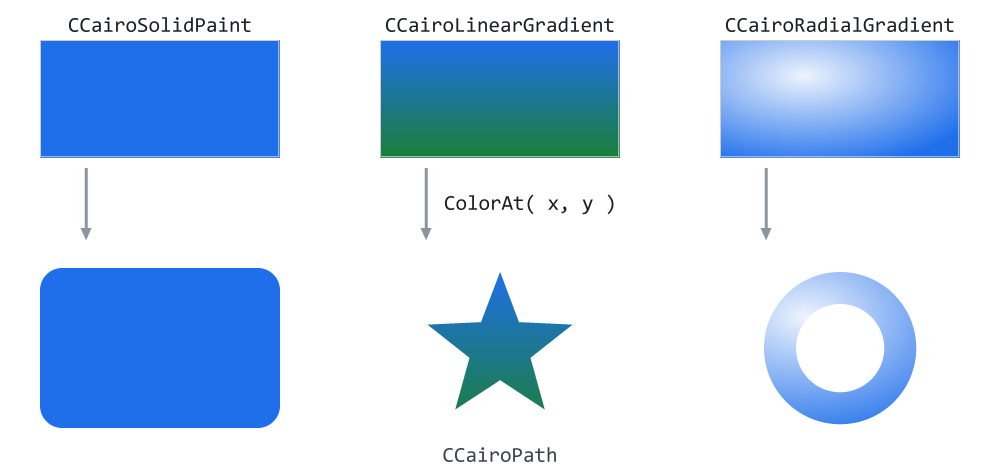
Figure 1. Three sources, three outlines, and the one question between them.
Figure 1 is the architecture in one image. Along the top are three source planes, drawn as if they extended forever: a flat blue, a blue-to-green ramp, and an off-center highlight. Along the bottom are three outlines: a rounded rectangle, a star and a ring. Between them, three arrows, and on each one the same call.
The thing to notice is what is not in the picture: there is no line from any source to any particular shape. The star could take the flat plane, the ring could take the ramp, and neither object would need a single line changed. The small grey text at the bottom makes the symmetry literal — the shape half of the library is five arrays of geometry, the color half is two arrays of stops, and ColorAt is the only thing that ever has to see both.
One line in the rasterizer
Raster.mqh gains an include:
#include "Config.mqh"
#include "Path.mqh"
#include "Color.mqh"
#include "Paint.mqh"
a member:
   //--- Part 8: the paint the uint overload wraps a color in. Held
   //--- by value and reused, so a solid fill still allocates nothing.
   CCairoSolidPaint  m_solid;
and a second declaration beside the first:
   //--- Part 8: the real Fill. The color arrives as an object that is
   //--- asked, per pixel, what it is - so a gradient needs no case here.
   void              Fill(CCairoPath &path, CCairoPaint *paint, uint &buffer[],
                          const int width, const int height,
                          const ENUM_CAIRO_FILLRULE rule = CAIRO_NONZERO);
The implementation's signature changes to match:
//+------------------------------------------------------------------+
//| Fill `path` into an ARGB buffer, taking its color from `paint`.  |
//+------------------------------------------------------------------+
void CCairoRasterizer::Fill(CCairoPath &path, CCairoPaint *paint,
                            uint &buffer[],
                            const int width, const int height,
                            const ENUM_CAIRO_FILLRULE rule)
  {
//--- a path that lost an allocation is not geometry we can trust
The paint arrives as a pointer rather than a reference, and that is not stylistic. A reference cannot be null, and null is a value this parameter needs: it is how "this shape has no fill" is expressed. Passing a fully transparent color would produce the same picture and cost the entire scan — every edge built, every row walked, every coverage value computed — to composite nothing. So the early-out test gains one clause:
//--- a path that lost an allocation is not geometry we can trust
   if(!path.IsValid())
      return;

   if(paint == NULL)
      return;

   path.BuildEdges(m_edges);

   const int edge_count = m_edges.m_count;

   if(edge_count == 0)
      return;

   if(!EnsureCapacity(width, edge_count))
      return;                        // no scratch room - draw nothing
An empty path and a null paint are the same situation from here: there is nothing to do, and the cheapest correct response is to stop.
Then the line at the bottom of the row loop, which is the actual feature:
         const int idx = row_base + x;

         //--- THE PART 8 LINE.
         //---
         //--- Until now this read `argb` - one color for the whole
         //--- shape. The paint is now asked what color belongs at
         //--- THIS pixel. A solid paint ignores the coordinates and
         //--- returns its color; a gradient computes one. The row
         //--- loop cannot tell the difference and does not need to.
         buffer[idx] = CairoBlendOver(buffer[idx],
                                      paint.ColorAt(x, iy), a);
        }
     }
  }
That is it. That is the whole of gradient support inside the renderer.
Everything else in the file is untouched: the bounding box, the row walk, the sub-scanline sampling, the crossing search, the insertion sort, the winding sweep, AddSpan, the coverage accumulator, the clamp at 1.0. Path.mqh is untouched completely, and BuildEdges still has not changed since Part 3.
I want to be direct about why this section is so short, because it is the strongest evidence in the series for the way the library was built. Imagine the same feature added to a renderer that had grown one function at a time — a FillRect, a FillCircle, a FillRoundRect, each writing its own pixels. Every one of them would need a gradient variant, or a color-source parameter threaded through it, and the ones nobody remembered to update would quietly stay flat. Here there is exactly one place where a color reaches a pixel, so there is exactly one line to change, and it is impossible for a shape to be left behind.
Keeping the old signature alive
Removing the uint form would break every line of code written against Parts 3 through 7, including all six previous demos, for no benefit. So it stays, as an overload that does the obvious thing:
//+------------------------------------------------------------------+
//| The flat-color form, kept so that every caller written against   |
//| Parts 3 to 7 still compiles.                                     |
//+------------------------------------------------------------------+
void CCairoRasterizer::Fill(CCairoPath &path, const uint argb,
                            uint &buffer[],
                            const int width, const int height,
                            const ENUM_CAIRO_FILLRULE rule)
  {
   m_solid.SetColor(argb);

   Fill(path, GetPointer(m_solid), buffer, width, height, rule);
  }
Read that carefully: it is easy to mistake it for an optimization, but it is the opposite. There is no faster path through the rasterizer for a flat color, because there was never a slower one. This overload does not skip anything; it constructs the same situation the caller would have constructed by hand and enters the same loop. What it saves is typing.
m_solid is a member rather than a local for one reason: a dashboard fills a few hundred shapes per frame, almost all of them flat, and constructing an object per fill is work that buys nothing. Reusing one member across every call is safe here because Fill is not re-entrant — the rasterizer is already a single-threaded object with shared scratch arrays, which is exactly why Part 3 told you to keep one instance and reuse it.
Color stops
Both gradient kinds need the same thing: a list of colors at positions, and a way to read a color out of it at an arbitrary position in between. Neither of them needs it differently, so it lives in a shared base:
//+------------------------------------------------------------------+
//| CCairoGradientPaint - the color-stop store both gradient kinds   |
//| share.                                                           |
//+------------------------------------------------------------------+
class CCairoGradientPaint : public CCairoPaint
  {
protected:
   double            m_positions[];      // 0..1, kept ascending
   uint              m_colors[];         // one color per position
   int               m_stop_count;

public:
                     CCairoGradientPaint();

   void              ClearStops();
   void              AddStop(const double position, const uint argb);
   int               StopCount() const;
   uint              Sample(const double t);
  };
A stop is a position from 0 to 1 plus a color. The gradient is the piecewise linear interpolation between consecutive stops. Two parallel arrays rather than an array of structs, for the same reason Path.mqh keeps m_xs[] and m_ys[] separately: MQL5 handles arrays of primitives better than arrays of objects, and the two are always resized together anyway.
Note the members are protected, not private. The subclasses do not touch them — they go through Sample like everyone else — but a fourth gradient kind written by a reader might want to, and there is no reason to forbid it.
//+------------------------------------------------------------------+
//| Constructor - no stops. Sample() then returns black, which is    |
//| again a visible bug rather than a silent one.                    |
//+------------------------------------------------------------------+
CCairoGradientPaint::CCairoGradientPaint()
  {
   m_stop_count = 0;

   ArrayResize(m_positions, 0);
   ArrayResize(m_colors, 0);
  }

//+------------------------------------------------------------------+
//| Forget every stop, without releasing the arrays. A widget that   |
//| rebuilds its gradient on a theme change reuses the memory.       |
//+------------------------------------------------------------------+
void CCairoGradientPaint::ClearStops()
  {
   m_stop_count = 0;
  }
ClearStops sets the count to zero and leaves the arrays alone. That is intentional: a widget that restates its stops when the theme changes reuses the memory it already has rather than releasing it and asking for it back a frame later. Note that this only applies to reusing the same gradient object. Going back through CCairoFillStyle::Linear() or Radial() frees the old gradient and builds a new one, so the arrays go with it. It is the same policy the rasterizer's scratch arrays have followed since Part 3 — never shrink, because the next frame is going to want it.
Sorting on insert
//+------------------------------------------------------------------+
//| Insert a stop, keeping the array sorted by position.             |
//+------------------------------------------------------------------+
void CCairoGradientPaint::AddStop(const double position, const uint argb)
  {
   double pos = position;

   if(pos < 0.0)
      pos = 0.0;
   if(pos > 1.0)
      pos = 1.0;

//--- find the slot this stop belongs in
   int idx = m_stop_count;

   for(int i = 0; i < m_stop_count; i++)
     {
      if(pos < m_positions[i])
        {
         idx = i;
         break;
        }
     }
The position is clamped first, because a stop outside 0..1 is not meaningful and silently pinning it to the end is friendlier than either ignoring it or trusting it. Then a linear scan finds the first existing stop that sits further along than the new one; if there is none, the new stop goes on the end.
//--- grow in blocks of 8, the same way the path grows its points.
//--- BOTH arrays are tested, not just the first: a resize that
//--- succeeded for m_positions and failed for m_colors would leave
//--- the two at different lengths, and the write below would go
//--- past the end of the shorter one.
   if(ArraySize(m_positions) < m_stop_count + 1 ||
      ArraySize(m_colors)    < m_stop_count + 1)
     {
      if(ArrayResize(m_positions, m_stop_count + 1, 8) < 0 ||
         ArrayResize(m_colors,    m_stop_count + 1, 8) < 0)
         return;                   // refused - drop the stop, not the run

      //--- and if one of them came back short anyway, do not write
      if(ArraySize(m_positions) < m_stop_count + 1 ||
         ArraySize(m_colors)    < m_stop_count + 1)
         return;
     }
The reserve of 8 means a four-stop gradient allocates once, ever. And the return value is checked, which by now is a house rule: every ArrayResize in this library is either checked or is not there. If memory is refused, the stop is dropped and the gradient carries on with what it has — a slightly wrong color ramp — rather than the alternative, which is writing past the end of an array and failing somewhere else entirely. The two arrays have to be grown as a pair, and the capacity test has to be satisfied by both of them: if one resize were allowed to succeed while the other failed, the next stop would be written into a m_colors[] that is one slot shorter than the code believes.
//--- shift the tail up one slot
   for(int j = m_stop_count; j > idx; j--)
     {
      m_positions[j] = m_positions[j - 1];
      m_colors[j]    = m_colors[j - 1];
     }

   m_positions[idx] = pos;
   m_colors[idx]    = argb;
   m_stop_count++;
  }

//+------------------------------------------------------------------+
//| How many stops are defined.                                      |
//+------------------------------------------------------------------+
int CCairoGradientPaint::StopCount() const
  {
   return m_stop_count;
  }
That is an insertion sort, and it is the correct choice rather than the lazy one. The obvious alternative is to let stops arrive in any order and sort them the first time Sample is called. Compare the two rates: stops are added a handful of times, when a widget is configured or a theme is switched. Sample runs once per pixel — for a 400×200 panel, eighty thousand times per fill. Any work you can move from the second number to the first is free. An insertion sort is also unbeatable at this size; gradients have two to four stops in practice, and a quicksort would spend more time deciding what to do than doing it.
Reading a color out
//+------------------------------------------------------------------+
//| The color at gradient parameter t.                               |
//+------------------------------------------------------------------+
uint CCairoGradientPaint::Sample(const double t)
  {
   if(m_stop_count == 0)
      return 0xFF000000;

   if(m_stop_count == 1)
      return m_colors[0];
No stops means black, once again choosing the visible failure. One stop means that stop everywhere, which is a solid color expressed the long way round and is exactly what a caller who added one stop asked for.
//--- pad: clamp outside the defined range
   if(t <= m_positions[0])
      return m_colors[0];

   if(t >= m_positions[m_stop_count - 1])
      return m_colors[m_stop_count - 1];
This is the pad extend mode: beyond the first and last stops, the end colors are held constant. It is what every design tool does, and the alternatives are worse in specific ways. Repeating the ramp turns a slightly-too-small radial highlight into a bullseye. Returning transparent puts a hard, unrequested edge in the middle of a shape. Padding means an off-center radial gradient whose circle does not quite cover its box simply fills the remaining corners with the last color, which is what anyone drawing it expected.
Padding also matters more than it looks for the radial gradient specifically: t there is a distance, and a distance is happily larger than 1 for a good fraction of any rectangle. Without the clamp, a highlight inside a square box would misbehave in all four corners.
   for(int i = 0; i < m_stop_count - 1; i++)
     {
      if(t >= m_positions[i] && t <= m_positions[i + 1])
        {
         const double span = m_positions[i + 1] - m_positions[i];

         //--- two stops at the same position are a legal way to ask
         //--- for a hard edge; the span is then zero and there is
         //--- nothing to interpolate across
         const double local = (span > 0.0)
                              ? (t - m_positions[i]) / span
                              : 0.0;

         return CairoLerp(m_colors[i], m_colors[i + 1], local);
        }
     }

   return m_colors[m_stop_count - 1];
  }
Walk the pairs, find the interval t falls in, rescale t into 0..1 across that interval, and hand it to CairoLerp from Part 1.
The zero-span guard covers a real technique rather than a hypothetical mistake. Two stops at the same position is how you ask a gradient for a hard edge — a color that changes abruptly at 0.6 and is smooth on both sides of it — which is how a two-tone progress bar or a threshold band is drawn. Without the guard that would be a division by zero.
The final return is unreachable when the stops are sorted, which they always are, and it is there anyway. A loop that can fall out the bottom needs an answer at the bottom.
And here is the property that unlocks more than it appears to. CairoLerp interpolates the alpha channel along with red, green and blue. So a stop that is fully transparent does not fade a shape toward black — it fades the shape out, letting whatever is behind it through. There is a condition attached, and it is the one people trip over: the channels are interpolated straight, so fade to the same color at alpha zero, not to 0x00000000. The second one drags red, green and blue toward zero on the way, and the middle of the ramp goes muddy. That single fact is where glows, soft shadows, feathered edges and the fading area fill under a price line all come from, and none of them needed a line of code beyond what is printed above.
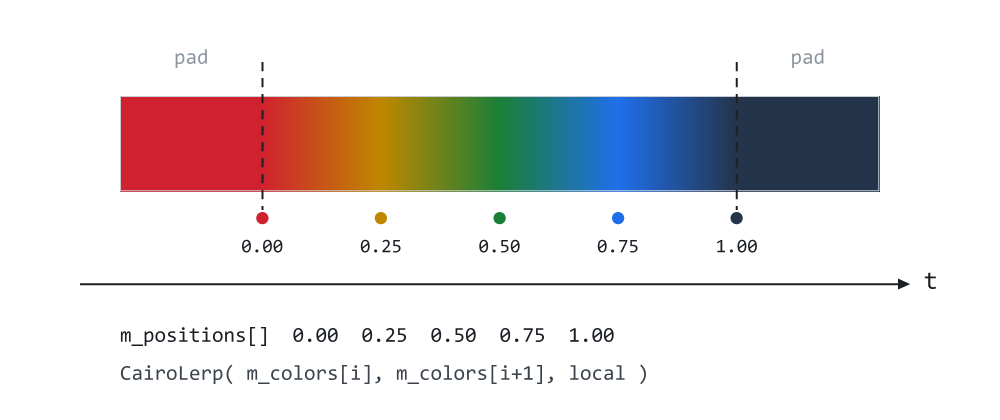
Figure 2. Five stops, the ramp between them, and the padded tails outside.
Figure 2 is the array made visible. The five dots below the bar are the stops, at 0.00, 0.25, 0.50, 0.75 and 1.00, each labeled with its index in m_positions[]. The two dashed lines mark where the defined range begins and ends. Look at the strips outside them: they are not fading and they are not repeating, they are simply the first and last colors continuing. That flat red on the left and flat navy on the right are the pad clamp, and they are the reason a gradient never produces a surprise outside its own bounds.
Linear gradients, and the normalization that matters
A linear gradient runs along an axis. The library asks for that axis as an angle in degrees over a bounding box, using the screen convention Part 7 established — zero points right, and ninety points down, because y grows downward in a pixel buffer. One qualification, because it surprises people: the angle is measured in the box's normalized space, not on the screen. In a square box the two agree. In a wide box, 45 degrees is the diagonal of the box rather than a 45-degree line in pixels, which is almost always what is wanted and is worth knowing before you measure it with a protractor:
| angle | direction |
|---|---|
| 0° | left to right |
| 90° | top to bottom |
| 45° | diagonal, top-left to bottom-right |
//+------------------------------------------------------------------+
//| CCairoLinearGradient - a gradient along an axis, given as an     |
//| ANGLE IN DEGREES over a bounding box:                            |
//|                                                                  |
//|     0    left to right                                           |
//|     90   top to bottom                                           |
//|     45   diagonal, top-left to bottom-right                      |
//+------------------------------------------------------------------+
class CCairoLinearGradient : public CCairoGradientPaint
  {
private:
   double            m_x0, m_y0, m_w, m_h;     // the box, in buffer pixels
   double            m_cos, m_sin;             // the direction vector
   double            m_proj_min, m_proj_inv;   // the normalization

public:
                     CCairoLinearGradient();

   void              SetBounds(const double x, const double y,
                  const double w, const double h);
   void              SetAngle(const double degrees);

   virtual uint      ColorAt(const int x, const int y) override;
  };
Six doubles, and four of them exist so that ColorAt does no work it can avoid.
//+------------------------------------------------------------------+
//| Constructor - the unit box, left to right.                       |
//+------------------------------------------------------------------+
CCairoLinearGradient::CCairoLinearGradient()
  {
   SetBounds(0.0, 0.0, 1.0, 1.0);
   SetAngle(0.0);
  }

//+------------------------------------------------------------------+
//| Set the box the gradient spans. A zero extent is coerced to 1,   |
//| because ColorAt divides by it once per pixel.                    |
//+------------------------------------------------------------------+
void CCairoLinearGradient::SetBounds(const double x, const double y,
                                     const double w, const double h)
  {
   m_x0 = x;
   m_y0 = y;
   m_w  = (w != 0.0) ? w : 1.0;
   m_h  = (h != 0.0) ? h : 1.0;
  }
The constructor sets a unit box rather than leaving the members undefined, because a gradient that is drawn before it is configured should produce colors rather than a division by zero. SetBounds coerces a zero extent to 1 for the same reason: a collapsed widget is a normal transient state during an animation or a resize, and it must not produce an infinity that then propagates into every pixel of the shape. A negative extent is not corrected, because it has a meaning: it mirrors the gradient. Passing one by accident is therefore a gradient running the wrong way rather than an error.
Where the normalization comes from
//+------------------------------------------------------------------+
//| Set the direction, and recompute the normalization.              |
//+------------------------------------------------------------------+
void CCairoLinearGradient::SetAngle(const double degrees)
  {
   const double rad = degrees * M_PI / 180.0;

   m_cos = MathCos(rad);
   m_sin = MathSin(rad);

   const double p1 = m_cos;            // corner (1,0)
   const double p2 = m_sin;            // corner (0,1)
   const double p3 = m_cos + m_sin;    // corner (1,1)

   double lo = 0.0;                    // corner (0,0)
   double hi = 0.0;

   lo = MathMin(lo, MathMin(p1, MathMin(p2, p3)));
   hi = MathMax(hi, MathMax(p1, MathMax(p2, p3)));

   const double range = hi - lo;

   m_proj_min = lo;
   m_proj_inv = (range != 0.0) ? 1.0 / range : 0.0;
  }
This is the part of the file worth reading twice, so let us build it up from the problem rather than from the code.
Take a pixel, express it as a fraction of the box — call those u and v, both running 0 to 1 — and project it onto the direction vector by taking the dot product, u·cos + v·sin. That number is how far along the gradient axis the pixel sits, and it is the natural candidate for the gradient parameter t.
At 0° it behaves. sin is 0, so t is just u, which runs cleanly from 0 on the left edge to 1 on the right. At 90° it behaves for the same reason.
At 45° it does not. Both cos and sin are 0.707, so the far corner projects to 0.707 + 0.707 = 1.414. The gradient reaches its last color at t = 1, which happens along the diagonal running from the top-right corner to the bottom-left one, and everything beyond that line is flat. Roughly a third of the box is a solid block of the final color.
This is why hand-rolled gradients so often look correct on a square button and wrong on a wide panel: at 0° and 90° the naive projection is right, and those are the two angles anybody tests.
The fix is to compute the projection range over the box and rescale into that range. m_proj_min is the smallest value, m_proj_inv is the reciprocal of the spread, and ColorAt applies both.
Why only the corners? Because the projection is a linear function, and a linear function over a convex region reaches its extremes at the vertices. It cannot have a maximum in the middle of a rectangle — there is nowhere for it to turn around. So four points settle the question for the entire box, and corner (0,0) projects to 0 by definition, which leaves three dot products. That is not an approximation that is good enough; it is the exact answer, obtained by checking four points instead of eighty thousand.
The other thing to notice is when this runs: once per angle change, not once per pixel. Two calls to the trigonometric functions, three additions, a few comparisons and one division, and then the per-pixel path divides only to turn a pixel into box-relative coordinates, because the division belonging to the normalization was folded into a reciprocal here.
//+------------------------------------------------------------------+
//| Project the pixel onto the gradient axis and sample.             |
//+------------------------------------------------------------------+
uint CCairoLinearGradient::ColorAt(const int x, const int y)
  {
   const double u = (x - m_x0) / m_w;
   const double v = (y - m_y0) / m_h;
   const double t = ((u * m_cos + v * m_sin) - m_proj_min) * m_proj_inv;

   return Sample(t);
  }
Three lines, no branches, and the only divisions are the two that turn a pixel into box-relative coordinates.
One small thing this does not do: it takes the pixel's integer coordinate rather than its center at x + 0.5. The gradient therefore sits half a pixel up and to the left of where the geometry does. Across a 200-pixel ramp nobody can see it; on a tiny shape, or across a hard-edged stop pair, it is the kind of half-pixel discrepancy worth remembering exists.
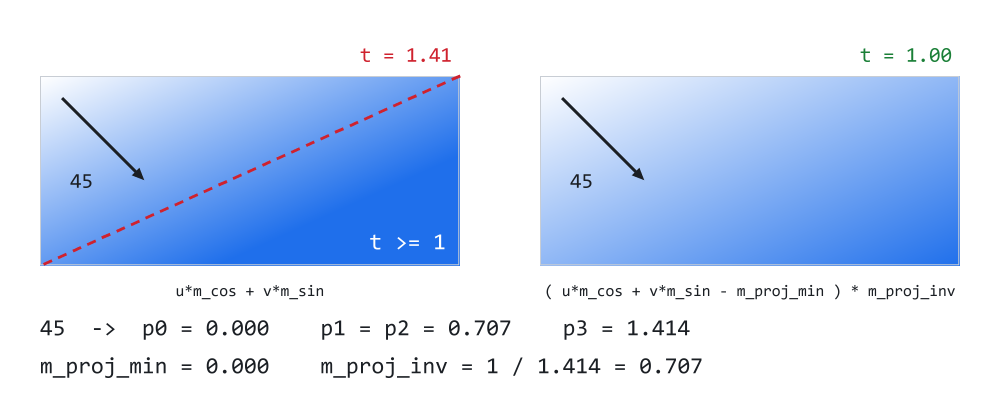
Figure 3. The same 45° gradient run without the corner rescale, and with it.
Figure 3 is the argument rendered rather than described: both panels come from running ColorAt over every pixel, once with m_proj_min and m_proj_inv applied and once without.
The left panel is the unnormalized projection. The dashed red line is where t first reaches 1.0, and everything below and to the right of it is a single flat blue — not a subtle gradient, an entirely uniform region occupying a third of the box. The corner is marked t = 1.41, which is the number the arithmetic above produces and the size of the error.
The right panel is the same gradient with the three corner projections taken into account. The ramp now uses the whole box and arrives at full color precisely at the far corner, t = 1.00. The numbers underneath are the actual contents of the four p variables at 45°, and m_proj_inv = 1/1.414 = 0.707 is the single value that separates the two pictures.
Radial gradients
//+------------------------------------------------------------------+
//| CCairoRadialGradient - a gradient outward from a center.         |
//+------------------------------------------------------------------+
class CCairoRadialGradient : public CCairoGradientPaint
  {
private:
   double            m_x0, m_y0, m_w, m_h;      // the box, in buffer pixels
   double            m_center_u, m_center_v;    // the center, 0..1 in that box
   double            m_inv_radius;              // 1 / radius, also 0..1

public:
                     CCairoRadialGradient();

   void              SetBounds(const double x, const double y,
                  const double w, const double h);
   void              SetCenterNorm(const double u, const double v);
   void              SetRadiusNorm(const double r);

   virtual uint      ColorAt(const int x, const int y) override;
  };
The comments on the last three members carry the important decision: the center and the radius are given normalized against the bounds, from 0 to 1, rather than in pixels.
That is worth defending, because pixels would be the obvious choice. A highlight specified at (0.3, 0.3) with radius 0.5 stays visually identical at any size — the same highlight in the same place, whether the widget is 60 pixels wide or 600. Specified in pixels, every resize would need the gradient reconfigured, and in a trading panel where windows are dragged and rescaled constantly, that is a recalculation somebody will forget in at least one code path.
//+------------------------------------------------------------------+
//| Constructor - centered, radius 0.5, so the gradient just touches |
//| the edges of its box.                                            |
//+------------------------------------------------------------------+
CCairoRadialGradient::CCairoRadialGradient()
  {
   SetBounds(0.0, 0.0, 1.0, 1.0);
   SetCenterNorm(0.5, 0.5);
   SetRadiusNorm(0.5);
  }

//+------------------------------------------------------------------+
//| Set the box, with the same guard the linear gradient uses.       |
//+------------------------------------------------------------------+
void CCairoRadialGradient::SetBounds(const double x, const double y,
                                     const double w, const double h)
  {
   m_x0 = x;
   m_y0 = y;
   m_w  = (w != 0.0) ? w : 1.0;
   m_h  = (h != 0.0) ? h : 1.0;
  }

//+------------------------------------------------------------------+
//| Where the gradient starts, as a fraction of the box.             |
//+------------------------------------------------------------------+
void CCairoRadialGradient::SetCenterNorm(const double u, const double v)
  {
   m_center_u = u;
   m_center_v = v;
  }
The default is centered with radius 0.5, which is the configuration where the gradient just touches the edges of its box — the most useful starting point, and the one a caller who sets stops and nothing else gets.
SetCenterNorm deliberately does not clamp. A center outside the box is a legitimate thing to ask for: it is how you produce a sweep that enters from off the edge of a card, which is a common way to light a header.
//+------------------------------------------------------------------+
//| Store the RECIPROCAL of the radius, so that ColorAt multiplies   |
//| instead of dividing once per pixel. A zero radius would be a     |
//| division by zero, so it is floored to something tiny - the       |
//| gradient then reads as its last stop everywhere, which is a      |
//| flat shape rather than a NaN.                                    |
//+------------------------------------------------------------------+
void CCairoRadialGradient::SetRadiusNorm(const double r)
  {
   m_inv_radius = 1.0 / ((r > 0.0) ? r : 1e-9);
  }
The reciprocal is stored rather than the radius, so that ColorAt multiplies instead of dividing. That is a small saving per pixel and a real one across a few hundred thousand, and it costs nothing in readability because the member is named for what it holds.
A radius of zero would be a division by zero, so it is floored to something tiny. The result is that t becomes enormous everywhere except at the center itself, the pad clamp catches it, and the shape comes out flat in the last stop's color. The one exception is a pixel whose sample point falls exactly on the center: its distance is zero, so its t is zero and it takes the first stop — at most a single pixel, and only when the center lands on a sample point. A flat shape is a comprehensible thing to see when you asked for a zero-radius gradient; a buffer full of NaN is not.
//+------------------------------------------------------------------+
//| Distance from the center, divided by the radius.                 |
//|                                                                  |
//| The distance is measured in the box's NORMALIZED space, so in a  |
//| wide, short box the gradient is ELLIPTICAL - it follows the      |
//| shape. That is almost always what a designer means by a          |
//| "highlight", and it is why the bounds are used here rather than  |
//| raw pixel distance.                                              |
//+------------------------------------------------------------------+
uint CCairoRadialGradient::ColorAt(const int x, const int y)
  {
   const double u  = (x - m_x0) / m_w;
   const double v  = (y - m_y0) / m_h;
   const double du = u - m_center_u;
   const double dv = v - m_center_v;
   const double t  = MathSqrt(du * du + dv * dv) * m_inv_radius;

   return Sample(t);
  }
Distance from the center, divided by the radius. The linear gradient's dot product has become a distance, and everything else is the same.
One consequence deserves stating plainly, because it looks like a bug until you want it. The distance is measured in the box's normalized space, not in pixels. In a square box that makes no difference. In a wide, short box it means du and dv are scaled differently, so the gradient comes out elliptical and follows the shape rather than sitting as a circle in the middle of it.
That is almost always what is meant by a highlight on a wide element — a progress track, a card header, a toolbar. The panel-E bar in the demo is exactly this case, and it is why the bounds are used here rather than raw pixel distance. If you ever need a genuinely circular gradient in a non-square box, the way to get it is to pass square bounds rather than the shape's own.
One handle for a widget
The paints above are enough to draw anything. They are not enough to build a widget with, and the gap is ownership.
Think about what a button class needs. It supports flat colors and gradients, so it holds something polymorphic. That means a pointer, which means it has to remember which kind of object is on the end of it, allocate on every change and free the previous one first. Get that wrong once and a theme switch leaks. Now multiply by thirty widget classes, each written on a different day.
CCairoFillStyle does it once:
//+------------------------------------------------------------------+
//| CCairoFillStyle - one handle answering "how is this shape        |
//| filled?".                                                        |
//+------------------------------------------------------------------+
class CCairoFillStyle
  {
private:
   ENUM_CAIRO_FILL       m_type;
   CCairoSolidPaint      m_solid;   // by value: always needed, never freed
   CCairoLinearGradient *m_linear;  // by pointer: usually absent
   CCairoRadialGradient *m_radial;

   void              FreeGradients();

   //--- not copyable: the style owns its gradients, and a copy would
   //--- delete them a second time
                     CCairoFillStyle(const CCairoFillStyle &other) = delete;
   void              operator=(const CCairoFillStyle &other)       = delete;

public:
                     CCairoFillStyle();
                    ~CCairoFillStyle();

   //--- kind selection
   void              None();
   void              Solid(const uint argb);

   //--- return the gradient, so the caller can set stops and an angle
   CCairoLinearGradient *Linear();
   CCairoRadialGradient *Radial();

   //--- queries
   bool              IsNone() const;
   ENUM_CAIRO_FILL   Type() const;
   uint              SolidColor() const;

   //--- recolor a solid fill without reallocating anything
   void              SetSolidColor(const uint argb);

   //--- bind the gradient bounds to the shape, and hand the paint over
   CCairoPaint       *Paint(const int ax, const int ay,
                            const int w, const int h);
  };
The asymmetry in those three members is the first thing to copy into your own code. The solid paint is held by value; the gradients by pointer. A solid paint is one uint, is needed by almost every style, and never has to be freed — allocating it would be pure ceremony. A gradient carries two arrays and is absent from most widgets, so it is worth the indirection to not pay for it.
//+------------------------------------------------------------------+
//| Constructor - solid black until told otherwise.                  |
//+------------------------------------------------------------------+
CCairoFillStyle::CCairoFillStyle()
  {
   m_type   = CAIRO_FILL_SOLID;
   m_linear = NULL;
   m_radial = NULL;

   m_solid.SetColor((uint)0xFF000000);
  }

//+------------------------------------------------------------------+
//| Destructor                                                       |
//+------------------------------------------------------------------+
CCairoFillStyle::~CCairoFillStyle()
  {
   FreeGradients();
  }

//+------------------------------------------------------------------+
//| Release whatever gradient this style owns.                       |
//|                                                                  |
//| Called on EVERY kind change, which is what makes it safe for a   |
//| widget to go solid -> gradient -> solid across a theme switch    |
//| without leaking a single object.                                 |
//+------------------------------------------------------------------+
void CCairoFillStyle::FreeGradients()
  {
   if(m_linear != NULL)
     {
      delete m_linear;
      m_linear = NULL;
     }

   if(m_radial != NULL)
     {
      delete m_radial;
      m_radial = NULL;
     }
  }
FreeGradients is called from the destructor and from every kind-changing method below. That is the entire leak-safety story: there is one place that releases, every path routes through it, and it nulls what it deletes so calling it twice is harmless.
//+------------------------------------------------------------------+
//| Draw nothing at all.                                             |
//+------------------------------------------------------------------+
void CCairoFillStyle::None()
  {
   FreeGradients();
   m_type = CAIRO_FILL_NONE;
  }

//+------------------------------------------------------------------+
//| Switch to a solid color.                                         |
//+------------------------------------------------------------------+
void CCairoFillStyle::Solid(const uint argb)
  {
   FreeGradients();
   m_type = CAIRO_FILL_SOLID;
   m_solid.SetColor(argb);
  }

//+------------------------------------------------------------------+
//| Switch to a linear gradient and return it for configuration.     |
//| The style owns the object; the caller only borrows the pointer.  |
//+------------------------------------------------------------------+
CCairoLinearGradient *CCairoFillStyle::Linear()
  {
   FreeGradients();
   m_linear = new CCairoLinearGradient();

//--- a refused allocation becomes "no fill" rather than a kind whose
//--- object does not exist. The caller still has to check the
//--- pointer before configuring it.
   m_type = (m_linear != NULL) ? CAIRO_FILL_LINEAR : CAIRO_FILL_NONE;

   return m_linear;
  }

//+------------------------------------------------------------------+
//| Switch to a radial gradient and return it for configuration.     |
//+------------------------------------------------------------------+
CCairoRadialGradient *CCairoFillStyle::Radial()
  {
   FreeGradients();
   m_radial = new CCairoRadialGradient();

//--- same contract as Linear() above
   m_type = (m_radial != NULL) ? CAIRO_FILL_RADIAL : CAIRO_FILL_NONE;

   return m_radial;
  }
Four methods, one shape. Free whatever was there, record the new kind, set it up. A widget can cycle solid → linear → radial → none across a dozen theme changes and leak nothing, and the widget's author never wrote a delete.
Linear() and Radial() hand back the object they just built so the caller can configure it. The style keeps ownership; the caller borrows the pointer for as long as it takes to add stops, and must not hold on to it past the next kind change. Two things follow from owning a raw pointer. The first is that a CCairoFillStyle must never be copied, because the copy would hold the same gradient and the second destructor to run would delete it twice — and that rule is enforced by the class rather than left to the caller. Its copy constructor and assignment operator are declared = delete, so b = a; or CCairoFillStyle b(a); is a compile error instead of a crash. MQL5 already passes class objects to functions by reference only, so in practice a style lives as a member and is handed around by reference, and a widget that needs a second style gets a second member configured from scratch. The second is the caller's to respect: the returned pointer has to be checked, because an allocation can be refused. In practice the pointer is checked and used on the lines right after it is obtained:
CCairoFillStyle style;

style.Solid(CairoRgb(40, 90, 160));

CCairoLinearGradient *g = style.Linear();      // frees the previous kind
if(g != NULL)
  {
   g.SetAngle(90);
   g.AddStop(0.0, top_color);
   g.AddStop(1.0, bottom_color);
  }

ras.Fill(path, style.Paint(x, y, w, h), px, W, H);
//+------------------------------------------------------------------+
//| Queries.                                                         |
//+------------------------------------------------------------------+
bool CCairoFillStyle::IsNone() const
  {
   return (m_type == CAIRO_FILL_NONE);
  }

//+------------------------------------------------------------------+
//|                                                                  |
//+------------------------------------------------------------------+
ENUM_CAIRO_FILL CCairoFillStyle::Type() const
  {
   return m_type;
  }

//+------------------------------------------------------------------+
//| The current solid color. Meaningless for a gradient, so check    |
//| Type() first.                                                    |
//|                                                                  |
//| It exists so a caller can ask "is this already the color I       |
//| want?" and skip an entire repaint - which is worth more than any |
//| micro-optimization inside the rasterizer when a tick handler     |
//| runs many times a second.                                        |
//+------------------------------------------------------------------+
uint CCairoFillStyle::SolidColor() const
  {
   return m_solid.GetColor();
  }

//+------------------------------------------------------------------+
//| Recolor a solid fill in place. Ignored for gradients, which have |
//| to be rebuilt through Linear() or Radial().                      |
//+------------------------------------------------------------------+
void CCairoFillStyle::SetSolidColor(const uint argb)
  {
   if(m_type == CAIRO_FILL_SOLID)
      m_solid.SetColor(argb);
  }
SolidColor and SetSolidColor look like trivial accessors and are not there for symmetry. They exist so a caller can ask "is this already the color I want?" and skip an entire repaint:
if(style.SolidColor() != wanted)
  {
   style.SetSolidColor(wanted);
   Redraw();
  }
When a tick handler runs several times a second and the answer is usually "yes, already", that comparison is worth more than any micro-optimization inside the rasterizer — it is the difference between redrawing a panel and not redrawing it. SetSolidColor deliberately ignores the call when the style is a gradient, rather than silently switching kind behind the caller's back. It reports nothing when it does, so code that might be holding either kind should ask Type() first; a gradient has to be rebuilt through Linear() or Radial().
//+------------------------------------------------------------------+
//| Bind the gradient bounds to the shape's rectangle, and return    |
//| the paint to hand to the rasterizer.                             |
//+------------------------------------------------------------------+
CCairoPaint *CCairoFillStyle::Paint(const int ax, const int ay,
                                    const int w, const int h)
  {
   if(m_type == CAIRO_FILL_SOLID)
      return GetPointer(m_solid);

   if(m_type == CAIRO_FILL_LINEAR)
     {
      m_linear.SetBounds(ax, ay, w, h);
      return m_linear;
     }

   if(m_type == CAIRO_FILL_RADIAL)
     {
      m_radial.SetBounds(ax, ay, w, h);
      return m_radial;
     }

   return NULL;
  }

#endif // CAIRO5_PAINT_MQH
Paint is where the class earns its place. It takes the rectangle the shape occupies and binds the gradient bounds at draw time, not at configuration time.
That inversion is the point. A widget can be moved, resized, docked or animated without anybody remembering to touch its gradient, because the gradient learns its box on the way to the rasterizer. Forgetting to update gradient bounds after a resize is otherwise a common and genuinely confusing bug — the shape moves and the colors stay where they were, so a card dragged across the screen appears to scrape its own paint off.
And the CAIRO_FILL_NONE case falls out the bottom as NULL, which is the value the rasterizer's early-out test was written for. The two halves were designed together: "no fill" costs one comparison in Paint, one comparison in Fill, and not a single row walked.
The demo
Demo08_Paint.mq5 has seven panels, and the whole thing is still one chart object.
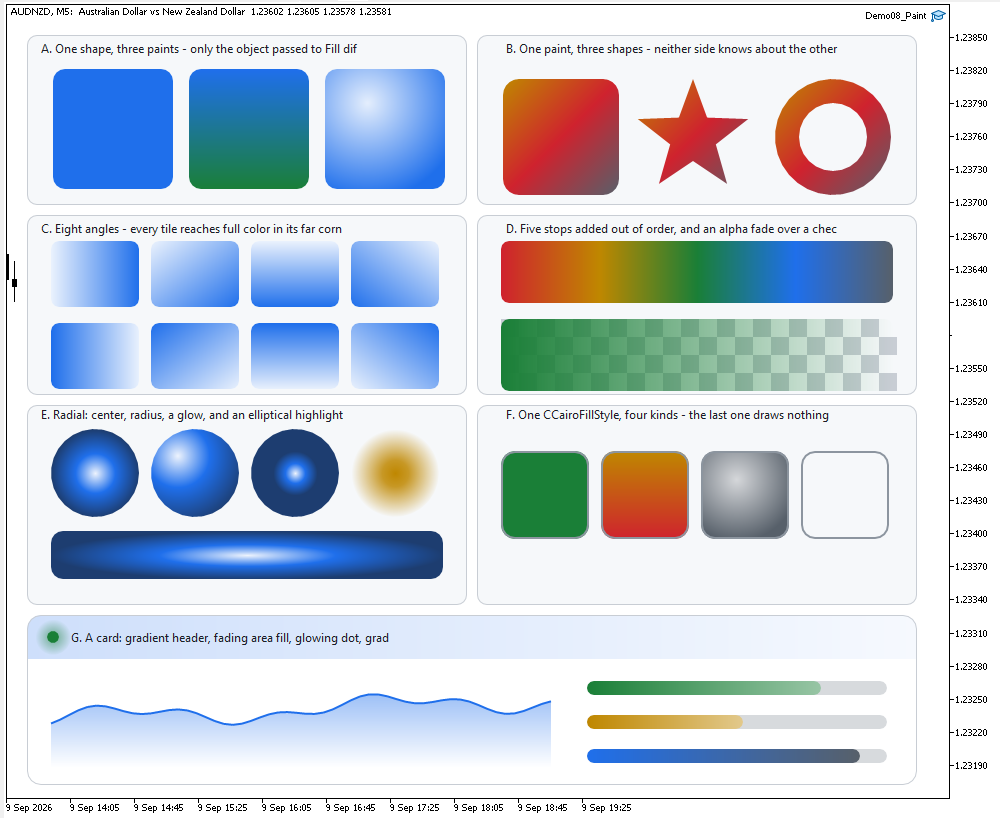
Figure 4. Demo08_Paint on a Black On White chart: seven panels of paint.
- A — one shape, three paints. The same rounded rectangle with the same radius, filled solid, linear and radial. The only difference between the three calls is the object handed to Fill.
- B — one paint, three shapes. A single gradient object fills a rounded rectangle, a star and a ring. The ring is Part 5's even-odd construction and needed no adjustment whatsoever to accept a gradient.
- C — eight tiles from 0° to 315°, which is the corner normalization working at every angle rather than at the two that are easy.
- D — a five-stop ramp with the stops added deliberately out of order, and an alpha fade drawn over a checkerboard so the transparency is visible against something instead of assumed.
- E — radial gradients: three circles differing only in center and radius, a glow, and the elliptical highlight in a wide box.
- F — one CCairoFillStyle switched through all four kinds, including the None() tile where Paint() returns NULL and the fill is skipped entirely.
- G — a realistic card: gradient header, an area chart fading to transparent at the baseline, a glowing status dot, and gradient progress bars.
Panels D and F print to the log, because both are claims that a picture cannot settle:
=== Part 8: paint - one virtual method ===
D. five stops added out of order -> StopCount = 5
F. tile 0 -> style type 0, paint is valid
F. tile 1 -> style type 1, paint is valid
F. tile 2 -> style type 2, paint is valid
F. tile 3 -> style type 3, paint is NULL (fill skipped)
The stops in panel D go in at 1.00, 0.00, 0.50, 0.25 and 0.75 — deliberately scrambled — and the bar comes out as a clean red-amber-green-blue-slate ramp with all five present. That is AddStop's insertion sort, checked rather than asserted.
The four F lines are the kind cycling through CAIRO_FILL_SOLID, CAIRO_FILL_LINEAR, CAIRO_FILL_RADIAL and CAIRO_FILL_NONE on a single style object, with the last one reporting the NULL that makes the rasterizer return before it builds an edge. In the panel, that fourth tile is a bordered rectangle with the card showing through it — an outlined widget with no background, for the cost of one comparison.
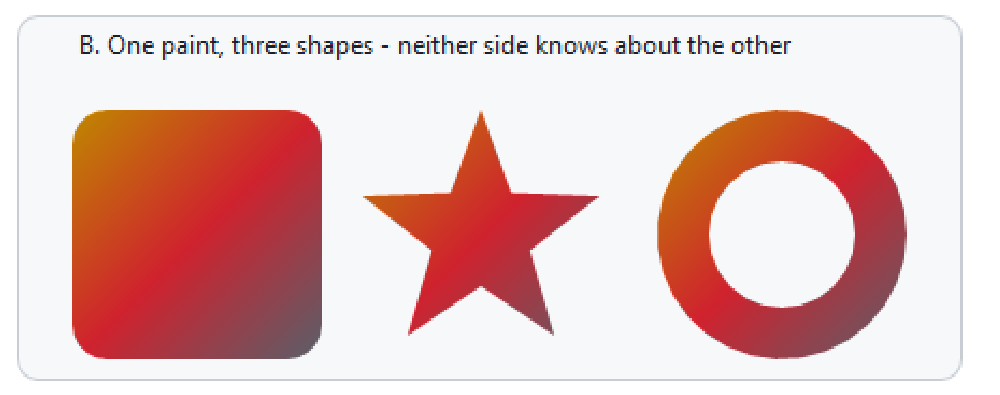
Figure 5. Panel B magnified: one gradient object, three unrelated outlines.
Figure 5 is the article in one panel. The same CCairoLinearGradient — one object, configured once with three stops at 45° — fills a rounded rectangle, a five-pointed star built from AddPolygon, and a ring built from two circles and the even-odd rule. Follow the amber-to-red transition across all three: it runs along the same diagonal in each, because the paint answers by pixel position and has no idea what shape it is inside.
Nothing in Path.mqh changed to make that work. The star does not know it is being filled with a gradient, and the gradient does not know it is filling a star.
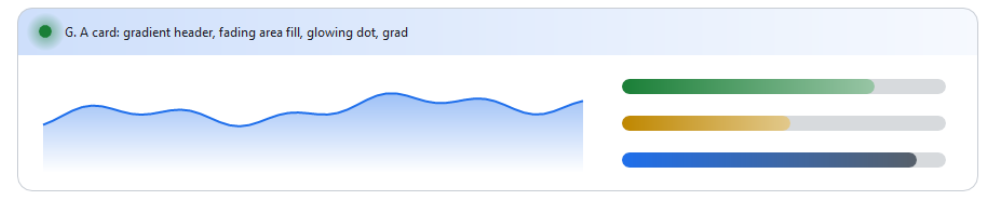
Figure 6. Panel G magnified: four gradient techniques on one card.
Figure 6 is what the whole thing is for. Four separate techniques are on that card, and every one of them was out of reach at the end of Part 7:
The header is a rounded rectangle with its bottom two radii set to zero — Part 7's per-corner control — filled with a horizontal gradient. The status dot is a solid circle inside a radial gradient that runs from a semi-opaque green to the same green at alpha zero, which is what a glow is. The area chart is a polygon closed down to the baseline, filled with a vertical gradient from 55% opacity to 0%, so it fades into the card instead of stopping at a line. The progress bars each run between two colors, which makes their length readable without a number beside it.
Not one of them needed a new shape, a new fill rule, or a line in the rasterizer.
What does a gradient cost?
There is an honest question to ask about this design, and the demo asks part of it. Every composited pixel now goes through a virtual call — the solid paint as much as the gradients, since both are handed to Fill as a CCairoPaint. Benchmark() fills the same 400×200 rounded rectangle two hundred times with a solid paint and two hundred times with a 45° gradient, into a scratch buffer, and prints both totals. Because both runs pay for the dispatch, the difference between them is the cost of the gradient's arithmetic, not the cost of the virtual call itself; measuring that would need a third run through a non-virtual, constant-color path, which this demo does not have.
bench: 200 fills of a 400x200 rounded rect
bench: solid    1087870 us  ( 5439 us per fill)
bench: gradient 2126269 us  (10631 us per fill)
The conditions behind those numbers: CairoAaSamples at its default of 4, a two-stop gradient from C_BLUE to C_GREEN at 45° with its bounds set to the shape, and timing by GetMicrosecondCount() around each loop of 200 fills. The solid loop runs first and there is no separate warm-up and no repeated trial, so each figure is a single total from a single run. The two lines above are therefore an example of the demo's output, not a reproducible comparison: they come from one run on the author's machine, and no claim is made that another terminal build, operating system or CPU will reproduce them. Read your own two numbers rather than trusting mine. This is one shape at one size on one machine, so treat it as an order of magnitude rather than as a figure to quote: the ratio moves with the CPU, with the shape and with how many stops the gradient has. But it is worth knowing in advance roughly what shape the answer has, and that can be reasoned from the code above rather than measured.
A solid fill was never free. Every composited pixel already runs CairoBlendOver: four channel extractions, four multiply-adds, a recombination, and one virtual dispatch to fetch the color. On top of the same dispatch, the gradient adds two subtractions, two divisions, a dot product and a walk through at most a handful of stops — and Sample usually exits on one of the two pad comparisons or on the first interval it tests. So the extra work is of the same order as the work already being done per pixel, not a multiple of it. For this shape at this size the measured cost was roughly double the solid fill — real and measurable, and nothing like the difference between drawing and not drawing. Whether that holds at other sizes, with more stops, at other antialiasing settings or for other shapes is a question for the systematic benchmarks the closing section promises, not one a single microbenchmark can settle.
If it ever does matter, the fix is available and does not touch this design: a gradient's t changes linearly along a scanline, so a future version could compute it once per row and step it, leaving ColorAt for the general case. That is an optimization the interface permits rather than one it blocks — which is what a good interface is for.
What this design buys you next
The point of a one-method interface is what it lets you add without asking anyone. Three examples, each a short subclass of CCairoGradientPaint and none of them requiring a single change to Raster.mqh or Path.mqh.
A conic (sweep) gradient. Replace the distance in CCairoRadialGradient's ColorAt with an angle:
const double t = ( MathArctan2( dv, du ) + M_PI ) / ( 2.0 * M_PI );
That is a hue wheel, a pie chart whose wedges blend into one another, and a gauge whose color follows its own needle — from one changed line.
A pattern or a texture. Return a color sampled from an image buffer, indexed by x and y modulo the image size. Now any shape in the library can be filled with artwork, and the tiling is free because ColorAt is asked per pixel anyway.
A gamma-correct gradient. CairoLerp blends sRGB values directly, which is technically wrong: sRGB is not linear in light, so a blend between two saturated complementary colors dips darker in the middle than it should. Most of the time nobody notices. When it matters, a subclass that converts to linear light, interpolates there and converts back fixes it — for that gradient, without changing the behavior of anything else in the library.
None of these need permission from the rasterizer, and none of them can break a shape.
Project structure
Extract the archive under MQL5/, keep the folder structure, and compile Demo08_Paint.mq5. No paths need editing.
MQL5/
├── Include/
│   └── CairoG2D/
│       ├── Color.mqh          // the ARGB color type and blending
│       ├── Config.mqh         // CairoAaSamples, CairoFlattenTolerance
│       ├── Surface.mqh        // pixel buffer bound to one chart object
│       ├── Path.mqh           // the path and the edges, now + the arcs
│       ├── Paint.mqh          // the color source, solid and gradient
│       ├── Raster.mqh         // the coverage fill and the fill rule
│       └── DemoTheme.mqh      // the demos' shared palette - NOT library code
└── Experts/
    └── CairoG2D/
        └── Article 08/
└── Demo08_Paint.mq5 // seven panels of paint | # | File | Directory | Holds |
|---|---|---|---|
| 1 | Color.mqh | MQL5/Include/CairoG2D | the ARGB color type, CairoLerp and CairoBlendOver |
| 2 | Config.mqh | MQL5/Include/CairoG2D | CairoAaSamples and CairoFlattenTolerance |
| 3 | Surface.mqh | MQL5/Include/CairoG2D | CCairoSurface - pixel buffer to chart bitmap |
| 4 | Path.mqh | MQL5/Include/CairoG2D | the path, the edges, the curves and the round shapes |
| 5 | Paint.mqh | MQL5/Include/CairoG2D | CCairoPaint, the two gradients, CCairoFillStyle |
| 6 | Raster.mqh | MQL5/Include/CairoG2D | CCairoRasterizer - coverage, compositing, fill rule, paint |
| 7 | DemoTheme.mqh | MQL5/Include/CairoG2D | palette, chart setup, captions - not library code |
| 8 | Demo08_Paint.mq5 | MQL5/Experts/CairoG2D/Article 08/ | seven panels, different shapes with gradient and solid colors |
| 9 | Cairo Style Library - Part 08.zip | archive containing all the attached files and their paths relative to the terminal's root folder. |
One file is new and one file changed. Paint.mqh is written from scratch; Raster.mqh gained an include, a member, an overload and one line in its inner loop. Color.mqh, Config.mqh, Surface.mqh and Path.mqh were not touched at all, and the attached include/ folder is exactly what the series has written so far — six files, and nothing from later parts.
Both halves of the model are real
With the addition of gradients, the graphics library now supports a more complete and flexible rendering model. The two fundamental components introduced in Part 1 are fully implemented: the mask, represented by an array of coverage values calculated by the scanline rasterizer, and the source, which determines the color of each pixel. The rasterizer has remained structurally unchanged since Part 3, while the source can be implemented through a simple interface requiring only a small amount of code. These two components interact through a single function call at the point where each pixel is rendered.
This separation provides considerable flexibility. The geometry system supports outlines constructed from lines, Bézier curves, and arcs, with either fill rule to handle complex shapes, holes, and rings. Combined with smooth anti-aliasing and correct alpha compositing, the paint system can now apply flat colors, linear gradients, radial gradients, glows, and transparency fades to any supported shape. Within the current path-filling operation, geometry and paint remain independent: any supported shape can use any available paint source without either system needing to understand the other's implementation.
However, path filling is only one part of a complete rendering engine. Some capabilities are still missing, including clipping, independent paint handling for strokes, and transformations that can be applied consistently to both shapes and their paint sources. These limitations define possible directions for further development.
The most important result of this article is not simply the addition of gradients, but the demonstration of how a well-structured architecture simplifies future extensions. By centralizing pixel-color evaluation in a single location from the beginning, we were able to introduce an entire category of rendering effects with minimal changes to the existing code. The small architectural decisions made throughout the earlier parts of this series have now demonstrated their practical value.
In the next article, we will shift our focus from adding rendering capabilities to evaluating and improving performance. Although the engine can produce the expected graphical results, we still need to determine whether it can redraw complex interfaces efficiently enough for real-time applications, particularly trading dashboards that may require updates on every tick.
We will focus on three areas. First, we will introduce a clipping rectangle, allowing elements such as scrolling lists to remain within their designated panel boundaries. This addresses an important missing rendering capability rather than a performance issue. Second, we will optimize the rasterizer using an active edge table. Currently, every edge is tested on every scanline, which is acceptable for simple shapes but inefficient for complex paths containing thousands of edges. By sorting edges according to their starting coordinates and maintaining an updated set of active edges, we can reduce unnecessary processing. A runtime switch in the demonstration will allow readers to compare both approaches on their own systems.
Finally, we will perform systematic benchmarks to examine rendering time under different anti-aliasing settings, shape sizes, and path complexities. We will also compare the library's performance and object requirements with native MetaTrader chart objects, returning to one of the original motivations for developing this graphics engine in Part 1.
The project is supported on MQL5 Algo Forge. Each part of this series has its own release, frozen at exactly the code that part explains, so whichever article you are reading, its release is the one to download.
Part 8 is here: https://forge.mql5.io/SandroBegashvil/CairoG2D/releases/tag/part-08
Warning: All rights to these materials are reserved by MetaQuotes Ltd. Copying or reprinting of these materials in whole or in part is prohibited.
This article was written by a user of the site and reflects their personal views. MetaQuotes Ltd is not responsible for the accuracy of the information presented, nor for any consequences resulting from the use of the solutions, strategies or recommendations described.


