

Developing Smart Chart Objects in MQL5 (Part 3): Integrating Lifecycle Alerts into Managed Trendlines
 74
 0

Introduction
The previous parts of this series developed a framework for turning ordinary chart trendlines into managed objects. Part 1 introduced lifecycle states and interaction tracking, while Part 2 extended the framework with automatic trendline discovery, directional behavior, and post-break management. At this stage, the system can identify when a trendline is touched, determine whether the interaction develops into a confirmed bounce or break, and continue tracking a broken line for possible resurrection.
These lifecycle changes help during chart observation, but they still require the trader to be present. A transition can occur inside the management engine without any immediate indication other than visual chart changes. Part 3 addresses this by adding an alert layer to the existing lifecycle framework.The objective is not to create another event-detection system. Instead, alerts originate from transitions already produced by the managed trendline. A touch corresponds to entry into TOUCH_PENDING, while bounce, break, and resurrection alerts follow their respective lifecycle transitions.This keeps the state machine as the authority on what happened. The alert layer decides whether to report the event and how to deliver it.
Architectural Focus of This Phase
The extension is added around the existing lifecycle logic rather than duplicating its detection rules. The main additions are:- Transition tracking: CManagedTrendline records its previous state and exposes whether a lifecycle transition has occurred.
- Event translation: CTrendlineManager converts relevant state transitions into touch, bounce, break, or resurrection alert events.
- Alert filtering: Events can be enabled individually, while manual and automatically generated trendlines can be filtered independently.
- Message construction: Alert information is converted into a consistent message containing the symbol, timeframe, trendline source, direction, event, price, and line name.
- Delivery: Approved messages can be sent through terminal popup alerts, push notifications, or both. If both channels are disabled, an event can still pass the filters but no notification is delivered.
This separation keeps transition tracking, alert translation, filtering, and delivery organized across their respective components.
In this article, we will build these additions progressively and connect them to the existing Smart Trendline Manager through a small number of integration points. This preserves the lifecycle architecture developed in the previous parts while allowing important trendline events to reach the user without continuous chart monitoring.
Adding the Alert Configuration Layer
Before connecting alerts to lifecycle transitions, we first need to expose the behavior that the user can control. Part 3 adds a dedicated group of inputs to the main indicator.
The configuration separates three decisions:
- Which lifecycle events should generate alerts: touch, bounce, break, and resurrection can be enabled independently.
- Which trendline sources should be monitored: manually created and automatically generated trendlines have separate switches.
- How alerts should be delivered: terminal popup alerts and push notifications can be enabled independently.
This separation is useful because lifecycle detection continues regardless of the notification configuration. Disabling a bounce alert, for example, does not prevent the trendline from entering its BOUNCED state. It only prevents that confirmed transition from being reported through the alert system.
//--- Alert Settings (Part 3)
input group "=== Alert Settings ==="
input bool InpEnableAlerts            = true;                      // Enable trendline alerts
input bool InpAlertOnTouch            = true;                      // Alert when price touches a trendline
input bool InpAlertOnBounce           = true;                      // Alert when price confirms a bounce
input bool InpAlertOnBreak            = true;                      // Alert when price confirms a break
input bool InpAlertOnResurrection     = true;                      // Alert when a broken trendline is reclaimed
input bool InpAlertManualLines        = true;                      // Alert for manually created trendlines
input bool InpAlertAutoLines          = true;                      // Alert for automatically created trendlines
input bool InpEnablePopupAlert        = true;                      // Show terminal popup alerts
input bool InpEnablePushNotification  = false;                     // Send MetaQuotes ID push notifications
The new inputs are passed to CTrendlineManager during initialization together with the existing lifecycle and automatic-generation settings.
//+------------------------------------------------------------------+
//| Custom indicator initialization function                         |
//+------------------------------------------------------------------+
int OnInit()
  {
//--- Enable MT5 chart object deletion events
   ChartSetInteger(0, CHART_EVENT_OBJECT_DELETE, true);

//--- Instantiate Manager with User Inputs
   g_manager = new CTrendlineManager(InpPrefix,
                                     InpProximityPts,
                                     InpBreakATRMult,
                                     InpBreakConfirmCloses,
                                     InpBounceATRMult,
                                     InpBounceConfirmCloses,
                                     InpEnableAutoTrendlines,
                                     InpLookbackCandles,
                                     InpSwingDepth,
                                     InpMinTrendlineSwings,
                                     InpMinBarsBetweenSwings,
                                     InpSwingConfirmationBars,
                                     InpAutoBullishTrendlines,
                                     InpAutoBearishTrendlines,
                                     InpEnableResurrection,
                                     InpResurrectionBars,
                                     InpExpirationBars,
                                     InpBullishTrendlineColor,
                                     InpBearishTrendlineColor,
                                     InpEnableAlerts,
                                     InpAlertOnTouch,
                                     InpAlertOnBounce,
                                     InpAlertOnBreak,
                                     InpAlertOnResurrection,
                                     InpAlertManualLines,
                                     InpAlertAutoLines,
                                     InpEnablePopupAlert,
                                     InpEnablePushNotification);
   if(g_manager == NULL)
     {
      Print("//--- [SmartTrendline] Critical Error: Failed to allocate CTrendlineManager.");
      return INIT_FAILED;
     }

//--- Initialize Manager and Perform Discovery Scan
   if(!g_manager.Init())
     {
      Print("//--- [SmartTrendline] Critical Error: Failed to initialize CTrendlineManager.");
      delete g_manager;
      g_manager = NULL;
      return INIT_FAILED;
     }

//--- Initialize ATR Handle
   g_atr_handle = iATR(_Symbol, _Period, InpATRPeriod);
   if(g_atr_handle == INVALID_HANDLE)
     {
      Print("//--- [SmartTrendline] Critical Error: Failed to create ATR handle.");
      delete g_manager;
      g_manager = NULL;
      return INIT_FAILED;
     }

   PrintFormat("//--- [SmartTrendline] Initialized | Prefix: '%s' | AutoGen: %s (MinSwings: %d) | Resurrect: %s (%d bars) | Expire: %d bars | ATR: %d",
               InpPrefix, (InpEnableAutoTrendlines ? "ON" : "OFF"), InpMinTrendlineSwings,
               (InpEnableResurrection ? "ON" : "OFF"), InpResurrectionBars, InpExpirationBars, InpATRPeriod);

   return INIT_SUCCEEDED;
  }
This keeps alert configuration at the main indicator level, while the actual alert behavior remains inside the management layer rather than being implemented directly in OnCalculate() or OnChartEvent().
Extending the Manager
Part 3 introduces a dedicated CTrendlineAlert object inside CTrendlineManager. The manager therefore becomes the connection point between lifecycle transitions and the notification subsystem.
The additions to the manager consist of:
- an m_alert pointer for the alert engine,
- the private ProcessLifecycleAlert() method for translating lifecycle transitions into alert events,
- additional constructor parameters carrying the alert configuration,
- initialization and configuration of CTrendlineAlert through a dedicated manager-owned creation path,
- cleanup of the alert object when the manager is destroyed.
class CTrendlineManager
  {
private:
   //--- Chart & Naming Context
   long              m_chart_id;             // Target chart context
   string            m_prefix;               // Prefix filter for managed objects

   //--- Managed Collection
   CArrayObj         m_lines;                // Managed trendline collection (CManagedTrendline)

   //--- Interaction Threshold Settings
   double            m_proximity_pts;        // Touch proximity threshold (points)
   double            m_break_atr_mult;       // Break ATR multiplier
   int               m_break_confirm_closes; // Consecutive closes for breakout
   double            m_bounce_atr_mult;      // Bounce ATR multiplier
   int               m_bounce_confirm_closes;// Consecutive closes for bounce

   //--- Automatic Generation Settings
   bool              m_enable_auto;          // Master toggle for auto trendline generation
   int               m_lookback_bars;        // Bars to scan for swing structure
   int               m_swing_depth;          // Swing pivot depth
   int               m_min_swings;           // Minimum swings to build a line
   int               m_min_bars_between;     // Minimum bars between swing anchors
   int               m_swing_confirm_bars;   // Bars required to confirm a swing
   bool              m_auto_bullish;         // Build bullish (HL) trendlines
   bool              m_auto_bearish;         // Build bearish (LH) trendlines

   //--- Broken Line Lifecycle Settings
   bool              m_enable_resurrection;  // Reclaim broken levels
   int               m_resurrection_bars;    // Reclaim window after break
   int               m_expiration_bars;      // Purge window after break

   //--- Part 2: Directional Trendline Colors
   color             m_bullish_color;        // Active color for rising (bullish) trendlines
   color             m_bearish_color;        // Active color for falling (bearish) trendlines

   //--- Part 3: Retained alert configuration so the engine can be recreated
   bool              m_alerts_enabled;        // Master alert switch
   bool              m_alert_touch;           // Alert on trendline touch
   bool              m_alert_bounce;          // Alert on confirmed bounce
   bool              m_alert_break;           // Alert on confirmed break
   bool              m_alert_resurrection;    // Alert on resurrection
   bool              m_alert_manual;          // Alert for manual trendlines
   bool              m_alert_auto;            // Alert for automatic trendlines
   bool              m_alert_popup;           // Terminal popup delivery
   bool              m_alert_push;            // Push notification delivery

   //--- Sub-Engines
   CTrendlineBuilder *m_builder;             // Automatic trendline builder
   CTrendlineAlert   *m_alert;               // Part 3: Alert engine (filters, formats, delivers)

   datetime          m_last_processed_bar;   // Timestamp of last processed closed bar
   bool              m_builder_ready;        // Builder ownership flag

private:
   //--- Collection Helpers
   int               FindIndexByName(const string name);
   bool              IsManaged(const string name);

   //--- Part 3: Lifecycle transition -> alert event translation
   void              ProcessLifecycleAlert(CManagedTrendline *line);

   //--- Part 3: Alert engine creation/reconfiguration
   void              CreateAlertEngine();

public:
   //--- Constructor consumed by the indicator
                     CTrendlineManager(const string prefix,
                     double proximity_pts,
                     double break_atr_mult,
                     int break_confirm_closes,
                     double bounce_atr_mult,
                     int bounce_confirm_closes,
                     bool enable_auto,
                     int lookback_bars,
                     int swing_depth,
                     int min_swings,
                     int min_bars_between,
                     int swing_confirm_bars,
                     bool auto_bullish,
                     bool auto_bearish,
                     bool enable_resurrection,
                     int resurrection_bars,
                     int expiration_bars,
                     color bullish_color = clrLime,
                     color bearish_color = clrLime,
                     bool enable_alerts = true,
                     bool alert_touch = true,
                     bool alert_bounce = true,
                     bool alert_break = true,
                     bool alert_resurrection = true,
                     bool alert_manual = true,
                     bool alert_auto = true,
                     bool popup_enabled = true,
                     bool push_enabled = false);
                    ~CTrendlineManager();

   //--- Lifecycle & Event Methods
   bool              Init();
   void              Update(const double &open[], const double &high[], const double &low[],
                            const double &close[], const datetime &time[], const double atr,
                            const int rates_total);
   void              HandleChartEvent(const int id, const long &lparam, const double &dparam, const string &sparam);

   //--- Cleanup & Chart Hygiene
   void              PurgeAutoGenerated();
   void              ReleaseAllManaged(const bool wipe_manual);

   //--- Discovery & Registration
   int               DiscoverTrendlines();
   bool              RegisterTrendline(const string name);
   bool              UnregisterTrendline(const string name);

   //--- Collection Accessors
   int               GetTotalManaged() const { return m_lines.Total(); }
   CManagedTrendline* GetLine(const int index);
  };
The alert object is created by the manager and configured using the values received from the indicator. This keeps ownership clear: the indicator owns the manager, while the manager owns the alert engine.
//+------------------------------------------------------------------+
//| Constructor                                                      |
//+------------------------------------------------------------------+
CTrendlineManager::CTrendlineManager(const string prefix,
                                     double proximity_pts,
                                     double break_atr_mult,
                                     int break_confirm_closes,
                                     double bounce_atr_mult,
                                     int bounce_confirm_closes,
                                     bool enable_auto,
                                     int lookback_bars,
                                     int swing_depth,
                                     int min_swings,
                                     int min_bars_between,
                                     int swing_confirm_bars,
                                     bool auto_bullish,
                                     bool auto_bearish,
                                     bool enable_resurrection,
                                     int resurrection_bars,
                                     int expiration_bars,
                                     color bullish_color,
                                     color bearish_color,
                                     bool enable_alerts,
                                     bool alert_touch,
                                     bool alert_bounce,
                                     bool alert_break,
                                     bool alert_resurrection,
                                     bool alert_manual,
                                     bool alert_auto,
                                     bool popup_enabled,
                                     bool push_enabled)
   : m_chart_id(0),
     m_prefix(prefix),
     m_proximity_pts(proximity_pts),
     m_break_atr_mult(break_atr_mult),
     m_break_confirm_closes(break_confirm_closes),
     m_bounce_atr_mult(bounce_atr_mult),
     m_bounce_confirm_closes(bounce_confirm_closes),
     m_enable_auto(enable_auto),
     m_lookback_bars(lookback_bars),
     m_swing_depth(swing_depth),
     m_min_swings(min_swings),
     m_min_bars_between(min_bars_between),
     m_swing_confirm_bars(swing_confirm_bars),
     m_auto_bullish(auto_bullish),
     m_auto_bearish(auto_bearish),
     m_enable_resurrection(enable_resurrection),
     m_resurrection_bars(resurrection_bars),
     m_expiration_bars(expiration_bars),
     m_bullish_color(bullish_color),
     m_bearish_color(bearish_color),
     m_alerts_enabled(enable_alerts),
     m_alert_touch(alert_touch),
     m_alert_bounce(alert_bounce),
     m_alert_break(alert_break),
     m_alert_resurrection(alert_resurrection),
     m_alert_manual(alert_manual),
     m_alert_auto(alert_auto),
     m_alert_popup(popup_enabled),
     m_alert_push(push_enabled),
     m_builder(NULL),
     m_alert(NULL),
     m_last_processed_bar(0),
     m_builder_ready(false)
  {
//--- Enable automatic memory management for CArrayObj elements
   m_lines.FreeMode(true);

//--- Part 3: Alert-engine ownership and single initialisation path
   CreateAlertEngine();

  }
CreateAlertEngine() provides the single initialization path for the alert component. It creates the object when necessary and applies the configuration retained by the manager, allowing the same path to be reused during initialization if the component must be recreated.
//+------------------------------------------------------------------+
//| Part 3: Creates/reconfigures the alert engine from retained      |
//| configuration. Safe to call on (re)initialization.               |
//+------------------------------------------------------------------+
void CTrendlineManager::CreateAlertEngine()
  {
   if(m_alert == NULL)
      m_alert = new CTrendlineAlert();

   if(m_alert == NULL)
     {
      PrintFormat("//--- [SmartTrendline] Warning: Failed to allocate CTrendlineAlert. Alerts disabled.");
      return;
     }

   m_alert.Configure(m_alerts_enabled,
                     m_alert_touch,
                     m_alert_bounce,
                     m_alert_break,
                     m_alert_resurrection,
                     m_alert_manual,
                     m_alert_auto,
                     m_alert_popup,
                     m_alert_push);
  }
//+------------------------------------------------------------------+
//| Destructor: full cleanup across managed + auto lines and builder |
//+------------------------------------------------------------------+
CTrendlineManager::~CTrendlineManager()
  {
   PrintFormat("//--- [SmartTrendline] Manager shutting down. Clearing %d managed lines.", m_lines.Total());

//--- Wipe all auto lines and all prefix-scoped manual lines from the chart
   ReleaseAllManaged(true);

//--- Part 3: Release alert engine (no alerts during destructor)
   if(m_alert != NULL)
     {
      delete m_alert;
      m_alert = NULL;
     }

   if(m_builder != NULL)
     {
      delete m_builder;
      m_builder = NULL;
     }
  }
//+------------------------------------------------------------------+
//| Manager Initialization: spins up the builder and discovers lines |
//+------------------------------------------------------------------+
bool CTrendlineManager::Init()
  {
   PrintFormat("//--- [SmartTrendline] Manager initialized with prefix filter: '%s'", m_prefix);

//--- Hygiene sweep: purge any leftover auto-generated objects from prior runs/TF
   PurgeAutoGenerated();

//--- Spin up the automatic builder engine
   if(m_enable_auto)
     {
      m_builder = new CTrendlineBuilder(m_prefix,
                                        m_lookback_bars,
                                        m_swing_depth,
                                        m_min_swings,
                                        m_min_bars_between,
                                        m_swing_confirm_bars,
                                        m_auto_bullish,
                                        m_auto_bearish,
                                        m_chart_id);
      //--- Part 3: Ensure alert engine is alive (allocation safety net)
      if(m_alert == NULL)
        {
         CreateAlertEngine();
         //--- recreated instance now receives retained configuration
        }

      if(m_builder != NULL)
        {
         m_builder_ready = true;
        }
     }

//--- Part 3: Ensure alert engine is alive and configured (independent of auto-gen)
   if(m_alert == NULL)
      CreateAlertEngine();

//--- Discover any pre-existing user trendlines matching the prefix
   DiscoverTrendlines();
   return true;
  }
No separate alert object is created globally in the indicator. This is intentional. The alert engine operates on events produced by managed trendlines, so keeping it within CTrendlineManager prevents the indicator from having to coordinate lifecycle state and notification delivery itself. The same ownership relationship determines cleanup. When the manager is destroyed, the alert object is released together with the other internal components.
At this point, the alert subsystem exists and has its configuration, but it still needs a reliable signal indicating that a managed trendline has actually changed state. The next step is therefore to extend CManagedTrendline with minimal transition tracking before connecting those transitions to the alert engine.
Tracking Lifecycle Transitions
The alert system needs to know when a managed trendline changes state, but it should not reproduce the lifecycle rules that already exist inside CManagedTrendline. Part 3 therefore extends the existing state machine with a small transition record that can later be consumed by the manager.
Two members are added for this purpose:
- m_previous_state stores the state before the latest transition.
- m_state_changed indicates that a transition is waiting to be processed. The lifecycle engine performs at most one state change per call, so the recorded pair always describes a single transition.
class CManagedTrendline : public CObject
  {
private:
   //--- Object Identity
   string                m_name;                         // Chart object name
   long                  m_chart_id;                     // Target chart ID

   //--- Time & Price Coordinates
   datetime              m_time1;                        // Anchor 1 timestamp
   double                m_price1;                       // Anchor 1 price
   datetime              m_time2;                        // Anchor 2 timestamp
   double                m_price2;                       // Anchor 2 price

   //--- State & Tracking
   ENUM_TRENDLINE_STATE m_state;                         // Current lifecycle state
   ENUM_TRENDLINE_STATE m_previous_state;                // Part 3: State before the most recent transition
   bool                 m_state_changed;                 // Part 3: True when a lifecycle transition occurred
   int                  m_touch_count;                   // Total touches recorded
   int                  m_bounce_count;                  // Total confirmed bounces recorded
   datetime             m_last_touch_time;               // Timestamp of last touch
   datetime             m_break_time;                    // Timestamp of breakout
   bool                 m_was_recently_moved;            // Flag indicating direct user drag/modification
   bool                 m_needs_initial_proximity_check; // Line just entered management; initial live check pending

   //--- Pending Resolution Tracking
   int                  m_pending_close_count;           // Number of completed candles observed in pending state
   int                  m_break_close_count;             // Accumulated breakout confirmation closes
   int                  m_bounce_close_count;            // Accumulated bounce confirmation closes
   bool                 m_support_context;               // Locked interaction context (true = support, false = resistance)

   //--- Part 2: Post-Break Tracking (Resurrection & Expiration)
   int                  m_bars_since_break;              // Bars elapsed since breakout confirmation
   bool                 m_enable_resurrection;           // Enable reclamation check after break
   int                  m_resurrection_bars;             // Window of bars eligible for resurrection
   int                  m_expiration_bars;               // Window of bars before broken line expires
   int                  m_resurrection_count;            // Total resurrection events recorded

   //--- Settings & Volatility Thresholds
   double               m_proximity_pts;                 // Touch tolerance in points
   double               m_break_atr_mult;                // ATR multiplier for BROKEN confirmation
   int                  m_break_confirm_closes;          // Required closes for breakout confirmation
   double               m_bounce_atr_mult;               // ATR multiplier for BOUNCED confirmation
   int                  m_bounce_confirm_closes;         // Required closes for bounce confirmation
   double               m_touch_atr_mult;                // ATR multiplier for TOUCH_PENDING trigger

   //--- Part 2: Directional Trendline Colors
   color                m_bullish_color;                 // Active color for rising (bullish) trendlines
   color                m_bearish_color;                 // Active color for falling (bearish) trendlines

private:
   //--- Internal Styling Helpers
   void                 UpdateVisualState();

public:
                     CManagedTrendline(const string name,
                     long chart_id = 0,
                     double proximity_pts = DEFAULT_TOUCH_PROXIMITY_PTS,
                     double break_atr = DEFAULT_BREAK_ATR_MULT,
                     int break_confirm_closes = 1,
                     double bounce_atr = DEFAULT_BOUNCE_ATR_MULT,
                     int bounce_confirm_closes = 1,
                     bool enable_resurrection = true,
                     int resurrection_bars = 10,
                     int expiration_bars = 20,
                     color bullish_color = clrLime,
                     color bearish_color = clrLime);
                    ~CManagedTrendline();

   //--- Lifecycle & State Engine
   bool                 RefreshProperties();
   bool                 Update(const double &open[], const double &high[], const double &low[], const double &close[], const datetime &time[], const double atr);
   void                 EvaluateLiveDrag(const bool force_evaluation = false);

   //--- Object Getters
   string               GetName()          const { return m_name; }
   ENUM_TRENDLINE_STATE GetState()         const { return m_state; }
   ENUM_TRENDLINE_STATE GetPreviousState() const { return m_previous_state; }
   bool                 StateChanged()     const { return m_state_changed; }
   void                 ClearStateChange()       { m_state_changed = false; }
   string               GetDirection()     const;
   int                  GetTouchCount()    const { return m_touch_count; }
   int                  GetBounceCount()   const { return m_bounce_count; }
   bool                 WasRecentlyMoved() const { return m_was_recently_moved; }
   bool                 IsExpired()        const { return (m_state == TRENDLINE_STATE_EXPIRED); }
   bool                 IsAutoGenerated()  const { return (StringFind(m_name, "AUTO_") >= 0); }
   int                  GetResurrectionCount() const { return m_resurrection_count; }
   void                 MarkRecentlyMoved() { m_was_recently_moved = true; }

   //--- Coordinate Conversion & Price Helpers
   double               GetPriceAtBarIndex(int bar_index, const datetime &time[]) const;
  };
Recording Transitions Inside the Existing State Machine
Rather than introducing separate alert-detection logic, Part 3 records transitions at the points where the lifecycle engine already changes state.
There are two paths that require this tracking.
The first is EvaluateLiveDrag(). This routine handles immediate proximity evaluation after registration or direct manipulation of a trendline. When an active line enters TOUCH_PENDING, the previous state is stored, and the transition flag is raised.
//+------------------------------------------------------------------+
//| Immediate On-Tick Proximity Evaluation Routine.                  |
//| Handles both user-drag and initial attachment evaluation.        |
//+------------------------------------------------------------------+
void CManagedTrendline::EvaluateLiveDrag(const bool force_evaluation)
  {
   if(!force_evaluation && !m_was_recently_moved && !m_needs_initial_proximity_check)
      return;

//--- One-shot flag consumption: capture initial-check reason before clearing
   bool was_initial_check = m_needs_initial_proximity_check;

   m_was_recently_moved            = false;
   m_needs_initial_proximity_check = false;

//--- Only evaluate active lines
   if(m_state != TRENDLINE_STATE_ACTIVE)
      return;

   double live_bid = SymbolInfoDouble(_Symbol, SYMBOL_BID);

   Point2D p1, p2;
   p1.x = (double)m_time1;
   p1.y = m_price1;
   p2.x = (double)m_time2;
   p2.y = m_price2;

   double line_price = CGeometry::GetYAtX(p1, p2, (double)TimeCurrent());

   if(line_price == 0.0)
      return;

   double proximity_margin = m_proximity_pts * _Point;

//--- Check if live bid is within proximity threshold
   if(MathAbs(live_bid - line_price) <= proximity_margin)
     {
      ENUM_TRENDLINE_STATE previous_state = m_state;

      m_touch_count++;
      m_last_touch_time = TimeCurrent();
      m_pending_close_count = 0;
      m_break_close_count = 0;
      m_bounce_close_count = 0;
      m_support_context = (live_bid >= line_price);
      m_state            = TRENDLINE_STATE_TOUCH_PENDING;

      //--- Part 3: Record the ACTIVE -> TOUCH_PENDING transition
      m_previous_state = previous_state;
      m_state_changed  = true;

      //--- Distinguish initial attachment evaluation from genuine user drag
      if(force_evaluation || was_initial_check)
        {
         PrintFormat("//--- [SmartTrendline] Object '%s' Initial Proximity Touch: %s -> %s | Total Touches: %d",
                     m_name, EnumToString(previous_state), EnumToString(m_state), m_touch_count);
        }
      else
        {
         PrintFormat("//--- [SmartTrendline] Object '%s' Live Drag Touch Intercept: %s -> %s | Total Touches: %d",
                     m_name, EnumToString(previous_state), EnumToString(m_state), m_touch_count);
        }

      UpdateVisualState();
     }
  }
The second path is the main Update() routine. Its completed-bar lifecycle rules were developed in the previous parts, so we do not need to reproduce the complete state machine here. Part 3 only requires the state before processing to be retained and any resulting transition to be recorded.
We do not alter those conditions. Instead, once the existing logic has finished, the function compares the resulting state with the state captured at the beginning of the update. When they differ, the resulting transition is recorded for the alert layer to consume.
The following extract highlights this integration point.
//+------------------------------------------------------------------+
//| Core State Machine & Pending Resolution Engine Routine.          |
//+------------------------------------------------------------------+
bool CManagedTrendline::Update(const double &open[],
                               const double &high[],
                               const double &low[],
                               const double &close[],
                               const datetime &time[],
                               const double atr)
  {
   if(ArraySize(close) < 3)
      return false;

//--- Evaluate latest closed bar (Bar 1)
   int bar_idx = 1;
   double expected_price = GetPriceAtBarIndex(bar_idx, time);

   if(expected_price == 0.0)
      return false;

//--- Existing lifecycle preparation
   double current_close   = close[bar_idx];
   double signed_diff     = current_close - expected_price;
   double dist_to_line    = MathAbs(signed_diff);
   double proximity_price = m_proximity_pts * _Point;

   ENUM_TRENDLINE_STATE previous_state = m_state;

//--- Existing lifecycle state processing
//--- ACTIVE -> TOUCH_PENDING includes full candle-range crossing
//--- TOUCH_PENDING -> BOUNCED / BROKEN
//--- BOUNCED -> ACTIVE
//--- BROKEN -> ACTIVE / EXPIRED

//--- Part 3: Record lifecycle transition for alert dispatch
   if(m_state != previous_state)
     {
      m_previous_state = previous_state;
      m_state_changed  = true;

      PrintFormat("//--- [SmartTrendline] Object '%s' State Changed: %s -> %s | Total Touches: %d | Total Bounces: %d",
                  m_name,
                  EnumToString(previous_state),
                  EnumToString(m_state),
                  m_touch_count,
                  m_bounce_count);

      UpdateVisualState();
     }

   return true;
  }
The existing lifecycle processing remains between these two points. Once processing completes, a difference between m_state and previous_state records the transition for later consumption by the manager.
One additional helper, GetDirection(), supplies geometric direction as alert metadata. It classifies the line as bullish, bearish, or neutral from its slope, but it does not participate in lifecycle detection.
//+------------------------------------------------------------------+
//| Part 3: Geometric direction label for alert metadata.            |
//+------------------------------------------------------------------+
string CManagedTrendline::GetDirection() const
  {
   Point2D p1, p2;
   p1.x = (double)m_time1;
   p1.y = m_price1;
   p2.x = (double)m_time2;
   p2.y = m_price2;

   double slope = CGeometry::CalculateSlope(p1, p2);

   if(slope > 0.0)
      return "Bullish";

   if(slope < 0.0)
      return "Bearish";

   return "Neutral";
  }
At this stage, a managed trendline exposes the three pieces of information required by the alert layer: the previous state, the resulting state, and whether that transition is still waiting to be processed. The manager can therefore consume the recorded transition and forward only relevant lifecycle events to the alert engine.
The complete flow is illustrated below. Manual and auto-generated trendlines share the same managed lifecycle. Interactions are evaluated and state changes are recorded. Once a transition is detected, the alert path checks the configured event and source filters before constructing the message and passing it to the enabled delivery channel. The transition is then marked as processed, preventing the same state change from being handled repeatedly.
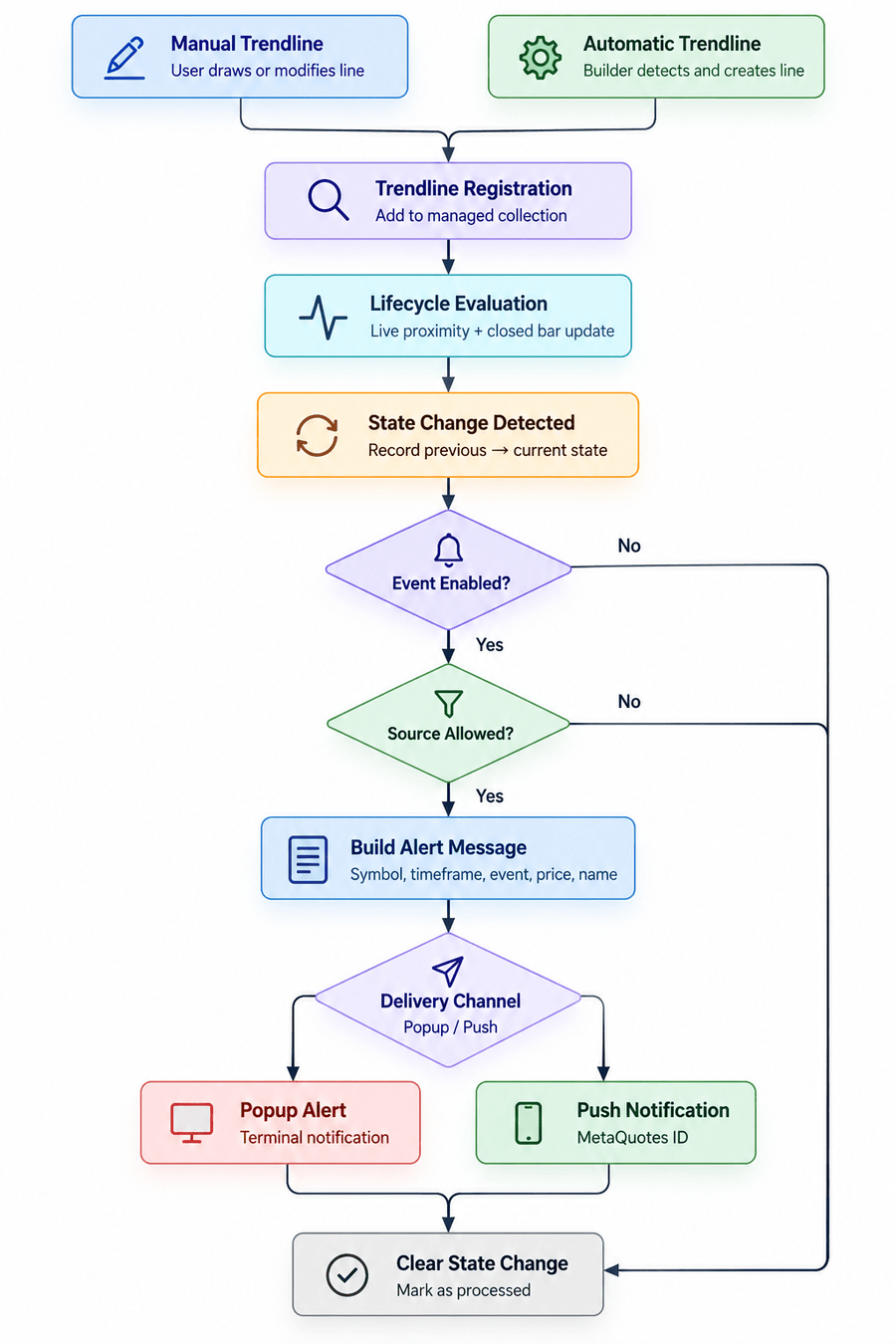
Fig. 1. Lifecycle transition and alert processing flow
Building the Alert Engine
With lifecycle transitions now exposed as consumable events, the next step is to handle notifications independently of the state machine. Part 3 introduces CTrendlineAlert for this purpose. The class does not detect touch/bounce/break/resurrection. It receives an already classified event and decides whether that event should produce a notification.
Two enumerations establish the vocabulary used by the alert layer:
- ENUM_TRENDLINE_ALERT_EVENT identifies the four supported events: touch, bounce, break, and resurrection.
- ENUM_TRENDLINE_SOURCE identifies whether the event originated from a manually created or automatically generated trendline. The source is determined by the object-name marker the builder assigns to automatically generated lines.
//+------------------------------------------------------------------+
//| Alert event types                                                |
//+------------------------------------------------------------------+
enum ENUM_TRENDLINE_ALERT_EVENT
  {
   TL_ALERT_TOUCH = 0,
   TL_ALERT_BOUNCE,
   TL_ALERT_BREAK,
   TL_ALERT_RESURRECTION
  };

//+------------------------------------------------------------------+
//| Trendline source types                                           |
//+------------------------------------------------------------------+
enum ENUM_TRENDLINE_SOURCE
  {
   TL_SOURCE_MANUAL = 0,
   TL_SOURCE_AUTO
  };
Separating event and source is useful because they represent different filtering dimensions. A user may, for example, enable break and resurrection alerts while monitoring only automatically generated trendlines.
Configuring Event and Source Filters
CTrendlineAlert stores the alert configuration received from the main indicator through the manager. The configuration includes the enabled lifecycle events, permitted trendline sources, and available delivery channels.
//+------------------------------------------------------------------+
//| Handles filtering, formatting and delivery of trendline alerts.  |
//+------------------------------------------------------------------+
class CTrendlineAlert
  {
private:
   //--- Event Filters
   bool              m_enabled;
   bool              m_alert_touch;
   bool              m_alert_bounce;
   bool              m_alert_break;
   bool              m_alert_resurrection;

   //--- Source Filters
   bool              m_alert_manual;
   bool              m_alert_auto;

   //--- Delivery Channels
   bool              m_popup_enabled;
   bool              m_push_enabled;

private:
   //--- Internal Filtering Helpers
   bool              IsEventEnabled(const ENUM_TRENDLINE_ALERT_EVENT event) const;
   bool              IsSourceEnabled(const ENUM_TRENDLINE_SOURCE source) const;

   //--- Message Formatting Helpers
   string            EventToString(const ENUM_TRENDLINE_ALERT_EVENT event) const;
   string            SourceToString(const ENUM_TRENDLINE_SOURCE source) const;
   string            BuildMessage(const ENUM_TRENDLINE_ALERT_EVENT event,
                                  const ENUM_TRENDLINE_SOURCE source,
                                  const string line_name,
                                  const string line_direction,
                                  const string symbol,
                                  const ENUM_TIMEFRAMES timeframe,
                                  const double price) const;

   //--- Alert Delivery
   void              Dispatch(const string message);

public:
                     CTrendlineAlert(void);

   //--- Configuration
   void              Configure(const bool enabled,
                               const bool alert_touch,
                               const bool alert_bounce,
                               const bool alert_break,
                               const bool alert_resurrection,
                               const bool alert_manual,
                               const bool alert_auto,
                               const bool popup_enabled,
                               const bool push_enabled);

   //--- Public Alert Interface
   void              Notify(const ENUM_TRENDLINE_ALERT_EVENT event,
                            const ENUM_TRENDLINE_SOURCE source,
                            const string line_name,
                            const string line_direction,
                            const string symbol,
                            const ENUM_TIMEFRAMES timeframe,
                            const double price);
  };
Before a message is constructed, the alert engine applies two filter checks:
- IsEventEnabled() determines whether the received lifecycle event is enabled.
- IsSourceEnabled() determines whether the originating trendline source is permitted.
//+------------------------------------------------------------------+
//| Returns true when the requested lifecycle alert is enabled.      |
//+------------------------------------------------------------------+
bool CTrendlineAlert::IsEventEnabled(const ENUM_TRENDLINE_ALERT_EVENT event) const
  {
   switch(event)
     {
      case TL_ALERT_TOUCH:
         return m_alert_touch;

      case TL_ALERT_BOUNCE:
         return m_alert_bounce;

      case TL_ALERT_BREAK:
         return m_alert_break;

      case TL_ALERT_RESURRECTION:
         return m_alert_resurrection;
     }

   return false;
  }

//+------------------------------------------------------------------+
//| Returns true when alerts are enabled for the trendline source.   |
//+------------------------------------------------------------------+
bool CTrendlineAlert::IsSourceEnabled(const ENUM_TRENDLINE_SOURCE source) const
  {
   switch(source)
     {
      case TL_SOURCE_MANUAL:
         return m_alert_manual;

      case TL_SOURCE_AUTO:
         return m_alert_auto;
     }

   return false;
  }
These checks happen before the message is constructed and delivered.
Constructing the Alert Message
After an event passes the filters, its information is converted into a readable notification. EventToString() and SourceToString() provide the text representation of the event and trendline source used in the final message.
//+------------------------------------------------------------------+
//| Converts an alert event into user-facing text.                   |
//+------------------------------------------------------------------+
string CTrendlineAlert::EventToString(const ENUM_TRENDLINE_ALERT_EVENT event) const
  {
   switch(event)
     {
      case TL_ALERT_TOUCH:
         return "TOUCH";

      case TL_ALERT_BOUNCE:
         return "BOUNCE";

      case TL_ALERT_BREAK:
         return "BREAK";

      case TL_ALERT_RESURRECTION:
         return "RESURRECTION";
     }

   return "UNKNOWN";
  }

//+------------------------------------------------------------------+
//| Converts the trendline source into user-facing text.             |
//+------------------------------------------------------------------+
string CTrendlineAlert::SourceToString(const ENUM_TRENDLINE_SOURCE source) const
  {
   switch(source)
     {
      case TL_SOURCE_MANUAL:
         return "Manual";

      case TL_SOURCE_AUTO:
         return "Auto";
     }

   return "Unknown";
  }
BuildMessage() then combines these labels with the chart and trendline information. Each alert contains:
- symbol and timeframe,
- lifecycle event,
- trendline source,
- direction,
- current price,
- trendline name.
//+------------------------------------------------------------------+
//| Builds a compact message describing the lifecycle event.         |
//+------------------------------------------------------------------+
string CTrendlineAlert::BuildMessage(const ENUM_TRENDLINE_ALERT_EVENT event,
                                     const ENUM_TRENDLINE_SOURCE source,
                                     const string line_name,
                                     const string line_direction,
                                     const string symbol,
                                     const ENUM_TIMEFRAMES timeframe,
                                     const double price) const
  {
   string period_text = EnumToString(timeframe);

   if(StringFind(period_text, "PERIOD_") == 0)
      StringReplace(period_text, "PERIOD_", "");

   int digits = (int)SymbolInfoInteger(symbol, SYMBOL_DIGITS);

   string message = "Smart Trendline Alert\n";

   message += symbol + " " + period_text + "\n";
   message += SourceToString(source);

   if(line_direction != "")
      message += " " + line_direction;

   message += "\nEvent: " + EventToString(event);
   message += "\nPrice: " + DoubleToString(price, digits);

   if(line_name != "")
      message += "\nLine: " + line_name;

   return message;
  }
Using one message builder gives all four lifecycle events the same format while allowing the event, source, direction, and chart context to change with each notification.
Filtering and Delivering the Alert
Notify() provides the public entry point to the alert engine. It checks the master alert setting followed by the event and source filters. Once these conditions are satisfied, it builds the message and passes it to the delivery routine.
//+------------------------------------------------------------------+
//| Filters and dispatches a trendline lifecycle alert.              |
//+------------------------------------------------------------------+
void CTrendlineAlert::Notify(const ENUM_TRENDLINE_ALERT_EVENT event,
                             const ENUM_TRENDLINE_SOURCE source,
                             const string line_name,
                             const string line_direction,
                             const string symbol,
                             const ENUM_TIMEFRAMES timeframe,
                             const double price)
  {
//--- Master alert switch
   if(!m_enabled)
      return;

//--- Ignore disabled lifecycle events
   if(!IsEventEnabled(event))
      return;

//--- Ignore disabled trendline sources
   if(!IsSourceEnabled(source))
      return;

   string message = BuildMessage(event,
                                 source,
                                 line_name,
                                 line_direction,
                                 symbol,
                                 timeframe,
                                 price);

   Dispatch(message);
  }
Dispatch() completes the process by sending the formatted message through the enabled channels. Popup alerts use the terminal alert mechanism, while push notifications are sent to the configured mobile device.
//+------------------------------------------------------------------+
//| Sends the message through all enabled delivery channels.         |
//+------------------------------------------------------------------+
void CTrendlineAlert::Dispatch(const string message)
  {
   if(m_popup_enabled)
      Alert(message);

   if(m_push_enabled)
     {
      ResetLastError();

      if(!SendNotification(message))
        {
         PrintFormat("//--- [SmartTrendline] Push notification failed | Error: %d",
                     GetLastError());
        }
     }
  }
Together, these functions complete the alert engine: the configuration controls which events are accepted, BuildMessage() prepares the notification content, and Dispatch() handles its delivery.
Architectural consideration: The Price field records the current Bid when the alert is dispatched. For transitions determined from completed candles, this value provides market context at notification time rather than the exact price that caused the lifecycle transition.
At this point, both sides of the alert architecture are in place.
Connecting Lifecycle Transitions to the Alert Engine
The previous sections established both parts of the alert architecture. CManagedTrendline records lifecycle transitions, while CTrendlineAlert filters and delivers notification events. CTrendlineManager now connects these components by translating recorded state changes into the alert vocabulary introduced in Part 3.
Translating State Changes into Alert Events
The central integration point is ProcessLifecycleAlert(). The function reads the previous and current lifecycle states and maps only the transitions supported by the alert system:
- ACTIVE → TOUCH_PENDING becomes a touch event.
- TOUCH_PENDING → BOUNCED becomes a bounce event.
- TOUCH_PENDING → BROKEN becomes a break event.
- BROKEN → ACTIVE becomes a resurrection event.
Other lifecycle changes are left untouched. This allows states such as expiration or the return from BOUNCED to ACTIVE to continue operating normally without automatically becoming notification events.
//+------------------------------------------------------------------+
//| Part 3: Translates a recorded lifecycle transition into an alert |
//| event and dispatches it through the alert engine.                |
//+------------------------------------------------------------------+
void CTrendlineManager::ProcessLifecycleAlert(CManagedTrendline *line)
  {
   if(line == NULL || m_alert == NULL)
      return;

   if(!line.StateChanged())
      return;

   ENUM_TRENDLINE_STATE previous_state = line.GetPreviousState();
   ENUM_TRENDLINE_STATE current_state  = line.GetState();

   ENUM_TRENDLINE_ALERT_EVENT event = TL_ALERT_TOUCH;
   bool dispatch = true;

//--- Map recorded lifecycle transitions to alert events only
   if(previous_state == TRENDLINE_STATE_ACTIVE && current_state == TRENDLINE_STATE_TOUCH_PENDING)
      event = TL_ALERT_TOUCH;
   else
      if(previous_state == TRENDLINE_STATE_TOUCH_PENDING && current_state == TRENDLINE_STATE_BOUNCED)
         event = TL_ALERT_BOUNCE;
      else
         if(previous_state == TRENDLINE_STATE_TOUCH_PENDING && current_state == TRENDLINE_STATE_BROKEN)
            event = TL_ALERT_BREAK;
         else
            if(previous_state == TRENDLINE_STATE_BROKEN && current_state == TRENDLINE_STATE_ACTIVE)
               event = TL_ALERT_RESURRECTION;
            else
               dispatch = false;

   if(!dispatch)
      return;

//--- Part 3: Alert source follows existing manual/automatic identity
   ENUM_TRENDLINE_SOURCE source = (line.IsAutoGenerated() ? TL_SOURCE_AUTO : TL_SOURCE_MANUAL);

//--- Part 3: Dispatch with chart context and current market price
   m_alert.Notify(event,
                  source,
                  line.GetName(),
                  line.GetDirection(),
                  _Symbol,
                  _Period,
                  SymbolInfoDouble(_Symbol, SYMBOL_BID));
  }
After identifying a supported transition, the manager determines whether the trendline is manual or automatically generated. It then forwards the event together with the line name, direction, symbol, timeframe, and current market price to CTrendlineAlert::Notify().
Note: Automatically generated trendlines use the reserved AUTO_ naming marker, which the manager uses to identify their source when applying alert filters. Manual trendlines should therefore avoid including AUTO_ in their object names, as such a line could be classified as automatic. If independent naming is required, this convention can be replaced by storing the trendline source explicitly during registration rather than deriving it from the object name.
This makes ProcessLifecycleAlert() a translation layer rather than another detection layer. It does not determine whether the market touched or broke a trendline; those decisions have already been made by CManagedTrendline.
Processing a Transition During Registration
The first integration point occurs when a trendline enters management. RegisterTrendline() already performs an initial proximity evaluation so that a newly registered line can immediately recognize an existing interaction with price. The check flag is initialised to true when the managed trendline object is constructed, so a newly registered line always performs this evaluation once.
We extend this path by checking whether that evaluation produced a state change. If so, the manager processes the transition and then clears its pending flag.
//+------------------------------------------------------------------+
//| Registers a new trendline object into the collection.            |
//+------------------------------------------------------------------+
bool CTrendlineManager::RegisterTrendline(const string name)
  {
   if(IsManaged(name))
      return false;

   CManagedTrendline *new_line = new CManagedTrendline(name,
         m_chart_id,
         m_proximity_pts,
         m_break_atr_mult,
         m_break_confirm_closes,
         m_bounce_atr_mult,
         m_bounce_confirm_closes,
         m_enable_resurrection,
         m_resurrection_bars,
         m_expiration_bars,
         m_bullish_color,
         m_bearish_color);
   if(new_line == NULL)
      return false;

   if(m_lines.Add(new_line))
     {
      //--- Overwrite visual properties directly on managed chart object
      ObjectSetInteger(m_chart_id, name, OBJPROP_RAY_RIGHT, true);
      ObjectSetInteger(m_chart_id, name, OBJPROP_BACK, true);
      ObjectSetInteger(m_chart_id, name, OBJPROP_WIDTH, TrendlineDefaults::DefaultWidth);
      //--- Part 2: Directional color is owned by CManagedTrendline::UpdateVisualState() - not overwritten here

      //--- Immediately evaluate initial attachment proximity.
      //--- This is NOT a user drag and must not set m_was_recently_moved.
      new_line.EvaluateLiveDrag(false);

      //--- Part 3: Dispatch lifecycle alert before consuming transition
      if(new_line.StateChanged())
        {
         ProcessLifecycleAlert(new_line);
         new_line.ClearStateChange();
        }

      PrintFormat("//--- [SmartTrendline] Registered trendline: '%s'", name);
      return true;
     }

   delete new_line;
   return false;
  }
This is important for both discovered and newly created trendlines. An interaction detected during registration does not have to wait for the next completed-bar cycle before reaching the alert system.
Architectural consideration: Registration includes an initial proximity evaluation. Therefore, a trendline already near the current market price when it is registered can enter TOUCH_PENDING and generate a touch alert even though the proximity condition began before registration.
Consuming Transitions During Manager Updates
The remaining integration points are contained within CTrendlineManager::Update(). Rather than introducing a separate notification loop, the manager consumes transitions immediately after the lifecycle operation that may have produced them.
The function covers two existing processing paths:
- Live modification path: after EvaluateLiveDrag() processes a recently moved trendline, the manager checks for a pending transition.
- Closed-bar path: after CManagedTrendline::Update() advances the regular lifecycle state machine, the manager performs the same check.
In both cases, the sequence is deliberately small:
state evaluation → StateChanged() → ProcessLifecycleAlert() → ClearStateChange()
//+------------------------------------------------------------------+
//| Orchestrates lifecycle updates across all managed trendlines.    |
//+------------------------------------------------------------------+
void CTrendlineManager::Update(const double &open[], const double &high[], const double &low[],
                               const double &close[], const datetime &time[], const double atr,
                               const int rates_total)
  {
   if(ArraySize(time) < 3)
      return;

//--- Enforce time-series indexing (Index 0 = current live bar, Index 1 = last closed bar)
   ArraySetAsSeries(open, true);
   ArraySetAsSeries(high, true);
   ArraySetAsSeries(low, true);
   ArraySetAsSeries(close, true);
   ArraySetAsSeries(time, true);

//--- 1. Live Drag Branch: process immediate touch evaluation if user moved lines
   bool has_moved_lines = false;
   int total = m_lines.Total();

   for(int i = 0; i < total; i++)
     {
      CManagedTrendline *line = (CManagedTrendline*)m_lines.At(i);

      if(line != NULL && line.WasRecentlyMoved())
        {
         has_moved_lines = true;
         line.EvaluateLiveDrag();

         //--- Part 3: Dispatch lifecycle alert before consuming transition
         if(line.StateChanged())
           {
            ProcessLifecycleAlert(line);
            line.ClearStateChange();
           }
        }
     }

//--- 2. Closed-Bar Gate: skip unless a new bar completed
   bool is_new_bar = (time[1] != m_last_processed_bar);

   if(!is_new_bar && !has_moved_lines)
      return;

   if(is_new_bar)
     {
      m_last_processed_bar = time[1];

      //--- Standard closed-bar state machine processing
      for(int i = m_lines.Total() - 1; i >= 0; i--)
        {
         CManagedTrendline *line = (CManagedTrendline*)m_lines.At(i);

         if(line == NULL)
           {
            m_lines.Delete(i);
            continue;
           }

         line.Update(open, high, low, close, time, atr);

         //--- Part 3: Dispatch lifecycle alert before consuming transition
         if(line.StateChanged())
           {
            ProcessLifecycleAlert(line);
            line.ClearStateChange();
           }

         //--- Expired lines removed their chart object internally; drop from collection
         if(line.IsExpired())
           {
            string name = line.GetName();
            m_lines.Delete(i);

            PrintFormat("[SmartTrendline] Expired line dropped from manager: '%s'.",
                        name);
           }
        }

      //--- 3. Automatic trendline generation on fresh bars
      if(m_builder_ready && m_builder != NULL)
        {
         int created = m_builder.ScanAndBuild(time, high, low, rates_total);

         //--- Immediately discover and register newly created automatic lines
         if(created > 0)
           {
            DiscoverTrendlines();
           }
        }
     }
  }
ClearStateChange() is called immediately after the recorded transition has been passed to ProcessLifecycleAlert(), whether or not the alert engine ultimately delivers a notification. The transition is therefore treated as a one-shot event rather than persistent state information that could be processed again during a later update.
Keeping this logic inside the existing manager cycle also avoids introducing another polling mechanism. Registration handles the initial evaluation, while Update() covers both live modifications and normal completed-bar processing.
At this point, the complete alert path is connected. CManagedTrendline remains responsible for lifecycle decisions, CTrendlineManager translates and consumes the resulting transitions, and CTrendlineAlert applies the configured filters before formatting and delivering the notification. The implementation can now be tested from the chart to verify each lifecycle event and delivery path.
Configuring Push Notifications
Before testing lifecycle alerts on the chart, push notifications must be configured between the MetaTrader 5 desktop terminal and the mobile application. Each mobile installation receives a unique MetaQuotes ID, which identifies the device that should receive notifications.
The setup requires:
- Open the MetaTrader 5 mobile application and locate the MetaQuotes ID in the Messages section.
- In the desktop terminal, open Tools → Options → Notifications.
- Enable Push Notifications and enter the MetaQuotes ID obtained from the mobile application.
- Use the Test button to verify that the desktop terminal can deliver a notification to the device. MetaTrader reports whether the test was successfully sent, while the corresponding message should appear on the configured mobile device.
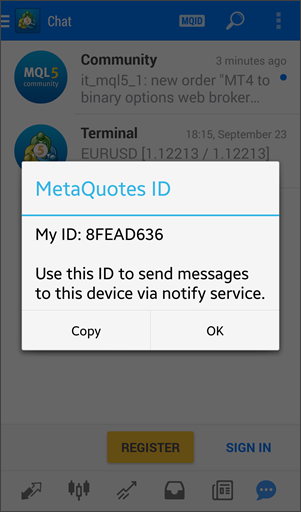
Fig. 2. MetaTrader 5 mobile Messages screen showing the MetaQuotes ID

Fig. 3. Configuring push notifications in the MetaTrader 5 desktop terminal
Verifying Alert Delivery
With the indicator attached to the chart, create a manual trendline or leave automatic trendline generation enabled. For this demonstration, the lifecycle alerts and both delivery channels are enabled so that reported lifecycle transitions can be observed on the desktop terminal and the configured mobile device.
When a monitored trendline produces an enabled lifecycle transition, the alert engine formats the event information and sends it through the selected channels.

Fig. 4. Lifecycle alert displayed in the MetaTrader 5 desktop terminal
The desktop notification provides the event together with its symbol, timeframe, source, direction, price, and trendline identity.

Fig. 5. Lifecycle alert received as a MetaTrader 5 mobile push notification
The mobile notification carries the same lifecycle information, allowing the event to be followed without continuously monitoring the desktop chart. This completes the alert path from a recorded trendline state transition to its configured notification channels.
Conclusion
In this article, we extended the Smart Trendline Manager with lifecycle-based alerts. Existing state transitions now provide the trigger for notifications, while event and source filters determine which interactions are reported. The resulting messages can be delivered through terminal popup alerts and push notifications without changing the underlying lifecycle rules.
This addition builds naturally on the previous parts of the series. The framework has progressed from managing manually drawn trendlines to automatic discovery and extended lifecycle behavior, and now to reporting significant interactions beyond the chart itself.
At this stage, the Smart Trendline Manager supports monitoring trendline behavior without constant chart observation. Further development could explore tighter control over automatically generated lines or move beyond observation by using confirmed lifecycle events within trading logic. The complete implementation is organized across the following files, with each component retaining a clearly defined role within the framework.
| File Name | Description |
|---|---|
| SmartTrendlineManager3.mq5 | The main indicator entry point. It connects MetaTrader 5 events and market data with the framework, configures lifecycle and alert settings, forwards chart interactions, and passes market updates to the manager. |
| TrendlineManager.mqh | Implements the orchestration layer. It discovers and registers trendlines, manages the active collection, coordinates lifecycle updates, and translates recorded state transitions into alert events. |
| ManagedTrendline.mqh | Implements the behavior of an individual managed trendline. It handles geometry, lifecycle states, interaction tracking, confirmation logic, visual updates, and exposes recorded state transitions to the manager. |
| TrendlineAlert.mqh | Implements the alert layer introduced in Part 3. It defines alert events and trendline sources, applies event and source filters, constructs notification messages, and dispatches them through enabled popup and push channels. |
| Common.mqh | Contains shared definitions used throughout the framework, including common constants, enumerations, default configuration values, and declarations required by multiple components. |
| Geometry.mqh | Provides reusable geometric calculations, including trendline projection and price evaluation at specific chart positions, independently of lifecycle and alert logic. |
| TrendlineBuilder.mqh | Implements automatic trendline generation. It analyzes market structure, identifies qualifying candidates, creates the corresponding chart objects, and supplies them to the management layer. |
| MQL5.zip | Contains the complete MQL5 folder structure. Extract it into the MetaTrader 5 terminal directory so that SmartTrendlineManager3.mq5 is placed under MQL5\Indicators\SmartTrendlineManager\V3\ and the supporting .mqh files are placed under MQL5\Include\SmartTrendline\V3\. |
References
Warning: All rights to these materials are reserved by MetaQuotes Ltd. Copying or reprinting of these materials in whole or in part is prohibited.
This article was written by a user of the site and reflects their personal views. MetaQuotes Ltd is not responsible for the accuracy of the information presented, nor for any consequences resulting from the use of the solutions, strategies or recommendations described.


