

CSV Data Analysis (Part 1): CSV Export Engine for MQL5 Multi-Core Optimizations
 1 190
1 190
 1
1

Introduction
The MetaTrader 5 Strategy Tester is a powerful backtesting tool. However, its native reporting pipeline introduces a bottleneck for rigorous comparative analysis. When running a parametric sweep across multiple trend filters—such as SMA, EMA, WMA, KAMA, DEMA, TEMA, ZLEMA, VIDYA, or SAMA—the Tester produces individual, non-persistent result rows. These rows are visible only in the optimization graph and results grid. Crucially, the Tester cannot natively consolidate results across filter types, timeframes, and test phases into one portable data file.
Three friction points define this limitation in practice:
- No cross-filter output artifact: Each optimization pass produces its own result set. Comparing SMA against EMA against KAMA across identical market conditions requires manual extraction and collation.
- No custom metric persistence: Metrics the Tester does not compute natively are discarded when the test session closes. This includes metrics such as the Sortino Ratio, average trade duration, or signal quality indicators including lag and whipsaw frequency.
- No programmatic downstream interface: A CSV file loads directly into Python, R, or any spreadsheet application. The Tester's native XML report does not.
This article presents a structural solution: a reusable MQL5 include file (CSVExportEngine.mqh) that extracts custom metrics, constructs a formatted CSV row, and safely appends it to a consolidated output file under multi-core parallel conditions. A companion Demo Expert Advisor (MultiFilter_Pullback_Demo_EA.mq5) demonstrates the framework in a realistic multi-filter trend-pullback strategy context.
Section 1: The Custom Metrics Gap: Sortino Ratio, Trade Duration, and Signal Quality
The metrics surfaced by TesterStatistics() cover standard performance descriptors — net profit, profit factor, maximum drawdown, Sharpe Ratio, and trade counts. These suffice for evaluating a single strategy in isolation. They are not sufficient for a rigorous comparative study between filter architectures. Three categories of custom metrics are particularly relevant.
The Sortino Ratio
The Sharpe Ratio penalizes upside and downside volatility equally in its denominator. For trend-following strategies explicitly designed to capture large asymmetric gains, this is a theoretical mismatch. The Sortino Ratio penalizes only downside returns — trades with negative profit — making it a more appropriate discriminator for trend-following systems.
The formula used in this framework is:
Sortino Ratio = Average Profit Per Trade / Downside Deviation
Where:
Downside Deviation = sqrt(sum(losing_trade_profit²) / number_of_losing_trades)
To compute it, the code iterates deal history (HistoryDealsTotal(), HistoryDealGetTicket()), isolates losing trades, sums squared losses, and calculates the RMS value. Because this calculation operates on raw deal history, it is unavailable from TesterStatistics() and must be derived manually.
Average Trade Duration
Average trade duration measures the mean holding time per position. This is a structurally important metric for filter comparison: a faster-reacting filter such as a short-period EMA may generate more frequent signals with shorter average durations, while a slower adaptive filter may hold positions significantly longer. To calculate this, the framework matches each closing deal (DEAL_ENTRY_OUT) to its corresponding opening deal (DEAL_ENTRY_IN) using DEAL_POSITION_ID, computes the time delta in seconds, and accumulates a running total. The result is expressed in hours for readability.
Signal Quality Metrics
Signal quality metrics characterize the behavior of the filter line itself, independent of profitability. The framework tracks four such metrics during the EA's OnTick() loop:
- Average Lag on Turns (Bars): When the filter slope changes direction, the framework measures how many bars have elapsed since the most recent price pivot. A higher value indicates the filter is slower to confirm directional change.
- False Flips (Whipsaws): A slope change that reverses within three bars is classified as a whipsaw, incrementing a counter. This quantifies the filter's noise sensitivity.
- Average Price-to-Line Distance (Points): The mean absolute distance between the closing price and the filter value across all bars. Filters with larger average distances are less responsive to price action.
- Intersection Frequency (%): The percentage of bars on which the closing price crosses the filter line. A very high frequency suggests the filter is too reactive; a very low frequency may indicate excessive lag.
These metrics are tracked in TrackSignalQualityMetrics(), called once per bar inside OnTick(), and passed to the export engine at the end of the test run.
Section 2: The Multi-Core Concurrency Problem: Parallel File-Lock Contention
This is the framework's central technical problem; it should be understood before reviewing the solution.
When the MetaTrader 5 Strategy Tester runs an optimization with "Use multi-core processing" enabled, it distributes individual parameter combinations across multiple parallel agent processes. Each agent runs an independent EA instance with a specific parameter set. At the conclusion of each run, OnDeinit() is called on that instance.
If the optimization spans multiple filter types or parameter ranges, several agents will reach their OnDeinit() call at approximately the same time. When multiple agents call OnDeinit() and try to open the same CSV for writing, the following occurs:
- Agent A calls FileOpen() on MultiFilter_InSample_EURUSD_H1.csv. The operating system grants Agent A the write lock. The file handle is valid.
- Agent B calls FileOpen() on the same file a few microseconds later. Because Agent A holds the write lock, Agent B receives INVALID_HANDLE. The error code from GetLastError() is typically ERR_CANNOT_OPEN_FILE (5004).
- Agent B's export call silently fails. That entire row of results — representing a complete optimization pass — is permanently lost.

Fig. 1: A concurrency conflict occurring during multi-core optimization. Agent A locks the shared CSV file, causing Agent B's simultaneous write attempt to fail and lose data.
The severity of this data loss scales directly with the degree of parallelism. A 16-core machine can run 16 simultaneous agents across a large parameter grid. However, a contention-handling mechanism must be in place to prevent the system from silently discarding results.
The standard remedy for lock contention in operating system programming, Sleep(), is disabled in the MetaT5 Strategy Tester environment. The Sleep() function is a no-op during testing and optimization. Code that relies on Sleep(ms) to pause and retry a file open will not function as intended. A different approach is necessary.
Section 3: The Spin-Lock Solution: Iteration-Based Retry for Zero Data Loss
The solution is an iteration-based spin-lock. It uses a tight for loop that retries the FileOpen() call continuously without a sleep interval. The loop runs until a valid handle is obtained or the maximum iteration count is reached.
The core mechanism:
int file_handle = INVALID_HANDLE;
int max_spin_attempts = 50000;

for(int attempt = 0; attempt < max_spin_attempts; attempt++)
   {
    file_handle = FileOpen(file_name, FILE_CSV | FILE_WRITE | FILE_READ | FILE_ANSI | FILE_COMMON, ',');
    if(file_handle != INVALID_HANDLE)
       break; // Lock acquired. Exit the spin loop.
   }
Why this works in the Tester environment:Each loop iteration is extremely fast (a few CPU cycles), allowing rapid retries. Agent A holds the file lock and writes its data row quickly, taking just a few milliseconds. Meanwhile, Agent B performs rapid retries in a tight loop. When Agent A closes the file handle, Agent B captures the newly released lock on its very next iteration.
The 50,000 iteration ceiling: This is a conservative upper bound. A standard file operation takes only a few milliseconds. Since a CPU processes millions of loop iterations per second, 50,000 iterations provide a retry window of several seconds. This is far longer than needed for realistic contention. It also adds no noticeable overhead to a workflow that already takes minutes to run.
On the failure path: If all 50,000 attempts fail, the framework logs a critical error to the Experts log. This message includes the code from GetLastError(). Such a failure indicates a severe system-level problem rather than ordinary contention. By logging it, the system guarantees visibility instead of failing silently.
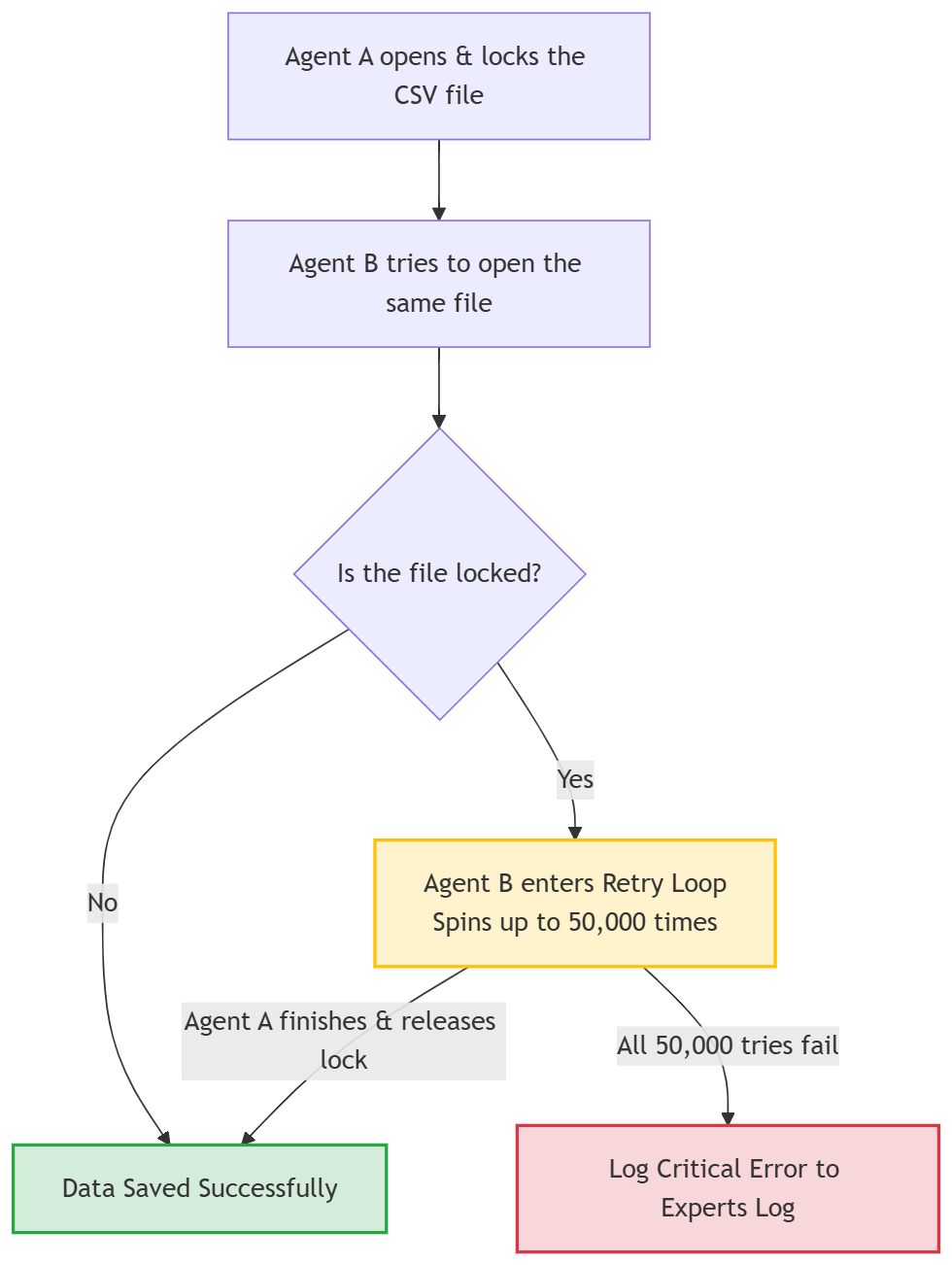
Fig. 2: This flowchart demonstrates the retry loop solution. Agent B performs up to 50,000 rapid checks while waiting for Agent A to release the shared file. This ensures the optimization data is safely written instead of being discarded.
Section 4: The Include File Implementation: CSVExportEngine.mqh
Phase detection, filename generation, spin-locking, and CSV writing are implemented in a single include file. This architecture keeps the export tool completely independent of your EA's trading strategy. To add this capability to any future EA, you only need three things: an #include directive, a populated struct, and one function call.
The SExportMetrics Structure
Rather than passing more than twenty scalar parameters to the export function, a dedicated struct bundles all metrics into a single named argument. This keeps the function signature clean and makes the calling code self-documenting.
//+------------------------------------------------------------------+
//| Data structure bundling all metrics for a single export row.     |
//| The EA populates this struct, then passes it to ExportToCSV().   |
//+------------------------------------------------------------------+
struct SExportMetrics
  {
   //--- Identification Fields
   string            filterName;          // e.g., "EMA", "SAMA"
   int               filterPeriod;        // Primary lookback period
   double            paramLearningRate;   // SAMA-specific: learning rate (0.0 for non-SAMA)
   double            paramSlMult;         // SL ATR multiplier used in the test
   double            paramTpMult;         // TP ATR multiplier used in the test

   //--- Standard Performance Metrics (sourced from TesterStatistics)
   double            netProfit;
   double            profitFactor;
   double            expectedPayoff;
   double            winRate;             // Expressed as a percentage (0-100)
   double            maxDrawdown;         // Max relative equity drawdown (%)
   double            recoveryFactor;
   double            sharpeRatio;
   double            sortinoRatio;        // Custom-calculated; not from TesterStatistics
   int               totalTrades;
   double            avgProfitPerTrade;

   //--- Time and Stability Metrics
   double            avgTradeDurationHrs; // Average holding time in hours
   double            marketShareTime;     // % of test duration spent in a position
   int               positiveYears;       // Positive-years count

   //--- Signal Quality Metrics (sourced from TrackSignalQualityMetrics)
   double            avgLagBars;          // Average filter lag on direction changes
   int               falseFlipWhipsaws;   // Count of slope flips that reversed within 3 bars
   double            avgDistPoints;       // Average price-to-filter distance in points
   double            intersectFreqPct;    // % of bars where price crossed the filter line
  };
Dynamic Test Phase Detection
MQLInfoInteger() queries distinguish three distinct test contexts. The logic is written explicitly to eliminate ambiguity:
- If MQL_OPTIMIZATION returns false, the EA is running a single backtest, labeled "Baseline".
- If MQL_OPTIMIZATION returns true and MQL_FORWARD returns true, the EA is in a forward-validation pass, labeled "OutSample".
- If MQL_OPTIMIZATION returns true and MQL_FORWARD returns false, the EA is in a standard in-sample optimization pass, labeled "InSample".
This prefix is prepended to both the filename and the data row's Test_Phase column, enabling a single master file to carry clearly tagged rows from all three configurations for direct comparison.
//+------------------------------------------------------------------+
//| Determines the active test phase and returns the row prefix.     |
//|                                                                  |
//| Returns:                                                         |
//|   "Baseline"  - Single backtest (MQL_OPTIMIZATION is false)      |
//|   "InSample"  - Optimization pass (MQL_FORWARD is false)         |
//|   "OutSample" - Forward validation pass (MQL_FORWARD is true)    |
//+------------------------------------------------------------------+
string GetTestPhasePrefix()
  {
   if(!MQLInfoInteger(MQL_OPTIMIZATION))
      return("Baseline");    // Standard single-pass backtest

   if(MQLInfoInteger(MQL_FORWARD))
      return("OutSample");   // Optimization forward-validation segment

   return("InSample");       // Standard optimization in-sample segment
  }
Consolidated vs. Per-Filter File Toggle
The boolean input InpConsolidatedMode controls filename construction. When true, all filter types write to one master file. When false, each filter type generates its own file. Both modes still invoke the spin-lock, as per-filter files can also be contested by multiple agents running the same filter type across different period parameters.
Table 1: File structure for the Consolidated Mode. All filter types write to a single master file when InpConsolidatedMode is true.
| // Consolidated: one master file for all filters |
|---|
| // "MultiFilter_InSample_EURUSD_H1.csv" |
Table 2: File structure for the Per-Filter Mode. Each active filter type generates its own dedicated file when InpConsolidatedMode is false.
| // Per-Filter: individual file per active filter |
|---|
| // "MultiFilter_InSample_EURUSD_H1_EMA.csv" |
The Spin-Lock File Opener
The SpinLockFileOpen() helper isolates the retry mechanism, keeping the main export function readable and the spin-lock logic independently testable.
//+------------------------------------------------------------------+
//| Attempts to open a file using an iteration-based spin-lock.      |
//| This is the core concurrency-safety mechanism. Sleep() is a      |
//| no-op in the Strategy Tester, so a CPU-spin retry loop is used   |
//| instead to wait out a competing agent's write lock.              |
//|                                                                  |
//| file_name    : Full filename to open                             |
//| max_attempts : Upper bound on retry iterations (default: 50000)  |
//|                                                                  |
//| Returns a valid file handle, or INVALID_HANDLE if all retries    |
//| are exhausted (indicating a severe system-level lock failure).   |
//+------------------------------------------------------------------+
int SpinLockFileOpen(const string file_name,
                     const int    max_attempts = 50000)
  {
   int file_handle = INVALID_HANDLE;

   for(int attempt = 0; attempt < max_attempts; attempt++)
     {
      //--- Attempt to acquire the write lock on each iteration.
      file_handle = FileOpen(file_name,
                             FILE_CSV | FILE_WRITE | FILE_READ | FILE_ANSI | FILE_COMMON,
                             ',');

      if(file_handle != INVALID_HANDLE)
         break; // Lock successfully acquired; exit the spin loop.
     }

   return(file_handle);
  }
The Main Export Function
ExportToCSV() is the single public function called by the EA. It orchestrates phase detection, filename construction, lock acquisition, conditional header writing (only when the file is new), and data row writing.
//+------------------------------------------------------------------+
//| Primary public function. Call from OnDeinit() inside MQL_TESTER. |
//|                                                                  |
//| metrics : Struct populated by the EA with all computed metrics   |
//| tf_str  : Timeframe string derived from EnumToString(_Period)    |
//+------------------------------------------------------------------+
void ExportToCSV(const SExportMetrics &metrics, const string tf_str)
  {
   string phase_prefix = GetTestPhasePrefix();
   string file_name    = BuildFileName(phase_prefix,
                                       metrics.filterName,
                                       tf_str,
                                       InpConsolidatedMode);

   int file_handle = SpinLockFileOpen(file_name);

   if(file_handle != INVALID_HANDLE)
     {
      //--- Move to end of file for appending.
      FileSeek(file_handle, 0, SEEK_END);

      //--- Write the header only if the file was just created (size is zero).
      if(FileSize(file_handle) == 0)
        {
         FileWrite(file_handle, BuildCSVHeader());
        }

      FileWrite(file_handle, BuildCSVDataRow(metrics, phase_prefix, tf_str));
      FileClose(file_handle);
     }
   else
     {
      //--- Log a critical error if all spin-lock retries were exhausted.
      PrintFormat(
         "CRITICAL ERROR [CSVExportEngine]: Failed to acquire file lock for '%s' "
         "after %d spin-lock retries. Data row was NOT written. Last error: %d",
         file_name, 50000, GetLastError());
     }
  }
Section 5: The Demo EA: MultiFilter_Pullback_Demo_EA.mq5
The Demo EA implements a trend-pullback strategy that is structurally filter-agnostic. Its core logic just checks two things: it confirms the trend direction via the filter's slope, and then waits for a price pullback to the filter line. This process works exactly the same whether you use an SMA, EMA, KAMA, or any of the other supported filters. Because the strategy itself never changes, it serves as a clean vehicle for a controlled comparative study.
Metric Collection in OnDeinit()
The EA's OnDeinit() function triggers metric collection and export only when running inside the Tester (MQLInfoInteger(MQL_TESTER) is true). It calls a local helper, CollectAndExportMetrics(), which follows this sequence:
- Queries TesterStatistics() for all standard metrics.
- Iterates the deal history via HistorySelect() and HistoryDealsTotal() to compute the Sortino Ratio, average trade duration, market share time, and positive-years count.
- Reads the signal quality accumulators populated by TrackSignalQualityMetrics() during the run.
- Populates an SExportMetrics struct with all computed values.
- Calls ExportToCSV() from the include file, passing the populated struct.
//+------------------------------------------------------------------+
//| Expert deinitialization function                                 |
//+------------------------------------------------------------------+
void OnDeinit(const int reason)
  {
//--- Only attempt CSV export when running inside the Strategy Tester
   if(MQLInfoInteger(MQL_TESTER))
     {
      CollectAndExportMetrics();
     }

//--- Release indicator handles
   if(g_filter_handle != INVALID_HANDLE)
      IndicatorRelease(g_filter_handle);
   if(g_atr_handle != INVALID_HANDLE)
      IndicatorRelease(g_atr_handle);
  }
Calling the Export Engine
The entire export process is condensed into a single call to ExportToCSV(). This function completely encapsulates the export process, managing all file I/O, naming conventions, and concurrency internally.
Important Setup Requirement:
Before running the EA, ensure you download SAMA_NLMS.mq5 (attached at the end of this article) and copy it to your terminal's indicators directory:
C:\Users\USERNAME\AppData\Roaming\MetaQuotes\Terminal\D0E8209F77C8CF37AD8BF550E51FF075\MQL5\Indicators
The EA relies on this custom indicator, and omitting this step will cause compilation to fail.
Section 6: Practical Workflow: Comparative Analysis in a Spreadsheet
When optimization runs complete, output files reside in the MQL5\Files\Common directory, specified by the FILE_COMMON flag in FileOpen(). The typical path on Windows is:
C:\Users\<UserName>\AppData\Roaming\MetaQuotes\Terminal\Common\Files\ A consolidated file such as MultiFilter_InSample_AUDJPY_H1.csv will contain one row per completed optimization agent pass, each tagged by Test_Phase, Indicator_Name, Filter_Period, and the full set of associated metrics.

Fig. 3: MultiFilter_InSample_AUDJPY_H1.csv sample data open in MS Excel.
A practical analysis workflow using this output proceeds as follows:
- Step 1 — Filter by Phase: Use the Test_Phase column to segregate in-sample rows from out-of-sample rows. Metrics that appear strong in-sample but collapse in the OutSample segment warrant scrutiny for overfitting.
- Step 2 — Rank by Sortino: Sort descending by Sortino_Ratio. This produces a risk-adjusted ranking more appropriate for trend-following strategies than Sharpe alone.
- Step 3 — Cross-reference Signal Quality: Filters that rank highly on Sortino but show elevated False_Flips_Whipsaws counts or high Avg_Lag_On_Turn_Bars values may be performing well in-sample due to data-specific conditions rather than structural robustness.
- Step 4 — Evaluate Stability: The Stability_Over_Years column counts how many calendar years within the test period produced a positive P&L. A strategy that is profitable in only one or two years within a five-year test period may exhibit time-localized performance.
- Step 5 — Script downstream analysis: Because the output is a clean CSV with consistent column headers, it loads directly into a Python pandas DataFrame or an R data.frame for visualization, correlation analysis, or further filtering — no manual data manipulation required.
Conclusion
This framework bridges a significant gap in the MQL5 optimization workflow. Currently, MQL5 lacks a native way to automatically combine custom performance metrics during multi-core optimization runs. This framework solves that problem by consolidating your data into a single, portable, and consistently structured output file.
CSVExportEngine.mqh delivers its functionality through three core capabilities:
- First, it uses MQLInfoInteger() queries to detect the active testing phase at runtime. This completely eliminates manual file management across your in-sample, out-of-sample, and baseline runs.
- Second, it resolves parallel file-lock contention with an iteration-based spin-lock. This is crucial for optimization environments where the native Sleep() function is disabled.
- Finally, it cleanly isolates the export logic from your actual trading strategy using a simple struct and a single function call, meaning you can drop this include file into any Expert Advisor without modification.
The framework intentionally does not prescribe how to interpret the exported data. Deciding the appropriate weighting of Sortino versus Sharpe ratios is an analytical judgment. Setting acceptable thresholds for whipsaw frequency or minimum stability requirements depends entirely on your specific instrument, timeframe, and risk context. The framework's sole role is to ensure you make those judgments using a complete, correctly structured dataset, rather than relying on incomplete Tester output or manually assembled metrics.
Programs used in the article:
| # | Name | Type | Description |
|---|---|---|---|
| 1 | CSVExportEngine.mqh | Include File | The core export framework. Handles test phase detection, filename construction, spin-lock file acquisition, and CSV row writing. Any EA can integrate it with a single #include directive and one function call. |
| 2 | MultiFilter_Pullback_Demo_EA.mq5 | Demo EA | A trend-pullback strategy that supports nine filter variants: SMA, EMA, WMA, KAMA, DEMA, TEMA, ZLEMA, VIDYA, and SAMA. It tracks signal quality metrics per bar, computes the Sortino Ratio and trade duration from deal history, and calls ExportToCSV() at the end of each test run. |
| 3 | SAMA_NLMS.mq5 | Custom Indicator | A self-adaptive moving average (NLMS algorithm) referenced via iCustom() under FILTER_SAMA. This custom indicator is included specifically to demonstrate how external resources can be integrated into an EA while maintaining full compatibility with the concurrent data export engine. Note: SAMA_NLMS.mq5 must be placed in the terminal's MQL5\Indicators directory; omitting this file will cause compilation to fail. |
Warning: All rights to these materials are reserved by MetaQuotes Ltd. Copying or reprinting of these materials in whole or in part is prohibited.
This article was written by a user of the site and reflects their personal views. MetaQuotes Ltd is not responsible for the accuracy of the information presented, nor for any consequences resulting from the use of the solutions, strategies or recommendations described.


 Position Management: A Reusable Trade Journal with Live Maximum Adverse Excursion, Maximum Favorable Excursion, and R-Multiple Tracking in MQL5
 Exploring Regression Models for Causal Inference and Trading
 MQL5 Custom Symbols: Creating a 3D Bars Symbol
 Recurrence Network Analysis (RNA) in MQL5: From Recurrence Matrices to Complex Networks

- Free trading apps
- Over 8,000 signals for copying
- Economic news for exploring financial markets
You agree to website policy and terms of use