

RiskGate: Centralized Risk Management for Multiple EAs
 2 076
2 076
 2
2

Most MetaTrader 5 accounts blow up not because a single Expert Advisor (EA) is badly coded, but because multiple EAs interact in unintended ways. You run a few strategies on the same account, each one backtested and "safe" on its own. Then they align in the same direction, stack correlated positions, and hit their stops together. There is no single place that sees the whole picture and says: "Given everything that is already open, should we really add this trade, and with what size?"
In a typical MetaTrader 5 setup, risk is fragmented. Every EA decides its own lot size and limits, and magic numbers only help inside each EA’s code. There is no central authority that enforces account-wide constraints such as maximum daily loss, total exposure per symbol, or correlation limits between instruments and strategies. Some traders try to connect EAs using global variables, files, or external Python bridges. These solutions can work, but they are fragile, hard to deploy on VPS environments, and difficult to maintain once several systems are running concurrently.
This article proposes a different architecture. Instead of every EA being responsible for its own risk, EAs become signal generators: they decide when and what they want to trade, but they ask a central "risk brain" for permission and position size before sending an order. That central risk layer is implemented as a Service inside MetaTrader 5, called RiskGate. EAs send a simple "intent" (a signal) to RiskGate; RiskGate checks account-wide rules (daily loss, exposure, correlations, strategy limits) and returns a decision: approved or rejected, with an appropriate lot size and a reason. This article illustrates the concept with an implementation built from KnitPkg packages. However, the architecture is tool-agnostic and can be implemented with other technologies.
Problem: Why Multi-EA Accounts Blow Up
Running many EAs on one account is attractive: you diversify across ideas, timeframes, and symbols, and you hope that the portfolio will be smoother than any single strategy. In practice, traders often discover the opposite. Each EA is designed, tested, and tuned in isolation. It sees the account only through its own logic, its own risk rules, and its own magic numbers. When these independent agents are unleashed together on a live account, they start to interact in ways that no single backtest ever showed. Consider three typical cases.
Case 1: Stacked USD exposure. You run three different EAs: one trades EURUSD breakouts, another trades GBPUSD pullbacks, and a third trades USDJPY mean reversion. On a particular day, all three systems independently see "buy USD" setups. Each EA, believing it is the only one on the account, opens its full-sized position. The result is a large, concentrated long USD exposure. If the dollar moves sharply against you, the combined loss is far larger than any of the individual strategies would ever risk on its own. No EA saw the total USD risk; each only saw "one trade within my rules."
Case 2: Correlated pairs moving together. You run two strategies on correlated pairs, say EURUSD and GBPUSD. The EURUSD system gets a long signal on a breakout; the GBPUSD system gets a long signal on a pullback. In backtests, each looks fine. Live, when a risk-off move hits European assets, both pairs fall together. The account takes a double hit because there was no mechanism saying: "You already have a large long in a highly correlated pair; this second trade should be smaller or blocked."
Case 3: One strategy hits daily loss, others keep trading. Many traders implement a daily loss limit at the EA level: "If this EA loses more than 2% today, it stops trading." Now imagine you have five EAs, each with its own 2% daily limit, and all share the same account. One EA hits its 2% loss and stops. The other four, unaware of this, continue trading and can easily lose another 2–3% each. The account ends the day down 6–8% even though "every EA respected its daily limit." The problem is that there was no account‑wide daily loss rule, only local rules inside each EA.
These scenarios share the same pattern: risk is managed locally, but the consequences are global. The single account running multiple EAs breaks down because margin and drawdown are shared. The rest of this article builds on that observation. If the account is shared, risk decisions should be shared. That is what RiskGate is designed to provide.
The Core Idea: Separate Signals from Risk Management
The core idea behind RiskGate is simple: stop asking each EA to manage the account, and let it do only one job — generate trade signals. All account‑wide risk decisions (whether to trade, with what size, and under which limits) move to a single, central layer that sees the whole portfolio.
In the usual setup, an EA does everything. In the RiskGate model, each EA still decides "I want to go long EURUSD now, with this stop‑loss." But before it touches the market, it sends this intent to a central service and asks: "Given the current state of the account, is this trade allowed, and if so, how big?"
Practically, this means we separate two questions that are often mixed together:
- Signal (EA): Is this a good trade idea for this strategy right now?
- Risk (RiskGate): Given everything already open on the account, how much can I risk on this idea, or should I skip it?
The EA continues to answer the first question. The central RiskGate service answers the second. The EA describes its intended trade in a simple data structure (symbol, side, stop‑loss, maybe a strategy id and some tags) and sends it to RiskGate. RiskGate evaluates the intent against account‑level rules — daily loss limits, current exposure per symbol or currency, number of open positions, per‑strategy budgets, correlation caps — and returns a decision. That decision always has three core elements:
- approved: true/false (trade allowed or blocked),
- lot: the position size to use if it is allowed,
- reason: a short explanation (useful for logs and debugging).
The EA then acts accordingly. If approved is false, it logs the reason and does nothing. If approved is true, it uses the lot value from RiskGate when sending the order to the broker. From the EA’s perspective, RiskGate is just a "risk oracle" it must consult before trading. From the account’s perspective, RiskGate is the only place where risk is truly governed.
This separation has a few important consequences. First, it becomes possible to enforce rules that no single EA could implement reliably alone: "stop all new trades if the account is down 3% today", "never risk more than 1% in total on EUR crosses", "do not open new trades in a symbol if there are already two open positions there", "reduce size if correlated exposure is already high", and so on. Second, you can add, remove, or modify EAs without rewriting your risk logic each time; as long as they speak the same simple "intent/decision" protocol, they all inherit the same risk governance. Third, changing risk policy is a matter of updating the central service, not of editing ten different EAs.
In the rest of the article, we will make this idea concrete: first by showing a minimal client/server wiring (an EA asking permission, a service replying with approved/lot/reason), then by implementing real risk rules (daily loss, exposure caps, position sizing), and finally by discussing more advanced constraints such as correlation, strategy‑level budgets, and trade ownership.
Architecture: EA → RiskGate → Broker
Now that the concept is clear, let us walk through the concrete sequence of events when a trade flows through the system, and map each step to the actual code that implements it.
The flow diagram below captures the full round trip:
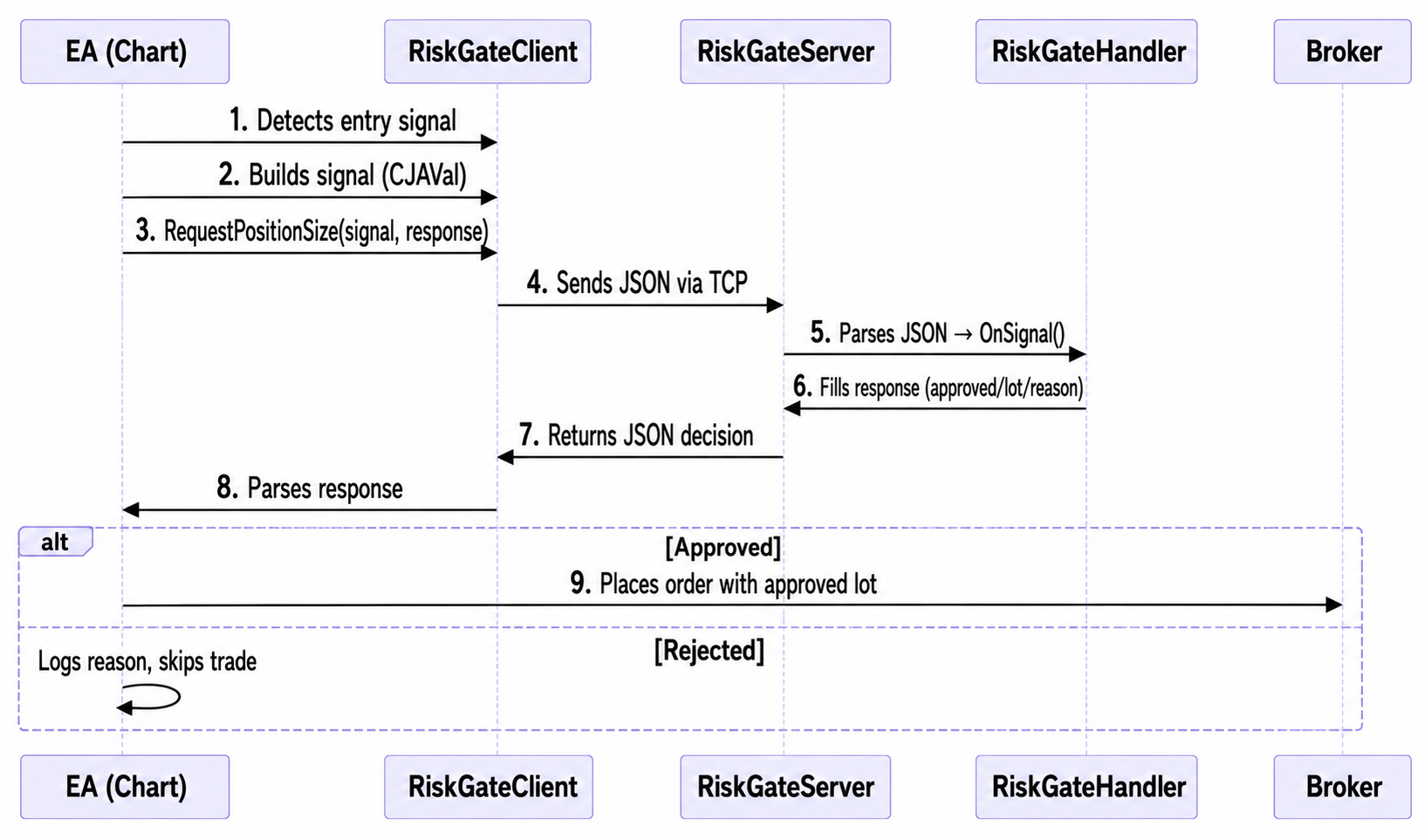
Here is a brief description of each numbered action:
EA (OnTick)
    1. Strategy detects a signal.
    2. Builds a JSON (with class CJAVal) signal: symbol, side, stop_loss, ...
    3. Calls client.RequestPositionSize(signal, response)

↓ JSON over TCP socket (localhost)

RiskGateServer
    4. Receives raw JSON from the EA.
    5. Parses it into a signal object and calls handler.OnSignal(signal, response).

RiskGateHandler
    6. Applies risk rules and populates response: approved, lot, reason.

↑ JSON over TCP socket (localhost)

RiskGateClient
    7. Receives and parses the response, returns it to the EA.

EA (OnTick)
   8. Reads response["approved"]:
       - true  → place order using response["lot"]
       - false → log response["reason"], trade rejected
From Diagram to Code. Each box in that flow maps directly to a class in the implementation.
RiskGateClient is the EA-side entry point. It is the only class an EA developer needs to interact with directly. Internally it wraps a TCP ClientSocket, handles serialization of the signal CJAVal to JSON, sends it with a message separator (\r\n\r\n), and waits for the server response within a configurable timeout (default 500ms). If no response arrives in time, or the connection is down, the client attempts to reconnect. It then applies the configured fallback policy: reject all trades (RISKGATE_FALLBACK_REJECT, the recommended default for prop-style accounts) or approve with a fixed lot (RISKGATE_FALLBACK_FIXED_LOT). The EA code never deals with sockets, timeouts or reconnection — it only calls the methods of RiskGateClient wherever it needs a risk decision.
RiskGateServer is the service-side counterpart. It runs a blocking accept loop inside an MQL5 Service, accepting up to 32 simultaneous EA connections. For each connected client, it reads incoming messages, strips the separator, deserializes the JSON into a signal CJAVal, creates an empty response CJAVal, and dispatches both to the handler via OnSignal(). Once OnSignal() returns, it serializes the response back to JSON and sends it to the EA over the same TCP connection. The server is not meant to be modified: you instantiate it, inject a logger and a handler, and call Run().
RiskGateHandler is the abstract base class that contains the single method you implement: OnSignal(CJAVal& signal, CJAVal& response). This is where all risk logic is implemented. The server calls it for every signal it receives, passing the parsed JSON signal and an empty response object. You populate the response with at least approved, lot and reason, and return. The server handles the rest. The handler also receives optional lifecycle callbacks — OnClientConnected() and OnClientDisconnected() — which are useful for maintaining per-client state or logging connection events.
We will implement OnSignal() with real risk rules later. For now, the important point is that the only concrete class you write on the server side inherits from RiskGateHandler. Everything else — TCP accept loop, message framing, JSON parsing, client pool management, logging — is handled by RiskGateServer internally.
Packages and transitive dependencies. The RiskGate architecture is implemented as a small set of MQL5 components, each hosted in its own Git repository and packaged for use with KnitPkg. Two of them are the main actors:
- riskgate: server-side infrastructure (RiskGateServer and RiskGateHandler)
- riskgate-ea: EA‑side client (RiskGateClient)
Both riskgate and riskgate-ea depend on three shared components:
- logger: structured logging
- sockets: TCP client/server sockets
- JAson: JSON for MQL5 (CJAVal and helpers by Artem Maltsev and other contributors, forked from the original repository)
All of these are ordinary Git repositories, and each of them is also exposed as a KnitPkg package. We'll see how to use these packages to create the server and the EA, whether you decide to use KnitPkg or not.
Minimal Implementation: Client/Server Wiring
Before writing any real risk logic, it is worth getting the skeleton running: a Service that listens for signals and a minimal EA that sends them. This confirms the communication channel is working and gives you a concrete starting point to extend. There are two ways to get there.
Option 1: Using KnitPkg (recommended).KnitPkg handles dependency resolution, header installation, and compilation. If you want to create your own project from scratch and have KnitPkg available, the full step-by-step tutorials are available here: Minimal server (RiskGateServer) and Minimal EA (RiskGateClient).
Each tutorial walks through project creation, adding and installing the required packages, and running the result. The main advantage of this path is that your project stays connected to the package ecosystem: running `kp install` (kp is the KnitPkg CLI) always pulls the correct versions of all dependencies (riskgate, riskgate-ea, sockets, logger, and JAson), and running `kp compile` regenerates BuildInfo.mqh so that version and metadata in the compiled binary always match the manifest. Upgrading a dependency in the future is a single command-line operation.
Note: For more details about KnitPkg and its package dependency ecosystem, see the Documentation page and this article.
Option 2: Using the Flat Files Directly. If you prefer not to use KnitPkg, you can download the attached pre-generated flat files and drop them directly into your MetaTrader 5 Data Folder. KnitPkg can generate "flat" versions of its headers, which are single self-contained files that inline all transitive dependencies. This means you do not need to install any toolchain. The files are organized as follows:
Server side:
- RiskGateHandlerDep_flat.mqh — a single flat header containing all server-side dependencies (riskgate, logger, sockets, JAson). This file is generated by KnitPkg and must not be edited.
- RiskgateHandler.mqh — the RiskGateHandler subclass where your risk rules live. This is the file you write and evolve. It includes RiskGateHandlerDep_flat.mqh and defines MyHandler with its OnSignal() implementation.
- RiskgateServiceExample.mq5 — the Service entry point. It includes RiskgateHandler.mqh and indirectly the flat dependency header, instantiates Logger, RiskGateServer, and MyHandler, and calls server.Run(). You can rename this file and adjust the properties, but the OnStart() body requires minimal changes.
- RiskgateEaExample_flat.mqh — a single flat header containing all EA-side dependencies (riskgate-ea, logger, sockets, JAson). This file is generated by KnitPkg and must not be edited.
- RiskgateEaExample.mq5 — the EA entry point. It includes RiskgateEaExample_flat.mqh, declares a global RiskGateClient instance pointing to localhost on port 5555, connects in OnInit(), disconnects in OnDeinit(), and sends a minimal signal every 30 ticks in OnTick(). This file is yours to rename and extend with your actual trading logic.
Place the server files under MQL5/Services/ and the EA files under MQL5/Experts/ in your MetaTrader 5 Data Folder, then open them in MetaEditor and compile normally. No external tools required.
What the Minimal Wiring Does. Regardless of which option you choose, the result is the same skeleton:
The Service starts, binds to TCP port 5555, and enters a blocking loop waiting for connections. When an EA connects and sends a signal, RiskGateServer deserializes the JSON, calls MyHandler.OnSignal(), serializes the response, and sends it back. In the minimal handler, OnSignal() always returns approved=true and lot=0.01 with no actual risk evaluation. That is intentional: the goal at this stage is only to confirm that the channel works end to end. Here is a screenshot showing MetaTrader running the Service; see the logs in the Experts tab:
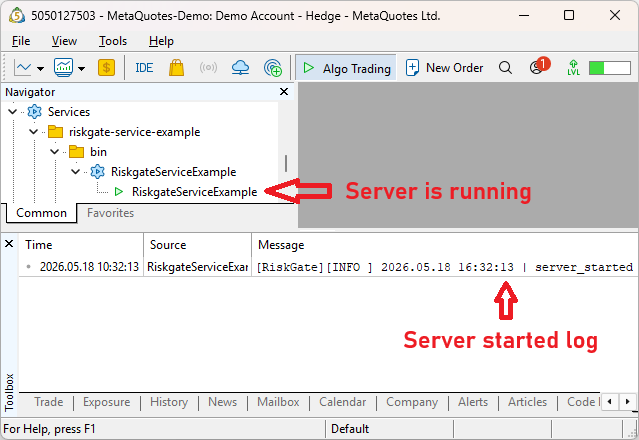
The EA connects to the Service in OnInit(). Every 30 ticks it builds a CJAVal signal with symbol, side, and stop_loss, calls client.RequestPositionSize(signal, response), and prints the three response fields — approved, lot, and reason — to the Experts tab. If the Service is offline, RiskGateClient applies the fallback policy (reject by default) and returns false, so the EA always behaves predictably regardless of the Service state. See below the Minimal EA running over EURUSD and GBPUSD in parallel while making requests to the server:

Once you see the log entries confirming the round trip — signal sent, response received, approved=true, lot=0.01 — the infrastructure is working. From this point, all further development happens in two places only: OnSignal() on the server side for risk logic, and OnTick() on the EA side for trading logic. The communication layer between them does not need to change.
Real risk example
The minimal implementation from the previous section confirms the communication channel works end to end, but the handler always returns approved=true and lot=0.01 regardless of the account state. That is not risk management — it is just wiring. In this section we replace that placeholder with a handler that applies real account-level rules, and wire it to an EA that sends meaningful signals based on actual market data.
The Risk Rules. Before writing a single line of code, it is worth stating the rules explicitly. The following set is representative of a prop-style trading environment and covers the most common failure modes described earlier in this article:
- Maximum daily loss: 2% of account core equity. If the account has lost 2% or more today (realized), no new trade is approved for any symbol or any strategy until the next trading day.
- Maximum risk per trade: 0.5% of account equity. Each approved trade may expose at most 0.5% of equity to loss on its stop.
- Maximum open positions per symbol: 2. If there are already two or more open positions on the requested symbol, the trade is rejected.
- Maximum daily trades: 6. The handler tracks how many trades have been opened today (across all EAs). When the count reaches six, further signals are blocked until the next trading day.
- 50% lot reduction for correlated exposure: When the incoming signal belongs to a correlation group identified by its magic number and the account already holds an open position from the same group, the approved lot is automatically halved before being returned to the EA.
- Offline fallback: reject all trades. If the Service is unreachable, no trade is placed.
These six rules are arbitrary. The daily loss cap prevents one or more EAs from continuing to trade after the account has already had a bad day. The per‑symbol limit prevents position stacking on the same instrument. The daily trade cap (max 6 trades) puts a hard ceiling on how many times the account can "try again" in one session. The 50% lot reduction for correlated exposure ensures that when a new signal arrives from a group that is already active (same magic), it adds only incremental risk instead of doubling the bet.
Extending the Minimal Server. The riskgate-service-realcase repository shows how to extend the minimal skeleton from the previous section to implement these rules. The project structure remains the same: RiskgateServiceRealCase.mq5 is the Service entry point and does not change at all; all the risk logic lives in RiskgateHandler.mqh inside the MyHandler subclass.
Note: if you're using KnitPkg, run `kp get mql5 @douglasrechia/riskgate-service-realcase` to download and build the service in a one-shot command. See the project README for more installation instructions.
The MyHandler.OnSignal() method in the real example follows a clear sequential structure. Each rule is evaluated in order, and the first rule that fails rejects the trade immediately with an explicit reason:
   //+------------------------------------------------------------------+
   //| Entry point called by RiskGateServer for every incoming signal.  |
   //| Runs the full risk pipeline and writes approved/lot/reason into  |
   //| response.                                                        |
   //+------------------------------------------------------------------+
   void              OnSignal(CJAVal& signal, CJAVal& response) override
     {
      // 1. Signal validation
      if(!signal.HasKey("symbol") || !signal.HasKey("sl_points") || !signal.HasKey("magic"))
        {
         response["approved"] = false;
         response["lot"]      = 0.0;
         response["reason"]   = "invalid_signal";
         return;
        }

      string symbol   = signal["symbol"].ToStr();
      double slPoints = signal["sl_points"].ToDbl();
      long   magic    = signal["magic"].ToInt();

      if(symbol == "" || slPoints <= 0)
        {
         response["approved"] = false;
         response["lot"]      = 0.0;
         response["reason"]   = "invalid_signal";
         return;
        }

      // 2. Compute stats for today
      this.ComputeDayStats();

      // 3. Max daily positions limit
      if(IsDailyMaxPositionsReached())
        {
         response["approved"] = false;
         response["lot"]      = 0.0;
         response["reason"]   = "daily_max_positions_limit";
         return;
        }

      // 4. Daily loss limit
      if(IsDailyLossBreached())
        {
         response["approved"] = false;
         response["lot"]      = 0.0;
         response["reason"]   = "daily_loss_limit";
         return;
        }

      // 5. Max positions per symbol + correlated exposure
      int  countBySymbol;
      bool correlatedExposure;
      ScanPositions(symbol, magic, countBySymbol, correlatedExposure);

      if(countBySymbol >= 2)
        {
         response["approved"] = false;
         response["lot"]      = 0.0;
         response["reason"]   = "max_positions_reached";
         return;
        }

      // 6. Lot from SL + % risk, with correlated exposure reduction
      double lot = CalcLot(symbol, slPoints, correlatedExposure);
      if(lot <= 0)
        {
         response["approved"] = false;
         response["lot"]      = 0.0;
         response["reason"]   = "lot_too_small";
         return;
        }

      // 5. Approved
      response["approved"] = true;
      response["lot"]      = lot;
      response["reason"]   = "";
     }
Each check reads from a helper injected into the handler: m_account wraps account balance, m_positions wraps position enumeration, m_history handles deals history, and m_symbolInfo provides the needed information for each instrument. These helpers are defined as interfaces, not as direct calls to MQL5 native functions. That design decision is not incidental.
Unit Testing the Handler. MetaTrader's Strategy Tester cannot run MQL5 Services. There is no built-in way to launch a RiskGateServer in a backtest environment, feed it signals, and observe its decisions in a controlled scenario. If your handler calls AccountInfoDouble() and PositionSelect() directly, it becomes hard to test. You cannot easily simulate specific conditions (e.g., 1.9% daily loss) without a live account in the required state.
The riskgate-service-realcase project addresses this with a unit test suite included alongside the handler code. The key that makes this possible is the indirection already mentioned: every call to a native MQL5 function is wrapped behind a simple interface. For example: IAccountInfo exposes Balance(); IOpenPositions exposes Total(), GetSymbol() and GetMagic() for every open position. The handler depends only on these interfaces, not on the underlying native calls.
In the unit tests, mock implementations of those interfaces replace the real ones. A mock MockAccountInfo can return any equity value. A mock MockPositioncan report exactly two open EURUSD positions. With these mocks injected, the tests exercise OnSignal() directly under controlled conditions. Here is an example:
//+------------------------------------------------------------------+
//| Verifies that MyHandler approves a trade when closed deals sum   |
//| to a daily loss below the 2% threshold (-1.77% in this case).    |
//+------------------------------------------------------------------+
bool Test_ApprovedTrade_DailyLossUnder2Percent()
  {
// 3 x -60 = -180; m_dayPnl = -180/10180*100 ≈ -1.77% → under threshold
   MockTradeHistory* history = new MockTradeHistory();
   history.AddDeal(1, true, -60.0);
   history.AddDeal(2, true, -60.0);
   history.AddDeal(3, true, -60.0);

   MyHandler* handler = BuildHandler(history, new MockOpenPositions());
   CJAVal signal, response;
   BuildSignal(signal);
   handler.OnSignal(signal, response);
   delete handler;

   return response["approved"].ToBool() &&
          MathAbs(response["lot"].ToDbl() - CalcExpectedLot(TEST_BALANCE, TEST_SL)) < SymbolInfoDouble(TEST_SYMBOL, SYMBOL_VOLUME_STEP);
  }
This pattern allows you to cover every branch of OnSignal() in isolation: the daily loss gate, the per-symbol limit, the total risk cap, and the lot sizing path. Because the handler is just a class with injected dependencies, the tests are straightforward to write and run directly in MetaEditor without any special infrastructure. For a component that governs every trade on a live account, this kind of testability is not a bonus — it is a requirement.
The EA Side: ATR-Based Signals with RiskGateClient. The companion EA project demonstrates how to build a meaningful signal and send it to the Service. The EA monitors four currency pairs (EURUSD, GBPUSD, AUDUSD, NZDUSD), organized into two correlation groups: EURUSD and GBPUSD share magic number 1000, while AUDUSD and NZDUSD share magic number 1001. This magic number is included in the signal so that the handler can apply per-group rules for correlated assets.
Note: if you're using KnitPkg, run `kp get mql5 @douglasrechia/riskgate-ea-realcase` to download and build the EA in a one-shot command. See the project README for more installation instructions.
The communication layer is handled entirely by RiskGateClient, exactly as in the minimal example. What changes is the content of the signal in RiskgateEaRealCase.mq5. Instead of a fixed stop_loss price, the EA computes a dynamic stop loss distance in points using ATR(14) multiplied by a factor of 4. This computation is performed on each new bar using the @douglasrechia/calc package, which provides a clean helper and ATR utilities without requiring the EA to implement the arithmetic manually. Bar detection is handled by the BarWatcher class from the @douglasrechia/bar package, which fires an event on each new bar regardless of which symbol or timeframe the EA is attached to, keeping the OnTick() body free of bar-detection boilerplate.
The signal sent to the Service on each new bar looks like this:
{
  "symbol":    "EURUSD",
  "sl_points": 120,
  "magic":     1000
}
The sl_points value is what the server uses to compute the lot size: it knows the symbol, it knows the account equity, it knows the risk percentage, and with the stop distance in points it can compute the exact lot that risks exactly 0.5% of equity on that trade. The EA does not need to know the lot sizing formula; it only needs to describe the trade it wants to take. If the server approves, the EA reads response["lot"] and places the order using that value as the position size, and sl_points * _Point as the stop loss distance.In this example, the entry logic is intentionally simple: the EA requests permission on every new bar. In a real system you would replace this with your actual entry conditions (a pattern, an indicator signal, a time filter, or any combination). The infrastructure — BarWatcher for bar detection, calc for ATR computation, RiskGateClient for the server conversation — remains unchanged regardless of what entry logic you plug in. That is the point: once the wiring is in place, you can evolve the signal generation logic independently from the risk governance logic, and neither side needs to know how the other one works.
Extending RiskGate for More Advanced Risk Rules
The real-case example already showed how to enforce daily loss, per‑trade risk, per‑symbol limits and basic correlation-based position sizing. This section sketches how you can push RiskGate further, building on the same handler structure without changing your EAs.
Correlation Management. The real-case example already applies a simple correlation rule: EAs that belong to the same correlation group share a magic number, and the handler halves the lot size when there is already open exposure for that magic. This alone makes a big difference for pairs like EURUSD/GBPUSD or AUDUSD/NZDUSD, where you often don’t want two full‑sized positions in the same direction at the same time.
Two natural ways to extend this design are: first, move from a fixed "divide by 2" to a budget per group, expressed as "max group risk = X% of equity." The handler would compute current risk for that magic group, then either reject the new trade or scale its lot so the group stays within budget. Second, you can introduce a small static correlation table between symbols (or groups) and use it to compute a correlation‑weighted total exposure, not just a per‑group count. Both refinements keep the signal format unchanged (symbol + magic already sent by the EA) and are implemented entirely inside the handler.
Strategy‑Level Budgets. The real-case handler already enforces account‑level budgets; extending this to strategies is a natural next step. The pattern is:
- Add a strategy_id (or magic group) to the signal.
- Keep small per‑strategy counters/state in the handler: today’s realized loss, current open risk, number of open positions.
- Apply the same kinds of rules, but scoped to that id: max daily loss per strategy, max open risk per strategy, max open trades per strategy.
Because all signals, from all charts and EAs, flow through the same handler, these budgets apply consistently no matter where the strategy is attached. The EA only needs to provide a stable strategy_id; the rest is centralized.
Trade Ownership and Position Registry. For more advanced governance, you may want a clear view of "who owns what" on the account. This can be as simple as a small registry inside the handler keyed by ticket or (symbol, direction, magic), storing:
- strategy_id or group id,
- initial R (risk in currency or percent),
- original SL/TP and open time,
- optional tags (e.g. "news", "trend", "mean_reversion").
You can populate this registry by scanning current positions on each signal and inferring ownership from magic/strategy_id, or by extending your protocol so that EAs send lifecycle events ("open", "update", "close") alongside position requests. Once you have this map, you can implement rules like "max open positions per strategy", "no hedging between strategies on the same symbol", or "tighten limits after a series of losing trades for this strategy" — all in one place and with full context.
From Simple Checks to a Rule Pipeline. As you add these ideas, OnSignal naturally turns into a small rule pipeline: validate the signal; apply hard account‑level blockers; apply per‑strategy rules; apply portfolio‑level rules (groups, correlation); then compute position size if everything passes. Each rule can live in its own helper function, which keeps the code readable and, more importantly, testable. Your EAs still just send symbol/side/SL/strategy_id and obey approved/lot/reason; all of the sophistication remains encapsulated in the one component that sees every trade before it reaches the broker.
Operation considerations
Latency. RiskGate runs entirely inside the same MetaTrader 5 terminal as your EAs, using localhost TCP connections and small JSON messages. On a typical VPS or desktop, the end-to-end round trip — serialize, send, process on the Service, send back, deserialize — is usually well under a few milliseconds. For strategies running on M1, M5 or higher timeframes, this added latency is negligible. The main impact is that you must conceptually treat RequestPositionSize as part of your decision path: you request a size, wait for the answer, and then place the order. For ultra-low-latency strategies or tick scalping close to the feed, this overhead may be relevant, but such strategies rarely rely on MQL5 for execution in the first place.
Reliability and Failure Modes. Any centralized service becomes a single point of failure, so it is important to understand how RiskGate behaves in adverse conditions. If the Service is stopped, crashes, or the TCP connection is interrupted, RiskGateClient detects the disconnection, attempts to reconnect according to the configured interval and maximum attempts, and returns a false value from RequestPositionSize. In that case, it also fills the response object using the configured fallback policy, either rejecting trades by default (RISKGATE_FALLBACK_REJECT) or approving with a fixed lot (RISKGATE_FALLBACK_FIXED_LOT). For serious accounts and prop trading environments, the recommended setting is to reject trades when the Service is offline, making "no central risk, no trades" your baseline safety rule.
Security Considerations. The design presented here assumes a local deployment: EAs and the RiskGate Service run on the same terminal, and the server binds to a localhost port. In this setup, the attack surface is minimal and security concerns are mostly limited to standard OS-level hardening and VPS hygiene. If you decide to expose RiskGateServer beyond localhost, you should treat it like any other internal TCP service: limit access with firewall rules, avoid binding to public interfaces, and, if cross-machine communication is truly required, place a proxy or gateway in front of it that can handle authentication, encryption, and rate limiting. The current RiskGate packages intentionally keep networking simple and focused on local usage; any remote exposure should be done with additional infrastructure and care.
Logging and Monitoring. RiskGate is designed to be observable from day one through logger. On the Service side, you can log every connection, disconnection, incoming signal, and risk decision, optionally writing everything to a file for later analysis. This makes it straightforward to answer questions like "Why was this trade rejected?" or "How many trades did Strategy A send today?" On the EA side, RiskGateClient can log when offline fallbacks are used, how often reconnections occur, and what decisions are being received from the Service. Together, these logs form an audit trail of your risk engine’s behavior. For production use, it is worth standardizing on a log format and retention policy so you can debug incidents and evaluate whether your risk rules behave as intended under real market conditions.
When This Architecture Is Worth Using - And When It's Overkill
The Sweet Spot: Diversification with Centralized Safety. RiskGate shines when you are actively pursuing portfolio diversification – running multiple independent strategies on a single account to smooth equity curves and reduce volatility. This architecture becomes essential when: - 3+ strategies coexist on one account, especially if they trade correlated instruments (e.g., EURUSD and GBPUSD systems).
- Risk constraints are non-negotiable (e.g., prop firm drawdown limits, daily loss caps, or regulatory exposure ceilings).
- Strategies have varying risk profiles (e.g., a scalper risking 0.3% per trade alongside a swing trader risking 1.5%).
Here, RiskGate transforms from "nice to have" to critical infrastructure. It’s the only way to:
- Prevent invisible correlation (e.g., three "uncorrelated" strategies simultaneously longing USD).
- Enforce true account-wide stop-losses (not per-EA illusions).
- Dynamically resize positions when exposure accumulates (e.g., "Reduce EURUSD trade by 50% due to existing GBPUSD exposure").
When Simplicity Wins: Cases for Decentralized Risk. Conversely, this architecture is overkill if:
- You run a single strategy per account. Local risk management suffices.
- All strategies are micro-risk (e.g., fixed 0.01 lots with 0.1% equity risk). The "stacking" effect is negligible.
- Manual oversight is feasible (e.g., one active strategy with infrequent trades).
- Backtesting is your primary focus. RiskGate’s real-time constraints complicate Strategy Tester workflows.
The Complexity Tradeoff. RiskGate introduces operational overhead:
- A single point of failure (if the service crashes, trades halt).
- Testing complexity (unit/integration tests for risk rules are mandatory).
- Latency sensitivity (high-frequency strategies may time out).
If your setup lacks these challenges, decentralized risk management is simpler and equally effective.
Conclusion
We started from a situation that is very common in real trading: several EAs running on the same account, each one with its own idea of what "risk management" means, and no single place that truly understands the portfolio as a whole. In that world, account‑level limits, correlation constraints, and strategy‑level controls are hard to implement and even harder to trust. You can bolt on scripts, glue EAs together with global variables, or add an external Python process, but the result is usually fragile and uncomfortable to operate.
The architecture presented in this article moves you to a different place. Instead of every EA trying to manage risk on its own, you have one RiskGate Service that centralizes risk decisions for all strategies on an account. EAs become signal generators: they describe the trade they intend to make, in JSON, and ask the Service "is this allowed, and with what lot size?" The Service answers with a structured decision, and only then does the EA actually talk to the broker.
Practically, you now have a concrete set of components that make this architecture straightforward to implement: package sockets for TCP communication, logger for structured logs, riskgate for the server and handler base class, and riskgate-ea for the EA‑side client. You no longer need to design your own socket protocol, build your own reconnection logic, or sprinkle ad‑hoc risk checks into every EA. You can build your own RiskGate handler and EA either by using the provided attached files or the KnitPkg CLI.
From here, your next steps are incremental. Start by writing a simple RiskGateHandler that enforces basic rules like fixed risk per trade and a daily loss cap. Wire one EA to use RiskGateClient instead of deciding its own lot size. Once that is stable, gradually migrate other EAs to the same Service and evolve your handler with more advanced rules: per‑strategy limits, correlation‑aware exposure, or a position registry that tracks who owns what across the account.
The important mental shift is this: EAs are no longer isolated programs trying to protect themselves; they are clients of a single, central risk engine that protects the account. That engine runs inside MetaTrader 5, speaks MQL5, and can evolve with your understanding of risk—without forcing you to rebuild your whole infrastructure every time you add a new strategy.
Attachments
The attached source files form a minimal working skeleton of the RiskGate server (Service) and client (EA). You can use them as a starting point to build your own projects even if you do not use KnitPkg at all: just edit the handler and EA entry points, and leave the flat dependency headers untouched. If you prefer full KnitPkg projects instead of flat files, both sides are also available in the registry: the server and the EA.
| File name | Side | Role | Editable? |
|---|---|---|---|
| RiskGateHandlerDep_flat.mqh | Server | Single flat header with all server‑side dependencies (riskgate, logger, sockets, JAson). Used by the handler. | No – generated by KnitPkg |
| RiskGateHandler.mqh | Server | Your RiskGateHandler subclass: where all risk rules live, including OnSignal() and any helpers. | Yes – main place for server risk logic |
| RiskGateServiceExample.mq5 | Server | Service entry point: includes the handler, creates Logger and RiskGateServer, wires MyHandler, calls Run(). | Yes – usually only minimal changes in OnStart() |
| RiskGateEaExample_flat.mqh | EA | Single flat header with all EA‑side dependencies (riskgate-ea, logger, sockets, JAson). Used by the EA. | No – generated by KnitPkg |
| RiskGateEaExample.mq5 | EA | EA entry point: includes the flat header, instantiates RiskGateClient, connects/disconnects, sends minimal signals. | Yes – extend/rename with your strategy logic |
| MQL5.zip | Zip | Archive that includes all the above; unzip it directly into your MetaTrader 5 data folder | No - Zip archive |
Warning: All rights to these materials are reserved by MetaQuotes Ltd. Copying or reprinting of these materials in whole or in part is prohibited.
This article was written by a user of the site and reflects their personal views. MetaQuotes Ltd is not responsible for the accuracy of the information presented, nor for any consequences resulting from the use of the solutions, strategies or recommendations described.

 Determining Fair Exchange Rates Using PPP and IMF Data
 Building an Object-Oriented ONNX Inference Engine in MQL5
 Beyond GARCH (Part II): Measuring the Fractal Dimension of Markets
 Cross Recurrence Quantification Analysis (CRQA) in MQL5: Building a Complete Analysis Library

- Free trading apps
- Over 8,000 signals for copying
- Economic news for exploring financial markets
You agree to website policy and terms of use
This is a very interesting initiative and perspective for the future of Expert Advisors and algorithmic trading development.
I believe ideas like this can significantly change how EAs are designed, optimized, and adapted to market conditions in the future.
The possibility of making trading systems more adaptive, intelligent, and context-aware is something that really caught my attention. It feels like the next evolution beyond traditional static-rule EAs.
I’m very interested in experimenting further with this concept and exploring how it could be integrated into advanced ATR logic, market structure analysis, volatility filtering, and dynamic trade management systems.
One thing I’m still curious about:
How do you see the long-term balance between adaptive/self-learning systems and the need for stability, consistency, and overfitting prevention in live trading environments?
Excellent work and very inspiring article. I think this kind of research and initiative can open a new direction for the MQL5 ecosystem and the future generation of intelligent trading systems.
Regards
This is a very interesting initiative and perspective for the future of Expert Advisors and algorithmic trading development.
I believe ideas like this can significantly change how EAs are designed, optimized, and adapted to market conditions in the future.
The possibility of making trading systems more adaptive, intelligent, and context-aware is something that really caught my attention. It feels like the next evolution beyond traditional static-rule EAs.
I’m very interested in experimenting further with this concept and exploring how it could be integrated into advanced ATR logic, market structure analysis, volatility filtering, and dynamic trade management systems.
One thing I’m still curious about:
How do you see the long-term balance between adaptive/self-learning systems and the need for stability, consistency, and overfitting prevention in live trading environments?
Excellent work and very inspiring article. I think this kind of research and initiative can open a new direction for the MQL5 ecosystem and the future generation of intelligent trading systems.
Regards