

Engineering Trading Discipline into Code (Part 2): Building a Daily Trade Limit Enforcer for All Trades in MQL5
 8 951
8 951
 0
0

Contents
- Introduction
- Understanding the Discipline Logic
- System Design Overview
- MQL5 Implementation
- Testing
- Conclusion
Introduction
Limiting the number of trades per day is one of the simplest risk control rules a trader can define. In practice, however, it is also one of the easiest to violate. This applies not only to discretionary traders, but also to accounts where several Expert Advisors operate simultaneously across different symbols. A rule such as “no more than N entries per day” quickly loses effectiveness when market pressure increases, when performance fluctuates, or when multiple strategies act independently without coordination.
The core issue is not the absence of discipline, but the absence of enforcement at the account level. MT5 does not natively provide a centralized mechanism that defines what qualifies as an entry, how a trading day is measured, or what must occur once a predefined limit is reached. Without precise definitions—whether an entry is based on DEAL_ENTRY_IN, positions, or orders; whether the session resets at server midnight or at a custom time; whether the control applies across all symbols—the rule remains conceptual rather than structural.
This article develops a Daily Trade Limit Enforcer in MQL5 designed to operate at the account level. The system counts confirmed entry deals within a configurable session window, monitors trading activity across all symbols, and enforces the limit automatically. Once the defined threshold is reached, new pending orders are removed and newly opened positions are closed, while existing positions established before the limit remain unaffected.
The discussion focuses on translating a behavioral risk rule into a technically enforced constraint. The architecture, implementation details, and testing procedures are presented in a modular and reproducible manner. The complete source code—including the shared logic layer, dashboard component, and enforcement Expert Advisor—is provided at the end of the article.
Understanding the Discipline Logic
Discipline is widely discussed in trading literature, yet it remains one of the most difficult qualities to sustain in practice. While it is easy to define rules, document them, and even encourage others to follow them, applying those same rules consistently under live market conditions presents a very different challenge. Trading discipline deteriorates not because traders forget their rules, but because emotional and cognitive pressure accumulates over time. Each decision slightly alters perception, confidence, and risk tolerance. As a result, behavior gradually drifts away from the original plan, often without immediate awareness.
Factors That Affect Trading Discipline
Several factors contribute directly to the erosion of discipline during trading sessions. These include, but are not limited to:
- Emotional amplification caused by consecutive wins or losses
- Time pressure, particularly during volatile market phases
- Outcome fixation, where recent results dominate decision-making
- Recovery bias, the urge to offset losses within the same session
- False confidence, often triggered by short-term success
Each of these factors influences behavior in different ways, yet they share a common consequence: rule adherence weakens at the most critical moments. Importantly, these pressures are not limited to inexperienced participants. Even seasoned professionals encounter periods where discipline slips—particularly during prolonged sessions or under unusual market conditions. Experience may reduce the frequency of such lapses, but it does not eliminate vulnerability.
Because these psychological pressures can override conscious awareness, a system built solely on warnings may fail precisely when it is needed most. This is why the logic extends beyond passive monitoring to active enforcement. Once the predefined limit is reached, the system intervenes automatically, removing the ability to act on impulse and preserving structural discipline.
Automating Trading Discipline
Given these realities, relying exclusively on self-control becomes insufficient. Human psychology is not designed for prolonged exposure to uncertainty, rapid feedback, and financial risk. This is precisely why automation plays a crucial role in maintaining consistency.
Automating discipline does not mean surrendering control to an algorithm. Instead, it means transferring monitoring, counting, and signaling responsibilities to a system that remains unaffected by emotion. By externalizing these functions, the trader reduces cognitive load and decision fatigue. This approach reframes discipline as a structural safeguard rather than a personal struggle.
Discipline Logic in This System
The daily trade limit system is built around a two‑layer logic: awareness through real‑time feedback and enforcement through automated intervention. Its design avoids complexity and keeps state transitions transparent, while adding a critical safety net when the limit is breached.
In operation, the system carries out the following functions:
1. Tracks the total number of trades executed within a defined trading day across the entire account (any symbol, manual or EA).2. Compares that count against a user‑defined maximum.
3.Classifies the current trading state based on proximity to the limit:
- Allowed—trading is within the limit.
- Caution—the remaining trades have dropped to or below a warning threshold.
- Limit Reached—the maximum number of trades has been executed.
4. Visually and verbally communicates the current state to the trader through a color‑coded dashboard and optional alerts (pop‑up, push, sound).
5. Enforces the limit by actively blocking any new trade once the “Limit Reached” state is entered:
- Any new pending order (placed after the limit is reached) is immediately deleted.
- Any newly opened position (whether by EA or manually) is immediately closed.
- Existing positions that were opened before the limit was reached remain untouched–the system only prevents additional exposure.
This two‑layer approach ensures that the trader is always aware of their status, but even if awareness falters under pressure, the structural enforcement prevents further overtrading. The logic can be visualized as follows:
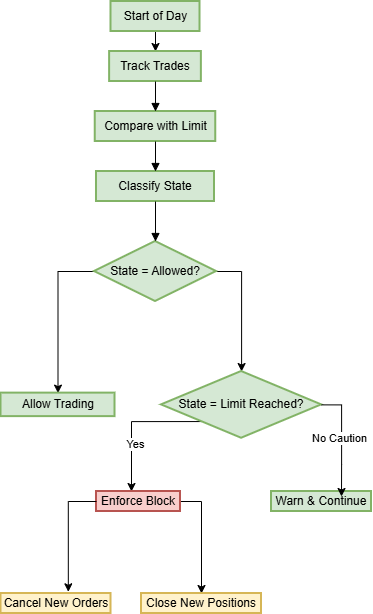
Figure 1: Decision flow from daily start to enforcement
This flow illustrates how the system continuously tracks executed trades, compares them against the predefined daily limit, and classifies the current trading state. The process begins at the start of the trading day, where all trades across the account are monitored. After each update, the system evaluates whether trading remains within the allowed threshold.
If the state is allowed, trading continues without restriction. When the system detects that the limit is approaching but not yet reached, it transitions into a caution state, issuing warnings while still permitting activity. This raises early awareness without immediate restriction.
Once the daily limit is reached, the system transitions into the Limit Reached state. At this stage, enforcement is no longer informational but active: new pending orders are cancelled and newly opened positions are immediately closed, while previously existing positions remain unaffected.
This structured progression—from allowed, to caution, to enforced restriction—mirrors practical control systems where monitoring leads to classification, and classification determines action. The objective is not only to inform, but to intervene decisively once predefined boundaries are exceeded.
System Design Overview
Before examining the code in detail, it is important to understand the overall architecture of the daily trade limit enforcer. Instead of building a single monolithic Expert Advisor, the system is deliberately divided into three independent but cooperating components.
This modular approach ensures that each component has a clearly defined responsibility and can be modified, replaced, or extended without disrupting the others. Communication between components is handled through terminal global variables, which function as a shared memory layer accessible to any MQL5 program.
The three components are as follows:
1. Shared Library—DailyTradeLimit.mqh
This include file contains the core logic of the system. It is responsible for:
- Counting trades executed during the current trading day
- Determining the active trading day based on the configured start time
- Calculating remaining trades
- Classifying the trading state (Allowed / Caution / Limit Reached)
It exposes a set of lightweight functions such as IsTradingAllowed(), TradesToday(), and GetState(), which can be called by any EA or indicator.
Placing the logic inside a shared library guarantees that every component relies on the same calculation rules and consistent data, eliminating duplication and preventing logical drift between modules.
2. Dashboard Indicator—DailyTradeLimitDashboard.mq5
The dashboard acts as the user interface layer. When attached to a chart, it:
- Reads user-defined inputs (daily limit, start time, amber threshold, alert preferences)
- Writes these settings into global variables
- Displays a color-coded panel showing:
- Trades executed today
- Remaining trades
- Current state
The dashboard refreshes every second and immediately after trade events, ensuring real-time visibility. It can also generate pop-up, push, or sound alerts when the trading state changes. Its role is awareness and transparency.
3. Enforcer EA—DailyTradeLimitEnforcer.mq5
The Enforcer EA runs continuously in the background as the enforcement layer. It reads the same global variables defined by the dashboard and monitors all trading activity across the entire account. Whenever a new trade is detected, it checks whether the daily limit has already been reached.
If the limit is exceeded, the EA immediately
- Cancels any newly placed pending order
- Closes any newly opened position
This applies regardless of whether the trade was initiated manually or by another EA. Crucially, positions opened before the limit was reached remain untouched. The system prevents additional exposure—it does not interfere retroactively.
Communication via Global Variables
All three components rely on the following shared global variables:
- DTL_LIMIT—Maximum trades allowed per day (stored as a double but treated as an integer).
- DTL_START_TIME—Trading day start time encoded as HHMM (e.g., 900 for 09:00).
- DTL_AMBER—Threshold for the caution state (remaining trades ≤ this value).
The dashboard writes these values during initialization. Both the library and the enforcer read them whenever recalculation is required. Because the trade-counting logic resides in the shared library and uses periodic refresh logic, all components operate on the same synchronized data state.
The diagram below illustrates the interaction flow between the dashboard, shared library, and enforcement EA.
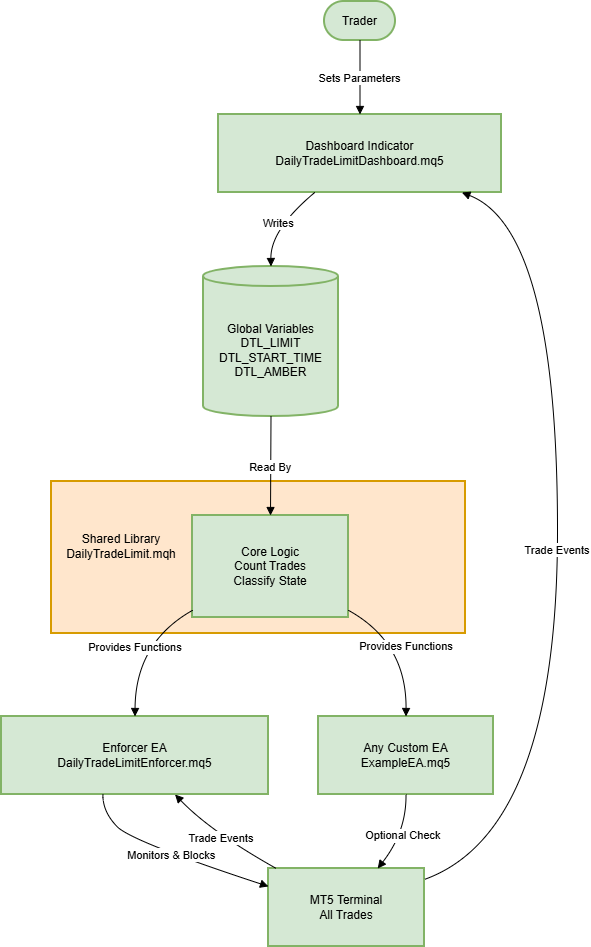
Figure 2: Interaction flow
Why This Design?
Separating the system into three cooperating modules provides several structural advantages:
| Advantage | Explanation |
|---|---|
| Reusability | Any EA can include the shared library and voluntarily check IsTradingAllowed(). Even if it does not, the Enforcer EA still guarantees compliance. |
| Independence | The dashboard and enforcer can run on separate charts. Neither interferes with other EAs or manual execution workflows. |
| Clarity | Each component follows a single-responsibility principle, making the system easier to understand, test, and maintain. |
| Extensibility | Additional constraints—such as daily profit caps, drawdown limits, or time-based trading windows—can be implemented by extending the shared library while preserving the same architectural pattern. |
With this architectural foundation established, we now move to the step-by-step implementation of each component.
MQL5 Implementation
In this section, we move step by step through the practical process of translating the discipline framework into fully functional MQL5 code. The goal is not simply to count trades, but to engineer a system that is stable, readable, and adaptable under live conditions.
Development begins in the MetaEditor environment, where three separate files are created—each assigned a clearly defined responsibility. From the outset, strict separation is maintained between configuration inputs, state management, calculation logic, and user interface elements. This structural clarity ensures that the system remains modular, testable, and easy to extend as additional constraints are introduced later.
A) DailyTradeLimit.mqh—The Shared Library
- Time Conversion Utilities
The library provides TimeToInt and IntToTime to bridge human-friendly time input with the terminal’s storage format. TimeToInt converts a string like "09:00" into an integer, 900, which is convenient for saving in a terminal global variable. IntToTime performs the reverse, turning 900 back into "09:00" for display or processing. This encoding keeps configuration lightweight while remaining easy to interpret.
//+------------------------------------------------------------------+
//| Convert "HH:MM" to HHMM (e.g., "09:00" -> 900)                   |
//+------------------------------------------------------------------+
int TimeToInt(string timeStr)
  {
   string parts[];
   if(StringSplit(timeStr,':',parts)!=2)
      return 0;
   int h=(int)StringToInteger(parts[0]);
   int m=(int)StringToInteger(parts[1]);
   return h*100+m;
  }
//+------------------------------------------------------------------+

//+------------------------------------------------------------------+
//| Convert HHMM to "HH:MM"                                           |
//+------------------------------------------------------------------+
string IntToTime(int value)
  {
   int h=value/100;
   int m=value%100;
   return StringFormat("%02d:%02d",h,m);
  }
//+------------------------------------------------------------------+
- Parameter Retrieval
Configuration is read from terminal global variables via GetParamLimit, GetParamStartTime, and GetParamAmber. Each function reads its corresponding global (DTL_LIMIT, DTL_START_TIME, DTL_AMBER) and falls back to a sensible default if the global isn’t set. This ensures that all components—dashboard and enforcer—share the same configuration source without duplicating logic.
//+------------------------------------------------------------------+
//| Get the daily trade limit (max trades per day)                   |
//+------------------------------------------------------------------+
int GetParamLimit()
  {
   if(GlobalVariableCheck("DTL_LIMIT"))
      return (int)GlobalVariableGet("DTL_LIMIT");
   return DEFAULT_LIMIT;
  }
//+------------------------------------------------------------------+

//+------------------------------------------------------------------+
//| Get the configured start time as a string                        |
//+------------------------------------------------------------------+
string GetParamStartTime()
  {
   if(GlobalVariableCheck("DTL_START_TIME"))
     {
      int t=(int)GlobalVariableGet("DTL_START_TIME");
      return IntToTime(t);
     }
   return DEFAULT_START_TIME;
  }
//+------------------------------------------------------------------+

//+------------------------------------------------------------------+
//| Get the amber threshold (remaining trades before caution)        |
//+------------------------------------------------------------------+
int GetParamAmber()
  {
   if(GlobalVariableCheck("DTL_AMBER"))
      return (int)GlobalVariableGet("DTL_AMBER");
   return DEFAULT_AMBER;
  }
//+------------------------------------------------------------------+
- Time Calculation
ParseTime interprets an "HH:MM" string into separate hour and minute integers, which GetDayStart uses to anchor the current trading day. GetDayStart compares the broker time to the configured start time, and, if the current time is before today’s start, it uses yesterday as the anchor; otherwise, today is used. This precise calculation guarantees that the daily trade count resets at the correct moment across different broker time zones.
//+------------------------------------------------------------------+
//| Parse "HH:MM" into hour and minute integers                      |
//+------------------------------------------------------------------+
bool ParseTime(string txt,int &h,int &m)
  {
   string parts[];
   if(StringSplit(txt,':',parts)<2)
      return false;
   h=(int)StringToInteger(parts[0]);
   m=(int)StringToInteger(parts[1]);
   return (h>=0 && h<=23 && m>=0 && m<=59);
  }
//+------------------------------------------------------------------+

//+------------------------------------------------------------------+
//| Calculate the start datetime of the current trading day          |
//+------------------------------------------------------------------+
datetime GetDayStart(datetime now,string startTime)
  {
   int h=0,m=0;
   if(!ParseTime(startTime,h,m))
     {
      h=0;
      m=0;
     }
   MqlDateTime t;
   TimeToStruct(now,t);

   //--- If current time is before today's start, use yesterday
   if(t.hour<h || (t.hour==h && t.min<m))
      now-=86400;

   TimeToStruct(now,t);
   t.hour=h;
   t.min=m;
   t.sec=0;
   return StructToTime(t);
  }
//+------------------------------------------------------------------+
- Trade Counting
CountTrades tallies all deals with DEAL_ENTRY_IN since the computed day start by scanning the history within the day window. It uses HistorySelect to bound the search and iterates over deals to count those with DEAL_ENTRY_IN.
//+------------------------------------------------------------------+
//| Count trades (DEAL_ENTRY_IN) since a given datetime              |
//+------------------------------------------------------------------+
int CountTrades(datetime from)
  {
   datetime to=from+86400;
   if(!HistorySelect(from,to))
      return 0;

   int total=HistoryDealsTotal();
   int cnt=0;
   for(int i=0; i<total; i++)
     {
      ulong ticket=HistoryDealGetTicket(i);
      if(ticket>0 && HistoryDealGetInteger(ticket,DEAL_ENTRY)==DEAL_ENTRY_IN)
         cnt++;
     }
   return cnt;
  }
//+------------------------------------------------------------------+
- State Calculation
CalcState compares the number of trades against the daily limit and amber threshold, returning STATE_ALLOWED, STATE_CAUTION, or STATE_LIMIT. This provides a simple, consistent mapping from a numeric count to a clear trading state.
//+------------------------------------------------------------------+
//| Map the trade count to a state (allowed/caution/limit)           |
//+------------------------------------------------------------------+
ENUM_DTL_STATE CalcState(int trades,int limit,int amber)
  {
   if(trades>=limit)
      return STATE_LIMIT;
   if(limit-trades<=amber)
      return STATE_CAUTION;
   return STATE_ALLOWED;
  }
//+------------------------------------------------------------------+
- Cache Management
The library maintains internal cache variables for the last refresh time, day start, trades today, and current state. Refresh respects a one-second minimum interval to avoid frequent history scans; if the cache is stale, Refresh delegates to ForceRefresh, which performs a full recount and updates all cached values. ForceRefresh recalculates the day start, trades today, and state and stores the refresh timestamp. This caching balances responsiveness with performance.
//+------------------------------------------------------------------+
//| Cached refresh – only performs a full update every 1 second      |
//+------------------------------------------------------------------+
bool Refresh()
  {
   datetime now=TimeCurrent();
   if(now-s_lastRefresh<REFRESH_INTERVAL)
      return false;
   return ForceRefresh();
  }
//+------------------------------------------------------------------+

//+------------------------------------------------------------------+
//| Force a full recount and update all cache values                 |
//+------------------------------------------------------------------+
bool ForceRefresh()
  {
   datetime now=TimeCurrent();
   int limit=GetParamLimit();
   string st=GetParamStartTime();
   int amber=GetParamAmber();

   datetime newDayStart=GetDayStart(now,st);
   int newTrades=0;

   if(newDayStart!=s_dayStart)
     {
      s_dayStart=newDayStart;
      newTrades=CountTrades(s_dayStart);
     }
   else
     {
      newTrades=CountTrades(s_dayStart);
     }

   ENUM_DTL_STATE newState=CalcState(newTrades,limit,amber);
   bool changed=(newState!=s_state) || (newTrades!=s_tradesToday);

   s_tradesToday=newTrades;
   s_state=newState;
   s_lastRefresh=now;

   return changed;
  }
//+------------------------------------------------------------------+
- Global Parameter Setting
SetParameters stores the user’s input values into terminal globals (DTL_LIMIT, DTL_START_TIME, DTL_AMBER), ensuring all components read from the same source and behave consistently. It also resets the cache to force a fresh calculation on the next access.
//+------------------------------------------------------------------+
//| Store configuration into terminal globals                        |
//+------------------------------------------------------------------+
bool SetParameters(int limit,string startTime,int amber)
  {
   if(!GlobalVariableSet("DTL_LIMIT",limit))
      return false;
   int t=TimeToInt(startTime);
   if(!GlobalVariableSet("DTL_START_TIME",t))
      return false;
   if(!GlobalVariableSet("DTL_AMBER",amber))
      return false;
   s_lastRefresh=0; // force refresh next time
   return true;
  }
//+------------------------------------------------------------------+
B) DailyTradeLimitDashboard.mq5—The Visual Dashboard
- Initialization
The dashboard starts by including the shared library and exposing inputs that mirror the library’s defaults. On initialization, it calls DTL::SetParameters to propagate the user’s inputs into terminal globals, creates the visual panel, performs an initial refresh to populate the cache, and starts a 1-second timer to drive ongoing updates.
//+------------------------------------------------------------------+
//| Custom indicator initialization function                         |
//+------------------------------------------------------------------+
int OnInit()
  {
   //--- Propagate user inputs into globals
   DTL::SetParameters(InpDailyTradeLimit,InpDayStartTime,InpAmberRemainingTrades);

   //--- Build UI and prime data
   CreatePanel();
   DTL::Refresh();
   prevState=DTL::GetState();

   //--- Start timer for updates
   EventSetTimer(1);
   return(INIT_SUCCEEDED);
  }
//+------------------------------------------------------------------+
- CreatePanel()
CreatePanel builds a compact, self-contained panel on the chart. It first removes any existing objects that share the panel’s prefix to avoid clutter, then draws a background rectangle and four labels: TITLE, L1, L2, and L3. The panel’s layout is designed to be clear and legible, with colors chosen to reflect the trading state.
//+------------------------------------------------------------------+
//| Create the entire dashboard panel                                |
//+------------------------------------------------------------------+
void CreatePanel()
  {
   DeleteByPrefix(PREFIX);

   ObjectCreate(0,PREFIX+"BG",OBJ_RECTANGLE_LABEL,0,0,0);
   ObjectSetInteger(0,PREFIX+"BG",OBJPROP_CORNER,InpCorner);
   ObjectSetInteger(0,PREFIX+"BG",OBJPROP_XDISTANCE,InpX);
   ObjectSetInteger(0,PREFIX+"BG",OBJPROP_YDISTANCE,InpY);
   ObjectSetInteger(0,PREFIX+"BG",OBJPROP_XSIZE,InpWidth);
   ObjectSetInteger(0,PREFIX+"BG",OBJPROP_YSIZE,InpHeight);
   ObjectSetInteger(0,PREFIX+"BG",OBJPROP_BACK,false);
   ObjectSetInteger(0,PREFIX+"BG",OBJPROP_SELECTABLE,false);

   string labels[4]={"TITLE","L1","L2","L3"};
   int y[4]={8,32,52,78};

   for(int i=0; i<4; i++)
     {
      ObjectCreate(0,PREFIX+labels[i],OBJ_LABEL,0,0,0);
      ObjectSetInteger(0,PREFIX+labels[i],OBJPROP_CORNER,InpCorner);
      ObjectSetInteger(0,PREFIX+labels[i],OBJPROP_XDISTANCE,InpX+10);
      ObjectSetInteger(0,PREFIX+labels[i],OBJPROP_YDISTANCE,InpY+y[i]);
      ObjectSetInteger(0,PREFIX+labels[i],OBJPROP_COLOR,clrWhite);
      ObjectSetInteger(0,PREFIX+labels[i],OBJPROP_SELECTABLE,false);
     }

   ObjectSetInteger(0,PREFIX+"TITLE",OBJPROP_FONTSIZE,11);
   ObjectSetString(0,PREFIX+"TITLE",OBJPROP_TEXT,"DAILY TRADE LIMIT");

   ObjectSetInteger(0,PREFIX+"L1",OBJPROP_FONTSIZE,10);
   ObjectSetInteger(0,PREFIX+"L2",OBJPROP_FONTSIZE,10);
   ObjectSetInteger(0,PREFIX+"L3",OBJPROP_FONTSIZE,10);
  }
//+------------------------------------------------------------------+
- UpdatePanel()
UpdatePanel reads live data from the library using TradesToday, GetParamLimit, Remaining, and GetState, and updates the panel’s text lines accordingly. It also adjusts the background color to green for STATE_ALLOWED, orange for STATE_CAUTION, and maroon for STATE_LIMIT, providing an immediate visual cue of the current status.
//+------------------------------------------------------------------+
//| Refresh the panel's content with the latest state                |
//+------------------------------------------------------------------+
void UpdatePanel()
  {
   int trades=DTL::TradesToday();
   int limit=DTL::GetParamLimit();
   int remaining=DTL::Remaining();
   DTL::ENUM_DTL_STATE state=DTL::GetState();

   ObjectSetString(0,PREFIX+"L1",OBJPROP_TEXT,
                   StringFormat("Trades today: %d / %d",trades,limit));
   ObjectSetString(0,PREFIX+"L2",OBJPROP_TEXT,
                   StringFormat("Remaining today: %d",remaining));
   ObjectSetString(0,PREFIX+"L3",OBJPROP_TEXT,
                   StringFormat("STATUS: %s",DTL::StateToString(state)));

   color bg=clrNONE;
   switch(state)
     {
      case DTL::STATE_ALLOWED:
         bg=clrDarkGreen;
         break;
      case DTL::STATE_CAUTION:
         bg=clrOrange;
         break;
      case DTL::STATE_LIMIT:
         bg=clrMaroon;
         break;
     }
   ObjectSetInteger(0,PREFIX+"BG",OBJPROP_BGCOLOR,bg);
  }
//+------------------------------------------------------------------+
- Timer Handling (OnTimer)
OnTimer acts as the heartbeat of the dashboard. It calls Refresh to update the internal state, then UpdatePanel to refresh the display. If the state has changed and alerts are enabled, it emits a terminal alert, a push notification (if enabled), and optionally plays a sound to draw attention to the change.
//+------------------------------------------------------------------+
//| Timer event – updates the panel and triggers alerts              |
//+------------------------------------------------------------------+
void OnTimer()
  {
   bool changed=DTL::Refresh();
   UpdatePanel();

   if(changed && InpShowAlerts)
     {
      string msg;
      switch(DTL::GetState())
        {
         case DTL::STATE_ALLOWED:
            msg="Trading allowed: within daily trade limit.";
            break;
         case DTL::STATE_CAUTION:
            msg="Caution: approaching daily trade limit.";
            break;
         case DTL::STATE_LIMIT:
            msg="Trading limit reached: no trades remaining today.";
            break;
        }
      Alert(msg);
      if(InpUsePushNotifications)
         SendNotification(msg);
      if(InpPlaySound)
         PlaySound(InpSoundFile);
     }
  }
//+------------------------------------------------------------------+
C) DailyTradeLimitEnforcer.mq5—The Enforcement EA
- Initialization
The Enforcer includes the shared library and uses ForceRefresh to obtain the latest state. A small internal flag (s_limitJustReached) helps detect transitions into the limit state so cleanup can occur exactly when the limit becomes active. It starts a 1-second timer to periodically re-check the state and perform cleanup if the limit has just been reached.
//+------------------------------------------------------------------+
//| Expert initialization function                                   |
//+------------------------------------------------------------------+
int OnInit()
  {
   Print("DailyTradeLimitEnforcer started. AutoTrading must be enabled.");
   EventSetTimer(1);
   DTL::ForceRefresh(); // initial read
   s_limitJustReached=(DTL::GetState()==DTL::STATE_LIMIT);
   return(INIT_SUCCEEDED);
  }
//+------------------------------------------------------------------+

//+------------------------------------------------------------------+
//| Expert deinitialization function                                 |
//+------------------------------------------------------------------+
void OnDeinit(const int reason)
  {
   EventKillTimer();
   Print("DailyTradeLimitEnforcer stopped.");
  }
//+------------------------------------------------------------------+
- Timer Routine (OnTimer)
OnTimer calls ForceRefresh to ensure it has up-to-date information. If the current state is STATE_LIMIT and the limit has just been reached (transition detected by the flag), it cancels all pending orders via CancelAllPendingOrders, preventing any new trades from arising from orders placed before the limit took effect. The flag is updated to reflect the current transition status.
//+------------------------------------------------------------------+
//| Timer – checks for limit state and cancels pending orders        |
//+------------------------------------------------------------------+
void OnTimer()
  {
   DTL::ForceRefresh();
   bool nowLimited=(DTL::GetState()==DTL::STATE_LIMIT);

   //--- If we just entered the limit, cancel all pending orders
   if(nowLimited && !s_limitJustReached)
     {
      Print("Daily limit reached – cancelling all pending orders.");
      CancelAllPendingOrders();
     }

   s_limitJustReached=nowLimited;
  }
//+------------------------------------------------------------------+
- Trade Transaction Reaction (OnTradeTransaction)
OnTradeTransaction provides immediate reaction to new activity. After forcing a refresh, if trading is still allowed, the function returns without action. If the limit is reached, it handles two specific cases:
- a newly added pending order: the enforcer cancels it immediately to prevent it from becoming a trade
- a newly opened deal: it locates the associated position and closes it with a market order in the opposite direction
This approach prevents additional exposure without disturbing positions opened before the limit was hit.
//+------------------------------------------------------------------+
//| Trade transaction handler – blocks any disallowed trade          |
//+------------------------------------------------------------------+
void OnTradeTransaction(const MqlTradeTransaction &trans,
                        const MqlTradeRequest &request,
                        const MqlTradeResult &result)
  {
   //--- Ensure we have latest state
   DTL::ForceRefresh();

   //--- If still allowed, nothing to do
   if(DTL::IsTradingAllowed())
      return;

   //--- Case: new pending order added
   if(trans.type==TRADE_TRANSACTION_ORDER_ADD)
     {
      ulong orderTicket=trans.order;
      if(orderTicket==0)
         return;

      if(!OrderSelect(orderTicket))
        {
         Print("Failed to select order ",orderTicket);
         return;
        }

      ENUM_ORDER_TYPE type=(ENUM_ORDER_TYPE)OrderGetInteger(ORDER_TYPE);
      if(type==ORDER_TYPE_BUY || type==ORDER_TYPE_SELL)
         return; // market order – will be handled if filled

      MqlTradeRequest req={};
      MqlTradeResult  res={};
      req.action   =TRADE_ACTION_REMOVE;
      req.order    =orderTicket;
      req.comment  ="Daily limit reached – order cancelled immediately";

      if(OrderSend(req,res))
         Print("Immediately cancelled pending order ",orderTicket);
      else
         Print("Immediate cancel failed for order ",orderTicket,": ",res.comment);
     }

   //--- Case: new deal added (opening trade)
   if(trans.type==TRADE_TRANSACTION_DEAL_ADD)
     {
      ulong dealTicket=trans.deal;
      if(dealTicket==0)
         return;

      if(HistoryDealGetInteger(dealTicket,DEAL_ENTRY)!=DEAL_ENTRY_IN)
         return;

      ulong posTicket=HistoryDealGetInteger(dealTicket,DEAL_POSITION_ID);
      if(posTicket==0)
         return;

      if(!PositionSelectByTicket(posTicket))
        {
         Print("Position ",posTicket," no longer open.");
         return;
        }

      //--- Close newly opened position
      MqlTradeRequest req={};
      MqlTradeResult  res={};
      req.action    =TRADE_ACTION_DEAL;
      req.position  =posTicket;
      req.symbol    =PositionGetString(POSITION_SYMBOL);
      req.volume    =PositionGetDouble(POSITION_VOLUME);
      req.deviation =5;
      req.comment   ="Daily limit reached – new position closed immediately";

      if(PositionGetInteger(POSITION_TYPE)==POSITION_TYPE_BUY)
        {
         req.price=SymbolInfoDouble(req.symbol,SYMBOL_BID);
         req.type=ORDER_TYPE_SELL;
        }
      else
        {
         req.price=SymbolInfoDouble(req.symbol,SYMBOL_ASK);
         req.type=ORDER_TYPE_BUY;
        }

      if(OrderSend(req,res))
         Print("Immediately closed new position ",posTicket);
      else
         Print("Immediate close failed for position ",posTicket,": ",res.comment);
     }
  }
//+------------------------------------------------------------------+
- Helper Function (CancelAllPendingOrders)
CancelAllPendingOrders iterates through all orders, removing those that are pending (non-market). Market orders are ignored, as they will resolve through normal price action, not as pre-placed bets.
//+------------------------------------------------------------------+
//| Cancel all pending orders (market orders are ignored)            |
//+------------------------------------------------------------------+
void CancelAllPendingOrders()
  {
   for(int i=OrdersTotal()-1; i>=0; i--)
     {
      ulong ticket=OrderGetTicket(i);
      if(ticket==0)
         continue;

      if(!OrderSelect(ticket))
        {
         Print("Failed to select order ",ticket);
         continue;
        }

      ENUM_ORDER_TYPE type=(ENUM_ORDER_TYPE)OrderGetInteger(ORDER_TYPE);
      if(type==ORDER_TYPE_BUY || type==ORDER_TYPE_SELL)
         continue; // market order – ignore

      MqlTradeRequest req={};
      MqlTradeResult  res={};
      req.action   =TRADE_ACTION_REMOVE;
      req.order    =ticket;
      req.comment  ="Daily limit reached – order cancelled";

      if(OrderSend(req,res))
         Print("Cancelled pending order ",ticket);
      else
         Print("Failed to cancel order ",ticket,": ",res.comment);
     }
  }
//+------------------------------------------------------------------+
With all three components now fully implemented—a shared library containing the core discipline logic, a visual dashboard for real‑time awareness, and an independent enforcer EA that actively blocks further trading once the limit is reached—the system is complete. Communication via terminal global variables ensures that every component operates with the same configuration and up‑to‑the‑second trade count.
The modular design offers flexibility: the dashboard and enforcer can be used together for full protection, or the library can be integrated into custom EAs for voluntary compliance, while the enforcer provides a reliable safety net.
Creating the Files in MetaEditor
To implement the system on your own platform, follow these steps to create the three required files in MetaEditor:
Create the Shared Library (.mqh)
- In MetaEditor, click "New" → select "Include File" (.mqh).
- Name it DailyTradeLimit.mqh and save it in the MQL5\Include\ folder.
- Copy and paste the complete code for the shared library into this file and save it. (Include files are referenced by other programs and do not need to be compiled separately.)
Create the Dashboard Indicator (.mq5)
- Click "New" → select "Custom Indicator".
- Name it DailyTradeLimitDashboard.mq5 and save it in the MQL5\Indicators\ folder.
- In the wizard, accept the default settings (no need to add indicator buffers manually—the code already handles them).
- Replace the generated code with the complete dashboard code provided, then compile (Ctrl+F7).
Create the Enforcer EA (.mq5)
- Click "New" → select "Expert Advisor".
- Name it DailyTradeLimitEnforcer.mq5 and save it in the MQL5\Experts\ folder.
- Replace the template code with the complete enforcer EA code, then compile.
Once all files are created successfully, you can attach the dashboard to any chart (via "Navigator" → "Indicators") and the enforcer EA to any chart (via "Navigator" → "Expert Advisors"). Ensure Algo Trading is enabled in the terminal for the enforcer to function. In the next section, we will test the system under live market conditions, verifying its accuracy, responsiveness, and, most importantly, its ability to enforce the daily trade limit without exception.
Testing
The complete daily trade limit system—comprising the shared library, visual dashboard, and enforcer EA—was tested within the MetaTrader 5 environment under live chart conditions to validate its accuracy, responsiveness, and, most importantly, its ability to actively prevent new trades once the defined limit is reached.
Testing focused on four core areas: accurate trade counting across the entire account, real-time state transitions and dashboard updates, the enforcer’s immediate reaction to trade activity after the limit is breached, and correct behavior during trading day transitions. Each component was evaluated independently to confirm internal correctness, and then tested as part of the fully integrated system to ensure consistent, reliable enforcement under realistic conditions.
Test Environment Overview
The system was evaluated under the following conditions:
| Category | Specification |
|---|---|
| Platform | MetaTrader 5 |
| Account Type | Demo account |
| Execution Type | Manual trade placement |
| Components Active | 1. Shared Library (DailyTradeLimit.mqh) 2. Dashboard Indicator (DailyTradeLimitDashboard.mq5) |
| Objective | Validate counting accuracy, state transitions, and enforcement behavior under live chart conditions. |
The test was intentionally performed with manually placed trades to confirm that enforcement applies universally—not only to automated systems.
Phase 1—Initial State and Progressive Transition
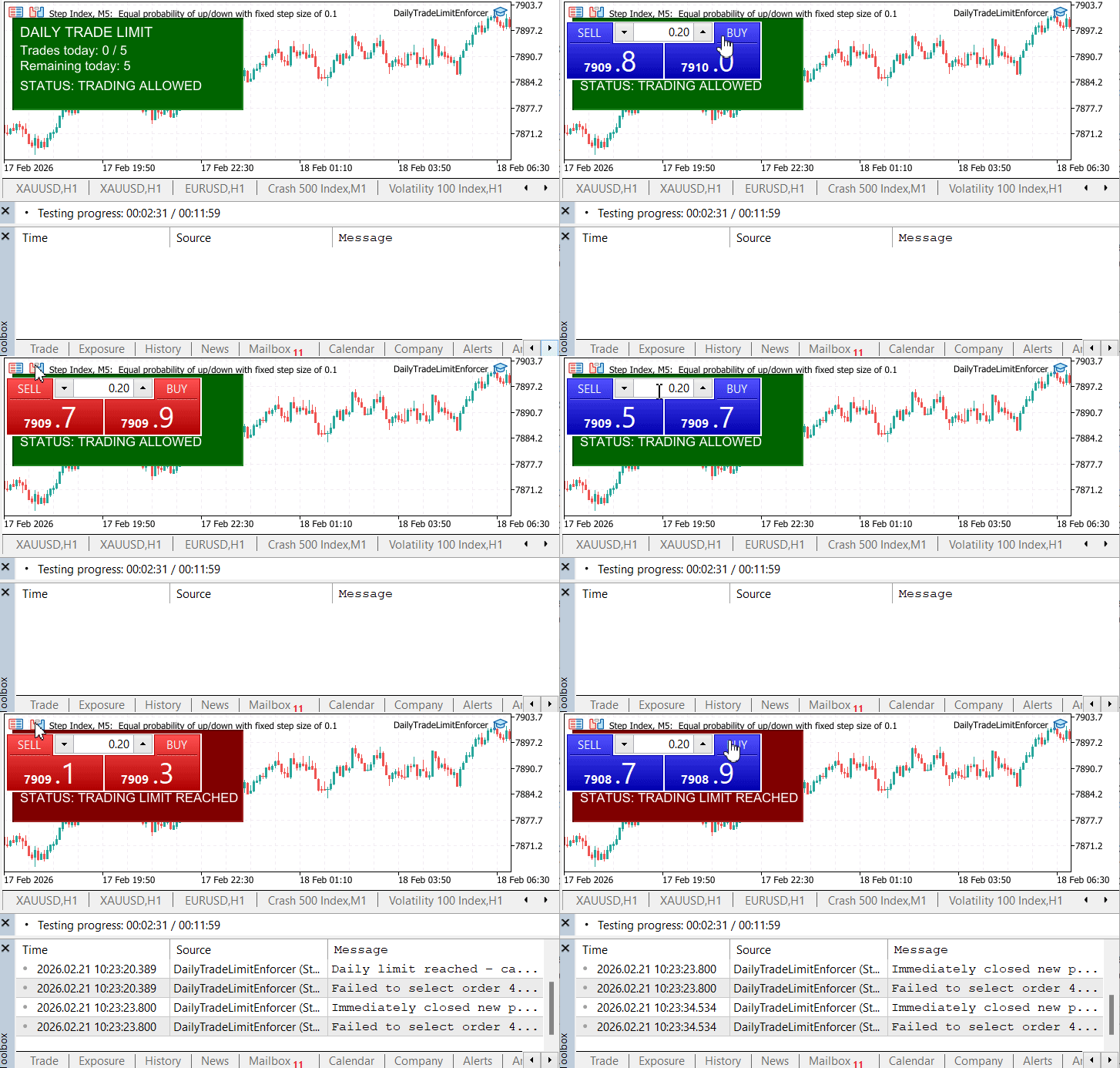
Figure 3: Initial State and Progressive Transition
The first diagram captures the beginning of the trading session.
Observations:
- Trades today: 0 / 5
- Remaining trades: 5
- Status: TRADING ALLOWED
- Dashboard color: Green
This confirms:
- The trading day was correctly initialized.
- The trade counter started at zero.
- The system correctly classified the state as STATE_ALLOWED.
- Global variables were properly read and synchronized.
As trades were manually executed, the system progressed through the following transitions:
Allowed State
While trades remained comfortably below the threshold, trading continued without restriction.
Caution State
As the number of remaining trades approached the configured amber threshold, the system transitioned into the Caution state. The dashboard color changed accordingly, and the status updated to STATE_CAUTION, introducing clear visual awareness before any restriction was applied. This behavior confirms that the system correctly detects proximity to the daily limit, evaluates the amber threshold accurately, updates the panel in real time, and recalculates the trading state immediately after each trade event.
Limit Reached Transition
When the fifth trade was executed, the remaining trade count dropped to zero and the system transitioned into the STATE_LIMIT condition. The dashboard immediately turned maroon/red, and the status updated to TRADING LIMIT REACHED, clearly signaling that the daily boundary had been hit. This transition confirms accurate trade counting through history scanning, correct anchoring of the trading day start time, immediate state reclassification upon limit breach, and full synchronization between the dashboard and the shared library logic.
Once the daily limit is reached, the blocking mechanism activates and prevents any further trades from being executed. Although additional trade attempts may still be made, the system immediately intervenes to cancel or close them. The dashboard continues to update in real time, reflecting the total number of attempted trades against the predefined threshold. However, the status remains in red, clearly indicating that trading is locked and enforcement is actively in effect.
Phase 2—Enforcement After Limit Breach
The second diagram demonstrates the critical enforcement stage.
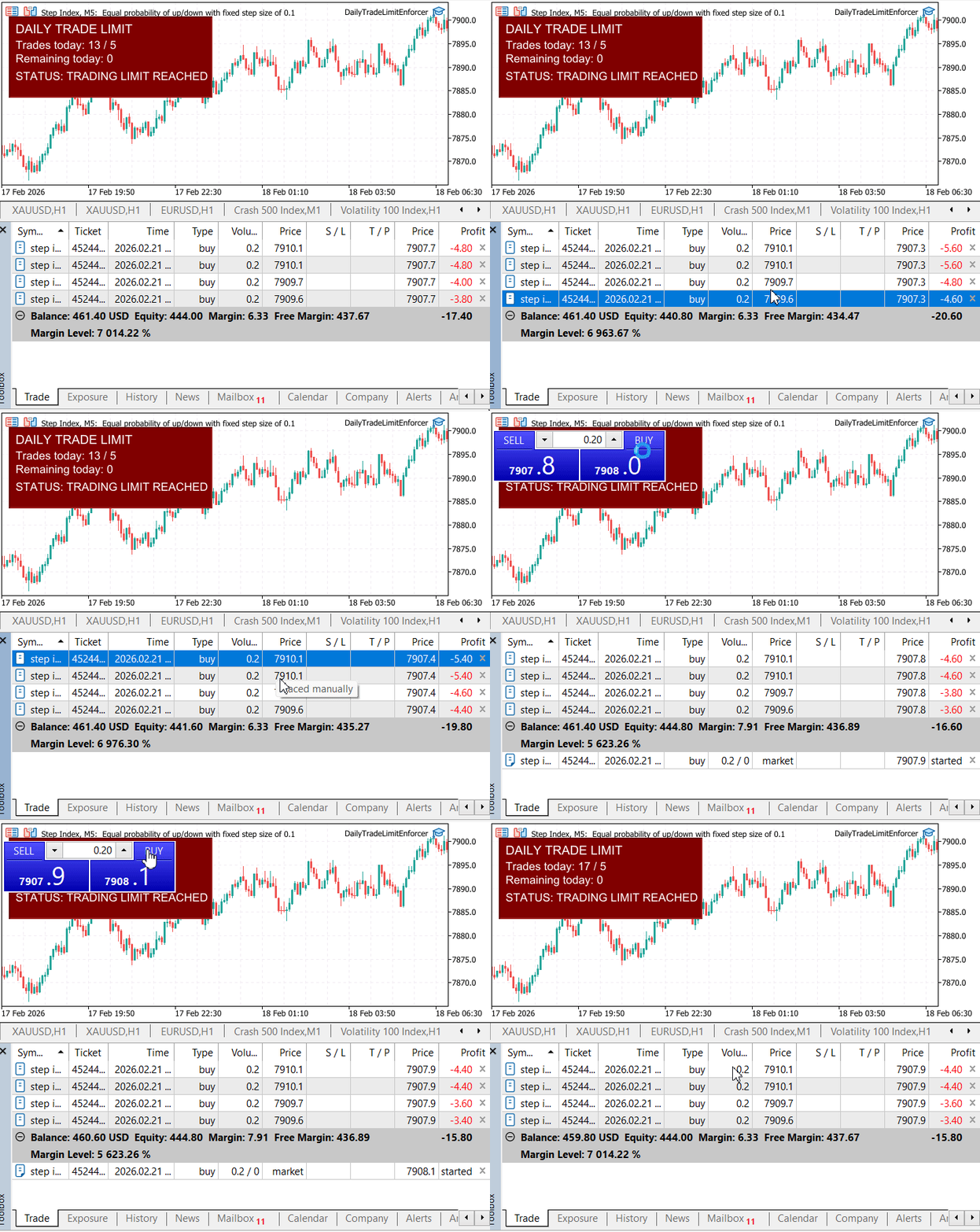
Figure 4: Enforcement After Limit Breach
Despite manual attempts to initiate additional trades after the daily limit had been reached, the system enforced the restriction immediately. Newly placed pending orders were cancelled, and any newly opened positions were closed without delay, while positions opened before limit activation remained unaffected. This confirms that the Enforcer EA correctly detected trade events through OnTradeTransaction, refreshed the trading state using ForceRefresh() before taking action, accurately identified the transition into the limit state via its internal flag, and executed cleanup logic precisely at the required moment. No observable delay occurred between trade attempt and enforcement, ensuring that additional exposure was prevented without disturbing pre-existing positions.
The test confirms that all components operated cohesively as a unified system. The shared library accurately calculated trades across the entire account, ensuring that no symbol or manual execution was excluded from the count. The dashboard indicator reflected state transitions in real time, updating immediately as trade activity occurred. The enforcer EA responded instantly and consistently whenever the limit condition was met, demonstrating reliable enforcement behavior. Terminal global variables successfully synchronized configuration across all components, maintaining a single source of truth. Importantly, manual trading attempts could not bypass the enforcement logic, and the system continued to behave consistently even after multiple attempts were made to exceed the daily limit.
From this live demo evaluation, several important conclusions can be drawn. Trade counting remains accurate across symbols and execution types. State transitions occur immediately following trade events, confirming proper recalculation logic. The caution layer functions effectively as an early warning mechanism before restrictions apply. Once the daily limit is reached, enforcement is automatic and unconditional. No race conditions or timing inconsistencies were observed during testing, and overall, the system demonstrated stable and reliable performance under live chart conditions.
Conclusion
This article formalized a daily trade limit as a set of technical specifications and implemented them as an account-level enforcement layer in MT5. The objective was not to display warnings, but to guarantee that a predefined maximum number of entries per trading day cannot be exceeded under clearly defined conditions.
The completed package consists of three coordinated components:
- DailyTradeLimit.mqh — a shared library that centralizes session timing, DEAL_ENTRY_IN counting, and state management.
- DailyTradeLimitDashboard.mq5 — a configuration and monitoring layer providing real-time status visualization and alerts.
- DailyTradeLimitEnforcer.mq5 — an independent Expert Advisor responsible for intervention and enforcement.
The system counts confirmed DEAL_ENTRY_IN transactions per trading day using a configurable session start time. The scope covers the entire trading account, across all symbols, including manual trades and third-party Expert Advisors. Once the defined threshold is reached, newly placed pending orders are deleted and any positions opened after the limit are closed immediately. Positions established before the limit remain unaffected.
Validation was performed through structured live testing scenarios: multi-symbol execution, simultaneous EA activity, repeated manual entry attempts after the limit, and session reset verification. In each case, trade counting remained consistent, state transitions were immediate, and the limit could not be exceeded.
The final result is a clearly defined and testable invariant: given the specified definition of an entry and trading day, the account will not execute more than the configured number of daily entries.
Subsequent extensions may incorporate additional constraints such as profit targets or drawdown ceilings, following the same specification-driven and modular design approach established here.
Warning: All rights to these materials are reserved by MetaQuotes Ltd. Copying or reprinting of these materials in whole or in part is prohibited.
This article was written by a user of the site and reflects their personal views. MetaQuotes Ltd is not responsible for the accuracy of the information presented, nor for any consequences resulting from the use of the solutions, strategies or recommendations described.

 MQL5 Trading Tools (Part 22): Graphing the Histogram and Probability Mass Function (PMF) of the Binomial Distribution
 Larry Williams Market Secrets (Part 13): Automating Hidden Smash Day Reversal Patterns
 Package-based approach with KnitPkg for MQL5 development
 Neural Networks in Trading: Integrating Chaos Theory into Time Series Forecasting (Final Part)

- Free trading apps
- Over 8,000 signals for copying
- Economic news for exploring financial markets
You agree to website policy and terms of use