

Market Simulation: Position View (XV)
 791
791
 0
0

Introduction
Hello, everyone, and welcome to a new article in the series on creating a replay/simulation system.
In the previous article “Market Simulation: Position View (XIV)”, I showed how to add the necessary details so that the Take Profit / Stop Loss lines display the result associated with their triggering. In other words, when the price reaches one of these levels — either Stop Loss or Take Profit — we will be able to determine whether this will result in a profit or a loss, and how large it will be. For now, this result is measured in points, since we are not yet working with monetary amounts.
In that same article, I promised to explain in detail how messaging and event-driven programming make it possible for code like the one I am presenting here to work — something many people can easily verify for themselves. I include executable files as attachments once they become stable enough, and I also provide the full source code so that other programmers have access to the information and to what is being implemented.
Although the code presented up to the previous article works perfectly, we can take it much further. To make the explanation easier to follow, I decided to publish the same code again, but with updated calls. It works the same way as the previous version, and although the implementation has changed slightly, there is no need to explain it separately: if you understand what I will explain in this article, you will be able to understand this code as well, provided you have been following this series up to this point. Let's get started.
A Quick Update
Below is the updated code. Compare it to the version from the previous article, and you will see that it is the same code, even though it might look different at first glance. The main code is shown below:
001. //+------------------------------------------------------------------+
002. #property copyright "Daniel Jose"
003. #property icon "/Images/Market Replay/Icons/Positions.ico"
004. #property description "Indicator for tracking an open position on the server."
005. #property description "This should preferably be used together with an Expert Advisor."
006. #property description "For more details see the same article."
007. #property version   "1.127"
008. #property link "https://www.mql5.com/pt/articles/13375"
009. #property indicator_chart_window
010. #property indicator_plots 0
011. //+------------------------------------------------------------------+
012. #define def_ShortName "Position View"
013. //+------------------------------------------------------------------+
014. #include <Market Replay\Order System\C_ElementsTrade.mqh>
015. #include <Market Replay\Defines.mqh>
016. //+------------------------------------------------------------------+
017. input ulong user00 = 0;        //For use in an Expert Advisor
018. //+------------------------------------------------------------------+
019. struct st00
020. {
021.     ulong   ticket;
022.     string  szShortName,
023.             szSymbol;
024.     double  priceOpen;
025.     char    digits;
026.     bool    bIsBuy;
027. }m_Infos;
028. //+------------------------------------------------------------------+
029. C_ElementsTrade *Open = NULL, *Stop = NULL, *Take = NULL;
030. //+------------------------------------------------------------------+
031. bool CheckCatch(ulong ticket)
032. {
033.     ZeroMemory(m_Infos);
034.     m_Infos.szShortName = StringFormat("%I64u", m_Infos.ticket = ticket);
035.     if (!PositionSelectByTicket(m_Infos.ticket)) return false;
036.     if (ObjectFind(0, m_Infos.szShortName) >= 0)
037.     {
038.         m_Infos.ticket = 0;
039.         return false;
040.     }
041.     m_Infos.szSymbol = PositionGetString(POSITION_SYMBOL);
042.     m_Infos.digits = (char)SymbolInfoInteger(m_Infos.szSymbol, SYMBOL_DIGITS);
043.     IndicatorSetString(INDICATOR_SHORTNAME, m_Infos.szShortName);
044.     EventChartCustom(0, evUpdate_Position, ticket, 0, "");
045.
046.     return true;
047. }
048. //+------------------------------------------------------------------+
049. inline void ProfitNow(void)
050. {
051.     double ask, bid;
052.
053.     ask = SymbolInfoDouble(m_Infos.szSymbol, SYMBOL_ASK);
054.     bid = SymbolInfoDouble(m_Infos.szSymbol, SYMBOL_BID);
055.     if (Open != NULL)
056.         (*Open).ViewValue((m_Infos.bIsBuy ? bid - m_Infos.priceOpen : m_Infos.priceOpen - ask));
057. }
058. //+------------------------------------------------------------------+
059. int OnInit()
060. {
061.     IndicatorSetString(INDICATOR_SHORTNAME, def_ShortName);
062.     if (!CheckCatch(user00))
063.     {
064.         ChartIndicatorDelete(0, 0, def_ShortName);
065.         return INIT_FAILED;
066.     }
067.
068.     return INIT_SUCCEEDED;
069. }
070. //+------------------------------------------------------------------+
071. int OnCalculate(const int rates_total, const int prev_calculated, const int begin, const double &price[])
072. {
073.     ProfitNow();
074.
075.     return rates_total;
076. }
077. //+------------------------------------------------------------------+
078. void OnChartEvent(const int id, const long &lparam, const double &dparam, const string &sparam)
079. {
080.     if (Open != NULL) (*Open).DispatchMessage(id, lparam, dparam, sparam);
081.     if (Take != NULL) (*Take).DispatchMessage(id, lparam, dparam, sparam);
082.     if (Stop != NULL) (*Stop).DispatchMessage(id, lparam, dparam, sparam);
083.     switch (id)
084.     {
085.         case CHARTEVENT_CUSTOM + evUpdate_Position:
086.             if (lparam != m_Infos.ticket) break;
087.             if (!PositionSelectByTicket(m_Infos.ticket))
088.             {
089.                 ChartIndicatorDelete(0, 0, m_Infos.szShortName);
090.                 return;
091.             };
092.             if (Open == NULL) Open = new C_ElementsTrade(m_Infos.ticket, evMsgClosePositionEA, clrRoyalBlue, m_Infos.digits, StringFormat("%I64u : Position opening price.", m_Infos.ticket), m_Infos.bIsBuy = (PositionGetInteger(POSITION_TYPE) == POSITION_TYPE_BUY));
093.             if (Take == NULL) Take = new C_ElementsTrade(m_Infos.ticket, evMsgCloseTakeProfit, clrForestGreen, m_Infos.digits, StringFormat("%I64u : Take Profit price.", m_Infos.ticket), m_Infos.bIsBuy);
094.             if (Stop == NULL) Stop = new C_ElementsTrade(m_Infos.ticket, evMsgCloseStopLoss, clrFireBrick, m_Infos.digits, StringFormat("%I64u : Stop Loss price.", m_Infos.ticket), m_Infos.bIsBuy);
095.             (*Open).UpdatePrice(0, m_Infos.priceOpen = PositionGetDouble(POSITION_PRICE_OPEN));
096.             (*Take).UpdatePrice(m_Infos.priceOpen, PositionGetDouble(POSITION_TP));
097.             (*Stop).UpdatePrice(m_Infos.priceOpen, PositionGetDouble(POSITION_SL));
098.             ProfitNow();
099.             break;
100.     }
101.     ChartRedraw();
102. };
103. //+------------------------------------------------------------------+
104. void OnDeinit(const int reason)
105. {
106.     delete Open;
107.     delete Take;
108.     delete Stop;
109. }
110. //+------------------------------------------------------------------+
Position indicator
The class code is shown below:
001. //+------------------------------------------------------------------+
002. #property copyright "Daniel Jose"
003. //+------------------------------------------------------------------+
004. #define def_NameHLine      m_Info.szPrefixName + "#HLINE"
005. #define def_NameBtnClose   m_Info.szPrefixName + "#CLOSE"
006. #define def_NameBtnMove    m_Info.szPrefixName + "#MOVE"
007. #define def_NameInfoDirect m_Info.szPrefixName + "#DIRECT"
008. #define def_NameObjLabel   m_Info.szPrefixName + "#PROFIT"
009. //+------------------------------------------------------------------+
010. #define macro_LineInFocus(A) ObjectSetInteger(0, def_NameHLine, OBJPROP_YSIZE, m_Info.weight = (A ? 3 : 1));
011. //+------------------------------------------------------------------+
012. #define def_PathBtns "Images\\Market Replay\\Orders\\"
013. #define def_Btn_Close def_PathBtns + "Btn_Close.bmp"
014. #resource "\\" + def_Btn_Close;
015. //+------------------------------------------------------------------+
016. #include "..\Auxiliar\C_Mouse.mqh"
017. //+------------------------------------------------------------------+
018. #ifdef def_FontName
019.     "Why are you trying to do this?"
020. #else
021.     #define def_FontName "Lucida Console"
022.     #define def_FontSize 10
023. #endif
024. //+------------------------------------------------------------------+
025. class C_ElementsTrade : private C_Mouse
026. {
027.     private    :
028. //+------------------------------------------------------------------+
029.         struct st00
030.         {
031.             struct st_01
032.             {
033.                 uchar   Width,
034.                         Height,
035.                         digits;
036.             }Text;
037.             ulong       ticket;
038.             string      szPrefixName,
039.                         szDescr;
040.             EnumEvents  ev;
041.             double      price,
042.                         open;
043.             bool        bClick,
044.                         bIsBuy;
045.             char        weight;
046.             color       _color;
047.         }m_Info;
048. //+------------------------------------------------------------------+
049.         void UpdateViewPort(const double price)
050.         {
051.             int x, y;
052.
053.             ChartTimePriceToXY(0, 0, 0, price, x, y);
054.             x = (m_Info.ev == evMsgClosePositionEA ? 150 : (m_Info.ev == evMsgCloseTakeProfit ? 220 : 290));
055.             ObjectSetInteger(0, def_NameHLine, OBJPROP_XDISTANCE, x);
056.             ObjectSetInteger(0, def_NameHLine, OBJPROP_YDISTANCE, y - (m_Info.weight > 1 ? (int)(m_Info.weight / 2) : 0));
057.             ObjectSetInteger(0, def_NameBtnClose, OBJPROP_XDISTANCE, x);
058.             ObjectSetInteger(0, def_NameBtnClose, OBJPROP_YDISTANCE, y);
059.             ObjectSetInteger(0, def_NameObjLabel, OBJPROP_XDISTANCE, x + 10);
060.             ObjectSetInteger(0, def_NameObjLabel, OBJPROP_YDISTANCE, y - (m_Info.Text.Height / 2));
061.             ObjectSetInteger(0, def_NameInfoDirect, OBJPROP_XDISTANCE, x + m_Info.Text.Width + 20);
062.             ObjectSetInteger(0, def_NameInfoDirect, OBJPROP_YDISTANCE, y);
063.             ObjectSetInteger(0, def_NameBtnMove, OBJPROP_XDISTANCE, x + m_Info.Text.Width + 20);
064.             ObjectSetInteger(0, def_NameBtnMove, OBJPROP_YDISTANCE, y);
065.         }
066. //+------------------------------------------------------------------+
067. inline void CreateLinePrice(void)
068.         {
069.             string szObj;
070.
071.             CreateObjectGraphics(szObj = def_NameHLine, OBJ_RECTANGLE_LABEL, m_Info._color, (EnumPriority)(ePriorityDefault));
072.             ObjectSetInteger(0, szObj, OBJPROP_BGCOLOR, m_Info._color);
073.             ObjectSetInteger(0, szObj, OBJPROP_XSIZE, TerminalInfoInteger(TERMINAL_SCREEN_WIDTH));
074.             ObjectSetInteger(0, szObj, OBJPROP_BORDER_TYPE, BORDER_FLAT);
075.             ObjectSetInteger(0, szObj, OBJPROP_CORNER, CORNER_LEFT_UPPER);
076.             ObjectSetString(0, szObj, OBJPROP_TOOLTIP, m_Info.szDescr);
077.             macro_LineInFocus(false);
078.         }
079. //+------------------------------------------------------------------+
080. inline void CreateBoxInfo(const bool bMove)
081.         {
082.             string szObj;
083.             const char c[] = {(char)(bMove ? 'u' : (m_Info.bIsBuy ? 236 : 238)), 0};
084.
085.             CreateObjectGraphics(szObj = (bMove ? def_NameBtnMove : def_NameInfoDirect), OBJ_LABEL, clrNONE, (EnumPriority)(ePriorityDefault));
086.             ObjectSetString(0, szObj, OBJPROP_FONT, "Wingdings");
087.             ObjectSetString(0, szObj, OBJPROP_TEXT, CharArrayToString(c));
088.             ObjectSetInteger(0, szObj, OBJPROP_COLOR, (bMove ? m_Info._color : (m_Info.bIsBuy ? clrForestGreen : clrFireBrick)));
089.             ObjectSetInteger(0, szObj, OBJPROP_FONTSIZE, (bMove ? 17 : 15));
090.             ObjectSetInteger(0, szObj, OBJPROP_ANCHOR, ANCHOR_CENTER);
091.         }
092. //+------------------------------------------------------------------+
093. inline void CreateObjectInfoText(void)
094.         {
095.             string szObj;
096.
097.             CreateObjectGraphics(szObj = def_NameObjLabel, OBJ_EDIT, clrNONE, (EnumPriority)(ePriorityDefault));
098.             ObjectSetString(0, szObj, OBJPROP_FONT, def_FontName);
099.             ObjectSetInteger(0, szObj, OBJPROP_FONTSIZE, def_FontSize);
100.             ObjectSetInteger(0, szObj, OBJPROP_COLOR, clrBlack);
101.             ObjectSetInteger(0, szObj, OBJPROP_BORDER_COLOR, m_Info._color);
102.             ObjectSetInteger(0, szObj, OBJPROP_ALIGN, ALIGN_CENTER);
103.             ObjectSetInteger(0, szObj, OBJPROP_READONLY, true);
104.             ObjectSetInteger(0, szObj, OBJPROP_YSIZE, m_Info.Text.Height);
105.             ObjectSetInteger(0, szObj, OBJPROP_XSIZE, m_Info.Text.Width);
106.         }
107. //+------------------------------------------------------------------+
108. inline void CreateButtonClose(void)
109.         {
110.             string szObj;
111.
112.             CreateObjectGraphics(szObj = def_NameBtnClose, OBJ_BITMAP_LABEL, clrNONE, (EnumPriority)(ePriorityDefault));
113.             ObjectSetString(0, szObj, OBJPROP_BMPFILE, 0, "::" + def_Btn_Close);
114.             ObjectSetInteger(0, szObj, OBJPROP_ANCHOR, ANCHOR_CENTER);
115.         }
116. //+------------------------------------------------------------------+
117.     public    :
118. //+------------------------------------------------------------------+
119.         C_ElementsTrade(const ulong ticket, const EnumEvents ev, color _color, char digits, string szDescr = "\n", const bool IsBuy = true)
120.             :C_Mouse(0, "")
121.         {
122.             uint w, h;
123.
124.             ZeroMemory(m_Info);
125.             m_Info.szPrefixName = StringFormat("%I64u@%03d", m_Info.ticket = ticket, (int)(m_Info.ev = ev));
126.             m_Info._color = _color;
127.             m_Info.szDescr = szDescr;
128.             m_Info.bIsBuy = IsBuy;
129.             m_Info.Text.digits = digits;
130.             TextSetFont(def_FontName, def_FontSize * -10);
131.             TextGetSize(StringFormat("%." + (string)digits + "f", 8888.88888), w, h);
132.             m_Info.Text.Width = (uchar) w + 4;
133.             m_Info.Text.Height = (uchar) h + 4;
134.         }
135. //+------------------------------------------------------------------+
136.         ~C_ElementsTrade()
137.         {
138.             ObjectsDeleteAll(0, m_Info.szPrefixName);
139.         }
140. //+------------------------------------------------------------------+
141. inline void UpdatePrice(const double open, const double price)
142.         {
143.             if (price > 0)
144.             {
145.                 CreateLinePrice();
146.                 CreateButtonClose();
147.             }else
148.                 ObjectsDeleteAll(0, m_Info.szPrefixName);
149.             CreateBoxInfo(m_Info.ev != evMsgClosePositionEA);
150.             if (price > 0)
151.                 CreateObjectInfoText();
152.             m_Info.open = open;
153.             UpdateViewPort(m_Info.price = (price > 0 ? price : open));
154.             if (m_Info.ev != evMsgClosePositionEA)
155.                 ViewValue(m_Info.bIsBuy ? m_Info.price - m_Info.open : m_Info.open - m_Info.price);
156.         }
157. //+------------------------------------------------------------------+
158.         void ViewValue(const double profit)
159.         {
160.             ObjectSetString(0, def_NameObjLabel, OBJPROP_TEXT, StringFormat("%." + (string)m_Info.Text.digits + "f", (profit < 0 ? -(profit) : profit)));
161.             ObjectSetInteger(0, def_NameObjLabel, OBJPROP_BGCOLOR, (profit >= 0 ? clrPaleGreen : clrCoral));
162.             ChartRedraw();
163.         }
164. //+------------------------------------------------------------------+
165.         void DispatchMessage(const int id, const long &lparam, const double &dparam, const string &sparam)
166.         {
167.             string sz0;
168.             long _lparam = lparam;
169.             double _dparam = dparam;
170.
171.             C_Mouse::DispatchMessage(id, lparam, dparam, sparam);
172.             switch (id)
173.             {
174.                 case (CHARTEVENT_KEYDOWN):
175.                     if (!TerminalInfoInteger(TERMINAL_KEYSTATE_ESCAPE)) break;
176.                     _lparam = (long) m_Info.ticket;
177.                     _dparam = 0;
178.                     EventChartCustom(0, evUpdate_Position, _lparam, 0, "");
179.                 case CHARTEVENT_CUSTOM + evMsgSetFocus:
180.                     if ((m_Info.ticket == (ulong)(_lparam)) && ((EnumEvents)(_dparam) == m_Info.ev))
181.                         UpdatePrice(m_Info.open, GetPositionsMouse().Position.Price);
182.                     macro_LineInFocus((m_Info.ticket == (ulong)(_lparam)) && ((EnumEvents)(_dparam) == m_Info.ev));
183.                     EventChartCustom(0, (ushort)(_dparam ? evHideMouse : evShowMouse), 0, 0, "");
184.                     m_Info.bClick = false;
185.                 case CHARTEVENT_CHART_CHANGE:
186.                     UpdateViewPort(m_Info.price);
187.                     if (m_Info.ev != evMsgClosePositionEA)
188.                         ViewValue(m_Info.bIsBuy ? m_Info.price - m_Info.open : m_Info.open - m_Info.price);
189.                     break;
190.                 case CHARTEVENT_OBJECT_CLICK:
191.                     sz0 = GetPositionsMouse().szObjNameClick;
192.                     if (m_Info.bClick)
193.                     {
194.                         if (sz0 == def_NameBtnMove)
195.                             EventChartCustom(0, evMsgSetFocus, m_Info.ticket, m_Info.ev, "");
196.                         if (sz0 == def_NameBtnClose)
197.                             EventChartCustom(0, (ushort) m_Info.ev, m_Info.ticket, PositionGetDouble(m_Info.ev == evMsgCloseTakeProfit ? POSITION_SL : POSITION_TP), PositionGetString(POSITION_SYMBOL));
198.                     }
199.                     m_Info.bClick = false;
200.                     break;
201.                 case CHARTEVENT_MOUSE_MOVE:
202.                     m_Info.bClick = (CheckClick(C_Mouse::eClickLeft) ? true : m_Info.bClick);
203.                     if (m_Info.weight > 1)
204.                     {
205.                         UpdateViewPort(_dparam = GetPositionsMouse().Position.Price);
206.                         if (m_Info.ev != evMsgClosePositionEA)
207.                             ViewValue(m_Info.bIsBuy ? _dparam - m_Info.open : m_Info.open - _dparam);
208.                         if (m_Info.bClick)
209.                         {
210.                             if ((m_Info.ev == evMsgCloseTakeProfit) || (m_Info.ev == evMsgCloseStopLoss))
211.                                 EventChartCustom(0, (ushort)(m_Info.ev == evMsgCloseTakeProfit ? evMsgNewTakeProfit : evMsgNewStopLoss), m_Info.ticket, GetPositionsMouse().Position.Price, PositionGetString(POSITION_SYMBOL));
212.                             EventChartCustom(0, evMsgSetFocus, 0, 0, "");
213.                         }
214.                     }
215.                     break;
216.             }
217.         }
218. //+------------------------------------------------------------------+
219. };
220. //+------------------------------------------------------------------+
221. #undef macro_LineInFocus
222. //+------------------------------------------------------------------+
223. #undef def_Btn_Close
224. #undef def_PathBtns
225. #undef def_FontName
226. #undef def_FontSize
227. //+------------------------------------------------------------------+
228. #undef def_NameObjLabel
229. #undef def_NameInfoDirect
230. #undef def_NameBtnMove
231. #undef def_NameBtnClose
232. #undef def_NameHLine
233. //+------------------------------------------------------------------+
C_ElementsTrade
Once compiled, this code works the same way as the code from the previous article, so it does not require any special explanation. Nevertheless, I will use it as a basis for my further explanation, since that will make it a little easier to understand some of the concepts I will need later. In some cases, you will have to refer back to previous articles to follow the line of reasoning and understand how event-driven programming and inter-application messaging enable this code—which seems nonsensical at first glance—to work. With that in mind, let’s see how to use this implementation model. I will try to explain this as clearly as possible.
Why the System Works
To understand the entire system, let's start with the basics. The initial and simplest structure is shown in the following figure:
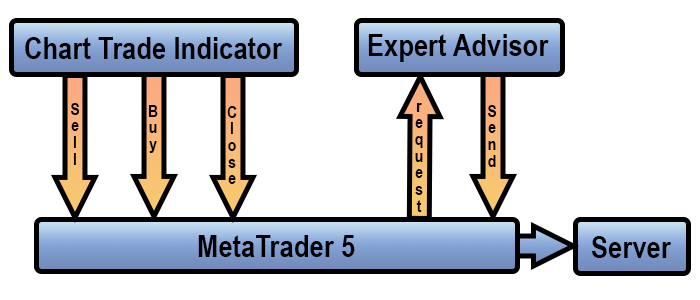
Let's start analyzing this messaging mechanism using this image as a starting point. We have been using this programming model for quite some time now, but until now I have not provided a detailed explanation of it. Please note that there are three arrows extending from the Chart Trade indicator. Each of these represents a custom event that will be generated when a user interacts with Chart Trade using the mouse pointer.
Although events are captured and handled in the Expert Advisor's code, Chart Trade does not generate them directly for the Expert Advisor. In fact, it generates them through MetaTrader 5, which then sends them to the corresponding chart. Note this detail. You can instruct MetaTrader 5 to distribute the event to the current chart or to any other chart.
As a result, MetaTrader 5 will distribute the custom event and call OnChartEvent in the applications attached to the chart. This allows the Expert Advisor to capture and handle the event generated by Chart Trade in response to user interaction. After interpreting it correctly, the Expert Advisor will send a request to the trade server to open or close a position, or to change its volume. This is the first part of the system. When the server responds to the request, the message-and-event flow shown below begins. The flow shown earlier occurs every time a request is sent to the server.
However, note that there is a purple arrow in the diagram. This arrow indicates that the Expert Advisor will create a position indicator. At this stage, no events are generated that could be captured by other applications.

However, as soon as the indicator appears on the chart, the Expert Advisor generates a custom event via MetaTrader 5. MetaTrader 5 distributes it to the chart, and the position indicator captures it and obtains the latest position data. Note that the position indicator is not aware of the presence of an Expert Advisor. Similarly, the Expert Advisor does not know whether the position indicator is present on the chart.
The two applications are completely unaware of each other's existence. They simply generate a custom event through MetaTrader 5, which then distributes it to the chart specified by the sending application. An event will be captured and handled only if an application implements the corresponding handling logic. Otherwise, it will be lost.
However, the previous image does not show what happens when a user interacts with the position indicator, since it does not include the Mouse Study indicator. When these two indicators interact, the system's behavior changes slightly, and we end up with the following diagram.
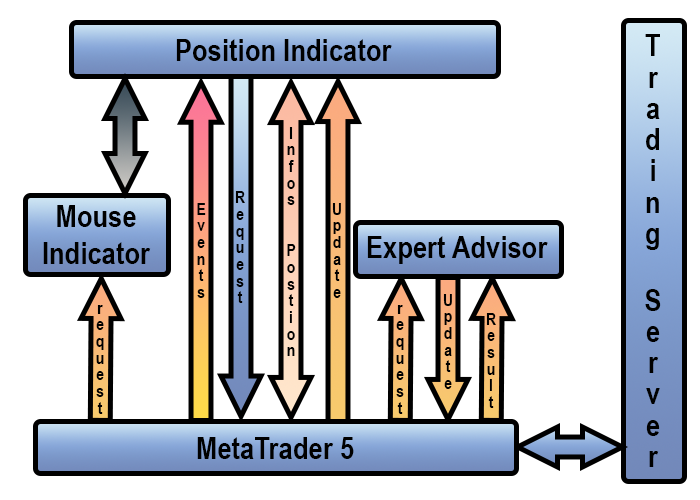
If you look at the diagram now, it might seem like everything has become much more complicated, but that is not the case. The image above clearly shows what happens between the Mouse Study indicator, the position indicator, and the Expert Advisor when all three are present on the chart. Now we can go back to the code shown at the beginning of the article to understand each of the arrows in the diagram.
Note one interesting detail. A gray arrow appears here, which seems to indicate the exchange of information between the Mouse Study indicator and the position indicator. However, that is not the connection it shows. The GRAY arrow indicates inheritance between classes: on line 25, the C_ElementsTrade class privately inherits from the C_Mouse class. Nevertheless, this diagram should be interpreted with caution.
One might think that there is no need to keep the Mouse Study indicator on the chart, since the C_ElementsTrade class inherits from the C_Mouse class, but inheritance merely connects the classes and does not replace the indicator. The Mouse Study indicator must be present on the chart. Otherwise, the position indicator will not be able to capture mouse events. Now, pay very close attention.
In this diagram, we see an arrow extending from MetaTrader 5 to the position indicator. This arrow indicates the flow of events coming from MetaTrader 5: the OnChartEvent procedure in the main code captures the event, and DispatchMessage inside the class handles it. Also note that in the diagram, I have separated the Update event from the other events. Why did I do that? Because you need to understand that there are two types of events here. The first type is generated by the Expert Advisor: these are Update events. The second type is generated by the position indicator or by MetaTrader 5. In both cases, the Mouse Study indicator and the Expert Advisor also capture this second type of event. However, their code does not handle events received from the position indicator, so they are completely ignored. On the contrary, this same event is important for the position indicator.
When this indicator generates a custom event, MetaTrader 5 calls `OnChartEvent` in the applications attached to the chart. They all capture the event generated by the position indicator and distributed by MetaTrader 5. However, the corresponding handling logic is implemented only in the position indicator's `DispatchMessage`.
One of the moments when this happens is precisely when line 178 is executed. Note that a custom event, `evUpdate_Position`, is generated there. The `OnChartEvent` procedure of the position indicator captures it on line 85 and passes it to `DispatchMessage` for handling. In principle, the code could interpret this as if the event had been generated by the Expert Advisor, but that is not the case. The position indicator itself generates it via MetaTrader 5, which then distributes it again to the applications attached to the chart. Thus, the position indicator forcibly updates the position data. Since the event is generated after the ESC key is pressed, we can handle this condition without having to store any data in memory.
However, that is not the most interesting aspect. Do you remember the previous article, in which I explained how to modify the code to create a Stop Loss or Take Profit line—if one did not already exist—using the interaction between the Mouse Study indicator and the position indicator? So, this task is shown in the previous figure, even though it is not entirely obvious. Let's follow the line of reasoning. The `C_ElementsTrade` class accesses the members inherited from `C_Mouse` via private inheritance, whereas the position indicator receives mouse updates primarily through events coming from MetaTrader 5.
Initially, the m_Info.bClick variable will be set to false. Therefore, when MetaTrader 5 generates a CHARTEVENT_OBJECT_CLICK event, line 192 will prevent the code from continuing to execute, since that is where the value of m_Info.bClick is checked. However, if the Mouse Study indicator reports that a click is allowed, line 202 will set the variable `m_Info.bClick` to `true`. Since the CHARTEVENT_OBJECT_CLICK event is generated after the CHARTEVENT_MOUSE_MOVE event, as we have already seen in previous articles, the check on line 192 will pass. Thus, when you click on a movable object, line 195 triggers a custom event via MetaTrader 5.
This is where the mechanism really gets interesting, even though it might seem a little confusing at first glance. Always keep this diagram handy as a reference. In practice, executing line 195 is equivalent to executing line 179. However, even though the call is initiated within the same code, to the application it appears as though it came from outside the indicator code. At this point, the code updates certain values and then returns control. Line 199 is executed in parallel, and this completes the handling of the events from lines 179 and 190. If there is more than one position indicator on the chart, they will all capture the same custom event broadcast by MetaTrader 5, regardless of where exactly it was generated. They will all react in almost the same way. Thus, the line that is supposed to receive focus will get mouse focus, while the others will lose it.
The next time the position indicator captures the CHARTEVENT_MOUSE_MOVE event, we will check in line 203 whether it has focus. In this case, lines 205 and 207 will show the line's movement—either for the Take Profit line or the Stop Loss line. No other line will be affected by this movement. However, this shift has not actually been applied yet. In other words, the shift does not actually happen as the mouse moves. This movement is virtual and waits for a new event that will either confirm or cancel it. If it is canceled, which is what happens when the ESC key is pressed, MetaTrader 5 will generate an event that will be captured in line 174. As a result, all data is checked, because an Update event is generated in line 178. Thus, the position indicator once again displays the previous data, that is, the data that is still registered on the trade server.
If, on the other hand, the data corresponding to the mouse movement is accepted because the operator clicks the desired price level, then a custom event addressed to the Expert Advisor is generated in line 211. After capturing and handling it, the Expert Advisor sends a request to the server to update the Take Profit or Stop Loss level. Next, on line 212, another event is generated and sent to all position indicators—including the one that generated it—so that the Take Profit and Stop Loss lines lose focus. Meanwhile, the Expert Advisor is waiting for a response from the trade server. When a response is received, the Expert Advisor generates an Update event addressed to the position indicator whose ticket matches the value specified in the event. So, we return once again to line 85 of the OnChartEvent procedure in the position indicator.
This is the main advantage of messaging and event-driven programming. We do not need to strictly control the order in which things happen; the main thing is that each event is generated, captured, and handled correctly. However, note that the Mouse Study indicator also captures the event. The position indicator generates it on line 183, and the Mouse Study indicator handles this event to hide its price line. We could also completely change this behavior. To do this, it would be enough to tell the Mouse Study indicator exactly what it should do, and it would perform the corresponding action. You could even run some analysis or another similar action while moving the mouse pointer to set a Stop Loss or Take Profit line.
As I have long pointed out, there are no limits to what we can do. That is why I am dedicating this article to explaining to you, dear reader, how to use event-driven programming and messaging. If you need to change or analyze any element, you can do so very easily, quickly, and directly on the chart. There is no need to resort to overly complicated methods or tools.
For example, several people have approached me with a request that strikes me as quite reasonable. Although I did not explain how to do it or encourage them to think that way, it can easily be implemented using messaging between applications.
Their request is as follows: they want the Expert Advisor they are creating to instruct the replay/simulation service to stop generating new ticks or price quotes. At first glance, this seems extremely difficult to implement, since we cannot send a request or message to the service, or directly generate an event for it. Keep in mind that generated custom events and messages sent using this mechanism are always tied to the chart. In other words, we cannot send messages directly to the service because it is not tied to any specific chart. However, there is a way to send or forward messages to the service. To distinguish between these concepts and explain how to proceed, let's move on to a new topic.
Pausing the replay/simulation service directly from the Expert Advisor
To achieve this goal, we will need a little help. Or, to be more precise, we will need something. In order for the service to receive information from events or messages, it must monitor some element on the chart. Once again: messages and events are sent to the chart. NEVER FORGET THIS when programming in MQL5. Fortunately, the replay/simulation service has an indicator on the chart: the control indicator. By interacting with it using the Mouse Study indicator, we can instruct the service to switch to pause mode or play mode.
However, the system was not originally designed for simulating or testing automated strategies—that is, for using an Expert Advisor that would assist you with trading operations. For this reason, it still lacks any event or message that would allow an Expert Advisor, another indicator, or an MQL5 script attached to the chart to switch the service to pause mode or play mode upon request. To achieve this, we will need to make a slight change to the code.
Don't worry: these are very simple changes that you can easily make. All you need to do is add a single line to the Expert Advisor, indicator, or script you are developing. This will allow you to switch the replay/simulation service between play mode and pause mode.
Now let's take a look at what needs to be changed in the source code of the replay/simulation system. To do this, locate the C_Controls class and navigate to the DispatchMessage procedure. Here, you need to add handling for custom events that will allow the service to switch between play mode and pause mode. Below is the original code snippet that we will be modifying:
179. //+------------------------------------------------------------------+
180.         void DispatchMessage(const int id, const long &lparam, const double &dparam, const string &sparam)
181.             {
182.                 short x, y;
183.                 static ushort iPinPosX = 0;
184.                 static short six = -1, sps;
185.                 uCast_Double info;
186.
187.                 switch (id)
188.                 {
189.                     case (CHARTEVENT_CUSTOM + evCtrlReplayInit):
190.                         info.dValue = dparam;
191.                         if ((info._8b[7] != 'D') || (info._8b[6] != 'M')) break;
192.                         iPinPosX = m_Slider.Minimal = (info._16b[eCtrlPosition] > def_MaxPosSlider ? def_MaxPosSlider : (info._16b[eCtrlPosition] < iPinPosX ? iPinPosX : info._16b[eCtrlPosition]));
193.                         SetPlay((eObjectControl)(info._16b[eCtrlStatus]) == ePlay);
194.                         break;
195.                     case CHARTEVENT_OBJECT_DELETE:
196.                         if (StringSubstr(sparam, 0, StringLen(def_ObjectCtrlName(""))) == def_ObjectCtrlName(""))
197.                         {
198.                             if (sparam == def_ObjectCtrlName(ePlay))
199.                             {
200.                                 delete m_Section[ePlay].Btn;
201.                                 m_Section[ePlay].Btn = NULL;
202.                                 SetPlay(m_Section[ePlay].state);
203.                             }else
204.                             {
205.                                 RemoveCtrlSlider();
206.                                 CreateCtrlSlider();
207.                             }
208.                         }
209.                         break;
210.                     case CHARTEVENT_MOUSE_MOVE:
211.                         if ((*m_MousePtr).CheckClick(C_Mouse::eClickLeft))    switch (CheckPositionMouseClick(x, y))
212.                         {
213.                             case ePlay:
214.                                 SetPlay(!m_Section[ePlay].state);
215.                                 if (m_Section[ePlay].state)
216.                                 {
217.                                     RemoveCtrlSlider();
218.                                     m_Slider.Minimal = iPinPosX;
219.                                 }else CreateCtrlSlider();
220.                                 break;
221.                             case eLeft:
222.                                 PositionPinSlider(iPinPosX = (iPinPosX > m_Slider.Minimal ? iPinPosX - 1 : m_Slider.Minimal));
223.                                 break;
224.                             case eRight:
225.                                 PositionPinSlider(iPinPosX = (iPinPosX < def_MaxPosSlider ? iPinPosX + 1 : def_MaxPosSlider));
226.                                 break;
227.                             case ePin:
228.                                 if (six == -1)
229.                                 {
230.                                     six = x;
231.                                     sps = (short)iPinPosX;
232.                                     ChartSetInteger(GetInfoTerminal().ID, CHART_MOUSE_SCROLL, false);
233.                                 }
234.                                 iPinPosX = sps + x - six;
235.                                 PositionPinSlider(iPinPosX = (iPinPosX < m_Slider.Minimal ? m_Slider.Minimal : (iPinPosX > def_MaxPosSlider ? def_MaxPosSlider : iPinPosX)));
236.                                 break;
237.                         }else if (six > 0)
238.                         {
239.                             six = -1;
240.                             ChartSetInteger(GetInfoTerminal().ID, CHART_MOUSE_SCROLL, true);
241.                         }
242.                         break;
243.                 }
244.                 ChartRedraw(GetInfoTerminal().ID);
245.             }
246. //+------------------------------------------------------------------+
Original code snippet from C_Controls
Please note that line 213 contains a filter that determines where the click occurred. If you press the Play button, the service will switch from pause mode to play mode. If the service is already in play mode, the opposite will happen. This change is made when line 214 is executed. So, all we need to do is generate a custom event in this procedure. When the control indicator's OnChartEvent captures it, DispatchMessage will be able to handle this event and tell the replay/simulation service whether it should switch to play mode or pause mode. That is all that is required.
To do this, open the Defines.mqh file and add the new event shown below:
01. //+------------------------------------------------------------------+
02. #property copyright "Daniel Jose"
03. //+------------------------------------------------------------------+
04. #define def_VERSION_DEBUG
05. //+------------------------------------------------------------------+
06. #ifdef def_VERSION_DEBUG
07.     #define macro_DEBUG_MODE(A) \
08.                     Print(__FILE__, " ", __LINE__, " ", __FUNCTION__ + " " + #A + " = " + (string)(A));
09. #else
10.     #define macro_DEBUG_MODE(A)
11. #endif
12. //+------------------------------------------------------------------+
13. #define def_SymbolReplay          "RePlay"
14. #define def_MaxPosSlider          400
15. #define def_MaskTimeService       0xFED00000
16. #define def_IndicatorTimeFrame    (_Period < 60 ? _Period : (_Period < PERIOD_D1 ? _Period - 16325 : (_Period == PERIOD_D1 ? 84 : (_Period == PERIOD_W1 ? 91 : 96))))
17. #define def_IndexTimeFrame        4
18. //+------------------------------------------------------------------+
19. union uCast_Double
20. {
21.     double   dValue;
22.     long     _long;                                  // 1 information
23.     datetime _datetime;                              // 1 information
24.     uint     _32b[sizeof(double) / sizeof(uint)];    // 2 data blocks
25.     ushort   _16b[sizeof(double) / sizeof(ushort)];  // 4 data blocks
26.     uchar    _8b [sizeof(double) / sizeof(uchar)];   // 8 bytes of data
27. };
28. //+------------------------------------------------------------------+
29. enum EnumEvents     {
30.             evTicTac,                        //Tick-tock event
31.             evHideMouse,                     //Hide the mouse price line
32.             evShowMouse,                     //Show the mouse price line
33.             evHideBarTime,                   //Hide bar time
34.             evShowBarTime,                   //Show bar time
35.             evHideDailyVar,                  //Hide daily change
36.             evShowDailyVar,                  //Show daily change
37.             evHidePriceVar,                  //Hide instant change
38.             evShowPriceVar,                  //Show instant change
39.             evCtrlReplayInit,                //Initialize replay control
40.             evChartTradeBuy,                 //Market Buy Event
41.             evChartTradeSell,                //Market Sell Event
42.             evChartTradeCloseAll,            //Event for closing positions
43.             evChartTrade_At_EA,              //Communication Event
44.             evEA_At_ChartTrade,              //Communication Event
45.             evChatWriteSocket,               //Mini-chat Event
46.             evChatReadSocket,                //Mini-chat Event
47.             evUpdate_Position,               //Communication Event
48.             evMsgClosePositionEA,            //Communication Event
49.             evMsgCloseTakeProfit,            //Communication Event
50.             evMsgCloseStopLoss,              //Communication Event
51.             evMsgNewTakeProfit,              //Communication Event
52.             evMsgNewStopLoss,                //Communication Event
53.             evMsgSetFocus,                   //Communication Event
54.             evMsgServiceSwapStatus           //Event to stop the replay/simulation service
55.                         };
56. //+------------------------------------------------------------------+
57. enum EnumPriority {                          //List of priorities for objects
58.             ePriorityNull = -1,
59.             ePriorityDefault = 0
60.                         };
61. //+------------------------------------------------------------------+
Defines.mqh
Line 54 contains the identifier for a new custom event. When you use it in your code, be sure to include the Defines.mqh file so that the compiler knows the correct value. This line allows you to toggle the state of the replay/simulation service.
EventChartCustom(0, evMsgServiceSwapStatus, 0, 0, "");
Therefore, at some point in your code, you will need to add the following line: if the service is in play mode, it will switch to pause mode and wait for permission to continue. If the service is in pause mode, it will receive permission to switch to play mode. As you can see, it is very simple. However, the exact location where this line should be inserted and the condition that will trigger its execution depend on what you are implementing, so it is not possible to provide a practical example here. Nevertheless, those who need to perform this task will know where and how to use it. Also keep in mind that you do not have to generate both the pause mode event and the play mode event. You will most likely use the pause mode event primarily, since the system can return directly to play mode through interaction between the Mouse Study indicator and the control indicator.
Now let's see what needs to be added or changed in the previous code snippet so that the control indicator can tell the replay/simulation service what to do. Below is a new snippet of the `DispatchMessage` procedure from the `C_Controls` class:
179. //+------------------------------------------------------------------+
180.         void DispatchMessage(const int id, const long &lparam, const double &dparam, const string &sparam)
181.             {
182.                 short x, y;
183.                 static ushort iPinPosX = 0;
184.                 static short six = -1, sps;
185.                 uCast_Double info;
186.
187.                 switch (id)
188.                 {
189.                     case (CHARTEVENT_CUSTOM + evMsgServiceSwapStatus):
190.                         SetPlay(!m_Section[ePlay].state);
191.                         if (m_Section[ePlay].state)
192.                         {
193.                             RemoveCtrlSlider();
194.                             m_Slider.Minimal = iPinPosX;
195.                         }else CreateCtrlSlider();
196.                         break;
197.                     case (CHARTEVENT_CUSTOM + evCtrlReplayInit):
198.                         info.dValue = dparam;
199.                         if ((info._8b[7] != 'D') || (info._8b[6] != 'M')) break;
200.                         iPinPosX = m_Slider.Minimal = (info._16b[eCtrlPosition] > def_MaxPosSlider ? def_MaxPosSlider : (info._16b[eCtrlPosition] < iPinPosX ? iPinPosX : info._16b[eCtrlPosition]));
201.                         SetPlay((eObjectControl)(info._16b[eCtrlStatus]) == ePlay);
202.                         break;
203.                     case CHARTEVENT_OBJECT_DELETE:
204.                         if (StringSubstr(sparam, 0, StringLen(def_ObjectCtrlName(""))) == def_ObjectCtrlName(""))
205.                         {
206.                             if (sparam == def_ObjectCtrlName(ePlay))
207.                             {
208.                                 delete m_Section[ePlay].Btn;
209.                                 m_Section[ePlay].Btn = NULL;
210.                                 SetPlay(m_Section[ePlay].state);
211.                             }else
212.                             {
213.                                 RemoveCtrlSlider();
214.                                 CreateCtrlSlider();
215.                             }
216.                         }
217.                         break;
218.                     case CHARTEVENT_MOUSE_MOVE:
219.                         if ((*m_MousePtr).CheckClick(C_Mouse::eClickLeft)) switch (CheckPositionMouseClick(x, y))
220.                         {
221.                             case ePlay:
222.                                 EventChartCustom(0, evMsgServiceSwapStatus, 0, 0, "");
223.                                 break;
224.                             case eLeft:
225.                                 PositionPinSlider(iPinPosX = (iPinPosX > m_Slider.Minimal ? iPinPosX - 1 : m_Slider.Minimal));
226.                                 break;
227.                             case eRight:
228.                                 PositionPinSlider(iPinPosX = (iPinPosX < def_MaxPosSlider ? iPinPosX + 1 : def_MaxPosSlider));
229.                                 break;
230.                             case ePin:
231.                                 if (six == -1)
232.                                 {
233.                                     six = x;
234.                                     sps = (short)iPinPosX;
235.                                     ChartSetInteger(GetInfoTerminal().ID, CHART_MOUSE_SCROLL, false);
236.                                 }
237.                                 iPinPosX = sps + x - six;
238.                                 PositionPinSlider(iPinPosX = (iPinPosX < m_Slider.Minimal ? m_Slider.Minimal : (iPinPosX > def_MaxPosSlider ? def_MaxPosSlider : iPinPosX)));
239.                                 break;
240.                         }else if (six > 0)
241.                         {
242.                             six = -1;
243.                             ChartSetInteger(GetInfoTerminal().ID, CHART_MOUSE_SCROLL, true);
244.                         }
245.                         break;
246.                 }
247.                 ChartRedraw(GetInfoTerminal().ID);
248.             }
249. //+------------------------------------------------------------------+
New C_Controls snippet
Take a close look, and you will see that I am using the same mechanism I have used throughout this article: the control indicator generates a custom event, which it then captures and handles itself. The event is generated on line 222; OnChartEvent captures it, and DispatchMessage handles it on line 189. This ensures that when your Expert Advisor generates this same event, it will be handled using the same capture-and-handling pattern. However, there is one detail to keep in mind. If the Expert Advisor generates an event at the exact moment you press the Pause button on the control indicator, two events will accumulate in the queue. As a result, the service will switch to pause mode, and immediately afterward it will return to play mode. The opposite scenario is also possible. If necessary, you can change this behavior.
However, since I don't explain how to develop this system so that it serves as an alternative to the MetaTrader 5 Strategy Tester, I don't think this aspect poses too much of a problem. All you need to do is stay calm and remember that you can improve or change the system in whatever way you find most interesting.
Concluding Thoughts
In this article, I have tried to explain as simply as possible how to use messaging between applications. The goal is to enable you to create something workable in the simplest and most efficient way possible, whenever possible. I am not sure whether I have managed to convey the idea behind this concept, because it is not that easy to understand for someone encountering it for the first time. In addition, I showed how to modify the replay/simulation system to debug an Expert Advisor or any other code you are developing. I did this in the same simple and straightforward way, using the same technique described throughout the article to make the material even more interesting.
Since this series of articles on developing a replay/simulation system is purely educational in nature, I could not pass up the opportunity to explain a mechanism that has long been used in the code. I hope this will encourage those who have just joined us to read the previous articles. Perhaps among these enthusiasts and aspiring programmers there is someone who can truly achieve outstanding results. What I am explaining here is not something you can master overnight. You will need to devote a lot of time to studying this mechanism and gaining practical experience with it. Nevertheless, I assure you that studying this concept and making an effort to understand it are definitely worth it. See you in the next article, where we will continue developing our replay/simulation system. I wish everyone great success in their studies. See you next time.
| File | Description |
|---|---|
| Experts\Expert Advisor.mq5 | Shows the interaction between Chart Trade and the Expert Advisor (Mouse Study must be used for this interaction). |
| Indicators\Chart Trade.mq5 | Creates a window for configuring the order to be sent (Mouse Study must be used for this interaction) |
| Indicators\Market Replay.mq5 | Creates controls for interacting with the replay/simulation service (Mouse Study must be used for this interaction). |
| Indicators\Mouse Study.mq5 | Provides interaction between graphical controls and the user (which is necessary both for the replay/simulation system and for live trading) |
| Indicators\Order Indicator.mq5 | Displays market orders and allows you to interact with and manage them. |
| Indicators\Position View.mq5 | Displays market positions and allows you to interact with and manage them. |
| Services\Market Replay.mq5 | Creates and maintains the replay/simulation service (main system file) |
Translated from Portuguese by MetaQuotes Ltd.
Original article: https://www.mql5.com/pt/articles/13375
Warning: All rights to these materials are reserved by MetaQuotes Ltd. Copying or reprinting of these materials in whole or in part is prohibited.
This article was written by a user of the site and reflects their personal views. MetaQuotes Ltd is not responsible for the accuracy of the information presented, nor for any consequences resulting from the use of the solutions, strategies or recommendations described.

 Enhanced Colliding Bodies Optimization (ECBO)
 From Basic to Intermediate: Classes (III)
 From Basic to Intermediate: Queues, Lists, and Trees (VI)
 Honest Backtesting of Swing Strategies on Index CFDs: Financing Costs, Swap Modes, and What the Strategy Tester Cannot Model

- Free trading apps
- Over 8,000 signals for copying
- Economic news for exploring financial markets
You agree to website policy and terms of use