

Market Simulation: Position View (IX)
 1 249
1 249
 0
0

Introduction
Hello, dear readers! Welcome to a new article on creating a replay/simulation system.
In the previous article, Market Simulation: Position View (VIII), we showed how this can be implemented—or, more precisely, how we should modify the position indicator’s code so that, through interaction, it can remove take-profit and stop-loss lines and also allow us to close a position very easily. For those who have been following this series, I think it won't be hard to understand what exactly is being implemented here. However, up to this point, we have not yet done anything regarding trade simulation. But don't worry about that for now. We are moving in that direction, even if it isn't always obvious.
Now we're faced with a problem that, on the one hand, is quite unpleasant, but on the other hand, is very interesting. The problem is this: how can we restore the take-profit and stop-loss lines after they have been deleted, and do so without using the terminal by performing the operation directly on the chart? At first glance, it seems simple. However, there are several obstacles that must be overcome.
Thinking Through the Solution to the Problem
Essentially, this problem can be solved as follows: by clicking the price line on the chart, we can add a new line to the chart. This line can then be dragged to the desired level, and the moment it is released, the Expert Advisor should understand that this is exactly where we want the take-profit or stop-loss line to be. Basically, that's it. By the way, it's actually pretty simple.
But let's think a little more about this approach. First, we need to add or implement a system that can move the line correctly, since this isn't just a matter of moving it haphazardly. Keep in mind that the price at which the line is released must meet certain criteria so that the trading server does not reject the request sent by the Expert Advisor. The problem at this stage is that each asset class may have a specific tick size. In some cases, the value may be $0.01; in others, $0.50; and in some situations, $0.20. At first glance, this seems very complicated, but fortunately, we have already implemented a solution to this problem. This has already been implemented in the mouse indicator. So, we no longer need to worry about price adjustments. All we need to do is look at the mouse indicator's position and use that point as the value to be passed to the Expert Advisor. This way, the Expert Advisor will know which price to send to the trading server to create the stop-loss or take-profit line. All right, that's one less problem.
But we still have other issues that need to be analyzed and resolved. The next issue concerns which line will be created if both lines are missing for this position. At this initial stage, this problem is one of the most interesting. The point is that if a buy position is open, then when we drag the line to a higher price, we can define it as a take-profit line. On the other hand, if we drag the line in the same way for a sell position, that is, toward a higher price, we can define it as a stop-loss line. The same is true when moving in the opposite direction: in this case, the line will be interpreted either as a stop-loss line or as a take-profit line. But we can also use the current market price. In other words, if we extend a line for a buy position to a point above the current market price, we will identify it as a take-profit line. If we were dealing with a sell position, we would set a stop loss. If, however, the line—even in a buy position—is moved below the current traded price, we will identify it as a stop loss. And if we were dealing with a sell position, we would identify the take-profit point.
This explanation may have confused you a little, dear reader. However, understanding what I am trying to explain is of paramount importance for understanding why I decide to implement the system in one way or another. There is no single correct way to do it. There is only a method that suits what I intend to build. However, if for one reason or another you want to do things differently, you need to understand what I'm explaining, as this will allow you to implement the system in a more consistent and straightforward way.
But despite the apparently confusing nature of the explanation, there is another minor problem with it. To make the explanation less confusing, try to imagine the following situation for a moment: as a trader, you are working with any given symbol and decide to buy it at a price of, say, $100. So, the order was sent as a market order using the Chart Trade indicator. The Expert Advisor will then send a request with the take-profit and stop-loss lines already defined. After a while, you decide to delete those lines. To do this, you use the buttons that were implemented in previous articles, together with the position indicator. Okay, the Expert Advisor has understood your request and sent a command to the trading server to delete the take-profit and stop-loss levels. Now we have the scenario we want. In other words, an open position without take-profit or stop-loss lines. At this stage, I want you to start thinking about it and try to follow my line of reasoning logically.
Let's say the price has risen to $150. You decide it's time to set a stop loss. This line will be attached to the position; it will not be a new order placed in the order book and waiting for the price to return. This is important because these are different situations. So, what do you, as a trader, need to do to add a stop-loss line to a position? The most natural thing for a trader to do is to click the position line and drag it. Great. But where should you drag it, and to what level? That's the problem. But let's simplify things a bit. As a trader, your plan is to set the stop loss at $140. All right, that's what you, as a trader, want to do. But how are you going to do that? Or, to be more precise: how should you, as a programmer, implement this? And that's where the difficulties begin. Because if, as a programmer, you don't plan for such situations properly, then even you—using a system that you yourself implemented—may end up making mistakes while working with a program that you yourself wrote.
Simply put, if you’ve implemented a system where you need to click the horizontal price line at the $100 level, drag the mouse to a price of, say, $90, and release the mouse button so that the Expert Advisor understands that it needs to send a request to the trading server to create a stop-loss line, and only then grab that same line at the $90 level and drag it to $140, you may end up making a mistake if you drag the line directly from $100 to $140. This happens because the Expert Advisor interprets it as a request to create a take-profit line rather than a stop-loss line, as one might expect.
Apparently, this should not be a major problem, since this price line means absolutely nothing. We need to digress briefly here to explain something. Something that many traders believe to be true is, in fact, nothing more than a major misconception. Take-profit and stop-loss lines—NO, and I will say it again: THEY ARE NOT THE PLACE WHERE EVERYTHING HAPPENS. The position will be closed if, and only if, a trade is executed at exactly that price. And the volume of trades executed there must be sufficient to absorb all the lots before the price changes. If the price changes before the entire lot volume available there has been absorbed, the order will be skipped. In other words, the position will remain open. This is a fairly serious problem that affects many less experienced traders, since many of them use trading robots and assume that take-profit and stop-loss orders will always be triggered without being skipped by price movement.
In one of our previous series of articles, we explained similar issues. If you haven't read it yet, I highly recommend reading this series. These are 15 fairly simple articles in which I explain how to develop an Expert Advisor that operates 100% automatically. In that series of publications, I show how to solve this specific problem of order skipping, and at this stage of developing the replay/simulation system, it may help you consider other solutions. For example, using an opposite order with the same volume, which would be executed in any case, even if the price moves past the order, since it would be executed as a market order. You can find the first article in this series at the following link:
How to Build an Expert Advisor That Works Automatically (Part 01): Concepts and Structures
Since an order can be skipped, I said that we cannot consider an implementation in which the stop loss or take profit is an opposite order placed in the order book. Right, because that would completely change the approach to solving the problem. So, I don't know whether you, dear reader, have fully understood what needs to be implemented. My solution to this problem is simple. Why complicate things when we can give the trader or user the option to specify in advance whether the line being moved will be a stop-loss line or a take-profit line? Earlier, in another series of articles, I showed how this was done. However, at that time, that series of articles had a different focus. I never imagined that they could be used by people who are just starting out in programming. Thus, although the implementation worked at the time, the explanation provided in the articles did nothing to help those who wanted to learn how to develop something based on that system.
Fortunately, that approach has now changed. Here, dear reader, I want you to learn and understand why the implementation is done in one way or another. But first and foremost, I want you to study the material and create your own solutions using the knowledge I am trying to share with you.
All right, then let's get started. In all the situations described above, one thing has become absolutely clear: we need to find a way to drag the lines on the chart. Even simply dragging them will allow us to change the take-profit and stop-loss level values. Therefore, at this stage, we need to begin implementation. So, we can move on to the next topic.
Preparing to Move Price Lines
The first thing we need to do to be able to move the price lines (and when I say “price lines” in the position indicator, I mean the stop-loss and take-profit lines) is to add a new event to the system. This is easy to do, as shown below:
01. //+------------------------------------------------------------------+
02. #property copyright "Daniel Jose"
03. //+------------------------------------------------------------------+
04. #define def_VERSION_DEBUG
05. //+------------------------------------------------------------------+
06. #ifdef def_VERSION_DEBUG
07.     #define macro_DEBUG_MODE(A) \
08.                     Print(__FILE__, " ", __LINE__, " ", __FUNCTION__ + " " + #A + " = " + (string)(A));
09. #else
10.     #define macro_DEBUG_MODE(A)
11. #endif
12. //+------------------------------------------------------------------+
13. #define def_SymbolReplay          "RePlay"
14. #define def_MaxPosSlider          400
15. #define def_MaskTimeService       0xFED00000
16. #define def_IndicatorTimeFrame    (_Period < 60 ? _Period : (_Period < PERIOD_D1 ? _Period - 16325 : (_Period == PERIOD_D1 ? 84 : (_Period == PERIOD_W1 ? 91 : 96))))
17. #define def_IndexTimeFrame        4
18. //+------------------------------------------------------------------+
19. union uCast_Double
20. {
21.     double   dValue;
22.     long     _long;                                  // 1 Information
23.     datetime _datetime;                              // 1 Information
24.     uint     _32b[sizeof(double) / sizeof(uint)];    // 2 Informations
25.     ushort   _16b[sizeof(double) / sizeof(ushort)];  // 4 Informations
26.     uchar    _8b [sizeof(double) / sizeof(uchar)];   // 8 Informations
27. };
28. //+------------------------------------------------------------------+
29. enum EnumEvents     {
30.             evTicTac,                        //Event of tic-tac
31.             evHideMouse,                     //Hide mouse price line
32.             evShowMouse,                     //Show mouse price line
33.             evHideBarTime,                   //Hide bar time
34.             evShowBarTime,                   //Show bar time
35.             evHideDailyVar,                  //Hide daily variation
36.             evShowDailyVar,                  //Show daily variation
37.             evHidePriceVar,                  //Hide instantaneous variation
38.             evShowPriceVar,                  //Show instantaneous variation
39.             evCtrlReplayInit,                //Initialize replay control
40.             evChartTradeBuy,                 //Market buy event
41.             evChartTradeSell,                //Market sales event
42.             evChartTradeCloseAll,            //Event to close positions
43.             evChartTrade_At_EA,              //Event to communication
44.             evEA_At_ChartTrade,              //Event to communication
45.             evChatWriteSocket,               //Event to Mini Chat
46.             evChatReadSocket,                //Event To Mini Chat
47.             evUpdate_Position,               //Event to communication
48.             evMsgClosePositionEA,            //Event to communication
49.             evMsgCloseTakeProfit,            //Event to communication
50.             evMsgCloseStopLoss,              //Event to communication
51.             evMsgNewTakeProfit,              //Event to communication
52.             evMsgNewStopLoss                 //Event to communication
53.                         };
54. //+------------------------------------------------------------------+
55. enum EnumPriority {                          //Priority list on objects
56.             ePriorityNull = -1,
57.             ePriorityDefault = 0,
58.             ePriorityChartTrade = 5,
59.             ePriorityOrders = 10
60.                         };
61. //+------------------------------------------------------------------+
Defines.mqh
Please note that two new events have been added to the list. This will help us with the interaction between the position indicator and the Expert Advisor. Once we have done that, we can move on to the C_Orders class in the Expert Advisor and implement these two events. Thus, the new class code can be seen below:
001. //+------------------------------------------------------------------+
002. #property copyright "Daniel Jose"
003. //+------------------------------------------------------------------+
004. #include "..\Defines.mqh"
005. //+------------------------------------------------------------------+
006. class C_Orders
007. {
008.     protected:
009. //+------------------------------------------------------------------+
010. inline const ulong GetMagicNumber(void) const { return m_Base.MagicNumber; }
011. //+------------------------------------------------------------------+
012.         bool ClosePosition(const ulong ticket)
013.             {
014.                 bool   IsBuy;
015.                 string szContract;
016.
017.                 if  (!PositionSelectByTicket(ticket)) return false;
018.                 IsBuy = PositionGetInteger(POSITION_TYPE) == POSITION_TYPE_BUY;
019.                 szContract = PositionGetString(POSITION_SYMBOL);
020.                 ZeroMemory(m_Base.TradeRequest);
021.                 m_Base.TradeRequest.action    = TRADE_ACTION_DEAL;
022.                 m_Base.TradeRequest.type      = (IsBuy ? ORDER_TYPE_SELL : ORDER_TYPE_BUY);
023.                 m_Base.TradeRequest.price     = NormalizeDouble(SymbolInfoDouble(szContract, (IsBuy ? SYMBOL_BID : SYMBOL_ASK)), (int)SymbolInfoInteger(szContract, SYMBOL_DIGITS));
024.                 m_Base.TradeRequest.position  = ticket;
025.                 m_Base.TradeRequest.symbol    = szContract;
026.                 m_Base.TradeRequest.volume    = PositionGetDouble(POSITION_VOLUME);
027.                 m_Base.TradeRequest.deviation = 1000;
028.
029.                 return SendToPhysicalServer() != 0;
030.             };
031. //+------------------------------------------------------------------+
032.     private    :
033. //+------------------------------------------------------------------+
034.         struct stBase
035.         {
036.             MqlTradeRequest TradeRequest;
037.             ulong           MagicNumber;
038.             bool            bTrash;
039.         }m_Base;
040. //+------------------------------------------------------------------+
041.         struct stChartTrade
042.         {
043.             struct stEvent
044.             {
045.                 EnumEvents  ev;
046.                 string      szSymbol,
047.                             szContract;
048.                 bool        IsDayTrade;
049.                 ushort      Leverange;
050.                 double      PointsTake,
051.                             PointsStop;
052.             }Data;
053. //---
054.             bool Decode(const EnumEvents ev, const string sparam)
055.                 {
056.                     string Res[];
057.
058.                     if (StringSplit(sparam, '?', Res) != 7) return false;
059.                     stEvent loc = {(EnumEvents) StringToInteger(Res[0]), Res[1], Res[2], (bool)(Res[3] == "D"), (ushort) StringToInteger(Res[4]), StringToDouble(Res[5]), StringToDouble(Res[6])};
060.                     if ((ev == loc.ev) && (loc.szSymbol == _Symbol)) Data = loc;
061.                     else return false;
062.
063.                     return true;
064.                 }
065. //---
066.         }m_ChartTrade;
067. //+------------------------------------------------------------------+
068.         ulong SendToPhysicalServer(void)
069.             {
070.                 MqlTradeCheckResult  TradeCheck;
071.                 MqlTradeResult       TradeResult;
072.
073.                 ZeroMemory(TradeCheck);
074.                 ZeroMemory(TradeResult);
075.                 if (!OrderCheck(m_Base.TradeRequest, TradeCheck))
076.                 {
077.                     PrintFormat("Order System - Check Error: %d", GetLastError());
078.                     return 0;
079.                 }
080.                 m_Base.bTrash = OrderSend(m_Base.TradeRequest, TradeResult);
081.                 if (TradeResult.retcode != TRADE_RETCODE_DONE)
082.                 {
083.                     PrintFormat("Order System - Send Error: %d", TradeResult.retcode);
084.                     return 0;
085.                 };
086.
087.                 return TradeResult.order;
088.             }
089. //+------------------------------------------------------------------+
090.         ulong ToMarket(const ENUM_ORDER_TYPE type)
091.             {
092.                 double price  = SymbolInfoDouble(m_ChartTrade.Data.szContract, (type == ORDER_TYPE_BUY ? SYMBOL_ASK : SYMBOL_BID));
093.                 double vol    = SymbolInfoDouble(m_ChartTrade.Data.szContract, SYMBOL_VOLUME_STEP);
094.                 uchar  nDigit = (uchar)SymbolInfoInteger(m_ChartTrade.Data.szContract, SYMBOL_DIGITS);
095.
096.                 ZeroMemory(m_Base.TradeRequest);
097.                 m_Base.TradeRequest.magic         = m_Base.MagicNumber;
098.                 m_Base.TradeRequest.symbol        = m_ChartTrade.Data.szContract;
099.                 m_Base.TradeRequest.price         = NormalizeDouble(price, nDigit);
100.                 m_Base.TradeRequest.action        = TRADE_ACTION_DEAL;
101.                 m_Base.TradeRequest.sl            = NormalizeDouble(m_ChartTrade.Data.PointsStop == 0 ? 0 : price + (m_ChartTrade.Data.PointsStop * (type == ORDER_TYPE_BUY ? -1 : 1)), nDigit);
102.                 m_Base.TradeRequest.tp            = NormalizeDouble(m_ChartTrade.Data.PointsTake == 0 ? 0 : price + (m_ChartTrade.Data.PointsTake * (type == ORDER_TYPE_BUY ? 1 : -1)), nDigit);
103.                 m_Base.TradeRequest.volume        = NormalizeDouble(vol + (vol * (m_ChartTrade.Data.Leverange - 1)), nDigit);
104.                 m_Base.TradeRequest.type          = type;
105.                 m_Base.TradeRequest.type_time     = (m_ChartTrade.Data.IsDayTrade ? ORDER_TIME_DAY : ORDER_TIME_GTC);
106.                 m_Base.TradeRequest.stoplimit     = 0;
107.                 m_Base.TradeRequest.expiration    = 0;
108.                 m_Base.TradeRequest.type_filling  = ORDER_FILLING_RETURN;
109.                 m_Base.TradeRequest.deviation     = 1000;
110.                 m_Base.TradeRequest.comment       = "Order Generated by Experts Advisor.";
111.
112.                 MqlTradeRequest TradeRequest[1];
113.
114.                 TradeRequest[0] = m_Base.TradeRequest;
115.                 ArrayPrint(TradeRequest);
116.
117.                 return (((type == ORDER_TYPE_BUY) || (type == ORDER_TYPE_SELL)) ? SendToPhysicalServer() : 0);
118.             };
119. //+------------------------------------------------------------------+
120.         void CloseAllsPosition(void)
121.             {
122.                 for (int count = PositionsTotal() - 1; count >= 0; count--)
123.                 {
124.                     if (PositionGetSymbol(count) != m_ChartTrade.Data.szContract) continue;
125.                     if (PositionGetInteger(POSITION_MAGIC) != m_Base.MagicNumber) continue;
126.                     ClosePosition(PositionGetInteger(POSITION_TICKET));
127.                 }
128.             };
129. //+------------------------------------------------------------------+
130.         void ModifyValueSLTP(const ulong ticket, const string symbol, const double sl, const double tp)
131.             {
132.                 ZeroMemory(m_Base.TradeRequest);
133.                 MqlTradeRequest TradeRequest[1];
134.
135.                 if ((sl < 0) || (tp < 0)) if (!PositionSelectByTicket(ticket)) return;
136.                 m_Base.TradeRequest.magic     = m_Base.MagicNumber;
137.                 m_Base.TradeRequest.action    = TRADE_ACTION_SLTP;
138.                 m_Base.TradeRequest.symbol    = symbol;
139.                 m_Base.TradeRequest.position  = ticket;
140.                 m_Base.TradeRequest.sl        = (sl < 0 ? PositionGetDouble(POSITION_SL) : sl);
141.                 m_Base.TradeRequest.tp        = (tp < 0 ? PositionGetDouble(POSITION_TP) : tp);
142.
143.                 TradeRequest[0] = m_Base.TradeRequest;
144.                 ArrayPrint(TradeRequest);
145.
146.                 SendToPhysicalServer();
147.             }
148. //+------------------------------------------------------------------+
149.     public    :
150. //+------------------------------------------------------------------+
151.         C_Orders(const ulong magic)
152.             {
153.                 m_Base.MagicNumber = magic;
154.             }
155. //+------------------------------------------------------------------+
156.         void DispatchMessage(const int id, const long &lparam, const double &dparam, const string &sparam)
157.             {
158.                 switch (id)
159.                 {
160.                     case CHARTEVENT_CUSTOM + evChartTradeBuy     :
161.                     case CHARTEVENT_CUSTOM + evChartTradeSell    :
162.                     case CHARTEVENT_CUSTOM + evChartTradeCloseAll:
163.                         if (m_ChartTrade.Decode((EnumEvents)(id - CHARTEVENT_CUSTOM), sparam)) switch (m_ChartTrade.Data.ev)
164.                         {
165.                             case evChartTradeBuy:
166.                                 ToMarket(ORDER_TYPE_BUY);
167.                                 break;
168.                             case evChartTradeSell:
169.                                 ToMarket(ORDER_TYPE_SELL);
170.                                 break;
171.                             case evChartTradeCloseAll:
172.                                 CloseAllsPosition();
173.                                 break;
174.                         }
175.                         break;
176.                     case CHARTEVENT_CUSTOM + evMsgClosePositionEA:
177.                         ClosePosition((ulong)(lparam));
178.                         break;
179.                     case CHARTEVENT_CUSTOM + evMsgCloseTakeProfit:
180.                         ModifyValueSLTP((ulong)(lparam), sparam, dparam, 0);
181.                         break;
182.                     case CHARTEVENT_CUSTOM + evMsgCloseStopLoss:
183.                         ModifyValueSLTP((ulong)(lparam), sparam, 0, dparam);
184.                         break;
185.                     case CHARTEVENT_CUSTOM + evMsgNewTakeProfit:
186.                         ModifyValueSLTP((ulong)(lparam), sparam, -1, dparam);
187.                         break;
188.                     case CHARTEVENT_CUSTOM + evMsgNewStopLoss:
189.                         ModifyValueSLTP((ulong)(lparam), sparam, dparam, -1);
190.                         break;
191.                 }
192.             }
193. //+------------------------------------------------------------------+
194. };
195. //+------------------------------------------------------------------+
C_Orders.mqh
It may seem pointless to include the entire class code, since the changes affected only a part of it. But that's no problem; let's take a look at the changes. Please note that on lines 185 and 188, we implemented the new events in precisely this way so that the Expert Advisor would understand how to handle them. Now take note: we used the very same procedure as before, namely ModifyValueSLTP. But, unlike what we did before, we now pass a negative value in one of the fields. The new value of the message field is passed in the dparam parameter, just as before. What about this negative value? What is the reason for this? To understand this, you need to look at the code on line 130; that is where we implement the ModifyValueSLTP procedure.
Please note that there are now some minor differences within this procedure. First, on line 135, we perform a check to determine whether the sl or tp value is negative. In this case, we call the PositionSelectByTicket function. This call is required to load the up-to-date position values. But why? You can see the reason in lines 140 and 141. If the value of any of the arguments is negative, the most recent value present in the position will be used so that the server does not delete the existing value. However, if the value is zero—as is the case when deleting a line—or any other non-negative value, the server will use that exact value to place the stop-loss or take-profit line at the level specified by the trader. With that, the Expert Advisor code has been updated and no longer requires any further changes to its structure.
Now we can focus on the position indicator, since the Expert Advisor code can now recognize requests to change the price, whether for take profit or stop loss. But before we start analyzing the indicator's code, I'd like to remind you, dear reader, that when the price is updated, the indicator will display it automatically. In other words, we don't need to worry about where the price line is located on the chart. All we need to do is create a procedure that will generate an event so that the Expert Advisor modifies the horizontal price line.
So, what I'm about to show you won't be included in the final version. I just want to show you how to move the price line. To do this, we need to make a few minor adjustments to the source code. And since I don't want to leave you, my dear reader, confused by so many changes, let's take it one step at a time. First, we'll modify the indicator code so that actions are performed only using the mouse indicator. To do this, we need to make a few changes to the code we covered in previous articles. You can see the new code below:
001. //+------------------------------------------------------------------+
002. #property copyright "Daniel Jose"
003. //+------------------------------------------------------------------+
004. #define def_NameHLine        m_Info.szPrefixName + "#HLINE"
005. #define def_NameBtnClose     m_Info.szPrefixName + "#CLOSE"
006. //+------------------------------------------------------------------+
007. #define def_PathBtns "Images\\Market Replay\\Orders\\"
008. #define def_Btn_Close def_PathBtns + "Btn_Close.bmp"
009. #resource "\\" + def_Btn_Close;
010. //+------------------------------------------------------------------+
011. #include "..\Auxiliar\C_Mouse.mqh"
012. //+------------------------------------------------------------------+
013. class C_ElementsTrade : private C_Mouse
014. {
015.     private    :
016. //+------------------------------------------------------------------+
017.         enum eObjects {LINE_PRICE, BTN_CLOSE, ELEM_NULL};
018. //+------------------------------------------------------------------+
019.         struct st00
020.         {
021.             ulong        ticket;
022.             string       szPrefixName;
023.             EnumEvents   ev;
024.             double       price;
025.             struct st01
026.             {
027.                 short xi, xf, yi, yf;
028.             }Positions[ELEM_NULL];
029.         }m_Info;
030. //+------------------------------------------------------------------+
031.         void UpdateViewPort(void)
032.         {
033.             int x, y;
034.
035.             ChartTimePriceToXY(0, 0, 0, m_Info.price, x, y);
036.             ObjectSetDouble(0, def_NameHLine, OBJPROP_PRICE, m_Info.price);
037.             x = 130;
038.             m_Info.Positions[BTN_CLOSE].xi = (short)(x - 8);
039.             m_Info.Positions[BTN_CLOSE].xf = (short)(x + 8);
040.             m_Info.Positions[BTN_CLOSE].yi = (short)(y - 8);
041.             m_Info.Positions[BTN_CLOSE].yf = (short)(y + 8);
042.             ObjectSetInteger(0, def_NameBtnClose, OBJPROP_XDISTANCE, x);
043.             ObjectSetInteger(0, def_NameBtnClose, OBJPROP_YDISTANCE, y);
044.         }
045. //+------------------------------------------------------------------+
046.         eObjects CheckMousePosition(double &price)
047.             {
048.                 short x, y;
049.                 st_Mouse loc;
050.
051.                 loc = GetPositionsMouse();
052.                 price = loc.Position.Price;
053.                 x = loc.Position.X_Graphics;
054.                 y = loc.Position.Y_Graphics;
055.                 for (eObjects c0 = LINE_PRICE; c0 < ELEM_NULL; c0++)
056.                     if ((x > m_Info.Positions[c0].xi) && (x < m_Info.Positions[c0].xf) &&
057.                         (y > m_Info.Positions[c0].yi) && (y < m_Info.Positions[c0].yf)) return c0;
058.                 return ELEM_NULL;
059.             }
060. //+------------------------------------------------------------------+
061.     public    :
062. //+------------------------------------------------------------------+
063.         C_ElementsTrade(const ulong ticket, const EnumEvents ev, color _color, EnumPriority ePrio, string szDescr = "\n")
064.             :C_Mouse(0, "")
065.         {
066.             string szObj;
067.
068.             ZeroMemory(m_Info);
069.             m_Info.szPrefixName = StringFormat("%I64u@%d", m_Info.ticket = ticket, (int)(m_Info.ev = ev));
070.             CreateObjectGraphics(szObj = def_NameHLine, OBJ_HLINE, _color, ePrio);
071.             ObjectSetInteger(0, szObj, OBJPROP_WIDTH, 2);
072.             ObjectSetString(0, szObj, OBJPROP_TEXT, szDescr);
073.             ObjectSetString(0, szObj, OBJPROP_TOOLTIP, szDescr);
074.             ObjectSetInteger(0, szObj, OBJPROP_SELECTABLE, ePrio != ePriorityNull);
075.             CreateObjectGraphics(szObj = def_NameBtnClose, OBJ_BITMAP_LABEL, clrNONE, (EnumPriority)(ePriorityOrders + 1));
076.             ObjectSetString(0, szObj, OBJPROP_BMPFILE, 0, "::" + def_Btn_Close);
077.             ObjectSetInteger(0, szObj, OBJPROP_ANCHOR, ANCHOR_CENTER);
078.         }
079. //+------------------------------------------------------------------+
080.         ~C_ElementsTrade()
081.         {
082.             if (m_Info.szPrefixName != "")
083.                 ObjectsDeleteAll(0, m_Info.szPrefixName);
084.         }
085. //+------------------------------------------------------------------+
086.         inline void UpdatePrice(const double price)
087.         {
088.             m_Info.price = price;
089.             UpdateViewPort();
090.         }
091. //+------------------------------------------------------------------+
092.         void DispatchMessage(const int id, const long &lparam, const double &dparam, const string &sparam)
093.         {
094.             double price;
095.
096.             C_Mouse::DispatchMessage(id, lparam, dparam, sparam);
097.             switch (id)
098.             {
099.                 case CHARTEVENT_MOUSE_MOVE:
100.                     if (CheckClick(C_Mouse::eClickLeft)) switch(CheckMousePosition(price))
101.                     {
102.                         case LINE_PRICE:
103.                             break;
104.                         case BTN_CLOSE:
105.                             if (PositionSelectByTicket(m_Info.ticket)) switch (m_Info.ev)
106.                             {
107.                                 case evMsgClosePositionEA:
108.                                     EventChartCustom(0, evMsgClosePositionEA, m_Info.ticket, 0, "");
109.                                     break;
110.                                 case evMsgCloseTakeProfit:
111.                                     EventChartCustom(0, evMsgCloseTakeProfit, m_Info.ticket, PositionGetDouble(POSITION_SL), PositionGetString(POSITION_SYMBOL));
112.                                     break;
113.                                 case evMsgCloseStopLoss:
114.                                     EventChartCustom(0, evMsgCloseStopLoss, m_Info.ticket, PositionGetDouble(POSITION_TP), PositionGetString(POSITION_SYMBOL));
115.                                     break;
116.                             }
117.                             break;
118.                     }
119.                     break;
120.                 case CHARTEVENT_CHART_CHANGE:
121.                     UpdateViewPort();
122.                     break;
123.             }
124.         }
125. //+------------------------------------------------------------------+
126. };
127. //+------------------------------------------------------------------+
128. #undef def_Btn_Close
129. #undef def_PathBtns
130. //+------------------------------------------------------------------+
131. #undef def_NameBtnClose
132. #undef def_NameHLine
133. //+------------------------------------------------------------------+
C_ElementsTrade.mqh
Looking at this code, you're probably thinking, "But nothing has changed in the code." However, that's not quite true, my friend. The code has completely changed its behavior. Please note that we no longer use the C_Terminal class; instead, we use the C_Mouse class. This is done on line 11. Similarly, the class is no longer derived from C_Terminal. The class inherits from C_Mouse and, as a result, also includes the C_Terminal class. As a result, we are now starting to use the mouse indicator to interact with the position indicator. However, simply implementing the aforementioned changes is not enough to achieve this goal. Further changes to the code are needed. Thus, an enumeration appears on line 17. The purpose of this update is to replace the work previously performed in MetaTrader 5. In other words, we'll now have a little more control over the code.
As a result of this replacement, we declared a new structure on line 25. It contains four variables, which are declared on line 27. However, this structure is actually an array of positions, as can be seen on line 28, which specifies that the array will have a size of X elements. In this case, there are 3 elements. All right, now we need to add elements to this array. This is done in the procedure defined on line 31. Please note that between lines 38 and 41, we've added a position—or hitbox (the area where a click is detected)—where the close button will wait for a mouse click. The “eight” values that appear in these lines represent half the size of the bitmap. Just a reminder: the bitmap is 16 by 16 pixels. And since it's centered, we need to configure this hitbox correctly. Great, now we know where the close button is.
But before we move on to line 46, let's go to the class constructor. You can see this on line 63. Please note that on line 64, we now initialize the C_Mouse class. Previously, it was the C_Terminal class. This method of initializing the C_Mouse class tells MetaTrader 5 that we do not want to create a Mouse object. We just need to be able to access the mouse indicator if it is present on the chart.
Now we can go back to line 46 and see what's happening there. Please note that this function seems much more complicated than it actually is. Here, on line 51, we simply record the position of the mouse indicator. Immediately after that, on line 52, we store the price value so we can return it to the calling code, which we will look at shortly. But we're specifically interested in the following lines. They check the hitbox in order to return the object that was clicked. If no object was identified, we will return an invalid value to the caller on line 58.
Now, finally, we can see the object that calls the CheckMousePosition function. Specifically, this is the DispatchMessage procedure, which is on line 92. Now comes the most interesting part, because the very first thing we do is call the event handler of the C_Mouse class. This happens on line 96. The reason is that we need to ensure the data is correct, since we do not use a buffering system to retrieve data from the mouse indicator. After events are handled in the C_Mouse class, when a mouse event occurs, the code will execute line 99.
Now, please note: the mouse events here are not the same as what you might expect if you plan to use the same mouse coding method that is typically used in MQL5. Here, mouse events are filtered and processed differently. To understand this, go back to this same series of articles on the replay/simulation system and see how the mouse indicator was implemented. There, you'll notice that when using the mouse indicator, some click events may be ignored. This is because this indicator was designed for analysis. In this same series of articles, I demonstrated how to modify the indicator, allowing you to create your own analysis mode for interacting directly with the chart without having to configure any analysis objects. The mouse pointer will do this for you.
Therefore, the test in line 100 will be considered successful only if no clicks were made while using the study mode. If, during the analysis, you accidentally click an object tracked by this C_ElementsTrade class code, that click will be ignored. Thus, assuming you are not doing any graphical drawing and click at some point on the chart, the check will pass and the CheckMousePosition function will be called. However, there is one important detail worth mentioning. This check will completely ignore the display order on the chart, or the value of the ZOrder property. In other words, be careful. Even if you click an object with a lower ZOrder, it may still take precedence, since the order here will be determined by the enumeration in line 17. And two objects, even if they belong to different indicators but have the same hitbox position, will receive this event. In this case, it will not matter which object has the higher ZOrder value or which one is in the foreground. Be careful with this until a fix is provided.
Later, we will look at how to do this. But for now, be careful. Returning to the code, when the CheckMousePosition function finishes executing, it will indicate exactly which object received the click. At this point, we distinguish between these cases. Please note that in line 102, we have already begun to specify that when the LINE_PRICE object is clicked, a certain event will occur. In line 104, we included the exact same code that was there before, when MetaTrader 5 handled this task for us. So now we have completely replaced what was previously controlled by the MetaTrader 5 platform with our own code.
The rest of the indicator's code will remain unchanged, so there is no need to show it here.
Concluding Thoughts
This article addressed an issue that we will explore in greater detail in the next article. But before I wrap up, I want to show you a small change in the Expert Advisor's code. The goal is to have the Expert Advisor trigger an event when a position is closed—that is, when the price reaches the stop-loss or take-profit lines. Without this adjustment, the position indicator will not receive a notification that it can be removed from the chart. The corrected code is shown below:
001. //+------------------------------------------------------------------+
002. #property copyright "Daniel Jose"
003. #property icon "/Images/Market Replay/Icons/Replay - EA.ico"
004. #property description "Demo version between interaction"
005. #property description "of Chart Trade and Expert Advisor"
006. #property version   "1.121"
007. #property link "https://www.mql5.com/pt/articles/13265"
008. //+------------------------------------------------------------------+
009. #include <Market Replay\Order System\C_Orders.mqh>
010. #include <Market Replay\Auxiliar\C_Terminal.mqh>
011. //+------------------------------------------------------------------+
012. enum eTypeContract {MINI, FULL};
013. //+------------------------------------------------------------------+
014. input eTypeContract user00 = MINI;         //Cross order in contract
015. //+------------------------------------------------------------------+
016. C_Orders    *Orders;
017. C_Terminal  *Terminal;
018. //+------------------------------------------------------------------+
019. int OnInit()
020. {
021.     Terminal = NULL;
022.     Orders = new C_Orders(0xC0DEDAFE78514269);
023.
024.     return INIT_SUCCEEDED;
025. }
026. //+------------------------------------------------------------------+
027. void OnTick() {}
028. //+------------------------------------------------------------------+
029. void OnChartEvent(const int id, const long &lparam, const double &dparam, const string &sparam)
030. {
031.     int handle;
032.
033.     (*Orders).DispatchMessage(id, lparam, dparam, sparam);
034.     switch (id)
035.     {
036.         case CHARTEVENT_CHART_CHANGE:
037.             if (Terminal != NULL) break;
038.             else
039.             {
040.                 ulong ul;
041.                 Terminal = new C_Terminal(0, 0, user00);
042.                 for (int count = PositionsTotal() - 1; count >= 0; count--)
043.                 {
044.                     ul = PositionGetTicket(count);
045.                     if (PositionGetString(POSITION_SYMBOL) != (*Terminal).GetInfoTerminal().szSymbol)
046.                     {
047.                         ChartIndicatorDelete(0, 0, IntegerToString(ul));
048.                         continue;
049.                     }
050.                     handle = iCustom(NULL, PERIOD_CURRENT, "\\Indicators\\Position View.ex5", ul);
051.                     ChartIndicatorAdd(0, 0, handle);
052.                     IndicatorRelease(handle);
053.                 }
054.             }
055.         case CHARTEVENT_CUSTOM + evChartTrade_At_EA:
056.             EventChartCustom(0, evEA_At_ChartTrade, user00, 0, "");
057.             break;
058.     }
059. }
060. //+------------------------------------------------------------------+
061. void OnTradeTransaction(const MqlTradeTransaction &trans, const MqlTradeRequest &request, const MqlTradeResult &result)
062. {
063.     static ulong ticket = 0;
064.
065.     if (Terminal == NULL) return;
066.     switch (trans.type)
067.     {
068.         case TRADE_TRANSACTION_HISTORY_ADD:
069.             EventChartCustom(0, evUpdate_Position, trans.position, 0, "");
070.             ticket = (trans.order != trans.position ? trans.position : 0);
071.             break;
072.         case TRADE_TRANSACTION_REQUEST:
073.             if ((request.symbol == (*Terminal).GetInfoTerminal().szSymbol) && (result.retcode == TRADE_RETCODE_DONE)) switch (request.action)
074.             {
075.                 case TRADE_ACTION_DEAL:
076.                     if (ticket > 0) EventChartCustom(0, evUpdate_Position, ticket, 0, "");
077.                     else
078.                     {
079.                         int handle = iCustom(NULL, PERIOD_CURRENT, "\\Indicators\\Position View.ex5", result.order);
080.                         ChartIndicatorAdd(0, 0, handle);
081.                         IndicatorRelease(handle);
082.                     }
083.                     ticket = 0;
084.                     break;
085.                 case TRADE_ACTION_SLTP:
086.                     EventChartCustom(0, evUpdate_Position, request.position, 0, "");
087.                     break;
088.             }
089.             break;
090.     };
091. }
092. //+------------------------------------------------------------------+
093. void OnDeinit(const int reason)
094. {
095.     ulong ul;
096.
097.     switch (reason)
098.     {
099.         case REASON_REMOVE:
100.         case REASON_INITFAILED:
101.             EventChartCustom(0, evEA_At_ChartTrade, -1, 0, "");
102.             break;
103.     }
104.     if (Terminal != NULL) for (int count = PositionsTotal() - 1; count >= 0; count--)
105.     {
106.         ul = PositionGetTicket(count);
107.         if (PositionGetString(POSITION_SYMBOL) != (*Terminal).GetInfoTerminal().szSymbol) continue;
108.         ChartIndicatorDelete(0, 0, IntegerToString(ul));
109.     }
110.     delete Orders;
111.     delete Terminal;
112. }
113. //+------------------------------------------------------------------+
Expert Advisor.mq5
The fix consists specifically of adding line 69 to the code. Without this line, the update event will not be triggered when a position is closed upon reaching one of the price lines. And, as a brief additional note, there is one point that may not have been obvious while reading this article. This point specifically concerns the movement of the stop-loss and take-profit lines. You may very well even ask—and you would be absolutely right—why I bother implementing this kind of movement if it already occurs when we try to drag the lines created by the position indicator.
But in reality, things are not quite like that, dear reader. The thing is, if you are using a tradable symbol, you are most likely moving the lines created by MetaTrader 5. The movement we plan to create occurs precisely when the lines created by MetaTrader 5 are absent. Or when the MetaTrader 5 settings do not specify that it is allowed to move these lines.
If you don't know where to find this setting, just take a look at the image below:
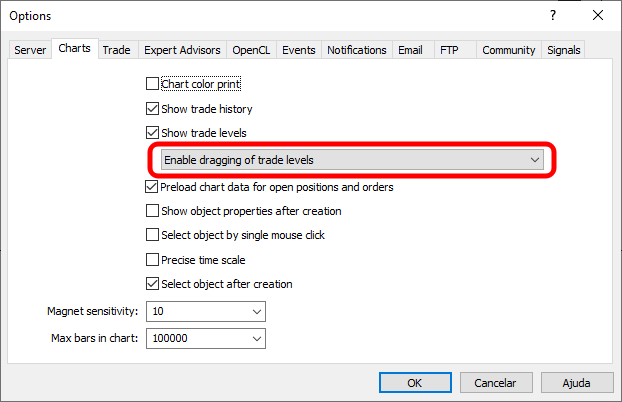
By default, MetaTrader 5 will use the setting shown in the image above. However, if you change this setting as shown in the following image, this movement will not occur.
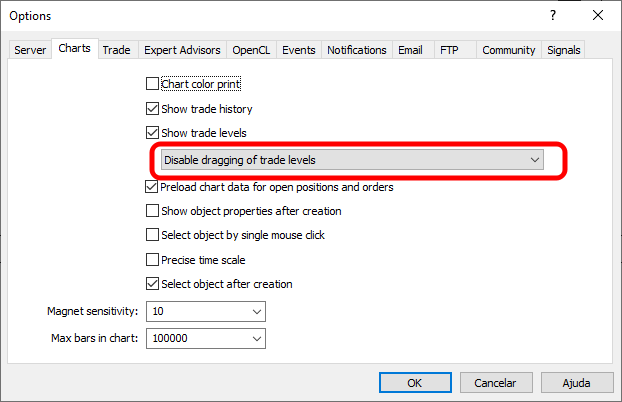
At this exact point, we would use MetaTrader 5 as if the symbol on the chart were a non-tradable instrument. In other words, this is a typical scenario that we will encounter when using the same system or indicators in replay/simulation. Therefore, it is important to implement all processes related to moving price lines. The question isn't whether we should do this or not, but simply how and when we'll do it. For those who follow the articles but are unable to compile the source code, I have included modified executable files in the attachment. In the next article, we will continue with a more detailed description of the implementation of the replay/simulation system.
| File | Description |
|---|---|
| Experts\Expert Advisor.mq5 | Demonstrates the interaction between Chart Trade and the Expert Advisor (Mouse Study is required for this interaction). |
| Indicators\Chart Trade.mq5 | Creates a window for configuring the order to be sent (Mouse Study is required for interaction) |
| Indicators\Market Replay.mq5 | Creates controls for interacting with the replay/simulation service (Mouse Study is required for this interaction). |
| Indicators\Mouse Study.mq5 | Provides interaction between graphical controls and the user (which is necessary both for the market replay/simulation system and in the real market). |
| Indicators\Order Indicator.mq5 | Responsible for placing market orders and handling their interaction and control. |
| Indicators\Position View.mq5 | Responsible for detecting and managing open market positions and handling interaction and control. |
| Services\Market Replay.mq5 | Creates and maintains the market replay/simulation service (the main file of the entire system). |
Translated from Portuguese by MetaQuotes Ltd.
Original article: https://www.mql5.com/pt/articles/13265
Warning: All rights to these materials are reserved by MetaQuotes Ltd. Copying or reprinting of these materials in whole or in part is prohibited.
This article was written by a user of the site and reflects their personal views. MetaQuotes Ltd is not responsible for the accuracy of the information presented, nor for any consequences resulting from the use of the solutions, strategies or recommendations described.

 Price Action Analysis Toolkit Development (Part 81): Adding Persistent Historical Bookmarks to an MQL5 Navigator
 From Basic to Intermediate: Queues, Lists, and Trees (I)
 Building a Bar Replay Tool in MQL5
 Markov Chain Monte Carlo Sampling Methods: The HMC Algorithm

- Free trading apps
- Over 8,000 signals for copying
- Economic news for exploring financial markets
You agree to website policy and terms of use