

Market Simulation: Position View (XIV)
 742
742
 0
0

Introduction
Hello, everyone, and welcome to a new article in our series on how to create a replay/simulation system.
In the previous article “Market Simulation: Position View (XIII)”, I showed how to view the result of an open trade and check whether the position is generating a profit or a loss. Nevertheless, we can expand and improve this same system to turn the position indicator into a practical and useful tool for everyday use. In this article, we will adapt it to various situations. That is why I invite you to follow along with this article, as these same techniques will prove useful in other projects developed using MQL5.
Implementation of Automatic Height Adjustment
Perhaps one of the most time-consuming tasks when creating objects using code is determining exactly how to set their size. We often have to specify their height and width, compile the code, and run the application in MetaTrader 5 to check whether the selected dimensions are appropriate.
With certain types of objects, this task is not difficult. However, this work is tedious and time-consuming, especially when we do not yet know what dimensions the object will need at a later stage of development. So, one of the objects we will be using frequently is OBJ_EDIT. We will use it to display values to the trader. This object is best suited when we need to display text that must remain within the boundaries of a predefined background. In the previous article, the profit or loss figure is displayed against a background that makes it easy to see at a glance whether we are in the black or in the red.
However, this presents a problem: you need to set the height and width of the OBJ_EDIT object correctly. It can be difficult to specify the dimensions of an object because some values require four characters, while others require more. The point is not to manually adjust the current dimensions, but rather what will happen if you, dear reader, enthusiastic and interested in learning MQL5 programming, decide to use a different font or font size. If you use the same code, you may find that the text is clipped or displayed not the way you expected. The mismatch between the font size and the OBJ_EDIT dimensions can be frustrating when we are just learning to program and do not know exactly what to change to fix it.
Fortunately, there is a practical and effective solution for adjusting the dimensions of the object, although few programmers use it. This approach is useful when designing an interface for personal use, as it eliminates the need to manually adjust the height and width of the OBJ_EDIT object based on the number of characters.
To properly automate the process of adjusting the dimensions, let's move on to the C_ElementsTrade class and add new definitions, variables, and a data structure. I will gradually make changes to C_ElementsTrade so that you, my dear reader, can understand how we structure the class and find it easier to refine the code. So, based on what was shown in the previous article, we will modify the C_ElementsTrade class. I will show the result below.
001. //+------------------------------------------------------------------+
002. #property copyright "Daniel Jose"
003. //+------------------------------------------------------------------+
004. #define def_NameHLine       m_Info.szPrefixName + "#HLINE"
005. #define def_NameBtnClose    m_Info.szPrefixName + "#CLOSE"
006. #define def_NameBtnMove     m_Info.szPrefixName + "#MOVE"
007. #define def_NameInfoDirect  m_Info.szPrefixName + "#DIRECT"
008. #define def_NameObjLabel    m_Info.szPrefixName + "#PROFIT"
009. //+------------------------------------------------------------------+
010. #define macro_LineInFocus(A) ObjectSetInteger(0, def_NameHLine, OBJPROP_YSIZE, m_Info.weight = (A ? 3 : 1));
011. //+------------------------------------------------------------------+
012. #define def_PathBtns "Images\\Market Replay\\Orders\\"
013. #define def_Btn_Close def_PathBtns + "Btn_Close.bmp"
014. #resource "\\" + def_Btn_Close;
015. //+------------------------------------------------------------------+
016. #include "..\Auxiliar\C_Mouse.mqh"
017. //+------------------------------------------------------------------+
018. #ifdef def_FontName
019.     "Why are you trying to do this?"
020. #else
021.     #define def_FontName "Lucida Console"
022.     #define def_FontSize 10
023. #endif
024. //+------------------------------------------------------------------+
025. class C_ElementsTrade : public C_Mouse
026. {
027.     private    :
028. //+------------------------------------------------------------------+
029.         struct st00
030.         {
031.             struct st_01
032.             {
033.                 uchar   Width,
034.                         Height,
035.                         digits;
036.             }Text;
037.             ulong       ticket;
038.             string      szPrefixName,
039.                         szDescr;
040.             EnumEvents  ev;
041.             double      price,
042.                         open;
043.             bool        bClick,
044.                         bIsBuy;
045.             char        weight;
046.             color       _color;
047.         }m_Info;
048. //+------------------------------------------------------------------+
049.         void UpdateViewPort(const double price)
050.         {
051.             int x, y;
052.
053.             ChartTimePriceToXY(0, 0, 0, price, x, y);
054.             x = (m_Info.ev == evMsgClosePositionEA ? 150 : (m_Info.ev == evMsgCloseTakeProfit ? 220 : 290));
055.             ObjectSetInteger(0, def_NameHLine, OBJPROP_XDISTANCE, x);
056.             ObjectSetInteger(0, def_NameHLine, OBJPROP_YDISTANCE, y - (m_Info.weight > 1 ? (int)(m_Info.weight / 2) : 0));
057.             ObjectSetInteger(0, def_NameBtnClose, OBJPROP_XDISTANCE, x);
058.             ObjectSetInteger(0, def_NameBtnClose, OBJPROP_YDISTANCE, y);
059.             ObjectSetInteger(0, def_NameObjLabel, OBJPROP_XDISTANCE, x + 10);
060.             ObjectSetInteger(0, def_NameObjLabel, OBJPROP_YDISTANCE, y - (m_Info.Text.Height / 2));
061.             ObjectSetInteger(0, def_NameInfoDirect, OBJPROP_XDISTANCE, x + m_Info.Text.Width + 20);
062.             ObjectSetInteger(0, def_NameInfoDirect, OBJPROP_YDISTANCE, y);
063.             ObjectSetInteger(0, def_NameBtnMove, OBJPROP_XDISTANCE, x + m_Info.Text.Width + 20);
064.             ObjectSetInteger(0, def_NameBtnMove, OBJPROP_YDISTANCE, y);
065.         }
066. //+------------------------------------------------------------------+
067. inline void CreateLinePrice(void)
068.         {
069.             string szObj;
070.
071.             CreateObjectGraphics(szObj = def_NameHLine, OBJ_RECTANGLE_LABEL, m_Info._color, (EnumPriority)(ePriorityDefault));
072.             ObjectSetInteger(0, szObj, OBJPROP_BGCOLOR, m_Info._color);
073.             ObjectSetInteger(0, szObj, OBJPROP_XSIZE, TerminalInfoInteger(TERMINAL_SCREEN_WIDTH));
074.             ObjectSetInteger(0, szObj, OBJPROP_BORDER_TYPE, BORDER_FLAT);
075.             ObjectSetInteger(0, szObj, OBJPROP_CORNER, CORNER_LEFT_UPPER);
076.             ObjectSetString(0, szObj, OBJPROP_TOOLTIP, m_Info.szDescr);
077.             macro_LineInFocus(false);
078.         }
079. //+------------------------------------------------------------------+
080. inline void CreateBoxInfo(const bool bMove)
081.         {
082.             string szObj;
083.             const char c[] = {(char)(bMove ? 'u' : (m_Info.bIsBuy ? 236 : 238)), 0};
084.
085.             CreateObjectGraphics(szObj = (bMove ? def_NameBtnMove : def_NameInfoDirect), OBJ_LABEL, clrNONE, (EnumPriority)(ePriorityDefault));
086.             ObjectSetString(0, szObj, OBJPROP_FONT, "Wingdings");
087.             ObjectSetString(0, szObj, OBJPROP_TEXT, CharArrayToString(c));
088.             ObjectSetInteger(0, szObj, OBJPROP_COLOR, (bMove ? m_Info._color : (m_Info.bIsBuy ? clrForestGreen : clrFireBrick)));
089.             ObjectSetInteger(0, szObj, OBJPROP_FONTSIZE, (bMove ? 17 : 15));
090.             ObjectSetInteger(0, szObj, OBJPROP_ANCHOR, ANCHOR_CENTER);
091.         }
092. //+------------------------------------------------------------------+
093. inline void CreateObjectInfoText(void)
094.         {
095.             string szObj;
096.
097.             CreateObjectGraphics(szObj = def_NameObjLabel, OBJ_EDIT, clrNONE, (EnumPriority)(ePriorityDefault));
098.             ObjectSetString(0, szObj, OBJPROP_FONT, def_FontName);
099.             ObjectSetInteger(0, szObj, OBJPROP_FONTSIZE, def_FontSize);
100.             ObjectSetInteger(0, szObj, OBJPROP_COLOR, clrBlack);
101.             ObjectSetInteger(0, szObj, OBJPROP_BORDER_COLOR, m_Info._color);
102.             ObjectSetInteger(0, szObj, OBJPROP_ALIGN, ALIGN_CENTER);
103.             ObjectSetInteger(0, szObj, OBJPROP_READONLY, true);
104.             ObjectSetInteger(0, szObj, OBJPROP_YSIZE, m_Info.Text.Height);
105.             ObjectSetInteger(0, szObj, OBJPROP_XSIZE, m_Info.Text.Width);
106.         }
107. //+------------------------------------------------------------------+
108. inline void CreateButtonClose(void)
109.         {
110.             string szObj;
111.
112.             CreateObjectGraphics(szObj = def_NameBtnClose, OBJ_BITMAP_LABEL, clrNONE, (EnumPriority)(ePriorityDefault));
113.             ObjectSetString(0, szObj, OBJPROP_BMPFILE, 0, "::" + def_Btn_Close);
114.             ObjectSetInteger(0, szObj, OBJPROP_ANCHOR, ANCHOR_CENTER);
115.         }
116. //+------------------------------------------------------------------+
117.     public    :
118. //+------------------------------------------------------------------+
119.         C_ElementsTrade(const ulong ticket, const EnumEvents ev, color _color, char digits, string szDescr = "\n", const bool IsBuy = true)
120.             :C_Mouse(0, "")
121.         {
122.             uint w, h;
123.
124.             ZeroMemory(m_Info);
125.             m_Info.szPrefixName = StringFormat("%I64u@%03d", m_Info.ticket = ticket, (int)(m_Info.ev = ev));
126.             m_Info._color = _color;
127.             m_Info.szDescr = szDescr;
128.             m_Info.bIsBuy = IsBuy;
129.             m_Info.Text.digits = digits;
130.             TextSetFont(def_FontName, def_FontSize * -10);
131.             TextGetSize(StringFormat("%." + (string)digits + "f", 8888.88888), w, h);
132.             m_Info.Text.Width = (uchar) w + 4;
133.             m_Info.Text.Height = (uchar) h + 4;
134.         }
135. //+------------------------------------------------------------------+
136.         ~C_ElementsTrade()
137.         {
138.             ObjectsDeleteAll(0, m_Info.szPrefixName);
139.         }
140. //+------------------------------------------------------------------+
141. inline void UpdatePrice(const double open, const double price)
142.         {
143.             if (price > 0)
144.             {
145.                 CreateLinePrice();
146.                 CreateButtonClose();
147.             }else
148.                 ObjectsDeleteAll(0, m_Info.szPrefixName);
149.             CreateBoxInfo(m_Info.ev != evMsgClosePositionEA);
150.             if (price > 0)
151.                 CreateObjectInfoText();
152.             m_Info.open = open;
153.             UpdateViewPort(m_Info.price = (price > 0 ? price : open));
154.             if (m_Info.ev != evMsgClosePositionEA)
155.                 ViewValue(m_Info.bIsBuy ? m_Info.price - m_Info.open : m_Info.open - m_Info.price);
156.         }
157. //+------------------------------------------------------------------+
158.         void ViewValue(const double profit)
159.         {
160.             ObjectSetString(0, def_NameObjLabel, OBJPROP_TEXT, StringFormat("%." + (string)m_Info.Text.digits + "f", (profit < 0 ? -(profit) : profit)));
161.             ObjectSetInteger(0, def_NameObjLabel, OBJPROP_BGCOLOR, (profit >= 0 ? clrPaleGreen : clrCoral));
162.             ChartRedraw();
163.         }
164. //+------------------------------------------------------------------+
165.         void DispatchMessage(const int id, const long &lparam, const double &dparam, const string &sparam)
166.         {
167.             string sz0;
168.             long _lparam = lparam;
169.             double _dparam = dparam;
170.
171.             C_Mouse::DispatchMessage(id, lparam, dparam, sparam);
172.             switch (id)
173.             {
174.                 case (CHARTEVENT_KEYDOWN):
175.                     if (!TerminalInfoInteger(TERMINAL_KEYSTATE_ESCAPE)) break;
176.                     _lparam = (long) m_Info.ticket;
177.                     _dparam = 0;
178.                 case CHARTEVENT_CUSTOM + evMsgSetFocus:
179.                     macro_LineInFocus((m_Info.ticket == (ulong)(_lparam)) && ((EnumEvents)(_dparam) == m_Info.ev));
180.                     EventChartCustom(0, (ushort)(_dparam ? evHideMouse : evShowMouse), 0, 0, "");
181.                     m_Info.bClick = false;
182.                 case CHARTEVENT_CHART_CHANGE:
183.                     UpdateViewPort(m_Info.price);
184.                     if (m_Info.ev != evMsgClosePositionEA)
185.                         ViewValue(m_Info.bIsBuy ? m_Info.price - m_Info.open : m_Info.open - m_Info.price);
186.                     break;
187.                 case CHARTEVENT_OBJECT_CLICK:
188.                     sz0 = GetPositionsMouse().szObjNameClick;
189.                     if (m_Info.bClick) switch (m_Info.ev)
190.                     {
191.                         case evMsgClosePositionEA:
192.                             if (sz0 == def_NameBtnClose)
193.                                 EventChartCustom(0, evMsgClosePositionEA, m_Info.ticket, 0, "");
194.                             break;
195.                         case evMsgCloseTakeProfit:
196.                             if (sz0 == def_NameBtnClose)
197.                                 EventChartCustom(0, evMsgCloseTakeProfit, m_Info.ticket, PositionGetDouble(POSITION_SL), PositionGetString(POSITION_SYMBOL));
198.                             else if (sz0 == def_NameBtnMove)
199.                                 EventChartCustom(0, evMsgSetFocus, m_Info.ticket, evMsgCloseTakeProfit, "");
200.                             break;
201.                         case evMsgCloseStopLoss:
202.                             if (sz0 == def_NameBtnClose)
203.                                 EventChartCustom(0, evMsgCloseStopLoss, m_Info.ticket, PositionGetDouble(POSITION_TP), PositionGetString(POSITION_SYMBOL));
204.                             else if (sz0 == def_NameBtnMove)
205.                                 EventChartCustom(0, evMsgSetFocus, m_Info.ticket, evMsgCloseStopLoss, "");
206.                             break;
207.                     }
208.                     m_Info.bClick = false;
209.                     break;
210.                 case CHARTEVENT_MOUSE_MOVE:
211.                     m_Info.bClick = (CheckClick(C_Mouse::eClickLeft) ? true : m_Info.bClick);
212.                     if (m_Info.weight > 1)
213.                     {
214.                         UpdateViewPort(_dparam = GetPositionsMouse().Position.Price);
215.                         if (m_Info.ev != evMsgClosePositionEA)
216.                             ViewValue(m_Info.bIsBuy ? _dparam - m_Info.open : m_Info.open - _dparam);
217.                         if (m_Info.bClick)
218.                         {
219.                             switch (m_Info.ev)
220.                             {
221.                                 case evMsgCloseTakeProfit:
222.                                     EventChartCustom(0, evMsgNewTakeProfit, m_Info.ticket, GetPositionsMouse().Position.Price, PositionGetString(POSITION_SYMBOL));
223.                                     break;
224.                                 case evMsgCloseStopLoss:
225.                                     EventChartCustom(0, evMsgNewStopLoss, m_Info.ticket, GetPositionsMouse().Position.Price, PositionGetString(POSITION_SYMBOL));
226.                                     break;
227.                             }
228.                             EventChartCustom(0, evMsgSetFocus, 0, 0, "");
229.                         }
230.                     }
231.                     break;
232.             }
233.         }
234. //+------------------------------------------------------------------+
235. };
236. //+------------------------------------------------------------------+
237. #undef macro_LineInFocus
238. //+------------------------------------------------------------------+
239. #undef def_Btn_Close
240. #undef def_PathBtns
241. #undef def_FontName
242. #undef def_FontSize
243. //+------------------------------------------------------------------+
244. #undef def_NameObjLabel
245. #undef def_NameInfoDirect
246. #undef def_NameBtnMove
247. #undef def_NameBtnClose
248. #undef def_NameHLine
249. //+------------------------------------------------------------------+
C_ElementsTrade.mqh
All right. The first thing you will notice is a construct that seems strange at first glance if you look at line 18. You, dear reader, may be wondering: why is this preprocessor condition used in the code? The reason is that when working in C/C++ with function libraries or other reusable modules, identical names may be defined in different files, leading to conflicts. It is important to distinguish between the stages: first, the preprocessor processes the directives and prepares the active source code, and then the compiler translates that code. In C/C++, #error is a diagnostic preprocessor directive. When it is encountered in the active branch, it issues a diagnostic message and stops translation. The purpose of this directive is to clearly indicate an invalid configuration or condition detected before the executable file is created.
MQL5 does not provide an equivalent to the #error directive. Therefore, the code uses an unrecognized directive within a conditional branch to intentionally trigger an error if a specific macro, `def_FontName`, has already been defined. An unrecognized directive serves as a safeguard against redefinition or configuration conflicts, although it does not fully replicate the formal behavior or customizable messaging of the #error directive in C/C++. Let's analyze what is happening.
At the preprocessing stage, code line 18 uses the #ifdef directive to check whether the def_FontName macro has already been defined. If so, the active branch includes code line 19. Since MQL5 does not support #error, the preprocessor detects an unrecognized directive, and compilation stops before the executable file is generated. Text written after #error should not be interpreted as a message generated by an MQL5-compatible directive. If `def_FontName` is not defined, this branch is discarded, and the preprocessor keeps the block between `#else` and `#endif` so that the compiler can compile it.
If the def_FontName macro has not been defined, the preprocessor keeps the block between #else and #endif, where the font name and size are specified. Centralizing both definitions makes it possible to modify them without having to change multiple sections of code. After specifying the font name and size, look at line 25 of the code. Note that the inheritance, which used to be private, is now public. Changing the inheritance from `private` to `public` may not seem important right now, but by the end of this article, it will be precisely this change that will enable further modifications. Line 31 of the code declares a structure that stores the dimensions and formatting data needed to display the text.
The UpdateViewPort function, located on line 49 of the code, uses the new variables to apply the calculated width and height to the OBJ_EDIT field. On code line 93, these dimensions are reused when configuring the graphical object. In both places, the function reads the values that have already been stored; the class constructor initializes them, starting at line 119. Now take a look at how we initialize the dimensions, because you may need to modify this code if you expand the functionality.
Note that on line 122 we declare two new local variables, and until line 130 the preceding code remains the same as what you have already seen. When an instance is created, the constructor executes lines 130 and 131, which set the font and calculate the width and height of the text in pixels. The compiler simply checks and translates these calls. Then, in lines 132 and 133, four pixels are added to each dimension to leave two pixels on each side. In addition, I made some other minor changes to the class that do not require a detailed explanation. However, I would like to point out one important addition.
Lines 184 and 215 check whether the current instance of `C_ElementsTrade` corresponds to the take-profit line or the stop-loss line before calculating its distance from the opening price. Now, note this. In my previous article, I showed that the OBJ_EDIT field located above the opening price line can display the current profit or loss. In this extension, we reuse the same logic so that other OBJ_EDIT fields display the distance in points between the opening price and the take-profit or stop-loss lines. There is no need to reprogram the entire display logic.
Just as the OBJ_EDIT field on the opening price line shows the current profit or loss, the fields associated with take profit and stop loss display the distance in points relative to the opening price. Lines 185 and 216 calculate the distance in points, and the result is written to the take profit and stop loss OBJ_EDIT fields. Since this same function also processes the instance associated with the opening price, the conditions in lines 184 and 215 exclude this instance and prevent the profit or loss value displayed on the opening price line from being overwritten.
This version compiles, but it still behaves incorrectly at runtime. Therefore, we need to update the indicator code. Below is the complete revised version.
001. //+------------------------------------------------------------------+
002. #property copyright "Daniel Jose"
003. #property icon "/Images/Market Replay/Icons/Positions.ico"
004. #property description "Indicator for tracking an open position on the server."
005. #property description "This should preferably be used together with an Expert Advisor."
006. #property description "For more details see the same article."
007. #property version   "1.126"
008. #property link "https://www.mql5.com/pt/articles/13361"
009. #property indicator_chart_window
010. #property indicator_plots 0
011. //+------------------------------------------------------------------+
012. #define def_ShortName "Position View"
013. //+------------------------------------------------------------------+
014. #include <Market Replay\Order System\C_ElementsTrade.mqh>
015. #include <Market Replay\Defines.mqh>
016. //+------------------------------------------------------------------+
017. input ulong user00 = 0;        //For use in an Expert Advisor
018. //+------------------------------------------------------------------+
019. struct st00
020. {
021.     ulong   ticket;
022.     string  szShortName,
023.             szSymbol;
024.     double  priceOpen;
025.     char    digits;
026.     bool    bIsBuy;
027. }m_Infos;
028. //+------------------------------------------------------------------+
029. C_ElementsTrade *Open = NULL, *Stop = NULL, *Take = NULL;
030. //+------------------------------------------------------------------+
031. bool CheckCatch(ulong ticket)
032. {
033.     ZeroMemory(m_Infos);
034.     m_Infos.szShortName = StringFormat("%I64u", m_Infos.ticket = ticket);
035.     if (!PositionSelectByTicket(m_Infos.ticket)) return false;
036.     if (ObjectFind(0, m_Infos.szShortName) >= 0)
037.     {
038.         m_Infos.ticket = 0;
039.         return false;
040.     }
041.     m_Infos.szSymbol = PositionGetString(POSITION_SYMBOL);
042.     m_Infos.digits = (char)SymbolInfoInteger(m_Infos.szSymbol, SYMBOL_DIGITS);
043.     IndicatorSetString(INDICATOR_SHORTNAME, m_Infos.szShortName);
044.     EventChartCustom(0, evUpdate_Position, ticket, 0, "");
045.
046.     return true;
047. }
048. //+------------------------------------------------------------------+
049. inline void ProfitNow(void)
050. {
051.     double ask, bid;
052.
053.     ask = SymbolInfoDouble(m_Infos.szSymbol, SYMBOL_ASK);
054.     bid = SymbolInfoDouble(m_Infos.szSymbol, SYMBOL_BID);
055.     if (Open != NULL)
056.         (*Open).ViewValue((m_Infos.bIsBuy ? bid - m_Infos.priceOpen : m_Infos.priceOpen - ask));
057. }
058. //+------------------------------------------------------------------+
059. int OnInit()
060. {
061.     IndicatorSetString(INDICATOR_SHORTNAME, def_ShortName);
062.     if (!CheckCatch(user00))
063.     {
064.         ChartIndicatorDelete(0, 0, def_ShortName);
065.         return INIT_FAILED;
066.     }
067.
068.     return INIT_SUCCEEDED;
069. }
070. //+------------------------------------------------------------------+
071. int OnCalculate(const int rates_total, const int prev_calculated, const int begin, const double &price[])
072. {
073.     ProfitNow();
074.
075.     return rates_total;
076. }
077. //+------------------------------------------------------------------+
078. void OnChartEvent(const int id, const long &lparam, const double &dparam, const string &sparam)
079. {
080.     if (Open != NULL) (*Open).DispatchMessage(id, lparam, dparam, sparam);
081.     if (Take != NULL) (*Take).DispatchMessage(id, lparam, dparam, sparam);
082.     if (Stop != NULL) (*Stop).DispatchMessage(id, lparam, dparam, sparam);
083.     switch (id)
084.     {
085.         case CHARTEVENT_CUSTOM + evUpdate_Position:
086.             if (lparam != m_Infos.ticket) return;
087.             if (!PositionSelectByTicket(m_Infos.ticket))
088.             {
089.                 ChartIndicatorDelete(0, 0, m_Infos.szShortName);
090.                 return;
091.             };
092.             if (Open == NULL) Open = new C_ElementsTrade(m_Infos.ticket, evMsgClosePositionEA, clrRoyalBlue, m_Infos.digits, StringFormat("%I64u : Position opening price.", m_Infos.ticket), m_Infos.bIsBuy = (PositionGetInteger(POSITION_TYPE) == POSITION_TYPE_BUY));
093.             if (Take == NULL) Take = new C_ElementsTrade(m_Infos.ticket, evMsgCloseTakeProfit, clrForestGreen, m_Infos.digits, StringFormat("%I64u : Take Profit price.", m_Infos.ticket), m_Infos.bIsBuy);
094.             if (Stop == NULL) Stop = new C_ElementsTrade(m_Infos.ticket, evMsgCloseStopLoss, clrFireBrick, m_Infos.digits, StringFormat("%I64u : Stop Loss price.", m_Infos.ticket), m_Infos.bIsBuy);
095.             (*Open).UpdatePrice(0, m_Infos.priceOpen = PositionGetDouble(POSITION_PRICE_OPEN));
096.             (*Take).UpdatePrice(m_Infos.priceOpen, PositionGetDouble(POSITION_TP));
097.             (*Stop).UpdatePrice(m_Infos.priceOpen, PositionGetDouble(POSITION_SL));
098.             ProfitNow();
099.             break;
100.     }
101.     ChartRedraw();
102. };
103. //+------------------------------------------------------------------+
104. void OnDeinit(const int reason)
105. {
106.     delete Open;
107.     delete Take;
108.     delete Stop;
109. }
110. //+------------------------------------------------------------------+
Position indicator
The code changes have been left as an exercise so that you can study how they work. Since these are only minor changes, I will not go into detail here. When you run the updated code, you will see the result shown in the following animation:
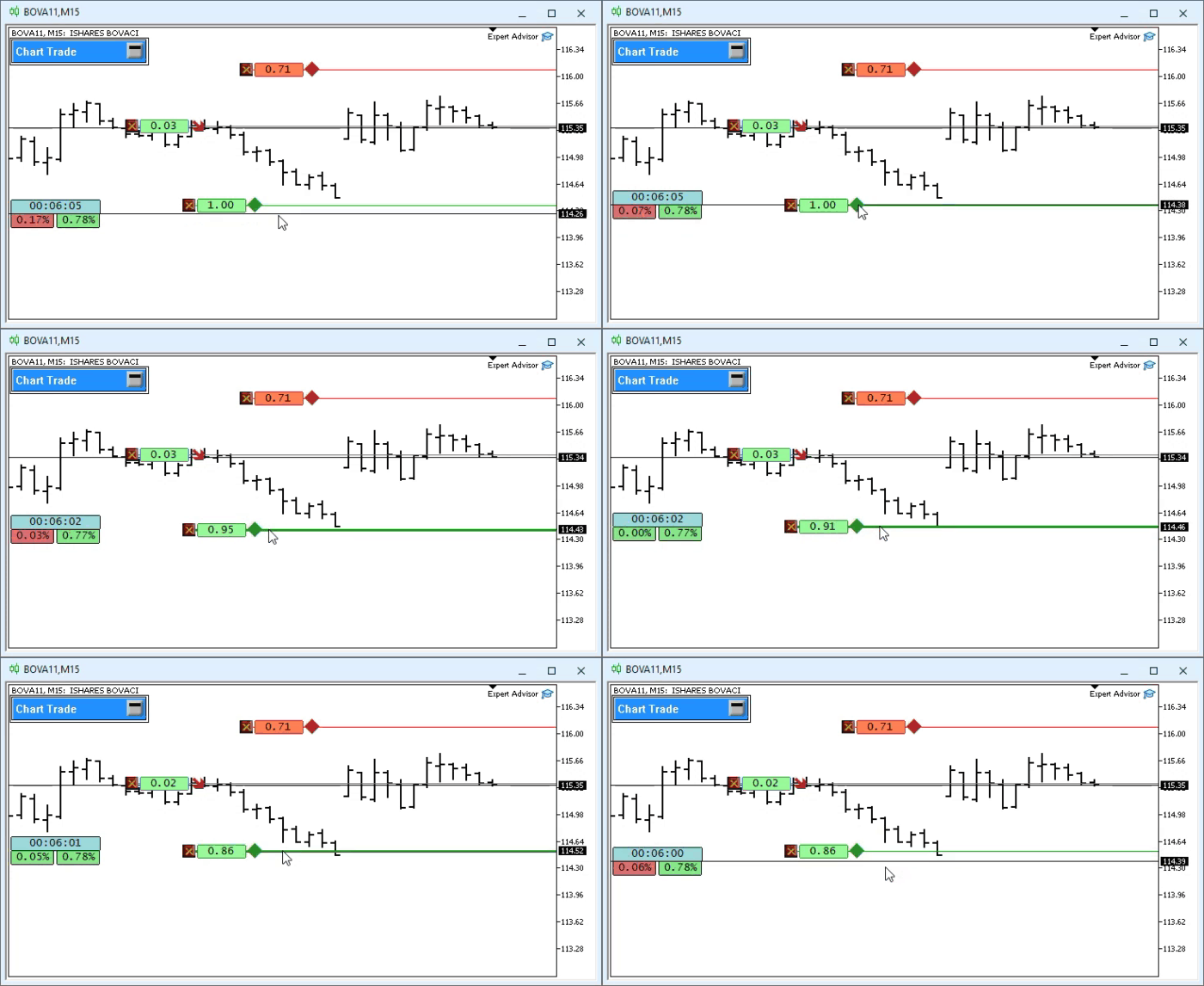
Please note: when we move the take-profit or stop-loss line, the indicator shows how many points separate that line from the opening price. One thing to note: if you move the take-profit line so that the value becomes negative, the indicator will reflect this, and the value will start to appear in red, just like for the stop-loss line. A change in color means that if the take profit is displayed in red, you will incur a loss if the position is closed at that point. The same applies to the stop loss. When the stop-loss line moves into the area where the value begins to appear in green—the same color as the take profit—this will mean that if the position closes at that point, you will, of course, make a profit equal to the specified number of points. The indicator works on a simple and straightforward principle. There is nothing complicated about it.
However, there is one detail. Please note that the position has both a take-profit line and a stop-loss line. But what happens if you try to create one of them using the Position View controls? Will the graphical distance field display the number of points while the line is being created? All right. Without making any additional changes to the code, you will get the result shown in the following animation.
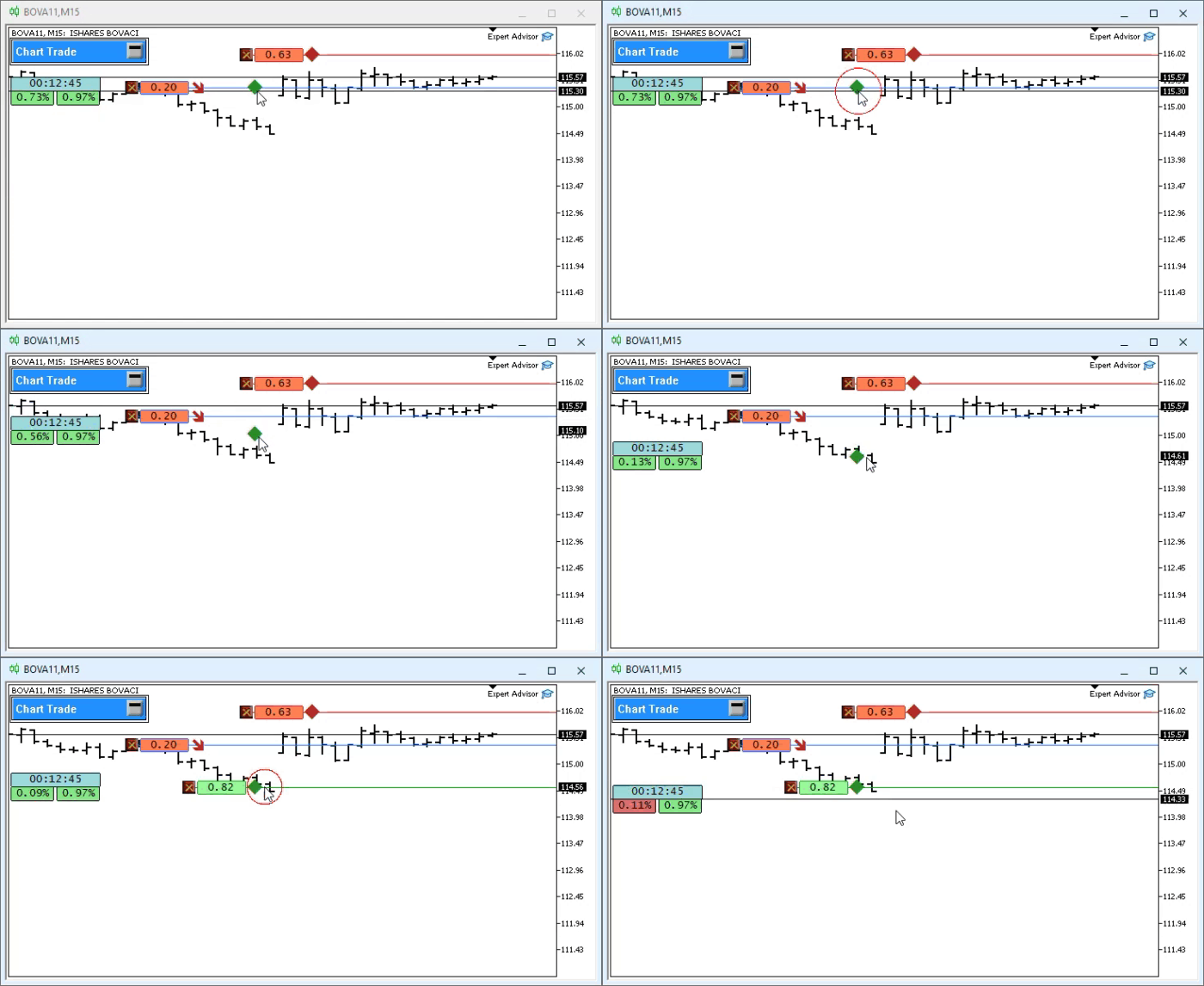
Please note that the OBJ_EDIT field for the distance appears only after you click the price at which the take-profit or stop-loss line will be created. From this point on, the field displays the distance in points between the confirmed line and the opening price. The calculation works for both lines. During the initial drag, a confirmed take-profit or stop-loss line does not yet exist; we are simply moving the interactive graphical object. Although this does not prevent you from creating a line, you still have to confirm the price first and only then adjust its position, as we saw in the first animation. This behavior looks unnatural, so it needs to be improved. Changing the indicator seems like a difficult task, as if it required a PhD in programming or a genius with an IQ of five million. Does this kind of refinement really require such a high level of complexity? To answer this question, let's move on to the next topic, since this will help us better distinguish between these two issues.
Adding more intuitive interaction
Now we will implement this solution, since MQL5 is based on the same principles as event-driven programmingю Developers often use this model when creating DLLs. I know that event-driven programming may seem confusing and not very logical at first. But believe me, dear reader: I have been working with event-driven programming for a long time, and I can say with confidence that understanding and mastering it requires practice and perseverance. You will have to write a few event-driven applications to fully understand the mechanism I will try to explain here.
The idea is to make as few changes to the code as possible while providing more intuitive interaction. When attempting to create a take-profit or stop-loss line, we need to update the OBJ_EDIT distance field with a value corresponding to the cursor's current vertical coordinate during dragging. This lets us display the provisional distance before the line is confirmed. Until the take profit or stop loss exists on the server, there is only an interactive graphical object that allows you to select the line type, move the cursor to the desired price, and confirm its creation with a mouse click. Selection and dragging work correctly, but the OBJ_EDIT field does not calculate the distance between this provisional price and the opening price. Our first task is to update the field while dragging.
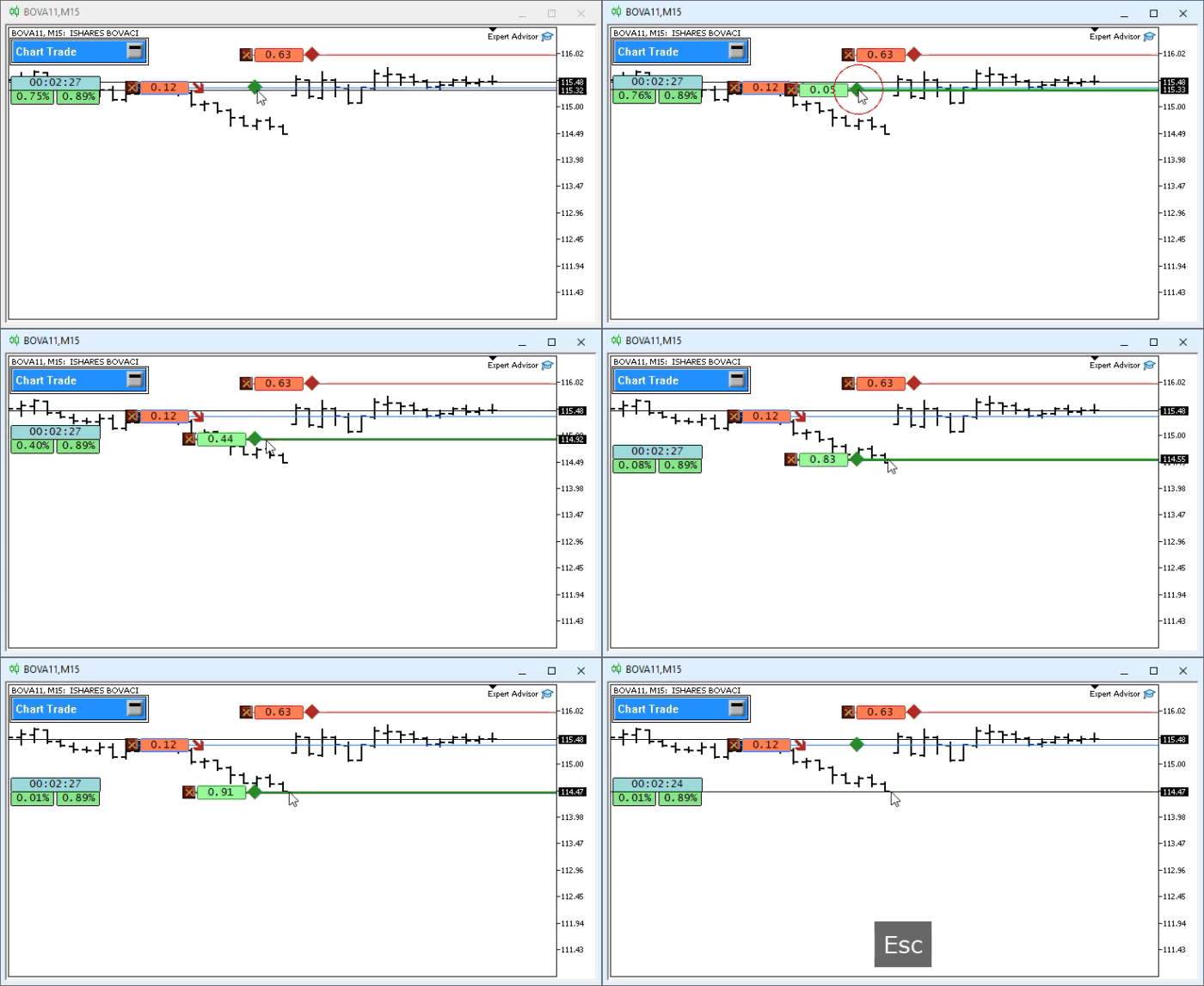
The second problem arises when we temporarily display the OBJ_EDIT distance field before creating a line. After starting the creation process, the user cancels the operation by pressing the ESC key. In this case, the stop-loss or take-profit line is not created. Cancellation already works, but we also need to hide or reset the graphical distance field. Otherwise, this field will remain visible on the chart with a value corresponding to a nonexistent line and will provide the trader with misleading information.
We need to solve two problems with as few changes as possible: update the OBJ_EDIT field while dragging and hide it after the operation is canceled. Many people would start mindlessly adding and rewriting code, as well as modifying a significant portion of C_ElementsTrade, in order to update and hide the distance field. That would be a perfectly acceptable option, but here we will only change the code for the position indicator.
The new code is shown below.
001. //+------------------------------------------------------------------+
002. #property copyright "Daniel Jose"
003. #property icon "/Images/Market Replay/Icons/Positions.ico"
004. #property description "Indicator for tracking an open position on the server."
005. #property description "This should preferably be used together with an Expert Advisor."
006. #property description "For more details see the same article."
007. #property version   "1.126"
008. #property link "https://www.mql5.com/pt/articles/13361"
009. #property indicator_chart_window
010. #property indicator_plots 0
011. //+------------------------------------------------------------------+
012. #define def_ShortName "Position View"
013. //+------------------------------------------------------------------+
014. #include <Market Replay\Order System\C_ElementsTrade.mqh>
015. #include <Market Replay\Defines.mqh>
016. //+------------------------------------------------------------------+
017. input ulong user00 = 0;        //For use in an Expert Advisor
018. //+------------------------------------------------------------------+
019. struct st00
020. {
021.     ulong     ticket;
022.     string    szShortName,
023.               szSymbol;
024.     double    priceOpen;
025.     char      digits;
026.     bool      bIsBuy;
027. }m_Infos;
028. //+------------------------------------------------------------------+
029. C_ElementsTrade *Open = NULL, *Stop = NULL, *Take = NULL;
030. //+------------------------------------------------------------------+
031. bool CheckCatch(ulong ticket)
032. {
033.     ZeroMemory(m_Infos);
034.     m_Infos.szShortName = StringFormat("%I64u", m_Infos.ticket = ticket);
035.     if (!PositionSelectByTicket(m_Infos.ticket)) return false;
036.     if (ObjectFind(0, m_Infos.szShortName) >= 0)
037.     {
038.         m_Infos.ticket = 0;
039.         return false;
040.     }
041.     m_Infos.szSymbol = PositionGetString(POSITION_SYMBOL);
042.     m_Infos.digits = (char)SymbolInfoInteger(m_Infos.szSymbol, SYMBOL_DIGITS);
043.     IndicatorSetString(INDICATOR_SHORTNAME, m_Infos.szShortName);
044.     EventChartCustom(0, evUpdate_Position, ticket, 0, "");
045.
046.     return true;
047. }
048. //+------------------------------------------------------------------+
049. inline void ProfitNow(void)
050. {
051.     double ask, bid;
052.
053.     ask = SymbolInfoDouble(m_Infos.szSymbol, SYMBOL_ASK);
054.     bid = SymbolInfoDouble(m_Infos.szSymbol, SYMBOL_BID);
055.     if (Open != NULL)
056.         (*Open).ViewValue((m_Infos.bIsBuy ? bid - m_Infos.priceOpen : m_Infos.priceOpen - ask));
057. }
058. //+------------------------------------------------------------------+
059. int OnInit()
060. {
061.     IndicatorSetString(INDICATOR_SHORTNAME, def_ShortName);
062.     if (!CheckCatch(user00))
063.     {
064.         ChartIndicatorDelete(0, 0, def_ShortName);
065.         return INIT_FAILED;
066.     }
067.
068.     return INIT_SUCCEEDED;
069. }
070. //+------------------------------------------------------------------+
071. int OnCalculate(const int rates_total, const int prev_calculated, const int begin, const double &price[])
072. {
073.     ProfitNow();
074.
075.     return rates_total;
076. }
077. //+------------------------------------------------------------------+
078. void OnChartEvent(const int id, const long &lparam, const double &dparam, const string &sparam)
079. {
080.     switch (id)
081.     {
082.         case CHARTEVENT_CUSTOM + evMsgSetFocus:
083.             if (lparam != m_Infos.ticket) break;
084.             switch ((EnumEvents)dparam)
085.             {
086.                 case evMsgCloseTakeProfit:
087.                     (*Take).UpdatePrice(m_Infos.priceOpen, (*Take).GetPositionsMouse().Position.Price);
088.                     break;
089.                 case evMsgCloseStopLoss:
090.                     (*Stop).UpdatePrice(m_Infos.priceOpen, (*Stop).GetPositionsMouse().Position.Price);
091.                     break;
092.             }
093.             break;
094.         case CHARTEVENT_CUSTOM + evUpdate_Position:
095.             if (lparam != m_Infos.ticket) break;
096.             if (!PositionSelectByTicket(m_Infos.ticket))
097.             {
098.                 ChartIndicatorDelete(0, 0, m_Infos.szShortName);
099.                 return;
100.             };
101.             if (Open == NULL) Open = new C_ElementsTrade(m_Infos.ticket, evMsgClosePositionEA, clrRoyalBlue, m_Infos.digits, StringFormat("%I64u : Position opening price.", m_Infos.ticket), m_Infos.bIsBuy = (PositionGetInteger(POSITION_TYPE) == POSITION_TYPE_BUY));
102.             if (Take == NULL) Take = new C_ElementsTrade(m_Infos.ticket, evMsgCloseTakeProfit, clrForestGreen, m_Infos.digits, StringFormat("%I64u : Take Profit price.", m_Infos.ticket), m_Infos.bIsBuy);
103.             if (Stop == NULL) Stop = new C_ElementsTrade(m_Infos.ticket, evMsgCloseStopLoss, clrFireBrick, m_Infos.digits, StringFormat("%I64u : Stop Loss price.", m_Infos.ticket), m_Infos.bIsBuy);
104.             (*Open).UpdatePrice(0, m_Infos.priceOpen = PositionGetDouble(POSITION_PRICE_OPEN));
105.             (*Take).UpdatePrice(m_Infos.priceOpen, PositionGetDouble(POSITION_TP));
106.             (*Stop).UpdatePrice(m_Infos.priceOpen, PositionGetDouble(POSITION_SL));
107.             ProfitNow();
108.             break;
109.     }
110.     if (Open != NULL) (*Open).DispatchMessage(id, lparam, dparam, sparam);
111.     if (Take != NULL) (*Take).DispatchMessage(id, lparam, dparam, sparam);
112.     if (Stop != NULL) (*Stop).DispatchMessage(id, lparam, dparam, sparam);
113.     ChartRedraw();
114. };
115. //+------------------------------------------------------------------+
116. void OnDeinit(const int reason)
117. {
118.     delete Open;
119.     delete Take;
120.     delete Stop;
121. }
122. //+------------------------------------------------------------------+
Indicator code
In the next animation, we press the ESC key and cancel creation of the line.
The following animation shows the result when a line is created.
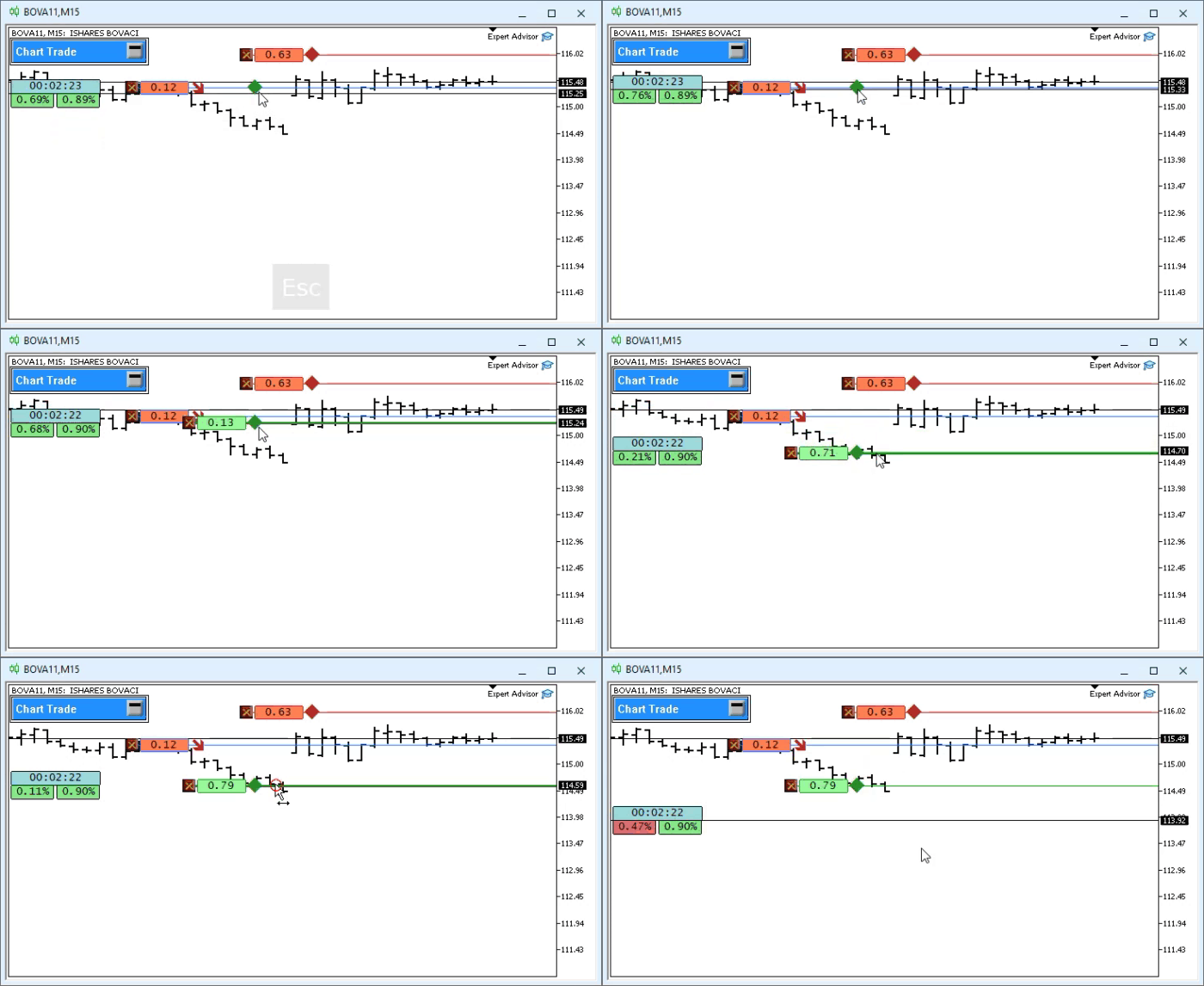
When examining the indicator's code, its behavior may seem difficult to explain. Compare it to the previous version, which we discussed in this same article. You will see that differences really exist. But even if they do, why does a modified version of the indicator—which has far fewer changes than one might expect—allow us to almost complete its implementation? The fact that just a few changes are enough to almost fully implement the indicator seems like magic or sorcery, as if someone had struck a deal. But no, dear reader. We achieve this result through the proper use of the mechanisms for events, messages, and code reuse provided by MQL5.
Let's figure out why changing only the indicator code was enough to achieve the desired result. Take note of this. Line 49 declares a helper function that contains the update logic, which was previously located inside OnCalculate. When MetaTrader 5 calls OnCalculate, line 73 will execute this function to recalculate and update the position display. The inline keyword on line 49 does not turn the function into a macro, nor does it force the MQL5 compiler to copy its body at every call site. In MQL5, the keyword `inline` is reserved for compatibility with C++, but it does not alter the generated code; the compiler automatically decides whether to apply call-site expansion as an optimization. From a coding perspective, it is still a function with standard calls and parameters.
The helper function allows you to reuse the same logic in two handlers. Line 73 of the code is executed when MetaTrader 5 calls OnCalculate; line 107 is executed from OnChartEvent to update the chart display after a chart event is received. Now let's set the rest of the code aside and focus on `OnChartEvent`, where the response to chart events is handled. Understanding the flow of events and calls plays a huge role in your development as a programmer, especially when working with event-driven applications.
This flow depends on the event generated either by the user or by MetaTrader 5. When the terminal detects this event, it calls OnChartEvent and passes the associated data to the handler. If you think of this function as if the program were executing its instructions at compile time, you will not understand the mechanism itself. But if you follow the flow of events and calls, this sequence will begin to make sense. Inside OnChartEvent, we moved the statements from lines 110–112 from the beginning of the handler to the end. Thus, the handler first processes the received message and then updates the overall display.
At line 178 of the C_ElementsTrade file, the evMsgSetFocus message identifier is defined as the one that OnChartEvent checks at line 82. When the handler receives this identifier, line 83 checks whether the position ticket belongs to the position managed by Position View. Next, line 84 branches execution based on the selected line type: the branch leading to line 87 calculates and displays the provisional distance to the take profit, while the branch leading to line 90 does the same for the stop loss. Thanks to these two branches, Position View maintains synchronization of the graphical display of distance whenever a line is created or adjusted.
But the question remains: how does the modified indicator code produce the behavior we see in the animations? The connection to C_ElementsTrade lies in the calls on lines 87 and 90: they pass the opening price and the provisional line price to a function that calculates the difference relative to the opening price and updates the corresponding OBJ_EDIT field with that distance.
Exactly, dear reader. This mechanism requires you to track the flow of events carefully. You were probably expecting that, in order for what is shown in the animations to make sense, you would need to modify the code for the C_ElementsTrade class. Nevertheless, we did make a change to the class, albeit a rather subtle one. Remember, in the previous section I mentioned that we changed the inheritance? This change allows the indicator to call the inherited function used by code lines 87 and 90. Each call converts the cursor's vertical coordinate into a price on the chart, calculates the difference relative to the opening price, and writes the resulting distance to the corresponding OBJ_EDIT field. The function takes two prices: the position opening price and the line reference price. Once the line has been confirmed, the second value is its actual price; while it is being dragged, it is the provisional price determined by the cursor position. Lines 105 and 106 perform the same calculation using the take-profit and stop-loss prices that have already been confirmed on the server.
Lines 105 and 106 update the visual display, displaying the take-profit or stop-loss price registered on the server. In turn, code lines 87 and 90 use a provisional price calculated from the cursor's vertical coordinate. At this stage, there is still no take-profit or stop-loss line with that price on the server; only an interactive graphical object and a local distance indication exist. Good heavens. Now the analysis has indeed become more complicated. So, when we select an interactive object and move the cursor, are code lines 87 and 90 the ones that move that object in the animation? NO.
In the previous version, the calls on lines 87 and 90 were missing. These calls DO NOT MOVE THE GRAPHICAL OBJECT: they obtain the provisional price associated with the cursor, calculate its distance from the opening price, and update the corresponding OBJ_EDIT field before the line is confirmed. Thus, the same calculation and visualization logic is reused without assuming that the line already exists on the server.
Concluding Thoughts
I know the code might seem confusing at first. However, it's not that easy to understand how this works just by looking at the code, and messaging and events are difficult to grasp without understanding the underlying logic. However, I need a little more space to explain in detail what is happening here. In the next article, I will temporarily set aside the development of the replay/simulation system to explain in more detail how applications and MetaTrader 5 exchange messages and events.
This way, those who want to learn how to use the event-driven programming model will know where to start. It took me a long time to study this mechanism in order to understand how it works. Once I realized that, I started designing and writing programs differently.
I want you, dear reader, to understand how events, messages, and graphical updates are coordinated. Many programmers spend hours working on solutions that can be implemented much more quickly and clearly using event-driven programming and messaging.
To test the message and event system, I am attaching the already compiled files. This way, you will avoid having to compile all the files and reduce the risk of making errors during compilation. I will say goodbye for now. See you in the next article, where I promise to explain the messaging mechanism and event-driven programming. See you next time.
| File | Description |
|---|---|
| Experts\Expert Advisor.mq5 | Shows the interaction between Chart Trade and the Expert Advisor (Mouse Study must be used for this interaction) |
| Indicators\Chart Trade.mq5 | Creates a window for configuring the order to be sent (Mouse Study must be used for this interaction) |
| Indicators\Market repetición.mq5 | Creates controls for interacting with the market replay/simulation service (Mouse Study must be used for this interaction) |
| Indicators\Mouse Study.mq5 | Provides interaction between graphical controls and the user (which is necessary both for the replay/simulation system and for live trading) |
| Indicators\Order Indicator.mq5 | Displays market orders and allows you to interact with and manage them. |
| Indicators\Position View.mq5 | Displays market positions and allows you to interact with and manage them. |
| Services\Market repetición.mq5 | Creates and maintains the market replay/simulation service (the main file of the market replay/simulation system). |
Translated from Portuguese by MetaQuotes Ltd.
Original article: https://www.mql5.com/pt/articles/13361
Warning: All rights to these materials are reserved by MetaQuotes Ltd. Copying or reprinting of these materials in whole or in part is prohibited.
This article was written by a user of the site and reflects their personal views. MetaQuotes Ltd is not responsible for the accuracy of the information presented, nor for any consequences resulting from the use of the solutions, strategies or recommendations described.

 Creating a Cairo-Inspired Graphics Library for MetaTrader 5 (Part 2): Points, Contours and the Path
 From Basic to Intermediate: Classes (I)
 The Mathematics of Volatility: Why the GRI Indicator Deserves to Return to Your Trading Terminal
 Neural Networks in Trading: Decomposition Instead of Scaling (SSCNN)

- Free trading apps
- Over 8,000 signals for copying
- Economic news for exploring financial markets
You agree to website policy and terms of use