

Market Simulation: Position View (XII)
 1 284
1 284
 0
0

Introduction
Welcome, everyone, to another article in our series on how to create a replay/simulation system.
In the previous article Market Simulation: Position View (XI), we examined how to move Stop Loss and Take Profit lines in a very simple and practical way, displaying on the chart exactly the state recorded on the live trading server. As you have probably noticed, there is an obvious issue that affects the position indicator when both the Stop Loss line and the Take Profit line are removed. The problem is that it is impossible to tell directly from the chart whether a position is long or short. To do this, you need to open the Terminal. However, we can solve this problem in a very simple and practical way. This is the first thing we will discuss in this article. Let's move on to the first topic.
Graphical representation of the position direction
Perhaps the most interesting aspect of this article is not the indicators themselves or the replay/simulation system, but rather the way the code is modified to add new features or adapt it to a specific task.
In the previous article, I showed how to move Stop Loss and Take Profit lines with minimal effort. Many people consider this a very complex and difficult task, given the number of steps involved. Without the proper precautions, the chart may display a price level that differs from the one recorded on the server. This can happen if you move a line to a new level, but the server does not register the change. As a result, in real trading, you may suffer significant losses while securing only minimal profit. You should make as few changes to the code as possible and, after each edit, verify that the system behaves exactly as expected.
Following the same philosophy—making as few changes as possible without disrupting the system’s behavior—we will add a visual signal to the position indicator that will show directly on the chart whether the position is long or short.
The first thing we need to do is modify the C_ElementsTrade class by adding a graphical object to it that will indicate whether the position is long or short. This is a simple and straightforward task. The code below demonstrates a new version of the C_ElementsTrade class with this graphical signal:
001. //+------------------------------------------------------------------+
002. #property copyright "Daniel Jose"
003. //+------------------------------------------------------------------+
004. #define def_NameHLine       m_Info.szPrefixName + "#HLINE"
005. #define def_NameBtnClose    m_Info.szPrefixName + "#CLOSE"
006. #define def_NameBtnMove     m_Info.szPrefixName + "#MOVE"
007. #define def_NameInfoDirect  m_Info.szPrefixName + "#DIRECT"
008. //+------------------------------------------------------------------+
009. #define macro_LineInFocus(A) ObjectSetInteger(0, def_NameHLine, OBJPROP_YSIZE, m_Info.weight = (A ? 3 : 1));
010. //+------------------------------------------------------------------+
011. #define def_PathBtns "Images\\Market Replay\\Orders\\"
012. #define def_Btn_Close def_PathBtns + "Btn_Close.bmp"
013. #resource "\\" + def_Btn_Close;
014. //+------------------------------------------------------------------+
015. #include "..\Auxiliar\C_Mouse.mqh"
016. //+------------------------------------------------------------------+
017. class C_ElementsTrade : private C_Mouse
018. {
019.     private    :
020. //+------------------------------------------------------------------+
021.         struct st00
022.         {
023.             ulong       ticket;
024.             string      szPrefixName,
025.                         szDescr;
026.             EnumEvents  ev;
027.             double      price;
028.             bool        bClick,
029.                         bIsBuy;
030.             char        weight;
031.             color       _color;
032.         }m_Info;
033. //+------------------------------------------------------------------+
034.         void UpdateViewPort(void)
035.         {
036.             int x, y;
037.
038.             ChartTimePriceToXY(0, 0, 0, m_Info.price, x, y);
039.             x = (m_Info.ev == evMsgClosePositionEA ? 150 : (m_Info.ev == evMsgCloseTakeProfit ? 220 : 290));
040.             ObjectSetInteger(0, def_NameHLine, OBJPROP_XDISTANCE, x);
041.             ObjectSetInteger(0, def_NameHLine, OBJPROP_YDISTANCE, y - (m_Info.weight > 1 ? (int)(m_Info.weight / 2) : 0));
042.             ObjectSetInteger(0, def_NameBtnClose, OBJPROP_XDISTANCE, x);
043.             ObjectSetInteger(0, def_NameBtnClose, OBJPROP_YDISTANCE, y);
044.             ObjectSetInteger(0, def_NameInfoDirect, OBJPROP_XDISTANCE, x + 18);
045.             ObjectSetInteger(0, def_NameInfoDirect, OBJPROP_YDISTANCE, y);
046.             ObjectSetInteger(0, def_NameBtnMove, OBJPROP_XDISTANCE, x + 30);
047.             ObjectSetInteger(0, def_NameBtnMove, OBJPROP_YDISTANCE, y);
048.         }
049. //+------------------------------------------------------------------+
050. inline void CreateLinePrice(void)
051.         {
052.             string szObj;
053.
054.             CreateObjectGraphics(szObj = def_NameHLine, OBJ_RECTANGLE_LABEL, m_Info._color, (EnumPriority)(ePriorityDefault));
055.             macro_LineInFocus(false);
056.             ObjectSetInteger(0, szObj, OBJPROP_BGCOLOR, m_Info._color);
057.             ObjectSetInteger(0, szObj, OBJPROP_XSIZE, TerminalInfoInteger(TERMINAL_SCREEN_WIDTH));
058.             ObjectSetInteger(0, szObj, OBJPROP_BORDER_TYPE, BORDER_FLAT);
059.             ObjectSetInteger(0, szObj, OBJPROP_CORNER, CORNER_LEFT_UPPER);
060.             ObjectSetString(0, szObj, OBJPROP_TOOLTIP, m_Info.szDescr);
061.         }
062. //+------------------------------------------------------------------+
063. inline void CreateBoxMove(void)
064.         {
065.             string szObj;
066.
067.             CreateObjectGraphics(szObj = def_NameBtnMove, OBJ_LABEL, m_Info._color, (EnumPriority)(ePriorityDefault));
068.             ObjectSetString(0, szObj, OBJPROP_FONT, "Wingdings");
069.             ObjectSetString(0, szObj, OBJPROP_TEXT, "u");
070.             ObjectSetInteger(0, szObj, OBJPROP_FONTSIZE, 17);
071.             ObjectSetInteger(0, szObj, OBJPROP_ANCHOR, ANCHOR_CENTER);
072.             ObjectSetInteger(0, szObj, OBJPROP_XSIZE, 21);
073.             ObjectSetInteger(0, szObj, OBJPROP_YSIZE, 23);
074.         }
075. //+------------------------------------------------------------------+
076. inline void CreateButtonClose(void)
077.         {
078.             string szObj;
079.
080.             CreateObjectGraphics(szObj = def_NameBtnClose, OBJ_BITMAP_LABEL, clrNONE, (EnumPriority)(ePriorityDefault));
081.             ObjectSetString(0, szObj, OBJPROP_BMPFILE, 0, "::" + def_Btn_Close);
082.             ObjectSetInteger(0, szObj, OBJPROP_ANCHOR, ANCHOR_CENTER);
083.         }
084. //+------------------------------------------------------------------+
085. inline void CreateInfoDirect(void)
086.         {
087.             string szObj;
088.             const char c[] = {(char)(m_Info.bIsBuy ? 236 : 238), 0};
089.
090.             CreateObjectGraphics(szObj = def_NameInfoDirect, OBJ_LABEL, m_Info._color, (EnumPriority)(ePriorityDefault));
091.             ObjectSetString(0, szObj, OBJPROP_FONT, "Wingdings");
092.             ObjectSetString(0, szObj, OBJPROP_TEXT, CharArrayToString(c));
093.             ObjectSetInteger(0, szObj, OBJPROP_FONTSIZE, 15);
094.             ObjectSetInteger(0, szObj, OBJPROP_ANCHOR, ANCHOR_CENTER);
095.             ObjectSetInteger(0, szObj, OBJPROP_XSIZE, 21);
096.             ObjectSetInteger(0, szObj, OBJPROP_YSIZE, 23);
097.             ObjectSetInteger(0, szObj, OBJPROP_COLOR, (m_Info.bIsBuy ? clrForestGreen : clrFireBrick));
098.             ObjectSetInteger(0, szObj, OBJPROP_ANCHOR, ANCHOR_CENTER);
099.         }
100. //+------------------------------------------------------------------+
101.     public    :
102. //+------------------------------------------------------------------+
103.         C_ElementsTrade(const ulong ticket, const EnumEvents ev, color _color, string szDescr = "\n", const bool IsBuy = true)
104.             :C_Mouse(0, "")
105.         {
106.             ZeroMemory(m_Info);
107.             m_Info.szPrefixName = StringFormat("%I64u@%03d", m_Info.ticket = ticket, (int)(m_Info.ev = ev));
108.             m_Info._color = _color;
109.             m_Info.szDescr = szDescr;
110.             m_Info.bIsBuy = IsBuy;
111.         }
112. //+------------------------------------------------------------------+
113.         ~C_ElementsTrade()
114.         {
115.             ObjectsDeleteAll(0, m_Info.szPrefixName);
116.         }
117. //+------------------------------------------------------------------+
118. inline void UpdatePrice(const double open, const double price)
119.         {
120.             m_Info.price = (price > 0 ? price : open);
121.             if (price > 0)
122.             {
123.                 CreateLinePrice();
124.                 CreateButtonClose();
125.             }else
126.                 ObjectsDeleteAll(0, m_Info.szPrefixName);
127.             if (m_Info.ev != evMsgClosePositionEA) CreateBoxMove();
128.             else CreateInfoDirect();
129.             UpdateViewPort();
130.         }
131. //+------------------------------------------------------------------+
132.         void DispatchMessage(const int id, const long &lparam, const double &dparam, const string &sparam)
133.         {
134.             string sz0;
135.
136.             C_Mouse::DispatchMessage(id, lparam, dparam, sparam);
137.             switch (id)
138.             {
139.                 case CHARTEVENT_CUSTOM + evMsgSetFocus:
140.                     macro_LineInFocus((m_Info.ticket == (ulong)(lparam)) && ((EnumEvents)(dparam) == m_Info.ev));
141.                     m_Info.bClick = false;
142.                 case CHARTEVENT_CHART_CHANGE:
143.                     UpdateViewPort();
144.                     break;
145.                 case CHARTEVENT_OBJECT_CLICK:
146.                     sz0 = GetPositionsMouse().szObjNameClick;
147.                     if (m_Info.bClick) switch (m_Info.ev)
148.                     {
149.                         case evMsgClosePositionEA:
150.                             if (sz0 == def_NameBtnClose)
151.                                 EventChartCustom(0, evMsgClosePositionEA, m_Info.ticket, 0, "");
152.                             break;
153.                         case evMsgCloseTakeProfit:
154.                             if (sz0 == def_NameBtnClose)
155.                                 EventChartCustom(0, evMsgCloseTakeProfit, m_Info.ticket, PositionGetDouble(POSITION_SL), PositionGetString(POSITION_SYMBOL));
156.                             else if (sz0 == def_NameBtnMove)
157.                                 EventChartCustom(0, evMsgSetFocus, m_Info.ticket, evMsgCloseTakeProfit, "");
158.                             break;
159.                         case evMsgCloseStopLoss:
160.                             if (sz0 == def_NameBtnClose)
161.                                 EventChartCustom(0, evMsgCloseStopLoss, m_Info.ticket, PositionGetDouble(POSITION_TP), PositionGetString(POSITION_SYMBOL));
162.                             else if (sz0 == def_NameBtnMove)
163.                                 EventChartCustom(0, evMsgSetFocus, m_Info.ticket, evMsgCloseStopLoss, "");
164.                             break;
165.                     }
166.                     m_Info.bClick = false;
167.                     break;
168.                 case CHARTEVENT_MOUSE_MOVE:
169.                     m_Info.bClick = (CheckClick(C_Mouse::eClickLeft) ? true : m_Info.bClick);
170.                     if (m_Info.bClick && (m_Info.weight > 1))
171.                     {
172.                         switch (m_Info.ev)
173.                         {
174.                             case evMsgCloseTakeProfit:
175.                                 EventChartCustom(0, evMsgNewTakeProfit, m_Info.ticket, GetPositionsMouse().Position.Price, PositionGetString(POSITION_SYMBOL));
176.                                 break;
177.                             case evMsgCloseStopLoss:
178.                                 EventChartCustom(0, evMsgNewStopLoss, m_Info.ticket, GetPositionsMouse().Position.Price, PositionGetString(POSITION_SYMBOL));
179.                                 break;
180.                         }
181.                         EventChartCustom(0, evMsgSetFocus, 0, 0, "");
182.                     }
183.                     break;
184.             }
185.         }
186. //+------------------------------------------------------------------+
187. };
188. //+------------------------------------------------------------------+
189. #undef macro_LineInFocus
190. //+------------------------------------------------------------------+
191. #undef def_Btn_Close
192. #undef def_PathBtns
193. //+------------------------------------------------------------------+
194. #undef def_NameInfoDirect
195. #undef def_NameBtnMove
196. #undef def_NameBtnClose
197. #undef def_NameHLine
198. //+------------------------------------------------------------------+
C_ElementsTrade.mqh
If you are having trouble identifying the changes, I will highlight some specific modifications to make them more obvious. However, ideally, you, dear reader, should try to understand the code without having to read the explanations I am about to provide. That way, you will get used to understanding the code and identifying on your own the parts that might interest you. Great, line 07 defines the name assigned to the object being created. On line 29, we define a new variable. For now, this variable will be used very rarely, so it might seem unnecessary to declare it. Later on, you will better understand the reason for declaring it. Now, moving on to the procedure at line 34, we find two new lines: 44 and 45. They define the object's position on the chart.
Now let's move on to line 85, where the CreateInfoDirect procedure creates a graphical object. There is one detail we need to understand. If you decide to use an image to represent a long or a short position, you will need to modify this procedure slightly, starting at line 85. There is nothing complicated about it. Use the CreateButtonClose code as a basis for loading an image. However, here we will use a solution similar to the one used in the CreateBoxMove procedure. In other words, we will add a symbol indicating whether the position is long or short. One important point: for now, most of the CreateBoxMove code will also be present in CreateInfoDirect. This shows how to create these elements. Eventually, this code duplication will be eliminated.
Let's take a closer look at this section now, since some of the instructions may be difficult to understand. For example, the expression on line 88 might raise some questions. Now answer honestly: when you look at this line 88, do you understand what is happening? If that is the case, then everything is fine. That means you already know what I am going to explain. If that is not the case, then pay close attention. Line 92 assigns a sequence of characters to a graphical object. To generate it, the CharArrayToString function converts the “c” array into the string defined on line 88.
Why am I defining this value as a constant? Because I want to make sure that I do not accidentally change the contents of this array, and that it remains unchanged throughout the entire procedure. Although this procedure is simple, it may become a little more complicated in the future. And I do not want to risk accidentally changing the value of the “c” array. And now the magic begins. A string in MQL5 follows the same principle as strings in C/C++—that is, it ends with a null character, or \0. That is the zero value you see on line 88. The “c” array is a one-dimensional dynamic array whose initial size is two elements: the code for the character to be displayed and a terminating null. Its dynamic nature stems from the fact that the first dimension is declared without a fixed size; the initial size, on the other hand, is determined by two values included in the initialization. Without this syntax, the code will result in a compile-time error.
In other words, "c" is declared as a one-dimensional dynamic array, and the ternary expression is explicitly cast before being stored in the array. Initialization begins after the equals sign and is enclosed in curly braces. Inside these curly braces, the expression (ushort) does not declare a variable or modify the array declaration: it explicitly converts the result of the expression evaluated using the ternary operator to the ushort type. This conversion prevents the compiler from generating warnings during compilation. Here, we use the value of the variable defined on line 29. If it is true, the first element of the array stores the numeric code 236; if it is false, it stores the numeric code 238. These numbers are not text by themselves; they identify characters. The CharArrayToString function converts an array into a string containing the selected character. Line 91 sets Wingdings as the font for the graphical object, so the font displays this character using the glyph corresponding to code 236 or 238. To find out which symbol will appear on the chart, check these codes in the Wingdings symbol table. The rest of the procedure uses standard MQL5 operations to create and configure graphical objects.
All right, you are probably wondering, "How do we tell the class which of the two glyphs it should display to represent a long or short position?" The answer is simple: we will pass the position direction to the constructor. For this reason, take a look at the constructor code on line 103. Please note that it has been slightly modified, but the changes are not significant enough to require a separate explanation. Since this constructor has been modified, we also need to modify the code that uses it. Before we move on to discussing the changes, let's take another look at them. I am referring to the code on line 118. Line 128 distinguishes the open price line from the Take Profit and Stop Loss lines. The condition on line 127 determines whether the instance represents the open price line or one of the Take Profit or Stop Loss lines. When an instance represents the open price, the code does not create a graphical object for moving the line. Instead, it creates an object that indicates whether the position is long or short. With that, we can finish developing the code for the C_ElementsTrade class. As I mentioned recently, the code that calls this constructor also had to be updated. Therefore, we need to modify the code in the C_IndicatorPosition class. Since most of the code has remained unchanged, we will focus only on what has changed. So, the modified part is shown in the following code snippet:
45. //+------------------------------------------------------------------+
46.         void DispatchMessage(const int id, const long &lparam, const double &dparam, const string &sparam)
47.         {
48.             double value;
49.
50.             if (Open != NULL) (*Open).DispatchMessage(id, lparam, dparam, sparam);
51.             if (Take != NULL) (*Take).DispatchMessage(id, lparam, dparam, sparam);
52.             if (Stop != NULL) (*Stop).DispatchMessage(id, lparam, dparam, sparam);
53.             switch (id)
54.             {
55.                 case CHARTEVENT_CUSTOM + evUpdate_Position:
56.                     if (lparam != m_Infos.ticket) return;
57.                     if (!PositionSelectByTicket(m_Infos.ticket))
58.                     {
59.                         ChartIndicatorDelete(0, 0, m_Infos.szShortName);
60.                         return;
61.                     };
62.                     if (Open == NULL) Open = new C_ElementsTrade(m_Infos.ticket, evMsgClosePositionEA, clrRoyalBlue, StringFormat("%I64u : Position opening price.", m_Infos.ticket), PositionGetInteger(POSITION_TYPE) == POSITION_TYPE_BUY);
63.                     if (Take == NULL) Take = new C_ElementsTrade(m_Infos.ticket, evMsgCloseTakeProfit, clrForestGreen, StringFormat("%I64u : Take Profit price.", m_Infos.ticket));
64.                     if (Stop == NULL) Stop = new C_ElementsTrade(m_Infos.ticket, evMsgCloseStopLoss, clrFireBrick, StringFormat("%I64u : Stop Loss price.", m_Infos.ticket));
65.                     (*Open).UpdatePrice(0, value = PositionGetDouble(POSITION_PRICE_OPEN));
66.                     (*Take).UpdatePrice(value, PositionGetDouble(POSITION_TP));
67.                     (*Stop).UpdatePrice(value, PositionGetDouble(POSITION_SL));
68.                     break;
69.             }
70.             ChartRedraw();
71.         }
72. //+------------------------------------------------------------------+
Excerpt from the C_IndicatorPosition.mqh file
Notice how minor these changes are. These changes are limited to lines 62 through 64. This is the only change compared to how things were before. After compiling the position indicator and placing it on the chart, a graphical signal similar to the one shown in the following image will appear:
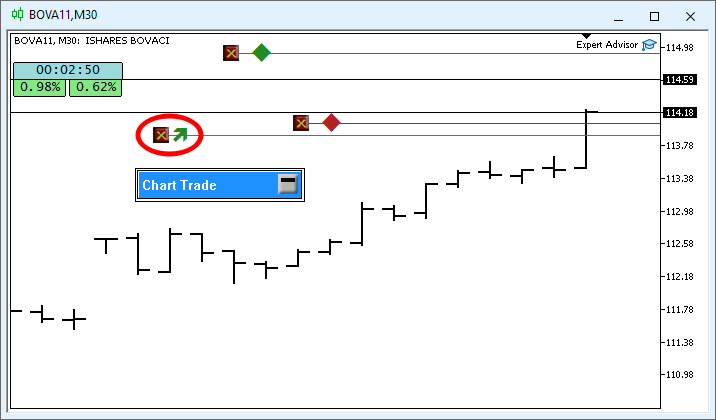
The highlighted area in this image shows the difference. Now the chart clearly shows whether the position is long or short. Nice, isn't it? It is all pretty simple. Before moving on to the next change, let's take a look at what the final code for the C_ElementsTrade class looks like after removing the duplicate parts. This is shown below:
001. //+------------------------------------------------------------------+
002. #property copyright "Daniel Jose"
003. //+------------------------------------------------------------------+
004. #define def_NameHLine       m_Info.szPrefixName + "#HLINE"
005. #define def_NameBtnClose    m_Info.szPrefixName + "#CLOSE"
006. #define def_NameBtnMove     m_Info.szPrefixName + "#MOVE"
007. #define def_NameInfoDirect  m_Info.szPrefixName + "#DIRECT"
008. //+------------------------------------------------------------------+
009. #define macro_LineInFocus(A) ObjectSetInteger(0, def_NameHLine, OBJPROP_YSIZE, m_Info.weight = (A ? 3 : 1));
010. //+------------------------------------------------------------------+
011. #define def_PathBtns "Images\\Market Replay\\Orders\\"
012. #define def_Btn_Close def_PathBtns + "Btn_Close.bmp"
013. #resource "\\" + def_Btn_Close;
014. //+------------------------------------------------------------------+
015. #include "..\Auxiliar\C_Mouse.mqh"
016. //+------------------------------------------------------------------+
017. class C_ElementsTrade : private C_Mouse
018. {
019.     private    :
020. //+------------------------------------------------------------------+
021.         struct st00
022.         {
023.             ulong       ticket;
024.             string      szPrefixName,
025.                         szDescr;
026.             EnumEvents  ev;
027.             double      price;
028.             bool        bClick,
029.                         bIsBuy;
030.             char        weight;
031.             color       _color;
032.         }m_Info;
033. //+------------------------------------------------------------------+
034.         void UpdateViewPort(void)
035.         {
036.             int x, y;
037.
038.             ChartTimePriceToXY(0, 0, 0, m_Info.price, x, y);
039.             x = (m_Info.ev == evMsgClosePositionEA ? 150 : (m_Info.ev == evMsgCloseTakeProfit ? 220 : 290));
040.             ObjectSetInteger(0, def_NameHLine, OBJPROP_XDISTANCE, x);
041.             ObjectSetInteger(0, def_NameHLine, OBJPROP_YDISTANCE, y - (m_Info.weight > 1 ? (int)(m_Info.weight / 2) : 0));
042.             ObjectSetInteger(0, def_NameBtnClose, OBJPROP_XDISTANCE, x);
043.             ObjectSetInteger(0, def_NameBtnClose, OBJPROP_YDISTANCE, y);
044.             ObjectSetInteger(0, def_NameInfoDirect, OBJPROP_XDISTANCE, x + 18);
045.             ObjectSetInteger(0, def_NameInfoDirect, OBJPROP_YDISTANCE, y);
046.             ObjectSetInteger(0, def_NameBtnMove, OBJPROP_XDISTANCE, x + 30);
047.             ObjectSetInteger(0, def_NameBtnMove, OBJPROP_YDISTANCE, y);
048.         }
049. //+------------------------------------------------------------------+
050. inline void CreateLinePrice(void)
051.         {
052.             string szObj;
053.
054.             CreateObjectGraphics(szObj = def_NameHLine, OBJ_RECTANGLE_LABEL, m_Info._color, (EnumPriority)(ePriorityDefault));
055.             macro_LineInFocus(false);
056.             ObjectSetInteger(0, szObj, OBJPROP_BGCOLOR, m_Info._color);
057.             ObjectSetInteger(0, szObj, OBJPROP_XSIZE, TerminalInfoInteger(TERMINAL_SCREEN_WIDTH));
058.             ObjectSetInteger(0, szObj, OBJPROP_BORDER_TYPE, BORDER_FLAT);
059.             ObjectSetInteger(0, szObj, OBJPROP_CORNER, CORNER_LEFT_UPPER);
060.             ObjectSetString(0, szObj, OBJPROP_TOOLTIP, m_Info.szDescr);
061.         }
062. //+------------------------------------------------------------------+
063. inline void CreateBoxInfo(const bool bMove)
064.         {
065.             string szObj;
066.             const char c[] = {(char)(bMove ? 'u' : (m_Info.bIsBuy ? 236 : 238)), 0};
067.
068.             CreateObjectGraphics(szObj = (bMove ? def_NameBtnMove : def_NameInfoDirect), OBJ_LABEL, clrNONE, (EnumPriority)(ePriorityDefault));
069.             ObjectSetString(0, szObj, OBJPROP_FONT, "Wingdings");
070.             ObjectSetString(0, szObj, OBJPROP_TEXT, CharArrayToString(c));
071.             ObjectSetInteger(0, szObj, OBJPROP_COLOR, (bMove ? m_Info._color : (m_Info.bIsBuy ? clrForestGreen : clrFireBrick)));
072.             ObjectSetInteger(0, szObj, OBJPROP_FONTSIZE, (bMove ? 17 : 15));
073.             ObjectSetInteger(0, szObj, OBJPROP_ANCHOR, ANCHOR_CENTER);
074.         }
075. //+------------------------------------------------------------------+
076. inline void CreateButtonClose(void)
077.         {
078.             string szObj;
079.
080.             CreateObjectGraphics(szObj = def_NameBtnClose, OBJ_BITMAP_LABEL, clrNONE, (EnumPriority)(ePriorityDefault));
081.             ObjectSetString(0, szObj, OBJPROP_BMPFILE, 0, "::" + def_Btn_Close);
082.             ObjectSetInteger(0, szObj, OBJPROP_ANCHOR, ANCHOR_CENTER);
083.         }
084. //+------------------------------------------------------------------+
085.     public    :
086. //+------------------------------------------------------------------+
087.         C_ElementsTrade(const ulong ticket, const EnumEvents ev, color _color, string szDescr = "\n", const bool IsBuy = true)
088.             :C_Mouse(0, "")
089.         {
090.             ZeroMemory(m_Info);
091.             m_Info.szPrefixName = StringFormat("%I64u@%03d", m_Info.ticket = ticket, (int)(m_Info.ev = ev));
092.             m_Info._color = _color;
093.             m_Info.szDescr = szDescr;
094.             m_Info.bIsBuy = IsBuy;
095.         }
096. //+------------------------------------------------------------------+
097.         ~C_ElementsTrade()
098.         {
099.             ObjectsDeleteAll(0, m_Info.szPrefixName);
100.         }
101. //+------------------------------------------------------------------+
102. inline void UpdatePrice(const double open, const double price)
103.         {
104.             m_Info.price = (price > 0 ? price : open);
105.             if (price > 0)
106.             {
107.                 CreateLinePrice();
108.                 CreateButtonClose();
109.             }else
110.                 ObjectsDeleteAll(0, m_Info.szPrefixName);
111.             CreateBoxInfo(m_Info.ev != evMsgClosePositionEA);
112.             UpdateViewPort();
113.         }
114. //+------------------------------------------------------------------+
115.         void DispatchMessage(const int id, const long &lparam, const double &dparam, const string &sparam)
116.         {
117.             string sz0;
118.
119.             C_Mouse::DispatchMessage(id, lparam, dparam, sparam);
120.             switch (id)
121.             {
122.                 case CHARTEVENT_CUSTOM + evMsgSetFocus:
123.                     macro_LineInFocus((m_Info.ticket == (ulong)(lparam)) && ((EnumEvents)(dparam) == m_Info.ev));
124.                     m_Info.bClick = false;
125.                 case CHARTEVENT_CHART_CHANGE:
126.                     UpdateViewPort();
127.                     break;
128.                 case CHARTEVENT_OBJECT_CLICK:
129.                     sz0 = GetPositionsMouse().szObjNameClick;
130.                     if (m_Info.bClick) switch (m_Info.ev)
131.                     {
132.                         case evMsgClosePositionEA:
133.                             if (sz0 == def_NameBtnClose)
134.                                 EventChartCustom(0, evMsgClosePositionEA, m_Info.ticket, 0, "");
135.                             break;
136.                         case evMsgCloseTakeProfit:
137.                             if (sz0 == def_NameBtnClose)
138.                                 EventChartCustom(0, evMsgCloseTakeProfit, m_Info.ticket, PositionGetDouble(POSITION_SL), PositionGetString(POSITION_SYMBOL));
139.                             else if (sz0 == def_NameBtnMove)
140.                                 EventChartCustom(0, evMsgSetFocus, m_Info.ticket, evMsgCloseTakeProfit, "");
141.                             break;
142.                         case evMsgCloseStopLoss:
143.                             if (sz0 == def_NameBtnClose)
144.                                 EventChartCustom(0, evMsgCloseStopLoss, m_Info.ticket, PositionGetDouble(POSITION_TP), PositionGetString(POSITION_SYMBOL));
145.                             else if (sz0 == def_NameBtnMove)
146.                                 EventChartCustom(0, evMsgSetFocus, m_Info.ticket, evMsgCloseStopLoss, "");
147.                             break;
148.                     }
149.                     m_Info.bClick = false;
150.                     break;
151.                 case CHARTEVENT_MOUSE_MOVE:
152.                     m_Info.bClick = (CheckClick(C_Mouse::eClickLeft) ? true : m_Info.bClick);
153.                     if (m_Info.bClick && (m_Info.weight > 1))
154.                     {
155.                         switch (m_Info.ev)
156.                         {
157.                             case evMsgCloseTakeProfit:
158.                                 EventChartCustom(0, evMsgNewTakeProfit, m_Info.ticket, GetPositionsMouse().Position.Price, PositionGetString(POSITION_SYMBOL));
159.                                 break;
160.                             case evMsgCloseStopLoss:
161.                                 EventChartCustom(0, evMsgNewStopLoss, m_Info.ticket, GetPositionsMouse().Position.Price, PositionGetString(POSITION_SYMBOL));
162.                                 break;
163.                         }
164.                         EventChartCustom(0, evMsgSetFocus, 0, 0, "");
165.                     }
166.                     break;
167.             }
168.         }
169. //+------------------------------------------------------------------+
170. };
171. //+------------------------------------------------------------------+
172. #undef macro_LineInFocus
173. //+------------------------------------------------------------------+
174. #undef def_Btn_Close
175. #undef def_PathBtns
176. //+------------------------------------------------------------------+
177. #undef def_NameInfoDirect
178. #undef def_NameBtnMove
179. #undef def_NameBtnClose
180. #undef def_NameHLine
181. //+------------------------------------------------------------------+
C_ElementsTrade.mqh
To encourage you to learn, I will not explain exactly what was changed or why. I want you to study and try to understand the changes made to the code above to remove duplicate sections. Your task is to figure out why these changes did not affect what is shown on the chart.
Before we wrap up this article, let's make one more update to the system to make things even more interesting. This update will let us know whether we are adjusting the Take Profit line or the Stop Loss line. Let's take a look at this as part of a new topic.
Which line am I moving: the Take Profit line or the Stop Loss line?
It is perfectly normal that, after clicking on a graphical object, you might be unsure which of the two lines you're moving: the Take Profit line or the Stop Loss line. In fact, doubts may arise even after clicking on the chart, since there is still no way to tell whether we are moving one of the price lines or simply moving the mouse cursor over the chart. In addition, if we move the price line and forget to click on it again, we may be in for an unpleasant surprise when we click on a specific point on the chart. To address this issue, we will continue to improve the system. However, for now, the improvement will be very simple and will only show which of the two price lines we are moving: the Take Profit line or the Stop Loss line.
Well, dear reader, at this point you may be thinking the following: we now face a problem that will require a lot of work to solve. However, it does not actually take much effort. If you have been following this series of articles on the replay/simulation system, you'll quickly understand the strategy we will be using. Before continuing, it is important to understand how the mouse indicator, the Expert Advisor, and the position indicator exchange events.
I will give a brief summary, but I recommend that you read the previous articles—if you have not done so already—to fully understand everything. Otherwise, you will not understand the changes I am going to make.
Event handling is distributed across several chart components, which exchange events and process them in a coordinated manner. In other words, we have the mouse indicator, the Expert Advisor, and the position indicator. In addition, of course, there is the Chart Trade indicator. However, it will not be involved in the changes we will make below. When we click a control used to complete the drawing, a price line, or a graphical representation of a position, the Expert Advisor handles the event, and the position indicator updates the chart. When you click a graphical object that allows you to move a Take Profit or Stop Loss line, the horizontal line of the mouse indicator follows the cursor.
The second click sends the final price level for this line to the Expert Advisor. The mouse indicator transmits the selected price level to the position indicator, which generates an event that is received by the Expert Advisor. The Expert Advisor then asks the trading server to update the price level for the Take Profit or Stop Loss line. The line's level remains unchanged until the server confirms the change. After receiving confirmation, the Expert Advisor sends the confirmed level to the position indicator, which updates the line on the chart. Thus, the visible result depends on this sequence of events and the server's response. The first thing we need to do is send each component the appropriate message to update its state, without altering the current flow of events. To help you better understand how this interaction works, we will make changes step by step. First, we will do the following: when you click one of the graphical objects to move the price line, we will hide the horizontal line of the mouse indicator. As soon as you select a new price level for the Take Profit or Stop Loss line, we'll display the horizontal line of the mouse indicator again. It does not get any simpler than that.
If you have not been following this series of articles, you might be tempted to change the objects on the chart. Although this is not wrong in and of itself, it would be considered a mistake because we should not manipulate these objects; instead, we should notify the applications that they need to change their behavior. This is the right way. Therefore, to implement this behavior, we will need to slightly modify the code of the C_ElementsTrade class. The change is so subtle that if you are not paying close attention, you will not notice it. This is shown in the following excerpt:
114. //+------------------------------------------------------------------+
115.         void DispatchMessage(const int id, const long &lparam, const double &dparam, const string &sparam)
116.         {
117.             string sz0;
118.
119.             C_Mouse::DispatchMessage(id, lparam, dparam, sparam);
120.             switch (id)
121.             {
122.                 case CHARTEVENT_CUSTOM + evMsgSetFocus:
123.                     macro_LineInFocus((m_Info.ticket == (ulong)(lparam)) && ((EnumEvents)(dparam) == m_Info.ev));
124.                     EventChartCustom(0, (ushort)(dparam ? evHideMouse : evShowMouse), 0, 0, "");
125.                     m_Info.bClick = false;
126.                 case CHARTEVENT_CHART_CHANGE:
127.                     UpdateViewPort();
128.                     break;
129.                 case CHARTEVENT_OBJECT_CLICK:
130.                     sz0 = GetPositionsMouse().szObjNameClick;
131.                     if (m_Info.bClick) switch (m_Info.ev)
132.                     {
Excerpt from C_ElementsTrade
The previous snippet clearly demonstrates exactly what changes we need to make. That's right: we are modifying the DispatchMessage procedure. Unless you look closely, it is hard to tell exactly where the modification is. It is right on line 124. This line passes an enumeration value to the mouse indicator that determines whether to show or hide the horizontal line. It does not get any simpler than that. Please note that the expression (ushort) is not a declaration, but an explicit type cast applied to the value of an enumeration, which is typically of type int. We need to cast this value to ushort; otherwise, the compiler will issue a warning about possible data loss.
This concludes the first modification. In price line movement mode, the horizontal line of the mouse indicator will be hidden. Otherwise, the horizontal line will be shown on the chart again. Let's move on to the second modification. Here is how we will do it. We will replace the horizontal line of the mouse indicator with an auxiliary price line that will represent the line we are moving. To do this, we will need to make some additional changes to the code. Nevertheless, we will continue working on the C_ElementsTrade class. Let's take a moment to think about this.
How do we want to represent this auxiliary price line? In my opinion, the best approach is to use the original line colors. That way, it will be clear that we are moving the correct line. There is one more thing. Simply moving a line seems too easy—and even boring. How about making the task a little more challenging and also moving the graphical controls associated with this line, such as the close button and the control used to move it? "Hmm, now that seems a little more complicated. Is that really the case?" Okay, let's see. If the idea is to move all objects along with the price line, it will be enough to pass the new price level to the UpdateViewPort procedure. "Hmm, with this code, that won't be possible." What happens if we modify the UpdateViewPort procedure so that it receives the price?" The new code is shown in the following snippet:
33. //+------------------------------------------------------------------+
34.         void UpdateViewPort(const double price)
35.         {
36.             int x, y;
37.
38.             ChartTimePriceToXY(0, 0, 0, price, x, y);
39.             x = (m_Info.ev == evMsgClosePositionEA ? 150 : (m_Info.ev == evMsgCloseTakeProfit ? 220 : 290));
40.             ObjectSetInteger(0, def_NameHLine, OBJPROP_XDISTANCE, x);
41.             ObjectSetInteger(0, def_NameHLine, OBJPROP_YDISTANCE, y - (m_Info.weight > 1 ? (int)(m_Info.weight / 2) : 0));
42.             ObjectSetInteger(0, def_NameBtnClose, OBJPROP_XDISTANCE, x);
43.             ObjectSetInteger(0, def_NameBtnClose, OBJPROP_YDISTANCE, y);
44.             ObjectSetInteger(0, def_NameInfoDirect, OBJPROP_XDISTANCE, x + 18);
45.             ObjectSetInteger(0, def_NameInfoDirect, OBJPROP_YDISTANCE, y);
46.             ObjectSetInteger(0, def_NameBtnMove, OBJPROP_XDISTANCE, x + 30);
47.             ObjectSetInteger(0, def_NameBtnMove, OBJPROP_YDISTANCE, y);
48.         }
49. //+------------------------------------------------------------------+
Excerpt from C_ElementsTrade
All right. In light of this, we need to modify the procedure responsible for updating the price. This is shown in the following snippet:
101. //+------------------------------------------------------------------+
102. inline void UpdatePrice(const double open, const double price)
103.         {
104.             if (price > 0)
105.             {
106.                 CreateLinePrice();
107.                 CreateButtonClose();
108.             }else
109.                 ObjectsDeleteAll(0, m_Info.szPrefixName);
110.             CreateBoxInfo(m_Info.ev != evMsgClosePositionEA);
111.             UpdateViewPort(m_Info.price = (price > 0 ? price : open));
112.         }
113. //+------------------------------------------------------------------+
Excerpt from C_ElementsTrade
So, what will we achieve by doing this? That does not really solve the problem. We still cannot move the price line the way we intended. However, if we now modify the DispatchMessage procedure as shown below, the situation will change.
113. //+------------------------------------------------------------------+
114.         void DispatchMessage(const int id, const long &lparam, const double &dparam, const string &sparam)
115.         {
116.             string sz0;
117.
118.             C_Mouse::DispatchMessage(id, lparam, dparam, sparam);
119.             switch (id)
120.             {
121.                 case CHARTEVENT_CUSTOM + evMsgSetFocus:
122.                     macro_LineInFocus((m_Info.ticket == (ulong)(lparam)) && ((EnumEvents)(dparam) == m_Info.ev));
123.                     EventChartCustom(0, (ushort)(dparam ? evHideMouse : evShowMouse), 0, 0, "");
124.                     m_Info.bClick = false;
125.                 case CHARTEVENT_CHART_CHANGE:
126.                     UpdateViewPort(m_Info.price);
127.                     break;
128.                 case CHARTEVENT_OBJECT_CLICK:
129.                     sz0 = GetPositionsMouse().szObjNameClick;
130.                     if (m_Info.bClick) switch (m_Info.ev)
131.                     {
132.                         case evMsgClosePositionEA:
133.                             if (sz0 == def_NameBtnClose)
134.                                 EventChartCustom(0, evMsgClosePositionEA, m_Info.ticket, 0, "");
135.                             break;
136.                         case evMsgCloseTakeProfit:
137.                             if (sz0 == def_NameBtnClose)
138.                                 EventChartCustom(0, evMsgCloseTakeProfit, m_Info.ticket, PositionGetDouble(POSITION_SL), PositionGetString(POSITION_SYMBOL));
139.                             else if (sz0 == def_NameBtnMove)
140.                                 EventChartCustom(0, evMsgSetFocus, m_Info.ticket, evMsgCloseTakeProfit, "");
141.                             break;
142.                         case evMsgCloseStopLoss:
143.                             if (sz0 == def_NameBtnClose)
144.                                 EventChartCustom(0, evMsgCloseStopLoss, m_Info.ticket, PositionGetDouble(POSITION_TP), PositionGetString(POSITION_SYMBOL));
145.                             else if (sz0 == def_NameBtnMove)
146.                                 EventChartCustom(0, evMsgSetFocus, m_Info.ticket, evMsgCloseStopLoss, "");
147.                             break;
148.                     }
149.                     m_Info.bClick = false;
150.                     break;
151.                 case CHARTEVENT_MOUSE_MOVE:
152.                     m_Info.bClick = (CheckClick(C_Mouse::eClickLeft) ? true : m_Info.bClick);
153.                     if (m_Info.weight > 1)
154.                     {
155.                         UpdateViewPort(GetPositionsMouse().Position.Price);
156.                         if (m_Info.bClick)
157.                         {
158.                             switch (m_Info.ev)
159.                             {
160.                                 case evMsgCloseTakeProfit:
161.                                     EventChartCustom(0, evMsgNewTakeProfit, m_Info.ticket, GetPositionsMouse().Position.Price, PositionGetString(POSITION_SYMBOL));
162.                                     break;
163.                                 case evMsgCloseStopLoss:
164.                                     EventChartCustom(0, evMsgNewStopLoss, m_Info.ticket, GetPositionsMouse().Position.Price, PositionGetString(POSITION_SYMBOL));
165.                                     break;
166.                             }
167.                             EventChartCustom(0, evMsgSetFocus, 0, 0, "");
168.                         }
169.                     }
170.                     break;
171.             }
172.         }
173. //+------------------------------------------------------------------+
Excerpt from C_ElementsTrade
Now pay attention. When the line is selected, the variable `weight` will have a value greater than one. Therefore, the logical expression on line 153 will evaluate to true, and the program will execute the corresponding block. Inside this block, line 155 calls the UpdateViewPort procedure and passes it a new preliminary price level for the line. The display is updated in real time, but the change is confirmed only when you click. As soon as the server confirms the price level, the system will resume operation.
In other words, we modified the code without changing the system's observable behavior. As you have already seen, it was not difficult at all. We only had to adjust a few instructions so that UpdateViewPort would update the line and its associated graphical controls. It is not complicated at all; to be honest, it is even a little boring. Now we can consider a more complex situation. Or maybe not? All right, let's think about the following. What would happen if we decided to start an analysis while moving the price line? This should stop the current movement and return the objects to their original positions. You might think this is very difficult, since the values changed during the initial movements.
Let's see how to solve this problem. So, when we start moving one of the price lines—whether it is a Take Profit or a Stop Loss—we cannot begin a study. To begin a study using the mouse indicator, refer to the previous articles for instructions on how to do so. To continue, you will need to cancel the movement and decide how to carry it out. After I talked to a few people, they suggested using something quite practical and reliable: pressing the ESC key. We could very well accidentally click a mouse button or another control, but we certainly will not press the ESC key without noticing it. Therefore, we will modify the DispatchMessage procedure again so that the ESC key cancels the movement. After that, you can perform any other action.
113. //+------------------------------------------------------------------+
114.         void DispatchMessage(const int id, const long &lparam, const double &dparam, const string &sparam)
115.         {
116.             string sz0;
117.             long _lparam = lparam;
118.             double _dparam = dparam;
119.
120.             C_Mouse::DispatchMessage(id, lparam, dparam, sparam);
121.             switch (id)
122.             {
123.                 case (CHARTEVENT_KEYDOWN):
124.                     if (!TerminalInfoInteger(TERMINAL_KEYSTATE_ESCAPE)) break;
125.                     _lparam = (long) m_Info.ticket;
126.                     _dparam = 0;
127.                 case CHARTEVENT_CUSTOM + evMsgSetFocus:
128.                     macro_LineInFocus((m_Info.ticket == (ulong)(_lparam)) && ((EnumEvents)(_dparam) == m_Info.ev));
129.                     EventChartCustom(0, (ushort)(_dparam ? evHideMouse : evShowMouse), 0, 0, "");
130.                     m_Info.bClick = false;
131.                 case CHARTEVENT_CHART_CHANGE:
132.                     UpdateViewPort(m_Info.price);
133.                     break;
134.                 case CHARTEVENT_OBJECT_CLICK:
135.                     sz0 = GetPositionsMouse().szObjNameClick;
136.                     if (m_Info.bClick) switch (m_Info.ev)
Snippet from C_ElementsTrade
The previous excerpt demonstrates the solution. I didn't include the entire code for the DispatchMessage procedure because, in my opinion, it's completely unnecessary—the solution is easily apparent from this code snippet. Please note that two local variables had to be added to keep the values of the event parameters received from MetaTrader 5 unchanged. These variables are located on lines 117 and 118. This raises a perfectly reasonable question: why not remove the `const` qualifier from the call arguments on line 114? Thus, there would be no need to use these variables. In many cases, this would be an acceptable solution. However, I know from experience that you should not do this, because you will often be tempted to change that value. At some point in the future, the procedure may stop interpreting event parameters sent by MetaTrader 5 or the operating system correctly. In Windows, this same parameter template is used for messaging between applications or processes. This is most common when programming DLLs. For this reason, I do not recommend that you make this change. It is always preferable to change the value locally, as shown here. This will save you headaches and time wasted trying to figure out why the code is not working properly.
All right, next, note that line 123 identifies the keyboard events received by the procedure. There are several ways to manage and filter these events. In MetaTrader 5, line 124 compares the received key code with the ESC key code. If the key is not ESC, the break command stops event processing at this line. For example, if you selected an object to move and press F2, the cancellation block will not be executed. If the key received is ESC, the program will execute lines 125 through 133. In this case, execution deliberately falls through to the next two processing blocks, allowing their logic to be reused without duplicating code.
Concluding Thoughts
I think we have made quite a bit of progress so far. At this stage, dear reader, you still have a great deal to understand and try out. Since you may not know how to compile these MQL5 files, the attachment includes precompiled versions. If you are just getting started, you can test the system described above.
Please keep in mind that everything shown here is intended for educational purposes. Therefore, you should exercise extreme caution when using attached files on a live account. I would recommend using them on demo accounts. Learn how the system works and modify it to suit your specific needs.
See you in the next article, where we will continue moving toward a more complete system.
| File | Description |
|---|---|
| Experts\Expert Advisor.mq5 | Demonstrates the interaction between Chart Trade and the Expert Advisor (Mouse Study is required for this interaction). |
| Indicators\Chart Trade.mq5 | Creates a window for configuring the order to be sent (Mouse Study is required for interaction) |
| Indicators\Market Replay.mq5 | Creates controls for interacting with the replay/simulation service (Mouse Study is required for this interaction). |
| Indicators\Mouse Study.mq5 | Enables interaction between graphical controls and the user (which is necessary both for the replay/simulation system and for live trading). |
| Indicators\Order Indicator.mq5 | Responsible for displaying market orders and allowing users to interact with and manage them |
| Indicators\Position View.mq5 | Responsible for displaying market positions and allowing users to interact with and manage them |
| Services\Market Replay.mq5 | Creates and maintains the market replay/simulation service (the main file of the entire system). |
Translated from Portuguese by MetaQuotes Ltd.
Original article: https://www.mql5.com/pt/articles/13317
Warning: All rights to these materials are reserved by MetaQuotes Ltd. Copying or reprinting of these materials in whole or in part is prohibited.
This article was written by a user of the site and reflects their personal views. MetaQuotes Ltd is not responsible for the accuracy of the information presented, nor for any consequences resulting from the use of the solutions, strategies or recommendations described.

 Building Your Personal Expert Advisor (Part 2): Risk Management and Dynamic Lot Sizing
 From Basic to Intermediate: Queues, Lists, and Trees (IV)
 Decoding Market Intent: Reading Structure, Liquidity, and Price Behavior
 Ecological Cycle Optimizer (ECO)

- Free trading apps
- Over 8,000 signals for copying
- Economic news for exploring financial markets
You agree to website policy and terms of use