

Building Your Personal Expert Advisor (Part 2): Risk Management and Dynamic Lot Sizing
 1 491
1 491
 0
0

Table of Contents
- Introduction
- What Part 1 Missed: The Problem With Fixed Lot Size
- Fix 1: Risk-Based Position Sizing
- Fix 2: Respecting Broker Constraints
- Fix 3: Adaptive Risk During Drawdowns
- Conclusion
Introduction
In Part 1, you have already improved the basic MA‑crossover EA into a technically sound skeleton: it processes signals once per bar, isolates positions with a Magic Number, sets ATR‑based stops, and handles basic errors. One critical problem remains for algorithmic traders and EA developers: the EA still uses a fixed LotSize. That single choice breaks risk control — monetary risk per trade drifts with volatility (ATR widens), does not scale with account balance, and never responds to drawdowns; it can also cause otherwise valid orders to be rejected by brokers because of minimum stop distances or lot rules.
This article fixes that gap by tying position size to a chosen percent of account equity (using the ATR stop as the sizing input), validating stops and volumes against the broker's SYMBOL_* constraints, and adding an optional adaptive risk layer that reduces exposure during drawdowns. The result is a reusable MetaTrader 5 position‑sizing module that keeps $‑risk predictable and executable without changing the strategy logic.
Scope of This Article
By the end of this part, we will have:
- Replaced the fixed LotSize input with risk-based position sizing.
- Derived lot size from account balance, risk percentage, and ATR-based stop distance.
- Added validation against broker-imposed minimum stop distance and volume constraints.
- Introduced an adaptive risk layer that reduces exposure automatically during drawdowns.
The techniques here are not specific to a moving average crossover strategy. The same sizing logic can apply to most EAs that calculate a stop-loss before sending an order.
What Part 1 Missed: The Problem With Fixed Lot Sizing
This is how our EA currently opens trades. The lot size is a static input, set once and used for every trade regardless of conditions:
input double LotSize = 0.1; // Fixed lot size
And here is where the lot size input gets used directly, on both the buy and sell sides:
if(canOpenTrade)
  {
   double sl = NormalizeDouble(ask - stopDistance, digits);
   double tp = NormalizeDouble(ask + (stopDistance * TPRatio), digits);

// Execute Buy trade and check result
   if(!trade.Buy(LotSize, _Symbol, 0.0, sl, tp, "Fixed EA Buy"))
     {
      PrintFormat("Buy failed. Retcode: %u (%s)",
                  trade.ResultRetcode(),
                  trade.ResultRetcodeDescription());
     }
  }
if(canOpenTrade)
  {
   double sl = NormalizeDouble(bid + stopDistance, digits);
   double tp = NormalizeDouble(bid - (stopDistance * TPRatio), digits);

// Execute Sell trade and check result
   if(!trade.Sell(LotSize, _Symbol, 0.0, sl, tp, "Fixed EA Sell"))
     {
      PrintFormat("Sell failed. Retcode: %u (%s)",
                  trade.ResultRetcode(),
                  trade.ResultRetcodeDescription());
     }
  }
At first glance this looks OK—LotSize is just another configurable input, much like FastMA or ATRMultiplier. The difference is that lot size controls exposure. If exposure stays fixed while the account changes, it is not really being managed at all.
Problem 1: Lot Size Is Disconnected From Account Balance
A trader running LotSize = 0.1 on a $1,000 account and another using the same setting on a $50,000 account are clearly not taking the same risk. The first may be risking a meaningful portion of their equity per trade, while the second risks only a tiny fraction. Since the EA never adjusts the lot size automatically, traders must recalculate and update it themselves whenever their balance changes significantly—and truth be told, most never do.
Problem 2: Lot Size Is Disconnected From Stop Distance
This issue is more subtle because it cancels part of what we achieved with ATR-based stops in Part 1. Remember that the stop distance is calculated from the current ATR:
double stopDistance = atrValue * ATRMultiplier; As volatility changes, the stop widens or narrows accordingly. This is the behavior we want. The problem is that LotSize remains fixed. A wider stop with the same lot size means more money is being risked, even though the trader's intended risk has not changed.
Problem 3: No Response to Drawdown
The EA is also unaware of its own performance. It uses the same lot size whether the account is making new equity highs or recovering from a losing streak. A more defensive system would automatically reduce exposure during drawdowns instead of relying on manual intervention. This logic will be left as optional since not all traders want to be defensive.
In the next section, we'll solve this by calculating lot size from a chosen risk percentage and the current stop distance instead of relying on a fixed input.
Fix 1: Risk-Based Position Sizing
We identified two flaws with a fixed lot size: it ignores account balance and it ignores the ATR-based stop distance. Both come from the same root cause—lot size was never tied to risk. The solution is to calculate the lot size from the amount we're willing to risk on each trade.
Instead of asking, "How many lots should I trade?" ask, "How much money am I willing to lose if this trade reaches its stop-loss?" That amount is defined as a percentage of the account balance. The stop-loss distance then tells us how much one lot would lose, allowing us to calculate the lot size that keeps the monetary risk constant. A good risk management system follows a principle: the risk amount stays fixed, while the position size adjusts to maintain it.
Replacing the Fixed Input
The fixed LotSize input is replaced with a fixed percentage:
input double RiskPercent = 1.0; // Risk per trade [%]
A risk percent of 1.0 means every trade is sized so that a stop-loss results in approximately a 1% loss of the current account balance, regardless of how wide or narrow that stop is.
Converting Stop Distance Into Monetary Risk
To calculate the lot size, we first need to know how much one lot would lose if the stop-loss is hit. We retrieve two symbol properties:
double tickSize  = SymbolInfoDouble(_Symbol, SYMBOL_TRADE_TICK_SIZE);
double tickValue = SymbolInfoDouble(_Symbol, SYMBOL_TRADE_TICK_VALUE);
SYMBOL_TRADE_TICK_SIZE is the smallest price movement the symbol can make, while SYMBOL_TRADE_TICK_VALUE is the monetary value, in account currency, of that movement for one lot. Once we know the stop distance, converting it into monetary loss per lot is straightforward:
double monetaryRiskPerLot = (stopDistance / tickSize) * tickValue; A Note on Tick Value vs. Contract Size
Building the Lot Size Function
With the monetary risk per lot available, we can tie up the calculation into a reusable function:
//+------------------------------------------------------------------+
//| Calculate lot size from account risk and stop distance           |
//+------------------------------------------------------------------+
double CalculateLotSize(double stopDistance)
  {
   double balance = AccountInfoDouble(ACCOUNT_BALANCE);
   double riskAmount = balance * (RiskPercent / 100.0);

   double tickSize  = SymbolInfoDouble(_Symbol, SYMBOL_TRADE_TICK_SIZE);
   double tickValue = SymbolInfoDouble(_Symbol, SYMBOL_TRADE_TICK_VALUE);

   if(tickSize <= 0 || tickValue <= 0)
     {
      Print("Invalid tick size or tick value. Cannot calculate lot size.");
      return 0.0;
     }

   double monetaryRiskPerLot = (stopDistance / tickSize) * tickValue;
   if(monetaryRiskPerLot <= 0)
     {
      Print("Monetary risk per lot is zero. Cannot calculate lot size.");
      return 0.0;
     }

   return NormalizeDouble(riskAmount / monetaryRiskPerLot, 2);
  }
The validation checks are essential, not optional. SymbolInfoDouble() can legitimately return zero while a symbol is synchronizing or if its properties are unavailable. Returning 0.0 allows the EA to skip the trade safely instead of producing an invalid order or triggering a divide-by-zero error.
Integrating Into OnTick()
The above function is called immediately after calculating the ATR stop distance:
//--- Calculate the dynamic stop distance
   double stopDistance = atrValue * ATRMultiplier;
   int digits = (int)SymbolInfoInteger(_Symbol, SYMBOL_DIGITS);
   double lotSize = CalculateLotSize(stopDistance);
If the calculated lot size is invalid, we simply skip the trade:
   if(lotSize <= 0)
     {
      Print("Calculated lot size is invalid. Trade skipped.");
      return;
     }
Finally, we replace every occurrence of the LotSize input with lotSize when executing trades. For the buy side:
if(!trade.Buy(lotSize, _Symbol, 0.0, sl, tp, "Fixed EA Buy"))
  {
   PrintFormat("Buy failed. Retcode: %u (%s)",
               trade.ResultRetcode(),
               trade.ResultRetcodeDescription());
  }
And for sell side:
if(!trade.Sell(lotSize, _Symbol, 0.0, sl, tp, "Fixed EA Sell"))
  {
   PrintFormat("Sell failed. Retcode: %u (%s)",
               trade.ResultRetcode(),
               trade.ResultRetcodeDescription());
  }
With these changes, if we consider the same trading signal under two market conditions:
- When ATR is low, the stop distance is smaller, so one lot risks less money. The EA compensates by increasing the lot size.
- When ATR is high, the stop distance is wider, so one lot risks more money. The EA reduces the lot size accordingly.
In both situations, the maximum loss remains anchored to the chosen RiskPercent of the current account balance. The EA now adapts its exposure automatically to both market volatility and account growth or decline, which is something a fixed lot size can never achieve. This is not the complete picture yet. lotSize must be validated against the broker's min/max/step constraints, and stopDistance must be validated against the broker's minimum stop level. If either is out of range, the order will be rejected. That's the next fix.
Fix 2: Respecting Broker Constraints
Risk-based sizing gives us a mathematically correct lot size. That doesn't mean the broker will accept it. Every symbol has rules: a minimum stop-loss distance, a minimum and maximum trade volume, and a volume step. Ignore any of them, and a valid risk calculation can still end with the trade server rejecting the order.
Problem 1: Minimum Stop Distance
We flagged this in Part 1 as a safeguard worth adding later, and now it's time to implement it. Brokers enforce a minimum distance between the entry price and stop-loss through SYMBOL_TRADE_STOPS_LEVEL. If our ATR-based stop distance falls below that limit when trading low-volatility symbols or lower timeframes, the stop-loss we calculated is simply too close to price, and the order will be rejected.
Solution: Validate and Adjust
Before the stop-loss is finalized, we compare its distance from price against the broker's minimum and push it out if necessary:
//--- Validate minimum stop distance
   double minStopDistance = SymbolInfoInteger(_Symbol, SYMBOL_TRADE_STOPS_LEVEL) * _Point;
   if(stopDistance < minStopDistance)
     {
      Print("Stop distance too tight. Adjusting from ", stopDistance, " to ", minStopDistance);
      stopDistance = minStopDistance;
     }
SYMBOL_TRADE_STOPS_LEVEL is returned in points, so it must be converted into a price distance using _Point before comparing it with stopDistance, which is already expressed in price units.
A Note on Ordering
This validation must happen before calling the CalculateLotSize() function. If the stop distance is increased, the monetary risk of one lot also increases. Calculating the lot size first and adjusting the stop afterward would leave the two out of sync, undoing the accuracy gained in Fix 1.
The correct sequence is therefore:
- Calculate stop distance.
- Validate it against the broker's minimum.
- Calculate lot size.
Problem 2: The Lot Size Must Also Be Valid
Brokers place restrictions on trade volume as well. Every symbol defines a minimum lot size, a maximum lot size, and the increments volume is allowed to change by. A calculated value such as 0.133 lots, or one below the minimum, will be rejected regardless of how accurate the risk calculation is.
Solution: Confine and Round
This is handled directly inside CalculateLotSize(), just before returning the result:
//--- Confine and round to the broker's volume rules
   double minLot  = SymbolInfoDouble(_Symbol, SYMBOL_VOLUME_MIN);
   double maxLot  = SymbolInfoDouble(_Symbol, SYMBOL_VOLUME_MAX);
   double lotStep = SymbolInfoDouble(_Symbol, SYMBOL_VOLUME_STEP);

   double lotSize = riskAmount / monetaryRiskPerLot;
   lotSize = MathMax(minLot, MathMin(lotSize, maxLot));
   lotSize = NormalizeDouble(lotSize / lotStep, 0) * lotStep;

   return lotSize;
First, MathMax() and MathMin() keep the calculated lot size within the broker's allowed range. Then, rounding to the nearest lotStep ensures the value falls on a valid trading increment. This replaces this line from Fix 1:
return NormalizeDouble(riskAmount / monetaryRiskPerLot, 2);
Rounding to two decimal places assumes every symbol trades in 0.01 lot steps, which might not always be true.
Integrating Both Into OnTick()
With both validations in place, the relevant section of OnTick() becomes:
//--- Calculate the dynamic stop distance
   double stopDistance = atrValue * ATRMultiplier;

//--- Validate minimum stop distance
   double minStopDistance = SymbolInfoInteger(_Symbol, SYMBOL_TRADE_STOPS_LEVEL) * _Point;
   if(stopDistance < minStopDistance)
     {
      Print("Stop distance too tight. Adjusting from ", stopDistance, " to ", minStopDistance);
      stopDistance = minStopDistance;
     }

   double lotSize = CalculateLotSize(stopDistance);

   if(lotSize <= 0)
     {
      Print("Calculated lot size is invalid. Trade skipped.");
      return;
     }
Everything else, like the stop-loss and take-profit calculations, along with the trade.Buy() and trade.Sell() calls remain largely unchanged. The difference is that the stop distance and lot size have been validated, so every order sent to the broker satisfies its trading rules.
Fix 1 made the lot size accurate. Fix 2 makes it tradable, or in other words, acceptable. A risk calculation can be mathematically correct yet still violate broker rules. In that case, the trade will not execute, so the risk management is effectively unusable. With both fixes in place, the EA now sizes positions according to risk while staying within the broker's execution constraints.
Testing the Risk-Based Position Sizing
After implementing risk-based position sizing, the next step is to verify that it behaves as expected in the Strategy Tester. This is an important check because an error in the calculation could cause the EA to risk far more than intended, potentially damaging a live account before the problem is even noticed. To test it, we configure the desired risk percentage, stop-loss, and take-profit. In this example, we risk 1% of a $10,000 account per trade. That means a stop-loss should produce a loss of roughly $100, while a 2:1 reward-to-risk ratio should produce a profit of about $200.
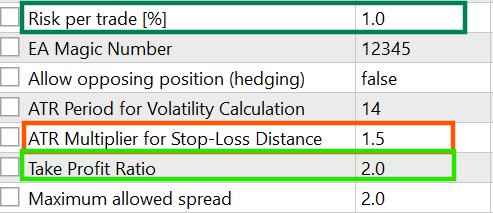
The results are shown below:

After ten completed trades, the average losing trade is approximately -$103.16, while the average winning trade is approximately $196.90. These values are very close to the expected -$100 and +$200, confirming that the position sizing is working as intended. The small differences are expected and are not caused by the risk calculation itself. They come from normal trading costs and execution factors such as spreads, slippage, and commissions.
An additional enhancement is realizing that every trade is still sized the same way regardless of recent performance. Whether the account is at a new equity high or recovering from a drawdown, the EA takes the same percentage risk. That's the adaptive layer we'll build next.
Fix 3: Adaptive Risk During Drawdowns
The EA now sizes trades correctly and respects the broker's rules, but it still treats every trade the same regardless of account performance. Whether the account has just reached a new equity high or is several losing trades into a drawdown, RiskPercent never changes. A more defensive approach is to reduce risk automatically during drawdowns instead of relying on the trader to intervene manually.
The Idea: A Risk That Responds to Drawdown
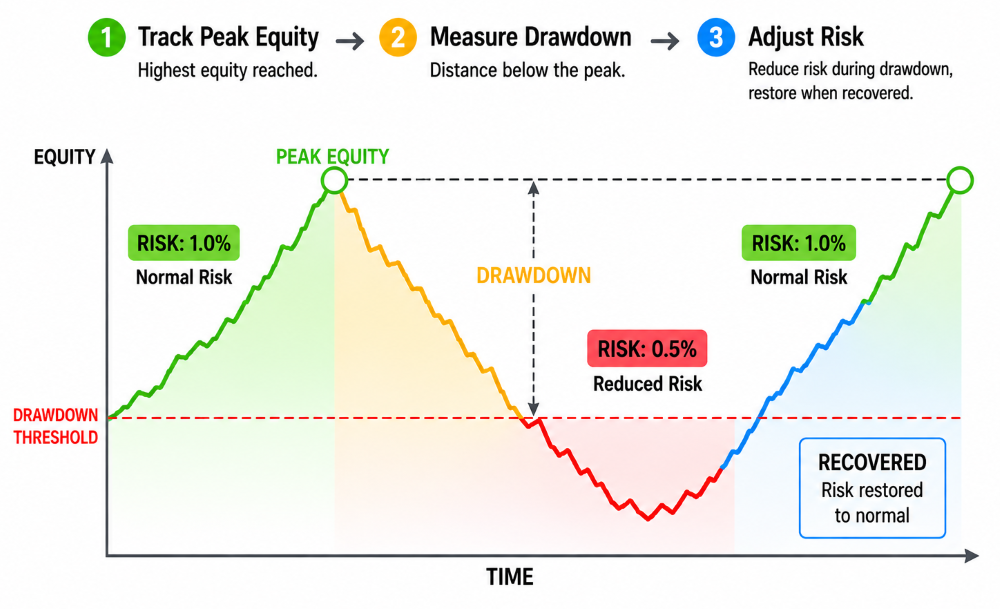
The mechanism we will use: track the highest equity the account has reached, measure how far the current equity has fallen from that peak, and reduce the risk percentage once the drawdown exceeds a chosen threshold. As the account recovers, the normal risk level is restored. The image illustration below shows this idea visually:
Add the Inputs
Three new inputs control the feature: a switch, the drawdown level that activates it, and how much risk should be reduced.
input bool   EnableAdaptiveRisk  = false; // Reduce risk during drawdowns
input double DDLevel             = 3.0;   // Drawdown % that triggers reduced risk
input double RiskReductionFactor = 0.5;   // Adaptive risk multiplier when triggered [0.5 = half risk]
This feature is optional; leave it disabled (false), and the EA behaves exactly as it did after Fix 2.
Track the Equity Peak
To measure drawdown, the EA needs to remember the highest equity it has seen. Since this value must persist across ticks, we store it as a global variable. It will be added below other global variables:
//--- Global Variables
CTrade trade;
int fastHandle, slowHandle;
int atrHandle;
double g_PeakEquity = 0.0;
Build the Adaptive Risk Function
//+------------------------------------------------------------------+
//| Return the risk percent to use, adjusted for drawdown            |
//+------------------------------------------------------------------+
double GetAdaptiveRiskPercent()
  {
   if(!EnableAdaptiveRisk)
      return RiskPercent;

   double equity = AccountInfoDouble(ACCOUNT_EQUITY);

//--- Initialize or update the peak
   if(g_PeakEquity == 0.0 || equity > g_PeakEquity)
      g_PeakEquity = equity;

//--- Calculate current drawdown from peak
   double drawdownPercent = 0.0;
   if(g_PeakEquity > 0.0)
      drawdownPercent = (g_PeakEquity - equity) / g_PeakEquity * 100.0;

   PrintFormat("Adaptive Risk | Drawdown: %.2f%% | Risk Used: %.2f%%",
               drawdownPercent,
               (drawdownPercent >= DDLevel) ? RiskPercent * RiskReductionFactor : RiskPercent);

   if(drawdownPercent >= DDLevel)
      return RiskPercent * RiskReductionFactor;

   return RiskPercent;
  }
When adaptive risk is disabled, the function simply returns RiskPercent, allowing the CalculateLotSize() function to call it unconditionally without needing to know whether adaptive risk is on. The PrintFormat() statement is optional but useful during testing. It records both the current drawdown and the risk percentage being applied, making it easy to confirm the feature behaves as expected in the Strategy Tester or live trading.
A Note on Equity vs. Balance:
Integrating Into CalculateLotSize()
The only change needed is where the risk amount is calculated. RiskPercent will be replaced with a call to the new function. From:
double balance = AccountInfoDouble(ACCOUNT_BALANCE);
double riskAmount = balance * (RiskPercent / 100.0);
To:
double balance = AccountInfoDouble(ACCOUNT_BALANCE);
double riskAmount = balance * (GetAdaptiveRiskPercent() / 100.0);
Everything else, including the monetary risk calculation, volume validation, and broker checks introduced in the previous fixes, remains unchanged. The adaptive layer just changes the risk percentage that feeds into an existing calculation.
Explanation
Since g_PeakEquity only increases, drawdown is always measured from the account's highest recorded equity. Once the drawdown reaches DDLevel, every new trade uses RiskPercent x RiskReductionFactor until the account recovers above the threshold. Instead of risking the same amount throughout a losing streak, the EA automatically becomes more conservative when performance deteriorates.
This implementation uses a single drawdown threshold. In practice, some EAs add a small recovery buffer before restoring full risk. Without one, the risk level might switch back and forth if equity hovers around the threshold. While this refinement makes the behavior smoother, the version presented here already captures the main benefit of adaptive position sizing.
With Fixes 1 through 3 complete, the EA now sizes positions from account risk, validates every order against the broker's trading rules, and automatically reduces exposure during drawdowns.
Tidying Up OnTick()
Most of the OnTick() function, like new-bar detection, indicator readiness checks, MA and ATR data copying, and spread validation, remains unchanged. Repeating it would be redundant. Instead, we focus on Fixes 1–3. These changes duplicate the same logic in two branches: buy and sell. A few duplicated lines now include position awareness, adaptive risk, stop validation, and lot sizing. In software engineering, maintaining two nearly identical code blocks is unnecessary. A cleaner solution is to move everything into a single direction-aware function.
Trade Execution Function (Extracted)
//+------------------------------------------------------------------+
//| Validate, size, and open a trade in the given direction          |
//| direction: 1 = Buy, -1 = Sell                                    |
//+------------------------------------------------------------------+
void OpenPosition(int direction, double price, double stopDistance, int digits)
  {
//--- Position awareness check
   bool canOpenTrade = false;
   if(AllowHedging)
      canOpenTrade = (CountOpenPositionsByDirection(direction) == 0);
   else
      canOpenTrade = (CountOpenPositions() == 0);

   if(!canOpenTrade)
      return;

//--- Lot size from the validated stop distance
   double lotSize = CalculateLotSize(stopDistance);
   if(lotSize <= 0)
     {
      Print("Calculated lot size is invalid. Trade skipped.");
      return;
     }

//--- SL/TP and execution, direction-specific
   double sl, tp;
   if(direction == 1)
     {
      sl = NormalizeDouble(price - stopDistance, digits);
      tp = NormalizeDouble(price + (stopDistance * TPRatio), digits);
      if(!trade.Buy(lotSize, _Symbol, 0.0, sl, tp, "Fixed EA Buy"))
         PrintFormat("Buy failed. Retcode: %u (%s)", trade.ResultRetcode(),
                     trade.ResultRetcodeDescription());
     }
   else
     {
      sl = NormalizeDouble(price + stopDistance, digits);
      tp = NormalizeDouble(price - (stopDistance * TPRatio), digits);
      if(!trade.Sell(lotSize, _Symbol, 0.0, sl, tp, "Fixed EA Sell"))
         PrintFormat("Sell failed. Retcode: %u (%s)", trade.ResultRetcode(),
                     trade.ResultRetcodeDescription());
     }
  }
Everything leading up to the spread check and stop-distance validation stays exactly as it did after Fix 2. The only section that changes is the crossover logic, which now delegates trade execution to the new function:
//--- Check crossover on the latest closed bar (index 1) and execute trade
   if(fast[1] > slow[1] && fast[2] <= slow[2])
      OpenPosition(1, ask, stopDistance, digits);
   else
      if(fast[1] < slow[1] && fast[2] >= slow[2])
         OpenPosition(-1, bid, stopDistance, digits);
  }
OnTick() now only determines whether a signal exists. Once confirmed, OpenPosition() handles execution: permission checks, lot sizing, SL/TP calculation, and order submission. Any future improvements to sizing, broker validation, or execution only need to be made in one place instead of two. It also makes sure that buy and sell orders always follow the same rules, eliminating the risk of the two branches gradually drifting apart as the EA evolves.
Common Pitfalls and Solutions
Here, we brief cover some of the common pitfalls that this article solves when traders build their personal EAs.
| Pitfall | Solution |
|---|---|
| Deriving monetary risk from contract size and point value manually. | Use SYMBOL_TRADE_TICK_VALUE and SYMBOL_TRADE_TICK_SIZE which account for different contract specifications automatically. |
| Calculating lot size before validating the stop distance. | Validate stop distance against SYMBOL_TRADE_STOPS_LEVEL first, then calculate the lot size from the final value. |
| Rounding the lot size to a fixed number of decimal places. | Confine the lot size result to SYMBOL_VOLUME_MIN/MAX and round using SYMBOL_VOLUME_STEP, since not every symbol trades in 0.01 lot increments. |
Yet to Be Discussed
The risk model used in this article assumes the stop-loss defines the maximum acceptable risk. That fits many trend-based strategies, like the moving average crossover strategy, but it isn't the only way to manage positions.
Mean-reversion systems can size trades around a target profit and an expected reversion distance. In that case, the stop-loss acts as a structural safeguard rather than the sizing input. Some strategies remove the conventional stop-loss altogether. Instead, they define a maximum account-level drawdown (eg, 3–5%) and manage the position until the profit target is reached or the floating loss hits that account-level limit. In these systems, the account-level risk limit replaces the trade-level stop-loss as the primary measure of risk. Extending this framework to support these alternative approaches is a natural next step and deserves a dedicated article of its own. However, implementing these approaches is outside the scope of this article.
Conclusion
Fixed lot sizing was the last remaining weakness in the Part 1 EA: it left dollar risk unanchored to balance, volatility, and account performance. In this article we replaced the static LotSize with a practical, testable position‑sizing framework that:
- Calculates lot size from a chosen RiskPercent of account equity and the ATR‑based stop distance (using SYMBOL TRADE TICK SIZE and SYMBOL TRADE TICK VALUE to convert price distance into monetary risk);
- Validates and, if necessary, adjusts the stop distance against SYMBOL TRADE STOPS_LEVEL before sizing;
- Constrains and rounds the calculated lot to SYMBOL VOLUME MIN/MAX/STEP so orders are accepted by the broker;
- Adds an optional adaptive layer (peak‑equity drawdown detection) to reduce risk automatically during losing streaks;
- Centralizes execution in a single direction‑aware function so buy and sell branches always follow the same rules.
Taken together, these changes produce predictable per‑trade dollar risk that scales with balance and market volatility, avoids server rejections, and can be dropped into other EAs without altering their trading logic. The Strategy Tester should be used to confirm the expected $‑loss per stop and to verify rounding/constraint behavior before going live. The source code used in this article is provided for direct reuse and comparison with the original implementation.
Warning: All rights to these materials are reserved by MetaQuotes Ltd. Copying or reprinting of these materials in whole or in part is prohibited.
This article was written by a user of the site and reflects their personal views. MetaQuotes Ltd is not responsible for the accuracy of the information presented, nor for any consequences resulting from the use of the solutions, strategies or recommendations described.

 Decoding Market Intent: Reading Structure, Liquidity, and Price Behavior
 Market Simulation: Position View (XII)
 Combining 3D Bars, Quantum Computing, and Machine Learning into a Unified Trading System
 From Basic to Intermediate: Queues, Lists, and Trees (IV)

- Free trading apps
- Over 8,000 signals for copying
- Economic news for exploring financial markets
You agree to website policy and terms of use