

Market Simulation: Position View (XI)
 601
601
 0
0

Introduction
Hello, dear friends! Welcome to another article in our series on how to create a market replay/simulation system.
In the previous article, Market Simulation: Position View (X), we explained how we can select objects that we create on the chart using MetaTrader 5. Up until this point, the main challenge had been to find a satisfactory way to select objects on the chart. Without the help of MetaTrader 5 and the use of the ZOrder property, this task would be quite difficult. However, as we showed in the previous article, we have found a fairly practical and effective way to use MetaTrader 5 to our advantage.
As soon as we managed to achieve this result, it became clear that we had another problem to solve. The specific challenge is selecting price lines. Even though they are relatively thicker, it is still no easy task. Especially when it needs to be done fairly quickly and the lines are very close together.
It is absolutely essential to select the right line and do so as quickly as possible, but we must also approach this thoughtfully. Not only will we select a line, but we also want to provide the ability to create a price line directly on the chart, whether it is a Take Profit line or a Stop Loss line. For a trader, this interaction should be as simple as possible. Not from the perspective of the code, but from the trader's perspective.
A while back, in these articles, we presented a model that, in my opinion, is quite suitable for our needs. However, this model was fully tied to the Expert Advisor, so it was difficult to extract it from the internal structure. But since this is relevant to our needs, we will explain how to do it. However, now we will do this as an indicator. All right, let's get started.
Creating a Button for Moving Price Levels
The idea behind this rather old model was to use a special button to select the desired line. In addition to allowing you to select a line, this button also lets you create one if it is not present on the chart, and it performed other minor functions, which we will also cover in this article. So, the first thing you need to do is shown in the following code:
001. //+------------------------------------------------------------------+
002. #property copyright "Daniel Jose"
003. //+------------------------------------------------------------------+
004. #define def_NameHLine       m_Info.szPrefixName + "#HLINE"
005. #define def_NameBtnClose    m_Info.szPrefixName + "#CLOSE"
006. #define def_NameBtnMove     m_Info.szPrefixName + "#MOVE"
007. //+------------------------------------------------------------------+
008. #define macro_LineInFocus(A) ObjectSetInteger(0, def_NameHLine, OBJPROP_YSIZE, m_Info.weight = (A ? 3 : 1));
009. //+------------------------------------------------------------------+
010. #define def_PathBtns "Images\\Market Replay\\Orders\\"
011. #define def_Btn_Close def_PathBtns + "Btn_Close.bmp"
012. #resource "\\" + def_Btn_Close;
013. //+------------------------------------------------------------------+
014. #include "..\Auxiliar\C_Mouse.mqh"
015. //+------------------------------------------------------------------+
016. class C_ElementsTrade : private C_Mouse
017. {
018.     private    :
019. //+------------------------------------------------------------------+
020.         struct st00
021.         {
022.             ulong         ticket;
023.             string        szPrefixName;
024.             EnumEvents    ev;
025.             double        price;
026.             bool          bClick;
027.             char          weight;
028.         }m_Info;
029. //+------------------------------------------------------------------+
030.         void UpdateViewPort(void)
031.         {
032.             int x, y;
033.
034.             ChartTimePriceToXY(0, 0, 0, m_Info.price, x, y);
035.             x = (m_Info.ev == evMsgClosePositionEA ? 150 : (m_Info.ev == evMsgCloseTakeProfit ? 220 : 290));
036.             ObjectSetInteger(0, def_NameHLine, OBJPROP_XDISTANCE, x);
037.             ObjectSetInteger(0, def_NameHLine, OBJPROP_YDISTANCE, y - (m_Info.weight > 1 ? (int)(m_Info.weight / 2) : 0));
038.             ObjectSetInteger(0, def_NameBtnClose, OBJPROP_XDISTANCE, x);
039.             ObjectSetInteger(0, def_NameBtnClose, OBJPROP_YDISTANCE, y);
040.             ObjectSetInteger(0, def_NameBtnMove, OBJPROP_XDISTANCE, x + 30);
041.             ObjectSetInteger(0, def_NameBtnMove, OBJPROP_YDISTANCE, y);
042.         }
043. //+------------------------------------------------------------------+
044. inline void CreateLinePrice(const color _color, const string szDescr)
045.         {
046.             string szObj;
047.
048.             CreateObjectGraphics(szObj = def_NameHLine, OBJ_RECTANGLE_LABEL, _color, (EnumPriority)(ePriorityDefault));
049.             macro_LineInFocus(false);
050.             ObjectSetInteger(0, szObj, OBJPROP_BGCOLOR, _color);
051.             ObjectSetInteger(0, szObj, OBJPROP_XSIZE, TerminalInfoInteger(TERMINAL_SCREEN_WIDTH));
052.             ObjectSetInteger(0, szObj, OBJPROP_BORDER_TYPE, BORDER_FLAT);
053.             ObjectSetInteger(0, szObj, OBJPROP_CORNER, CORNER_LEFT_UPPER);
054.             ObjectSetString(0, szObj, OBJPROP_TOOLTIP, szDescr);
055.         }
056. //+------------------------------------------------------------------+
057. inline void CreateBoxMove(const color _color)
058.         {
059.             string szObj;
060.
061.             CreateObjectGraphics(szObj = def_NameBtnMove, OBJ_LABEL, _color, (EnumPriority)(ePriorityDefault));
062.             ObjectSetString(0, szObj, OBJPROP_FONT, "Wingdings");
063.             ObjectSetString(0, szObj, OBJPROP_TEXT, "u");
064.             ObjectSetInteger(0, szObj, OBJPROP_FONTSIZE, 17);
065.             ObjectSetInteger(0, szObj, OBJPROP_ANCHOR, ANCHOR_CENTER);
066.             ObjectSetInteger(0, szObj, OBJPROP_XSIZE, 21);
067.             ObjectSetInteger(0, szObj, OBJPROP_YSIZE, 23);
068.         }
069. //+------------------------------------------------------------------+
070. inline void CreateButtonClose(void)
071.         {
072.             string szObj;
073.
074.             CreateObjectGraphics(szObj = def_NameBtnClose, OBJ_BITMAP_LABEL, clrNONE, (EnumPriority)(ePriorityDefault));
075.             ObjectSetString(0, szObj, OBJPROP_BMPFILE, 0, "::" + def_Btn_Close);
076.             ObjectSetInteger(0, szObj, OBJPROP_ANCHOR, ANCHOR_CENTER);
077.         }
078. //+------------------------------------------------------------------+
079.     public    :
080. //+------------------------------------------------------------------+
081.         C_ElementsTrade(const ulong ticket, const EnumEvents ev, color _color, EnumPriority ePrio, string szDescr = "\n")
082.             :C_Mouse(0, "")
083.         {
084.             ZeroMemory(m_Info);
085.             m_Info.szPrefixName = StringFormat("%I64u@%03d", m_Info.ticket = ticket, (int)(m_Info.ev = ev));
086.             CreateLinePrice(_color, szDescr);
087.             if (ev != evMsgClosePositionEA) CreateBoxMove(_color);
088.             CreateButtonClose();
089.         }
090. //+------------------------------------------------------------------+
091.         ~C_ElementsTrade()
092.         {
093.             ObjectsDeleteAll(0, m_Info.szPrefixName);
094.         }
095. //+------------------------------------------------------------------+
096. inline void UpdatePrice(const double price)
097.         {
098.             m_Info.price = price;
099.             UpdateViewPort();
100.         }
101. //+------------------------------------------------------------------+
102.         void DispatchMessage(const int id, const long &lparam, const double &dparam, const string &sparam)
103.         {
104.             string sz0;
105.
106.             C_Mouse::DispatchMessage(id, lparam, dparam, sparam);
107.             switch (id)
108.             {
109.                 case CHARTEVENT_CUSTOM + evMsgSetFocus:
110.                     macro_LineInFocus((m_Info.ticket == (ulong)(lparam)) && ((EnumEvents)(dparam) == m_Info.ev));
111.                     m_Info.bClick = false;
112.                 case CHARTEVENT_CHART_CHANGE:
113.                     UpdateViewPort();
114.                     break;
115.                 case CHARTEVENT_OBJECT_CLICK:
116.                     sz0 = GetPositionsMouse().szObjNameClick;
117.                     if (m_Info.bClick) switch (m_Info.ev)
118.                     {
119.                         case evMsgClosePositionEA:
120.                             if (sz0 == def_NameBtnClose)
121.                                 EventChartCustom(0, evMsgClosePositionEA, m_Info.ticket, 0, "");
122.                             break;
123.                         case evMsgCloseTakeProfit:
124.                             if (sz0 == def_NameBtnClose)
125.                                 EventChartCustom(0, evMsgCloseTakeProfit, m_Info.ticket, PositionGetDouble(POSITION_SL), PositionGetString(POSITION_SYMBOL));
126.                             else if (sz0 == def_NameBtnMove)
127.                                 EventChartCustom(0, evMsgSetFocus, m_Info.ticket, evMsgCloseTakeProfit, "");
128.                             break;
129.                         case evMsgCloseStopLoss:
130.                             if (sz0 == def_NameBtnClose)
131.                                 EventChartCustom(0, evMsgCloseStopLoss, m_Info.ticket, PositionGetDouble(POSITION_TP), PositionGetString(POSITION_SYMBOL));
132.                             else if (sz0 == def_NameBtnMove)
133.                                 EventChartCustom(0, evMsgSetFocus, m_Info.ticket, evMsgCloseStopLoss, "");
134.                             break;
135.                     }
136.                     m_Info.bClick = false;
137.                     break;
138.                 case CHARTEVENT_MOUSE_MOVE:
139.                     m_Info.bClick = (CheckClick(C_Mouse::eClickLeft) ? true : m_Info.bClick);
140.                     if (m_Info.bClick && (m_Info.weight > 1)) EventChartCustom(0, evMsgSetFocus, 0, 0, "");
141.                     break;
142.             }
143.         }
144. //+------------------------------------------------------------------+
145. };
146. //+------------------------------------------------------------------+
147. #undef macro_LineInFocus
148. //+------------------------------------------------------------------+
149. #undef def_Btn_Close
150. #undef def_PathBtns
151. //+------------------------------------------------------------------+
152. #undef def_NameBtnMove
153. #undef def_NameBtnClose
154. #undef def_NameHLine
155. //+------------------------------------------------------------------+
C_ElementsTrade.mqh
Here, we begin further improving object management. Note that on line 06, we created a new definition. It will assign a name to the object that will represent our move icon. As long as this element is missing, the line cannot be moved. If it exists, the line can be moved. However, for now, we will not worry about moving the line. First, let's look at how to manage the selection.
Please note that the code has changed only very slightly. This will allow you to truly understand the entire process step by step. So, if you want, you can easily change what we display.
On line 40, we specify the position of our new object on the X-axis. Please note that we have left a small space between this object and the Close button. Now, pay attention: on line 35, I adjusted the offset of the objects so that they do not overlap. This leaves a small gap between them, so we will not have any problems when this indicator is displayed on the chart.
To make future changes even easier, I moved the procedures that create objects out of the constructor. This is how the CreateLinePrice and CreateButtonClose procedures came about. The logic of these procedures used to be inside the constructor. Therefore, I will not go into further detail about them. However, the CreateBoxMove procedure is new, so it warrants a basic explanation. In this procedure, we simply create an OBJ_LABEL object and assign text to it. Actually, it is just one character. It will indicate whether we can select and, consequently, move the price line. Since the code is very simple, I do not think a detailed explanation is necessary.
Now take a look at the following details in the constructor. To be more precise, take a look at line 87. On this line, we check whether the created control is for closing the position. If that is not the case, we can create the price line move object. Great, now we can move on to the DispatchMessage procedure. Some more significant changes were made in this procedure. However, these changes are intended to prevent code duplication, since some tasks can be handled in a cascading manner.
You can see this by looking at the event on line 109: in this event, on line 111, we set the mouse click state to false. But this event, associated with line 109, will not end the way many would expect. In fact, execution falls through to the next case, CHARTEVENT_CHART_CHANGE, which is located on line 112. But why do that or allow it to happen? The reason is simple. When the line thickness changes, it must be redrawn on the chart. If we did not allow the custom event to fall through to the redraw event, we would have to add a special call to redraw the line within the custom event, and we can avoid that because we are simply setting up cascading event handling.
Note that in the CHARTEVENT_OBJECT_CLICK event, we do not check whether a click occurred on a price line. Now we check whether the move object was clicked. So do not waste time selecting the price line. Click directly on the small diamond that appears on it. This way, the line will be selected together with the diamond.
Another new function is located specifically in the CHARTEVENT_MOUSE_MOVE event. Please note that a new check is now performed on line 140. It is used to ensure that no other lines are selected on the chart. If this condition is met, an event will be triggered to clear the current selection. This implementation is quite interesting because if a line is selected and you click anywhere on the chart, the selection is removed from the line. And we will not have to worry about which line will be selected. The selection will be removed from all lines.
Okay, but even though what I just showed you can be used to select or highlight a price line, it doesn't let you do anything more useful. Let's think about it for a moment. I guarantee you, this will be very interesting.
Looking at the code above and reading the explanation of how it works, can you suggest a simple and quick way to move these price lines? It does not matter whether the trading server accepts it or not. I just want you to tell me whether it is possible to move the lines using what we have just implemented. Remember that for this to become possible, we need to add code to the system. The question is whether we can do this with as little code as possible. I do not feel like writing a lot of code. So, is it possible to do this or not?
If you answered NO, you may not fully understand how all of this works. You will probably think that this cannot be done without taking some time to think it through, but we can do it. Of course, provided that we add a little more code to our main system. As a reminder, in previous articles we have already added two new messages to the system. However, these messages had not yet been implemented in the code at that time, since it was not practical to do so then. Now, however, we have a simple and quick way to select price lines. Thus, we can use this messaging system and implement it. Before we do that, I want to explain what we are going to do. This will allow you to understand or visualize the implementation of the solution before you actually see it.
If you replace the C_ElementsTrade.mqh header file with the code we discussed at the beginning of this topic, you will see that when you select a price line and click on a point, the selection is removed from the line. That is exactly the idea. When we ask the position indicator to remove the selection from the price line, it must send a message to the Expert Advisor indicating that the selected line should be moved to a new position. This new position will correspond exactly to the point where the mouse is clicked. Do you understand now?
Nevertheless, the idea has not been perfected. But we will not worry about that right now; we will just do what I said: once a price line is selected and we click on another point, that line should move to that point. This can be achieved by modifying the code of the DispatchMessage procedure as follows:
138.     case CHARTEVENT_MOUSE_MOVE:
139.         m_Info.bClick = (CheckClick(C_Mouse::eClickLeft) ? true : m_Info.bClick);
140.         if (m_Info.bClick && (m_Info.weight > 1))
141.         {
142.             switch (m_Info.ev)
143.             {
144.                 case evMsgCloseTakeProfit:
145.                     EventChartCustom(0, evMsgNewTakeProfit, m_Info.ticket, GetPositionsMouse().Position.Price, PositionGetString(POSITION_SYMBOL));
146.                     break;
147.                 case evMsgCloseStopLoss:
148.                     EventChartCustom(0, evMsgNewStopLoss, m_Info.ticket, GetPositionsMouse().Position.Price, PositionGetString(POSITION_SYMBOL));
149.                     break;
150.             }
151.             EventChartCustom(0, evMsgSetFocus, 0, 0, "");
152.         }
153.         break;
Fragment of the C_ElementsTrade.mqh file
Take a look at what happened here. By adding this code fragment to the C_ElementsTrade class, you can move the Take Profit and Stop Loss lines using the mouse pointer. However, take a look at the following details. We don't move lines or related objects; we do exactly what was planned. In other words, the line is marked through the move object. Move the mouse pointer to a new position and click again. When that happens, the check on line 140 should eventually be performed.
When this happens, the appropriate event is selected on line 142. In this case, the event on line 145 may be triggered if the Take Profit line was selected, or the event on line 148 may be triggered if the Stop Loss line was selected. Note that the message sent to MetaTrader 5 will be virtually identical. However, it differs in its second parameter.
This message will be forwarded by MetaTrader 5 to the chart on which the indicator is loaded and intercepted by the Expert Advisor. In the code of the C_Orders class, which is part of the Expert Advisor, this message will be interpreted as a request to change the position of a price line, whether it is the Stop Loss line or the Take Profit line. As soon as the server returns the result of our request, the Expert Advisor will send another message, which will be intercepted by the position indicator, causing it to display the new point at which the price line is located. That way, whenever we look at the chart, we will know exactly where the lines are on the server. This is because we always accurately reflect what is on the server. This is how we can easily move lines with as little code as possible.
This system, which we have just implemented, works so well that you can even use the Trailing Stop feature available in MetaTrader 5 to have the Stop Loss line move, and this position indicator will follow it and remain consistent with what exists on the trading server.
Although this system works extremely well, we still have not solved one more problem. The problem is this: how can we create Take Profit or Stop Loss lines if they have been removed from the server and, consequently, from the chart? Okay, that seems a lot harder. But follow along with our explanation, and you will see that it is just as simple as what we just did. To keep the topics separate and avoid confusion, we'll move on to a new topic.
Without Stop Loss and Take Profit lines. How can we place them again?
Now we have a slightly different problem. It is as follows: let's say we remove the Stop Loss and Take Profit values on the server, but after a while we decide to put them back in place. There are several ways to do this. However, here I want to show you how to modify the position indicator so you can set Stop Loss or Take Profit directly on the chart again.
To do this, we will need to tweak the indicator a bit. This is because when Stop Loss or Take Profit is removed from a position, the indicator also removes the elements corresponding to the Stop Loss or Take Profit lines. That is the behavior we will have to change. This way, we will be able to use the same mechanism we discussed in the previous topic. That is, click one of the elements, whether it is Stop Loss or Take Profit. Move the mouse pointer to the desired location and click again. This changes the closing level for the position. That is the main idea.
But how can you do that easily? Maybe you have come up with a rather crazy solution. I do not know whether this will be easier or harder than the proposed solution, but, as in the previous topic, the idea is to make as few changes to the code as possible.
All right, let's pause again and think about it for a moment: what would be the simplest solution to our problem? Since we want to use the same model we discussed in the previous topic, the simplest solution would be to leave the price line's move object on the chart. If that is what you thought, then you were thinking the same way I was. But where can we place the object when there is no price line, whether a Take Profit or a Stop Loss line? All right, in that case, I think the best solution would be to place the move object directly on the line where the position was opened. I do not know if you share this opinion, dear reader. You are free to think whatever you like, provided, of course, that you know what you're doing.
Let's do it this way. When a Stop Loss or Take Profit line is removed from a position, the move handle is placed next to the opening price line. But now we have a problem. When this same line is deleted, the position indicator also deletes the objects associated with it. We do not want to make our code any more complicated, so let's take a look at where in the code the indicator deletes these objects. This is shown in the following snippet.
45. //+------------------------------------------------------------------+
46.         void DispatchMessage(const int id, const long &lparam, const double &dparam, const string &sparam)
47.         {
48.             double value;
49.
50.             if (Open != NULL) (*Open).DispatchMessage(id, lparam, dparam, sparam);
51.             if (Take != NULL) (*Take).DispatchMessage(id, lparam, dparam, sparam);
52.             if (Stop != NULL) (*Stop).DispatchMessage(id, lparam, dparam, sparam);
53.             switch (id)
54.             {
55.                 case CHARTEVENT_CUSTOM + evUpdate_Position:
56.                     if (lparam != m_Infos.ticket) return;
57.                     if (!PositionSelectByTicket(m_Infos.ticket))
58.                     {
59.                         ChartIndicatorDelete(0, 0, m_Infos.szShortName);
60.                         return;
61.                     };
62.                     if (Open == NULL) Open = new C_ElementsTrade(m_Infos.ticket, evMsgClosePositionEA, clrRoyalBlue, ePriorityNull, StringFormat("%I64u : Position opening price.", m_Infos.ticket));
63.                     if (Take == NULL) Take = new C_ElementsTrade(m_Infos.ticket, evMsgCloseTakeProfit, clrForestGreen, ePriorityDefault, StringFormat("%I64u : Take Profit price.", m_Infos.ticket));
64.                     if (Stop == NULL) Stop = new C_ElementsTrade(m_Infos.ticket, evMsgCloseStopLoss, clrFireBrick, ePriorityDefault, StringFormat("%I64u : Stop Loss price.", m_Infos.ticket));
65.                     (*Open).UpdatePrice(PositionGetDouble(POSITION_PRICE_OPEN));
66.                     if ((value = PositionGetDouble(POSITION_TP)) > 0) (*Take).UpdatePrice(value); else
67.                     {
68.                         delete Take;
69.                         Take = NULL;
70.                     }
71.                     if ((value = PositionGetDouble(POSITION_SL)) > 0) (*Stop).UpdatePrice(value);    else
72.                     {
73.                         delete Stop;
74.                         Stop = NULL;
75.                     }
76.                     break;
77.             }
78.             ChartRedraw();
79.         }
80. //+------------------------------------------------------------------+
Snippet from the C_IndicatorPosition.mqh file
This code snippet is part of the C_IndicatorPosition class. This is the source code for this class. Now let's take a look at the following points. On lines 66 and 71, we have two checks: one for Take Profit and the other for Stop Loss. Now pay attention so you can understand what we need to do. These checks tell the position indicator that we need to remove the pointers to the C_ElementsTrade class. This happens when the position value is zero or less. I think you have understood everything perfectly.
However, at this point, we will need to modify the code. Let's think about this for a moment. If, instead of removing the pointer to the C_ElementsTrade class, we pass the values of the Take Profit and Stop Loss lines to that class, we can create a mechanism that will allow us to do what we want. In that case, this same code snippet must be modified to implement the specified mechanism. This modification is shown below:
45. //+------------------------------------------------------------------+
46.         void DispatchMessage(const int id, const long &lparam, const double &dparam, const string &sparam)
47.         {
48.             double value;
49.
50.             if (Open != NULL) (*Open).DispatchMessage(id, lparam, dparam, sparam);
51.             if (Take != NULL) (*Take).DispatchMessage(id, lparam, dparam, sparam);
52.             if (Stop != NULL) (*Stop).DispatchMessage(id, lparam, dparam, sparam);
53.             switch (id)
54.             {
55.                 case CHARTEVENT_CUSTOM + evUpdate_Position:
56.                     if (lparam != m_Infos.ticket) return;
57.                     if (!PositionSelectByTicket(m_Infos.ticket))
58.                     {
59.                         ChartIndicatorDelete(0, 0, m_Infos.szShortName);
60.                         return;
61.                     };
62.                     if (Open == NULL) Open = new C_ElementsTrade(m_Infos.ticket, evMsgClosePositionEA, clrRoyalBlue, ePriorityNull, StringFormat("%I64u : Position opening price.", m_Infos.ticket));
63.                     if (Take == NULL) Take = new C_ElementsTrade(m_Infos.ticket, evMsgCloseTakeProfit, clrForestGreen, ePriorityDefault, StringFormat("%I64u : Take Profit price.", m_Infos.ticket));
64.                     if (Stop == NULL) Stop = new C_ElementsTrade(m_Infos.ticket, evMsgCloseStopLoss, clrFireBrick, ePriorityDefault, StringFormat("%I64u : Stop Loss price.", m_Infos.ticket));
65.                     (*Open).UpdatePrice(0, value = PositionGetDouble(POSITION_PRICE_OPEN));
66.                     (*Take).UpdatePrice(value, PositionGetDouble(POSITION_TP));
67.                     (*Stop).UpdatePrice(value, PositionGetDouble(POSITION_SL));
68.                     break;
69.             }
70.             ChartRedraw();
71.         }
72. //+------------------------------------------------------------------+
Snippet from the C_IndicatorPosition.mqh file
Note that the code has remained virtually unchanged. However, we have disabled the checks that were being performed. Now, regardless of the Stop Loss or Take Profit value, it will be passed to the C_ElementsTrade class. This will allow us to properly manage the price line objects.
Great, now let's take a look at the code in the C_ElementsTrade class. The source code is shown in the following snippet:
095. //+------------------------------------------------------------------+
096. inline void UpdatePrice(const double price)
097.         {
098.             m_Info.price = price;
099.             UpdateViewPort();
100.         }
101. //+------------------------------------------------------------------+
Snippet from the C_ElementsTrade.mqh file
Now let's focus on the previous snippet—this is where the magic happens. However, keep in mind that we originally expected to receive only one parameter. However, in the changes made to the C_IndicatorPosition class, you can see that two parameters are passed to this procedure. This will be the first change. But before we look at what the code should look like, let's gather a few more details. Okay, the first argument received will specify the location of the position's opening price line. The second argument is the price of the line to be created.
Now think about it for a moment. We only need to remove the unnecessary objects, which in this case are the object representing the price line and the Close button, while leaving the move button in place. However, this move object will be moved to a new position. This new position is the position's opening price. Therefore, the easiest way to make this change is to modify the previous code snippet so that it looks like the example below:
095. //+------------------------------------------------------------------+
096. inline void UpdatePrice(const double open, const double price)
097.         {
098.             m_Info.price = (price > 0 ? price : open);
099.             if (price == 0)
100.             {
101.                 ObjectDelete(0, def_NameBtnClose);
102.                 ObjectDelete(0, def_NameHLine);
103.             }
104.             UpdateViewPort();
105.         }
106. //+------------------------------------------------------------------+
Snippet from the C_ElementsTrade.mqh file
This code snippet would allow our position indicator to work properly, but there is a minor drawback. Note that when the trader removes the Stop Loss or Take Profit line from an open position, the position indicator also removes the horizontal line and the Close button. This is due to lines 101 and 102 of the previous snippet. But when the trader requests a change in the position of the Stop Loss or Take Profit line on an open position, only the move button will be moved correctly. The other objects will be removed from the list of objects. They will not appear on the chart under any circumstances. The result is shown in the following image:
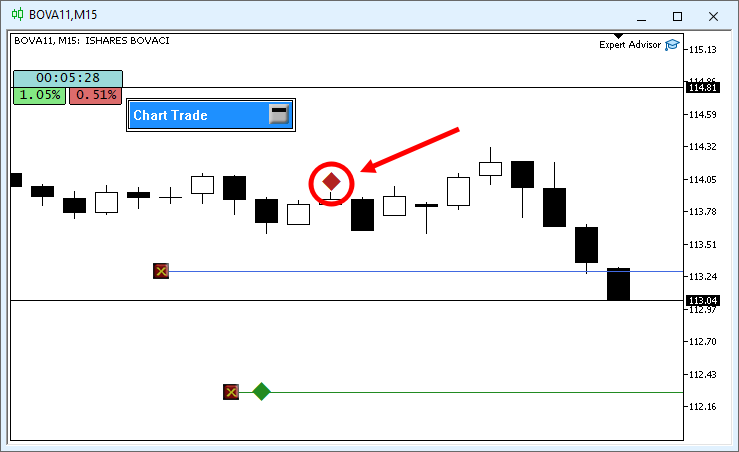
This is not a serious problem, just a minor inconvenience that needs to be fixed. It is just as simple as what we have been doing up until now. However, we will need to make a few more substantial changes to the class code. Below is the final, corrected code:
001. //+------------------------------------------------------------------+
002. #property copyright "Daniel Jose"
003. //+------------------------------------------------------------------+
004. #define def_NameHLine       m_Info.szPrefixName + "#HLINE"
005. #define def_NameBtnClose    m_Info.szPrefixName + "#CLOSE"
006. #define def_NameBtnMove     m_Info.szPrefixName + "#MOVE"
007. //+------------------------------------------------------------------+
008. #define macro_LineInFocus(A) ObjectSetInteger(0, def_NameHLine, OBJPROP_YSIZE, m_Info.weight = (A ? 3 : 1));
009. //+------------------------------------------------------------------+
010. #define def_PathBtns "Images\\Market Replay\\Orders\\"
011. #define def_Btn_Close def_PathBtns + "Btn_Close.bmp"
012. #resource "\\" + def_Btn_Close;
013. //+------------------------------------------------------------------+
014. #include "..\Auxiliar\C_Mouse.mqh"
015. //+------------------------------------------------------------------+
016. class C_ElementsTrade : private C_Mouse
017. {
018.     private    :
019. //+------------------------------------------------------------------+
020.         struct st00
021.         {
022.             ulong       ticket;
023.             string      szPrefixName,
024.                         szDescr;
025.             EnumEvents  ev;
026.             double      price;
027.             bool        bClick;
028.             char        weight;
029.             color       _color;
030.         }m_Info;
031. //+------------------------------------------------------------------+
032.         void UpdateViewPort(void)
033.         {
034.             int x, y;
035.
036.             ChartTimePriceToXY(0, 0, 0, m_Info.price, x, y);
037.             x = (m_Info.ev == evMsgClosePositionEA ? 150 : (m_Info.ev == evMsgCloseTakeProfit ? 220 : 290));
038.             ObjectSetInteger(0, def_NameHLine, OBJPROP_XDISTANCE, x);
039.             ObjectSetInteger(0, def_NameHLine, OBJPROP_YDISTANCE, y - (m_Info.weight > 1 ? (int)(m_Info.weight / 2) : 0));
040.             ObjectSetInteger(0, def_NameBtnClose, OBJPROP_XDISTANCE, x);
041.             ObjectSetInteger(0, def_NameBtnClose, OBJPROP_YDISTANCE, y);
042.             ObjectSetInteger(0, def_NameBtnMove, OBJPROP_XDISTANCE, x + 30);
043.             ObjectSetInteger(0, def_NameBtnMove, OBJPROP_YDISTANCE, y);
044.         }
045. //+------------------------------------------------------------------+
046. inline void CreateLinePrice(void)
047.         {
048.             string szObj;
049.
050.             CreateObjectGraphics(szObj = def_NameHLine, OBJ_RECTANGLE_LABEL, m_Info._color, (EnumPriority)(ePriorityDefault));
051.             macro_LineInFocus(false);
052.             ObjectSetInteger(0, szObj, OBJPROP_BGCOLOR, m_Info._color);
053.             ObjectSetInteger(0, szObj, OBJPROP_XSIZE, TerminalInfoInteger(TERMINAL_SCREEN_WIDTH));
054.             ObjectSetInteger(0, szObj, OBJPROP_BORDER_TYPE, BORDER_FLAT);
055.             ObjectSetInteger(0, szObj, OBJPROP_CORNER, CORNER_LEFT_UPPER);
056.             ObjectSetString(0, szObj, OBJPROP_TOOLTIP, m_Info.szDescr);
057.         }
058. //+------------------------------------------------------------------+
059. inline void CreateBoxMove(void)
060.         {
061.             string szObj;
062.
063.             CreateObjectGraphics(szObj = def_NameBtnMove, OBJ_LABEL, m_Info._color, (EnumPriority)(ePriorityDefault));
064.             ObjectSetString(0, szObj, OBJPROP_FONT, "Wingdings");
065.             ObjectSetString(0, szObj, OBJPROP_TEXT, "u");
066.             ObjectSetInteger(0, szObj, OBJPROP_FONTSIZE, 17);
067.             ObjectSetInteger(0, szObj, OBJPROP_ANCHOR, ANCHOR_CENTER);
068.             ObjectSetInteger(0, szObj, OBJPROP_XSIZE, 21);
069.             ObjectSetInteger(0, szObj, OBJPROP_YSIZE, 23);
070.         }
071. //+------------------------------------------------------------------+
072. inline void CreateButtonClose(void)
073.         {
074.             string szObj;
075.
076.             CreateObjectGraphics(szObj = def_NameBtnClose, OBJ_BITMAP_LABEL, clrNONE, (EnumPriority)(ePriorityDefault));
077.             ObjectSetString(0, szObj, OBJPROP_BMPFILE, 0, "::" + def_Btn_Close);
078.             ObjectSetInteger(0, szObj, OBJPROP_ANCHOR, ANCHOR_CENTER);
079.         }
080. //+------------------------------------------------------------------+
081.     public    :
082. //+------------------------------------------------------------------+
083.         C_ElementsTrade(const ulong ticket, const EnumEvents ev, color _color, EnumPriority ePrio, string szDescr = "\n")
084.             :C_Mouse(0, "")
085.         {
086.             ZeroMemory(m_Info);
087.             m_Info.szPrefixName = StringFormat("%I64u@%03d", m_Info.ticket = ticket, (int)(m_Info.ev = ev));
088.             m_Info._color = _color;
089.             m_Info.szDescr = szDescr;
090.         }
091. //+------------------------------------------------------------------+
092.         ~C_ElementsTrade()
093.         {
094.             ObjectsDeleteAll(0, m_Info.szPrefixName);
095.         }
096. //+------------------------------------------------------------------+
097. inline void UpdatePrice(const double open, const double price)
098.         {
099.             m_Info.price = (price > 0 ? price : open);
100.             if (price > 0)
101.             {
102.                 CreateLinePrice();
103.                 CreateButtonClose();
104.             }else
105.                 ObjectsDeleteAll(0, m_Info.szPrefixName);
106.             if (m_Info.ev != evMsgClosePositionEA) CreateBoxMove();
107.             UpdateViewPort();
108.         }
109. //+------------------------------------------------------------------+
110.         void DispatchMessage(const int id, const long &lparam, const double &dparam, const string &sparam)
111.         {
112.             string sz0;
113.
114.             C_Mouse::DispatchMessage(id, lparam, dparam, sparam);
115.             switch (id)
116.             {
117.                 case CHARTEVENT_CUSTOM + evMsgSetFocus:
118.                     macro_LineInFocus((m_Info.ticket == (ulong)(lparam)) && ((EnumEvents)(dparam) == m_Info.ev));
119.                     m_Info.bClick = false;
120.                 case CHARTEVENT_CHART_CHANGE:
121.                     UpdateViewPort();
122.                     break;
123.                 case CHARTEVENT_OBJECT_CLICK:
124.                     sz0 = GetPositionsMouse().szObjNameClick;
125.                     if (m_Info.bClick) switch (m_Info.ev)
126.                     {
127.                         case evMsgClosePositionEA:
128.                             if (sz0 == def_NameBtnClose)
129.                                 EventChartCustom(0, evMsgClosePositionEA, m_Info.ticket, 0, "");
130.                             break;
131.                         case evMsgCloseTakeProfit:
132.                             if (sz0 == def_NameBtnClose)
133.                                 EventChartCustom(0, evMsgCloseTakeProfit, m_Info.ticket, PositionGetDouble(POSITION_SL), PositionGetString(POSITION_SYMBOL));
134.                             else if (sz0 == def_NameBtnMove)
135.                                 EventChartCustom(0, evMsgSetFocus, m_Info.ticket, evMsgCloseTakeProfit, "");
136.                             break;
137.                         case evMsgCloseStopLoss:
138.                             if (sz0 == def_NameBtnClose)
139.                                 EventChartCustom(0, evMsgCloseStopLoss, m_Info.ticket, PositionGetDouble(POSITION_TP), PositionGetString(POSITION_SYMBOL));
140.                             else if (sz0 == def_NameBtnMove)
141.                                 EventChartCustom(0, evMsgSetFocus, m_Info.ticket, evMsgCloseStopLoss, "");
142.                             break;
143.                     }
144.                     m_Info.bClick = false;
145.                     break;
146.                 case CHARTEVENT_MOUSE_MOVE:
147.                     m_Info.bClick = (CheckClick(C_Mouse::eClickLeft) ? true : m_Info.bClick);
148.                     if (m_Info.bClick && (m_Info.weight > 1))
149.                     {
150.                         switch (m_Info.ev)
151.                         {
152.                             case evMsgCloseTakeProfit:
153.                                 EventChartCustom(0, evMsgNewTakeProfit, m_Info.ticket, GetPositionsMouse().Position.Price, PositionGetString(POSITION_SYMBOL));
154.                                 break;
155.                             case evMsgCloseStopLoss:
156.                                 EventChartCustom(0, evMsgNewStopLoss, m_Info.ticket, GetPositionsMouse().Position.Price, PositionGetString(POSITION_SYMBOL));
157.                                 break;
158.                         }
159.                         EventChartCustom(0, evMsgSetFocus, 0, 0, "");
160.                     }
161.                     break;
162.             }
163.         }
164. //+------------------------------------------------------------------+
165. };
166. //+------------------------------------------------------------------+
167. #undef macro_LineInFocus
168. //+------------------------------------------------------------------+
169. #undef def_Btn_Close
170. #undef def_PathBtns
171. //+------------------------------------------------------------------+
172. #undef def_NameBtnMove
173. #undef def_NameBtnClose
174. #undef def_NameHLine
175. //+------------------------------------------------------------------+
C_ElementsTrade.mqh
The result is shown in the following animation.
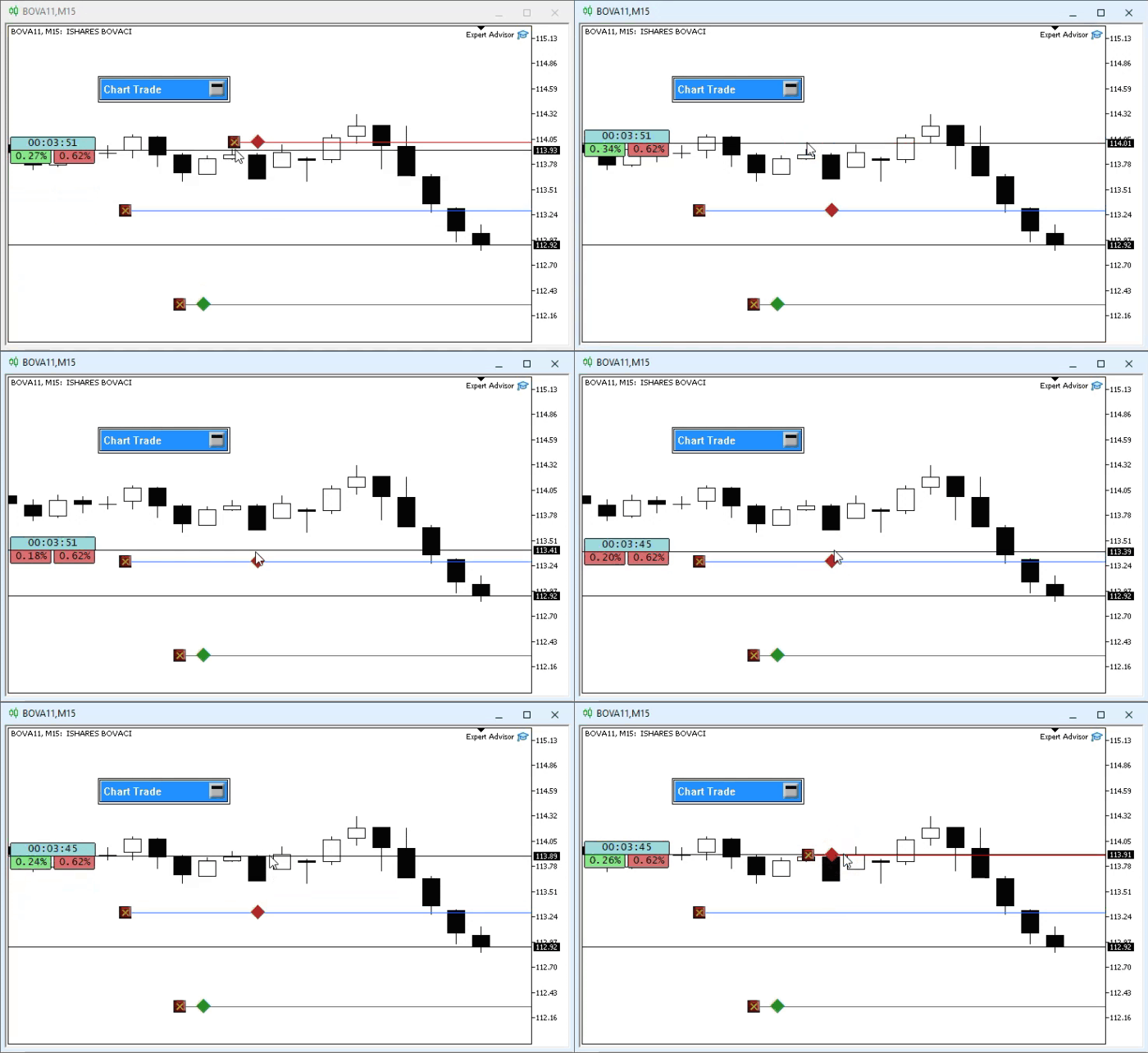
Note that the system is now working flawlessly, just as expected. Since the code has undergone some changes—many of which are very minor—there is no need to highlight them separately. However, dear reader, I would like you to pay special attention to two points in this code. The first is the constructor. Note that it is slightly different from the previous version. The second procedure is UpdatePrice. Note that the procedures that created the objects, which were previously in the constructor, are now in this procedure. Since the code is fairly simple, there is no need to go into detail. Basically, all that was done was to remove what used to be done in the constructor and move it into this procedure. Nothing particularly noteworthy.
However, I would like you to focus on something else—specifically, the animation above. Answer me honestly. If, as a trader, you were to try using the system we have just implemented, would you hesitate when adjusting the Take Profit or Stop Loss levels? Do you know whether you need to move the mouse pointer line to a higher or lower price in order to place the price line on the server again? Perhaps the last question was not clear enough. Let's try to clarify the situation a bit so you can understand what problem we still need to solve.
Just by looking at the animation, you can clearly see that we are in a short position. This is because the Take Profit line is below the opening price of the position. Good, but let's suppose that you, as a trader, removed both lines from the chart. Or, more precisely, that you removed them from the position recorded on the server. In that case, if you were watching this same animation and focusing only on the position indicator, you would not be able to tell whether the position is short or long. That is the first point.
The second point is as follows: if we have sold and the Take Profit and Stop Loss values are not defined in the position—that is, both objects that allow the price line to be moved are located at the opening price—how could you determine, just by looking at the chart, whether the Stop Loss line should be placed above or below the current price? That is a tough question to answer, isn't it? However, we have a fairly simple solution to this problem. As you can see, in the C_ElementsTrade class, we never access the position data. The data comes from the C_IndicatorPosition class. And I do not want to clutter the C_ElementsTrade class with data that I would have to remove from it later. This is because we will also be using it when working with pending orders. So we will have to put in a little more effort. We will discuss this in the next article.
Concluding Thoughts
In this article, I showed you how to modify the position indicator so that, with minimal effort, it can perform many more actions than it originally could. We saw how to implement the ability to move price levels and create price lines directly on the chart. Many people may find this difficult. However, as you may have noticed, we did everything very easily and with minimal effort. All it took was to stop and think for a moment.
That is precisely the purpose of this series of articles. I am not here to teach you how to build applications. However, learning to program becomes much more interesting when we see that we are creating something new. I hope you will understand the purpose of these articles and that they will serve as a solid theoretical and motivational foundation for your continued learning. After all, there are no unsolvable problems; there are only people who cannot see a simple solution to complex problems.
| File | Description |
|---|---|
| Experts\Expert Advisor.mq5 | Shows the interaction between Chart Trade and the Expert Advisor on the chart. (Mouse Study is required for this interaction.) |
| Indicators\Chart Trade.mq5 | Creates a window for configuring the order to be sent. (Mouse Study is required for this interaction.) |
| Indicators\Market Replay.mq5 | Creates controls for interacting with the market replay/simulation service. (Mouse Study is required for interaction.) |
| Indicators\Mouse Study.mq5 | Enables interaction with graphical controls and with the user. (This is necessary both for the replay/simulation system and for live trading). |
| Indicators\Order Indicator.mq5 | Responsible for displaying market orders, enabling users to interact with and manage them. |
| Indicators\Position View.mq5 | Responsible for displaying market positions, allowing users to interact with and control them. |
| Services\Market Replay.mq5 | Creates and maintains the market replay/simulation service. (Main system file) |
Translated from Portuguese by MetaQuotes Ltd.
Original article: https://www.mql5.com/pt/articles/13295
Warning: All rights to these materials are reserved by MetaQuotes Ltd. Copying or reprinting of these materials in whole or in part is prohibited.
This article was written by a user of the site and reflects their personal views. MetaQuotes Ltd is not responsible for the accuracy of the information presented, nor for any consequences resulting from the use of the solutions, strategies or recommendations described.

 First Fractal Breakout — Intraday Strategy, Expert Advisor and Backtesting
 From Basic to Intermediate: Queues, Lists, and Trees (III)
 Zero-Copy Tick Streaming (Part 1): Bridging MetaTrader 5 to Shared Memory with the Arrow C Data Interface
 Machine Learning Under Constraint (Part 1): A Configurable Rule Set for Prop-Firm Position Sizing

- Free trading apps
- Over 8,000 signals for copying
- Economic news for exploring financial markets
You agree to website policy and terms of use