

Market Simulation: Position View (XIII)
 1 183
1 183
 0
0

Introduction
Hello, everyone, and welcome to a new article in our series on how to build a replay/simulation system.
In the previous article, Market Simulation: Position View (XII), we improved the position indicator to make it more convenient and enjoyable to use. However, it is not yet a fully practical tool. It already includes features that many might consider very difficult to implement, although we added them in a fairly simple way. Now we will make a few minor changes to make it more useful.
Don't worry: the changes will be easy to understand, and they will lay the groundwork for a more sophisticated and functional solution. Let's get started.
Removing the C_IndicatorPosition class
Before removing the C_IndicatorPosition class from the final code, it is worth explaining why. We want to remove the intermediate layer between the indicator and the C_ElementsTrade class. You might be wondering why we are changing the architecture right now. It is pretty simple. Up to this point, the behavior of the position indicator had not yet been fully defined. We temporarily kept the C_IndicatorPosition class as a separation layer to isolate the implementation from potential failures or radical changes, as shown in the following image.
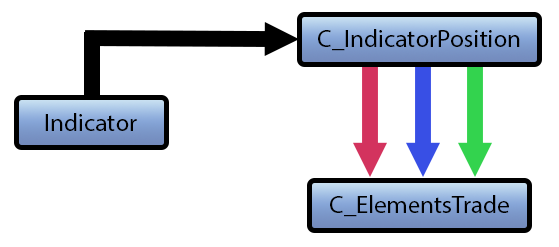
In the previous diagram, the black line represents the connection between the indicator and the C_IndicatorPosition class. This class branches into three lines: red, blue, and green, which correspond to the components to be displayed on the chart: stop-loss, opening price, and take-profit, respectively. Although this structure has been useful so far, it will become a limitation in the next phase. Therefore, we will remove the C_IndicatorPosition class from the project and incorporate the methods and member variables currently defined by that class into the indicator, as shown below.
01. //+------------------------------------------------------------------+
02. #property copyright "Daniel Jose"
03. #property icon "/Images/Market Replay/Icons/Positions.ico"
04. #property description "Indicator for tracking an open position on the server."
05. #property description "This should preferably be used together with an Expert Advisor."
06. #property description "For more details see the same article."
07. #property version   "1.125"
08. #property link "https://www.mql5.com/pt/articles/13356"
09. #property indicator_chart_window
10. #property indicator_plots 0
11. //+------------------------------------------------------------------+
12. #define def_ShortName "Position View"
13. //+------------------------------------------------------------------+
14. #include <Market Replay\Order System\C_ElementsTrade.mqh>
15. #include <Market Replay\Defines.mqh>
16. //+------------------------------------------------------------------+
17. input ulong user00 = 0;        //For Expert Advisor use
18. //+------------------------------------------------------------------+
19. struct st00
20. {
21.     ulong  ticket;
22.     string szShortName;
23. }m_Infos;
24. //+------------------------------------------------------------------+
25. C_ElementsTrade *Open = NULL, *Stop = NULL, *Take = NULL;
26. //+------------------------------------------------------------------+
27. bool CheckCatch(ulong ticket)
28. {
29.     ZeroMemory(m_Infos);
30.     m_Infos.szShortName = StringFormat("%I64u", m_Infos.ticket = ticket);
31.     if (!PositionSelectByTicket(m_Infos.ticket)) return false;
32.     if (ObjectFind(0, m_Infos.szShortName) >= 0)
33.     {
34.         m_Infos.ticket = 0;
35.         return false;
36.     }
37.     IndicatorSetString(INDICATOR_SHORTNAME, m_Infos.szShortName);
38.     EventChartCustom(0, evUpdate_Position, ticket, 0, "");
39.
40.     return true;
41. }
42. //+------------------------------------------------------------------+
43. int OnInit()
44. {
45.     IndicatorSetString(INDICATOR_SHORTNAME, def_ShortName);
46.     if (!CheckCatch(user00))
47.     {
48.         ChartIndicatorDelete(0, 0, def_ShortName);
49.         return INIT_FAILED;
50.     }
51.
52.     return INIT_SUCCEEDED;
53. }
54. //+------------------------------------------------------------------+
55. int OnCalculate(const int rates_total, const int prev_calculated, const int begin, const double &price[])
56. {
57.     return rates_total;
58. }
59. //+------------------------------------------------------------------+
60. void OnChartEvent(const int id, const long &lparam, const double &dparam, const string &sparam)
61. {
62.     double value;
63.
64.     if (Open != NULL) (*Open).DispatchMessage(id, lparam, dparam, sparam);
65.     if (Take != NULL) (*Take).DispatchMessage(id, lparam, dparam, sparam);
66.     if (Stop != NULL)    (*Stop).DispatchMessage(id, lparam, dparam, sparam);
67.     switch (id)
68.     {
69.         case CHARTEVENT_CUSTOM + evUpdate_Position:
70.             if (lparam != m_Infos.ticket) return;
71.             if (!PositionSelectByTicket(m_Infos.ticket))
72.             {
73.                 ChartIndicatorDelete(0, 0, m_Infos.szShortName);
74.                 return;
75.             };
76.             if (Open == NULL) Open = new C_ElementsTrade(m_Infos.ticket, evMsgClosePositionEA, clrRoyalBlue, StringFormat("%I64u : Position opening price.", m_Infos.ticket), PositionGetInteger(POSITION_TYPE) == POSITION_TYPE_BUY);
77.             if (Take == NULL) Take = new C_ElementsTrade(m_Infos.ticket, evMsgCloseTakeProfit, clrForestGreen, StringFormat("%I64u : Take Profit price.", m_Infos.ticket));
78.             if (Stop == NULL) Stop = new C_ElementsTrade(m_Infos.ticket, evMsgCloseStopLoss, clrFireBrick, StringFormat("%I64u : Stop Loss price.", m_Infos.ticket));
79.             (*Open).UpdatePrice(0, value = PositionGetDouble(POSITION_PRICE_OPEN));
80.             (*Take).UpdatePrice(value, PositionGetDouble(POSITION_TP));
81.             (*Stop).UpdatePrice(value, PositionGetDouble(POSITION_SL));
82.             break;
83.     }
84.     ChartRedraw();
85. };
86. //+------------------------------------------------------------------+
87. void OnDeinit(const int reason)
88. {
89.     delete Open;
90.     delete Take;
91.     delete Stop;
92. }
93. //+------------------------------------------------------------------+
Source code for the position indicator
The code shown above already includes the methods, variables, and update logic that were previously defined in C_IndicatorPosition. The following diagram illustrates the new structure.
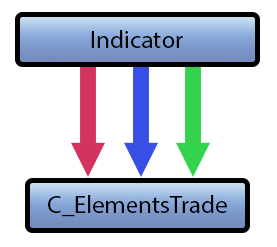
At first glance, the architecture seems simpler, while the indicator's code may seem more complex. None of these impressions is accurate: the division of responsibilities between the indicator and the helper classes has neither been simplified nor made more complex—it has merely been reorganized.
This change is necessary because the new profit or loss label must have direct access to the component representing the opening price. Now we will display the position result—either as a monetary amount or as the number of ticks of profit or loss. This will make it easier for the trader to decide whether it makes sense to close the position.
"Wow, now this is getting interesting. Can we keep the C_IndicatorPosition class?" Yes, but adding a function just to access the Open pointer would not be practical. This pointer refers to the graphical line and label that mark the opening price of a position. Now that we have explained the reason for the changes, let's move on to the next section.
Understanding Profit or Loss Indication
For now, we will omit other position metrics, such as trade volume and the monetary result, and show only whether a position is in profit or loss. First, we will calculate the difference between the opening price and the closing price, expressed in points; later, we will convert this difference into a monetary result, since the financial calculation requires additional modifications.
Now let's think about how to get the current price of the instrument. Relying solely on the OnCalculate function is not enough, because a trader may be working with a cross-order system, in which case this function may not be the ideal option. Nevertheless, we will assume that the trader is working with a similar symbol. For example, you can analyze the full history of a dollar contract while trading the current mini-dollar contract. In this case, the difference between the two symbols is not a problem.
To clarify: on B3 (the Brazilian exchange), there are contracts that are not tradable, such as historical futures contracts. Professional traders often use this history as a guide when trading the current contract. This can also be applied to multi-symbol trading: one instrument is analyzed, while orders are executed on another using a cross-order system. For those who trade currency pairs on FOREX, this method of separating the symbol being analyzed from the symbol being traded may be less familiar.
We can also create a ratio chart between instruments. In FOREX, trading based on this chart requires sending orders for the traded pair through a cross-order system. Therefore, this explanation may be helpful to you if you have a clear understanding of how this type of trading works. We will leave this multi-symbol trading and the use of ratio charts for another time and return to our topic.
Therefore, we will use the OnCalculate function to show whether we will end up with a profit or a loss. However, it is not enough to simply use the current price, even though at first glance this may seem like the simplest solution. Please note the difference between the entry price and the quote available for closing the position. When we buy, we execute the order against available liquidity at the Ask price; when we sell, we execute it against available liquidity at the Bid price. To close a long position, we must sell at the Bid price. Similarly, to close a short position, we must buy at the Ask price.
In previous articles on the replay/simulation system, we considered two chart-construction methods: LAST-based construction and BID-based construction. If you are unfamiliar with this concept, please read these articles. Regardless of the chart type, the price parameter of the OnCalculate function always contains the most up-to-date price. Although this behavior can be changed, we will not do so because we are interested in the latest price, not the average value. On the LAST chart, the price corresponds to the price of the last executed trade, which may be either Bid or Ask. When plotting by Bid, the Bid price is displayed—that is, the best bid price quoted in the market.
That is the first problem. LAST-based plotting is typically used on netting accounts, whereas Bid-based plotting is standard for Forex. You might think that it would be enough to read POSITION_PROFIT and display the profit or loss calculated using this property via a graphical text label. In principle, this seems reasonable, but this approach may show a profit when closing the position would result in a loss. The reason is the spread.
You may not fully understand how POSITION_PROFIT is calculated. The problem is that this property does not distinguish whether the position is a buy or a sell and, moreover, does not take the spread into account in the calculation. Such a spread can significantly erode capital. You may see a profit in POSITION_PROFIT, close the position, and then discover that the trade resulted in a loss.
Therefore, we will not use POSITION_PROFIT and will calculate the closing result directly. If the position is long, we will check the result of closing it by selling at the Bid price; if the position is short, we will calculate the result of buying at the Ask price. When using this indicator in a cross-order system, try to choose a symbol with good liquidity. Thus, price fluctuations will better reflect actual market behavior.
Adding profit or loss indication
We already know the goal and the rationale behind it. Now we can implement this in a simple demonstration. To do this, we will make a few changes to the indicator. The following block contains the complete updated code:
001. //+------------------------------------------------------------------+
002. #property copyright "Daniel Jose"
003. #property icon "/Images/Market Replay/Icons/Positions.ico"
004. #property description "Indicator for tracking an open position on the server."
005. #property description "This should preferably be used together with an Expert Advisor."
006. #property description "For more details see the same article."
007. #property version   "1.125"
008. #property link "https://www.mql5.com/pt/articles/13356"
009. #property indicator_chart_window
010. #property indicator_plots 0
011. //+------------------------------------------------------------------+
012. #define def_ShortName "Position View"
013. //+------------------------------------------------------------------+
014. #include <Market Replay\Order System\C_ElementsTrade.mqh>
015. #include <Market Replay\Defines.mqh>
016. //+------------------------------------------------------------------+
017. input ulong user00 = 0;        //For Expert Advisor use
018. //+------------------------------------------------------------------+
019. struct st00
020. {
021.     ulong   ticket;
022.     string  szShortName,
023.             szSymbol;
024.     double  priceOpen;
025.     bool    bIsBuy;
026. }m_Infos;
027. //+------------------------------------------------------------------+
028. C_ElementsTrade *Open = NULL, *Stop = NULL, *Take = NULL;
029. //+------------------------------------------------------------------+
030. bool CheckCatch(ulong ticket)
031. {
032.     ZeroMemory(m_Infos);
033.     m_Infos.szShortName = StringFormat("%I64u", m_Infos.ticket = ticket);
034.     if (!PositionSelectByTicket(m_Infos.ticket)) return false;
035.     if (ObjectFind(0, m_Infos.szShortName) >= 0)
036.     {
037.         m_Infos.ticket = 0;
038.         return false;
039.     }
040.     m_Infos.szSymbol = PositionGetString(POSITION_SYMBOL);
041.     IndicatorSetString(INDICATOR_SHORTNAME, m_Infos.szShortName);
042.     EventChartCustom(0, evUpdate_Position, ticket, 0, "");
043.
044.     return true;
045. }
046. //+------------------------------------------------------------------+
047. int OnInit()
048. {
049.     IndicatorSetString(INDICATOR_SHORTNAME, def_ShortName);
050.     if (!CheckCatch(user00))
051.     {
052.         ChartIndicatorDelete(0, 0, def_ShortName);
053.         return INIT_FAILED;
054.     }
055.
056.     return INIT_SUCCEEDED;
057. }
058. //+------------------------------------------------------------------+
059. int OnCalculate(const int rates_total, const int prev_calculated, const int begin, const double &price[])
060. {
061.     double ask, bid;
062.
063.     ask = SymbolInfoDouble(m_Infos.szSymbol, SYMBOL_ASK);
064.     bid = SymbolInfoDouble(m_Infos.szSymbol, SYMBOL_BID);
065.
066.     Comment(StringFormat("BID : %f  ||| ASK : %f  ||| PROFIT : %f", bid, ask, (m_Infos.bIsBuy ? bid - m_Infos.priceOpen : m_Infos.priceOpen - ask)));
067.
068.     return rates_total;
069. }
070. //+------------------------------------------------------------------+
071. void OnChartEvent(const int id, const long &lparam, const double &dparam, const string &sparam)
072. {
073.     if (Open != NULL) (*Open).DispatchMessage(id, lparam, dparam, sparam);
074.     if (Take != NULL) (*Take).DispatchMessage(id, lparam, dparam, sparam);
075.     if (Stop != NULL) (*Stop).DispatchMessage(id, lparam, dparam, sparam);
076.     switch (id)
077.     {
078.         case CHARTEVENT_CUSTOM + evUpdate_Position:
079.             if (lparam != m_Infos.ticket) return;
080.             if (!PositionSelectByTicket(m_Infos.ticket))
081.             {
082.                 ChartIndicatorDelete(0, 0, m_Infos.szShortName);
083.                 return;
084.             };
085.             if (Open == NULL) Open = new C_ElementsTrade(m_Infos.ticket, evMsgClosePositionEA, clrRoyalBlue, StringFormat("%I64u : Position opening price.", m_Infos.ticket), m_Infos.bIsBuy = (PositionGetInteger(POSITION_TYPE) == POSITION_TYPE_BUY));
086.             if (Take == NULL) Take = new C_ElementsTrade(m_Infos.ticket, evMsgCloseTakeProfit, clrForestGreen, StringFormat("%I64u : Take Profit price.", m_Infos.ticket));
087.             if (Stop == NULL) Stop = new C_ElementsTrade(m_Infos.ticket, evMsgCloseStopLoss, clrFireBrick, StringFormat("%I64u : Stop Loss price.", m_Infos.ticket));
088.             (*Open).UpdatePrice(0, m_Infos.priceOpen = PositionGetDouble(POSITION_PRICE_OPEN));
089.             (*Take).UpdatePrice(m_Infos.priceOpen, PositionGetDouble(POSITION_TP));
090.             (*Stop).UpdatePrice(m_Infos.priceOpen, PositionGetDouble(POSITION_SL));
091.             break;
092.     }
093.     ChartRedraw();
094. };
095. //+------------------------------------------------------------------+
096. void OnDeinit(const int reason)
097. {
098.     delete Open;
099.     delete Take;
100.     delete Stop;
101. }
102. //+------------------------------------------------------------------+
Source code for the position indicator
Let's consider the changes. The structure on line 19 includes new fields for storing the symbol name, position direction, and opening price. First, we initialize the symbol name, as shown on line 40. We retrieve it from the position rather than from the _Symbol constant, because the indicator may operate on a symbol other than the one displayed on the chart. Once we have the name, we move from the OnCalculate function to the OnChartEvent function, located on line 71.
In this function, we initialize the other fields of the structure: m_Infos.bIsBuy on line 85 and m_Infos.priceOpen on line 88. This initializes all the fields needed for the calculation. Before creating a graphical indication, it is worth checking that the calculation works correctly. Test this at this stage of development, and then go to line 59, where the OnCalculate function is located.
Great, the logic of the OnCalculate function is simple. On lines 63 and 64, we requested the Ask and Bid quotes from MetaTrader 5. Line 66 displays the quotes used in the calculation in the upper-left corner of the chart. It displays the best bid price (Bid), the best ask price (Ask), and the result we would get if we closed the trade at that moment. The calculation depends on the type of position: a negative result indicates a loss upon closing; a positive result indicates a profit. Everything is very simple and straightforward, with no complications.
After checking that the calculation works correctly, we can display the PROFIT result in a graphical label linked to the opening price line. It is worth noting that the implementation supports positions with an average entry price and changes in the traded volume. When the opening price changes, the indicator automatically updates and displays the price recorded by the trading server. For now, we are not calculating a monetary amount, but only the price offset expressed as a number of ticks, whether in favor of the position or against it.
All right, to clarify things, let's move on to the next section.
Creating a display on the price line
Implementing this display is straightforward: just create a graphical text label, configure its properties, and place it next to the opening price line. It is simple. For now, let's set aside the indicator code and work with the C_ElementsTrade class, where we will implement this label. The following block contains the complete, updated class code:
001. //+------------------------------------------------------------------+
002. #property copyright "Daniel Jose"
003. //+------------------------------------------------------------------+
004. #define def_NameHLine      m_Info.szPrefixName + "#HLINE"
005. #define def_NameBtnClose   m_Info.szPrefixName + "#CLOSE"
006. #define def_NameBtnMove    m_Info.szPrefixName + "#MOVE"
007. #define def_NameInfoDirect m_Info.szPrefixName + "#DIRECT"
008. #define def_NameObjLabel   m_Info.szPrefixName + "#PROFIT"
009. //+------------------------------------------------------------------+
010. #define macro_LineInFocus(A) ObjectSetInteger(0, def_NameHLine, OBJPROP_YSIZE, m_Info.weight = (A ? 3 : 1));
011. //+------------------------------------------------------------------+
012. #define def_PathBtns "Images\\Market Replay\\Orders\\"
013. #define def_Btn_Close def_PathBtns + "Btn_Close.bmp"
014. #resource "\\" + def_Btn_Close;
015. //+------------------------------------------------------------------+
016. #include "..\Auxiliar\C_Mouse.mqh"
017. //+------------------------------------------------------------------+
018. class C_ElementsTrade : private C_Mouse
019. {
020.     private    :
021. //+------------------------------------------------------------------+
022.         struct st00
023.         {
024.             ulong       ticket;
025.             string      szPrefixName,
026.                         szDescr;
027.             EnumEvents  ev;
028.             double      price;
029.             bool        bClick,
030.                         bIsBuy;
031.             char        weight,
032.                         digits;
033.             color       _color;
034.         }m_Info;
035. //+------------------------------------------------------------------+
036.         void UpdateViewPort(const double price)
037.         {
038.             int x, y;
039.
040.             ChartTimePriceToXY(0, 0, 0, price, x, y);
041.             x = (m_Info.ev == evMsgClosePositionEA ? 150 : (m_Info.ev == evMsgCloseTakeProfit ? 220 : 290));
042.             ObjectSetInteger(0, def_NameHLine, OBJPROP_XDISTANCE, x);
043.             ObjectSetInteger(0, def_NameHLine, OBJPROP_YDISTANCE, y - (m_Info.weight > 1 ? (int)(m_Info.weight / 2) : 0));
044.             ObjectSetInteger(0, def_NameBtnClose, OBJPROP_XDISTANCE, x);
045.             ObjectSetInteger(0, def_NameBtnClose, OBJPROP_YDISTANCE, y);
046.             ObjectSetInteger(0, def_NameObjLabel, OBJPROP_XDISTANCE, x + 10);
047.             ObjectSetInteger(0, def_NameObjLabel, OBJPROP_YDISTANCE, y - 8);
048.             ObjectSetInteger(0, def_NameInfoDirect, OBJPROP_XDISTANCE, x + 80);
049.             ObjectSetInteger(0, def_NameInfoDirect, OBJPROP_YDISTANCE, y);
050.             ObjectSetInteger(0, def_NameBtnMove, OBJPROP_XDISTANCE, x + 30);
051.             ObjectSetInteger(0, def_NameBtnMove, OBJPROP_YDISTANCE, y);
052.         }
053. //+------------------------------------------------------------------+
054. inline void CreateLinePrice(void)
055.         {
056.             string szObj;
057.
058.             CreateObjectGraphics(szObj = def_NameHLine, OBJ_RECTANGLE_LABEL, m_Info._color, (EnumPriority)(ePriorityDefault));
059.             ObjectSetInteger(0, szObj, OBJPROP_BGCOLOR, m_Info._color);
060.             ObjectSetInteger(0, szObj, OBJPROP_XSIZE, TerminalInfoInteger(TERMINAL_SCREEN_WIDTH));
061.             ObjectSetInteger(0, szObj, OBJPROP_BORDER_TYPE, BORDER_FLAT);
062.             ObjectSetInteger(0, szObj, OBJPROP_CORNER, CORNER_LEFT_UPPER);
063.             ObjectSetString(0, szObj, OBJPROP_TOOLTIP, m_Info.szDescr);
064.             macro_LineInFocus(false);
065.         }
066. //+------------------------------------------------------------------+
067. inline void CreateBoxInfo(const bool bMove)
068.         {
069.             string szObj;
070.             const char c[] = {(char)(bMove ? 'u' : (m_Info.bIsBuy ? 236 : 238)), 0};
071.
072.             CreateObjectGraphics(szObj = (bMove ? def_NameBtnMove : def_NameInfoDirect), OBJ_LABEL, clrNONE, (EnumPriority)(ePriorityDefault));
073.             ObjectSetString(0, szObj, OBJPROP_FONT, "Wingdings");
074.             ObjectSetString(0, szObj, OBJPROP_TEXT, CharArrayToString(c));
075.             ObjectSetInteger(0, szObj, OBJPROP_COLOR, (bMove ? m_Info._color : (m_Info.bIsBuy ? clrForestGreen : clrFireBrick)));
076.             ObjectSetInteger(0, szObj, OBJPROP_FONTSIZE, (bMove ? 17 : 15));
077.             ObjectSetInteger(0, szObj, OBJPROP_ANCHOR, ANCHOR_CENTER);
078.         }
079. //+------------------------------------------------------------------+
080. inline void CreateObjectInfoText(void)
081.         {
082.             string szObj;
083.
084.             CreateObjectGraphics(szObj = def_NameObjLabel, OBJ_EDIT, clrNONE, (EnumPriority)(ePriorityDefault));
085.             ObjectSetString(0, szObj, OBJPROP_FONT, "Lucida Console");
086.             ObjectSetInteger(0, szObj, OBJPROP_FONTSIZE, 10);
087.             ObjectSetInteger(0, szObj, OBJPROP_COLOR, clrBlack);
088.             ObjectSetInteger(0, szObj, OBJPROP_BORDER_COLOR, m_Info._color);
089.             ObjectSetInteger(0, szObj, OBJPROP_ALIGN, ALIGN_CENTER);
090.             ObjectSetInteger(0, szObj, OBJPROP_READONLY, true);
091.             ObjectSetInteger(0, szObj, OBJPROP_YSIZE, 17);
092.             ObjectSetInteger(0, szObj, OBJPROP_XSIZE, 60);
093.         }
094. //+------------------------------------------------------------------+
095. inline void CreateButtonClose(void)
096.         {
097.             string szObj;
098.
099.             CreateObjectGraphics(szObj = def_NameBtnClose, OBJ_BITMAP_LABEL, clrNONE, (EnumPriority)(ePriorityDefault));
100.             ObjectSetString(0, szObj, OBJPROP_BMPFILE, 0, "::" + def_Btn_Close);
101.             ObjectSetInteger(0, szObj, OBJPROP_ANCHOR, ANCHOR_CENTER);
102.         }
103. //+------------------------------------------------------------------+
104.     public    :
105. //+------------------------------------------------------------------+
106.         C_ElementsTrade(const ulong ticket, const EnumEvents ev, color _color, char digits, string szDescr = "\n", const bool IsBuy = true)
107.             :C_Mouse(0, "")
108.         {
109.             ZeroMemory(m_Info);
110.             m_Info.szPrefixName = StringFormat("%I64u@%03d", m_Info.ticket = ticket, (int)(m_Info.ev = ev));
111.             m_Info._color = _color;
112.             m_Info.szDescr = szDescr;
113.             m_Info.bIsBuy = IsBuy;
114.             m_Info.digits = digits;
115.         }
116. //+------------------------------------------------------------------+
117.         ~C_ElementsTrade()
118.         {
119.             ObjectsDeleteAll(0, m_Info.szPrefixName);
120.         }
121. //+------------------------------------------------------------------+
122. inline void UpdatePrice(const double open, const double price)
123.         {
124.             if (price > 0)
125.             {
126.                 CreateLinePrice();
127.                 CreateButtonClose();
128.             }else
129.                 ObjectsDeleteAll(0, m_Info.szPrefixName);
130.             CreateBoxInfo(m_Info.ev != evMsgClosePositionEA);
131.             if (m_Info.ev == evMsgClosePositionEA)
132.                 CreateObjectInfoText();
133.             UpdateViewPort(m_Info.price = (price > 0 ? price : open));
134.         }
135. //+------------------------------------------------------------------+
136.         void ViewValue(const double profit)
137.         {
138.             ObjectSetString(0, def_NameObjLabel, OBJPROP_TEXT, StringFormat("%." + (string)m_Info.digits + "f", (profit < 0 ? -(profit) : profit)));
139.             ObjectSetInteger(0, def_NameObjLabel, OBJPROP_BGCOLOR, (profit >= 0 ? clrPaleGreen : clrCoral));
140.             ChartRedraw();
141.         }
142. //+------------------------------------------------------------------+
143.         void DispatchMessage(const int id, const long &lparam, const double &dparam, const string &sparam)
144.         {
145.             string sz0;
146.             long _lparam = lparam;
147.             double _dparam = dparam;
148.
149.             C_Mouse::DispatchMessage(id, lparam, dparam, sparam);
150.             switch (id)
151.             {
152.                 case (CHARTEVENT_KEYDOWN):
153.                     if (!TerminalInfoInteger(TERMINAL_KEYSTATE_ESCAPE)) break;
154.                     _lparam = (long) m_Info.ticket;
155.                     _dparam = 0;
156.                 case CHARTEVENT_CUSTOM + evMsgSetFocus:
157.                     macro_LineInFocus((m_Info.ticket == (ulong)(_lparam)) && ((EnumEvents)(_dparam) == m_Info.ev));
158.                     EventChartCustom(0, (ushort)(_dparam ? evHideMouse : evShowMouse), 0, 0, "");
159.                     m_Info.bClick = false;
160.                 case CHARTEVENT_CHART_CHANGE:
161.                     UpdateViewPort(m_Info.price);
162.                     break;
163.                 case CHARTEVENT_OBJECT_CLICK:
164.                     sz0 = GetPositionsMouse().szObjNameClick;
165.                     if (m_Info.bClick) switch (m_Info.ev)
166.                     {
167.                         case evMsgClosePositionEA:
168.                             if (sz0 == def_NameBtnClose)
169.                                 EventChartCustom(0, evMsgClosePositionEA, m_Info.ticket, 0, "");
170.                             break;
171.                         case evMsgCloseTakeProfit:
172.                             if (sz0 == def_NameBtnClose)
173.                                 EventChartCustom(0, evMsgCloseTakeProfit, m_Info.ticket, PositionGetDouble(POSITION_SL), PositionGetString(POSITION_SYMBOL));
174.                             else if (sz0 == def_NameBtnMove)
175.                                 EventChartCustom(0, evMsgSetFocus, m_Info.ticket, evMsgCloseTakeProfit, "");
176.                             break;
177.                         case evMsgCloseStopLoss:
178.                             if (sz0 == def_NameBtnClose)
179.                                 EventChartCustom(0, evMsgCloseStopLoss, m_Info.ticket, PositionGetDouble(POSITION_TP), PositionGetString(POSITION_SYMBOL));
180.                             else if (sz0 == def_NameBtnMove)
181.                                 EventChartCustom(0, evMsgSetFocus, m_Info.ticket, evMsgCloseStopLoss, "");
182.                             break;
183.                     }
184.                     m_Info.bClick = false;
185.                     break;
186.                 case CHARTEVENT_MOUSE_MOVE:
187.                     m_Info.bClick = (CheckClick(C_Mouse::eClickLeft) ? true : m_Info.bClick);
188.                     if (m_Info.weight > 1)
189.                     {
190.                         UpdateViewPort(GetPositionsMouse().Position.Price);
191.                         if (m_Info.bClick)
192.                         {
193.                             switch (m_Info.ev)
194.                             {
195.                                 case evMsgCloseTakeProfit:
196.                                     EventChartCustom(0, evMsgNewTakeProfit, m_Info.ticket, GetPositionsMouse().Position.Price, PositionGetString(POSITION_SYMBOL));
197.                                     break;
198.                                 case evMsgCloseStopLoss:
199.                                     EventChartCustom(0, evMsgNewStopLoss, m_Info.ticket, GetPositionsMouse().Position.Price, PositionGetString(POSITION_SYMBOL));
200.                                     break;
201.                             }
202.                             EventChartCustom(0, evMsgSetFocus, 0, 0, "");
203.                         }
204.                     }
205.                     break;
206.             }
207.         }
208. //+------------------------------------------------------------------+
209. };
210. //+------------------------------------------------------------------+
211. #undef macro_LineInFocus
212. //+------------------------------------------------------------------+
213. #undef def_Btn_Close
214. #undef def_PathBtns
215. //+------------------------------------------------------------------+
216. #undef def_NameObjLabel
217. #undef def_NameInfoDirect
218. #undef def_NameBtnMove
219. #undef def_NameBtnClose
220. #undef def_NameHLine
221. //+------------------------------------------------------------------+
C_ElementsTrade
First, we will take a look at the C_ElementsTrade class, and then we will make the necessary changes to the indicator. Since most of the code has not changed, we will focus on the new additions. The first of these appears in the definition on line 08. Next, the variable on line 32 is introduced; we will explain its purpose a little later.
When you add a profit or loss label, you must recalculate the positions of the graphical lines and labels. Check the changes in the UpdateViewPort procedure defined on line 36. I will not go into detail about them because they are simple, but it is worth keeping them in mind to ensure each element is positioned correctly.
Line 80 contains a procedure that creates a graphical label and displays the result calculated by the indicator in it. Since this pattern has already appeared several times in the series, we will not repeat the explanation. It is also worth taking a look at the class constructor defined on line 106. The constructor now receives the number of decimal places to be displayed in the label. With this number of decimal places, the label correctly displays the price change expressed in ticks or points, which corresponds to a profit or loss. All right, now we have a new procedure as well.
Line 136 defines a new public procedure that the indicator will use. Although it contains only three instructions, it is worth clarifying how it formats the difference in points and how it updates the graphical label. The procedure takes a single parameter: the number of points separating the opening price from the best available quote for closing the position.
Line 138 calls the StringFormat function from MQL5. Its syntax may seem unusual: it returns, as a positive number, the number of points separating the opening price from the best exit price, and uses the number of decimal places configured for the symbol. This price difference should not be confused with the actual amount of money. To understand the difference, it is helpful to know the minimum price increment for each symbol: for some, it is 5 price units; for others, 0.01; and for still others, 0.00001.
Although this may seem complicated at first glance, that is exactly what StringFormat does: it automatically adjusts the number of decimal places to match the minimum price increment of the symbol. Displaying more decimal places than necessary would make the number harder to read. We could set the number of decimal places to five, but that decision would not make sense for a symbol that requires only two decimal places—or none at all, as is the case with the B3 (Brazilian Stock Exchange) index futures.
The format is structured as follows. First, we open the double quotation marks, type the percent sign, and add a period before closing the quotation marks. IMPORTANT: THERE SHOULD BE NO SPACE BETWEEN THIS SYMBOL AND THE DOUBLE QUOTATION MARKS. Next, we specify the number of decimal places stored in digits. Then we open the quotation marks again and type f, which identifies a floating-point number. THERE SHOULD ALSO BE NO SPACE BETWEEN THE OPENING QUOTATION MARK AND THE LETTER f. After f, we can add literal characters to be included with the formatted number, provided that the string ends with double quotation marks. Since the format string is constructed at runtime, let's look at a few examples.
Assume that the symbol uses two decimal places. When line 138 is executed, concatenating its parts will create the format string "%.2f" at runtime. Then StringFormat will know to display two decimal places. The same code works without recompilation even with a symbol that requires five decimal places; in this case, the digits variable determines that the resulting string will be "%.5f".
Although it may seem complicated at first glance, the mechanism is simple and produces a useful result. Line 139 immediately indicates whether the result is positive or negative. The number is always displayed as a positive value, but the background color indicates whether the position would result in a loss or a potential profit. You might be surprised to learn that, except in Forex when Bid and Ask coincide, an exchange trade always starts with a loss: entering and immediately exiting at market price means losing money. This is not a possibility—it is REALITY.
Line 140 causes the chart to be updated immediately. Updates to graphical elements are typically queued for execution and sometimes take a little while to appear on the chart. This call avoids that delay. Apart from the changes described, the rest of the code remains unchanged. Now let's take a look at the changes to the indicator, whose complete code is provided below:
001. //+------------------------------------------------------------------+
002. #property copyright "Daniel Jose"
003. #property icon "/Images/Market Replay/Icons/Positions.ico"
004. #property description "Indicator for tracking an open position on the server."
005. #property description "This should preferably be used together with an Expert Advisor."
006. #property description "For more details see the same article."
007. #property version   "1.125"
008. #property link "https://www.mql5.com/pt/articles/13356"
009. #property indicator_chart_window
010. #property indicator_plots 0
011. //+------------------------------------------------------------------+
012. #define def_ShortName "Position View"
013. //+------------------------------------------------------------------+
014. #include <Market Replay\Order System\C_ElementsTrade.mqh>
015. #include <Market Replay\Defines.mqh>
016. //+------------------------------------------------------------------+
017. input ulong user00 = 0;        //For Expert Advisor use
018. //+------------------------------------------------------------------+
019. struct st00
020. {
021.     ulong   ticket;
022.     string  szShortName,
023.             szSymbol;
024.     double  priceOpen;
025.     char    digits;
026.     bool    bIsBuy;
027. }m_Infos;
028. //+------------------------------------------------------------------+
029. C_ElementsTrade *Open = NULL, *Stop = NULL, *Take = NULL;
030. //+------------------------------------------------------------------+
031. bool CheckCatch(ulong ticket)
032. {
033.     ZeroMemory(m_Infos);
034.     m_Infos.szShortName = StringFormat("%I64u", m_Infos.ticket = ticket);
035.     if (!PositionSelectByTicket(m_Infos.ticket)) return false;
036.     if (ObjectFind(0, m_Infos.szShortName) >= 0)
037.     {
038.         m_Infos.ticket = 0;
039.         return false;
040.     }
041.     m_Infos.szSymbol = PositionGetString(POSITION_SYMBOL);
042.     m_Infos.digits = (char)SymbolInfoInteger(m_Infos.szSymbol, SYMBOL_DIGITS);
043.     IndicatorSetString(INDICATOR_SHORTNAME, m_Infos.szShortName);
044.     EventChartCustom(0, evUpdate_Position, ticket, 0, "");
045.
046.     return true;
047. }
048. //+------------------------------------------------------------------+
049. int OnInit()
050. {
051.     IndicatorSetString(INDICATOR_SHORTNAME, def_ShortName);
052.     if (!CheckCatch(user00))
053.     {
054.         ChartIndicatorDelete(0, 0, def_ShortName);
055.         return INIT_FAILED;
056.     }
057.
058.     return INIT_SUCCEEDED;
059. }
060. //+------------------------------------------------------------------+
061. int OnCalculate(const int rates_total, const int prev_calculated, const int begin, const double &price[])
062. {
063.     double ask, bid;
064.
065.     ask = SymbolInfoDouble(m_Infos.szSymbol, SYMBOL_ASK);
066.     bid = SymbolInfoDouble(m_Infos.szSymbol, SYMBOL_BID);
067.
068.     Comment(StringFormat("BID : %f  ||| ASK : %f  ||| PROFIT : %f", bid, ask, (m_Infos.bIsBuy ? bid - m_Infos.priceOpen : m_Infos.priceOpen - ask)));
069.     if (Open != NULL) (*Open).ViewValue((m_Infos.bIsBuy ? bid - m_Infos.priceOpen : m_Infos.priceOpen - ask));
070.
071.     return rates_total;
072. }
073. //+------------------------------------------------------------------+
074. void OnChartEvent(const int id, const long &lparam, const double &dparam, const string &sparam)
075. {
076.     if (Open != NULL) (*Open).DispatchMessage(id, lparam, dparam, sparam);
077.     if (Take != NULL) (*Take).DispatchMessage(id, lparam, dparam, sparam);
078.     if (Stop != NULL) (*Stop).DispatchMessage(id, lparam, dparam, sparam);
079.     switch (id)
080.     {
081.         case CHARTEVENT_CUSTOM + evUpdate_Position:
082.             if (lparam != m_Infos.ticket) return;
083.             if (!PositionSelectByTicket(m_Infos.ticket))
084.             {
085.                 ChartIndicatorDelete(0, 0, m_Infos.szShortName);
086.                 return;
087.             };
088.             if (Open == NULL) Open = new C_ElementsTrade(m_Infos.ticket, evMsgClosePositionEA, clrRoyalBlue, m_Infos.digits, StringFormat("%I64u : Position opening price.", m_Infos.ticket), m_Infos.bIsBuy = (PositionGetInteger(POSITION_TYPE) == POSITION_TYPE_BUY));
089.             if (Take == NULL) Take = new C_ElementsTrade(m_Infos.ticket, evMsgCloseTakeProfit, clrForestGreen, m_Infos.digits, StringFormat("%I64u : Take Profit price.", m_Infos.ticket));
090.             if (Stop == NULL) Stop = new C_ElementsTrade(m_Infos.ticket, evMsgCloseStopLoss, clrFireBrick, m_Infos.digits, StringFormat("%I64u : Stop Loss price.", m_Infos.ticket));
091.             (*Open).UpdatePrice(0, m_Infos.priceOpen = PositionGetDouble(POSITION_PRICE_OPEN));
092.             (*Take).UpdatePrice(m_Infos.priceOpen, PositionGetDouble(POSITION_TP));
093.             (*Stop).UpdatePrice(m_Infos.priceOpen, PositionGetDouble(POSITION_SL));
094.             break;
095.     }
096.     ChartRedraw();
097. };
098. //+------------------------------------------------------------------+
099. void OnDeinit(const int reason)
100. {
101.     delete Open;
102.     delete Take;
103.     delete Stop;
104. }
105. //+------------------------------------------------------------------+
Source code for the position indicator
The remaining changes consist of declaring a variable and initializing it. Line 25 adds a variable that we pass to the C_ElementsTrade constructor. The variable declared on line 25 is initialized on line 42 with the number of decimal places specified for the position symbol. The symbol name is obtained on line 41, after the position has been found on line 35.
As expected, the constructors on lines 88–90 have also changed slightly. However, the main change is in the OnCalculate method: compared to the original version of the article, only line 69 has been added. We can remove line 68, since it only displays the result for verification purposes. Line 69 performs exactly the same calculation.
Thus, the label will display the difference between the opening price and the best exit price, whether the trade is executed at the Bid or the Ask. I must emphasize: WHAT YOU WILL SEE IS NOT A FINANCIAL AMOUNT, BUT THE NUMBER OF POINTS SEPARATING THE OPENING PRICE FROM THE BEST CLOSING PRICE. Do not interpret this number as a monetary profit or loss. To obtain the monetary amount, a different calculation is required, which we will discuss later.
The following animation shows the result, so there is no need to check it locally at this stage.
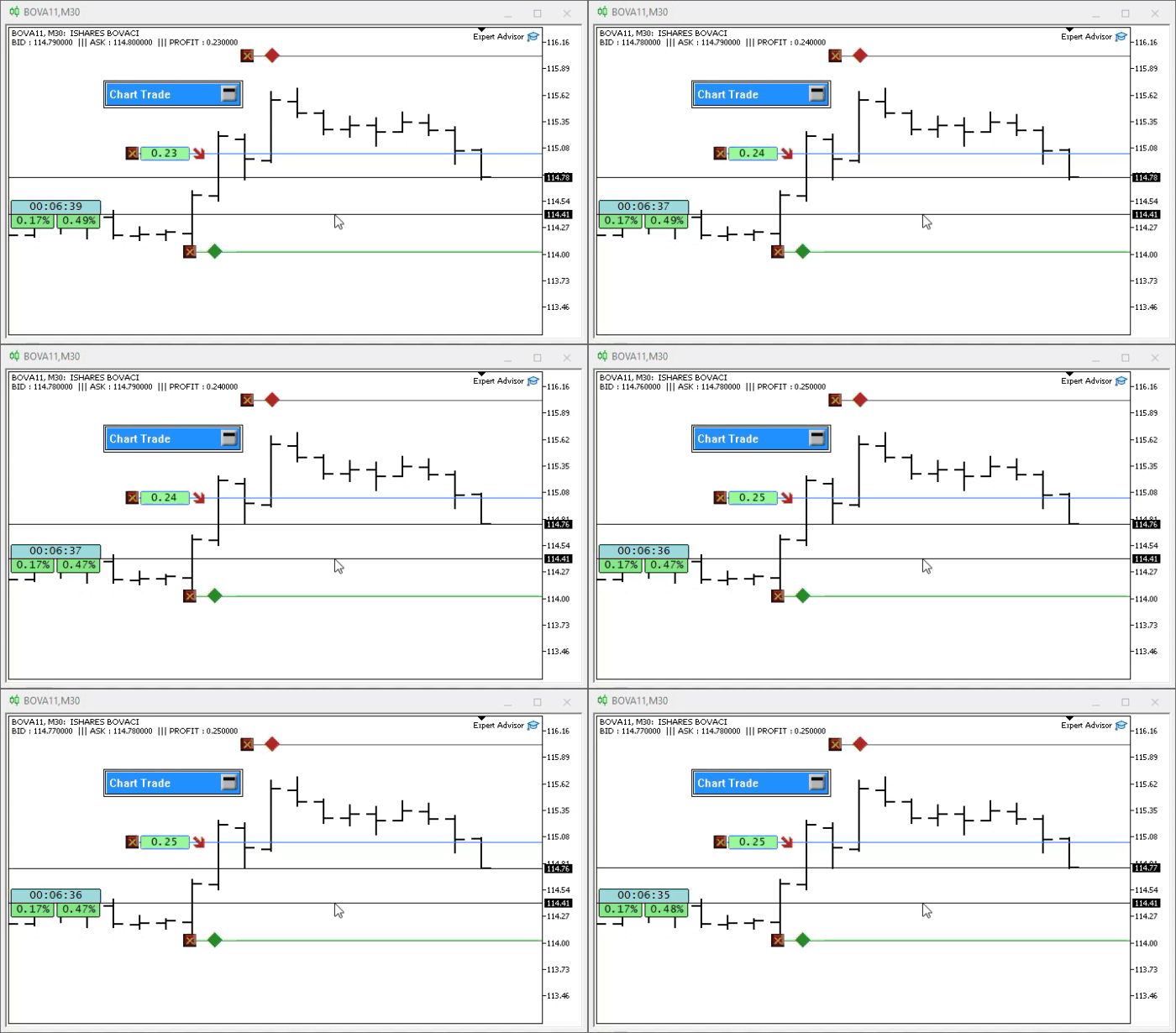
Please note that the last trade line, or closing price, may change without affecting the market exit result. This happens because the Bid or Ask quote remains the same even if the closing price changes.
Concluding Thoughts
In this article, I showed how to easily implement a graphical label that indicates whether a position is generating a loss or a profit. The procedure is simple and effective. Many novice traders do not fully understand the impact of the spread and, as a result, may frequently incur losses. Even without in-depth knowledge, this indicator will allow you to easily recognize when to close a position. This helps you understand more clearly when it is best to close a position and reduces the risk of getting a result that differs from what was expected. The calculation includes the spread at the time of closing, rather than simply reading the POSITION_PROFIT value.
The attached package contains all the components needed to test the application locally. I recommend using a demo account. Do not run the system on a live account until you fully understand how it works. This material has been developed for educational purposes and is not intended to be a final, error-free application.
| File | Description |
|---|---|
| Experts\Expert Advisor.mq5 | Shows the interaction between Chart Trade and the Expert Advisor. (Mouse Study is required for this interaction.) |
| Indicators\Chart Trade.mq5 | Creates a window for configuring an order before it is submitted. (Mouse Study is required for this interaction.) |
| Indicators\Market Replay.mq5 | Creates controls for interacting with the replay/simulation service. (Mouse Study is required for this interaction.) |
| Indicators\Mouse Study.mq5 | Enables interaction between graphical controls and the user (which is necessary both for the replay/simulation system and for live trading). |
| Indicators\Order Indicator.mq5 | Responsible for displaying market orders, allowing users to interact with and manage them. |
| Indicators\Position View.mq5 | Responsible for displaying market positions, enabling interaction with them, and controlling them. |
| Services\Market Replay.mq5 | Creates and maintains the market replay/simulation service (the main file of the entire system). |
Translated from Portuguese by MetaQuotes Ltd.
Original article: https://www.mql5.com/pt/articles/13356
Warning: All rights to these materials are reserved by MetaQuotes Ltd. Copying or reprinting of these materials in whole or in part is prohibited.
This article was written by a user of the site and reflects their personal views. MetaQuotes Ltd is not responsible for the accuracy of the information presented, nor for any consequences resulting from the use of the solutions, strategies or recommendations described.

 Neural Networks in Trading: Decomposition Instead of Scaling (SSCNN)
 From Basic to Intermediate: Queues, Lists, and Trees (V)
 From Basic to Intermediate: Classes (I)
 Bidirectional LSTM and Quantum Computing for Predicting the Direction of Price Movement

- Free trading apps
- Over 8,000 signals for copying
- Economic news for exploring financial markets
You agree to website policy and terms of use