

Market Simulation: Position View (X)
 865
865
 0
0

Introduction
Hello, everyone, and welcome to a new article in our series on how to create a replication/simulation system.
In the previous article Market Simulation: Position View (IX), we began exploring how the movement of the Take Profit and Stop Loss lines should be implemented. Since I want to explain to everyone—and make it as clear as possible—how and why changes are made to the code, in this article we will try to solve the problem presented in the previous article. The problem lies with ZOrder. If you are not sure what the ZOrder property means for objects, don't worry—just check out the previous articles in this series, where I explain the importance of setting this property correctly.
In addition, the question arises: how can we use ZOrder to our advantage? The answer is simple: we cannot. This seems absurd and completely pointless. Nevertheless, no matter how skilled a programmer you may be, dear reader, you will not be able to surpass what is already programmed in MetaTrader 5 for managing ZOrder.
Nevertheless, we need tools for handling the graphical objects we create. The approach presented in the previous article works very well for certain scenarios. In this case, we will need something more complex, given the specific nature of the problem at hand. Therefore, we will not attempt to replace the ZOrder management mechanisms that exist in MetaTrader 5, nor, of course, will we check which object is in the foreground or hidden by another object. We are going to do something completely different. Here, I'll show you what changes need to be made to the code in order to make use of some of what MetaTrader 5 already does for us. In other words, to determine which object should be interacted with and which should not after a click is received.
To help you understand what we are going to do, we first need to look at a fairly simple piece of code that is, nonetheless, extremely useful for understanding how to approach our problem.
The simplest code
To understand this, you need to use something you can actually understand. Many people tend to think that to solve a problem, we need to come up with a convoluted or extremely complex solution. But in practice, we should not do that. In practice, we need to create something as simple as possible. We need to use the application and understand what it is telling us. To demonstrate this, we'll use the code below:
01. //+------------------------------------------------------------------+
02. #property copyright "Daniel Jose"
03. #property indicator_chart_window
04. #property indicator_plots 0
05. //+------------------------------------------------------------------+
06. #define debug(A) Print(__FILE__, " ", __LINE__, " ", __FUNCTION__ + " " + #A + " = " + (string)(A));
07. //+------------------------------------------------------------------+
08. int OnInit()
09. {
10.     string sz1 = "Object #01";
11.
12.     ObjectCreate(0, sz1, OBJ_BUTTON, 0, 0, 0);
13.     ObjectSetInteger(0, sz1, OBJPROP_XDISTANCE, 100);
14.     ObjectSetInteger(0, sz1, OBJPROP_YDISTANCE, 100);
15.
16.     sz1 = "Object #02";
17.     ObjectCreate(0, sz1, OBJ_BUTTON, 0, 0, 0);
18.     ObjectSetInteger(0, sz1, OBJPROP_XDISTANCE, 200);
19.     ObjectSetInteger(0, sz1, OBJPROP_YDISTANCE, 200);
20.
21.     ChartSetInteger(0, CHART_EVENT_MOUSE_MOVE, true);
22.
23.     return INIT_SUCCEEDED;
24. }
25. //+------------------------------------------------------------------+
26. int OnCalculate(const int rates_total,
27.                 const int prev_calculated,
28.                 const int begin,
29.                 const double &price[])
30. {
31.     return rates_total;
32. }
33. //+------------------------------------------------------------------+
34. void OnChartEvent(const int id, const long &lparam, const double &dparam, const string &sparam)
35. {
36.     switch(id)
37.     {
38.         case CHARTEVENT_OBJECT_CLICK:
39.             debug(sparam);
40.             break;
41.         case CHARTEVENT_MOUSE_MOVE:
42.             if (sparam != "0")
43.                 debug(sparam);
44.             break;
45.     }
46. };
47. //+------------------------------------------------------------------+
48. void OnDeinit(const int reason)
49. {
50.     ObjectsDeleteAll(0, "Object", -1, OBJ_BUTTON);
51. }
52. //+------------------------------------------------------------------+
Indicator for testing
This code is extremely simple. All it does is create two objects with the standard ZOrder value—that is, zero—and display a message when an event occurs. It is simple. This may seem silly or even naive, but it can show us something extremely important and useful.
When we run this code on the chart, we'll get the result shown in the following animation:
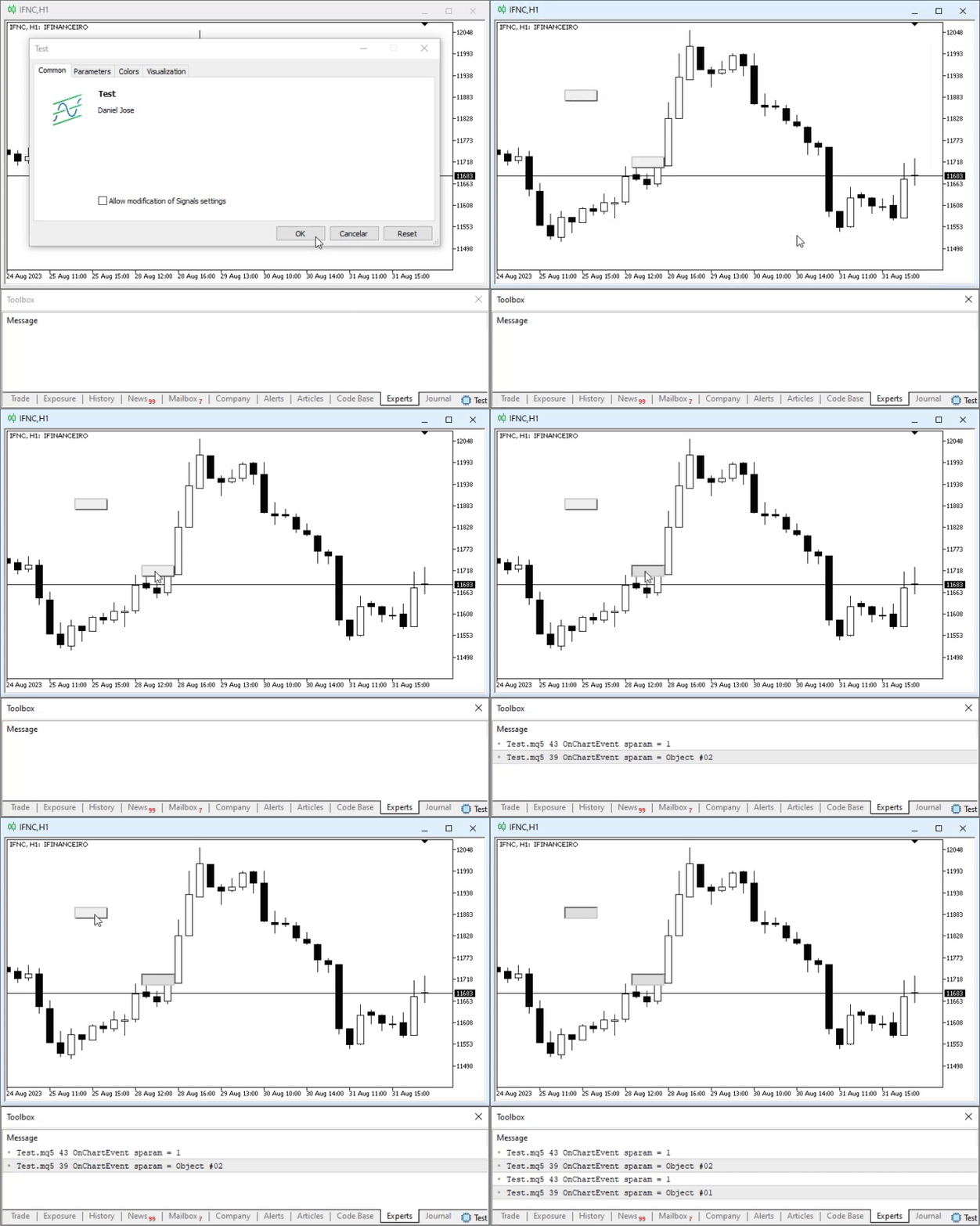
In this animation, the main focus is on the messages that appear. Forget about everything else and focus on the messages. Note that there is a pattern here. So what will happen now if we add an object that overlaps the buttons? What will happen? To answer this question, just take a look at the following animation:
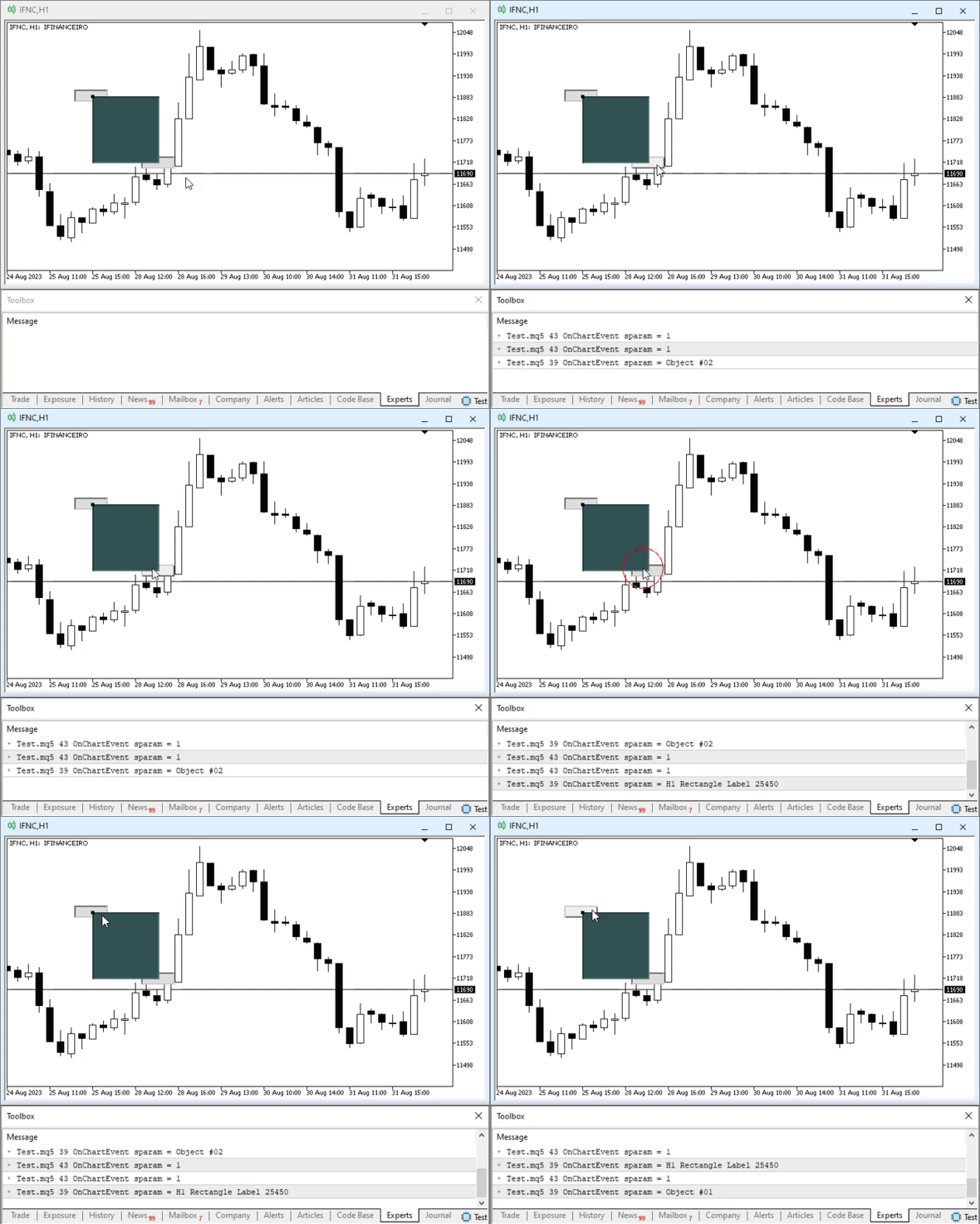
Once again, pay attention to the displayed messages. Now compare them and tell me: what's the pattern here? If you have not noticed, try looking at the messages and the code. And think about it: what's the pattern here?
If this isn't clear, here is how it works: when we click on an object on the chart, MetaTrader 5 first triggers the CHARTEVENT_MOUSE_MOVE event, and then the CHARTEVENT_OBJECT_CLICK event. It is important to know this. Why? Knowing this, we can use the same pattern to our advantage to solve the problem that arises when there are many objects on a chart. Thus, contrary to what many might expect, we will not try to replace the existing mechanism in MetaTrader 5. We will use this to our advantage. For this purpose, this template, which you can test on your platform, will be controlled by our applications. Thus, when we perform a check using the mouse indicator, we will be able to ignore clicks on objects whose events are handled in our applications.
You might be thinking, "But how are we going to do this? We've already made quite a bit of progress on the code. Do we really have to go back to the beginning and completely abandon everything that has already been created?" No, dear reader. As I mentioned earlier, the purpose of this series of articles is not to show exactly how to develop a replication/simulation system, but rather to demonstrate how a programmer should approach the problems that arise. Many people believe that creating an application is a simple and hassle-free process. But those who truly immerse themselves in this world know that things are actually quite convoluted. We often have to solve problems of varying degrees of complexity.
This issue with ZOrder can be quite a challenge in many cases. You, dear reader, might simply think that at no point during the development process did I, as a programmer, encounter any problems or difficulties. This is because if I had simply fixed the code and published it without any errors, you might have been under the false impression that everything went perfectly, and that if you, dear reader, are having trouble writing code, it is only because—pardon the expression—you’re a complete amateur. But that is not the case. We all face challenges. The way we overcome these challenges allows us to learn and become professionals with varying levels of expertise.
So, let us think about the following, and I want you to try to follow the line of reasoning. How can we use the information we get from this simple program to our advantage so that we have to modify the code we've already designed and implemented as little as possible? This is exactly the kind of question that would eventually make many people give up trying to solve it, since it seems like an extremely difficult task. But, as I have already said, I want to show you, dear reader, that if you stop for a few moments and think about it, you will eventually realize what needs to be done.
Updating the Code
Before we continue, I hope you have really tried to come up with a solution to the problem. Because, as unbelievable as it may sound, it is actually simpler than many people might imagine.
First, we will remove the ZOrder levels. In fact, we will not eliminate them entirely; rather, we will redefine them to take full advantage of MetaTrader 5's built-in support. This way, MetaTrader 5 will be able to easily tell us which object actually received the click event. So we will modify the file shown below.
01. //+------------------------------------------------------------------+
02. #property copyright "Daniel Jose"
03. //+------------------------------------------------------------------+
04. #define def_VERSION_DEBUG
05. //+------------------------------------------------------------------+
06. #ifdef def_VERSION_DEBUG
07.     #define macro_DEBUG_MODE(A) \
08.                     Print(__FILE__, " ", __LINE__, " ", __FUNCTION__ + " " + #A + " = " + (string)(A));
09. #else
10.     #define macro_DEBUG_MODE(A)
11. #endif
12. //+------------------------------------------------------------------+
13. #define def_SymbolReplay          "RePlay"
14. #define def_MaxPosSlider          400
15. #define def_MaskTimeService       0xFED00000
16. #define def_IndicatorTimeFrame    (_Period < 60 ? _Period : (_Period < PERIOD_D1 ? _Period - 16325 : (_Period == PERIOD_D1 ? 84 : (_Period == PERIOD_W1 ? 91 : 96))))
17. #define def_IndexTimeFrame        4
18. //+------------------------------------------------------------------+
19. union uCast_Double
20. {
21.     double   dValue;
22.     long     _long;                                  // 1 Information
23.     datetime _datetime;                              // 1 Information
24.     uint     _32b[sizeof(double) / sizeof(uint)];    // 2 Informations
25.     ushort   _16b[sizeof(double) / sizeof(ushort)];  // 4 Informations
26.     uchar    _8b [sizeof(double) / sizeof(uchar)];   // 8 Informations
27. };
28. //+------------------------------------------------------------------+
29. enum EnumEvents     {
30.             evTicTac,                        //Event of tic-tac
31.             evHideMouse,                     //Hide mouse price line
32.             evShowMouse,                     //Show mouse price line
33.             evHideBarTime,                   //Hide bar time
34.             evShowBarTime,                   //Show bar time
35.             evHideDailyVar,                  //Hide daily variation
36.             evShowDailyVar,                  //Show daily variation
37.             evHidePriceVar,                  //Hide instantaneous variation
38.             evShowPriceVar,                  //Show instantaneous variation
39.             evCtrlReplayInit,                //Initialize replay control
40.             evChartTradeBuy,                 //Market buy event
41.             evChartTradeSell,                //Market sales event
42.             evChartTradeCloseAll,            //Event to close positions
43.             evChartTrade_At_EA,              //Event to communication
44.             evEA_At_ChartTrade,              //Event to communication
45.             evChatWriteSocket,               //Event to Mini Chat
46.             evChatReadSocket,                //Event To Mini Chat
47.             evUpdate_Position,               //Event to communication
48.             evMsgClosePositionEA,            //Event to communication
49.             evMsgCloseTakeProfit,            //Event to communication
50.             evMsgCloseStopLoss,              //Event to communication
51.             evMsgNewTakeProfit,              //Event to communication
52.             evMsgNewStopLoss                 //Event to communication
53.                         };
54. //+------------------------------------------------------------------+
55. enum EnumPriority {                          //Priority list on objects
56.             ePriorityNull = -1,
57.             ePriorityDefault = 0
58.                         };
59. //+------------------------------------------------------------------+
Defines.mqh
Note that EnumPriority now contains fewer enumeration values. Thus, we get a standard type, or a default type, with a value of zero. We also have another one: ePriorityNull. This type should be applied to all objects that should not participate in any interaction. Well, after making this change, we'll have to recompile all of our code. This helps ensure its complete stability. When you try to compile the Chart Trade indicator, errors related to the C_ChartFloatingRAD class occur. You can see them in the following image:
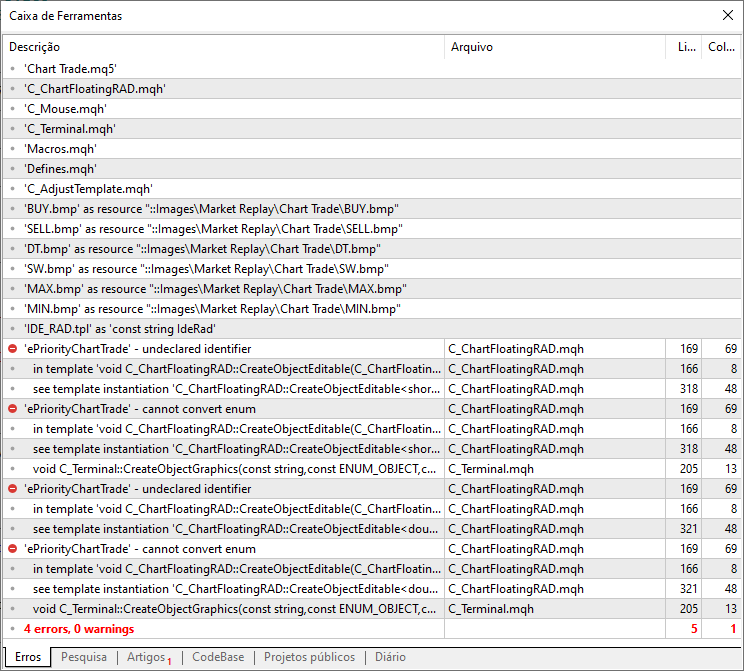
At this stage, many people start tearing their hair out, thinking, “What have we done?” Nothing will work anymore. But will that really be the case? If we go to the location where the first error is reported—that is, line 169 of the C_ChartFloatingRAD class—we will see the cause of the error. To fix this, simply replace the original code with the code shown in the following snippet:
164. //+------------------------------------------------------------------+
165.         template <typename T >
166.         void CreateObjectEditable(eObjectsIDE arg, T value)
167.             {
168.                 DeleteObjectEdit();
169.                 CreateObjectGraphics(m_Info.szObj_Editable, OBJ_EDIT, clrBlack, ePriorityDefault);
170.                 ObjectSetInteger(m_Init.id, m_Info.szObj_Editable, OBJPROP_XDISTANCE, m_Info.Regions[arg].x + m_Info.x + 3);
171.                 ObjectSetInteger(m_Init.id, m_Info.szObj_Editable, OBJPROP_YDISTANCE, m_Info.Regions[arg].y + m_Info.y + 3);
172.                 ObjectSetInteger(m_Init.id, m_Info.szObj_Editable, OBJPROP_XSIZE, m_Info.Regions[arg].w);
173.                 ObjectSetInteger(m_Init.id, m_Info.szObj_Editable, OBJPROP_YSIZE, m_Info.Regions[arg].h);
174.                 ObjectSetInteger(m_Init.id, m_Info.szObj_Editable, OBJPROP_BGCOLOR, m_Info.Regions[arg].bgcolor);
175.                 ObjectSetInteger(m_Init.id, m_Info.szObj_Editable, OBJPROP_ALIGN, ALIGN_CENTER);
176.                 ObjectSetInteger(m_Init.id, m_Info.szObj_Editable, OBJPROP_FONTSIZE, m_Info.Regions[arg].FontSize - 1);
177.                 ObjectSetString(m_Init.id, m_Info.szObj_Editable, OBJPROP_FONT, m_Info.Regions[arg].FontName);
178.                 ObjectSetString(m_Init.id, m_Info.szObj_Editable, OBJPROP_TEXT, (typename(T) == "double" ? DoubleToString(value, 2) : (string) value));
179.                 ChartRedraw();
180.             }
181. //+------------------------------------------------------------------+
Fragment of the C_ChartFloatingRAD.mqh file
After making the changes, we tried to recompile the Chart Trade indicator. And the result is shown below:
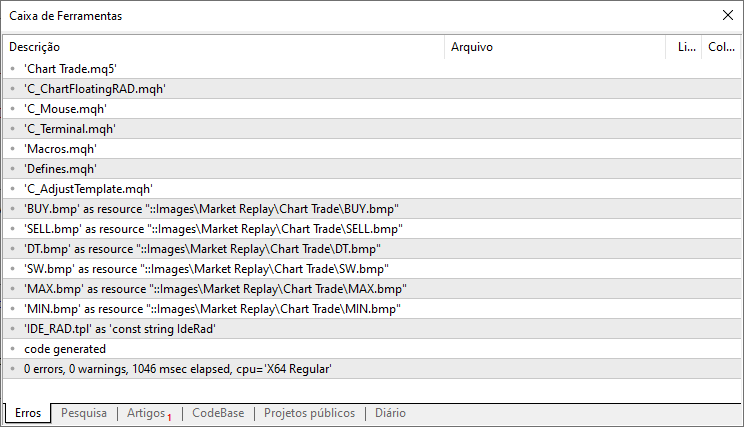
In other words, success. We can move on to the next one. As for the mouse indicator, there will be no changes here, since its ZOrder has not changed. Therefore, the next step will be to compile the position indicator. However, since issues with ZOrder will arise specifically in the code of the C_ElementsTrade class—and that same code will undergo further changes—I will not show the modified code just yet. Let's move on to the stage of using the information we obtained in the previous section. In other words, we are going to implement the support that MetaTrader 5 provides us. This way, when we click on something, we will be able to determine exactly which object was clicked. However, during this check, the click should be ignored.
This will require deep and radical changes. It's extremely difficult to even imagine this. Something only a great guru could have come up with and implemented. So pay attention to how incredibly complex and convoluted this solution is. You can see it in the following code:
001. //+------------------------------------------------------------------+
002. #property copyright "Daniel Jose"
003. //+------------------------------------------------------------------+
004. #include "Macros.mqh"
005. #include "..\Defines.mqh"
006. //+------------------------------------------------------------------+
007. class C_Terminal
008. {
009. //+------------------------------------------------------------------+
010.     public    :
011. //+------------------------------------------------------------------+
012.         struct st_Mouse
013.         {
014.             struct st00
015.             {
016.                 short    X_Adjusted,
017.                          Y_Adjusted,
018.                          X_Graphics,
019.                          Y_Graphics;
020.                 double   Price;
021.                 datetime dt;
022.             }Position;
023.             uchar     ButtonStatus;
024.             bool      ExecStudy;
025.             string    szObjNameClick;
026.         };
027. //+------------------------------------------------------------------+
028.     protected:
029.         enum eErrUser {ERR_Unknown, ERR_FileAcess, ERR_PointerInvalid, ERR_NoMoreInstance};
030. //+------------------------------------------------------------------+
031.         struct st_Terminal
032.         {
033.             ENUM_SYMBOL_CHART_MODE   ChartMode;
034.             ENUM_ACCOUNT_MARGIN_MODE TypeAccount;
035.             long    ID;
036.             string  szSymbol;
037.             int     Width,
038.                     Height,
039.                     nDigits,
040.                     SubWin,
041.                     HeightBar;
042.             double  PointPerTick,
043.                     ValuePerPoint,
044.                     VolumeMinimal,
045.                     AdjustToTrade;
046.         };
047. //+------------------------------------------------------------------+
048.         void CurrentSymbol(bool bUsingFull)
049.             {
050.                 MqlDateTime mdt1;
051.                 string sz0, sz1;
052.                 datetime dt = macroGetDate(TimeCurrent(mdt1));
053.                 enum eTypeSymbol {WIN, IND, WDO, DOL, OTHER} eTS = OTHER;
054.
055.                 sz0 = StringSubstr(m_Infos.szSymbol = _Symbol, 0, 3);
056.                 for (eTypeSymbol c0 = 0; (c0 < OTHER) && (eTS == OTHER); c0++) eTS = (EnumToString(c0) == sz0 ? c0 : eTS);
057.                 switch (eTS)
058.                 {
059.                     case DOL :
060.                     case WDO : sz1 = "FGHJKMNQUVXZ"; break;
061.                     case IND :
062.                     case WIN : sz1 = "GJMQVZ";       break;
063.                     default  : return;
064.                 }
065.                 sz0 = EnumToString((eTypeSymbol)(((eTS & 1) == 1) ? (bUsingFull ? eTS : eTS - 1) : (bUsingFull ? eTS + 1: eTS)));
066.                 for (int i0 = 0, i1 = mdt1.year - 2000, imax = StringLen(sz1);; i0 = ((++i0) < imax ? i0 : 0), i1 += (i0 == 0 ? 1 : 0))
067.                     if (dt < macroGetDate(SymbolInfoInteger(m_Infos.szSymbol = StringFormat("%s%s%d", sz0, StringSubstr(sz1, i0, 1), i1), SYMBOL_EXPIRATION_TIME))) break;
068.             }
069. //+------------------------------------------------------------------+
070. inline void DecodeMousePosition(int xi, int yi)
071.             {
072.                 int w = 0;
073.
074.                 xi = (xi > 0 ? xi : 0);
075.                 yi = (yi > 0 ? yi : 0);
076.                 ChartXYToTimePrice(m_Infos.ID, m_Mouse.Position.X_Graphics = (short)xi, m_Mouse.Position.Y_Graphics = (short)yi, w, m_Mouse.Position.dt, m_Mouse.Position.Price);
077.                 m_Mouse.Position.dt = AdjustTime(m_Mouse.Position.dt);
078.                 m_Mouse.Position.Price = AdjustPrice(m_Mouse.Position.Price);
079.                 ChartTimePriceToXY(m_Infos.ID, w, m_Mouse.Position.dt, m_Mouse.Position.Price, xi, yi);
080.                 yi -= (int)ChartGetInteger(m_Infos.ID, CHART_WINDOW_YDISTANCE, m_Infos.SubWin);
081.                 m_Mouse.Position.X_Adjusted = (short) xi;
082.                 m_Mouse.Position.Y_Adjusted = (short) yi;
083.             }
084. //+------------------------------------------------------------------+
085.     private    :
086.         st_Terminal m_Infos;
087.         st_Mouse    m_Mouse;
088.         struct mem
089.         {
090.             long  Show_Descr,
091.                   Show_Date;
092.             bool  AccountLock;
093.         }m_Mem;
094. //+------------------------------------------------------------------+
095. inline void ChartChange(void)
096.             {
097.                 int x, y, t;
098.
099.                 m_Infos.Width  = (int)ChartGetInteger(m_Infos.ID, CHART_WIDTH_IN_PIXELS);
100.                 m_Infos.Height = (int)ChartGetInteger(m_Infos.ID, CHART_HEIGHT_IN_PIXELS);
101.                 ChartTimePriceToXY(m_Infos.ID, 0, 0, 0, x, t);
102.                 ChartTimePriceToXY(m_Infos.ID, 0, 0, m_Infos.PointPerTick * 100, x, y);
103.                 m_Infos.HeightBar = (int)(t - y) / 100;
104.             }
105. //+------------------------------------------------------------------+
106.     public    :
107. //+------------------------------------------------------------------+
108.         C_Terminal(const long id = 0, const uchar sub = 0, const bool bFull = false)
109.             {
110.                 m_Infos.ID = (id == 0 ? ChartID() : id);
111.                 m_Mem.AccountLock = false;
112.                 m_Infos.SubWin = (int) sub;
113.                 CurrentSymbol(bFull);
114.                 ZeroMemory(m_Mouse);
115.                 m_Mem.Show_Descr = ChartGetInteger(m_Infos.ID, CHART_SHOW_OBJECT_DESCR);
116.                 m_Mem.Show_Date  = ChartGetInteger(m_Infos.ID, CHART_SHOW_DATE_SCALE);
117.                 ChartSetInteger(m_Infos.ID, CHART_SHOW_OBJECT_DESCR, false);
118.                 ChartSetInteger(m_Infos.ID, CHART_EVENT_OBJECT_DELETE, true);
119.                 ChartSetInteger(m_Infos.ID, CHART_EVENT_OBJECT_CREATE, true);
120.                 ChartSetInteger(m_Infos.ID, CHART_SHOW_DATE_SCALE, false);
121.                 m_Infos.nDigits = (int) SymbolInfoInteger(m_Infos.szSymbol, SYMBOL_DIGITS);
122.                 m_Infos.Width   = (int)ChartGetInteger(m_Infos.ID, CHART_WIDTH_IN_PIXELS);
123.                 m_Infos.Height  = (int)ChartGetInteger(m_Infos.ID, CHART_HEIGHT_IN_PIXELS);
124.                 m_Infos.PointPerTick  = SymbolInfoDouble(m_Infos.szSymbol, SYMBOL_TRADE_TICK_SIZE);
125.                 m_Infos.ValuePerPoint = SymbolInfoDouble(m_Infos.szSymbol, SYMBOL_TRADE_TICK_VALUE);
126.                 m_Infos.VolumeMinimal = SymbolInfoDouble(m_Infos.szSymbol, SYMBOL_VOLUME_STEP);
127.                 m_Infos.AdjustToTrade = m_Infos.ValuePerPoint / m_Infos.PointPerTick;
128.                 m_Infos.ChartMode    = (ENUM_SYMBOL_CHART_MODE) SymbolInfoInteger(m_Infos.szSymbol, SYMBOL_CHART_MODE);
129.                 if(m_Infos.szSymbol != def_SymbolReplay) SetTypeAccount((ENUM_ACCOUNT_MARGIN_MODE)AccountInfoInteger(ACCOUNT_MARGIN_MODE));
130.                 ChartChange();
131.             }
132. //+------------------------------------------------------------------+
133.         ~C_Terminal()
134.             {
135.                 ChartSetInteger(m_Infos.ID, CHART_SHOW_DATE_SCALE, m_Mem.Show_Date);
136.                 ChartSetInteger(m_Infos.ID, CHART_SHOW_OBJECT_DESCR, m_Mem.Show_Descr);
137.                 ChartSetInteger(m_Infos.ID, CHART_EVENT_OBJECT_DELETE, false);
138.                 ChartSetInteger(m_Infos.ID, CHART_EVENT_OBJECT_CREATE, false);
139.             }
140. //+------------------------------------------------------------------+
141. inline void SetTypeAccount(const ENUM_ACCOUNT_MARGIN_MODE arg)
142.             {
143.                 if (m_Mem.AccountLock) return; else m_Mem.AccountLock = true;
144.                 m_Infos.TypeAccount = (arg == ACCOUNT_MARGIN_MODE_RETAIL_HEDGING ? arg : ACCOUNT_MARGIN_MODE_RETAIL_NETTING);
145.             }
146. //+------------------------------------------------------------------+
147. inline const st_Terminal GetInfoTerminal(void) const
148.             {
149.                 return m_Infos;
150.             }
151. //+------------------------------------------------------------------+
152. inline const st_Mouse GetPositionsMouse(void) const
153.             {
154.                 return m_Mouse;
155.             }
156. //+------------------------------------------------------------------+
157. const double AdjustPrice(const double arg) const
158.             {
159.                 return NormalizeDouble(round(arg / m_Infos.PointPerTick) * m_Infos.PointPerTick, m_Infos.nDigits);
160.             }
161. //+------------------------------------------------------------------+
162. inline datetime AdjustTime(const datetime arg)
163.             {
164.                 int nSeconds= PeriodSeconds();
165.                 datetime dt = iTime(m_Infos.szSymbol, PERIOD_CURRENT, 0);
166.
167.                 return (dt < arg ? ((datetime)(arg / nSeconds) * nSeconds) : iTime(m_Infos.szSymbol, PERIOD_CURRENT, Bars(m_Infos.szSymbol, PERIOD_CURRENT, arg, dt)));
168.             }
169. //+------------------------------------------------------------------+
170. inline double FinanceToPoints(const double Finance, const uint Leverage)
171.             {
172.                 double volume = m_Infos.VolumeMinimal + (m_Infos.VolumeMinimal * (Leverage - 1));
173.
174.                 return AdjustPrice(MathAbs(((Finance / volume) / m_Infos.AdjustToTrade)));
175.             };
176. //+------------------------------------------------------------------+
177.         void DispatchMessage(const int id, const long &lparam, const double &dparam, const string &sparam)
178.             {
179.                 static string st_str = "";
180.
181.                 switch (id)
182.                 {
183.                     case CHARTEVENT_CHART_CHANGE:
184.                         m_Infos.Width  = (int)ChartGetInteger(m_Infos.ID, CHART_WIDTH_IN_PIXELS);
185.                         m_Infos.Height = (int)ChartGetInteger(m_Infos.ID, CHART_HEIGHT_IN_PIXELS);
186.                         ChartChange();
187.                         break;
188.                     case CHARTEVENT_MOUSE_MOVE:
189.                         DecodeMousePosition((int)lparam, (int)dparam);
190.                         break;
191.                     case CHARTEVENT_OBJECT_CLICK:
192.                         m_Mouse.szObjNameClick = sparam;
193.                         if (st_str != sparam) ObjectSetInteger(m_Infos.ID, st_str, OBJPROP_SELECTED, false);
194.                         if (ObjectGetInteger(m_Infos.ID, sparam, OBJPROP_SELECTABLE) == true)
195.                             ObjectSetInteger(m_Infos.ID, st_str = sparam, OBJPROP_SELECTED, true);
196.                         break;
197.                     case CHARTEVENT_OBJECT_CREATE:
198.                         if (st_str != sparam) ObjectSetInteger(m_Infos.ID, st_str, OBJPROP_SELECTED, false);
199.                         st_str = sparam;
200.                         break;
201.                 }
202.             }
203. //+------------------------------------------------------------------+
204. inline void CreateObjectGraphics(const string szName, const ENUM_OBJECT obj, const color cor = clrNONE, const EnumPriority zOrder = ePriorityNull) const
205.             {
206.                 ChartSetInteger(m_Infos.ID, CHART_EVENT_OBJECT_CREATE, 0, false);
207.                 ObjectCreate(m_Infos.ID, szName, obj, m_Infos.SubWin, 0, 0);
208.                 ObjectSetString(m_Infos.ID, szName, OBJPROP_TOOLTIP, "\n");
209.                 ObjectSetInteger(m_Infos.ID, szName, OBJPROP_BACK, false);
210.                 ObjectSetInteger(m_Infos.ID, szName, OBJPROP_COLOR, cor);
211.                 ObjectSetInteger(m_Infos.ID, szName, OBJPROP_SELECTABLE, false);
212.                 ObjectSetInteger(m_Infos.ID, szName, OBJPROP_SELECTED, false);
213.                 ObjectSetInteger(m_Infos.ID, szName, OBJPROP_ZORDER, zOrder);
214.                 ChartSetInteger(m_Infos.ID, CHART_EVENT_OBJECT_CREATE, 0, true);
215.             }
216. //+------------------------------------------------------------------+
217.         bool IndicatorCheckPass(const string szShortName)
218.             {
219.                 string szTmp = szShortName + "_TMP";
220.
221.                 IndicatorSetString(INDICATOR_SHORTNAME, szTmp);
222.                 m_Infos.SubWin = ((m_Infos.SubWin = ChartWindowFind(m_Infos.ID, szShortName)) < 0 ? 0 : m_Infos.SubWin);
223.                 if (ChartIndicatorGet(m_Infos.ID, m_Infos.SubWin, szShortName) != INVALID_HANDLE)
224.                 {
225.                     ChartIndicatorDelete(m_Infos.ID, 0, szTmp);
226.                     Print("Only one instance is allowed...");
227.                     SetUserError(C_Terminal::ERR_NoMoreInstance);
228.
229.                     return false;
230.                 }
231.                 IndicatorSetString(INDICATOR_SHORTNAME, szShortName);
232.
233.                 return true;
234.             }
235. //+------------------------------------------------------------------+
236. };
C_Terminal.mqh
The solution is implemented in the code shown above. Did you notice where? If you do not follow this series or study the materials I have provided, you definitely will not be able to find the solution. Actually, I deliberately included the complete code for the C_Terminal class so that you'd get completely confused and wouldn't understand exactly where the solution was implemented.
All joking aside. In fact, the solution is to use MetaTrader 5 to our advantage. But to do that, we will have to resort to a little trick. This technique can be implemented here, in the C_Terminal class, or wherever the code implemented here will actually be used. You might be thinking, "Shouldn't the implementation be in the C_Mouse class, since it's responsible for passing click events to our applications?" Yes, that is true, but if we try to do that, we will run into a small problem. Take another look at the animation. Note that the CHARTEVENT_MOUSE_MOVE event precedes the CHARTEVENT_OBJECT_CLICK event. And when we analyze whether a click occurred on an object, there will be some loss of event synchronization—or, to put it another way, when you click on an object, the C_Mouse class will still be pointing to the object that received the previous click. This might seem strange. But if we take a look at the C_ElementsTrade class, everything will become clearer.
So, once again, the solution was to add a new variable. It is located on line 25 and is used only on line 192. As mentioned earlier, we could place the solution within the same code that will use it. But since I want everything to be very well organized, we'll place it here. That is, in the C_Terminal class. Thus, we can now look at the code for the position indicator.
Updating the position indicator
After making changes to the other code snippets shown above, we can see what had to be changed in the position indicator. First, it was decided that the trader or user would no longer be able to change the colors used for the lines. They will be standardized within the indicator. As a result, the code in the main file has changed, and you can see it below.
//+------------------------------------------------------------------+
01. #property copyright "Daniel Jose"
02. #property icon "/Images/Market Replay/Icons/Positions.ico"
03. #property description "Indicator for tracking an open position on the server."
04. #property description "This should preferably be used together with an Expert Advisor."
05. #property description "For more details see the same article."
06. #property version   "1.122"
07. #property link "https://www.mql5.com/pt/articles/13274"
08. #property indicator_chart_window
09. #property indicator_plots 0
10. //+------------------------------------------------------------------+
11. #define def_ShortName "Position View"
12. //+------------------------------------------------------------------+
13. #include <Market Replay\Order System\C_IndicatorPosition.mqh>
14. #include <Market Replay\Defines.mqh>
15. //+------------------------------------------------------------------+
16. input ulong user00 = 0;        //For Expert Advisor use
17. //+------------------------------------------------------------------+
18. C_IndicatorPosition *Positions = NULL;
19. //+------------------------------------------------------------------+
20. int OnInit()
21. {
22.     IndicatorSetString(INDICATOR_SHORTNAME, def_ShortName);
23.     Positions = new C_IndicatorPosition();
24.     if (!Positions.CheckCatch(user00))
25.     {
26.         ChartIndicatorDelete(0, 0, def_ShortName);
27.         return INIT_FAILED;
28.     }
29.
30.     return INIT_SUCCEEDED;
31. }
32. //+------------------------------------------------------------------+
33. int OnCalculate(const int rates_total, const int prev_calculated, const int begin, const double &price[])
34. {
35.     return rates_total;
36. }
37. //+------------------------------------------------------------------+
38. void OnChartEvent(const int id, const long &lparam, const double &dparam, const string &sparam)
39. {
40.     (*Positions).DispatchMessage(id, lparam, dparam, sparam);
41. };
42. //+------------------------------------------------------------------+
43. void OnDeinit(const int reason)
44. {
45.     delete Positions;
46. }
47. //+------------------------------------------------------------------+
Position indicator:
As a result, the code for the C_IndicatorPosition class has changed slightly. The full text of the new code is provided below:
01. //+------------------------------------------------------------------+
02. #property copyright "Daniel Jose"
03. //+------------------------------------------------------------------+
04. #include "C_ElementsTrade.mqh"
05. //+------------------------------------------------------------------+
06. class C_IndicatorPosition
07. {
08.     private    :
09.         struct st00
10.         {
11.             ulong   ticket;
12.             string  szShortName;
13.         }m_Infos;
14.         C_ElementsTrade *Open, *Stop, *Take;
15. //+------------------------------------------------------------------+
16.     public    :
17. //+------------------------------------------------------------------+
18.         C_IndicatorPosition()
19.         {
20.             ZeroMemory(m_Infos);
21.             Open = Take = Stop = NULL;
22.         }
23. //+------------------------------------------------------------------+
24.         ~C_IndicatorPosition()
25.         {
26.             delete Open;
27.             delete Take;
28.             delete Stop;
29.         }
30. //+------------------------------------------------------------------+
31.         bool CheckCatch(ulong ticket)
32.         {
33.             m_Infos.szShortName = StringFormat("%I64u", m_Infos.ticket = ticket);
34.             if (!PositionSelectByTicket(m_Infos.ticket)) return false;
35.             if (ObjectFind(0, m_Infos.szShortName) >= 0)
36.             {
37.                 m_Infos.ticket = 0;
38.                 return false;
39.             }
40.             IndicatorSetString(INDICATOR_SHORTNAME, m_Infos.szShortName);
41.             EventChartCustom(0, evUpdate_Position, ticket, 0, "");
42.
43.             return true;
44.         }
45. //+------------------------------------------------------------------+
46.         void DispatchMessage(const int id, const long &lparam, const double &dparam, const string &sparam)
47.         {
48.             double value;
49.
50.             if (Open != NULL) (*Open).DispatchMessage(id, lparam, dparam, sparam);
51.             if (Take != NULL) (*Take).DispatchMessage(id, lparam, dparam, sparam);
52.             if (Stop != NULL) (*Stop).DispatchMessage(id, lparam, dparam, sparam);
53.             switch (id)
54.             {
55.                 case CHARTEVENT_CUSTOM + evUpdate_Position:
56.                     if (lparam != m_Infos.ticket) return;
57.                     if (!PositionSelectByTicket(m_Infos.ticket))
58.                     {
59.                         ChartIndicatorDelete(0, 0, m_Infos.szShortName);
60.                         return;
61.                     };
62.                     if (Open == NULL) Open = new C_ElementsTrade(m_Infos.ticket, evMsgClosePositionEA, clrRoyalBlue, ePriorityNull, StringFormat("%I64u : Position opening price.", m_Infos.ticket));
63.                     if (Take == NULL) Take = new C_ElementsTrade(m_Infos.ticket, evMsgCloseTakeProfit, clrForestGreen, ePriorityDefault, StringFormat("%I64u : Take Profit price.", m_Infos.ticket));
64.                     if (Stop == NULL) Stop = new C_ElementsTrade(m_Infos.ticket, evMsgCloseStopLoss, clrFireBrick, ePriorityDefault, StringFormat("%I64u : Stop Loss price.", m_Infos.ticket));
65.                     (*Open).UpdatePrice(PositionGetDouble(POSITION_PRICE_OPEN));
66.                     if ((value = PositionGetDouble(POSITION_TP)) > 0) (*Take).UpdatePrice(value); else
67.                     {
68.                         delete Take;
69.                         Take = NULL;
70.                     }
71.                     if ((value = PositionGetDouble(POSITION_SL)) > 0) (*Stop).UpdatePrice(value);    else
72.                     {
73.                         delete Stop;
74.                         Stop = NULL;
75.                     }
76.                     break;
77.             }
78.             ChartRedraw();
79.         }
80. //+------------------------------------------------------------------+
81. };
82. //+------------------------------------------------------------------+
C_IndicatorPosition.mqh
Based on all this, it is time to finally take a look at the new code for the C_ElementsTrade class. It is shown below. Note that the code is significantly different from the one we looked at in the previous article. Nevertheless, it contains the same elements and works in exactly the same way.
001. //+------------------------------------------------------------------+
002. #property copyright "Daniel Jose"
003. //+------------------------------------------------------------------+
004. #define def_NameHLine     m_Info.szPrefixName + "#HLINE"
005. #define def_NameBtnClose  m_Info.szPrefixName + "#CLOSE"
006. //+------------------------------------------------------------------+
007. #define def_PathBtns "Images\\Market Replay\\Orders\\"
008. #define def_Btn_Close def_PathBtns + "Btn_Close.bmp"
009. #resource "\\" + def_Btn_Close;
010. //+------------------------------------------------------------------+
011. #include "..\Auxiliar\C_Mouse.mqh"
012. //+------------------------------------------------------------------+
013. class C_ElementsTrade : private C_Mouse
014. {
015.     private    :
016. //+------------------------------------------------------------------+
017.         struct st00
018.         {
019.             ulong      ticket;
020.             string     szPrefixName;
021.             EnumEvents ev;
022.             double     price;
023.             bool       bClick;
024.         }m_Info;
025. //+------------------------------------------------------------------+
026.         void UpdateViewPort(void)
027.         {
028.             int x, y;
029.
030.             ChartTimePriceToXY(0, 0, 0, m_Info.price, x, y);
031.             ObjectSetDouble(0, def_NameHLine, OBJPROP_PRICE, m_Info.price);
032.             ObjectSetInteger(0, def_NameBtnClose, OBJPROP_XDISTANCE, 130);
033.             ObjectSetInteger(0, def_NameBtnClose, OBJPROP_YDISTANCE, y);
034.         }
035. //+------------------------------------------------------------------+
036.     public    :
037. //+------------------------------------------------------------------+
038.         C_ElementsTrade(const ulong ticket, const EnumEvents ev, color _color, EnumPriority ePrio, string szDescr = "\n")
039.             :C_Mouse(0, "")
040.         {
041.             string szObj;
042.
043.             ZeroMemory(m_Info);
044.             m_Info.szPrefixName = StringFormat("%I64u@%d", m_Info.ticket = ticket, (int)(m_Info.ev = ev));
045.             CreateObjectGraphics(szObj = def_NameHLine, OBJ_HLINE, _color, ePrio);
046.             ObjectSetInteger(0, szObj, OBJPROP_WIDTH, 2);
047.             ObjectSetString(0, szObj, OBJPROP_TEXT, szDescr);
048.             ObjectSetString(0, szObj, OBJPROP_TOOLTIP, szDescr);
049.             ObjectSetInteger(0, szObj, OBJPROP_SELECTABLE, ePrio != ePriorityNull);
050.             CreateObjectGraphics(szObj = def_NameBtnClose, OBJ_BITMAP_LABEL, clrNONE, (EnumPriority)(ePriorityDefault));
051.             ObjectSetString(0, szObj, OBJPROP_BMPFILE, 0, "::" + def_Btn_Close);
052.             ObjectSetInteger(0, szObj, OBJPROP_ANCHOR, ANCHOR_CENTER);
053.         }
054. //+------------------------------------------------------------------+
055.         ~C_ElementsTrade()
056.         {
057.             if (m_Info.szPrefixName != "")
058.                 ObjectsDeleteAll(0, m_Info.szPrefixName);
059.         }
060. //+------------------------------------------------------------------+
061.         inline void UpdatePrice(const double price)
062.         {
063.             m_Info.price = price;
064.             UpdateViewPort();
065.         }
066. //+------------------------------------------------------------------+
067.         void DispatchMessage(const int id, const long &lparam, const double &dparam, const string &sparam)
068.         {
069.             C_Mouse::DispatchMessage(id, lparam, dparam, sparam);
070.             switch (id)
071.             {
072.                 case CHARTEVENT_OBJECT_CLICK:
073.                     if ((m_Info.bClick) && (GetPositionsMouse().szObjNameClick == def_NameBtnClose)) switch (m_Info.ev)
074.                     {
075.                         case evMsgClosePositionEA:
076.                             EventChartCustom(0, evMsgClosePositionEA, m_Info.ticket, 0, "");
077.                             break;
078.                         case evMsgCloseTakeProfit:
079.                             EventChartCustom(0, evMsgCloseTakeProfit, m_Info.ticket, PositionGetDouble(POSITION_SL), PositionGetString(POSITION_SYMBOL));
080.                             break;
081.                         case evMsgCloseStopLoss:
082.                             EventChartCustom(0, evMsgCloseStopLoss, m_Info.ticket, PositionGetDouble(POSITION_TP), PositionGetString(POSITION_SYMBOL));
083.                         break;
084.                     }
085.                     m_Info.bClick = false;
086.                     break;
087.                 case CHARTEVENT_MOUSE_MOVE:
088.                     m_Info.bClick = (CheckClick(C_Mouse::eClickLeft) ? true : m_Info.bClick);
089.                     break;
090.                 case CHARTEVENT_CHART_CHANGE:
091.                     UpdateViewPort();
092.                     break;
093.             }
094.         }
095. //+------------------------------------------------------------------+
096. };
097. //+------------------------------------------------------------------+
098. #undef def_Btn_Close
099. #undef def_PathBtns
100. //+------------------------------------------------------------------+
101. #undef def_NameBtnClose
102. #undef def_NameHLine
103. //+------------------------------------------------------------------+
C_ElementsTrade.mqh
Several of the previously included elements have been removed, which is clearly evident when comparing the two code listings. However, keep in mind that a new variable has appeared on line 23. It is used in the DispatchMessage procedure. Otherwise, nothing has changed. But let's take a look at how the DispatchMessage procedure will work now. This is because, from this point on, the procedure will rely on MetaTrader 5.
Note that on line 67, where the DispatchMessage procedure begins, we have not made any significant changes. We simply adapted the existing code. Note that in the CHARTEVENT_MOUSE_MOVE event handler, on line 87, we check—in addition to the mouse indicator—whether the click is valid or not. We do this in a fairly simple and straightforward way. Thus, the variable from line 23 will be set to true for a valid mouse click, or to false if the mouse indicator performs any kind of analysis. This is the part that our application will process. The part where MetaTrader 5 can help us can be seen in the CHARTEVENT_OBJECT_CLICK event, starting at line 72.
Note one detail in this code, specifically in the CHARTEVENT_OBJECT_CLICK event. This is exactly the same as in the previous article. However, this occurred in the CHARTEVENT_MOUSE_MOVE event. But will we run into any problems here? Actually, no, because a mouse-move event will occur before the click event. And when a click occurs, we will check whether it is valid or not. As shown in the previous article, only one action will be performed—but only if the click is valid and the object's name matches the name currently being processed. In other words, the object representing the close button. Everything else has already been explained in detail, so no further clarification is needed.
Before we conclude this article, however, we will make a small change to the system. This is because there isn't much point in having a horizontal line that spans the entire width of the chart, with a close button located at some point along it. We can improve this so that the line ends at the close button, which would make a little more sense. However, this will lay the groundwork for yet another modification that will be implemented in the future. But to get closer to the desired result, we will have to modify the class. Since I am not entirely sure how things will develop from here, don't get too attached to what we are going to explain, but do try to understand how it all works. This might come in handy for you in the future.
Preparing for the Next Steps
The next step we're going to take may seem somewhat absurd and even unnecessary. However, this is important in light of what we will be implementing next. So, what is the main point at this stage? The idea is to create a visual and sufficiently clear way to verify exactly which line we are controlling. And why is that important? The reason is that we can use a system where one click selects the line, and another click releases it. And without knowing exactly which line we are working with, it is very difficult to do this correctly. Therefore, we need a simple and effective way to provide this information.
Many people might think, “Since we have an open position, we can simply create an internal switching system.” And once again, I agree with you, dear reader. Implementing an internal switching system is the most sensible solution. However, let's look at this a bit more generally. Consider the following: if you are using a HEDGING account, the switching system will not be effective enough, since two or more position indicators may be present on the same chart at the same time. This makes implementing such switching quite complicated, given the possibility that you might click on the line of one position and then click on the line of another position. In other words, in this case, we will run into a problem.
In addition, there is another problem that, while it does not currently affect our work, will create enormous difficulties in the future if we do not implement the architecture in a more universal way. We are talking about pending orders. Pending orders will use a system very similar to the one we are about to develop now. Consequently, an internal switch will not be enough to make the corresponding changes. Fortunately, however, we have an equally simple solution that will fully cover all possible scenarios. This involves message passing between indicators. You might imagine that this is an extremely complex task that is difficult to implement. But will that really be the case? Before we look at the necessary changes, let's see what has changed in the Defines.mqh header file. It is shown below:
01. //+------------------------------------------------------------------+
02. #property copyright "Daniel Jose"
03. //+------------------------------------------------------------------+
04. #define def_VERSION_DEBUG
05. //+------------------------------------------------------------------+
06. #ifdef def_VERSION_DEBUG
07.     #define macro_DEBUG_MODE(A) \
08.                     Print(__FILE__, " ", __LINE__, " ", __FUNCTION__ + " " + #A + " = " + (string)(A));
09. #else
10.     #define macro_DEBUG_MODE(A)
11. #endif
12. //+------------------------------------------------------------------+
13. #define def_SymbolReplay          "RePlay"
14. #define def_MaxPosSlider          400
15. #define def_MaskTimeService       0xFED00000
16. #define def_IndicatorTimeFrame    (_Period < 60 ? _Period : (_Period < PERIOD_D1 ? _Period - 16325 : (_Period == PERIOD_D1 ? 84 : (_Period == PERIOD_W1 ? 91 : 96))))
17. #define def_IndexTimeFrame        4
18. //+------------------------------------------------------------------+
19. union uCast_Double
20. {
21.     double   dValue;
22.     long     _long;                                  // 1 Information
23.     datetime _datetime;                              // 1 Information
24.     uint     _32b[sizeof(double) / sizeof(uint)];    // 2 Informations
25.     ushort   _16b[sizeof(double) / sizeof(ushort)];  // 4 Informations
26.     uchar    _8b [sizeof(double) / sizeof(uchar)];   // 8 Informations
27. };
28. //+------------------------------------------------------------------+
29. enum EnumEvents     {
30.             evTicTac,                        //Event of tic-tac
31.             evHideMouse,                     //Hide mouse price line
32.             evShowMouse,                     //Show mouse price line
33.             evHideBarTime,                   //Hide bar time
34.             evShowBarTime,                   //Show bar time
35.             evHideDailyVar,                  //Hide daily variation
36.             evShowDailyVar,                  //Show daily variation
37.             evHidePriceVar,                  //Hide instantaneous variation
38.             evShowPriceVar,                  //Show instantaneous variation
39.             evCtrlReplayInit,                //Initialize replay control
40.             evChartTradeBuy,                 //Market buy event
41.             evChartTradeSell,                //Market sales event
42.             evChartTradeCloseAll,            //Event to close positions
43.             evChartTrade_At_EA,              //Event to communication
44.             evEA_At_ChartTrade,              //Event to communication
45.             evChatWriteSocket,               //Event to Mini Chat
46.             evChatReadSocket,                //Event To Mini Chat
47.             evUpdate_Position,               //Event to communication
48.             evMsgClosePositionEA,            //Event to communication
49.             evMsgCloseTakeProfit,            //Event to communication
50.             evMsgCloseStopLoss,              //Event to communication
51.             evMsgNewTakeProfit,              //Event to communication
52.             evMsgNewStopLoss,                //Event to communication
53.             evMsgSetFocus                    //Event to communication
54.                         };
55. //+------------------------------------------------------------------+
56. enum EnumPriority {                          //Priority list on objects
57.             ePriorityNull = -1,
58.             ePriorityDefault = 0
59.                         };
60. //+------------------------------------------------------------------+
Defines.mqh
Note that a new event is defined on line 53. We will use this event to carry out the task we want to accomplish. Next, we can move on to the code for the C_ElementsTrade class to see the changes that were necessary to achieve the expected result. You can see the entire class code below.
001. //+------------------------------------------------------------------+
002. #property copyright "Daniel Jose"
003. //+------------------------------------------------------------------+
004. #define def_NameHLine      m_Info.szPrefixName + "#HLINE"
005. #define def_NameBtnClose   m_Info.szPrefixName + "#CLOSE"
006. //+------------------------------------------------------------------+
007. #define macro_LineInFocus(A) ObjectSetInteger(0, def_NameHLine, OBJPROP_YSIZE, m_Info.weight = (A ? 7 : 3));
008. //+------------------------------------------------------------------+
009. #define def_PathBtns "Images\\Market Replay\\Orders\\"
010. #define def_Btn_Close def_PathBtns + "Btn_Close.bmp"
011. #resource "\\" + def_Btn_Close;
012. //+------------------------------------------------------------------+
013. #include "..\Auxiliar\C_Mouse.mqh"
014. //+------------------------------------------------------------------+
015. class C_ElementsTrade : private C_Mouse
016. {
017.     private    :
018. //+------------------------------------------------------------------+
019.         struct st00
020.         {
021.             ulong       ticket;
022.             string      szPrefixName;
023.             EnumEvents  ev;
024.             double      price;
025.             bool        bClick;
026.             char        weight;
027.         }m_Info;
028. //+------------------------------------------------------------------+
029.         void UpdateViewPort(void)
030.         {
031.             int x, y;
032.
033.             ChartTimePriceToXY(0, 0, 0, m_Info.price, x, y);
034.             x = (m_Info.ev == evMsgClosePositionEA ? 150 : (m_Info.ev == evMsgCloseTakeProfit ? 200 : 250));
035.             ObjectSetInteger(0, def_NameHLine, OBJPROP_XDISTANCE, x);
036.             ObjectSetInteger(0, def_NameHLine, OBJPROP_YDISTANCE, y - (m_Info.weight / 2));
037.             ObjectSetInteger(0, def_NameBtnClose, OBJPROP_XDISTANCE, x);
038.             ObjectSetInteger(0, def_NameBtnClose, OBJPROP_YDISTANCE, y);
039.         }
040. //+------------------------------------------------------------------+
041.     public    :
042. //+------------------------------------------------------------------+
043.         C_ElementsTrade(const ulong ticket, const EnumEvents ev, color _color, EnumPriority ePrio, string szDescr = "\n")
044.             :C_Mouse(0, "")
045.         {
046.             string szObj;
047.
048.             ZeroMemory(m_Info);
049.             m_Info.szPrefixName = StringFormat("%I64u@%03d", m_Info.ticket = ticket, (int)(m_Info.ev = ev));
050.             CreateObjectGraphics(szObj = def_NameHLine, OBJ_RECTANGLE_LABEL, _color, (EnumPriority)(ePriorityDefault));
051.             macro_LineInFocus(false);
052.             ObjectSetInteger(0, szObj, OBJPROP_BGCOLOR, _color);
053.             ObjectSetInteger(0, szObj, OBJPROP_XSIZE, TerminalInfoInteger(TERMINAL_SCREEN_WIDTH));
054.             ObjectSetInteger(0, szObj, OBJPROP_BORDER_TYPE, BORDER_FLAT);
055.             ObjectSetInteger(0, szObj, OBJPROP_CORNER, CORNER_LEFT_UPPER);
056.             ObjectSetString(0, szObj, OBJPROP_TOOLTIP, szDescr);
057.             ObjectSetInteger(0, szObj, OBJPROP_SELECTABLE, ePrio != ePriorityNull);
058.             CreateObjectGraphics(szObj = def_NameBtnClose, OBJ_BITMAP_LABEL, clrNONE, (EnumPriority)(ePriorityDefault));
059.             ObjectSetString(0, szObj, OBJPROP_BMPFILE, 0, "::" + def_Btn_Close);
060.             ObjectSetInteger(0, szObj, OBJPROP_ANCHOR, ANCHOR_CENTER);
061.         }
062. //+------------------------------------------------------------------+
063.         ~C_ElementsTrade()
064.         {
065.             ObjectsDeleteAll(0, m_Info.szPrefixName);
066.         }
067. //+------------------------------------------------------------------+
068.         inline void UpdatePrice(const double price)
069.         {
070.             m_Info.price = price;
071.             UpdateViewPort();
072.         }
073. //+------------------------------------------------------------------+
074.         void DispatchMessage(const int id, const long &lparam, const double &dparam, const string &sparam)
075.         {
076.             string sz0;
077.
078.             C_Mouse::DispatchMessage(id, lparam, dparam, sparam);
079.             switch (id)
080.             {
081.                 case CHARTEVENT_CUSTOM + evMsgSetFocus:
082.                     macro_LineInFocus((m_Info.ticket == (ulong)(lparam)) && ((EnumEvents)(dparam) == m_Info.ev));
083.                     break;
084.                 case CHARTEVENT_OBJECT_CLICK:
085.                     sz0 = GetPositionsMouse().szObjNameClick;
086.                     if (m_Info.bClick) switch (m_Info.ev)
087.                     {
088.                         case evMsgClosePositionEA:
089.                             if (sz0 == def_NameBtnClose)
090.                                 EventChartCustom(0, evMsgClosePositionEA, m_Info.ticket, 0, "");
091.                             else if (sz0 == def_NameHLine)
092.                                 EventChartCustom(0, evMsgSetFocus, 0, 0, "");
093.                             break;
094.                         case evMsgCloseTakeProfit:
095.                             if (sz0 == def_NameBtnClose)
096.                                 EventChartCustom(0, evMsgCloseTakeProfit, m_Info.ticket, PositionGetDouble(POSITION_SL), PositionGetString(POSITION_SYMBOL));
097.                             else if (sz0 == def_NameHLine)
098.                                 EventChartCustom(0, evMsgSetFocus, m_Info.ticket, evMsgCloseTakeProfit, "");
099.                             break;
100.                         case evMsgCloseStopLoss:
101.                             if (sz0 == def_NameBtnClose)
102.                                 EventChartCustom(0, evMsgCloseStopLoss, m_Info.ticket, PositionGetDouble(POSITION_TP), PositionGetString(POSITION_SYMBOL));
103.                             else if (sz0 == def_NameHLine)
104.                                 EventChartCustom(0, evMsgSetFocus, m_Info.ticket, evMsgCloseStopLoss, "");
105.                             break;
106.                     }
107.                     m_Info.bClick = false;
108.                     break;
109.                 case CHARTEVENT_MOUSE_MOVE:
110.                     m_Info.bClick = (CheckClick(C_Mouse::eClickLeft) ? true : m_Info.bClick);
111.                     break;
112.                 case CHARTEVENT_CHART_CHANGE:
113.                     UpdateViewPort();
114.                     break;
115.             }
116.         }
117. //+------------------------------------------------------------------+
118. };
119. //+------------------------------------------------------------------+
120. #undef macro_LineInFocus
121. //+------------------------------------------------------------------+
122. #undef def_Btn_Close
123. #undef def_PathBtns
124. //+------------------------------------------------------------------+
125. #undef def_NameBtnClose
126. #undef def_NameHLine
127. //+------------------------------------------------------------------+
C_ElementsTrade.mqh
You can see the expected result in the following animation.
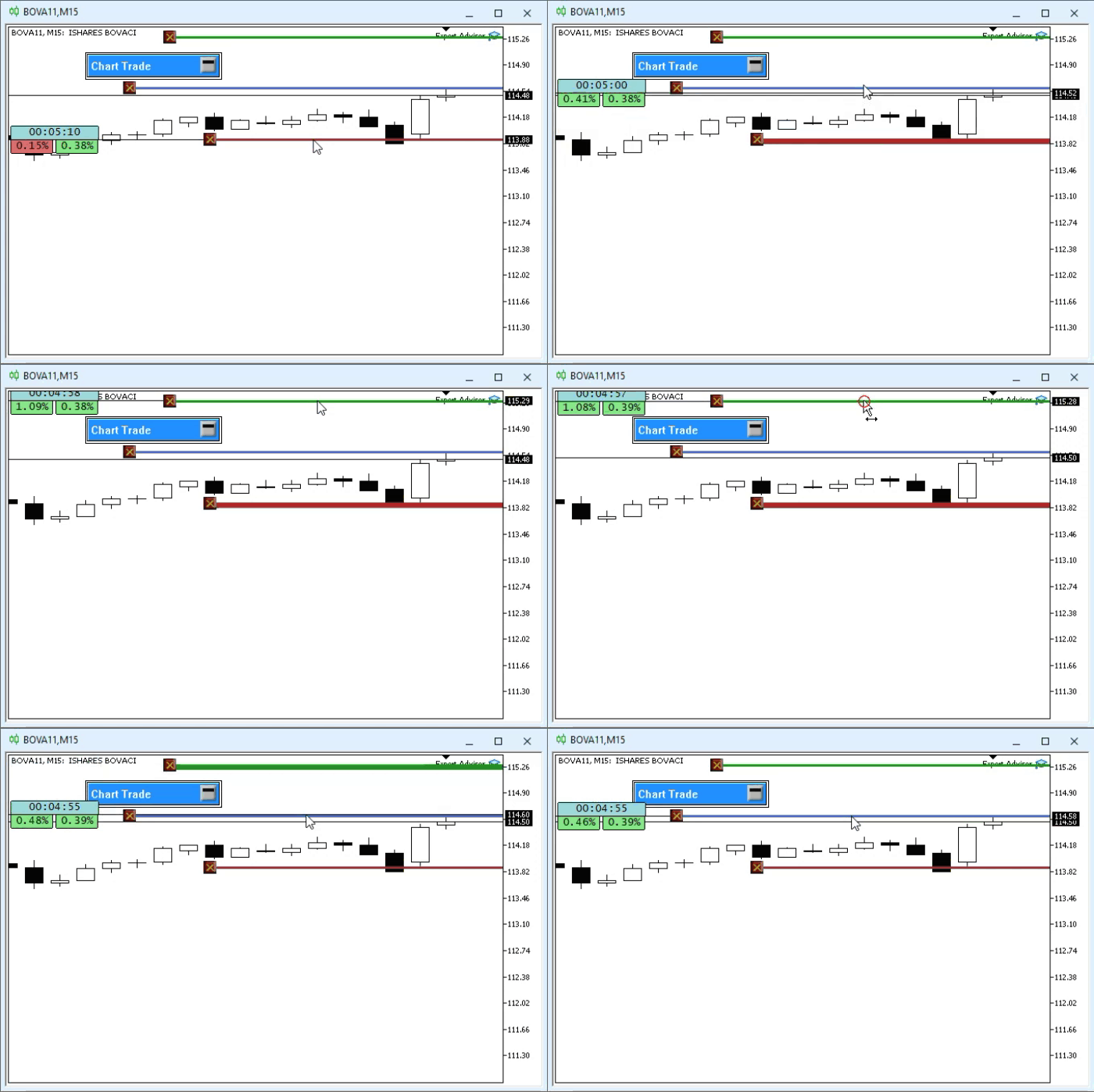
I am showing this result before explaining the code so that you, dear reader, will notice what is going to be explained next. This mechanism may undergo some changes in the future. However, if at any point you need to do something like this, you should know that there are several ways to do it. But you need to understand why these methods work. With that said, I think you are probably curious to understand how we managed to implement the previous animation without creating a conventional switching mechanism. Let's examine, then, how and why this happens.
First of all, note that on line 07, we defined a macro to very clearly highlight the line that gains focus. On line 26, I defined a new variable that will store the line thickness value defined in this class. On line 36, we will center the line created here. To perform this operation correctly, the line thickness must be set to an odd number. If you specify an even number, such as two or four, the line will be slightly offset from its ideal position. Note one more thing: on line 34, we specify the position of each button. This prevents them from getting too close together or overlapping. This will make it difficult to access them properly. These values are not final, but they already serve their purpose.
So far, so good. Now take a look at the change in the class constructor. Previously, the HLINE object was used to represent a price line. But now we will use the OBJ_RECTANGLE_LABEL object. This change allows us to set a maximum limit on the size of the horizontal lines. This way, they will not stretch from one edge of the chart to the other. The reason for using OBJ_RECTANGLE_LABEL instead of OBJ_TREND is precisely that trend lines require anchoring to time. This is something that can be difficult to set up correctly in some situations. In contrast, the OBJ_RECTANGLE_LABEL object uses Cartesian coordinates. This works perfectly for our purposes.
Most of the code remains unchanged, despite the difference in the object that will serve as our horizontal line. However, the actual changes were made in the procedure at line 74, that is, in the DispatchMessage function. At this stage, things might seem a little confusing at first, but there is no need to panic. Just pay attention, and everything will become clear.
Note that line 81 handles the message we created in the Defines.mqh file. However, this message exists here only because we are taking generalization to the extreme. Keep in mind that message handling is very simple. If the C_ElementsTrade class receives the evMsgSetFocus message, it checks whether the value of lparam matches the ticket being tracked by the class. In addition, the dparam parameter must be one of the event values. If it does not, the line will be set back to a smaller thickness. If the condition is met, the line thickness will be increased. It is simple.
"But wait a minute. How will the class know when the line gets thicker or thinner? Shouldn't this be defined somewhere?" Yes, dear reader. The actual task of signaling this is handled by the events described on lines 92, 98, and 104. Each of them is triggered only when there is a valid mouse click on the indicator. Note that the condition that allows these events to be triggered is specifically the name of the object that was clicked. "Yes, but why exactly this way? Wouldn't it be faster, simpler, and more practical to use a macro instead of triggering these events?" And once again, you are right, dear reader.
However, this would lead us to the very problem that arises when there is more than one position indicator on the chart. Or when we have pending order indicators. In this case, one indicator would not be able to tell another that it has lost focus and is no longer the active one. However, by using this specific message passing mechanism, we enable all indicators to work in perfect harmony and know exactly what to do and what not to do. Although this mechanism may not be very efficient in terms of implementation, it is quite practical and safe. Furthermore, from an implementation standpoint, it is significantly simpler than a more efficient mechanism.
Final Thoughts
You can see for yourself how this mechanism works by using a demo account. I recommend using a MetaQuotes demo account so you can see how the mechanism works when you have multiple open positions. Believe me, this will be very interesting to study.
If you do this, you'll probably notice that you run into some difficulties selecting lines, even if they're thicker than 1 pixel. Sometimes lines can be quite difficult to select. To make things even easier, we'll improve them a bit in the next article. In addition, of course, we'll start working directly on the chart, without needing to use the terminal system to create Stop Loss and Take Profit lines.
In the attached file, you'll find executable files so you can experiment with the material covered. This is for those who don't know how to compile the entire system.
| File | Description |
|---|---|
| Experts\Expert Advisor.mq5 | Demonstrates the interaction between Chart Trade and the Expert Advisor (Mouse Study is required for this interaction). |
| Indicators\Chart Trade.mq5 | Creates a window for configuring the order to be sent (Mouse Study is required for interaction) |
| Indicators\Market Replay.mq5 | Creates controls for interacting with the replication/simulation service (Mouse Study is required for this interaction). |
| Indicators\Mouse Study.mq5 | Enables interaction between graphical controls and the user (which is necessary both for the replication/simulation system and for live trading). |
| Indicators\Order Indicator.mq5 | Responsible for displaying market orders and providing interaction with and control over them. |
| Indicators\Position View.mq5 | Responsible for displaying market positions and providing interaction with and control over them. |
| Services\Market Replay.mq5 | Creates and maintains the market replication/simulation service (the main file of the entire system). |
Translated from Portuguese by MetaQuotes Ltd.
Original article: https://www.mql5.com/pt/articles/13274
Warning: All rights to these materials are reserved by MetaQuotes Ltd. Copying or reprinting of these materials in whole or in part is prohibited.
This article was written by a user of the site and reflects their personal views. MetaQuotes Ltd is not responsible for the accuracy of the information presented, nor for any consequences resulting from the use of the solutions, strategies or recommendations described.

 Machine Learning Under Constraint (Part 1): A Configurable Rule Set for Prop-Firm Position Sizing
 From Basic to Intermediate: Queues, Lists, and Trees (II)
 From Basic to Intermediate: Queues, Lists, and Trees (III)
 Building a Bar Replay Tool in MQL5

- Free trading apps
- Over 8,000 signals for copying
- Economic news for exploring financial markets
You agree to website policy and terms of use