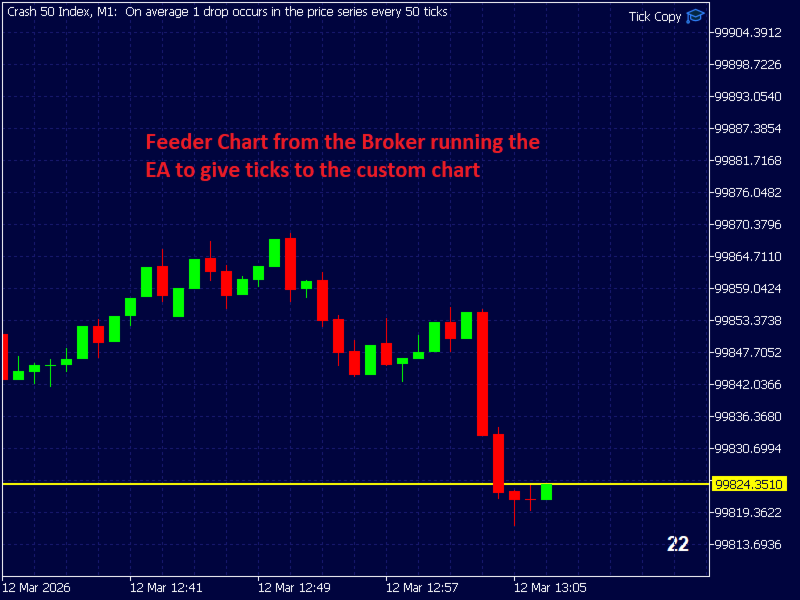
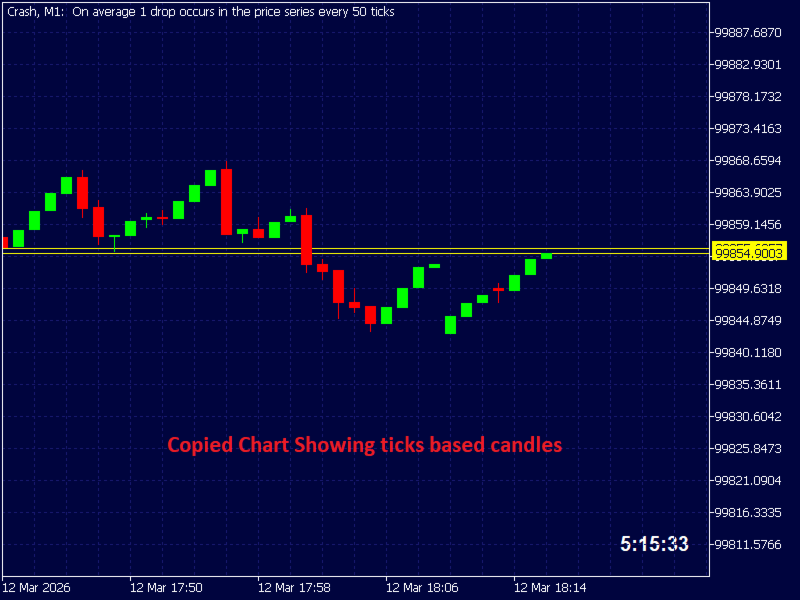
Ticks Charting

Tick Copier EA — Description & Usage Guide

Instead of seeing the market like everybody else using time based charts, instead view the market using ticks like an x-ray.

This Expert Advisor (EA) for MetaTrader 5 copies live ticks from the chart it is attached to and sends them to a custom symbol you already created (for example EURUSD TICKS ).

Each time a new market tick arrives:

  1.  EA reads the current tick data from the source symbol.

  2. It copies the tick values:

    • time

    • bid price

    • ask price

    • last price

    • volume

  3. It sends that tick to the custom symbol using CustomTicksAdd() .

Once ticks are fed to the custom symbol, MT5 automatically builds candles (M1, M5, H1, etc.) for that symbol just like a normal market instrument.

This allows you to:

  • create synthetic charts

  • run indicators on the custom symbol

  • run EAs on the custom symbol

  • experiment with tick-driven chart generation

What the EA Does Internally
Step Action
1 EA waits for a market tick
2 SymbolInfoTick() retrieves the latest tick
3 Tick data is copied into a new MqlTick structure
4 CustomTicksAdd() sends the tick to your custom symbol
5 MT5 records the tick and updates the chart
Instructions to Use the EA

1. Download EA

Open MetaEditor and press Compile.

2. Attach the EA to the Source Symbol

Open the real market symbol chart you want to copy ticks from.

Example:

  • EURUSD

Then attach the EA to that chart.

4. Set the Custom Symbol Name

In the EA inputs set:

CustomSymbol = EURUSDTICKS

This must match the custom symbol you already created.

5. Open the Custom Symbol Chart

Open the chart for the custom symbol:

  1. Press Ctrl + U

  2. Go to Create Custom Symbol

  3. Give your symbol a name without spaces (e.g. EURUSD TICK )

  4. Select Copy from (select EURUSD) and click Ok

  5.  Click ok to finalise

  6. Click created symbol to unhide it so that it appears in Market Watch

6. Verify Ticks Are Arriving

Important Notes

The EA must stay running

If the EA is removed or MT5 is closed, the custom symbol stops receiving ticks.

Symbol properties must match

Your custom symbol should have the same:

  • digits

  • tick size

  • pricing format

as the original symbol.

Typical Uses

Pro Traders commonly use this technique to:

  • build tick charts

  • create range charts

  • generate synthetic trading instruments

  • test custom market logic


PLEASE NOTE THAT DEMOS WILL NOT WORK BECAUSE NO TICK DATA WILL HAVE BEEN RECORDED ON THE CUSTOM SYMBOL.
推荐产品
Gap Straddle EA
Nazat Hossain Adi
Gap Straddle Trailing EA Automated Pending Order Management with Smart Trailing Stop Gap Straddle Trailing EA is an Expert Advisor for MetaTrader 5 designed to manage pending orders and trade protection through configurable settings. It includes automated order management, risk-based lot sizing, trailing stop functionality, session controls, and an on-chart dashboard. Key Features Buy Stop & Sell Stop Management — Automated pending-order placement and management. OCO Functionality — Opposite pen
Orydax Zenvar
Pablo Orcaray Lopez
Orydax Zenvar — XAUUSD Expert Advisor for MetaTrader 5 Turn a demanding market routine into a clear, automated process. Orydax Zenvar is a daily gold level strategy for MetaTrader 5, with XAUUSD D1 as the recommended starting setup. It follows the market continuously, waits for a qualified gold level inside its daily market and risk context, and handles the trading workflow when its confirmation process is complete. It is designed for users seeking selective daily gold automation: traders who va
Smart Strategy EA v6 VISUAL
Sergio Millares Raposo
XAUUSD Smart Strategy EA Price Action • Market Structure • Fibonacci • Smart Risk Management XAUUSD Smart Strategy EA is a professional MetaTrader 5 Expert Advisor designed specifically for Gold (XAUUSD) , combining Price Action, Market Structure, Dynamic Fibonacci analysis, trend confirmation, momentum filters, volatility analysis and advanced trade management into one integrated trading system. The EA is designed to identify structured trading opportunities rather than relying on a single tech
BossFXTradePanelEA (MT5)  [First 10 copies sold at 50 USD price will increase to 99USD] BossFXTradePanelEA is a fully interactive trade management panel designed for MetaTrader 5, providing traders with an easy-to-use, one-click interface to execute and manage trades. This EA simplifies trade execution , risk management, and position control by combining market orders, stop loss, take profit, trailing stops, and breakeven functionalities into a single, intuitive panel.  Key features include: On
FlowAxis
Aysar Alafif
5 (1)
Product Overview   FlowAxis is a semi-automated Expert Advisor for Meta Trader 5 designed for traders who rely on manual trendline analysis and want precise, rule-based trade execution.   Instead of guessing market direction, the trader defines the trend visually, and FlowAxis executes trades automatically when price interacts with predefined trendlines. This approach       combines human market analysis with disciplined, rule-based execution. Important – Please Read Before Use   FlowAxis EA
不要相信排名靠前的交易机器人那些平滑的资金曲线。它们都用了各种手段来制造漂亮的回测结果,但一旦实盘交易,这些机器人全都会失败。一些常见手段包括:用一万亿美元的模拟资金做定投(DCA)和马丁格尔加仓,用最优参数进行过度拟合…… 最好的交易系统通常只包含几条简单的规则。它们看起来并不炫酷,资金曲线也总是起伏不平。但它们更稳健,在实盘市场中存活下来的几率更高。 这是一款仅做多的趋势跟踪型智能交易系统(EA),基于突破原理,并结合通过平均真实波幅(ATR)实现的动态波动性追踪止损。该系统严格按K线收盘运行,消除盘中价格噪音,并降低点差滑点带来的影响。 技术要求与建议 平台:MetaTrader 5(MT5)。 适用品种:黄金(XAUUSD)。 最佳时间周期:H2及以上。 账户要求:对冲或净额账户;建议最低余额1000美元,用于0.01手的交易规模。 运行环境:需要24/5全天候不间断的VPS运行,以确保追踪止损更新和订单执行能精确地在K线收盘时完成。
Orydax Keldrix
Pablo Orcaray Lopez
Orydax Keldrix — XAUUSD Expert Advisor for MetaTrader 5 Turn a demanding market routine into a clear, automated process. Orydax Keldrix is a liquidity-structure breakout strategy for MetaTrader 5, with XAUUSD M15 as the recommended starting setup. It follows the market continuously, waits for a defined liquidity structure with room for expansion, and handles the trading workflow when its confirmation process is complete. It is designed for users seeking selective structure-based breakout exposu
Forex Strike EA
Abderrahmane Benali
FOREX Strike EA – Discipline Meets Opportunity FOREX Strike EA is an intelligent automated trading system built to bring structure, control, and consistency to the Forex market. Designed with modern MQL5 standards, it focuses on precision execution and disciplined awareness rather than aggressive exposure. By combining smart order placement with adaptive money management, the system engages the market only when conditions align—allowing you to trade with confidence, not emotion. Operating withi
Neuro Power
Dayanand Pandey
Neuro Power is a neural network-based Expert Advisor developed for MetaTrader 5. It is designed to analyze the psychology of buyers and sellers by studying market behavior through advanced neural network logic. Instead of relying on traditional indicators alone, the EA evaluates multiple market conditions simultaneously to identify high-probability trading opportunities. The system continuously processes price action, momentum, volatility, and other market conditions to estimate where institutio
RoundReflection
RainyChord Inc.
RoundReflection Live trading signal RoundReflection is a MetaTrader 5 Expert Advisor for USDJPY that trades reversals near round-number levels. Core strategy settings are preset. Users control trading volume, protection filters, tester time settings, and the dashboard. Strategy and risk settings The EA uses a limited sequence of entries at predefined price intervals. Later entries use larger volumes, and each trading set shares a Stop Loss level and a price-based exit target. It does not double
Harness institutional strategies with Institutional VWAP Reversal EA: Capture reversals via VWAP deviation bands, volume spikes, and 200 EMA trend filter. Targets 5% monthly profit with 5% max daily DD, including profit caps, breakeven SL, and signal reversal options—ideal for prop-trading challenges. Customize TP/SL by percentages, RR, or candles; trade with trend or both sides. Optimized for forex majors and gold, with time-restricted execution for low-risk, reliable automation in volatile mar
Bneu Smart Monkey Concept Pro
Marvinson Salavia Caballero
Bneu Smart Money Concepts Pro — All-in-One ICT/SMC Analysis An automated Smart Money Concepts indicator that marks BOS, CHoCH, Order Blocks, Fair Value Gaps, Liquidity Sweeps, OTE Zone, Kill Zones, Asian Range, and Premium/Discount zones in real time. All signals use closed-bar data only. Non-repainting. WHAT IT DRAWS - BOS (Break of Structure) and CHoCH (Change of Character) labels - HH / HL / LH / LL swing point labels - Order Block zones (supply and demand) with midpoint lines - Fair Val
Titan Backup
Elies Noah Siebenpfeiffer
Introducing Titan Backup : Are you ready to enhance your trading game with an automated system built for precision and flexibility? Meet Titan Backup , your expert trading assistant designed to capture high-profit breakouts by identifying accumulation zones . This powerful Expert Advisor (EA) excels in high-volatility markets such as the Nasdaq 100 and Crypto 10 , offering both hands-free automation and manual assistance to support your trading strategies. How Titan Backup Works: Titan Backup ru
News Hedging Pro  is a unique robot that allows you to trade during the most critical news announcement periods by your predefined strategy. You can preset the strategy to trade, and then it will trade that news automatically when the news comes. News release gives opportunity to have pips since the price usually has big move at that time. Now with this tool, trading news become easier, more flexible and more exciting than ever. No waiting, no confusing anymore. Product Links Fully  Description
SuperTrend AI Clustering EA
Michael Prescott Burney
SuperTrend AI Clustering 自动聚类趋势跟随智能交易系统(MetaTrader 5) SuperTrend AI Clustering 是一款用于 MetaTrader 5 的自适应趋势跟随智能交易系统,旨在根据不断变化的市场环境自动调整自身参数。系统并非只使用单一固定的 SuperTrend 倍数,而是同时评估多个倍数因子,衡量其近期表现,通过 K-Means 聚类算法将其分组,并选择当前表现最优的一组因子。这样就形成了一个动态的 SuperTrend 模型,可以在不同波动率阶段和市场结构下自我适应,而无需频繁手动重新配置。 该系统适合希望采用自动化趋势跟随方式,并且重视自适应能力、结构化风险控制以及透明图表信息展示的交易者。它可用于外汇交易品种、贵金属、指数、加密货币、商品及其他在 MetaTrader 5 中可交易的品种。智能交易系统兼容多种周期,从短周期的日内交易到长周期的波段和中长期趋势交易均可应用。 核心交易理念 该智能交易系统的逻辑基础是 SuperTrend 指标,它使用基于 ATR 的波动通道来识别市场的多头和空头阶段。较低的倍数因子会形成更紧的
Click Sent Order
Supanat Wiboonpanit
This program is a GUI for issuing orders that can be done more quickly. Faster TP SL setting This program is not an automated trading platform. Trading is risky, please manage your risk. We do not accept any responsibility. It should be tried with Demo before using it with Real. Normally, the setting sets the risk to 1:1 to shift manually or to enter the risk to x:1, where x can be entered and everything can move freely. Thank you to all customers who have purchased our products. We would like t
Faithify Pro
Saiful Izham Bin Hassan
Faithify Pro:一个纯粹的、基于规则的智能资金概念交易系统 Faithify Pro 是一款机构级、全自动的交易系统,旨在严格遵循稳健的 Smart Money Concepts (SMC) 进行交易,同时坚持最高标准的资金保存和风险管理。 Faithify Pro 真正独特之处在于其基础架构:它从头开始构建,尊重道德和符合伊斯兰教法的交易原则。它严格强制零隔夜掉期风险,过滤高波动(不确定)的市场,避免受限资产,并限制每日交易上限以防止情绪化过度交易。 该 EA 不是网格,不是马丁格尔,也不保证不切实际的回报。它是一个高选择性、纪律严明的算法工具,在投入资金之前等待精确的数学设定,并严格执行止损和动态分批平仓。 主要优势与特点 道德交易引擎:EA 强制执行严格的可交易资产白名单,避免黄金或加密货币等商品,并且如果经纪商账户收取掉期/利息,则完全放弃交易。 机构级 SMC 逻辑:基于高级时间框架 (HTF) 趋势一致性、流动性扫荡、市场结构转变 (MSS) 和公允价值缺口 (FVG) 的汇合点进行入场。 黄金比例回调:仅在深度、合理的回撤位(61.8% 斐波那契)执行交
FREE
Hedgehog Pro
Alex Amuyunzu Raymond
Hedgehog Pro: Roll Up. Stay Safe. The Automated Hedge Shield for Your MT5 Account A hedgehog does not run from danger. It curls into a ball and lets nothing through. Hedgehog Pro does the same for your account. When a trade moves against you, it opens an opposite position at the moment you choose and holds the damage there, instead of letting one bad trade eat your balance. What Hedgehog Pro is Hedgehog Pro is a capital protection engine for MetaTrader 5. It does not generate entry signals and i
PrecisionEntry EA is a semi-automatic Expert Advisor for MetaTrader 5 that enables precise order placement at the click of a button — without taking control away from the trader. With a single click on the LONG or SHORT button, the EA automatically places a BuyStop or SellStop order at the high or low of the previous candle. Stop-loss, take-profit, and lot size are calculated fully automatically — based on the configured risk percentage and the desired risk-reward ratio. Features: Interactive on
The CV Volumeprofile Adaptive EA is a professional Expert Advisor for MetaTrader 5, designed for adaptive market analysis and precise institutional-grade trading decisions. The EA combines Volume Profile, market structure analysis, dynamic trend filters, and intelligent signal and risk management into one powerful trading system. Features: Adaptive Volume Profile Dynamic market structure detection Intelligent entry and exit logic Volatility and trend filters Professional risk and money managemen

Multi Strategy Dashboard EA MT5
Kevin Beltran Keena
5 (1)
Multi instrument and multi time frame EA, with the best indicators.  The MSD EA can be used for automated and manual trading. Click on the '?' button on the dashboard to obtain information about the various elements of the MSD EA. Uses ATR Take Profits, ATR Stop Losses and ATR Trailing Stops. Comes with an FX Currency Strength meter and a Market Sessions indicator. Has the option to place Trade Lines (Buy, Sell, Close, Alarm). When the price reaches the trendline, the EA will perform the approp
ALPHATREND INSTITUTIONAL STRUCTURE MODE Descripción general: AlphaTrend es un Expert Advisor híbrido para MetaTrader 5 que combina análisis de estructura de mercado con indicadores de momentum. No es un sistema reactivo tradicional. Opera identificando primero la tendencia real mediante máximos y mínimos, luego espera un retroceso o pullback, y finalmente confirma la entrada con ADX y pendiente de media rápida. Esto permite entrar temprano en la dirección correcta, no perseguir el precio. Lógica
Adaptive Multi Hybrid
Dmitriq Evgenoeviz Ko
Adaptive Multi-Hybrid (AMH) v3.0: A Next-Generation Intelligent Trading System for MetaTrader 5 Basic concept Unlike classic robots, AMH doesn't use grids, Martingale, or dangerous pending orders. Entries are made only at the market , when the global trend and local momentum are in sync. The system "breathes" with the market, widening or narrowing stop-losses depending on current volatility (ATR-Adaptation). Key Features (The Edge) Market Precision Execution: Entry at market price elim
當蠟燭觸及手動放置的趨勢線時,該實用程式會打開訂單,就好像它是一個更明確的掛單一樣。  它可以用於任何資產,當它打開訂單時,它會消除它所觸及的線並創建箭頭。在這種情況下,它用於價格反轉操作,當看漲蠟燭觸及自下而上的線時,它打開賣單,當看跌蠟燭觸及自上而下的線時,打開買單。  您可以調整停損和止盈,該實用程式非常有用,因為您可以對要打開的訂單進行編程並退出螢幕,對於圖表模式非常有用,當價格達到上升和下降的支撐線和阻力線時,例如水平線和垂直的。 使用最新更新,您可以放置​​多行。 非常重要:Meta trader 5 有交易歷史記錄,當訂單關閉並繪製一條線時,該線可能會與機器人的邏輯混淆並打開不需要的訂單,要解決此問題,請禁用交易歷史記錄,使其不顯示,請參閱列印輸出,如果它已顯示在圖表上,請以滑鼠右鍵按一下「交易記錄」將其隱藏。 注意:無法測試策略測試器。
FREE
Kyora MT5
Mauro Augello
5 (2)
Kyora 是一款专为 USDJPY 设计的突破交易智能交易系统(Expert Advisor)。 它将多种内置交易策略整合到一个 EA 中,提供两种可选配置、独立的 BUY 和 SELL 手数设置,以及可选的风险保护和经济新闻过滤功能。所有策略均在同一个 USDJPY 图表上运行。 Kyora 使用 Buy Stop 和 Sell Stop 挂单 ,在各策略定义的突破价位入场。每笔订单均设有独立的 Stop Loss 和 Take Profit,并根据不同策略分别管理保本止损和移动止损。Kyora 不使用网格加仓、均价摊平或马丁格尔手数递增机制。 实盘交易表现信号 用户手册 限时优惠!仅剩少量商品以此价格出售。下一件将涨至 $399。 主要功能 两种内置配置: Balanced 启用选定的策略组合,Ultimate 启用全部策略。 可选择交易方向:仅 BUY、仅 SELL 或双向交易。 支持固定手数或根据账户余额自动计算手数,BUY 和 SELL 可独立设置,并可选择 Auto Lot 配置文件及自定义计算基准。 每笔订单均设有独立的 Stop Loss 和 Take Prof
Boom Trader
Godbless C Nygu
Join Deriv now link on my profile>>>> Boom Trader This robot is developed to trade Boom 1000 which is available on Deriv. Boom 1000 is one of other many indices which its behaviour is to form the spike of few pips, Those spikes always happen after 1000 ticks. To avoid spikes i came up with idea of develop the robot which take sells and few buys. IMPORTANT! After the purchase please send me a private message to receive the installation manual and the setup instructions. •All settings on this ro
Envelope monitoring for multi-EA accounts. Each magic number is watched against its own backtest; you get a traffic light on the chart and an alert only when a state changes. Includes the full free measurement layer. What it is You run several Expert Advisors on one account. This utility reads their closed history, groups it by magic number, and watches every system against its own backtest: a traffic light on the chart, and an alert only when a state actually changes. Underneath sits a full mea
NexusPilot Core is an MT5 EA Manage and Prop Firm Control tool designed for traders who run multiple Expert Advisors, manual trades, or funded account challenges. It is not a signal indicator or trading strategy. Its main purpose is to help you supervise your account, control EA activity, and reduce the risk of breaking prop firm rules. With one centralized dashboard, NexusPilot Core monitors drawdown, Magic Numbers, EA exposure, pending orders, no-SL trades, margin level, floating loss, tradi
专家顾问允许您模拟由另一位专家执行并保存在csv文件中的事务的执行。 这对于在另一台服务器上检查交易策略的结果很有用。 使用另一个程序,例如,帐户历史导出器将帐户上的交易历史导出为所需格式的csv文件,或将程序代码从专家历史导出器连接到您的专家以导出历史。 在文件的开头应该有这样一行: DATE,TICKET,TYPE,SYMBOL,VOLUME,ENTRY,PRICE,STOPLOSS,TAKEPROFIT,PROFIT,COMMISSION,FEE,SWAP,MAGIC, COMMENT 它可能不是从文件的一开始就找到的,也就是说,任何其他信息都可能在它之前。 在它们之后和文件的末尾,有一行以逗号分隔的字段值用于一个事务。 行中字段的值: DATE - date in the format YYYY.MM .DD HH:MM:SS TICKET - transaction ticket (integer) TYPE - transaction type from ENUM_DEAL_TYPE (integer) SYMBOL - trading instrumen
FREE
FX Monitor
Ivan Pochta
5 (1)
FX Monitor EA is a free utility that turns your raw MetaTrader account into a fully analyzed, monitored trading record. It reads your account's trading data — balance, equity, open positions, and closed trade history — and sends it securely over HTTPS to your FX Monitor account (fx-monitor.com), where it becomes the foundation for deep performance analytics. Once connected, you can monitor all your accounts online from any device and dig into your trading the way professionals do: profit factor,
FREE
该产品的买家也购买
Trade Assistant MT5
Evgeniy Kravchenko
4.43 (216)
它有助于计算每笔交易的风险,容易安装新的订单,具有部分关闭功能的订单管理, 7 种类型的追踪止损和其他有用的功能。   附加材料和说明 安装说明   -   应用程序说明 线条功能  - 在图表上显示开仓线、止损线、止盈线。 有了这个功能,就可以很容易地设置一个新的订单,并在开仓前看到它的附加特性。   风险管理  - 风险计算功能在考虑到设定的风险和止损单的大小的情况下,计算新订单的成交量。它允许你设置任何大小的止损,同时观察设定的风险。 批量计算按钮 - 启用 / 禁用风险计算。 在 " 风险 " 一栏中设置必要的风险值,从 0 到 100 的百分比或存款的货币。 在 " 设置 " 选项卡上选择风险计算的变量: $ 货币, % 余额, % 资产, % 自由保证金, % 自定义, %AB 前一天, %AB 前一周, %AB 前一个月。   R/TP 和 R/SL - 设置止盈和止损的关系。 这允许你设置相对于损失的利润大小。 例如, 1 : 1 - 这决定了 TP = SL 的大小。 2 : 1 - 这意味着 TP 是 SL 的两倍。 RR - 它禁用比率。   订单管理 该面板支
欢迎来到 Trade Manager EA——这是一个终极风险管理工具,旨在使交易变得更直观、精准和高效。它不仅仅是一个下单工具,而是一个用于无缝交易计划、仓位管理和风险控制的全面解决方案。不论您是新手交易员、资深交易员,还是需要快速执行的剥头皮交易员,Trade Manager EA 都可以满足您的需求,适用于外汇、指数、大宗商品、加密货币等各种市场。 借助 Trade Manager EA,复杂的计算已成过去。只需分析市场,在图表上用水平线标记入场、止损和止盈,设置您的风险水平,Trade Manager 就会立即计算出理想的头寸规模,并实时显示以点、账户货币计价的止损和止盈。每笔交易都得以轻松管理。 主要功能: 头寸规模计算器 :根据定义的风险瞬间确定交易规模。 简单的交易计划 :在图表上用可拖动的水平线直接计划交易,设置入场、止损和止盈。 实时显示 SL 和 TP :以账户货币、点或分显示止损和止盈,便于分析。 高级保护工具 盈亏平衡选项 : 基本盈亏平衡 :当您的交易达到设定水平时自动保护利润。 多级盈亏平衡 :设置多达 4 个级别以逐步保护利润。 尾随止损选项 : 基本尾随
Telegram to MT5 Multi-Channel Copier   可将您 Telegram 和 Discord 频道中的交易信号自动复制到 MetaTrader 5。无需机器人、无需浏览器扩展、无需手动复制。信号一到 Telegram 或 Discord,EA 几秒内就在您的终端开仓。 在复制某个频道之前,内置回测器还能告诉您该频道在您的账户上会有怎样的表现。 产品包含两个组件:一个监听您 Telegram 频道的 Windows 应用程序,以及在 MT5 终端执行信号的本 EA。同时提供 MT4 版本   点此 . 设置指南与应用下载:   https://www.mql5.com/en/blogs/post/768988 了解如何 回测任何 Telegram 信号频道 。 当前价格将来会上调。 工作原理 应用通过您自己的 Telegram 账号连接,因此能看到您关注的所有频道、群组、话题和机器人,包括私密和 VIP 频道。信号到达时,应用读取它,EA 按您的手数和设置在终端中开仓。 整个过程全自动,无需守在电脑前。专为 24/7 无人值守运行设计:Telegram 连接
Farmed Hedge Yield Farming | All Markets (Manual - Hybrid - Semi/Automated EA) VERIFIED TRADING RESULTS - Farmed Hedge Yield Axi Copy:  https://www.mql5.com/en/signals/2356376 - Farmed Hedge Yield Exn Copy:   https://www.mql5.com/en/signals/2356404 - Farmed Hedge Yield V Copy:  https://www.mql5.com/en/signals/2357156 IMPORTANT NOTICE: FarmedHedge is a MANUAL-FOCUSED TRADING UTILITY ,not a fully automated EA. Results shown on this Signal include manual trades and overall strategic management.
按照自己的交易规则复制 Telegram 信号 Telegram to MT5 Signal Trader 可将 Telegram 公开及私密频道和群组中的文字交易信号自动复制到 MetaTrader 5。通过一个桌面应用管理多个信号提供者和 MT5 账户,并为 每个提供者单独设置风险和交易参数 。 复制信号无需 Telegram 机器人,也无需配置 API。 只需通过手机号或二维码登录您自己的 Telegram 账户,然后选择您已加入的频道或群组。您无需创建机器人,也无需提供 Telegram API 令牌、API ID 或 API hash。 自行选择仓位大小,将平仓分配到多个止盈价位,并自动执行保本止损和移动止损。在跟随信号提供者的同时,掌握信号的实际交易方式。 本产品由这款 MT5 EA 和必须配合使用的 Windows 桌面应用组成。请参阅 安装指南及应用下载 。 管理多个信号提供者和账户 为每个提供者单独设置: 为每个频道设置专属的仓位计算方式、入场规则、止损、止盈和交易管理参数。 灵活分配至不同账户: 将同一提供者的信号复制到多个已连接的 MT5 账户,并为每个账户使用不
News Trade EA MT5
Konstantin Kulikov
4.55 (11)
在此向大家介绍一款我本人使用多年的机器人。该产品支持半自动和全自动交易模式。 >>> Chat <<< 本程序包含基于经济日历新闻的灵活交易设置功能。不支持策略测试器检验。仅可进行实际操作。需在终端设置允许URL 列表中添加新闻网站。点击服务 > 设置 > 智能交易系统。选中“允许WebRequest对下列URL发出请求:”。添加下列(删除空格):https://  nfs.faireconomy.media 下載最新的設定檔: https://www.mql5.com/en/blogs/post/747929 訊號監控: https://www.mql5.com/en/signals/author/test-standart 请参考博客中各类参数说明自行实现个性化设置   : https://www.mql5.com/en/blogs/post/748545   。 主要默认设置说明 单一图表英镑/GBP(英镑美元/GBPUSD、欧元英镑/EURGBP、英镑日元/GBPJPY、英镑加拿大元/GBPCAD、英镑澳大利亚元/GBPAUD、英镑瑞士法郎/GBPCHF)货币对操作。英镑/
================================================================================ POC BREAKOUT - V20.72. Full Professional Grade Toolkit ================================================================================ POC Breakout is a full MetaTrader 5 trading dashboard for discretionary traders who want breakout signals, Point of Control (POC) context, volume profiles, order flow, market structure, news, alerts, and advanced trade planning in one professional workspace. Attached directly to you
TradePanel MT5
Alfiya Fazylova
4.88 (170)
交易面板是一款多功能交易助手。该应用包含超过50种手动交易功能,并允许您自动执行大多数交易任务。 应用程序说明 : https://www.mql5.com/zh/blogs/post/761102 用于模拟账户的应用程序试用版: https://www.mql5.com/zh/blogs/post/762579 如何安装应用程序: https://www.mql5.com/zh/blogs/post/762580 如何在可视化模式下测试应用程序: https://www.mql5.com/zh/blogs/post/770278 如何在VPS MetaTrader上安装应用程序: https://www.mql5.com/zh/blogs/post/770196 贸易. 只需单击一下即可执行交易操作: 打開掛單和頭寸,並自動計算風險。 一鍵打開多個訂單和頭寸。 打開訂單網格。 按組別關閉掛單和頭寸。 反轉頭寸方向(關閉買入>打開賣出,關閉賣出>打開買入)。 鎖定頭寸(通過開啟缺少的頭寸,使買入和賣出頭寸的數量相等)。 一鍵部分關閉所有頭寸。 將所有頭寸的止盈和止損設置在同一價格水平。
Master Your Trading Discipline   Stop losing your hard-earned gains to overtrading and emotional decisions. The Discipline Tool is your ultimate trading assistant, ensuring strict risk management in real-time. Key Protection Features: Advanced Drawdown Defense : Automatically halts trading if your daily drawdown exceeds a preset threshold (percentage or dollar amount). Real-Time Equity Lock : Safeguard profits by referencing peak equity, ensuring drawdown stays within control. Hard Profit Target
Dealer's Panel No signal decides anything here — a hand does. One click, and the panel calculates what's underneath: lot size from risk, target from a 30-step balance ladder that remembers exactly how far an account has climbed. Toggle between market and pending without touching an input field. Set a stop, and the take-profit can write itself — a fixed share of the balance, translated into price with no arithmetic left for the trader to get wrong. One trade live at a time; it won't let a seco
The product will copy all telegram signal to MT5 ( which you are member) , also it can work as remote copier.  Easy to set up, copy order instant, can work with almost signal formats, image signal,  s upport to translate other language to English Work with all type of channel or group, even channel have "Restrict Saving Content", work with  multi channel, multi MT5 Work as remote copier: with signal have ticket number, it will copy exactly via ticket number. Support to backtest signal. How to s
RETAILBERG FOOTPRINT CHART PRO — Order-Flow Workspace for MetaTrader 5 Version 7.00  |  Professional System  |  31 tools  |  One chart A full 150-page illustrated User Manual is included. Please read the full manual to understand this feature packed footprint chart elements and ui. https://www.mql5.com/en/blogs/post/777982 DEMO / STRATEGY TESTER — PLEASE READ FIRST
下一次更新 — 版本 2.52 即将推出![全新功能] 准备迎接 4 项重大新功能,全面提升您的市场分析能力与交易流程! 我们将通过 4 项全新功能,进一步提升市场分析水平,满足您的交易需求。现为您介绍: 1. TRADE OVERVIEW DASHBOARD 2. CONFLUENCE AT ZONE 3. STRONG & WEAK HIGH/LOW 4. OTE 1. TRADE OVERVIEW DASHBOARD 一个帮助您更轻松地了解整体市场状况的仪表盘,为您的交易决策提供参考指引,帮助您系统地分析市场并规划交易,所有信息尽在一个屏幕中。 多时间周期市场概览(Multi-Timeframe Market Overview) 更清晰地了解市场方向与价格结构 快速查看市场状况 为系统化市场分析和入场规划提供指引。 2. CONFLUENCE AT ZONE 当价格进入关键区域时……您将了解有多少项支持因素相互吻合。 关键区域是交易决策至关重要的地方。但仅仅是价格进入某个区域还不够。此功能可帮助您在入场交易前,识别相互吻合的因素,包括信号及其他相关因素,从而进行更全面的分析,并
EasyInsight AIO MT5
Alain Verleyen
4.92 (12)
EASY Insight AIO – 全能智能交易一站式解决方案 概述 想象一下,您可以在几秒钟内扫描整个市场——外汇、黄金、加密货币、指数,甚至股票——无需手动筛选图表、繁琐安装或配置指标。 EASY Insight AIO 是您专为 AI 交易打造的即装即用数据导出工具。它将整个市场快照一次性输出为简洁的 CSV 文件,直接支持 ChatGPT、Claude、Gemini、Perplexity 等各类 AI 平台的即时分析。 无需窗口切换,无需图表叠加,也没有任何杂乱。只需纯净、结构化的数据自动导出,让您专注于基于数据的高效决策,无需再盯盘耗时。 为什么选择 EASY Insight AIO? 真正的一体化 • 无需设置,无需安装指标,无图表叠加。只需安装、运行并导出——就是这么简单。 多资产全覆盖 • 扫描分析外汇、金属、加密货币、指数、股票——您的券商所能提供的一切市场。 AI 专属数据导出 • 高度结构化、针对 AI 优化的 CSV 文件,直接适配主流智能工具和平台。 完整导出内容: • 三个可选周期的货币强度分析 • 净多头头寸变化体现市场情绪 • 成交量变化、
The Patch
Mian Rameez Ali
The Patch It never opens a trade. It walks behind the ones that did. Every open position, every pending order — checked twice a second for the one thing that's easy to forget: a stop, a target. Found bare, it doesn't ask. It writes the missing number in, measured in points from wherever the position began, and moves on to the next. No strategy, no opinion on direction. Just the quiet assumption that nothing should ever sit on the market unprotected — not because someone decided it shouldn't,
Grid Manual MT5
Alfiya Fazylova
4.73 (22)
Grid Manual是一个交易面板,用于处理订单网格。 该实用程序是通用的,具有灵活的设置和直观的界面。 它不仅可以在亏损方向上设置订单网格,还可以在盈利方向上设置订单网格。 交易者不需要创建和维护订单网格,实用程序会这样做。 打开一个订单就足够了,Grid manual会自动为它创建一个订单网格,并伴随它直到非常关闭。 完整说明和演示版 此處 。 该实用程序的主要特性和功能: 伴隨以任何方式打開的訂單,包括從移動終端打開的訂單。 適用於兩種類型的網格:“限制”和“停止”。 使用兩種方法計算網格間距:固定和動態(基於 ATR 指標)。 允許您更改未結訂單網格的設置。 顯示圖表上每個網格的盈虧平衡水平。 顯示每個網格的利潤率。 允許您一鍵關閉網格中的盈利訂單。 讓您一鍵關閉每個訂單網格。 允許您對訂單網格應用追踪止損功能。 允許您在訂單網格上應用將訂單網格的止損轉移到盈虧平衡水平的功能。 相對於訂單網格的盈虧平衡水平自動重新排列止盈(僅在限價網格模式下,距離取決於所選的計算類型:“保守”或“激進”)。 最多可管理 20 個訂單網格,每個網格最多可包含 100 個訂單。 計算初始手數時,
Power Candles 策略扫描器——自优化多符号设置查找器 Power Candles策略扫描器 采用与Power Candles指标相同的自优化引擎,可同时扫描您“市场观察”中的所有交易品种。一个面板即可显示当前哪些品种在统计上具备交易价值、每种策略的最佳应用方向、最优止损/止盈组合,并在新信号触发时立即向您发送提醒。 本工具是 Stein Investments 生态系统的一部分 - 18+ 款工具,加上 Max,您的一对一 AI 交易导师。  随时在线,深入了解每一款指标,在您需要梳理思路的那一刻就在那里。  立即认识他: https://stein.investments 您的全面市场监控。每个交易品种超过3,000次自动优化。2种警报类型。一键切换图表并采取行动。 为何您需要此工具 大多数多标的扫描器仅展示价格 波动 。每只股票的波动率、百分比变化、RSI。您仍需自行摸索正确的策略、合适的止损位以及理想的入场阈值。Power Candles策略扫描器针对每只股票自动解答这些问题,仅在数学验证过的交易设置中触发实际入场信号时才会向您发出提示。这就是全部卖点。 自动
Anchor Trade Manager
Kalinskie Gilliam
5 (9)
Your EAs cannot see each other, but Anchor can. Anchor gives you one place to coordinate your EAs, manage risk, and decide when trading is allowed. It works alongside the trading bots you already use without any changes to them. The Problem One EA opens a trade. Then another starts trading. The next thing you know, you wake up to multiple grids built across your account. Each EA may be doing exactly what it was designed to do, but together they can place far more risk on your account than you in
Floor Watch
Syed Tauqeer Hussain Shah
Floor Watch One number, watched every thirty seconds: how far equity has fallen since the day began — or since its highest point, if it's told to trail the peak instead of the open. Cross the line and it doesn't argue. Every open position closes, every pending order vanishes, and anything that slips through afterward gets shut the moment it appears. Not asked. Removed. The floor holds until the clock turns 5 AM Pakistan time — then, and only then, does the day start over. One rule. No except
YuClusters
Yury Kulikov
4.93 (43)
Attention: You can view the program operation in the free version  YuClusters DEMO .  YuClusters is a professional market analysis system. The trader has unique opportunities to analyze the flow of orders, trade volumes, price movements using various charts, profiles, indicators, and graphical objects. YuClusters operates on data based on Time&Sales or ticks information, depending on what is available in the quotes of a financial instrument. YuClusters allows you to build graphs by combining da
一次购买,即可免费获得我所有 MT4 和 MT5 指标,包括现有指标及未来发布的指标。 购买后请联系我,了解领取方式。 计划每售出 10 份后提价 50$,最高至 999$。 实际价格以结算时的 Market 标价为准。 保留您信赖的指标,让相关操作自动完成。 您的信号。您的规则。您的交易执行。 您已有信赖的 MT5 指标,却仍需盯盘、等待信号、计算手数、下单并手动管理每个持仓? Stratiora Signal Engine MT5 将这些环节连接起来。它可将兼容的买入和卖出缓冲区信号转化为完整的自动化流程:入场、交易量计算、止损、止盈、过滤、持仓管理及账户保护。 更换指标或交易思路时,无需每次另行定制 EA。您可以使用同一个灵活的执行引擎,自行决定每个信号的交易方式。 您的信号。您的规则。您的交易执行。 为什么开发 Stratiora 许多交易者已有熟悉且信赖的指标,但仍需手动盯盘、等待信号、计算手数、下单和管理持仓。 Stratiora 的目的就是连接这些步骤。 指标仍负责生成交易信号,Stratiora 负责按您的规则执行和管理。您决定何时读取信号、如何计算交易量、设置哪些保
Prop Guardian Risk Manager MT5 – Drawdown, Risk & Hedge Protection for Prop Firm and Managed Accounts Prop Guardian Risk Manager is a professional risk-control utility for MetaTrader 5, designed for prop firm traders, money managers and anyone who wants strict account-level risk protection. It does not generate trading signals, strategy entries or trading decisions. Instead, it runs in the background, monitors your account risk and can automatically block new exposure, close managed positions or
Trade Indicator Assistant   is a powerful MT5 utility designed to turn indicators into automated trading systems. Its main feature is the ability to automatically detect an indicator’s   BUY and SELL signal buffers , without requiring you to know the buffer numbers, search through indicator settings, or modify the indicator source code. Bonus Indicator:   After purchasing Trade Indicator Assistant, contact me to receive   Trade Signal Pro   completely free as a bonus indicator. [Download Demo V
EA Overfitter
Stephen J Martret
5 (1)
回测看起来很漂亮。但它明天、下周、下个月还能继续赚钱吗? EA Overfitter 让您的 EA 在 100 段它从未见过的价格历史上重新运行。一个分数告诉您这个优势是否真实。 回测告诉您的,是 EA 在某一段价格历史上的表现——那段恰好发生过的历史。您无法从中判断,这个结果有多少来自策略本身,又有多少只是那一条特定路径带来的。 EA Overfitter 回答的正是这个问题。它构建最多 100 段您的 EA 从未交易过的合成价格历史,让策略在全部这些历史上重新运行,并展示它所产生的完整结果区间。您得到的不再是一条幸运或不幸路径上的单个数字,而是一幅真实的图景:策略在陌生数据上多久能赚钱、典型结果是什么样(而不是最好的那一次),以及您的回测离它有多远。 这些世界是由您自己的近期历史重建而成,因此这不是预测——任何从历史数据出发的检验都不可能是预测。它告诉您的是:这个优势是否依赖于价格的某一种特定排列,以及回测数字距离典型结果有多远。在投入资金之前,这才是值得回答的问题。 三个步骤 1. 构建。在图表上选择时间区间和世界数量,然后按 Build。EA Overfitter 会
Quant AI Agents
Ho Tuan Thang
5 (1)
Quant AI Agents are independent trading Expert Advisors. Instead of trading using a fixed strategy like other conventional EAs, Quant AI Agents   is a   multi-agent AI trading framework   that turns natural-language strategy prompts into live.  WANT THE SAME RESULTS AS MY LIVE SIGNAL?   Use the exact same brokers I do:   IC MARKETS , IC TRADING   .  Unlike the centralized stock market, Forex has no single, unified price feed.  Every broker sources liquidity from different providers, creating un
Daily Trading Limiter
AL MOOSAWI ABDULLAH JAFFER BAQER
5 (8)
• Please test the product in the Strategy Tester before purchasing to understand how it works. • If you face any issues, contact me via private message—I’m always available to help. • After purchase, send me a screenshot of your order to receive a FREE EA as a gift. Daily Trading Limiter — the rule you cannot break Every trader knows the number. Three trades. Two percent. One bad day and stop. And every trader has watched themselves take the fourth trade anyway. The problem was never knowing th
FUTURES ORDERFLOW FOOTPRINT CHART Professional OrderFlow EA for MetaTrader 5 Version 1.01| Professional tool for real traders | Institutional-Grade Visualization STRATEGY TESTER USERS - PLEASE SELECT EVERY REAL TICK WHEN TESTING AND YOU HAVE DOWNLOADED HISTORICAL DATA. IF YOU SEE A WAITING SCREEN AND IT IS NOT DOWNLOADING, IT MEANS YOU HAVE LOW HISTORICAL DATA. TRY 1 MIN AND 5 MIN FIRST ON 1 DAY DATA. ONE DAY DATA SHOULD BE THE NEWEST AND MOST CURRENT DATE. PLEASE WAIT UNTIL THE MARKET HAS ROL
Premium Trade Manager - 内置交易导师的图表面板 Premium Trade Manager 将一位交易导师嵌入您的图表,并在其下搭载完整的执行引擎。像往常一样建立交易,然后让您的 AI 交易导师 Max 读取这笔具体的交易,结合您的实时账户给出直接判断,再由您决定是否下单:止损是否符合纪律化交易的要求、风险规模是否合理、高影响新闻事件是否即将发布、您是否接近资金盘限额。其下是完整的执行引擎,负责点击之后的一切:一键按风险下单、您在图表上拖动规划且交易进行中仍可随时调整的计划、最多四个分批止盈级别、七种移动止损方式、实时资金盘合规检查、新闻屏蔽保护,以及对自身成本进行评级的点差功能。决策由您做出。Max 给出第二次审视。面板负责此后的一切。 购买前先亲手体验。 直接在浏览器中点击实时面板,这是在购买前感受其工作方式的最快途径。 stein.investments/products/premium-trade-manager Max 是您的一对一 AI 交易导师,他直接内置于面板之中。  他了解您的账户、您的设置和您的规则,用您自己的语言回答,并在每笔交易下单前进
Trading Chaos Expert
Hennadii Stanilevych
5 (11)
世界上没有本软件的同等产品,它代表一个覆盖交易信号的通用交易 "控制台",自动入场,设置止损和止盈,还有在单一窗口里同时进行多交易尾随终止。EA 的 "三次点击" 直观控制,确保在不同计算机上全方位使用所有功能,包括平板电脑。 与附加的信号指标交互来标记图标,给出实际市场的全貌,EA 令您做出正确的选择,以及在大多数情况下成为胜者一方。内置资金管理算法, 还有自动计算手数, 虚拟订单交易, 以及一些其它从崩溃账户里挽救交易者的 "诀窍"。它不是一个 "黑盒子"。而是一个深思熟虑的交易员的不可或缺的助理, 至少要尝试一次它的动作。 注,在面板上形成的 EA 不能在策略测试员中测试。可以在您的模拟账户里以实时模式检查它, 您可以下载本 EA 的免费版 - 混沌交易 EA 演示 。 EA 表现为一个面板,带有内置功能的交易机器人的,自动基于交易者可直观检查的交易信号入场,完全按照比尔·威廉姆斯的策略“混沌交易:第二版”和“新贸易维度”。在单独的窗口里,EA 识别价格走势的导向,用于指定品种和时间帧的全自动交易模式,也可以多品种并发。 它同时分析 MetaTrader 5“市场观察”窗口中显示
Copy your MT5 trades to Interactive Brokers You keep using MT5. Every order you open or close is sent to your IB account. In real time. No coding. No changes to your strategy or EA. Try it first Rent 1 month: $30. Test on a live or paper account. What it does Real-time copying: same direction, reverse, or one side only. Map any MT5 symbol to any IB symbol. Set a lot ratio for each. Forex, Futures, Stocks, CFDs, Metals and Crypto. Position sync: both accounts checked, any difference fixed. Optio
作者的更多信息
Dynamic Levels Marker
Mativenga Geoffrey Mativenga
Dynamic Levels Marker is a smart MT5 indicator that automatically detects and plots three support and three resistance levels using a tiered historical analysis. Levels are visually distinct, labeled, and adapt as price evolves. Key Features: Dynamic multi-level support/resistance zones Tiered logic based on recent price action Customizable alerts (popup, sound, push notifications) Clean visual lines with auto-positioned labels Lightweight and easy to use on any timeframe Whether you’re
Simple Candle Timer
Mativenga Geoffrey Mativenga
Simple Candle Timer Overview: The Simple Candle Timer is a simple, yet powerful, tool for traders who want to stay informed about the time remaining until the next candle appears on their chart. Whether you are trading on minute charts or higher timeframes, this indicator ensures you never miss a new candle formation. Features: Real-Time Countdown Timer: Displays the time left until the current candle closes and a new one starts. The timer updates smoothly every 100 milliseconds for precision
Volume Flow Analyzer
Mativenga Geoffrey Mativenga
Volume Flow Analyzer The Indicator helps you decode market activity by visualizing real-time volume strength. Whether you're a fast-paced scalper or a patient swing trader , this tool gives you a clearer view of when volume truly supports the price action.  Instructions: Indicator alerts when there is expected increase in volatility by analyzing volumes to allow a trader to prepare. It indicates "High Expected Volatility in such cases", It should be used along with your buy and sell parameters
Scalping Bias Trading Tool
Mativenga Geoffrey Mativenga
多时间框架趋势及入场确认系统包含以下组件: 趋势信号:每个趋势均在两个时间框架内进行分析:5分钟和15分钟 强度(强度:最高价 | 最低价)—— 可能指示不同时间框架内的波动性或成交量强度。 入场确认 最终交易信号(交易信号:买入/卖出)—— 暗示潜在的做多(买入)/做空(卖出)机会 Duō shíjiān kuàngjià qūshì jí rù chǎng quèrèn xìtǒng bāohán yǐxià zǔjiàn: Qūshì xìnhào: Měi gè qūshì jūn zài liǎng gè shíjiān kuàngjià nèi jìn háng fēnxī:5 Fēnzhōng hé 15 fēnzhōng qiángdù (qiángdù: Zuìgāo jià | zuìdī jià)—— kěnéng zhǐshì bùtóng shíjiān kuàngjià nèi de bōdòng xìng huò chéngjiāo liàng qiángdù. Rù chǎng quèrèn zuìzhōng jiāoyì xìnhào (jiāoyì
Seconds Candles
Mativenga Geoffrey Mativenga
Seconds Candles Chart Utility  This Expert Advisor creates custom time-based candles shorter than 1 minute (10s–50s) by converting incoming market ticks into synthetic OHLC bars. Normally, MetaTrader only supports timeframes like:  M1, M5, M15, H1 etc. This EA allows you to generate sub-minute candles such as: 10-second candles, 20-second candles, 30-second candles, 40-second candles, 50-second candles These candles are written into a custom symbol so they behave like a normal chart. Traders

筛选:
无评论
回复评论