Binance Quotes Updater

5

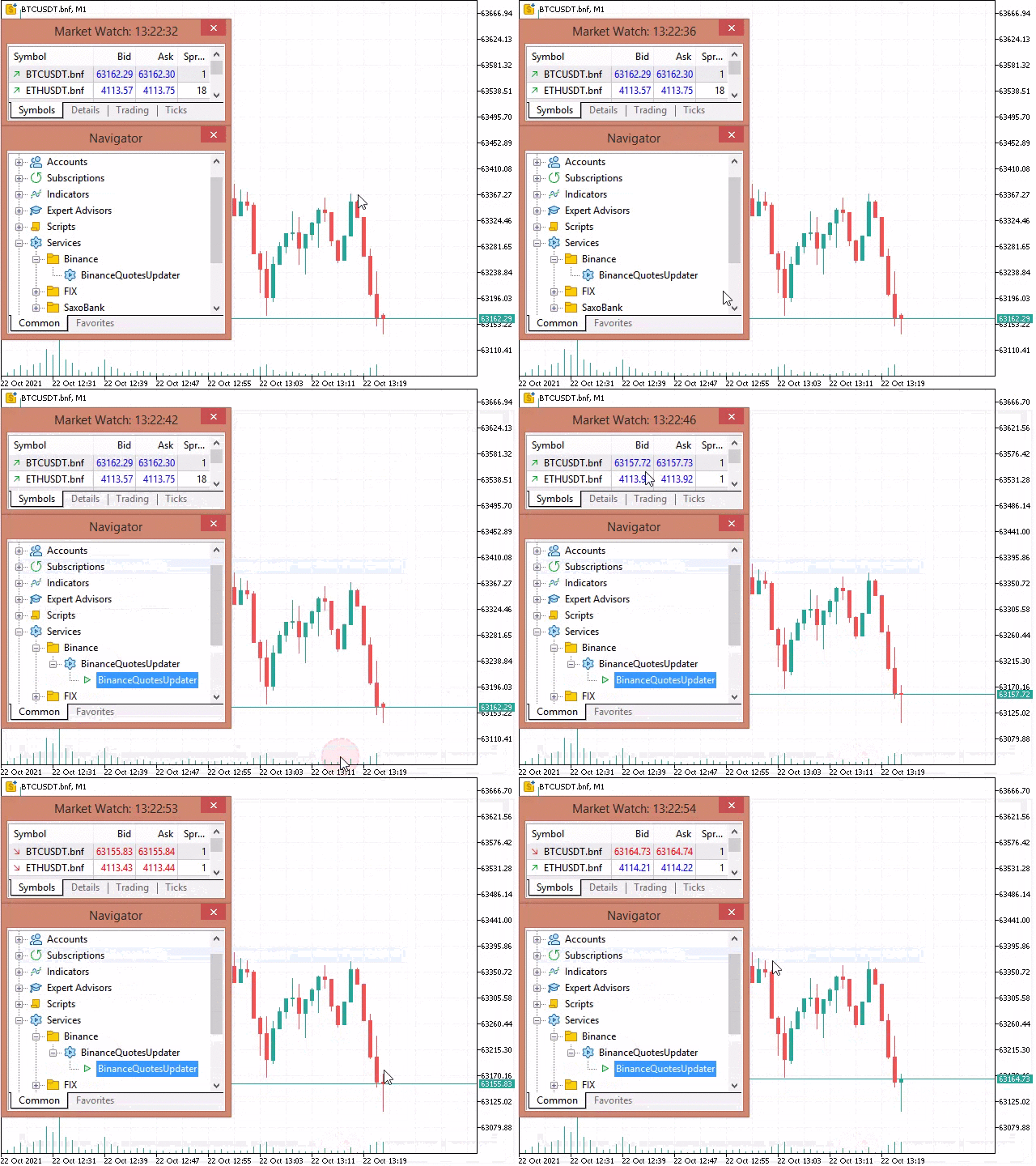
This service is designed to stream online cryptocurrency quotes from the Binance exchange to your MetaTrader 5 terminal.

You will find it perfectly suitable if you want to see the quotes of cryptocurrencies in real time — in the Market watch window and on the MetaTrader 5 charts.

    After running the service, you will have fully featured and automatically updated cryptocurrency charts in your MetaTrader 5. You can apply templates, color schemes, technical indicators and any non-trading tools to the charts, as well as make any drawings on them. The only thing that will not be available to you is a one click trading. To trade on Binance directly from your MetaTrader terminal, use the Binance Trade Manager utility.

    The service will not be useful for you if you want to download a long history of quotes (more than 30 days), for this purpose, please, use the Binance History Loader script.

    Attention! You will not be able to run the demo-version of Binance Quotes Updater in the MetaTrader 5 Strategy Tester!
    To get a free demo, please, contact me in any convenient way.


    Before you start

    Configure your MetaTrader 5 to connect to Binance. Learn the utility settings and best use practices.


    Do not hesitate to ask any questions you have in the official support chat.

    Have a successful crypto-trading!

    评分 1
    Denis Sotnikov
    20040
    Denis Sotnikov 2023.03.01 20:13 
     

    Отличная вещь для загрузки и последующего тестирования не требовательных к тикам стратегий

    推荐产品
    Indicator Values Panel MT5
    AL MOOSAWI ABDULLAH JAFFER BAQER
    Indicator Values Panel – Your Ultimate Indicator Monitoring Solution! Are you tired of constantly switching between indicators to check values? Want a simple, elegant, and real-time solution that puts all key indicator readings in one place? Indicator Values Panel is the ultimate utility for traders who want a clear and concise display of important indicator values – directly on their chart! What is Indicator Values Panel? Indicator Values Panel is a sleek, easy-to-use utility that provides rea
    币安是全球知名的加密数字货币交易所!为方便对加密数字货币行情进行实时数据分析,程序可自动将币安期货实时成交数据导入到MT5进行分析,主要功能有: 1、支持币安全部USD-M期货交易对自动创建,也可以单独设置基础货币。基础货币BaseCurrency为空表示所有货币,也可以单独设置BNB、ETC等任何币安支持的加密货币。 2、同步币安各货币的价格精度、交易量精度以及最大交易量等。 3、通过WebSocket链接币安,每一笔期货成交即可推送到Mt5更新行情。 4、支持所有期货品种同时更新,为提高实时数据效率,可自定义最大更新组(需要打开对应窗口更新),工具默认最大组数为4组,需要打开4个图表窗口,运行时分别设置RangNO为0,1,2,3(小于最大窗口数),以此类推。如果仅需要更新当前窗口的实时行情,可将RangNO设置为-1。 5、实时行情更新请使用代理地址,因此,必须将代理地址 trade.ctabot.com 添加到:MT5——工具——选项——EA——WebRequest列表中。 6、行情更新时,图表窗口的计数器会不断变化,如果因为网络原因或币安接口异常导致停止,请重新运
    Are you the type that likes to protect your trades by moving the stop loss to the entry point and also using trail stop? Cool! This EA will help you with that. What's more, it also partially closes the trade when the trail stop is activated. That's it! Beyond all this it shows the stop loss projection (which you can move)   and notify you when it is activated. EA can be used by configuring the default window or by using a custom window , which makes it easy to change settings. You can test
    Boleta de negociação, adiciona automáticamente as ordens Take Profit e Stop Loss quando excutada uma ordem de compra ou venda. Ao apertar as teclas de atalho (A, D, ou TAB), serão inseridas duas linhas de pre-visualização, representando as futuras ordens de take profit (azul) e stop loss (vermelho), as quais irão manter o distanciamento especificado pelo usuário. Ditas ordens só serão adicionadas ao ser executada a ordem inicial. Ao operar a mercado, as ordens pendentes de take profit, e stop lo
    News History Expoter
    Donaldo Sande Angiela
    This program is designed to download economic calendar news events for a specified country over a selected date range, allowing traders to analyze and incorporate important economic data into their trading strategies. By specifying both a start and end date, as well as a country code, the program retrieves relevant news events within the defined period and exports them to a CSV file for easy review and analysis. This tool helps traders stay informed about scheduled economic events that may impac
    FREE
    Order Selective Delete MT5
    Francisco Manuel Vicente Berardo
    The Order Selective Delete is a multi-symbol multi-timeframe script used to delete simultaneously various pending orders.  General Description   The Order Selective Delete   possesses   three operation modes (Intersection,   Union   and All) that control the way   as   three pending order features (symbol, magic   number   and type) are used. The modes, available through the Selection Mode input parameter, relate to the features, available through the “Select by Feature” and “Feature” input pa
    FREE
    实时点差显示工具 实时点差显示工具是一种专门的软件或应用程序,旨在为交易者和投资者提供各类金融工具的 点差 实时数据 —— 点差即买入价(买方愿意购买某资产的价格)与卖出价(卖方愿意出售该资产的价格)之间的差额。这类工具在外汇(FX)、股票、期货和加密货币等市场中至关重要,因为价格波动和流动性会直接影响交易决策。 核心功能 实时更新 实时显示买卖点差,通常每秒更新多次,以反映最新市场状况。 这对剥头皮交易者、日内交易者和高频交易者至关重要,他们依赖及时数据捕捉微小价格波动获利。 应用场景 交易策略制定 :交易者通过点差数据识别流动性良好(点差窄)的资产,以便高效开仓 / 平仓,或避开交易成本高(点差宽)的非流动性资产。 风险管理 :在市场剧烈波动期间(如经济数据发布、地缘政治事件),点差扩大预示风险上升,交易者可据此调整仓位规模或离场。 经纪商比较 :投资者可用该工具对比不同经纪商对同一资产的点差,确保获得有竞争力的定价。 套利机会捕捉 :寻求跨交易所价格差异的交易者可通过实时监控点差发现套利机会。 重要性 点差直接影响交易盈利能力,因其代表每笔交易的隐性成本。实时点差显示工具使用
    US Market Data Feed Pro
    Marcelo Alejandro Borasi
    US Market Data Feed Pro — MQL5 Market Description ============================================= US Market Data Feed Pro is a real-time financial data utility for MetaTrader 5. It automatically collects US economic calendar events, MAG7 earnings dates, Treasury yields, VIX, NYSE holidays, and Quad Witching dates from multiple sources  and saves everything into simple text files that any Expert Advisor can read. It does NOT trade. It feeds data to your trading systems.
    Welcome to Smart Algo Trade Panel Manager MT5 - the ultimate   risk management tool designed to make trading more effective based on user needs.  It is a comprehensive solution for seamless trade planning, position management, and enhanced control over risk. It does not matter weather you a beginner or an advanced trader, or a scalper needing rapid executions, SmartAlgo Trade Panel  adapts to your needs offering flexibility across all markets of your choice. You can put SL, Lot and TP of choice
    The only drawdown guardian that stops your other EAs from digging you deeper. PropMarshal monitors your account equity in real time and instantly closes all positions the moment a drawdown or profit target threshold is breached. But it doesn't stop there — it closes every chart on your platform too, cutting off any other Expert Advisors before they can open new trades and compound the damage. The Problem PropMarshal Solves Most prop firm traders run multiple EAs across multiple charts. When a dr
    FREE
    Get news5
    Aleksander Gladkov
    Utility for reading news from investing.com To access the site, you need to add WebRequest in the Options terminal menu on the Expert Advisors tab: https://sslecal2.investing.com If reading is successful, a message about writing the file is displayed. The INV_week_this.txt file is written to the MQL5\Files folder of the terminal and is kept up to date, updating data according to its own timer. The  INV_week_last.txt   file is recorded on Saturday and saves the news data of the previous week .
    Smart Ruler MT5
    Serhii Shevchuk
    5 (1)
    This tool is designed to measure the distance between two points on a chart and much more. List of measured values:  Distance in points  Profit (with and without spread)  Time difference  Percentage price change  Slope angle  Number of bars (various variations)  Ratio of distance in points to the reference value Features:  Snap to OHLC prices  Automatic color profile setting based on chart background color  Various types of pointers to choose from  Display of values ​​of selected points on th
    EAs Manager
    Abdeljalil El Kedmiri
    5 (1)
    The   Ultimate EAs Manager   is a professional risk management and trade assistance tool designed to monitor, control, and optimize all trading activities on your MT5 account. It acts as a   central command center   that oversees every trade - whether opened by other Expert Advisors or manually by you. How it's work with other EAs : Blog post  MT4 version:  https://www.mql5.com/en/market/product/167007 Only 10 copies will be sold at the early-bird price. After 10 copies, the price jumps directly
    Dhokiyas Market Screener
    Dhokiyas Money Map Investment Consultants - FZCO
    Dhokiya's Market Screener 用户指南 适用于 MetaTrader 5 的多品种分析面板 支持一键交易和完整技术概览 官方更新频道 加入频道 : Dhokiyas 技术支持 直接联系 : Contact 1. 产品功能说明 Dhokiya's Market Screener 是一款适用于 MetaTrader 5 的多品种技术分析工具。 它扫描多个交易品种 并基于多重技术确认生成方向信号和评分。 本产品旨在帮助交易者快速掌握市场整体情况 在一个清晰的面板中完成分析。 2. 重要说明 本产品不保证盈利 也不承诺任何特定收益。 交易存在风险 请合理管理资金。 信号基于技术指标和终端可用的市场数据生成。 实际表现取决于经纪商条件 点差 执行速度 以及交易品种规格。 3. 安装步骤 打开 MetaTrader 5。 如有需要 在 MetaEditor 中编译产品文件。 将产品加载到任意图表。 在 MetaTrader 5 中开启 Algo Trading。 在设置窗口中允许自动交易。 4. 首次使用 加载后 面板会显示在图表上。 点击 SCAN 按钮开始市场
    Buy Sell Multiple Panel - Execute Bulk Orders in a Single Click! Description: Save time and seize market opportunities instantly. This powerful panel allows you to place multiple buy or sell orders simultaneously, each with custom lot sizes, take-profit, and stop-loss levels. Perfect for sophisticated entry strategies and managing complex trades efficiently. Key Features: Bulk Order Execution: Open multiple market orders at once with just one click. Flexible Lot Sizing: Set individual lot size
    Draw Agent MT5
    Omar Alkassar
    5 (1)
    Draw Agent 被设计为以美观和创新的方式来创建和管理您所有的图表分析、涂鸦、笔记等。 本工具提供徒手画法,将图表空间当成黑板,徒手绘制。 此徒手绘图工具可让您在 MT4/MT5 图表上绘图,以便在图表上标记或突出显示事件。 如果您 想手动绘制艾略特波浪、在图表上画线或在图表上说明想法,它是一个 有用的工具,如果您正在为客户举办现场网络研讨会,或向人们分发屏幕截图或图表文件,它特别有用以及。 Draw Agent 安装和输入指南 如果您想获得有关 EA 添加 URL (  http://autofxhub.com   ) MT4/MT5 终端的通知(见屏幕截图)。 MT4版本 https://www.mql5.com/en/market/product/14929 MT5版本 https://www.mql5.com/en/market/product/14964 主要特点: 这个免费的手绘工具旨在确保您绘制的所有内容都将在您使用时保存   改变符号 。当您返回图表时,所有绘图都会重新出现。 您可以用钢笔或画笔在图表上绘图。 您可以更改颜色和大小,也可以在图表的背景或前景上绘制
    Market View MT5
    Kyra Nickaline Watson-gordon
    Definition : Market View is a dashboard (scanner) to view price graphs of all symbols and all timeframes at a glance. The utility is designed user friendly and added a wide range of customization options. Main features of Market View : Visual settings window on the chart Customizable list of symbols and timeframes Different shapes : Real Candles, Schematic Candles, Arrows Customizable number of candles Changeable size of dashboard (scanner) Highlight timeframes with gaps on candles Open approp
    Com este Expert Advisor tenha a possibilidade de fechar todas as posições de forma automatizada. Tenha em mãos o recurso de fechar as posições e ordens pendentes por ações, Dólar, Índice ou TODOS estes juntos, algo inovador no mercado. Ideal para quem quer uma segunda camada de segurança para suas operações automatizadas ou ainda que o próprio robô feche suas operações manuais em um horário programado. Promoção de 30 dólares para a três primeiras assinatura, posteriormente será cobrado 50 dól
    Symbol Cost Info
    Opeyemi Fuad Anokwu
    Introducing the “Symbol Cost Info MT5” indicator – your ultimate tool for staying ahead in the forex market! This innovative indicator is designed to empower traders with real-time cost information, directly on their charts. Here’s why every trader needs the “Symbol Cost Info MT5” in their arsenal: Real-Time Spread Monitoring : Keep a close eye on the spread for any currency pair, ensuring you enter the market at the most cost-effective times. Pip Value at Your Fingertips : Instantly know the v
    FREE
    Format Charts
    Vital H B Engenharia Ltda
    5 (1)
    If you use several charts open at the same time, you know how boring it is to apply formats to each chart individually. This script can change all open charts using a single command. Parameters: 1 - Choose symbol to put on charts: apply the selected symbol to all charts. If "current", it does not change the symbol; 2 - Choose timeframe or leave empty: apply the selected timeframe to all charts. If "CURRENT", it does not change the timeframe; 3 - Apply template to the charts: If true, apply the t
    FREE
    Volume Calculator Botti
    Guilherme Bitencourt Botti
    3 (4)
    Volume Calculator This indicator shows the volume to be used in an operation based on the maximum acceptable stop value and the size of the stop. That way you will not use a calculator to calculate the volume you are going to use every time. This indicator makes your life much easier and faster. Suitable for any type of trader: Scalper, DayTrader, SwingTrader.
    FREE
    HFT Bot Builder
    Thomas Bradley Butler
    Build an HFT Bot with source code.  This specialized algorithm in the bot will build an HFT bot for you, to alter, enhance and optimize to trade by.  The algorithm in the bot is a special recipe to build an HFT program.  One that you can enhance upon creation. Just follow the steps: Load the bot on a chart Wait for it to load, could takes some time depending on computer, refresh chart if needed (USE DEMO SO IT WON'T MAKE REAL TRADES WHILE YOU BUILD).  THIS IS BEING USED AS A BUILDER NOT AN EA A
    Telegram Sender Osw MT5
    William Oswaldo Mayorga Urduy
    用户手册:Telegram Sender Osw Telegram Sender Osw 是一款智能交易系统 (EA),旨在自动将 MetaTrader 交易信号发送到 Telegram。它非常适合信号提供商和账户管理,能够即时、专业地发送关键数据(价格、止损、止盈、成交量)。 1. 参数配置 常规和连接 启用 EA:激活(true)或暂停(false)系统。 机器人令牌:从 @BotFather 获取的字母数字代码。 聊天 ID:目标频道、群组或私聊的标识符。 发送子群组/主题 ID:仅当您的 Telegram 群组使用“主题”功能时才启用此选项。 发送逻辑(类型:发送) 自动:检测到任何新仓位或指令后立即发送。 按钮:仅当手动按下图表上的“发送 Telegram”按钮时才发送。 自定义设置(Telegram 文本消息) 使用系统会自动替换的标签:[SYMBOL]、[TYPE]、[PRICE]、[SL]、[TP] 和 [VOLUME]。 2. Telegram 设置(分步指南) A. 获取机器人令牌 在 Telegram 中,搜索 @BotFather
    The Expert Advisor "TimeLeft Display" shows the remaining time until the close  of the current candle in a digital display. The time is displayed in days, hours, minutes, and  seconds.      Features: Time Calculation:  Calculates the remaining time until the close of the current candle based on the  current timeframe of the chart. Digital Display:  Shows the remaining time in a digital format. Customizable Font and Size:  Allows selection of the font (Arial, Arial Black, Aptos Display, Tahoma, 
    FREE
    Renko Indicator MT5
    Mohammed Kaddour
    A Renko Tick chart based on continuously adjusting percentage. Live Renko bricks formed by tick data Adjustable brick width expert for indicator attached Scalp with a Renko, get weird. The settings can and will break the script if you turn them up too high. Turning off outline mode will not look as nice, but can potentially allow for a larger number of bricks.
    FREE
    This script is designed to download a long history of cryptocurrency quotes from the Binance exchange. You will find it perfectly suitable if you want once to download the history of cryptocurrencies for charts analyzing, collecting statistics or testing trading robots in the MetaTrader 5 strategy tester, or if you need to update the history not very frequently (for example, once a day or once a week). After running the script, you will have fully featured (but not automatically updated) cryptoc
    You can see Binance Spot data instantly in Metatrader 5 and it allows you to use all the features that Metatrader has provided to you. You can access the data of all symbols listed on Binance Futures. Don't forget to set the timezone. Binance it's 00:00 UTC. You need to fix it according to your own country You need to install the free Binance Spot Symbol List plugin. https://www.mql5.com/tr/market/product/83507 After loading, it automatically downloads the data of the cryptos in the market obser
    MT5 信息导出器支持将终端信息、账户信息、历史交易和历史订单导出到本地 csv 文件,发送电子邮件,并使用部署的脚本 URL 将其直接导出到 Google 表格。 您可以选择导出到 csv 文件、通过电子邮件导出或导出到 Google 表格。您甚至可以修改导出的文件名和工作表名称。 使用的输入参数: export terminal informations ? #: 选择是否导出终端信息。您可以将其值更改为 true 或 false 。 terminal info file or sheet name #: 默认值为“ Terminal_Info ”,但您可以在输入提示中更改它。 export historical deals ? #: 选择是否导出历史交易。您可以将其值更改为 true 或 false 。默认值为 false ,即不导出。 history deals file or sheet name #: 默认值为“ History_Deals ”,但您可以在输入提示中更改它。 export historical orders ? #: 选择是否导出历史订单。您可以将其值更改为
    FREE
    Server Clock
    Flavio Javier Jarabeck
    5 (5)
    Many friends asked me for a simple, non-obtrusive, resource-friendly clock to track the time during their trades. It seems pretty obvious, but it is a must-have for those trading the market manually, waiting for the Market News, or just to visually know what time it is... Trading is an absorbing endeavor! So, here it is... Totally configurable, including Font Type, Font Size and Chart Location: Upper Left/Center/Right OR Lower Left/Center/Right, with a little twist of adjusting the Offset, just
    FREE
    Quant Panel
    Kevin Craig E Gittins
    量化面板专业版 量化交易者的终极多EA性能仪表盘 无需再在多个图表或外部工具之间切换来监控您的算法策略!Quant Panel Pro 通过一个简洁专业的界面,为您提供机构级的投资组合监控体验。 核心功能 触手可及的量化分析 所有智能交易顾问(EA)的实时盈亏汇总 带有交易频率指标的胜率统计分析 高级回撤跟踪(已实现和未实现) 风险回报分析——最佳盈利与最大亏损对比 连续亏损监控及警报 专业量化界面 无限滚动——同时监控无限制策略 彩色编码性能矩阵——即时可视化投资组合健康状况 完全可定制布局——适应您的分析流程 现代金融风格设计——专为专业交易者打造 机构级功能 实时数据流——毫秒级精准更新 魔术编号策略筛选——按算法类型组织 多品种性能跟踪——跨市场分析 投资组合级统计——全面的绩效总结 完全可定制 专业配色方案和排版 可调整的刷新率和显示行数 可配置的列布局和指标 个性化仪表盘偏好 改变您的交易操作方式 之前: 手动表格、分散的MT4窗口、延迟分析 之后: 实时投资组合仪表盘、自动化分析、专业报告 “我的量化交易系统中缺失的一环——终于有了机构级的监控工具!” 简单设置流程 将
    该产品的买家也购买
    Trade Assistant MT5
    Evgeniy Kravchenko
    4.42 (207)
    它有助于计算每笔交易的风险,容易安装新的订单,具有部分关闭功能的订单管理, 7 种类型的追踪止损和其他有用的功能。   附加材料和说明 安装说明   -   应用程序说明   -   模拟账户应用程序的试用版 线条功能  - 在图表上显示开仓线、止损线、止盈线。 有了这个功能,就可以很容易地设置一个新的订单,并在开仓前看到它的附加特性。   风险管理  - 风险计算功能在考虑到设定的风险和止损单的大小的情况下,计算新订单的成交量。它允许你设置任何大小的止损,同时观察设定的风险。 批量计算按钮 - 启用 / 禁用风险计算。 在 " 风险 " 一栏中设置必要的风险值,从 0 到 100 的百分比或存款的货币。 在 " 设置 " 选项卡上选择风险计算的变量: $ 货币, % 余额, % 资产, % 自由保证金, % 自定义, %AB 前一天, %AB 前一周, %AB 前一个月。   R/TP 和 R/SL - 设置止盈和止损的关系。 这允许你设置相对于损失的利润大小。 例如, 1 : 1 - 这决定了 TP = SL 的大小。 2 : 1 - 这意味着 TP 是 SL 的两倍。 RR -
    VERIFIED TRADING RESULTS - Farmed Hedge Yield Axi Copy:  https://www.mql5.com/en/signals/2356376 - Farmed Hedge Yield Exn Copy:   https://www.mql5.com/en/signals/2356404 - Farmed Hedge Yield V Copy:  https://www.mql5.com/en/signals/2357156 Contact me via private message to receive the User Manual and Setup. * Thai Lauguage Support Available Farmed Hedge Yield Farming - Professional Pair Trading Dashboard (Manual - Hybrid - Semi/Automated EA) VERSION 3 - WILD HARVEST UPDATE Trading Approac
    Footprint Chart Pro — Professional OrderFlow EA for MetaTrader 5 Version 6.34 | Professional tool for real traders | Institutional-Grade Visualization DEMO USERS - PLEASE SELECT EVERY TICK / REAL TICK WHEN TESTING AND YOU HAVE DOWNLOADED HISTORICAL DATA. IF YOU SEE A WAITING SCREEN AND IT IS NOT DOWNLOADING, IT MEANS YOU HAVE LOW HISTORICAL DATA. TRY 1 MIN AND 5 MIN FIRST ON 1 DAY DATA. ONE DAY DATA SHOULD BE THE NEWEST AND MOST CURRENT DATE. PLEASE WAIT UNTIL THE MARKET HAS ROLLED OVER PERIOD.
    HINN Lazy Trader
    ALGOFLOW OÜ
    5 (2)
    The core idea: using the user interface, you configure the parameters the chart must meet before entering a position (or positions), choose which entry models to use, and set the rules for when trading and planning should end. Lazy Trader  handles the rest: it  takes over all the routine chart watching and execution! full description  :: 3 key videos [1] ->  [2]   ->  [3] What can it do? - Understands Larry Williams market structure - Understands swing market structure by Michael Huddleston
    The product will copy all telegram signal to MT5 ( which you are member) , also it can work as remote copier.  Easy to set up, copy order instant, can work with almost signal formats, image signal,  s upport to translate other language to English Work with all type of channel or group, even channel have "Restrict Saving Content", work with  multi channel, multi MT5 Work as remote copier: with signal have ticket number, it will copy exactly via ticket number. Support to backtest signal. How to s
    Crypto Charting
    Rajesh Kumar Nait
    5 (5)
    Crypto Charting for MT5 – MetaTrader 5 加密货币图表集成工具 概述 Crypto Charting for MT5 通过 WebSocket 提供实时 OHLC 图表数据。支持多家交易所,并可在 MT5 中自动更新历史数据。 功能 实时 WebSocket 数据传输 自动历史数据同步 网络中断后的计划更新 兼容所有 MT5 时间周期 支持 OHLCV 数据格式 支持策略测试器 自动重新连接 支持的交易所 Binance, Bybit, OKX, KuCoin, MEXC, Gate.io, Bitget, XT.com 补充说明 如需获取 Tick 数据和深度数据,可查看名为 Crypto Ticks 的相关产品。 注意事项 不使用 DLL,适用于 VPS 环境。 Strategy Tester 不支持 WebRequest 功能。 如需试用版本,请通过 MQL5 私信联系作者。 Full Documentation & Setup Guide : Click Here
    Telegram To MT5 Receiver
    Levi Dane Benjamin
    4.31 (16)
    将信号从您所属的任何渠道(包括私人和受限渠道)直接复制到您的 MT5。 该工具在设计时充分考虑了用户的需求,同时提供了管理和监控交易所需的许多功能。 该产品采用易于使用且具有视觉吸引力的图形界面。 自定义您的设置并在几分钟内开始使用该产品! 用户指南 + 演示  |   MT4版本  |   不和谐版本 如果您想尝试演示,请参阅用户指南。 Telegram To MT5 接收器在策略测试器中不起作用! Telegram 至 MT5 功能 一次复制多个通道的信号 从私人和受限频道复制信号 不需要机器人令牌或聊天 ID(如果出于某种原因需要,您仍然可以使用这些) 使用风险百分比或固定手数进行交易 排除特定符号 选择复制所有信号或自定义要复制的信号 配置单词和短语以识别所有信号(默认值应适用于 99% 的信号提供商) 配置时间和日期设置以仅在需要时复制信号 设置一次打开的最大交易量 交易和头寸管理 使用信号或自动设置的管理 通过设置每月、每周、每天、每小时或每分钟的最大交易次数,停止过度交易和报复性交易。 支持市价订单和挂单 每日最大利润目标(以美元为单位)以确保头寸并停止过度交易 确
    Ultimate Extractor
    Clifton Creath
    5 (9)
    Ultimate Extractor - Professional Trading Analytics for MT5 *****this is the local HTML version of Ultimate Extractor. For the online version please reach out to me directly****** Ultimate Extractor transforms your MetaTrader 5 trading history into actionable insights with comprehensive analytics, interactive charts, and real-time performance tracking. What It Does Automatically analyzes your MT5 trading history across all Expert Advisors and generates detailed HTML reports with interactive vi
    Neowave Chart Plotter
    Bahador Baradari
    5 (1)
    This Expert Advisor is applicable to plot wave charts as per the NeoWave  method (Neely Extension of Wave Theory).  NeoWave is a scientific, objective and revolutionary style of Elliott Wave Theory that was invented by Glenn Neely in 1990 in the “Mastering Elliott Wave” book. To start analyzing with this method, we need a particular chart called the Wave Chart or Cash Data chart . This is the first step for a good wave analysis. To draw this chart, Highs and Lows should be plotted in the order t
    YuClusters
    Yury Kulikov
    4.93 (43)
    Attention: You can view the program operation in the free version  YuClusters DEMO .  YuClusters is a professional market analysis system. The trader has unique opportunities to analyze the flow of orders, trade volumes, price movements using various charts, profiles, indicators, and graphical objects. YuClusters operates on data based on Time&Sales or ticks information, depending on what is available in the quotes of a financial instrument. YuClusters allows you to build graphs by combining da
    ManHedger MT5
    Peter Mueller
    4.83 (6)
    THIS EA IS A SEMI-AUTO EA, IT NEEDS USER INPUT. Manual & Test Version Please TEST this product before BUYING  and watch my video about it. The price of the ManHedger will increase to 250$ after 20 copies sold. Contact me for user support or bug reports or if you want the MT4 version! MT4 Version  I do not guarantee any profits or financial success using this EA. With this Expert Advisor, you can: Implement your own Zone Recovery strategy to capitalize on trending markets. Create Grid trading s
    Signal TradingView to MT5 Pro Automator TradingView 与 MetaTrader 5 之间的即时专业执行 使用最强大的桥梁,将 TradingView 警报与 MT5 中的实际执行连接起来,实现交易策略的自动化。这款 Expert Advisor 专为要求速度、灵活性和完美风险管理的交易者设计,可将任何警报消息转化为精确的市价或限价订单。 优势与特点 通用解析引擎(专有): 先进技术,能够自动识别并提取任何警报格式中的数据。您不再受限于单一的死板格式;系统会自动理解交易品种(Symbol)、操作(Action)、价格(Price)、止损(SL)和止盈(TP)。 实时执行: 极速轮询技术(低于 1 秒),经过优化可将延迟降至最低。接收到信号后,订单将在毫秒内执行。 机构级风险管理: 基于以下方式自动精确计算手数: 净值/余额百分比(% of Equity/Balance): 每笔交易承担固定账户百分比的风险。 风险金额(Risk Amount): 设定在触发止损时损失的固定货币金额(例如:100 美元)。 固定手数(Static Lots)
    Custom Alerts AIO:多市场智能监控,一键启动,无需设置 概述 Custom Alerts AIO 是一款“开箱即用”的高级市场扫描工具,无需额外安装任何其他指标或进行复杂设置。它内置了 Stein Investments 的所有核心指标(FX Power、FX Volume、FX Dynamic、FX Levels 和 IX Power),可帮助您轻松监控所有主要资产类别,如外汇、黄金、指数和加密货币。如果您的经纪商支持股票,您也可以手动添加个股进行监控。 1. 为什么选择 Custom Alerts AIO? 无需额外购买任何指标 • 所有关键指标均已内置,开箱即用。 • 专注于实时预警,不包含任何图形元素,性能高效,界面简洁。 全面覆盖所有主要市场 • 支持监控外汇、金属、加密货币和指数市场。 • 无需手动输入任何交易品种,只需在设置中勾选资产类别即可启用。 • 股票并不属于默认类别,如有需要可手动通过参数输入添加。 高效、专业、便捷 • 无需图表模板和手动加载,适合自动化或远程交易环境。 • 非常适合 VPS 上长期运行,或作为后台市场预警工具使用。 2
    EasyInsight AIO MT5
    Alain Verleyen
    4.92 (12)
    EASY Insight AIO – 全能智能交易一站式解决方案 概述 想象一下,您可以在几秒钟内扫描整个市场——外汇、黄金、加密货币、指数,甚至股票——无需手动筛选图表、繁琐安装或配置指标。 EASY Insight AIO 是您专为 AI 交易打造的即装即用数据导出工具。它将整个市场快照一次性输出为简洁的 CSV 文件,直接支持 ChatGPT、Claude、Gemini、Perplexity 等各类 AI 平台的即时分析。 无需窗口切换,无需图表叠加,也没有任何杂乱。只需纯净、结构化的数据自动导出,让您专注于基于数据的高效决策,无需再盯盘耗时。 为什么选择 EASY Insight AIO? 真正的一体化 • 无需设置,无需安装指标,无图表叠加。只需安装、运行并导出——就是这么简单。 多资产全覆盖 • 扫描分析外汇、金属、加密货币、指数、股票——您的券商所能提供的一切市场。 AI 专属数据导出 • 高度结构化、针对 AI 优化的 CSV 文件,直接适配主流智能工具和平台。 完整导出内容: • 三个可选周期的货币强度分析 • 净多头头寸变化体现市场情绪 • 成交量变化、
    Unlimited Trade Copier Pro MT5 is a tool to copy trade remotely to multiple MT4, MT5 and cTrader accounts at different computers/locations over internet. This is an ideal solution for you if you are a signal provider and want to copy your trades to other receivers globally on your own rules. One provider can copy trades to multiple receivers and one receiver can get trade from multiple providers as well. The provider can even set the subscription expiry for each receiver, so that receiver will n
    The product is used to trade base on any Alert signal in MT5 Easy to setup, simple format with custom keyword All option to management orders as trailing stop, breakeen, partial close, time filter, news filter ... Option to auto open grid orders How to setup and guide: Let read all details about setup and download indicator for auto get   Alert Signal   here Do not buy if you even can not install demo EA to your VPS ( some VPS block download EA from mql5 market) We always bring customers high q
    GRat Binance
    Ivan Titov
    1 (1)
    Trade on Binance in MT5! GRat_Crypto is a tool for manual and automated trading , including ANY available EA, ANY  cryptocurrency  on most popular crypto exchange Binance in the familiar MT5 environment 24/7. Features 1. ALL instruments of the 5 most popular crypto exchange  Binance . 2. The ability to place ANY type of order available in MT5, both market and pending, to modify orders and positions, to delete orders and close positions (even partially), to set trailing stop and trailing profit.
    Features   With MT5 to Interactive Brokers(IB) Trader, you can: 1. Load chart data from IB to MT5, and Analyze with all standard or customer Indicators. 2. Place Orders to IB Account Directly in MT5. 3. Make your Own EAs upon IB Securities by only making minus changes of the trading function. Usage 1) Installation Copy the "Mt5ToIBTraderEn.ex4" and sample files to [MT5 Data Folder]->MQL5->Experts.  2)  MT5 Settings Add the IP Address to the MT5 Allowed URLs in 'Tools->Options->Expert Adviso
    ******************************* ***************** ********************** ***************** ********************** ************************* GoldMine Train 是一款针对黄金的趋势交易策略 EA。 操作员确定主要趋势方向并指示Train前进。 Train 将在该方向连续买入/卖出, 手数取决于账户余额和预设的杠杆比率。 当操作员改变趋势方向时,Train将停止并锁定利润。 用户可以使用图表上的按钮轻松选择趋势方向。 ******************************* ***************** ********************** ***************** ********************** *************************
    The Expert Advisor will help you forward all alert from  MetaTrader 5 to Telegram channel/ group.  All alert must save to folder <Data folder>MQL5\Files\Alerts\ , text file with format *.txt and screenshot with format *.gif or *.png. Parameters: - Telegram Bot Token: - create bot on Telegram and get token. - Telegram Chat ID:  - input your Telegram user ID,  group / channel ID - Forward Alert: - default true, to forward alert. - Send message as caption of Screenshot: - default false, set true t
    FuturesGate
    Laurent Xavier Richer
    MT5 → Futures API Bridge Mirror your MT5 trades into an external futures platform in real time—perfect for running your favorite Expert Advisor (EA) on MT5 while executing on supported external futures accounts. NEW in v2.0: Multi-Symbol Support (Trade Nasdaq, S&P, and Dow from one chart), List-Based Filtering. Click here to read the Full Manual & Setup Guide Key Features Multi-Symbol Control: Manage trades for multiple instruments simultaneously from a single chart instance using the new "
    Dynamic Fibonacci Grid
    Tsvetan Tsvetanov
    5 (1)
    推出最新版本的 MT5 动态斐波那契网格仪表盘(Dynamic Fibonacci Grid Dashboard)。 全新版本配备了众多新功能,为您的交易体验带来彻底升级,并让您从全新的角度观察市场和价格行为。通过同时分析多个时间周期和多个交易品种,探索更多可能性。界面友好,支持手动交易和持仓管理,并大幅扩展了预设自动化策略的应用能力。此外,DFG 现在在策略测试器中可作为交易模拟器全面运行,您可以使用历史数据重现不同的交易环境。在可视化模式中练习手动交易,在高速模式中测试自动化策略。 主要功能 • 基于动态斐波那契通道(Dynamic Fibonacci Bands)的多周期、多品种高级技术分析。 通过我们的实时市场监控仪表盘,体验前所未有的高效分析能力。我们将来自 M1、M5、M15 和 H1 图表的复杂数据合成为易于理解的网格水平。这种独特呈现方式让交易者能够在同一个屏幕上监控 10 个不同品种的价格行为,而无需依赖传统图表。结果是更快速的决策过程,以及更简洁、不杂乱的交易环境。 • 可自定义且用户友好的界面,集成最重要的功能。 包括账户状态与信息、快捷手动交易与持仓管理按
    The product will copy all  Discord  signal   to MT5   ( which you are member  ) , also it can work as remote copier.  Easy to set up. Work with almost signal formats, support to translate other language to English Work with multi channel, multi MT5. Work with Image signal. Copy order instant, auto detect symbol. Work as remote copier: with signal have ticket number, it will copy exactly via ticket number. How to setup and guide: Let read all details about setup and download Discord To MetaTrader
    Mt5 To InterativeBrokers Copier allows you to copy deals from MT5 account to Interactive Brokers. With this, you can run your EA strategy on a MT5 Demo/Real Account, then copy all the deals to Interactive Brokers account real time. Features: 1. Copy or Invert-Copy deals Realtime from MT5 to IB Account. 2. Synchronizing positions of both accounts periodicaly, in case any missing copying. 3. You can choose only Buy position or Sell position. Symbols Setup: General Format:  {MT Symbol} -> {IB S
    Mentfx Mmanage mt5
    Anton Jere Calmes
    4.25 (8)
    The added video will showcase all functionality, effectiveness, and uses of the trade manager. Drag and Drop Trade Manager. Draw your entry and have the tool calculate the rest. Advanced targeting and close portions of a trade directly available in tool (manage trades while you sleep). Market order or limit order on either side with factored spread. Just draw the entry, the tool does the rest. Hotkey setup to make it simple. Draw where you want to enter, and the stop loss, the tool calculates al
    Ultimate Trailing Stop EA MT5
    BLAKE STEVEN RODGER
    4.13 (8)
    This EA Utility allows you to manage (with advanced filtering) unlimited open orders (manual or EA) with 16 trailing stop methods: fixed, percent, ATR Exit, Chandelier Exit, Moving Average, Candle High Low Exit, Bollinger Bands, Parabolic, Envelope, Fractal, Ichimoku Kijun-Sen, Alligator, Exit After X Minutes or Bars, RSI and Stochastic. The trailing stop can be either real or virtual, and you can exit fully or with a partial close percent on touch or bar close.  Moreover, you can add (override
    Trade Copier Pro MT5 is a tool to copy trade remotely to multiple MT4, MT5 and cTradfer accounts at different computers/locations over internet. This is an ideal solution for you if you are a signal provider and want to copy your trades to other receivers globally on your own rules. One provider can copy trades to multiple receivers and one receiver can get trade from multiple providers as well. The provider can even set the subscription expiry for each receiver, so that receiver will not be abl
    GRat Crypto
    Ivan Titov
    4.5 (2)
    Trade on crypto exchanges in MT5! GRat_Crypto is a tool for manual and automated trading , including ANY available EA, ANY  cryptocurrency  on most popular crypto exchanges in the familiar MT5 environment 24/7. Features 1. ALL instruments of the 9 most popular crypto exchanges are available: Binance, BingX, Bybit, Coinbase, CoinEx, Kraken,   KuCoin, MEXC and OKX . 2. The ability to place ANY type of order available in MT5, both market and pending, to modify orders and positions, to delete order
    PineChart
    Muhammad Minhas Qamar
    Developed by MMQ —  PineChart: Run PineScript Inside MT5 With A Modern Charting Experience An MQL5 Expert Advisor that runs Pine Script indicators and strategies directly inside MetaTrader 5. PineChart includes a full Pine Script interpreter so you can use your existing Pine Script v5/v6 source code without manually rewriting anything in MQL5. Links [  Website  |  Documentation  |  Demo ] NOTE: Downloading demo through MQL5 will give you limited functionality. To experience PineChart fully, dow
    Crystal Trade Manager – Advanced MT5 Risk and Trade Control Utility Overview Crystal Trade Manager (CTM) is a professional MetaTrader 5 utility designed for risk management, trade automation, and instant execution control. It provides traders with an integrated system for protecting equity, managing daily drawdowns, controlling lot sizes, and applying automation features such as automatic SL/TP, break-even, and trailing stop. The tool is suitable for manual traders, prop-firm challenge particip
    作者的更多信息
    Binance Trade Manager
    Andrey Khatimlianskii
    5 (3)
    Binance Trade Manager — is an utility that allows you to transmit trade orders from your MetaTrader 5 to the Binance exchange. It will suite you if you want to use your favorite MetaTrader 5, getting all the benefits of trading cryptocurrencies directly on the exchange (low commission, high liquidity, absolute transparency, etc.) Binance Trade Manager can work in two modes: copying trades from a demo-account , which your MetaTrader 5 is connected to (cryptocurrencies must be available on this ac
    Ilan
    Andrey Khatimlianskii
    4.71 (7)
    用于 MetaTrader 5 的 Ilan 由于使用虚拟交易,同时并发双向交易 (买与卖) 成为可能。 这样,允许用户在 MetaTrader 5 的单向持仓规则下,采用流行策略。  EA 设置 该 EA 的设置很简单。不过,策略的所有重要设置均可调整。可用工具: 单一  MagicNumber  用于识别交易; 交易方向选项 ( Trade direction ): 仅买入, 仅卖出或者并发双向; 开仓步长 ( Step ) 和盈利距离 ( TakeProfit ) 可自动适应 4 或 5-位的报价; 起始手数 ( Start lot ) 和增量系数 ( Lot coefficient ) 用来指定本金使用大小; 最后, 交易数量限制 ( Max trades in one direction ) 和最终一系列交易的止损 ( Max loss of last trade ) 用于风险管理。 您可以根据需要在单一账户里使用多个  Ilan  EA (即便是单一金融品种)。它们之中的每一个都仅处理自己的虚拟交易,不会与其它实例交互。手工交易加上 EA - 这不会影响交易策略。即使有
    Orders Indicator Base
    Andrey Khatimlianskii
    5 (1)
    i-Orders   is a simple indicator to monitor your own trade/analyze others' trades. I use it for a long time and do not imagine a chart without these arrows, lines and trade result numbers. The features allow you to: disable display of opened and closed positions ( Show OPENED ,  Show CLOSED ,  Show PENDING ), change colors of arrows and lines for profitable and loss-making buy and sell positions separately ( Color for profitable/ losing   BUYs/SELLs ), change style and width of the lines connect
    Orders Indicator MT5
    Andrey Khatimlianskii
    5 (1)
    i-Orders is a simple indicator to monitor your own trade/analyze others' trades. I use it for a long time and do not imagine a chart without these arrows, lines and trade result numbers. The features allow you to: change the size and location of the control buttons ( Control buttons size , Control buttons corner ), disable display of opened and closed positions ( Show OPENED , Show CLOSED , Show PENDING ), change colors of arrows and lines for profitable and unprofitable buy and sell positions s
    CommunityPower MT5
    Andrey Khatimlianskii
    4.69 (90)
    CommunityPower EA   — is the Expert Advisor for MetaTrader 4/5, created by community and for community. It is free, versatile and very powerful, and allows to trade a wide range of strategies. The idea is simple Your suggestions + my code = a win-win for everyone! Is it a ready-to-use money-making machine? No, it is definitely not. It is a tool, which allows you to create and run your own trading strategy, and it is up to you to find profitable settings and take the responsibility for your tra
    FREE
    CommunityPower MT4
    Andrey Khatimlianskii
    4.88 (40)
    CommunityPower EA — is the Expert Advisor for MetaTrader 4/5, created by community and for community. It is free, versatile and very powerful, and allows to trade a wide range of strategies. The idea is simple Your suggestions + my code = a win-win for everyone! Is it a ready-to-use money-making machine? No, it is definitely not. It is a tool, which allows you to create and run your own trading strategy, and it is up to you to find profitable settings and take the responsibility for your tradi
    FREE
    Screen Shoter
    Andrey Khatimlianskii
    5 (1)
    Indicator for "screenshoting" the chart at a specified interval. The files are saved in the " MQL5\Files\ScreenShots\Symbol TF\ " directory and named as the date and time the screenshot was taken ( 2017.06.20 23.56.24.png ) Settings: Width and Height — width and height of the saved screenshots, IntervalSeconds — the saving interval in seconds. Attention ! If you set a large size for screenshots and a high frequency, you may run out of space on the hard drive. Do not delete the folder where the s
    FREE
    Ilan MT4
    Andrey Khatimlianskii
    5 (1)
    The original Ilan EA for MetaTrader 4 This is the original Ilan EA for the MetaTrader 4 trading terminal. The strategy needs no advertising as it is well known even to novice traders. Settings of the Expert Advisor The Expert Advisor can easily be set, while allowing you to adjust any important parameters of the strategy. Available Features: Unique  MagicNumber  for identification of trades; Trade direction option ( Trade direction ): buy only, sell only, or both directions simultaneously; Step
    Orders Indicator
    Andrey Khatimlianskii
    4.43 (7)
    Grammy MT4
    Andrey Khatimlianskii
    5 (1)
    Grammy — is: Instant messages to your Telegram on any  trade events , Commands to  control all your terminals  from one Telegram chat, Price alerts  (crossing horizontal or trend lines), Daily, weekly and monthly  reports . You can't test this utility in the Strategy Tester. Please, contact me to get your free demo version. Why is Grammy better : Fully customizable  messages templates , Emoji  and "smart" substitution to the messages, Commands  to control all your terminals from Tel
    Grammy MT5
    Andrey Khatimlianskii
    Grammy  — is: Instant messages to your Telegram on any  trade events , Commands to  control all your terminals  from one Telegram chat, Price alerts  (crossing horizontal or trend lines), Daily, weekly and monthly  reports . You can't test this utility in the Strategy Tester. Please, contact me to get your free demo version. Why is Grammy better : Fully customizable  messages templates , Emoji  and "smart" substitution to the messages, Commands  to control all your terminals from Tel
    Orders Indicator Base MT5
    Andrey Khatimlianskii
    i-Orders   is a simple indicator to monitor your own trade/analyze others' trades. I use it for a long time and do not imagine a chart without these arrows, lines and trade result numbers. Features disable display of opened and closed positions ( Show OPENED ,  Show CLOSED ,  Show PENDING ), change colors of arrows and lines for profitable and loss-making buy and sell positions separately ( Color for profitable/ losing   BUYs/SELLs ), change style and width of the lines connecting deal open and
    Market Screener
    Andrey Khatimlianskii
    5 (1)
    Professional tool for professional traders It allows you to browse all available financial instruments and select best ones to trade with lightning speed. Fastest market screening ever Move your mouse over the instruments and instantly see 3 charts with selected timeframes and predefined indicators! Click on the symbol name to hold it. Use UP and DOWN keys to select previous /  next instrument. Ultimate charting Smooth scale, automatic indicator lines width, smart grid and much more. You'll li
    This script is designed to download a long history of cryptocurrency quotes from the Binance exchange. You will find it perfectly suitable if you want once to download the history of cryptocurrencies for charts analyzing, collecting statistics or testing trading robots in the MetaTrader 5 strategy tester, or if you need to update the history not very frequently (for example, once a day or once a week). After running the script, you will have fully featured (but not automatically updated) cryptoc
    筛选:
    Denis Sotnikov
    20040
    Denis Sotnikov 2023.03.01 20:13 
     

    Отличная вещь для загрузки и последующего тестирования не требовательных к тикам стратегий

    Andrey Khatimlianskii
    58725
    来自开发人员的回复 Andrey Khatimlianskii 2023.03.01 21:42
    Спасибо за отзыв!
    Будем совершенствоваться дальше)
    回复评论