HotkeyTrader

5

🔥 HotkeyTrader V5 – Your Ultimate Fast Trading Ally!

➡️ Enter the market, exit in profit – all with one key!


Ever dreamed of buying, selling, setting break-even, or closing all trades with a simple keyboard shortcut or Stream Deck button?

With HotkeyTrader V5, it's reality. No clicks, no distractions. Just pure speed.


🧠 Description

HotkeyTrader V5 is an advanced utility for manual traders, designed to simplify and execute scaling IN/OUT strategies precisely, quickly, and in a structured way.


This utility doesn't make autonomous decisions but acts under user control, allowing the orderly and rapid execution of complex strategies such as:


- Staggered entry on multiple levels (SCALE_IN)

- Staggered exit on multiple take profits (SCALE_OUT)

- Fixed Stop Loss, Take Profit, and Break Even management

- Smart Auto Break Even

- Advanced Trailing Stop with configurable margin

- Modern interface with customizable themes


🧩 Main Features

✅ Manual scalar execution on long or short orders

✅ Supports both SCALE IN and SCALE OUT in a fully assisted way

✅ All values expressed in PIPS (automatic conversion for every symbol)

✅ Fixed Stop Loss and Take Profit for each scale level

✅ Break Even function with configurable offset

✅ Auto Break Even: automatically moves SL when you reach a certain profit

✅ Advanced Trailing Stop: protects profits by following price

✅ Supports hedging or netting environments

✅ Magic Number for isolated and precise order management

✅ Compatible with keyboard, mouse, or external command input

✅ 5 graphic themes: Dark, Light, Blue, Green, High Contrast


🔄 Operating Modes

SCALE_OUT: enters the full position and closes it at multiple profit levels, automating partial exits.


SCALE_IN: allows building the position on multiple entry levels, with simultaneous closing.


Perfect for:

- Manual scalping

- Multi-level discretionary trading

- Emotional management support (preset decisions)

- Combination with indicators/alert systems


⌨️ Available Hotkeys:

- Ctrl + 1 → Instant BUY

- Ctrl + 2 → Instant SELL

- Ctrl + 3 → Automatic BreakEven with configurable offset

- Ctrl + 4 → Close all positions instantly

- Ctrl + 5 → Increase lot (+0.01)

- Ctrl + 6 → Decrease lot (-0.01)

- Ctrl + 7 → Enable/Disable Scaling

- Ctrl + 8 → Scale IN/OUT

- Ctrl + 9 → Enable/Disable Dashboard

- Ctrl + 0 → Enable/Disable Auto BE

- Ctrl + , → Enable/Disable Trailing Stop


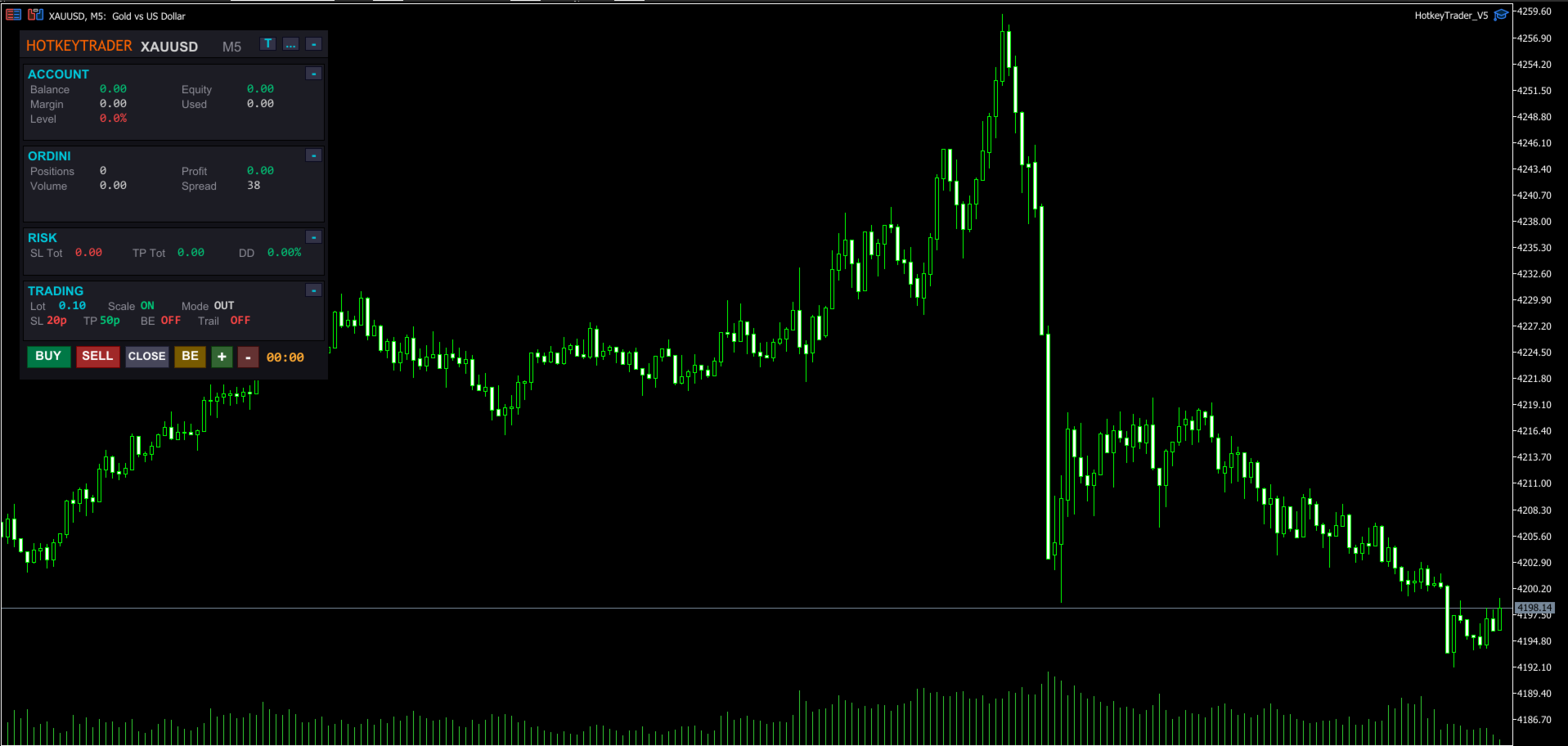
📊 Modern Dashboard Integrated on Chart:

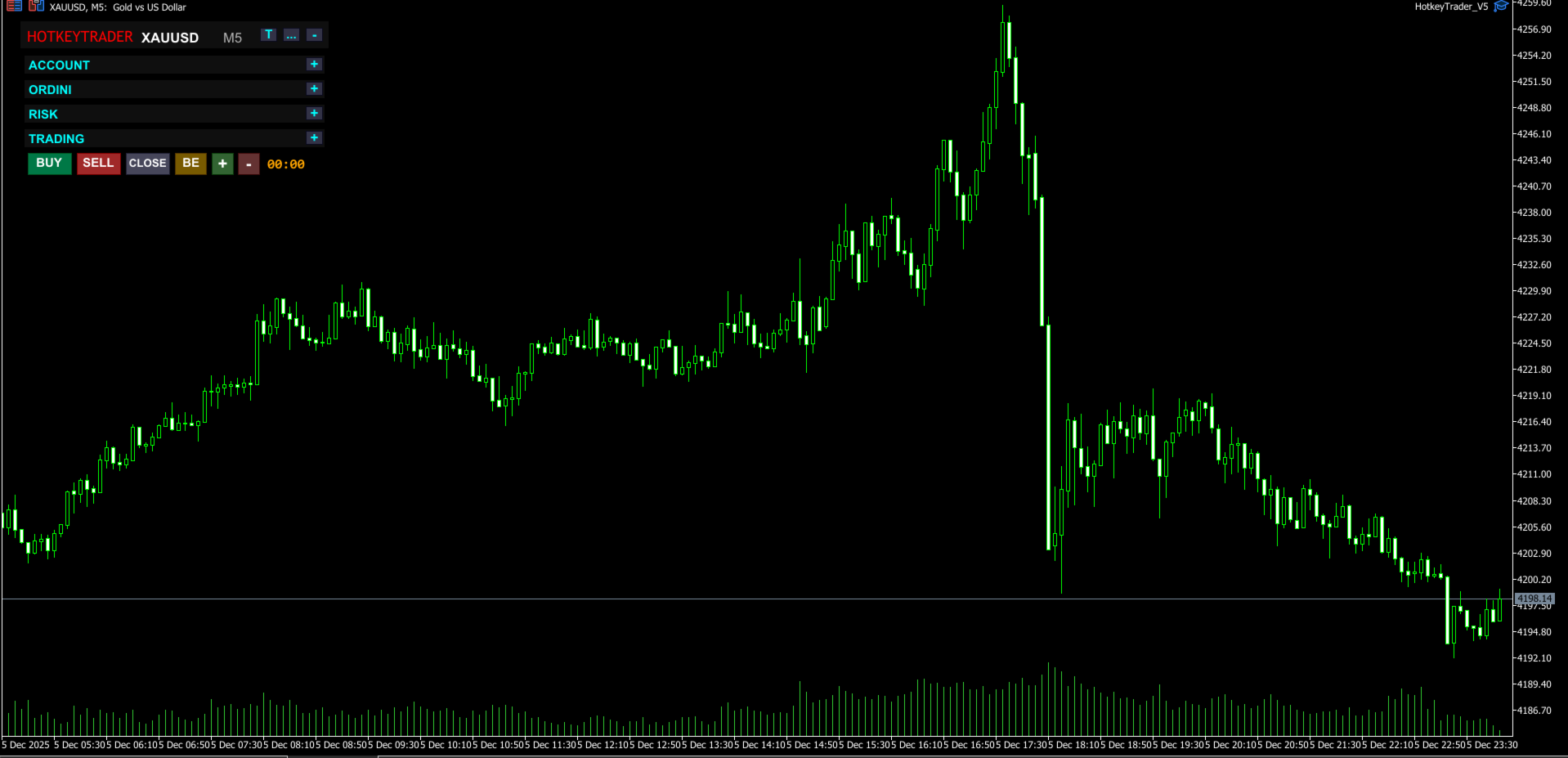
- Collapsible sections (Account, Orders, Risk, Trading)

- Open positions and total lots

- Real-time profit (green/red color)

- Equity, Balance, Margin, Drawdown

- Current spread

- Countdown to next candle

- Draggable to any position

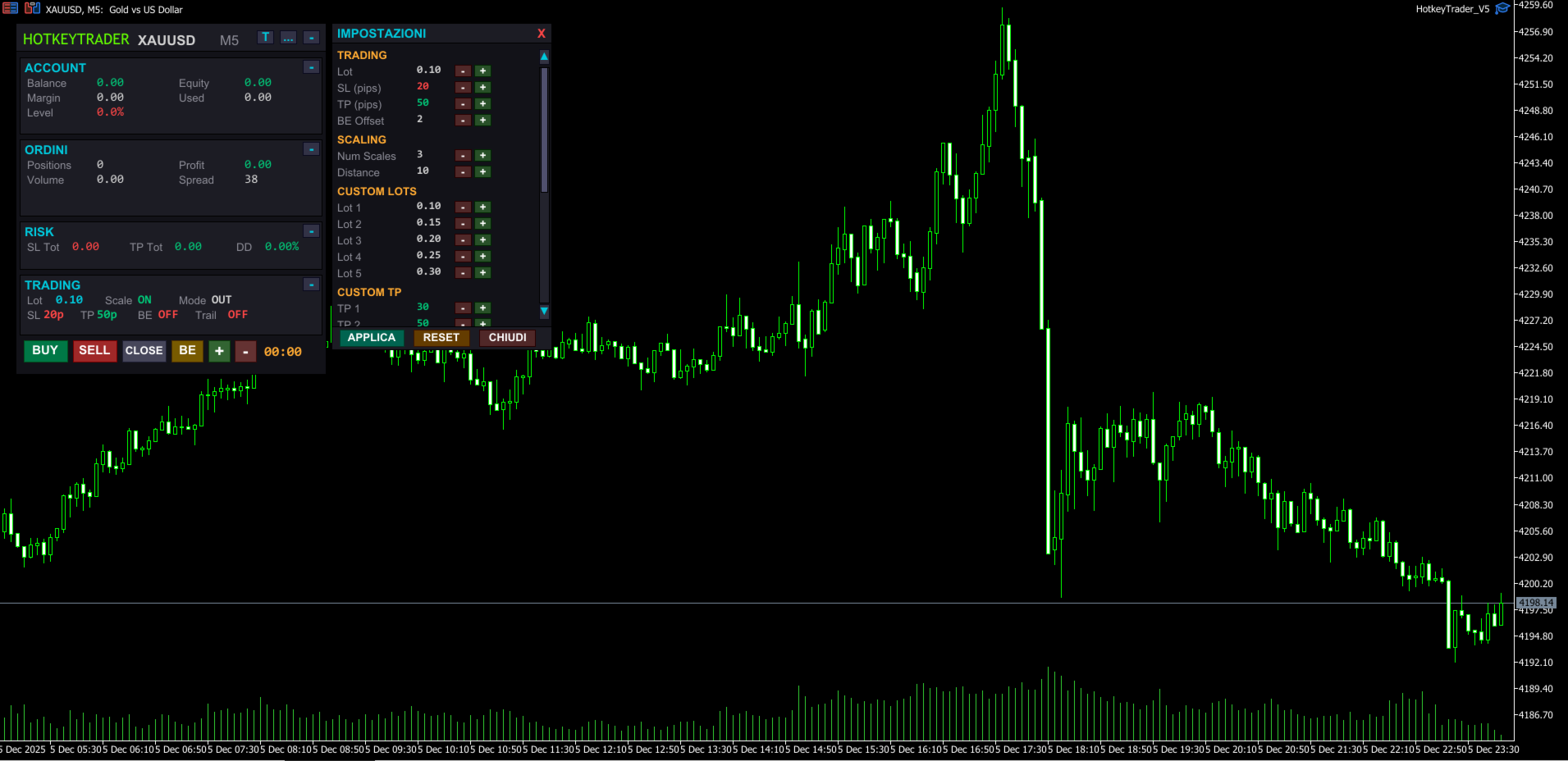
- Complete settings panel with scrollbar

- Hover effects on buttons

- 5 selectable themes with one click


🎨 Available Themes:

- Dark – Modern dark theme (default)

- Light – Light background, classic style

- Blue – Deep blue tones, professional trading style

- Green – Dark green theme, matrix/terminal style

- High Contrast – Pure black with vivid colors for maximum visibility


🎮 Universal Compatibility with External Devices:

✔️ Standard keyboard (with or without numpad)

✔️ Elgato Stream Deck (Mini, MK.2, XL, Neo…)

✔️ Macro keyboards and gaming mice

✔️ AutoHotKey, Loupedeck, macro software, OBS plugins, etc.


⚙️ Configurable Parameters:

- Initial lot and custom lots for each scale

- SL and TP in PIPS (automatic conversion)

- BreakEven offset

- Auto BE: configurable trigger and offset

- Trailing Stop: activation, distance, and step

- Custom TP for each scale level

- Slippage

- Magic Number

- Dashboard position


🆕 What's New in V5:

- Completely redesigned dashboard with modern look

- Integrated settings panel with scrollbar

- 5 selectable graphic themes

- Hover effects on all buttons

- Collapsible sections to save space

- Smart Auto Break Even

- Advanced Trailing Stop with professional logic

- Values in PIPS instead of points (more intuitive)

- 3D buttons with stylized borders

- Integrated candle countdown

- Real-time Drawdown calculation


🧪 Usage Tips

- Connect it to hotkeys or programmable keyboard

- Use it with external indicators for manual entry

- Set parameters in PIPS before the trading session

- Great tool for psychological management and avoiding overtrading

- Use High Contrast theme for night sessions


🚀 Advantages:

- No indicators, just immediate reactivity

- Designed for scalping and manual trading

- Clean and modern interface, zero distractions

- Ideal for professional or semi-automatic traders

- Complete customization with themes and settings


📦 Included in Package:

- Compiled EA .ex5

- PDF instruction manual

- Custom icons for Stream Deck (upon request)


📘 User Manual Included

For a detailed guide on using HotkeyTrader V5, check the complete User Manual available in the Comments section.

You'll find clear explanations on:

- How to configure the panel

- Using hotkeys

- Customizing the dashboard and themes

- Compatibility with Stream Deck and macro keyboards

- Configuring Auto BE and Trailing Stop


💡 The manual is regularly updated to reflect every new version.


🎯 Don't waste time in menus. Trade with precision, speed, and total control.


💡 "Who masters speed, masters the market." – HotkeyTrader V5


⚠️ Note: the demo version can only be tested in the MetaTrader 5 Strategy Tester and does not respond to real keyboard inputs (like Ctrl+1, Ctrl+2). To test the complete experience, you need to purchase or rent the product.


⚠️ This EA is a trading support tool. The author is not responsible for any financial losses resulting from its use. It is recommended to thoroughly test the product and use it with appropriate risk management.

评分 1
371918
524
371918 2025.09.22 12:24 
 

So far, after using it, trading has been smooth and hassle-free. I would greatly appreciate it if the input language could be changed to English.

推荐产品
Quick deals EA
Aleksandr Slavskii
Горячие клавиши плюс клик левой кнопки мыши на графике. Советник открывает сделки, выставляет лимитные и стоповые ордера, удаляет ордера и закрывает позиции, также  делает реверс  открытых позиций, выставляет прописанные в настройках стоп лосс и тейк профит. (реверс только на неттинговых счетах) При запуске советника можно посмотреть подсказку как действует советник при нажатии клавиши + клик на графике. Правее последнего бара, ниже цены Ctrl+ЛКМ  - OpenSell Правее последнего бара, выше цены C
Mirror Chart MT5
Andrej Hermann
5 (1)
The Mirror Chart MT5 is a overlay indicator specifically designed to project a second financial instrument directly onto the main chart window. This tool is invaluable for traders who rely on correlation analysis, as it visualizes the price movements of two different instruments in real time. Unlike traditional overlays, this indicator utilizes intelligent, dynamic centering and scaling logic. It continuously analyzes the visible price range in the current window for both symbols and calculates
FREE
Easy Trading Panel: 核心功能总结 1. 全图形化视觉下单 (Visual Trading) 这是该工具最核心的卖点。它摆脱了传统的输入价格下单,转而采用直观的 图表线条拖拽 模式: 拖拽进场线 (Entry Line): 在图表上直接拖动线条设定挂单位置。 一键开关 SL/TP: 通过面板按钮快速开启 / 关闭止损线和止盈线。 同步测算: 线条在拖动时,面板会实时计算并显示该位置对应的 点数 (Points) 和 预期盈亏金额 ($) 。 2. 智能挂单识别系统 (Smart Order Logic) 面板具有极高的自动化水平,能自动判断挂单类型: 自动切换类型: 根据你拖动进场线相对于当前 Bid/Ask 价格的位置,系统会自动在 Buy Limit、Sell Limit、Buy Stop、Sell Stop 之间切换,无需手动选择。 手动微调锁定: 支持通过面板按钮手动强制切换 Limit 或 Stop 模式,满足特定的交易策略需求。 3. 实时风险控制与盈亏预览 在订单发送前,面板会根据当前的 手数 (Lots) 配置进行动态计算: 风险预览: 实时显示如果触
中文(简体) YouTube 视频说明: https://youtu.be/OJXERVs405g Keyboard Scalper Pro —— 工具说明 Keyboard Scalper Pro 是一款 手动剥头皮交易辅助工具 ,专为通过 键盘快捷键 执行和管理交易而设计,可实现 快速、精准、专注的交易操作 。 该工具 不自动做出任何交易决策 。 所有操作均由交易者通过预设快捷键 手动触发 。 快捷键功能说明 W – Buy Market(市价买入) 使用预设的风险或手数设置,在当前交易品种上立即开立市价多头仓位。 S – Sell Market(市价卖出) 使用预设的风险或手数设置,在当前交易品种上立即开立市价空头仓位。 E – Break-Even(保本) 将止损移动至保本位置,基于当前品种 所有已开仓位的平均入场价格 进行计算。 在加仓(分批建仓)时尤为实用。 Q – Close All Positions(按品种平仓) 立即关闭 当前交易品种的所有持仓 。 其他交易品种不受影响。 Y / X – 仓位风险调整 基于账户余额动态调整仓位风险: Y → 风
Blahtech Market Profile MT5
Blahtech Limited
5 (10)
Was: $249  Now: $99   Market Profile defines a number of day types that can help the trader to determine market behaviour. A key feature is the Value Area, representing the range of price action where 70% of trading took place. Understanding the Value Area can give traders valuable insight into market direction and establish the higher odds trade. It is an excellent addition to any system you may be using. Inspired by Jim Dalton’s book “Mind Over Markets”, this indicator is designed to suit the
MR Volume Profile 5
Sergey Khramchenkov
The "MR Volume Profile 5" indicator is a charting tool that displays trading volume at different price levels rather than time intervals. A key concept in volume profile is the point of control (POC)—the price level with the highest volume traded during the session or time range. While tools like VWAP or OBV provide volume trends, the "MR Volume Profile 5" indicator offers granular detail about where the most market activity occurs at specific price levels. This makes it a more precise tool for
SmartLot MT5
Nikita Chernyshov
演示账户免费版 | MT4 版本 The SmartLot for  MT5   是一款交互式且简单的面板,用于快速计算手数,直接从图表设置挂单和市价单。 不适用于策略测试器 。要测试该工具,请下载适用于模拟账户的免费版本。说明和文件位于描述顶部。 功能: 图形界面: 带有盈亏区域颜色标记的交互式入场、止损、止盈线。 实时计算: 当更改止损/止盈水平时,面板会自动重新计算风险/利润值(货币单位 / 点数 / %)。 执行: 通过点击图形线上的按钮来开单。支持主要订单类型。 风险管理: 用于处理动态手数(存款百分比)或固定交易量的内置模块。 独立魔术码: 可为每个订单单独指定魔术码。 如果在安装或使用中遇到任何问题 — 欢迎随时联系,我将乐意为您提供帮助。
Advanced Volume Profile
Henry Armando Baltazar
Advanced Volume Profile Liquidity Analysis via Custom Area Selection The Advanced Manual Volume Profile is a precision tool for MetaTrader 5 designed to deconstruct market structure through price-level volume analysis. Unlike static profiles, this indicator exclusively processes the price and time range defined by the user via a rectangle object, offering a surgical view of the market auction. Elite Technical Specifications Dynamic Algorithm: Real-time calculation (400ms refresh rate) based on t
Epic Spikes
Saba Ansar Ul Haq
Join WhatsApp Group for Free Signals & More Discussion https://chat.whatsapp.com/IWc1CaxviFw8Bu94JGRIQv For Live Signals Please Visit https://www.mql5.com/en/signals/2352564?source=Site+Profile+Seller Epic Spikes EA – Key Features  for Set Files when you purchase EA contact me. 1. Smart Breakout Trading The EA automatically detects strong price levels and places pending orders when the market is about to break out. It buys above the recent high and sells below the recent low. 2. Automat
Candle Countdown Timer MT5
AL MOOSAWI ABDULLAH JAFFER BAQER
蜡烛倒计时器 – 抢占市场先机 你是否曾经想知道当前蜡烛关闭前还剩多少时间?在交易中,时机至关重要。蜡烛倒计时器是专为交易者打造的精准计时工具,帮助你高效执行交易策略。无论你是剥头皮交易者、日内交易者还是波段交易者,这款工具都能确保你不错过任何关键时刻。 什么是蜡烛倒计时器 蜡烛倒计时器是一款 轻量级且高效的MT4工具 ,可以显示当前K线的剩余时间,帮助交易者精准规划进场和出场时机。它实时自动更新,确保你随时掌握最新数据。 如何运作 实时倒计时 持续跟踪当前蜡烛的起始时间,并计算剩余时间 当新蜡烛形成时,倒计时会自动重置 颜色警示提醒 当蜡烛即将关闭时,标签颜色会发生变化,以提醒你注意 绿色 – 充足的剩余时间 黄色 – 提醒:蜡烛即将关闭 红色 – 紧急:蜡烛即将关闭 精准的进度追踪 显示自蜡烛开启以来的时间 计算蜡烛完成的百分比,帮助判断市场动能 可根据你的交易风格自定义 可调整的更新时间间隔(默认1秒) 选择字体大小、颜色和显示位置 可将显示界面放置在图表的任意角落,方便查看 为什么需要蜡烛倒计时器 适用于剥头皮和日内交易者。在低时间周期交易时,每秒都至关重要。这款工具可确保你
V-Connect Tick Data Validator is a utility for MetaTrader 5. It checks each tick and rejects invalid data. Features - Checks bid and ask prices - Checks spread and time - Uses only MQL5 functions - Logs results in the Experts tab - Real-time filtering: - Negative or zero spreads - Stale timestamps (>60 seconds) - Reversed bid/ask - **<1ms overhead** — runs on low-spec VPS - **Journal audit trail** — "TICK PASSED" / "TICK REJECTED" How to Use Attach to a chart. In your EA: if (validate_tick(tick
FREE
Color Histogram Volume Set
Ricardo Almeida Branco
Do you use volume in your reading of the market? Certainly many traders use it, and do not imagine operating without it. The Color Histogram Volume Set indicator allows the user to choose the value that he considers interesting to monitor. When you pass this you will have visual confirmation and if you want you will also have the audible alert that is given by the indicator. Of course, there are other ways to try to find a high volume, such as assessing whether the volume is above av
Delta Profile Volume
Teresinha Moraes Correia
指标技术说明 – Delta Profile for MetaTrader 5 Delta Profile 是为 MetaTrader 5 开发的一款指标,用于在指定的 K 线区间内对成交量流进行详细分析。它能够在不同的价格水平上对正向成交量(与上涨相关)和负向成交量(与下跌相关)的不平衡进行结构化和可视化展示。最终,用户可以清晰地识别图表中成交最为集中的区域,以及真实的市场不平衡形成的位置。 以下是该指标的主要技术特征与参数说明。 核心概念 指标会识别 价格水平 ,并将其分类为正向成交量、负向成交量,以及净 Delta(正负成交量的差值)。 每个价格水平会在图表中以 水平条形 显示,帮助用户直观观察市场活跃区和不平衡区域。 用户可自由控制 分析的 K 线数量 、 价格精度(小数位数) 、 显示的最大水平数量 以及 可视化样式 。 主要功能 价格水平映射 :根据设定的精度对价格进行四舍五入,并累计对应 K 线的成交量。 净 Delta 计算 :显示正负成交量的差值,提供每个价格区间的客观数值。 最强 Delta 水平突出显示 :自动识别 Delta 绝对值最大的价格水平,并用特殊颜色标
Delta Volume histogram
Lina Staseliene
3.67 (3)
The " Delta Volume histogram " Expert Advisor plots histograms of "Delta volume", "Real volume", "Buy volume", "Sell volume", "Tick volume". EA version: Has a built-in «Pending orders indicator". The indicator is designed for analysis of pending orders in the market, available in "MarketBook". Displays the Volume profile levels (VAH VAL from 60% to 85%). Built-in side histogram. This is a powerful tool for analyzing trade volumes. The chart is plotted based on tick data. Depending on the broker,
Trading Utility for Forex Currency Pairs Only not for Gold  Functions Auto Lot Calculation based on Risk Auto stoploss  Auto TakeProfit Breakeven Auto Close Half % Close in percentage with respect to the PIPs Pending Orders BuyLimit Sell Limit with distances BuyStop Sell Stop    with distances Trading Informations Risk in percentage For Multiple trades Combine Takeprofit and Combine Stoplosses
TradeControl Pro —— 适用于 MetaTrader 的高级交易管理工具 TradeControl Pro 是一款用于 MetaTrader 的交易管理工具,可在图表中直接实现结构化且高效的持仓管理。该应用结合了清晰的用户界面、自动化计算功能以及灵活的控制选项,适用于不同的交易方式。 内置的图表面板采用表格布局,并划分为三个主要区域(标签): Execution 、 Close 和 Info 。界面设计注重清晰性与直接交互。 结构清晰,功能分组合理 关键交易数据实时动态更新 无需额外窗口,直接在图表中操作 标签:Execution(交易规划与执行) Execution 区域用于新交易的规划与执行。 Open Calc(挂单设置) 通过 Open Calc 可在图表中自动生成三条价格线: 入场价格(Entry) 止损(SL) 止盈(TP) 这些价格线可自由拖动调整。系统将基于当前价格水平实时计算: 止损价格及潜在亏损 止盈价格及潜在盈利 仓位大小(手数) 风险回报比 在该模式下仅用于设置挂单(Pending Orders)。通过 Execute 和 Confirm 按钮执
VolumeDeltaBars
Stanislav Korotky
This indicator is a conventional analytical tool for tick volumes changes. It calculates tick volumes for buys and sells separately, and their delta on every bar, and displays volumes by price clusters (cells) within a specified bar (usually the latest one). The algorithm used internally is the same as in the indicator VolumeDeltaMT5 , but results are shown as cumulative volume delta bars (candlesticks). Analogous indicator for MetaTrader 4 exists - CumulativeDeltaBars . This is a limited substi
HTF Candles Nika 可将任意更高时间框架的完整K线直接叠加显示在MetaTrader 5的当前图表上,无需切换图表即可获得多时间框架视角。 主要功能 - 在当前图表上以矩形加影线的形式绘制高时间框架K线 - 支持标准K线和平均K线(Heiken Ashi)两种显示模式 - 实时倒计时,显示当前高时间框架K线距关闭的剩余时间 - 多头和空头K线颜色可自定义 - 自动或手动控制K线宽度 - 可配置影线宽度、字体、字号及文字位置偏移 - 适用于任何品种和时间框架组合 - 自动检测交易时段间隙并调整渲染 - 轻量级 — 仅使用图表对象,无指标缓冲区 输入参数 显示设置 - Max Lookback — 绘制的高时间框架K线数量(默认:500) - Timeframe — 要显示的高时间框架(默认:H1) - Bars Mode — K线或平均K线模式 颜色设置 - Up Color — 多头K线颜色(默认:DodgerBlue) - Down Color — 空头K线颜色(默认:Red) - Frame Color — 时间框架标签颜色(默认:Red) - Count
FREE
Blahtech Supply Demand MT5
Blahtech Limited
4.54 (13)
Was: $299  Now: $99  Supply Demand uses previous price action to identify potential imbalances between buyers and sellers. The key is to identify the better odds zones, not just the untouched ones. Blahtech Supply Demand indicator delivers functionality previously unavailable on any trading platform. This 4-in-1 indicator not only highlights the higher probability zones using a multi-criteria strength engine, but also combines it with multi-timeframe trend analysis, previously confirmed swings a
Weis Waves
Flavio Javier Jarabeck
2.83 (18)
The original author is David Weis, an expert in the Wyckoff Method. The Weis Wave is a modern adaptation of the 1930's Wyckoff Method, another expert in Tape Reading techniques and Chart Analysis. Weis Waves takes market volume and stacks it into waves according to price conditions giving the trader valuable insights about the market conditions. If you want to learn more about this subject you can find tons of videos in YouTube. Just look for "The Wickoff Method", "Weis Wave" and "Volume Spread
FREE
Expert TP SL v04 - Professional Trading Assistant with AI Motivation System Advanced manual trading tool with automatic risk management, overtrading protection, and intelligent psychological support for disciplined trading. PRODUCT OVERVIEW Expert TP SL v04 is a comprehensive trading assistant designed for manual traders who want to maintain emotional discipline while automating risk calculations. This isn't just another order placement tool - it's a complete trading psychology system that pr
Order Book, known also as Market Book, market depth, Level 2, - is a dynamically updated table with current volumes of orders to buy and to sell specific financial instument at price levels near Bid and Ask. MetaTrader 5 provides the means for receiving market book from your broker, but in real time only, without access to its history. This expert adviser OrderBook History Playback allows you to playback the market book events on the history using files, created by OrderBook Recorder . The exper
FREE
Value Chart Candlesticks
Flavio Javier Jarabeck
4.69 (13)
The idea of a Value Chart indicator was presented in the very good book I read back in 2020 , " Dynamic Trading Indicators: Winning with Value Charts and Price Action Profile ", from the authors Mark Helweg and David Stendahl. The idea is simple and the result is pure genius: Present candlestick Price analysis in a detrended way! HOW TO READ THIS INDICATOR Look for Overbought and Oversold levels. Of course, you will need to test the settings a lot to find the "correct" one for your approach. It
FREE
这是一个可视化的交易面板,可帮助您轻松进行交易管理,避免人为错误并增强交易活动。它结合了易于使用的视觉界面以及完善的风险和位置管理方法。 [ 安装指南 | 更新指南 | 故障排除 | 常见问题 | 所有产品 ] 易于使用 从图表轻松交易 精确的风险管理交易,无忧 保本是重中之重 让利润不受您的关注 尽快享受无风险交易 所有已开通交易的自动追踪止损 交易开始后立即设置初始止损 进行交易后,EA将执行以下任务: 初始止损/获利被自动放置 它会尽快锁定自由行(可选) 它将止损首次移动到盈亏平衡点(可选) 它使用您所需的方法跟踪止损,直到止损为止 其他很酷的功能是: 出色的终端活动报告 单一但功能强大的尾随止损方法 干净的图表界面 没有输入参数 我进行交易后会怎样? 这是您进行交易后EA的操作: 它放置初始止损并获利订单。 尽快搭便车并确保保本。默认情况下,这是通过在达到盈亏平衡点时关闭50%的交易来完成的,默认情况下为5点。这意味着,如果您日后被淘汰,您将一无所获(可选)。 盈亏平衡后,跟踪止损开始运行。 它跟踪止损,直到止损为止,让利润运行。 尾随止损如何运作? 追踪止损表示为所管
Order Book, known also as Market Book, market depth, Level 2, - is a dynamically updated table with current volumes of orders to buy and to sell specific financial instument at price levels near Bid and Ask. MetaTrader 5 provides the means for receiving market book from your broker, but in real time only, without access to its history. The indicator OrderBook Cumulative Indicator accumulates market book data online and visualizes them on the chart. In addition, the indicator can show the market
Market Profile 3 ForexArby com
Hussien Abdeltwab Hussien Ryad
4 (15)
Market Profile 3 MetaTrader 5 indicator  version 4.70— is a classic Market Profile implementation that can show the price density over time, outlining the most important price levels, value area, and control value of a given trading session. This indicator can be attached to timeframes between M1 and D1 and will show the Market Profile for daily, weekly, monthly, or even intraday sessions. Lower timeframes offer higher precision. Higher timeframes are recommended for better visibility. It is als
FREE
Order Book, known also as Market Book, market depth, Level 2, - is a dynamically updated table with current volumes of orders to buy and to sell specific financial instument at price levels near Bid and Ask. MetaTrader 5 provides the means for receiving market book from your broker in real time. The expert OrderBook Recorder records market book changes and stores them in local files for further usage in indicators and expert adviser, including testing in the tester. The expert stores market book
FREE
Kalifx TradePad
Calvin Andile Mahlangu
KALIFX TRADEPAD – MT5 TRADING PANEL Kalifx TradePad is a smart and user-friendly trading panel for MetaTrader 5 designed to simplify trade execution, risk management, and order control directly from the chart. Instead of manually calculating lot sizes, stop losses, or take profits, TradePad allows traders to visually prepare trades using adjustable lines before sending the order. The panel provides instant access to market orders, pending orders, position management tools, and real-time risk cal
Deriv Synthetic HTF Candle Projection GMT2 Higher Timeframe Candle Projection & Previous Levels Tool for Deriv Synthetic Indices (MT5) Overview Deriv Synthetic HTF Candle Projection GMT2 is a professional MetaTrader 5 indicator built specifically for Deriv Synthetic indices . It projects the current forming Higher Timeframe (HTF) candle onto the chart and automatically draws key reference levels from previous candles. This indicator is designed to help traders maintain higher timeframe context
FREE
该产品的买家也购买
Trade Assistant MT5
Evgeniy Kravchenko
4.42 (208)
它有助于计算每笔交易的风险,容易安装新的订单,具有部分关闭功能的订单管理, 7 种类型的追踪止损和其他有用的功能。   附加材料和说明 安装说明   -   应用程序说明   -   模拟账户应用程序的试用版 线条功能  - 在图表上显示开仓线、止损线、止盈线。 有了这个功能,就可以很容易地设置一个新的订单,并在开仓前看到它的附加特性。   风险管理  - 风险计算功能在考虑到设定的风险和止损单的大小的情况下,计算新订单的成交量。它允许你设置任何大小的止损,同时观察设定的风险。 批量计算按钮 - 启用 / 禁用风险计算。 在 " 风险 " 一栏中设置必要的风险值,从 0 到 100 的百分比或存款的货币。 在 " 设置 " 选项卡上选择风险计算的变量: $ 货币, % 余额, % 资产, % 自由保证金, % 自定义, %AB 前一天, %AB 前一周, %AB 前一个月。   R/TP 和 R/SL - 设置止盈和止损的关系。 这允许你设置相对于损失的利润大小。 例如, 1 : 1 - 这决定了 TP = SL 的大小。 2 : 1 - 这意味着 TP 是 SL 的两倍。 RR -
欢迎来到 Trade Manager EA——这是一个终极风险管理工具,旨在使交易变得更直观、精准和高效。它不仅仅是一个下单工具,而是一个用于无缝交易计划、仓位管理和风险控制的全面解决方案。不论您是新手交易员、资深交易员,还是需要快速执行的剥头皮交易员,Trade Manager EA 都可以满足您的需求,适用于外汇、指数、大宗商品、加密货币等各种市场。 借助 Trade Manager EA,复杂的计算已成过去。只需分析市场,在图表上用水平线标记入场、止损和止盈,设置您的风险水平,Trade Manager 就会立即计算出理想的头寸规模,并实时显示以点、账户货币计价的止损和止盈。每笔交易都得以轻松管理。 主要功能: 头寸规模计算器 :根据定义的风险瞬间确定交易规模。 简单的交易计划 :在图表上用可拖动的水平线直接计划交易,设置入场、止损和止盈。 实时显示 SL 和 TP :以账户货币、点或分显示止损和止盈,便于分析。 高级保护工具 盈亏平衡选项 : 基本盈亏平衡 :当您的交易达到设定水平时自动保护利润。 多级盈亏平衡 :设置多达 4 个级别以逐步保护利润。 尾随止损选项 : 基本尾随
TradePanel MT5
Alfiya Fazylova
4.87 (153)
交易面板是一款多功能交易助手。该应用包含超过50种手动交易功能,并允许您自动执行大多数交易任务。 注意!折扣时间有限,每周二价格将上涨5美元。(直到100美元)。 在购买之前,您可以在演示账户上测试演示版本。下载用于演示账户的试用版应用程序: https://www.mql5.com/zh/blogs/post/762579 。 完整说明 这里 。 贸易. 只需单击一下即可执行交易操作: 打開掛單和頭寸,並自動計算風險。 一鍵打開多個訂單和頭寸。 打開訂單網格。 按組別關閉掛單和頭寸。 反轉頭寸方向(關閉買入>打開賣出,關閉賣出>打開買入)。 鎖定頭寸(通過開啟缺少的頭寸,使買入和賣出頭寸的數量相等)。 一鍵部分關閉所有頭寸。 將所有頭寸的止盈和止損設置在同一價格水平。 將所有頭寸的止損設置在盈虧平衡水平。 開倉時,可使用以下功能: 在多個訂單或倉位之間分配計算出的數量(在單擊一次時開啟多個訂單和倉位)。 在開啟訂單前在圖表上可視化交易水平。 僅在當前點差不超過設定值時才開啟倉位。 止盈和止損之間的自動比例。 虛擬止損和止盈。 自動將止損和止盈的大小增加為當前點差的大小。 基於ATR指
测试版发布 Telegram to MT5 Signal Trader 即将进入正式的 Alpha 版本。一些功能仍在开发中,您可能会遇到一些小错误。如果您遇到问题,请反馈,您的意见将帮助我们改进软件。 Telegram to MT5 Signal Trader 是一款强大的工具,能够将 Telegram 频道或群组的交易信号自动复制到您的 MetaTrader 5 账户。 支持公开和私人频道,可将多个信号提供者连接至一个或多个 MT5 账户。软件优化、高效、稳定,精准控制每笔复制交易。 界面简洁,仪表盘美观,图表交互性佳,导航直观。您可以管理多个信号账户,自定义每个提供者的设置,并实时监控所有操作。 系统需求 由于 MQL 限制,EA 需要配合 PC 端应用与 Telegram 通信。 安装程序可通过官方 安装指南 获取。 核心功能 多提供者支持: 从多渠道复制信号至多个 MT5 帐户 高级信号识别: 关键词、模式和标签全面自定义 逐提供者控制: 可启用/禁用特定信号类型、平仓策略等 灵活风险管理: 固定手数、固定金额、余额/权益百分比、部分平仓设置 可定制 SL/TP: 覆盖信号
Farmed Hedge Yield Farming | All Markets (Manual - Hybrid - Semi/Automated EA) MULTI-ASSET SUPPORT Trade any asset available on your broker - Forex: Major, Minor, Exotic pairs - Crypto: BTC, ETH, XRP, SOL, BNB - Stocks: Apple, Tesla, Amazon, Google, etc. - Commodities: Gold, Silver, Oil, Gas - Indices: US30, NAS100, SPX500, DAX40 - Any CFD your broker offers VERIFIED TRADING RESULTS - Farmed Hedge Yield Axi Copy:  https://www.mql5.com/en/signals/2356376 - Farmed Hedge Yield Exn Copy:   https:/
The product will copy all telegram signal to MT5 ( which you are member) , also it can work as remote copier.  Easy to set up, copy order instant, can work with almost signal formats, image signal,  s upport to translate other language to English Work with all type of channel or group, even channel have "Restrict Saving Content", work with  multi channel, multi MT5 Work as remote copier: with signal have ticket number, it will copy exactly via ticket number. Support to backtest signal. How to s
Footprint Chart Pro — Professional OrderFlow EA for MetaTrader 5 Version 6.34 | Professional tool for real traders | Institutional-Grade Visualization DEMO USERS - PLEASE SELECT EVERY TICK / REAL TICK WHEN TESTING AND YOU HAVE DOWNLOADED HISTORICAL DATA. IF YOU SEE A WAITING SCREEN AND IT IS NOT DOWNLOADING, IT MEANS YOU HAVE LOW HISTORICAL DATA. TRY 1 MIN AND 5 MIN FIRST ON 1 DAY DATA. ONE DAY DATA SHOULD BE THE NEWEST AND MOST CURRENT DATE. PLEASE WAIT UNTIL THE MARKET HAS ROLLED OVER PERIOD.
Helios Pulse
Jonathan Mboya Kinaro
Helios Pulse v1.03 — 实时概率交易面板,专为手动交易者打造 Helios Pulse 彻底改变您解读市场的方式。无需在多个指标窗口之间来回切换、纠结于相互矛盾的信号,您只需看一个清晰的答案:一个实时更新的概率百分比,展示当前市场的方向性偏移,逐笔跳动持续刷新。 这不是又一个信号箭头面板。Helios Pulse 是一个概率引擎,它衡量多个技术维度之间的一致程度,输出一个真正可信赖的确信度评分。您看到的不仅是方向,还有这个方向有多强——以及它正在实时增强还是减弱。 图表上的呈现 一个紧凑的深色主题面板嵌入您的图表,包含两张动态概率卡片——一张代表做多,一张代表做空。随着市场状况变化,卡片颜色强度从暗淡渐变为鲜明,让您在查看数字之前就能获得即时的视觉判断。清晰的判定标签显示当前状态:Strong Buy、Lean Long、Neutral、Lean Short 或 Strong Sell。 动量变化箭头显示概率正在上升还是下降,让您在确信度积聚或消散的瞬间捕捉到变化。峰值追踪功能记录当前交易时段两个方向的最高概率值。 当需要完整的图表视野时,将面板最小化为一条精简的状态
Trade Manager DashPlus
Henry Lyubomir Wallace
5 (13)
DashPlus 是一款先进的交易管理工具,旨在提升您在 MetaTrader 5 平台上的交易效率和效果。它提供一整套功能,包括风险计算、订单管理、先进的网格系统、基于图表的工具和绩效分析。 主要功能 1. 恢复网格 实施一个平均和灵活的网格系统,以在不利的市场条件下管理交易。 允许设置战略性进出点,以优化交易恢复。 2. 叠加网格 通过在强劲的市场波动中增加仓位,最大化有利交易的潜在回报。 帮助您通过扩展获利交易来利用趋势市场。 3. 盈亏线 在图表上直接提供潜在利润和损失场景的可视化表示。 调整设置并拖动盈亏线,以在执行之前评估各种交易结果。 4. 篮子模式 简化同一交易品种的多仓位管理,将它们合并为一个聚合仓位。 基于平均价格,便于监控和应用止损、止盈以及其他订单修改。 5. 图表上的新闻 将预定的经济新闻事件整合到您的交易图表中。 帮助您随时掌握可能影响市场波动的即将发生的事件,从而更好地规划交易。 6. 警报 设置基于时间或价格的警报,通知会显示在 MT5 中,或通过 MT5 应用发送到您的移动设备。 对监控关键价格水平或重要的交易时段非常有用。 7. 绩效统计 提供详细的
AntiOverfit PRO MT5
Enrique Enguix
5 (4)
在购买 EA 之前,先确认它到底是真的扛得住,还是只是刚好在回测里走运。 大多数机器人都是靠一份漂亮的回测卖出去的。 曲线一路向上。 Profit Factor 很好看。 看起来几乎没有疑点。 但即便如此,很多 EA 只要市场不再按照那段历史那样运行,很快就会出问题。 为什么? 因为回测只能证明一件事: 这个策略曾经在某一条特定的价格路径上有效。 它不能证明它在其他路径下也能扛住。 不能证明它足够稳健。 更不能证明它值得你花钱。 因为你买 EA,不是为了欣赏过去那条漂亮的曲线。 你买它,是为了在会变化的市场里使用它。 AntiOverfit PRO 是做什么的 AntiOverfit PRO 帮你判断一个 MetaTrader 5 Expert Advisor 到底是真的够扎实,还是只是恰好适配某一段特定历史。 它的原理其实很容易理解: 它拿真实历史数据,生成许多与原始历史相似、但路径不同的版本,然后让你看到当市场不再完全照着原来的路线走时,这个 EA 会有什么表现。 如果你只是稍微改变一下市场路径,这个机器人就开始失效,那就是个坏信号。 而如果它在许多与原始历史相似的场景里都能稳住
HINN Lazy Trader
ALGOFLOW OÜ
5 (2)
Limited time offer: 20% off for a few days only!  - Annual subscription $360 instead of $450  - Lifetime plan $550 instead of $690 The core idea: using the user interface, you configure the parameters the chart must meet before entering a position (or positions), choose which entry models to use, and set the rules for when trading and planning should end. Lazy Trader  handles the rest: it  takes over all the routine chart watching and execution! full description  :: 3 key videos [1] ->  [2]   -
EA Auditor
Stephen J Martret
5 (1)
EA AUDITOR — EA and Signal Verification Tool for MetaTrader 5 EA Auditor is an independent analysis tool for traders evaluating Expert Advisors and trading signals on MetaTrader 5. It audits backtest reports, reviews posted developer signals, and cross-verifies the two against each other to help traders assess strategies before committing capital. The MQL5 market offers a wide range of Expert Advisors from many developers, with varying approaches, quality, and transparency. EA Auditor provides a
Ultimate Extractor
Clifton Creath
5 (9)
Ultimate Extractor - Professional Trading Analytics for MT5 *****this is the local HTML version of Ultimate Extractor. !!!!!it is not compatible with Cloud!!!! For the online version please reach out to me directly****** Ultimate Extractor transforms your MetaTrader 5 trading history into actionable insights with comprehensive analytics, interactive charts, and real-time performance tracking. What It Does Automatically analyzes your MT5 trading history across all Expert Advisors and generates
YuClusters
Yury Kulikov
4.93 (43)
Attention: You can view the program operation in the free version  YuClusters DEMO .  YuClusters is a professional market analysis system. The trader has unique opportunities to analyze the flow of orders, trade volumes, price movements using various charts, profiles, indicators, and graphical objects. YuClusters operates on data based on Time&Sales or ticks information, depending on what is available in the quotes of a financial instrument. YuClusters allows you to build graphs by combining da

Bots Builder Pro MT5
Andrey Barinov
4.17 (6)
This is exactly what the name says. Visual strategy builder . One of a kind. Turn your trading strategies and ideas into Expert Advisors without writing single line of code. Generate mql source code files with a few clicks and get your fully functional Expert Advisors, which are ready for live execution, strategy tester and cloud optimization. There are very few options for those who have no programming skills and can not create their trading solutions in the MQL language. Now, with Bots Builde
VOLUME BUBBLES ORDERFLOW FOOTPRINT PROFESSIONAL Expert Advisor for MetaTrader 5 Complete Feature Documentation Introduction: Volume Bubbles OrderFlow Footprint Professional is an advanced order flow visualization tool designed for the MetaTrader 5 platform. It provides institutional-grade market analysis through real-time volume bubbles visualization, volume profiling, and sophisticated order flow analysis. This Expert Advisor transforms raw market data into actionable trading intelligence, hel
Custom Alerts AIO:多市场智能监控,一键启动,无需设置 概述 Custom Alerts AIO 是一款“开箱即用”的高级市场扫描工具,无需额外安装任何其他指标或进行复杂设置。它内置了 Stein Investments 的所有核心指标(FX Power、FX Volume、FX Dynamic、FX Levels 和 IX Power),可帮助您轻松监控所有主要资产类别,如外汇、黄金、指数和加密货币。如果您的经纪商支持股票,您也可以手动添加个股进行监控。 1. 为什么选择 Custom Alerts AIO? 无需额外购买任何指标 • 所有关键指标均已内置,开箱即用。 • 专注于实时预警,不包含任何图形元素,性能高效,界面简洁。 全面覆盖所有主要市场 • 支持监控外汇、金属、加密货币和指数市场。 • 无需手动输入任何交易品种,只需在设置中勾选资产类别即可启用。 • 股票并不属于默认类别,如有需要可手动通过参数输入添加。 高效、专业、便捷 • 无需图表模板和手动加载,适合自动化或远程交易环境。 • 非常适合 VPS 上长期运行,或作为后台市场预警工具使用。 2
Telegram To MT5 Receiver
Levi Dane Benjamin
4.31 (16)
将信号从您所属的任何渠道(包括私人和受限渠道)直接复制到您的 MT5。 该工具在设计时充分考虑了用户的需求,同时提供了管理和监控交易所需的许多功能。 该产品采用易于使用且具有视觉吸引力的图形界面。 自定义您的设置并在几分钟内开始使用该产品! 用户指南 + 演示  |   MT4版本  |   不和谐版本 如果您想尝试演示,请参阅用户指南。 Telegram To MT5 接收器在策略测试器中不起作用! Telegram 至 MT5 功能 一次复制多个通道的信号 从私人和受限频道复制信号 不需要机器人令牌或聊天 ID(如果出于某种原因需要,您仍然可以使用这些) 使用风险百分比或固定手数进行交易 排除特定符号 选择复制所有信号或自定义要复制的信号 配置单词和短语以识别所有信号(默认值应适用于 99% 的信号提供商) 配置时间和日期设置以仅在需要时复制信号 设置一次打开的最大交易量 交易和头寸管理 使用信号或自动设置的管理 通过设置每月、每周、每天、每小时或每分钟的最大交易次数,停止过度交易和报复性交易。 支持市价订单和挂单 每日最大利润目标(以美元为单位)以确保头寸并停止过度交易 确
Ultimate Trailing Stop EA MT5
BLAKE STEVEN RODGER
4.13 (8)
This EA Utility allows you to manage (with advanced filtering) unlimited open orders (manual or EA) with 16 trailing stop methods: fixed, percent, ATR Exit, Chandelier Exit, Moving Average, Candle High Low Exit, Bollinger Bands, Parabolic, Envelope, Fractal, Ichimoku Kijun-Sen, Alligator, Exit After X Minutes or Bars, RSI and Stochastic. The trailing stop can be either real or virtual, and you can exit fully or with a partial close percent on touch or bar close.  Moreover, you can add (override
The panel was created to manage trading positions: to open new trades and close existing ones. To open new transactions, you can set the position volume, Stop Loss in points, risk in dollars or as a percentage, Take Profit in points or Profit in dollars, you can set the Profit/Risk parameter. It is possible to place a panel on the active chart to visually set the parameters of a new transaction, select a market order or a pending one. If you fix the RR parameter, then when Risk changes, Profit w
AlgoRadar
Stephen J Martret
5 (4)
ALGORADAR - 实时交易分析 MetaTrader 5 最强大的图表内性能分析工具 一个图表。所有EA。所有账户。MT4和MT5合并显示。 唯一能将您所有EA跨多个账户、经纪商和VPS(包括MT4和MT5)显示在单一MT5图表上的分析工具。您的完整交易帝国,一览无余。 为什么选择 ALGORADAR? 无需外部软件。无需翻找文件。实时数据直接显示在图表上。 与其他需要运行独立应用程序或翻找报告文件夹的投资组合分析工具不同,AlgoRadar 直接在图表上实时显示您的完整交易表现。 在一个图表上分析和排名所有EA! 运行
ManHedger MT5
Peter Mueller
4.83 (6)
THIS EA IS A SEMI-AUTO EA, IT NEEDS USER INPUT. Manual & Test Version Please TEST this product before BUYING  and watch my video about it. The price of the ManHedger will increase to 250$ after 20 copies sold. Contact me for user support or bug reports or if you want the MT4 version! MT4 Version  I do not guarantee any profits or financial success using this EA. With this Expert Advisor, you can: Implement your own Zone Recovery strategy to capitalize on trending markets. Create Grid trading s

Trend Cue Basket Manager
Mohammadreza Faghanimakrani
Trend Cue is a basket-management utility for MetaTrader 5 hedging accounts. You open the first trade. You choose the direction, the timing, and the lot size. Trend Cue then manages the basket that forms around that decision — setting take-profit levels based on real market volatility, optionally building a grid of additional entries, tracking your average price, and protecting your account with drawdown limits that act on the entire basket rather than on individual positions. It works on any ins
Crystal Trade Manager – Advanced MT5 Risk and Trade Control Utility Overview Crystal Trade Manager (CTM) is a professional MetaTrader 5 utility designed for risk management, trade automation, and instant execution control. It provides traders with an integrated system for protecting equity, managing daily drawdowns, controlling lot sizes, and applying automation features such as automatic SL/TP, break-even, and trailing stop. The tool is suitable for manual traders, prop-firm challenge particip
EchoTrade Telegram to MT5 Copier
Perpetual Chinemerem Vincent
5 (1)
EchoTrade Telegram to MT5 Copier Seamless, Instant, and Reliable Signal Copying - Direct from Telegram to MetaTrader 5! The product does not run in the strategy tester but you can get free trial version here  for testing before purchase. Tired of manually executing trades from Telegram signals? EchoTrade automates the process, instantly copying trades from any Telegram channel or group directly into your MT5 account—accurately, efficiently, and without delay. Key Features: Universal Compatibi
EasyInsight AIO MT5
Alain Verleyen
4.92 (12)
EASY Insight AIO – 全能智能交易一站式解决方案 概述 想象一下,您可以在几秒钟内扫描整个市场——外汇、黄金、加密货币、指数,甚至股票——无需手动筛选图表、繁琐安装或配置指标。 EASY Insight AIO 是您专为 AI 交易打造的即装即用数据导出工具。它将整个市场快照一次性输出为简洁的 CSV 文件,直接支持 ChatGPT、Claude、Gemini、Perplexity 等各类 AI 平台的即时分析。 无需窗口切换,无需图表叠加,也没有任何杂乱。只需纯净、结构化的数据自动导出,让您专注于基于数据的高效决策,无需再盯盘耗时。 为什么选择 EASY Insight AIO? 真正的一体化 • 无需设置,无需安装指标,无图表叠加。只需安装、运行并导出——就是这么简单。 多资产全覆盖 • 扫描分析外汇、金属、加密货币、指数、股票——您的券商所能提供的一切市场。 AI 专属数据导出 • 高度结构化、针对 AI 优化的 CSV 文件,直接适配主流智能工具和平台。 完整导出内容: • 三个可选周期的货币强度分析 • 净多头头寸变化体现市场情绪 • 成交量变化、
Description: Smart Recovery Manager is a technical utility developed for the MetaTrader 5 platform. Its primary function is to provide trade management solutions for existing positions through a combination of averaging techniques and an automated hedging mechanism. Operational Features: This utility is designed to manage trades that are already active in the terminal. It does not provide trade signals or execute initial market entries. Averaging Logic: The tool can be configured to open additi
EmoGuardian
Samuel Bandi Roccatello
5 (6)
避免過度交易、FOMO和強迫性行為,通過使用EmoGuardian對你的交易帳戶施加高級風險限制。 自動為倉位添加 止損 , 管理 EA 損失 , 自動載入 / 卸載 EA 。 限制 每個頭寸、每筆交易、每個時間範圍、每天的風險。 風險管理選項旨在專門解決導致交易者爆倉的強迫行為。 注意 : 這是一個實用程式 , 因此它不適用於策略測試器。EmoGuardian 不適用於凈額結算帳戶 (大多數交易帳戶都是對沖帳戶) 完整、詳細的手冊,請訪問以下連結: https://www.mql5.com/en/blogs/post/753194 獨特功能: 自動將止損添加到賬戶餘額的百分比或點數的頭寸中 當達到風險限制時終止 EA,並在第二天自動重新載入它們 創建緊急信號以管理 在 VPS 伺服器上運行的 EA 每日限額 以帳戶貨幣設置最低/最高凈值水準 以貨幣價值或百分比設置每天的最大損失/最大收益 自訂一天的開始時間 持倉限額 限制每個倉位的最大開倉量 限制每日最大交易量 限制每天的交易數量 施加最大連續失敗者數 對每筆交易或每個交易品種施加最大未平倉風險 每個時間範圍的限制 最多可定義 3
Local Trade Copier EA 是针对需要从外部来源执行交易信号或需要同时管理多个账户的个人交易者或账户经理的解决方案,无需 MAM 或 PAMM 账户。它可以从多达 8 个主帐户复制到无限的从帐户 [ 安装指南 | 更新指南 | 故障排除 | 常见问题 | 所有产品 ] 100% 自托管 容易安装和使用 不使用安装程序、配置文件、服务器、内存管道或 DLL 1000 次激活可永久使用 EA 本地执行,无网络延迟 它实现了您需要的所有功能: 最多8个主账户和无限从属账户 适用于所有经纪人和 DD/NDD/ECN/STP 执行 适用于具有不同帐户货币的帐户 在真实账户和模拟账户之间工作不明显 支持主从账户中的符号名称后缀 按幻数和订单评论过滤 不会干扰其他交易 可选择复制 SL 和 TP 水平 可选择复制挂单 支持符号翻译 支持部分关闭 反向模式 灵活的交易规模: - 固定地段 - 乘数 - 成比例的 - 与乘数成比例 EA 可以使用投资者或任何账户的主密码复制交易。 如何将交易从一个主账户复制到一个或多个从账户 在源终端中安装 EA 将 EA 加载到任何图表并选择“MA
MT5-StreamDeck offers the possibility to use a certain number of pre-programmed Hot-keys with a clearly defined role. So by the push of a button you can open a trade with a pre-defined lot size, stoploss and take profit. Close all your trades, close the ones in profit, or in loss, set Break-even or set a trailing stop. All this with a Hot key button. See the feature list for all the actions that can take place at the push of a button. Ideal for Quick Scalping or day trading with set risk managem
筛选:
371918
524
371918 2025.09.22 12:24 
 

So far, after using it, trading has been smooth and hassle-free. I would greatly appreciate it if the input language could be changed to English.

回复评论