
Hydra Trend Rider
- 指标
- 版本: 1.11
- 更新: 24 九月 2026
- 激活: 5

Hydra Trend Rider is a premium multi-timeframe dashboard that instantly reveals the market trend across 9 timeframes (M1 to Monthly). Using a highly accurate, non-repainting AI-Powered algorithm, it helps you trade in the direction of the dominant market momentum.
We don't offer free or bonus indicators in exchange of reviews from you. You won't need any free products with this indicator to make it work. ;) Enjoy!
- Blog Posts:
- Trading Strategy: How to use the 3-in-1 combo of Volatility Master + Hydra Trend Rider (AI-Powered Trend Detector) + IQ FX Gann Levels (Gann Forex Intraday Trading Tool)
- XAUUSD Trading with Hydra Trend Rider & IQ Gold Gann Levels
Disclaimer:
Products are sold strictly AS-IS. We provide lifetime bug fixes, but we do not accept custom modification requests. Please utilize the backtest feature or 1-month rental to ensure this tool fits your exact manual trading style before purchasing.
- Read the full product description before purchasing.
- Due to regulatory and compliance restrictions, our service, including personalized technical support and one-on-one troubleshooting, is unavailable in India, Pakistan, and Bangladesh. Products purchased from these regions are ineligible for these services after purchase. For setup, operation, and troubleshooting guidance, please refer to the user manual.
- Intraquotes products are sold exclusively on MQL5. We never contact users privately, sell off-platform, or provide personal trading advice.
1. How does Hydra Trend Rider help?
- Designed for traders of all levels: scalpers, intraday traders, and swing traders - who need an easy-to-use, highly accurate tool to identify trends, avoid false signals, and trade with confidence.
- This indicator can be used for Binary Options Trading too.
- Multiple Timeframe Dashboard – Analyze trends across M1 to MN timeframes in a single view.
- Precision Buy/Sell Signals – The Hydra Arrow provides clear trade entry signals, reducing guesswork.
- Smart Trend Analysis – The Hydra Line changes color to indicate bullish, bearish, or correction phases, helping you follow trends with confidence.
- Mobile Alerts for Convenience – Stay informed with push notifications when a strong trade setup appears, even when you're away from the screen.
- Indicator supports all the symbols, FX, Gold, Metals, Crypto and Indices, live synthetic index charts (e.g., Volatility and Crash/Boom).
2. Indicator Smart Features:
- Dark & Light Themes – Enjoy improved visuals with the newly added dark and light theme options.
- One-click Miinimise or Maximise button.
- Dashboard Resizing – 2 available sizes: default (standard) & large.
- User-Friendly Design – Reposition the dashboard to any of the 4 corners of the chart for an optimized chart experience.
- Customizable Colors – Personalize your experience by adjusting theme component colors to suit your style.
NOTE: This indicator is compatible with the IQ FX GANN Levels and the IQ Gold Gann Levels. This indicator can be used together with them on the same chart for an optimal trading setup.
- Compatible only with live charts and not offline charts or custom "artificial" symbols created via EAs or scripts.
- Indicator operates only on standard MetaTrader 4 / MetaTrader 5 platforms. Third-party or modified environments are not supported.
- Does not provide Data Window values or buffers for EA integration.
4. Indicator Installation and Alert
Installation: Go to MT4/MT5 Terminal —> Toolbox —> Market —> Purchased —> Click Install. Drag the indicator from the Navigator window onto a fresh blank chart.
Mobile Alerts: In MT4/MT5, press Ctrl + O —> Open Notifications tab —> Enter your MetaQuotes ID from your mobile app —> Test connection.
Indicator Backtesting Note: Multi-timeframe signal feature is not available on Backtesting mode. One can only check signal of one timeframe at a time. Check Hydra Trend Rider User Manual for more details.
The indicator is highly customizable and easy to set up:
DashboardScale: Choose the size of the dashboard (Standard for normal screens, Large for high-resolution displays).DashboardCorner: Select which corner of the chart the dashboard will snap to (e.g., Bottom-Left, Top-Right).
Dashboard X (X-Axis Offset): Adjust the horizontal distance (in pixels) from the corner.
DashboardY (Y-Axis Offset): Adjust the vertical distance (in pixels) from the corner.
arrow buy: Change the color of the Bullish (Buy) entry arrows drawn on the chart.
arrow sell: Change the color of the Bearish (Sell) entry arrows drawn on the chart.
bull signal: Change the specific color used for Bullish elements inside the dashboard grid.
bear signal: Change the specific color used for Bearish elements inside the dashboard grid.
Alert: Set to True to receive standard MetaTrader pop-up alerts with sound when a new signal forms.
Push Notification: Set to True to send real-time Push Notifications directly to your mobile phone.
6. How to use Hydra Trend Rider for Trading?
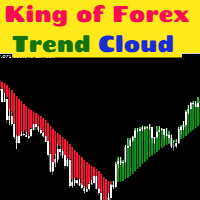
Hydra makes trading simple by using visual color-coded signals: for both dashboard and trend wave.
Green signals bullish trend
Red signals bearish trend
Gray signals neutral/ranging market.
1. Multiple Timeframe Strategy: Enhance your analysis by observing market behavior across multiple timeframes. This strategy allows you to confirm trends and make more accurate trading decisions.
2. Trend Following: Utilise the trend wave as explained in the user guide to identify and follow market trends. This approach helps you to stay in profitable trades longer and maximize your gains.
3. Trail Position: Optimise your exit plan with our trail position strategy. User manual explains how to adjust stop-loss levels as the market moves in our favor, protecting profits and minimizing risks.
4. Spotting a Good Entry Signal: The indicator excels in spotting optimal entry signals. This strategy enables you to enter trades at the most advantageous points, enhancing potential for success.
5. Entering a Trade After Correction: Powerful trends often corrects them before going even further. Hydra indicator can help you identify correction zones easily.
6. Merging with Other Indicators: For enhanced trend confirmation, observe market price action and consider combining with powerful Gann indicators like IQ FX Gann Levels (for forex major & minor pairs) and IQ Gold Gann Levels (for XAUUSD). You can even combine it with vedic astrological indicator IQ Star Lines for an optimal trade setup.
End Notes:
Indicator Technical Support: Message here.
Stay ahead of the market with Hydra Trend Rider; a non-repainting, precision-driven trading tool designed to give you clear trend direction, high-probability trade setups, and real-time alerts. Whether you're a day trader or a swing trader, this indicator simplifies decision-making and boosts trading accuracy. Get it now and trade smarter!
Risk Disclosure:
Trading financial markets carries inherent risks and may not be suitable for every investor. This indicator is designed as a tool to assist in trading decisions but does not guarantee profits or prevent losses, which could exceed your initial investment. Past performance is not a reliable indicator of future outcomes. Users are encouraged to fully understand the risks and seek independent financial advice if needed. Any trading decisions made using this indicator are at the user's discretion and responsibility.
Related topics:
Trend analysis, multiple timeframe trend analysis, candlestick charts, bar chart, trend dashboard, scalping, day trading, position trading, swing trading, trade following, trend riding, indicator, trend following, trend reversal, MetaTrader software, currency pairs, market analysis, chart window, mobile alert, trading strategy, multiple timeframe, dashboard, 4K monitors, risk disclosure, market price action, trading decisions, lag-free, range-bound conditions, bearish signal, bullish signal, correction, higher highs, lower lows, entry signals, downtrend, uptrend, manual, strategy examples, legal restrictions, responsible trading, eurusd, gbpusd, bitcoin.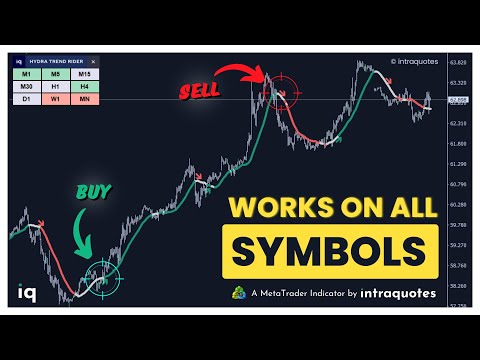













































Interesting concept