Mykola Demko
Mykola Demko
  • Информация
16+ лет
опыт работы
1
продуктов
153
демо-версий
10
работ
0
сигналов
0
подписчиков
Программирую на mql4, mql5

https://www.mql5.com/ru/users/Urain/publications
Vitaly Muzichenko
Vitaly Muzichenko
Оставил отзыв на заказчика за работу Need a convertion of MT4 ea to MT5
Sergii Onyshchenko
Sergii Onyshchenko
Опубликован скриншот
BTCUSDt, H4Gerchik and Co Limited
Vladimir Pastushak
Vladimir Pastushak
What Is a Price Chart?

A price chart is a visual representation of how an asset's price changes over time. It is the trader's most important tool: the chart shows where the market is headed and whether it is rising, falling or moving sideways. A chart turns thousands of trades made by market participants into a clear picture that can be analyzed. No type of analysis is possible without a price chart — not even news-based trading — because price has always been and remains the top priority in decision-making.

There are three main types of charts: line, bar and candlestick. A line chart connects closing prices and gives a general idea of the trend. A bar chart shows the open, high, low and close for each period. The candlestick chart is the most popular one: a single candle compactly reflects all four key prices and helps you quickly assess market sentiment. In addition to the chart type, it is important to choose the right timeframe — the time scale you use to analyze price movement, from one-minute to monthly candles.

Proper chart reading is the ability to see trends, support and resistance levels, reversal and continuation patterns, and to estimate the strength of a move by volume. Chart analysis is the foundation of most trading strategies, so it is the best place for a beginner to start. Once you master the basics — chart types, timeframes and core patterns — you will make a confident first step toward systematic and conscious trading.

In my profile, you will find a lot of useful educational information — don't forget to add me as a friend. Profile: https://www.mql5.com/ru/users/voldemar

Что такое график цены?

График цены — это визуальное представление движения котировок актива во времени. Это самый главный инструмент трейдера: именно по графику он оценивает, куда движется рынок и в каком состоянии он находится — растёт, падает или торгуется в диапазоне. График превращает тысячи сделок участников рынка в наглядную картину, которую можно анализировать. Без графика невозможно представить ни один вид анализа — ни технический, ни даже торговлю по новостям, ведь цена всегда была и остаётся высшим приоритетом для принятия решений.

Существует три основных вида графиков: линейный, баровый и японские свечи. Линейный график соединяет точки закрытия и даёт общее представление о тренде. Баровый график показывает цену открытия, максимум, минимум и закрытие за период. Самым популярным считается график японских свечей: одна свеча компактно отражает все четыре ключевые цены и позволяет быстро оценить настроение рынка. Помимо вида графика, важно уметь выбирать таймфрейм — временной масштаб, на котором вы анализируете движение цены, от минутных до месячных свечей.

Грамотное чтение графика — это умение видеть тренды, уровни поддержки и сопротивления, разворотные и продолженческие фигуры, а также оценивать силу движения по объёмам. Именно графический анализ лежит в основе большинства торговых стратегий, поэтому начинающему трейдеру стоит начать обучение именно с него. Освоив базу — виды графиков, таймфреймы и базовые паттерны — вы сделаете первый уверенный шаг к системной и осознанной торговле.

В моём профиле Вы найдете много полезной обучающей информации, (не забудь добавить в друзья) Профиль: https://www.mql5.com/ru/users/voldemar
Eleni Anna Branou - Juvenille Emperor Limited
Eleni Anna Branou
Matrix Arrow Indicator MT4/5© is a unique 10 in 1 trend following 100% non-repainting multi-timeframe indicator that can be used on all symbols/instruments: forex, commodities, cryptocurrencies, indices, stocks. Matrix Arrow Indicator MT4/5© will determine the current trend at its early stages, gathering information and data from up to 10 standard indicators, which are: Average Directional Movement Index (ADX), Commodity Channel Index (CCI), Classic Heiken Ashi candles, Moving Average, Moving Average Convergence Divergence (MACD), Relative Vigor Index (RVI), Relative Strength Index (RSI), Parabolic SAR, Stochastic Oscillator, Williams' Percent Range.

When all indicators give a valid buy or sell signal, a corresponding arrow will be printed on the chart, at the opening of the next candle/bar indicating a strong uptrend/downtrend. The user can choose which indicators will use and can adjust the parameters of each indicator separately. Matrix Arrow Indicator MT4/5© gathers information only from the selected indicators and prints the arrow based only on their data. Matrix Arrow Indicator MT4/5© can also send terminal, push notification or email alerts for all new signals. Matrix Arrow Indicator MT4/5© is a super friendly & efficient solution whether you are a scalper, intraday or swing trader!

Matrix Arrow Indicator MT4/5© comes with a free add on, the Matrix Arrow Indicator Multi Timeframe Panel MT4/5© that offers the option to show the Matrix Arrow Indicator signals for 5 customizable timeframes of 16 modifiable symbols/instruments. It gives also the option to change the current chart it is attached onto, by clicking any one of the 16 modifiable symbol buttons. This will allow you to work much faster between different symbols and never miss a trading opportunity again.

✔️ 100% Non-Repainting indicator
✔️ 10 in 1 unique and extremely efficient Matrix and Arrow indicator
✔️ Works on all timeframes and all symbols/instruments
✔️ Super accurate entry Arrow signals that indicate a strong trend
✔️ Exit dot signals define neutral periods with no clear trend
✔️ Equally effective in trending and ranging markets
✔️ Each one indicator can be turned ON/OFF
✔️ Each and every parameter of all 10 indicators are fully adjustable
✔️ Matrix and Arrow colors are fully customizable
✔️ Free add on Panel with Matrix Arrow signals for 16 symbols and 5 timeframes
✔️ Terminal, Push Notification and Email Alerts available
✔️ Ideal for beginners but also a great asset for experienced traders

🔥🔥🔥🔥🔥 Matrix Arrow Indicator MT4/5© Demonstration Video: https://www.youtube.com/watch?v=-teba5v_90I

⭐️⭐️⭐️⭐️⭐️ Matrix Arrow Indicator MT4©: https://www.mql5.com/en/market/product/69726

⭐️⭐️⭐️⭐️⭐️ Matrix Arrow Indicator MT5©: https://www.mql5.com/en/market/product/69725

👉 Matrix Arrow Indicator MT4/5© Real Trading Examples: https://www.mql5.com/en/blogs/post/745715

✅ Matrix Arrow Indicator MT4/5© Installation Guide: https://www.mql5.com/en/blogs/post/745711

✅ Matrix Arrow Indicator MT4/5© Settings/Inputs: https://www.mql5.com/en/blogs/post/745707

💎💎💎💎💎 Check out all my Expert Advisors, Indicators and Utilities: https://www.mql5.com/en/users/eleanna74/seller

3 October 2026
Rustamzhan Salidzhanov
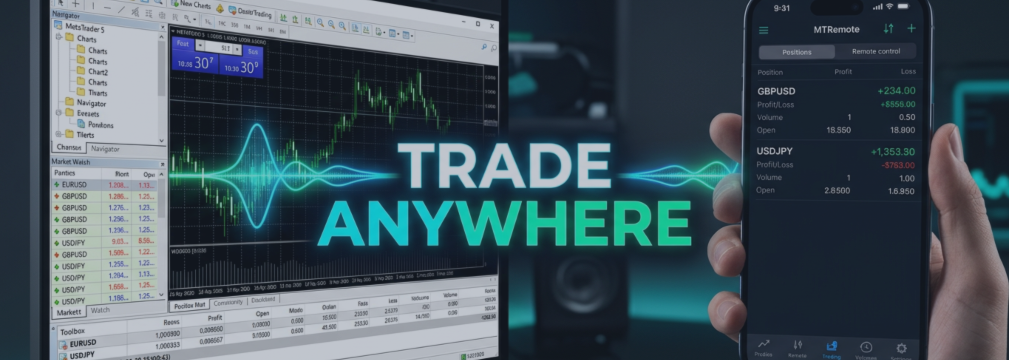
The best way to understand remote control is to use it. That is why MTRemote has a free live demo: a real control panel connected to a real MetaTrader terminal, open in your browser, with nothing to install on your computer or your phone...
Rustamzhan Salidzhanov
Лучший способ понять, что такое удалённое управление, - попробовать его самому. Поэтому у MTRemote есть бесплатное живое демо: настоящая панель управления, подключённая к настоящему терминалу MetaTrader...
Eleni Anna Branou - Juvenille Emperor Limited
Eleni Anna Branou
Basket EA MT4/5© is a powerful profit-harvesting tool and a comprehensive account protection system, all combined into a simple and easy-to-use solution. Its core purpose is to give you complete control over your trading account’s overall profit and loss by managing all open positions at the basket level, rather than individually. The EA offers a full range of basket-level features, including take profit, stop loss, break even, and trailing stop loss. These can be configured as a percentage of your account balance, a fixed amount in your account’s currency, or a target in average points across all managed trades. This flexibility allows traders to tailor risk and profit strategies to their unique needs. Basket EA MT4/5© also supports intelligent trade filtering, allowing you to include or exclude specific trades from management based on their magic number, symbol, or comment. This ensures that only the trades you want managed by the EA are affected, while others are left untouched.

For added protection, the EA includes advanced account safeguarding mechanisms. When a specified equity take profit or stop loss level or a maximum drawdown from the account's balance high is reached, the EA can automatically close all open trades, delete any pending orders, and shut down all charts, removing any Expert Advisors running on them. This feature helps protect your capital during unexpected market movements or when reaching your predefined account targets.

✔️ Does not use Martingale, Grid, Averaging, or other high-risk techniques
✔️ Allows exclusion of specific Magic Numbers, trade comments, or symbol trades from management
✔️ Basket Take Profit in % for all managed trades combined
✔️ Basket Stop Loss in % for all managed trades combined
✔️ Basket Break Even in % for all managed trades combined
✔️ Basket Trailing Stop Loss in % for all managed trades combined
✔️ Basket Take Profit in money for all managed trades combined
✔️ Basket Stop Loss in money for all managed trades combined
✔️ Basket Break Even in money for all managed trades combined
✔️ Basket Trailing Stop Loss in money for all managed trades combined
✔️ Basket Take Profit in average points for all managed trades combined
✔️ Basket Stop Loss in average points for all managed trades combined
✔️ Basket Break Even in average points for all managed trades combined
✔️ Basket Trailing Stop Loss in average points for all managed trades combined
✔️ Option to reset all Basket settings after each account balance update or after a Basket target is hit
✔️ Option to close all managed trades at break even after recovering from a drawdown
✔️ Option to close all managed trades at a specific time on a chosen day or daily
✔️ Account protection feature that closes all trades and charts when equity-based TP or SL is reached
✔️ Maximum drawdown % from balance high that closes all trades and charts/EAs if triggered
✔️ Optional on-chart panel to monitor profit/loss and close trades by type or all at once
✔️ Terminal, push notification, and email alerts when any Basket or protection condition is triggered
✔️ 100% automated Expert Advisor
✔️ Fully compatible with MQL5 VPS

⭐️⭐️⭐️⭐️⭐️ Basket EA EA MT4©: https://www.mql5.com/en/market/product/45192

⭐️⭐️⭐️⭐️⭐️ Basket EA EA MT5©: https://www.mql5.com/en/market/product/72782

📥 Download the Basket EA MT4© demo version in your demo account now: https://c.mql5.com/6/988/Basket_EA_MT4_2_20_Demo.ex4

📥 Download the Basket EA MT5© demo version in your demo account now: https://c.mql5.com/6/988/Basket_EA_MT5_2_00_Demo.ex5

✅ Basket EA MT4/5© detailed Settings/Inputs guide: https://www.mql5.com/en/blogs/post/746117

💎💎💎💎💎 Check out all my Expert Advisors and Utilities: https://www.mql5.com/en/users/eleanna74/seller

3 October 2026
Eleni Anna Branou - Juvenille Emperor Limited
Eleni Anna Branou
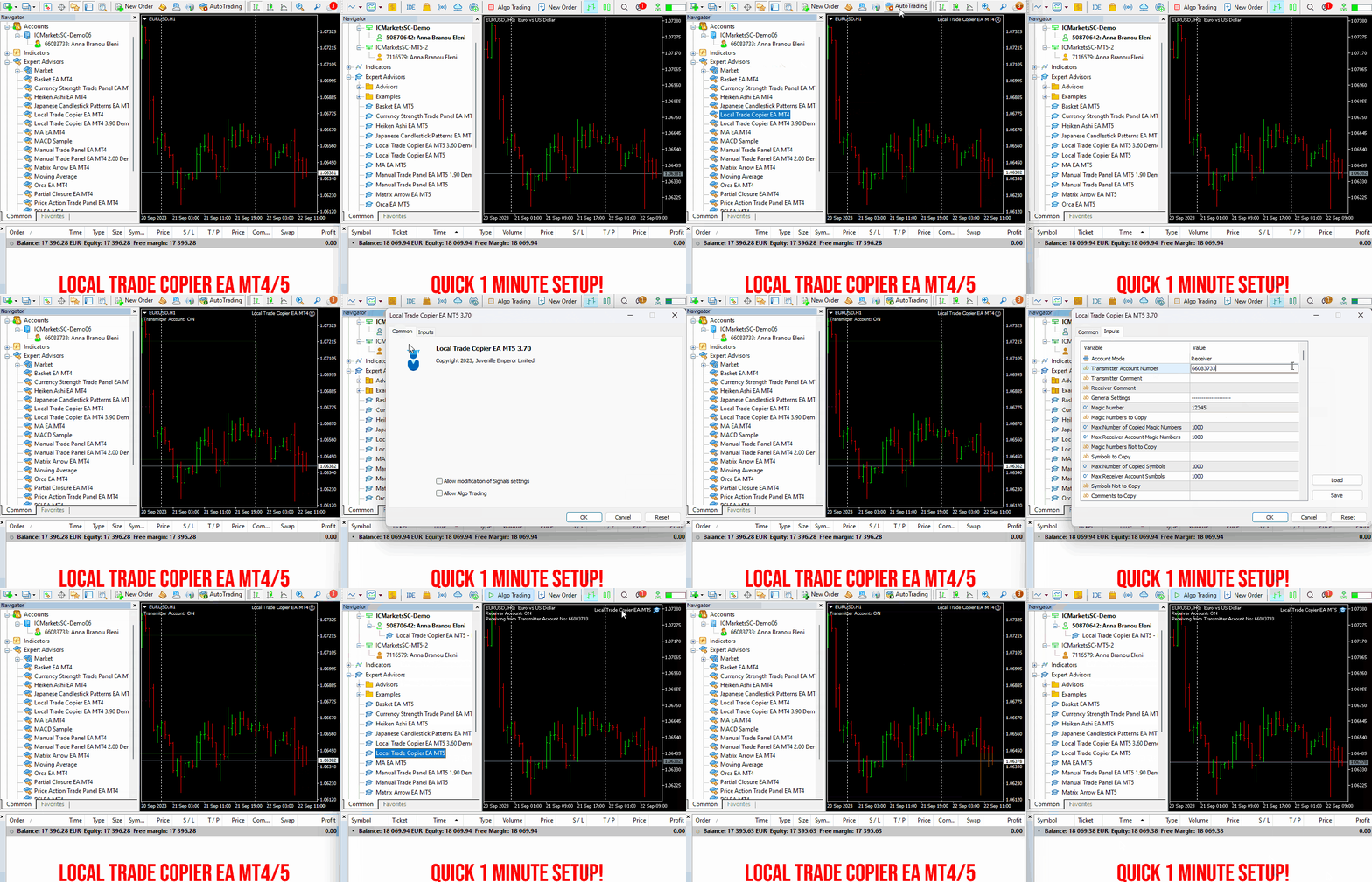
Local Trade Copier EA MT4/5© is a fast and flexible trade copier for copying and managing trades between multiple MetaTrader 4 and MetaTrader 5 accounts on the same Windows computer or Windows VPS.

Set up your Transmitter and Receiver terminals in about 1 minute and copy manual or EA trades between accounts at the same or different brokers. Under suitable conditions, trade information can be synchronized between local MetaTrader terminals in under 0.5 seconds. Actual trade execution depends on broker latency, network conditions, computer/VPS performance and terminal workload.

Each Receiver account can use its own lot sizing, risk management, trade filtering, symbol mapping, trade management and account-protection settings. This allows the same trading activity to be synchronized across multiple accounts while each Receiver can be configured according to its own requirements.

✔️ Copying & Connectivity: Copy between multiple MT4/MT5 accounts* on the same Windows computer or VPS, across different brokers and real/demo accounts.
✔️ Lot Sizing & Risk Management: Choose from 18 lot size and risk options, with independent sizing and risk settings for each Receiver.
✔️ Trade Filtering & Copying Controls: Filter copied trades by symbol, magic number, comment, ticket, volume, direction, day and time.
✔️ Trade Management: Manage market and pending orders, TP/SL, partial closures, reopening, reverse copying, better-price conditions and trade splitting.
✔️ Account Protection: Control lot limits, risk, daily drawdown/profit, copying restrictions and emergency protection independently for each Receiver.
✔️ Broker Compatibility & Symbol Mapping: Copy between different brokers and configure suffixes and special symbol mappings when symbol names differ.
✔️ Notifications & Reliability: Use email/push notifications, persistent settings and MetaTrader logs for monitoring and troubleshooting.
✔️ 20 Activations: Each MT4/MT5 version includes 20 activations, allowing you to install and use it on multiple Windows computers or VPSs.

* MT4 → MT5 and MT5 → MT4 copying requires both LTC versions. Both terminals must run on the same Windows computer or Windows VPS.

🔥🔥🔥🔥🔥 Watch the Local Trade Copier EA MT4/5© Quick Setup Video: https://www.youtube.com/watch?v=zhc9s56QhlE

⭐️⭐️⭐️⭐️⭐️ Local Trade Copier EA MT4©: https://www.mql5.com/en/market/product/68950

⭐️⭐️⭐️⭐️⭐️ Local Trade Copier EA MT5©: https://www.mql5.com/en/market/product/68951

📥 Download the Local Trade Copier EA MT4© Free Demo: https://c.mql5.com/6/1030/Local_Trade_Copier_EA_MT4_4_60_Demo.ex4

📥 Download the Local Trade Copier EA MT5© Free Demo: https://c.mql5.com/6/1030/Local_Trade_Copier_EA_MT5_4_40_Demo.ex5

✅ Local Trade Copier EA MT4/5© Purchase, Installation & Quick Setup Guide: https://www.mql5.com/en/blogs/post/745683

✅ Local Trade Copier EA MT4/5© Detailed Inputs/Settings Guide: https://www.mql5.com/en/blogs/post/745681

✅ Local Trade Copier EA MT4/5© Troubleshooting Guide: https://www.mql5.com/en/blogs/post/746561

💎💎💎💎💎 View all my Expert Advisors, Indicators and Utilities: https://www.mql5.com/en/users/eleanna74/seller

3 October 2026
.
Eleni Anna Branou - Juvenille Emperor Limited
Eleni Anna Branou
Moving Average EA ΜΤ4/5© is a fully automated Expert Advisor that takes the trading of Moving Average to a whole new level. Moving Average EA MT4/5© can either open one buy trade when MA turns up (blue color MA) or one sell trade when MA turns down (red color MA) or can open a new same direction trade on every new candle, as long as the slope direction of the Moving Average remains unchanged. A series of unique settings make this EA extremely versatile. This EA comes with provided set files for many symbols, specially optimized for ECN Raw Spread ICMarkets accounts (New York based GMT+3 time zone servers). Other brokers or account types may be used, but you may need to make any necessary time adjustments to fit your broker/account.

✔️ Martingale, Grid, Averaging or other dangerous techniques are not used
✔️ New trade on every change of the Moving Average slope direction
✔️ Option for a new same direction trade on each new candle
✔️ Offset setting for a better trade placement after a price retracement
✔️ Hard and Virtual Take Profit and Stop Loss levels
✔️ SL, TP, BE and Trailing SL levels in Percentage of the Average Daily Range
✔️ Basket TP, SL, BE and Trailing SL in % for all open positions combined
✔️ Optimized set files for many symbols/instruments
✔️ 100% automated Expert Advisor
✔️ MQL5 VPS compatible

🔥🔥🔥🔥🔥 Moving Average EA MT4/5© Backtests & New Set Files: https://www.mql5.com/en/blogs/post/745753

⭐️⭐️⭐️⭐️⭐️ Moving Average EA ΜΤ4©: https://www.mql5.com/en/market/product/45633

⭐️⭐️⭐️⭐️⭐️ Moving Average EA ΜΤ5©: https://www.mql5.com/en/market/product/47673

💎💎💎💎💎 Check out all my Expert Advisors, Indicators and Utilities: https://www.mql5.com/en/users/eleanna74/seller

2 October 2026
Bernhard Schweigert
Bernhard Schweigert Выставил продукт

My Trade History PRO — Русское описание My Trade History PRO Анализируйте свои сделки — первый шаг к успешной торговле. Успешные трейдеры не просто торгуют. Они анализируют. Они разбирают каждую сделку. Они учатся на каждой позиции. My Trade History PRO   делает этот процесс простым, наглядным и мощным. Независимо от того, торгуете ли вы вручную, по сигналам или с помощью советника — этот индикатор даёт вам полную историю сделок прямо на графике с профессиональной аналитикой. ОСНОВНЫЕ

Eleni Anna Branou - Juvenille Emperor Limited
Eleni Anna Branou
Partial Closure EA MT4/5© allows you to partially close any trade on your account, manually by a chosen percentage of the lot size and/or by trade ticket, or automatically at specified percentages of the TP/SL level, closing a percentage of the initial lot size across up to 10 take profit and 10 stop loss levels.. It can manage all or selected trades in your account by specifying or excluding certain magic numbers, comments, or symbols.

✔️ Extremely easy and straightforward interface
✔️ Works smoothly on any chart, account type, or broker
✔️ Automatic partial closure of managed trades at specified TP/SL levels, closing independent percentages of the initial lot size across up to 10 TP and 10 SL levels
✔️ Manual partial closure of all managed trades or any individual trade by ticket number, based on a percentage of the lot size
✔️ Option to move the stop loss to break even for the remaining portion of trades automatically partially closed as above
✔️ Option to move the stop loss to break even once a specified profit level (in points) is reached
✔️ Ability to exclude certain magic numbers, comments, or symbol trades from management
✔️ Compatible with MQL5 VPS

⭐️⭐️⭐️⭐️⭐️ Partial Closure EA MT4©: https://www.mql5.com/en/market/product/82356

⭐️⭐️⭐️⭐️⭐️ Partial Closure EA MT5©: https://www.mql5.com/en/market/product/82357

📥 Download the Partial Closure EA MT4© demo version in your demo account now: https://c.mql5.com/6/975/Partial_Closure_EA_MT4_1.30_Demo.ex4

📥 Download the Partial Closure EA MT5© demo version in your demo account now: https://c.mql5.com/6/975/Partial_Closure_EA_MT5_1.30_Demo.ex5

✅ Partial Closure EA MT4/5© installation & user guide: https://www.mql5.com/en/blogs/post/749385

💎💎💎💎💎 Check out all my Expert Advisors, Indicators and Utilities: https://www.mql5.com/en/users/eleanna74/seller

2 October 2026
Vladimir Pastushak
Vladimir Pastushak Выставил продукт

180.00 USD

Торговый робот (Expert Advisor) для MetaTrader , объединяющий трендовое открытие позиций, усреднение при откатах, автоматический перевод в безубыток, трейлинг-стоп и закрытие серии сделок с контролируемой минимальной прибылью. VR Proton — это не просто «советник по сигналам». Это полноценная система управления серией позиций, которая сама решает, когда добавить сделку, когда защитить прибыль безубыточным стопом, когда подтянуть защитный уровень вслед за ценой и когда выйти по усреднённому уровню

Vladimir Pastushak
Vladimir Pastushak Выставил продукт

180.00 USD

Торговый робот (Expert Advisor) для MetaTrader , объединяющий трендовое открытие позиций, усреднение при откатах, автоматический перевод в безубыток, трейлинг-стоп и закрытие серии сделок с контролируемой минимальной прибылью. VR Proton — это не просто «советник по сигналам». Это полноценная система управления серией позиций, которая сама решает, когда добавить сделку, когда защитить прибыль безубыточным стопом, когда подтянуть защитный уровень вслед за ценой и когда выйти по усреднённому уровню

Eleni Anna Branou - Juvenille Emperor Limited
Eleni Anna Branou
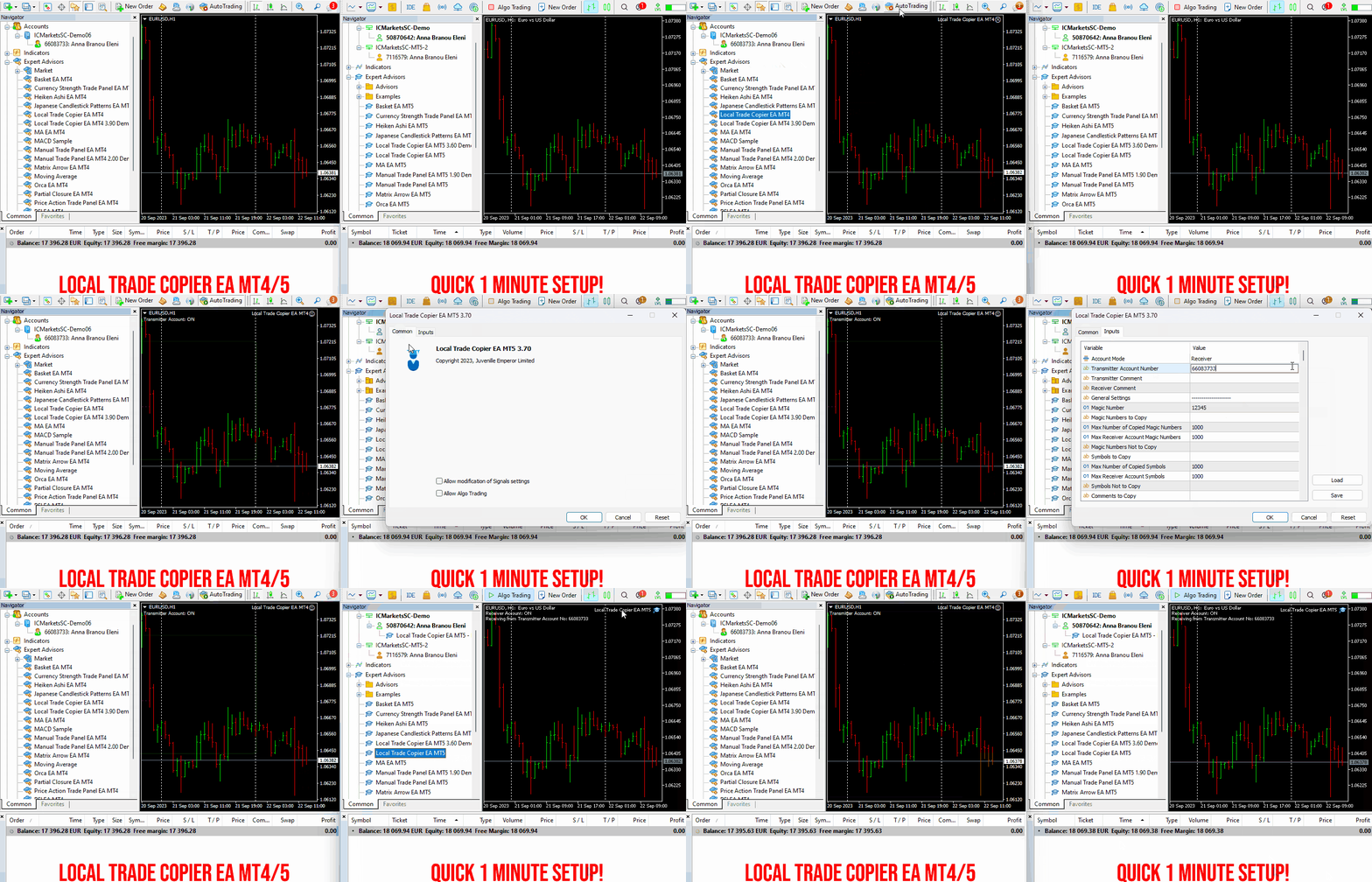
Local Trade Copier EA MT4/5© is a fast and flexible trade copier for copying and managing trades between multiple MetaTrader 4 and MetaTrader 5 accounts on the same Windows computer or Windows VPS.

Set up your Transmitter and Receiver terminals in about 1 minute and copy manual or EA trades between accounts at the same or different brokers. Under suitable conditions, trade information can be synchronized between local MetaTrader terminals in under 0.5 seconds. Actual trade execution depends on broker latency, network conditions, computer/VPS performance and terminal workload.

Each Receiver account can use its own lot sizing, risk management, trade filtering, symbol mapping, trade management and account-protection settings. This allows the same trading activity to be synchronized across multiple accounts while each Receiver can be configured according to its own requirements.

✔️ Copying & Connectivity: Copy between multiple MT4/MT5 accounts* on the same Windows computer or VPS, across different brokers and real/demo accounts.
✔️ Lot Sizing & Risk Management: Choose from 18 lot size and risk options, with independent sizing and risk settings for each Receiver.
✔️ Trade Filtering & Copying Controls: Filter copied trades by symbol, magic number, comment, ticket, volume, direction, day and time.
✔️ Trade Management: Manage market and pending orders, TP/SL, partial closures, reopening, reverse copying, better-price conditions and trade splitting.
✔️ Account Protection: Control lot limits, risk, daily drawdown/profit, copying restrictions and emergency protection independently for each Receiver.
✔️ Broker Compatibility & Symbol Mapping: Copy between different brokers and configure suffixes and special symbol mappings when symbol names differ.
✔️ Notifications & Reliability: Use email/push notifications, persistent settings and MetaTrader logs for monitoring and troubleshooting.
✔️ 20 Activations: Each MT4/MT5 version includes 20 activations, allowing you to install and use it on multiple Windows computers or VPSs.

* MT4 → MT5 and MT5 → MT4 copying requires both LTC versions. Both terminals must run on the same Windows computer or Windows VPS.

🔥🔥🔥🔥🔥 Watch the Local Trade Copier EA MT4/5© Quick Setup Video: https://www.youtube.com/watch?v=zhc9s56QhlE

⭐️⭐️⭐️⭐️⭐️ Local Trade Copier EA MT4©: https://www.mql5.com/en/market/product/68950

⭐️⭐️⭐️⭐️⭐️ Local Trade Copier EA MT5©: https://www.mql5.com/en/market/product/68951

📥 Download the Local Trade Copier EA MT4© Free Demo: https://c.mql5.com/6/1030/Local_Trade_Copier_EA_MT4_4_60_Demo.ex4

📥 Download the Local Trade Copier EA MT5© Free Demo: https://c.mql5.com/6/1030/Local_Trade_Copier_EA_MT5_4_40_Demo.ex5

✅ Local Trade Copier EA MT4/5© Purchase, Installation & Quick Setup Guide: https://www.mql5.com/en/blogs/post/745683

✅ Local Trade Copier EA MT4/5© Detailed Inputs/Settings Guide: https://www.mql5.com/en/blogs/post/745681

✅ Local Trade Copier EA MT4/5© Troubleshooting Guide: https://www.mql5.com/en/blogs/post/746561

💎💎💎💎💎 View all my Expert Advisors, Indicators and Utilities: https://www.mql5.com/en/users/eleanna74/seller

2 October 2026
Yuri Papshev
Yuri Papshev
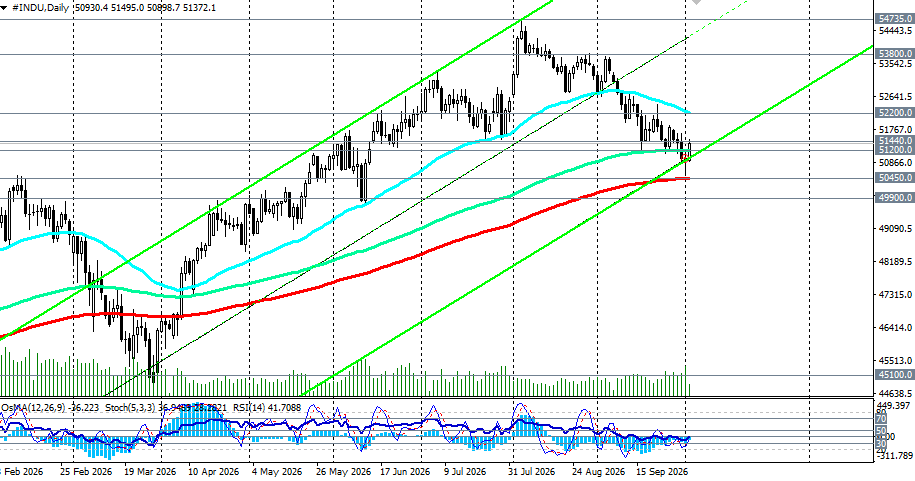
DJIA получил передышку после слабого NFP, но устойчивость отскока под вопросом. Ключевым уровнем для быков остаётся 51500.0, для медведей — 50900.0. Наиболее вероятная динамика (базовый сценарий): консолидация в диапазоне 50900.0–51550.0 с постепенным смещением к верхней границе. Пробой верхней границы откроет путь к 52000.0-52200.0, пробой нижней — к 50450.0 и 50000.0-49900.0
👉 больше в Телеграм-канале https://t.me/fxrealtrading
Eleni Anna Branou - Juvenille Emperor Limited
Eleni Anna Branou
Matrix Arrow Indicator MT4/5© is a unique 10 in 1 trend following 100% non-repainting multi-timeframe indicator that can be used on all symbols/instruments: forex, commodities, cryptocurrencies, indices, stocks. Matrix Arrow Indicator MT4/5© will determine the current trend at its early stages, gathering information and data from up to 10 standard indicators, which are: Average Directional Movement Index (ADX), Commodity Channel Index (CCI), Classic Heiken Ashi candles, Moving Average, Moving Average Convergence Divergence (MACD), Relative Vigor Index (RVI), Relative Strength Index (RSI), Parabolic SAR, Stochastic Oscillator, Williams' Percent Range.

When all indicators give a valid buy or sell signal, a corresponding arrow will be printed on the chart, at the opening of the next candle/bar indicating a strong uptrend/downtrend. The user can choose which indicators will use and can adjust the parameters of each indicator separately. Matrix Arrow Indicator MT4/5© gathers information only from the selected indicators and prints the arrow based only on their data. Matrix Arrow Indicator MT4/5© can also send terminal, push notification or email alerts for all new signals. Matrix Arrow Indicator MT4/5© is a super friendly & efficient solution whether you are a scalper, intraday or swing trader!

Matrix Arrow Indicator MT4/5© comes with a free add on, the Matrix Arrow Indicator Multi Timeframe Panel MT4/5© that offers the option to show the Matrix Arrow Indicator signals for 5 customizable timeframes of 16 modifiable symbols/instruments. It gives also the option to change the current chart it is attached onto, by clicking any one of the 16 modifiable symbol buttons. This will allow you to work much faster between different symbols and never miss a trading opportunity again.

✔️ 100% Non-Repainting indicator
✔️ 10 in 1 unique and extremely efficient Matrix and Arrow indicator
✔️ Works on all timeframes and all symbols/instruments
✔️ Super accurate entry Arrow signals that indicate a strong trend
✔️ Exit dot signals define neutral periods with no clear trend
✔️ Equally effective in trending and ranging markets
✔️ Each one indicator can be turned ON/OFF
✔️ Each and every parameter of all 10 indicators are fully adjustable
✔️ Matrix and Arrow colors are fully customizable
✔️ Free add on Panel with Matrix Arrow signals for 16 symbols and 5 timeframes
✔️ Terminal, Push Notification and Email Alerts available
✔️ Ideal for beginners but also a great asset for experienced traders

🔥🔥🔥🔥🔥 Matrix Arrow Indicator MT4/5© Demonstration Video: https://www.youtube.com/watch?v=-teba5v_90I

⭐️⭐️⭐️⭐️⭐️ Matrix Arrow Indicator MT4©: https://www.mql5.com/en/market/product/69726

⭐️⭐️⭐️⭐️⭐️ Matrix Arrow Indicator MT5©: https://www.mql5.com/en/market/product/69725

👉 Matrix Arrow Indicator MT4/5© Real Trading Examples: https://www.mql5.com/en/blogs/post/745715

✅ Matrix Arrow Indicator MT4/5© Installation Guide: https://www.mql5.com/en/blogs/post/745711

✅ Matrix Arrow Indicator MT4/5© Settings/Inputs: https://www.mql5.com/en/blogs/post/745707

💎💎💎💎💎 Check out all my Expert Advisors, Indicators and Utilities: https://www.mql5.com/en/users/eleanna74/seller

2 October 2026
Eleni Anna Branou - Juvenille Emperor Limited
Eleni Anna Branou
Basket EA MT4/5© is a powerful profit-harvesting tool and a comprehensive account protection system, all combined into a simple and easy-to-use solution. Its core purpose is to give you complete control over your trading account’s overall profit and loss by managing all open positions at the basket level, rather than individually. The EA offers a full range of basket-level features, including take profit, stop loss, break even, and trailing stop loss. These can be configured as a percentage of your account balance, a fixed amount in your account’s currency, or a target in average points across all managed trades. This flexibility allows traders to tailor risk and profit strategies to their unique needs. Basket EA MT4/5© also supports intelligent trade filtering, allowing you to include or exclude specific trades from management based on their magic number, symbol, or comment. This ensures that only the trades you want managed by the EA are affected, while others are left untouched.

For added protection, the EA includes advanced account safeguarding mechanisms. When a specified equity take profit or stop loss level or a maximum drawdown from the account's balance high is reached, the EA can automatically close all open trades, delete any pending orders, and shut down all charts, removing any Expert Advisors running on them. This feature helps protect your capital during unexpected market movements or when reaching your predefined account targets.

✔️ Does not use Martingale, Grid, Averaging, or other high-risk techniques
✔️ Allows exclusion of specific Magic Numbers, trade comments, or symbol trades from management
✔️ Basket Take Profit in % for all managed trades combined
✔️ Basket Stop Loss in % for all managed trades combined
✔️ Basket Break Even in % for all managed trades combined
✔️ Basket Trailing Stop Loss in % for all managed trades combined
✔️ Basket Take Profit in money for all managed trades combined
✔️ Basket Stop Loss in money for all managed trades combined
✔️ Basket Break Even in money for all managed trades combined
✔️ Basket Trailing Stop Loss in money for all managed trades combined
✔️ Basket Take Profit in average points for all managed trades combined
✔️ Basket Stop Loss in average points for all managed trades combined
✔️ Basket Break Even in average points for all managed trades combined
✔️ Basket Trailing Stop Loss in average points for all managed trades combined
✔️ Option to reset all Basket settings after each account balance update or after a Basket target is hit
✔️ Option to close all managed trades at break even after recovering from a drawdown
✔️ Option to close all managed trades at a specific time on a chosen day or daily
✔️ Account protection feature that closes all trades and charts when equity-based TP or SL is reached
✔️ Maximum drawdown % from balance high that closes all trades and charts/EAs if triggered
✔️ Optional on-chart panel to monitor profit/loss and close trades by type or all at once
✔️ Terminal, push notification, and email alerts when any Basket or protection condition is triggered
✔️ 100% automated Expert Advisor
✔️ Fully compatible with MQL5 VPS

⭐️⭐️⭐️⭐️⭐️ Basket EA EA MT4©: https://www.mql5.com/en/market/product/45192

⭐️⭐️⭐️⭐️⭐️ Basket EA EA MT5©: https://www.mql5.com/en/market/product/72782

📥 Download the Basket EA MT4© demo version in your demo account now: https://c.mql5.com/6/988/Basket_EA_MT4_2_20_Demo.ex4

📥 Download the Basket EA MT5© demo version in your demo account now: https://c.mql5.com/6/988/Basket_EA_MT5_2_00_Demo.ex5

✅ Basket EA MT4/5© detailed Settings/Inputs guide: https://www.mql5.com/en/blogs/post/746117

💎💎💎💎💎 Check out all my Expert Advisors and Utilities: https://www.mql5.com/en/users/eleanna74/seller

2 October 2026
Eleni Anna Branou - Juvenille Emperor Limited
Eleni Anna Branou
Local Trade Copier EA MT4/5© is a fast and flexible trade copier for copying and managing trades between multiple MetaTrader 4 and MetaTrader 5 accounts on the same Windows computer or Windows VPS.

Set up your Transmitter and Receiver terminals in about 1 minute and copy manual or EA trades between accounts at the same or different brokers. Under suitable conditions, trade information can be synchronized between local MetaTrader terminals in under 0.5 seconds. Actual trade execution depends on broker latency, network conditions, computer/VPS performance and terminal workload.

Each Receiver account can use its own lot sizing, risk management, trade filtering, symbol mapping, trade management and account-protection settings. This allows the same trading activity to be synchronized across multiple accounts while each Receiver can be configured according to its own requirements.

✔️ Copying & Connectivity: Copy between multiple MT4/MT5 accounts* on the same Windows computer or VPS, across different brokers and real/demo accounts.
✔️ Lot Sizing & Risk Management: Choose from 18 lot size and risk options, with independent sizing and risk settings for each Receiver.
✔️ Trade Filtering & Copying Controls: Filter copied trades by symbol, magic number, comment, ticket, volume, direction, day and time.
✔️ Trade Management: Manage market and pending orders, TP/SL, partial closures, reopening, reverse copying, better-price conditions and trade splitting.
✔️ Account Protection: Control lot limits, risk, daily drawdown/profit, copying restrictions and emergency protection independently for each Receiver.
✔️ Broker Compatibility & Symbol Mapping: Copy between different brokers and configure suffixes and special symbol mappings when symbol names differ.
✔️ Notifications & Reliability: Use email/push notifications, persistent settings and MetaTrader logs for monitoring and troubleshooting.
✔️ 20 Activations: Each MT4/MT5 version includes 20 activations, allowing you to install and use it on multiple Windows computers or VPSs.

* MT4 → MT5 and MT5 → MT4 copying requires both LTC versions. Both terminals must run on the same Windows computer or Windows VPS.

🔥🔥🔥🔥🔥 Watch the Local Trade Copier EA MT4/5© Quick Setup Video: https://www.youtube.com/watch?v=zhc9s56QhlE

⭐️⭐️⭐️⭐️⭐️ Local Trade Copier EA MT4©: https://www.mql5.com/en/market/product/68950

⭐️⭐️⭐️⭐️⭐️ Local Trade Copier EA MT5©: https://www.mql5.com/en/market/product/68951

📥 Download the Local Trade Copier EA MT4© Free Demo: https://c.mql5.com/6/1030/Local_Trade_Copier_EA_MT4_4_60_Demo.ex4

📥 Download the Local Trade Copier EA MT5© Free Demo: https://c.mql5.com/6/1030/Local_Trade_Copier_EA_MT5_4_40_Demo.ex5

✅ Local Trade Copier EA MT4/5© Purchase, Installation & Quick Setup Guide: https://www.mql5.com/en/blogs/post/745683

✅ Local Trade Copier EA MT4/5© Detailed Inputs/Settings Guide: https://www.mql5.com/en/blogs/post/745681

✅ Local Trade Copier EA MT4/5© Troubleshooting Guide: https://www.mql5.com/en/blogs/post/746561

💎💎💎💎💎 View all my Expert Advisors, Indicators and Utilities: https://www.mql5.com/en/users/eleanna74/seller

2 October 2026
.
Eleni Anna Branou - Juvenille Emperor Limited
Eleni Anna Branou
Matrix Arrow Indicator MT4/5© is a unique 10 in 1 trend following 100% non-repainting multi-timeframe indicator that can be used on all symbols/instruments: forex, commodities, cryptocurrencies, indices, stocks. Matrix Arrow Indicator MT4/5© will determine the current trend at its early stages, gathering information and data from up to 10 standard indicators, which are: Average Directional Movement Index (ADX), Commodity Channel Index (CCI), Classic Heiken Ashi candles, Moving Average, Moving Average Convergence Divergence (MACD), Relative Vigor Index (RVI), Relative Strength Index (RSI), Parabolic SAR, Stochastic Oscillator, Williams' Percent Range.

When all indicators give a valid buy or sell signal, a corresponding arrow will be printed on the chart, at the opening of the next candle/bar indicating a strong uptrend/downtrend. The user can choose which indicators will use and can adjust the parameters of each indicator separately. Matrix Arrow Indicator MT4/5© gathers information only from the selected indicators and prints the arrow based only on their data. Matrix Arrow Indicator MT4/5© can also send terminal, push notification or email alerts for all new signals. Matrix Arrow Indicator MT4/5© is a super friendly & efficient solution whether you are a scalper, intraday or swing trader!

Matrix Arrow Indicator MT4/5© comes with a free add on, the Matrix Arrow Indicator Multi Timeframe Panel MT4/5© that offers the option to show the Matrix Arrow Indicator signals for 5 customizable timeframes of 16 modifiable symbols/instruments. It gives also the option to change the current chart it is attached onto, by clicking any one of the 16 modifiable symbol buttons. This will allow you to work much faster between different symbols and never miss a trading opportunity again.

✔️ 100% Non-Repainting indicator
✔️ 10 in 1 unique and extremely efficient Matrix and Arrow indicator
✔️ Works on all timeframes and all symbols/instruments
✔️ Super accurate entry Arrow signals that indicate a strong trend
✔️ Exit dot signals define neutral periods with no clear trend
✔️ Equally effective in trending and ranging markets
✔️ Each one indicator can be turned ON/OFF
✔️ Each and every parameter of all 10 indicators are fully adjustable
✔️ Matrix and Arrow colors are fully customizable
✔️ Free add on Panel with Matrix Arrow signals for 16 symbols and 5 timeframes
✔️ Terminal, Push Notification and Email Alerts available
✔️ Ideal for beginners but also a great asset for experienced traders

🔥🔥🔥🔥🔥 Matrix Arrow Indicator MT4/5© Demonstration Video: https://www.youtube.com/watch?v=-teba5v_90I

⭐️⭐️⭐️⭐️⭐️ Matrix Arrow Indicator MT4©: https://www.mql5.com/en/market/product/69726

⭐️⭐️⭐️⭐️⭐️ Matrix Arrow Indicator MT5©: https://www.mql5.com/en/market/product/69725

👉 Matrix Arrow Indicator MT4/5© Real Trading Examples: https://www.mql5.com/en/blogs/post/745715

✅ Matrix Arrow Indicator MT4/5© Installation Guide: https://www.mql5.com/en/blogs/post/745711

✅ Matrix Arrow Indicator MT4/5© Settings/Inputs: https://www.mql5.com/en/blogs/post/745707

💎💎💎💎💎 Check out all my Expert Advisors, Indicators and Utilities: https://www.mql5.com/en/users/eleanna74/seller

1 October 2026
Eleni Anna Branou - Juvenille Emperor Limited
Eleni Anna Branou
Matrix Arrow EA MT4/5© is a unique expert advisor that can trade the Matrix Arrow Indicator's MT4/5© signals with a trade panel on the chart, manually or 100% automatically. Matrix Arrow Indicator MT4/5© will determine the current trend at its early stages, gathering information and data from up to 10 standard indicators, which are: Average Directional Movement Index (ADX), Commodity Channel Index (CCI), Classic Heiken Ashi candles, Moving Average, Moving Average Convergence Divergence (MACD), Relative Vigor Index (RVI), Relative Strength Index (RSI), Parabolic SAR, Stochastic Oscillator, Williams' Percent Range.

When all indicators give a valid buy or sell signal, a corresponding arrow will be printed on the chart, at the opening of the next candle/bar indicating a strong uptrend/downtrend. The user can choose which indicators will use and can adjust the parameters of each indicator separately. With Matrix Arrow EA MT5 you can trade the Matrix Arrow Indicator MT4/5© signals, directly from a trade panel on the chart manually or 100% automatically with a 100% algorithmic trading option!

✔️ Martingale, Grid, Averaging or other dangerous techniques are not used
✔️ Features on chart Trade Panel for manual or 100% algorithmic trading
✔️ SL, TP, BE and Trailing SL levels in Points and in Percentage of the Average Daily Range
✔️ New optimized set files for trading 12 popular symbols/instruments
✔️ Based on the 100% Non-Repainting Matrix Arrow Indicator MT5
✔️ Working, Entry & Exit Confirmation timeframes available
✔️ Works on all timeframes and all symbols/instruments
✔️ Super accurate Arrow signals that indicate a strong trend
✔️ Exit dot signals define neutral periods with no clear trend
✔️ Equally effective in trending and ranging markets
✔️ Each one indicator can be turned ON/OFF
✔️ Each and every parameter of all 10 indicators are fully adjustable
✔️ Ideal for beginners but also a great asset for experienced traders
✔️ 100% automated Expert Advisor
✔️ MQL5 VPS compatible

🔥🔥🔥🔥🔥 Matrix Arrow EA MT4/5© Backtests & Optimized Set Files: https://www.mql5.com/en/blogs/post/745695

⭐️⭐️⭐️⭐️⭐️ Matrix Arrow EA MT4©: https://www.mql5.com/en/market/product/70812

⭐️⭐️⭐️⭐️⭐️ Matrix Arrow EA MT5©: https://www.mql5.com/en/market/product/70813

✅ How to Test the Matrix Arrow EA MT4/5©: https://www.mql5.com/en/blogs/post/745701

✅ Matrix Arrow EA MT4/5© Installation Guide: https://www.mql5.com/en/blogs/post/745703

📢📢📢📢📢 ATTENTION: If you want to trade the Matrix Arrow signals with your Matrix Arrow EA MT4/5©, you must purchase the Matrix Arrow Indicator MT4/5© separately! Otherwise the Matrix Arrow EA MT4/5© will work as a manual trade panel only.

Buy now the Matrix Arrow Indicator MT4©: https://www.mql5.com/en/market/product/69726

Buy now the Matrix Arrow Indicator MT5©: https://www.mql5.com/en/market/product/69725

💎💎💎💎💎 Check out all my Expert Advisors, Indicators and Utilities: https://www.mql5.com/en/users/eleanna74/seller

1 October 2026