KNN-VWMA Confluence Scanner
Multi-Timeframe Machine-Learning Confluence Scanner with Daily Bias, Risk Box & News Filter
SaintEmma KNN-VWMA Confluence Scanner is a professional multi-symbol, multi-timeframe scanner that combines two independent machine-learning engines (VWMA + kNN ADX/MFI and KNN Momentum) and only presents signals when they agree. It delivers ranked setups with calculated entry, stop-loss, take-profit, position size and daily bias context in a clean dashboard.
2. WHAT THIS INDICATOR DOES
It solves the problem of noisy, conflicting signals by requiring confluence between two distinct k-nearest-neighbour models before a trade idea is shown. Traders receive a ranked shortlist of the strongest recent confluence events across M30–H4, complete with risk-defined boxes and lot-size calculation based on a fixed percentage of account balance.
3. HOW THE TECHNOLOGY WORKS
Script 1 continuously evaluates Volume-Weighted Moving Averages of the Open and applies a kNN classifier on ADX and MFI features to confirm or reject crossovers.
Script 2 builds a feature vector of normalised RSI, price deviation, signal distance and candle metrics, then uses Minkowski-distance kNN over a rolling learning window to predict short-term momentum direction.
A confluence engine looks for same-direction events from both engines within a configurable bar window.
Multiple optional filters (Daily Bias, trend EMA, ADX + DI, candle body strength, spread relative to stop distance, session) further refine the candidates.
Surviving signals are scored, ranked, and displayed in a four-slot dashboard together with calculated risk parameters.
4. CORE FEATURES
Dual kNN engines with independent feature sets and parameters
Strict or flexible confluence logic
Daily Bias filter derived from EMA, RSI, MACD, ADX and volume
Toggleable noise filters (trend, ADX, candle quality, spread, session)
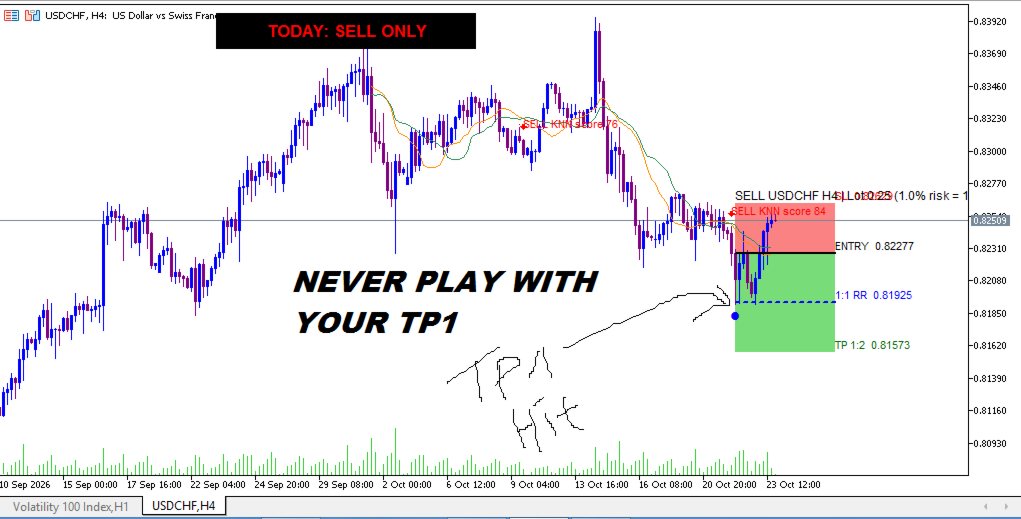
Automatic 1:2 reward-to-risk box with entry, SL, 1:1 level and TP
Lot-size calculator based on percentage of balance and actual tick value
High-impact news panel with optional exclusion of affected pairs
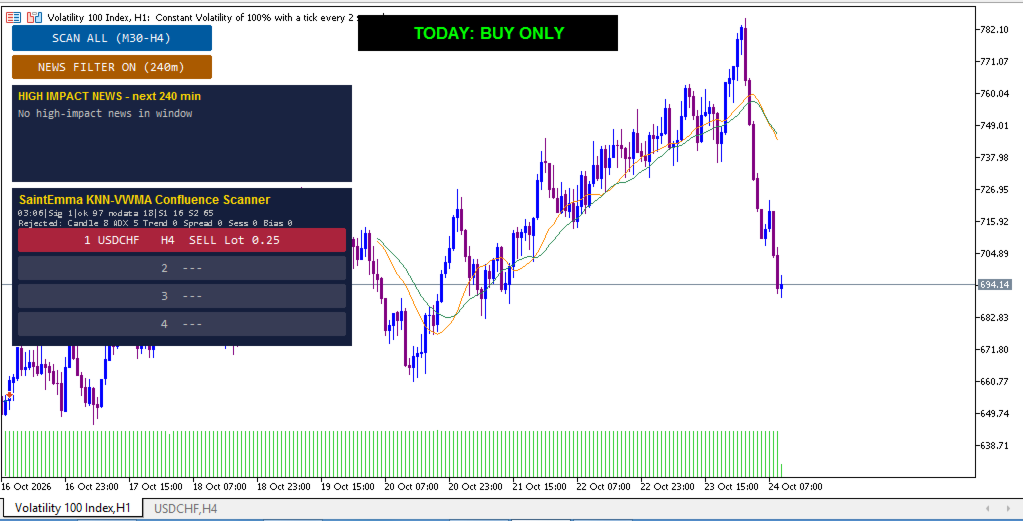
Top-4 ranked signal dashboard with one-click chart opening
On-chart VWMA lines, directional arrows and fully labelled risk box
5. BUY AND SELL SIGNALS
A Buy signal is generated when both engines produce a fresh bullish event inside the confluence window (or either engine if confluence is disabled) and all enabled filters are satisfied. A Sell signal requires the opposite. Signals are marked by arrows on the signal bar and are only listed if their age does not exceed the maximum-age setting. Confirmation is the closed-bar state of both engines plus the active filters; no future bars are used.
6. TRADE SETUP INTERPRETATION
When a ranked row is selected, a new chart opens with the two VWMA lines, historical confluence arrows, the full risk box (green zone to TP, red zone to SL, blue 1:1 dashed line) and the Daily Bias label. The box starts on the bar after the signal bar, giving a clear visual of the planned trade geometry. Traders can accept, adjust or discard the idea according to their own rules.
7. CONFIRMATION AND FILTERS
Daily Bias (previous completed or live daily candle) must match direction (or be neutral if allowed).
Price must be on the correct side of a long-period EMA.
ADX must exceed a minimum and DI must confirm direction.
Signal candle body must be a minimum percentage of the range and close in the signal direction.
Spread must not exceed a percentage of the calculated stop distance.
Optional session-hour filter.
All filters are independently toggleable.
8. CHART VISUALIZATION
Orange and sea-green VWMA lines
Green/red arrows with probability score labels
Semi-transparent risk boxes (entry–TP and entry–SL)
Solid entry line, dashed 1:1 RR line with marker, labelled TP and SL
Centre-top Daily Bias rectangle (BUY ONLY / SELL ONLY / NO CLEAR BIAS)
Left-side control panel with Scan button, News toggle and four ranked signal buttons
9. SUPPORTED TIMEFRAMES AND MARKETS
Designed and tested for M30, H1, H2, H3 and H4. Works on any symbol present in Market Watch that has sufficient history. No restriction to a particular asset class is coded; performance depends on the quality of the broker’s tick volume and the availability of the economic calendar.
10. USER SETTINGS
Key groups include:
Script 1 VWMA lengths, kNN neighbours and minimum difference
Script 2 neighbours, learning window, prediction threshold, feature MA type, filter mode
Confluence requirement, window size, maximum signal age, which timeframes to scan
Independent on/off switches and thresholds for every noise filter
Daily Bias parameters
Swing lookback, ATR buffers, reward-to-risk ratio, risk percentage, box width
News look-ahead minutes and exclusion behaviour
11. INSTALLATION AND ACTIVATION
Copy the .mq5 file into the Indicators folder of your MetaTrader 5 data directory, compile it, then attach it to any chart. The panel appears immediately. No external DLLs or paid services are required.
12. PRACTICAL TRADING PROCEDURE
Attach the indicator and press “SCAN ALL (M30–H4)”.
Review the ranked dashboard and the news panel.
Click a row to open the chart with full visual setup and Daily Bias.
Verify the calculated lot size against your risk tolerance.
Decide whether to take the trade, modify levels, or wait.
Re-scan periodically or after major news events.
13. RISK MANAGEMENT
The indicator calculates stop distance from recent swing extremes plus an ATR buffer, enforces a minimum risk distance, places a fixed reward-to-risk target (default 1:2), and computes the exact lot size that risks a chosen percentage of balance. Over-risk situations (broker minimum lot exceeds the risk limit) are flagged. Final position sizing and trade management remain the trader’s responsibility.
14. LIMITATIONS AND TRANSPARENCY
Signals are generated on closed bars of the scanned timeframe; they do not repaint once the bar is complete. Extremely low-liquidity or newly listed symbols may return insufficient history. The kNN models are statistical and can produce false positives in ranging or news-driven markets—hence the multi-layer filters. The indicator does not place orders.
15. WHO SHOULD USE THIS INDICATOR?
Swing and intra-day traders who prefer multi-timeframe confluence, systematic filters and clear risk geometry. Suitable for discretionary traders who want a ranked shortlist rather than continuous chart clutter, and for those who already manage risk with fixed percentage rules.
16. WHY THIS INDICATOR DESERVES ATTENTION
It unites two distinct machine-learning approaches, enforces explicit confluence, layers professional-grade filters including a full Daily Bias engine, and presents every surviving idea with calculated entry, stop, target and position size—reducing analysis time while keeping the trader firmly in control of the final decision.
17. RISK DISCLAIMER
Trading foreign exchange and CFDs involves substantial risk of loss and is not suitable for every investor. Past performance of any methodology is not indicative of future results. This indicator is a decision-support tool only and does not guarantee profitable trades. Always trade with capital you can afford to lose and use proper risk management.