Layer Trade Manager

5

Layer Trade Manager — Level trade & Scalping Assistant

Layer Trade Manager is a simple yet powerful on-chart trade management panel for MetaTrader 5 designed to take the heavy lifting out of layered trade strategies. It operates in two modes: Standard Mode — a single

click opens the first trade and queues up a basket of up to 5 staggered market entries if price reaches the preconfigured layers, each with its own configurable take profit, and the smart automation takes care of setting BE, etc. from there; and Quick Target Mode — a streamlined scalping mode where every BUY/SELL press opens a market layer, auto-cascading adds further layers as price moves, and the entire basket shares a single dynamic TP anchored to the deepest entry.

What It Does

Instead of manually placing multiple orders at different price levels, Layer Trade Manager does it for you. Press BUY or SELL on the panel and:

Standard Mode:

  • Trade 1 opens immediately at market
  • Trades 2–5 open automatically as the market moves against you, each triggered at a configurable offset from the previous trade's actual fill price — a classic layering approach for building into a position
  • When price moves to your configured threshold, break even is set (if configured) on your open trades to take off risk

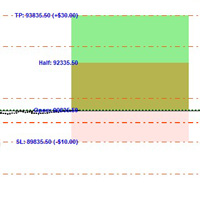
All active TP levels are calculated and displayed on the chart the moment you press the button, so you always know exactly where your exits are.

Quick Target Mode:

  • Layer 1 opens immediately at market when BUY/SELL is pressed
  • Further layers open automatically each time price moves a configurable number of pips against the basket — up to 20 layers total
  • The basket take profit is always calculated from the deepest entry (lowest buy / highest sell) plus the Quick Target distance, and is recalculated every time a new layer opens
  • An optional Best Layer TP gives the most recently opened layer a wider individual target
  • An optional Recovery Mode switches the basket TP to a tighter level anchored just above Trade 1's fill price once the drawdown exceeds a configurable threshold

Key Features

Two Operating Modes
Switch between Standard Mode (up to 5 layered trades, full TP row management, auto-BE) and Quick Target Mode (unlimited auto-cascade layers, dynamic basket TP, best-layer and recovery options) via the EA Mode input before attaching the EA.

Compact On-Chart Panel
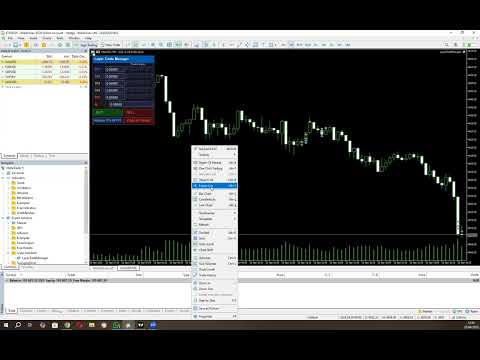
A clean, dark-themed HUD sits in the corner of your chart. In Standard Mode every TP price and the SL are live-editable — click any field, type a price, and it is applied to the linked trades instantly. In Quick Target Mode all pip distances are editable directly in the panel before and between baskets.

Up to 10 Configurable Take Profit Levels (Standard Mode)
TP1 through TP10 are spaced cumulatively from each other using configurable point offsets. TP rows with a zero offset are hidden from the panel. Each visible TP row has five trade-link buttons (T1–T5) — click a button to assign that trade to close at that TP level, or reassign it at any time while the basket is live.

Relay TPs off TP1
Changed your TP1? One click on Relayer TPs off TP1 recalculates and pushes TP2 through the last active TP row to all linked trades automatically, respecting the original spacing offsets.

Two Auto Break-Even Strategies (Standard Mode)

  • Individual BE — Each trade's SL is moved to its own entry price (+ a configurable buffer for fees) as soon as price reaches a trigger distance from Trade 1's entry. Trades are protected one by one.
  • Combined BE — A single weighted-average entry price is calculated across all open basket positions. All SLs are moved to that blended level at once, with a configurable settling delay so completed TP closes don't skew the average.

Automatic Cascade Entries
In Standard Mode, Trades 2–5 monitor price in real time and open at market the moment each threshold is breached, using actual fill prices as the reference for the next level. In Quick Target Mode every layer after the first cascades automatically each time price moves one Layer distance against the basket.

Trailing Stop for Unlinked Trades (Standard Mode)
Any trade slot not assigned to a TP row is automatically managed with a trailing stop, so nothing is left unprotected.

Prop Firm Protection
An optional minimum-time gate between cascade opens prevents rapid-fire layering that could breach prop firm trade-frequency rules. Set to 0 to disable.

Session Recovery
Restart MT5 mid-basket? No problem. The EA reads your existing open positions on  OnInit  and fully restores the panel state — tickets, TP links, SL, direction, and BE status — without touching any live trade settings. Quick Target Mode recovers all open layers and restores recovery mode state automatically.

Close All Trades button
If news is coming up, you need to go out, or you don't like the way the market is moving, press one button and all your open trades are closed together.

Live Chart Lines
Colour-coded TP lines and a dashed SL line are drawn directly on the chart for instant visual reference. They update the moment you edit a price in the panel.

Input Settings At A Glance

Group Parameters
Magic Number Unique EA identifier, optional panel title label
Trade Settings Lot size, SL offset, BE strategy, BE trigger distance, BE delay, BE buffer
TP Offsets Independent point-offset for each of TP1–TP10 (set to 0 to hide a row)
Trade to TP Links Which TP row each of Trade 1–5 closes at (0 = trailing SL)
Trade Entry Offsets Cascade distance for Trades 2–5 from the previous entry
Order Frequency (Prop Firm Protection) Minimum seconds between auto-cascade opens (0 = disabled)
EA Mode Standard Mode or Quick Target Mode
Quick Target Mode Settings Basket TP distance, layer spacing, SL distance, Best Layer TP, Recovery TP

Who It's For

  • Scalpers who want rapid basket execution without the manual overhead
  • Grid/layer traders who build into positions as price retraces
  • Any trader who wants a clean visual panel to manage multi-trade setups with automated BE and TP management

Requirements

  • MetaTrader 5
  • Algo trading enabled in MT5

Please note that you should always watch open trades to ensure the EA is managing your trades as you expect so you can close your trades manually if required to protect your capital.


Configuration Instructions

Magic Number

Variable Default Description
EA magic number 20260307 Unique identifier stamped on every order placed by this EA. Use a different number per instance on the same account to keep baskets separate.
Configuration name for panel title (if using multiple instances) (empty) Optional text label appended to the panel title bar. Useful when running multiple instances on different charts — leave blank for the default “Layer Trade Manager” title.


Trade Settings

Variable Default Description
Lot size applied to every trade 0.01 Volume applied to every trade in the basket (T1–T5). Normalised to the broker’s minimum volume step automatically.
SL distance in points from Trade 1 entry 800 pts Initial stop-loss distance in points from the Trade 1 entry price. Applied when no manual SL has been typed into the panel.
BE strategy: Individual, Combined BE_COMBINED Determines how break-even is calculated when the auto-BE threshold is reached.
Individual — each trade gets its own BE SL set just above its own entry price.
Combined — all trades share a single BE SL set above the weighted average entry price of the whole basket.
Points from Trade 1 EP to trigger auto-BE 300 pts How far price must move in the trade direction from Trade 1’s actual fill price before auto-BE fires. Measured against the peak high-water-mark price so the trigger is never missed if price retraces.
Milliseconds to wait after BE threshold breach before applying BE 800 ms Settling delay (milliseconds) between the BE threshold being breached and the BE SL actually being applied. Allows in-progress TP closes at that level to settle before the weighted average EP is calculated. Most relevant to the Combined strategy.
BE points offset to cover fees/minor slippage 50 pts Points added above (buy) or below (sell) the reference entry price when setting the BE stop-loss, to cover spread, commission, and minor slippage.


TP Offsets

TP levels are cumulative. TP1 is measured from Trade 1’s entry price; TP2 is measured from TP1; TP3 from TP2, and so on.

Variable Default Description
TP offset for TP1 from EP 300 pts Distance from Trade 1 entry price to the TP1 level.
TP offset for TP2 from TP1 200 pts Additional distance from TP1 to the TP2 level.
TP offset for TP3 from TP2 200 pts Additional distance from TP2 to the TP3 level.
TP offset for TP4 from TP3 200 pts Additional distance from TP3 to the TP4 level.
TP offset for TP5 from TP4 200 pts Additional distance from TP4 to the TP5 level.
Example (Buy, 5-digit broker):
T1 entry = $5000  •  TP1Offset=300  •  TP2Offset=200  •  TP3Offset=200
→ TP1 = $5003    TP2 = $5005    TP3 = $5007

Trade to TP Links

Each trade is assigned to a specific TP row. When price reaches that TP level the assigned trade closes. Assignments can also be changed live on the panel by clicking the T1–T5 buttons on any TP row.

Variable Default Description
TP row for Trade 1 (0 = trail SL, 1–10 = TP row) 2 The TP row at which Trade 1 will close. Default links Trade 1 to TP2. Set to 0 to use a trailing stop instead.
TP row for Trade 2 (0 = trail SL, 1–10 = TP row) 3 The TP row at which Trade 2 will close. Default links Trade 2 to TP3.
TP row for Trade 3 (0 = trail SL, 1–10 = TP row) 4 The TP row at which Trade 3 will close. Default links Trade 3 to TP4.
TP row for Trade 4 (0 = trail SL, 1–10 = TP row) 0 Trade 4 uses a trailing SL by default (no fixed TP). Set to 1–10 to assign a TP row.
TP row for Trade 5 (0 = trail SL, 1–10 = TP row) 0 Trade 5 uses a trailing SL by default (no fixed TP). Set to 1–10 to assign a TP row.
Trailing SL distance in points (for trades with no TP) 200 pts Trailing stop distance for any trade that has no TP assigned (link = 0). The trailing SL only activates once BE has been triggered and only ever moves in the profitable direction.


Trade Entry Offsets

Trade 1 always opens at the market price when BUY/SELL is pressed. Trades 2–5 can open immediately, cascade as price moves, or be disabled entirely.

Variable Default Special values Description
Trade2 entry offset from Trade1 (0=disabled, -1=open with T1) 200 pts 0 = off  •  -1 = with T1 Offset from Trade 1’s actual fill price at which Trade 2 opens. Buy: T2 opens when ask falls this many points below T1 entry. Sell: when bid rises this many points above T1 entry.
Trade3 entry offset from Trade2 (0=disabled, -1=open with T1) 200 pts 0 = off  •  -1 = with T1 Offset from Trade 2’s actual fill price at which Trade 3 opens. Cascade chain anchors to the previous trade’s fill, not T1 entry.
Trade4 entry offset from Trade3 (0=disabled, -1=open with T1) 0 (off) 0 = off  •  -1 = with T1 Offset from Trade 3’s actual fill price at which Trade 4 opens.
Trade5 entry offset from Trade4 (0=disabled, -1=open with T1) 0 (off) 0 = off  •  -1 = with T1 Offset from Trade 4’s actual fill price at which Trade 5 opens.

Special value reference

Value Behaviour
0 Trade slot disabled — that trade will never open as part of an auto-basket.
-1 Trade opens immediately at market alongside Trade 1 when BUY/SELL is pressed. Use this to fire 2, 3, or 4 trades simultaneously. E.g. set Trade2Offset = -1 to always open two trades on each BUY/SELL click.
> 0 Trade opens via cascade. The EA monitors price every tick and opens this trade at market once the threshold is reached.
Cascade chain example (Buy):
T1 fills at $5000. Trade2Offset=200 → T2 opens when ask ≤ $4998.
T2 fills at $4998. Trade3Offset=200 → T3 opens when ask ≤ $4996.
Each threshold is anchored to the previous trade’s actual fill, not T1 entry.


Order Frequency (Prop Firm Protection)

Variable Default Description
Min seconds between layered trades 0 (disabled) Minimum number of seconds that must elapse between consecutive auto-cascade trade opens. Prevents rapid-fire layering that may breach prop firm trade-frequency rules. Set to 0 to disable the gate entirely and allow immediate cascading. Applies to both Standard Mode cascade entries and Quick Target Mode layers.


EA Mode

Variable Default Description
EA Mode Standard Mode Selects the operating mode for the EA.
Standard Mode — the full multi-TP layered basket with auto-BE, TP row management, and T1–T5 trade slots.
Quick Target Mode — a streamlined scalping panel with unlimited auto-cascade layers, a dynamic basket TP, optional Best Layer TP, and optional Recovery Mode. See the Quick Target Mode section below for full details.


Panel Controls — Standard Mode (runtime)

Control Function
TP1–TP10 edit boxes Type a price and press Enter to set that TP level and push it to any linked open trades. Only rows with a non-zero offset are shown.
T1–T5 buttons (per row) Toggle the TP↔trade link. Highlighted green = linked. Click to link/unlink; linking immediately pushes the panel TP price to the live trade.
BE button Grey — disabled; price has not yet reached Trade 1 entry level.
Dark red — eligible; price is at or above T1 entry. Click to immediately apply BE stops to all open trades using the configured strategy.
Bright red — BE active; SL is locked. Click again to deactivate and re-enable manual SL editing.
The button re-disables if price drops back below T1 entry while BE is not yet activated.
SL edit box Editable when BE is off. Type a price and press Enter to update the SL on every open basket trade simultaneously. Locked to read-only when BE is active.
BUY / SELL Opens a fresh basket (T1 at market, immediate trades fired, cascade monitoring starts). If a basket is already active in the same direction and T5 is not yet filled, pressing the same button adds the next available trade at market.
Relayer TPs off TP1 Recalculates all visible TP rows (TP2 onward) from the current TP1 value using the configured offsets and pushes the new prices to all linked trades.
Close All Trades Closes every open basket position at market. Panel and tracking state reset automatically once all positions are confirmed closed.

Quick Target Mode

Quick Target Mode is a dedicated scalping panel that replaces the Standard Mode panel entirely. It is designed for fast, repetitive basket scalps where you want a simple TP target, automatic layering as price moves against you, and optional smarter TP management for the deepest layer and for recovery scenarios.

How It Works

  • Press BUY or SELL to open the first layer at market. The basket SL is set immediately from the configured SL distance and does not change for the life of the basket.
  • Each time price moves one Layer distance against the basket, a new layer opens automatically at market — up to 20 layers total.
  • The basket TP is always anchored to the worst entry in the basket (lowest buy fill / highest sell fill) plus the Quick Target distance, and is recalculated and pushed to all layers every time a new layer opens.
  • If Best Layer is enabled, the most recently opened layer always gets a separate, wider TP equal to its own fill price plus the Best Layer distance. All other layers continue to use the basket TP.
  • If Recovery Mode is enabled and price moves more than the Quick Target distance into drawdown from Trade 1's fill price, recovery mode activates automatically. While active, the basket TP for all layers (except the best layer) switches to Trade 1's fill price plus the Recovery distance — a tighter target designed to get out near break-even rather than waiting for the full basket TP.
  • Once all layers have closed the panel resets automatically and is ready for the next basket.

You can also press BUY/SELL at any time while a basket is active to add an immediate extra layer without waiting for the cascade threshold to be reached. The opposite-direction button is greyed out while a basket is live.

Enabling Quick Target Mode

  1. In the EA inputs, find the EA Mode group.
  2. Set EA Mode to Quick Target Mode .
  3. Configure the Quick Target Mode Settings group (see table below).
  4. Attach or re-initialise the EA. The panel will display the teal-headed Quick Target Mode panel instead of the standard panel.

Quick Target Mode Settings

Variable Default Description
Quick Target basket TP distance in points 300 pts (30 pips) Distance in points from the worst entry in the basket to the basket TP. This is the core profit target for every layer (except the best layer when Best Layer is enabled). Editable live in the panel as pips.
Layer offset in points between QT trades 100 pts (10 pips) How far price must move against the last opened layer before the next layer opens automatically. Each new layer's threshold is anchored to the previous layer's actual fill price. Editable live in the panel as pips.
SL distance in points for Quick Target mode 500 pts (50 pips) Stop-loss distance in points from the first layer's entry price. The same SL price is applied to all subsequent layers. Locked once a basket is open; editable as pips between baskets.
Best Layer extra TP in points (0 = disabled) 1000 pts (100 pips) When non-zero, the most recently opened layer in the basket is assigned a separate TP equal to its own fill price plus this distance. This gives your newest (deepest) layer a much wider target, effectively letting it ride further while earlier layers close at the tighter basket TP. Set to 0 to disable — all layers share the same basket TP. Editable live in the panel as pips.
Recovery TP offset in points above T1 fill (0 = disabled) 100 pts (10 pips) When non-zero, recovery mode can activate. Recovery mode triggers once price moves more than Quick Target points into drawdown from Trade 1's fill. When active, the basket TP for all non-best layers switches from the normal basket TP to Trade 1's fill price plus this recovery offset — a near-break-even target designed to exit the basket in adverse conditions. Set to 0 to disable recovery mode entirely. Editable live in the panel as pips.

Quick Target Mode Panel Controls (runtime)

Control Function
Status row (read-only) When idle: shows the configured SL distance in pips and Ready. When a basket is active: shows the current layer count, the live basket TP price, and the basket SL price.
Quick Tgt edit The basket TP distance in pips. Edit and press Enter to update the runtime value. Takes effect on the next layer open or immediately if a basket is already active (recalculates and pushes TP to all open layers).
Layer edit The cascade layer spacing in pips. Edit and press Enter to update the runtime value. Controls how far price must move from the last layer before the next one opens.
Best Layer edit The Best Layer TP distance in pips. Edit and press Enter. Set to 0 to disable. When a basket is active the current Best Layer TP price is displayed alongside the edit field.
Recovery edit The Recovery TP offset in pips. Edit and press Enter. Set to 0 to disable. The row turns red and the status label shows RECOVERY when recovery mode is active. When idle it shows the drawdown threshold that will trigger recovery (e.g. >30 DD).
SL edit When idle: shows the SL distance in pips — edit and press Enter to change it before opening the next basket. When a basket is active: locked, displays the live SL price applied to all open layers.
BUY / SELL Opens a new basket (first layer at market) when no basket is active, or adds an immediate extra layer to the existing basket when pressed in the same direction. The opposite-direction button is greyed out while a basket is live.
Close All Trades Closes every open Quick Target layer at market. Panel and tracking state reset automatically once all positions are confirmed closed.
Отзывы 1
str8derx
76
str8derx 2026.05.03 14:12 
 

This EA is a highly efficient tool for layering trades. Once you manually enter a position, the system takes over and automates the rest based on your configured settings, including target levels and trade management. It offers two modes, giving flexibility depending on your strategy. I also appreciate the developer’s responsiveness—being open to feedback and actively incorporating improvements into the EA makes a big difference in usability and performance.

Рекомендуем также
DDKiller Pro
Njaratahiry Michael Randrianiaina
Stop Blowing Your Account. Once and For All. DDKiller Pro is the MT5 risk guardian that runs silently on your chart and shuts down trading the moment you hit a limit — whether you're grinding a prop firm challenge or managing your own CFD account. The problem every trader knows: You set your rules. You break them anyway. One revenge trade. One overleveraged position. One session that erases a month of gains. DDKiller Pro removes that decision from your hands entirely. What it does: The second yo
Core function Intelligent transaction management one-click opening and closing operation, which supports user-defined lots to set multiple closing modes: all closing, closing by direction and closing by profit and loss status. Professional risk control, real-time risk monitoring and spread control to avoid high-cost trading environment. Visual control panel has an intuitive graphical interface, and all functions can be operated with one button to display position information, profit and loss sta
FREE
Trade Copilot - полуавтоматическая панель управления рисками для золота (XAUUSD) и любого инструмента Trade Copilot - это полуавтоматическая торговая панель для трейдеров, которые хотят дисциплину советника, не теряя контроль над собственными входами в рынок. Вы выбираете направление и уровень - панель автоматически рассчитывает размер риска, устанавливает стоп-лосс, управляет тейк-профитом и защищает сделку. ОСНОВНЫЕ ФУНКЦИИ - Расчёт лота по риску - выберите Risk %, Risk $ или фиксированный
HedgeSafe Trade Assistant Торговая панель для MetaTrader 5 с приоритетом контроля риска. HedgeSafe помогает подготовить, проверить и сопровождать ручную сделку прямо на графике до нажатия BUY или SELL. HedgeSafe не является сервисом сигналов, прогнозным инструментом, AI-ботом или автоматической стратегией. Продукт не выбирает направление сделки и не обещает прибыль. Каждое торговое решение остаётся за трейдером. Основные возможности Расчёт лота от процента баланса или фиксированной суммы в валют
Trading Utility for Forex Currency Pairs Only not for Gold  Functions Auto Lot Calculation based on Risk Auto stoploss  Auto TakeProfit Breakeven Auto Close Half % Close in percentage with respect to the PIPs Pending Orders BuyLimit Sell Limit with distances BuyStop Sell Stop    with distances Trading Informations Risk in percentage For Multiple trades Combine Takeprofit and Combine Stoplosses
Protect your funded accounts and personal capital with military-grade precision. This utility continuously monitors your floating equity against your daily starting balance. The moment your custom drawdown threshold is breached, it instantly liquidates all open positions, deletes pending orders, and completely unloads from the chart. Stop revenge trading and never fail a prop firm evaluation due to a margin breach again.
FREE
FiT Panel Pro
Thonglak Janyakorn
Overview FiT Panel Pro is a professional-grade trade management panel designed for MetaTrader 5 traders who demand speed, precision, and full control over their trades. Built with a modern dark-theme UI, it combines one-click execution with advanced risk management, visual SL/TP drag lines, automatic Fibonacci-based levels, and comprehensive order management — all in a single, compact panel. Whether you are a scalper, day trader, or swing trader, FiT Panel Pro gives you the edge you need to exec
FREE
Trade Panel by RWBTradeLab — The Ultimate Trade & Risk Management Utility Take full control of your MetaTrader 5 trading with the   Trade Panel by RWBTradeLab ! Designed by RWBTradeLab, this all-in-one utility is built for both professional and beginner traders who want to execute trades faster, manage risk perfectly, and analyse their account performance in real-time. Say goodbye to manual lot calculations and slow trade execution. With a sleek, draggable, and highly intuitive User Interfa
FREE
"Manage multiple positions as a single unit with hidden targets." The Virtual Basket TP SL Manager is a professional MetaTrader 5 utility designed to automate the closing of positions based on the total profit or loss of a group of orders (a "basket"). By utilizing Virtual Levels , all Take Profit (TP) and Stop Loss (SL) targets are stored locally within the EA's memory and are not sent to the broker's server, keeping your strategy safe from stop-hunting and price manipulation. Key Features Virt
FREE
Capital Management EA – Smart Risk Management & Profit Optimization for MT5 Take control of your trading capital with smart, automated strategies — fully optimized for MetaTrader 5 (MT5). Looking to protect your capital and maximize profits through automated money management strategies ? Capital Management EA is the all-in-one Expert Advisor for MetaTrader 5 (MT5) that helps you trade smarter, not harder. Core Features: 5-in-1 Capital Management Strategies – Built-in versatility Gr
Pro Order Lot Size Calculator Pro Order Lot Size Calculator is a simple and practical tool designed to help you calculate the appropriate lot size based on the amount of risk you want to take . With this tool, you can easily calculate your trading risk directly from the panel according to the amount of money available in your account. Easy Risk & Lot Calculation The panel is designed to be very simple and easy to use. You can choose how you want to define your risk: Enter your desired risk amoun
Trade Assistant MT5 Pro – One Click Trading Panel | Auto Lot Size | Risk Management Tool Short Description Trade Assistant MT5 Pro is a professional trading utility for MetaTrader 5 that allows traders to execute trades with one click, manage risk automatically, and improve trading accuracy using advanced tools like ATR stop loss, risk reward ratios, breakeven, and trailing stop. Full Description Trade Assistant MT5 Pro is a powerful manual trading panel designed for traders who want speed, prec

Руководство пользователя Quick Lines Mastery Lite v1.85 Издатель: Forex Noob Tube Веб-сайт: forexnoobtube.com 1. Обзор Quick Lines Mastery Lite — это оптимизированная профессиональная утилита для построения графиков для трейдеров MT5, которым важны скорость, точность и удобный интерфейс. Она позволяет мгновенно размещать предварительно настроенные горизонтальные линии, вертикальные линии, лучи и перетаскиваемые трендовые линии одним кликом прямо с плавающей панели управления. 2. Панель управлени
FREE
SmartRisk Trade Tool — One-Click Risk-Based Trade Panel SmartRisk Trade Tool is a manual trading panel for MetaTrader 5 built around position sizing and risk control rather than signal generation. It does not analyze the market or suggest trade direction — it exists so that every order sent from the chart already has a calculated lot size, stop loss, and take profit consistent with a risk value the trader chooses, removing the manual arithmetic that normally happens between deciding to trade and
FREE
Painel de Trading Pro
Dedial Pereira Da Silva
TradePanel Pro - Manual Trading Panel with Grid, Trailing, and Targets "Complete manual trading panel for MT5: grid, trailing stop, smart breakeven, daily targets and risk management in one click." TradePanel Pro is a professional manual trading panel for MetaTrader 5, built for traders who want speed, organization and automatic position protection — without juggling multiple tools or complex setups. Everything you need lives in a single panel: one-click buy/sell, point-based stops and target
CosmiCLab SMC FIBO CosmiCLab SMC FIBO — это профессиональный торговый индикатор, основанный на концепциях Smart Money Concepts (SMC), анализе структуры рынка и уровнях Fibonacci. Индикатор автоматически определяет свинги рынка и строит уровни Fibonacci по последнему импульсному движению. Также индикатор определяет ключевые изменения структуры рынка: BOS — Break Of Structure CHOCH — Change Of Character Дополнительно отображаются сигнальные стрелки BUY / SELL при пробое структуры. Индикатор подход
WAP TP Stealth EA – Intelligent Basket Management for Precision Exits WAP TP Stealth EA is a specialized trade management expert advisor designed for traders who rely on basket strategies, recovery systems, and multi-position workflows. Instead of closing trades individually, the EA dynamically calculates the Weighted Average Price (WAP) of all open positions and executes a coordinated closure once your defined profit target is reached. This approach enables efficient drawdown management, smooth
FREE
Recovery Manager Panel MT5 is a manual order management panel for traders who want to manage open positions directly from the chart in a clearer and more organized way. This tool is not a signal robot. It does not predict market direction, generate entry signals, or trade automatically based on market forecasts. Instead, it helps traders work with positions that are already open. You can calculate possible recovery lot sizes, view estimated target levels on the chart, and use available floating
Click Trading
Jawad Tauheed
5 (2)
One Click Trading – Auto TP SL Developer TraderLinkz Version 1.00 Category Utility What it does Adds missing TP and SL to your manual trades and pending orders Sets them once per ticket Lets you move TP and SL afterward Works on hedging and netting accounts Scans on every tick and reacts on trade events Why you want it You place faster entries You get consistent risk and exit targets You reduce fat finger errors You keep full manual control Quick start Attach the EA to any chart Keep TP and SL e
FREE
Trade assistant pro v8
Ahmed Mohammed Bakr Bakr
2 (1)
FREE FREE FREE Trade Assistant MT5 – Professional Trading & Risk Management Panel Trade Assistant MT5 is an advanced trading panel designed to help traders execute orders faster, safer, and more professionally . It simplifies manual trading by combining smart order management , precise risk control , and one-click execution , making it ideal for both beginners and advanced traders. This tool does not trade automatically . Instead, it empowers you with full control while applying professional-gra
FREE
SLTPSetter
Raphael Djangmah Osro Agbo
SLTPSetter - StopLoss Take Profit Setter HOW DOES IT WORK? Risk and account management is a very critical aspect of trading. Before entering a position, you must be fully aware how much you will be willing to loss both in percentage and value. This is where SLTPSetter gets you covered.  All you need to do is attach the indicator on the chart and PRESS BUY OR SELL automatically, all parameters needed for placing the trades will be provided at the top left corner of the screen. Feel free to adjust
RR Ratio KS Visual Calculator Amount Based EA Освойте управление рисками в долларах как никогда раньше с помощью RR Ratio KS Visual Calculator Amount Based EA — революционной утилиты для MetaTrader 5, которая автоматизирует точные настройки риска/вознаграждения с фиксированной суммой в долларах прямо на вашем графике. Идеально подходит для трейдеров, уставших от волатильного размера лота или ручных расчетов. Этот советник фиксирует точные долларовые риски (например, 50 долларов за сделку) и воз
Профессиональная панель планирования позиции и расчета объема для MetaTrader 5 Position Control Suite — это профессиональная визуальная панель для планирования сделок в MetaTrader 5. Она предназначена для трейдеров, которые хотят готовить ордера прямо на графике, задавать точный уровень Stop Loss и автоматически рассчитывать объем позиции на основе выбранной суммы риска в валюте счета. Основная идея инструмента проста: укажите сумму, которой вы готовы рискнуть, задайте расстояние до Stop Loss, и
FREE
Easy Trade Executor — инструмент для быстрого расчета лота, открытия и сопровождения сделок в MT5. Размещайте уровни Open Price, Stop Loss и Take Profit прямо на графике, получайте автоматический расчет объема позиции и открывайте сделки с контролируемым риском всего за несколько кликов. Почему Easy Trade Executor? Easy Trade Executor создан для трейдеров, которые хотят не только рассчитывать риск, но и быстро управлять сделками на графике. Инструмент объединяет расчет позиции, открытие ордеро
Risk Manager – Account Protection Tool Risk Manager is an Expert Advisor for MetaTrader 5 designed to protect your trading account by applying automatic risk management rules. This tool does not open trades . It continuously monitors your account and enforces predefined limits to help prevent excessive losses and maintain disciplined trading. Risk Manager works in the background and can manage positions opened by manual trading or other Expert Advisors. It is particularly useful for: • Manual tr
FREE
GDS RiskLab TradeDesk Free Manual Trading Desk and Risk-Control Utility for MetaTrader 5 GDS RiskLab TradeDesk is a free chart-based utility for traders who want a cleaner manual trading workspace in MetaTrader 5. It is designed as a simple execution-support and risk-control panel. The goal is to keep the trading process more organized: review the chart, plan the trade, keep risk visible and execute manually with more structure. This tool does not generate buy or sell signals. It does not predic
FREE
OpenAllSymbolsSafe.mq5 — Умный скрипт для MetaTrader 5 Назначение: Автоматически открывает графики всех символов из Обзора рынка с применением шаблона default.tpl на текущем таймфрейме (TF) , предварительно закрывая все открытые графики (кроме текущего). Идеален для быстрого анализа множества инструментов без рутинных действий! Особенности: Автоматизация: Экономит время — открытие десятков графиков в один клик. Безопасность: Аккуратно закрывает лишние графики, сохраняя текущий акти
FREE
Free MetaTrader 5 indicator that displays "CALL IT A DAY" when London & New York sessions close. Customizable alerts, session tracking, and a guilt-free reminder to log off. Perfect for workaholic traders! Tired of staring at charts when the market’s already clocked out? Session Guardian   is your sassy trading assistant that slaps a giant   "CALL IT A DAY"   on your screen when both London   and   New York sessions are closed—because even traders deserve happy hour. Key Features:   Big, Bo
FREE
С этим продуктом покупают
Trade Assistant MT5
Evgeniy Kravchenko
4.41 (216)
Помогает рассчитать риск на сделку, простая установка нового ордера с помощью линий, управление ордерами с функциями частичного закрытия, 7 типов трейлинг-стопа и другие полезные функции. Дополнительные материалы и инструкции Инструкция по установке - Инструкция к приложению - Пробная версия приложения для демо счета Функция Линии   - отображает на графике линию открытия, стоп-лосс, тейк-профит. С помощью этой функции легко установить новый ордер и увидеть его дополнительные характеристики пе
Добро пожаловать в Trade Manager EA — лучший инструмент для управления рисками, предназначенный для упрощения, точности и эффективности торговли. Это не просто инструмент для размещения ордеров; это комплексное решение для удобного планирования торгов, управления позициями и усиленного контроля над рисками. Независимо от того, начинающий вы трейдер, опытный специалист или скальпер, нуждающийся в быстром исполнении, Trade Manager EA адаптируется к вашим потребностям и работает с любыми активами:
Farmed Hedge Yield Farming | All Markets (Manual - Hybrid - Semi/Automated EA) VERIFIED TRADING RESULTS - Farmed Hedge Yield Axi Copy:  https://www.mql5.com/en/signals/2356376 - Farmed Hedge Yield Exn Copy:   https://www.mql5.com/en/signals/2356404 - Farmed Hedge Yield V Copy:  https://www.mql5.com/en/signals/2357156 * Before purchasing, please feel free to send me a message if you have any questions about the product or setup. - You can test the system using Strategy Tester: Visual Mode , a
Бета-версия Telegram to MT5 Signal Trader почти готов к официальному альфа-релизу. Некоторые функции все еще находятся в разработке, и вы можете столкнуться с небольшими ошибками. Если вы заметите проблемы, пожалуйста, сообщите о них, ваша обратная связь помогает улучшать программное обеспечение для всех. Telegram to MT5 Signal Trader — мощный инструмент, который автоматически копирует торговые сигналы из каналов и групп Telegram прямо в ваш счёт MetaTrader 5 . Поддерживаются как публичные, так
================================================================================ POC BREAKOUT - V20.72. Full Professional Grade Toolkit ================================================================================ POC Breakout is a full MetaTrader 5 trading dashboard for discretionary traders who want breakout signals, Point of Control (POC) context, volume profiles, order flow, market structure, news, alerts, and advanced trade planning in one professional workspace. Attached directly to you
TradePanel MT5
Alfiya Fazylova
4.88 (167)
Trade Panel — это многофункциональный торговый помощник. Приложение содержит более 50 торговых функций для ручной торговли и позволяет автоматизировать большинство торговых операций. Инструкция к приложению + видео-инструкции: https://www.mql5.com/ru/blogs/post/771695 Пробная версия приложения для демо-счета: https://www.mql5.com/ru/blogs/post/750864 Как установить приложение: https://www.mql5.com/ru/blogs/post/750096 Как тестировать приложение в визуальном режиме: https://www.mql5.com/ru/blogs/
Local Trade Copier EA MT5
Juvenille Emperor Limited
4.94 (148)
Опыт экстремально быстрого копирования сделок с помощью Local Trade Copier EA MT5 . Благодаря простой установке в течение 1 минуты этот копировщик сделок позволяет вам копировать сделки между несколькими терминалами MetaTrader на одном компьютере с Windows или на Windows VPS с крайне быстрыми скоростями копирования менее 0.5 секунды. Независимо от того, новичок вы или профессиональный трейдер, Local Trade Copier EA MT5 предлагает широкий спектр опций, чтобы настроить его под ваши конкретные по
EA Overfitter
Stephen J Martret
5 (1)
Бэктест выглядит отлично. Но будет ли советник зарабатывать завтра, через неделю, через месяц? EA Overfitter прогоняет вашего советника по 100 историям цены, которых он никогда не видел. Одна оценка показывает, реально ли преимущество. Бэктест показывает, что советник сделал на одной истории цены — на той, которая случайно произошла. Из него невозможно понять, какая часть результата была заслугой стратегии, а какая — конкретного пути цены. EA Overfitter отвечает на этот вопрос. Он строит до 10
Telegram to MT5 Multi-Channel Copier   автоматически копирует торговые сигналы из ваших Telegram-каналов прямо в MetaTrader 5. Без ботов, без браузерных расширений, без ручного копирования. Сигнал приходит в Telegram — и советник открывает сделку в вашем терминале за считанные секунды. А перед тем как копировать канал, встроенный бэктестер покажет, что этот канал сделал бы на вашем счёте. Продукт состоит из двух компонентов: приложения для Windows, которое слушает ваши Telegram-каналы, и этого с
Astro Trade MT5
Indra Maulana
5 (6)
25% discount on the release of the tool: only for the next 3 buyers Send a message to receive a demo version. AstroTrade Trading Assistant AstroTrade is a comprehensive multi-functional trading utility developed for the MetaTrader 5 platform. It integrates essential tools for trade execution, risk management, and technical monitoring into a single unified interface. The application is designed to assist traders in managing their daily operations through a visual and structured environment. Vi
HINN MAGIC ENTRY - лучший инструмент для входа и менеджмента позиций! ПРОСТО. БЫСТРО. ИНТУИТИВНО. МАКСИМАЛЬНО АВТОМАТИЗИРОВАНО. Выставляет ордера через выбор уровня на графике! полное описание    ::    demo-версия    ::   60-sec-video-description Основные функции: - Рыночные, лимитные и отложенные ордера -  Автоматический подсчет лоттажа  -  Автоматический учет спреда и комиссий -  Неограниченное количество промежуточных тейков для позиций - Перевод в безубыток и трейл стоп-лосса и тейк-проф
Exp COPYLOT CLIENT for MT5
Vladislav Andruschenko
3.97 (35)
Профессиональный копировщик сделок для MetaTrader 5 Быстрый, профессиональный и надежный копировщик сделок для MetaTrader . COPYLOT позволяет копировать сделки Forex между терминалами MT4 и MT5 с поддержкой счетов Hedge и Netting . Версия COPYLOT для MT5 поддерживает: - MT5 Hedge → MT5 Hedge - MT5 Hedge → MT5 Netting - MT5 Netting → MT5 Hedge - MT5 Netting → MT5 Netting - MT4 → MT5 Hedge - MT4 → MT5 Netting Версия MT4 Полное описание + DEMO + PDF Как купить Как установить Как получить файлы жур
Premium Trade Manager - Торговая панель со встроенным коучем Premium Trade Manager помещает торгового коуча прямо в ваш график, а под ним работает полноценный движок исполнения. Настройте сделку так, как вы всегда это делаете, затем позвольте Max, вашему ИИ-наставнику по трейдингу, прочитать именно эту настройку с учётом вашего живого счёта и дать чёткое заключение до того, как вы входите: соответствует ли стоп дисциплинированному подходу, разумен ли риск, не выходит ли высоковолатильный релиз ч
Anchor Trade Manager
Kalinskie Gilliam
5 (9)
Your EAs cannot see each other, but Anchor can. Anchor gives you one place to coordinate your EAs, manage risk, and decide when trading is allowed. It works alongside the trading bots you already use without any changes to them. The Problem One EA opens a trade. Then another starts trading. The next thing you know, you wake up to multiple grids built across your account. Each EA may be doing exactly what it was designed to do, but together they can place far more risk on your account than you in
Telegram To MT5 Ultra
Mirel Daniel Gheonu
5 (5)
Telegram To MT5 — копировщик сигналов Превратите торговые сигналы из ваших Telegram-каналов в реальные ордера MT5 — автоматически, на любом количестве счетов, с полным контролем над риском и правилами. Telegram To MT5 связывает VIP / сигнальные каналы, на которые вы уже подписаны в Telegram, с вашим терминалом MetaTrader 5. Бесплатное приложение-компаньон для ПК читает сообщения (даже из каналов, которые не допускают ботов), а этот советник исполняет их на вашем счёте — применяя ваши настройки р
Power Candles Strategy Scanner — самооптимизирующийся инструмент для поиска настроек по нескольким инструментам Power Candles Strategy Scanner использует тот же самооптимизирующийся движок, что и индикатор Power Candles — для всех символов в вашем Market Watch, одновременно. На одной панели отображается информация о том, какие символы в данный момент являются статистически торгуемыми, какая стратегия выигрывает на каждом из них, оптимальная пара Stop Loss / Take Profit, а также отправляется увед
Strategy Ledger Pro
Abdullah Uygar Tuna
5 (1)
Strategy Ledger Pro — панель анализа счёта для MetaTrader 5, работающая только на чтение. Она разделяет результаты счёта по советникам, стратегиям, символам и магическим номерам. Подробное руководство  с описанием каждой функции. MetaTrader показывает один баланс на весь счёт. Когда несколько советников торгуют вместе, этот баланс не показывает вклад каждого. Strategy Ledger Pro читает историю счёта, восстанавливает закрытые позиции, относит их к стратегиям и выводит результаты в одной панели.
MT5 to Telegram Signal Provider — это простой в использовании полностью настраиваемый инструмент, который позволяет отправлять определённые сигналы в чат, канал или группу Telegram, превращая вашу учётную запись в провайдера сигналов . В отличие от большинства конкурирующих продуктов, он не использует импорт DLL. [ Демо ]   [ Руководство ] [ Версия MT4 ] [ Версия для Discord ] [ Канал в Telegram ]  New: [ Telegram To MT5 ] Настройка Доступно пошаговое руководство пользователя . Никаких знаний A
Grid Manual MT5
Alfiya Fazylova
4.73 (22)
Grid Manual — это торговая панель для работы с сеточными стратегиями. Утилита универсальная, имеет гибкие настройки и понятный интерфейс. Работает с сеткой ордеров не только в сторону усреднения убытков, но и в сторону наращивания прибыли. Трейдеру не нужно создавать и сопровождать сетку ордеров, это сделает утилита. Достаточно открыть ордер и Grid manual автоматически создаст ему сетку ордеров и будет сопровождать его до самого закрытия. Полная инструкция и демо-версия здесь . Основные особенно
The News Filter MT5
Leolouiski Gan
4.78 (23)
Этот продукт фильтрует всех экспертных советников и ручные графики во время новостей, так что вам не нужно беспокоиться о внезапных скачках цены, которые могут разрушить ваши ручные торговые настройки или сделки, введенные другими экспертными советниками. Этот продукт также поставляется с полной системой управления ордерами, которая может обрабатывать ваши открытые позиции и ордера на ожидание перед выпуском новостей. После покупки   The News Filter   вам больше не придется полагаться на встроен
Signal TradingView to MT5 Pro Automator Мгновенное профессиональное исполнение между TradingView и MetaTrader 5 Автоматизируйте свою торговую стратегию с помощью самого надежного моста связи между алертами TradingView и реальным исполнением в MT5. Разработанный для трейдеров, которым требуются скорость, гибкость и безупречное управление рисками, этот советник (Expert Advisor) превращает любое сообщение с алертом в точный рыночный или лимитный ордер. ПРЕИМУЩЕСТВА И СИЛЬНЫЕ СТОРОНЫ Универсальный д
Footprint Chart Pro — Professional OrderFlow EA for MetaTrader 5 Version 6.34 | Professional tool for real traders | Institutional-Grade Visualization DEMO USERS - PLEASE SELECT EVERY TICK / REAL TICK WHEN TESTING AND YOU HAVE DOWNLOADED HISTORICAL DATA. IF YOU SEE A WAITING SCREEN AND IT IS NOT DOWNLOADING, IT MEANS YOU HAVE LOW HISTORICAL DATA. TRY 1 MIN AND 5 MIN FIRST ON 1 DAY DATA. ONE DAY DATA SHOULD BE THE NEWEST AND MOST CURRENT DATE. PLEASE WAIT UNTIL THE MARKET HAS ROLLED OVER PERIOD.
Trade Dashboard MT5
Fatemeh Ameri
4.95 (132)
Trade Dashboard simplifies how you open, manage, and control your trades, with built-in lot size calculation. It allows you to execute trades, manage risk, and control positions directly on the chart, with tools such as partial close, breakeven, and trailing stop. Designed to reduce manual work and help you stay focused on your trading decisions. A demo version is available for testing. Detailed explanations of features are provided within the MQL5 platform. Installation instructions are include
FUTURES ORDERFLOW FOOTPRINT CHART Professional OrderFlow EA for MetaTrader 5 Version 1.01| Professional tool for real traders | Institutional-Grade Visualization STRATEGY TESTER USERS - PLEASE SELECT EVERY REAL TICK WHEN TESTING AND YOU HAVE DOWNLOADED HISTORICAL DATA. IF YOU SEE A WAITING SCREEN AND IT IS NOT DOWNLOADING, IT MEANS YOU HAVE LOW HISTORICAL DATA. TRY 1 MIN AND 5 MIN FIRST ON 1 DAY DATA. ONE DAY DATA SHOULD BE THE NEWEST AND MOST CURRENT DATE. PLEASE WAIT UNTIL THE MARKET HAS ROL
Trade copier MT5
Alfiya Fazylova
4.61 (56)
Trade Copier — это профессиональная утилита, предназначенная для копирования и синхронизации сделок между торговыми счетами. Копирование происходит от счета/терминала поставщика к счету/терминалу получателя, которые установлены на одном компьютере или vps. АКЦИЯ - Если вы уже приобрели "Trade copier MT5", вы можете получить "Trade copier MT4" бесплатно (для копирования MT4 > MT5 и MT4 < MT5). Для получения более подробной информации об условиях, пожалуйста, свяжитесь с нами через личные сообщени
Ultimate Extractor - Professional Trading Analytics for MT5 *****this is the local HTML version of Ultimate Extractor. !!!!!it is not compatible with Cloud!!!! For the online version please reach out to me directly****** Ultimate EA manager also now available when you use cloud pro and above for free!! Ultimate Extractor transforms your MetaTrader 5 trading history into actionable insights with comprehensive analytics, interactive charts, and real-time performance tracking. What It Does Automa
Risk Manager Pro MT5 - это советник для защиты торгового счета и контроля рисков в MetaTrader 5. Утилита отслеживает equity, дневной и недельный результат, просадку, открытые позиции, количество сделок, серии убыточных сделок и разрешенное торговое время. Когда заданный лимит достигнут, Risk Manager Pro MT5 может автоматически закрыть позиции, удалить отложенные ордера, остановить другие советники, отправить уведомление или закрыть терминал. Вместо того чтобы полагаться только на дисциплину во в
Seconds Chart MT5
Boris Sedov
4.61 (18)
Seconds Chart - уникальный инструмент для создания секундных графиков в MetaTrader 5 . С помощью Seconds Chart вы можете построить график с таймфреймом, заданным в секундах, получая идеальную гибкость и точность анализа, недоступную на стандартных минутных или часовых графиках. Например, таймфрейм S15 обозначает график со свечами продолжительностью 15 секунд. Вы можете использовать любые индикаторы и советники с поддержкой пользовательских символов. Работать с ними так же удобно, как и на станда
Telegram To MT5 Receiver
Levi Dane Benjamin
4.53 (15)
Копируйте сигналы из любого канала, участником которого вы являетесь (в том числе частного и ограниченного), прямо на свой MT5. Этот инструмент был разработан с учетом потребностей пользователей и предлагает множество функций, необходимых для управления и мониторинга сделок. Этот продукт представлен в простом в использовании и визуально привлекательном графическом интерфейсе. Настройте свои параметры и начните использовать продукт в течение нескольких минут! Руководство пользователя + Демо  |
X2 Copy MT5
Liubov' Shkandrii
Быстрый. Точный. Инновационный. Технологичный. Откройте для себя мгновенное копирование сделок с революционным X2 Copy MT5. Всего за 10 секунд простой установки вы получите мощный инструмент для синхронизации сделок между терминалами MetaTrader на одном компьютере или Windows VPS с беспрецедентной скоростью. Управляете несколькими счетами, следуете сигналам или масштабируете свою стратегию — X2 Copy MT5 адаптируется к вашему рабочему процессу с непревзойдённой точностью и контролем. Работайте бы
Фильтр:
str8derx
76
str8derx 2026.05.03 14:12 
 

This EA is a highly efficient tool for layering trades. Once you manually enter a position, the system takes over and automates the rest based on your configured settings, including target levels and trade management. It offers two modes, giving flexibility depending on your strategy. I also appreciate the developer’s responsiveness—being open to feedback and actively incorporating improvements into the EA makes a big difference in usability and performance.

Ответ на отзыв