SmartRisk Trade Tool
- Утилиты
-
Hoang Tuan Le
 Welcome to my MQL5 profile!
 - Версия: 1.0
SmartRisk Trade Tool — One-Click Risk-Based Trade Panel
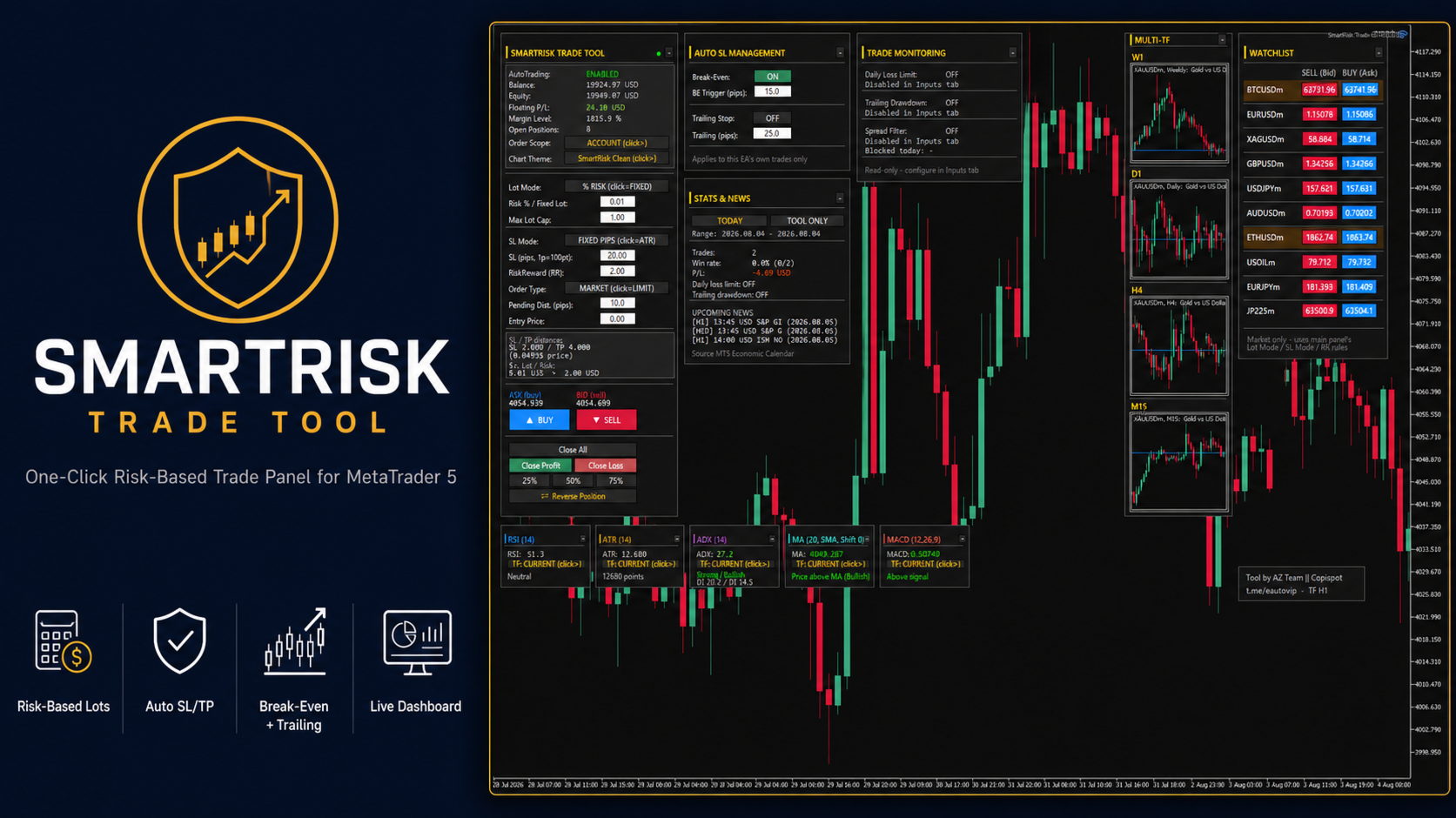
SmartRisk Trade Tool is a manual trading panel for MetaTrader 5 built around position sizing and risk control rather than signal generation. It does not analyze the market or suggest trade direction — it exists so that every order sent from the chart already has a calculated lot size, stop loss, and take profit consistent with a risk value the trader chooses, removing the manual arithmetic that normally happens between deciding to trade and pressing the order button.
Order Panel and Lot Sizing
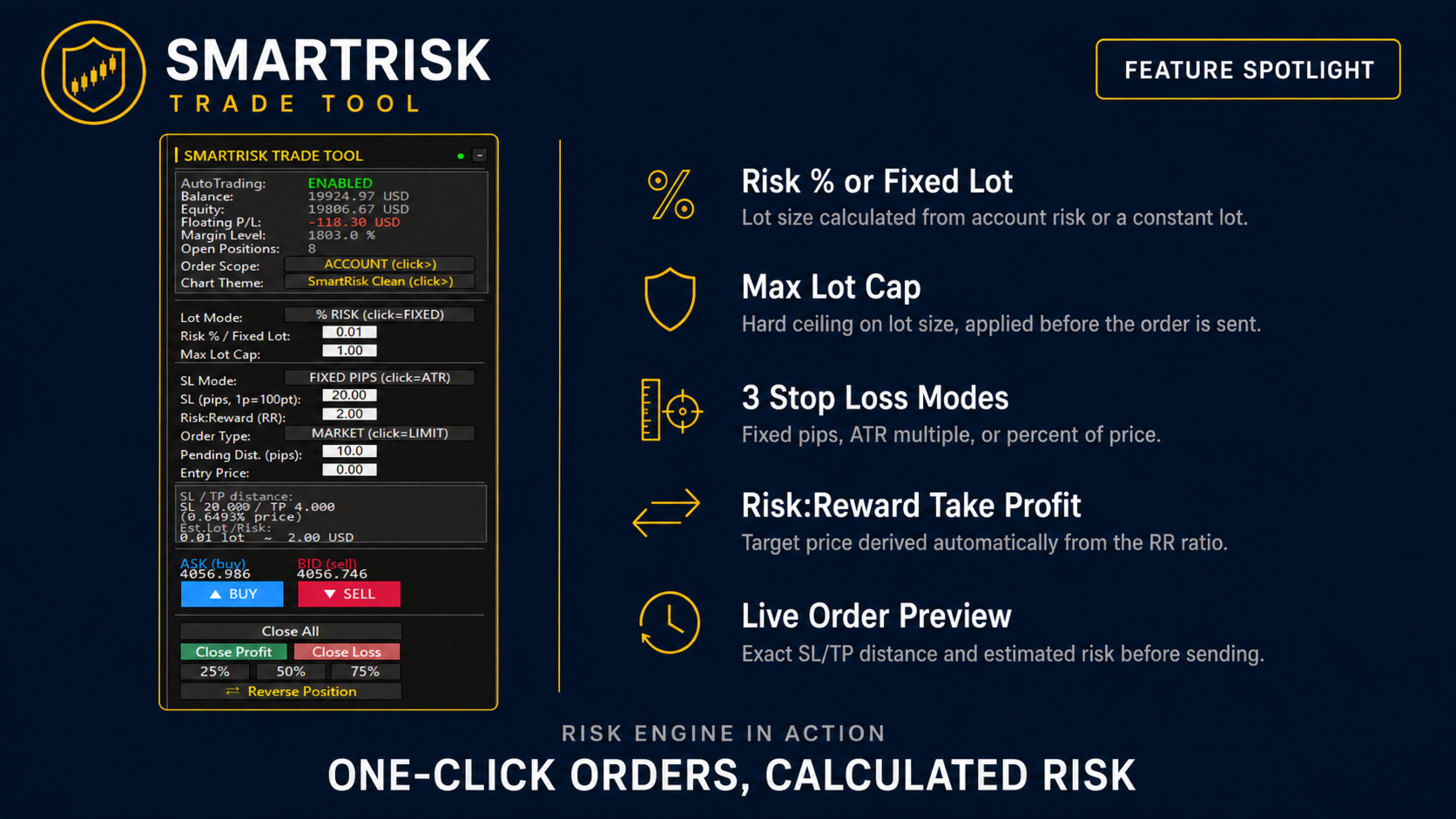
Orders can be sent as Market, Limit, or Stop, with the panel switching its input fields automatically depending on the order type selected. Lot size is calculated using one of two modes: Risk %, where the lot is derived from a chosen percentage of account balance or equity combined with the current stop loss distance, or Fixed Lot, where a constant lot size is used regardless of stop distance. An independent Max Lot Cap input places a hard ceiling on the final lot size sent to the broker; unlike a simple warning message, this cap is applied inside the lot-normalization step itself, so a tight stop loss on a fast-moving symbol cannot produce an oversized position even if a risk warning is dismissed.
Before an order is sent, a live preview box shows the exact stop loss distance, take profit distance, calculated lot size, and estimated risk in account currency, so the trade can be reviewed before execution rather than after. Pip and point size are calculated per symbol rather than assumed to follow standard Forex conventions, including a dedicated calculation path for metals such as Gold and Silver where the relationship between points and price is different from currency pairs; a manual override input is also available for symbols or brokers where the automatic calculation does not match the intended pip size.
Stop Loss and Take Profit
Stop loss can be set in three modes: a fixed number of pips, a multiple of the Average True Range, or a percentage of the current price. Take profit is not set directly — it is derived from the chosen stop loss distance and a Risk:Reward ratio entered by the trader, so changing the ratio automatically recalculates the target. Stop and target prices are snapped to the symbol's real tick size rather than a fixed number of decimal digits, and the broker's minimum stop distance is applied automatically where required, with the preview box flagging when a requested stop was tightened to meet that minimum so the displayed numbers always match what is actually sent to the server. For pending orders, an entry price field can be typed directly or left to follow an auto-suggested price based on the configured pips distance from the current market price, with a validation check confirming the entry price is on the correct side of the market for the order type chosen.
Position Management
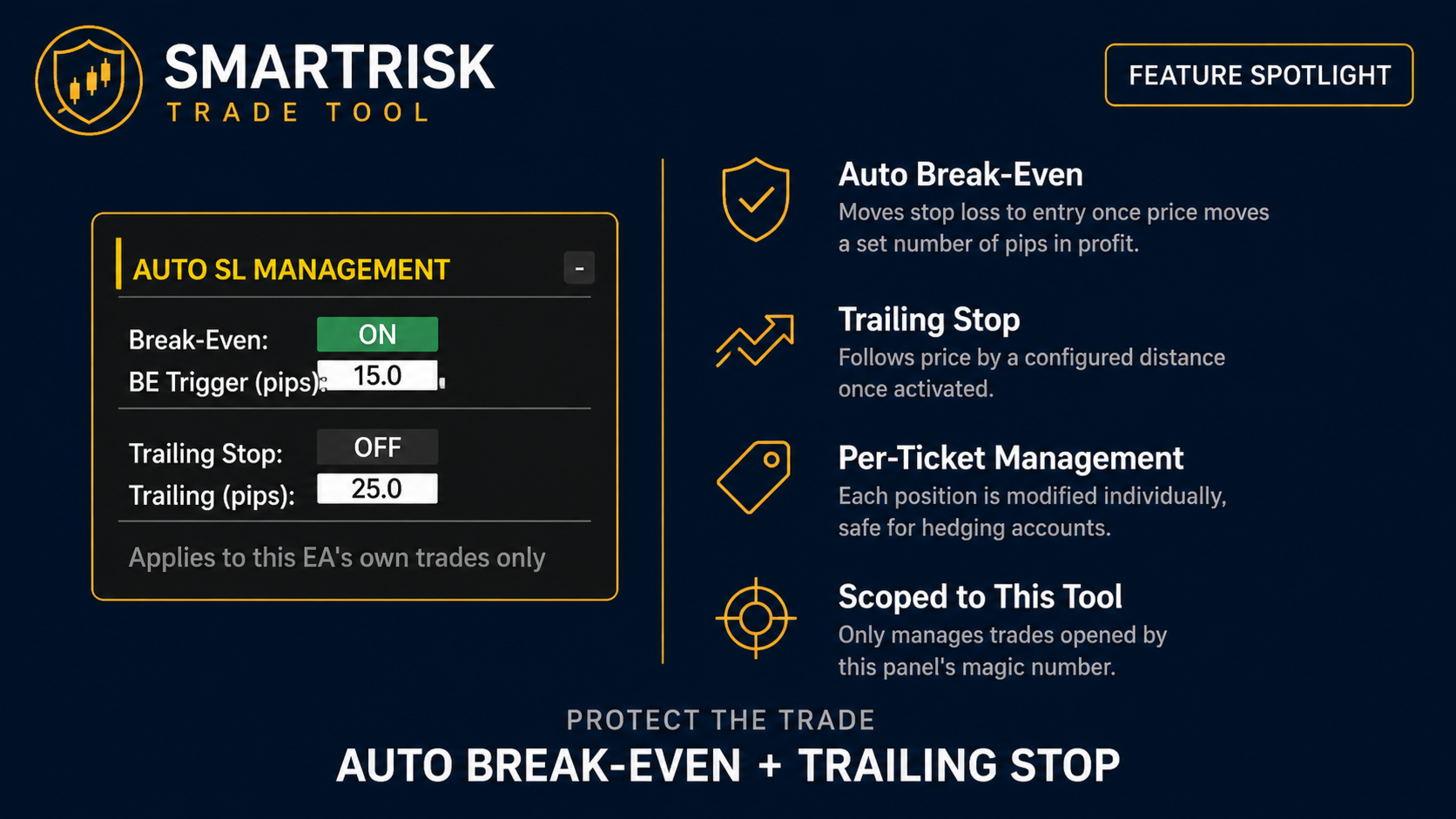
Existing positions opened by the tool can be closed with Close All, Close Profit, or Close Loss buttons, or partially closed at 25%, 50%, or 75% of their current volume. A Reverse Position button closes the current position and opens a new one in the opposite direction using the same lot-sizing rules. Break-Even and Trailing Stop can each be enabled independently: Break-Even moves the stop loss to entry once price has moved a configured number of pips in favor of the trade, and Trailing Stop then follows price by a configured distance once active. Both are scoped to the tool's own trades by magic number, and modify positions by ticket rather than by symbol, so on hedging accounts with multiple open positions on the same symbol, each position is managed individually instead of only the first one found.
Risk Guardrails
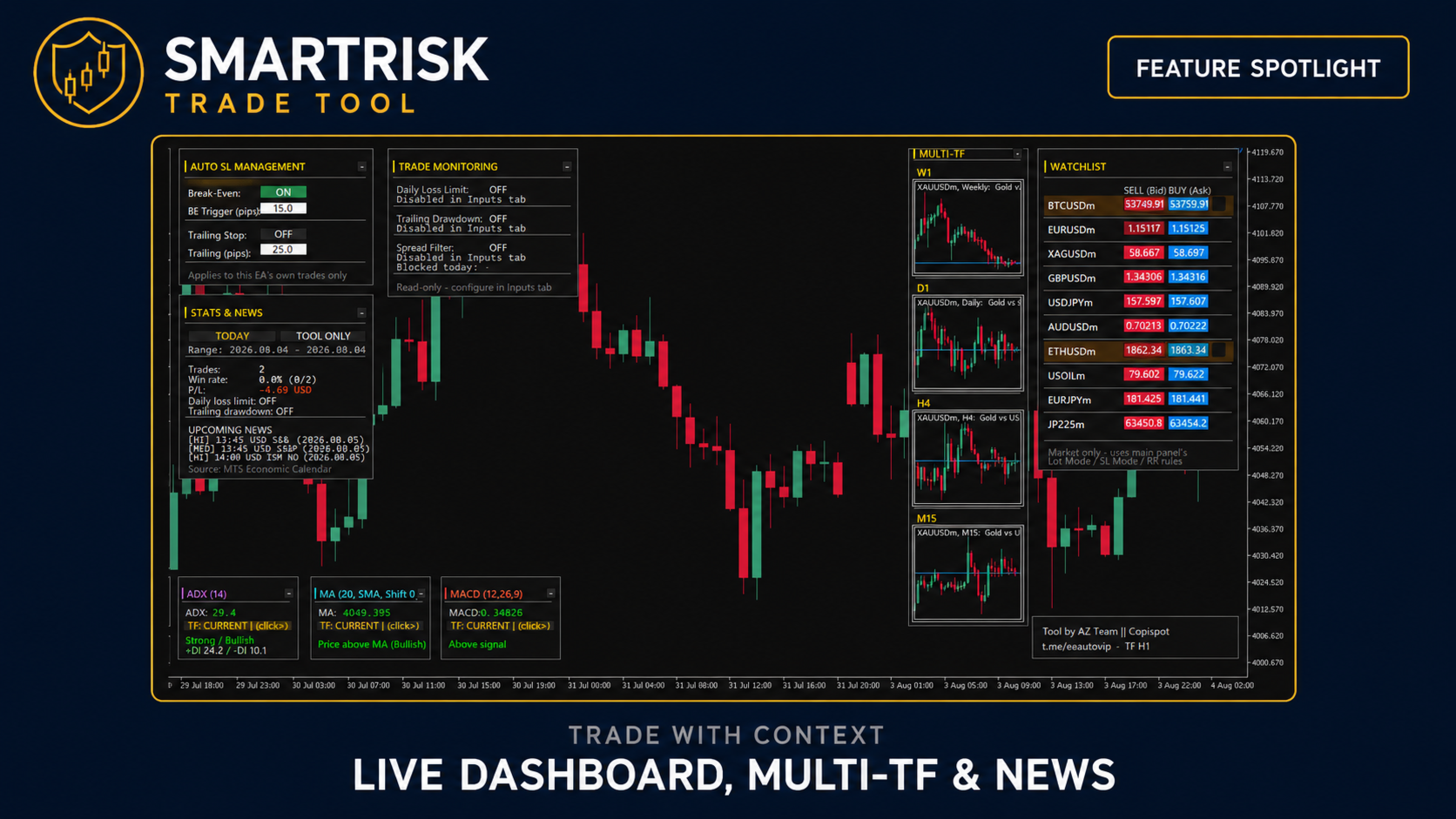
Three optional protections can be enabled from the Inputs tab, each acting independently of the others. A Daily Loss Limit blocks new orders from the panel once the day's realized and floating loss reaches a configured percentage of the balance recorded at the start of the day, with an option to also trigger Close All automatically when the limit is hit. A Trailing Drawdown limiter tracks the day's peak equity as it changes and blocks new orders once equity falls a configured percentage below that peak, catching cases where an account was up for the day and gave back gains quickly, not only a net loss against the day's opening balance. A Spread Filter blocks new market orders (pending orders are unaffected) when the current spread exceeds a configured multiple of its own recent rolling average, guarding against sending a market order into a temporary spread spike. All three are shown as read-only status fields on the panel, with the underlying limits configured once in the Inputs tab.
Monitoring Dashboard
The main dashboard section shows account balance, equity, floating profit/loss, margin level, and the number of currently open positions, refreshed continuously. Alongside it, a Multi-Timeframe panel displays small reference charts for four configurable timeframes of the active symbol (Weekly, Daily, H4, and M15 by default), and a Watchlist panel shows live bid/ask prices for a configurable list of up to twelve symbols, with a broker symbol suffix (such as "m" or ".a") detected automatically so the base symbol name is enough. A Stats & News section reports the number of trades taken and win rate for a selectable period (Today, Last Week, Last Month, or a custom date range), together with an upcoming and recent economic-events list read directly from the MetaTrader 5 terminal's built-in Economic Calendar, filterable by currency, title keyword, and impact level, using the trade server's own time so no timezone adjustment is required.
Auxiliary Indicator Readout
A row of compact panels below the main dashboard shows current values for RSI, ATR, ADX, a configurable Moving Average, and MACD on the active chart, each independently minimizable and each able to cycle its own timeframe, so common context indicators can be checked without opening separate indicator windows.
Alerts
Optional popup-and-sound alerts can be enabled separately for a position closing by Stop Loss or Take Profit, for the first time Break-Even or Trailing activates on a position, and for the account's Margin Level dropping below a configured threshold. An optional alert can also fire a configured number of minutes before an upcoming high-impact news event, with a separate option to temporarily lock the Buy/Sell buttons for a configured window around the event time.
Interface
Each of the four main panel sections (order panel, auto SL management, stats & news, trade monitoring) can be shown or hidden independently. The panel can be collapsed to its header bar with a single click to save chart space, and automatically rescales its layout to the width and height of the chart window, within a configurable minimum and maximum scale range. Panel background, text, and accent colors can be customized from the Inputs tab, independent of the chart's own color scheme.
Input Parameters
Inputs are organized into the following groups:
- General — magic number used to identify the tool's own trades, an option to scope Partial Close/Reverse/alerts to the current chart symbol only, and maximum allowed order slippage.
- Panel Visibility / Panel Colors / Panel Auto-Resize — show/hide each panel section, background/text/accent colors, and the minimum/maximum scale the panel is allowed to resize to.
- Default Values — starting risk %, fixed lot, stop loss value for each SL mode, default Risk:Reward ratio, and the manual pip-size override for non-standard symbols.
- Risk Safety Guards — the spread multiple below which a stop loss is flagged as too tight, the free-margin usage percentage that triggers a warning, and the hard maximum lot size per trade.
- Break-Even / Trailing — enable/disable each feature and its trigger/trailing distance in pips (also adjustable live from the panel itself).
- Pending Orders — default distance in pips used to suggest an entry price for Limit/Stop orders.
- Trade Monitoring — enable/disable the Daily Loss Limit and Trailing Drawdown limiter, their percentage thresholds, and whether hitting either limit also triggers Close All.
- Spread Filter — enable/disable, the spread multiple that blocks new market orders, and the rolling time window used to compute the average spread.
- Multi-Symbol Watchlist — enable/disable, the list of symbols to display, and the spread threshold (in points) that highlights a row as elevated.
- Indicator View — show/hide and starting state for each of the RSI, ATR, ADX, MA, and MACD boxes, along with their individual periods and default timeframe.
- Multi-Timeframe Preview — show/hide, column width, and the four timeframes displayed.
- Alerts — enable/disable each alert type, the margin level threshold for the low-margin alert, and the sound file used.
- Dashboard: Upcoming News — enable/disable the news section, currency/keyword/impact filters, how many upcoming and past events are shown, how far ahead/behind the calendar is read, how often it refreshes, and the optional pre-news alert and trading-lock window.
Notes
- The tool does not open, close, or modify any trade automatically based on market conditions; every entry is triggered manually by the user through the panel. Break-Even, Trailing Stop, and the risk guardrails only manage or restrict trades already opened through user action.
- Order filling mode is detected automatically per symbol and broker.
- Works on any symbol and timeframe; the panel's default values are set for manual discretionary trading rather than any specific strategy.