
Strategy Ledger Pro
- Утилиты
-
Abdullah Uygar Tuna
 IT-специалист, специализирующийся на алгоритмической торговле, количественном анализе и разработке практичных инструментов для MetaTrader 5.
 - Версия: 4.43
- Обновлено: 13 октября 2026
- Активации: 10
Теперь доступно на русском языке.
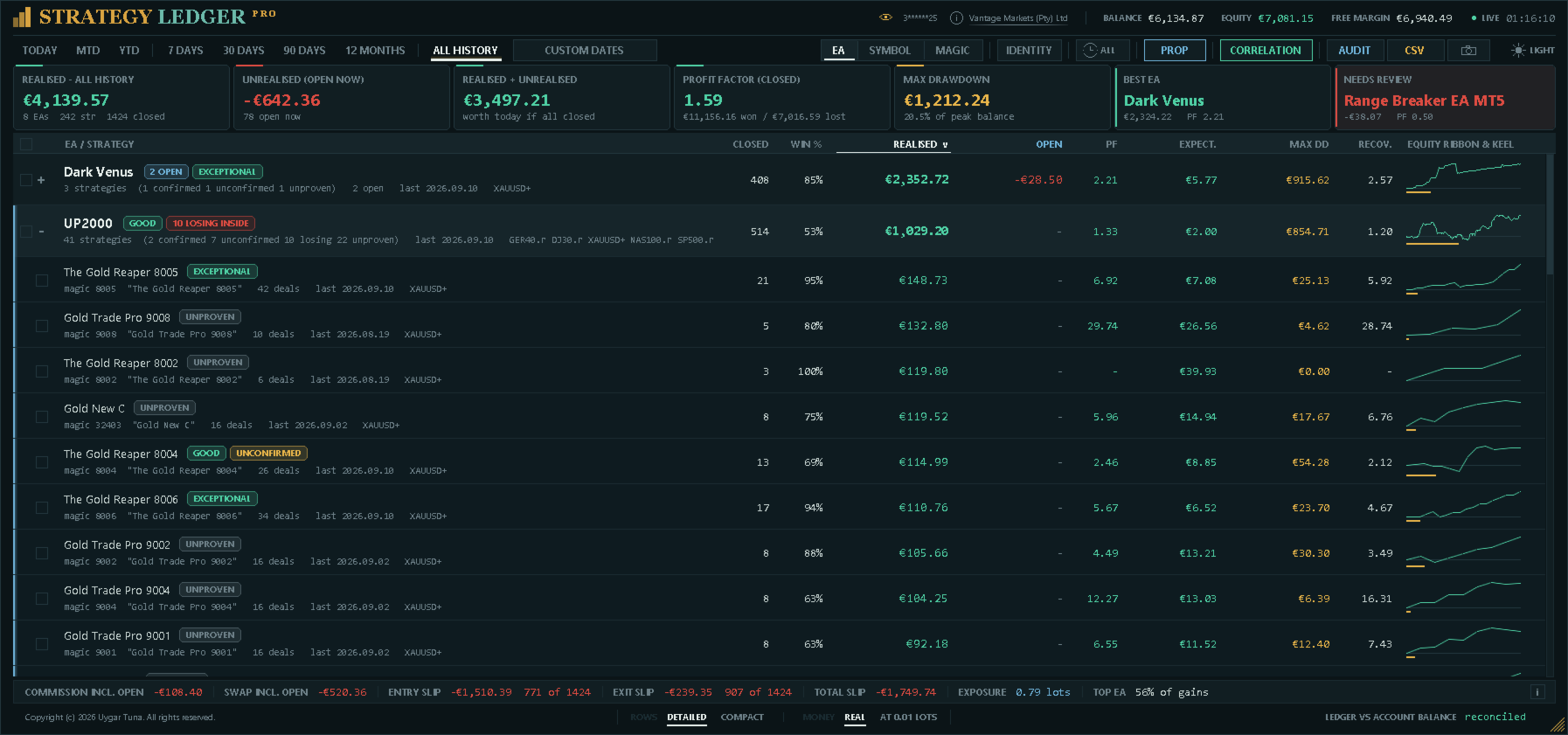
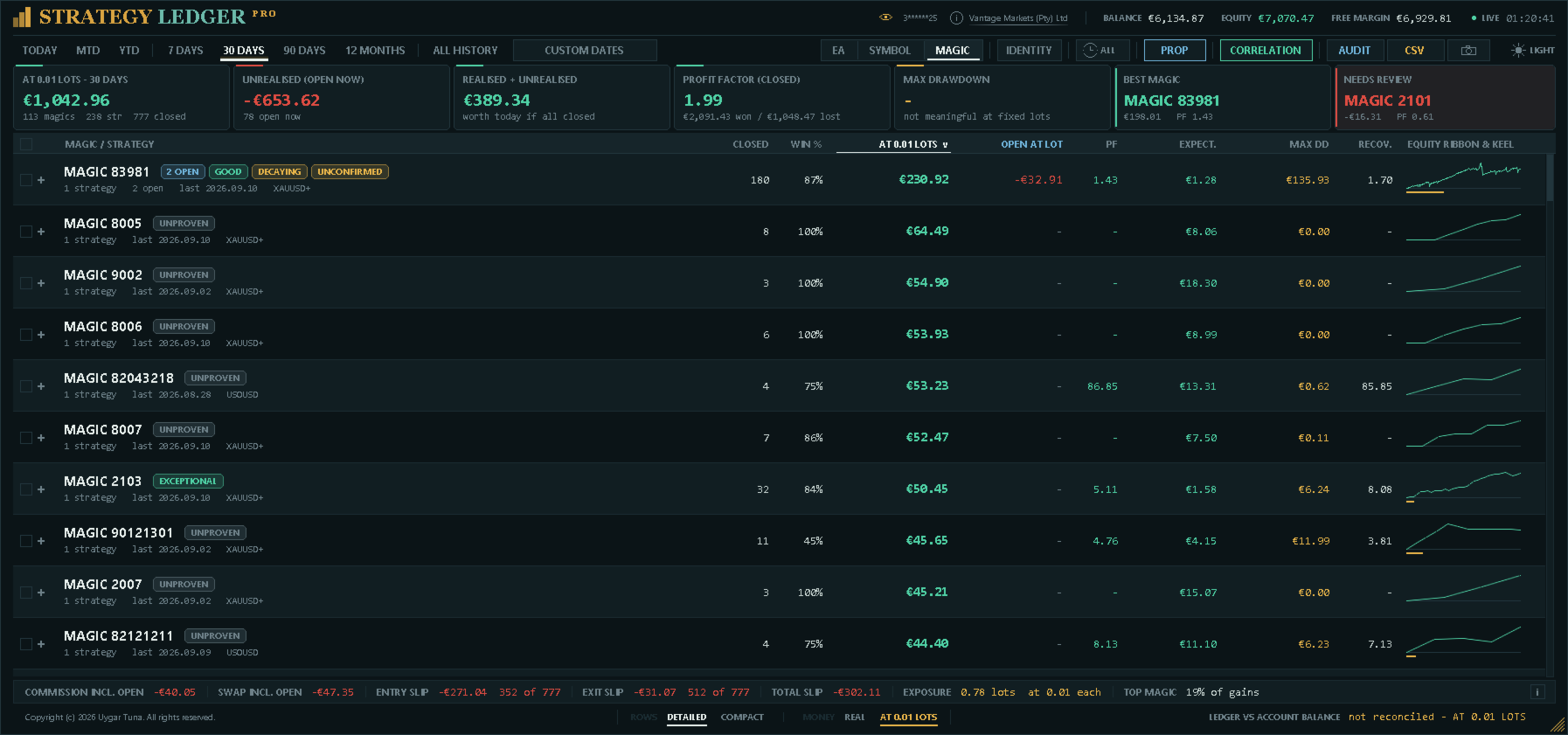
Strategy Ledger Pro — панель анализа счёта для MetaTrader 5, работающая только на чтение. Она разделяет результаты счёта по советникам, стратегиям, символам и magic-номерам, чтобы было видно, что на самом деле вносит каждый из них.
Панель доступна на 11 языках: English, Français, Deutsch, Español, Italiano, Português, Русский, Türkçe, 中文, 日本語 и 한국어.
Перед загрузкой демоверсии. Маркет запускает демоверсию любого платного продукта только в тестере стратегий. Эта панель анализирует сделки на вашем собственном счёте, а в тестере стратегий нет истории счёта, поэтому демоверсия открывается с пустой панелью и сообщает об этом. Так устроен механизм демоверсий, это не ограничение продукта.
Видео в этом описании показывает работу панели на реальном счёте.
Подробное руководство (на английском) описывает каждую функцию, а группа AureusAI Trading Suite открыта для обсуждений и объявлений.
MetaTrader показывает один баланс на весь счёт. Когда на нём одновременно торгуют несколько советников, этот баланс не показывает вклад каждого. Strategy Ledger Pro читает историю счёта, восстанавливает закрытые позиции, распределяет их по стратегиям и показывает результаты на одной панели.
Продукт не открывает, не изменяет и не закрывает ордера. Он не содержит торговой стратегии, не создаёт индикаторов и не читает цены графика.
Основные функции
- Результаты по советнику, отдельной стратегии, символу или magic-номеру.
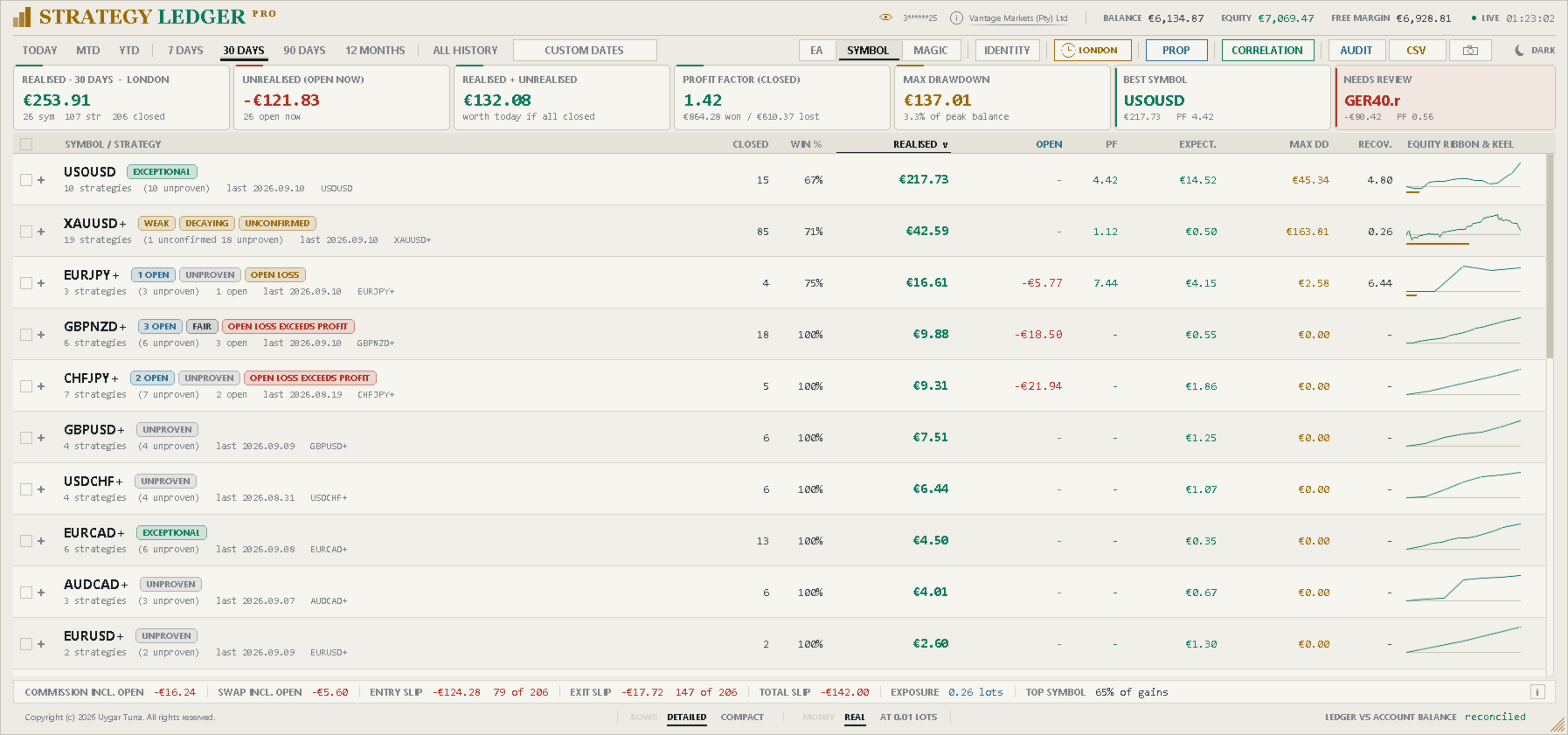
- Готовые периоды, произвольный диапазон дат и фильтр по сессиям: Азия, Лондон или Нью-Йорк.
- Реализованный и плавающий результат, открытая позиция, торговая статистика, пункты, просадка и кривые средств.
- Комиссия, своп, доля издержек и расчётное проскальзывание на входе и выходе с общим итогом.
- Оценки эффективности, текстовые резюме и статусные метки по фиксированным правилам.
- Сетапы: позиции, открытые вместе или закрытые вместе как корзина, считаются одним решением для показателей достоверности.
- Отслеживание просадки средств в реальном времени для счёта и для каждой строки.
- Интерактивное переименование, группировка, перемещение, скрытие, восстановление, раскрытие и сортировка.
- Идентификация: magic-номер можно считать одной стратегией или несколькими, а magic-номера и размеры лотов — убирать с панели с указанием их вклада.
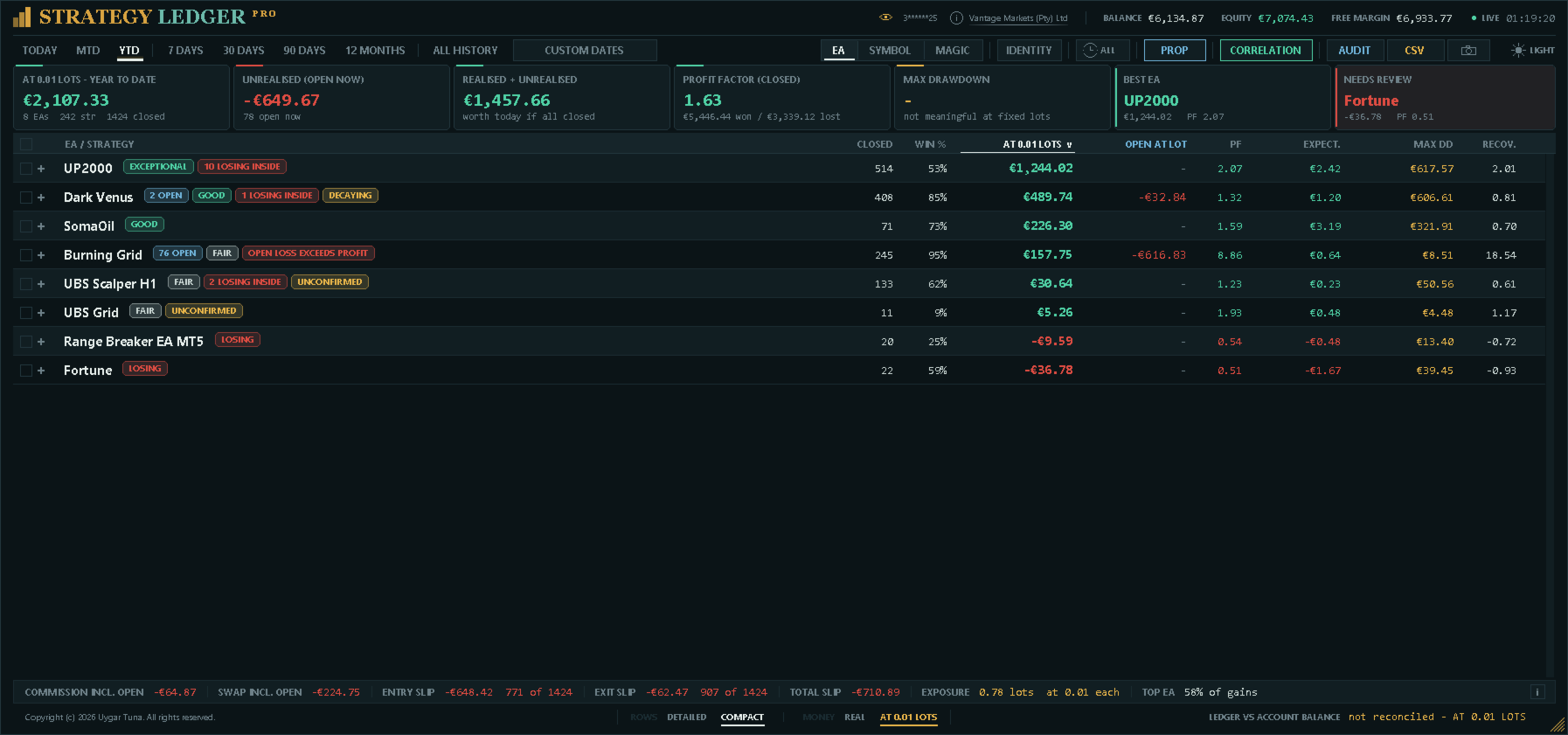
- Режим фиксированного лота: каждая сделка пересчитывается с одним размером лота и явно помечена как расчёт «что если».
- Результаты по сессиям и по часам суток для каждой стратегии.
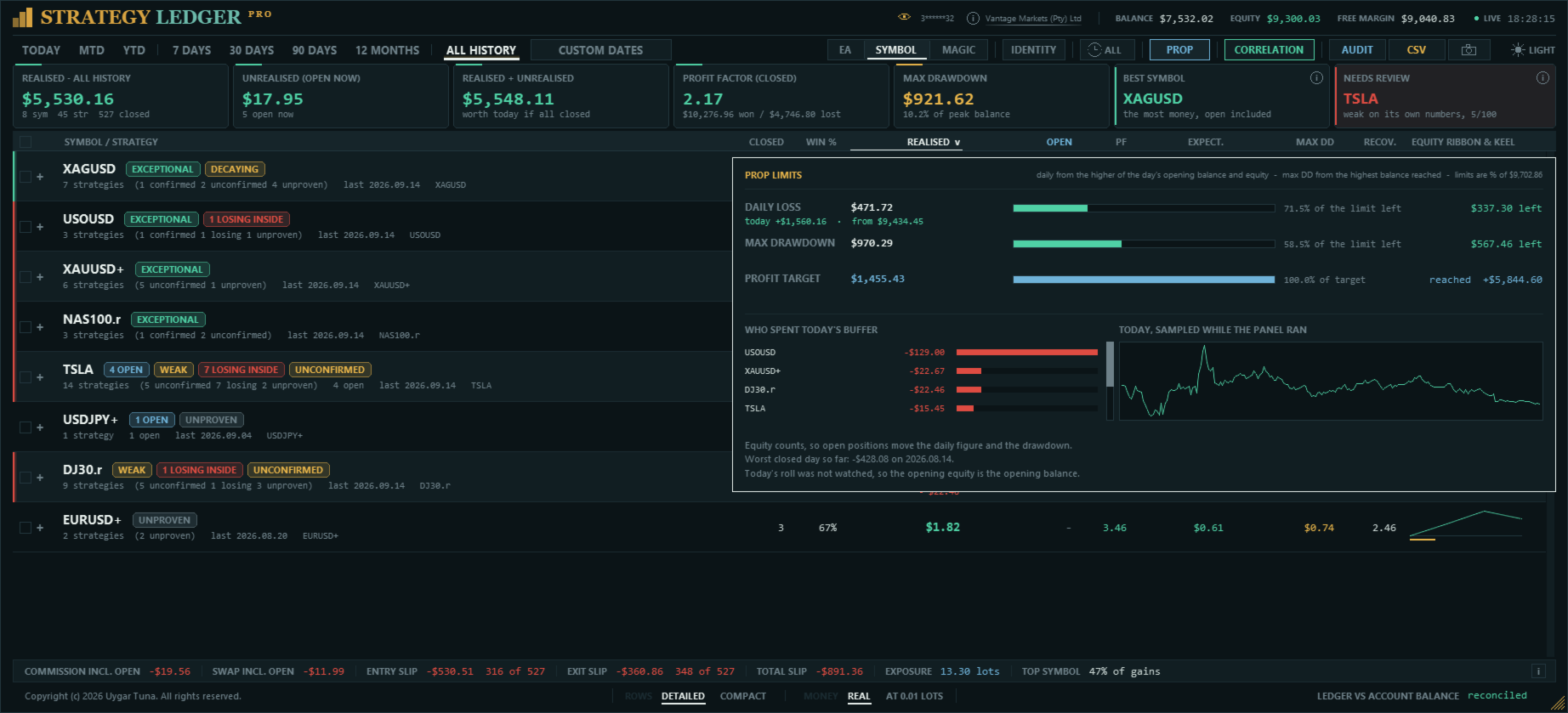
- Лимиты проп-компаний: дневной убыток, максимальная просадка и цель по прибыли, с оставшимся запасом по каждому.
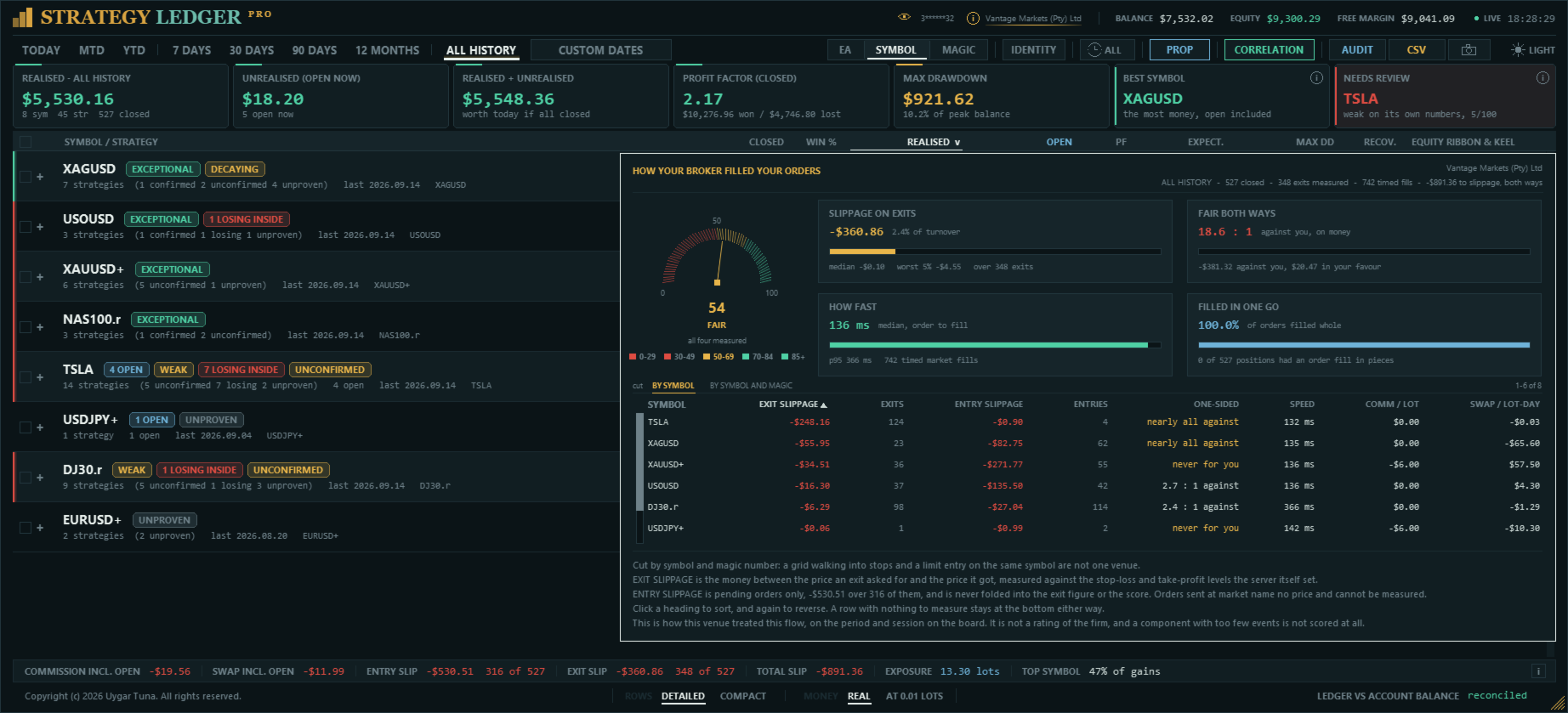
- Отчёт об исполнении: во что обходится исполнение ваших ордеров, одинаково ли часто оно выгодно и невыгодно вам, как быстро исполняются ордера и сколько вы платите за лот и за лот в сутки.
- Метки дневного изменения: что сделала каждая строка с начала торгового дня.
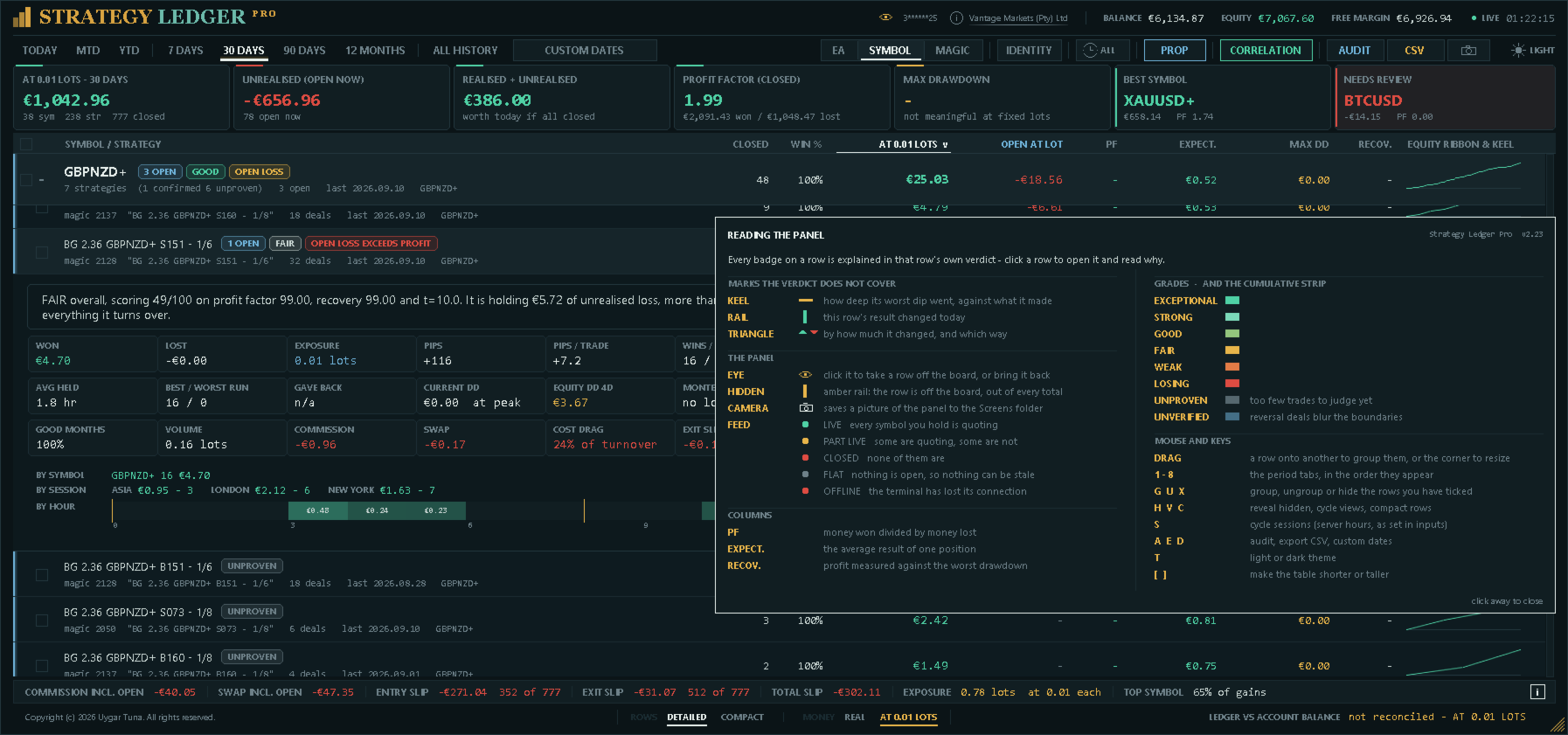
- Встроенное руководство с описанием каждой метки, столбца и горячей клавиши.
- Корреляция между советниками, стратегиями или символами по дневным закрытым результатам.
- История оценок: оценка каждой строки по месяцам, восстановленная по истории сделок.
- Отчёты тестера стратегий: один или несколько HTML-отчётов тестера на той же панели, с пометкой «симуляция» и без смешивания со счётом.
- Карточки для публикации: один клик сохраняет наглядное изображение результатов советника без номера счёта и названия брокера.
- Интерфейс на 11 языках, выбираемый один раз в настройках.
- Экспорт подробных показателей и аудита в формате CSV и снимки панели в формате PNG.
Как строятся данные счёта
Strategy Ledger Pro считает завершённые позиции, а не отдельные сделки. MetaTrader может открывать или закрывать одну позицию несколькими сделками. Панель группирует такие сделки по идентификатору позиции и записывает одну сделку, когда закрытый объём совпадает с открытым. Частичные закрытия остаются частью той же позиции.
Прибыль, комиссия, сборы и своп входят в каждый результат. Пополнения, выводы, кредиты, корректировки, бонусы, списания, проценты, дивиденды и налоги учитываются при сверке счёта, если брокер отражает их в истории счёта. Каждая позиция также имеет результат в пунктах — средний выход против среднего входа, — который не зависит от размера лота.
Стратегия обычно определяется по magic-номеру и очищенному комментарию открывающей сделки. Это поддерживает советники, которые используют один magic-номер для нескольких внутренних стратегий. Сделки, скопированные с сигнала MQL5, собираются в одну стратегию с названием сигнала. Ручные и мобильные сделки с magic-номером ноль также можно включить.
Не каждая позиция — отдельное решение. Советник, открывший четыре позиции по одному сигналу, принял одно решение, а сетка, закрывшая корзину разом, дала один результат. Поэтому позиции одного magic-номера и символа, открытые в коротком интервале или закрытые вместе как лестница — в одном направлении, с ценами входа, идущими в одном порядке, — считаются одним сетапом. Денежные показатели всегда считают позиции; показатели достоверности — статистическая достоверность, минимальная выборка, оценка, балл и просадка Монте-Карло — используют сетапы, чтобы корзина, открытая как одно решение, не считалась сорока независимыми результатами.
Нижняя строка сравнивает восстановленный реализованный результат и балансовые операции с балансом и кредитом, которые показывает MetaTrader. Любое расхождение отображается. Разворотные сделки на неттинговых счетах могут делать границы сделок неточными, поэтому такие строки помечаются как «Не проверено» и не получают оценку.
Представления, периоды и организация
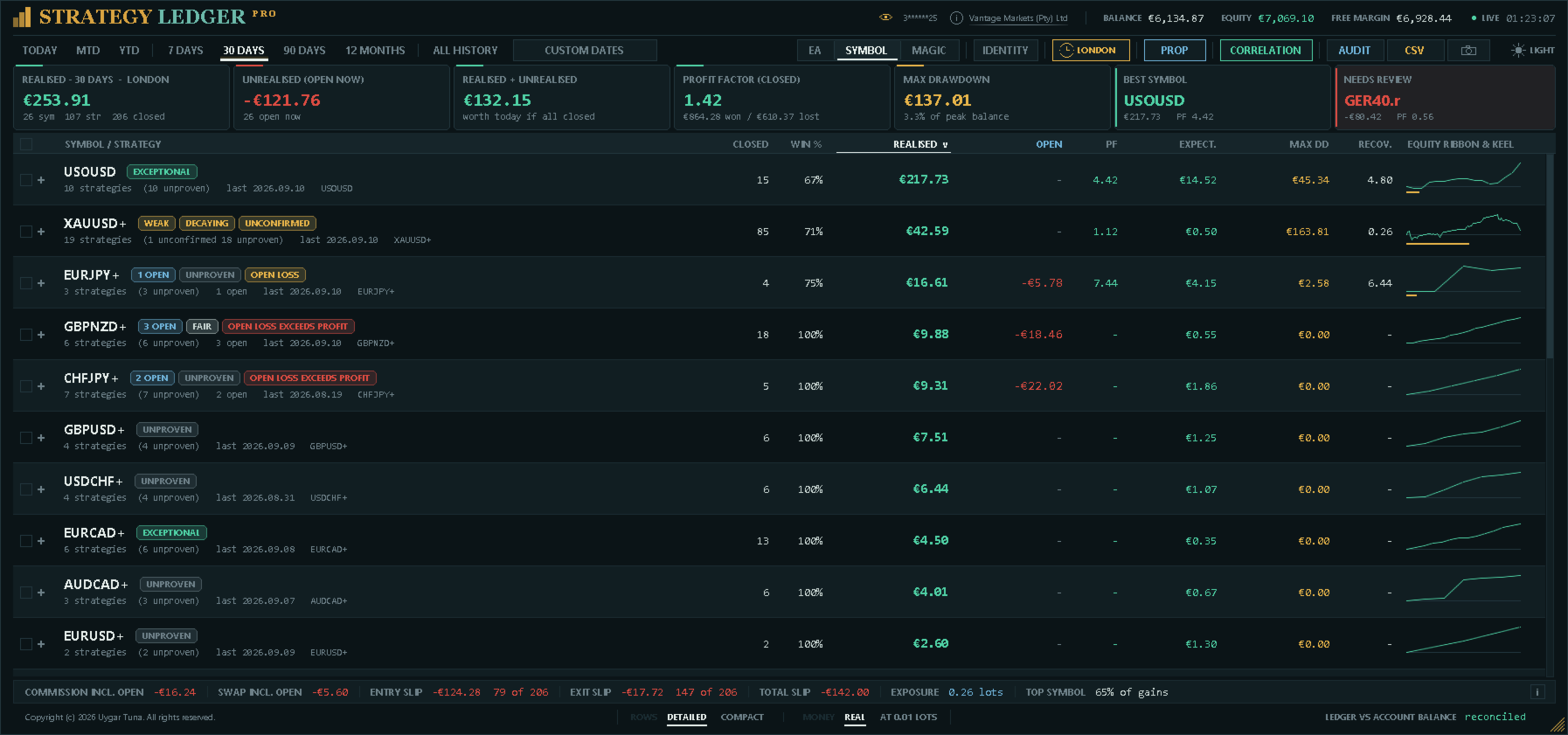
Представление по советникам группирует стратегии под назначенным советником. Представление по символам группирует те же данные по инструментам. Представление по magic-номерам группирует их по номеру, который отправил каждый советник, с комментариями в качестве стратегий ниже; именно там стоит смотреть, если комментарии советника ведут себя неожиданно. Одновременно можно раскрыть несколько строк.
Доступные периоды: сегодня, с начала месяца, с начала года, 7 дней, 30 дней, 90 дней, 12 месяцев, вся история и произвольный диапазон дат. Позиция относится к периоду по времени закрытия или по времени открытия.
Часы в заголовке фильтруют всю панель по одной торговой сессии — Азия, Лондон или Нью-Йорк — в любом представлении и за любой период. Позиция относится к сессии, в которую она была открыта. Часы начала сессий задаются в настройках по времени сервера, а подпись периода везде указывает, какая сессия действует.
Названия можно брать из комментариев сделок или задавать вручную. Стратегии можно переименовывать, группировать из выделения, перетаскивать к другому советнику, объединять и разделять. Перетаскивание строки, входящей в отмеченное выделение, перемещает всё выделение. Одинаковые комментарии можно объединять между magic-номерами, со списком исключений для комментариев, которые должны оставаться отдельными.
Строки можно скрывать по одной или выделением и позже восстанавливать. У каждой строки советника справа, в отдельном столбце, есть два элемента управления: глаз, который скрывает строку и затем становится янтарным, чтобы её восстановить, и камера, которая сохраняет карточку этой строки. Оба всегда видны в приглушённом виде и становятся ярче при наведении мыши. Скрытые строки хранятся отдельно для каждого представления. Они исключаются из видимых итогов и из отфильтрованной кривой баланса. Советник, все стратегии которого скрыты, не показывает цифр, потому что их у него нет, и размещается ниже строк, которые ещё учитываются, чтобы не смещаться при их изменении.
Столбцы можно сортировать по названию, результату, профит-фактору, числу закрытых позиций, просадке или матожиданию.
Идентификация
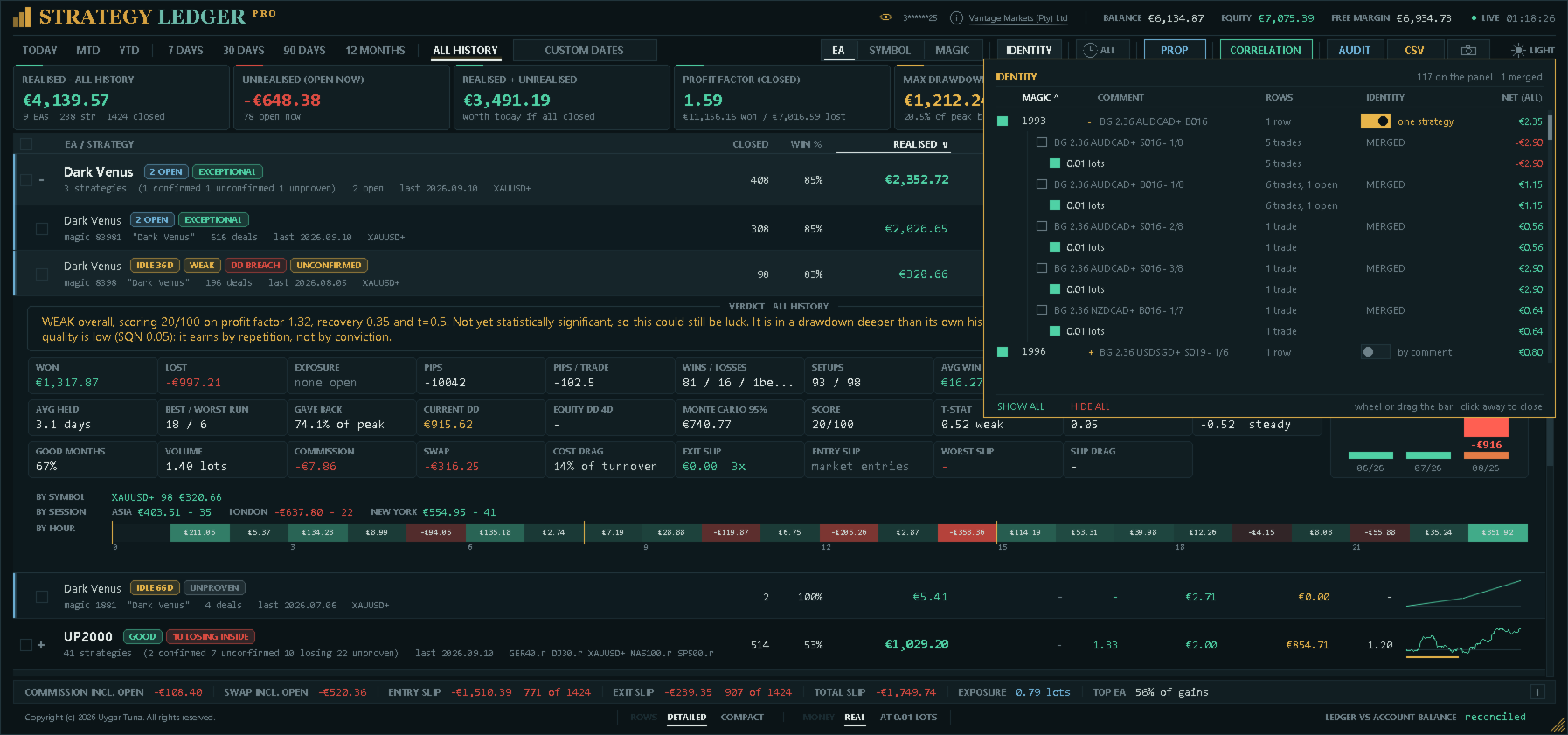
Окно идентификации показывает каждый magic-номер на счёте с его строками, результатом за всю историю и переключателем. Правило «по комментарию» — обычное: стратегия — это magic-номер вместе с его комментарием. Правило «одна стратегия» объединяет все комментарии этого magic-номера в одну строку — для советников, которые пишут в комментарий диагностику или номера ступеней сетки; любой отдельный комментарий можно снова вывести в собственную строку. Для сигналов MQL5 переключатель не предлагается: они уже являются одной стратегией по правилу сигналов.
Каждый magic-номер раскрывается до своих комментариев, а под каждым комментарием — до размеров лотов, от меньшего к большему, с числом сделок и результатом. Размер лота можно убрать с панели так же, как magic-номер; одинаковый размер под двумя комментариями убирается отдельно. Всё убранное показывается внизу окна вместе с исключёнными сделками и суммой, так что улучшенный результат никогда не показывается без своей цены. Фильтры по magic-номерам и лотам — это линзы: они не сохраняются и сбрасываются вместе. Переключатель идентификации и выделенные комментарии — это решения, и они запоминаются вместе с раскладкой.
Режим фиксированного лота
Переключатель в нижней строке пересчитывает каждую закрытую сделку и каждую открытую позицию так, как если бы она была открыта одним размером лота (задаётся в настройках, по умолчанию 0,01). Лестница сетки выравнивается — видно, было ли преимущество во входах или только в размере позиций; сигнал показывает, что он принёс бы при том размере, с которым его копировали бы. Поскольку все денежные цифры на экране становятся расчётом «что если», панель сообщает об этом везде, где читаются деньги: заголовок реализованного результата и первая ячейка сводки называют размер лота, строка сверки показывает «не сверено», экспорт получает соответствующее название и пометку о пересчёте, аудит не запускается, история оценок и отслеживание средств приостанавливаются и ничего не сохраняется. Режим выключается при каждом подключении панели. Фиксированный лот уравнивает размер, но не риск; пункты уравнивают только движение цены.
Панель и подробности стратегии
Заголовок показывает счёт, брокера, баланс, средства, свободную маржу, время сервера и состояние котировок. Состояние отображается как «Онлайн», «Частично», «Закрыто», «Без позиций» или «Офлайн», чтобы цифры, которые сейчас не обновляются, не принимались за текущие. Глаз рядом с номером счёта скрывает его для снимков экрана, которыми вы будете делиться.
Сводка показывает реализованный результат, текущий плавающий результат, их сумму, профит-фактор по закрытым позициям, максимальную просадку баланса, самую сильную строку по текущей стоимости и строку, выбранную для проверки по правилам панели. Две последние карточки называют причину выбора, и у каждой есть значок, открывающий правило: для строки на проверку — каждая составляющая оценки с набранными баллами и тем, что она увидела; для самой сильной — правило и цифры, к которым оно применено.
Таблица показывает число закрытых позиций, долю прибыльных, реализованный и плавающий результат, профит-фактор, матожидание, максимальную просадку по закрытым позициям, фактор восстановления и компактную кривую средств с траекторией просадки. Если строки скрыты, эти цифры описывают показанную выборку.
Строки, изменившиеся с начала торгового дня, получают цветную кромку и значок направления с суммой изменения. Если у коэффициента нет знаменателя — у строки нет убыточных сделок или просадки, — в столбце показывается прочерк, а не число.
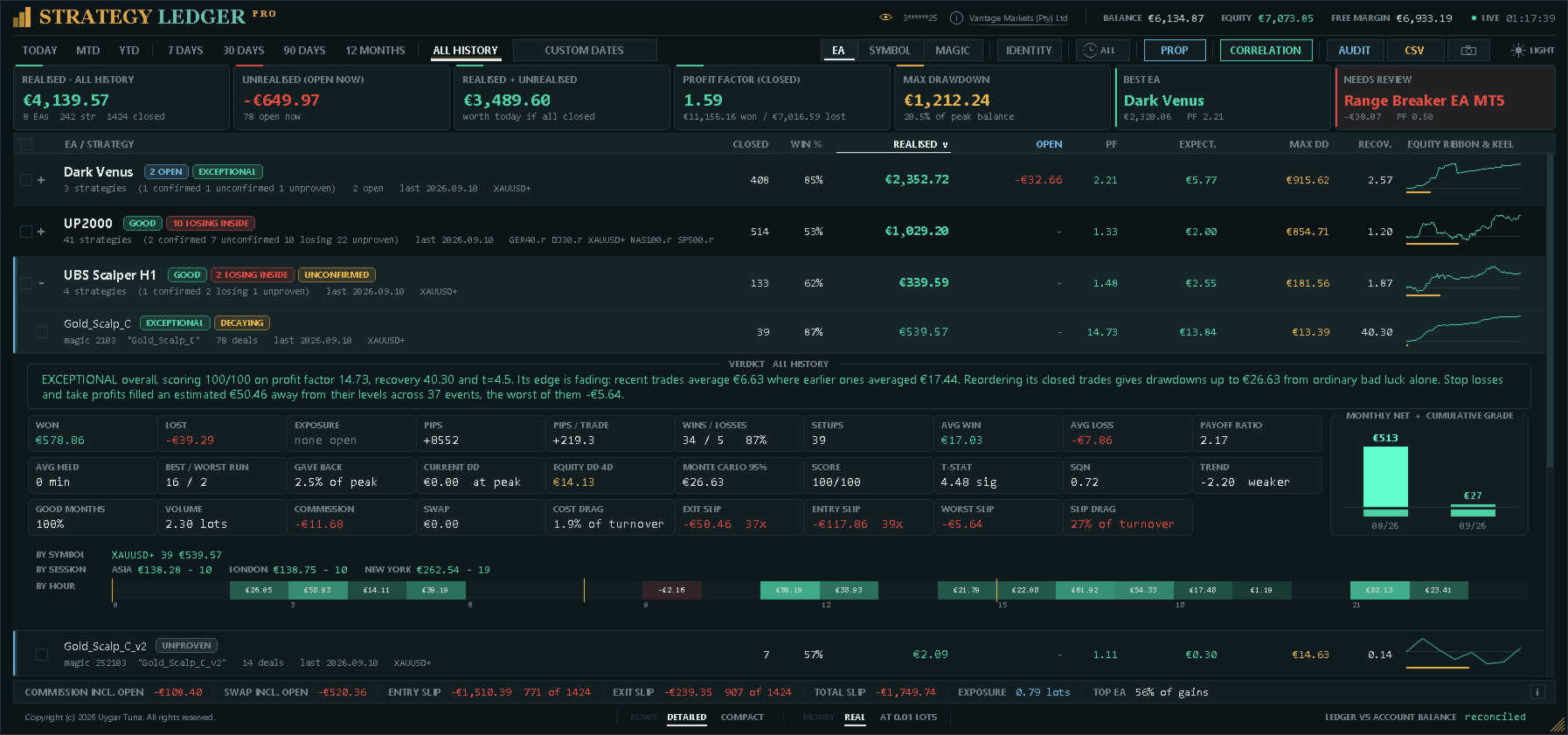
Раскрытые подробности содержат общую прибыль и убыток, открытую позицию, пункты и пункты на сделку, прибыльные и убыточные сделки, сетапы, среднее время удержания, среднюю прибыль и убыток, отношение прибыли к убытку, лучшую и худшую серии, процент просадки, текущую просадку, самый долгий период в просадке, объём и долю прибыльных месяцев.
Самый долгий период в просадке — это самый длинный отрезок, в течение которого накопленный закрытый результат строки оставался ниже своего предыдущего максимума, от одного максимума до следующего. Это не время удержания позиции: советник, сделки которого длятся минуты, может неделями находиться ниже своего максимума. Отрезок, который ещё не вернулся к максимуму, считается до сегодняшнего дня и отмечается как «пока».
Подробности также показывают балл, статистическую достоверность, System Quality Number, тренд последних результатов, оценку просадки Монте-Карло, просадку средств в реальном времени, комиссию, своп, долю издержек, проскальзывание на входе и выходе, худшее измеренное проскальзывание и долю проскальзывания. Включены график месячных итогов, разбивка по символам, результат строки в каждой сессии и полоса из двадцати четырёх ячеек, окрашенных по прибыли или убытку каждого часа суток.
Оценки и метки риска
Балл объединяет статистическую достоверность, профит-фактор и фактор восстановления. Каждая составляющая ограничивается перед усреднением. Плавающий убыток может ограничить балл, потому что статистика закрытых позиций не учитывает этот открытый убыток.
Минимальная выборка по умолчанию — 20 сетапов. Строки ниже неё помечаются «Не доказано». Остальные оценки — от «Убыточно» до «Исключительно» — зависят от балла и заданного порога убыточности. Оценки описывают записанные данные счёта; это не торговые сигналы и не прогнозы.
Статусные метки обозначают открытые позиции, отсутствие закрытых сделок, неактивность, убыточный результат, открытый убыток, открытый убыток больше зафиксированной прибыли, ослабление последних результатов, недостаточное статистическое подтверждение, просадку выше оценки по перемешанной истории, убыточные стратегии внутри прибыльного советника и просадку средств, заметно превышающую просадку по закрытым позициям. Раскрытие строки показывает применимые метки и текстовое пояснение в цифрах этой строки.
Сессии и часы
Фильтр сессий действует на всю панель; кроме того, подробности каждой стратегии показывают её результат во всех трёх сессиях рядом, так что сравнение можно прочитать, ничего не меняя. Ниже двадцать четыре ячейки — по одной на каждый час дня по серверу, в который была открыта позиция, — окрашены по прибыли или убытку этого часа и подписаны суммой, а границы сессий отмечены, чтобы одно соответствовало другому.
И то и другое — описание записанных результатов. Сессия или час, выглядящие сильными на нескольких сделках, — это гипотеза, и число сделок показывается рядом с цифрами, чтобы это было видно.
Лимиты проп-компаний
Дневной убыток, максимальную просадку и цель по прибыли можно задать в валюте счёта или в процентах, а панель показывает оставшийся запас по каждому с полосой, которая становится янтарной, а затем красной по мере его исчерпания. Превышенный лимит обозначается как нарушенный, а не как отрицательный остаток.
Компании по-разному измеряют просадку, поэтому одна настройка охватывает оба лимита: статичная от начального баланса, плавающая от максимального достигнутого баланса или плавающая от максимальных средств. Дневной лимит применяет то же правило внутри дня и сбрасывается вместе с ним — от баланса на открытие дня, от большего из баланса и средств на открытие дня или от максимальных средств за день. Дневная строка также показывает результат дня на данный момент, а окно называет цифры, от которых идёт отсчёт.
Используются средства, поэтому открытые позиции влияют на дневной показатель. Средства в момент смены дня нельзя восстановить по истории, поэтому они фиксируются, пока панель работает; если этот момент не был зафиксирован, окно сообщает об этом и использует баланс на открытие дня, который точно восстанавливается по истории сделок.
Отчёт об исполнении
Название брокера в заголовке открывает отчёт о том, как исполнялись ваши ордера. Шкала оценивает четыре вещи, которые контролирует площадка, по двадцать пять баллов: стоимость проскальзывания как долю всего оборота счёта, одинаково ли часто исполнение выгодно и невыгодно вам, сколько времени брокер тратит между получением и исполнением ордера и как часто ордер исполняется частями. Каждая часть показана со своей полосой и фразой о том, что её определило.
Под шкалой — те же показатели по символам, с комиссией на лот и свопом на лот в сутки. Проскальзывание на выходе измеряется относительно уровней стоп-лосса и тейк-профита, установленных самим сервером, поэтому целевая цена известна; проскальзывание на входе измеряется по отложенным ордерам, а рыночные ордера не имеют запрошенной цены и не могут быть измерены. Скорость исполнения берётся из собственных отметок времени ордера.
Это описание исполнения ваших ордеров на этом счёте, а не рейтинг компании, и отчёт говорит об этом прямо: проскальзывание во многом зависит от стратегии — пробой, вход в который выполняется по стоп-ордеру, платит его везде, — а комиссия и своп зависят от выбранного вами типа счёта.
Просадка, издержки и проскальзывание
Просадка по закрытым позициям не может показать полного движения позиций, пока они открыты. Strategy Ledger Pro может раз в секунду фиксировать средства и сохранять наибольшее наблюдавшееся падение от предыдущего максимума для счёта, каждого советника и каждой стратегии. Отслеживание начинается при первом включении функции, и дата начала отображается. Запись следует за жизнью строки, а не за вкладкой периода, скрытым состоянием или режимом фиксированного лота: смена представления не записывает просадку.
Когда отслеживание в реальном времени выключено, подробности могут показывать оценку просадки на 95-м процентиле, полученную перемешиванием закрытых результатов. Перемешиваются сетапы, а не отдельные позиции, поэтому корзина, которая могла произойти только одним блоком, моделируется как один блок. Эта оценка и все оценки описывают только исторические данные.
Комиссия и своп показываются отдельно, и каждая включает сумму, уже начисленную по открытым позициям. Доля издержек показывается как процент от валового оборота, если есть необходимые данные.
Проскальзывание на выходе оценивается, если ордер на выход содержит запрошенную цену, включая стоп-лосс, тейк-профит и выходы по отложенным ордерам. Проскальзывание на входе оценивается для отложенных ордеров с запрошенной ценой входа. У рыночных ордеров нет запрошенной цены для сравнения, поэтому панель сообщает о недоступности или частичном охвате. Оба показателя указывают, сколько позиций было измерено из числа закрытых, чтобы частичная выборка не читалась как полная. Показывается и общий итог; у него нет счётчика, потому что его две части охватывают разные подмножества одних и тех же позиций. Значения переводятся в валюту счёта по текущей стоимости тика символа.
Корреляция
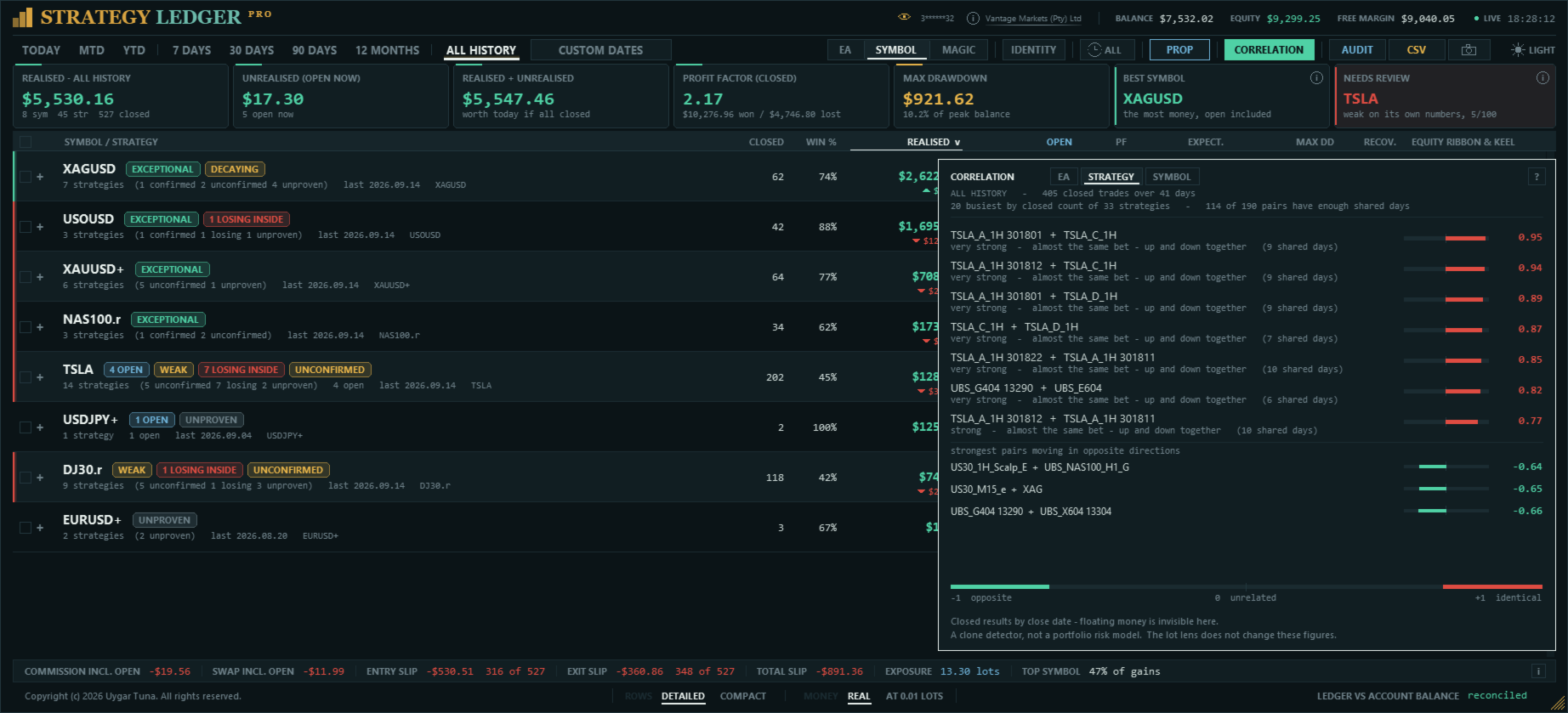
Каждая строка оценивается сама по себе, поэтому несколько советников могут по отдельности выглядеть надёжно, реагируя при этом на одни и те же условия. Список корреляций сравнивает строки друг с другом, а не оценивает их по отдельности, и показывает, какие из них движутся одинаково в одни и те же дни.
Закрытые результаты каждой строки суммируются по дням. Затем две строки сравниваются по дням, в которые торговали обе; дни, когда торговала только одна, исключаются, потому что не дают основы для сравнения. Показывается коэффициент корреляции Пирсона, который принимает значения от +1 (одинаковое движение) через 0 (нет связи) до −1 (противоположное движение).
Список можно построить для советников, magic-номеров, отдельных стратегий или символов. Сравниваются только двадцать строк с наибольшим числом закрытых позиций, а пара показывается, только если у двух строк не меньше общих торговых дней, чем заданная минимальная выборка. Пары, движущиеся в противоположных направлениях, выводятся отдельно, чтобы они оставались на виду.
Расчёт выполняется при открытии списка и затем не чаще раза в день, а также всякий раз, когда меняется состав строк. Пояснительная панель внутри списка указывает метод, период, число строк и сделок и общепринятые интервалы интерпретации коэффициента.
История оценок
Раскрытые подробности строки включают полосу месячных блоков под графиком месячных итогов, выровненную по тем же месяцам. Каждый блок показывает оценку, которую строка имела в конце этого месяца.
Блоки накопительные: каждый рассчитывается по всем позициям, закрытым строкой к концу месяца, а не только за этот месяц, потому что за один месяц редко закрывается достаточно позиций для оценки. Поэтому строка с текущей оценкой «Исключительно» может показывать неопределённые месяцы в начале истории — значит, к тому моменту закрылось слишком мало позиций, чтобы сделать вывод.
Месяцы до установки восстанавливаются по истории счёта тем же расчётом, что и для текущих данных, поэтому полоса заполнена с первого запуска. Месяцы, записанные во время работы панели, никогда не заменяются восстановлением.
Отчёты тестера стратегий
Панель читает отчёты, сохранённые из тестера стратегий. Сохраните отчёт в формате HTML в папку MQL5\Files\StrategyLedgerPro\Backtests, нажмите BACKTEST в заголовке, отметьте один или несколько отчётов и загрузите их. Каждый отчёт становится на панели одним советником с названием из отчёта; его комментарии становятся стратегиями, а символы разделяются в представлении по символам — точно так же, как реальные сделки. Можно загружать несколько отчётов одновременно.
Пока отчёт на панели, в заголовке написано «СИМУЛЯЦИЯ» с числом отчётов, их стратегиями и символами, охваченными датами и источником magic-номера, а по верху панели проходит золотая линия. Нижняя строка сверяет восстановленные позиции со столбцом баланса самого отчёта до цента. Для бэктеста карточки показывают баланс отчёта, период тестирования, годовую доходность, самый длинный период ниже предыдущего максимума и, при нескольких отчётах, лучший по восстановлению. Вкладки периодов отсчитываются от последнего закрытия в отчёте, поэтому «12 месяцев» — это последний год теста.
Реальный счёт и бэктест никогда не показываются вместе. Переход к отчёту заменяет счёт на всех экранах, а возврат восстанавливает его. Ничто из прочитанного в отчёте не записывается в названия, группы, скрытые строки, запись средств или отметку проп-лимитов счёта; собственные названия и скрытые строки отчёта хранятся в отдельных файлах. Исполнение, задержку, проскальзывание и сегодняшнюю отметку проп-лимитов нельзя измерить в бэктесте, и окна, которые бы их показывали, сообщают об этом. В отчёте нет идентификаторов позиций, поэтому выходы сопоставляются со входами по объёму, а затем по прибыли, указанной самим тестером; заголовок сообщает, сколько сопоставлений, если такие были, пришлось вывести.
В самом тестере стратегий, где работает демоверсия Маркета, панель показывает выбор отчётов, но не загружает их; работа ведётся на реальном или демо-счёте.
Карточки для публикации
Камера в каждой строке советника сохраняет карточку — одно изображение размером 1240 × 844 с результатами этого советника за период на экране, готовое к публикации. На ней показаны чистый результат с торговыми издержками (комиссия и своп и их доля от валовой прибыли), лучшая и худшая серии, кривая средств, десять ключевых показателей, последние двенадцать месяцев, результаты по сессиям, по дням недели и по часам суток, а также вердикт.
На карточке нет номера счёта и названия брокера, поэтому ничто на ней вас не идентифицирует. Каждая карточка указывает охваченный период и то, откуда она: с реального счёта, из отчёта тестера стратегий или из пересчёта с фиксированным лотом, — так что смоделированный результат никогда не будет принят за реальный.
Карточки сохраняются в папке MQL5\Files\StrategyLedgerPro\Cards, в отдельной папке для каждой даты, с названием советника, периодом и временем в имени файла; существующая карточка никогда не перезаписывается. По умолчанию на каждой карточке есть знак Strategy Ledger; его можно отключить в настройках.
Перед публикацией карточки ознакомьтесь с правилами каждой площадки. MQL5.com не разрешает размещать на сайте подобные изображения продуктов; делитесь карточками в своих каналах.
Языки
Язык панели — первая настройка во входных параметрах: English, Français, Deutsch, Español, Italiano, Português, Русский, Türkçe, 中文, 日本語 или 한국어. Всё, что панель показывает в виде надписей, следует ему: заголовок, вкладки периодов, карточки сводки, заголовки столбцов, окно подробностей, значки, нижняя строка, окна корреляции и идентификации и карточки для публикации. Используются термины, принятые у трейдеров каждого рынка, а не дословные переводы; китайский, японский и корейский отображаются шрифтами, которые Windows предоставляет для этих языков.
Текстовые вердикты, вторая строка каждой записи и подсказка при переименовании пока на английском. Экспорт, имена файлов и журнал всегда остаются на английском, чтобы скрипты и службы поддержки читали их одинаково на любом языке.
Экспорт
Экспорт показателей записывает отображаемые группы и стратегии, включая результаты, статистику, пункты, сетапы, издержки, проскальзывание, оценки и текстовые резюме. Автоматический экспорт может выполняться после каждого обновления.
Экспорт аудита перечисляет восстановленные закрытые позиции, открытые позиции, принадлежность к периоду и скрытым строкам, а также независимые проверки позиций против сделок. Он предназначен для поиска пропущенной истории или расхождений в расчётах.
Кнопка снимка экрана сохраняет панель в формате PNG, включая любое открытое в этот момент окно панели. Экспорт и снимки записываются в отдельные папки под номером счёта; карточки для публикации сохраняются в собственную папку, описанную выше.
Раскладка и сохраняемые настройки
Панель поддерживает тёмную и светлую темы, прокрутку колесом мыши, произвольную ширину и высоту таблицы, автоматическую подгонку под график, масштабирование экрана, ручное масштабирование текста и необязательные часы в реальном времени. При сужении панели столбцы убираются постепенно. В заголовке элементы управления не сжимаются, а убираются целиком в установленном порядке — камера, CSV, AUDIT, CORRELATION, PROP, IDENTITY, часы сессии, произвольные даты и переключатель темы, — так что вкладки периодов исчезают последними и ничто не рисуется поверх них. Горячие клавиши действуют на панель, пока курсор над ней; над графиком клавиши остаются за графиком.
Компактную высоту строк можно выбрать в нижней строке или с клавиатуры: при этом убираются вторая строка и кривая средств и помещается примерно вдвое больше строк.
При переименовании строки появляется курсор: стрелки перемещают его, Home и End переходят к краям, Delete удаляет вперёд, а Ctrl с удалением убирает целое слово, так что начало названия можно исправить, не набирая остальное заново.
Встроенное руководство, открываемое из нижней строки, показывает каждую метку так, как она выглядит в таблице, значение сокращённых столбцов, действия мыши и горячие клавиши. Значки там не повторяются, потому что каждый объясняется в текстовом резюме строки, на которой он стоит.
Названия, группы, скрытые и раскрытые строки, сортировка, период, сессия, тема, высота строк, размер панели и решения по идентификации могут запоминаться. Представление, с которого открывается панель, задаётся настройкой. Состояние и история средств хранятся отдельно для каждого счёта и сервера. Старые файлы названий и раскладки копируются при наличии. Старая история средств принимается только при включении отдельной настройки.
Входные параметры сгруппированы и описаны простым языком. Они управляют языком, названиями и группировкой, распознаванием сигналов, ручными сделками, окном сетапа, основой периода, начальным периодом, часами сессий, лимитами проп-компаний, сортировкой, темой, положением и размером панели, подгонкой под график, часами в реальном времени, сохранением раскладки, статистическими резюме, минимальной выборкой, числом прогонов Монте-Карло, отслеживанием средств, порогами статусов, размером фиксированного лота, знаком на карточке, автоматическим экспортом, размером текста, диагностическим журналом и необязательным принятием старой истории средств.
Установка и ограничения
- На вкладке «История» в MetaTrader выберите «Вся история».
- Прикрепите Strategy Ledger Pro к отдельному графику. Подойдёт любой символ и таймфрейм.
- Выберите русский язык в первом входном параметре.
- После первого сканирования проверьте строку сверки.
Панель читает сделки на счёте, поэтому работает на реальном или демо-счёте. В тестере стратегий нет истории счёта; панель сообщает об этом и больше ничего не делает. Там она показывает выбор отчётов, но не загружает их.
Для полных результатов нужна полная история счёта. Отсутствующие записи брокера, необычная структура сделок и развороты на неттинговых счетах могут приводить к расхождениям или непроверенным строкам.
Значения проскальзывания — оценки. Пересчёт использует текущую стоимость тика символа, а не её значение в момент исполнения. Проскальзывание нельзя измерить, если в ордере не была указана запрошенная цена.
Просадка средств в реальном времени, максимум средств за сегодня и наивысшие средства фиксируются, пока панель работает, и не могут быть восстановлены за периоды, когда она не работала. Цифры, восстановленные по истории сделок, — балансы, закрытые результаты, просадка баланса — точны.
Если советник пишет в каждой сделке другой комментарий, комментарии создают отдельные строки стратегий. Типичные номера и ссылки на ордера удаляются автоматически; окно идентификации может объявить этот magic-номер одной стратегией, а оставшиеся строки можно сгруппировать вручную.
Сохранённые названия, группы, скрытые строки и история средств от прежних установок на том же счёте сохраняются. Запускать две копии панели на одном счёте одновременно не рекомендуется, потому что каждая будет перезаписывать сохранённую раскладку другой.
Вопросы, предложения и сообщения о проблемах принимаются в комментариях к продукту, в личных сообщениях MQL5 или в канале AureusAI Trading Suite, где большинство обновлений начинается с чьего-то комментария. При сообщении о расхождении в расчётах приложите экспорт аудита.


















































I’ve been using Strategy Ledger Pro and it’s a really useful tool if you run multiple EAs or strategies on the same MT5 account. It makes it much easier to see what is actually performing well and what isn’t, rather than just looking at the overall account result. I particularly like being able to break things down by strategy, EA and symbol, and the extra stats give a much clearer picture of drawdown and expectancy. It’s also read-only, which I like, because it doesn’t interfere with any trades. Very practical tool and definitely useful for anyone running a portfolio of automated strategies.