Time Wizard MT5
- Утилиты
-
Agus Santoso
 ОТКАЗ ОТ ОТВЕТСТВЕННОСТИ: Автор торгового советника (EA) не несет ответственности за любые убытки или проблемы, возникшие в результате прямого или косвенного использования данной программы.
 - Версия: 2.1
- Обновлено: 23 марта 2026
- Активации: 10
MQL5 Blogs : https://www.mql5.com/en/blogs/post/761446
MT4 Version : https://www.mql5.com/en/market/product/136790
MT5 Version : https://www.mql5.com/en/market/product/136791
Time Wizard is a professional trading assistant built for traders who need speed, timing, and execution control in one clean dashboard.
This Expert Advisor is designed for event-based trading, scheduled execution, and fast semi-automatic order management. It allows you to prepare your orders in advance, define the exact execution time, place layered pending orders, manage risk with stop loss and take profit, and monitor everything from a compact interface on the chart.
Whether you trade around economic events, session opens, breakout moments, or your own custom schedule, Time Wizard helps you execute with structure and discipline.
Main Features
1. Time-Based Order Execution
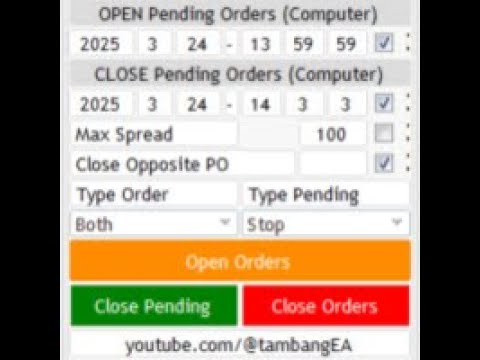
Set a specific date and time for execution, then let the EA place orders exactly when needed.
This is ideal for:
news trading
session breakout setups
pre-planned market execution
scheduled order deployment
2. Pending Order Ladder
Create multiple pending orders in layers with flexible spacing and lot progression.
Supported concepts include:
first entry distance
next layer distance
number of layers
lot multiplier
Buy only / Sell only / Both sides
Stop or Limit order mode
This gives traders a structured way to build staged entries around price.
3. Manual Trading Buttons
Trade directly from the chart using built-in controls:
Buy Market
Sell Market
Close Pending Orders
Close Open Orders
Close All
Perfect for traders who want quick execution without opening multiple terminal windows.
4. Built-In Event / News Preparation
Time Wizard is built to work around scheduled market events.
The EA helps traders prepare positions before important releases by allowing order timing, event tracking, and automatic pending-order handling around key moments.
5. Basket Profit Control
You can define a floating profit target in money value.
When the total profit for the active basket reaches the target, the EA can close all related positions automatically.
6. Trailing Stop Management
The EA includes trailing stop logic with adjustable:
trailing start
trailing step
This helps protect profits after price moves in your favor.
7. Currency Strength Display
Time Wizard includes a built-in currency strength panel to help traders quickly identify stronger and weaker currencies across major pairs.
This can be used as an additional decision-support tool before placing orders.
8. Telegram Notifications
The EA can send trade-related notifications and chart screenshots to Telegram, allowing you to monitor activity even when you are away from the terminal.
9. Hotkey Support
Fast keyboard shortcuts are available for quicker execution and dashboard control.
10. Clean On-Chart Dashboard
Everything is managed from one visual panel:
order setup
execution timer
lot settings
stop loss / take profit
news time
pending order control
trade management
No need to switch between multiple windows.
How It Works
Time Wizard follows a simple workflow:
Select your execution mode
Set order direction and pending order type
Define entry distance, layers, lot size, multiplier, SL, and TP
Set the scheduled execution time
Activate the process
The EA handles order placement automatically at the selected time
Manage positions with trailing stop, close tools, and basket target control
This structure is especially useful for traders who want planned execution instead of emotional execution.
Suitable For
Time Wizard is suitable for:
news traders
breakout traders
session-based traders
semi-automatic traders
traders who want a chart-based execution dashboard
traders who need better timing and faster order control
Key Advantages
precise execution timing
multi-layer pending order deployment
manual + semi-automatic workflow
basket management tools
visual dashboard on chart
Telegram integration
strong usability for scheduled trading setups
Important Notes
This EA is an execution and management tool, not a guaranteed profit system.
Trading during high volatility events involves substantial risk.
Proper lot sizing, stop loss, and account risk control remain the responsibility of the trader.
Before live use, always test settings in the Strategy Tester and on a demo account.
Recommended Use
Time Wizard is best used by traders who already have a trading plan and want a faster, cleaner, and more disciplined way to execute it.
If your strategy depends on timing, prepared entries, and structured order placement, Time Wizard can become a practical tool in your workflow.