RiskManagementEA

# Risk Management EA - User Manual

## 📖 Table of Contents
1. [Overview](#overview)
2. [Installation](#installation)
3. [Features](#features)
4. [Input Parameters](#input-parameters)
5. [User Interface](#user-interface)
6. [How to Use](#how-to-use)
7. [Advanced Features](#advanced-features)
8. [Troubleshooting](#troubleshooting)

---

## 🎯 Overview

**Risk Management EA** is a professional trading tool designed to help traders manage risk, split orders, and automate take profit settings. It provides a user-friendly interface for placing orders with precise risk control.

### Key Benefits:
- ✅ Automatic lot size calculation based on risk percentage
- ✅ Split orders with different take profit levels
- ✅ Auto TP distribution (50% at 1R, remaining at 2R, 4R, 6R...)
- ✅ Break Even functionality
- ✅ Support for Market and Pending orders (Limit/Stop)
- ✅ Visual UI panel with drag & drop

---

## 🔧 Installation

### Step 1: File Structure
Place the files in the correct folders:

```
MQL5/
├── Experts/
│   └── RiskManagementEA-English.ex5        ← Main EA file
└── Include/RiskManagementEA/
    ├── RiskManager-English.mqh              ← Risk management class
    ├── TradeManager-English.mqh             ← Trade management class
    └── UIPanel-English.mqh                  ← UI interface class
```

### Step 2: Compile
1. Open **MetaEditor** (F4 from MT5)
2. Open `RiskManagementEA-English.ex5`
3. Press **F7** or click **Compile** button
4. Check for errors in the **Errors** tab

### Step 3: Attach to Chart
1. Open MT5
2. Drag `RiskManagementEA` from **Navigator****Expert Advisors** to your chart
3. Enable **AutoTrading** (Ctrl+E or click icon)
4. The UI panel will appear on the chart

---

## ⚡ Features

### 1. **Risk Management**
- Set maximum total risk as percentage of account balance
- Define risk per position (% or fixed USD)
- Real-time risk monitoring
- Prevents over-risking

### 2. **Split Orders**
- Split one trade into multiple orders
- **Manual Mode**: Enter different SL for each split
- **Auto Mode**: Same SL for all splits
- Auto distribute TP levels across splits

### 3. **Auto Take Profit**
- Automatically calculate TP based on Risk-Reward ratios
- **For single orders**: Uses first R ratio (e.g., 1R)
- **For split orders**:
  - First half: 1R
  - Second order: 2R
  - Third order: 4R
  - Fourth order: 6R
  - And so on...

### 4. **Entry Price**
- **Entry = 0**: Place Market order immediately
- **Entry > 0**: Place Pending order (Limit/Stop)
  - Buy Limit if entry < current price
  - Buy Stop if entry > current price
  - Sell Limit if entry > current price
  - Sell Stop if entry < current price

### 5. **Break Even**
- Move SL to entry + specified pips
- Only affects orders of current symbol
- Safe confirmation dialog

### 6. **Close All**
- Close all orders of current symbol only
- Does not affect other symbols
- Safe confirmation dialog

---

## ⚙️ Input Parameters

### Risk Management
| Parameter | Type | Default | Description |
|-----------|------|---------|-------------|
| `InpMaxRiskPercent` | double | 10.0 | Total maximum risk allowed (%) |

### Risk Per Position
| Parameter | Type | Default | Description |
|-----------|------|---------|-------------|
| `InpRiskTypeInput` | int | 0 | 0 = Percent, 1 = Fixed USD |
| `InpRiskValue` | double | 1.0 | Risk value per trade |

**Example:**
- Type = 0, Value = 1.0 → Risk 1% per trade
- Type = 1, Value = 50 → Risk $50 per trade

### Split Orders
| Parameter | Type | Default | Description |
|-----------|------|---------|-------------|
| `InpUseSplitOrder` | bool | false | Enable/disable split orders |
| `InpSplitModeInput` | int | 1 | 0 = Manual, 1 = Auto |
| `InpNumSplits` | int | 4 | Number of splits (2-10) |

### Take Profit
| Parameter | Type | Default | Description |
|-----------|------|---------|-------------|
| `InpAutoTP` | bool | true | Auto calculate TP |
| `InpTPRatios` | string | "1,2,4,6,8" | R multiples for TP levels |

**How TP Ratios work:**
- `"1,2,4"` = TP at 1R, 2R, 4R
- For split orders, first half gets 1R, then 2R, 4R...

### Break Even
| Parameter | Type | Default | Description |
|-----------|------|---------|-------------|
| `InpBEPips` | double | 5.0 | Additional pips when moving to BE |

---

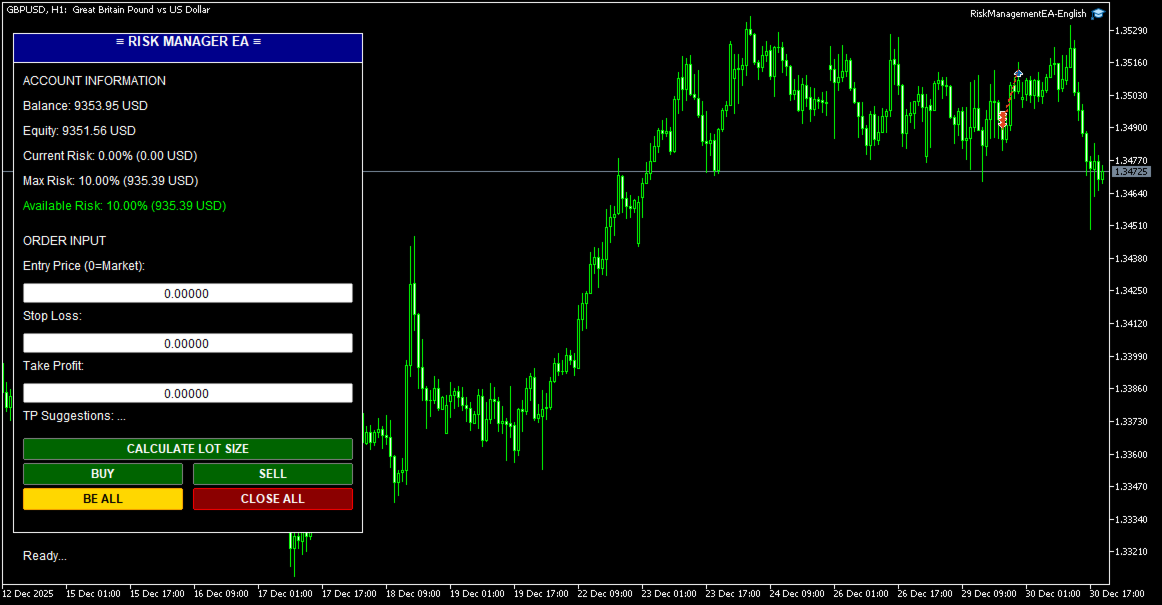
## 🖥️ User Interface

### Panel Layout

```
┌─────────────────────────────┐
│  ≡ RISK MANAGER EA ≡        │ ← Header (drag to move)
├─────────────────────────────┤
│ ACCOUNT INFORMATION         │
│ Balance: $10,000.00         │
│ Equity: $10,150.00          │
│ Current Risk: 2.5% ($250)   │
│ Max Risk: 10.0% ($1000)     │
│ Available Risk: 7.5% ($750) │
├─────────────────────────────┤
│ ORDER INPUT                 │
│ Entry Price (0=Market):     │
│ [0.00000]                   │
│ Stop Loss:                  │
│ [1.08000]                   │
│ Take Profit:                │
│ [1.09000]                   │
│ Suggestions: 1R=1.09, 2R=... │
├─────────────────────────────┤
│ [   CALCULATE LOT SIZE   ]  │
│ [   BUY   ] [   SELL   ]    │
│ [ BE ALL  ] [ CLOSE ALL ]   │
├─────────────────────────────┤
│ Status: Ready...            │
└─────────────────────────────┘
```

### Color Codes
- **Green buttons**: Action buttons (Buy/Sell/Calculate)
- **Gold button**: Break Even (BE ALL)
- **Red button**: Close All orders
- **Green text**: Available risk (positive)
- **Red text**: No available risk (at limit)

---

## 📝 How to Use

### Basic Trading Workflow

#### 1. **Market Order (No Entry)**
```
1. Leave Entry Price = 0
2. Enter Stop Loss (e.g., 1.08000)
3. (Optional) Enter Take Profit or leave 0 for auto TP
4. Click BUY or SELL
```

**Result:**
- Order opens immediately at market price
- If Auto TP enabled: TP calculated automatically
- Lot size calculated based on risk settings

#### 2. **Pending Order (With Entry)**
```
1. Enter Entry Price (e.g., 1.08500)
2. Enter Stop Loss (e.g., 1.08000)
3. (Optional) Enter Take Profit
4. Click BUY or SELL
```

**Result:**
- Pending order placed at Entry price
- Type determined automatically (Limit/Stop)
- Activates when price reaches entry

#### 3. **Split Orders**
```
1. Enable: InpUseSplitOrder = true
2. Set: InpNumSplits = 4
3. Set: InpAutoTP = true
4. Enter Entry (or 0 for market)
5. Enter Stop Loss
6. Click BUY or SELL
```

**Result:**
- 4 orders placed with same SL
- TP distributed automatically:
  - Order 1-2: TP = 1R
  - Order 3: TP = 2R
  - Order 4: TP = 4R

#### 4. **Calculate Lot Size**
```
1. Enter Stop Loss
2. Click "CALCULATE LOT SIZE"
```

**Result:**
- Shows calculated lot size
- Shows SL in points
- Shows current price

#### 5. **Break Even**
```
1. Wait for trade to be in profit
2. Click "BE ALL" button
3. Confirm in dialog box
```

**Result:**
- All orders of current symbol move to BE + 5 pips
- Orders of other symbols unaffected
- Safe from reversal

#### 6. **Close All**
```
1. Click "CLOSE ALL" button
2. Confirm in dialog box
```

**Result:**
- All orders of current symbol closed
- Orders of other symbols remain open
- P&L realized

---

## 🎓 Advanced Features

### 1. **Custom TP Ratios**

Change `InpTPRatios` to customize TP levels:

```
"1,1.5,3" → TP at 1R, 1.5R, 3R
"2,4,6,8" → TP at 2R, 4R, 6R, 8R
```

### 2. **Manual Split Mode**

Set `InpSplitModeInput = 0` for manual control:
- Enter different SL for each split
- System calculates proportional lot sizes
- More flexible for complex strategies

### 3. **Fixed Risk in USD**

Set `InpRiskTypeInput = 1` and `InpRiskValue = 100`:
- Every trade risks exactly $100
- Independent of account balance
- Good for consistent risk management

### 4. **Multiple Symbols**

Run EA on multiple charts simultaneously:
- Each chart manages its own symbol
- Break Even affects only current chart symbol
- Close All affects only current chart symbol
- Total risk tracked across all symbols

### 5. **Drag & Drop UI**

Click and drag the **header** (blue bar) to move panel anywhere on chart.

---

## 🔍 Troubleshooting

### Problem: EA doesn't open orders

**Check:**
1. AutoTrading enabled (Ctrl+E)
2. Stop Loss entered correctly
3. Available risk > 0
4. Account has sufficient margin
5. Symbol is tradable

### Problem: "Maximum risk limit reached"

**Solution:**
- Close some existing positions
- Or increase `InpMaxRiskPercent`
- Or reduce `InpRiskValue`

### Problem: Split orders not working

**Check:**
1. `InpUseSplitOrder = true`
2. `InpNumSplits` between 2-10
3. `InpAutoTP = true` (for auto TP)
4. Check Experts log for errors

### Problem: Auto TP not filling

**Check:**
1. `InpAutoTP = true`
2. `InpTPRatios` has valid values
3. Leave TP input = 0 (or blank)
4. Split orders enabled for distribution

### Problem: Break Even doesn't work

**Possible causes:**
- Orders already at or past BE
- No orders for current symbol
- SL already better than BE level

### Problem: Lot size too small/large

**Adjust:**
- Reduce/increase `InpRiskValue`
- Check SL distance (larger SL = smaller lot)
- Verify account balance

---

## 📊 Example Scenarios

### Scenario 1: Conservative Trader
```
InpMaxRiskPercent = 5.0
InpRiskTypeInput = 0
InpRiskValue = 0.5
InpUseSplitOrder = false
InpAutoTP = true
InpTPRatios = "2"
```
**Result:** Risk 0.5% per trade, TP at 2R (1:2 R:R)

### Scenario 2: Aggressive Scalper
```
InpMaxRiskPercent = 15.0
InpRiskTypeInput = 0
InpRiskValue = 2.0
InpUseSplitOrder = false
InpAutoTP = true
InpTPRatios = "1"
```
**Result:** Risk 2% per trade, quick 1R targets

### Scenario 3: Professional with Scaling
```
InpMaxRiskPercent = 10.0
InpRiskTypeInput = 0
InpRiskValue = 1.0
InpUseSplitOrder = true
InpNumSplits = 4
InpAutoTP = true
InpTPRatios = "1,2,4,6"
```
**Result:**
- 1% total risk split into 4 orders
- 2 orders close at 1R (secure profit)
- 1 order at 2R
- 1 order at 4R (let winners run)

---

## 📞 Support

For questions or issues:
- Telegram: [@CodingforDummies911](https://t.me/CodingforDummies911)
- Check EA logs: Tools → Options → Expert Advisors → Enable logs

---

## ⚠️ Disclaimer

Trading forex and CFDs carries high risk. This EA is a tool to assist with risk management but does not guarantee profits. Use at your own risk. Always test on demo account first.

---

## 📄 Version History

**v1.00** (2025)
- Initial release
- Risk management system
- Split orders with auto TP
- Entry price support (Market/Limit/Stop)
- Break Even functionality
- Close All (symbol-specific)
- Draggable UI panel

---

*Last updated: January 2025*
Рекомендуем также
EA Pause Manager
David Enrique Barrera Moncayo
3.83 (6)
EA Pause Manager — Your Smart Risk Guard & Scheduler (MT5) What It Does - Stops conflicting trades before they happen (based on active market positions).   - Pauses or resumes your EAs automatically based on:     - A simple “leader” rule: the first EA to trade becomes the leader and blocks the rest.     - A time schedule you set (e.g. no trading in Asian session). - Note : Interlock logic is triggered by executed market orders, not by pending orders (Buy Stop / Sell Stop). Why It Matters - Prot
Scale & Trail Trade Manager (MT5) Your all-in-one solution for   precision trade execution and management . With just two clicks, you can size, place, and manage trades effortlessly—no calculators, no guesswork, no stress. Workflow Click 1:   Set your entry — instantly snaps to the live market price. Move Mouse:   Preview your stop-loss and four profit targets (1R–4R) in real time. Click 2:   Lock it in — the tool sizes your trade to your exact dollar risk (e.g., $3350) and manages it automatica
MQL5 Blogs : https://www.mql5.com/en/blogs/post/761446 MT4 Version : https://www.mql5.com/en/market/product/136790 MT5 Version : https://www.mql5.com/en/market/product/136791 Time Wizard is a professional trading assistant built for traders who need speed, timing, and execution control in one clean dashboard. This Expert Advisor is designed for event-based trading, scheduled execution, and fast semi-automatic order management. It allows you to prepare your orders in advance, define the exact
Click Trading
Jawad Tauheed
5 (2)
One Click Trading – Auto TP SL Developer TraderLinkz Version 1.00 Category Utility What it does Adds missing TP and SL to your manual trades and pending orders Sets them once per ticket Lets you move TP and SL afterward Works on hedging and netting accounts Scans on every tick and reacts on trade events Why you want it You place faster entries You get consistent risk and exit targets You reduce fat finger errors You keep full manual control Quick start Attach the EA to any chart Keep TP and SL e
FREE
Close All Pro MT5 – Fast PnL Control is a powerful trade manager MT5 utility that gives you total control over your trades. With a single click, you can close all MT5 orders, monitor real-time profit and loss, and manage your floating PnL directly from a clean on-chart panel. The tool is lightweight, responsive, and built to help traders save time, reduce emotional stress, and maintain focus. Whether you trade manually or through an EA, this MT5 profit panel provides the visibility and precisio
25R - WASD Order is a visual risk management EA for MetaTrader 5 that combines gaming-style WASD keyboard controls with interactive chart drawing for precise order placement. Designed for active traders who value speed and accuracy, it lets you visually plan trades by dragging entry and stop-loss lines directly on the chart, while automatically calculating position size based on your risk percentage. The tool displays color-coded profit/loss zones with real-time risk metrics, supports automatic
TradeDock Pro
Alex Michael Murray
TradeDock Pro (MT5) — One-Click Trade Manager Panel TradeDock Pro is a sleek and professional one-click trade panel for MetaTrader 5 designed for fast manual execution and simple trade management. Built for traders who want a clean interface, quick order placement, and essential management tools — without complicated settings or typing. Can be used on any market. KEY FEATURES One-Click BUY / SELL Lot size control on chart (0.01 – 99.99) SL toggle + SL in points TP toggle + TP in points Trailing
FREE
BerelzBridge
Barend Willem Van Den Berg
BerelzBridge Pro MT5-to-JSON мост данных для всех таймфреймов с информацией о счете. Обзор BerelzBridge Pro — это индикатор MT5, который экспортирует рыночные данные в реальном времени в JSON-файл на диск. Он записывает цены bid и ask, спред, тиковый объем, дневную статистику, информацию о счете и бары OHLCV для всех 9 таймфреймов. Файл обновляется с настраиваемым интервалом, по умолчанию 2 секунды. Индикатор работает одновременно с советниками на одном графике без конфликтов. Он не использует
This EA help traders close their open positions at a specific MT5 server time before news or before ending of H4 timeframe of the morning New York session to protect their profit or prevent from unexpected loss. The default setting is 19:30 (HH:MM) and you can adjust as require to fit trading strategies. It very user friendly where contain only single input parameter to specify a time that position will be closed.  
Trailing Stop Manager PRO — Профессиональное управление трейлинг-стопом (MT5) Trailing Stop Manager PRO — это эксперт-советник для MetaTrader 5, который автоматизирует управление трейлинг-стопом по открытым позициям. Он может управлять всеми позициями на счете или только теми, которые отфильтрованы по символу и/или MagicNumber. Советник реализует несколько режимов: фиксированный трейлинг в пунктах, трейлинг на основе ATR, автоматический перевод в безубыток, частичное закрытие и визуальную панель
Clonify PRO MT5
Andrej Hermann
5 (1)
Clonify PRO - Локальный копировщик сделок для МТ5 и МТ4           (  Local trade copier for MT4   https://www.mql5.com/ru/market/product/15992   ) Профессиональный инструмент для копирования сделок между счетами MT5 и МТ4 (через общую папку "Common"). ФУНКЦИИ: 1. ОТПРАВИТЕЛЬ (Sender): Экспортирует сделки в реальном времени Отправляет всё (без фильтров) Не требует никаких дополнительных настроек 2. ПОЛУЧАТЕЛЬ (Receiver): Копирует сделки. Magic Number: Использует ID счета отправителя (по умолчанию
Russisch Видео с объяснением на YouTube: https://youtu.be/OJXERVs405g Keyboard Scalper Pro — Описание инструмента Keyboard Scalper Pro — это инструмент для ручного скальпинга , предназначенный для выполнения и управления сделками полностью с помощью горячих клавиш клавиатуры , обеспечивая быстрое, точное и сосредоточенное трейдинг-исполнение . Инструмент не автоматизирует торговые решения . Все действия выполняются вручную трейдером с помощью заранее заданных клавиш. Описание горячих клави
Boleta de negociação, adiciona automáticamente as ordens Take Profit e Stop Loss quando excutada uma ordem de compra ou venda. Ao apertar as teclas de atalho (A, D, ou TAB), serão inseridas duas linhas de pre-visualização, representando as futuras ordens de take profit (azul) e stop loss (vermelho), as quais irão manter o distanciamento especificado pelo usuário. Ditas ordens só serão adicionadas ao ser executada a ordem inicial. Ao operar a mercado, as ordens pendentes de take profit, e stop lo
Introduction: The RosMaFin Trading Panel is not just a standard order execution tool. It is a comprehensive, professional assistant designed for manual and price-action traders who want to save time, manage risk with mathematical precision, and maintain full market awareness. Say goodbye to manual lot size calculations and tedious Stop Loss adjustments. This panel streamlines your entire trading workflow from analysis to trade exit. KEY FEATURES & BENEFITS: Advanced Risk Management & Exec
FREE
Core function Intelligent transaction management one-click opening and closing operation, which supports user-defined lots to set multiple closing modes: all closing, closing by direction and closing by profit and loss status. Professional risk control, real-time risk monitoring and spread control to avoid high-cost trading environment. Visual control panel has an intuitive graphical interface, and all functions can be operated with one button to display position information, profit and loss sta
FREE
When executing an order, whether through the Metatrader ticket on a computer or the Metatrader app on a mobile device, either manual or pending, Easy Trade will automatically set the take profit and stop loss levels, as well as a limit order with its respective take profit and stop loss levels. It follows the trading strategy for market open (US30, US100, US500), but it can be applied to any market asset.
FREE
Auto Position Manager is a unique services application of its kind across the entire MQL5 market, setting new standards for applications of this type. The Services app is a compact but powerful tool that significantly impacts the entire system. Its user-friendly interface and start-stop system make it excellent for automating repetitive tasks. Once it's set up, the service can be toggled on or off with a single click. Crucially, the configuration persists even if the platform is turned off and
FREE
Price Action Builder Premium
Florea E. Sorin-Mihai Persoana Fizica Autorizata
The Price Action Builder Premium expert advisor is an extension of the freely available Price Action Builder Basic :     it provides 2 new candlestick patterns besides the pinbar (already available in the basic edition);     in most configurations, backtesting usually shows an average yearly return rate increased by approximately 50%;     the account growth curve is also smoother, due to larger number of trades, almost double (2x) compared to the free version. While aimed primarily at obtaining
When executing an order, whether through the Metatrader ticket on a computer or the Metatrader app on a mobile device, either manual or pending, Easy Trade will automatically set the take profit and stop loss levels, as well as a limit order with its respective take profit and stop loss levels. It follows the trading strategy for market open (US30, US100, US500), but it can be applied to any market asset.
MT5 Trades To Telegram
Mohammad Taher Halimi Tabrizi
The Trades To Telegram is a powerful and customizable trading assistant designed to bridge the gap between the MetaTrader 5 platform and the popular messaging app, Telegram. This bot serves as a crucial tool for traders, providing them with timely and accurate trading signals, alerts, and updates directly to their Telegram accounts. Key Features: Real-Time Signals: The bot monitors the MetaTrader 5 platform continuously, detecting trading signals, such as Opening/Closing of  buy/sell orders , a
EasyTradePad for MT5
Sergey Batudayev
5 (5)
EasyTradePad – торговая панель для MetaTrader 5 EasyTradePad — это инструмент для ручной и полуавтоматической торговли. Панель позволяет быстро управлять ордерами и позициями, а также рассчитывать параметры управления рисками в один клик. [Демо и Инструкция] Возможности панели: открытие и закрытие сделок с учётом заданного риска (% или в валюте депозита); установка SL и TP в пунктах, процентах или деньгах; расчет соотношения риска к прибыли; перенос стоп-лосса в безубыток; частичное закрытие п
Format Charts
Vital H B Engenharia Ltda
5 (1)
If you use several charts open at the same time, you know how boring it is to apply formats to each chart individually. This script can change all open charts using a single command. Parameters: 1 - Choose symbol to put on charts: apply the selected symbol to all charts. If "current", it does not change the symbol; 2 - Choose timeframe or leave empty: apply the selected timeframe to all charts. If "CURRENT", it does not change the timeframe; 3 - Apply template to the charts: If true, apply the t
FREE
Rosy Pro Panel MT5
Theresia Yovitha Herwanda
5 (1)
Download DEMO here  https://www.mql5.com/en/blogs/post/759772 An ultimate panel you've never seen before.  Compact and nice Trade panel with large Total P/L and it's percentage display. Groups for trades summary available: Ticket, Symbol, Type, Category, and Magic. Average price field helps you know your trading average price and direction. Set magic and comment of your trading in a very easy way. Group closing by symbol, type, category or magic - only by one click. Close All button for a quick
Trade Manager JM
Jonathan Ferreira De Magalhaes
Efficient Manual Trading Panel for Professional Traders === TRADING SESSIONS DISPLAY & BAR TIMER INCLUDED === Trade Manager JM is a comprehensive, intuitive utility designed to revolutionize manual order execution and management on MetaTrader 5. Built for speed and precision, this panel consolidates everything a serious manual trader needs into a single, sleek interface. Stop wasting precious seconds calculating lot sizes or manually setting SL/TP levels. Trade Manager JM allows you to focus pur
BreakEven ProSync
Rosen Kanev Kanev
5 (1)
For DEMO - please contact me and I will send you demo version to test the product. BreakEven ProSync – Advanced Trade Management Tool for MetaTrader 5 Overview The  BreakEven ProSync  is a powerful utility designed to enhance trade management in   MetaTrader 5 . It provides   one-click break-even functionality ,   hotkey trading ,   position synchronization , and   visual SL/TP tracking —all in a single, user-friendly tool. Perfect for manual traders who want   faster execution   and   better r
Quick Trade Panel Pro
Nicolas Olivier Menetrey
Панель торговли в один клик с автоматическим управлением лотом и риском Quick Trade Panel Pro — это интуитивно понятная торговая панель, разработанная для трейдеров, которые хотят быстро исполнять ордера, сохраняя полный контроль над рисками. Основные функции Автоматический расчёт размера лота на основе процента от доступной маржи Настраиваемый Stop Loss в пунктах, автоматически применяемый к каждой сделке Размер лота фиксируется во время серии сделок для обеспечения постоянного размера позиции
FREE
Trade Panel Pro is a powerful and easy-to-use trading utility designed for traders who need fast execution, accurate position sizing, and complete risk management directly from the chart. Whether you scalp on the 1-minute chart or swing trade on the 4H, Trade Panel Pro gives you the tools to manage trades with confidence and precision — all in one clean interface. Price will double after 5 purchases. Grab this offer Key Features Fast Trade Execution Open Buy/Sell positions instantly from the pan
THIS PRODUCT CAN NOT BE TEST IN STRATEGY TESTER. PLEASE TRY DEMO VERSION: https://www.mql5.com/en/market/product/58096 RISK AND TRADE MANAGER RISK AND TRADE MANAGER   is an advanced trading panel designed for manual trading.   Utility helps to manage trades effectively and efficiently with a single click. MAIN FEATURES Convert and display Stop Loss (SL)   Pips into % and amount to view the clear picture of the trades if SL hits. Fund allocation for individual trade in % and in amount. Get alert
Risk Manager Pro
Jhojan Alberto Tobon Monsalve
Risk Manager Pro - это простая утилита, которая вычисляет необходимый размер лота с процентом риска и стоп-лоссом в пипсах перед открытием позиции. Интернет-калькуляторы в некоторых случаях могут быть полезны, но они неэффективны для открытия позиций в режиме реального времени. При торговле возникает небольшое количество торговых возможностей, а когда они появляются, секунды имеют решающее значение. Это невозможно с обычными интернет-калькуляторами, так как для расчета размера позиции и дистанци
С этим продуктом покупают
Trade Assistant MT5
Evgeniy Kravchenko
4.42 (208)
Помогает рассчитать риск на сделку, простая установка нового ордера с помощью линий, управление ордерами с функциями частичного закрытия, 7 типов трейлинг-стопа и другие полезные функции. Дополнительные материалы и инструкции Инструкция по установке - Инструкция к приложению - Пробная версия приложения для демо счета Функция Линии   - отображает на графике линию открытия, стоп-лосс, тейк-профит. С помощью этой функции легко установить новый ордер и увидеть его дополнительные характеристики пе
Добро пожаловать в Trade Manager EA — лучший инструмент для управления рисками, предназначенный для упрощения, точности и эффективности торговли. Это не просто инструмент для размещения ордеров; это комплексное решение для удобного планирования торгов, управления позициями и усиленного контроля над рисками. Независимо от того, начинающий вы трейдер, опытный специалист или скальпер, нуждающийся в быстром исполнении, Trade Manager EA адаптируется к вашим потребностям и работает с любыми активами:
TradePanel MT5
Alfiya Fazylova
4.87 (151)
Trade Panel — это многофункциональный торговый помощник. Приложение содержит более 50 торговых функций для ручной торговли и позволяет автоматизировать большинство торговых операций. Внимание! Скидки действуют ограниченное время, каждый вторник цена будет повышаться на 5$ (до 100$). Перед покупкой вы можете протестировать демоверсию на демо-счете. Скачать пробную версию приложения для демонстрационного аккаунта: https://www.mql5.com/ru/blogs/post/750864 . Полная инструкция здесь . Торговля. Позв
Бета-версия Telegram to MT5 Signal Trader почти готов к официальному альфа-релизу. Некоторые функции все еще находятся в разработке, и вы можете столкнуться с небольшими ошибками. Если вы заметите проблемы, пожалуйста, сообщите о них, ваша обратная связь помогает улучшать программное обеспечение для всех. Telegram to MT5 Signal Trader — мощный инструмент, который автоматически копирует торговые сигналы из каналов и групп Telegram прямо в ваш счёт MetaTrader 5 . Поддерживаются как публичные, так
Farmed Hedge Yield Farming | All Markets (Manual - Hybrid - Semi/Automated EA) MULTI-ASSET SUPPORT Trade any asset available on your broker - Forex: Major, Minor, Exotic pairs - Crypto: BTC, ETH, XRP, SOL, BNB - Stocks: Apple, Tesla, Amazon, Google, etc. - Commodities: Gold, Silver, Oil, Gas - Indices: US30, NAS100, SPX500, DAX40 - Any CFD your broker offers VERIFIED TRADING RESULTS - Farmed Hedge Yield Axi Copy:  https://www.mql5.com/en/signals/2356376 - Farmed Hedge Yield Exn Copy:   https:/
Trade Dashboard MT5
Fatemeh Ameri
4.94 (121)
Tired of complex order placement and manual calculations? Trade Dashboard is your solution. With its user-friendly interface, placing orders becomes effortless, by a single click, you can open trades, set stop loss and take profit levels, manage trade lot size, and calculate risk to reward ratios, allowing you to only focus on your strategy. Say goodbye to manual calculations and streamline your trading experience with Trade Dashboard. Download  Demo Version  right now. You can find  Details of
Exp COPYLOT CLIENT for MT5
Vladislav Andruschenko
3.82 (34)
Профессиональный копировщик сделок для MetaTrader 5 Быстрый, профессиональный и надежный копировщик сделок для MetaTrader . COPYLOT позволяет копировать сделки Forex между терминалами MT4 и MT5 с поддержкой счетов Hedge и Netting . Версия COPYLOT для MT5 поддерживает: - MT5 Hedge → MT5 Hedge - MT5 Hedge → MT5 Netting - MT5 Netting → MT5 Hedge - MT5 Netting → MT5 Netting - MT4 → MT5 Hedge - MT4 → MT5 Netting Версия MT4 Полное описание + DEMO + PDF Как купить Как установить Как получить файлы жур
Footprint Chart Pro — Professional OrderFlow EA for MetaTrader 5 Version 6.34 | Professional tool for real traders | Institutional-Grade Visualization DEMO USERS - PLEASE SELECT EVERY TICK / REAL TICK WHEN TESTING AND YOU HAVE DOWNLOADED HISTORICAL DATA. IF YOU SEE A WAITING SCREEN AND IT IS NOT DOWNLOADING, IT MEANS YOU HAVE LOW HISTORICAL DATA. TRY 1 MIN AND 5 MIN FIRST ON 1 DAY DATA. ONE DAY DATA SHOULD BE THE NEWEST AND MOST CURRENT DATE. PLEASE WAIT UNTIL THE MARKET HAS ROLLED OVER PERIOD.
Ограниченное предложение: скидка 20% действует всего несколько дней!  - годовая подписка 360 вместо 450 $  - лайфтайм тариф 550 вместо 690 $ Суть: используя юзер-интерфейс вы настраиваете параметры, которым должен соответствовать график до входа в позицию(позиции), настраиваете какие входные модели использовать, настраиваете правила по которым надо завершать торговлю и планирование. А всю рутину по наблюдению за графиком и исполнению  Lazy Trader  берет на себя. полное описание  :: 3 ключевых в
Copy Cat More Trade Copier MT5 (Копи-Кот MT5) — это локальный торговый копировщик и полная система управления рисками и исполнения, разработанная для современных торговых задач. От испытаний проп-фирм до управления личным портфелем, он адаптируется к любой ситуации с сочетанием надежного исполнения, защиты капитала, гибкой настройки и продвинутой обработки сделок. Копировщик работает как в режиме Мастер (отправитель), так и в режиме Слейв (получатель), с синхронизацией в реальном времени рыночны
MT5 to Telegram Signal Provider — это простой в использовании полностью настраиваемый инструмент, который позволяет отправлять определённые сигналы в чат, канал или группу Telegram, превращая вашу учётную запись в провайдера сигналов . В отличие от большинства конкурирующих продуктов, он не использует импорт DLL. [ Демо ]   [ Руководство ] [ Версия MT4 ] [ Версия для Discord ] [ Канал в Telegram ]  New: [ Telegram To MT5 ] Настройка Доступно пошаговое руководство пользователя . Никаких знаний A
The News Filter MT5
Leolouiski Gan
4.77 (22)
Этот продукт фильтрует всех экспертных советников и ручные графики во время новостей, так что вам не нужно беспокоиться о внезапных скачках цены, которые могут разрушить ваши ручные торговые настройки или сделки, введенные другими экспертными советниками. Этот продукт также поставляется с полной системой управления ордерами, которая может обрабатывать ваши открытые позиции и ордера на ожидание перед выпуском новостей. После покупки   The News Filter   вам больше не придется полагаться на встроен
Ultimate Extractor - Professional Trading Analytics for MT5 *****this is the local HTML version of Ultimate Extractor. !!!!!it is not compatible with Cloud!!!! For the online version please reach out to me directly****** Ultimate Extractor transforms your MetaTrader 5 trading history into actionable insights with comprehensive analytics, interactive charts, and real-time performance tracking. What It Does Automatically analyzes your MT5 trading history across all Expert Advisors and generates

Trader Evolution
Siarhei Vashchylka
5 (7)
"Trader Evolution" - Утилита, предназначенная для трейдеров, которые используют в своей работе волновой и технический анализ. Одна вкладка утилиты способна управлять капиталом и открывать ордера, а другая - помогать в построении волн Эллиотта, уровней поддержки и сопротивления, а также линий тренда. Инструкция/Мануал ( Обязательно читайте перед приобретением ) | Версия для МТ4 Преимущества 1. Торговля в несколько кликов. В панели доступны немедленные и отложенные ордера 2. Управление капиталом
Сканируйте весь список наблюдения на экстремальные бары - в реальном времени. Power Bar Scanner отслеживает все ваши символы одновременно и оповещает вас в момент появления экстремального ценового бара. Больше не нужно переключаться между графиками. Все возможности в одной панели. Работает на любом таймфрейме. Forex, индексы, золото, крипто - все в одном окне. Как это работает Сканер проверяет каждый символ в вашем Market Watch на наличие баров, где тело свечи превышает N x ATR . Когда такой ба
Trade Manager DashPlus
Henry Lyubomir Wallace
5 (13)
DashPlus – это продвинутое средство для управления торговлей, разработанное для повышения эффективности и результативности торговли на платформе MetaTrader 5. Оно предлагает широкий набор функций, включая расчет рисков, управление ордерами, продвинутые системы сеток, инструменты на основе графиков и аналитику производительности. Основные функции Восстановительная Сетка Внедряет систему усреднения и гибкую сетку для управления сделками в неблагоприятных рыночных условиях. Позволяет стратегически
Trade Manager DaneTrades
Levi Dane Benjamin
4.36 (28)
Trade Manager, который поможет вам быстро входить и выходить из сделок, автоматически рассчитывая риск. Включает функции, которые помогут предотвратить чрезмерную торговлю, торговлю из мести и эмоциональную торговлю. Сделками можно управлять автоматически, а показатели эффективности счета можно визуализировать в виде графика. Эти функции делают эту панель идеальной для всех трейдеров, занимающихся ручной торговлей, и помогают улучшить платформу MetaTrader 5. Многоязычная поддержка. Версия для МТ
Telegram to MT5: Идеальное решение для копирования сигналов Упростите свою торговлю с Telegram to MT5 — современным инструментом, который копирует торговые сигналы прямо из каналов и чатов Telegram на вашу платформу MetaTrader 5, без необходимости использования DLL. Это мощное решение обеспечивает точное исполнение сигналов, широкие возможности настройки, экономит время и повышает вашу эффективность. [ Instructions and DEMO ] [ FAQ ] Ключевые возможности Прямая интеграция с Telegram API Аутенти
Smart Stop Scanner – многоактивный интеллектуальный сканер стоп-лоссов Общее описание Smart Stop Scanner предоставляет профессиональный контроль стоп-лоссов на любом рынке. Он анализирует рыночную структуру, определяет значимые пробои и формирует ключевые защитные уровни по Forex, Золоту, Индексам, Металлам, Криптовалютам и другим инструментам. Все данные отображаются в одном чистом, информативном и DPI-адаптивном панели для максимальной ясности и скорости принятия решений. Как определяется с
Anchor Trade Manager
Kalinskie Gilliam
5 (2)
Anchor: The EA Manager A coordination system for traders running multiple EAs. Anchor ensures only one EA can trade at a time, preventing conflicting positions and keeping your portfolio safer. Attach Anchor to any chart. Configure your EAs and their magic numbers. Anchor handles the rest. Built for portfolios. Built for discipline. Built for prop firms. The Problem Running multiple EAs on the same account creates risk. Two gold EAs can open opposite positions on the same candle. Three EA
EasyTrade MT5
Alain Verleyen
5 (3)
Easy Trade – Умное, простое и мощное управление сделками Easy Trade — это универсальное решение для управления сделками в MetaTrader для тех, кто хочет держать риск под контролем и обеспечить максимально плавное исполнение ордеров. Созданный с нуля на основе обратной связи от трейдеров, Easy Trade позволяет легко открывать, отслеживать и управлять сделками по множеству символов — без лишней сложности. Независимо от того, скальпируете ли вы вручную или управляете несколькими позициями, Easy Tra
The product will copy all telegram signal to MT5 ( which you are member) , also it can work as remote copier.  Easy to set up, copy order instant, can work with almost signal formats, image signal,  s upport to translate other language to English Work with all type of channel or group, even channel have "Restrict Saving Content", work with  multi channel, multi MT5 Work as remote copier: with signal have ticket number, it will copy exactly via ticket number. Support to backtest signal. How to s
Risk Manager for MT5
Sergey Batudayev
4.31 (16)
Советник Риск Менеджер для МТ5, очень важная и по моему мнению необходимая программа для каждого трейдера. С помощью данного советника вы сможете контролировать  риск на вашем торговом счету. Контроль риска и прибыли может осуществляться как в  денежном $ эквиваленте так и в % процентном. Для работы советника просто прикрепите его на график валютной пары и выставите значения допустимого риска в валюте депозита или в % от текущего баланса.   [ Инструкция с описанием настроек ] Функции советника
ManHedger MT5
Peter Mueller
4.83 (6)
THIS EA IS A SEMI-AUTO EA, IT NEEDS USER INPUT. Manual & Test Version Please TEST this product before BUYING  and watch my video about it. The price of the ManHedger will increase to 250$ after 20 copies sold. Contact me for user support or bug reports or if you want the MT4 version! MT4 Version  I do not guarantee any profits or financial success using this EA. With this Expert Advisor, you can: Implement your own Zone Recovery strategy to capitalize on trending markets. Create Grid trading s
DrawDown Limiter
Haidar Lionel Haj Ali
5 (20)
Drawdown Limiter EA You are in the right place if you were searching for Drawdown control, Drawdown limiter, Balance protection, Equity Protection or Daily Drawdown Limit related to Prop Firm, FTMO, or Funded account trading, or if you want to protect your trading account. Have you suffered from controlling your drawdown when trading funded accounts? This EA is meant for you. Prop firms usually set a rule called “Trader Daily Drawdown”, and if it is not respected, you are disqualified.  I am an
AntiOverfit PRO: неудобная правда о бэктестах Прежде чем покупать этого EA, остановитесь на минуту. Вы только что нашли систему, которая обещает 250% в год. Бэктест выглядит впечатляюще. Продавец просит $399, а может и $1,999. На бумаге всё выглядит идеально. Но есть проблема: этот бэктест не доказывает того, что вы думаете. Исторический тест сам по себе почти ничего не доказывает. Единственное, что он подтверждает, — эта логика сработала в одной конкретной рыночной последовательности. Как толь
Take a Break MT5
Eric Emmrich
4.75 (24)
News filter, equity guard & session control for all your EAs — one tool, full protection Take a Break has evolved from a basic news filter into a comprehensive account protection solution . It pauses your other Expert Advisors during news events or based on custom filters. When trading resumes, it automatically restores your entire chart setup , including all EA settings. Why traders choose Take a Break One news filter for all your EAs — no more relying on individual built-in filters that may o
Риск-менеджер позволяет контролировать свою торговую активность и защищать от убытков. Настройки теперь организованы в логические группы, что упрощает конфигурацию различных параметров риска. При превышении любого лимита риск-менеджер может принудительно закрыть открытые позиции, остановить работу других советников и даже полностью закрыть терминал, чтобы предотвратить эмоциональную торговлю, не соответствующую вашей торговой стратегии. Настройки Risk Manager Защита Счета Check min equity limit
Торговая панель для торговли в один клик.  Работа с позициями и ордерами!  Торговля с  графика  или  клавиатуры  . Используя нашу торговую панель, вы можете торговать в один клик с графика и совершать торговые операции в 30 раз быстрее, чем стандартное управление MetaTrader. Автоматические расчеты параметров и функций, которые облегчают жизнь трейдеру и помогают трейдеру вести торговую деятельность намного быстрее и удобнее. Графические подсказки и полная информация о торговых сделках на графике
Poc Breakout Signal: The Ultimate Institutional Order Flow & Price Action System Elevate your trading with Poc Breakout, a comprehensive technical analysis tool designed to bridge the gap between retail trading and institutional market understanding. This all-in-one system combines powerful Buy/Sell signals, advanced Volume Profile analysis, real-time Order Flow (Depth of Market), and critical macroeconomic data to give you a clear, unambiguous edge in the markets. Poc Breakout Signal decodes c
Другие продукты этого автора
Volume indicator judging level of volume per bar accordingly to Volume Spread Analysis rules. It allows either to set static volume levels or dynamic ones based on ratio comparable to Moving Average. Bars are coloured based on ratio or static levels, visually presenting level of Volume (low, average, high, ultra high). Release Notes - Fixed and optimised calculations of Session Average Volume - added predefined settings for time to calculate Session Average for EU and US markets
FREE
Introducing the Machine Learning Price Target Predictions, a cutting-edge trading tool that leverages kernel regression to provide accurate price targets and enhance your trading strategy. This indicator combines trend-based signals with advanced machine learning techniques, offering predictive insights into potential price movements. Perfect for traders looking to make data-driven decisions with confidence. What is Kernel Regression and How It Works Kernel regression is a non-parametric mach
The   Volume SuperTrend AI   is an advanced technical indicator used to predict trends in price movements by utilizing a combination of traditional SuperTrend calculation and AI techniques, particularly the k-nearest neighbors (KNN) algorithm. The Volume SuperTrend AI is designed to provide traders with insights into potential market trends, using both volume-weighted moving averages (VWMA) and the k-nearest neighbors (KNN) algorithm. By combining these approaches, the indicator aims to offer
Фильтр:
Нет отзывов
Ответ на отзыв