 MetaTrader 5
 エキスパート
 インディケータ
 ライブラリ
ライブラリ
 ユーティリティ
 ウィジェット
 ルール
ルール
YouTubeにあるマーケットチュートリアルビデオをご覧ください
ロボットや指標を購入する
仮想ホスティングで
EAを実行
EAを実行
ロボットや指標を購入前にテストする
マーケットで収入を得る
販売のためにプロダクトをプレゼンテーションする方法
MetaTrader 4版新取引ユーティリティ
 以下はMetaTrader4での外国替取引を簡素化する取引プログラムです。以下のリストのユーティリティにカーソルを合わせて、説明と目的をご覧ください。
JET Trade Assistant PRO は、MetaTrader 4 用の本格的なトレードパネル兼トレードマネージャーです。リスクを選び、チャート上にトレードを描き、ワンクリックで発注 — パネルがロット数を計算し、最後の決済までトレードを管理します。MetaTrader 5 版バージョン 3.00 と同じパネル、入力項目、テキストです。 主な特長 Reverse(ドテン):ワンクリック(または Shift + V)でシンボルの保有側を決済し反対側を新規建て、2回目のクリックで確定。ストップロスとテイクプロフィットは反転、ロット数は同じかリスクから再計算。 日次利益目標:日初残高の % または口座通貨での金額。達成すると次のサーバー日まで新規エントリーをブロック(オプション:ポジション決済と待機注文の削除)。 保有ポジションの建値ライン(BE OPEN):シンボルに 2 つ以上のポジションがある場合、スワップと手数料込みで合計損益がゼロになる価格。ワンクリックの "SL at open BE" 付き。 注文コメント "JTA#<number> <origin> <detail>

ThemeManager は、MetaTrader 4 で開いているすべてのチャートの配色をワンクリックで変更します。ダークモード、ライトモード、ウェブトレーダー風など 8 種類のプロフェッショナルなチャートテーマから選ぶか、13 色のカラーピッカーで自分だけの Custom テーマを作成できます。チャートごとに色を設定する必要はもうありません。チャート上の小さなパネルが、すべてのチャートを一度にスタイリングします。 ThemeManager は完全無料 — すべてのテーマと機能を制限なしで使えます。 MetaTrader 5をお使いですか? ThemeManager MT5 も無料です。 その他のトレーディングツール 使い方 ThemeManager を任意のチャートにセットします(ナビゲータ → インディケータ)。 THEMES パネルのテーマをクリック — 各ボタンはそのテーマの配色をライブでプレビューしています。 完了:開いているすべてのチャートが瞬時に変わります。 最後に使ったテーマは記憶され、インジケーターの読み込み時に再適用されます。後から開いたチャートにも自動で適用
FREE

GoldEdge SMC Dashboard — ゴールド向けスマートダッシュボード
GoldEdge SMC Dashboard は、ゴールドトレーダーに必要なものをすべて1つのチャートにまとめます。 XAUUSD の M15 時間足 向けに開発・調整されています。
これは 意思決定支援ツールであり、自動売買ロボットではありません 。ダッシュボードが自分で取引を開くことはありません。相場を読み取り、セットアップを表示し、仮想注文でシミュレーションし、判断はすべてあなたに委ねます。
チャートに表示される内容 相場構造:BoS / CHoCH、ZigZag スイング オーダーブロックと需給ゾーン 最小サイズフィルター付きのフェアバリューギャップ(FVG) 流動性レベル(買い側 / 売り側) チャート上と H4 の Supertrend OTE ゾーン付きフィボナッチ、プレミアム / ディスカウントゾーン クアジモド(QM)レベル、トレンドライン、ICT ボックス、H1 POI 各レイヤーはワンクリックでオン / オフ可能 1つのパネルに12の戦略シグナル
BO · TF · I

Signal Buffer Inspector は、同じチャート上の別のインジケーターが実際に何を出力しているかを表示します。EX4 ファイルしか持っていないインジケーターも対象です。自動売買を始める前に必ず確認すべき点に答えます。どのバッファに BUY シグナルがあり、どのバッファに SELL シグナルがあるか、どの値が「シグナルなし」を意味するか、新しいシグナルがどのバーに現れるか、確定したバーの値が後から変わるかどうかです。 表示内容 表には、検査対象インジケーターのすべてのバッファが、種類(BUY 矢印、SELL 矢印、混在した矢印、+1/-1 フラグ、ライン、空)、方向と信頼度、シグナル数、空の値、シグナルのシフトとともに一覧表示されます。EMPTY_VALUE、0、-1 などの定数は「シグナルなし」として認識されます。矢印をチャートオブジェクトとして描くインジケーターも検出し、オブジェクト名のプレフィックスごとにまとめます。 リペイントチェックは確定したバーの値を記録します。値が後で変わったり消えたりした場合、バッファは REPAINTS と表示され、変更回数と何本前のバー
FREE
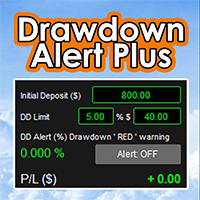
Drawdown Alert Plus: Know Your Drawdown at a Glance
Drawdown comes first Live drawdown, always visible. The panel shows your account’s floating loss (profit plus swap, all open orders) as a percentage of your Initial Deposit, updated with every price move. Three-level colour warning. Green when risk is low, orange when you pass your warning level, red when you reach your drawdown limit. You choose the colours and the warning level. Set your limit your way. Type the limit in % or in $, and the o

Ephemeris Trade Calendar - 口座履歴を月間損益カレンダーに (MT4) Ephemeris Trade Calendar は MetaTrader 4 の履歴をチャート上の月間損益カレンダーに変えます。決済済みの取引はそれぞれの日に入り、セルは結果で色分けされ、勝ち数と負け数を表示し、週ごとの合計にまとめられます。下部のデッキは統計、エッジマップ(エントリー曜日・時間ごとの P/L と決済済み取引のエクイティカーブ)、日別台帳を切り替え、TODAY メーターが1日の目標と損失上限を追跡します。リアル口座とデモ口座のチャートでは履歴を読むだけで、取引の新規・変更・決済は一切行いません。 クイックスタート 任意のチャート(任意の銘柄・時間足)に適用します。Algo Trading は不要です。 ターミナルウィンドウの「口座履歴」タブを開き、右クリックで All History を選びます。MT4 はこのタブに読み込まれた履歴しかプログラムに渡しません。期間が短いと古い月は空になり、パーセント値は概算になります。 任意:1つの銘柄や EA だけを追う場合は Symb

Analyzator Optim は、最適化結果で動作するユーティリティです。 彼女は最大5年間の最適化の深さで膨大な数のデータ配列を分析し、年ごとに別々にそれを行います。 データ分析が完了すると、時間の経過とともにより安定した結果をもたらし、注意を払う価値のある上位5つの上位10または上位20の最適化オプションが表示されます。
ユーティリティの使用方法については、手順を参照してください。 Instructions on how to use. Version MT5
重要! ストラテジーテスターのユーティリティのデモ版は、非常に明白な理由でデータ分析を実行しません。
Analyzator Optimが役立つキーポイント: 品質, 数量, 機動性。
1. 質。 目標は、1年目だけでなく、他のすべての年にも良い結果を示す最適化結果を見つけることです。 (言い換えれば、最適でより安定した結果を選択する)。 このアプローチを使用すると、将来的にも安定した結果を示す可能性が高いオプションを見つけることができます。
ある年の結果が他の年に影響を与えないようにするには、最適化を毎年他

ユーザーガイド (PDF): https://polymaria.net/manuals/maria-trade-manager-user-guide.pdf Maria Trade Managerは、裁量トレーダーのためのトレードデスクを、MetaTrader 4のチャート上にそのまま用意します。BUYやSELLをクリックする前に、パネルがトレードプランをチャートに描画します:エントリー、ストップロス、テイクプロフィットのゾーンと、リスク金額、想定利益、リスクリワード比です。ラインをドラッグしてプランを変更し、ワンクリックで注文を出せます。ポジションを建てた後も、パネルが建値ストップ、トレーリングストップ、部分利確、デイリーガードでトレードを守り続けます。 パネルにはTRADE、PROTECT、STATSの3つのタブがあります。パネルが適用するルールは、すべてパネル上または入力パラメーターで確認できます。 TRADEタブ ワンクリックでBUYとSELL。リアルタイムのスプレッドと、ローソク足の確定までの残り時間も表示します。 ロットサイズ:FIXED LOT(固定ロット)、または残高

ユーザーガイド (PDF): https://polymaria.net/manuals/maria-copier-user-guide.pdf Maria Copierは、1つのMetaTrader 4口座のトレードを、同じパソコンまたはVPS上で稼働している他のMetaTrader 4口座にコピーします。 MASTERターミナルのチャート1つと、各SLAVEターミナルのチャート1つにセットして同じチャンネル名を指定するだけで、 SLAVEは1秒未満でMASTERに追従します。1つのEAで両方の役割をこなし、パラメータでMASTERかSLAVEかを選択します。 MASTERは保有中の注文を、共有フォルダCommon\Files内の小さなファイルに毎秒数回書き込みます。各SLAVEはそのファイルを読み取り、 自分のコピー注文を発注・変更・決済します。インターネット接続、サーバー、DLLは一切不要です。 コピー機能 成行注文:新規、決済、部分決済(SLAVEは自分のコピーを同じ割合だけ決済)。 SL/TP:新規時にコピーし、MASTERが変更するたびに反映。PRICEモード(同じ価格)ま

ユーザーガイド (PDF): https://polymaria.net/manuals/maria-telegram-user-guide.pdf Maria Telegram は、MetaTrader 4 口座の状況をスマートフォンでいつでも確認できるようにします。任意のチャートに設定し、Telegram ボットのトークンと chat ID を入力するだけで、わかりやすいレポート、新規・決済ごとのトレードカード、リスク警告、チャートのスクリーンショットを個人チャット、グループ、またはチャンネルに送信します。口座を読み取るだけで、リアルのチャートでトレードを新規発注・変更・決済することは一切ありません。 レポート 指定した時刻に日次レポート(ブローカーのサーバー時間)。土曜日と日曜日をスキップするオプション付き。 必要に応じて N 分ごとに追加レポート。 金曜日に週次サマリー、月末日に月次サマリー:損益、トレード数、勝ちと負け、勝率、プロフィットファクター、最良・最悪のトレード、平均利益と平均損失。 各レポートには、残高、有効証拠金、証拠金維持率、含み損益、ドローダウン(現在の含み分

MultiRange Stop Loss Manager MT4 MultiRange Stop Loss Manager MT4 is a utility designed to temporarily remove Stop Loss levels during specific time windows and automatically restore them afterwards. Its main purpose is to protect open and pending orders during market conditions in which the Bid/Ask spread can widen sharply for technical market reasons , rather than because the trading strategy itself has failed. This can be especially useful: around the daily trading rollover , generally around

One-click % risk trading, automatic SL/TP, break-even, trailing stop, partial closes, daily loss limit and a multi-timeframe signal advisor. Works on every symbol. AEGIS Trade Manager and Signal Advisor MT4- Your plan, enforced on every trade.
AEGIS is a professional trade manager and risk shield for MetaTrader 4. It sizes every position from your risk, protects it with a hard stop, manages it to the target, and stops you trading when your daily or drawdown limit is reached. It works on manual

MT4の口座履歴を眺めながら「結局、どの通貨ペアで、何曜日の何時に稼げているんだろう?」と目をこすっていませんか? もう大丈夫。「Trade Report to CSV」は、決済済みトレードを【1トレード=1行】のきれいなCSVにまとめ、そのすぐ横に集計をずらりと並べてくれます。実行して、Excelで開く。それだけで、自分のトレードの全体像が見えてきます。
出力される内容
メイン明細(1トレード=1行、17列)
エントリー時間/タイプ/ロット/通貨ペア/エントリー価格/SL/TP/決済時間/決済価格/手数料/スワップ/損益額/損益pips/マジックナンバー/保有時間(分)/決済理由/コメント
集計ブロック(同じシートの右側に出力)
・マジックナンバー別×通貨ペア別(常に出力)
複数のEAを動かしていても、マジックナンバーごとにブロックが分かれます。名前の対応表を書く手間はありません。
・全体サマリー:総トレード数、勝率、平均pips、プロフィットファクター、最大連勝、最大連敗、累計損益額
・通貨ペア別
・曜日別
・時間帯別(サーバー時間)
全体・通貨ペア別・曜日別・時間帯別
FREE

PREZZO DI LANCIO 49 USD -> PREZZO SUCCESSIVO 97 USD!
Calcolatore della dimensione del lotto PRO Universale - L'UNICO calcolatore di rischio che funziona con il simbolo OGNI.
Se cerchi: calcolatore della dimensione del lotto, calcolatore del rischio, calcolatore della dimensione della posizione, gestione del denaro MT5, calcolatore di lotti forex - eccolo.
UNIVERSALE: Forex, XAUUSD Oro, BTCUSD Criptovalute, indici US30 NAS100, conti Standard, CENT, Micro. Rilevamento automatico della lev

When your indicator changes direction, do you know what price does next? Does your indicator tend to move before price, after it, or within the same observation window? Do you know how responsive your indicator is across symbols, timeframes, and market periods?
IndicatorLab MT4 can help with that! IndicatorLab MT4 is a utility that samples indicator values alongside price and analyzes their movement and timing relationships, presenting the results in clear HTML reports built from CSV data chec

BNT Rapid Copier Local MT4 / MT5 trade copying with configurable execution and copy-profit statistics. User Manual and Installation Guide Download the English User Manual and Installation Guide (ZIP) Download and extract the ZIP file to access the PDF user manual. The guide covers Sender and Receiver setup, channel configuration, symbol mapping, lot sizing, synchronization options, profit statistics and troubleshooting. MT4 and MT5 in One Workflow BNT Rapid Copier connects a source trading acco

BNT Account Monitor MT4 Whole-account monitoring, performance analysis and read-only sharing User Guide and Required Data Link EA Download the MT4 Companion EA — BNT Data Link This product is the MT4 monitoring terminal. Collecting data from an account requires the compatible BNT Data Link companion EA to be installed and running in that account’s MT4 terminal. Download the companion EA using the link above, then follow the setup steps below. The system requires the compatible BNT data service,

発売記念価格:30ドル。 レビューが集まったら値上げします。
ZEN COMMAND(ゼン・コマンド)は、裁量トレードのための注文・管理パネルです。注文、損切り・利確の設定、決済までを、チャートの上の1枚のパネルで行います。パネルの表示は、設定の Language で日本語にできます。
ZEN には3つの「ぜん」を込めています。全:欲しい機能を全部この1枚に。禅:落ち着いて注文・決済できる。善:記録と跡で振り返り、トレードを改善できる。
主な特長 - リスクからロットを自動で決める:金額か資金の%を一度決めておけば、損切り線を動かすたびにロットが計算し直されます。 - 線は全部スプレッド込み:線の横の金額は実際に減る額・増える額です。売りの損切り・利確も、チャートの値段が線に来た時に効くように置かれます。 - 損切り・利確を pips・金額・資金の%で入れると、線がその値段に動きます。 - エントリーと決済のたびに、記録(CSV)とチャートのスクリーンショットを自動で保存します。 - 決済したトレードは、入った所からの点線と pips でチャートに残ります。
そのほかの機能 -

Candle Lengths Analyze r is an institutional-grade quantitative utility that models and measures how financial price volatility, candle range, and body displacement scale across all timeframes.
Financial markets do not expand linearly. By mathematically separating extreme high-to-low ranges (Bar Length) from net open-to-close directional progress (Body Length), this tool reveals the underlying diffusive power-law behavior of any financial asset, replacing subjective chart inspection with empiri

ALIEN Telegram Master PRO MT4 Advanced Telegram Signal & Trading Account Monitoring System for MetaTrader 4 ONE EA — ALL CHARTS — ALL TRADING ACTIVITY — MULTIPLE TELEGRAM CHANNELS — FOUR LANGUAGES ALIEN Telegram Master PRO MT4 is an advanced Telegram notification and trading account monitoring Expert Advisor designed specifically for MetaTrader 4. The system automatically monitors trading activity, BUY/SELL indicator signals, manual and automated trades, Stop Loss and Take Profit modifications,
FREE

Accelerate your market screen-time. Condense weeks of Forex price action into minutes of deliberate practice. Mastering discretionary trading requires analyzing hundreds of real setups. In live markets, waiting for higher-timeframe structures to develop and trades to resolve takes days or weeks. Accelerated Forex Training turns any MetaTrader 4 chart into a fast, step-by-step training environment where you control time candle by candle with simple mouse clicks. No complex offline charts. No ext

Goat Prop Guard MT4 protects prop-firm challenge and funded accounts on MetaTrader 4. It watches your account every tick and closes everything before a firm rule is broken - so one bad trade or one revenge session cannot cost you the account. Rules it enforces Daily loss limit - % or money, measured from day-start balance, equity, or the higher of the two; custom day reset hour (server time) Max overall drawdown - static or trailing; trailing floor can stop rising once it reaches the start balan

Goat Trade Panel MT4 brings one-click, risk-based trading and a TradingView-style position tool to MetaTrader 4. Set your risk once - the panel calculates the lot size for every trade. Trading Risk-based lot sizing - % of balance or fixed money; lot, money at risk and R:R shown live before you click One-click BUY / SELL with automatic SL and TP from your stop distance and reward:risk Long / Short position tool - drag entry, stop and target lines on the chart; places a market or pending order (li

Goat Trade Copier MT4 copies trades between terminals on the same computer or VPS. Trade one account and every other account follows automatically, usually within a second. Cross-platform: it uses the same channel format as Goat Trade Copier for MetaTrader 5, so an MT4 master can feed MT5 slaves and an MT5 master can feed MT4 slaves . Tested live: MT4 open and close mirrored on MT5 within a second. How it works Attach it in MASTER mode on the account you trade from (manual trades or any EA). Att

MNFM Manual Entry MT4 is a compact manual trading utility for MetaTrader 4. Set the lot size in the dashboard and click BUY or SELL to send one market order on the current chart symbol. Each order is opened with Magic Number 0 and the comment “MNFM Manual Entry”. The dashboard displays open buy and sell net results and counts positions with Magic Number 0.
This utility does not open trades automatically. It does not place pending orders, read news, or manage stop loss, take profit, trailing sto
FREE

Monitoraggio completo dei drawdown storici - Expert Advisor per MetaTrader 4 Descrizione del prodotto (descrizione del mercato): Smetti di fare supposizioni sulla tua reale esposizione al rischio. Scopri immediatamente il tuo peggior calo storico. Il Full History Drawdown Monitor è un'utility professionale essenziale per la gestione del rischio, sviluppata per MetaTrader 4 (MT4). A differenza dei report o dei monitor standard del terminale, che calcolano il drawdown solo dal momento in cui veng
FREE

My Trade Panel MT4 A manual trading panel for MetaTrader 4. It calculates your lot size from the risk you choose, places market and pending orders in one click, and manages open positions with breakeven, partial close, and seven types of trailing stop. It does not open trades on its own. You make the decisions and the panel handles the math and the routine work. Line function
Show Entry, Stop Loss, and Take Profit lines on the chart. Drag them to plan a trade and see the lot, risk, and reward b

What this is An on-chart control panel for manual MT4 trading. Instead of typing a lot size and hoping it is right, you set a risk percent once and every button on the panel sizes the position from your stop distance and the symbol tick value. What it does On-chart BUY/SELL buttons that size the position from a risk percent, plus CLOSE ALL and BE ALL. Interactive chart panel with risk-based sizing; no dependency on any indicator. Runs as an Expert Advisor attached to a single chart. No DLL calls

What this is A planning tool that projects a volatility-based stop and target onto the chart and tells you the lot size that a fixed risk percent implies at that distance. Useful before you commit to a trade, and useful for building the habit of sizing from risk rather than from feeling. What it does Draws ATR-based stop and target levels and shows the lot size for a fixed risk percent. Volatility-adaptive stop projection drawn live on the chart. Runs as an Expert Advisor attached to a single ch

What this is A trade manager that works in R multiples. Once a position reaches a chosen R multiple it protects the trade, optionally takes partial profit, and only then starts trailing. It never opens trades. What it does Moves stops to break-even at a chosen R multiple, optionally takes a partial close, then trails. R-multiple driven management rather than fixed pip triggers; partial-close state persisted globally. Runs as an Expert Advisor attached to a single chart. No DLL calls. No external

What this is An account-level circuit breaker. It watches the day's closed results plus floating profit and loss, and when a daily loss limit or a maximum trade count is reached it can stop new orders on the panel and flatten what is open. What it does Stops the day when a loss limit or a max-trade count is reached, and can flatten open positions. Account-level daily circuit breaker computed from closed history plus floating P/L. Runs as an Expert Advisor attached to a single chart. No DLL calls

What this is A small on-chart readout of current spread, with a warning threshold, a colour state and an optional countdown to the next candle. Spread is a cost that most EAs and most manual traders simply do not measure. What it does Live spread versus 60-bar average, current session bucket, and seconds to the next bar close. Combines spread context, session awareness and bar timing in one compact panel. Runs as an Expert Advisor attached to a single chart. No DLL calls. No external services. N

What this is Writes your closed trade history to a CSV file on a timer or every tick, including commission and swap, with a totals row at the end. The point is a clean spreadsheet you can actually analyse offline instead of screenshots. What it does Writes the full closed-trade history to a CSV with a totals row, on a timer or every tick. Clean spreadsheet output including commission, swap and a computed total. Runs as an Expert Advisor attached to a single chart. No DLL calls. No external servi

What this is A free single-strip readout of the numbers that decide whether an account survives a bad hour: equity, free margin, margin level with a colour state that warns before the margin call, floating profit and loss, and the current spread measured against its sixty-bar average. It takes no decisions for you and it is free on purpose. What it does Free strip showing equity, free margin, margin level with margin-call colouring, floating P/L and current spread against its 60-bar average. Fre
FREE

What this is Most multi-pair traders think in positions, not in currencies. Three long EURUSD trades and one short EURJPY feel diversified, but the book is really one large long EUR position. Exposure Lens opens every trade, splits it into its base and quote leg, nets every leg of the same currency together, converts the result into your account currency and shows what share of your equity each currency actually represents. What it does Nets every open position into per-currency long/short expos

What this is Pending orders left overnight and positions carried through the weekend are two of the most common ways a planned trade turns into an unplanned risk. This utility handles the clock for you: it cancels pending orders that have been sitting for longer than you allow, closes everything at a session end time you choose, and forces a cut-off before the Friday close. What it does Expires stale pending orders, flattens all positions at a chosen session end time, and forces a Friday cut-off

PowerTech AutoUpdater downloads Forex Factory Calendar and COT CFTC updated data and writes the exact cache files used by PowerTechPropTradingSystemPro MT5 https://www.mql5.com/en/market/product/195280 (No separate panel, just data updates — panel is built into the indicator)
PowerTech AutoUpdater — Companion EA for PowerTech Prop Trading System PowerTech AutoUpdater is a companion Expert Advisor for PowerTech Prop Trading System Pro . MT4 indicators cannot use WebRequest: this EA takes
FREE

What this is Not every hour of the trading day moves the same amount, and the difference matters: a breakout at a dead hour is far more likely to fail than the same setup during the session when the symbol actually travels. This indicator averages the high-low range of each hour of the server day over a number of days and shows all twenty-four hours as a ranked table. What it does Averages the high-low range of every hour of the server day over N days and ranks all 24 hours with a bar and a perc

What this is Watching several charts for a handful of price levels is a poor use of attention. This tool watches the levels for you. You type a list such as 1.0850;1.0900;EURUSD 1.2700 into one input, and it alerts when price approaches, touches or crosses each level. Every level fires once, so an alert means something happened rather than repeating all day. What it does Watches a list of price levels, on one symbol or several, and alerts on approach, touch and cross, each firing once per level.

What this is When margin runs low, the broker closes whatever it decides to close, usually the largest position and usually at the worst moment. This utility acts before that point with two stages: an alert at a warning level you set, and then an orderly close of the least profitable position once a lower level is reached, pausing between closes and stopping as soon as margin recovers. What it does Warns at one margin level and starts closing the least profitable position, one at a time with a c

What this is Placing a ladder of pending orders by hand is slow and error-prone, and one mistyped lot size turns a plan into an accident. This tool builds the whole ladder in one action: a fixed number of levels per side, a fixed distance between them, one lot size, and optional stop loss and take profit in points. Before anything is sent it draws exactly where the orders would sit, and it only places them when you set the arming input to true. What it does Places a symmetric ladder of buy-limit

What this is Evaluation accounts are scored on rules, not on feelings, and the rules are unforgiving in one direction: a profit target is a goal, but a daily loss limit or a maximum drawdown is a hard stop. This tracker keeps all three numbers on the chart at once, measured from the starting balance you enter, so the distance between where the account is and where it is allowed to go is always visible. What it does Tracks profit-target progress, worst daily loss and worst total loss against the

What this is The spread you are quoted is a cost you pay on every trade, and most traders never measure it. This recorder samples the spread on a schedule, for one symbol or for everything in Market Watch, and appends it to a CSV file inside the terminal data folder. The result is a record you can open in a spreadsheet and use to compare hours, days and brokers. What it does Samples live spread on a fixed interval, one symbol or the whole Market Watch, and appends time / symbol / spread / ask /

GoldSniper is a precision algorithmic scalper built exclusively for XAUUSD (Gold). Engineered for traders who demand consistency, transparency, and capital protection.
WHY GOLDSNIPER?
Passed all MT5 Strategy Tester examinations → 0 execution errors | 0 margin failures | 0 modification errors
Strict 1:1 Risk-to-Reward on EVERY trade → SL distance = TP distance. Always. No exceptions.
EMA 20 Trend Filter → O

IC Risk Manager : Risk Calculator and Trade Manager for MT4 IC Risk Manager lets you plan a trade on the chart before you place it. You drag a colored box to set your stop loss and take profit, and the lot size is calculated for you from your risk. Nothing is sent to the broker until you press EXECUTE. How it works Set your risk. Enter a risk percentage of your balance, or switch to a money amount by clicking the “Risk %” button. You can also type a fixed lot size and the panel will show the ris

CopierMasterPro — копировщик сделок Master/Slave для MetaTrader 5 Копируйте сделки между счетами быстро, надёжно и без лишних затрат. CopierMasterPro передаёт сделки от мастер-счёта на неограниченное число slave-счетов через общий файл терминала — без интернета, DLL, VPS-релеев и подписок. Мастер и слейв могут находиться на одном компьютере или разных терминалах одной машины. Почему CopierMasrerPro: Никаких DLL и внешних сервисов. Обмен идёт через файл в общей папке MQL5\Files — разрешено Mar

Riskly Pro is a risk and trade management utility for manual traders. It combines account protection, position management and scale-in entries in one Expert Advisor.
Trading panel - On-chart BUY and SELL buttons. The lot is calculated from the risk you set (percent of the account) and the stop loss distance. - Automatic stop loss and take profit on every position, including positions you open manually.
Account protection - Maximum daily loss, maximum number of trades per day and maximum conse

RiskGuard protects your account while you trade manually. It enforces the rules you set, so a bad day cannot turn into a blown account.
Account limits - Maximum daily loss (percent of the start-of-day balance, closed and open trades together). - Optional profit target: when reached, all positions are closed and trading stops for the day. - When a limit is reached the account is locked until the next day: any new position is closed immediately.
Discipline - Maximum number of trades per day. -

RisklyCopy copies trades from a master account to one or more receiving accounts running on the same computer or VPS. It works between MT5 terminals, between MT4 terminals, and between MT4 and MT5, also with different brokers.
How it works - Attach RisklyCopy in SEND mode on the master account and in RECEIVE mode on each receiving account, using the same channel name. - New trades, stop loss and take profit changes, partial closes and closes are copied.
Lot calculation on the receiving accoun

RisklyTrailing turns one manual entry into a group of positions without take profit and manages each of them with a step stop, so the first positions lock profit early and the last ones stay in the market for long moves.
How it works - Open a position manually: RisklyTrailing opens the additional positions you choose, all with the same stop loss and no take profit. - After a set profit, all positions move to break-even (with a small margin beyond the entry). - Step stop: at +1 step the first p

ScaleIn splits one manual entry into several positions. Open a trade as usual: ScaleIn adds the extra positions you choose, each with its own take profit, while keeping the total risk of the whole trade under control.
Positions to open - Number of additional positions. - Same volume as your original trade, or custom volumes for each position.
Entries - Market orders (all positions open immediately), or pending orders placed at a set distance between levels.
Stop loss and take profit - Stop l

TradeManager manages the positions you open manually, so every trade gets a stop loss, a take profit, break-even and trailing without you having to watch the chart.
Stop loss and take profit - Adds a stop loss and a take profit to any position that does not have them.
Break-even - Moves the stop loss to break-even after a set profit, with a small margin beyond the entry.
Trailing stop - Starts trailing after a set profit, at the distance you choose. - Updates the stop only every N pips, to a

MT-Remote — は、RDP(リモートデスクトップ)を使わずに、スマートフォンやPCから MetaTrader 4 および 5 をリモート操作できるマルチターミナル対応の Web パネルです。複数の VPS 上のターミナルを1つの画面に集約し、EA の管理、トレードとポジションの確認、チャート、履歴、ログ、Market Watch、VPS の監視を一元管理できます。
パッケージ内容物* MT-Remote EA — MetaTrader 4/5 のチャートに適用し、ローカルチャネルを通じてターミナルと MTAgent をつなぎます Windows 用 MTAgent — ターミナルと Web パネルの間でデータを暗号化したまま受け渡す無料の Windows アプリケーションです Web コントロールパネル — ほぼあらゆる端末のブラウザからターミナルを管理でき、スマートフォンに本格的な取引ターミナルを入れる必要はありません Android / iOS 向けモバイルアプリ — 開発中 * ご注意ください: MT-Remoteは包括的なシステムです。すべての機能への完全な管理とアク

Local Copier – MetaTrader 4・MetaTrader 5用トレードコピーツール MetaTrader 4とMetaTrader 5のためのローカルトレードコピーツールです。同じWindowsパソコンまたはVPS上で動作するターミナル間で、方向を問わず取引をコピーします。MetaTrader 4からMetaTrader 4、MetaTrader 5からMetaTrader 5、そして2つのプラットフォーム間でもコピーできます。
こちらはMetaTrader 4版です。 MetaTrader 5版 は別の製品です。2つのプラットフォーム間でコピーするには、各ターミナルにそれぞれ対応するバージョンをインストールしてください。 追加資料と説明書 インストールガイド - ユーザーマニュアル(パート1) - ユーザーマニュアル(パート2) 無料デモ版 ご購入前に、 無料デモ版 を使ってご自身のデモ口座でコピーツールをお試しいただけます。製品版のすべての機能を備え、デモ口座でのみ動作し、2時間ごとのセッションでコピーを行います。 インストール: ターミナルで「ファイル >

WONNFX MONITOR: Account Dashboard for MT4 is a Expert Advisor that turns a chart window into a full account monitoring dashboard. Balance, growth, drawdown, monthly returns and dozens of statistics are gathered on one screen. The layout is the familiar one from public monitoring sites, but it runs right inside your terminal and updates in real time.
The EA does not open, modify or close trades. It only reads the account history. No internet connection or third-party services are needed, so your
FREE

Local Trade Copier Local Trade Copier (LTC) は、対応する MetaTrader 4 と MetaTrader 5 のターミナルを接続し、チャート上のパネルから取引口座間のコピーを簡単に行えるツールです。MT4 間、MT5 間、または MT4 と MT5 の接続には、それぞれのターミナルに対応する LTC 版を導入してください。受信側の口座では、ブローカーの設定を統一する必要なく、ロット数、銘柄の選択、取引管理方法を個別に設定できます。 口座の接続 一方向にコピーする場合は MASTER と RECEIVER を選択します。MASTER は対象となる取引情報を提供し、RECEIVER は独自の設定を適用します。双方向のコピーでは PRIMARY と SECONDARY によって、接続口座の間で対応注文を送受信できます。現在の口座の役割と接続状態はパネルに表示されます。 対応する注文 条件を満たす新規の BUY と SELL の成行取引をコピーします。接続前からあるポジションは自動的に複製されません。 BUY LIMIT、SELL LIMIT、

Eagle Signal Provider
取引をしている間に、口座の取引を Telegram のチャット、グループまたはチャンネルに配信します。新規注文、変更、部分決済、決済、待機注文、そして日次・週次・月次レポートです。各メッセージには価格の水準、金額とパーセントでのリスク、結果、さらに希望すれば取引を描き込んだチャートのスクリーンショットが付きます。文章を打つ必要はありません。あなたは取引し、EA が書きます。
Eagle Signal Provider は口座のすべての取引と待機注文を追跡し、イベントごとに、発生した直後に分かりやすい Telegram メッセージを送ります。購読者は、あなたが何を、いくらで、どれだけのリスクで行い、どんな結果になったかを、スマートフォンで読みやすい形で確認できます。遅延、ストップロスのルール、フィルターが配信内容を決めるので、手動の取引、別の EA の取引、ストップロスのない取引が誤ってチャンネルに流れることはありません。
購読者が受け取る内容 - 新規注文:銘柄、方向、エントリー、SL と TP とその距離、ロット、残高または有効証
FREE

TW Trade Copier MT4 – 複数のMaster口座とReceiver口座 TW Trade Copier MT4は、ネットワーク経由で複数のMaster口座とReceiver口座間の取引を同時にコピーするために設計された、MetaTrader 4用のプロフェッショナルなトレードコピーEAです。成行注文と指値・逆指値などの予約注文に対応しており、手動または他のエキスパートアドバイザー(EA)によって開かれた取引もコピーできます。本システムは、取引操作に加えて、ストップロス(SL)とテイクプロフィット(TP)の変更も同期します。柔軟な銘柄マッピング機能により、異なるブローカー間でも、異なるプレフィックスやサフィックスが付いた銘柄を含め、取引銘柄を対応付けることができます。さまざまな取引戦略や口座サイズに対応するため、Receiver口座のロット計算方法として、 Fixed Lot、Equivalent Lot、Risk-Based Lot Sizing の3種類を提供します。 主な機能 複数のMaster口座とReceiver口座 – 複数のMaster口座とReceive

MQLTeam Auto Select は、マウスを重ねるとチャートオブジェクトを選択します。ダブルクリックなしで移動、プロパティ、Delete での削除ができます。 こちらも利用可能: MetaTrader 5 用 MQLTeam Auto Select Auto Select は小さなチャート用ツールです。シグナルは描かず、注文もしません。一度付けてボタンを緑のままにし、通常どおり線や図形を扱います。 使い方 ボタン: 印は右下から始まります。緑がオン、落ち着いた色がオフ。印は同じで色だけ変わります。邪魔ならドラッグできます。 移動: 対象に重ねてドラッグ。 プロパティ: 重ねて右クリック。 削除: 重ねて Delete。 対応オブジェクト 水平・垂直線、トレンドライン、2点アンカーのフィボナッチ、ガン線系、矩形、矢印、テキスト、一般的な画面ラベル。選択は最初の2つの時間/価格アンカーに基づきます。 現バージョンの制限 3点以上が必要なオブジェクト(チャネル、三角形、ピッチフォークなど)はこの版では選択しません。後で追加できます。それまでは MetaTrader の通常操作を使って
FREE

プロップ口座は、会社のダッシュボード上の一本のラインで失われます。Prop Limit Sentinel MT4 は、日次損失と最大損失をあなたのプロップ会社と同じ方法で計算し、有効証拠金がそのラインに達する前に動作します。 問題 日の数え方は会社ごとに異なります。FTMO の1日はプラハの午前0時に始まります。ブローカーのサーバーでは、1年の大半は 01:00 ですが、欧州と米国が別々の日に時計を切り替える約3週間は 02:00 になります。サーバー時刻を固定で設定したガードは、その期間に日を誤って数えます。また、ストップのないポジションには損失の上限がありません。 できること 会社自身の基準で日次損失と最大損失を計算します(固定型またはトレーリング型)。プリセット:FTMO 2-Step と 1-Step、FundedNext Stellar 2-Step と 1-Step、The5ers High Stakes、Custom rules。 会社のタイムゾーン(夏時間を含む)と実測したサーバーの時差から会社の1日の開始時刻を求め、パネルに表示します。 取引が約定する前に最悪のケース

Faster execution, clearer order control, and better trading discipline. OCT Panel — Professional MT5 Trading Control Panel OCT Panel is built for traders who want faster execution, clearer order control, and better trading discipline. OCT Panel is a professional trading assistant panel designed for MetaTrader 5 .
It helps traders manage orders, positions, Stop Loss, Take Profit, pending orders, and trade execution more efficiently during manual trading. OCT is not a signal system and does not g
FREE

Telegram and Discord to MT4 AI Trade Signal Copier, a signal copier for MetaTrader 4 that copies trades from your Telegram and Discord signal providers and manages each position with your own money management in your languages. The program screens and messages come in English, Russian, Chinese (Simplified and Traditional), Spanish, Portuguese, Japanese, German, Korean, French, Italian, Turkish, Thai, Indonesian and Vietnamese. Backtest first, then trade: run a signal provider's history on real M

Risk Panel MT4 is a trade panel for MetaTrader 4 that sizes every trade from the risk you choose and then manages it from entry to exit. It is built for manual traders on forex, gold, indices and prop-firm accounts, and it works with any MT4 broker. Buy Now | MT5 Version | Download Demo Version (Only for Demo Accounts) | User Guide You plan the trade on the chart, the panel shows exactly what you risk and what you can win, and one click places it. After that, the panel takes care of partial tak

こんなお悩みはありませんか? ロット計算を手でやるのは、時間がかかって面倒ではありませんか? 通貨ペアが増えるほど、手間も増えていませんか? 損失の上限を割って口座を失うのが怖くありませんか? 口座を失うたびに、前より心が折れそうになっていませんか? 私自身がこの繰り返しに苦しみました。自分のために作ったツールです。 この製品について 本製品はインジケーターです。注文機能は一切含まれていません。
注文を出す・変更する・決済する、いずれもできません。
MetaTrader 4 版です。 チャート上の損切りラインをドラッグするだけで、口座残高とファームの損失上限からロット数を計算します。 できること 損切りラインをドラッグすると、ロット数がその場で更新されます ラインの位置から売買方向を判定します。価格より下ならBUY、上ならSELL。
パネルに表示します 利確プレビューライン(任意・初期設定はオフ)。
「Show the TP preview line」をオンにすると、Risk-Reward の設定から自動配置され、損切りラインを動かすと連動します 損失額を口座通貨で表示
FREE

Sign@l12 Trade Manager: protect your manual trades without watching every tick.
Sign@l12 Trade Manager is a small Expert Advisor that looks after the trades you open yourself. It does four jobs: - it adds a stop loss and / or take profit when a trade has none - it moves the stop loss to break even once the trade is far enough in profit - it shows all your open trades on a clean dashboard, with SL, TP and profit or loss - it logs every trade to a CSV file when it closes, so you can review your
FREE

$299 per year — just $24.90 per month for an unlimited number of signals. Choose a provider at https://www.emilon.ru/monitoring and enter their account numbers — all trades will be automatically copied to your account. Real-time support chat. A built-in AI assistant replies instantly — around the clock, with no waiting. Then every message is reviewed by a human: if the AI can't help, an operator takes the case through to a solution. Open chat EmilonCopy Receiver is an Expert Advisor (

Like the logic of this tool? Explore the full ecosystem of professional indicators and utilities, built by a trader for traders: All author's products in MQL5 Market: https://www.mql5.com/en/users/musa1994/seller Trading philosophy and details: https://developer-mql4-mql5.netlify.app/ SLTPManager is a professional automatic Stop Loss and Take Profit manager with an interactive panel for MetaTrader 4, which instantly sets protection and profit-taking levels for every new trade. You will

is a native chart-management script. When run on a chart, it opens separate charts for the same symbol at the enabled timeframes, from M1 through MN1. By default, it opens M15, M30, H1, H4, and D1. You can enable or disable each supported timeframe to create a workspace suited to your analysis. Key Benefits One-Click Multi-Timeframe Access: Open all selected timeframes without manually creating each chart. Flexible Configuration: Enable or disable individual timeframes from M1 to MN1. Cleaner W
FREE

UMNi-FLOW
Buy / Sell Pressure & Market Activity Monitor for MetaTrader 4 UMNi-FLOW watches every price tick and tells you on Telegram when buyers or sellers take control, when the market suddenly speeds up, and when a bar trades far more volume than normal. A clean panel on the chart shows the same read at a glance. It does not place trades. It is an awareness tool: it tells you what the market is doing, so you are not caught off guard. KEY FEATURES Buy / sell pressure measured tick by tick: ev

Task Panel Nxfx Trade Manager Task Panel Nxfx Trade Manager is a trading utility designed to simplify manual trading, position management, and risk control in MetaTrader 4 and MetaTrader 5. The panel provides quick access to trading functions directly from the chart. Traders can place orders, configure Stop Loss and Take Profit levels, manage position sizes, and monitor open trades through a clear and convenient interface. The tool is suitable for scalping, day trading, swing trading, and other
FREE
MetaTraderマーケットは、履歴データを使ったテストと最適化のための無料のデモ自動売買ロボットをダウンロードできる唯一のストアです。
アプリ概要と他のカスタマーからのレビューをご覧になり、ターミナルにダウンロードし、購入する前に自動売買ロボットをテストしてください。完全に無料でアプリをテストできるのはMetaTraderマーケットだけです。

取引の機会を逃しています。
- 無料取引アプリ
- 8千を超えるシグナルをコピー
- 金融ニュースで金融マーケットを探索