SLTPManagerX

  • ユーティリティ
  • Musa Khunarikov
    Musa Khunarikov
    2014年からのプロトレーダー(10年以上の経験)。市場:Forex、株式、MOEX、金属。
    MQL4-MQL5開発者。専門:ボリューム分析、クラスター分析、フットプリント、デルタ、ボリュームプロファイル。
    経験とアプローチ:
    2014年からATASを使用—注文フロー、フットプリント、デルタ、ボリュームプロファイルを分析。大口プレイヤーの論理を理解し、ボリュームに基づく戦略をMQL5で動作するアドバイザーとインジケーターに変換します。トレーダーの言語を話します—「吸収」や「デルタダイバージェンス」が何かを説明する必要はありません。
    サービス:
  • バージョン: 1.0
  • アクティベーション: 5
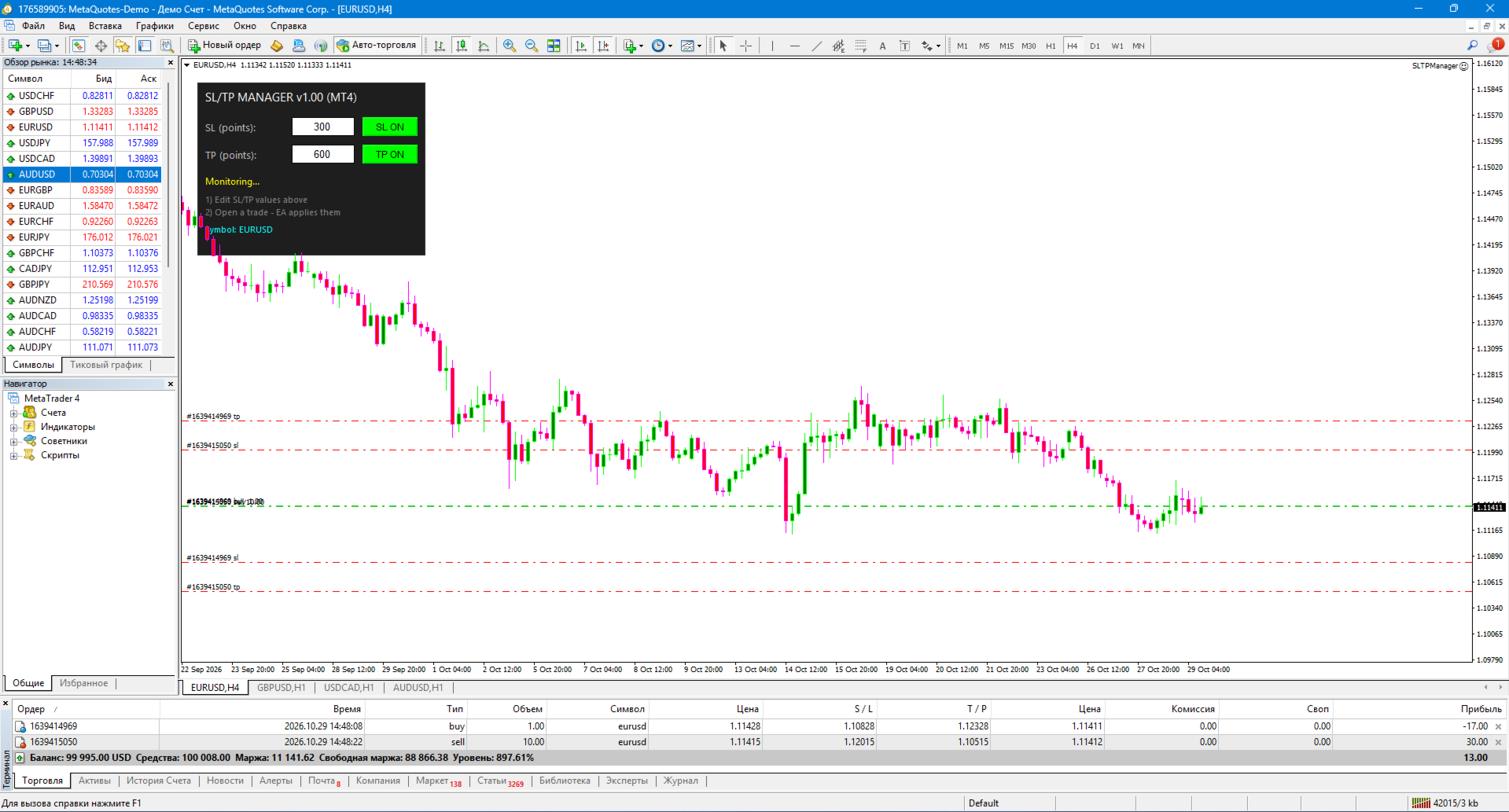
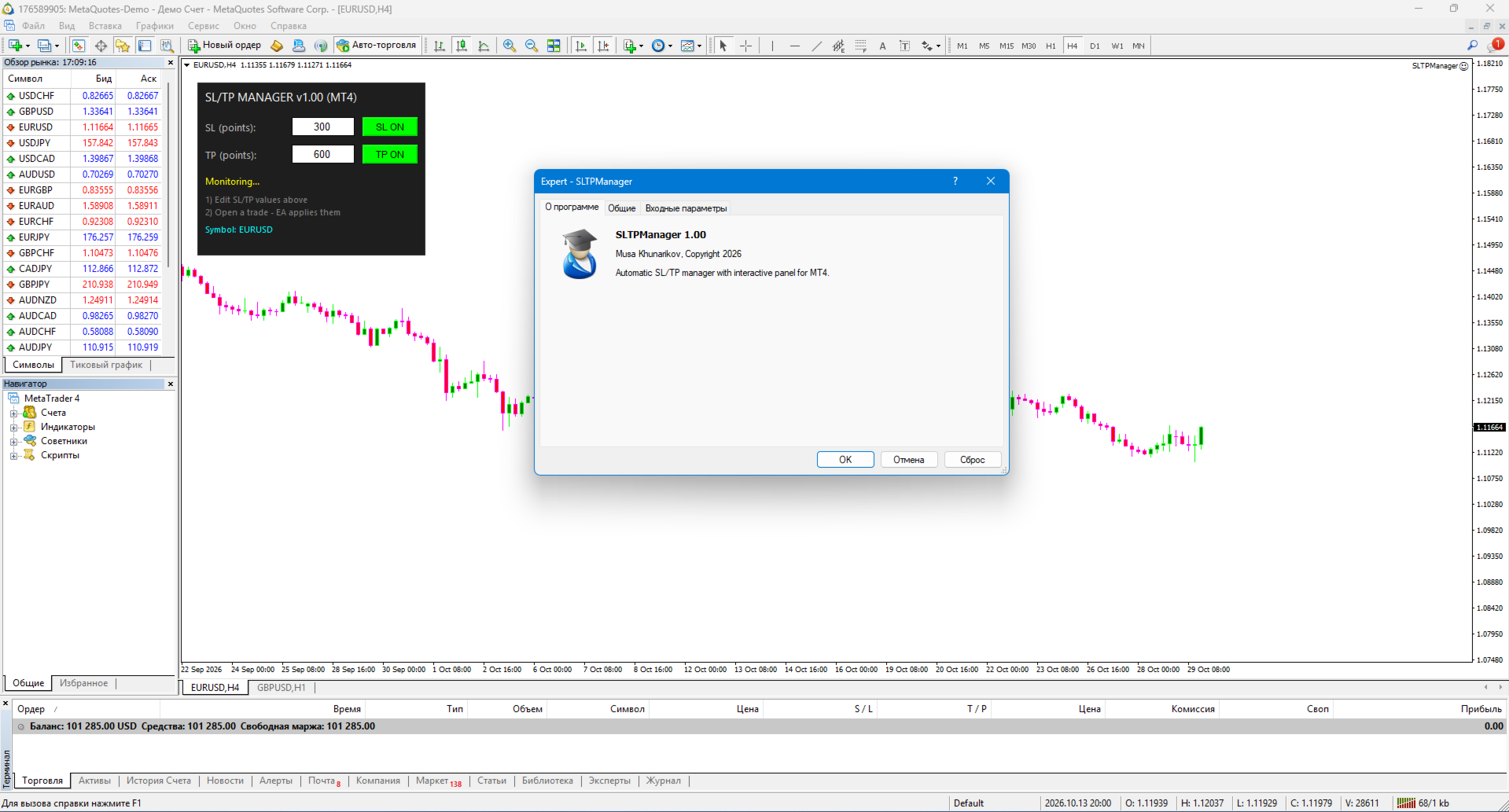
SLTPManager is a professional automatic Stop Loss and Take Profit manager with an interactive panel for MetaTrader 4, which instantly sets protection and profit-taking levels for every new trade. You will never leave a position "naked" again or waste time manually modifying orders. Created by a practicing trader with 12 years of experience. It saves your deposit from force majeure, internet outages, and the classic "forgot to set a stop" mistake.

🎯 What the utility does

An interactive control panel that is always right in front of your eyes on the chart:
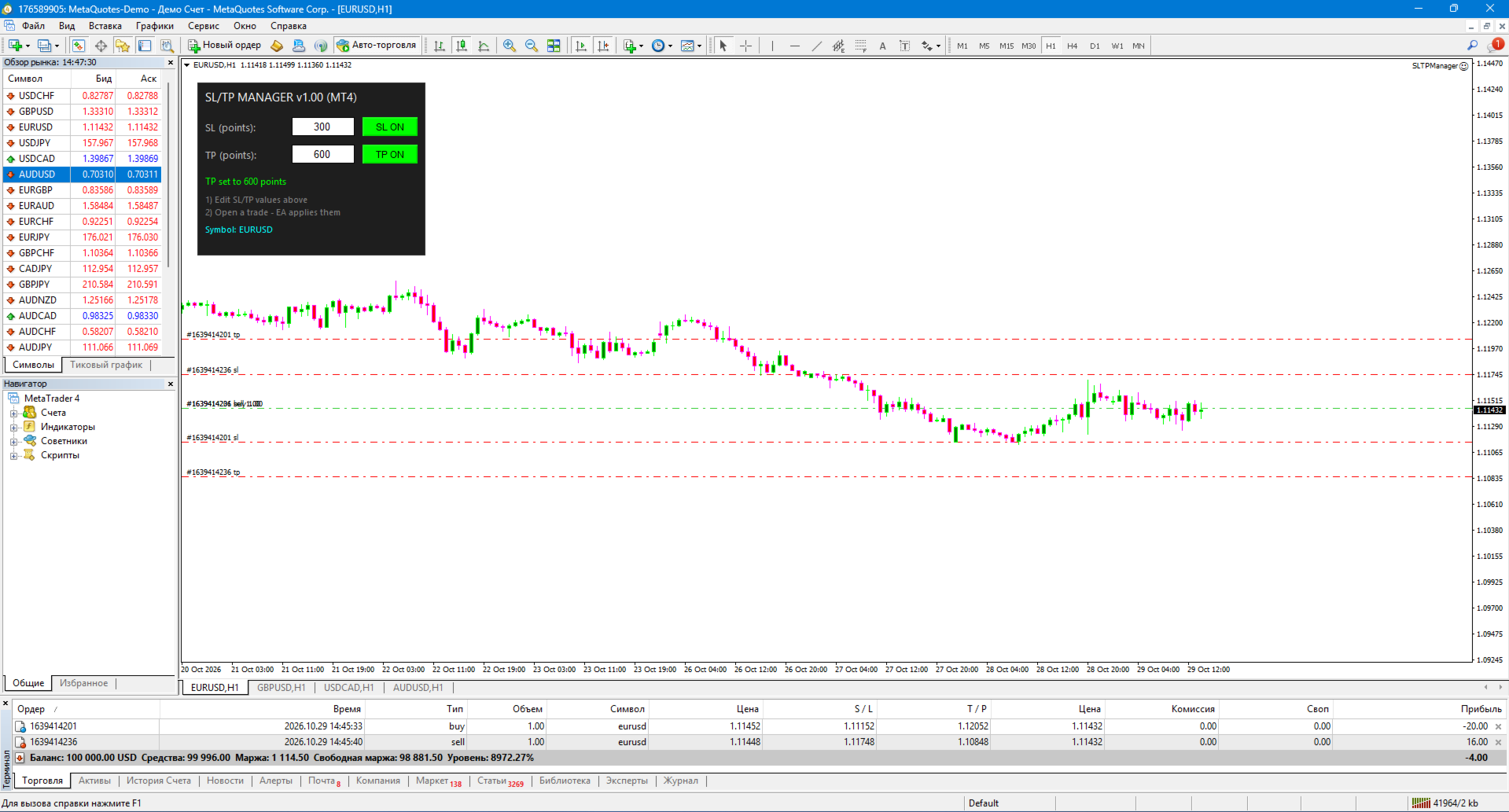
🟢 SL ON — Automatic Stop Loss placement is active 🔴 SL OFF — Stop Loss is disabled (for manual control) 🟢 TP ON — Automatic Take Profit placement is active 🔴 TP OFF — Take Profit is disabled 📝 Edit-fields — Change SL and TP values in points with a single click without restarting the EA.
Example of the panel:

=================================== SL/TP MANAGER v1.00 ----------------------------------- SL (points): [ 300 ] [ SL ON ] TP (points): [ 600 ] [ TP ON ] ----------------------------------- Status: Monitoring... 1) Edit SL/TP values above 2) Open a trade - EA applies them Symbol: XAUUSD ===================================

✨ Key Features

⚡ Instant Reaction Monitors trade openings on every tick, via timer, and through the OnTradeTransaction event. Stops are placed in the exact same millisecond the position appears on the server.
🛡 Smart Broker Logic Automatically calculates and respects your broker's StopsLevel and FreezeLevel . If you set a stop too close, the utility will automatically push it to the minimum allowed distance, preventing the "Invalid Stops" error.
🔄 Overwrite Mode An optional feature to forcefully modify existing SL/TP levels to the values set in the panel. Ideal for aligning order grids.
🎯 Flexible Filters Work only with the current chart or monitor the entire account. Use the Magic Number filter so the utility manages stops only for specific EAs.
🖱 Draggable Panel The panel can be dragged with the mouse to any convenient spot on the chart. Its position and entered values are saved between sessions.

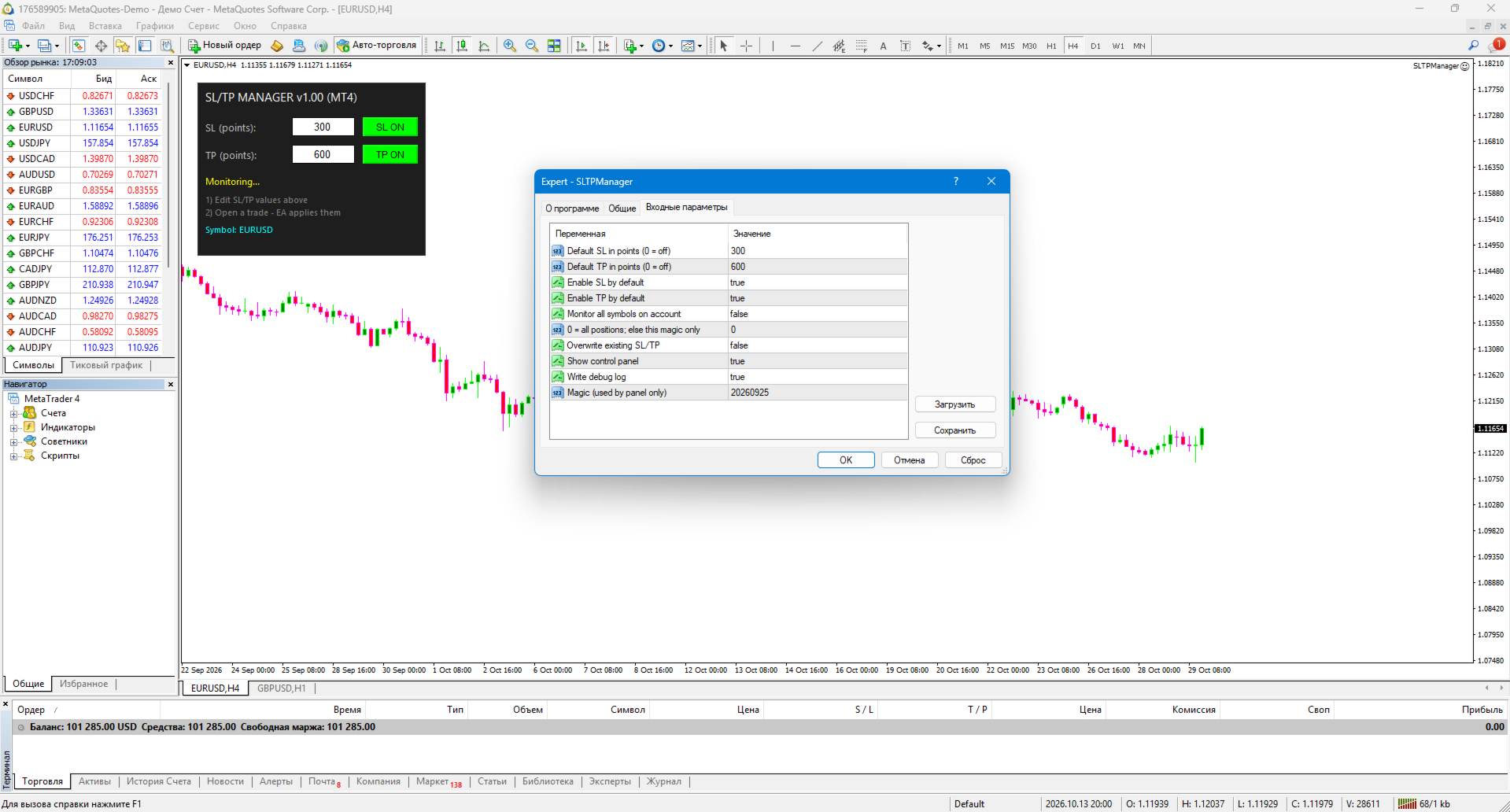
⚙️ Flexible Settings

  • Default SL and TP values (in points)
  • Enable/disable SL and TP on startup
  • Monitor all symbols (true/false)
  • Magic Number filter (0 = all positions)
  • Overwrite mode for existing stops
  • Enable/disable panel and logs

🛠️ How to use

1. Installation
  • MT4: copy the .ex4  file to MQL4/Experts/
  • Restart the terminal, drag the EA onto any chart (allow algorithmic trading).
2. Setting Values Simply click inside the SL (points) and TP (points) fields on the panel, enter the desired value, and press Enter. Changes apply instantly.
3. Trading Scenarios
  • Manual Trading (Scalping/Intraday): Open trades using One Click Trading buttons — SLTPManager automatically "catches" them and sets the stops.
  • Pairing with other EAs: If your main EA doesn't know how to set hidden or fixed stops, SLTPManager will do it for it (use the Magic Number filter).
  • News Trading: Disable TP, set a short SL. Upon entering a trade, the protection triggers instantly, saving you from slippage and sudden price spikes.

📋 Implementation Details

  • Pure MQL4 using the standard CTrade library — no DLLs or external dependencies.
  • Works on any instrument: Forex, crypto, metals, indices.
  • Optimized for performance — minimal CPU load.
  • Supports all account types and Execution modes (Instant/Market).

⚠️ Important Warning

SLTPManager is a strict risk management tool, not a trading system. It does not open trades or provide signals. Its task is to discipline the trader and protect capital from catastrophic losses. Using the utility does not guarantee profit. All trading decisions and lot size choices are made by the trader.

🏆 About the Developer

Created by Musa Khunarikov — a practicing trader with 12 years of trading experience. Holds 51 certificates from the Finam Training Center in trading, algorithmic trading, and MetaTrader. Services: EA development, indicators, panels, trading system audits. Author's live trading: 👉 https://developer-mql4-mql5.netlify.app/

📞 Support

30 days of free support after purchase. Bug fixes within 48 hours.
おすすめのプロダクト
市場が取引と反対になっている場合は、マージンコールからアカウントを保護してください。 マルチンゲール、グリッド、平均を使用しているときにリスクを管理します。彼らはもはや危険ではありませんが、管理可能です このEAユーティリティを使用して、すべてのMT4インストールに同梱します このEAは、取引が好ましくない場合に資本を保護するためのユーティリティです。 お金の最大損失、 最大ドローダウン/パーセントでの株式損失、 最小エクイティに達しました それらは最初に到達した方です 取引に同行するのは簡単、簡単、強力です このEAをいずれかの通貨タブにインストールすると、取引ターミナルからすべての取引が監視されます。 シンプルで軽量で非常に便利
FREE
Grid Trading EA is a semi-automated one-click trading EA for both Normal Trading and Grid/Martingale Trading . Normal Trading Simply click Buy or Sell directly from the chart. The EA will automatically manage trades by: Setting Stop Loss and Take Profit Managing Trailing Stop Grid / Martingale Trading When Grid Trading mode is enabled, the EA will automatically open additional grid orders at specified distances while increasing the lot size based on your settings. Inputs & Settings Lots — Initia
Giant Trade Panel  comes as a whole package with functionalities that will satisfy all your needs as a manual trader. I created this utility to help you manage your trades from a single chart with just a few clicks . It has a smooth interface which is very responsive.  The utility has sub panels each with different functions: Symbols panel   - This will help you open chart of any symbol with just one click. Timeframes panel - With this you can navigate from M1 timeframe to MN1 timeframe with jus
Smarter Trade Manager  is an advanced trade management tool that can monitor and manage your manual and EA trades according to the settings you choose. It works as an Expert Advisor (EA), it does not open any trades but it closes trades as per the auto closing settings or when manually pressing any of the close buttons. FEATURES: Three-dimensional interactive  view of your trades Trade Summary, P/L, Alerts, Closure by Currency Trade Summary, P/L, Alerts, Closure by Magic Number Profit and Loss
This EA will automatically close all open and pending order when profit or loss is reached according to users setting. Profit or loss can be set by percentage or by amount. When inputting amount for loss make sure to put " - " (minus) sign before the amount. The color of text displayed on the chart can be change in the user input. The text position can also be changed: - left top corner - right top corner - left bottom corner - right bottom corner
多機能取引ツール:ロット計算機、グリッド注文、R/R比率、トレードマネージャー、需給ゾーン、プライスアクションなど デモ版   |   ユーザーマニュアル トレードアシスタント はストラテジーテスターでは動作しません:この ユーティリティ をテストするには デモ版をこちら からダウンロードしてください。 ご質問 /改善のアイデア/バグ発見 の場合は 私に連絡 してください MT5版が必要な場合は、 こちら から入手できます 取引 プロセス を簡素化、高速化、自動化します。この ダッシュボード で標準ターミナルの機能を拡張します。 取引パネル はあらゆる取引銘柄で動作します:FX、株式、指数、暗号通貨など。 1. 新規取引の開始 :ロット/リスク/RR計算:手動取引のリスク管理 ロット計算機(リスクサイズに基づく取引量計算) リスク計算機(ロットサイズに基づくリスク額) リスクリワード比率 グリッド注文: + 動的間隔オプション、分割ロットオプション 注文アクショントリガー、+ 買いストップリミット/売りストップリミット:Mt4でも可能 仮想SL、仮想TP(非表示SL、非表示TP:ブロ
QuantumGuard Pro - Intelligent Quantum Risk Management Trading System Core Features Five independent fund management groups for smart risk diversification Triple protection mechanism: profit target + drawdown protection + global risk control Professional trading panel for one-stop trade execution 24/7 real-time risk monitoring and protection Automatic display of average price lines for each group One-click close single group orders for precise control Order group highlighting for clear status o
In a trend trading system, find the right entry and exit points. In forex trading, a trading strategy is a fixed plan designed to make a decent return by going long or short the market. The main reason a properly researched trading strategy is helpful is because it is verifiable, quantifiable, consistent, and objective. For each trading strategy, you need to define the assets to be traded, the entry/exit points, and money management rules.
MT4用NAS100 Auto SL and TP Makerをご紹介します: MetaTrader4でナスダック100市場をナビゲートするトレーダーにとって不可欠なアシスタントであるNAS100オートSLおよびTPメーカーで、ストップロスおよびテイクプロフィットの設定をもう見逃すことはありません。このツールは、ストップロスとテイクプロフィットのレベル管理を自動化するシームレスなソリューションを求める方々のために設計されています。 主な特徴 簡単な自動化: ストップロスやテイクプロフィットのないナスダック100取引を自動的に監視します。 ユーザーが構成した設定に基づいてレベルを動的に調整します。 注文タイプの多様性: Nasdaq100の成行注文と未決済注文の両方に対応。 MetaTrader 4で利用可能な様々な注文タイプをサポートします。 カスタマイズされた設定: ユーザーフレンドリーなパラメータ設定により、トラッキング設定とストップロス/テイクプロフィットレベルのカスタマイズが可能です。 柔軟な範囲: 実行する特定のNAS100商品、または取引されるすべての商品に対してStop
FREE
Worried about weekend price crashes wiping your account? Tired of adverse news releases stopping your positions? Trade with peace of mind with Smart Hedge. Smart Hedge protects your positions from weekend gaps and news spikes. MT5 version:  https://www.mql5.com/en/market/product/113024 Description : Have you ever feared that some breaking news during the weekend could wipe your account? Did you ever have your positions stopped by an adverse news release during the market open hours? I did, an
Lycan MT4
Leo Carlo Bermudez
Lycan MT4 is an automated Scalping system optimized for  XAUUSD (GOLD)  on the MetaTrader platform. The EA does not use grid or martingale recovery methods. It applies volatility-based stop loss protection and rule-based filters (spread, news, and session) to select scalp trade opportunities using confirmed breakout strength, rather than relying on high-frequency or recovery-based entries. Core Principle: No Grid, No Martingale, Dual Scalp Strategy System Lycan does not add to losing positions
FREE
Milch Cow Pro
Mohamed Nasseem
1 (1)
MILCH COW MIX PRO EA is primarily a Hedging and Multiples Strategy. It support to seize every opportunity in any direction as MILCH COW MIX but with an increased number of trades. YOU must run the expert on two chart at same currency. Not just opens the deals, but chooses the right time to close the open positions to begin trading again. We recommend the use of an expert with a pair of high volatility for the currency, such as GBPAUD, AUDCAD Testing expert during the period from 01.01.2014 until
PrecisionEntry EA is a semi-automatic Expert Advisor for MetaTrader 4 that enables precise order placement at the click of a button — without taking control away from the trader. With a single click on the LONG or SHORT button, the EA automatically places a BuyStop or SellStop order at the high or low of the previous candle. Stop-loss, take-profit, and lot size are calculated fully automatically — based on the configured risk percentage and the desired risk-reward ratio. Features: Interactive on
StatBar 1.6 Indicator showing balance, earnings for today, yesterday and the day before yesterday. The indicator also shows: - Server; - GMT; - Server time; - Shoulder; - Spread. Description of variables: extern int Magic = "-1"; // Magic for statistics -1 = all 0 = manual extern string Symboll = "-1"; // Symbol for statistics -1 = all 0 = current EURUSD = for EURUSD
FREE
Diversify the risk in your trading account by combining our Expert Advisors. Build your own custom trading system here:   Simple Forex Trading Strategies The expert advisor opens trades when the SMAs cross and when the WPR has left overbought/oversold areas. The SMAs are also programmed to close the trades if the trend changes. The Stop Loss, Take Profit, and Trailing Stop are calculated based on the ATR indicator. The recommended currency pair is NZDUSD and the recommended timeframe to operat



FREE
Diamond Hedge MT4
Mario Miguel Marques Vara
強固な戦略を繰り返し実装することはしばしば挑戦的な課題であることがあります。私たちはあなたの時間が貴重であることを理解しています。そのために、私たちは「 Diamond Hedge 」を紹介しています。この革新的な解決策は、成功を楽しむことを可能にする勝利の戦略を提供し、数時間にわたるチャートの監視の負担なしに成功を楽しむことができます。 重要!購入後すぐに私に連絡していただければ、私は使用しているパラメータを提供します! 動作方法: 取引チャネルを設定し、希望する乗数を選択します。市場がチャネルの限界に達すると、EAが動作します。動きの方向に関係なく、予め定義された利益確定と損切りの水準で取引が開始されます。市場が設定されたチャネル内にある限り、「Diamond Hedge」は安値で買い、高値で売って利益を積み上げます。市場がトレンドになりチャネルから出ると、EAは控えめになり、安定が戻ると再び活動し、取引をプラスに保つヘッジメカニズムを使用します。 戦略的なフィルターで性能を最適化 EAの性能をさらに向上させるために、重要な戦略的なフィルターを組み込んでいます。時間フィルター
FREE
ピラミッド化は、成功した取引からの未実現利益を新しい取引の証拠金として使用することにより、ポジションサイズを増やす方法です。このエキスパートアドバイザーは、あなたの介入なしにあなたの取引をピラミッド化します。 [ インストールガイド | アップデートガイド | トラブルシューティング | FAQ | すべての製品 ] あなたの成功した取引を簡単にピラミッド 勝った取引を最大限に活用する 完全に構成可能なピラミッド化動作 ピラミッドは時間枠に依存しません ECN /非ECNブローカーおよび2-3-4-5桁で機能します バックテストでランダムな取引を行います 双方向取引をサポート 使用法はかなり簡単です: EAをチャートにロードします 取引量、間隔、ピラミッド化動作を選択します ストップロスを入力し、入力で利益を取ります(残高の%として) 最初の取引を手動で行う EAに残りの面倒を見てもらいましょう 入力 Expert Advisorを任意のチャートにロードすると、ブロックにグループ化された一連のオプションが入力パラメーターとして表示されます。 ピラミッド化動作 このパラメーターは、ピ
Recovery Assistant Pro for MT4 Manual Recovery Trading Assistant Recovery Assistant Pro is a Manual Trading Assistant EA for Recovery trade calculations and management. Helps calculate the appropriate Lot Size. Designed to calculate Recovery trade parameters based on floating loss and the selected Target USD. Simplifies Recovery calculations that would otherwise require manual calculation. The trading panel provides direct access to the main Recovery functions from the chart. Includes a Recov
QMMatrix PRO
Witold Jacek Herrmann
Description: Upgrade your MetaTrader 4 into a professional, institutional-grade trading terminal. Welcome to QMMatrix PRO , the ultimate execution panel and trade management system built by Quant Trading . Designed specifically for scalpers, day traders, and Prop-Firm funded traders, this tool eliminates the slow, clunky default MT4 order window and replaces it with lightning-fast execution and automated risk control. Whether you trade manually or want to semi-automate your setups, QMMatrix PRO
YOU WANT TO WIN THE DUEL. Look the market in the eye, feel the trigger on your finger. Take a deep breath and shoot before anyone else. This system allows you to detect the right moment to attack the market. The whistles are already sounding in the air. Dare to win the duel at the market. This system is suitable for small accounts and can be used with only  $ 10 0 . You can download the demo and test it yourself.   Very stable growth curve as result of smart averaging techniques. "Safety
Grid Assistant Pro – Utility for Managing Grid Strategies on MetaTrader 4 Grid Assistant Pro is a professional utility that helps traders manage and monitor unidirectional grid strategies directly from the MT4 chart. It provides a visual dashboard , clear controls, and automated risk protection features for precise and efficient grid operation. Key Features Visual Dashboard Real-time metrics: Balance, Equity, Floating P/L, Drawdown %, Free Margin Grid status: active and pending or
FREE
Automated Timeframe cycling with Symbols centered.  Force every timeframe onto one clock window, so the story you see on Daily is the same story you are slicing on H4, H1, and M1.  Traders usually flip timeframes and lose the span. A Daily chart shows a few weeks, then M15 shows a few hours, and the eye treats them as different markets. This indicator locks the window to N bars of the highest enabled timeframe — default 10 Daily — and maps every lower timeframe to that same stretch. You stay ins
FREE
If you are good at market analysis this Semi-automatic EA will help you to manage trade for entry and take profit as you analyzed You job is set the zone for buying or selling by moving the lines on MT4 chart For Supply and Demand Strategy - Support & Resistance System.. Buy low sell high from potential reversal point For this tool you only need to set the Market zone for buy or sell Start lots should be small for low drawdown for 0.01 standard lots for each $200 or more Default setting is for t
Yihaa Shoot applies a unique range calculation and time management to enter a trade. It has a unique money management system which calculates the risk before it takes a trade. Suggested pairs: GBPJPY and USDJPY Timeframe: H1 Suggested balance: $500 ($1000 is recomended) Risk in dollar suggested: 4 (0.5% from $1000) Parameters Signal Settings Margin Top (pip) >> margin top from range Margin Bottom (pip) >> margin bottom from range TP Buy deduct (pip) >> reduce the TP spot TP Sell deduct (pip) >
Details of each condition Type 1. Set no use Hedging Martingale, to open the order by yourself only through the push button. TP and SL follow setting. Set Setting_Hedging =false; Set Setting_TrailingStop =false; if not use. Type 2. Semi Auto Recovery Zone You have to open the order by yourself only through the push button. If in the wrong direction and Set true on Hedging Martingale, EA will fix the order with the zone system by use Hedging Martingale Set Setting_Hedging =true; Set Setting_Tra
Basket Recovery System : is useful for trading multiple pair on a single account, single chart. Functions Of this Ea with a simple click on a button in any Symbol row, this Utilities will, Open new Order, Set Lot, Close Order, Reverse Order, Add new Symbol, Delete Symbol, with a simple click on a Navigation Button, this Utilities will, Select all Symbol Available on Broker, ReSet Symbol Lots, Close all Order, Set Low Risk for all Symbol, Remove all Pair with spread above 2two.
FREE
MV Liquidity Sniper High EA If you’re the type who doesn’t like staring at charts all day, this EA is built to help simplify your trading flow with a more structured setup. This EA uses High Line (HA) as Liquidity Level together with momentum detection to automate entries, exits, and recovery flow. Simple concept: Price closes above the HA High Line → BUY Price closes below the HA High Line → SELL The EA continuously follows market direction based on the active High Line level. Entry Logic The
Утилита  TSim   позволяет симулировать ручную торговлю в Тестере Стратегий MetaTrader 4. В панеле можно устанавливать размеры лота, тейпрофита и стоплосса. Панель имеет кнопки Sell   и Buy для выставления рыночных ордеров, а также кнопки CloseSell, CloseBuy и CloseAll для быстрого закрытия ордеров. Под панелью отображается список открытых ордеров. Внимание. Панель работает только в Визуальном режиме Тестера Стратегий MetaTrader 4.
FREE
Simple RSI Forex Trading Strategy
Victor Manuel Valderrama Zamora
2.5 (2)
Diversify the risk in your trading account by combining our Expert Advisors. Build your own custom trading system here:   Simple Forex Trading Strategies The expert advisor opens trades when RSI indicator enter in oversold or overbought areas. The Stop Loss, Take Profit, and Trailing Stop are calculated based on the ATR indicator. The recommended currency pair is EURGBP and the recommended timeframe to operate and to do backtests is H4. This Expert Advisor can be profitable in any TimeFrame an
FREE
OTRX Fimathe Backtest is a tool for the Trader or Enthusiast who uses the Fimathe technique created by Trader Marcelo Ferreira to carry out his training and validate if he can obtain profitability. In this tool you will be able to: 1. Define whether you are looking for a buy or sell entry. (Trend). 2. Define by clicking twice on the horizontal lines where your Reference Zone and your Neutral Zone will be. 3. Monitor the entry, subcycle and exit of the trade. 4. Trading Summary, Daily, Week
FREE
このプロダクトを購入した人は以下も購入しています
Trade Manager EAへようこそ。これは、取引をより直感的、正確、そして効率的にするために設計された究極の リスク管理ツール です。これは単なるオーダー実行ツールではなく、包括的な取引計画、ポジション管理、リスク管理のためのソリューションです。初心者から上級者、迅速な実行を必要とするスキャルパーまで、Trade Manager EAはあらゆるニーズに対応し、為替、指数、商品、暗号通貨などさまざまな市場で柔軟に対応します。 Trade Manager EAを使用すると、複雑な計算が過去のものになります。市場を分析し、エントリーポイント、ストップロス、テイクプロフィットのレベルをチャート上のラインでマークし、リスクを設定するだけで、Trade Managerが最適なポジションサイズを即座に計算し、SLとTPをピップ、ポイント、口座通貨でリアルタイムに表示します。すべての取引が簡単かつ効果的に管理されます。 主な機能: ポジションサイズ計算機 :定義されたリスクに基づいて取引サイズを瞬時に決定します。 簡単な取引計画 :エントリー、ストップロス、テイクプロフィットを設定するためのド
Telegram to MT4 Multi-Channel Copier   は、 Telegram と Discord チャンネルのトレードシグナルを MetaTrader 4 へ自動コピーします。ボット不要、ブラウザ拡張不要、手動コピー不要。Telegram や Discord にシグナルが届くと、EA が数秒であなたのターミナルに注文を出します。 さらに、チャンネルをコピーする前に、内蔵バックテスターでそのチャンネルがあなたの口座でどう動いたかを確認できます。 製品は 2 つのコンポーネントで構成されます:Telegram チャンネルを監視する Windows アプリと、MT4 ターミナルでシグナルを執行する本 EA です。MT5 版もあります   こちら . セットアップガイドとアプリのダウンロード:   https://www.mql5.com/en/blogs/post/768988 Telegramのシグナルチャンネルをバックテストする方法 をご覧ください。 現在の価格は今後値上げされます。 仕組み アプリはあなた自身の Telegram アカウントで接続するため、フォロ
TradeMirror は、MT4/MT5プラットフォーム向けに開発されたローカル注文同期ツールで、リアルタイム取引をサポートします。 チュートリアル Trademirror チュートリアル のリンクをクリックして、さらにチュートリアルをご覧ください。 製品の特長 金融ソフトウェアにおけるセキュリティ・安定性・プライバシー保護の高基準に準拠し、以下の3つの核心領域を最適化しました: 直感的なグラフィカルインターフェースで操作が容易 金融シナリオにおける機密データ分離のための強化されたプライバシー保護 ミリ秒単位の注文同期で信号遅延ゼロを実現 MT4/MT5完全互換、多様な取引環境にシームレス対応 システム監視機能とメール通知による取引安定性管理 主要機能 本製品には以下のプロフェッショナルコピー機能を搭載: 複数アカウント並列接続 リアルタイムメール通知 ロットサイズカスタマイズ 信号フィルタリング機構 逆方向コピーモード テイクプロフィット/ストップロス再設定 無料デモ手順 購入前に以下の手順で全機能を体験可能: ページ内の「無料デモ」ボタンをクリック 「MetaTrader 4/5
これは視覚的な取引パネルであり、取引を簡単に配置および管理し、人為的エラーを回避し、取引活動を強化するのに役立ちます。使いやすい視覚的なインターフェースと、健全なリスクおよび位置管理アプローチを組み合わせています。 [ インストールガイド | 更新ガイド | トラブルシューティング | よくある質問 | すべての製品 ] 驚くほど使いやすい チャートから簡単に取引 正確なリスク管理との取引、手間のかからない 資本の保存が最優先事項です 気をつけずに利益を上げましょう できるだけ早くリスクのない取引をお楽しみください 開かれているすべての取引の自動トレーリングストップ 最初のストップロスは、取引が行われるとすぐに配置されます EAは、取引を行った後に次のタスクを実行します。 最初のストップロス/テイクプロフィットは自動的に配置されます できるだけ早くフリーライドにロックします(オプション) ストップロスを初めて損益分岐点に移動します(オプション) 停止するまで、希望の方法を使用してストップロスを追跡します その他のクールな機能は次のとおりです。 優れたターミナルアクティビティレポート
サポートが必要ですか?設定方法は?ご質問は?こちらでお客様の言語でどうぞ、迅速に返信します: https://www.mql5.com/en/market/product/139089/comments 無料トライアル版ダウンロード Copy Cat More (コピーキャット・モア) MT4 トレードコピー (Trade Copier) は単なるローカルのトレードコピーではありません。今日のトレード課題のために設計された 完全なリスク管理・執行フレームワーク (risk management and execution framework) です。プロップファーム (prop firm) のチャレンジから個人のポートフォリオ管理まで、堅牢な執行、資金保護、柔軟な設定、高度なトレード処理の組み合わせによって、あらゆる状況に適応します。 このコピーは   マスター (Master、送信側) と スレーブ (Slave、受信側)   の両モードで動作し、成行注文・指値注文、トレードの変更、部分決済、そして両建て決済 (Close By) 操作をリアルタイムで同期します。デモ口座と実口
Trade Indicator Assistant is a powerful MT4 utility designed to turn indicators into automated trading systems. Its main feature is the ability to automatically detect an indicator’s   BUY and SELL signal buffers , without requiring you to know the buffer numbers, search through indicator settings, or modify the indicator source code. Bonus Indicator: After purchasing Trade Indicator Assistant, contact me to receive Trade Signal Pro completely free as a bonus indicator. [Download Demo Version]
The product will copy all telegram signal to MT4   ( which you are member  ) , also it can work as remote copier.  Easy to set up, copy order instant, can work with almost signal formats, image signal, s upport to translate other language to English Work with all type of channel or group, even channel have "Restrict Saving Content", work with  multi channel, multi MT5 Work as remote copier: with signal have ticket number, it will copy exactly via ticket number. Support to backtest signal. How to
FCK CurrencyStrength Pro
Patel Hitendrakumar Mahendrabhai
Hi Friends, " FCK Currency Strength Pro " is a auto & semi auto trading expert with direction of pair. Buy-Sell separate or multi currency in one click. The strategy of  FCK Currency Strength Pro  is a combination of custom indicator, Trendlines, Support & Resistance levels ( Price Action ) and most important secretive trading algorithm mentioned above. Download News Ex4 and csv file You need the following SDSnews.ex4 in MQL4/Libraries and the daylightsavings.csv in MQL4/Files. Only 4 of 5 copi
Unlimited Trade Copier Pro is a tool to copy trade remotely to multiple MT4, MT5 and cTrader accounts at different computers/locations over internet. This is an ideal solution for you if you are a signal provider and want to copy your trades to other receivers globally on your own rules. One provider can copy trades to multiple receivers and one receiver can get trade from multiple providers as well. The provider can even set the subscription expiry for each receiver, so that receiver will not b
Strategy Builder offers an incredible amount of functionality. It combines a trade panel with configurable automation (covert indicators into an EA), real-time statistics (profit & draw down) plus automatic optimization of SL, TP/exit, trading hours, indicator inputs. Multiple indicators can be combined into an single alert/trade signal and can include custom indicators, even if just have ex4 file or purchased from Market. The system is easily configured via a CONFIG button and associated pop-up
Take a Break pauses your Expert Advisors when trading is a bad idea: before news, after a daily loss, outside your trading hours, or when a rule you wrote yourself says so. When the pause is over, your EAs simply continue. Account protection for all your EAs in one tool: news filter, drawdown and equity protection, time filter and custom rules. One EA on one chart protects the whole account, the free indicator gives every chart its own rules on top. Free demo | What is new in 26.09 | Support Ass
取引したい主要エリアを特定したら、サポートとレジスタンス、または供給と需要のゾーンを自動的に取引します。この EA を使用すると、1 回のクリックで買いゾーンと売りゾーンを描画し、価格が反転すると予想される場所に正確に配置できます。EA はそれらのゾーンを監視し、ゾーンに指定した価格アクションに基づいて自動的に取引を行います。最初の取引が行われると、EA は、ターゲット エリアとなる、配置した反対のゾーンで利益を出して終了します。その後、2 つの選択肢があります。取引を終了して新しいゾーンを描画してエントリーするか、利益を出して終了し、すぐに反対方向に取引を反転して、「常に市場に参加する」スタイルの戦略を作成します。 入力と戦略を含む完全なマニュアルはこちら: https://www.mql5.com/en/blogs/post/760256 この EA は、市場で固定またはハード ストップ ロスを使用しないポジション トレーダーまたはドル コスト平均法の取引戦略向けに設計されています。代わりに、次の利用可能なサポートまたはレジスタンス ゾーンで同じ方向に新しい取引を行うことで、
Riskless Pyramid
Snapdragon Systems Ltd
5 (1)
Introduction This powerful MT4 trade mangement EA offers a way potentially to aggressively multiply trade profits in a riskfree manner. Once a trade has been entered with a defined stoploss and take profit target then the EA will add three pyramid add-on trades in order to increase the overall level of profit. The user sets the total combined profit target to be gained if everything works out. This can be specified either as a multiple of the original trade profit or as a total dollar amount. Fo
Prop Guardian Risk Manager MT4 – Drawdown, Risk & Hedge Protection for Prop Firm and Managed Accounts Prop Guardian Risk Manager is a professional risk-control utility for MetaTrader 4, designed for prop firm traders, money managers and anyone who wants strict account-level risk protection. It does not generate trading signals, strategy entries or trading decisions. Instead, it runs in the background, monitors your account risk and can automatically block new exposure, close managed trades or ac
Grid Manual MT4
Alfiya Fazylova
4.71 (17)
「Grid Manual」は、注文のグリッドを操作するための取引パネルです。 ユーティリティはユニバーサルで、柔軟な設定と直感的なインターフェイスを備えています。 それは、損失を平均化する方向だけでなく、利益を増やす方向でも注文のグリッドで機能します。 トレーダーは注文のグリッドを作成して維持する必要はありません。 すべてが「Grid Manual」によって行われます。 注文を開くだけで十分であり、「Grid Manual」は注文のグリッドを自動的に作成し、非常に閉じるまでそれに付随します。 完全な説明とデモバージョン ここ。 ユーティリティの主な機能と機能 ユーティリティは、モバイル端末から開かれた注文を含め、あらゆる方法で開かれた注文を処理します。 「制限」と「停止」の2種類のグリッドで機能します。 グリッド間隔の計算には、固定と動的(ATRインジケーターに基づく)の2つの方法で機能します。 オープンオーダーグリッドの設定を変更できます。 チャート上の各注文グリッドの損益分岐点を表示します。 各注文グリッドの利益率を表示します。 ワンクリックでグリッドから収益性の高い注文を閉じるこ
DrawDown Limiter MT4
Haidar Lionel Haj Ali
5 (8)
DrawDown Limiter v5.0 — Advanced Account Protection Controller DrawDown Limiter v5.0 is a client-side account protection controller designed to supervise your trading account and automatically react when configured risk, profit, news, schedule, rollover, or position limits are reached. It can monitor manual trades, automated strategies, multiple Expert Advisors, pending orders and floating positions from one dedicated chart. It can protect the complete account or be configured to supervise a spe
Auto Trade Driver is an automatic powerful tool (run as Expert Advisor) that helps you to manage risk and control orders and maximize your profit in multi-protect/trailing-stop rules. This tool is very useful for both scalpers and trend followers. It not only calculates the trade risk exactly, but also protects and maximizes your profits in real-time. With this tool, the only thing you have to do is to enter trade by your own strategy, then it will auto-drive your position with exit strategy you
The FFx Hidden Manager panel will help you to manage easily your orders directly on the chart. Below all features described: TP, SL and TrailingStop are hidden Each order has its own lines on chart Drag & Drop any line to change the TP/SL as per your need Option to move automatically the SL line at breakeven when TP #1 is reached Option to choose the TP/SL type (by pips or price) Option to choose the TrailingStop type (by pips, MA, Fractals, PSAR or ATR) Define which order(s) you want to manage
FFx Risk Calculator panel will help you to calculate very easily your trades size, SL or the risk directly on the chart. All features are described below: Option to select which parameter to calculate: Risk, Stop Loss or Lot Size The panel will show if the lot size is allowed according to the current account free margin Button to maximize/minimize the panel Drag and Drop the panel anywhere on the chart How to use it? Select the parameter you want to be calculated. It will be based on the 2 other
Trade Copier Pro is a tool to copy trade remotely to MT4, MT5 and cTrader accounts at different computers/locations over internet. This is an ideal solution for you if you are a signal provider and want to copy your trades to other receivers globally on your own rules. One provider can copy trades to multiple receivers and one receiver can get trade from multiple providers as well. The provider can even set the subscription expiry for each receiver, so that receiver will not be able to receive t
News Trader Pro is a unique robot that allows you to trade the news by your predefined strategy. It loads every piece of news from several popular Forex websites. You can choose any news and preset the strategy to trade it, and then News Trader Pro will trade that news by selected strategy automatically when the news comes. News release gives opportunity to have pips since the price usually has big move at that time. Now, with this tool, trading news becomes easier, more flexible and more exciti
Bears CD HTB Global  (Bears Convergence/Divergence High Top Bottom Global) is an analytical bears convergence/divergence indicator (C, D or CD) between a financial instrument and 22 MT4 indicators working on all periods simultaneously. The indicator measures the power of CD for indicators and periods and is the second one out of the two possible versions (HBT and HTB). Features The analyzer is not a lagging one. It works by ticks and is able to show CD in the main window even in case the MT4 in
Bulls CD LBT Global  (Bulls Convergence/Divergence Low Bottom  Top   Global) is an analytical bulls convergence/divergence indicator (C, D or CD) between a financial instrument and 22 MT4 indicators working on all periods simultaneously. The indicator measures the power of CD for indicators and periods and is the first one out of the two possible versions (LBT and LTB). Features The analyzer is not a lagging one. It works by ticks and is able to show CD in the main window even in case the MT4 i
The FFx Watcher PRO is a dashboard displaying on a single chart the current direction of up to 15 standard indicators and up to 9 timeframes. It has 2 different modes: 1. Watcher mode: Multi Indicators User is able to select up to 15 indicators to be displayed User is able to select up to 9 timeframes to be displayed 2. Watcher mode: Multi Pairs User is able to select any number of pairs/symbols User is able to select up to 9 timeframes to be displayed This mode uses one of the standard indicat
THE [VIZUALIZER] is a MetaTrader (MT4) Script designed to visualize an account history. It will read the account statement and then will visualize the positions on chart in form of rectangles, showing the OpenTime, OpenPrice, CloseTime and ClosePrice. Generally, it has been developed to analyze the trading history, to observe how risky the particular positions were, allowing you to analyze the trading strategy from the account statement. It is working with standard MS Excel CSV files It is visua
This is a must have tool for a serious trader. It saves your precious time spent for opening/closing trades, creating pending trades and modifying your TP/SL in bulk according to either pips or price. If you need to quickly open several pending orders (Buy Stop, Sell Stop) at a certain distance from each other, this script will do all the routine for you! The first time you use this handy tool, you will realize it has already paid for itself. Instructions: Drag and drop this script onto a chart.
The product combines a manual trade panel with the ability to perform actions automatically in a highly configurable way. Actions include capturing indicator values and then based on those values raising alerts, open/close or partially close trades, scale-in, setting up pending orders, adjusting stop loss, take profit and more. On-chart controls can be configured, such as tick boxes and buttons, so can be fully interactive. The EA also handles money management, news events, hidden stop loss, tak
Binary Options Copier Remote is an EA that allows to copy binary options trades between MT4 accounts at different computers. This is an ideal solution for signal provider, who want to share his trade with the others globally on his own rules. Provider can give free bonus license to 10 receivers. That means those 10 receivers can copy from provider by using Binary Options Receiver Free (no cost). From 11th one, receiver have to buy Binary Options Receiver Pro (paid version) in order to copy from
This panel is very simple to use and it is a very ally to manage your positions and orders. Also you can modify your risk, writing in fields directly on Panel. One click on buttons and the operation on market is done! Operations possible: BUY/SELL Break Even Split (close 50% all orders) Close All positions Hedging (opens reverse positions to cover) Close only BUY positions Close only SELL positions Close All pending orders Reverse all positions Please watch the video to verify the very simple u
The Expert Advisor (EA) generates an advanced trading tool to place a pending or market order on any currency pair symbol , as selected from a drop-down menu in the panel. A market order is placed by clicking appropriate Sell or Buy button. On the other hand, a pending order is placed by selecting a pending order type and thereafter clicking Place button. Moreover, the panel provides various options to define exact parameters for every order before placing it. For instance, the triggering price
作者のその他のプロダクト
VolumeAnalysis is a professional library designed to integrate advanced volume analysis into your MQL5 Expert Advisors and indicators. The library was created by an active trader and developer with 10 years of experience in financial markets and 51 MQL5 certifications. It encapsulates complex volume calculations into simple, intuitive functions, allowing you to focus on building trading logic rather than routine data gathering. Key library features: Average volume analysis. Rapid calculation of
FREE
MA Crossover EA - advisor at the intersection of moving averages The advisor opens trades when two moving averages (Fast and Slow) cross. Works on any symbol and timeframe. Features: Opening BUY when crossing the Fast MA from bottom to top Opening SELL when crossing the Fast MA from top to bottom Setting Stop Loss and Take Profit Only one position at a time Working only on a new bar (optional) Customizable parameters Parameters: Lot - lot size FastMAPeriod, SlowMAPeriod - periods of MA StopLoss,
FREE
VolumeMonitorUtility — professional real-time volume monitoring tool VolumeMonitorUtility is a service utility for the MetaTrader 5 terminal that displays key volume analysis metrics directly on the chart as a compact information panel. The utility was created by a practicing trader and developer with 10 years of experience in financial markets and 51 MQL5 certificates. The utility is built on top of the open-source VolumeAnalysis library and is designed for traders who make decisions based on
FREE
Relative Volume — Relative Volume Indicator This indicator displays current volume as a percentage of the average volume over N bars. It helps identify abnormal volume spikes that often precede significant price movements. Features: Relative volume line displayed in a separate pane Levels for 100% (average volume) and 200% (abnormal volume) Color coding: blue / orange / red Customizable averaging period Parameters: AvgPeriod — volume averaging period (default: 20) ColorNormal, ColorHig
FREE
Retail Sentiment MT5 Retail Sentiment is a professional information indicator for MetaTrader 5 that displays retail trader sentiment based on MyFxBook Community Outlook. The panel shows the ratio of long vs short positions for the selected instrument in real time. Built by a trader with 12 years of live experience. Helps use a contrarian approach — when most retail traders are long, institutional players often go against them. What it shows Compact panel in chart corner: LONG XX% — blue bar
FREE
SpreadMonitor SpreadMonitor is a professional MetaTrader 5 indicator that colorizes candles by spread level and displays an on-chart monitoring panel with current value, statistics, and history. Created by a practicing trader with 12 years of real-account experience. Helps you avoid entering the market when spreads are abnormally high and see the real cost of trading at every moment. What the indicator shows Candle coloring by spread level: Blue — normal spread Orange — elevated Gr
FREE
SpreadMonitor SpreadMonitor is a professional indicator for MetaTrader 4 that color-codes candlesticks based on spread levels and displays a monitoring panel on the chart showing the current value, statistics, and history. The indicator was created by an active trader with 12 years of experience. It helps you avoid entering the market when the spread is abnormally high and allows you to see actual trading costs at any given moment. ️ MetaTrader 4 Limitation: MT4 does not provide access t
FREE
Retail Sentiment MT4 Retail Sentiment is a professional information indicator for MetaTrader 4 that displays retail trader sentiment based on MyFxBook Community Outlook. The panel shows the ratio of long vs short positions for the selected instrument in real time. Built by a trader with 12 years of live experience. Helps use a contrarian approach — when most retail traders are long, institutional players often go against them. What it shows Compact panel in chart corner: LONG XX% — blue bar w
FREE
Professional VolumeProfile Professional VolumeProfile is a professional indicator for MetaTrader 4 that builds a volume profile by price directly on the chart: it shows POC (Point of Control), VAH/VAL (boundaries of the value zone), and a histogram of volume distribution across price levels. The indicator was created by a practicing trader with 12 years of experience. It helps to see where the volume is actually concentrated, identify areas of interest for large capital, and determine the f
Liquidity + Volume Pro (MT4) Liquidity + Volume Pro is a professional MetaTrader 4 indicator that combines liquidity and volume analysis into one system. Detects level sweeps, filters by volume, scores signal strength, and builds Support/Resistance levels. Full MT5 functionality adapted for MT4. Identical signals, unified logic, same visualization. What the indicator shows Liquidity Sweeps: Green arrow — bullish sweep (Buy) Red arrow — bearish sweep (Sell) Signal Strength (0–100):
SM Structure PR SM Structure PR is a professional indicator for MetaTrader 4 that automatically identifies market structure using Smart Money Concepts (SMC) and ICT methodology. It detects BOS (Break of Structure), CHoCH (Change of Character), Order Blocks, Fair Value Gaps (FVG) and Premium/Discount zones — all in one tool. Built by a trader with 12 years of live experience. Helps see market structure the way institutional players see it, and find entries in the direction of "smart money". Wh
Professional Delta Volume is a professional indicator for MetaTrader 4 and MetaTrader 5 that shows the difference between buy and sell volume (Delta Volume) and cumulative delta. Helps to see who dominates the market — buyers or sellers — and to find hidden divergences between price and volume. What the indicator shows Buy Volume (blue bars) — estimated buy volume per bar Sell Volume (orange bars) — estimated sell volume Delta (histogram) — Buy − Sell. Green = buyers dominate, red = sellers C
MTF DashboardX MTF DashboardX is a professional scanner panel for MetaTrader 5 that shows market structure state across multiple symbols and timeframes in one window. Automatically detects BOS (Break of Structure) and CHoCH (Change of Character) signals so you don't miss important events and don't waste time switching between charts. Built by a trader with 12 years of live experience. Helps see the whole market picture at a glance. What the indicator shows Table panel with rows (symbols) and
VolatilityProX for MetaTrader 4 VolatilityProX is a professional indicator for MetaTrader 4 that combines three tools in one: Adaptive Supertrend — adaptive trend line Daily Range — yesterday's High/Low Pivot Points — classic R1, R2, S1, S2 levels Built by a trader with 12 years of live experience. Helps identify trend, key levels, and entry points — all in one window. What the indicator shows 1. Adaptive Supertrend Green line in uptrend, red in downtrend. Key difference from standard Supertr
Risk Manager Panel for MetaTrader 4 Risk Manager Panel is a professional trading panel for MetaTrader 4 that automatically calculates lot size based on risk and manages trades in one click. No more manual lot calculation — the panel does it for you. What the panel does 1. Automatic lot calculation Set risk as % of balance (or fixed $) — panel calculates position size for specified SL. Accounts for tick value and broker lot step. 2. Editable fields On the panel you can change: Lot Stop Loss (p
Divergence Indicator Pro X Divergence Indicator Pro X is a professional divergence indicator for MetaTrader 4 that automatically detects divergences between price and oscillator right on the chart. Full MT5-version functionality, adapted for MQL4. Works on any instrument and timeframe, no repaint. What the indicator shows 1. Regular Divergence — classic reversal signal: Bullish regular — price makes Lower Low, oscillator — Higher Low. Possible reversal up. Bearish regular — price makes
Volume Profile + CVD Volume Profile + CVD is a professional volume analysis indicator for MetaTrader 4 that displays volume distribution by price levels and cumulative volume delta. Full MT5-version functionality, adapted for MQL4. One file — all volume analysis on the chart. What the indicator shows 1. Volume Profile (right side of chart) Horizontal histogram of volume distribution by price levels. Each bar's length = total volume traded at that level over the last N bars. Blue bars
RoundLevelss — Psychological Round Levels with Auto-Adaptive Step for MetaTrader 4 Round price numbers — 4200.00 on gold, 1.1000 on euro, 160.00 on yen — are not just pretty digits. They are magnets for price and liquidity pools where the market slows down, reverses or accelerates. RoundLevelss  automatically draws these levels on any instrument and any timeframe — with zero manual step configuration. Created by a practicing trader with 12 years of experience. Free forever. What the indicato
FREE
Professional VolumeProfile v1.0 A professional Volume Profile indicator for MetaTrader 5. Builds a horizontal histogram of volume distribution by price levels and identifies key zones of institutional interest. Created by a practicing trader with 12 years of real-account experience . Understands trader's logic, not just programming. What the indicator shows Volume Histogram — trading volume distribution across price levels POC (Point of Control) — the price level with maximum volume VAH (V
Liquidity + Volume Pro (MT5) Liquidity + Volume Pro is a professional MetaTrader 5 indicator that combines liquidity analysis with volume filtering into a single trading system. It detects sweeps of key levels, filters them by volume, scores signal strength on a 100-point scale, and automatically builds Support/Resistance levels. Built by a trader with 12 years of live experience. Helps separate false breakouts from true ones, find Smart Money entry points, and see the real market picture wit
SM Structure SM Structure is a professional indicator for MetaTrader 5 that automatically identifies market structure using Smart Money Concepts (SMC) and ICT methodology. It detects BOS (Break of Structure), CHoCH (Change of Character), Order Blocks, Fair Value Gaps (FVG) and Premium/Discount zones — all in one tool. Built by a trader with 12 years of live experience. Helps see market structure the way institutional players see it, and find entries in the direction of "smart money". What the
Professional Delta Volume is a professional indicator MetaTrader 5 that shows the difference between buy and sell volume (Delta Volume) and cumulative delta. Helps to see who dominates the market — buyers or sellers — and to find hidden divergences between price and volume. What the indicator shows Buy Volume (blue bars) — estimated buy volume per bar Sell Volume (orange bars) — estimated sell volume Delta (histogram) — Buy − Sell. Green = buyers dominate, red = sellers Cumulative Delta (gold
MTF Dashboard is a professional scanner panel for MetaTrader 5 that shows market structure state across multiple symbols and timeframes in one window. Automatically detects BOS (Break of Structure) and CHoCH (Change of Character) signals so you don't miss important events and don't waste time switching between charts. Built by a trader with 12 years of live experience. Helps see the whole market picture at a glance. What the indicator shows Table panel with rows (symbols) and columns (timefra
VolatilityPro for MetaTrader 5 VolatilityPro is a professional indicator for MetaTrader 5 that combines three tools in one: Adaptive Supertrend — adaptive trend line Daily Range — yesterday's High/Low Pivot Points — classic R1, R2, S1, S2 levels Built by a trader with 12 years of live experience. Helps identify trend, key levels, and entry points — all in one window. What the indicator shows 1. Adaptive Supertrend Green line in uptrend, red in downtrend. Key difference from standard Supertren
Risk Manager PanelX for MetaTrader 5 Risk Manager PanelX is a professional trading panel for MetaTrader 5 that automatically calculates lot size based on risk and manages trades in one click. No more manual lot calculation or opening trades through the terminal menu. The panel does it for you — fast, accurate, and error-protected. What the panel does 1. Automatic lot calculation Set risk as % of balance (or a fixed $ amount) — the panel calculates position size for the specified Stop Loss. Ac
Divergence Indicator Pro Divergence Indicator Pro is a professional divergence indicator for MetaTrader 5 that automatically detects divergences between price and oscillator right on the chart. No more manual pivot hunting or checking whether price direction matches RSI or MACD. The indicator does it for you — on every new bar, accurately and without repaint. What the indicator shows 1. Regular Divergence — classic reversal signal: Bullish regular — price makes Lower Low, oscillator — High
Volume Profile + CVD Volume Profile + CVD is a professional volume analysis indicator for MetaTrader 5 that displays volume distribution by price levels and cumulative volume delta. The indicator answers two key trader questions: Where did volume actually trade? — Volume Profile Who dominates the market — buyers or sellers? — CVD All in one window, no separate sub-charts or switching. What the indicator shows 1. Volume Profile (right side of chart) Horizontal histogram of volume distribution
SLTPManager is a professional automatic Stop Loss and Take Profit manager with an interactive panel for MetaTrader 5, which instantly sets protection and profit-taking levels for every new trade. You will never leave a position "naked" again or waste time manually modifying orders. Created by a practicing trader with 12 years of experience. It saves your deposit from force majeure, internet outages, and the classic "forgot to set a stop" mistake. What the utility does An interactive control
RoundLevelsX — Psychological Round Levels with Auto-Adaptive Step for MetaTrader 5 Round price numbers — 4200.00 on gold, 1.1000 on euro, 160.00 on yen — are not just pretty digits. They are magnets for price and liquidity pools where the market slows down, reverses or accelerates. RoundLevelsX  automatically draws these levels on any instrument and any timeframe — with zero manual step configuration. Created by a practicing trader with 12 years of experience. Free forever. What the indicato
FREE
フィルタ:
レビューなし
レビューに返信