Maria Telegram

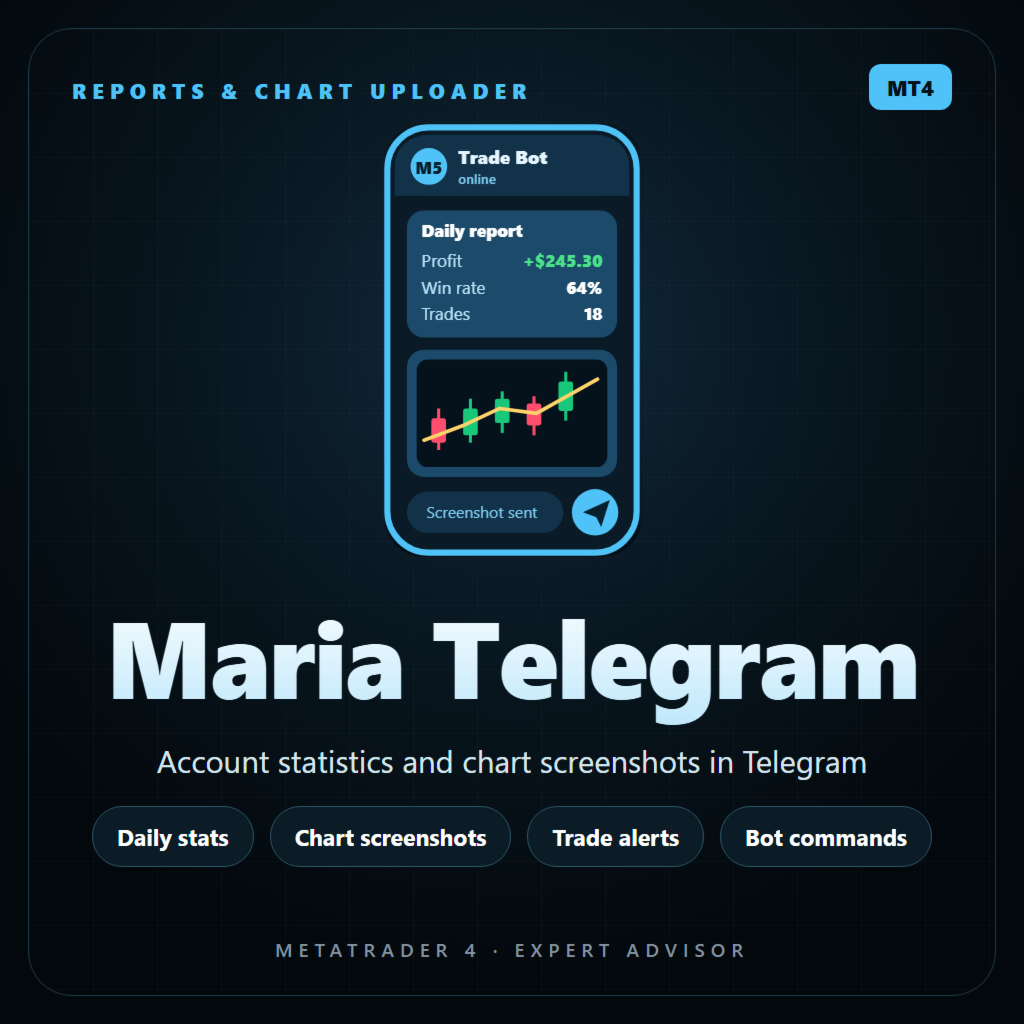
Maria Telegram は、MetaTrader 4 口座の状況をスマートフォンでいつでも確認できるようにします。任意のチャートに設定し、Telegram ボットのトークンと chat ID を入力するだけで、わかりやすいレポート、新規・決済ごとのトレードカード、リスク警告、チャートのスクリーンショットを個人チャット、グループ、またはチャンネルに送信します。口座を読み取るだけで、リアルのチャートでトレードを新規発注・変更・決済することは一切ありません。

レポート

  • 指定した時刻に日次レポート(ブローカーのサーバー時間)。土曜日と日曜日をスキップするオプション付き。
  • 必要に応じて N 分ごとに追加レポート。
  • 金曜日に週次サマリー、月末日に月次サマリー:損益、トレード数、勝ちと負け、勝率、プロフィットファクター、最良・最悪のトレード、平均利益と平均損失。
  • 各レポートには、残高、有効証拠金、証拠金維持率、含み損益、ドローダウン(現在の含み分と読み込み済み履歴での最大値)、本日・今週・今月の確定損益とトレード数・勝率、保有ポジションが表示されます。
  • 定期レポートにチャートのスクリーンショットを添付することもできます。

トレードカード

  • 新規:種類、ロット、銘柄、価格、SL と TP(pips での距離付き)、リスク金額と残高に対する %。
  • 決済:結果、pips、保有時間、SL または TP に到達したか、本日の合計。
  • 数秒以内に新規・決済されたトレード(グリッド、バスケット)は1つのメッセージにまとめられます。
  • 決済ごとにチャートのスクリーンショットを送ることもできます。
  • magic number フィルター:すべてのトレード、または特定の EA のみを監視。

警告

  • 含み損が残高の指定 % に達するとドローダウン警告。さらにその 2 倍、3 倍で再通知。
  • 証拠金維持率が設定値を下回ると低証拠金警告。
  • 警告はおやすみ時間中でも常に通知音付きで届きます。

TELEGRAM コマンド

  • /stats - 口座の詳細レポート
  • /chart - EA が動いているチャートのスクリーンショット
  • /positions - 保有中のトレード
  • /today - 本日決済したトレード
  • /help - コマンド一覧

応答するのはご自身の chat ID だけです。同じボットのコマンドを2つのプログラムが読むとメッセージを取り合ってしまうため、Maria Telegram には専用のボットをご用意ください。

チャート上のパネル

  • ステータス、送信キュー、最後のメッセージ、次回レポート、コマンドの状態。
  • 本日の確定損益、含み損益、ドローダウン、有効証拠金。
  • ボタン:SEND STATS、SEND CHART、POSITIONS、SEND TEST。

プライバシーとおやすみ時間

  • 公開チャンネル向けプライバシーモード:口座番号、名前、ブローカー、ロット、金額を隠し、結果を % で表示します。
  • おやすみ時間:夜間はメッセージが通知音なしで届きます(PC の時刻)。

確実な送信

  • Telegram の送信速度制限を守る、再試行付きの送信キュー。
  • スクリーンショットはファイルの書き込みが完了してからアップロードされます。
  • トークンや chat ID が間違っている場合は、無限に再試行せず、パネルにわかりやすいメッセージを表示して送信を一時停止します。
  • 同じ口座・同じチャットで複数のチャートに EA を設定しても、送信するのは1つだけなので、メッセージが重複しません。
  • ボットのトークンと chat ID はこの PC に暗号化して保存されます。入力は一度だけで済みます。

設定(3分)

  1. Telegram で @BotFather からボットを作成し、トークンをコピーします。
  2. chat ID を確認します:個人チャットなら数値のユーザー ID、グループならグループ ID(-100 で始まる)、公開チャンネルなら @mychannel のようなチャンネル名。グループやチャンネルの場合は、そこにボットを追加してください(チャンネルでは管理者として)。
  3. MT4 で ツール > オプション > エキスパートアドバイザ を開き、「WebRequest を許可する URL リスト」にチェックを入れて https://api.telegram.org を追加します。
  4. Maria Telegram を任意のチャートに設定し、入力パラメータにボットのトークンと chat ID を貼り付けて SEND TEST を押します。

重要

  • Maria Telegram はリアル口座・デモ口座のチャートで取引を行いません。口座データを読み取り、メッセージを送るだけです。
  • 統計は MT4 に読み込まれている口座履歴を使用します。正確な数値のために「口座履歴」タブで「全期間」を選択してください。
  • MetaTrader 4 はストラテジーテスターでの Web リクエストを許可していません。テスターではメッセージは送信されずログに書き込まれ、統計を確認するためだけに小さなデモ取引が行われます。
  • レポートの時刻はブローカーのサーバー時間、おやすみ時間は PC の時刻を使用します。

主な入力パラメータ

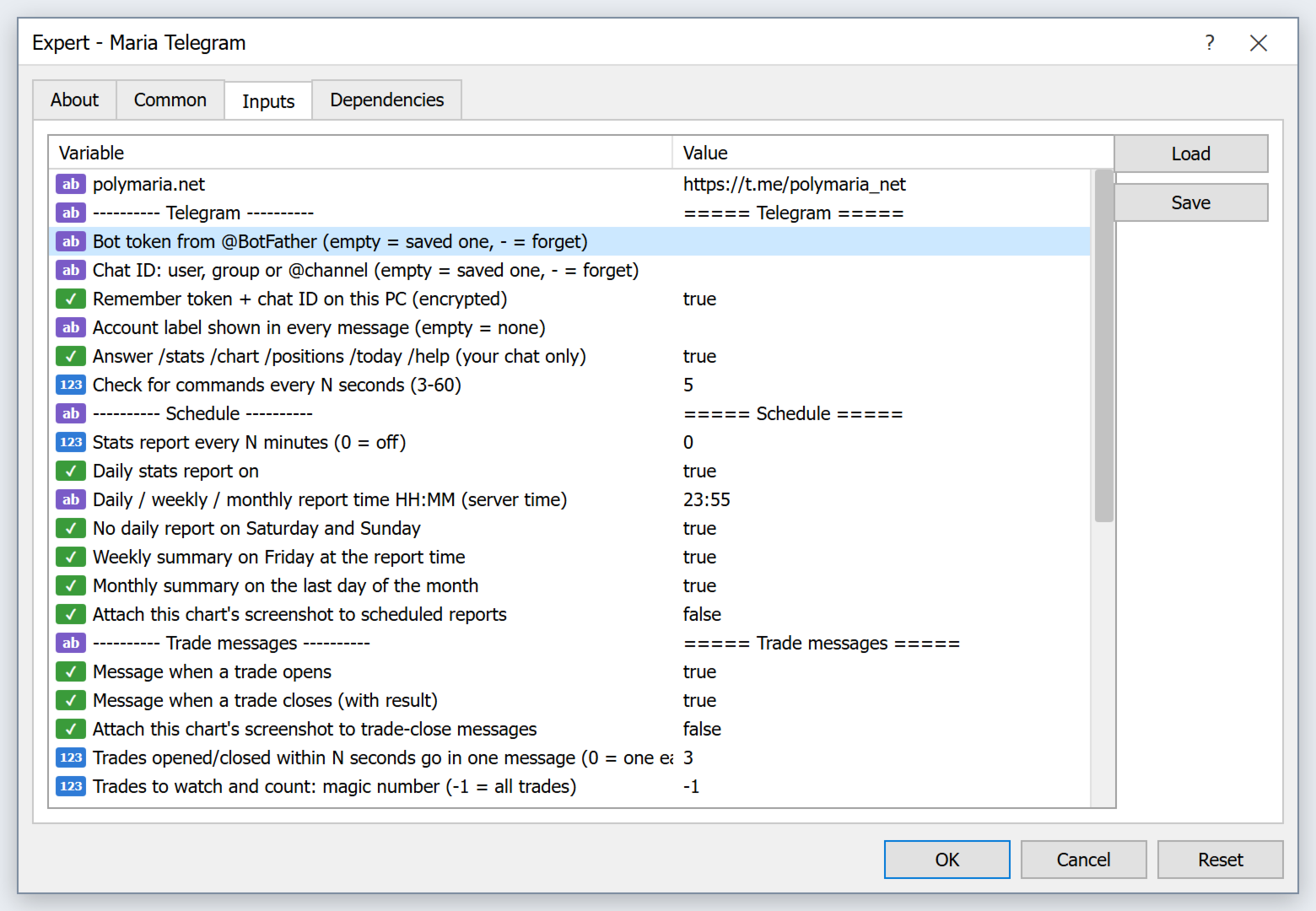
  • ボットのトークン、chat ID、この PC に保存、口座ラベル
  • Telegram コマンド オン / オフ、確認間隔
  • N 分ごとのレポート、日次レポート オン / 時刻、週末をスキップ、週次・月次サマリー、レポートにチャートを添付
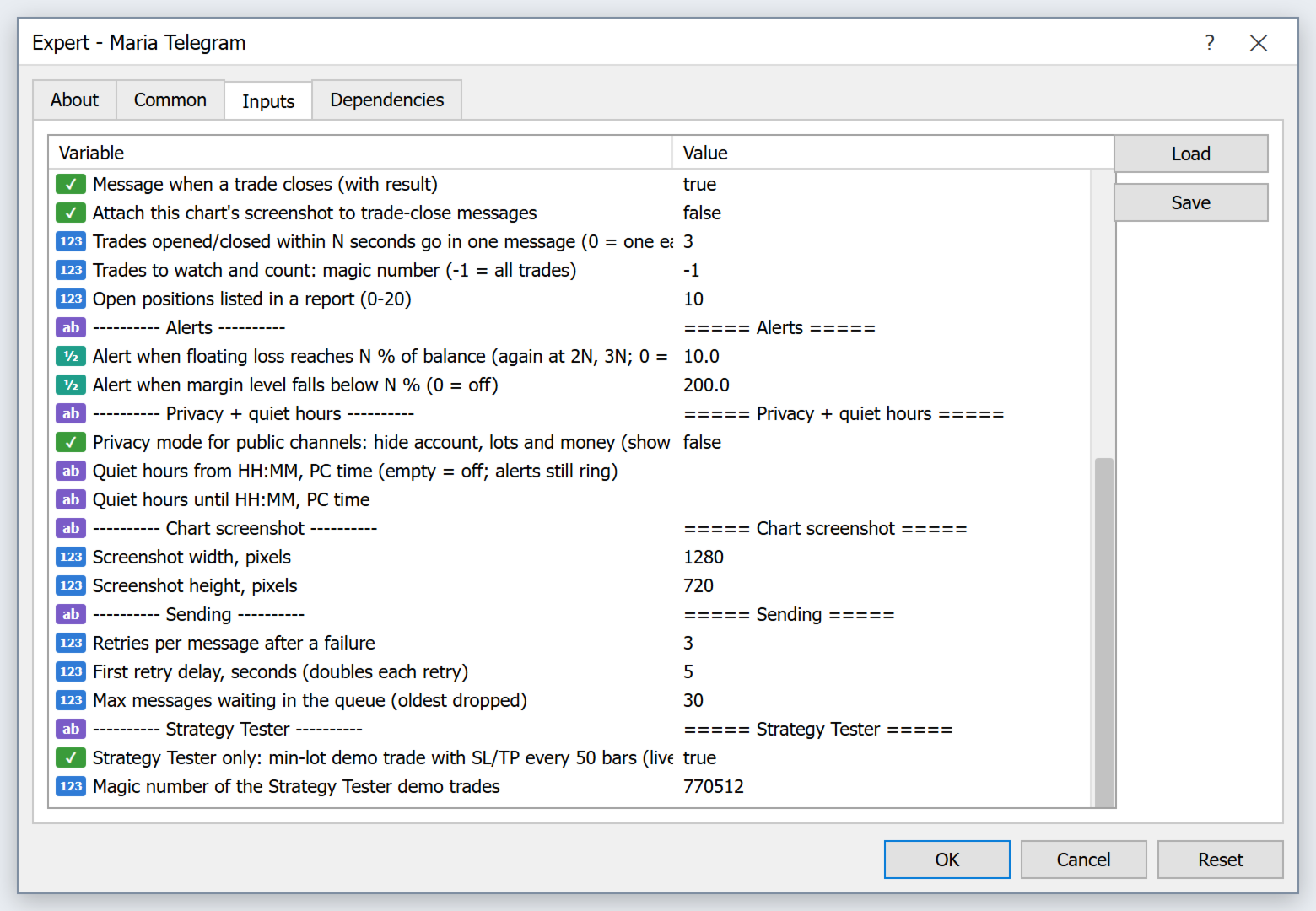
  • 新規 / 決済メッセージ、決済後のチャート、まとめる時間(秒)、magic number フィルター、レポート内のポジション数
  • ドローダウン警告 %、証拠金維持率警告 %
  • プライバシーモード、おやすみ時間 開始 / 終了
  • スクリーンショットのサイズ、再試行回数、キューのサイズ

おすすめのプロダクト
Every trader is watching over his account over and over.... trying to anlayse every system he or she has. With this tool you are able to  export your complete history of every account export withdrawls / deposits / rebates to a separate file export account status with balance / equity / current drawdown recalculate micro to standard lots / profits ...  export decimal by "." or ","  combine a series of Magic Numbers to one unique Magic Number   filter to ignore OrderComments.
M5 タイムフレームのロボット スカルパー。 GBPUSD 通貨ペアでの取引。このロボットは、英ポンドの取引のためにプロのトレーダーの会社によって特別に開発されました。ロボットは、毎日約 5 ~ 15 の取引を開始します。 GBPUSD のスプレッドが最大 10 ピップスまでの低いブローカーと取引するのが最善です。開始するための推奨最低入金額は $500 以上です。 利点: マーチンゲールは使いません。 ネットではありません。 すべての取引にはストップロスがあります。 GBPUSDペア専用のプロボット。 ロボットスキャルパー、M5 期間の日中取引。 このロボットはどのように取引しますか? 市場を分析するために、ロボットは 2 つの指標の価格モデルと戦略的な市場パターンを使用します: パラボリック ストップとリバース システムとボリンジャー バンド。ロボットは最初に、価格エントラポレーション統計を使用して価格の動きについて市場を分析します。次に、ロボットはこれらの指標を読み取り、現在と過去の動きの傾向を比較します。市場の反転またはロールバックを示すパターンが一致した場合、ロボットは取
Exp Swing
Vladislav Andruschenko
4.44 (64)
これは、Swinger(Pendulum、Cheburashka)と呼ばれる有名な戦略のモデルを使用しています。 戦略は、2つの反対の保留中の注文を出すことにあります。価格が特定の方向に移動すると、一方の保留中の注文がトリガーされ、もう一方の注文のロットサイズが増加します。 EAは3種類のオープン保留中の注文を提供します(TypeofTrade) 配置後の自動オープン(インスタントオープンAutoTrade) 手動開封後の開封と管理(手動開封ManualTrade) 高/低レベルで開く(過去のバーTFTradeの高低) OCO(One-Cancels-the-Other)注文は、2つの注文で構成される条件付き注文の一種です。2つ目の注文が約定すると、1つ目の注文は自動的にキャンセルされます。 スイング-完全な説明 MT5 version 購入する方法 インストールする方法     ログファイルの取得方法     テストと最適化の方法     Expforex のすべての製品 使い方? 開始時に、エキスパートアドバイザーは2つの注文を出します-現在の価格から StopOrderDe
FREE
The product has a great combination of pending orders and trends to help investors manage capital effectively. The bot does not have a martingale, so it is always safe of capital. Run the D1 timeframe pairs. The main parameters can be installed: Lot -  Startot . Auto-Grid   -    ON/OFF AutoLot  - ON/OFF TP - Takeprofit   -pips. SL - StopLoss  - Pips. Magic -  Number magic. TralllingStop  - ON/OFF Comment  - KING Tralling - pips
MRKD Vector — Smart Trade Management Utility MRKD Vector is a powerful and intuitive order execution tool designed for efficient manual trading in MetaTrader 5. Built with precision and speed in mind, MRKD Vector simplifies trade management by giving you full control over entries, stops, and targets — all from a sleek interface. Key Features: Quick Order Execution Place trades with ease using a clean, fast interface built for active traders. Intuitive SL, TP, and Lot Size Control Adjust sto
Usdjpy Killer MT4
Benbyaanda Silvere Henri Sedric Kabore
USDJPY Killer   は USDJPY 通貨ペア専用に設計された、強力かつユニークなエキスパートアドバイザー(EA)です。市販の多くのロボットが、未熟な購入者から利益を得るために急いで作られて販売されているのに対し、USDJPY Killer は裁量的かつ心理的に堅実な市場アプローチに基づいて構築されています。このEAは大量販売による収益化を目的とした製品ではなく、より大きな目標、すなわち自分自身の専業トレーディング会社を立ち上げるための資金調達を目的とした一時的なリリースです。資金目標に達した時点で、このEAの販売は終了します。 リアルタイムでの動作はこちらでご確認いただけます: ライブシグナル: https://www.mql5.com/en/signals/2305722 MT5バージョン: https://www.mql5.com/en/market/product/139465 このEAは USDJPY のみ取引可能です。使用前に、ブローカーの USDJPY シンボル名を MY_Symbol パラメータに正確に入力してください。 USDJPY Killer の特長
CycleMind Pro
Muhammad Abdulrahman Omar Naima Allah Al-rais
単一シンボル対応のサイクルトレーディング用プロフェッショナルEA マネーマネジメント切替ボタンと厳格な安全ルールを搭載 概要 本エキスパートアドバイザーは 2つの独立したバージョン で提供されています: MetaTrader 4(MT4)版 MetaTrader 5(MT5)版 各バージョンは、それぞれのプラットフォームカテゴリに個別に公開されています。 同一のトレーディングコンセプトおよびロジックが両バージョンに適用されており、本説明は MT4 および MT5 の両方に有効 です。 本EAは 1つのチャート/1つのシンボルのみ で動作するよう設計されており、 サイクル(Cycle)ベースのポジション管理 を採用し、制御されたレイヤー追加、厳格な距離保護、複数のハードセーフティルールを備えています。 また、チャート上に マネーマネジメントのON/OFF切替ボタン が搭載されており、EAを再起動することなくリアルタイムでリスク管理を制御できます。 本システムは 実行の安定性、リスク露出の制御、規律あるリスク管理 に重点を置いており、実際の市場環境に適しています。 主な特徴 単一シンボル
QuantumGuard Pro - Intelligent Quantum Risk Management Trading System Core Features Five independent fund management groups for smart risk diversification Triple protection mechanism: profit target + drawdown protection + global risk control Professional trading panel for one-stop trade execution 24/7 real-time risk monitoring and protection Automatic display of average price lines for each group One-click close single group orders for precise control Order group highlighting for clear status o
What is this?  This script not only can help you to place all type of orders, included market order " BUY " / " SELL " and pending order " BUYSTOP " / " BUYLIMIT " / " SELLSTOP " / " SELLLIMIT ", but also, it allow you to place order lots by money management concept. How to use this script? 1. Open the chart you want to trade; 2. Drag and drop the script to that chart; 3. Input the parameter what you want to do; 4. Double check the order information, then click "Yes" to confirm to place order;
MV Liquidity Sniper High EA If you’re the type who doesn’t like staring at charts all day, this EA is built to help simplify your trading flow with a more structured setup. This EA uses High Line (HA) as Liquidity Level together with momentum detection to automate entries, exits, and recovery flow. Simple concept: Price closes above the HA High Line → BUY Price closes below the HA High Line → SELL The EA continuously follows market direction based on the active High Line level. Entry Logic The
Harvest GOLD USES THE TREND WAVE INDICATOR AND IT CAN IDENTIFY THE BEGINNING AND THE END OF A NEW WAVE TREND MOVEMENT. AS AN OSCILLATOR, THE INDICATOR IDENTIFIES THE OVERBOUGHT AND OVERSOLD ZONES. IT WORKS GREAT TO CATCH THE SHORT TERM PRICE REVERSALS AND USES A MARTINGALE STRATEGY TO CLOSE ALL TRADES IN PROFIT. USE DEFAULT SETTINGS ON H1 OR HIGHER TIME FRAME ON ANY PAIR FOR MORE ACCURATE TRADES WHY THIS EA : Smart entries calculated by 3 great strategies The EA can be run on even a $30000
Trades Manager Buy and Sell Close The Close Buy and Sell Expert Advisor is a free EA given to help traders manage trades easily especially during volatile market environment. Features: It helps to quickly close trades either in profit or loss. Close for separate Buy Only  Close for separate Sell Only  Close for both Buy and Sell Only  Control Box can be minimized, closed or moved around from the chart. It works for all open trades opened on the terminal. Contact me for your specific coding
FREE
SESSION PILOT MT4 – MARKET SESSION & NEWS FILTER Session Pilot is an intelligent filtering tool designed to focus trading activity on the most liquid market sessions and avoid trades during high-volatility news events. The system continuously monitors current time and upcoming economic announcements. MAIN FEATURES • Automatic detection of London, New Y
Trade Desk for MT4
Mostafa Saad Saeed Shawara
Trade Desk は MetaTrader 向けのトレードパネルとトレードマネージャーです。チャート上でエントリーを決め、ロット計算機で数量を出し、同じパネルから保有ポジションを管理します。損切り、複数の利確、建値、トレーリングストップに対応します。 追加の説明: デモ口座向け体験版 — MetaTrader 5 向け Trade Desk チャート上のツールの多くは注文を出すところまでです。約定のあとはポジションマネージャーが必要です。 Trade Desk はその両方を同じチャートに置きます。レベルをドラッグしてリスク報酬比をその場で確認し、パネルから送信します。その後、別の注文ウィンドウを開かずに、開いている取引を選んで調整できます。ブローカーへの変更は 「更新」を押すまでプレビューのままなので、ラインをドラッグしてもポジションは誤って変わりません。 主な機能 チャート上のトレードパネル: Buy と Sell のクイックエントリー、ロット、金額リスク、口座に対する割合リスクを、レベル表と保有ポジション一覧の横に配置します。 チャート上のトレードアシスタント: エントリー、損
Details of each condition Type 1. Set no use Hedging Martingale, to open the order by yourself only through the push button. TP and SL follow setting. Set Setting_Hedging =false;     Use_Signal =false;  Type 2. Semi Auto Recovery Zone You have to open the order by yourself only through the push button. If in the wrong direction and Set true on Hedging Martingale, EA will fix the order with the zone system by use Hedging Martingale Set Setting_Hedging =true;     Use_Signal =false;  Type 3. Use
Signal Provider Utility Pro (Telegram & Discord) The Professional Solution for Signal Providers. Automated Broadcasting | Smart GUI Panel | Performance Reports Stop managing your signals manually.   Signal Provider Utility Pro   is the realiable bridge between your MetaTrader 4 terminal and your community on Telegram and Discord. Designed for high-performance signal services, this tool gives you instant control over your broadcasts without ever needing to open the settings window. From   real-ti
This indicator allows you to monitor the vitals of your account and notifies of some events, in accordance with user settings. Keep your finger on the pulse of trading. Control elements Main panel of the indicator shows the following values: chart symbol, bid/ask prices, spread, free margin, equity, total number of orders and total profit/loss. There are also two buttons: "Alarm" and "Mute". "Alarm" button starts up a timer, which will notify user in a period of time, defined in the settings. I
FREE
Multi Take Profit Manager Automatically close portions of your open trades at up to three profit targets. This utility is designed for manual traders who frequently open multiple positions and want to scale out of trades automatically as profit targets are reached. Instead of manually closing positions one by one, the utility can partially close your total open position at predefined Take Profit levels, helping you lock in profits while allowing the remaining positions to continue running. Key F
Pro Manager EA What is Pro Manager EA? The Advanced Pro Manager EA is a professional trade management Expert Advisor for MetaTrader 4 that  does not open trades  but provides comprehensive management of your existing open positions. Key Features Multi-Instrument Management No need to load EA on multiple charts, works on just one Manages all trades across all currency pairs from a single chart         2.  Multiple Exit Methods: Trailing Stop Loss - With start trigger and following distance Profi
Drawdown Guardian is a risk-control utility for MetaTrader 4 designed to help traders monitor and enforce daily and overall loss limits through configurable protective actions. This product is not a trading strategy, does not generate entry signals, and does not promise profits. Its purpose is to reduce the risk of breaching the limits defined by the user by applying warnings, trade restrictions, pending-order cleanup, and emergency actions when thresholds are reached. Supported preset profil
Details of each condition Type 1. Set no use Hedging Martingale, to open the order by yourself only through the push button. TP and SL follow setting. Set Setting_Hedging =false; Set Setting_TrailingStop =false; if not use. Type 2. Semi Auto Recovery Zone You have to open the order by yourself only through the push button. If in the wrong direction and Set true on Hedging Martingale, EA will fix the order with the zone system by use Hedging Martingale Set Setting_Hedging =true; Set Setting_Tra
The Ikka Martingale Strategy The EA is design to trade on the basis of martingale with average TP, but here it start from two type of initial trades " Limit Orders and Stop Orders Pending"  for determination of trend direction so You should be want to run different different settings for every pair as you will Optimize the that pair and it will make Profit as It only closes the Open trades on specified Take Profit value in Points.
Grid Trading EA is a semi-automated one-click trading EA for both Normal Trading and Grid/Martingale Trading . Normal Trading Simply click Buy or Sell directly from the chart. The EA will automatically manage trades by: Setting Stop Loss and Take Profit Managing Trailing Stop Grid / Martingale Trading When Grid Trading mode is enabled, the EA will automatically open additional grid orders at specified distances while increasing the lot size based on your settings. Inputs & Settings Lots — Initia
Andrews Pitchfork channels is a triple trend channel tool consisting of three lines. In the middle, there is a median trend line on both sides that has two parallel equidistant trend lines. These lines are usually drawn by selecting three points based on the heights moving from left to right on the response heights or graphs. As with the normal trend lines and channels, the outward trend lines mark potential support and resistance areas. Parameters Trend_period - the period setting to be calcu
MT4用NAS100 Auto SL and TP Makerをご紹介します: MetaTrader4でナスダック100市場をナビゲートするトレーダーにとって不可欠なアシスタントであるNAS100オートSLおよびTPメーカーで、ストップロスおよびテイクプロフィットの設定をもう見逃すことはありません。このツールは、ストップロスとテイクプロフィットのレベル管理を自動化するシームレスなソリューションを求める方々のために設計されています。 主な特徴 簡単な自動化: ストップロスやテイクプロフィットのないナスダック100取引を自動的に監視します。 ユーザーが構成した設定に基づいてレベルを動的に調整します。 注文タイプの多様性: Nasdaq100の成行注文と未決済注文の両方に対応。 MetaTrader 4で利用可能な様々な注文タイプをサポートします。 カスタマイズされた設定: ユーザーフレンドリーなパラメータ設定により、トラッキング設定とストップロス/テイクプロフィットレベルのカスタマイズが可能です。 柔軟な範囲: 実行する特定のNAS100商品、または取引されるすべての商品に対してStop
FREE
Forex Diamond EA
Lachezar Krastev
5 (6)
PROMOTION! -50% OFF Promo price: $267 (Regular price $547) Live Results:   https://www.mql5.com/en/signals/2379493 Forex Diamond EA – Reliable Automated Trading Powered by Smart Algorithms Forex Diamond EA is a proven expert advisor designed to deliver consistent results using a combination of trend and counter-trend strategies. Trusted by thousands of traders since its launch, Forex Diamond EA stands out with its intelligent trading logic, adaptive money management, and ability to thrive in va
PositionPilot — One-Click Trade Manager PositionPilot puts professional trade execution and position management directly on your chart. One click — and your trade is protected. Unlike most EAs that only handle their own orders, PositionPilot works with ALL positions — manual, from other EAs, or opened via its panel. One-Click Execution BUY/SELL buttons with auto lot by risk % Hotkeys F1–F6 for keyboard-only trading Auto SL/TP with configurable ratio ️ Smart Risk Management Balance or equity-
FREE
Heaven Assistant: Simplify Your MT4 Management Simplify the management of the MetaTrader 4 (MT4) platform with the Heaven Assistant . This Expert Advisor (EA) is a robust tool that allows you to control and customize your trading environment in an efficient and user-friendly manner. Key Features: Multiple Pairs Opening: Quick access to most currency pairs, both major and minor, plus exotic pairs. The ability to open indices, metals, and cryptocurrencies with a single click. Template Change: Easi
# CopyMaster Pro Trade Copier ## What Is This CopyMaster Pro is a local trade copying tool that syncs trades between multiple MT4/MT5 terminals. One account trades, others follow automatically. No server needed, no VPS required. Works on a single computer with multiple terminals. ## What It Does Copies trades from one account to others. You open a gold position on Account A, Account B and C will follow. You close on A, others close too. Simple as that. ## Why This One **Free** — No monthl
FREE
Zirk Trading Management Zirk Trading Management is a powerful trade management utility for MetaTrader that helps traders execute trades with consistent risk management. It is designed to simplify position sizing by automatically calculating the correct lot size based on your chosen risk percentage and stop-loss distance. Instead of manually calculating lot sizes, simply set your desired account risk (e.g., 1%), place your stop loss, and the utility instantly determines the appropriate trade vol
このプロダクトを購入した人は以下も購入しています
Unlimited Trade Copier Pro is a tool to copy trade remotely to multiple MT4, MT5 and cTrader accounts at different computers/locations over internet. This is an ideal solution for you if you are a signal provider and want to copy your trades to other receivers globally on your own rules. One provider can copy trades to multiple receivers and one receiver can get trade from multiple providers as well. The provider can even set the subscription expiry for each receiver, so that receiver will not b
Strategy Builder offers an incredible amount of functionality. It combines a trade panel with configurable automation (covert indicators into an EA), real-time statistics (profit & draw down) plus automatic optimization of SL, TP/exit, trading hours, indicator inputs. Multiple indicators can be combined into an single alert/trade signal and can include custom indicators, even if just have ex4 file or purchased from Market. The system is easily configured via a CONFIG button and associated pop-up
The FFx Hidden Manager panel will help you to manage easily your orders directly on the chart. Below all features described: TP, SL and TrailingStop are hidden Each order has its own lines on chart Drag & Drop any line to change the TP/SL as per your need Option to move automatically the SL line at breakeven when TP #1 is reached Option to choose the TP/SL type (by pips or price) Option to choose the TrailingStop type (by pips, MA, Fractals, PSAR or ATR) Define which order(s) you want to manage
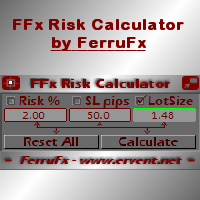
FFx Risk Calculator panel will help you to calculate very easily your trades size, SL or the risk directly on the chart. All features are described below: Option to select which parameter to calculate: Risk, Stop Loss or Lot Size The panel will show if the lot size is allowed according to the current account free margin Button to maximize/minimize the panel Drag and Drop the panel anywhere on the chart How to use it? Select the parameter you want to be calculated. It will be based on the 2 other
News Trader Pro is a unique robot that allows you to trade the news by your predefined strategy. It loads every piece of news from several popular Forex websites. You can choose any news and preset the strategy to trade it, and then News Trader Pro will trade that news by selected strategy automatically when the news comes. News release gives opportunity to have pips since the price usually has big move at that time. Now, with this tool, trading news becomes easier, more flexible and more exciti
The FFx Watcher PRO is a dashboard displaying on a single chart the current direction of up to 15 standard indicators and up to 9 timeframes. It has 2 different modes: 1. Watcher mode: Multi Indicators User is able to select up to 15 indicators to be displayed User is able to select up to 9 timeframes to be displayed 2. Watcher mode: Multi Pairs User is able to select any number of pairs/symbols User is able to select up to 9 timeframes to be displayed This mode uses one of the standard indicat
エリオット波動カウンターは、エリオット波動を迅速かつユーザーフレンドリーに手動でマークアップするためのパネルです。マークの色とレベルを選択できます。最後のマークアップとツールによって作成されたマークアップ全体を削除する機能もあります。マークアップはワンクリックで作成されます。 5 回クリック - 5 つの波があります。エリオット波動カウンターは、エリオット波動の初心者にもプロのアナリストにも最適なツールです。 エリオット波動カウンターのインストールと入力ガイド 取得したい場合     EA 追加 URL (  http://autofxhub.com   ) MT5 端末に関する 通知 (スクリーンショットを参照)。 MT4 バージョン https://www.mql5.com/en/market/product/14016 MT5 バージョン https://www.mql5.com/en/market/product/15081 一般的な入力: 波の種類ボタン: このボタンを使用すると、ユーザーはチャートで強調表示する波のパターンの種類を選択できます。使用可能なオプションには、イン
If you wish to draw Support and Resistance lines, view: daily market opening, classical pivot levels, Fibonacci pivot levels, trend lines, Fibonacci levels, the remaining time to candle closing, and current spread. If you seek to place your orders with the exact lot that meets your desired stop loss risk. If you wish to do all this and more with just one click, then this is the perfect tool to use. This tool will allow you to feel more relaxed when deciding to open orders, as well as predicting
Unlimited Binary Options Copier Remote is a powerful tool to copy binary options trades remotely between multiple accounts at different locations over internet. This is an ideal solution for signal provider, who want to share his binary options trades with the others globally on his own rules. One provider can copy trades to unlimited receivers and one receiver can get trade from unlimited providers as well. The provider can set the subscription expiry for each receiver, so that receiver will no
This is an Expert Adviser use for manual trading as a background EA or combine with external EA to open orders. Loss Recovery Trading is one of your options to handle the lose positions instead of using stop loss by setting a zone recovery area and target to exit the turn rounds sequence. How It Work? If the market goes against your first positions direction at the specific of losing points, the EA will open an opposite direction position with calculated larger lot size and also keep the first
Telegram Publisher Agent は、 トレーダーが Telegram チャネルおよびグループにリアルタイムでシグナルを送信できるようにするアドオンです。このツールは、カスタマイズ可能なメッセージ、チャートのスクリーンショット、その他の機能を備えており、トレーダーが取引の洞察や戦略をフォロワーと共有するのに役立ちます。このツールは、明暗のテーマ切り替えを備えた美しいデザインも備えており、ユーザーに美的で機能的な取引体験を提供します。 Telegram Publisher Agent は、すべての取引をチャネルおよびグループ内のシグナルとして公開するように設計されています。あなたがしなければならないことは、取引を提供することだけです。その後、ボタンをクリックするだけで、Telegram Publisher Agent が取引シグナルを取引チャネルまたはグループに送信するためのすべての面倒な作業を実行します。 Telegram パブリッシャーエージェント   インストールと入力ガイド EA に関する通知を受け取りたい場合は、URL  ( http://autofxhub.c
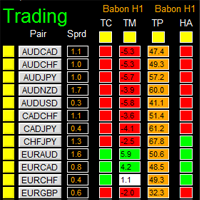
如果产品有任何问题或者您需要在此产品上添加功能,请联系我 Contact/message me if you encounter any issue using the product or need extra feature to add on the base version. There is Demo version of this panel Dashboard Babon Scalping System Demo in my product list, please try it out to get familiar with all functionalities for free, LINK . This system basically utilizes TDI, Heiken Ashi Trend, Price Trend on H1 time-frame and TMA on H1&H4 time-frame to generate the trend (big picture). Then the system will zoom in to genera
The Pairs Trade indicator is a utility for semi-automatic pair trading. It allows combining the charts of two arbitrary instruments, even if the schedules of their trading sessions are different. It displays a spread chart in the form of a histogram with an overlaying moving average. It calculates the swap that will be charged for the synthetic position (in the deposit currency). It is possible to set a level for automatic opening of a synthetic position on the spread chart (analogous to the 'se
The script displays info about the share's corporate reports and dividends. The data is downloaded from   investing.com : Report date Profit per share (EPS) Revenue Market capitalization Amount of dividends Date of payment of dividends Dividend income The product cannot be tested in the tester (since it is not possible to receive data from the Internet). Before launching:  Add 2   URL   https://ru.investing.com/earnings-calendar/Service/getCalendarFilteredData  and   https://ru.investing.com/di
This Stacker EA will: Automatically set Stop loss on a new order Automatically set Take profit on a new order Stack (or open up to 4 additional orders at the same time) when a new order is placed, the SL/TP can be preset individually for each order. Provides a transparent replacement for the standard 1-click trading buttons in MetaTrader 4 (1 click still works and SL/TP will automatically be set as well as Stacking). Automatically calculate lot order size according to preset risk management perc
Currencies Cleaner panel will give you an overview of all the most traded market's currencies in a single click. First of all the panel will refresh all your charts, opening them four times in all timeframes needed. 1 - CURRENCIES It uses a complex algorithm to study the movement of 17 different indicators. It means that the algorithm not only "reads" the actual value of an indicator, but also creates a probability of success using the position of this value on the indicator and the last moveme
Buy or rent it and request a copy of the Antimartingale EA for free  Trendline based utility, you design your trendlines or horizontal lines, the EA opens trades for you Possibility to trade on break and/or bounce events Indipendent break and bounce settings Configurable market, stop and limit orders T1T2 Logic to lock profits and minimize losses Trailing Stop Loss Max Spread check Notifies you when your trendlines are crossed No strange trendline name or syntax, you decide the color of tr
FXFledgling Exit Tool is a complete risk management tool that analyzes both the open trades and the direction of the pair of open trades. As long as the suggested entry and lotsizing management presented here is followed strictly, you will have a high chance (but no guarantee) of surviving the trade. What It Does It is used as an exit tool. It helps the trader to manage any manual trade that he transacted. It does the following: Trail Stop Dynamic Stop Loss - a calculated stop-loss that changes
This utility records the swap, which allows you to monitor and analyze the changes in the swap. The program writes a file with the swap data for every pair selected in the Market Watch. The data are recorded to a csv file at the specified time, the file is located in <terminal root directory>/MQL4/Files. File format: Date Day Time Currency pair Long-swap Short-swap 16.01.2018 Mon 23:30 EURNOK -34.81 27.14 16.01.2018 Mon 23:30 EURDKK -0.022 -0.032 16.01.2018 Mon 23:30 EURGBP -2.38 0.15 To start r
New opportunities for analyzing cryptocurrency in the usual MetaTrader 4. For example : We select the symbol of the cryptocurrency and attach any indicators, Expert Advisors or scripts. Startup Mode View cryptocurrency; Data collection. Capabilities Work as with a standard currency chart; Automatic update of open charts; Selection of individual cryptocurrency for updating; Selection of individual timeframes for updating; Work on the desired timeframes; Open charts do not affect the work of Cry
Notify Telegram is a utility that bridge your MetaTrader4 trading activities to your Telegram chat/channel. It will help you to monitor your MetaTrader4 actions such as placing trade, modifying order's TP/SL, closing trades etc and send a notification message to your dedicated Telegram chat/channel. It does not execute any trade on your MetaTrader4 account. It can be useful for monitoring EA performance or providing signal to your Telegram channel/group subscribed. Parameters Token ="" - enter
The  Easy Strategy Builder (ESB)  is a " Do It Yourself " solution that allows you to create a wide range of the automated trading strategies without any line of codes. This is the world’s easiest method to automate your strategies that can be used in STP, ECN and FIFO brokers. No drag and drop is needed. Just by set conditions of your trading strategy and change settings on desired values and let it work in your account. ESB has hundreds of modules to define unlimited possibilities of strategi
Telegram ChartSnap is an utility tool to bridge your MetaTrader 4 activities to your Telegram chat/group/channel. It will screen shot your MetaTrader 4 chart and send it to your dedicated Telegram chat/group/channel through a Telegram bot. The whole process will keep repeating based on a time cycle that predetermined by the user. It is a convenient tool for those who like to get access to their favorite system/dashboard that only available at MetaTrader Desktop. Beside that, trader can easily s
フィボナッチリトレースと拡張ラインツール DiNapoliポイント取引方法とゴールデンセクション取引を使用するトレーダーにとって理想的なMT4プラットフォームのフィボナッチリトレースと拡張ラインツール 主な特長: あなたはフィボナッチリトレースメントの複数のセットを直接描くことができ、重要なリターンポイント間の関係は一目瞭然です。 2.フィボナッチ拡張を描画することができます。 3.フィボナッチフォールドバックとラインの延長は、簡単な観察と数値表示のために左右に動かすことができます。 4.チャートは非常に爽やかな 5.数字キーでサイクルを切り替えることができます。 ファンクションキー: 1。 [戻るを押す、要求に応じて描画する、最大8つのグループにする 2。拡張]を描くには[押す] 3。 \を押すと、現在のサイクルの下にあるすべての拡張機能と折り畳みが削除されます 4。フォールドバックを移動して削除して展開する (1)最初のフォールドバックセットのF5行をクリックします。 一度クリックすると(黄色に変わります)、キーボードのDeleteキーを押すと、フォーカ
Советник риск-менеджер с огромным арсеналом возможностей защиты вашего депозита. Для инвесторов, которые решили передать капитал в доверительное управление. Когда у трейдера нет доступа к настройкам - нивелирует торговые риски. А также для трейдеров, которые осознали необходимость стороннего контроля за их торговлей для улучшения торговых результатов.  Для максимальных результатов - должен стоять на отдельном VPS сервере и у трейдера не должно быть возможности менять настройки в торговый период.
Grid Hero War Pad is a  GRAPHICAL MANUAL TRADER version of the original Grid Hero EA, designed and created for ADVANCED TRADERS who are experienced in plotting their own market entries. It is coded using ADVANCED GRAPHICAL INTERFACE programming, that combines the power of discretionary trading with Grid Hero algorithm in the form of a graphical console with button-click easy execution. It allows you to execute trades manually using Market Orders and Pending Orders, and then automatically uses th
The advantage of using this EA This EA directly updates takeprofit and stop losses that are still empty in a manual order Parameters Multiplier: Multiplier value of the previous transaction Distance: Distance hedging from the previous order Takeprofit: take profit taken from the last price + the value of this column We recommend that you do not add more than one manual transaction in the same pair martingale hedging | manual hedging | hedging manual | hedging lot | best robot | best ea
The new version of  MirrorSoftware 2021  has been completely rewriten and optimized.  This version requires to be loaded only on a single chart because  it can detect all actions on every symbol and not only the actions of symbol where it is loaded. Even the  graphics and the configuration mode  have been completely redesigned. The MirrorSoftware is composed of two components (all components are required to work):  MirrorController  (free indicator): This component must be loaded into the MASTER
Скрипт открывает графики по всем инструментам находящимся в окне "Обзор рынка" и по желанию может задать для всех графиков один шаблон. Так-же можно удалить все графике открытые в терминале Мт4. В скрипте имеются следующие настройки: "Таймфрейм" по умолчанию M30;             (Можно поставить свой: M1, M5, M15, M30, H1, H4, D1, W1, MN.) "Задержка" по умолчанию "0";                  (Задержка перед открытием следующего графика в миллисекундах.) "Шаблон" по умолчанию "True";                (True=пр
По факту вы выставляете виртуальные Buy Stop и Sell Stop которые срабатывают после закрытия свечи. Данный помощник позволяет заранее выставить уровень Stop Loss и Take Profit. Так-же имеется демо режим для предварительного расчёта параметра риск/прибыль. Помощник имеет следующие настройки "Лот" по умолчанию "0.01" "Проскальзывание" по умолчанию "60"        (Значение в пунктах) "Номер Ордера" по умолчанию "0"               (Магический номер ордера) "Цвет Комментариев" по умолчанию "Black"  "Шрифт
作者のその他のプロダクト
AbuTrader
Murodillo Eshkuvvatov
10 部のみ 800 ドルから 一日の素晴らしい時間 ---簡単に言えば、AbuTraderと呼ばれる100%自動化された外国為替ロボットを作成しました(人間の確認はまったく必要ありません) あなたが寝ている間、または生きている間にお金を稼ぐことができます PROP FIRM 特別セットファイル テストに合格したり、実際の合格したアカウントを管理したりするためのすべての制限が快適です * メジャーとマイナーのペアは機能します * タイムフレーム - PAIR 動作による自動選択 (H1、H4、M30) *最低$400デポジットOK *どの Brooker サーバーでも、どのようなサフィックスでも問題ありません *リスクなしで毎月約 5 ~ 10% の利益が得られます *ニュースフィルターデイリーFX *戦略タイプ - 徹底した資金管理のための超ハードコーディングされた 16000 行のコード。ニューラル予測、サポート、抵抗機能が付属しています。自動化されたボタン、詳細なマニュアル パネル、インジケーターの自動化も備えています。 -当社のサイトAbu
BitcoinRobot
Murodillo Eshkuvvatov
4.2 (5)
SET FILE Manual Guidebook  Why Bitcoin trading 1.   Elite Precision Precision – Redefining Trading Cutting-edge algorithms fine-tuned for pinpoint execution. Smart setups crafted to navigate risks and seize opportunities. 2. Adaptive Market Strategies with Real-Time Price Movement Markets shift—but Bitcoin Robot is built to adapt instantly: Trading in trending, volatile, or ranging conditions. Captures breakouts, reversals, and price surges before they happen. Dynamic strategy adjustments en
AfterMathMT4
Murodillo Eshkuvvatov
AfterMath - one panel, two ways to trade Most tools make you choose: a robot that trades without you, or a manual assistant that waits for you. AfterMath is both, and you pick which one on the chart, not in the settings. When you attach it, the panel asks a single question - AUTO TRADING or MANUAL TRADING - and shows you only the controls for the mode you chose. A SWITCH button in the header takes you back to that choice at any time, so the same chart can run the robot in the morning and beco
Maria AI
Murodillo Eshkuvvatov
Maria AI - AIマーケットチャット&トレードコーチ (MT4) ==================================== タイトル Maria AI 短い説明(マーケットカードに表示する1行) MT4チャート上で、どの相場でもAIに質問できます。リアルタイム価格、チャート画像、ニュース、経済指標カレンダーを読み取り、重要なレベルを描画し、すべてのトレードをコーチします。 詳細説明 Maria AIは、MetaTrader 4のチャートにAIマーケットアナリストを呼び込みます。「ゴールドは今どうなっている?」「EURUSDを買う前に待つべき?」のように普段の言葉で質問を入力するだけで、数秒後にはチャットパネルに回答が表示されます。AIは価格を当て推量しません。お使いのブローカーから届くリアルタイムデータ(M15・H1・H4・D1のトレンド、RSI、ATR、EMA 20/50/200、当日と前日の高値・安値、直近のローソク足)、最新のニュース見出し、経済指標カレンダー、さらに許可すれば、ご自身のインジケーターや描画を含むチャート画像を受け取って分析します。
Maria Trade Managerは、裁量トレーダーのためのトレードデスクを、MetaTrader 4のチャート上にそのまま用意します。BUYやSELLをクリックする前に、パネルがトレードプランをチャートに描画します:エントリー、ストップロス、テイクプロフィットのゾーンと、リスク金額、想定利益、リスクリワード比です。ラインをドラッグしてプランを変更し、ワンクリックで注文を出せます。ポジションを建てた後も、パネルが建値ストップ、トレーリングストップ、部分利確、デイリーガードでトレードを守り続けます。 パネルにはTRADE、PROTECT、STATSの3つのタブがあります。パネルが適用するルールは、すべてパネル上または入力パラメーターで確認できます。 TRADEタブ ワンクリックでBUYとSELL。リアルタイムのスプレッドと、ローソク足の確定までの残り時間も表示します。 ロットサイズ:FIXED LOT(固定ロット)、または残高に対するRISK %(ストップロスまでの距離からロットを計算)。 ストップロスとテイクプロフィットは、pips、金額、残高の%、ATRの倍数で設定できます。単位
Maria Copierは、1つのMetaTrader 4口座のトレードを、同じパソコンまたはVPS上で稼働している他のMetaTrader 4口座にコピーします。 MASTERターミナルのチャート1つと、各SLAVEターミナルのチャート1つにセットして同じチャンネル名を指定するだけで、 SLAVEは1秒未満でMASTERに追従します。1つのEAで両方の役割をこなし、パラメータでMASTERかSLAVEかを選択します。 MASTERは保有中の注文を、共有フォルダCommon\Files内の小さなファイルに毎秒数回書き込みます。各SLAVEはそのファイルを読み取り、 自分のコピー注文を発注・変更・決済します。インターネット接続、サーバー、DLLは一切不要です。 コピー機能 成行注文:新規、決済、部分決済(SLAVEは自分のコピーを同じ割合だけ決済)。 SL/TP:新規時にコピーし、MASTERが変更するたびに反映。PRICEモード(同じ価格)またはDISTANCEモード (建値から同じ距離。レートが異なるブローカー向け)。 待機注文(オプション):MASTERと同じように発注・移動・削除
Maria News
Murodillo Eshkuvvatov
Maria News は、指標発表をストラドル手法でトレードする MetaTrader 4 用のエキスパートアドバイザーです。 重要指標(NFP、CPI、FOMC など)の発表前後には、価格が一方向へ大きく跳ねることがよくありますが、どちらに動くかは 事前には誰にも分かりません。Maria News は現在値の上に buy stop、下に sell stop を同じ距離で置くため、価格がどちらへ 動いても片側が約定します。各注文にはそれぞれ利確と損切りが付きます。グリッドはワンクリックで発注することも、 自動ニュースモードに任せて、選んだ各イベントの数秒前に自動で置かせることもできます。 ワンクリックパネル PLACE で buy stop と sell stop をワンクリックで発注。BUY STOP と SELL STOP は片側のみ発注します。 片側1~20本のストップ注文:1本目は Start の距離、以降は1本ごとに Step ずつ離れます。 TP、SL、Trailing、Breakeven はそれぞれ ON/OFF スイッチと数値欄を持ち、パネル上で直接変更できます。 To
Maria Indicators は、たくさんのインジケーターでごちゃごちゃになったチャートを、小さなパネルひとつに置き換えます。すべてのツールが内蔵されているので、ほかに何もインストールする必要はありません。ツールはワンクリックでオン / オフでき、トレードスタイルに合わせたプリセットを読み込むこともできます。パネルはチャートごとに選択内容を記憶するため、再起動や時間足の切り替え後も同じ状態に戻ります。 チャートツール MA:短期と長期の移動平均線(期間、計算方法、価格、色は入力パラメータで設定)。 BANDS:上・中・下の3本のラインからなるボリンジャーバンド。 FIBO:直近 N 本のスイング高値と安値から自動で引くフィボナッチ・リトレースメント(0、23.6、38.2、50、61.8、78.6、100%)と、127.2% / 161.8% のエクステンション。価格が高値や安値を更新すると、ラインも追従します。 PIVOTS:Classic、Fibonacci、Camarilla、Woodie のピボット(P、R1-R3、S1-S3)と、前期間の高値・安値(PDH / PDL)。
AbuTraderMT5
Murodillo Eshkuvvatov
2025 year ending PROMO (valid till 01.01.2026year) Launch promo: Free get 70000 Files + 5000 video courses -> contact me after purchase Hello, I am   Murodillo Eshquvvatov , An EA (Expert Advisor) completely different from all other EAs on the market. You might like trading METALS or Index. But I like to move in most major active pair, flexibility for every broker I like PROFIT. Any currency pair that can provide good long-term profits is where I will focus. That's why this EA focuses on jus
Guidebook Why Bitcoin trading 1.   Elite Precision Precision – Redefining Trading Cutting-edge algorithms fine-tuned for pinpoint execution. Smart setups crafted to navigate risks and seize opportunities. 2. Adaptive Market Strategies with Real-Time Price Movement Markets shift—but Bitcoin Robot is built to adapt instantly: Trading in trending, volatile, or ranging conditions. Captures breakouts, reversals, and price surges before they happen. Dynamic strategy adjustments ensure continued p
AfterMathMT5
Murodillo Eshkuvvatov
AfterMath - one panel, two ways to trade Most tools make you choose: a robot that trades without you, or a manual assistant that waits for you. AfterMath is both, and you pick which one on the chart, not in the settings. When you attach it, the panel asks a single question - AUTO TRADING or MANUAL TRADING - and shows you only the controls for the mode you chose. A SWITCH button in the header takes you back to that choice at any time, so the same chart can run the robot in the morning and beco
フィルタ:
レビューなし
レビューに返信