 MetaTrader 5
 エキスパート
 インディケータ
 ライブラリ
ライブラリ
 ユーティリティ
 ウィジェット
 ルール
ルール
YouTubeにあるマーケットチュートリアルビデオをご覧ください
ロボットや指標を購入する
仮想ホスティングで
EAを実行
EAを実行
ロボットや指標を購入前にテストする
マーケットで収入を得る
販売のためにプロダクトをプレゼンテーションする方法
MetaTrader 4版新取引ユーティリティ - 19
 以下はMetaTrader4での外国替取引を簡素化する取引プログラムです。以下のリストのユーティリティにカーソルを合わせて、説明と目的をご覧ください。
TradeMirror は、MT4/MT5プラットフォーム向けに開発されたローカル注文同期ツールで、リアルタイム取引をサポートします。 チュートリアル Trademirror チュートリアル のリンクをクリックして、さらにチュートリアルをご覧ください。 製品の特長 金融ソフトウェアにおけるセキュリティ・安定性・プライバシー保護の高基準に準拠し、以下の3つの核心領域を最適化しました: 直感的なグラフィカルインターフェースで操作が容易 金融シナリオにおける機密データ分離のための強化されたプライバシー保護 ミリ秒単位の注文同期で信号遅延ゼロを実現 MT4/MT5完全互換、多様な取引環境にシームレス対応 システム監視機能とメール通知による取引安定性管理 主要機能 本製品には以下のプロフェッショナルコピー機能を搭載: 複数アカウント並列接続 リアルタイムメール通知 ロットサイズカスタマイズ 信号フィルタリング機構 逆方向コピーモード テイクプロフィット/ストップロス再設定 無料デモ手順 購入前に以下の手順で全機能を体験可能: ページ内の「無料デモ」ボタンをクリック 「MetaTrader 4/5

TimeBar TimeBar は、バーが閉じるまでの残り時間、バーが開いてからの経過時間と現在時刻を表示するシンプルな情報インジケーターです。 見やすくするために、グラフの左上隅にコメントの形で表示する方法と、グラフィック オブジェクトの形で表示する 2 種類の表示モードが追加されました。
利点 フォントの選択 フォントサイズ。 どれでも設定できます。 コメントすると小さすぎるので オブジェクトを移動できます。 マウスをダブルクリックして任意の時間を選択し、チャート上の任意の場所に移動すると、通常どおり更新され続けます 視覚的な警告。 現在のバーが閉じるまでの指定秒数を設定でき、その秒数に達すると、設定で指定した警告色に変わります 設定 表示する時間を選択します 各時刻の色 (グラフィック オブジェクトの場合) バーがまもなく閉店することを通知するアラート 取引システムへの追加として TimeBar インジケーターを使用する
市場にある他の製品もお試しください https://www.mql5.com/ru/users/capitalplus/seller
FREE

The Expert does not open transactions, he only controls the profit and loss of the account, closing all open transactions when a profit percentage is greater than the profit value and losses in percentages exceeding the loss value.
To control the entire account, it is enough to open an expert Advisor on one of the charts.
profit - the amount of profit as a percentage, upon reaching which all transactions will begin to close.
loss - the percentage of losses at which all transactions will beg

Many traders in the world trade with moving averages, like me. So I decided to upload the expert that I designed for my own use for those of you who use the same strategy as mine. Now I want to tell you about the features of this expert.
First, you can see the moving average in 7 time frames simultaneously in one time frame. (whatever time frame you are)
Second, you can receive an alert on your mobile at the moment the price hits any of the moving averages.
Third, you can trade on the moving av

4 buttons for managing your trades.
Close All : will close all open positions on the current chart Delete All : will delete any pending orders on the current chart SL + 1 : will move the stop loss 1 pip closer to the breakeven point on all open trades on the current chart Delete SL : will remove the stop loss for all open positions on the current chart
Useful for everyone who opens multiple positions on the same asset, where fast execution is essential.
FREE

Using the MetaTrader 4 platform, you can send trading information to Telegram to record each trader's detailed information. This information includes the regular trading account details, balance, equity, etc. It also includes the total number of orders, total trading volume, and maximum profit and loss. Additionally, daily trading information is recorded, including the number of trading orders for the day, trading profit, and maximum profit and loss. Each order record will include both local tim

The Pending Order Grid is a multi-symbol multi-timeframe script that enables multi-strategy implementation based on pending order grids. General Description
The Pending Order Grid allows the performing of a user-defined strategy through the creation of pending order grids. The script places pending orders of a given type (Buy Limit, Sell Limit, Buy Stop, or Sell Stop) at equidistant price levels to form each grid. The beginning and finish of every grid are defined by the Start Price and Sto

The Pending Order Grid is a multi-symbol multi-timeframe Expert Advisor that enables multi-strategy implementation based on pending order grids. General Description
The Pending Order Grid allows the performing of a user-defined strategy through the creation of pending order grids. The Expert Advisor places pending orders of a given type (Buy Limit, Sell Limit, Buy Stop, or Sell Stop) at equidistant price levels to form each grid. The user might set up different grids to exist simultaneously

MT4 trading tool. Intuitive Dashboard that allows effortless automated trading, saving 99 Strategies , Advanced Money Management , Automatic group orders : Global Take Profit / Stop Loss, Smart TP (Multi-Level, Position Recovery) and Smart SL (Breakeven, trailing Stop, Multi-Level), Exit Manager , Signals, Strength Indicator , ATR Graph, Price Alert, News Warning… # If you have any other requirements or are interested in collaboration, please contact (info@styxia.com)
Get more information

See my other products here. One Click Order This product helps you to send your order as quickly and easily as possible. Send your order as fast as possible: Just set your position parameter values(Price, TP, SL, Ex Date) with just a few simple mouse drags. On the other hand, the calculation of the losses and profits value before ordering is always a big challenge for traders; This expert is very useful in taking a position and calculating the amount of the stop loss/the take profit(in the curr
FREE

機能リスト: インターフェースのタイプ : 通常のモードと単一のモードを磨きます; 出来高は3つのパターンを確定します : 絶対手数、リスクの金額とリスクの比率; 数字のパネルは速く手の数あるいはリスクの金額を入力します; 固定損益比の損切り線です; 註文ロットを選択して倉または註文ロットを選択して損切りを修正します; 1つのリスク検査と総リスク制御します; ポジションを保持してポジションを移働します損失保盈減算しますなどの出場管理; 通報価格リストです; 価格観測区です; 組み合わせて簡単に線を引く指標3.65および以上のバージョンの組み合わせを実現します対に線を引く開平; 英語と中国語の両方のインターフェース言語をサポートします。 その他のグラフは簡単です。
出場管理ブロック注意事項です。 儲けのポイント —— 3つのレベルは1つでも2つでもかまいませんが、数値の順番は厳密にインクリメントされます。 ウエイトポイントと移損ポイント——どちらかしか設定できず、両方設定する場合はウエイトポイントになります。 移損点数——ある週期のN倍ATRで代用するなら負の数で表すことができます。例

EAを実際のティックデータでバックテストしたいですか?それなら、Real Tick Data Creator が最適です。ストラテジーテスターのティックデータは実際のものではなく、価格の実際の動きを反映していません。代わりにシミュレーションです。しかし、このソフトウェアを使えば、実際のティックデータで戦略をバックテストすることができます。 「Real Tick Data Creator」は、Metatrader 4 プラットフォームを使用するトレーダーに、正確で本物のティックデータを提供するために設計された革新的なソフトウェアです。この強力なツールを使用すると、ライブ市場の状況から記録された実際のティックデータを生成することができ、トレーディング戦略の包括的なテストを最高の精度で行うことができます。 Real Tick Data Creator は、トレーダーが徹底的なバックテストと分析を行うために必要なツールを提供し、より情報を元にしたトレードの決定を行い、金融市場でより大きな成功を収めるための支援をします。その精度、カスタマイズ性、使いやすさへのコミットメントにより、Real T

hint: my basic indicators are used like that KingLevel combind with KingSequence will provides basic insights of the price action of the markets and KingSequenceSgn is just for the convienent for watching. And plus with Forex Trading mentor subsccription I will assist you to win the market at first later if it's great will be upgraded to King Forex trading mentor.
Forex trading Guide by a 10-year Forex Trading Expert - Junior:forex[usdjpy,eruusd etc], crypto[btc,eth], gold
[*You can check the

The Environment State Info Print is a script to display the constants that describe the current runtime environment of a MQL4 program. General Description
The constants are divided into four groups in the Environment State section of the MQL4 documentation and each group is divided into enumerations/subgroups (with designations “ Market Info”, “Integer”, “Double” or “String”). The script displays constants in two ways: a single constant or all group constants. The constants are obtained by
FREE

The Tick Data Record is a multi-symbol multi-timeframe Expert Advisor that records tick data for later graphical representation and analysis. General Description
The Tick Data Record offers a(n) alternative/complement to the online/offline price charts displayed through the MT4/MT5 platform. The Expert Advisor permits to write and save the current/history values of Time, Bid, Ask, Spread, Last and Volume to a text file (“.txt”). The idea is to copy/open the obtained register to/in a spr
FREE

The Order Selective Delete is a multi-symbol multi-timeframe script used to delete simultaneously various pending orders. General Description
The Order Selective Delete possesses three operation modes (Intersection, Union and All) that control the way as three pending order features (symbol, magic number and type) are used. The modes, available through the Selection Mode input parameter, relate to the features, available through the “Select by Feature” and “Feature” input pa
FREE

The Position Selective Close is a multi-symbol multi-timeframe script used to close simultaneously various positions. General Description
The Position Selective Close possesses three operation modes (Intersection, Union and All) that control the way as four position features (symbol, magic number, type and profit) are used. The modes, available through the Selection Mode input parameter, relate to the features, available through the “Select by Feature” and “Feature” input pa
FREE

Never miss an opportunity with a pending order But if market structure changes or during events it can act against you
It is better to place pending orders with expire time
This tool will be helpful for you with preset expire time
Buy Limit : This order is placed below the current market price. Traders use it when they anticipate a pullback or retracement before the price continues to rise. Sell Limit : This order is placed above the current market price. It’s used when a trader expe
FREE

Trade with Confidence Using the Trendline Trading ATM (Advanced Trade Management)! Master entries, exits, and risk management with the powerful tools of the MetaTrader Trendline Trading ATM. This expert advisor equips you with a comprehensive suite of tools to trade consistently smarter, not harder. Take control of your trading risk and drawdown, capture profitable entries, and let your winners run. This innovative Trade Entry/Exit and Risk Management utility empowers you to: Precision Entry

The Double Trailing Stop is a multi-symbol multi-timeframe Expert Advisor that allows the Stop Loss and Take Profit trailing of positions. General Description
The Double Trailing Stop’s purpose is to secure profit and minimize losses of the opened positions. The Expert Advisor places stop orders (Stop Loss or Take Profit) at the Trailing Stop distance from the market price when the symbol's quote reaches/overcomes the Trailing Start distance from the position’s opening price (a single-time

The Multiple Position Opening is a multi-symbol multi-timeframe script used to open simultaneously various positions. Risk Management
The volume used to open a position is chosen between a fixed and a variable lot size, available through the Volume and Free Margin % input parameters, respectively. If there isn't enough money in the account for the chosen volume, this is reduced to the highest possible value (corresponding to free margin). If this reduction leads to a correct volume (if the

The MT4 DumpTicksCSV EA is a powerful tool designed for traders who need to capture and analyse market tick data. This EA continuously records all incoming tick data and saves it in a CSV file, making it easy to import the data into Excel or any database for detailed analysis. Each tick entry includes the server and candle timestamps, bid price, ask price, and spread, volume, Open, Close, High and Low; ensuring comprehensive data collection. Ideal for quantitative analysts, developers, and trade
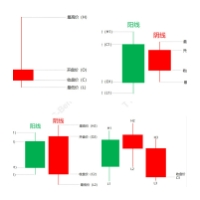
コア機能: 取引信号識別:本EAは市場における重要な取引信号を自動的に検出することができ、Pinbar、飲み込み、妊娠線と頂分型などを含む。これらの信号はいずれも市場の歴史的な価格行動に基づいており、広く検証されており、多くのトレーダーにとって重要な取引の参考とされている。 自動取引:上述の取引信号が認識されると、EAは自動的に取引操作を実行し、倉庫を開け、倉庫を平らにし、停止と収益停止を設定するなどを含む。これにより、トレーダーの手動操作が大幅に削減されるとともに、取引の一貫性と効率が向上します。 リスク管理:EAはリスク管理メカニズムを内蔵しており、トレーダーのリスク負担能力に応じてカスタマイズすることができる。合理的な倉庫管理と減損停止の設定を通じて、本EAはトレーダーが取引リスクを低減し、安定した利益を実現するのを支援することを目的としている。 パフォーマンス最適化:EMCはさまざまな市場条件で安定した運用を可能にするために、EAのアルゴリズムとパフォーマンスを最適化し続けています。また、EAの取引パフォーマンスをよりよく理解するために、トレーダーに詳細な取引記録とレポートを提

PL Graph Visualizer は、アカウントの損益をリアルタイムにグラフで表示するユーティリティです。
グラフは通貨ペア別やマジックナンバー別に見ることができ、ポジションごとの損益の推移が一目でわかります。 このツールは、ここにある統合決済ツールと組み合わせて使用すると、その機能をさらに強化できます。
https://www.mql5.com/en/market/product/116884
リアルタイムのグラフには口座全体の損益だけでなく、複数の通貨ペアの損益状況も表示されるため、トレーダーは詳細な変化を瞬時に把握することができ、意思決定を支援し、より効率的な取引を行うことができます。
リアルタイムの損益の可視化により、取引戦略を強化します。
このツールはリアルタイムでチャートを生成するため、チャートを閉じたり、時間足を変更したり、MT4を再起動したりすると、最新のデータからチャートが再生成されます。
より詳細な情報:
https://www.mql5.com/en/blogs/post/757410
FREE

Ichimoku signal finder expert Expert Ichimoku Analyzer is a very suitable tool for analyzing and checking standard Ichimoku indicator signals. This expert with the name TFI ICHIMOKU is one of the fast series experts that has the ability to send signals to email and mobile phones and due to its special technical features, it can quickly check the symbols in the watch list and check the signals. by buying Ichimoku Expert, you can find Ichimoku signals in the shortest time. TFI ICHIMOKU TFI ICHIMOK

Are you tired of missing out on profitable opportunities due to cumbersome and slow trade management in MT4? Do complexities in adjusting trades quickly and accurately analyzing market conditions make you hesitant and cost you financially? Understanding and reacting to market dynamics can be challenging, especially without the right tools. Our innovative Trading Panel is specifically engineered to tackle these issues. It provides a streamlined and efficient way to manage your trades and analyze

Expert Slider for MetaTrader 4 Expert Slider is one of the most widely used experts in the Forex financial market and Metatrader 4. Using this expert, you can easily design several slides for yourself and save several currency pairs with different templates, and according to the timer used for Each slide you set, view different currency pairs with the desired template and continue your analysis and reviews. In the technical specifications section of this expert, there are many options that can b

TFM MULTI CROSS expert MT4
TFM MULTI CROSS expert can receive different signals and send them to the user using 3 moving average indicators . This expert can help the trader to recognize different crosses in any time frame. This expert is a new version of forex signal finder experts, which has high speed, high efficiency and accuracy. By purchasing Expert Multi cross, you can easily find the crosses created in your watch list in the stock market and forex.
General features of TFM MULTI CROSS

Expert candle finder for forex in MetaTrader 4 Expert candle finder is one of the practical trader assistant experts that is used in the forex financial market, this expert accurately identifies the candlestick patterns on the price chart as a signal, all the found candles. informs you. This expert is run on your Meta trader platform and in a very precise way, it examines all the currency pairs that are in your watch list and every currency pair that had a professional and good candlestick patt

RF Trailing MT4 trading assistant robot
The Risk Free Trailing Stop expert is one of the experts designed by the active intelligence programming team, which is designed using the experience and skill of many years in financial markets programming of this expert. This expert is designed for the Metatrader 4 platform and has many attractive features that have a very positive effect on your trading process. Profit and loss limit management is one of the most effective factors in the success of a t

The Scientific Calculator is a script designed to compute science, engineering and mathematics expressions.
General Description
The expression to calculate must obey syntax rules and precedence order, being constituted by the following elements: Integer and real numbers. Mathematical operators for addition (+), subtraction (-), multiplication (*), division (/) and exponentiation (^). Mathematical and trigonometric functions . Curved parentheses (()) to define the precedence and co
FREE

Universal EA for Your Custom Indicator
This EA is to be based on buying /selling via buffers. This is based on the calling of a custom signal indicator. Here are the INPUTS below and I will give a description of how each INPUT works Custom Indicator Name
This is where the custom indicator will go for this EA to call from the folder. TP Mode
BASKET: for ALL trades to close out based on the TP/SL- OR Trail SL OR Break Even. Basically its basket and everything closes based on the INPUTS. These

Expert or Super Trend signal finder robot for MT4 The super trend indicator is a trend indicator that is very widely used in technical analysis, this indicator has two main tasks, the first task is to identify and recognize the market trend and the task of identifying buy and sell positions, but in order for us to be able to To check all the shares or currency pairs with which we do our transactions, we must compare each currency pair or share with this indicator one by one, so that we can find

Capital management trade assistant expert The function of the capital management expert is for positions, this expert helps the user to take Sell and Buy positions without calculating the amount of the lot, it also automatically observes the SL and TP points for the positions and on the price chart It registers, calculates the trading volume according to the balance, automatically considers the reverse position or hedge for the opened positions, of course, optionally, the selection of the SL an
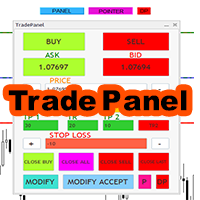
Expert trade panel MT4 The Expert Trade Panel consists of two sections, the panel and indicators, which you can see immediately after running the Expert on Metatrader, the Trade Panel is a tool that makes the trading process easy for the trader so that the trader can quickly and do your transactions easily. One of the features of this panel is that it has two parts. According to his needs, the trader can use both the indicator part of this panel and the panel part. Using this panel, the trader c
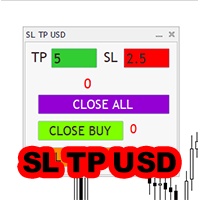
Expert SL TP USD panel MT4 SL TP USD Panel expert is one of the practical experts in the field of Forex financial market, which is designed for the Metatrader 4 platform, this expert helps the trader to determine the dollar profit and loss limit for himself.
The function of the expert is that the trader decides to close the position after, for example, $10 profit, or close the position after, for example, $5 loss. You can use Inexpert easily and control your trading performance.

Candle finder robot MT4
Candle finder robot is one of the trading assistant tools that helps the trader, this tool helps the trader to examine all the currency pairs that are in the Metatrader watch list in detail within a few seconds. Find the desired signals. According to the strategy that is defined for this robot, in your watch list, it carefully looks for trend change candles, there are many trend change candles that traders use in their trading decisions. This robot can simply check all t

MetaTrader 4用 UR_TradeManager MetaTrader 4プラットフォーム専用に設計された究極のトレーディング強化ツールであるUR_TradeManagerを使用して、トレーディングポテンシャルを最大限に発揮しましょう。精密さと機能性を念頭に置いて作られたこの包括的なツールは、市場分析、実行、管理スキルを向上させたいトレーダーにとって不可欠です。 主な特徴: ビジュアルトレーディングダッシュボード : MetaTrader 4のワークスペースに統合された洗練されたダッシュボードから直接トレードを管理します。前例のない容易さと正確さで取引を実行、修正、終了させることができます。 リアルタイムニュース統合 : リアルタイムの更新情報で常に先を行きます。当ツールは、最新の市場データに基づいた情報に基づいて意思決定を行うことができるよう、重要な財務ニュースを直接トレーディング環境に引き込みます。 高度なアラートシステム : 価格レベル、市場イベント、またはインジケーターの結果に対するカスタムアラートを設定し、取引の機会や潜在的なリスクを決して見逃さないようにし、24時

Use this multifunction button to execute orders instantly! Several buttons will handle:
1. BUY: Open a BUY order with preferred size (configurable in Expert config). 2. SELL: Open a SELL order with preferred size (configurable in Expert config). 3. LOCK PAIR: Open an order with the same lot to LOCK your order position, based on the currently opened chart (current pair). 4. LOCK ALL: Open an order with the same lot to LOCK your order position, based on all your open positions (all pairs). 5. Cl
FREE

The Best One Scalping Trade Panel functional manual trade panel with risk reward, auto SL by candle ( original solution), lot size calculation, one-click trading, scale in and out of trades (partial close),
Works with all symbols not just currency pairs, perfect works on DAX, NASDAQ, GOLD, ...... I earn every day during live stream on ZakopiecFX - join Me
Risk by lot Risk by percent SL by points SL by Candle, Renko, RangeBar ( original solution)
TP by point TP by Risk/Reward Auto Trailing by P

VR カラー レベルは、トレンドライン、四角形、テキストなどの要素を使用してテクニカル分析を適用する人にとって便利なツールです。グラフにテキストを直接追加したり、スクリーンショットを撮ったりすることができます。 設定、設定ファイル、デモ版、説明書、問題解決方法は、以下から入手できます。 [ブログ]
レビューを読んだり書いたりすることができます。 [リンク]
のバージョン [MetaTrader 5] インジケーターの操作は ワンクリック で実行できます。これを行うには、線の付いたボタンをクリックすると、カーソルの下に傾向線が表示されます。次に、カーソルを移動して 線の位置 を選択し、もう一度クリックして修正します。 インジケーター の特徴は、スタイルと色のすべての変更が自動的に保存され、その後すべての 新しく作成された グラフィック オブジェクトに適用されることです。 このインジケーターには、異なるスタイルのトレンド ラインを設定するための 2 つの独立したボタン、異なるスタイルの 2 つの独立した四角形、独自のスタイルを持つ 1 つのテキスト フィールド、およびスクリーンショット
FREE

チャート同期インジケーター - ターミナル ウィンドウのグラフィック オブジェクトを同期するように設計されています。 TradePanel への追加として使用できます。 購入する前に、デモ アカウントでデモ バージョンをテストできます。 デモは こちら から。 作業するには、オブジェクトのコピー元のチャートにインジケーターをインストールします。このチャート上で作成されたグラフィック オブジェクトは、インジケーターによって同じシンボルを持つすべてのチャートに自動的にコピーされます。インジケーターは、グラフィック オブジェクトの変更もコピーします。 入力パラメータ: Exception - コピーする必要のないグラフィックオブジェクトの名前。複数の名前を「;」で区切って指定できます。名前に共通の部分がある場合は、「*」を使用することができます。例えば、Btn_1453、Btn_7565、Btn_1453 は共通部分 Btn_ を持っているため、フィールドには Btn_* と入力できます。 Custom symbols - グラフィックオブジェクトをコピー(同期)する追加シンボル。複数のシン

MT4 to Telegram Copier MT4 は、MetaTrader 4 での取引体験を向上させるために設計された専門的なユーティリティで、トレード通知やレポートを直接あなたのTelegramチャンネルにシームレスに送信します。このツールは、信号提供者、トレーナー、リアルタイムで購読者に情報を提供したいトレーダーに最適です。 MT4 to Telegram Copier MT4 を使用すると、即時の取引アラート、カスタマイズ可能な設定、包括的なパフォーマンストラッキングの便利さを楽しむことができます。フォロワーと取引活動を簡単に共有でき、手動更新の手間をかけずにタイムリーな通知を受け取ることができることを想像してみてください。 MQL製品のインストールガイド | MT4/MT5 で購入したMQL製品の更新 | 一般的なトラブルシューティングガイド | インジケーター設定 / ガイド 主な機能 チャート上のダッシュボード: チャート上にリアルタイムの情報パネルを表示し、即時のステータス概要を提供します。 取引通知: 新しい取引、クローズ、重要な取引更新の即時アラートをあなたのT
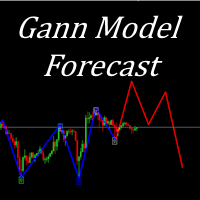
I present to your attention a powerful utility for predicting the future movement of an asset based on W.D. Ganna’s law of vibration. This utility analyzes the selected market model and provides codes for future possible market movement patterns. If you enter the selected code into the appropriate box, you will receive a forecast of the potential market movement. The utility has the ability to display several potential forecast models. The forecast is not yet tied to time and price and gives th

Tester binary indicators by Veles is a tool that checks the signals of any Meta Trader 4 indicator. Main functions:
Ability to select buffers of the required indicator to receive BUY and SELL signals. Ability to select the required expiration time based on indicator signals. Possibility to select the operating time range of the required indicator. Possibility to choose the trading verification scheme that is optimal for you (without martingale, martingale by candles, martingale by signal). Abil

For MT5: TP SL Calculator This tool helps you to automatically calculate profit at Take - Profit price and loss at Stop - Loss price. Feature:
- Calculate profit at TP price. Apply to all operators (BUY / BUY LIMIT / BUY STOP / SELL / SELL LIMIT / SELL STOP), with TP price is greater than 0. Profit is expressed in money and points.
- Calculate loss at SL price. Apply to all operators (BUY / BUY LIMIT / BUY STOP / SELL / SELL LIMIT / SELL STOP), with SL price is greater than 0. Loss is express

SX Theme Setter is intended for changing chart appearance in 2 modes: - Gradient background mode:
In this mode, the indicator creates a gradient background for your chart. Colors, steps and gradient type can be selected by user. - Color theme:
Color theme mode provides more than 50 built-in different color themes which can be selected from a list. Most of these themes are converted from official color themes of real trading platforms of the past and present. Try them out and see if they suit
FREE

Pips Keeper is a sophisticated Forex trade manager expert advisor designed to enhance trading efficiency and optimize profit-taking strategies. With its intuitive functionality, this EA empowers traders to automate the process of closing profitable positions at predefined profit thresholds, thereby maximizing returns and minimizing risks.
Key Features:
1. Threshold-based Profit Closure: Pips Keeper enables traders to set customizable profit thresholds, allowing for the automatic closure of pr
FREE

Introducing "PropFirm Consistency Analyst" — your dynamic companion for achieving consistency in proprietary trading. This innovative Expert Advisor operates seamlessly, continuously calculating consistency metrics between two specified dates, providing real-time insights throughout the trading month.
Tailored specifically for prop traders, this tool serves as a dedicated ally in meeting the stringent consistency requirements set by some proprietary firms. By evaluating trading performance on
FREE

フィボナッチ グリッドに基づく半自動トレンド アドバイザー。
フィボナッチ グリッドを描画した後、アドバイザーは価格がトレンドに沿ってさらに移動するにつれて自動的にグリッドを拡張し、設定で選択されたレベルから価格ロールバックの注文を開きます。 ストップロスはフィボグリッドの100%に自動的に設定され、テイクプロフィットはフィボグリッドの10%に設定されます。 Fibo グリッドの次のレベルで注文を閉じるオプションを有効にすることもできます。
設定では、次の Fibo グリッド レベルを選択して注文を開くことができます。 38%、50%、61%、78%。
注文サイズは、選択した設定に従って設定されます。
1. 固定ロット
デポジットの2.%
3. 損失額をドルで修正。
このアドバイザーは、MN から H1 までの時間枠で安定した有効性を示しています。 フィボナッチ グリッドを描画する範囲を決定するときは、波動が波の始まりと終わりにある 2 つの逆トレンド ローソク足と、それらの間に少なくとも 2 つのトレンド ローソク足で構成されていることを考慮する価値があります。

Telegram alert by Veles is a tool that allows you to send specific signals of any Meta Trader 4 indicator to your Telegram channel in the form of screenshots, turning your Meta Trader 4 account into a signal provider. Main functions Ability to select buffers of the required indicator to receive BUY and SELL signals. Ability to edit the time of sending screenshots. Ability to customize screenshot resolution. Note:
* When submitting screenshots, any objects on your charts such as main indicato
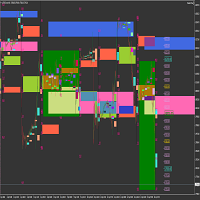
Market Viewer This utility seeks to assist the trader in identifying potential areas of interest on the price chart. Different components integral to decision making have been automated, allowing the user to engage with perfectly calculated levels. Some components include the weeks initial balance, session Min and Max areas and a round number indicator altogether forming templates providing confidence to the trader. Have a look at the screenshots for a sneak peak into the components. The utility
FREE

The DrawdownProtector is a custom MetaTrader 4 (MT4) EA designed to manage floating losses in trading accounts. Let’s break down its key features: Floating Loss Management : The EA monitors the account’s floating profit and loss (P/L). If the floating loss exceeds a user-defined threshold (default: $100), the EA takes action. Order Closure : When the floating loss surpasses the threshold, the EA closes all open orders. It ensures that no further losses accumulate beyond the specified limit.
FREE

This Utilities Expert Advisor will help traders set News Traps instantly. Usually, news-trapping traders open both SELL and BUY limit orders 10-5 minutes before high-impact news is released. You can wait until it hits Take Profit (TP), or you can also use the close button to close all or several orders in one click.
Please note that even though this is an Expert Advisor (EA), it doesn't open orders automatically. Traders need to click the "OPEN TRAP!" button, and the script will execute limit

この無料ツールが気に入っていただけましたら、ぜひ5つ星の評価をお願いします!本当にありがとうございます :) 「リスク管理アシスタント」エキスパートアドバイザーコレクションは、様々な市場環境においてリスクを効果的に管理することで、取引戦略を強化するために設計された包括的なツールスイートです。このコレクションは、平均化、スイッチング、ヘッジの3つの主要コンポーネントで構成されており、それぞれが異なる取引シナリオに合わせて独自のメリットを提供します。
このEAは、市場で標準的なリスク管理戦略を発展させたものです。
https://www.mql5.com/en/blogs/post/756961
1. 「平均化アシスタント」EA: MT4: https://www.mql5.com/en/market/product/115468 MT5: https://www.mql5.com/en/market/product/115469 2. 「スイッチングアシスタント」EA: MT4: https://www.mql5.com/en/market/product/115478 MT5:
FREE

この無料ツールが気に入っていただけましたら、ぜひ5つ星の評価をお願いします!本当にありがとうございます :) 「リスク管理アシスタント」エキスパートアドバイザーコレクションは、様々な市場環境においてリスクを効果的に管理することで、取引戦略を強化するために設計された包括的なツールスイートです。このコレクションは、平均化、スイッチング、ヘッジの3つの主要コンポーネントで構成されており、それぞれが異なる取引シナリオに合わせて独自のメリットを提供します。
このEAは、市場で標準的なリスク管理戦略を発展させたものです。
https://www.mql5.com/en/blogs/post/756961
1. 「平均化アシスタント」EA: MT4: https://www.mql5.com/en/market/product/115468 MT5: https://www.mql5.com/en/market/product/115469 2. 「スイッチングアシスタント」EA: MT4: https://www.mql5.com/en/market/product/115478 MT5:
FREE

この無料ツールが気に入っていただけましたら、ぜひ5つ星の評価をお願いします!本当にありがとうございます :) 「リスク管理アシスタント」エキスパートアドバイザーコレクションは、様々な市場環境においてリスクを効果的に管理することで、取引戦略を強化するために設計された包括的なツールスイートです。このコレクションは、平均化、スイッチング、ヘッジの3つの主要コンポーネントで構成されており、それぞれが異なる取引シナリオに合わせて独自のメリットを提供します。
このEAは、市場で標準的なリスク管理戦略を発展させたものです。
https://www.mql5.com/en/blogs/post/756961
1. 「平均化アシスタント」EA: MT4: https://www.mql5.com/en/market/product/115468 MT5: https://www.mql5.com/en/market/product/115469 2. 「スイッチングアシスタント」EA: MT4: https://www.mql5.com/en/market/product/115478 MT5:
FREE

This EA is a small aid, suitable for all who like to trade on smartphones or tablets. The EA is placed on a chart and monitors all markets (multicurrency). No matter where you are, as long as you have internet, you can trade with it. Open position, set stop, and the EA automatically creates a TP in the previously set ratio (1:1, 1:2 etc.) to the stop. This is a very convenient feature that helps you manage your trades better. Ideal for trading on mobile devices. Whether you are on the bus or in
FREE

OneClick Online Account Manager is a powerful utility that helps you to manage all your accounts from a centralized panel. It is suitable for all single account traders and specially for multiple accounts traders.
The utility help you to : Monitor status of all accounts on a private web page. Some information such as account connection status, account profit, DD, Balance, Equity, Margin Level, Number of positions and orders, Daily and Weekly profit/loss and also overall summation of all these p

Predetermination is an exit manager for trades you open yourself. It does not open positions and it does not send signals. After a manual buy or sell, it gives that trade a stop and up to six exit stages based on volatility. Three stages come from Average True Range, each with its own timeframe. Three come from completed range: daily (ADR), weekly (AWR), and monthly (AMR). Each stage can be switched on or off. Enabled stages are sorted by distance. Nearer stages trail the stop. The
FREE

This utility keeps a watchful eye on your trading terminals and ensures that you are notified if any of them are disconnected. Simply attach the utility to a chart and connect to a monitoring service who can notify you.
We use UptimeRobot for both VPS and terminal monitoring; however, any service supporting heartbeat monitoring can be employed.
Many such services offer free plans and various notification methods, such as Cronitor.io
FREE

The tool is suitable for traders who trade with prop firms, it tracks your daily decline so you don't lose your account and also specifies the money management set by you... The tool works as an Expert Advisior and therefore must be used in combination with a VPS in order to monitor the current status of your positions.. Prop account settings:
Challenge 50k,100k,200k -Daily Drawdown - From 0:00 or From max.Equity - depending on the type of conditions of your company -Daily Drawdown (8000usd)

Prop Firm Equity Protector safe guard your hard earned prop firm account from balance or equity downdraw. It can be used for live/personal account too. It will close all positions if drawdown hit the preset level or percentage. It can be set to close other EA in the same MT4 terminal too. This utility is not need to use conjuction with HFT Prop Firm EA (Green Man), HFT Prop Firm EA has it build-in equity protector and also it has ultra low drawdown.
Setting: Prop Firm Account Size Drawdown

Prop Firm Toolbox contains the important tools for maximising your funded account prop firm accounts.
It contains function:
- Lot Size Consistency Advisor (This is the number one reason of prop firm not paying if you soft bleach this rule)
- Biggest Profit Size Warning (This is the number two reason of prop firm not paying if you soft bleach this rule)
- Spread Meter
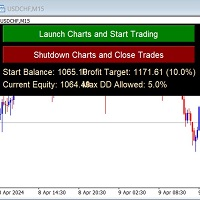
Auto-Close Profits And Protect Your Equity.
Close All Trades At Profit Target By Magic Number And Cut Losses At Max Drawdown Level Set By You.
And/or Run several EA's on several pairs and several timeframes - and monitor them all in one place!
Automatically Opens Your Charts Containing Your Templates (with EAs on if you wish) And Starts Trading Each Day At A Time Set By You.
You Set The Overall Profit Traget And Maximum Allowed Drawdown. This includes Swap Fees and Commissons.
Then This EA

Equity Protect Pro: 安心取引のための総合的な口座保護エキスパート 口座保護、資産保護、ポートフォリオ保護、マルチ戦略保護、利益保護、利益確定、取引セキュリティ、リスク管理プログラム、自動リスク管理、自動決済、条件付き決済、スケジュール決済、動的決済、トレーリングストップロス、ワンクリッククローズ、ワンクリック決済、ワンクリック復元などの機能をお探しなら、Equity Protect Pro が最適なプログラムです。 設定は簡単で、事前設定された条件に達すると、すべてのチャートを閉じることができ、シグナルサブスクリプションのキャンセルもサポートします(これは、すべての取引プログラムも停止することを意味します)。この時点で、新しい注文は生成されなくなり、最終的にすべての注文が閉じられ、予期せぬ損失を効果的に防止し、安心して取引できるようになります。 Equity Protect Pro (Technical Manual) Equity Protect Pro Demo Version for yo u to test Equity Protect Pro MT4

アカウントエクイティ保護ツールは、アカウントエクイティを保護するための必須ツールです。アカウントが複数の自動取引プログラムを同時に実行している場合、特に夜寝ている間にブラックスワンイベントや取引プログラムの障害が発生した場合、予期せぬ損失を被る可能性があります。このツールはこれらの問題を回避するのに効果的です。
設定は非常に簡単で、保護したい金額を入力するだけです。現在のアカウントエクイティに基づいて適切な設定をすることをお勧めします。設定が完了したら、「OK」をクリックしてプログラムのインターフェースに入り、「実行」をクリックします。右側に笑顔のアイコンが表示されることで、プログラムが正常に実行されていることがわかります。
アカウントのエクイティが設定された保護値を下回ると、すべてのチャートが即座に閉じられ、取引プログラムも停止します。同時に、すべての注文が削除され、アカウントは一切のリスクにさらされなくなります。
Equity Protect free MT4: https://www.mql5.com/en/market/product/115514 Equity Pro
FREE

特定のストップロス レベルに基づいてポジション サイズやリスクを即座に計算できるツールは、プロのトレーダーと初心者のトレーダーの両方にとって重要です。
TRADE PRO 取引ユーティリティは、高速かつ正確な計算を提供し、時間的制約のある不安定な市場状況での意思決定を支援します。 MT5バージョン / 追加の設置資材
主な機能:
オリジナル。シンプル。効果的。 メインの取引パネルを開くためのユニークで便利な方法: チャートの右側にマウスを移動し、適切な方向をクリックして将来の注文を配置します。 市場注文のクイックセットアップ TRADE PROを使用して、残高または資本の割合でリスクレベルを設定するか、具体的なリスク額を指定します。チャート上でストップロスレベルを視覚的に定義することで、ツールが各通貨ペアの最適なポジションサイズを自動計算します。また、指定されたリスクリワード比率に基づいて、利益目標(テイクプロフィット)を自動的に設定することもできます。 複数の指値注文を出し、総リスクを分散します (グリッド モード)。 複数の売買取引を行う場合でも、グリッド戦略に従

TendencSell_EURUSDのご紹介:下降トレンドと時間的な正確さのマスタリー TendencSell_EURUSDは、外国為替市場向けに精密に調整された売り取引専用のロボットであり、取引ロボットの進化を表しています。この高度なボットは、下降トレンドを最大限に利用し、ピーク時に取引を行うことで利益を最大化する能力によって特筆されます。先行モデルであるMacd_Sell_EURUSDの機能をさらに高めるとともに、TendencSell_EURUSDはEURUSDペアの下降トレンドを予測する戦略を洗練させ、さらにM15の時間枠での取引に最適化されており、出入りの正確さにおいて前例のないものを提供しています。 主な特徴: 売り取引への特化:下降トレンドを捉え、売り取引を実行することに特化しており、下降トレンドを利用した戦略を追求するトレーダーに最適です。 下降トレンドの高度な戦略:下降トレンドの始まりをキャッチし、下降移動時のピークで取引を行うことで、トレンドの下降局面での利益を最大化します。 M15の時間枠:15分の時間枠での取引に最適化されており、迅速かつ正確に取引の機会を見つけ

TendencBuy_EURUSDの紹介: 下降トレンドと時間の精度における卓越性 TendencBuy_EURUSD は、外国為替市場の下降トレンドから最大の利益を得ることに特化したトレーディングロボットの先駆者として台頭しています。この洗練されたボットは、特に重要なタイミングでの売買注文を特定して実行し、特に大きな下落前のピークで優れた結果を出しています。先行者である Macd_Buy_EURUSD の戦略を受け継ぎ、さらに洗練された TendencBuy_EURUSD は、M15の時間枠に最適化され、時間の精度に優れたエントリーとエグジットを確保しています。 主な特徴: 買い注文に焦点: 下降トレンドから利益を得る戦略の本質を捉えるために、専ら買い注文に特化しています。 下降トレンドの最適化: 下落を利用するために、ピークでのエントリーを実行して、潜在的な利益を最大化します。 M15の時間枠: 15分の時間枠に完璧に最適化されており、迅速かつ正確に取引の機会を特定します。 調整可能な取引時間: 取引を最適な時期に行うために、1日に2つの取引時間ウィンドウを設定できます。 取引日の
MetaTraderマーケットは、履歴データを使ったテストと最適化のための無料のデモ自動売買ロボットをダウンロードできる唯一のストアです。
アプリ概要と他のカスタマーからのレビューをご覧になり、ターミナルにダウンロードし、購入する前に自動売買ロボットをテストしてください。完全に無料でアプリをテストできるのはMetaTraderマーケットだけです。

取引の機会を逃しています。
- 無料取引アプリ
- 8千を超えるシグナルをコピー
- 金融ニュースで金融マーケットを探索