 MetaTrader 5
 エキスパート
 インディケータ
 ライブラリ
ライブラリ
 ユーティリティ
 ウィジェット
 ルール
ルール
YouTubeにあるマーケットチュートリアルビデオをご覧ください
ロボットや指標を購入する
仮想ホスティングで
EAを実行
EAを実行
ロボットや指標を購入前にテストする
マーケットで収入を得る
販売のためにプロダクトをプレゼンテーションする方法
MetaTrader 4版新取引ユーティリティ - 31
 以下はMetaTrader4での外国替取引を簡素化する取引プログラムです。以下のリストのユーティリティにカーソルを合わせて、説明と目的をご覧ください。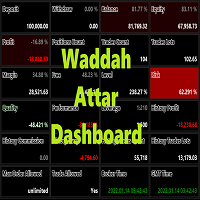
Waddah Attar Dashboard
Simple App show you the most important information about your account , trades and history . Risk , Quality and Performance are the most important numbers you must watch them carefully . also the important thing you must do is Focus on the RED Color on the board . you can control the font name , font size , width , height and padding properties . the information is auto arranged on the chart . don't worry about it .
Thanks .
recommended product for position risk manage
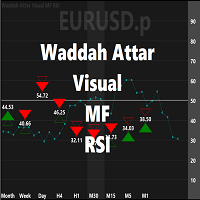
Waddah Attar Visual MF RSI
this App show you RSI values and status for all frames in one chart .
Filled Triangle means current RSI Value . Framed Triangle means previous RSI Value . Up Arrow and Green Color means the direction of RSI is up . Down Arrow and Red Color means the direction of RSI is down .
when you move mouse cursor on frame column .. the full RSI chart will drawn .
you can change RSI Period in the app properties .. the default is 14 .
thanks and good luck .

ワンクリックで注文を開始できる取引パネル! トレーダーを支援するために、利益確定、ストップロス、保留中のストップ注文とリミット注文、損益分岐点への転送、トレイルを設定します。 % での部分的な注文のクローズもあります。
すべてのパラメータはカスタマイズ可能です。 エキスパートに設置!
設定
ロット -- 0.02 ロット ストップロス --- 700 ストップロス テイクプロフィット --- 400 テイクプロフィット UseBreekeven ---- false 損益分岐点オフ ClosePersent--- 注文の 50 成約率 brStart ---- 100 損益分岐点スタート brインデント ---- 5 損益分岐点ステップ UseSTtrall ---- false トロールストップオフ UseTPtrall ---- true トラルテイクオン TrStar
FREE

Close All Orders for MT4 script - closes absolutely all orders, whether pending or market ones.
Orders are closed at the current profit/loss indicators at the time of closing.
The script is suitable for moments when you need to quickly close all orders at the current indicators.
The script is very easy to use, just drag the script onto the chart and it will do its job.
Add me as a friend , I have many other useful products.

Trend following pending orders detect a group of orders opened by chart buttons and automatically follows market price.
Once your STOP or LIMIT orders are activated Trend following pending orders immediately adds STOP LOSS and TAKE PROFITS . Optionally you can add rule for closing all market orders when sum or price will reach your profit or loss. You can also enable trailing stop loss and traling take profit to market orders. It is a very handy tool in cases where you want to catch the perf

Wicks Trade Panel It's a Trade Panel include Order Management & Risk Management for serious trader. Especially for those traders who pay attention to important events like the CPI, NFP, and ADP. A one-of-a-kind faster technique to fix the Entry Price by simply pointing the mouse pointer at it. This is what I enjoy about it. Automatically closing 50% order size lots when setting TRUE on Breakeven Status. It's especially useful when trading on significant economic events like the CPI, NFP, and A
FREE

It's a smart Investing.com utility signal analyzer on MT4 chart during 28 pairs ,It uses all technical and candlestick patterns for each pairs to analyze the final trend ,You can use it as base entry signal for each pairs, It's easy to use ,You must add the address ' https://www.investing.com/ ' in the list of allowed URL tab 'Advisors' , Added GlobalVariables for each pairs as buffer simulation to get data from any ExpertAdvasor for trading.
Setup
So to work with the server, you must add the U

Waddah Attar Easy Positions Risk Management
This EA gives you a full ability to close one position or close all positions . Close buy or sell trades in any position . Close profit or loss position . by clicking on a command button on the chart with confirmation message . Show you a full information about your positions like : count - lots - average price - points - profit - profit % - used margin for this position and the risk percent . and also the scrolled table of trades that position has
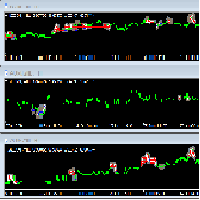
迈达克论坛交易记录复盘工具。 运行平台:MT4 迈达克论坛有很多优质的信号,如果你需要研究学习这些优质信号的交易轨迹,可以用这个工具进行复盘。 适用方法: 1、选择优质信号 2、选择“交易历史记录” 3、交易历史记录标签页右下角选择 导出至CSV历史,导出历史记录 4、将导出导出的CSV历史记录文件存放到MT4安装目录下的 \ MQL4\Files文件夹中。 5、运行程序,在参数表中输入历史文件名称,并点击确定。 6、软件自动在所选图表中绘出涉及到当前交易品种的交易痕迹。 说明: MT4,MT5信号均可在MT4上进行交易痕迹绘制。 多单蓝色显示,空单红色显示。止损红色表示,止盈蓝色表示。 在具体使用中有任何问题,可以联系我的微信gaoqing001

The trend in the market can be predicted using trend lines but the problem is you don’t know where exactly the price is going to touch the trend line where you can put your pending orders on. Smart Channel Expert Advisor makes it possible to put an advanced channel around the price data, which can be configured to handle placing orders, opening and closing positions, managing risk per trade, spread, slippage, and trailing stop-loss and take-profit automatically. Features Money Management (Calcul

The Silver Volatility Trend Line for MT4 is an EA that helps you trade using the trendlines, drawn on your chart. It basically allows you to send and manage orders using trend lines. It automatically calculates the True Range of your asset to allow you to send orders well calibrated with the market volatility. Take Profit and Stop Loss are calculated in number of True Range. You can do that for two different orders at the same time , so that you can trade two different kind of risk / profit rat

Вспомогательный советник. Советник сам не торгует. В тестере открывает сделки для демонстрации и возможности подбора настроек.
Советник анализирует сделки по всему счету, находит самый убыточный ордер, со значением ( Minimum order LOSS ) и закрывает его с минимальной прибылью ( Minimal annihilation profit for closing ) за счет текущих прибыльных ордеров, минимальная прибыль для закрытия прибыльного ордера ( Minimum order PROFIT ). Советник может оставлять самые прибыльные ордера ( Saving prof

- Go up one more level with the most important Tools to Analyze the Market, such as drawing Horizontal and Dynamic Lines, Zones, Ratios, Trap Level Strategy, Impulse Projection, Bar Information with precision, automatic drawing of the most important Opening Levels (Open Day , Open Week, Open Month, Open Year), floating boxes on the chart where we can see the Countdown of each bar, the Spread and ATR indicator, an independent Panel with buttons for all options and shows the symbol, Time Frame

This is a simple yet really handy assistant. It is useful if you want to close all positions on the market when a definite sum of the free margin is reached. Just place the assistant on a free chart and set a closing amount. All positions of all symbols will be closed when this amount is reached. At that, you don't have to sit by the monitor waiting for a good moment. The EA will do it for you.

Main features: I nforming via telegram buttons content and closing orders for one of the pairs or all necessary orders. Alert and information buttons to the telegram window when the specified percentage of profit is reached for each pair, or for two at once. The telegrams "sleep" while no profit we need, when a profit is reached, a menu of 5 buttons appears, in each button the profit will be displayed both in currency and in %%. When you click on the button, the direction of orders for this pa
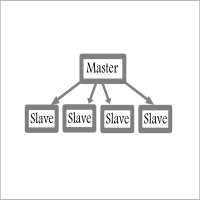
Fast / Reliable / Multi Functions / Simple To use local MT4 to MT4 | MT4 to MT5 platform copier , it will copy all your Master account orders into any Slave accounts very fast , no delay, Also it supports any kind of orders/ExpertAdvisors such as Buy / Sell / BuyStop / SellStop / BuyLimit / SellLimit / Smart Partial Closing / opened in Hedge mode / opened in Martingale mode / Modifying Pending orders / Modifying StopLoss-TakeProfit .using it is simple , Just drop the EA on Master account which y

OpenCharts for OpenOrders, スマートなチャート管理ツール このスマートスクリプトを 任意のチャート にドロップするだけで、ターミナル内の すべての保有ポジションの銘柄 に対応するチャートが自動的に開かれます。 主な機能 : 保有ポジションごとにチャートを1つだけ開く 同一銘柄に複数ポジションがあっても 1つのチャートのみ 開く 実行前にタイムフレームを選択可能 軽量で効率的, 複数ポジションを管理するトレーダーに最適 作業スペースを整理し、時間を節約 このスクリプトは 完全無料 です, 隠れた費用も制限も一切ありません。 キーワード : chart manager , auto chart opener , open order charts , free script , smart terminal tool , multiple trades , chart automation
FREE

Ultimate MT4 to Telegram (UMT) sends controlled trades (via symbol, magic, comment) to your telegram channel. It sends open and closed trades, including pending orders and TP/SL modifications, along with chart screenshots, to any telegram channel. Additionally, you can send trade reports of open trades and summary profit/pip reports for day, week, or month. You can customize the design of the trade actions or reports with variables and emoticons.
A beautiful panel allows you to visualize all t

Ultimate MT4 to Telegram Public Channel sends controlled trades (via symbol, magic, comment) to a public telegram channel. It sends open and closed trades, including pending orders and TP/SL modifications, along with chart screenshots, to this public telegram channel. Additionally, you can send trade reports of open trades and summary profit/pip reports for day, week, or month. You can customize the design of the trade actions or reports with variables and emoticons.
A beautiful panel allows
FREE

The CandleStick Factory is a tool that allow you to perform a market scan and search any candlestick pattern that you already created. The lite version can be downloaded here : https://www.mql5.com/en/market/product/75622 You can perform a quick search in the current chart (500 bars will be scanned), or save your custom candlestick patterns, and search in different Symbols/Timeframes that you can select in the settings tab, the scan can be scheduled every 1, 5 or 10 minutes by updating t
FREE

The CandleStick Scanner is a tool that allow you to perform a market scan and search any candlestick pattern that you already created in the current chart, You can perform a quick search in the current chart (500 bars will be scanned), This is a lite version of CandleStick Factory for MT4 . The full version video can be found here : https://www.youtube.com/watch?v=fq7pLXqVO94 The full version can be purchased here: https://www.mql5.com/en/market/product/75628
How it works Yo
FREE

組み込みのアルゴリズムを使用して未処理の注文に同行するのに役立つアシスタント。メインチャートウィンドウの情報パネルのボタンをクリックして、買い注文または売り注文を開くことができます。
トレードでの希望ポジションボリュームは、次の3つの方法で計算されます。
天びんの容量に応じて自動的に。 手動で指定します。 取引ごとのリスクのレベルとストップロスの値によって異なります。 ストップロスは、次の3つの方法で指定できます。
特定の数のバー(キャンドル)の価格の最大値または最小値。 ストップロスのサイズをポイントで指定します。 ラインに沿ってストップロスを設定する機能を使用します。チャート上の線で事前に必要なストップロス値を設定し、追加情報を取得し、設定されたストップレベルで取引を開始することができます。 ポジションがオープンすると、一連の3つの注文が作成され、合計ロットが指定された割合で取引で除算されます。
最初の注文のテイクプロフィットはストップロスレベルで設定されます。 2次のテイクプロフィットはSL / TPレシオのレベルで設定されます。比率は設定で設定されます。 Take P

Customized Copy is a Multi-Terminal visual trade copying utility that supports Metatrader4 and Metatrader5 for Trade Copying.
You can activate EA on 10 different PCs/VPS. On each PC/VPS can install on Unlimited Terminals.
Specifications :
Real Time, Multi Terminal - Multi Account - MT4/MT5 trade copying (support over 50 accounts at same time) All settings are input visually. Visual display and modify of copy map and network Each copy path can be used with different settings

Excellent spread indicator. Reflects the spread on each bar as it is. It should be remembered that the spread is displayed at the time of the bar opening. Therefore, the most correct information will be on the minute bars. Spread is one of the basic forex concepts that any trader should know. If explained clearly, you can describe such an example. The trader buys the EUR / USD pair at the rate of 1.1000. However, he immediately goes into negative territory, for example, by 10 points, as if he bo

The utility is convenient for closing trade operations when trade with two instruments.
Should be Installed to Experts folder and launched as an Expert Advisor.
After starting, Metatrader will indicate the device ID that is trying to connect.
In Telegram, start/create the channel with the standard command /start
Next, you need to enter a password that is assigned in the Expert Advisor field. If the password is correct, the Metatrader's comment will indicate that the password was successful,

Hello, boys and girls!
Script allows you either to quickly save opened charts and then close all charts opened by visual tester mode or just faster close all charts. Feel free to take a look at video manual about how to use this script on my YouTube channel. Also, feel free to join my telegram channel , where time to time I publish some exclusive stuffs. Feel free to leave feedback and thoughts how to improve this script - I'd highly appreciate that. All the best.

Stop Out Monitor will provide information on how many pips your account will stop out for each currency pair.
With this Stop out info, it is hoped that forex trader can maintain the health of their account and be able to take the necessary actions when a stop out will occur and look for prevention so that a stop out or margin call does not occur. So far, we have only provided standard information from Metatrader in the form of free margin and margin level in percentage , where this info
FREE

チャート上の透かし:シンボル+時間枠/または独自のテキスト 私の#1ユーティリティ 66+機能が含まれています| ご質問がある場合は私に連絡 インジケータの設定では、次の設定を行うことができます: フォントサイズ; テキストの色; フォント名; ポジション:
1=左上;
2=右上;
3=左下;
4=右下;
5=センター; 現在の時間枠を表示:オン/オフ; 削除するシンボルの接頭辞(n_audcad-->AUDCAD); 削除するシンボルのサフィックス(USD CAD pro-->USD CAD); カスタムテキストを表示:有効にすると、以下に指定された独自のテキストが表示されます: あなた自身の透かし; 私の#1ユーティリティ 66+機能が含まれています| ご質問がある場合は私に連絡

AutoOrderModifyEAPro: A Vital Aid for Forex Traders, Both Manual and System-based Catering to the diverse needs of forex traders, whether engaged in manual or system-based trading, AutoOrderModifyEAPro emerges as a pivotal tool in this intricate landscape. The tool's efficacy is most evident in scenarios such as: Enhancing EA Strategies: Addressing the common dilemma of lacking Trailing and/or Break Even mechanisms in otherwise promising EAs. Streamlining Position Management: Overcoming the hass

Levels and risk calculator for the Antimartingale (or Antimartingala) technique Totally visual, setup everything from control panel Decide your risk and margin, it will calculate and show trading lavels on the chart Free version of the orginal Antimartingale EA: https://www.mql5.com/en/market/product/53653 Public Signals using the Antimartingale's technique:
https://www.mql5.com/en/signals/1016250 https://www.mql5.com/en/signals/1018964 This EA does not open trades, it only shows the trading le
FREE

This is script to quickly modify multiple trades all at once and automatically calculate the breakeven point which work perfectly for martingale strategy and can be used alongside any martingale EA to adjust the TakeProfit and StopLoss For all the running orders on the chart. How to use: Pip worth : is for easily calculate the pips according to the chart you are running on, for example (pip = 10 points on major currency pairs, 100 point in indices, and 1000 on some crypto charts like BTCUSD) Sto
FREE

Dear Friends ,
this EA helps u to automatically tracing (following) your opening trades .. the trades will opened manually .. you can set all parameters such as lot size sl
tp distance from open price to set the break even point (that's to keep your deal in safe from losing any funds in case of the market go on negative way that you expect ) trailng your trade by set the distance of pips u need
if u need any assistance , add me and contact me on my links in profile .
wish all the best f
FREE
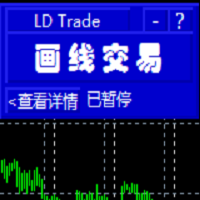
基于MT4的画线交易 辅助 EA。通过在图表上绘制趋势线和/或水平线实现开平仓等多种功能。 EA提供2种功能定义模式: 1.颜色标示模式。 2.文字说明模式。 颜色标示模式下, 默认颜色相应功能如下:
Blue(蓝色):开仓BUY.
Red(红色):开仓SELL.
Yellow(黄色):平仓当前品种所有BUY订单。
White(白色):平仓当前品种所有SELL订单。
Lime: 平仓当前品种所有盈利的BUY订单。
Aqua: 平仓当前品种所有盈利的SELL订单。
你可以在EA参数页修改设置你习惯并喜欢的颜色来实现相关功能.
文字说明模式:参数页输入预定义字符,在图表上添加 线条时,在该线的描述中输入与参数页相匹配的字符即实现相应功能。默认文字详见参数页。
图表中画线的数量不受限制,你可以在图表中不同位置添加多条相同功能的趋势线

This tool will help you hide your stoploss and takeprofit prices of all trades, it will manage them to close your trade when market price reached these levels. And it will replace all these StopLoss, TakeProfit levels for trades when you removed it, so you don't need to worry about missing your StopLoss, TakeProfit level when you remove it. It draw a button for you to control On/Off of working, you can see your SL,TP and modify it easy by the way turn Off the button, then drag your SL,TP price,

The tool will help you to hide your pending orders (buy/sell limit; buy/sell stop) To run it, you just need to add it on any chart (only 1 chart needed). So, when you make any pending order, it will remember that order (with price to open, lot number, symbol, your stop loss, take profit....) then, it will delete your pending order (hide it with broker). And it will make trade when market price reached the open price of your pending order, will all same parameters get from your old pending order.

Hi Dear Friends , As i told you ,,, today i produce the management EA to managing your trades and with closing instruments used to closing tow kind of trades.. the profitable trades and losable trades .. u can try it for free for 2 days ,, it is worth every cent .. now .. you do not need to keep tracing your deals.... let the EA do it for you automatically... for any inquires contact me directly in my contacts shown on my profile after adding me ..
best regards
Fawaz A. Al-baker

Информер предназначен для получения информации о состоянии счета (номер, баланс, эквити) через Телеграм канал. Для работы необходимо создать канал и взять токен который указывается в настройках эксперта вместе с именем канала. Выбирается 2 временные отметки по которым отправляются отчеты в Телеграм. Данный инфрормер удобна для мониторинга счетов с работающими экспертами. Возможна отправка отчетов с разных счетов в один телеграм канал. Для запуска скопируйте в папку Experts, наличие файла Telegra

If you use several charts open at the same time, you know how boring it is to apply formats to each chart individually. This script can change all open charts using a single command. Parameters: 1 - Choose symbol to put on charts: apply the selected symbol to all charts. If "current", it does not change the symbol; 2 - Choose timeframe or leave empty: apply the selected timeframe to all charts. If "CURRENT", it does not change the timeframe; 3 - Apply template to the charts: If true, apply the t
FREE

He is a very good tool, if you like him, he can be very effective to help you manage some of the orders, but not so effective every day, this depends on the market, to listen to my words, you need to open it every day, and then set a time to get up every day, he was like an alarm clock, let you every day have spirit, my products will only be released in MQL5, If you see him anywhere else, stay away from him

You can check out comment #1 how does it work This is a very useful tool, enter the currency charts you need to open, use the symbol "/" to distinguish them, and select the periodicity /TF of the chart, press the button and they will open the charts for you in batches without you having to manually open them each! Because some EA use multiple currency pairs strategy, but do not support one chart to support all currency pairs, so I developed this tool, hope you like it, if you are satisfied with
FREE

在使用智能交易的时候,可能需要针对多个品种进行交易,如果手动去把品种一个个打开,会很繁琐,所以我们开发了这个小工具,可以帮你一次性打开列表式所有的品种,只需要1秒时间。 在使用智能交易的时候,可能需要针对多个品种进行交易,如果手动去把品种一个个打开,会很繁琐,所以我们开发了这个小工具,可以帮你一次性打开列表式所有的品种,只需要1秒时间。 在使用智能交易的时候,可能需要针对多个品种进行交易,如果手动去把品种一个个打开,会很繁琐,所以我们开发了这个小工具,可以帮你一次性打开列表式所有的品种,只需要1秒时间。 在使用智能交易的时候,可能需要针对多个品种进行交易,如果手动去把品种一个个打开,会很繁琐,所以我们开发了这个小工具,可以帮你一次性打开列表式所有的品种,只需要1秒时间。

通貨ストレングストレードパネルEAMT4は、初心者またはエキスパートトレーダーにとって革新的なソリューションです。通貨の強さの概念は、価格アクションと組み合わされ、8つの主要通貨の通常の28の組み合わせを除いて、任意のシンボル/ペアに適用できるため、まったく新しいレベルになります。つまり、すべての通貨、商品、暗号(インデックスではない)を含む、任意のペアの長所または短所をトレードできます。複雑な強さを解読することなく、ペアの2つの部分の強さ/弱さのバランスを視覚的に知らせる色付きのバーを使用することで、16/32シンボルを一目で明確に把握できる画期的な製品です。他の従来の通貨強度ソリューションと同様に、線またはヒストグラム。
通貨の強さのトレードパネルEAMT4は、MT4で見つけることができる最も簡単で使いやすいトレードパネルでもあります。追加のウィンドウやパネルを開く必要なしに、すべてのオプションと機能が1つのサーフェスにあります。これは、注文管理、リスク計算、部分閉鎖、アカウント保護ユーティリティのすべてを1つにまとめた、非常に便利なインターフェースです。 Currency S

PROMINING EA + Aiは、XAUUSDGOLDペアで最も効果的な完全に自動化されたアルゴリズム取引システムです。 システムはマルチタイムフレームチャートを使用して取引し、EAは同時にトレンドに従います。 その非常に高速なスカルパーは、取引で非常に活発です。 XAUUSDペアで取引するために特別に設計されています。
新しいセットファイル、アップグレード、アップデートを共有するMQL5グループに参加してください。 Promining EA + Aiロボットを購入すると、EAの仕組み、ファイルセット、ガイド、およびセットアップと構成のチュートリアルについて話し合うことができるプライベートグループに参加できます。
おすすめ:
時間枠:M1およびM15 , H1 ペア:XAUUSD 設定:M1のデフォルトのセットファイルとM15のデフォルトのセットファイル , H1 ロット:EA戦略を理解するために2〜3週間0.01ロットを使用します。 その後、バランスに応じてロットサイズを増やすことができます。
指定されたEAセットファイルにはマルチアングル設定があります。 mar

Utility for order reversal. Closes orders on the chart on which it is launched and opens orders with the opposite direction instead of them. Has a simple and intuitive graphical interface. It is also possible to automatically reverse newly opened orders. MT5 version of the utility - https://www.mql5.com/en/market/product/74770 If you like this utility, take a look at my other products - https://www.mql5.com/en/users/nina_yermolenko/seller
FREE

Программа работает на сочетании двух индикаторов. Set _ Lot = 0.01 – значение объема лота Set _ TP = 100 – значение тейкпрофит в пунктах Set _ SL = 100 – значение стоплосс в пунктах Up _ Limit _ CCI = 100 – верхний предел CCI Down _ Limit _ CCI = -100 – нижний предел CCI Delta _ CCI = 25 – отклонение CCI от первой свечи Set _ Time _ Frame _ CCI = 15 – значение таймфрейма для расчета CCI Set _ Period _ CCI = 14 – значение периода для расчета CCI Set _ Price _ CCI = 0 – тип цены, по которому вед
The Five Minutes Strategy EA is designed for trading binary options. EURUSD on the five-minute period is strongly recommended. Trading is performed by the opening prices based on the signals of the Five Minutes indicator. It requires at least 100 bars in history to operate.
Input Parameters Initial Deposit - initial deposit. Lot Value - lot size. Lot Type - lot type: Fixed - fixed. Variable - variable. Last Lot Value - last lot value (used in cases when the EA is reattached) Day lot typ
The Rapid Strategy Expert Advisor is designed for binary option trading. M5 timeframe with the 15-minute expiration is recommended. Available financial instruments: EURUSD, EURCHF, GBPUSD, GBPJPY, USDJPY and XAGUSD. Trading multiple financial symbols at a time is not recommended. The EA trades at Open prices based on the signals of the Rapid indicator. It requires at least 100 history bars.
Input Parameters Experts Number - the number of expert advisors (corresponds to the number o

Mr Proper is made for manual trading and is well suited for people who are engaged in scalping and not only.
The idea was to make trading as easy as possible
And in this adviser, I think that I did not do badly.
There are 2 types of levels in the assistant at once. These are Zones and important levels from which the price often reacts.
What is in it?
You can turn zones and levels on or off.
Trailing is not as usual, trailing goes through bars.
There is a breakeven.
Stop loss and Take p

Description: Automatic Equity Manager EA manages the whole account equity. You need to set it up on its own chart. -----------------------------------------------------------------------------------------------------------------------------------------
Parameters: EquityGainPercent = 3 (This automatically closes all trades when your equity shows a gain of X percent.) ---------------------------------------------------------------------------------------------------------------------------------
FREE

Disciplina disciplina, quante volte hai sentito dire che e' la chiave del successo nel trading
Tutto vero... ma facile a dirsi , difficile a farsi; sopratutto se sei il tipico trader che usa le lot size in maniera errata o peggio ancora si dimentica totalmente di inserire lo stop loss...
Zerodrawdown.com ti viene incontro con Companion un expert advisor per mt4 che: inserisce automaticamente dopo un tempo configurabile dall'apertura della posizione lo stop loss in tutti quei trade dove:ti sei

Details of each condition Type 1. Set no use Hedging Martingale, to open the order by yourself only through the push button. TP and SL follow setting. Set Setting_Hedging =false; Set Setting_TrailingStop =false; if not use.
Type 2. Semi Auto Recovery Zone You have to open the order by yourself only through the push button. If in the wrong direction and Set true on Hedging Martingale, EA will fix the order with the zone system by use Hedging Martingale Set Setting_Hedging =true; Set Setting_Tra

Exit strategy is the key to success in Forex. But its hardly followed by any Forex trader leading to huge losses. Without a legitimate exit plan, as where to close with profit, when to close trade and exit, nobody can profit and most markets are loss-making. Considering the significance of money and trade management, we have few alternatives to deal with that: Handle just about all trades and risk your investment by combating apprehension and self-indulgence. That is certainly where almost all

This application is a close all feature that will allow the user to close all open trades under the chart being used. For an example, if the application is attached to the pair being traded, it will only close those positions. So, if you need to close positions on pairs that is not associated with the active chart, you will need to add the Emergency Stop software to the chart of pairs that you are trading.
**Please note: Data signals that are being sent from your computer, sometimes gets inte
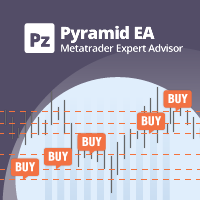
ピラミッド化は、成功した取引からの未実現利益を新しい取引の証拠金として使用することにより、ポジションサイズを増やす方法です。このエキスパートアドバイザーは、あなたの介入なしにあなたの取引をピラミッド化します。 [ インストールガイド | アップデートガイド | トラブルシューティング | FAQ | すべての製品 ] あなたの成功した取引を簡単にピラミッド 勝った取引を最大限に活用する 完全に構成可能なピラミッド化動作 ピラミッドは時間枠に依存しません ECN /非ECNブローカーおよび2-3-4-5桁で機能します バックテストでランダムな取引を行います 双方向取引をサポート 使用法はかなり簡単です:
EAをチャートにロードします 取引量、間隔、ピラミッド化動作を選択します ストップロスを入力し、入力で利益を取ります(残高の%として) 最初の取引を手動で行う EAに残りの面倒を見てもらいましょう
入力
Expert Advisorを任意のチャートにロードすると、ブロックにグループ化された一連のオプションが入力パラメーターとして表示されます。 ピラミッド化動作
このパラメーターは、ピ

Multi Strategy Dashboard Utility Some functions of the MSD Utility can only be used on the full version. Multi instrument and multi time frame scanner, with the best indicators. Comes with an order management panel. The MSD Utility can be used for manual trading. Click on the '?' button on the dashboard to obtain information about the various elements of the MSD Utility. Uses ATR Take Profits, ATR Stop Losses and ATR Trailing Stops. Comes with an FX Currency Strength meter and a Market Session

CyberZingFx Buffer Finder Tool Developed for Finding Buffers of Indicator to use in Universal Indicator EA . This is Not an Indicator or EA CyberZingFx Buffer Finder Tool is utility tool designed specifically for MetaTrader 4 (MT4) users. It is a standalone application that helps you easily find the buffers of any MT4 indicator, allowing you to use them in your Universal Indicator EA. With the Buffer Finder Tool, you no longer have to search through the data window to find the buffers you need.
FREE

The EA closes market orders after a specified time interval (put simply - by timer) after they are opened. Use this utility if you need to close a trade after a certain time. The EA has the following input parameters: Only current symbol - if true , the EA will close only the selected symbol's orders; if set to false - it will close any order of any symbol. Timeout - time (in seconds), after which the EA closes the orders. This EA is simple and very easy to use, does not use up your CP

Price Ray indicator is a utility that will improve the way you trade. Primarily, it shows the Bid, Ask or Last price as a line ray which beams till the current candle, last visible chart candle or extended to all candle bars. The enhanced features in this indicator provide information in an area where you focus most, right next to the current candle. You can select text to be shown above or below the Price ray. The indicator is fully customizable, allowing it to fit any strategy requirements. Th
FREE

A utility to close all orders automatically when conditions meet.
Various options are available to filter or select orders : Conditions : Closing conditions. 3 different conditions can be defined. EA will close orders anytime one or more defined conditions meet. Conditions can be defined based on account properties or selected orders properties. Also a fixed time to close orders is available.
Type of orders : Buy / Sell / Buy Limit / Sell Limit / Buy Stop / Sell Stop Symbol Selection : All / Ch

このユーティリティーは、見たいローソク足パターンがチャート上に表示されると、すぐに携帯電話に詳細な通知を送り、MT4ターミナルにアラートを表示します。通知には、シンボル、ローソク足パターン、パターンが形成されたタイムフレームが含まれます。
メタトレーダー4モバイルとWindows端末をリンクする必要があります。方法はこちらをご覧ください。 https://www.metatrader4.com/ja/trading-platform/help/setup/settings_notifications 検出できるCandlestickパターンの一覧です。 三匹の白い兵隊 三羽の黒いカラス 強気の三本線打ち 弱気の三本勝負 スリーインサイド・アップ スリー・インサイド・ダウン スリーアウトサイドアップ スリーアウトサイドダウン モーニングスター イブニングスター 強気のアバンドンドベイビー Bearish Abandoned Baby(ベアリッシュ・アバンドンド・ベイビー 強気のハラミ Bearish Harami Bullish Engulfing Bearish Engulfing

これにより、各操作のリスクを簡単かつ迅速に制御できます。その革新的なインターフェースにより、ロット数とリスク/報酬比率を即座に計算できます。あなたが望むリスク範囲内にあなたの操作を保ち、あなたの取引の悪い時期を避けてください。
ライン機能-チャートにオープニングライン、ストップロス、テイクプロフィットを表示します。この機能を使用すると、次の注文の主な最も関連性のある特性を簡単に知ることができます。
リスク管理-リスク計算機能は、確立されたリスクとストップロスのサイズを考慮して、次の注文の量を計算します。
-ストップロスの任意のサイズを設定できます。
-リスク/ベネフィットの関係を確立して、テイクプロフィットを計算できます。
-基本金額に基づいてバッチサイズを計算するか、手動でバッチサイズを入力するかを設定できます。
-パーセンテージリスクを設定できます。
[リスク設定]
基本金額:計算の基本金額の値を設定します。 0が設定されている場合、ツールはアカウント残高を基本金額として使用します。
最大ストップロスレベル:デフォルトのストップロス値をピップで設定しま

Metatrader 차트에 하나 이상의 지표 창이 있는 거래자 중 한 명이라면 이 도구가 이상적입니다.
오거나이저는 모든 지표 하위 창을 자동으로 구성하여 차트를 최대한 깔끔하게 유지할 수 있도록 도와줍니다. 이제 몇 번의 클릭만으로 여가 시간에 지표를 볼 수 있습니다. 더 이상 표시기를 보고 싶지 않다면 나중에 사용하기 위해 삭제하지 않고 표시기를 모두 숨기면 됩니다!
- 서브 윈도우의 높이 표준화
- 표시기에 직접 액세스할 수 있는 버튼
- 하위 창 최대화/최소화
- 바로 가기 버튼 숨기기
- 어둡고 밝은 테마
오거나이저는 의심할 여지 없이 모든 지표 하위 창을 자동으로 구성하여 차트를 가능한 한 깨끗하게 유지하는 데 도움을 줄 것입니다. 이제 몇 번의 클릭만으로 여가 시간에 지표를 볼 수 있습니다. 더 이상 표시기를 보고 싶지 않다면 나중에 사용하기 위해 삭제하지 않고 표시기를 모두 숨기면 됩니다!

同じウィンドウで記号とピリオドを変更するのに役立ち、プラットフォーム上のウィンドウでいっぱいになったり、非常に多くのウィンドウからめまいがしたり、機会を逃したりするのを防ぎます。 Symbol Changerはこれらすべてを簡素化し、単一のウィンドウで分析または観察するグラフの視覚化を容易にします。
特徴
-記号を変更します。
-期間を変更します。
-現在のアセット以外のアセットからオブジェクトを非表示にします。
-現在のアセットのオブジェクトを表示します。
-現在の資産規模のサイズを変更します。
-複数のウィンドウでシンボルを同期します。
-非常に使いやすい。
同じウィンドウで記号とピリオドを変更するのに役立ち、プラットフォーム上のウィンドウでいっぱいになったり、非常に多くのウィンドウからめまいがしたり、機会を逃したりするのを防ぎます。 Symbol Changerはこれらすべてを簡素化し、単一のウィンドウで分析または観察するグラフの視覚化を容易にします。

それはあなたがあなたのチャートを見続けるのと同じくらい簡単にあなたの取引とあなたの口座を管理するのを助けるでしょう。その革新的なインターフェースにより、現在の取引で何が起こっているかを確認し、アカウントのステータスを監視できます。業務を管理し、取引の悪い時期を避けてください。
パラメーター: シンボル設定 シンボルマークを表示: "true"シンボルを表示/ "false"シンボルを非表示にします。 期間スタンプを表示:「true」期間を表示/「false」期間を非表示にします。
情報設定 現在の取引概要を表示しますか?:現在のチャートの取引のデータブロックを表示します。 一般的なアカウントの概要を表示しますか?:アカウントの一般的なデータブロックを表示します。 その日の収益性を表示しますか?:その日に取得した収益性に関するデータのブロックを表示します。
時計キャンドルの設定 時計を表示?:現在の期間のキャンドルを閉じるための残り時間を示す時計を表示します。 ろうそくに時計を置きますか?:「true」はろうそくの側面に時計を表示します/「false」

Trading panel for manual trading. Has a fairly wide functionality. Allows you to automatically calculate the order size, open both market and pending orders. It has a wide range of options for closing orders, it is possible to partially close orders, close orders after reaching a certain profit or loss, separately close profitable and unprofitable, buy and sell, as well as pending orders. The panel also contains a simple implementation of a grid of pending orders, reverse and lock functions, tr

This expert advisor is a reverse version of the operation of "Dexter EA" ( https://www.mql5.com/en/market/product/67307 ) which works with the martingale method ... therefore it works in the opposite way. For each positive order, it will open one in the same direction with its respective increase in volume if the trader so wishes, on the side of negative orders, its lot will not increase.
Inputs Lot size Multiplier First order stop loss Profit distance to place a stop limit order Revert aver
FREE

Pro-Wealth is a new business entity focused on helping others make a success of their Forex trading. Thus it makes only sense to help others use the correct lot size and start practicing the correct risk management. This utility is a very simple tool to show the lot size respective to one percent of their balance which should be entered by the user when attaching the utility to the EUR/USD chart.

Rewards Taker Utility EA
Rewards Taker Utility EA is a portable semi-automated utility expert advisor which can close profitable trades when the amount set as a
profit target by the user is reached on a single currency pair.
The idea comes from the fact that, forex profit does not stay forever in the account, your trade(s) many be in profits now and be in losses
in the next minutes or hour but by this method, you will detain already made profits by closing the profitable trades to increase

Rewards Taker Utility EA PLUS
Rewards Taker Utility EA PLUS is a portable semi-automated utility expert advisor which can close profitable trades when the amount set as a
profit target by the user is reached while trading.
The idea comes from the fact that, forex profit does not stay forever in the account, your trade(s) many be in profits now and be in losses
in the next minutes or hour but by this method, you will detain already made profits by closing the profitable trades to increase yo
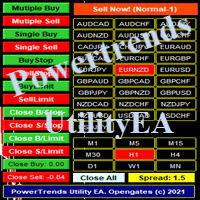
Power Trends System Utility EA
Power Trends System Utility EA is a semi-automated Expert advisor. The user can only open trades manually but it has signal board
where it informs the trader of any trade signals forming according to the current market's states. Many features were combined
together to make up this versatile ONE-in-ALL Utility EA:
1. Trade system that has signals provision:
It has in-built trade system that gives timely trade signals for the trader for profitable trades.
2. Tra
MetaTraderマーケットが取引戦略とテクニカル指標を販売するための最適な場所である理由をご存じですか?宣伝もソフトウェア保護も必要なく、支払いのトラブルもないことです。これらはすべて、MetaTraderマーケットで提供されます。

取引の機会を逃しています。
- 無料取引アプリ
- 8千を超えるシグナルをコピー
- 金融ニュースで金融マーケットを探索