 MetaTrader 5
 エキスパート
 インディケータ
 ライブラリ
ライブラリ
 ユーティリティ
 ウィジェット
 ルール
ルール
YouTubeにあるマーケットチュートリアルビデオをご覧ください
ロボットや指標を購入する
仮想ホスティングで
EAを実行
EAを実行
ロボットや指標を購入前にテストする
マーケットで収入を得る
販売のためにプロダクトをプレゼンテーションする方法
MetaTrader 4版新取引ユーティリティ - 13
 以下はMetaTrader4での外国替取引を簡素化する取引プログラムです。以下のリストのユーティリティにカーソルを合わせて、説明と目的をご覧ください。
What It Does: Automatically identifies key swing points and draws trendlines to highlight market structure. It marks recent highs and lows with clean visual cues and extends trendlines in real-time — helping you see potential turning points, support/resistance, or breakout zones at a glance. Key Features: Automatically draws trendlines based on recent price action Marks important swing highs and lows with visual dots Updates in real time at each new candle Fully customizable settings
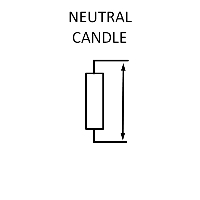
Neytral sham - Bu kunlik savdo uchun mo`ljallangan bo`lib, Neytral sham asosida daraja yaratilib ushbu darajani qaysi tarafga buzib o`tishiga qarab bozorga kirish metodlari qo`llaniladi - Taymfreym M15, H1, H4 - Valyuta paralarida qo`llash yaxshi natija beradi - Grafikda CTRL+Y vertikal darajalar yoqiladi Muhim: Savdo qilishdan oldin bektest qilishni unutmang!

トレードックスai あらゆる取引でスリッページコストを回避できると想像してみてください。これは、市場価格で実行されるほぼすべての取引に適用される避けられないコストです。 「スリッページ」という用語は、取引の注文価格と実行価格の差を表します。平均では 1 ピップまたは 10 ベーシス ポイントですが、それよりも高い場合もあります。
TRADEX AI はまさにそれを実現します。注文を開くたびにスリッページを回避し、場合によっては 20 ベーシス ポイントにもなるスリッページ コストを直ちに節約します。 また、人工知能を活用して市場参入価格も向上させます。 TRADEX AI は、体系的にスリッページの影響を受ける市場で実行される取引の非効率性とコストの問題を解決します。 すべての注文からスリッページ コストを回避することを想像してください。コストの節約が最初のメリットです。ある。 1 日あたりおよび 1 か月あたりに実行する注文数はどれくらいですか?これに、各注文で平均 1 ピップまたは 2 ピップの節約を掛けます。
TRADEX AIの利点:
+ MT4とMT5で動作します +

【MT4版】ワンクリック・テーマチェンジャー:チャートの見た目を一瞬で切り替え!
「チャートの色設定、もっと手軽にできたらいいのに…」
そんなトレーダーの声にお応えして、チャートの配色テーマをワンクリックで瞬時に切り替えられる便利なインジケーター「テーマチェンジャー」のMT4版が登場しました!
MT5版が必要な方は以下のリンクをクリックしてください。
MT5 Theme Changer
複雑な設定画面を開く手間はもうありません。チャート上に表示されるボタン一つで、あらかじめ用意された複数の美しいカラーテーマに、あなたのチャートが一瞬で生まれ変わります。
こんな方におすすめです!
気分や分析手法に合わせて、チャートの見た目をサッと変えたい方 複数の配色パターンを試して、自分に最適な表示を見つけたい方 日中と夜間で見やすいテーマを使い分けたい方 チャート設定にかかる時間を少しでも短縮し、分析に集中したい方 MT4の標準の配色に飽きてしまった方
主な機能と特長:
ワンクリックで簡単テーマ切り替え:
チャート上の「Theme: (テーマ名)」ボタンをクリックするだ
FREE

Ultimate Fibonacci EA & Trade Assistant + Manager - With Advanced Pattern Recognition In trading, as in any craft, mastery requires the right tools. In Fibonacci based trading, The Ultimate Fibonacci EA is that tool. Discover the power of precision trading with the Ultimate Fibonacci EA, an innovative Expert Advisor (EA) for the Forex market. This advanced tool is designed to work in harmony with your Fibonacci retracement tool, providing dynamic responses to market movements and pattern recogn

Overview Many proprietary trading firms enforce strict rules on daily drawdown limits. This Expert Advisor (EA) is specifically designed to help traders comply with such requirements by actively monitoring daily drawdown and profit levels. It automatically manages open positions to ensure adherence to prop firm criteria, enhancing risk control and account longevity. Key Features
Daily Performance Monitoring:
The EA continuously calculates and displays the current day's drawdown directly on you
FREE

TradeManager 1.0 is an Expert Advisor for MetaTrader 4 y 5 that streamlines real-time trade management. Through a graphical control panel, you can send market and pending orders, move stop losses to breakeven, and automatically calculate position size based on your risk settings. Below is a comprehensive overview of its features and input parameters.
Key Features Market Orders & Pending Orders BUY/SELL Buttons : Instantly open long or short positions at market. BUY STOP / SELL STOP / BUY LIMIT

MRKD Vector — Smart Trade Management Utility MRKD Vector is a powerful and intuitive order execution tool designed for efficient manual trading in MetaTrader 5. Built with precision and speed in mind, MRKD Vector simplifies trade management by giving you full control over entries, stops, and targets — all from a sleek interface. Key Features: Quick Order Execution
Place trades with ease using a clean, fast interface built for active traders. Intuitive SL, TP, and Lot Size Control
Adjust sto
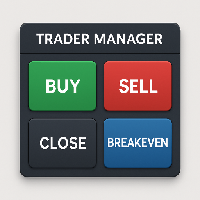
Trader Manager Panel for MT4 – Smart, Fast & Intuitive Trade Control Boost your trading efficiency with Trader Manager Panel , a compact and user-friendly trading assistant designed for MetaTrader 4. Whether you're a scalper, day trader, or swing trader, this tool gives you total control over your trades with one-click execution and risk-aligned automation. ️ Core Features: One-Click Trading Panel
Easily accessible UI in the top-right corner with buttons to Buy , Sell , Close All , and s

With this Expert Advisor, you can seamlessly integrate various channel, arrow, and reversal indicators. It offers the flexibility to use all popular channel trading strategies, while also providing powerful tools to customize your trading conditions and risk management system. The Expert Advisor opens orders when the price crosses the channel boundaries. Multiple crossing conditions are available for customization: Price touches boundary on re-entry into the channel Price touches boundary on
Unlock the full potential of your trading strategy with this all-in-one solution: Trade History Exporter + Pro Excel Trading Dashboard . Whether you're trading manually or using Expert Advisors (EAs), this powerful tool allows you to analyze, optimize, and improve your performance with professional-grade metrics and interactive dashboards. With the Pro Excel Dashboard, you can deeply analyze your trade history—manual or algorithmic—and even evaluate any EA’s performance using backtest resu
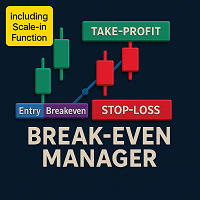
Whether short-term or long-term, you will eventually need to secure your position. The more positions you have open, the more difficult it becomes to calculate the breakeven point. That’s where the Break Even Manager comes in — it calculates your average price for you in milliseconds and sets your stop loss to breakeven. Depending on your strategy, you can choose the profit buffer distance. Try it out now !

MRPHN Overdosed is a trend-following Expert Advisor built for XAUUSD , powered by a custom Supertrend indicator : iMRPHN (included for free). It combines simplicity and flexibility, offering optional Martingale logic, configurable risk settings, and time-based trading filters — ideal for traders who prefer a set-and-forget approach.
Tested on : XAUUSD
Strategy : Trend-following using iMRPHN indicator
Trade Timing Control : User-defined trade start & end time
Take Profit / Stop Loss : Fully con

Swift Symbol Switch MT4 adds a clean, convenient symbol-switching panel directly to your chart, allowing you to move between Forex pairs, cryptocurrencies, commodities, metals, and other broker-supported instruments with a single click. There is no need to type symbol names, search through Market Watch, or repeatedly open MetaTrader menus. Simply select a symbol from the on-chart panel and the current chart updates instantly. The utility is designed for traders who monitor multiple markets and w
FREE

Margin Call Shield – Defend Your Margin on Your Terms
Margin Call Shield is a tool for MetaTrader 4 traders who want to decide for themselves which open positions are closed during margin call situations before the platform does so automatically based on its internal rules. By default, the broker or platform decides which positions to close, often using undisclosed algorithms. Margin Call Shield lets you set this order according to your own strategy. Why Was Margin Call Shield Created? In a

EchoTrade Local Trade Copier – Fast, Reliable, and Built for Seamless Account Management
Download free demo here to test with EURUSD trades on demo accounts
Read installation guide here
Copy Trades Like a Pro — Instantly, Accurately, and Safely Tired of juggling multiple MetaTrader accounts manually or missing trades between platforms? EchoTrade Local Trade Copier solves that — giving you a seamless, ultra-fast, and customizable trade replication system between MT4 and MT5 terminals

MultiSenseEA is an Expert Advisor that allows users to freely combine multiple indicators to create their own personalized strategy. MultiSenseEA enters trades based on the consensus of the selected indicators and additional filters such as breakout, RSI, ADX, news, and various other risk management functions. It features a visual information panel that keeps users informed of all necessary details, and it displays the win rate so users can easily compare different indicator strategies.

無料トライアル版ダウンロード
Copy Cat More (コピーキャット・モア) MT4 トレードコピー (Trade Copier) は単なるローカルのトレードコピーではありません。今日のトレード課題のために設計された 完全なリスク管理・執行フレームワーク (risk management and execution framework) です。プロップファーム (prop firm) のチャレンジから個人のポートフォリオ管理まで、堅牢な執行、資金保護、柔軟な設定、高度なトレード処理の組み合わせによって、あらゆる状況に適応します。 このコピーは マスター (Master、送信側) と スレーブ (Slave、受信側) の両モードで動作し、成行注文・指値注文、トレードの変更、部分決済、そして両建て決済 (Close By) 操作をリアルタイムで同期します。デモ口座と実口座、トレード用ログインと投資家ログインの両方に対応し、永続的トレードメモリ (Persistent Trade Memory) システムにより、EA・端末・VPS が再起動しても復旧を保証します。一意の

FoxForex Management is a professional trade management and risk management system for MetaTrader 4 and MetaTrader 5. It helps traders automatically calculate position size, manage risk with precision, execute trades with a single click, protect profits, and identify supply and demand zones in real time. Designed for both discretionary and professional traders, it combines trade execution, money management, and position protection tools within a single intuitive interface. Risk management setting
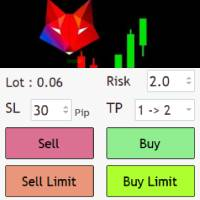
Risk management settings Automatic lot size calculation based on risk Open Buy and Sell positions with one click based on settings Open positions graphically (Buy Limit – Buy Stop – Sell Limit – Sell Stop) Real-time display of open positions' profit/loss and daily profit/loss Completely free You are welcome to explore and purchase from our other products as well. Please feel free to take a look and let us know if you have any questions.
FREE
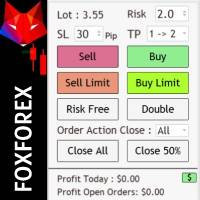
Risk management settings Automatic lot size calculation based on risk Open Buy and Sell positions with one click based on settings Open positions graphically (Buy Limit – Buy Stop – Sell Limit – Sell Stop) Risk-free open positions Open new trades with TP and SL from previous open trades Close all open trades with one click Save 50% of open trades' profit Setting to close open positions based on Sell or Buy positions Real-time display of open positions' profit/loss and daily profit/loss

"Rocket Fx MT4-T EA"
"This EA is your personal trade assistant that sends real-time Telegram alerts for all trading activity. It automatically detects whenever you: Open new trades (Market/Limit/Stop orders - Buy/Sell) Close positions (with profit/loss details) For every event, it sends formatted notifications showing: / Trade direction & exact order type Entry/exit prices Stop loss & take profit levels Profit/loss for closed trades Key advantages:
Works on any symbol (attac
The Asian Box Breakout EA is a powerful Expert Advisor designed to capitalize on market breakouts following the Asian trading session. It automatically draws a price range (box) during the low-volatility Asian session and sets strategic breakout entries for high-probability moves in the London and New York sessions. Key Features: Automatically detects and marks the Asian session range. Places pending Buy Stop and Sell Stop orders , and Buy Limit and Sell Limit based on breakout logic. Visual equ

IndiSig by Buffer
Detect Signals from a Custom Indicator by Buffer & Send notifications to Telegram Channel or Open orders
* Buy/Sell Buffer: You may get this info on MT4/5 Data Window (CTRL + D)
* MT5 version: Add the indicator first, then the EA
* MT4 version: Only works properly with default settings of the indicator
Join https://t.me/fxassistant_vn for more useful EAs!
FREE
Indicador que calcula e exibe dois níveis de preço: o preço médio das posições atualmente abertas e o preço de cobertura, definido como o preço necessário para zerar ou manter o lucro acumulado em determinado período. O cálculo do preço médio considera o volume e o preço de entrada das operações abertas, enquanto o preço de cobertura é ajustado dinamicamente conforme o lucro ou prejuízo realizado e não realizado no período analisado.
Versão MT5: https://www.mql5.com/pt/market/product/139405
FREE

EASY Insight AIO – スマートで手間いらずな取引のオールインワンソリューション 概要
数秒で市場全体——FX、ゴールド、暗号資産、指数、さらには株式まで——を、手作業のチャート確認や複雑なセットアップ・インジケーター導入なしにスキャンできたらどうでしょうか?
EASY Insight AIO はAIトレードのための究極のプラグ&プレイ型エクスポートツールです。市場全体のスナップショットを、クリーンなCSVファイルで一括出力。ChatGPT、Claude、Gemini、Perplexityなど、さまざまなAIプラットフォームで即座に解析できます。 ウィンドウの切り替えやグラフのごちゃごちゃしたオーバーレイはもう不要。自動エクスポートされる純粋で構造化されたインサイトだけで、無駄なチャート監視に悩まされず、スマートなデータ主導の判断に集中できます。 なぜEASY Insight AIOなのか? 本当のオールインワン
• セットアップ不要、インジケーターのインストール不要、チャートへのオーバーレイ不要。インストールして起動し、エクスポートするだけです。 マルチアセット対
The Asian Box Breakout EA is a powerful Expert Advisor designed to capitalize on market breakouts following the Asian trading session. It automatically draws a price range (box) during the low-volatility Asian session and sets strategic breakout entries for high-probability moves in the London and New York sessions.
Key Features:
Automatically detects and marks the Asian session range. Places pending Buy Stop and Sell Stop orders based on breakout logic. Visual equity tracker on chart. Fully c

Tired of manually adjusting stops? This powerful EA automatically secures your profits with dynamic trailing stops, protecting gains while letting winners run. No trade openings – just effortless risk management for your existing positions. Why Traders Love This EA Never Miss Profits Again Auto-locks gains as price moves in your favor. Eliminates emotional decisions – sticks to your predefined rules. Three Smart Trailing Modes Choose the method that fits your strategy: F
FREE

Easy Trade – シンプルかつ強力なスマートトレード管理 Easy Trade は、リスクを適切にコントロールし、スムーズな取引執行を実現したい MetaTrader ユーザーのためのオールインワン・トレードマネジメントソリューションです。
トレーダーの声をもとにゼロから設計された Easy Trade は、複数シンボルの取引を簡単に実行・監視・管理できるようにし、作業フローを複雑にしません。 手動スキャルピングでも、少数のセットアップを管理するポートフォリオでも、Easy Trade は賢明な判断と安定した成果に集中できるようサポートします。
⸻
なぜ Easy Trade を使うべきか? 精密なリスク管理:固定ロットサイズまたはパーセンテージによるリスク設定が可能。リアルタイムでリスクとリワード情報を確認。 バスケット型トレーリング:複数の取引の利益を監視。目標到達で部分利益を自動確保。 取引の自動記録:各取引をスクリーンショットで記録。ジャーナル記録やパフォーマンス分析に最適。 時限クローズ機能:指定日時での自動クローズ設定が可能。週末前や取引終了時に便利。 カス

Time Based Close - Automated Trade Management EA Overview
Time Based Close is a powerful and user-friendly Expert Advisor (EA) designed for MetaTrader 4 (MT4). It automates trade management by closing positions based on a user-defined holding time, while also protecting your account with a dynamic drawdown control feature. Whether you're a beginner or a seasoned trader, this EA simplifies your trading strategy and helps you manage risk effectively. Key Features Time-Based Closing : Automatical
FREE

BackTester FX — симулятор ручной торговли MetaTrader 4 .
Позволяет моделировать рыночные условия на исторических данных в тестере стратегий, вручную открывать и закрывать сделки, анализировать торговые стратегии без рисков потерять. Ключевые возможности Эмуляция ручной торговли в визуальном тестере стратегий Совместимость с любыми инструментами и таймфреймами Быстрое управление ордерами (открытие/закрытие) Настройки объема сделки, Stop Loss, Take Profit Работает как в тестере стратегий так и на
FREE

Golden Sizer By SKPAD – Calculateur et Gestionnaire de Position Intelligent Golden Sizer est bien plus qu'un simple outil de trading : c'est un assistant stratégique complet pour la gestion des risques et des positions. Conçu pour s'adapter à tous les styles de trading – du débutant au professionnel, du swing trader au scalpeur – il transforme votre approche des marchés grâce à une interface intuitive, une précision de calcul optimale et une exécution rapide. Compatible avec tous les marchés (F
FREE

EXTRCT – Telegram Signal to MT4
Let your chart listen, so you can live louder. Too busy to track Telegram trade signals? EXTRCT reads and trades them for you — directly in MT4. No Python. No API. No login required. Features: Freedom: Enter any public Telegram signal provider's channel username without needing to log in. Configurable Signal Format: Supports various signal formats, fully configurable via the settings. Symbol Filter: The EA will ignore signals for symbols not defined in the settin

RexCatch EA is designed to recognize all forms of boxes or rectangles with the specified color which will later be used for order execution, both buy and sell in the form of Supply and demand. This EA is also able to read indicators installed on the chart that display box or rectangle shapes, such as the Supply Demand indicator or boxes and rectangles that are made manually by giving them the color as specified in the EA setting.
Can only open 1 order and will reopen the order when the active

Download link for the sound files, it is to be placed in the MQL4 Sound Folder.
https://www.mql5.com/en/blogs/post/762237
Simplify your trading with Ultimate Price Alert , a lightweight and powerful utility tool designed for MetaTrader 4. This intuitive tool allows traders to set price alerts for all 28 major and cross forex pairs plus gold (XAUUSD) on a single chart, eliminating the need to open multiple charts and streamlining your workflow. Key Features: Multi-Pair Alerts on One Chart :

Auto SL/TP Manager EA – Gestion Automatique Intelligente Auto SL/TP Manager EA est un Expert Advisor conçu pour automatiser la gestion des commandes avec une efficacité maximale et une grande discrétion. Il gère automatiquement : Le Stop Loss (SL) et le Take Profit (TP) Le Profit Lock (verrouillage progressif des bénéfices) Le Trailing Stop avec plusieurs méthodes avancées L' affichage masqué du SL et du TP pour plus de discrétion (non visible par le courtisan) C'est l'outil idéal pour les

ONECLICK COPIER EA – UNIFIED VERSION 1.0 Category: Trade Utility | Type: Local Trade Copier for MT4
Created by fxdancer (Hani Mabad) Version: 1.0 – May 2025
OVERVIEW OneClick Copier EA is a local trade copying utility, not a trading strategy. It is designed for manual traders, fund managers, or multi-account users who want to mirror trades across MT4 terminals running on the same computer.
This EA does not generate signals or place trades by itself. Instead, it acts as a bridge between accou

RS Trade Copier - 超高速 で動作するローカルトレードコピー機。 真の グラフィカルインターフェース搭載。口座番号の手動入力はもう終わりです。200項目を超える長大なパラメータリストとも、これでおさらばです。 複数のMT4とMT5ターミナル間で取引操作をコピーするための、信頼性が高く柔軟なツールです。経験豊富なトレーダーやシグナルサービス、個人投資家に適しています。1つまたは複数のシグナルソース(Provider)から1つまたは複数のレシーバー(Client)へ、高い精度と最小限の遅延で 取引を同期 します。シンプルな自動設定と高度な手動設定の両方をサポートしています。手動または他のEAで開かれた注文に干渉しません。すべての処理は MT4内でローカルに 行われ、サードパーティサーバーを使用しません。 RS Trade Copierと他のソリューションの比較 RS Trade Copier 他のソリューション 設定 ビジュアルステップバイステップウィザード。
設定時間は約1分。 200以上の分かりにくい入力パラメータ。
設定時間は約20分。 速度 非同期トレード操作。*

Trade Closer EA v2.0 – MT4用 オールインワン取引管理ツール
**バージョン:**2.00 | サポート: +1786 6057858(WhatsApp)
ワンクリックで取引を即座に管理・コントロール・クローズ! 概要:
Trade Closer EAは、MetaTrader 4(MT4)向けに設計された高度な取引管理エキスパートアドバイザーです。ワンクリックでポジションを素早くクローズしたり、条件に応じてトレーリングストップを自動適用したりできます。インタラクティブなボタン式インターフェースで、スキャルパー、デイトレーダー、スイングトレーダーに最適です。 主な機能: ワンクリック操作で簡単管理: すべての取引をクローズ
買い(Buy)ポジションのみクローズ
売り(Sell)ポジションのみクローズ
すべての保留注文をキャンセル
利益が出ているポジションのみクローズ
損失が出ているポジションのみクローズ
️ ヘッジされたペアポジションを同時クローズ
ダイナミックトレーリングストップを適用 カ
FREE

RealSlippage: Master Your Trading Precision! Uncover real broker slippage and elevate your strategies! Designed for MetaTrader 4, RealSlippage tracks price discrepancies between orders and executions with unmatched accuracy. A must-have for traders using stop-loss or running trading bots, this tool helps you identify optimal brokers and timing while minimizing unexpected losses. Try this powerful indicator now and take your trading to the next level!

Trade History Export: The EA retrieves all historical orders using the OrdersHistoryTotal() and OrderSelect() functions. For each order, the following details are exported: Index: Sequential number of the trade. Order Ticket: Unique identifier of the order. Symbol: Trading instrument (e.g., EURUSD). Lot Size: Volume of the trade. Open Time: Time when the trade was opened. Trade Type: Buy or Sell. Open Price: Price at which the trade was opened. Close Time: Time when the trade was closed. Clos
FREE

NY Open Breakout EA is a fully automated trading robot specifically designed to capture strong breakouts during the New York trading session, focusing on major forex pairs and indices correlated with the US Dollar. Key Features: Automatically defines the trading zone based on customizable time settings. Opens trades when the price breaks above or below the identified zone. Smart built-in risk management with automatic stop loss and take profit settings. Advanced Martingale loop system to rec

Copy signals from Telegram channel to MT4/MT5 (Telegram bot must be added as an Admin in the channel) Input * Telegram bot token: Get your bot token by chatting with @BotFather * Multi- order for multi-tp signals * Signals filter by "not included text" * Option to Modify/Close by Reply message * Range Entry Mode: No open order if the price is out of range Setup on your MT4/MT5: - MT4/MT5 => Tools => Options => Expert Advisors => Tick on Allow Algo Trading & Allow WebRequest, add API Telegram

Description: Advanced Close Logic EA monitors your open market orders per symbol, displays the counts directly on your chart, and automatically closes orders when configurable thresholds are met. It supports both global and per-symbol settings for direction, profit/loss filtering, and whether to close all matching orders or only those that passed your filters.
External Parameters:
1. GlobalMaxOpenOrders (int) - Sets a single maximum number of open market orders for every symbol. - 0 = us

Overview This expert advisor (EA) monitors open positions and closes them based on the total floating profit or loss per symbol. It allows both global and symbol-specific configurations to control risk or lock in profits automatically. Core Functionality Tracks total floating P/L (profit or loss) per symbol in account currency. Automatically closes positions if a defined threshold is reached. Fully customizable per symbol via the CustomizedSettings string. Input Parameters GlobalTakeLoss (double

Letstrailbuddy is trade management tool aiming at helping you manage your trade better. FEATURES: TakeProfit: set in points. allow to set takeprofit at your desired level. TrailingDept: uses three method of trailingstop: moving average, atr and points trailing methods. to select, set to true. set the method you don't need to false. Breakeven settings: set to true if needed. Closing Orders: uses two methods: set close everday to true if you want to close trades everyday at a certain time.

Description: TradeMatrix Commander is an advanced Expert Advisor (EA) designed to enhance trading efficiency and management on the MetaTrader 4 platform. This EA offers a comprehensive suite of tools for position management, risk control, predictive analysis, multi-account synchronization, and mobile dashboard integration, all accessible through an intuitive, customizable interface. Key Features: Position Management: Easily close profitable positions, close all positions, or close by a specified

EASY Insight – スマートなトレードはここから始まる 概要
もし数秒で市場全体(FX、ゴールド、暗号通貨、指数、株式まで)を、手作業のチャート確認なしでスキャンできたらどうでしょう? EASY Insight は、インジケーターデータを実践的なトレードインテリジェンスに変換する、AI対応のエクスポートツールです。無駄な推測や視覚的な混乱に疲れたトレーダーのために設計されており、市場全体のスナップショットを1つのクリーンなCSVファイルで提供します。 これまでとは全く違う新しいトレード体験です。ウィンドウの切り替えも、グラフのごちゃごちゃしたオーバーレイもありません。FX Power (FXP)、FX Volume (FXV)、FX Dynamic (FXD)、FX Levels (FXL)、そして非FX資産用のIX Power (IXP) ― あなたがすでに知っているツールから得られる、純粋に構造化されたインサイトだけ。 さらに便利さを求めるなら、 EASY Insight AIO を選んでください。すべてが1つのインストールに含まれ、設定不要。チャート上にインジケータ

Fast Alerts MT4 — 一度の購入で、一生のアラート。 かつて、相場の一歩先を行くには、高額なプラットフォームに毎月課金するしかありませんでした…
1ヶ月20ドル、次の月は50ドル。数件のアラートを受け取るためだけに。
価値に対して払っていたわけではなく、他に選択肢がなかったからです。
でも、もうその時代は終わりました。 トレーダーがトレーダーのために作ったこのツールは、あなたが気になる価格帯にアラートを自由に設定でき、価格がゾーンに入ったミリ秒単位で通知を受け取れます。 チャート上で価格帯を設定し、画面から離れても、価格がそのゾーンに入った瞬間にリアルタイムで通知を受け取れることを想像してください。
チャンスを逃すことも、月額費用ももうありません。 Fast Alerts MT4の特徴: 独自のトレーディングレベルに基づいたカスタムアラート
通知回数に制限のあるサブスクとはお別れ
一度の購入で永久利用
トレード経験のある開発者による開発
無料のデモをダウンロードして、実際に試してみてください — 本当に使えます プライスアクション、需給、サポレジ…どんな手法で
FREE
While using the Double Action EA, you can take advantage of this free tool available on the market to plan your trades and potentially double your account. Simply download it, attach it to a chart, fill in the input fields, and you’ll receive four breakeven points, and profit. Then, apply those levels to the Double Action EA. Trade with confidence, knowing your risk in advance.
The inputs include: • Lot Sizes: INITIAL TRADE : (Lot1), TOPUPS 1-3: (Lot2, Lot3, Lot4). • Grid Sizes: Grid1, Grid2,
FREE
This Ea is base on RSI/GPT Advanced. you can run it on aud/usd pair, on 4 hour time frame. The input is included when downloading the ea. you can try test it on other pairs. In the bottom of the input you will need to insert the equity levels when you run it if you are up with the profit it will turn green. When you are down on the profit the equity will turn red , that way you got control on the situation.
BackTester Pro is a manual trading simulator for historical data in the MetaTrader 4 Strategy Tester.
It allows you to simulate market conditions, manually open and close trades, and analyze strategies without risking your deposit. Main Features Manual trading emulation in MT4 visual strategy tester Compatible with any symbols and timeframes Fast order execution (open/close) Customizable lot size, Stop Loss, and Take Profit Integrated logging and trade statistics in MT4 tester Perfect tool for s

Trade Terminator — Instant One-Click Trade Closer for MT4
Struggling to exit trades quickly during market spikes?
Trade Terminator gives you the power to close all open positions instantly with a single click — saving your profits and protecting your account in fast-moving conditions! Built for speed , security , and simplicity , Trade Terminator ensures you're always in control. Features : One-Click Termination: Instantly close all open BUY and SELL trades on the active chart symbol.
FREE

Description Simple Trailing Manager is a professional MetaTrader 4 Expert Advisor that automatically manages trailing stops for your open positions. It provides a clean, visually intuitive interface showing exactly where your trailing stops will activate, helping you monitor your risk management strategy at a glance. Unlike standard trailing stop features, this tool gives you a visual preview of where your trailing stops will be placed before they activate, allowing you to plan your trades more
FREE

MQL5ブログ: https://www.mql5.com/en/blogs/post/761446 MT4版: https://www.mql5.com/en/market/product/136790 MT5版: https://www.mql5.com/en/market/product/136791
Time Wizardは、スピード、タイミング、そして執行コントロールを一つの洗練されたダッシュボードで実現したいトレーダーのために開発された、プロフェッショナルなトレーディングアシスタントです。
このエキスパートアドバイザーは、イベントベースのトレーディング、スケジュール執行、そして高速な半自動注文管理のために設計されています。注文を事前に準備し、正確な執行時間を設定し、複数の指値注文を発注し、ストップロスとテイクプロフィットでリスクを管理し、チャート上のコンパクトなインターフェースからすべてを監視できます。
経済イベント、セッション開始、ブレイクアウト、あるいは独自のカスタムスケジュールなど、どのようなタイミングで取引を行う場合でも、Time Wizardは構造と規律に

Precision Candle Timer is a must-have visual indicator that accurately displays the remaining time of the current candle on your chart. Perfect for traders who need precise timing for entries and exits , especially in scalping , day trading , or candle-formation-based strategies. Designed to be fully customizable, you can easily change its position, color, font, and size to match your trading layout. It adds clarity, control, and responsiveness to your trading routine. Key Features: Precise t
FREE
The Order Info Box utility is designed to conveniently control the orders placed. If there are orders, the utility builds graphical informers for each order, indicating
- the order type (position direction);
- the order volume;
- the profit (if the order is in the market);
- optionally the order magic;
- optionally the order comment.
In addition, the utility builds informers for TakeProfits and StopLosses of orders, indicating the profit or loss that will occur when this TakeProfit or StopLoss i
FREE

This Ea. is very unique in his function, and not designed to be traded automatic. as the first option. It is a tool designed to be used by a mild experienced Forex trader that can: Trade manual or automated and can try to find a good entry price levels Trader that can enter the market using market or pending orders at specify price levels. Please watch the video about using the excel calculator when using the breakeven technic . The same idea used for the breake

Fibo Pending EA turns any Fibonacci Retracement you draw on the chart into a fully managed grid of pending orders — with one click. Draw your Fibo, set the levels you want to trade, and press Place Pending . The EA reads the retracement directly from the chart, calculates Buy Limit or Sell Limit prices for each level you've enabled, and sends the orders. Stop Loss and Take Profit are then applied automatically based on the Fibo levels you choose — no manual order entry, no manual SL/TP dragging.

The Time Zone indicator allows users to set specific time periods for major trading sessions (Asian, European, North American) and display them with distinct colors on the chart. Users can choose how many days of trading zones to show, set the start and end times for each session, and define the color to represent each trading period. The chart refreshes at user-defined intervals to ensure the time zone data is accurate and current. Key Features: Display Trading Zones: Users can choose to

Patrex Pro: Maximize Your Trading Potential Patrex Pro is an advanced trading bot designed to help traders optimize their trading strategies and maximize their potential returns. With its cutting-edge technology and user-friendly interface, Patrex Pro is the ultimate tool for traders seeking to elevate their trading game. Get MT5 version Key Features: 1. Position Hedging: Patrex Pro allows users to hedge their positions based on their individual risk tolerance and market analysis. 2. Advanced R

EchoTrade Telegram to MT5 Copier Seamless, Instant, and Reliable Signal Copying - Direct from Telegram to MetaTrader 4! The product does not run in the strategy tester but you can get free trial version here for testing before purchase.
Tired of manually executing trades from Telegram signals? EchoTrade automates the process, instantly copying trades from any Telegram channel or group directly into your MT5 account—accurately, efficiently, and without delay. Key Features: Universal Compatib
DYJ NetPilot is an Expert Advisor (Utilities) developed for the MetaTrader platform, designed to optimize trade exits by dynamically calculating the weighted average price (Pmix) of all open positions and adjusting exit levels accordingly. Key Features: Pmix Calculation: Computes the weighted average price (Price Mix) of open positions, providing a clear reference point for trade management. Dynamic Exit Strategy: Identify the prevailing direction (long/short positions) within open orders and es

Bingo – Smart Exit Automation for MT4 In the realm of trading, having a reliable exit strategy is just as crucial as finding the right entry. Bingo, an expert advisor for MT4, is designed to automate your trade exits with precision—ensuring you lock in profits and minimize losses without second-guessing your decisions. With advanced trailing take profit and stop loss, Bingo takes the complexity out of trade management, helping traders maintain discipline and execute their strategies flawlessly.
FREE

Stable Helper – Keep Your Trading Connection Uninterrupted! Ensure your MT4 stays connected and stable automatically! Stable Helper works silently in the background, monitoring your connection, rescanning servers, and even restarting MT4 if necessary—all without manual intervention. Designed to minimize downtime and optimize server performance , Stable Helper protects your trades from unexpected disconnections and latency issues. Key Features: 1️⃣ Real-Time Connection Monitoring
Constantly
FREE

Symbol Information The Symbol Info indicator provides an intuitive panel on the chart that displays essential information about the current trading symbol. This includes basic trading data, instrument properties, and trading rules, all designed to give traders a clear view of the market conditions and product specifications. Key Features: Symbol Name and Description:
The indicator displays the name and a detailed description of the current trading symbol, helping users identify the instrume

This tool can delete any object drawn on MT4 platform charts. you can delete: Line_Objects (Vertical_Line, Horizontal_Line, Trend_Line, TrendLinebyAngle, Cycle_Line) Channel_Objects (Fibo_Channel, Equidistant, Linear_Regression, Standard_Deviation, Andrews_Pitchfork) Gann_Objects (Gann_Line, Gann_Fan, Gann_Grid) Fibonacci_Objects (Fibo_Retracement, Fibo_TimeZones, Fibo_Fan, Fibo_Arcs, Fibo_Expansion) Shapes_Objects (Rectangle, Triangle, Ellipse, Text, Label) Arrows_Objects or you can Delete_All_
FREE

MT4 Position manager
- Open/Sell buttons for open orders - Lot size, SL, TP for positions - "Set Breakeven" button for set SL on all opened positions - "Set TP" button for set TP on all opened positions - "Close Half lot" button for closing all open positions half lot size( opened 1.0Lot, click the button and automated close 0.5Lot) - "Positions Half Close" button for close open positions half qty. (Opened 10 position, ckick the button and automated close 5 positions) - "Close All" button for
FREE

it is hard to do full margin strategy in MT4, because you cannot close all orders easily. Unlock the power of full margin trading with confidence using FullMargin RiskGuard , a cutting-edge Expert Advisor (EA) designed specifically for beginner traders on the MetaTrader 5 platform. Inspired by the renowned trading style of Papip Celebes, this EA empowers users to execute full trade strategies while safeguarding their capital with advanced risk management features. Key Features: MaxFloatingLos
FREE

• Please test the product in the Strategy Tester before purchasing to understand how it works.
• If you face any issues, contact me via private message—I’m always available to help.
• After purchase, send me a screenshot of your order to receive a FREE EA as a gift.
Introducing the ultimate Trade Management Panel designed to streamline your trading operations and boost your efficiency! Our advanced panel is packed with powerful features to simplify your trading tasks and provide real-t
MetaTraderプラットフォームのためのアプリのストアであるMetaTraderアプリストアで自動売買ロボットを購入する方法をご覧ください。
MQL5.community支払いシステムでは、PayPalや銀行カードおよび人気の支払いシステムを通してトランザクションをすることができます。ご満足いただけるように購入前に自動売買ロボットをテストすることを強くお勧めします。

取引の機会を逃しています。
- 無料取引アプリ
- 8千を超えるシグナルをコピー
- 金融ニュースで金融マーケットを探索