 MetaTrader 5
 エキスパート
 インディケータ
 ライブラリ
ライブラリ
 ユーティリティ
 ウィジェット
 ルール
ルール
YouTubeにあるマーケットチュートリアルビデオをご覧ください
ロボットや指標を購入する
仮想ホスティングで
EAを実行
EAを実行
ロボットや指標を購入前にテストする
マーケットで収入を得る
販売のためにプロダクトをプレゼンテーションする方法
MetaTrader 4版新取引ユーティリティ - 25
 以下はMetaTrader4での外国替取引を簡素化する取引プログラムです。以下のリストのユーティリティにカーソルを合わせて、説明と目的をご覧ください。
The Change Chart Timeframe EA is a powerful tool that provides users with the ability to effortlessly modify and customize chart timeframes according to their trading strategies and personal preferences. You can select individual charts to modify or apply changes to all charts simultaneously, saving valuable time and effort. This EA is just a tool to help with your auto trading. It doesn't open any trades, so nothing happens if you backtest it. Any setting marked with "(pro)" will use its
FREE

操作技术,资金管理,风险管理是交易系统三大要素,其中风险管理是交易中可以说是最重要的一部分,想要在市场上赚钱,首先要先活下来,要先活下来就要先做好风险管控。 相信做交易的朋友都会遇到风险管理的问题: 1. 不设置止损,亏了继续硬抗,如遇到单边行情,亏损便会大幅扩大,甚至爆仓。 2. 亏了一定资金后,开始着急想快点赚回来,开始重仓 或者频繁操作 ,结果亏得更多。 3. 赚了一定资金后,信心开始膨胀, 忘记做单规则 ,开始加仓操作,结果回吐利润。
这也是作者曾经经历的,所以把这些痛点总结出来做成工具,希望能帮助到大家。如果你是超级自律的人,能按照既定的系统规则交易,也能严格做好风控,也许不适合你,但 如果你正在经受这样的痛苦和懊恼,不妨试试这款工具,也许能帮助到你。
该工具具备以下功能: 1. 控制总资金回撤,当达到设定回撤时,会关闭所有持仓,并禁止开仓交易。 2. 当日资金回撤比例控制,对于日内交易者,可以帮助做好当天的资金回撤控制。 3. 当日资金盈利达到一定比例后可限制进行交易,以免头脑过热,回吐利润。 4. 下单仓位控制,可按照设置值来控制总的持仓大小。 5. 交易品种限制
The Change Chart Timeframe EA is a powerful tool that provides users with the ability to effortlessly modify and customize chart timeframes according to their trading strategies and personal preferences. You can select individual charts to modify or apply changes to all charts simultaneously, saving valuable time and effort. This EA is just a tool to help with your auto trading. It doesn't open any trades, so nothing happens if you backtest it.
Parameters Working hour setting Start hour:

1. TrendLine Monitoring : The EA can detect immediate breaks above or below any specified trend line drawn on the chart. It can monitor up to 25 trend lines simultaneously.
2. Automatic Take Profit and Stop Loss : The EA includes functionality for setting predetermined levels of take profit and stop loss. This feature helps to establish and maintain favorable risk-to-reward ratios.
3. Trailing Stop : A trailing stop mechanism is implemented, allowing you to secure profits by automatically adj

Need help managing your risk? Use Risk Helper
Drag this script onto your pair, enter your desired pip target, and open a trade. Once your pip target has been reached the Risk Helper will take partials profits, move the stop loss then double the profit target so it can do this process again on the next hit. A notification will be sent for every action the Risk Helper takes. Once the trade has been reduced to 0.01 lot size, Risk Helper will proceed to only move your stop loss for every pip tar

Introducing the "KFX Trade Manager" expert advisor for MetaTrader 4 (MT4), a comprehensive solution for advanced trade management and risk control. This powerful tool is designed to enhance your trading experience by automating various aspects of order handling, profit optimization, and alert notifications. With the "KFX Trade Manager," you can take your trading to the next level and streamline your operations for improved efficiency and better risk management. Key Features: Trade Management Set
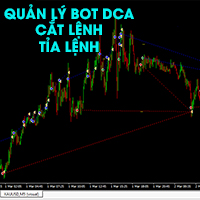
Bot chuyên quản lý và trị các thể loại DCA Kích hoạt bot theo level 1, level 2, level 3 Kích hoạt theo tiền hoặc theo % tài khoản tùy chọn Tất cả tự động Cắt tỉa lệnh theo cặp giúp hạ lot Đóng cắt lỗ thông minh Khóa lợi nhuận ngày Dùng lợi nhuận để đóng dần lệnh lỗ Giúp bot DCA về bờ sau 2-4 nhịp sideway Nhiều phương án đóng - cắt tỉa lệnh thông minh Phù hợp với tất cả các loại bot DCA, Martingel, Grid... Giúp không bay màu tài khoản Em chưa có thời gian viết kỹ tính năng. Mong mọi thông cảm. E

リスク管理の力を体感しましょう - Price Actionによるストップロスのポジショニング! エントリーポイントを正確に把握する一方で、適切なタイミングでポジションを解消することに迷った経験はありませんか?心配ご無用です!多くのトレーダーが日々この課題に直面しています。 しかし、喜ばしいことに、Price Actionに基づく当社のリスク管理ツールがこの問題を解決します。最適なエントリーポイントの特定に集中する一方で、当社のツールがオペレーションの終了を管理しましょう。 当社のPrice Actionに基づくリスク管理ツールは、単に最後のトップ/ボトムに初期ストップを配置するだけでなく、市場のトレンドを追跡し、トレンドに沿って新しいトップやボトムが形成されると自動的にストップを再配置します。これにより、可能な限り利益を最大化することが保証されます。 偉大なトレーディングの先駆者、 Jesse Livermore、Richard Dennis、Paul Tudor Jones、Larry Williams などのような大立者からインスピレーションを受けましょう。彼らは自身のオペレーシ

Position Calculator calculates how many lots to trade based on: Entry and stop-loss levels Risk tolerance Account size (balance, equity, or even your savings account) Account currency Currency exchange rates - The main tab of the panel provides the primary control over the EA's functions and serves to output the most important calculation results: the position size, risk, reward, and risk-to-reward ratio. - The risk tab can help you assess current and potential risk and reward profile. Using a s
FREE

Details of each condition
Type 1. Set no use Hedging Martingale, to open the order by yourself only through the push button. TP and SL follow setting.
Set Setting_Hedging =false;
Use_HLine =false;
Set Setting_TrailingStop =false; if not use.
Type 2. Semi Auto Recovery Zone You have to open the order by yourself only through the push button.
If in the wrong direction and Set true on Hedging Martingale, EA will fix the order with the zone system by use Hedging Martingale
Set Se

Have you ever wanted to back-test a strategy but never wanted to risk real money? And the thought of using a demo account is exhausting as real time markets develop your skills slowly. This utility will help you develop your strategy faster and will help determine if the strategy works long-term by simulating real trading through back-tests. This will save you time as you can back-test strategies from previous price data. In order to set an sl during the backtest you have to click on the sl b
FREE

This program sends alerts to telegram when a specified profit target or drawdown level is reached. The profit target and drawdown level are specified as percentages of the daily starting balance in the inputs. When you purchase feel free to contact me for any assistance required with the setup. I am open to adding custom functions limited to profit or drawdown alerts
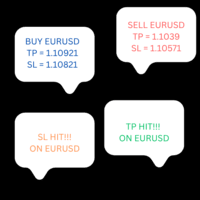
This product copies newly entered trades on MT4 and sends them to a telegram group or channel instantly. It also sends alerts on closed trades as TP Hit or SL Hit when they close with profit or loss. To use the product you first need to create a telegram bot and get the bot token. The bot token should be entered in the inputs on the token field. The chat ID to the telegram group/channel should be entered in the inputs on the chat_ID field. This product is suitable for instant sharing of trade si

ANALOG ASSASINS IS A NASDAQ AUTO TRADING SYSTEM. IT IS TRND SYSTEM THAT DOES WELL TO KEEP OUT OF THE CHOPPY PARTS OF THE MARKETS. IT ALSO HAS A AUTOMATIC STOP LOSS THAT FOLLOWS AT 1.5 * ATR. WITH A BACKTESTING RESULT OF OVER 30% DURING A YEAR WHERE THE NASDAQ HAD NEGATIVE RETURNS. TARDES ON H1. MORE VERSIONS OF THIS SYSTEM WILL BE POSTED, SPECIFICLY FOR D1 TRADERS..... DOWNLOAD AND ENJOY!

FX28 Trader Dashboardをご紹介します - あなたの究極のトレードマネージャー FX28 Trader Dashboardは、あなたの外国為替(Forex)取引を新たな高みに押し上げるために設計された包括的で直感的なトレードマネージャーです。経験豊富なトレーダーでも、まだ金融の旅を始めたばかりの方でも、この強力なツールは取引活動を効率化し、意思決定プロセスを向上させるために開発されました。 主な特徴: ユーザーフレンドリーなインターフェース: FX28 Trader Dashboardは、あらゆるレベルのトレーダーに適したユーザーフレンドリーなインターフェースを備えています。さまざまな機能やツールを簡単にナビゲートし、わずか数クリックでトレードを完全にコントロールできます。 リアルタイムマーケットデータ: リアルタイムのマーケットデータフィードで先を見越してください。通貨ペア、トレンド、マーケットの変動に関する最新の情報を提供し、情報を元に自信を持ってトレードを実行できます。 高度なトレードアナリティクス: FX28 Trader Dashboardでは、高度なアナ
Practice Simulatorは、バックテスト、トレード練習、そしてリアルトレードに対応したオールインワンのトレードシミュレーターです。これからトレードを始める初心者から、データ分析を行う経験豊富なトレーダーまで、幅広いレベルに対応します。 FXトレード、相場分析、戦略の最適化など、さまざまな目的に利用できます。市場が休みの日でも、いつでもシミュレーショントレードが可能。シンプルでありながら多機能なインターフェースにより、リスク管理やトレードをサポートします。 詳しい情報については、 セットアップ&ユーザーガイド をご覧ください。 主な機能 シミュレーショントレード – 休日でもいつでもトレードできます。複数チャートを同期してMTFにも対応。 バックテスト – 過去のデータで戦略をテストし、過去のトレードを再現できます。 リアルトレード – 同じインターフェースを使用して、スムーズにリアルトレードへ移行できます。 使いやすいインターフェース – ワンクリックエントリー、ドラッグ&ドロップによるTP/SL設定、一括決済に対応。 注文情報ツールチップ – BUY/SELLや指値・逆指

Hide Scale - チャートスペースを最大化したいトレーダーに最適なツール Hide Scaleの使い方 時間軸を非表示にするには「T」を、価格軸を非表示にするには「P」を押します。 各機能の新しいキーを選択するために対応するボタンをクリックして、キーボードショートカットをカスタマイズすることができます。 両方のスケールを同時に非表示にする場合は、両方のオプションに同じキーを割り当てることができます。 スケールを再表示するには、対応するキーを再度押すだけです。 このツールの開発理由 当社のインジケーター Sweet VWAP を使用するトレーダーが、トレーディング画面で利用可能なスペースを最大化するためにHide Scaleツールを開発しました。 私たちの目的は、トレーディング画面のスペース不足に苦しむトレーダーにとって、より生産的かつ快適な作業環境を作り出すことです。 このツールは、ローソク足の形成と価格の変動の監視に限定される傾向があるプライスアクションテクニックを使用するトレーダーにとって特に有利です。 Hide Scaleを使用すると、スケールを簡単に制御できます。 一つ
FREE

この製品は、手動で開かれた各取引、特にそれが接続されているチャート上で自動ストップロスを設定できるように設計されていることに注意してください。 未決注文に関しては、未決注文が有効化された後にのみストップロスが設定されます。 希望のストップロスをポイント単位で設定するには、InpStopLossPoints パラメーターを使用できます。
この商品はGBPUSDなどの通貨ペアのみでテストされていることに注意してください。 他のシンボルでも機能する可能性がありますが、テストされていないため、目的に応じて機能するかどうかを判断するのはあなた次第です。 この製品にはいかなるクレームや権利も与えられないため、実際の口座ではなくデモ口座で製品をテストすることをお勧めします。
この製品を使用するかどうかは完全にお客様の判断によるものであり、弊社ではいかなる保証も提供できません。 この MT4 エキスパートには、開かれたすべての取引ではなく、適用されるチャートに基づいて作業する追加機能が組み込まれました。
Google翻訳
FREE

Exaado Capital care If you've been searching for ways to manage Drawdown control, Drawdown Control, Balance protection, or Daily Drawdown Limit related to trading with Prop Firms, FTMO, My Forex Fund, or Funded accounts, then you've come to the right place. Additionally, if you're looking to safeguard your trading account, we can help. Do you struggle with managing your drawdown while trading funded accounts? Our EA is designed specifically for those in your position. Many prop firms have a "Tra
FREE
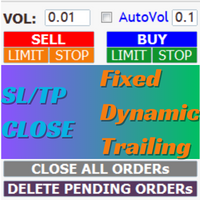
EaMinhonVN – TradeManagement The main functions of Ea TradeManagement 1. GUI o Interact with running EAs o GUI for placing orders o Closing orders by Ticket o Closing orders by MagicNumber o Closing all orders o Delete Pending orders 2. General management: o Management based on Symbol, manually orders , orders from the EA, and orders from other EAs o User-friendly trade interface with the ability to drag and drop SL,TP,Entry o Support backtest
3.

Breaking TrendLine This Forex Expert Advisor is a semi-automated trading system that utilizes trend lines and support/resistance levels to execute buy and sell orders in the foreign exchange market. The system automatically places stop-loss and take-profit orders based on predefined parameters set by the user. The Expert Advisor operates on an algorithmic approach to trading, allowing for precise and timely execution of trades without the need for human intervention. This system provides traders

[ MT5 Version ] [ Discord Version ] [ Pro: Telegram + Discord ] Post your MT4 trades to Telegram automatically — and keep every signal UPDATED: this is the only sender that EDITS the original message when you modify SL/TP or close the trade. Your followers always see the real state of every trade. Built for signal providers, VIP channel owners and traders who share their trading. WHY THIS ONE ️ EDITS THE ORIGINAL SIGNAL — modify SL/TP or close the trade and the o

Account tracker for a personal use.
Collect account balance, equity, margin, initial margin, p/l and push to a webserver. Lifetime license. Settings:
Allow dll import
Allow webrequest for certain urls drag and drop expert advisor on a new chart, minimize the chart and leave on the backgroud. Statistics will be update every 3 second and push it to the server.
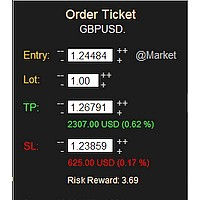
MONEY MANAGEMENT IS A CRITICAL COMPONENT OF SUCCESSFUL TRADING
One of the most important aspects of money management is risk management. YOU need to have a clear understanding of the risks associated with your trades, and mitigate those risks. This free MT4 indicator allows you to efficiently and easily protect your capital and avoid catastrophic losses. Download it and use it before every single trade! ***Please comment, rate and share it to your friends if you like it***
Tags: money managem
FREE

This free MT4 indicator allows you to easily compare as many symbols as you want! Make sure that the input symbol matches the name displayed in the Market Watch ***Please comment, rate and share it to your friends if you like it*** ------------------------------------------------------------------------------ Comparing trading pairs is useful for several reasons, including: Identifying relative strength: Comparing trading pairs can help traders identify which currency or asset is relatively stro
FREE

As a trader, it is essential to have access to the right trading tools and resources that can help you navigate the complex and constantly-changing markets. Get ready to elevate your trading game with Finanix Manager - a one-of-a-kind program that will revolutionize the way you trade. Are you ready to unlock your true potential and experience new levels of success? Try Finanix Manager today! First 10 customers - $30 Thus far: 0/10 buyers
Once 10 customers have bought the product, the price wi

n3oNpLoX Trade Manager Market Order. Stop Order. Limit Order.
To help you Place trades based on the amount of Money in Dollars you want to risk. As it will show in the screenshots you can calculate the right Lot size for the money you want to risk. Calculates Lot Size based on the distance between Stop Loss and Entry Point. 5 Options for TP - (1RR,2RR,3RR,4RR,5RR)
It will help you manage your risk and Place trades with the correct Lot Size. So you will not over expose yourself and your money
FREE

This indicator is useful for monitoring the performance of individual strategies or even everything of the entire portfolio of strategies directly on your MT4. In this way you can view the equity line and the balance line directly on the chart. In addition, you can set a line based on the percentage number of DD Max that the individual strategy can reach. Try it.

Phoenix MT4 Discord Notifier is a trading utility that integrates with both MetaTrader4 and Discord. The utility publishes all your trades as signals in your channels or groups. This allows you to track in real time what is happening with your account via Discord .
Notifications for :
Opened order Closed order Modified order
Parameters :
Discord Webhook - Discord webhook which will be used for receiving the info
Discord Bot name - Bot name in Discord server/channel Notify for opened order - no
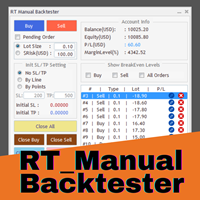
Enhance Your Manual Backtesting Experience in MT4 Strategy Tester with Our Powerful Trading Panel
>> The demo version allows a maximum of 5 orders and is limited to testing on EURUSD the M1 timeframe only. <<
Transform the way you practice and test your trading strategies in the MT4 Strategy Tester.
The RT_ManualBacktester enables you to execute trades and manage your orders more effectively,
providing a seamless manual backtesting experience. With RT_ManualBacktester , you can:
- Execut

この製品は、ニュースタイム中にすべてのエキスパートアドバイザーと手動チャートをフィルタリングするため、急激な価格変動によるマニュアルトレードのセットアップの破壊や他のエキスパートアドバイザーによって入力された取引について心配する必要はありません。この製品には、ニュースのリリース前にオープンポジションとペンディングオーダーを処理できる完全な注文管理システムも付属しています。 The News Filter を購入すると、将来のエキスパートアドバイザーのためにビルトインのニュースフィルターに頼る必要はなく、今後はすべてのエキスパートアドバイザーをここからフィルタリングできます。
ニュース選択
ニュースソースは、Forex Factoryの経済カレンダーから取得されます。 USD、EUR、GBP、JPY、AUD、CAD、CHF、NZD、CNYなど、任意の通貨数に基づいて選択できます。 Non-Farm(NFP)、FOMC、CPIなどのキーワード識別に基づいて選択することもできます。 影響レベルによってフィルタリングするニュースを選択することができ、低、中、高の影響範囲から選択できます。

チャートの任意の場所でマルチシンボルをダブルクリックして、価格アラートを設定し、ターミナルアラートまたはプッシュ通知から通知を受け取ります
1. EA ユーティリティをチャートに追加する
2. <- 左または -> 右矢印キーでチャートをブラウズ
3. チャートの任意の場所をダブルクリックすると、線が追加されます。この線をドラッグして希望の価格を設定すると、アラートが設定されます! 価格がラインに到達すると、ユーティリティの設定に従って端末またはプッシュ通知で通知されます。 ターミナルを再起動しても、このアラートは機能し続けます。
4. マルチシンボルを閲覧し続け、アラートで通知したい多くのチャートに線を追加し続けます.
5. 最初からやり直したい場合は、D を押して、設定したすべてのアラートを削除します。
6. 水平線を削除すると、アラートが無効になります。

最大 7 つの市場セッション と 3 つの週の範囲 を チャート に表示し、完全にカスタマイズ可能 各セッションとレンジは表示または非表示にすることができ、各トレーダーのニーズに応じて特別な日中または週内の期間に合わせて調整できます 次のいずれかを使用してセッションの開始/終了時間を定義します。 GMT/UTC 時間(任意のタイムゾーンに調整可能) サーバー/ブローカー時間 (チャート時間) 現地時間(コンピュータの時間)
PRO バージョンの機能
名前 : 各セッションと週の範囲を特定の名前で区別します 開始時刻と終了時刻を分単位で指定する : 時:分(HH:mm) または単に時間(HH) 形式で設定できます 週単位範囲の開始日と終了日: 週単位範囲の任意の曜日(日曜日から月曜日まで)間の期間を設定します GMT 時間のタイムゾーン オフセットを調整可能 : タイムゾーン オフセットを GMT 基準時間に設定すると、場所に応じて市場の基準時間を簡単に使用できます。 たとえば、ニューヨーク時間: GMT -5 Android 版または iPhone 版 MetaTrader ア

Telegram Signal Sender MT4であなたの外国為替シグナル共有の能力を高めましょう。この強力なユーティリティは、Telegramチャンネルにトレードシグナルを送信するプロセスを自動化し、簡素化するために設計されており、新進のシグナルプロバイダーから確立されたプロバイダーまで最適です。Forex FactoryやRedditのr/Forexなどのトレーディングコミュニティで広く称賛され、InvestopediaやMQL5フォーラムでの議論でもシグナルの効率的な配信で注目されており、視聴者を増やしたいトレーダーの間で人気のツールです。ユーザーは、タイムリーかつプロフェッショナルなシグナル配信により、フォロワーのエンゲージメントが30-40%増加し、シグナルを手動で投稿する時間が50%削減されたと報告しています。主な利点には、自動シグナル生成、カスタマイズ可能なリスク管理、公開またはプライベートのTelegramチャンネルに高品質のシグナルを簡単に共有できるユーザーフレンドリーなインターフェースが含まれ、信頼できるシグナルプロバイダーとしての評判を高めます。 Telegr

Avoid SWAP fees EA MT4 This version only supports orders with a single order transaction count of<10. If the single order transaction count is>10, please subscribe to a higher version This EA is not actively profitable, but only uses trading time to increase trading frequency and achieve the goal of saving swap fees. Working principle: This EA will generate MQL4 Experts Orderhis before the trading deadline of the day_ The today.csv file is used to record the information that has been opened
Avoid SWAP fees EA MT4 This version only supports orders with a single order transaction count of<0.1. If the single order transaction count is>0.1, please subscribe to a higher version This EA is not actively profitable, but only uses trading time to increase trading frequency and achieve the goal of saving swap fees. Working principle: This EA will generate MQL4 Experts Orderhis before the trading deadline of the day_ The today.csv file is used to record the information that has been op
Avoid SWAP fees EA MT4 This version only supports orders with a single order transaction count of=0.01. If the single order transaction count is=0.01, please subscribe to a higher version This EA is not actively profitable, but only uses trading time to increase trading frequency and achieve the goal of saving swap fees. Working principle: This EA will generate MQL4 Experts Orderhis before the trading deadline of the day_ The today.csv file is used to record the information that has been
FREE

[ MT5 Version ] [ Telegram Version ] [ Pro: Telegram + Discord ] Post your MT4 trades to Discord automatically via webhook — no bot setup, no permissions: paste ONE URL and you are live in 60 seconds . And keep every signal UPDATED: the original message is edited when you modify SL/TP or close the trade. Built for signal providers, trading communities and prop-firm teams on Discord. WHY THIS ONE WEBHOOK-BASED — no bot, no tokens: Discord channel → Integrations →
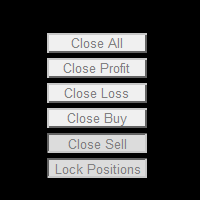
This powerful and user-friendly EA is designed to help you manage your trades with ease and efficiency. With its wide range of features and excellent compatibility, it runs flawlessly on the MetaTrader 4 platform. Key Features: Close All Positions: With just one click, you can close all open positions, regardless of their type and status. Close All Profitable Positions: Instantly close all positions that are currently in profit, ensuring you secure your gains. Close All Losing Positions: Swiftly

Multicurrency Hedge is an Automatic Trading Robot based on Standard Deviation. The EA is suitable for both beginners and experienced traders. The Main trade is when the price goes beyond the Standard Deviation on the Main Currency pair, and then the trading on other pairs is executed, the Multicurrency Grid is Activated. Install EA on VPS and on one Currency pair "EURUSD", Timeframe M15, Minimum deposit $1,000, Leverage 1:500.
PARAMETERS:
SD_TIMEFRAME - time frame for signals search;
SD_APRI

StarPlatform è un EA a pulsantiera che permette di aprire e, automaticamente, gestire e chiudere ordini. Apertura di posizione. StarPlatform permette di aprire ordini a mercato e/o piazzare pendenti di tipo LIMIT e STOP. I pendenti possono avere il livello d’ingresso posizionato manualmente oppure calcolato automaticamente in quanto ancorato ai massimi o ai minimi della candela su cui si clicca. Ogni ordine può avere lo Stop Loss piazzato con le stesse modalità del livello d’ingresso (impostat

Phoenix MT4 Telegram Notifier is a trading utility that integrates with both MetaTrader4 and Telegram. The utility publishes all your trades as signals in your channels or groups. This allows you to track in real time what is happening with your account via Telegram.
Notifications for :
Opened order Closed order Modified order
Parameters :
Telegram Bot Token - create a bot on Telegram and get a token Telegram Chat Id - input your Telegram group/channel Id Notify for opened order - notifies wh

Trade Closer
Set a trade and only have a profit target in mind? Drag onto the pair of choice, enter your profit target into the box and you're good to go. No need to set a Take profit anymore Your trade will be closed for you once the profit target is hit and will send an alert to your account.
Disclaimer: Only works on the windows version of MT4 and only when the computer terminal is active

Left4Trade MT4 Script
A script allows displaying the closure of a trade on the current chart. It helps to see where the trade was opened and closed and how it affects the overall trading result.
When using this script, arrows indicating the opening and closing of trades are displayed on the chart. They can be configured with different colors according to your preferences.
One of the main advantages of using this script is the ability to quickly analyze trading operations, which allows you to
FREE

Stormtrooper EA 基于货币特性的交易算法。 Stormtrooper 的策略结合了布林通道上、下阻力和支撑,以及行情波动率、分时收盘点位的一种交易算法。
推荐使用货币AUDCAD或NZDCAD进行操作 ,我用 2000 美元和1:500 的杠杆对其进行了测试,请查看下面的真实账户, 结果证明 Stormtrooper 极其稳定、且富有侵略性。 Stormtrooper 首次发布售价599美金,会根据信号展示结果进行逐渐涨价,最终售价为1999美金。(6月30日前特惠价599$,过后将回复原价,欢迎咨询购买.......) Stormtrooper 无论在测试还是实盘中,都展现了持续的稳定性。对此身边的朋友,在用过一段时间后,都给出了极高的评价。如果您对我的EA策略感兴趣,请您直接消息与我联系,以获取更多关于产品的信息以及我推荐的经纪人。相信我,如果选择我的EA策略,一定会收获满意的结果与回报,您将与我实盘真实账户同步。
结果展示
真实账户: https://www.mql5.com/zh/signals/1798191
特征:
建议用于15min时间

Trade Manager は、リスクを自動的に計算しながら、取引を迅速に開始および終了するのに役立ちます。 過剰取引、復讐取引、感情的な取引を防止する機能が含まれています。 取引は自動的に管理され、アカウントのパフォーマンス指標はグラフで視覚化できます。 これらの機能により、このパネルはすべてのマニュアル トレーダーにとって理想的なものとなり、MetaTrader 4 プラットフォームの強化に役立ちます。多言語サポート。 MT5バージョン | ユーザーガイド + デモ Trade Manager はストラテジー テスターでは機能しません。 デモについてはユーザーガイドをご覧ください。 危機管理 % または $ に基づくリスクの自動調整 固定ロットサイズを使用するか、ボリュームとピップに基づいた自動ロットサイズ計算を使用するオプション RR、Pips、または価格を使用した損益分岐点ストップロス設定 トレーリングストップロス設定 目標に達したときにすべての取引を自動的に終了するための 1 日あたりの最大損失 (%)。 過度のドローダウンからアカウントを保護し、オーバートレードを防ぎま

Ultimate Trade Panel MT4 は、MetaTrader 4向けに設計された強力なエキスパートアドバイザーで、MQL4プラットフォーム上でのトレーダーの効率を向上させ、取引活動を合理化します。このツールは使いやすい機能で日々の取引タスクを簡素化し、特定の取引ロジックに依存せずに取引管理の信頼できるパートナーとして機能します。競争優位性を求めるトレーダーのために開発され、自動化とリスク管理ツールを提供して取引体験を最適化します。 注 :Ultimate Trade Panel MT4のデモ版をデモアカウントでダウンロードしてテストしてください。 こちら 。 MT5バージョンはこちらでダウンロードできます: Ultimate Trade Panel MT5 MT4のフルバージョンはこちらでダウンロードできます: Ultimate Trade Panel MT4 詳細なドキュメントはこちら: 設定と入力ガイド 機能: インジケーターマネージャー:入力で指定されたテンプレートに基づいてインジケーターをロードし、ツールバーからインジケーターを変更する手間を省き、迅速な意思決定を

The MoneyMint Trade Assist is a game-changer for traders. This all-in-one control panel puts the power of professional trading at your fingertips, empowering you to take your trading to the next level. With its intuitive design and feature-rich functionality, the MoneyMint Trade Assist simplifies the complexities of order entry and exit and gives you the edge you need to succeed. Whether you're an experienced trader or just starting out, this powerful tool will help you maximize your profits and
This version only supports orders with a single order transaction count of<1. If the single order transaction count is>1, please subscribe to a higher version This EA is not actively profitable, but only uses trading time to increase trading frequency and achieve the goal of saving swap fees.
Working principle: This EA will generate MQL4 Experts Orderhis before the trading deadline of the day_ The today.csv file is used to record the information that has been opened on the current day, generat
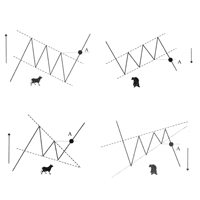
Скрипт проводит анализ трендов, выполняет поиск фигур продолжения и фигур разворота тренда по всем доступным инструментам окна Watch. Скрипт последовательно выводит несколько окон с сообщением о текущем состоянии: 1. Если в торговом терминале сохранено не достаточно цен по каждому инструменту или вам необходимо обновить цены по всем инструментам на актуальные после перерыва в работе, то проведите обновление. 2. Будет проведен анализ текущей тенденции активного графика. 3. На текущем графике п
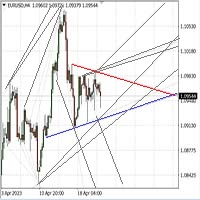
Автомated Trend Line Construction
Features: Draws multiple trend lines representing potential price growth/decline boundaries (gray lines) Identifies and draws price channels (green lines) Identifies potential technical analysis triangles (red and blue lines) Recommended: White chart background, Timeframe - M30 Settings: Interval=200 - Maximum number of bars used in the analysis for line construction The_greatest_distance=5000 - Controls the maximum distance from the current bar's price lev
Trading assistant that offers advanced management of your trades with optimization features. It automatically calculates the risk per trade, makes it easy to set up new orders, and offers advanced management tools such as automatic trade closing in 5 different ways. It also has other useful features that will improve your control and decision making. And best of all, you can use it in the strategy tester to perfect your tactics before trading live!
Our trading assistant is a trading tool that

Local_Timeは、チャート下部に指定の時差または、自動計算された時差でオリジナルの時間目盛りを追加します。
時間目盛りには、「DD.MM hh:mm」「DD MMM hh:mm」「MM-DD hh:mm」「MM/DD hh:mm」「DD hh:mm」「hh:mm」などなど対数のフォーマットに対応しています。
時差計算の必要性がない方でも、標準の時間目盛を消して、この時間目盛でサーバー時間の表示形式を変えるだけで、チャートの見やすさがアップするでしょう。
また、この日時バーよりも下にサブウインドウが作られてしまった場合は、赤いバーが表示されクリックすると最下部に移動する機能も付いています。
表示イメージは、スクリーンショットをご覧ください。
how to use
https://www.mql5.com/en/blogs/post/752455
FREE

チャート下に表示されるテキストボックスから、Slackに投稿するツールです。 w/Imgのボタンからは、チャート画像も送ることができます。
チャートに線やマーク、コメントなどを書いても、その画像が投稿されます。
使い方は簡単。 メッセージを入力し、SENDボタンでメッセージの投稿、w/IMGボタンでメッセージ+画像の投稿を行うことができます。 どんな使い方ができるか、人それぞれですが、Slackでコミュニケーションをされている方であれば、チャート画像を一発送信できるので便利だと思います。
*Slack API"のTOKENをパラメタに設定しますので、取得する必要があります。
ストラテジーテスターでも動作を確認できます。
FREE

Here is a powerful trading tool that will allow you to trade manually or automatically in any market, but is especially useful in markets with high volatility and liquidity.
This system has two EAs (Expert Advisors): one for Buy and one for Sell, which work independently. The operation is based on the hedging strategy and the increase in lots based on the Fibonacci sequence, which will allow you to always add the two previous lots: 1, 2, 3, 5, 8, 13...
You decide how you want to trade: you ca

SYSTEM DESCRIPTION: Cyber Capital TRADE HUB is support software for traders who wish to improve and speed up the opening, closing, and management of trades, as well as their own risk management. The system is developed for MT4 and allows you to open and close positions with fixed or automated lots based on percentage risk in one click. All the features of the dashboard are listed below. In addition to the normal functions of a trading dahsboard there is the ability to open manual trades with th
FREE

The account manager has a set of functions necessary for trading, which take into account the results of the entire account in total, and not for each individual open position: Trailing stop loss. Take profit. Break-even on the amount of profit. Breakeven by time. Stop Loss Typically, each of these options can be applied to each individual trade. As a result, the total profit on the account may continue to increase, and individual positions will be closed. This does not allow you to get the maxi
This EA is fully automated , it is built based on the method of catching the pop-up Alert event and Open Market Orders (BUY/SELL) . Download trial version here: https://www.mql5.com/en/blogs/post/751340
***NOTE: It is recommended to remove the available filter settings, only install the filter for your indicator. Parameters of the EA: -------- <EA Settings> -------- Magic Number: The identifying (magic) number of the currently selected order. Allow Open trade: Enable/ Disable Open Trade

HURRICANE EA is a compilation based on the volatility unique to XAUUSD (GOLD), which is a trading tool with simple internal operation logic but not ordinary, which uses martingale + hedging + trending as a set of operating modes. Expert was born by collecting and learning a large amount of historical data, combined with the characteristics of the variety and using it countless times to test the market. Please do not believe that there will be any complex algorithm in the market that can accurate

You can place an unlimited number of invisible pending orders using this tool. Orders will be filled under the following conditions: Spread is not greater than the set Max. spread Slippage is not greater than the set Max. slippage
The set trading time was not exceeded
The expiration time was not reached TRADING button is not switched to PAUSE If these conditions are not met, the order will be cancelled. You can also set up a Test Zone with an Off line for each order. The order will be cancel

Here is a utility that helps automatically setup stoploss, takeprofit and trailing stops for hand trades. This is not an auto-trading EA, it only supports manual trading of orders, helping you to better monitor your account management. Irrespective of symbol, server, timeframe. SETUP: On/Off: On or Off EA Take profit points: take profit value in points Stoploss points: s toploss value in points Average price of all orders of one type: when this function is enabled, the average take profit f
Your feedback is valuable and appreciated.
I appreciate feedback on where the application is weak and what improvements or features would be beneficial.
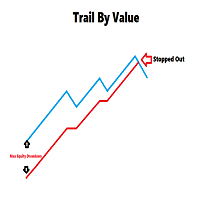
This is a utility for setting trailing stops by value. Trailing stops are great tools for locking in profits as a trade progresses. When trades progress towards potential targets confidence in the trade should be reflected in management of the trade. Market exposure persists for the duration of the trade, and the choice to remain in a trade is
FREE

Have you developed your own entry strategy or are you using an Expert Advisor to automate your entries? Then do the same with your exits!!! Nothing is as important as the right moment to exit your trades. Either to avoid bigger losses or to get maximum profit. But prices often move unpredictably and quickly, which often becomes a problem for a manual exit. Also, the previously set StopLoss or TakeProfit are usually not suitable to get the maximum out. Stop Manager Pro offers you strategies like

平均化ヘルパー - この種の取引ヘルパー ツールは、次の 2 つのテクニックを使用して、以前は利益がなかったポジションを平均化するのに役立ちます。 標準平均 トレンドに応じてポジションを開くヘッジ このユーティリティは、買いと売りの両方の異なる方向の複数のオープンポジションを一度に整理する機能を備えています 。例えば、売りポジションを1つ、買いポジションを1つオープンしたが、どちらも利益が出ていない場合、あるいは1つは利益が出ているものの利益が十分でない場合、この2つのポジションを平均化してプラスで取引を終了したい場合などです。これは、私の平均化支援ユーティリティが役立ちます。 平均化ヘルパー ユーティリティ - 次のポジションのサイズ、注文価格、ポジションを平均化する方向、指定した利益確定サイズでプラスでポジションをクローズする方向を自動的に計算できます。 このユーティリティでは、「買い」と「売り」ボタンを使ってポジションを開くこともできます。希望する利益確定額と開始ロットを指定するだけです。ユーティリティ自体は、最初に指定した利益確定額でポジションをクローズするか、ポジションを平均

私たちの多くは、VPSを使用して24時間365日取引EAを実行していますが、これらの端末が稼働しているかどうかを監視するにはどうしたらよいでしょうか。
もし、クラッシュしたり、アップデートのためにシャットダウンしたらどうする?そのような場合、どのように通知されるのでしょうか?
そこで、ハートビート・モニタリングの出番です。
24時間365日、すべての端末とVPSを監視することができるのです。
では、そのために必要なものは何でしょうか?
1.プロフェッショナルな監視サービスである Cronitorの 無料ユーザー アカウント 。
2.VPS上のチャート上で動作する本ツール。 MT5や接続の問題が発生した場合、メールにて通知されます(より多くの通知方法があります)。
私たちはこの技術的ソリューションを、重要なバックエンドインフラの監視に使用しているので、信頼性と有用性は実証済みです。
私のパートナーのブログ:Daniel Steinで 完全なチュートリアルをお読み ください。
もしご希望であれば、 Nodepingサービス (有料)をご利用ください。
詳細とスクリーンショッ

Trade simplifier is a trade panel that simplifies trade opening. It is simple and easy to understand, with key features to ease trading. Features include:
Order type selection Fixed lot entry from the chart user interface Easy Take profit entry field on the chart user interface Visual take profit selection and adjustment via the line that appears when you click the Take Profit button Easy Stop loss entry field in points on the chart user interface Visual Stop Loss selection and adjustment via
FREE

BALANCE GUARDIAN is a software to support traders who wish to set profit and maximum loss targets for their trading accounts. developed for MT4. Once BALANCE GUARDIAN is activated, the user will be able to set the maximum acceptable loss as well as their own profit target - upon reaching either one, the software will proceed with closing all open trades and subsequent deactivation of autotrading in case any Expert Advisors are active.
PLEASE NOTE: The software's sole purpose is to provide the
FREE

[LueYingEA]
掠影EA-简介:
掠影EA分为多个系列,不同系列之间由后缀字母区分.
[LueYingC] 掠影C:非自动助手类型工具EA-MT4版.
[LueYingX] 掠影X:多组件集成,强大云端数据库版EA-MT4版.
[LueYingM] 掠影M:多组件集成,强大云端数据库版EA-MT5版.
------------------------------
[LueYingC]
掠影C-使用:
操作防护:安全模式需要确认,急速模式操作立即执行.
做单模式:掠影C独立模式下的订单,自主管理不被掠影X识别.
掠影C联控模式下,同组订单可被掠影X管理同时在C上操作也.
可主动管理X版订单.
订单组别:修改后仅对指定组别进行操作.
手数:现价每单固定手数,挂单每单基础手数,
单数:订单数量.
挂单间隔:批量挂单每单间隔.
FREE
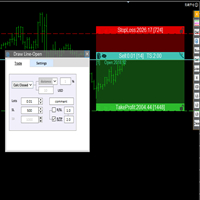
交易者的最佳伙伴! 基本使用设置 基本: 支持语言的选择切换(目前支持中文和英文) 自动识别语言 划线交易
支持英文中文自动选择,自动识别.
1.划线交易 ( 支持拖拉,支持多个订单线 ) 2.手数管理: 两种手数计算模式 ①资金的风险比例,例如设置风险百分比为1的时候,1万美金可交易1手. 计算手数 = 资金(净值或者余额或者剩余保证金) * RISK /10000 ②按亏损金额计算,本设置需要配合止损设置, 计算手数 = ( 当订单被初始下单设置的止损所止损的时候所亏损金额 计算得到的手数,小于最低手数会等于最小手数) ; 3.盈亏比等设置,
设置部分 1. 自动吸附最近高低点 2.高低点偏移 3.自动选择订单习惯 4.SL TP设置方式 5.语言设置

IMPORTANT: Blocks&Levels Alerts indicador.
Gives you the ability to easy draw Blocks and Levels (support and resistance) using key shortcuts and Alerts when price touch them. Please use it and give me feedback!! It really helps! Thank you very much! DESCRIPTION:
Blocks&Levels Indicator, has useful key shortcuts for draw Levels, Blocks Zones, change chart Time Frames, Select or Deselect all drew objects. SETUP:
Just install the Indicator on the Chart
Open and navigate Indicator properties to
MetaTraderマーケットはMetaTraderプラットフォームのためのアプリを購入するための便利で安全な場所を提供します。エキスパートアドバイザーとインディケータをストラテジーテスターの中でテストするためにターミナルから無料のデモバージョンをダウンロードしてください。
パフォーマンスをモニターするためにいろいろなモードでアプリをテストし、MQL5.community支払いシステムを使ってお望みのプロダクトの支払いをしてください。

取引の機会を逃しています。
- 無料取引アプリ
- 8千を超えるシグナルをコピー
- 金融ニュースで金融マーケットを探索