 MetaTrader 5
 エキスパート
 インディケータ
 ライブラリ
ライブラリ ユーティリティ
 ウィジェット
 ルール
ルール
YouTubeにあるマーケットチュートリアルビデオをご覧ください
ロボットや指標を購入する
仮想ホスティングで
EAを実行
EAを実行
ロボットや指標を購入前にテストする
マーケットで収入を得る
販売のためにプロダクトをプレゼンテーションする方法
MetaTrader 4版新取引ユーティリティ - 24
 以下はMetaTrader4での外国替取引を簡素化する取引プログラムです。以下のリストのユーティリティにカーソルを合わせて、説明と目的をご覧ください。
チャート下に表示されるテキストボックスから、Slackに投稿するツールです。 w/Imgのボタンからは、チャート画像も送ることができます。
チャートに線やマーク、コメントなどを書いても、その画像が投稿されます。
使い方は簡単。 メッセージを入力し、SENDボタンでメッセージの投稿、w/IMGボタンでメッセージ+画像の投稿を行うことができます。 どんな使い方ができるか、人それぞれですが、Slackでコミュニケーションをされている方であれば、チャート画像を一発送信できるので便利だと思います。
*Slack API"のTOKENをパラメタに設定しますので、取得する必要があります。
ストラテジーテスターでも動作を確認できます。
FREE

Here is a powerful trading tool that will allow you to trade manually or automatically in any market, but is especially useful in markets with high volatility and liquidity.
This system has two EAs (Expert Advisors): one for Buy and one for Sell, which work independently. The operation is based on the hedging strategy and the increase in lots based on the Fibonacci sequence, which will allow you to always add the two previous lots: 1, 2, 3, 5, 8, 13...
You decide how you want to trade: you ca

SYSTEM DESCRIPTION: Cyber Capital TRADE HUB is support software for traders who wish to improve and speed up the opening, closing, and management of trades, as well as their own risk management. The system is developed for MT4 and allows you to open and close positions with fixed or automated lots based on percentage risk in one click. All the features of the dashboard are listed below. In addition to the normal functions of a trading dahsboard there is the ability to open manual trades with th
FREE

The account manager has a set of functions necessary for trading, which take into account the results of the entire account in total, and not for each individual open position: Trailing stop loss. Take profit. Break-even on the amount of profit. Breakeven by time. Stop Loss Typically, each of these options can be applied to each individual trade. As a result, the total profit on the account may continue to increase, and individual positions will be closed. This does not allow you to get the maxi

This EA is fully automated , it is built based on the method of catching the pop-up Alert event and Open Market Orders (BUY/SELL) . Download trial version here: https://www.mql5.com/en/blogs/post/751340
***NOTE: It is recommended to remove the available filter settings, only install the filter for your indicator. Parameters of the EA: -------- <EA Settings> -------- Magic Number: The identifying (magic) number of the currently selected order. Allow Open trade: Enable/ Disable Open Trade

HURRICANE EA is a compilation based on the volatility unique to XAUUSD (GOLD), which is a trading tool with simple internal operation logic but not ordinary, which uses martingale + hedging + trending as a set of operating modes. Expert was born by collecting and learning a large amount of historical data, combined with the characteristics of the variety and using it countless times to test the market. Please do not believe that there will be any complex algorithm in the market that can accurate

What is The Commitment of Traders (COT)? The Commitment of Traders (COT) report is a weekly publication of net positions in the future market that is released on Fridays by CFTC commission. It is an outline for the commitment of the classified traders as commercial traders, speculators (non-commercial traders), and non-reportable traders. We use this report to understand the dynamics of the market. The commitment of commercial traders is not important for us because they take a position to he
FREE

You can place an unlimited number of invisible pending orders using this tool. Orders will be filled under the following conditions: Spread is not greater than the set Max. spread Slippage is not greater than the set Max. slippage
The set trading time was not exceeded
The expiration time was not reached TRADING button is not switched to PAUSE If these conditions are not met, the order will be cancelled. You can also set up a Test Zone with an Off line for each order. The order will be cancel

Here is a utility that helps automatically setup stoploss, takeprofit and trailing stops for hand trades. This is not an auto-trading EA, it only supports manual trading of orders, helping you to better monitor your account management. Irrespective of symbol, server, timeframe. SETUP: On/Off: On or Off EA Take profit points: take profit value in points Stoploss points: s toploss value in points Average price of all orders of one type: when this function is enabled, the average take profit f
Your feedback is valuable and appreciated.
I appreciate feedback on where the application is weak and what improvements or features would be beneficial.
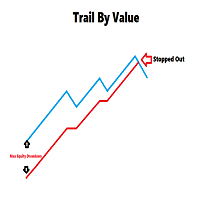
This is a utility for setting trailing stops by value. Trailing stops are great tools for locking in profits as a trade progresses. When trades progress towards potential targets confidence in the trade should be reflected in management of the trade. Market exposure persists for the duration of the trade, and the choice to remain in a trade is
FREE

Have you developed your own entry strategy or are you using an Expert Advisor to automate your entries? Then do the same with your exits!!! Nothing is as important as the right moment to exit your trades. Either to avoid bigger losses or to get maximum profit. But prices often move unpredictably and quickly, which often becomes a problem for a manual exit. Also, the previously set StopLoss or TakeProfit are usually not suitable to get the maximum out. Stop Manager Pro offers you strategies like

平均化ヘルパー - この種の取引ヘルパー ツールは、次の 2 つのテクニックを使用して、以前は利益がなかったポジションを平均化するのに役立ちます。 標準平均 トレンドに応じてポジションを開くヘッジ このユーティリティは、買いと売りの両方の異なる方向の複数のオープンポジションを一度に整理する機能を備えています 。例えば、売りポジションを1つ、買いポジションを1つオープンしたが、どちらも利益が出ていない場合、あるいは1つは利益が出ているものの利益が十分でない場合、この2つのポジションを平均化してプラスで取引を終了したい場合などです。これは、私の平均化支援ユーティリティが役立ちます。 平均化ヘルパー ユーティリティ - 次のポジションのサイズ、注文価格、ポジションを平均化する方向、指定した利益確定サイズでプラスでポジションをクローズする方向を自動的に計算できます。 このユーティリティでは、「買い」と「売り」ボタンを使ってポジションを開くこともできます。希望する利益確定額と開始ロットを指定するだけです。ユーティリティ自体は、最初に指定した利益確定額でポジションをクローズするか、ポジションを平均

私たちの多くは、VPSを使用して24時間365日取引EAを実行していますが、これらの端末が稼働しているかどうかを監視するにはどうしたらよいでしょうか。
もし、クラッシュしたり、アップデートのためにシャットダウンしたらどうする?そのような場合、どのように通知されるのでしょうか?
そこで、ハートビート・モニタリングの出番です。
24時間365日、すべての端末とVPSを監視することができるのです。
では、そのために必要なものは何でしょうか?
1.プロフェッショナルな監視サービスである Cronitorの 無料ユーザー アカウント 。
2.VPS上のチャート上で動作する本ツール。 MT5や接続の問題が発生した場合、メールにて通知されます(より多くの通知方法があります)。
私たちはこの技術的ソリューションを、重要なバックエンドインフラの監視に使用しているので、信頼性と有用性は実証済みです。
私のパートナーのブログ:Daniel Steinで 完全なチュートリアルをお読み ください。
もしご希望であれば、 Nodepingサービス (有料)をご利用ください。
詳細とスクリーンショッ

Trade simplifier is a trade panel that simplifies trade opening. It is simple and easy to understand, with key features to ease trading. Features include:
Order type selection Fixed lot entry from the chart user interface Easy Take profit entry field on the chart user interface Visual take profit selection and adjustment via the line that appears when you click the Take Profit button Easy Stop loss entry field in points on the chart user interface Visual Stop Loss selection and adjustment via
FREE

BALANCE GUARDIAN is a software to support traders who wish to set profit and maximum loss targets for their trading accounts. developed for MT4. Once BALANCE GUARDIAN is activated, the user will be able to set the maximum acceptable loss as well as their own profit target - upon reaching either one, the software will proceed with closing all open trades and subsequent deactivation of autotrading in case any Expert Advisors are active.
PLEASE NOTE: The software's sole purpose is to provide the
FREE

[LueYingEA]
掠影EA-简介:
掠影EA分为多个系列,不同系列之间由后缀字母区分.
[LueYingC] 掠影C:非自动助手类型工具EA-MT4版.
[LueYingX] 掠影X:多组件集成,强大云端数据库版EA-MT4版.
[LueYingM] 掠影M:多组件集成,强大云端数据库版EA-MT5版.
------------------------------
[LueYingC]
掠影C-使用:
操作防护:安全模式需要确认,急速模式操作立即执行.
做单模式:掠影C独立模式下的订单,自主管理不被掠影X识别.
掠影C联控模式下,同组订单可被掠影X管理同时在C上操作也.
可主动管理X版订单.
订单组别:修改后仅对指定组别进行操作.
手数:现价每单固定手数,挂单每单基础手数,
单数:订单数量.
挂单间隔:批量挂单每单间隔.
FREE
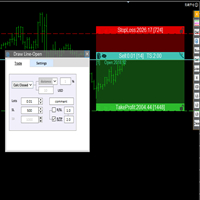
交易者的最佳伙伴! 基本使用设置 基本: 支持语言的选择切换(目前支持中文和英文) 自动识别语言 划线交易
支持英文中文自动选择,自动识别.
1.划线交易 ( 支持拖拉,支持多个订单线 ) 2.手数管理: 两种手数计算模式 ①资金的风险比例,例如设置风险百分比为1的时候,1万美金可交易1手. 计算手数 = 资金(净值或者余额或者剩余保证金) * RISK /10000 ②按亏损金额计算,本设置需要配合止损设置, 计算手数 = ( 当订单被初始下单设置的止损所止损的时候所亏损金额 计算得到的手数,小于最低手数会等于最小手数) ; 3.盈亏比等设置,
设置部分 1. 自动吸附最近高低点 2.高低点偏移 3.自动选择订单习惯 4.SL TP设置方式 5.语言设置

IMPORTANT: Blocks&Levels Alerts indicador.
Gives you the ability to easy draw Blocks and Levels (support and resistance) using key shortcuts and Alerts when price touch them. Please use it and give me feedback!! It really helps! Thank you very much! DESCRIPTION:
Blocks&Levels Indicator, has useful key shortcuts for draw Levels, Blocks Zones, change chart Time Frames, Select or Deselect all drew objects. SETUP:
Just install the Indicator on the Chart
Open and navigate Indicator properties to

このユーティリティEAは、ブローカーからすべてのヒストリカルデータを一度にダウンロードすることを目的としています。チャート(どのチャートでも可)にドロップしたら、入力で処理するシンボルとタイムフレームを選択します。そうすると、すべてが自動化されます。時間はかかりますが、処理された内容はExpertsログに表示されます。
もちろん、ダウンロードできるのはブローカーサーバーにあるデータのみです。このプロセスは、MT4の「チャート」設定の「ヒストリーの最大バー」と「チャートの最大バー」によって異なりますので、最大データを確実に取得したい場合は、これらの値をデフォルトよりも大きく設定することができます。しかし、すべてのブローカーが多くの履歴データを提供するわけではなく、これらの設定に非常に大きな値を使用すると、あなたのプラットフォームのパフォーマンスに深刻な影響を与える可能性があります、それを使用して注意してください。 このツールは主に、複数のシンボルと複数のタイムフレームで動作する指標やEAに必要なすべてのデータをダウンロードするために非常に便利です。 私のパートナーである ダニエル・スタイ
FREE

This indicator shows both GMT time and your broker's time on the chart.
Simply attach the indicator to a chart, and you will see the GMT time and your broker's time displayed in the top left corner, as shown in the screenshot. By using this indicator, you can always stay informed about your broker's time, which is especially useful during daylight saving changes.
You won't have to worry about whether your broker follows the US or EU schedule, as the indicator automatically adjusts to reflect an
FREE
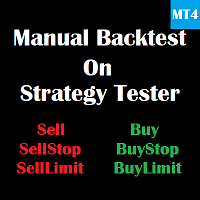
This is a tool for back testing your strategy manually on the Strategy Tester , it's very easy to use, it may be useful for both professional and beginner traders. Features : • Simple buttons and inputs. • Back-test result will show on the strategy tester graph and results tabs.
How to use : • Select the EA in the strategy tester list. • Configure the settings to your needs. • Start the tester and begin trading , input the stop loss and take profit set the lot size

OrderManager をご紹介:MT4用の革新的なユーティリティ 新しく設計されたOrder Managerユーティリティを使用して、MetaTrader 4での取引をプロフェッショナルなものにしましょう。シンプルさと使いやすさに焦点を当てたこのユーティリティは、各取引に関連するリスクを簡単に定義し、視覚化できます。これにより、情報に基づいた意思決定が可能になり、取引戦略を最適化できます。OrderManagerに関する詳細は、マニュアルをご参照ください。 [ マニュアル ] [ MT5 バージョン ] [ Telegram チャンネル ] New: [ Telegram To MT5 ]
主な特長: リスク管理:取引のリスクを素早く簡単に定義し、より良い意思決定を行い、取引パフォーマンスを向上させます。 視覚表現:オープンなポジションとそれに関連するリスクをグラフィカルに表示し、明瞭かつ簡潔な理解が可能です。 注文変更:数回のクリックで注文を簡単に変更またはクローズし、取引プロセスを効率化し、貴重な時間を節約します。 手のひらの上の最新ニュース:ボタン一つで最新の市場ニュース

スマートマネーコンセプトのトレードマネージャーをご紹介します。この究極のツールは、市場でプロのエッジを求めるトレーダーを対象に設計されています。ICT/スマートマネーコンセプト/マニュアルトレーダーであろうと、当社のソフトウェアは、取引を簡単に自動化し、リアルタイムでリスクを管理するために特別に構築されています。 スマートマネーコンセプトのトレードマネージャーを使用することで、自信を持って、一貫性を持って、スマートマネーコンセプトや機関投資家のトレードセットアップを簡単に実行できます。当社の強力なツールは、MetaTrader 4プラットフォーム上で実行されます(現在MT5バージョンの開発も進めています)。 スマートマネーコンセプトのトレードマネージャーは、リスク管理やストップロス、テイクプロフィット、プロプションなどの重要なパラメータを自動化することで、取引を簡素化します。当社独自のフラクタル対称戦略を使用して、スケーリングアウト測定値を設定することもできます。設定をカスタマイズして、独自のトレードスタイルとリスクプロファイルに合わせることができ、アルゴリズムは自動的に口座サイズに
FREE
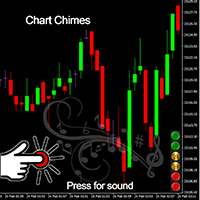
Chart Chimes のご紹介 - 取引を音の交響曲にする MT4/MT5 インジケーター! 一日中チャートを見つめるのにうんざりしていませんか? 取引中に気分を高揚させるために、ちょっとした気晴らしが必要ですか? まあ、Chart Chimes があなたをカバーしてくれます!
チャート チャイムを使用すると、そのボタンを押すたびに楽しい音が聞こえ、あなたの顔が笑顔になり、足元がスキップされます。 勝利を収めたトランペットや穏やかなハープの音を背景に取引をすることを想像してみてください - それはあなた自身の個人的なオーケストラがあなたを応援しているようなものです!
しかし、Chart Chimes は楽しい気晴らしだけではありません。取引中に集中して関与し続けるのに役立つ強力なツールです。 サウンドをカスタマイズする機能により、取引スタイルや好みに合った独自のサウンド環境を作成できます。 あなたのストップロスに固執するためのちょっとしたリマインダーが必要ですか? 審判の笛を模した音を設定してみませんか。 または、花火の音で取引の成功を祝いたいと思うかもしれません - 可能性
FREE

Blind Broker System の唯一の目的は、取引計画を隠し、ブローカーに見えないようにすることです。 あなたが本当に彼を「ブラインド」にしたいのであれば、彼があなたのストップロスレベル、テイクプロフィットレベル、ボリュームについて事前に何も知らないことを確認してください - ただこのトレーディングロボットを使用してください.
このプロジェクトの開始とアイデアについて、Henryk Kardas 氏に特に感謝します。 MQL が提供する無料のデモでは、この EA の機能をテストできないことに注意してください。 実際のテストについては、実際のデモ バージョンをダウンロードしてください。
デモ版へのリンク https://www.mql5.com/en/market/product/94190
Blind Broker System は、注文管理の代替システムです。 ある意味、Meta Trader Terminal 内のシステムと同じです。
違いは、ブローカーのサーバーに書き込まれるのではなく、Blind Broker System を通じて送信されたすべて

Drawdown Limiter EA You are in the right place if you were searching for Drawdown control, Drawdown limiter, Balance protection, Equity Protection or Daily Drawdown Limit related to Prop Firm, FTMO, or Funded account trading, or if you want to protect your trading account. Have you suffered from controlling your drawdown when trading funded accounts? This EA is meant for you. Prop firms usually set a rule called “Trader Daily Drawdown”, and if it is not respected, you are disqualified. I am an
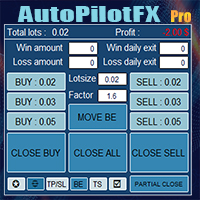
Introducing of AutoPilotFX Pro: Your Ultimate Trading Panel with Advanced Features of order management Take your trading to new heights with our Trade Assistant designed to streamline your trading process and optimize your strategies. Discover the powerful features it offers and learn how it can help you maximize your profits and minimize your risks.
Semi Automated EA for working as your trading assistant with Key Features: Automatic Lot Size Calculation: AutoPilotFX Pro automatically calc
Multi Chart Sync MT5 is a tool that synchronizes the chart symbol it is placed on to other charts, it can also be customized to exclude/skip some pairs from being synchronized to other charts, It also supports prefixes and suffixes that can be set from the input parameters for brokers with none-standard symbol formats, Synchronisation can be done once or continuously where if a synchronized chart symbol changes it will be reverted to the original/master symbol. This tool comes in handy for multi

MT4 Discord Copier - the perfect tool for those looking to remotely copy trades between multiple MT4 accounts on different computers over the internet! With the added convenience of Discord transactions monitoring, you can now easily share trades with a global group of people on your own terms, all while benefiting from the features of a Discord server . This solution is ideal for both providers and receivers, as providers can effortlessly copy trades to multiple receivers, while re

Calculates correct lot-size by just 4 clicks. It is simple, quick and effective. This tool does everything for you. Set your risk percentage and tool settings to fit your needs. You will have one main button to show simple menu, where you can after clicking on "Calc" button (second click) set your Entry level (third click) and SL level (fourth click). Software will show you info box with all information needed - risk %, risk value, ticks distance and calculated position size. Of course, it draw

MT4 Discord Copier - the perfect tool for those looking to remotely copy trades between multiple MT4 accounts on different computers over the internet! With the added convenience of Discord transactions monitoring, you can now easily share trades with a global group of people on your own terms, all while benefiting from the features of a Discord server . This solution is ideal for both providers and receivers, as providers can effortlessly copy trades to multiple receivers, while receivers can
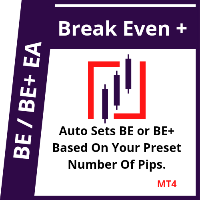
This EA will set breakeven or breakeven-plus for your trades, whether you have manually or automatically set stop loss or not. If your broker charges commissions per trade, you need to set breakeven plus, not just breakeven, in order to cover up those charges and properly let your trades run at zero risk. Inputs:
In the inputs section , set BEPoffsetPips to 0, to use it as a "breakeven" EA. Or set BEPoffsetPips to any amount of pips you want, to use it as a "breakeven-plus" EA. "OnPr

Features Ordering support tool using Fractals, Alligator, and HeikenAshi technical. Submit a stop order to the latest Fractals value emerging in the direction of Alligator's perfect order. Submit an additional stop order every time the Fractals price is updated. If Alligator's perfect order is canceled, cancel the placed stop loss order (leave only the contracted position). Filter entries by HeikenAshi (large), HeikenAshi (small) positive and negative lines. For filled positions, exit at any tim

The "Lot Size" button toggles between fixed and auto lot size modes. Fixed mode uses a predetermined lot size, while auto mode calculates lot size based on a customizable percentage of the account balance, displayed at the bottom. The "Trailing Stop" button enables the activation or deactivation of the trailing stop feature. Initially set to "No Trailing," clicking the button changes it to "Trailing ON" when the trailing stop is active, and "Trailing OFF" when it is inactive. Below the button,

Customize your charts with this simple utility.
Choose in the 24 pre-built color sets, or use your own colors, save them to re-use them later.
You can also add a text label on your chart.
--- Chart Colors--
Color Set : 24 prebuilt color sets (select "Custom" to use colors below) Background color Foreground color Grid color Chart Up color Chart Down color Candle Bull color Candle Bear color Line color Volumes color --- Label--- Text Label : Type the text you want to appear on the chart Label P
FREE

The Expert Advisor helps manage your account equity. You can set the EA to close all trades at the total account profit or buy/sell line profit or close at a certain predetermined loss percentage…
Parameters: Chart Symbol Selection: For Current Chart Only/ All Opened Orders Profit all to close all order USD (0 - not use): Profit in money Profit buy to close buy order USD (0 - not use): Profit in money Profit sell to close sell order USD (0 - not use): Profit in money Loss all to cl
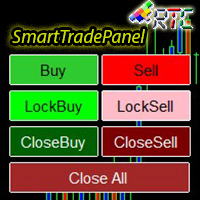
SmartTradePanel は、トレーダーが注文を迅速かつ効率的に実行できるようにする取引ツールです。 提供される高度な機能により、SmartTradePanel は、トレーダーがオープン注文を管理し、取引の潜在的な利益を最適化するのに本当に役立ちます。 この記事では、SmartTradePanel の機能と利点について詳しく説明します。
SmartTradePanel の主な機能の 1 つは、オープン注文の高速実行機能です。 数回クリックするだけで、トレーダーは迅速かつ効率的に取引ポジションを開くことができます。 これは、約定速度が利益を決定する要因となる可能性がある急速に変化する市況で特に役立ちます。
それとは別に、SmartTradePanel では、トレーダーがロック注文を出すこともできます。 ロッキングオーダーは、ポジションが逆転して将来的に利益を生み出すことを期待して、負けたポジションをロックすることを目的とする取引戦略です。 SmartTradePanel を使用すると、トレーダーは数回クリックするだけで簡単にロック注文を出すことができます。
注文の実行と注文
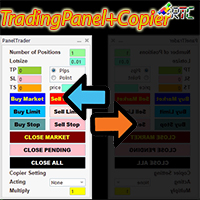
このTradingPanelには、同様の取引パネルと比較して、次のような多くの利点があります。 1. 即座に注文を開始 (市場) し、希望の価格で保留中です。 2. ピップまたはポイント モードで設定できるテイクプロフィット (TP)、ストップロス (SL)、およびトレーリングストップ (TS) 設定。 3. 成行注文のみ、未決注文のみ、または成行注文と未決注文のすべての注文を閉じることができます。 4. マスターとして開いた注文をクライアントとしてパネルにコピーできる CopyTrade も装備し、クライアントからロットスケール値を設定できます。
取引活動を容易にするために、今すぐこの TradingPanelPlusCopier を入手してください。
TradingPanelPlusCopier の使用方法と使用のデモは、説明のビデオ デモで見ることができます。 こんにちは利益!
Blind Broker System の唯一の目的は、取引計画を隠し、ブローカーに見えないようにすることです。あなたが本当に彼を「ブラインド」にしたいのであれば、あなたのストップロスレベル、ボリューム、利益レベルについて彼が何も知らないことを確認するには、このトレーディングロボットを使用してください.
Blind Broker System は、注文管理の代替システムです。ある意味、Meta Trader Terminal 内のシステムと同じです。
違いは、ブローカーのサーバーに書き込まれるのではなく、Blind Broker System を通じて送信されたすべての注文がプログラムのメモリに書き込まれることです。
ブローカーは、成行注文が発生した瞬間のリクエストのみを受け取ります。それ以上のものはありません。
ノート!正常な動作には無停電電源装置が必要です。VPS (Virtual Private Server) をお勧めします。
このシステムは、画面の前に座って取引している自分のコピーと考えることができます。その場合、誰もあなたの心を読むことはできません。あなたは
FREE

Copy Trade EA(Expert Advisor)是一种自动交易软件,可以帮助投资者自动复制其他交易者的交易策略和操作,从而获得类似于其它交易者的交易结果。该软件基于MetaTrader平台,具有易于使用、高效、灵活和自适应的特点,为投资者提供了自动化交易的一站式解决方案。
该软件支持多种交易品种,包括外汇、商品、股票和指数。其主要功能包括:
复制交易:该软件可以在实时模式下复制其他交易者的交易操作,自动将交易操作应用到您的账户中。您可以根据其他交易者的历史表现选择要跟随的交易者,并设置复制比例和风险管理策略,以满足您的投资需求。
风险管理:该软件支持多种风险管理策略,如止损、追踪止损和限价订单,可以帮助投资者最大限度地降低风险和保护资金。此外,该软件还提供了实时的交易报告和交易统计信息,以便投资者对其交易行为进行分析和调整。
自定义设置:该软件支持用户自定义设置,包括复制比例、交易量、止损和追踪止损距离、交易时间和其他参数。这些自定义设置可以根据投资者的偏好和风险承受能力进行调整。
高效运行:该软件基于MetaTrader平台,具有高效、灵活和自适应的特点。该软件
Our EA is designed to monitor the user's account and provide useful information about the balance, net balance, and current drawdown for the day and month. Additionally, it provides detailed information about daily, previous day, weekly, monthly, and yearly performance, which helps the user evaluate the effectiveness of their trading strategy. One of the unique features of our EA is that it draws the profit at the end of each operation on the chart, allowing the user to easily visualize the prof
FREE

Beta version of a semi-automatic utility for trading grid strategy. When using, please give feedback on the shortcomings / suggestions.
Good luck to us!
Parameters:
Lot exponent - multiplication of the lot on the next order. Grid pips - grid size. Take profit pip - distance of the take profit line. Magic number - the magic number of the adviser's work. Trading menu - presence/absence of a trading menu. Menu size - the size of the menu (choose the value for your resolution). Menu font size -

This is a trade management EA that will close all your Open Orders (or both Open and Pending Orders) when your drawdown against balance exceeds a set percentage limit. E.g. Balance = $10,000 and “DrawdownPercent” is set at 2.0, if floating P&L is greater than -$200.00, all Orders will be closed.
It will send a notification to you MT4 app on your phone ( ”Drawdown Percent Close triggered!”) A text display is included for some visual feedback.
Basic notes: It only needs to be attached to one char
FREE
This EA Trails your stops for both manually and auto-opened trades. This EA will work whether you have manually or automatically set stop loss or not. Trailing stop is a more flexible variation of a normal exit order. T railing stop is the practice of moving the stop-loss level closer to the current price when the price moves in your favor. Trailing the stop-loss allows traders to limit their losses and safeguard their positive trades. It is a very popular practice. This EA will manage your
Hello, Every one The EA is used to close buy or sell market positions and all pending orders when the RSI reaches a certain value. It is also used to close positions in the market when the profit reaches a certain value. All setting 1. RSI Period : 14 ( or as you want ) 2. RSI Close Buy Value : 70 (The EA will close all long positions and Pending Buy Orders when the RSI is above 70) 3. RSI Close Sell Value : 30 (The EA will close all short positions and Pending Sell Orders when the RSI is
FREE

What Is A SmcDrawTools? SmcDrawTools was developed for fast and comfortable trading of the financial markets especially for SMC TRADERS. It provides traders functionalities, such as: All in one place! A very exciting addition to make a trader’s job a whole lot easier. Just a single click and everything you need is right there at your fingertips. What could be more simple?! So, what can this SmcDrawTools do for you?
The Drawing Tool Will Make Your Analysis Easy! As a Trader, you often need to d

- The Symbol Changer Utility for MetaTrader is a tool that enables traders to switch between various symbols on the MetaTrader trading platform easily and quickly. - It is designed to change the symbol of the current and all open chart windows and the timeframe of the current chart window (by clicking the button). - The tool retrieves symbols from the Market Watch, displaying only the necessary symbols in the market watch.
FREE

a Perfect TradingPanel for who wants to have entry in a RANGE .
Join my channel ===> https://t.me/Ash_TheTrader
For example : You have a zone and you don't know where of the zone will be your entry so , you will use this Tool , to separate your risk per position and it will automatically calculate your LOT SIZE . Total risk base on martingale rules or Grid input . You can choose how many positions you want to have and it will calc the Lot size for you .
Features :
Enter in a range of p
FREE
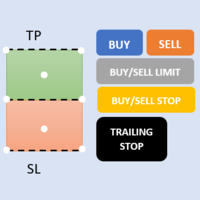
First 5 copies sold for 39$. 2/5 sold. Next price 49$. Not all function work on tester. If you want to test it, write to me a personal message, i send to you a demo version valid for 7 days with full functionality.
The Trade Manager Advace is composed by 4 part: Navigation panel. Execution panel (Here is present the Risk Reward Tool). Management panel. Equity panel.
Input parameters Magic Number : Number (number must be unique, do not use the same number in more one chart). Trailing stop for

Expert Advisor for MT4 Useful utility MUST have for all traders. With 1 click button, you're able to close all your open positions. Its come with a warning pop up notification when you click to close all your trades, to avoid an accident press the button. Just press 'Yes' to confirm or 'No' to cancel it. The expert will close all your open positions no matter what pairs you currently open or directions. Just attach the expert on 1 of your chart, and you're good to go.

このパネルは、初心者とプロの両方のトレーダーの取引を支援するために作成されました。
主な機能:
すべての時間枠での潜在的な市場の反転に関するシグナル ニュースリリースの5分前に通知 取引セッションの交差を 5 分で通知 電子メール、電話、または端末に通知を送信します 日中の各機器の抵抗線とサポートラインを計算します アベレージング時に各商品のリスクを超えないようにする(各商品の最適な平均値をリアルタイムで計算し、次のアベレージングまでのポイント数を言います) 自動ロット計算で各取引のデポジットから簡単にカスタマイズ可能なリスク管理 損益分岐点まで取引を行い、動きの方向に利益を引き出す組み込みのトレーリング システム 各楽器の量をパーセントで説明し、1 日あたりにどれだけ経過したかを示します。また、預金からこの商品で獲得した割合とポイントの相対的な割合も示します 一括決済注文と未決注文の配置に便利なホット ボタン 特定の商品のすべての取引の損益分岐点またはゼロ点の自動計算 サーバーを操作するには、「 http://ec.forexprostools.com/ 」を許可された U

M ulti Cross Alert! on your smartphone. Use multiple indicators to get a crossover signal on chart as well as on MetaTrader app. You can use all crossovers at the same time but it is not recommended cause your chart will look messy. Instead use combination of two indicators which will be better. IMP NOTE:- More indicators will be added in future updates. Any suggestions regarding indicators are welcome! Indicators List: 1. MA (Cross) 2. RSI (OB/OS) 3. MACD Lines (Main Line & Signal Line Cross)
FREE

PROTECT YOUR FTMO Account in a simplest way Must-Have Account Protector for any Prop-trading Account and Challenge MT4 / MT5 Expert Advisor that protects your Forex Prop Trading account from an unexpected drawdown! FTMO Protector is a Tool that lets you manage trades and control your profit and loss across multiple Robots and currency pairs using a simple parameters and settings. Use as many EAs and Instruments you need, the Protector will: 1. Calculate your midnight (01:00 System time) Bal

The Screen Shooter utility will help you take screenshots of your trading process.
How it works: The program is a small panel with two modes of operation: the first mode "All Open Charts" - allows you to create screenshots of all charts open in the terminal; the second mode "All TF Curr Chart" - creates, accordingly, screenshots of all timeframes of the current chart (to which this tool is attached). In the second mode, the user can disable unnecessary timeframes using the buttons on the panel (

Информирование пользователя о величине текущего спрэда цветом, в зависимости от тренда. Простой и удобный информатор. Расположить можно в любом месте графика (настраивается во входных параметрах). При активном индикаторе наносим на график горизонтальную линию цветом, указанным во входных параметрах. Эта линия будет (по Вашему мнению) точкой разворота тренда. Если цена будет ниже линии - цвет величины спрэда будет окрашен в цвет "медвежьего" тренда, если цена буде выше линии - цвет величины спрэ
FREE

Простая и полезная утилита для нанесения меток на открытые сделки. При запуске скрипта он ищет все открытые сделки и наносит метки на время и цену открытия сделки. Сделки в лонг обозначаются синим цветом, сделки в шорт обозначаются красным цветом. Есть два варианта нанесения меток: - с учетом текущего спрэда (по Ask) - без учета текущего спрэда (по Bid) Входных параметров нет. Всем профита!
FREE

OrderHelper script is super easy and trader friendly to use. It would boost your trading experience. Because it is designed to open one to multiple orders quickly with just one click. Besides using the OrderHelper script, traders can define various parameters for open orders such as the symbol, order type, lot size, stoploss, takeprofit and more. Basically, with this script traders can manage their open orders more efficiently and save their trading time.
OrderHelper manages: • Open the number
Auto Take Profit MT4 is designed to take profits in automatic way.
As a trader (manual or auto), you define your own expected profits schema. When you open one or several orders, the AutoTP program calculates profits then update into SL or TP automatically. It also re-calculates and updates accordingly for remaining open positions when a new order opened or an existing position closed. ---------------------------------- (Watch live in this DEMO ONLY signal https://www.mql5.com/en/signa

Do you over trade??? Do you lose your account by adjusting the stop loss or not putting stop loss?? Do you cross your daily loss limit and closed your account??? Do you breach your funded account??? Do you fail frequently because of emotion?? So you have to control your emotion in trading. And this EA will do the job for you. You can not repeat those mistake even if you try hard. Just set the EA and relax. This will do major role in funded account. This EA will not open orders/positions. It j

MAMMA インジケーターは、ストップ、ボリューム、またはリスクのレベルを計算する上級トレーダーだけでなく、初心者にも理想的です。 パラメータを制御し、ツールを取引に適応させるためのコックピットがあります。 このコックピットは、必要に応じて移動したり、単純に縮小して拡大したりできます。 3 つの計算方法があります。 * ロットサイズとストップサイズで何をする予定かを基にリスクを自動計算できます * 予想されるリスクとストップサイズに基づいてロットサイズを設定できます ※想定されるリスクとロットサイズから最適なストップサイズを設定できます。 各計算により、リスクの正確な量を知ることができ、計画されたストップの位置をチャートで直接確認することもできます。 計画を見失わないようにするために、その日の目標と最大損失を設定できます。 最後に、現在の市場または単に現在の日、週、月の進行状況を総合的に確認できます。 ボーナスとして、理想的なストップが提案された新しいオープンポジションごとにアラートを受け取ります。 最後に、コックピットはフランス語と英語の間でプログラミングできます。 ブローカーのサー

This is an ON CHART trade management panel. In other words, ON CHART Lot Size, Buy, Sell, Stop Loss, Take Profit, Close Buy, Close Sell and Close All buttons! *IMPORTANT NOTE: Input settings are NOT usable. You can change or insert Stop Loss and Take Profit values only on the chart panel. (See the below video!) This one is MT4 version!
BUTTONS List: 1. Lot Size - (0.01) is default click on it and insert the lot size with which you want to open a trade. 2. Stop Loss - (0.0) is default click on i
FREE

Informing the user about the size of the current spread.
A simple and convenient informant. You can place it anywhere on the chart (configurable in the input parameters).
Input parameters:
- text color
- text size
- text style
- binding to the corner of the graph
- horizontal offset from the anchor point
- vertical offset from the anchor point
- enabling (disabling) the "Show as background" function
Have a good trade to everyone!
FREE

New version 1.22. Partagas
The AG algorithm is an element of a comprehensive trading system for trading a basket of currencies across 8 major currencies across all 28 currency pairs. The algorithm serves as a signal block for determining entry/exit from a position. To collect initial values, AG uses data from the CSS Currency Slope Strength cluster indicator. This indicator was not chosen by chance - it performed very well during testing of the algorithm. A. AG determines the width of the e
FREE
Daily Sessions utility is the best tool to highlight trading sessions , the trader can set any starting hour and ending hour to mark his trading session. Main features :
Customizable session time. Customizable Colors. Customizable vertical lines for the start and end of sessions
Set as many sessions as you want by simply plotting the indicator and changing the Indicator ID.
This is a tool for back testing your strategy manually on the chart , it's very easy to use, it may be useful for both professional and beginner traders. Features : • Simple buttons. • Export : P/L Points , Lots , Order P/L Result , Balance , to CSV file. • Ability to choose Auto or Manual StopLoss & TakeProfit. • Manual lot , or lot by risk can be used.
• Ability to change the chart time frame for live charts without losing the backtest result , you can even clo
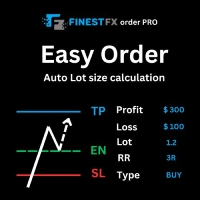
FinestFx order PRO is easy order execution and auto risk management tool developed by FinestFx official Programmer : Mohammed Rafi Just move SL,TP , Entry lines or Type SL,TP on entry columns . Lot are calculated automatically by fill out the loss cut amount. Work with all base currencies Fixed loss amount can be selected. Calculate risk rewards. Market order, limit order, and stop order are selected using buttons Supports FX, CFD, and crypto currency on MT4 Visit the owner website to see its

The EA is used as an assistant for traders in the Trading Masters group. The EA assists with identifying setups when taking trades using the strategies outline in the Trading Masters Group. The EA has been developed and is intended for use by community members who understand the concepts and would like assistance navigating trade setups. It is recommended to first understand the concepts presented in the Trading Masters group before purchasing this EA so the user can understand and benefit fr

The panel allows you to place and open orders with one click of a button.
It is possible to quickly change the parameters of the lot, take profit, stop loss and expiration time.
The expiration parameter is valid only for pending orders. The trading panel works in the tester. To open a pending order, click on the buy or sell stop button, and then on a place on the chart.
(This function cannot work in the strategy tester for technical reasons) Expiration time is in minutes, everything else is
FREE

Martingale grid panel - a semi-automatic Expert Advisor with a built-in trading panel. The Expert Advisor is activated by standard MT4 tools (or via its own panel) and automatically sets Take Profit, Stop Loss, Trailing Stop. Automatically or manually opens averaging orders. Changes the volume of orders in accordance with the Martingale strategy. Works with all orders of the selected symbol or only those opened from the panel, when the ID number is set. The Expert Advisor (and its Free Demo) are

Line Trader Pro is designed to simplify your trading activities and automatically open trade when the trendline or horizontalline you draw touched by the running price, You can choose to set EA to trade buy order or sell order when the trendline or horizontalline touched by running price, you can also set stoploss and takeprofit in pips, when using MM Lot it will automatically calculate your order lot based on the SL distance and set risk per trade from your current equity. This EA include : 1.
MetaTraderマーケットは、履歴データを使ったテストと最適化のための無料のデモ自動売買ロボットをダウンロードできる唯一のストアです。
アプリ概要と他のカスタマーからのレビューをご覧になり、ターミナルにダウンロードし、購入する前に自動売買ロボットをテストしてください。完全に無料でアプリをテストできるのはMetaTraderマーケットだけです。

取引の機会を逃しています。
- 無料取引アプリ
- 8千を超えるシグナルをコピー
- 金融ニュースで金融マーケットを探索