 MetaTrader 5
 エキスパート
 インディケータ
 ライブラリ
ライブラリ ユーティリティ
 ウィジェット
 ルール
ルール
YouTubeにあるマーケットチュートリアルビデオをご覧ください
ロボットや指標を購入する
仮想ホスティングで
EAを実行
EAを実行
ロボットや指標を購入前にテストする
マーケットで収入を得る
販売のためにプロダクトをプレゼンテーションする方法
MetaTrader 4版新取引ユーティリティ - 37
 以下はMetaTrader4での外国替取引を簡素化する取引プログラムです。以下のリストのユーティリティにカーソルを合わせて、説明と目的をご覧ください。
Trade24 for MT4 Trade24 is arguably the most powerful expert advisor in manual trading. With our tool, open your orders in record time (50 times faster). This is why our users call it the "scalper tool". Key features of the panel
It works perfectly on all trading asset Trade24 calculate the exact lot size for your trade according to the stop loss size and your available account equity Trade24 has the ability to schedule your future trades with the "Scedulled" function Set Stop Loss

This script is used to quickly place an order. Stop Loss = 100 points and Take Profit = 20 points are already automatically set in it under the five-digit system, the order size is 0.1. Working with the script: in the terminal window, click the "Auto-trade" button, then open the "Navigator"> "Scripts" panel and drag your script onto the chart. If you drag the script below the market price, then a sell position will open, if it is above the market price, then a buy position will open. You can ch

Telegram BrealOut Ichimoku Lite The Expert Advisor will help you forward all alert from MetaTrader 4 to Telegram channel
Parameters Channel Name - Name of your channel Token - create bot on Telegram and get token. AlertonTelegram - true to activate AlertonMobile - true to activate AlertonEmail - true to activate Customize moku Setting (Pro Version) Customize Comment (Pro Version) Add Customizable Signal Name(Pro Version)
Important Note
- You must allow WebRequest and add the https://a
FREE
Telegram BreakOut Ichimoku Telegram BrealOut Ichimoku PRO The Expert Advisor will help you forward all alert from MetaTrader 4 to Telegram channel
Parameters Channel Name - Name of your channel Token - create bot on Telegram and get token. AlertonTelegram - true to activate AlertonMobile - true to activate AlertonEmail - true to activate Customize moku Setting (Pro Version) Customize Comment (Pro Version) Add Customizable Signal Name(Pro Version)
FOR TRY YOU CAN DOWNLOAD LITE VERSION
CheatcodeFX Trade Manager
Your profit management companion. Especially perfect when you have a VPS or a dedicated machine setup. Apply it on the pairs that you care about and walk away. I personally applied it to the 28 main pairs that I often watch on a dedicated mini pc and do the trade execution on another device. With this supporting you in the background, trade with confidence know this will help move you to breakeven and take the best out of your trade. CheatcodeFX Trade Managers works on

コピー機->便利で高速なインターフェースインタラクション、ユーザーはすぐに使用できます ->>>> WindowsコンピュータまたはVPS Windowsでの使用を推奨 特徴: 多様でパーソナライズされたコピー取引設定:1. 異なるシグナルソースに異なるロットモードを設定できます。2. フォワードコピー取引とリバースコピー取引に異なるシグナルソースを設定できます。3. シグナルはコメントで設定できます。4. 契約ロットに応じてロットを調整するかどうか 多様でパーソナライズされたコピー注文設定2:1.品種ごとに異なるロットモードを設定できます2.順方向コピー注文と逆方向コピー注文に異なる品種を設定できます3.コメントでシグナルを設定できます4.契約ロットに応じてロットを調整するかどうか
コメントフィルタリング、MAGICフィルタリング、シグナルロットフィルタリング、ローカル製品フィルタリング 勤務時間設定 逆同期SLAVE終了 注文バインド機能: 任意の注文を設定されたシグナルソース注文にバインドできます (テーブルをダブルクリックして編集します) アカウントリスク管理 基本

Hello Traders! Version 3.0 of the script has been released!
What's new? Thanks to your suggestions I have inserted these changes to the tool: 1 - Data input are now date picker, it will be easier and faster to set the data export period; 2 - A message box will check that there is not a file with the same name in your folder; 3 - Error message to check that data insert are correct. If you like this product, take a look to the FULL INTERFACE! MT4 To Excel Interface
This script is a very usefu

Use this tool to plan your trades directly on your charts and get instant feedback on account risk, trade risk to reward and required position size. Plus, purchase LMBF Executor separately to easily convert planned trades into orders and manage them from your charts. Features include: Plan multiple trades for one or more symbols visually on your charts at one time, either on the same of different time frames. Use your mouse to drag levels to change entry, stop loss and take profit levels. See

**IMPORTANT** THIS TOOL REQUIRES YOU TO FIRST PURCHASE "Graphical Trade Planner" https://www.mql5.com/en/market/product/56702. Without it, this tool will do nothing of any use. -------------------------- Use "Graphical Trade Planner" to plan your trades directly on your charts and get instant feedback on account risk, trade risk to reward and required position size. Plus, purchase LMBF Executor separately to easily convert planned trades into orders and manage them from your charts. Features i

Every trader is watching over his account over and over.... trying to anlayse every system he or she has. With this tool you are able to export your complete history of every account
export withdrawls / deposits / rebates to a separate file
export account status with balance / equity / current drawdown
recalculate micro to standard lots / profits ...
export decimal by "." or ","
combine a series of Magic Numbers to one unique Magic Number
filter to ignore OrderComments.

Asa Manual Grid Buy Sell with UI is made for Grid trading when orders are placed above and below a set price, creating a grid of orders at incrementally increasing and decreasing prices.
Main Features Ability to set buy grid with 3 maximum orders. (200 in full version)
Ability to set sell grid with 3 maximum orders. (200 in full version)
Easy to use with simple interface. Have 2 mode of Take Profit and 1 for Stop Loss.
Real time information for the current open positions and calculate averag
FREE

Asa Manual Grid Buy Sell with UI is made for Grid trading when orders are placed above and below a set price, creating a grid of orders at incrementally increasing and decreasing prices.
Main Features Ability to set buy grid with 200 maximum orders. Ability to set sell grid with 200 maximum orders.
Easy to use with simple interface. Have 2 mode of Take Profit and 1 for Stop Loss.
Real time information for the current open positions and calculate average sum of order price. How to use
STEP 1

This Expert Advisor Give Us Notification on MT4 Mobile Aplication if CAndle break throught the kumo aka senkou span A/B You can put your ichimoku cloud setting at your desire How to Setup Notification please read this https://www.metatrader4.com/en/trading-platform/help/setup/settings_notifications
This is an Expert Advisor just put on Experts on your MT4
FREE

HEDGE Decreasing is an EA that opens an order if the market moves an adverse will make a safe zone and make it smaller every each trade with lower risk than the usually hedge strategy. Hedging with Forex is a strategy used to protect one's position in a currency pair from an adverse move. It is typically a form of short-term protection when a trader is concerned about news or an event triggering volatility in currency markets. if you want to try the EA for free just message me
i am alwa

Expert Advisor will manage all transactions you make using Expert Advisor, or manually from all platforms (Web Trade, MT4 Windows, MT4 Mac, MT4 Mobile phone) Multi Currency In one chart, the Tool will manage transactions of all currencies or according to the available list.
Currency Selection All Transactions of All Pairs Based on the Pairs List
Auto Manage, with setup parameters on one chart Auto Close Profit Average Auto Close Profit only Auto SL / TP Auto Trailing
Button Function to : Clos
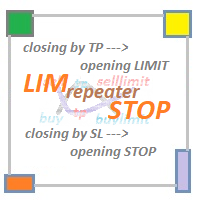
LIM_STOP_REPEATER Программа не открывает сделки сама. Она повторяет сделки открытые вручную. Программа повторяет закрытые по TP или SL ордера: Выставляет Limit ордер при закрытии по TP. Выставляет Stop ордер при закрытии по SL. Программа не имеет ограничений по количеству повторов сделок. В программе отсутствуют внешние параметры. Если сделку закрыть вручную, отменить отложенный ордер - программа не будет повторять эту сделку.
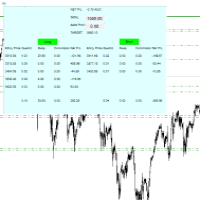
For all those traders who trade multiple positions , both long and short, in the one (or many) financial instruments, including grid trading, cost averaging, hedging, martingale, etc , by dragging it on to any chart from the navigator, this free and easy to use interactive panel utility will offer you the following benefits:
1. Live up to date visual data:
a. Shows live up to date details of all positions, both long and short, you have open in the particular financial instrument of the chart
FREE

With this Expert Advisor you will never miss an indicator event, you will receive notifications on your mobile phone when the chart matches the conditions you have set.
Indicators in the Expert Advisor
Moving Average(MA) Bollinger Bands(Bands)
Stochastic Oscillator(Stochastic)
MACD
Relative Strength Index(RSI)
Before use the Expert Advisor
Install "MetaTrader 4" on your mobile phone. Enable Push Notifications in "MetaTrader 4" on your PC, go to menu bar Tools -> Options -> Notifica

選択した期間における詳細な取引統計 私の #1 トレードマネージャー をご覧ください:66+ の機能、拡張統計を含む | ご質問はこちら まで 統計表示モード: 選択した 通貨ペア/取引商品 すべての取引 の統計 (" ALL ") 統計を取得したい期間を選択できます: 1 日 1 週間 1 ヶ月 2 ヶ月 3 ヶ月 6 ヶ月 1 年 2 年 すべての取引履歴 表示される情報: 総利益 総損失 総利益/損失 取引数 買い取引の利益率 売り取引の利益率 総利益取引率 平均保有時間 利益取引の平均保有時間 損失取引の平均 保有時間 インターフェースの利点: パネルを 折りたたむ ことができ、チャート上のスペースを解放します:(ボタン (^)); パネルを 移動 して、チャート上の任意の場所に配置できます:(ボタン < MOVE >); ダーク / ライトインターフェーステーマ :(スイッチ " Dark ");

あなたはついに心配することなく取引を続けることができます! Auto Trade Manager とは何ですか? これは、取引を行わないがアクティブな取引を管理するEAです。これは、ユーザーの仕様に従ってストップロスを自動的に移動することによって行われます。 特徴! -損益分岐点にストップロスを自動的に配置します(設定:利益のピップ、TPの%、SLの%) -ストップロスを自動的に追跡します(設定:利益のピップ、利益のお金、移動平均のストップロス) 注:EAを無数の取引スタイルと戦略にさらに適応させるための将来のアップデートがあります (まもなく、ATRインジケーターに従ってストップを追跡するオプションを追加します)

For the trader, trading sessions represent a clear time frame for increasing market volatility. The Trend Session indicator of trading sessions is a tool that will undoubtedly be useful not only for novice traders, but also for experienced traders. If you're looking for a simple indicator of Forex trading sessions, you've come to the right place. This indicator draws vertical bars that indicate the start and end times of the main trading sessions.

MagicExcel will allow you to extrapolate, from your trades, reports split down by Expert Advisor. The generated reports allow you to quickly compare statistics of trades data from different Expert Advisors, different symbols and also the behavior of an Expert Advisor against different symbols. Additionally, if selected, a report will be created that shows the behavior of the Expert Advisor over time. This is a very useful tool for a trader who works with many Expert Advisors at the same time. R

This Expert Advisor give you an alert to your Metatrader Mobile and on Metatrader Screen Chart You can put your Moving average setting You can freely add custom message to it. How to Setup Notification please read this https://www.metatrader4.com/en/trading-platform/help/setup/settings_notifications Input default on this Expert Advisor. You can change to it parameters. fastMAPeriode =3; slowMAPeriode =8; MAMethodType ="0=SMA 1=EMA 2=SMMA 3=LWMA"; fastMAMethod =1; slowMAMeth
FREE

This utility sends notification to trader’s MT4 (for MT5 version, checkout this link ) mobile app, to remind traders about their open positions. Super useful for part time traders to keep track and not forget any positions. To turn on notification, please visit this link (https://www.metatrader4.com/en/trading-platform/help/setup/settings_notifications) Features Keep track on open orders (pending orders, running orders) Customize time to send notification Customize notification interval (send ev

The Multiple Order Opener does Exactly what it says. It can open any number of orders of any type with just one click. (Sell, Buy, Sell Limit, Sell Stop, Buy Limit, Buy Stop). You only have to specify the number of orders you want to open, specify your lot size for the orders, take profit and stop loss pip points (optional), and just click once the button with the type of order/orders you want to open. It is simple as a click.
Note : Unfortunately the 'try demo' does not work fo

Lot by Risk tradingパネルは、手動取引用に設計されています。 これは、注文を送信するための代替手段です。
パネルの最初の特徴は、管理線を使用した注文の便利な配置です。 第二の特徴は、ストップロスラインの存在下で与えられたリスクのための取引量の計算です。
制御線はホットキーを使用して設定されます:
利益を取る-デフォルトではTキー;
価格-デフォルトではPキー;
ストップロス-デフォルトでは、Sキー;
取引パネルの設定で自分でキーを設定できます。
操作のアルゴリズム:
1)-レベルを希望の場所に配置します(すべてのレベルを配置する必要はありません);
2)-リスクを指定します(オプション);
3)-緑の送信注文ボタンをクリックします;
4)-注文が行われるのを待っているか、エラーメッセージ付きのアラートが表示されます;
5)-マジックでExpert Advisorにリンクされている現在のシンボルのすべての注文を閉じる場合は、注文を閉じるボタンをクリックします。
注文を送信ボタンを何度も押すべきではありません。 一度で十分です。 注文後、ボタンは「
FREE

AW Workpad は、手動および半自動取引用に設計された多機能取引コントロール パネルです。保留中の注文、市場ポジションを管理し、幅広い統計データを提供するだけでなく、古典的な指標のグループの複数期間の分析を行うことができます。 このユーティリティは、次の 5 つのタブで表されます。 POSITIONS, PENDING, CLOSE, INDICATORS, INFO . 各タブには、注文や現在の市場状況に関する情報を処理するための独自の機能グループがあります。 MT5版→ ここ / 問題解決 -> ここ 機能または利点: このユーティリティは、すべての時間枠と任意のシンボル (通貨、指数、石油、金属、株式) で機能します。 各パネルのすべての要素には追加のラベルが付けられており、任意の要素にカーソルを合わせるだけで表示されます。 AW Workpad 取引パネルには、柔軟な設定と直感的なパネル インターフェイスがあります。 最も必要なすべての機能を 1 つの製品に。 取引パネルのタブ: . POSITIONS - このタブでは、成行注文を操作および維持で

市場情報と詳細な統計:ボラティリティと価格バーの分析。 私の # 1 Trade Assistant : 66+ の機能、このツールを含む | ご質問はこちら まで 情報を取得するために任意の通貨ペア/取引商品を指定してください: 市場情報:
現在のスプレッド; ロングポジション(買い)のスワップ; ショートポジション(売り)のスワップ; 価格変動を分析するための時間枠と期間数を選択してください: 平均ボラティリティ; 最大ボラティリティ; 最小ボラティリティ; 最高価格; 最安価格; 上昇バー数(終値 > 始値); 下降バー数(終値 < 始値); 中立バー数(始値 = 終値); インターフェースの利点:
パネルを 折りたたむ ことができ、チャート上のスペースを解放します: ((^) ボタン ); パネルを 移動 してチャート上の任意の場所に配置できます: (< MOVE > ボタン ); ダークまたはライトのインターフェーステーマ : (" Dark " スイッチ ); TP / RR 計算 の有効化/無効化: (" TP " スイッチ ); 高

スクリプトは、1つのストップロスと5つの異なるテイクプロフィットで5つの注文(購入)を開きます。 そして、4つの指値注文(購入)を行います。 デフォルトでは、次のパラメータが設定されています。 すべての未処理の注文の損失を停止-120ピップ 1注文で利益を得る(ロット0.1)-30ピップ 他の4つの注文(ロット0.04)で利益を取ります-50、90、140、200ピップ。
指値注文のストップロスは、現在の価格(注文時)から135-140ピップスです。 各指値注文の距離は20ピップです。 マイクロマーチンゲールを使用したロットサイズ-0.04、0.05、0.06、0.08。
指値注文の場合、自動削除は2日後に設定されます。 このアドバイザーを使用して、募集中のポジションをサポートできますhttps://www.mql5.com/en/market/product/56277
開始する前に、独自のパラメーターまたはパラメーターを設定するためのウィンドウを使用してスクリプトを注文できます。 個人的には、パラメータ確認ウィンドウなしでスクリプトを実行すると便利だと思います。
MT5の
FREE

スクリプトは、利益が5ピップスを超えるすべてのポジションを閉じます。 すべてのペアのすべてのオープンポジションをチェックします(任意のチャートで実行できます)。 端末で「アルゴリズム取引」モードを有効にする必要があります。
早く閉じる必要のあるオープンポジションが多い場合に効果的です。
スクリプトは、トレーリングストップまたはアドバイザを置き換えるものではありません。 スクリプトは、すべての未決済取引をチェックし、起動時に条件(利益が5ピップスを超える)を満たす取引を1回閉じます。
その後の新しい収益性の高いポジションのクローズについては、スクリプトを最初から実行する必要があります。
バージョン1.3での変更点:
1.-スクリプトは、大きな利益から小さな利益(ピップ単位)までポジションをクローズします。
2.-ポジションを閉じるための利益のサイズを選択できます(デフォルトは5ピップです)。
1ペアのポジションを閉じるためのバージョン-https://www.mql5.com/en/market/product/56270
mt5のバージョン-https://ww
FREE

スクリプトは、1つのストップロスと5つの異なるテイクプロフィットで5つの売り注文を開きます。 そして、4つの指値注文(販売)を行います。 デフォルトでは、次のパラメータが設定されています。 すべての未処理の注文の損失を停止-120ピップ 1注文で利益を得る(ロット0.1)-30ピップ 他の4つの注文(ロット0.04)で利益を取ります-50、90、140、200ピップ。
指値注文のストップロスは、現在の価格(注文時)から135-140ピップスです。 各指値注文の距離は20ピップです。 マイクロマーチンゲールを使用したロットサイズ-0.04、0.05、0.06、0.08。
指値注文の場合、自動削除は2日後に設定されます。 このアドバイザーを使用して、募集中のポジションをサポートできますhttps://www.mql5.com/en/market/product/56277
開始する前に、独自のパラメーターまたはパラメーターを設定するためのウィンドウを使用してスクリプトを注文できます。 個人的には、パラメータ確認ウィンドウなしでスクリプトを実行すると便利だと思います。
MT5のスク
FREE

Protect your EA from unauthorized use. With EA Locker you can generate individual licenses for your EA to your customers.
Product blog page You can download MT5 version here
Protection consists of three parts: 1. Your Unique EA identifier 2. User Identifier 3. Expiration date
Description of parts: 1. EA ID is your internal EA identifier. Itcan be the short name of the EA. (MyGridEA, TradeCopierEA...) 2. User identifier can be anything user specific data (Mt4 account number, Account number + U

The script closes all positions for which the profit is more than 5 pips. Works only on an open pair (on an open chart).
The terminal must have the "Algo trading" mode enabled.
Effective if there are many open positions that need to be closed quickly.
The script does not replace trailing stop or advisor. The script checks all open deals and closes those that meet the condition (profit is more than 5 pips) once at the time of launch.
For the subsequent closing of new profitable positions, y
FREE

The EA monitors positions for selected pairs, sets a break-even level and moves a trailing stop. When the trade is "n" points of profit (parameter dist_BEP), the stop loss is moved to the break-even point (the level of the trade opening price) plus the specified distance in points (parameter BEP) The EA checks all available (or filtered) trades for break-even and moves stop-loss levels if necessary. The EA also checks all available (or filtered) trades for trailing stop conditions and, if neces
FREE
これは、グリッドシステムを取引する半自動のエキスパートアドバイザーです。アイデアは、市場で徐々にさまざまなポジションを取り、次にそれらの損益分岐点を計算することです。価格がこの損益分岐点を所定の距離だけ通過すると、すべての未決済注文がクローズされます。
重要な情報
ユーザーガイドは次のとおりです。 https://www.mql5.com/en/blogs/post/730567
このEAは、他のどの製品でも試すことができ ます。https://www.mql5.com/en/users/bermaui314/seller
重要な機能 EAには、予期しない結果から取引資本を保護するためのストップロスメカニズムがあります。
EURUSD-XAUUSD-Oil-BitcoinのようなMT4シンボルを取引することができます。
MT4の時間枠をトレードすることができます。
VPSからEAを実行することをお勧めします。
パラメータとデフォルト設定
1)お金の管理設定
ロットを開始します。 レバレッジが1:400以上の場合、デフォルト設定で500ドルごとに0.01にすることをお勧めし

Universal trading advisor "WOz" with a built-in trading panel
The EA's capabilities can be easily tested in the strategy tester in visual mode.
The EA can simulate real trading with the ability to move the SL and TP levels.
The EA has 5 modes of operation:
1. AUTOTRADING automatic trading mode on a set signal
2. ONLY SIGNAL mode of tracking the set signal without auto trading
3. RANGE MODUS mode of automatic placement of equidistant orders on Bayi Sell at a specified time
4. HAND MODUS
FREE

Recommended Broker and Utility Capabilities For optimal use of this utility, it is advisable to choose a broker like RoboForex or a similar one that offers fast order execution and low spreads. Utility Description: The purpose of this utility is to manage market orders, including opening new trades and optimizing losing positions using an internal algorithm. The utility incorporates trend filtering and various types of trailing stops and take profits, making it versatile for trading any instrum
FREE
This utility allows you to easily close positions.
You can close buy or sell positions by clicking each buttons. And also you can close whole positions by clicking one buttons.
This is advanced tool of "ClosePanelA". This panel would be placed left bottom corner of the chart. To get upgraded version, please visit https://github.com/johanfriso87/profile
Important: -Check allow live trading. -Enable Auto Trade trading.

This is an Ea to help trader to fix his objectif in a day before trade. The Idea behind this EA is: This ea is for the postion management The trader should provide the number of trade he would like to take in a day As soon as his take a trade , this number dicrement when taking a trade the ea use this number and the number of volume to calculate tp and sl and place it on the market When the number come to 0 , the ea provide a message to the trader to stop trade for this day
FREE
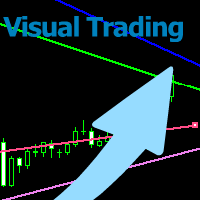
With this tool you can easily draw lines on the chart and the trade is done easily. The steps are as follows: First: Draw the buy and sell lines on the chart. Second: Draw the profit and loss lines on the chart. Third: Specify the volume of the transaction you want to trade. Fourth: Activate the lines. Warning When moving lines, be careful not to make a wrong trade.
Expert easily trades you.

This utility allows you to easily close profit or loss positions.
You can close profit or loss positions by clicking each buttons. If profit or loss positions reaches or exceed value specified as pips, they would be closed.
This panel would be placed left bottom corner of the chart. If the users want to change the placement and functions contact me.
Important : -Check allow live trading. -Enable Auto Trade trading.

MultiStopOrder Tis Script will help us to put multiple stop order with single one click. This is a script not an EA Will place BUYSTOP and SELLSTOP with single click
Main Feature 1. Put Multiple Stop Order 2. Specify how much stop orders will make 3. Set distance from current price 4. Set distance for each stop order 5. Set Take Profit dan Stop Loss 6. Use it on MT4 7. Set lot size with minmum 0.01 lots 8. Use with single one clicks
This utility allows you to easily close positions.
You can close buy or sell positions by clicking each buttons. And also you can close whole positions by clicking one buttons.
This panel would be placed left bottom corner of the chart.
If the users want to change the placement and functions contact me.
Important: -Check allow live trading. -Enable Auto Trade trading.

The arkdc module derives its name from the Ark data collector statement. The main purpose of this module is to instantly save incoming tick data to a csv file. How does this csv file differ from any ready-made csv file found in metatrader or imported from other sites? The data obtained with this module is each tick data that comes to the metatrader program. A lot of tick data can come in per second.But does the module only record tick data raw? The arkdc module saves not only incoming tick data,

Using hotkeys, you can create graphic objects of different drawing styles and different colors on the active chart. You can change the formatting styles for graphics. You can choose default drawing styles, or set them in the advisor properties selection window. Going to the graph, when creating graphic objects, the color, line type and line thickness are selected automatically. Drawing styles for graphical objects will depend on the current timeframe where drawing will be performed. Please watch
FREE

The Visual Order Tracking (VOT) indicator makes trade history and performance metrics visible on the chart in three ways: 1) Draw History of closed and open trades with arrows, lines and trade result numbers (pips, $ profit, % profit, % change); 2) Summary Trade Panel to show open and closed trade summaries by symbol, lots, pips, profit and advanced stats; and 3) Open Trades Panel to show open trades by Symbol Ticket, Type, Lots, Profit, pips, SL pips, StopLoss, TakeProfit, Spread, Magic, Comme

The Visual Order Tracking (VOT) EA makes trade history and performance metrics visible on the chart in four ways: 1) Draw History of closed and open trades with arrows, lines and trade result numbers (pips, $ profit, % profit, % change); 2) Trade Manager to show Open, SL and TP levels as vivid horizontal lines with dynamic specs and partial closing options; 3) Summary Trade Panel to show sortable table of open and closed trade summaries by symbol, lots, pips, profit and advanced stats; and 4)

This Expert Advisor is to assist you on Impulse's Titan method.
The expert : * Placement of SL/PE and TP in automatic mode * Automatic order taking * Automatic calculation of the Lots according to your Money management * Automatic calculation of Fibonacci levels * Tracking and closing of orders automatically * Detection of signal cancellations * Manual customisation of the PE is possible * Manual pause possible in case of event
To make the best use of the Expert you should : * follow the Impu
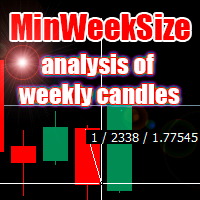
The script analyzes the size of the extreme closed candles of the selected timeframe (by default - W1).
If the candlestick size is higher than in the settings, the script opens the chart of this trading instrument.
In addition, the script calculates the average candle size for the number of candles specified in the settings.
An example of using the script: On Monday morning, activate the script on any trading instrument; Determine which instrument's weekly candle is above average; This week,

Hello Guys! I want to share with you a very useful tools. Anyone of us who has used MT4 for some time knows how impractical this platform can be for discretionary trading. That's why I created this graphical interface! Interface is very simple, all the info that you need are in the video and in the screenshot.
NB: Before to run the EA Interface, remember to copy the file in the comment in your MT4 folder "Controls". PATH: .../MQL4/INCLUDE/CONTROLS
NB: unfortunately the interface can't be test

Time Closer can help you closing all the open position at the specified time "Everyday". Mainly for Day trader that don't want to hold position overnight, or over different session, or over a specific time. Simple Parameter to use. Usage Download and drag Time Closer on the chart (Chart Symbol should be the same Chart Symbol as you want the position close) Check Allow AutoTrading is "On" Set parameters
Input Parameters Turnon True - Turnon the utility
False - Turnoff the utility Close All Open

Open trades knowing what your risk will be. The calculator returns the lot size for the MT4 desktop terminal and the units for mobile terminals.
It works on every instrument that your broker offers (forex, gold, commodities, etc.)
It can also be used to open market and pending orders with just one click.
This system adds an improvement to MT4's user interface.

キーと通知を使用した描画 この商品は、取引の専門家であるトレーダーにとって興味深いものです。より正確には、取引アルゴリズムでクリーンなチャートを使用します(インディケーターのない、またはインディケーターの数が最小のチャート)。 ホットキーを使用すると、アクティブなグラフ上にさまざまな描画スタイルとさまざまな色のグラフィックオブジェクトを作成できます。グラフィックの書式スタイルを変更できます。 デフォルトの描画スタイルを選択するか、アドバイザプロパティ選択ウィンドウで設定できます。グラフに移動すると、グラフィックオブジェクトを作成するときに、色、線種、線の太さが自動的に選択されます。グラフィカルオブジェクトの描画スタイルは、描画が実行される現在の時間枠によって異なります。 基本的な機能を紹介するビデオをご覧ください。
キーボードショートカット キー0-すべてのオブジェクトからフォーカスを削除します キー1-「水平線」オブジェクトを作成します キー2-「Rectangle」オブジェクトを作成します キー3-「トレンドライン」オブジェクトを作成します キー\-グラフからすべての種類のオブジ
FREE

Excellent dashboard for analytics. The panel helps to analyze the values of the Momentum indicator and its signals.
With this panel you can: watch the current signal from Momentum on all timeframes; watch the current signal from Momentum for different symbols; watch the current Momentum value; several types of signals for analytics.
Values in a table cell: value of Momentum
Signal type: Momentum crosses "100" line Momentum upper/lower "100" line Momentum direction
Work option: all

Alerts to Telegram The utility sends Alerts of all your indicators or advisers to a telegram channel (group or personal message). Benefits:
1. There is no need to be at the terminal waiting for an alert from your indicator or advisor; 2. Simple setup.
Currently works with terminal languages:
1.Russian; 2.English. If it is necessary to add your language please let me know. The utility works together with the AlertToFile indicator (put the indicator in the Indicators folder) Indicator: Alert

LMBFWatchlist is an interactive tool for Metatrader 4 that lets you create and manage watch lists directly on your Metatrader charts. Functionality includes: Add an unlimited number of watch lists with names of your choice Add different groups of watchlists for different time frames Add comments for symbols that always appear on the chart when that symbol is selected. Easily identify which symbols have comments against them. See watch lists instantly synchronise across all open charts that hav
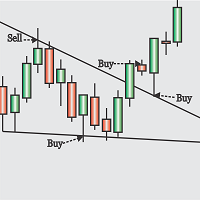
Obaforex TrendLine Trader is a tool developed to improve trading with trend lines. This tool is highly functional and yet extremely simple and safe to use. Simply draw trendlines and make them active for trading by renaming them based on what purpose you want them to serve. buy (to open a long trade based on the named line) sell (to open a short trade based on the named line) buytp (to close a buy trade at a price higher than current market price) buysl (to close a buy trade at a price lower t

Note: This is EA only panel for manage Orders ------------------------- EA input inclde
- EA_Comment
------------------------
The panel include - Lot size input for BUY and SELL button
- Close ALL SELL orders (same symbol)
- Close ALL BUY orders (same symbol)
- Close ALL orders (same symbol)
-------------------------
You can use on any pair and any time frame
Thanks
FREE

DataGrabber The database creator
DataGrabber store selected instrument history to .csv files. It's purpose is to automatically create extensive history database.
DataGrabber is added to the selected instrument chart window as an indicator. It periodically check presence of bar data on the server and presence of .csv files on client PC (local database). If missing files detected in local database, it's created, filled with data and added to the database.
Range of bar history in days beeing ch

非常好用的工具8888888888888888888888888888888888888888888888888888888888888888888888888888888888888888888888888888888888888888888888888888888888888888888888888888888888888888888888888888888888888888888888888888888888888888888888888888888888888888888888888888888888888888888888888888888888888888888888888888888888888888
FREE

MT4 Alert to Telegram MT4 Alert to Telegram is tool, which sends selected trades to telegram channel. Tool sends trades when open and close with chart to telegram channel. Tool can send multiple charts and pairs from a single chart. Send information of all type of orders: Opened (including Pending Orders), and closed triggered.
functions - user can custom self-sending message text even in their native language - user can send own advertisement text periodically - attach expert in one chart an

This experts helps you with increasing your signal volume. Everytime the signal opens a trade, the experts creats a specific amount of copies of this trade. Evertime the signal closes a trade, the expert closes all the copies of the singal trade.
Input parameters: - amount_of_copies: The amount of copies the expert should create - interval_in_seconds: How often the expert should look for new orders to copy or closed orders, to close copies - lot_size_of_copies: The lot size of the new copies

What this tool does Assistant AutoClose monitors open trades and closes them when selected conditions are met. You can automatically close trades by: Profit in points Loss in points Profit in deposit currency Loss in deposit currency
It can work: On Buy and Sell trades Only Buy trades Only Sell trades
You can also: Limit by number of deals Control total profit per symbol Close trades per-trade or based on overall result Typical use cases Closing trades after fixed profit without using br

This application exports all finished operations to a text file delimited by <TAB>, comma, semicolon or any character defined by the user, also including the comments and magic number of the operations, which can be easily exported to EXCEL or Google Spreadsheets.
The files are generated in the "files" folder, individually separated by month with the name in the format: 999999-AAAA BBBB- [9-9999] where:
999999 = MT4 Trading Account Number
AAAA BBBB = Trading Account User Name
[9-9999] - Mon

Features: fast opening / closing deals the number of deals and the total profit for the Symbol
Fast open deals: set the Lot volume set StopLoss / TakeProfit in points (if you set "0", then it is not used) set slippage set Magic (if necessary) set comment (if necessary)
Fast open features: fast open Buy fast open Sell fast close ALL open orders for the current Symbol
Attention: this utility works only on the current instrument this utility works on a VPS must enable Algo trading in the termi
FREE

A bot for trading in binary options for mql4.
He can do send message in mobile of phone.
He can do work in several long time-frame.
He can modify main analize.
He do displey panel of the bot and modify her you can.
He have do display of tick grafic in 15 min and more(time of timeframe).
He can modify a small main analize.
He can modify a dimension of smal main analize.
He can modify the advanced analize.
He can modify a small advanced analize.
He can modify a dimension of smal advanc

Features: fast opening / closing deals automatic closing of trades by profit / loss the number of deals and the total profit for the Symbol
Fast open deals: set the Lot volume set StopLoss / TakeProfit in points (if you set "0", then it is not used) set slippage set Magic (if necessary) set comment (if necessary)
Fast open features: fast open Buy fast open Sell fast close ALL open orders for the current Symbol
Auto close deals by profit / loss (analogue of virtual StopLoss / TakeProfit): mo
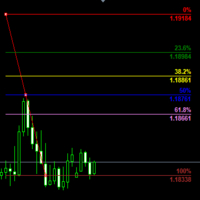
Customizable Fibonacci Lines Up to 9 Fibonacci levels Customize line color, line style and line width for each Fibonacci line Easily adjustable Fibo object is created in background so you can use with indicators and EAs How to use: Load the indicator to the chart and press "f" on keyboard and click anywhere on the chart to start drawing You can customize each line after its drawn as well as input window of the indicator

This application is now replaced by Ofir Notify Light Edition (Free) or Ofir Notify (paid).
Thank all for your positive feedbacks.
Ofir Notify is a tool which send alerts on trades to Telegram Alert on any event concerning a position : Opening, Closing, modification (SL, TP) Send alerts to Chats, Groups and Channel Alert on Equity change Display Risk, Reward and progress of profit/lost for each position Customization of alerts ( only in full edition ) Sending charts screenshots with alerts
FREE
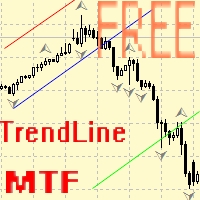
Советник для ручного построения трендовых линий и сопутствующих им стоплоссам и тейкпрофитам. После построения, советник запоминает уровни, направление и лот. При касании текущей цены с расчетной ценой, открывается ордер с заранее выбранными параметрами. Возможно построение и запоминание до 10 разнонаправленных уровней с разных таймфреймов. Можно использовать на любом торговом инструменте. Корректно работает с 4 и 5-значными ценами.
FREE
MetaTraderマーケットは、開発者がトレーディングアプリを販売するシンプルで便利なサイトです。
プロダクトを投稿するのをお手伝いし、マーケットのためにプロダクト記載を準備する方法を説明します。マーケットのすべてのアプリは暗号化によって守られ、購入者のコンピュータでしか動作しません。違法なコピーは不可能です。

取引の機会を逃しています。
- 無料取引アプリ
- 8千を超えるシグナルをコピー
- 金融ニュースで金融マーケットを探索