 MetaTrader 5
 エキスパート
 インディケータ
 ライブラリ
ライブラリ
 ユーティリティ
 ウィジェット
 ルール
ルール
YouTubeにあるマーケットチュートリアルビデオをご覧ください
ロボットや指標を購入する
仮想ホスティングで
EAを実行
EAを実行
ロボットや指標を購入前にテストする
マーケットで収入を得る
販売のためにプロダクトをプレゼンテーションする方法
MetaTrader 4版新取引ユーティリティ - 23
 以下はMetaTrader4での外国替取引を簡素化する取引プログラムです。以下のリストのユーティリティにカーソルを合わせて、説明と目的をご覧ください。
MT4とMT5の高度な取引マネージャーで取引を革命化しよう MT5バージョン: https ://www .mql5 .com /en /market /product /107253 精度と制御の究極のツールで取引戦略を強化しましょう。私たちのMT4およびMT5高度取引マネージャーは、従来の取引マネージャーとは異なり、市場の変動に動的に対応し、取引開始と同時に自動でストップロスおよび利益確定レベルを設定します。 主な特徴: 自動エントリー戦略: 自動エントリー戦略でチャンスを瞬時に捉える。取引を開始すると、システムは予め設定されたストップロスと利益確定を戦略的に配置し、リスク管理を徹底します。 動的ストップロスマネジメント: リアルタイムで市場の変動に対応。利益が+0.50%に達すると、システムがストップロスを自動的に半減し、利益を保護しつつリスクを低減します。 ブレークイーブン保護: 利益が+1%に達すると安心のブレークイーブン保護。高度な取引マネージャーがストップロスをブレークイーブンに移動させ、初期資金を守りつつ、利益を伸ばします。 最適化された利益ロック: 簡単にリターンを
FREE

Hi Friends, " FCK Currency Strength Pro " is a auto & semi auto trading expert with direction of pair. Buy-Sell separate or multi currency in one click. The strategy of FCK Currency Strength Pro is a combination of custom indicator, Trendlines, Support & Resistance levels ( Price Action ) and most important secretive trading algorithm mentioned above. Download News Ex4 and csv file You need the following SDSnews.ex4 in MQL4/Libraries and the daylightsavings.csv in MQL4/Files.
Only 4 of 5 copi

MT4用NAS100 Auto SL and TP Makerをご紹介します: MetaTrader4でナスダック100市場をナビゲートするトレーダーにとって不可欠なアシスタントであるNAS100オートSLおよびTPメーカーで、ストップロスおよびテイクプロフィットの設定をもう見逃すことはありません。このツールは、ストップロスとテイクプロフィットのレベル管理を自動化するシームレスなソリューションを求める方々のために設計されています。 主な特徴 簡単な自動化: ストップロスやテイクプロフィットのないナスダック100取引を自動的に監視します。 ユーザーが構成した設定に基づいてレベルを動的に調整します。 注文タイプの多様性: Nasdaq100の成行注文と未決済注文の両方に対応。 MetaTrader 4で利用可能な様々な注文タイプをサポートします。 カスタマイズされた設定: ユーザーフレンドリーなパラメータ設定により、トラッキング設定とストップロス/テイクプロフィットレベルのカスタマイズが可能です。 柔軟な範囲: 実行する特定のNAS100商品、または取引されるすべての商品に対してStop
FREE

Smart Trade and Order Manager: An Essential Tool for Precision Trading Smart Trade and Order Manager is your trusted trading assistant, meticulously designed to simplify and streamline your trading operations. It empowers traders by enabling swift order execution and effortless order management, allowing you to dedicate your valuable time to in-depth market analysis and decision-making. With just a few clicks, you can initiate various order types, ensuring you are always in control of your tradi
FREE

This EA is a free part of Flexible Trade Manager Indicator - Buy it here (It will not work without it) Flexible trade manager is a simple and effective trading tool for setting new order by pressing B as Buy or S as Sell on keyboard. All with ability to see additional characteristics before opening with predefined risk and observation of the risk and potential profit. Set and manipulate order levels straight from the charts or or place them right as pending orders.
Additional buttons helps
FREE

GGP Trade Copier EA is an automatic trading bot that can help traders automatically replicate the trading strategies and operations from one trading terminal to others by experiencing exceptionally fast trade copying system. Its easy-to-use setup allows you to copy trades between multiple MetaTrader terminals on the same Windows computer or Windows VPS with lightning-fast copying speeds of under 0.5 seconds. The software supports multiple trading varieties, including Forex, commodities, stocks,

ゾーンタッチMTテレグラムアラートは、ゾーンによる手動取引のためのシンプルだが便利なユーティリティであり、価格がトレーダーの関心のある特定のゾーンに達するとすぐに、スクリーンショットとテレグラムチャネルの短い説明でユーザーに通知します。 ユーザーがコンピューターの近くで多くの時間を無駄にすることなく、特別取引ゾーンを使用して 1 日または長期間のビジネス プランを簡単かつ便利に作成し、ニュースレターを使用してチャート上の重要な変化を完全に制御できるようにします。
デモ口座と実際の口座の両方、および Windows 8 以降の MT4 および MT5 で利用可能なすべての通貨ペアと資産で動作します。 非常にシンプルで迅速なアクティベーション。 外部ライブラリやモジュールは含まれていないため、TG チャネルへの取引シグナルの迅速な配信が保証され、事実上技術サポートは必要ありません。
インストール
[ツール] -> [オプション] -> [エキスパート アドバイザ] ウィンドウで、 [リストされた URL の WebRequest を許可する

日本のガムルスティック 外国為替注文を変えました 楽しいスロットマシンをあなたに。 さあ、楽しんで勝ちましょう。 興奮を感じることができない ゲームをせずに 本物のお金で。 これから本当のゲームが始まります、 準備はできたか? ゲームは非常にシンプルで、画面上のボックスのいずれかをクリックします。 次に、ランダム性の規則に従って形成された番号に基づいてボックスが選択されます。 選択したボックスが価格を下回っている場合は自動的に購入が行われ、価格がボックスを上回っている場合は自動的に販売が行われます。 Tp と SL は、上部および下部のボックス フィールドによって自動的に決定されます。 お金の一部を危険にさらすことで、FX を運任せのゲームに変えることができます。 画面を縮小・拡大することでボックスの数を増やすことができます。 設定後はキーボードの「X」を押すだけです。
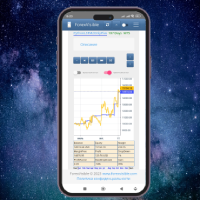
This client utility is intended for sharing and copying signals, as well as for monitoring your Expert Advisor on the site https://forexvisible.com . The Android version of the site can be downloaded here The version for the MT4 terminal can be downloaded here https://www.mql5.com/en/market/product/106509 There are many reasons to use this application in your trading, and these are: 1. If you have many trading advisors and many accounts, it is very difficult to track them and monitor everyt
FREE
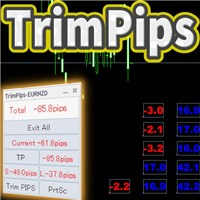
実現できること TrimPipsは、以下の悩みを一気に解決します。 現在のポジションの総合計や現通貨の合計pipsをひと目で知りたい。 プラスポジション、マイナスポジション、ショートポジション、ロングポジションの合計pips表示をひと目で知りたい。 一気にポジションをクローズしたい。 現在の通貨ポジションを一気にクローズしたい。 ショート・ロングポジションを一気にクローズしたい。 プラス・マイナスポジションを一気にクローズしたい。 エントリーとともにTP/SLを設定したい。 トレーリングストップ機能が欲しい。 ポジションのトータルpipsで決済してほしい。 チャート上に表示されたpips表示を整理したい。 MT4上で上記機能を動作させたい。
獲得pipsの表示 現通貨の獲得pipsがチャート上に継続的に表示されます。 現通貨が複数のポジションの場合は、ポジションごとに獲得pipsがチャート上に表示されます。 チャート上のpips表示は、チャート上を自由に移動させることができます。 色やフォントサイズを変更することができます。
「現在の獲得pips」の総合計を表示 現通貨の獲
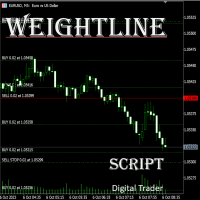
In multi-asset, multi-position trading environments—such as those involving forex, stocks, gold, and other instruments—traders often face a critical pain point: when holding multiple positions in the same instrument, it’s difficult to quickly and intuitively assess the current market price relative to all long and short positions. This makes it challenging to accurately determine the overall average entry cost, leading to delayed stop-loss and take-profit decisions. The problem worsens with mixe
FREE
Price Action Supply/Demand, Support/Resistance, Swing Low, Swing High Scanner Indicator is a software designed to automatically draw and mark regions on price charts, making it easier for traders to identify potential reaction sites. The software can be used for various currency pairs and commodities such as AUDCAD, gold, and bitcoin. Highlights The software automatically marks regions on price charts, indicating past working areas and potential reaction sites. Traders can easily switch be

Trading Advisor for margin currency pairs and metals. Conservative trading of 100,000 units per 0.01 lot. The standard trade is 10,000 units per 0.01 lot. Aggressive trading with high risks of 1000 units per 0.01 lot. You can always pick up your starting lot. The EA is fully automated, you only have to put up the initial lot depending on your initial deposit. The recommended timeframe is H1. 1. Test on any steam, iron and fuel oil 2. Try starting with convenient depots 3. When going into a dra

Here's a step-by-step guide on how to create and set up a Telegram bot for MetaTrader 4, enabling you to receive trading updates and alerts on your Telegram channel or group. Open Telegram : Launch your Telegram app on your device. Search for "BotFather" : In the Telegram search bar, type "BotFather" and select it from the search results. Create a New Bot : Type /start and send it to BotFather. Then, type /newbot to initiate the bot creation process. Bot Nickname and Username : Give your bot a n

Transform Your Trading with SmartFastTrade AI: Speed and Ease at Your Fingertips! Introduction Are you a trader struggling with slow order execution? Do you want a tool that can assist you in making quick and accurate trading decisions? If yes, then SmartFastTrade AI is the answer to all your trading needs. With its unique combination of speed, user-friendliness, and advanced features, SmartFastTrade AI will help you unlock your full trading potential. Let's delve deeper into why this innovativ

Copier for the MetaTrader4 terminal. Designed to copy trade from one terminal to another. Compatible with the version for the MetaTrader5 terminal; if available, copying can be performed between different terminals (regardless of the type of accounts: hedging or netting). The number of accounts to which copying is possible is not limited (depends only on the computing power of your computer). Directions for copying the version for MetaTrader 4 together with the version for MetaTrader 5: MT5 Net
*** Introductory Offer! *** Ends soon - Price will increase - do not miss it!
This EA Closes ALL open trades ( with the same magic number on that same pair ) at a certain level of profit - either in money or in percentage of balance. So if you have multiple trades open, you can choose to close them all as one "basket" using this EA. For spreads from a tiny 0.1 pips RAW/ECN Accounts, click here . Check out my Waka Esque EA signal here: >> High Risk Settings or Medium Risk Settings .
Se
EA supports traders in order management. The operations to close partial and total orders are quick and convenient. You can move all profits and protect profits in $ or in points, automatically move losses and profits at will, and automatically place orders. take losses and profits. Easy-to-use interface. Streamlined design for professional investors!!!
Trader Assistant MT4 は、各トレーダーが残高に応じて取引ごとのリスクを管理するのに役立ち、便利なツールがいくつかあります。 注意。 アプリケーションはストラテジー テスターでは動作しません。 デモのダウンロード方法。 トレーダーアシスタント: メタトレーダープラットフォームには含まれていない特別な流暢なパネルを使用します。 取引を設定する前に利益と損失の金額を確認できます。 また、以下で説明する便利なツールもいくつかあります。 報酬対リスク比パネル. このパネルは、Trading View プラットフォームのようなものです。 RR Ratio を固定数値に設定できます。 1:2 または 1:3 または ... また、ストップロスをポイント単位で固定額に設定することもできます。
取引量の計算. 取引量は 3 つのモードで計算できます。 1つ目は、ロットで設定できる固定量です。 2 つ目は、ストップロスの固定現金に基づいています。 3 番目は、残高/資本のストップロスの割合に基づいています。 ツールメニュー. 各トレーダーが必要とする 4 つの便利なツールが含
Indicator that synchronizes the charts, that is, when the asset is replaced in one of the charts, all those with the synchronized indicator are changed, with the same timeframe (Same_Timeframe = true) or with different timeframes (Same_Timeframe = false). The graphics to be synchronized are identified by color (Label). To synchronize indicators, the indicator must be inserted in all charts to be synchronized, using the same color (Label). A box with the chosen color (Label) and identification A
Modify TP SL Pending Orders Selected chart. Please leave a review about this product to help other users benefit from it. This script avoids modifying existing BUY and SELL ( TP & SL ) orders. + User-friendly utility + Help adjusting Take Profit and Stop Loss points for all your running orders automatically + Compatible with orders Sell Limit , Buy Limit , Sell Stop , Buy Stop + Easily edit all orders with appropriate new P&L values + The indicator works only on the selected window. There's no

Live testing available. Please contact.
ATR Auto Stop Loss & Take Profit Manager Automatically apply volatility-based Stop Loss and Take Profit levels to every new trade using the Average True Range (ATR). Unlike fixed-pip stop losses, ATR-based levels adapt to current market conditions. During high volatility, wider stops help prevent premature exits. During low volatility, tighter stops help improve risk efficiency. The utility automatically calculates and applies Stop Loss and Take Profit le

Account Info EA It is a tool that presents on the graph all the positions of the account, and specific information concerning the positions, but also the account. It enables the user to have an image of his account at a glance. Use like any expert advisor. You can't attach it in the same chart with other expert advisor. It does not have the ability to open or manage positions. You can attach it on any chart and any timeframe.
FREE

Open Popup Notification Please leave a review about this product to help other users benefit from it. " Free " Script to turn on pop-up notifications to view past trading alert messages including displaying account information. This script is compatible with MetaTrader 4 The script is easy to install and use, making it suitable for traders of all experience levels. There's nothing to worry about, including a freezing screen and any kind of effects on other chart windows. Disclaimer: This script
FREE

The "Dagangduit EA Auto_SLTP" is an Expert Advisor (EA) developed by the Dagangduit Core Team for MetaTrader 5. This EA is designed to provide automated management of Stop Loss (SL) and Take Profit (TP) levels for your trades, as well as other advanced features to enhance your trading experience. Key Features: Automated SL and TP Management : The EA automatically manages the Stop Loss (SL) and Take Profit (TP) levels of your open positions, allowing you to protect your profits and limit pote
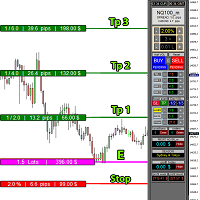
educational video https://www.youtube.com/watch?v=EHK_Z-9FvdM If you want to test the free version, you can download the file from the link below and test it in Alpari broker in demo accounts mt4. Download link free version: https://www.uplooder.net/files/199902052dcb318fb85a20262e8bd6b0/TPS-TradeManager-freeDemoFo-r-a-lpariBroker.ex4.html Download Metatrader 4 for free testing in demo accounts: https://www.uplooder.net/files/0e489a0794f5bf9130e149d0a8eb8f85/alpari4setup.exe.html Performance :

Utilities
This is an EA program to make it easier for traders to place open limit orders on the market. This program is equipped with: Set Lots Set BuyLimit, (this is the first price you must input to set up a BuyLimit order on the chart) Set SellLimit, (this is the first price you must input to set up a SellLimit order on the chart) SL and TP sets, Set Magic Number (I also matched it in the Order Comment) Set STEP By Point, Set Max Order, and Close all by Magic Number (you can close all order

The indicator has three main tools: Magnifier (Zoom chart), Ruler ( Time and Price scales ), and Crosshair. You can move it all around with your mouse and customize different formats for displaying , customize size and color of each element.
The Magnifier (zoom chart) allows you to display candles from any time frame and at different scales.
Hotkeys: 'Q' - higher timeframe, 'A' - lower timeframe, 'W' - decrease candle size, 'S' - increase candle size, 'Z' - show/hide zoom chart You can

Easy and Smart Trade Manager. It does work on visual strategy tester. Take your trading to the next level with it. Backtest you ideas and indicators. Improve it and run it live. This assistant has everything you need to do that. MT5 version
Basic features: Works with any FX, Crypto, Indices, Futures etc Several volume calculations methods, included risk calculation based on StopLoss level Several BreakEven modes Time close, timeout close and orders expiration Cancel pending orders level (OCO) R
FREE

News Protector Tool for Traders: As a trader, understanding the importance of microeconomic news is crucial. Passive traders face the challenge of managing news and pending orders efficiently. Repeatedly setting pending orders at the same price level after news events can be tedious. Introducing the News Protector Tool: News Protector is designed to simplify your trading experience. It removes pending orders before news events and automatically reopens them afterward. During news releases, if t
Close Pending Active chart. Closing - Deleting, all pending orders For only the window you selected Please leave a review about this product to help other users benefit from it. Key Features: Effortless Order Management: This script streamlines your trading by allowing you to close all pending orders on the active chart with a single click. Comprehensive Order Handling: It's not just about market orders! Our script closes Buy Limit, Sell Limit, Buy Stop, and Sell Stop orders, ensuring a thorough

Close All Selected Chart Overview: This is one of the smart choices to help you make your trading management a lot easier. Especially when you have to manage a large number of orders. This utility will work like a helping hand to close all the unrelated order windows in less than no time, plus without making any kind of unwanted effects. :: 3 simple steps to use :: 1. Select your chart window. 2. Click "Close All" 3. Click "OK" Note: For the better understanding on how this utility works, plea

DEMO VERSION HERE
MagicGuard EA Description: MagicGuard is a sophisticated Expert Advisor designed to maximize your trading gains. This intuitive and powerful tool continually monitors your open positions on a specific asset pair and automatically closes orders when your desired profit is achieved, taking commissions and swaps into account. Let MagicGuard handle the details, allowing you to focus on your trading strategy. Key Features: Automatic Profit Closure: MagicGuard calculates the net pr
Modify TP SL Multi-Order Selected chart. Please leave a review about this product to help other users benefit from it. Looking for an easy-to-use multiple trading helper?
This is the right choice!
Why?
+ User-friendly utility
+ Help adjusting Stop Loss & Take Profit for all your running orders automatically
+ Compatible with orders Sell , Buy , Sell Limit , Buy Limit , Sell Stop , Buy Stop
+ Easily edit all orders with appropriate new P&L values
+ The indicator works only on the select

Live testing available. Please contact. This is a simple utility which will put Automatic Stop Loss and Take Profit. It also has Trailing Stop Loss and Break Even features. The input value of the Stop Loss and Take Profit is in Pips. Whenever you open a trade it will put stop loss and take profit in pips automatically.
*If you need a more practical stop loss and take profit for your trades then you may like our ATR based stop loss utility.
Inputs:
1. SL and Trailing SL - This is the Stop Los

Simple and unobtrusive utility for displaying weeks, days and hours
Options to control the display of separator lines and labels allow you to customize them to your own taste Display of the separator lines either only in the main chart, or across any indicator windows Automatically reduce intensity of less relevant separator lines and labels for the chart‘s current magnification
FREE

This robot uses a strategy with hedge definite calculations, so that when it closes it is definitely profitable. how the robot works: 1. the first time the robot will open a buy position, - if the profit position is according to the target it will be closed automatically and re-open a buy position again - if a loss position the robot will open a buy and sell position simultaneously, if the position is still a loss the robot will open a position buy sell together again and close profit short po

This robot uses a strategy with hedge definite calculations, so that when it closes it is definitely profitable. how the robot works: 1. the first time the robot will open a buy position, - if the profit position is according to the target it will be closed automatically and re-open a buy position again - if a loss position the robot will open a buy and sell position simultaneously, if the position is still a loss the robot will open a position buy sell together again and close profit short po

This robot uses a strategy with hedge definite calculations, so that when it closes it is definitely profitable. how the robot works: 1. the first time the robot will open a buy position, - if the profit position is according to the target it will be closed automatically and re-open a buy position again - if a loss position the robot will open a buy and sell position simultaneously, if the position is still a loss the robot will open a position buy sell together again and close profit short po

Automatic Trade Long term US Natural Gas (xngusd) account swap free This EA can only be used on a free swap account. If it is used on a swap account, it will be very detrimental. Im use expert advisor (automatic trade) Us Natural Gas robot is a metatrader 4 safe investment robot. This robot uses a strategy with hedge definite calculations, so that when it closes it is definitely profitable. how the robot works: 1. the first time the robot will open a buy position, - if the profit position is acc

It is MoneyMaker from Morteza Soorakhi Strategy based on price and volume action. Fixed risdk per trade. Using Stoploss and Trailing.
100% automated trading Averaging+MARTINGALE money management (Using Fibonacci Increment) Recommended leverage 1:500 Min deposit $250 This signal trade GBPUSD only Target 0-3 Open position per day, 15%-30% per Month CUT LOSS AT 25% DRAW DOWN

Overview:
Harness the power of automation and precision with our order manager for MetaTrader 4. This expert advisor is meticulously crafted to serve both seasoned traders and beginners. Its primary focus is to simplify, streamline, and supercharge your trading experience, especially when following signals. Key Features: Automatic Order Placement : No longer will you miss trading opportunities while trying to manually set up multiple orders. This EA will handle all of that for you. Just input

Trailing Stop_Steps EA is an expert advisor that can manage your order's stop-loss by moving at fixed steps. In particular, this expert advisor can use two parameters to increment the stop-loss according to your preferences. In many cases, you might want to increment the stop-loss by a specific value when the price is at specific distance from the current stop. This trailing stop-loss EA allow you to do exactly this: to trigger a stop-loss increment when the price reaches a specific threshold.

A fundamental component to have within your trading arsenal is the ability to properly control and manage risk effectively. This tool offers a basic but comprehensive means to manage each and every trade position appropriately.
It can be used across different markets that require percentage-based calculations as opposed to simply measuring the difference in pip or point size i.e. the method for calculating take profit and stop loss in FX currency markets is usually a fixed point/pip size vs. p

Introducing Trade Assistant, your ultimate companion in the world of trading. Designed for traders, by traders, Trade Assistant is a cutting-edge tool that revolutionizes the way you manage your positions. Whether you're a seasoned pro or just starting out, our trade manager will empower you to make informed decisions and enhance your trading strategies.
Key Features:
Trade Manager Extraordinaire: Trade Assistant acts as your trusted trade manager, meticulously tracking all of your positions

Export Order History Free ! Meta Trader 4 script Please leave a review about this product to help other users benefit from it. Export trades history into a CSV file ( Excel sheet ) The summary is saved into a file in MQL4\Files folder. Choose / A ccount history / C ustom period from your MT4 Select period Click OK to Export file directory Open MT4 data folder CSV file ( Excel sheet ) Order > Open time > Close time > Type > Symbol > Size > Entry price > Exit price > T/P >
FREE

PendingOrderActivator manages pending orders in the forex market in a continuous cycle.
The user must configure the duration of the orders, stop loss levels, take profit levels, and the MagicNumber.
The expert advisor automatically places pending orders based on the distance from the current price and deletes them when the opposite order is triggered.
When an order is activated, the bot will take a break until the user reconfigures it or changes the timeframe, at which point the bot will reactiv
FREE

A tool for logging personal and downloaded MQL5 trade history data between specified date range into a CSV file and capturing open trade and close trade chart pictures
This History Capturer and Writer tool is an Indicator, so it works well in coexistence with other expert advisor on the same chart
$30 for the next 25 downloaders, next price: $30 Try Free Trial Version Here: Download Free Trial
Features: Trade History Chart Screenshot : Capture the opening and closing charts for each hist

Telegram Alert for Universal Indicator serves as an automated trading tool. It takes screenshots of the current chart when buy or sell signals are generated by a custom indicator and sends these screenshots to a designated Telegram channel. This feature allows traders to visually monitor their trading signals, enhancing their decision-making process and overall trading experience.
Inputs: Telegram BOT API: Input your BOT API Telegram Telegram Chat ID: Input your CHAT ID (Telegram channel/g
Jarfac Trades Extractor Description: Le "Jarfac Trades Extractor" est un script MQL4 conçu pour les traders qui souhaitent exporter et analyser leurs trades historiques. En un seul clic, le script génère un fichier CSV contenant des informations détaillées sur chaque trade exécuté pendant une période spécifiée. Caractéristiques principales : Filtrage par Période : Définissez une période personnalisée pour l'extraction. Possibilité de désactiver le filtrage par période. Filtrage par Commentaire :
FREE

The robot allows you to copy orders from different MT4 on a computer. It automatically open and close order that from master on clients. There are some options that allow you to customize your requests. Configuring server : Drag the robot on each pair you want then choose server in TypeOfCopy. Configuring Clients : As the same as server just choose client in TypeOfCopy then add the server account number in its field. AppendSymbolName: If a broker add extra letters after the pair name you can a

MT4端末のための事前設定された注文と自動ロット計算と取引パネル。 注意:ストラテジーテスターではトレーディングパネルは機能しません(トレーリングストップのテストのみ)。 マニュアル, 説明, ライトデモのダウンロード. 成功したトレーダーは、自己規律と有能なお金の管理によって区別されます。 固定ロットを使用すると、危険にさらされます。 結局のところ、異なる時間枠には異なる距離があり、1つの不採算取引がいくつかの収益性の高い取引をカバーすることができます。 各トランザクションのストップロスが預金の1%を超えないように自動ロットを使用する場合は、この問題を解決します。 また、トレーダーは部分的な閉鎖、損益分岐点への取引の移転、トレーリングストップを使用し、チャート上の過去の取引を分析します。 十分なニュアンスがあるので、私は取引パネルを書くことにしました。 私の好みのために、それは非常に機能的で快適であることが判明しました。
取引パネルの機能 。 任意のアカウントと通貨での作業 。 ロット計算のための注文の視覚的なプリセット 。 ロット計算のための保留中の注文の視覚的なプリセット 。

Market Position Manager is Expert Advisor that makes very fast executions of orders. First Tab allows you to: Open buy order Open sell order Open sell stop Open sell limit Open buy stop Open buy limit Second Tab allows you to: Put stop loss and take profit Third Tab Allows you to: Set Lot of position Indicator below shows you: Floating profit of open positions made by robot. Application features: Works with any account type and broker Doesnt require specific skills Easy and intuitive interfa

DEMO VERSION DOWNLOAD HERE Update
In Version 1.4 it is possible to set the amount of profit or loss in currency for martingale trades, by setting the profit or loss value for 0.01 lots the expert advisor will automatically multiply it if the starting base lot of the martingale increases or decreases
youtube: https://youtu.be/xn6TG8tyEfM
**EquityGuardEA - Equity Management Expert Advisor**
EquityGuardEA is a powerful Expert Advisor (EA) developed for the MetaTrader 4 (MT4) platform, provid

Product Description “Trades Opener EA for MetaTrader 4” Description:
Trades Opener EA is an efficient and straightforward utility for MetaTrader 4, built to allow traders to open new positions or set pending orders quickly and confidently. With its intuitive interface and streamlined operations, this tool is ideal for traders who wish to act on opportunities fast, without navigating complex menus. Key Features: Open market orders and/or pending orders on a selected symbol with one click. Confi
FREE

Product Description Trades Closer EA for MetaTrader 4 — the fastest and simplest way to close all your open or pending trades instantly with a single click. This tool is designed for traders who value speed, precision, and full control over their trading positions. With an intuitive and customizable interface, Trades Closer EA helps you manage orders efficiently, saving time and minimizing human error. Key Features Close open trades , pending orders , or both on any selected symbol instantly.
FREE
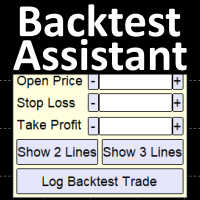
Simplify backtesting by automatically calculate trade outcomes (Profit or Loss) and estimated swap cost based on user-provided open, stop loss, and take profit prices, while also write the data into CSV file and capture before-and-after chart pictures automatically This Backtest Assistant tool is an Indicator, so it works well in coexistence with other expert advisor on the same chart
$30 for the next 25 downloaders, next price: $45 Try Free Trial Version Here: Download Free Trial
Features:

This EA will automatically close all open and pending order when profit or loss is reached according to users setting. Profit or loss can be set by percentage or by amount. When inputting amount for loss make sure to put " - " (minus) sign before the amount. The color of text displayed on the chart can be change in the user input. The text position can also be changed: - left top corner - right top corner - left bottom corner - right bottom corner
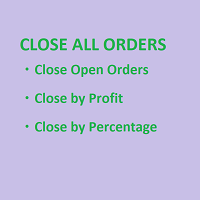
SmartClose(Close All Orders) helps you close all your trades. You can use it on any symbol. You can also set a warm value to manage the risk. With these functions: Close Open Orders : Close all open trades in the trading account. You don't need to set a value for the "value" parameter. Close by Profit : Close trades when profit reaches a specific predefined level. You need to set a value for the "value" parameter. Close by Percentage : Close trades based on a certain percentage of the balance.
FREE

「Time Sessions MT4」は、世界の主要な 4 つの取引セッションを表示する外国為替トレーダーにとってもう 1 つの便利なツールです。
タイムセッション: このツールの時刻は、現地時間に基づいて自動的に設定されます。 左に1秒ずつ移動する移動時間フラグがあり、リアルタイムを表示します。 パネルには目を引く美しいグラフィックが含まれています。
さらに、パネルをチャート上のどこにでも移動できます。
さらに説明...
楽しんでいただければ幸いです。
やっと:
あなたの考えやフィードバックを共有することを強くお勧めします。
トレーダーが要求すると思われる情報を提供することが重要です。
著者:
私は MQL 言語プログラマーで、3 年間さまざまなプロジェクトを行ってきました。
私は電気エンジニアで、難しい問題を解決するのが大好きです。
私のグループに参加して一緒に話しましょう ;)
セパール外国為替。 MQLグループ


DOWNLOAD FREE DEMO VERSION FROM HERE
The SmartCloseFX Expert Advisor, is a powerful tool designed for traders seeking efficient trade management in the MetaTrader platform. This EA is specifically built to manage trades by automatically closing all open positions except pending orders under specific conditions. The EA monitors the opening of a 0.01 lot pending order (eg. buy stop, sell stop, buy limit, sell limit) on a selected asset. When such an order is placed, SmartCloseFX takes action by c

Manually backtesting your strategy or trading system on MT4 Strategy Tester like you do on TradingView, but with free offline history data provided by MT4 or your broker, which means more resposive and much more lower timeframe data available. Because MT4 Strategy Tester doesn't detect mouse events, we will use the MT4 Horizontal Line tool and Arrows tool to modify the TP/SL/Entry and etc. on the screen.
Features:
70% TradingView backtesting user experience, due to the Strategy Tester's limi
FREE
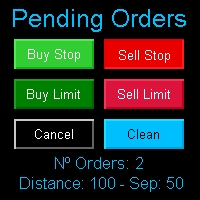
Multi Pending Orders The expert advisor "PendingOrders" is an automated trading program. This advisor manages multiple pending orders, setting entry levels, stop loss (loss limit), and take profit (profit limit) for each order. You can set various separation levels between each order. MagicNumber: It is a unique number used to identify orders related to this expert advisor. DistancePips: It is the distance in pips from the current price at which the pending orders will be placed. DistanceSeparat
FREE

DOWNLOAD FREE DEMO VERSION FROM HERE
**TradeMonitorPro Expert Advisor**
The TradeMonitorPro Expert Advisor is a powerful tool designed to help you effectively monitor and manage your trading activities in the forex market. This EA offers a range of useful features that allow you to keep track of your open trades, floating daily gains and losses (floating drawdown), as well as margin levels and the volume of open lots. For a correct counting of the Trading Volume, enable the complete history in

ZIWOX TRADE LIST Description:
Feeling weary with your small screen? and you need to close your trade list tab to have a larger perspective of chart? Require better management of your trade list? such as win rate, risk/reward ratio? Its a simple tools, but usefull. consolidate your trade list, active positions, opened positions and pending orders onto a distinct chart embellished with refined visuals. It contains with a lots of usefull information.
Feautures: List your trades and positions sort

MT4 to Discord Signal Provider は、Discord へ直接トレーディングシグナルを送信するために設計された、使いやすく完全にカスタマイズ可能なユーティリティです。このツールは、あなたのトレーディングアカウントを効率的なシグナルプロバイダーに変えます。 スタイルに合わせてメッセージフォーマットをカスタマイズ!利便性を考え、事前にデザインされたテンプレートから選択し、メッセージのどの要素を含めるか除外するかを選択できます。 [ デモ ] [ マニュアル ] [ MT5 バージョン ] [ Telegram バージョン ] New: [ Telegram To MT5 ]
セットアップ 簡単なセットアップのために、私たちの詳細な ユーザーガイド に従ってください。 Discord API の事前知識は必要ありません。必要なツールはすべて提供されます。
主な特徴 購読者の更新のための注文詳細をカスタマイズ。 ブロンズ、シルバー、ゴールドなど、各レベルで異なるシグナルアクセスを提供する階層的サブスクリプションモデルを実装。 注文が実行されたチャートのスクリーン
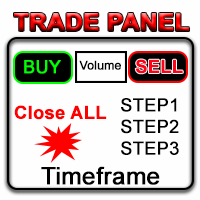
金融市場の中で、熟練した資本管理は不可欠です。それは、初期投資を守るだけでなく、増やすことにも関係しています。手動の計算の時代は終わりました。リターンを最大化し、リスクを最小化し、金融市場の潜在力を前代未聞の形で引き出すことができます。トレードパネルでトレードの旅を制御してください。
もしスキャルパーとして迅速に実行する必要がある場合、私たちのトレードマネージャーパネルはあなたの指先で必要なすべてのツールを提供します。固定された注文パラメータを設定し、「買う」ボタンや「売る」ボタンをクリックするだけで迅速にトレードを実行できます。すべてのポジションをワンクリックで閉じることもできますし、特定のタイプの保留注文を選択したり、利益が出ているトレードまたは損失を出しているトレードのみを閉じることもできます。
新しいレベルの利便性、効率性、収益性を体験してください。 Trade Panel MGHの使い方 MT5 version
機能: - トレーリングストップ - トレードが上昇するにつれて、プログラムは利益の一部を確保します - 部分クローズ - 価格が正しい方向に移動し、ト

革新的な Trades Time Manager を使用して、取引ルーチンを簡単に管理できます。この強力なツールは、指定された時間に注文執行を自動化し、取引アプローチを変革します。 購入から注文の設定まで、すべて手動介入なしで、さまざまな取引アクションのためのパーソナライズされたタスク リストを作成します。 Trades Time Manager のインストールと入力ガイド EA に関する通知を受け取りたい場合は、MT4/MT5 ターミナルに URL を追加してください (スクリーンショットを参照)。 MT4のバージョン https://www.mql5.com/en/market/product/103716 MT5のバージョン https://www.mql5.com/en/market/product/103715 手動監視に別れを告げ、合理化された効率を採用します。直感的なインターフェイスにより、シンボル、約定時間、価格、ストップロス (SL)、テイクプロフィット (TP) ポイント、ロットサイズなどの正確なパラメーターを設定できます。 このツールの柔軟性は、市
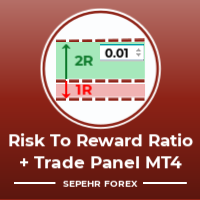
こんにちは皆さん 「Trader Assistant Mini」は、流暢な R:R パネルを使用して取引ごとのリスクを計算する便利なツールです。 リスクと報酬の比率と取引パネル: すべてのトレーダーにとって、利益の大きさに関する損失の大きさを計算し、トレーダーごとのリスクを管理して、それが良い取引であるかどうかを判断できるようにするのは便利です。また、損失と利益をpipsとパーセンテージで表示し、損失と利益も表示します。 デモ版 + デモファイルのインストール方法: Trader Assistant Mini MT4 Demo 「Trader Assistant Pro」が 表示されます。 プロリスクマネジメントパネルMT5
楽しんでいただければ幸いです。 やっと: あなたの考えやフィードバックを共有することを強くお勧めします。 トレーダーが要求すると思われる情報を提供することが重要です。 著者: 私は MQL 言語プログラマーで、3 年間さまざまなプロジェクトを行ってきました。 私は電気エンジニアで、難しい問題を解決するのが大好きです。
MetaTraderマーケットは自動売買ロボットとテクニカル指標を販売するための最もいい場所です。
魅力的なデザインと説明を備えたMetaTraderプラットフォーム用アプリを開発するだけでいいのです。マーケットでプロダクトをパブリッシュして何百万ものMetaTraderユーザーに提供する方法をご覧ください。

取引の機会を逃しています。
- 無料取引アプリ
- 8千を超えるシグナルをコピー
- 金融ニュースで金融マーケットを探索