 MetaTrader 5
 エキスパート
 インディケータ
 ライブラリ
ライブラリ
 ユーティリティ
 ウィジェット
 ルール
ルール
YouTubeにあるマーケットチュートリアルビデオをご覧ください
ロボットや指標を購入する
仮想ホスティングで
EAを実行
EAを実行
ロボットや指標を購入前にテストする
マーケットで収入を得る
販売のためにプロダクトをプレゼンテーションする方法
MetaTrader 4版新取引ユーティリティ - 17
 以下はMetaTrader4での外国替取引を簡素化する取引プログラムです。以下のリストのユーティリティにカーソルを合わせて、説明と目的をご覧ください。
Stock Indices Candle Gap Volatility Tool Designed for traders who demand precise and comprehensive analysis of candle gaps across major global stock indices. this tool provides the critical data needed for informed decision-making. Key Features: Candle Gap Analysis: Automatically display the high-low (Hi-Lo) gaps on your chart for any selected timeframe, giving you a clear view of market volatility. Wide Range of Timeframes: Analyze candle gaps (Current Candles) over multiple timeframes, providi
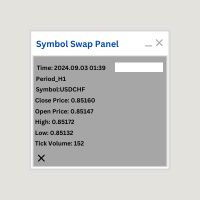
Symbol Swap Panel: Effortlessly switch the active symbol on your chart while simultaneously adding the new symbol to Market Watch. This tool ensures seamless integration and access to real-time market data, optimizing your trading workflow. **Note:** When switching to a different symbol, it's recommended to switch back and forth between timeframes to ensure that the panel loads properly. Description:
The "Symbol Swap Panel" is a versatile utility designed for traders seeking to manage the
FREE

Program Overview: This program is a trading tool designed to monitor and analyze the 7 major currency pairs. It is a variant of a similar program used for tracking stock indices, but this version focuses on the seven major currency pairs. The program helps in identifying and calculating significant price movements (gaps) between the high and low prices of these currency pairs over a specified time frame. It then provides insights through comments and alerts based on the calculated gaps. Major Cu

This utility sets the same stop loss and take profit level on several open positions at the same time. It does not open or close any trade and it makes no market decision.
Modifying positions one by one in the terminal takes time, and while you are doing it the price can move away. This EA applies the levels you enter to all selected positions in one action, so the whole basket is protected in a single step.
Example
You hold five XAUUSD buy positions opened at 2510, 2508, 2506, 2504 and 2495

Forex Trading Finance EA Indicator This expert advisor (EA) scans pre-selected currency pairs, CFDs, cryptos, and stock indexes to detect price movements based on user-defined parameters. It helps identify potential trade opportunities when the price rises by a certain percentage (suggesting a sell) or falls by a percentage (suggesting a buy). Key Features: Customizable Percentage Alerts :
The EA monitors price changes for user-set percentage thresholds (e.g., a 10% rise or a 5% drop), providin
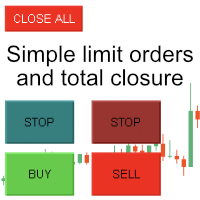
Enter all limit orders with your own logic to set with TP and SL and if you want something extra activate trailing to protect your position. A trading aid to speed up the entry and management of your orders. General protection with closing orders at a time to be set, visible on the chart, or closing everything via the monitor button. Speed up order entry with your preferred strategy.
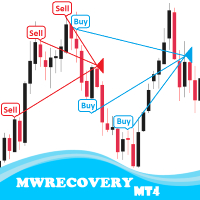
MWRecovery is a system designed to recover unprofitable positions.When the market moves by a certain amount against the direction of a trade and brings it to a loss, the system opens other trades in the same direction at specified intervals. Once these trades reach a certain profit, a magic trailing stop is activated to maximize your profit. How it works : The utility resets StopLoss levels for all processed orders. New trades will be placed if the conditions are met according to what you hav

MetaTrader4 Carry Trade FOREX Swap Rollover Indicator - Enhance Your Carry Trade Strategy Developed by a seasoned MT4 programmer and successful proprietary trader, this tool is designed to optimize your carry trade strategy. Key Features : Analyzes swap rollover values (in Points) for 63 currency pairs. Indicates whether to take a long (buy) or short (sell) position. Provides insights for generating positive rollover gains when holding trades overnight. Ideal for traders focusing on carry trade

Forex Algo GAP Trader with Trailing Stop
Overview: This Forex Algorithm is designed for traders who use gap trading strategies. It identifies and executes trades automatically based on candlestick gap patterns, providing customizable options for risk management and a trailing stop feature. Key Features: Customizable Gap Threshold : Configure the minimum gap size in pips to trigger trades based on market conditions. Flexible Trading Direction : Choose whether to buy on gap-up or sell on gap-dow

MA Crossover Pro MT4 Program Key Features : Moving Average Crossovers : Leverage the dynamic nature of the market with precise buy and sell signals based on fast and slow moving average crossovers. Risk Management Settings : Take control of your trades with customizable risk management settings. Set Stop Loss and Take Profit levels according to your risk tolerance. User-Friendly MT4 Integration : Seamlessly integrate the program into your MetaTrader 4 platform. Effortlessly execute trades and m

Automated Forex Trading Program - Stochastic Indicator Strategy with Customizable Settings Key Features: Stochastic Indicator Strategy :
Utilizes a sophisticated trading strategy based on the stochastic indicator, which is a momentum oscillator. The algorithm identifies potential reversal points at overbought or oversold levels, providing precise trade signals. Customizable Settings :
Adjust key parameters like stochastic periods, overbought and oversold levels, as well as Take Profit and Stop

Introducing the Open Order Timer EA
Are you tired of manually opening trades at specific times? Are you longing for a trading tool that can execute orders with pinpoint precision? Are you struggling to time your trades accurately in a fast-paced market environment?
Introducing Open Order Timer, an Expert Advisor that automatically opens positions at your desired times with just a few clicks. This powerful tool takes the guesswork out of timed trading, allowing you to focus on your strategy whil

This script is designed to automatically open charts for all available forex pairs on the MetaTrader 4 platform, as well as the gold (XAUUSD) chart. The script iterates through all symbols available on the platform, determines which of them are forex pairs, and opens their charts on the M1 (one minute) timeframe. Key Features: Gold Chart Opening: The script automatically opens the XAUUSD (gold/dollar) chart if this symbol is available from your broker. If the gold symbol is not found, an error m

This script in MQL4 is designed to automatically apply a specified template to all open charts in the MetaTrader 4 trading terminal. It allows you to quickly and efficiently update all open charts by adding an indicator or modifying other settings defined in the template. Script Description and Capabilities: Automation : The script automates the process of applying a template to all open charts, which is particularly useful when you need to update multiple charts with the same settings. For inst

Heartbeat Agent is a comprehensive monitoring system for MetaTrader 4 terminals, designed to detect critical issues before they impact your trading. Compatible with both Windows and Linux, it continuously monitors your terminal's health and alerts you immediately when problems arise. Key Features: Trading Permissions Monitoring: Detects when AutoTrading is disabled, preventing your Expert Advisors from executing trades. Alerts if your account is in Investor Mode (read-only) or if your broker has
FREE

Simple and lightweight utility for automatically synchronizing the symbol of multiple charts Synchronization in both directions, regardless of which chart you change the symbol on Quickly activate or deactivate the synchronization of individual charts at the touch of a button Create multiple synchronization groups by assigning different event IDs Themes for bright and dark chart layouts
FREE

GridMaster Bot is an automated trading tool designed to help you profit regardless of market direction. With its grid trading strategy, this Expert Advisor (EA) automatically opens and manages trades based on price movements, allowing you to benefit from market fluctuations. Key Advantages: No Need to Predict Market Direction: GridMaster Bot allows you to profit whether the market moves up, down, or sideways. Fully Automated Trading: Set your parameters and let the bot do the work for you, handl

Metatrader4 Trailing Stop Loss Program Platform Compatibility: The Program is for METATRADER4 Platform. Functionality: This program will go through all open Forex Currency pairs trades on Metatrader4 and move their corresponding STOP LOSSES to a PROFIT position based on the parameters INPUT settings. Parameters and Example: Example Trade: EURUSD Long (BUY) trade @ 1.0800
STOP LOSS (-50 pips) @ 1.0750
TAKE PROFIT (+50 pips) @ 1.0850 Program Settings: WhenToTrail=20 PIPS; (Pips profit amount to a

Forex Trading Trend Support Resistance Line Trader Overview: This Forex trading robot is designed to automatically take BUY and SELL positions based on a Trend Line . It identifies and executes trades depending on the line's relative position on the chart, offering an efficient tool for traders utilizing Support and Resistance strategies. Key Features: Customizable Stop Loss : User-defined STOP LOSS values. Take Profit Levels : Set your desired TAKE PROFIT levels. Trailing Stop Function : Optio

Enhance Your Trading with the Support and Resistance Alert! Ready to take your trading to the next level? Introducing the Support and Resistance Alert—the ultimate tool to precisely identify market turning points! Key Features: Dynamic Support and Resistance Lines: The indicator automatically draws support and resistance levels based on local lows and highs, giving you clear guidance on where the market is likely to reverse. Real-Time Alerts: Stay ahead of the market with customizable alerts. Ge
FREE

To achieve mutual support between MT4 and MT5, and to purchase the MT5 version, please click here>>
Main follow-up function: 1. Reverse order capability 2. Cross platform follow-up, ignoring different names 3. Proportional order, magnification and reduction order 4. Compared to a specified currency pair, not compared to a specified currency pair 5. Can be ordered one to many, many to one, any order 6. Other unclear messages
6. Other unclear messages.

ウォーターマーク MT4 バージョン: https://www.mql5.com/ja/market/product/120783 MT5 バージョン: https://www.mql5.com/ja/market/product/120784
ロゴ MT4 バージョン: https://www.mql5.com/ja/market/product/121289 MT5 バージョン: https://www.mql5.com/ja/market/product/121290
「ウォーターマーク」スクリプトは、チャートの背景に重要な情報を直接表示することで、取引チャートをより魅力的に見せるように設計されています。このスクリプトは、現在の取引ペア、時間枠、各種時間指標などの重要な情報を、明確かつ目立たないように把握できる方法を提供します。
機能:
取引ペア表示:
このスクリプトは、チャートに表示されている現在の取引ペア(例: EUR/USD、BTC/USD)を自動的に検出し、表示します。これにより、トレーダーは常にどの資産を分析しているかを把握でき、間違ったペアに基づいて意思決
FREE

ロゴ MT4 バージョン: https://www.mql5.com/ja/market/product/121289 MT5 バージョン: https://www.mql5.com/ja/market/product/121290
ウォーターマーク MT4 バージョン: https://www.mql5.com/ja/market/product/120783 MT5 バージョン: https://www.mql5.com/ja/market/product/120784
「ロゴ」スクリプトは、MetaTrader 4 (MT4) の取引チャートの背景にカスタムロゴまたは画像を表示するために設計されています。このスクリプトを使用すると、トレーダーはロゴやその他の任意の画像を使用してチャートをカスタマイズできます。
使い方:
画像の準備: まず、チャートにロゴとして表示したい画像を選択します。
任意の画像編集ソフトウェアを使用して、画像をビットマップファイル形式 (.bmp) に変換します。 画像の保存: 変換が完了したら、.bmp 画像ファイルを MT4 インストールディ
FREE

商品説明 トレーディングの世界では、すべてのトレーダーが自分の戦略の可能性を最大限に引き出す方法を探しています。私たちのエキスパートアドバイザー(EA)はそのエッジです。それは単なるツールではなく、トレーディングの旅における仲間であり、トレンドを保護し、あらゆる戦略を高収益に変えるために設計されています。私たちのEAの特徴は、市場で出現する特徴的なトレンドを捉えるための定期的な更新と最適化への取り組みにあります。 取引戦略 すべてのトレーダーはリスクに直面しています。私たちのEAはこれらのリスクを効果的に管理するように設計されています。それはポジションを3段階で減らし、潜在的な指数的利益のライフサイクルの複数の段階でトレンドを最大限に活用しながら、利益を保護します。 リスク管理 私たちのEAを使用することで、あなたのPnL(損益)が変わります。それはテイクプロフィットによって制限されることなく、取引の無限の可能性を捉えます。この変革は、私たちの製品の利点と価値を示し、それをトレーディングツールキットにおける説得力のある追加品にします。 このEAは、既存の戦略を強化するために設計されたツ
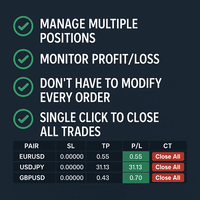
Tired of manually adjusting stop-loss and take-profit levels for multiple positions across different pairs? The Manage Multiple Positions Expert Advisor is your solution. MT5 Version - https://www.mql5.com/en/market/product/120989/ This powerful tool streamlines your trading experience by allowing you to manage multiple positions on a single pair with ease. Modify stop-loss and take-profit levels for all open positions on a specific pair with a single click. Plus, the EA provides clear visibili

Select the lot size, the number of orders, and with the click of a button, open your multiple buys or sells.
You can also change the EA's comment, and replicate any other type of orders, according to your magic number!! The tool also has a monitor that shows you the current equity of the account, and a button to close all orders with just one click!! All very simple.

All information related to your account in one place. Here is the indicator you were looking for.
The best and most complete mql5 account monitor for your metatrader 4...
Balance and Equity, Open Orders and Lots, Floating Equity separated into best and worst of the day, Profits separated by periods, Maximum Drawdowns for those who are concerned about risks, Closed Lots and much more!

This expert advisor is specially programmed for telegram channel owners who send trading signals to traders all over the world so that everyone can understand the signal from the attached image and on which asset, pair, currency or indices it is traded. If you have multiple public or private channels, you can customize the signal for the channel you want to send to. Sends trades and if a trade is modified if the stop loss or take profit price is changed, sends it to telegram and sends the trade

This feature shows a week's worth of news with a time shift based on your location. You can adjust the clock forward or backward for different purposes, all within the program. Before the news event, you will be alerted with a message and a vertical line. High priority news is displayed in red, medium in orange, and low priority news in gray. The "All Event Line" button allows you to view all the past news in the current week, along with their titles and corresponding lines. A crucial note: Yo

Overview: Trade Close Master is a powerful yet straightforward tool designed for MetaTrader 4 that allows traders to efficiently close all open trades with a single command. This script simplifies the management of multiple trades by automating the closure process, ensuring a seamless trading experience. It is ideal for traders who need to quickly exit positions across various currency pairs and symbols, especially during fast-moving market conditions.
Advantages and Features: Ease of Use: With
FREE

SL Maestro - Forex Expert Advisor SL Maestro - Forex Expert Advisor with Advanced Stop-Loss Features Introducing SL Maestro , the ultimate Forex Expert Advisor (EA) designed to enhance your trading strategy by adding stop-losses to existing trades with precision and flexibility. SL Maestro is not just limited to simple pips-based stop-losses; it incorporates a variety of advanced techniques to ensure optimal protection for your trades. Key Features: Pips-Based Stop-Loss : Easily set a stop-loss
FREE

Elevate your trading with this Breakeven and Trailing Stop Manager, an Expert Advisor (EA) built for MetaTrader 4 to streamline risk management by automating breakeven and trailing stop strategies. This EA helps secure profits and minimize losses without requiring constant manual intervention, giving you more time to focus on market analysis and strategy.
### Key Features:
- **Automatic Breakeven Adjustment:** Automatically move the Stop Loss to the breakeven level once your position reac
FREE

Overview Box Trade Master is a powerful Expert Advisor (EA) designed to automate breakout trading strategies in the Forex market. This EA allows traders to maximise profits by effectively managing trades based on breakout patterns, freeing you from constant monitoring of the charts.
Advantages Automated Breakout Trading : Automates the process of identifying and trading breakouts, reducing the need for manual chart monitoring. Customisable Settings : Easily adjust risk levels, trade directions

The EA (Expert Advisor) is only attached to the pair it is intended for XAUUSD/GOLD, in the TF (TimeFrame) M5!
Use Guide Complete in this Link PLEASE READ Use Guide https://docs.google.com/document/d/1dH6vMYZFSddo0_vd9j-Kxs1cPzUMxxLwgOna9H3JoeM/edit#heading=h.9hhcmqq153x2 PLEASE READ How the Strategy Works!
This strategy is created based on intelligent analyses and strategic mathematical placements of transactions so that the daily success rate is very high with a REAL percentage

Todas as informações relacionadas à sua conta num único lugar. Aqui está o indicador que você estava procurando.
O melhor e mais completo monitor de contas do mql5 para o seu metatrader 4...
Saldo e Equidade, Ordens e lotes em aberto, Equidade flutuante separada em melhor e pior do dia, Lucros separados por períodos, Rebaixamentos máximos para quem se preocupa com os riscos, Lotes fechados e muito mais!

Hedge Assistant - Hedge Assistantは、ヘッジ取引を簡素化するために設計された直感的なエキスパートアドバイザー(EA)です。このEAは、シンプルヘッジとダブルヘッジの2つの戦略をサポートしています。これらの戦略に関する詳細については、当社のYouTubeチャンネルにある説明動画をご覧ください(リンクと画像を添付)。 機能: バックテスト: 注文はパネルのボタンを通じて手動で実行されるため、バックテストはできません。これはトレーダーの直接介入が必要です。 ボタン: EAには、買い注文または売り注文を開くための3つの主要なボタンと、すべての注文を閉じるためのボタンがあります。さらに、トレーダーの操作を支援するために、グラフウィンドウに有用な情報が表示されます。最初の実行後、EAは注文を自動的に管理し、注文が閉じられるまで管理を続けます。ボタン上の情報の色は、設定で調整可能です。 設定データ: EA Name - EAの名前; Lot - 取引に使用されるロットサイズ; Lots_Martingale - 保留中の注文のロットサイズを増やすための乗数; Dist

AIP – MT4/MT5 To Telegram 1 Main features of MT4/MT5 EA To Telegram: Send all types of orders (Open Order/Close Order/Partial Close/Modify Order/Pending Order/Delete Order) Close and Modify Order with replies to the corresponding Open Order Support sending to both private, public channels and group, topic group Support sending to multiple channels simultaneously Send Chart Screenshots Manage all symbols with a single EA on one terminal Automatic loading of templates, logos, and screen

Trade Entry Journal is your ultimate solution for streamlining trade entries and journaling. Designed specifically for forex traders, this powerful tool automates the tedious tasks of calculating lot sizes, placing trades, and documenting your trading activities. Say goodbye to manual entries and focus on making smarter trading decisions. Key Advantages: Automated Lot Size Calculation : Calculate the perfect lot size based on your stop loss level and risk amount. The lot size will be adjusted t
FREE
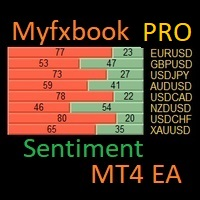
I have created this MT4 Tool EA to test if it is more profitable to trade in favor of the mass sentiment of traders or it is better to go against it. Remember to authorize Myfxbook url in WebRequest options in MT4 .
Features: Market Sentiment update every 30 minutes SL TP BreakEven Trail SL Daily Target Profit Max Daily DrawDown (Useful for prop firm) Max Spread Filter Time Filter Custom Trade Comments Protection in case a pair is not read correctly from the web (Prevents improper closing or o

JoyBoy EA advantage: the first support for small capital work EA, real trading more than 4 years; this EA based on volatility adaptive mechanism, only one single at a time, each single with a stop-loss, an average of about 4 orders per day, holding a single length of about 12 hours. This EA does not use Martingale or Grid strategy Makes it safer for your capital. You can also use this EA to pass prop firm Challenges because of its very low drawdowns and stable profits.
Support currency: EURNZD

Product Description: MT4 Trade Copier with Advanced Features
MT4 Trade Copier is designed to streamline and enhance your trading experience by allowing seamless replication of trades across multiple accounts. It offers advanced features to cater to different trading needs and preferences.
Features:
Master/Slave Selection:
Easily choose between master and slave modes to manage trades effectively. Multiplier for Slave Accounts:
Set a multiplier to adjust the size of trades copied to slave a

The DrawStopLevel script is designed for the MetaTrader 4 (MT4) trading platform. This script allows traders to quickly and easily draw a stop-loss horizontal line on their trading chart. This script is used in conjunction with the Trade Entry Journal Utility ( https://www.mql5.com/en/market/product/ . This script can also be easily integrated into any MT4 trading strategy, allowing for quick visual representation of stop-loss levels.
FREE

Discover the power of precise trading with the Box Breakout Alert EA for MetaTrader 4. This expert advisor is designed to help you identify and act on breakout opportunities, ensuring you never miss a profitable trade. Whether you're a beginner or an experienced trader, the Box Breakout Alert EA is your key to smarter, more efficient trading. Key Features and Advantages: Real-Time Alerts : Get instant notifications on your MT4 app when the price breaks out of the defined support and resistance l

これは、買い注文と売り注文のネットワークを配置する通常のパネルです。 このExpert Advisorは、設定で定義された利益注文を閉じます。 次に、ラダーと呼ばれるパラメータがあり、ラダーパラメータで示されたポイントだけ注文間の距離が増加し始めることを含みます(ここでは、メイン設定では10ポイントです)。これは、2次が10ポイント、3次が20ポイント、4次が40ポイントなどを意味します。
次に、これは設定にないため、このアドバイザーに何があるかを知る必要がありますが、このアドバイザーが提案した戦略のロジックに影響します。. アドバイザーが5つの注文を開くのは、ここの設定であるとしましょう。.. または購入のために。.. または販売のため。.. よかった.. ただし、注文を開くと、次のオープン注文のロットが以前にオープンした注文の半分だけ増加します。 つまり、設定で0.1ロットを設定すると、スキームに従って5つの注文が開き、現在の価格に近い最初の注文は0.1ロットの価格で開かれます。 第二に、与えられたステップのために、ここで50ポイントのステップは0.15ロットの価格で開きます。

Introducing our advanced Fast Trades Manager for MT4 Designed to seamlessly copy trades and provide comprehensive trade statistics. Link to MT5 version: Fast Trades Manager for MT5 Key features include: Fast Trade Copying: Efficiently copy trades from one broker to another, ensuring your strategies are implemented across different platforms. MT5 support: Fast copying between different terminal version, you copy trades from MT4 to MT5 or the opposite from MT5 to MT4 easier. Symbol Copying with S

Descripción del Asesor Experto "Mr. Beast Analyze" Nombre del Robot: Mr. Beast Analyze Descripción General: El Asesor Experto (EA) Mr. Beast Analyze está diseñado para proporcionar una visión completa y detallada del mercado a través de la visualización de información clave en la pantalla de MetaTrader 4 (MT4). Aunque el EA no realiza operaciones automáticamente, ofrece una amplia gama de datos útiles y gráficos que pueden ayudar a los operadores a tomar decisiones informadas. El EA se enfoca en
FREE

Zone Guardian is an advanced Expert Advisor (EA) designed to automate trade management. This EA manages trades within specified risk parameters using automatic lot calculation and multi-layered trade activation. It supports up to 5 layers within the entry zone, each with customizable risk percentages. Visual aids on the chart display entry zones, stop loss (SL), and take profits (TP), ensuring easy level adjustments. The EA adapts to market conditions by closing trades at each TP and moving SLs

MR BEAST SWING TRADING
El Mejor Robot de Swing Trading para Capturar el Mejor Precio y Optimizar el Swap Nuestro avanzado robot de trading de swing trading está diseñado para traders que buscan maximizar sus ganancias mediante una estrategia de precios óptimos y grids a favor del swap. Este robot incorpora análisis de múltiples periodos (día, semana, mes, año) para identificar los mejores puntos de entrada y salida, asegurando que siempre opere en condiciones favorables. Características Princip

Experience the ultimate trendline auto-trading solution! Our expert advisor/utility allows you to effortlessly place one or more trendlines from different timeframes - it places a trade in the breakout direction. 1. AUTO TRADING / MANUAL TRADING Trendscout can place orders for you automatically. You have to enable “Auto trading” and also check the “Enable live trading” box at the parameter window. When price crosses a trend lines for the first time two massages are sent to your mobile phon

This utilities can constantly monitors and handle the equity/ balance account to prevent drawdowns and protect your account. This Utilities can handle manually order and automatically order by other Expert Advisors. If the conditions are reached, the open position will be close/ all close (depending your setting).
How to use :
attach this utilities on new chart (same pair) you need to handle make sure magic number is same with other EA you need to handle entry magic number '0' if you need han
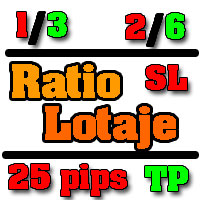
Asesor experto desarrollado para MT4 con el objetivo de ingresar ratios de utilidad y % de riesgo, adicional los Pips de SL para el cálculo del lotaje para dicho riesgo. Estos se calculan sobre el balance actual. El usuario tomaría como dato ingresar el lotaje que se calculó y arrastrar el SL manualmente a la cantidad de Pips que ingreso (15,20,25 Pips) el cual daría como perdida en $ el % de riesgo ingresado y arrastar el TP a la cantidad de pips indicado como TP. A la vez que se va inc
FREE

you can plan you exit in terms of money/floating with this tool Once the negative or positive floating value reached this tool will close all opened positions
How to deal with big negative floating profit?
It will be very difficult to overcome this phase you can prevent with this phase with a exit strategy
It can be stop loss or close all orders if account has reached this much floating
FREE

The Trend Diamond Analyzer, also known as Trend Advisor Diamond, is a market theory cycle used to analyze both the "buy side" and "sell side" and can identify various market phases. This tool was created by eaforexcenter based on the theory developed by Chuck Dukas. It combines technical indicators and market behavior, making it an excellent tool for analyzing market trends and phases.

The EA is a trend analysis tool that utilizes the moving average (MA) to assess the strength of a trend. You have the ability to customize the MA period, time frame, and digits. This tool offers information about the trend percentage, direction, and strength. It is developed by eaforexcenter using software called fxDreema. If you are interested in exploring other tools, please visit us at eaforexcenter

In Forex trading, the 1-day relative performance statistic gives an overview of the movements of various currency pairings in a single day. For traders who want to quickly make trading decisions and comprehend short-term market movements, this statistic is essential. Here's a thorough explanation of the 1-day relative performance, its importance, and a closer look at several particular Finviz cases. Understanding 1-Day Relative Performance The percentage change in a currency pair's value between

The Telegram Blue Chili Alerter is still in full development. Many more options are still being programmed. Signals for trades will be added next. I am also happy to respond to customer requests. The only thing you need to do is create a Telegram bot and enter the bot token and chat ID in the presets. If you have any questions or want to know which features are still to come, just get in touch with me. I will be happy to help you and answer your questions as quickly as possible. Quick guide:
1:
TimeZone In Chart - MT4用カスタムタイムゾーン水平スケール 概要 MT4用のTimeZone In Chart - カスタムタイムゾーン水平スケールインディケーターをご紹介します。これは、希望するタイムゾーンに基づいて水平タイムスケールをカスタマイズすることで、トレーディング体験を向上させるために設計されたユーティリティツールです。異なるタイムゾーンでのトレーディング活動を調整する必要があるトレーダーに最適で、このインディケーターは、指定されたGMTオフセットに従って時間を変換および表示することで、重要な瞬間を見逃さないようにします。 主な特徴 カスタムタイムゾーンサポート :GMT_Offsetパラメータを使用して表示される時間を任意のタイムゾーンに調整し、トレーディングニーズに応じてグラフが正しいタイムゾーンを反映するようにします。 動的な更新 :リアルタイムのトレーディング条件で水平タイムスケールを動的に更新し、常に最新の情報を提供します。 バックテストの互換性 :バックテスト中に各新しいバーで自動的に更新し、正確な履歴データ分析を提供します。 カスタマイ
FREE

Introducing ProTrade EA: Your Professional Trading Assistant ProTrade EA is your new professional trading assistant, designed to help you trade in the financial markets with precision and efficiency. This powerful EA is equipped with a range of advanced tools that will simplify and optimize your trading experience. Key Features of ProTrade EA: Account Management : Maintain complete control over your trading accounts with integrated management tools that allow you to monitor and adjust your posit

The ExactVol.ex4 utility helps the trader to accurately calculate the lot size and automatically set a trading order based on the input values and parameters of the order-pointer. It is designed for trading strategies where support/resistance levels and lines are used. A order-pointer has a size of 0.01, set manually by the trader in the desired direction (buy or sell) after starting the utility. The order-pointer is set From the MARKET and must necessarily have a Take Profit, which will be a
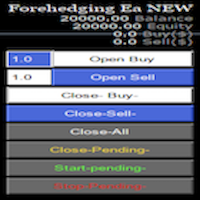
Semi Automatic Ea (MT4). Buy or Sell or Let it Trade . Either Buy or Sell Manually with the panel. Second option: Press Auto with one of the 4 options. Plug and play mode. This Panel can trade with very good result. As a Beginner trader as you ,if you want to be part of the 5% that can make it just give a chance and see for your self. 1:500-1000 leverage, lower then that rise the balance times 2'
Recommend: Auto Trading choose one option from below. $5000. false/true $8000. false/true $

Overview Custom Logic for Trading Mini is the free version of Custom Logic for Trading that designed to execute trades based on custom indicator signals, with robust position management features with break-even settings. This script allows traders to implement their strategies with high precision and flexibility, enhancing their trading efficiency and profitability. Input Parameters Indicator Settings indicator_name : Name of the custom indicator to be used for generating signals. buy_signal :
FREE

This free tool is more reliable and user friendly to use Please give five star if you feel the tool is helpful Lot size positioning is the important risk management rule The larger the lot, the more risk you're exposed to. Smaller lot sizes are often favored by traders who want to manage risk more conservatively.
A general rule of thumb is to risk no more than 1-2% of their account on each trade. Traders need to determine their risk tolerance for each trade. This will help them decide how muc
FREE

Демо-версия утилиты ExactVol.exe Утилита ExactVol . ex 4 помогает трейдеру точно рассчитать размер лота и автоматически установить торговый ордер, исходя из входных значений и параметров ордера-указателя. Это необходимо для эффективного риск-менеджмента, когда нужно установить процент прибыли и процент риска на сделку в определенном соотношении, например 4:1. Предназначена для торговых стратегий, где используются уровни и линии поддержки/сопротивления. Ордер-указатель – ордер с минимальным о
FREE

MQL Tool "Ofir Email to Telegram": Never Miss a Trading Alert Again! Tired of missing important alerts from your indicators and Expert Advisors (EAs)? Ofir Email to Telegram is the solution you've been waiting for! This revolutionary MQL tool automatically forwards all email alerts from your indicators and EAs directly to your Telegram account. Never again will you miss a trading opportunity or important notification! Here are just a few of the benefits of Ofir Email to Telegram: Quick and e

この製品を使用すると、多くの機能を使用して注文とアカウントを管理できます
1- アカウント サイズ / SL サイズ / 1 ロット サイズのペア ポイント値に応じて、正しいロット サイズを計算します。
2- ラインの場所 (ターゲット SL TP) に応じて現在の注文状況を表示します。
3- ボタンを 1 回押すだけで、すべての注文をターゲット / SL に移動します。
4- アカウントに関する情報と、注文を開くために必要なマージンを表示します。
5- すべての注文 (シンボルまたはすべて) をクローズする機能があります。
6- 損益分岐点に達し、利益を保護する機能があります。
7- すべてのペアで簡単に使用できます。
レビューを追加することを忘れないでください

Программу можно использовать как советник для ручной и полуавтоматической торговли. Или как индикатор для выявления структуры рынка. В торговой части программы отсутствуют ордера Sell, Buy. А также лимитные и стоповые ордера. Вместо этого на график выводится торговая рамка для сделок на продажу - SELL или на покупку - BUY . У торговой рамки имеются три уровня. Уровень открытия будущего ордера. Уровень стопа и уровень профита. Влево от торговой рамки выводятся три линии. Перемещая данные линии
FREE

When you expect an strong price movement you can click on the button which reads 'Ready' and open buy and sell with same stoploss distance; then the trade that survives the price movement you can close manually once the earnings are large enough.
Press the button and wait to open, do not press it more than once before it opens; taking that into account more than one pair of trades can be opened by clicking the button again after it has changed from 'Wait' To 'Ready'.

トレードアドバイザー:チャートの習得
プロのトレーダーのための究極のエキスパートアドバイザー(EA)アシスタント
バージョン MT4 バージョン | MT5 バージョン | ブログ
v.3.0 - Telegram ボット統合
注:MT4 バージョンは MT5 バージョンよりも軽量です
トレードアドバイザー:チャートの習得
トレードアドバイザーは、主要な市場分析ツールとトレーダー向けのシームレスな機能を統合することで、トレーディング戦略を強化するように設計された高度なトレーディングアシスタントです。トレードアドバイザーがトレーダーにとって強力な資産となる理由の概要は次のとおりです。
主な機能と利点
1. 供給ゾーンと需要ゾーン:トレードアドバイザーは、ユーザーが重要な供給ゾーンと需要ゾーンを特定できるようにし、市場でのより戦略的な参入ポイントと退出ポイントを確保します。
2. スマートマネーコンセプト:この機能により、トレーダーは市場のトレンドと構造をよりよく理解し、強気、弱気、統合フェーズを明確に特定できます。
3. 公正価値ギャップ検出: Trade Advi

Auto Risk Manager PRO は、注文管理用のユーティリティです。注文が手動で開かれたかアドバイザーによって開かれたかに関係なく、指定された利益または損失の割合に達すると、アドバイザーはすべてのポジションをクローズし、保留中の注文を削除し (必要な場合)、チャート ウィンドウを個別にクローズします (アドバイザーが新しい取引を開くことはできません)。このユーティリティは、アドバイザーを使用して、または複数の通貨ペアで同時に手動で取引するトレーダーにとって特に便利です。EA は、アカウントの 1 つまたはすべてのオープン ポジションの追加のストップロスまたはテイクプロフィットとして使用できます。Profit_Percent と Loss_Percent には、負の値と正の値の両方を指定できます。 Download demo version MT5 version
Work- true - 機能、folse - 機能しません。 Profit_Percent = 10 - 総利益のパーセンテージ(到達後、すべてのオープン オーダーがクローズされます)は負の値になる場合があり

残り 10 部 @ 49.55 次の価格 $55.77 Big Market Traderは、市場で優位に立つための究極のAI取引支援ツールです。最高の技術で設計されており、タイムリーな取引のための高頻度応答率を備えています。
ダイナミックAIオートメーションを搭載しており、これについては後ほど説明します。当社は高度なリスク管理システムを備えています。世界中のトレーダーが使用する株式ストップオプション、トレーリングストップシステム、タイムストップ、スプレッドテクノロジー。プロップファームトレーダー、従来のトレーダー、高資本および低資本取引などに適しています。
あらゆる種類の取引注文を行います。つまり、
買い注文、売り注文、買いストップ注文、売りストップ注文、買い指値注文、売り指値注文です。このAIマシンには、非常に多くの独自の機能があります。また、スキャルパートレーダー、デイトレーダー、スイングトレーダーなど、あらゆるタイプのトレーダーに適合するように設計されています。 Meta Trader 5 Version 主な機能:
ダイナミック AI 自動化
高頻度応答率 予測価
MetaTraderマーケットはMetaTraderプラットフォームのためのアプリを購入するための便利で安全な場所を提供します。エキスパートアドバイザーとインディケータをストラテジーテスターの中でテストするためにターミナルから無料のデモバージョンをダウンロードしてください。
パフォーマンスをモニターするためにいろいろなモードでアプリをテストし、MQL5.community支払いシステムを使ってお望みのプロダクトの支払いをしてください。

取引の機会を逃しています。
- 無料取引アプリ
- 8千を超えるシグナルをコピー
- 金融ニュースで金融マーケットを探索