 MetaTrader 5
 エキスパート
 インディケータ
 ライブラリ
ライブラリ ユーティリティ
 ウィジェット
 ルール
ルール
YouTubeにあるマーケットチュートリアルビデオをご覧ください
ロボットや指標を購入する
仮想ホスティングで
EAを実行
EAを実行
ロボットや指標を購入前にテストする
マーケットで収入を得る
販売のためにプロダクトをプレゼンテーションする方法
MetaTrader 4版新取引ユーティリティ - 16
 以下はMetaTrader4での外国替取引を簡素化する取引プログラムです。以下のリストのユーティリティにカーソルを合わせて、説明と目的をご覧ください。
一度に 全ての 取引を 閉じる , モバイル MT4 アプリ から直接管理 . この ユーティリティ は 9 種類の 異なる 取引 カテゴリを閉じることができます. アクションを 開始するには 予め 設定された 価格で 保留注文を 置く だけで 十分です (モバイル MT4 アプリを介して リモートで 実行可能).
その後 , ユーティリティは その 注文を 検出し 全ての 必要な 取引を 閉じます. この方法で あなたは 取引 グループを 迅速に 管理できます. 多機能ユーティリティ : 66以上の機能を含む | 質問があればご連絡ください | MT5バージョン 利用可能な 取引 カテゴリ : すべての取引 (アクティブおよび保留); アクティブなポジション; 保留注文; 利益; 損失; リミット保留注文 (Buy Limit / Sell Limit); ストップ保留注文 (Buy Stop / Sell Sto

Currency Pair Correlation Matrix & Alerts Tool Analyze correlations across major and minor currency pairs in real-time with Alerts for chosen amounts on positive and negative correlations coefficients where the user can specify the Time Frame and the number of candles to analyze within the Time Frame This adds an added layer flexibility when calculating the coefficients. The time frames that you can select are below PERIOD_CURRENT 0 Current timeframe PERIOD_M1 1 1 minute PERIOD_M5 5 5 minutes
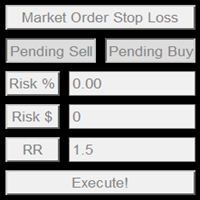
This product offers several advantages and features that make trading easier and more intuitive: User-Friendly Interface : The EA provides simple buttons for setting up pending orders, market orders, and stop-loss levels. This reduces complexity and makes it easier for users to manage their trades with just a few clicks. Customizable Risk Management : Users can adjust their risk percentage and reward-to-risk ratio using input fields. This feature ensures that traders can easily manage risk, hel

ATTENTION the expert does not work in strategy tester, for a trial version visit my profile. ATTENTION the expert must remain with the operations history in " COMPLETE HISTORY " Manual QUANTUM to download the automatic journal visit my profile RiskGuard Management – Professional trading, without compromise RiskGuard Management is the ultimate ally for traders who want to maximize profits and minimize losses with advanced risk management. It’s not just a tool; it’s an intelligent system that h

EA名:マルチトレード+ボタンEA
機能:このEAはMetaTrader4プラットフォームでのみ動作し、その機能は次のとおりです。
- 購入と販売ボタンを使用して、購入と販売の両方で自動的に注文を開きます。
- クローズオールボタンですべての未処理の注文を閉じます。
- EA設定の入力セクションから、開く注文の数とロットのサイズを決定します。
- テイクプロフィットを10ピップの最初の注文に自動的に設定すると、次の注文はテイクプロフィットが互いに10ピップの距離になります(データはEA設定の入力セクションで変更できます)。
- 10 ピップ後に起動する BE 機能を使用して、ストップロスを 20 ピップに自動的に設定し、利益でストップロスを 10 ティックに移動します (EA 設定の入力セクションからデータを編集できます) 。
FREE

Forex Unlimited ツールを発見 – MT4 または MT5 用の究極のポジション管理ツール トレードを次のレベルに引き上げる準備はできていますか?Forex Unlimited ツールを使用すれば、リスクの手動計算や資本配分の不安を解消できます。私たちは、使いやすく高度なポジション管理ツールを開発し、 2つのバージョン を用意しました: MetaTrader 4 用と MetaTrader 5 用です。購入時には、MT4 または MT5 どちらの取引プラットフォームを使用するか確認し、適切なバージョンを選択してツールのすべての機能を最大限に活用してください。 Forex Unlimitedツールのパワー: オーダーを完全にコントロール
3つのオーダータイプから選択できます: リミットオーダー 、 ストップオーダー 、または マーケットエグゼキューション 。 リミットオーダー : 現在の市場価格より低い価格でオーダーを設定します。 ストップオーダー : あらかじめ決めた価格でオーダーを有効にします。 マーケットエグゼキューション : 現在の市場価格で即時に実行

Simple Telegram Trade Alert
概要 : Simple Telegram Trade Alertは、MetaTrader 4 (MT4)ユーザー向けに設計された、シンプルながら効果的なエキスパートアドバイザー(EA)で、取引活動に関するリアルタイムの通知をTelegramで直接受け取ることができます。 数ステップで、ポジションが開かれたり閉じられたりする際に通知が送信され、エントリープライス、テイクプロフィット(TP)、ストップロス(SL)、口座通貨での利益/損失、残高変動率、総残高などの重要な情報を詳述します。 MT5プラットフォームを常に監視せずに、取引状況を把握したいトレーダーに最適です。
特徴 : 取引開始と終了に関する即時のTelegram通知。 提供される情報: 注文タイプ(買い/売り) シンボル 開始価格 テイクプロフィットとストップロス 注文番号(開始時と終了時) 口座通貨での利益/損失 残高変動率 現在の残高 ユーザーが構成可能なオプション : 取引開始および/または終了時の通知を有効/無効にする。 インターバルチェックのためにタイマーを

Here is a powerful trading tool that will allow you to trade manually or automatically in any market, but is especially useful in markets with high volatility and liquidity.
This system has two EAs (Expert Advisors): one for Buy and one for Sell, which work independently. The operation is based on the hedging strategy and the increase in lots based on the Fibonacci sequence, which will allow you to always add the two previous lots: 1, 2, 3, 5, 8, 13...
You decide how you want to trade: you ca

This MetaTrader4 tool monitors 21 minor currency pairs over a user-defined timeframe, displaying key PIVOT values along with SUPPORT Zones 1, 2, and 3, and RESISTANCE Zones 1, 2, and 3 for each selected pair. Users can choose to have this information optionally displayed on the chart ; however, logging of the data to the log file is always active and occurs periodically based on the selected timeframe. For example, when set to an hourly timeframe, data will be logged every hour; on a minute-base

The Tickerly TV Connector allows seamless integration between TradingView strategies and your MT4 terminal.
With this tool, you can automate trade execution by linking TradingView’s powerful scripting environment to your MetaTrader Terminal. Features include fast trade execution via Tickerly’s engine and easy setup using webhooks.
This EA is perfect for traders who want to deploy custom TradingView strategies on MT4, keeping their terminals in sync with real-time market conditions. Requires m
FREE

Kenalan Selamat datang di dunia perdagangan potensial dengan Robot Perdagangan Gold Cheetah ! Dirancang untuk mengoptimalkan keuntungan di pasar valas, robot perdagangan ini adalah alat yang sempurna bagi para pedagang yang ingin mengotomatiskan strategi mereka dengan akurat dan efisien. Apakah Anda seorang pedagang pemula atau profesional berpengalaman, Gold Cheetah siap membantu Anda mencapai kesuksesan di XAUUSD (Disarankan M5) dengan pendekatan yang cerdas dan terencana dengan baik Fitur Uta
FxProTrader is a multifunctional half-automatic trading system that allows you to trade both manually and automatically .
The algorithm includes 3 automatic trading strategies (1 trend and 2 flat).
The trader independently analyzes the trading situation and makes a decision on which trading strategy to include. Attention! Not all buttons work correctly in the strategy tester. Presented in the form of 4 graphic panels: 1 Panel - the main trading panel responsible for manual trading.
Allows yo

Important!!! Auto Trading must be activated! If you need to act quickly and all positions need to be closed or deleted. You drag this tool onto the chart where all open and pending orders are closed and deleted. When it has finished closing and deleting, it counts 20 ticks and the Expert Advisor automatically uninstalls itself from the chart.
Best regards and happy trading
FREE

Copy trades locally between MetaTrader terminals with a simple interface and strong risk controls. Mirror trades across accounts, brokers, and platforms in any MT4/MT5 combination. Designed for reliability : supports trade updates such as breakeven, trailing stop, partial closes, and more. User Guide + Demo | MT5 Version Important notes Local Trade Copier MT4 does not work in the Strategy Tester. For a demo, please use the User Guide + Demo link above. To copy to MT5, you will need to purchase

### Program Overview
**RemoteBatchClose EA** is an automated closing tool designed for forex traders, aimed at assisting users in managing open positions when they are away from their computers. By automatically monitoring specified pending order prices and currency pairs, this program can execute closing operations when conditions are met, thereby reducing the user's operational burden and ensuring effective implementation of trading strategies. Its primary purpose is to address the inconveni
FREE

Forex Candle High/Low Alert Indicator Overview: Forex Candle High/Low Alert Indicator, designed to provide real-time insights and alerts for major currency pairs. This custom-built tool displays key High and Low values over a chosen number of candles and time frame, ensuring you stay informed about critical price movements and trends. (The candles observed are from the 1st candle back - The amount of the chosen number of candles) Key Features: Real-Time High/Low Tracking : The indicator dynamica

Hello , Most people fail in trading because they use general strategies, trading should follow your own basics Being unique is the best strategy
I am MaxlumFX, a trader who uses Microsoft Excel I have been using it for years and the profits are realistic simple Follow the trade with Correlation Trigular for Analyst 1 Pair I share this file as your trading analysis Contact me for Excel file T.me/MaxlumFX

手動取引を改善: Trade Manager Assistant による正確で高速な自動リスク管理 提供されている無料のデモ バージョンを使用して、完全なセットアップ手順を入手し、Trade Manager Assistant の機能を調べてください。より詳しい情報は https://www.mql5.com/blogs/post/758625 をご覧ください。 。 手動取引では、慎重な分析と迅速な意思決定が必要ですが、実行エラー、矛盾、取引パラメータの混乱のリスクにより、利益が損なわれ、不必要なストレスがかかる可能性があります。 Trading Manager Assistant のご紹介: 手動取引プロセスを効率化するように設計された必須アシスタントで、チャートに精度、制御、自動化された効率をもたらします。 実行の遅さや計算ミスによる取引損失とはお別れです。アシスタント ビジネス マネージャーは、プロフェッショナルのスピードと正確さで業務を遂行できるようサポートし、重要な管理タスクを処理している間、ビジネス チャンスの発見に集中できるようにします。これは単なるウィザー
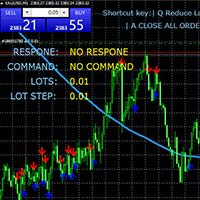
MT4キーボードショートカットトレーディングプラグイン 概要 : このMT4(MetaTrader 4)プラグインは、特にスケーリング戦略を利用するトレーダーに向けた、非常に効率的で直感的なトレーディング体験を提供します。キーボードショートカットを使用して、迅速かつ正確にオーダーを実行し、ポジションのサイズを動的に調整し、利益と最大損失(ストップロス)のレベルを精密に設定し、ワークフローを整然と管理できます。 主要機能 : キーボードショートカット : オーダーの変更、購入と売却オーダーの開設、オーダーの管理に使用できるカスタマイズ可能なキーボードショートカットを提供します。 ロットの動的変更 : リアルタイムで各取引のロット数を簡単に増減できます。市場への柔軟な対応を可能にします。 リスク管理 : 各取引の利益と最大損失(ストップロス)のレベルをポイントで精密に設定できます。リスクを正確にコントロールできます。 設定 : フォントスタイル、テキストサイズ、グラフ上の位置を変更することで、トレーディング体験をカスタマイズできます。 使用方法 : Q : 次の取引のロット数を減らします。
FREE
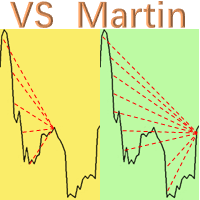
这是本人开发并且实际运用的EA实用工具”VS Martin”(VSMT),现分享给有需要的用户使用。 功能: 根据用户预设的马丁格尔交易序列进行自动化交易。该工具能够实时监控市场行情变化,并根据设定的盈利目标自动追迹止损,以实现最大收益并及时退出交易。整个马丁格尔执行过程无需人工干预。 优点: 1. 用户可以根据自身的风险偏好和资金规模,自定义马丁格尔交易序列,最多可设定30层深度。 2. 全自动化运行,在执行策略交易过程中无需人工干预。 3. 能够及时捕捉市场异动,并确保获利退出,避免恐惧和贪婪的情绪干扰。 4. 实时分析和统计持仓情况,在盈利时采用追踪止损,自动调整各个订单的止损价格,以获得最大收益并顺利退出。 参数设置: 1. MT Factors:设定交易序列的各层次的交易乘数,用“,”分隔。 2. MT Steps:设定交易序列的各层次的步幅距离,用“,”分隔,与“MT Factors”一一对应。 3. Start Trailing Stop:达到理想盈利点数时,VSMT开展追迹止损。 4. Trailing S

Master Close via Telegram can help you perform some management tasks on MT4/MT5 remotely via your Telegram by one click, easy to set up & use. Demo here (see more Master Notify Master Control ) ************************************************************************************ LIST OF COMMANDS: info_acc - Get account info info_pen - Get pending orders details info_pos - Get positions details info_pos_sum - Get positions summary
close_pen - Delete all pending orders close_pos_all -

This EA allows to set a specific Take Profit for all the trades of the same symbol when dropped in the chart. The Take profit can be set in the setting menu as a market price and not in pips.
Usefull when opening multiple orders and want to close them all in one time at a specific market price level without entering manually the take profit for each trade. For any question about this EA, you are welcome to contact me.

捞金团快捷平仓脚本 一键平仓 一键盈利 一键下单 一键平止盈 一键平亏损 EA 安装路径 在 C:\Program Files (x86)\TMGM MT4 Terminal\MQL4\Experts 请主语在你本地的安 装路径 安装 请自行查找本地路径 左侧为资金管理以及账户信息 , 右侧为脚本操作 方便快捷 手工加多 手工加空 可以快速实现下单 , 在 EA 设置里面修改 . 其他快捷按钮可以实现各种功能您只需点击就可以快速平仓 , 删除挂单 , 停止 ea 等操作 . 声音提醒功能 可以实现 手机提醒 邮箱提醒 和 声音提醒 以及弹出提醒 重要点位 4 种提醒方式 左侧为资金管理以及账户信息 , 右侧为脚本操作 方便快捷 手工加多 手工加空 可以快速实现下单 , 在 EA 设置里面修改 . 其他快捷按钮可以实现各种功能您只需点击就可以快速平仓 , 删除挂单 , 停止 ea 等操作 . 声音提醒功能 可以实现 手机提醒 邮箱提醒 和 声音提醒 以及弹出提醒 重要点位 4 种提醒方式

Product Description: The Prop Trading Panel is a powerful MetaTrader 4 utility designed specifically for prop firm traders and individual traders who want to enforce strict risk management rules, limit drawdowns, and secure profits based on their initial balance. This utility provides a dynamic interface on the chart that monitors account performance in real-time, automatically halts trading when predefined risk thresholds are breached, and displays vital trade statistics for informed decision-

Short Description:
FTMO Protector PRO MT4 is an EA designed to protect your funded account by managing risk and ensuring compliance with the Prop Firm's trading rules. This EA automatically monitors equity levels, closes trades when profit targets or drawdown limits are reached, and provides a visual display of key account metrics. EA w orks with all different Prop Firm service providers.
Overview:
FTMO Protector PRO MT4 is an Drawdown Safeguard Expert Advisor meticulously crafted for traders

Forex Stock Indexes Alerts EA - RSI & Price Index Expert Advisor (MT4) Forex Stock Index Price Alert & RSI EA for MT4 Condition: New Delivery: Electronic and free worldwide.
Email required for delivery details upon purchase. What Does the Program Do? The program will alert the user when any of the 10 pre-selected stock index symbols (additional indices can be added upon request) meet specific criteria: AUS200 EUSTX50 FRA40 GER30 HK50 JPN225 UK100 NAS100 US30 US500 For example, if you set a pric
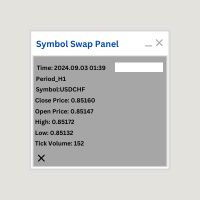
Symbol Swap Panel: Effortlessly switch the active symbol on your chart while simultaneously adding the new symbol to Market Watch. This tool ensures seamless integration and access to real-time market data, optimizing your trading workflow. **Note:** When switching to a different symbol, it's recommended to switch back and forth between timeframes to ensure that the panel loads properly. Description:
The "Symbol Swap Panel" is a versatile utility designed for traders seeking to manage the
FREE

Stock Indices Candle Gap Volatility Tool Designed for traders who demand precise and comprehensive analysis of candle gaps across major global stock indices. this tool provides the critical data needed for informed decision-making. Key Features: Candle Gap Analysis: Automatically display the high-low (Hi-Lo) gaps on your chart for any selected timeframe, giving you a clear view of market volatility. Wide Range of Timeframes: Analyze candle gaps (Current Candles) over multiple timeframes, providi

Program Overview: This program is a trading tool designed to monitor and analyze the 7 major currency pairs. It is a variant of a similar program used for tracking stock indices, but this version focuses on the seven major currency pairs. The program helps in identifying and calculating significant price movements (gaps) between the high and low prices of these currency pairs over a specified time frame. It then provides insights through comments and alerts based on the calculated gaps. Major Cu

METATRADER4 This program is designed to monitor and evaluate the market performance of 21 minor currency pairs by tracking key metrics such as maximum spread and the time of occurrence. For each selected currency pair, the program calculates the current spread and compares it against the highest recorded spread. If a new maximum spread is detected, it updates the maximum value and logs the time. The spread information is dynamically displayed.
Additionally, every hour, the program prints out t

The main function of this EA: use AI to quickly capture the price of the order, batch modify the stop profit and stop loss to the specified price position. For example, you have 5 buy orders for XAUUSD, and the opening prices are 2510, 2508, 2506, 2504, 2495 respectively. You can modify the stop profit to 2530 and the stop loss to 2480 through this EA batch. Good luck with your deal!
Wechat: FX-AIEA QQ: 2813871972 Email: lxy284628@163.com
Wechat public account: Xinyou Jinke FXAIEA.com Welcome

Forex Trading Finance EA Indicator This expert advisor (EA) scans pre-selected currency pairs, CFDs, cryptos, and stock indexes to detect price movements based on user-defined parameters. It helps identify potential trade opportunities when the price rises by a certain percentage (suggesting a sell) or falls by a percentage (suggesting a buy). Key Features: Customizable Percentage Alerts :
The EA monitors price changes for user-set percentage thresholds (e.g., a 10% rise or a 5% drop), providin

The Telegram EA can be used in conjunction with Abiroid Dashboard products. Detailed blog post with screenshots explained: https://www.mql5.com/en/blogs/post/758932
1. Abiroid Dashboards Setting: Within the Dashboard you have to set “File Alerts” to true. No need to give it a custom file name. It will use default file name and File will be created inside MQL4/Files folder. They will use “Prefix” setting as prefix by default. Unless you specify a Custom File Name. Then use this EA, and it will
FREE

Do you want tidy and attractive charts? Let Hogvid Chart Scale help you! Chart Scale automatically scales the height of the chart to a configurable percentage of the total window height.
This creates space at the top and bottom of the window for additional visual elements and increases clarity without having to manually adjust the vertical scaling which can be annoying, especially if you change the chart symbol frequently.
The function can be activated and deactivated at any time with a simple
FREE
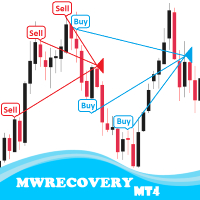
MWRecovery is a system designed to recover unprofitable positions.When the market moves by a certain amount against the direction of a trade and brings it to a loss, the system opens other trades in the same direction at specified intervals. Once these trades reach a certain profit, a magic trailing stop is activated to maximize your profit. How it works : The utility resets StopLoss levels for all processed orders. New trades will be placed if the conditions are met according to what you hav

MA Crossover Pro MT4 Program Key Features : Moving Average Crossovers : Leverage the dynamic nature of the market with precise buy and sell signals based on fast and slow moving average crossovers. Risk Management Settings : Take control of your trades with customizable risk management settings. Set Stop Loss and Take Profit levels according to your risk tolerance. User-Friendly MT4 Integration : Seamlessly integrate the program into your MetaTrader 4 platform. Effortlessly execute trades and m

Automated Forex Trading Program - Stochastic Indicator Strategy with Customizable Settings Key Features: Stochastic Indicator Strategy :
Utilizes a sophisticated trading strategy based on the stochastic indicator, which is a momentum oscillator. The algorithm identifies potential reversal points at overbought or oversold levels, providing precise trade signals. Customizable Settings :
Adjust key parameters like stochastic periods, overbought and oversold levels, as well as Take Profit and Stop

Introducing the Open Order Timer EA
Are you tired of manually opening trades at specific times? Are you longing for a trading tool that can execute orders with pinpoint precision? Are you struggling to time your trades accurately in a fast-paced market environment?
Introducing Open Order Timer, an Expert Advisor that automatically opens positions at your desired times with just a few clicks. This powerful tool takes the guesswork out of timed trading, allowing you to focus on your strategy whil

This script in MQL4 is designed to automatically apply a specified template to all open charts in the MetaTrader 4 trading terminal. It allows you to quickly and efficiently update all open charts by adding an indicator or modifying other settings defined in the template. Script Description and Capabilities: Automation : The script automates the process of applying a template to all open charts, which is particularly useful when you need to update multiple charts with the same settings. For inst

Heartbeat Agent is a comprehensive monitoring system for MetaTrader 4 terminals, designed to detect critical issues before they impact your trading. Compatible with both Windows and Linux, it continuously monitors your terminal's health and alerts you immediately when problems arise. Key Features: Trading Permissions Monitoring: Detects when AutoTrading is disabled, preventing your Expert Advisors from executing trades. Alerts if your account is in Investor Mode (read-only) or if your broker has
FREE
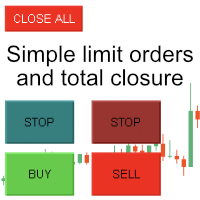
Enter all limit orders with your own logic to set with TP and SL and if you want something extra activate trailing to protect your position. A trading aid to speed up the entry and management of your orders. General protection with closing orders at a time to be set, visible on the chart, or closing everything via the monitor button. Speed up order entry with your preferred strategy.

Metatrader4 Trailing Stop Loss Program Platform Compatibility: The Program is for METATRADER4 Platform. Functionality: This program will go through all open Forex Currency pairs trades on Metatrader4 and move their corresponding STOP LOSSES to a PROFIT position based on the parameters INPUT settings. Parameters and Example: Example Trade: EURUSD Long (BUY) trade @ 1.0800
STOP LOSS (-50 pips) @ 1.0750
TAKE PROFIT (+50 pips) @ 1.0850 Program Settings: WhenToTrail=20 PIPS; (Pips profit amount to a

Forex Trading Trend Support Resistance Line Trader Overview: This Forex trading robot is designed to automatically take BUY and SELL positions based on a Trend Line . It identifies and executes trades depending on the line's relative position on the chart, offering an efficient tool for traders utilizing Support and Resistance strategies. Key Features: Customizable Stop Loss : User-defined STOP LOSS values. Take Profit Levels : Set your desired TAKE PROFIT levels. Trailing Stop Function : Optio

MetaTrader4 Carry Trade FOREX Swap Rollover Indicator - Enhance Your Carry Trade Strategy Developed by a seasoned MT4 programmer and successful proprietary trader, this tool is designed to optimize your carry trade strategy. Key Features : Analyzes swap rollover values (in Points) for 63 currency pairs. Indicates whether to take a long (buy) or short (sell) position. Provides insights for generating positive rollover gains when holding trades overnight. Ideal for traders focusing on carry trade

Forex Algo GAP Trader with Trailing Stop
Overview: This Forex Algorithm is designed for traders who use gap trading strategies. It identifies and executes trades automatically based on candlestick gap patterns, providing customizable options for risk management and a trailing stop feature. Key Features: Customizable Gap Threshold : Configure the minimum gap size in pips to trigger trades based on market conditions. Flexible Trading Direction : Choose whether to buy on gap-up or sell on gap-dow

This script is designed to automatically open charts for all available forex pairs on the MetaTrader 4 platform, as well as the gold (XAUUSD) chart. The script iterates through all symbols available on the platform, determines which of them are forex pairs, and opens their charts on the M1 (one minute) timeframe. Key Features: Gold Chart Opening: The script automatically opens the XAUUSD (gold/dollar) chart if this symbol is available from your broker. If the gold symbol is not found, an error m

To achieve mutual support between MT4 and MT5, and to purchase the MT5 version, please click here>>
Main follow-up function: 1. Reverse order capability 2. Cross platform follow-up, ignoring different names 3. Proportional order, magnification and reduction order 4. Compared to a specified currency pair, not compared to a specified currency pair 5. Can be ordered one to many, many to one, any order 6. Other unclear messages
6. Other unclear messages.

Simple and lightweight utility for automatically synchronizing the symbol of multiple charts Synchronization in both directions, regardless of which chart you change the symbol on Quickly activate or deactivate the synchronization of individual charts at the touch of a button Create multiple synchronization groups by assigning different event IDs Themes for bright and dark chart layouts
FREE

GridMaster Bot is an automated trading tool designed to help you profit regardless of market direction. With its grid trading strategy, this Expert Advisor (EA) automatically opens and manages trades based on price movements, allowing you to benefit from market fluctuations. Key Advantages: No Need to Predict Market Direction: GridMaster Bot allows you to profit whether the market moves up, down, or sideways. Fully Automated Trading: Set your parameters and let the bot do the work for you, handl

ウォーターマーク MT4 バージョン: https://www.mql5.com/ja/market/product/120783 MT5 バージョン: https://www.mql5.com/ja/market/product/120784
ロゴ MT4 バージョン: https://www.mql5.com/ja/market/product/121289 MT5 バージョン: https://www.mql5.com/ja/market/product/121290
「ウォーターマーク」スクリプトは、チャートの背景に重要な情報を直接表示することで、取引チャートをより魅力的に見せるように設計されています。このスクリプトは、現在の取引ペア、時間枠、各種時間指標などの重要な情報を、明確かつ目立たないように把握できる方法を提供します。
機能:
取引ペア表示:
このスクリプトは、チャートに表示されている現在の取引ペア(例: EUR/USD、BTC/USD)を自動的に検出し、表示します。これにより、トレーダーは常にどの資産を分析しているかを把握でき、間違ったペアに基づいて意思決
FREE

ロゴ MT4 バージョン: https://www.mql5.com/ja/market/product/121289 MT5 バージョン: https://www.mql5.com/ja/market/product/121290
ウォーターマーク MT4 バージョン: https://www.mql5.com/ja/market/product/120783 MT5 バージョン: https://www.mql5.com/ja/market/product/120784
「ロゴ」スクリプトは、MetaTrader 4 (MT4) の取引チャートの背景にカスタムロゴまたは画像を表示するために設計されています。このスクリプトを使用すると、トレーダーはロゴやその他の任意の画像を使用してチャートをカスタマイズできます。
使い方:
画像の準備: まず、チャートにロゴとして表示したい画像を選択します。
任意の画像編集ソフトウェアを使用して、画像をビットマップファイル形式 (.bmp) に変換します。 画像の保存: 変換が完了したら、.bmp 画像ファイルを MT4 インストールディ
FREE

Enhance Your Trading with the Support and Resistance Alert! Ready to take your trading to the next level? Introducing the Support and Resistance Alert—the ultimate tool to precisely identify market turning points! Key Features: Dynamic Support and Resistance Lines: The indicator automatically draws support and resistance levels based on local lows and highs, giving you clear guidance on where the market is likely to reverse. Real-Time Alerts: Stay ahead of the market with customizable alerts. Ge
FREE

Select the lot size, the number of orders, and with the click of a button, open your multiple buys or sells.
You can also change the EA's comment, and replicate any other type of orders, according to your magic number!! The tool also has a monitor that shows you the current equity of the account, and a button to close all orders with just one click!! All very simple.

All information related to your account in one place. Here is the indicator you were looking for.
The best and most complete mql5 account monitor for your metatrader 4...
Balance and Equity, Open Orders and Lots, Floating Equity separated into best and worst of the day, Profits separated by periods, Maximum Drawdowns for those who are concerned about risks, Closed Lots and much more!

This expert advisor is specially programmed for telegram channel owners who send trading signals to traders all over the world so that everyone can understand the signal from the attached image and on which asset, pair, currency or indices it is traded. If you have multiple public or private channels, you can customize the signal for the channel you want to send to. Sends trades and if a trade is modified if the stop loss or take profit price is changed, sends it to telegram and sends the trade

This feature shows a week's worth of news with a time shift based on your location. You can adjust the clock forward or backward for different purposes, all within the program. Before the news event, you will be alerted with a message and a vertical line. High priority news is displayed in red, medium in orange, and low priority news in gray. The "All Event Line" button allows you to view all the past news in the current week, along with their titles and corresponding lines. A crucial note: Yo

SL Maestro - Forex Expert Advisor SL Maestro - Forex Expert Advisor with Advanced Stop-Loss Features Introducing SL Maestro , the ultimate Forex Expert Advisor (EA) designed to enhance your trading strategy by adding stop-losses to existing trades with precision and flexibility. SL Maestro is not just limited to simple pips-based stop-losses; it incorporates a variety of advanced techniques to ensure optimal protection for your trades. Key Features: Pips-Based Stop-Loss : Easily set a stop-loss
FREE

Overview: Trade Close Master is a powerful yet straightforward tool designed for MetaTrader 4 that allows traders to efficiently close all open trades with a single command. This script simplifies the management of multiple trades by automating the closure process, ensuring a seamless trading experience. It is ideal for traders who need to quickly exit positions across various currency pairs and symbols, especially during fast-moving market conditions.
Advantages and Features: Ease of Use: With
FREE

Todas as informações relacionadas à sua conta num único lugar. Aqui está o indicador que você estava procurando.
O melhor e mais completo monitor de contas do mql5 para o seu metatrader 4...
Saldo e Equidade, Ordens e lotes em aberto, Equidade flutuante separada em melhor e pior do dia, Lucros separados por períodos, Rebaixamentos máximos para quem se preocupa com os riscos, Lotes fechados e muito mais!

Hedge Assistant - Hedge Assistantは、ヘッジ取引を簡素化するために設計された直感的なエキスパートアドバイザー(EA)です。このEAは、シンプルヘッジとダブルヘッジの2つの戦略をサポートしています。これらの戦略に関する詳細については、当社のYouTubeチャンネルにある説明動画をご覧ください(リンクと画像を添付)。 機能: バックテスト: 注文はパネルのボタンを通じて手動で実行されるため、バックテストはできません。これはトレーダーの直接介入が必要です。 ボタン: EAには、買い注文または売り注文を開くための3つの主要なボタンと、すべての注文を閉じるためのボタンがあります。さらに、トレーダーの操作を支援するために、グラフウィンドウに有用な情報が表示されます。最初の実行後、EAは注文を自動的に管理し、注文が閉じられるまで管理を続けます。ボタン上の情報の色は、設定で調整可能です。 設定データ: EA Name - EAの名前; Lot - 取引に使用されるロットサイズ; Lots_Martingale - 保留中の注文のロットサイズを増やすための乗数; Dist

商品説明 トレーディングの世界では、すべてのトレーダーが自分の戦略の可能性を最大限に引き出す方法を探しています。私たちのエキスパートアドバイザー(EA)はそのエッジです。それは単なるツールではなく、トレーディングの旅における仲間であり、トレンドを保護し、あらゆる戦略を高収益に変えるために設計されています。私たちのEAの特徴は、市場で出現する特徴的なトレンドを捉えるための定期的な更新と最適化への取り組みにあります。 取引戦略 すべてのトレーダーはリスクに直面しています。私たちのEAはこれらのリスクを効果的に管理するように設計されています。それはポジションを3段階で減らし、潜在的な指数的利益のライフサイクルの複数の段階でトレンドを最大限に活用しながら、利益を保護します。 リスク管理 私たちのEAを使用することで、あなたのPnL(損益)が変わります。それはテイクプロフィットによって制限されることなく、取引の無限の可能性を捉えます。この変革は、私たちの製品の利点と価値を示し、それをトレーディングツールキットにおける説得力のある追加品にします。 このEAは、既存の戦略を強化するために設計されたツ

Trade Entry Journal is your ultimate solution for streamlining trade entries and journaling. Designed specifically for forex traders, this powerful tool automates the tedious tasks of calculating lot sizes, placing trades, and documenting your trading activities. Say goodbye to manual entries and focus on making smarter trading decisions. Key Advantages: Automated Lot Size Calculation : Calculate the perfect lot size based on your stop loss level and risk amount. The lot size will be adjusted t
FREE
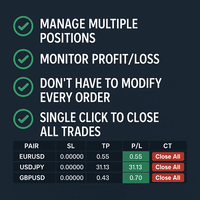
Tired of manually adjusting stop-loss and take-profit levels for multiple positions across different pairs? The Manage Multiple Positions Expert Advisor is your solution. MT5 Version - https://www.mql5.com/en/market/product/120989/ This powerful tool streamlines your trading experience by allowing you to manage multiple positions on a single pair with ease. Modify stop-loss and take-profit levels for all open positions on a specific pair with a single click. Plus, the EA provides clear visibili

Elevate your trading with this Breakeven and Trailing Stop Manager, an Expert Advisor (EA) built for MetaTrader 4 to streamline risk management by automating breakeven and trailing stop strategies. This EA helps secure profits and minimize losses without requiring constant manual intervention, giving you more time to focus on market analysis and strategy.
### Key Features:
- **Automatic Breakeven Adjustment:** Automatically move the Stop Loss to the breakeven level once your position reac
FREE

JoyBoy EA advantage: the first support for small capital work EA, real trading more than 4 years; this EA based on volatility adaptive mechanism, only one single at a time, each single with a stop-loss, an average of about 4 orders per day, holding a single length of about 12 hours. This EA does not use Martingale or Grid strategy Makes it safer for your capital. You can also use this EA to pass prop firm Challenges because of its very low drawdowns and stable profits.
Support currency: EURNZD

The DrawStopLevel script is designed for the MetaTrader 4 (MT4) trading platform. This script allows traders to quickly and easily draw a stop-loss horizontal line on their trading chart. This script is used in conjunction with the Trade Entry Journal Utility ( https://www.mql5.com/en/market/product/ . This script can also be easily integrated into any MT4 trading strategy, allowing for quick visual representation of stop-loss levels.
FREE

Discover the power of precise trading with the Box Breakout Alert EA for MetaTrader 4. This expert advisor is designed to help you identify and act on breakout opportunities, ensuring you never miss a profitable trade. Whether you're a beginner or an experienced trader, the Box Breakout Alert EA is your key to smarter, more efficient trading. Key Features and Advantages: Real-Time Alerts : Get instant notifications on your MT4 app when the price breaks out of the defined support and resistance l

Overview Box Trade Master is a powerful Expert Advisor (EA) designed to automate breakout trading strategies in the Forex market. This EA allows traders to maximise profits by effectively managing trades based on breakout patterns, freeing you from constant monitoring of the charts.
Advantages Automated Breakout Trading : Automates the process of identifying and trading breakouts, reducing the need for manual chart monitoring. Customisable Settings : Easily adjust risk levels, trade directions

The EA (Expert Advisor) is only attached to the pair it is intended for XAUUSD/GOLD, in the TF (TimeFrame) M5!
Use Guide Complete in this Link PLEASE READ Use Guide https://docs.google.com/document/d/1dH6vMYZFSddo0_vd9j-Kxs1cPzUMxxLwgOna9H3JoeM/edit#heading=h.9hhcmqq153x2 PLEASE READ How the Strategy Works!
This strategy is created based on intelligent analyses and strategic mathematical placements of transactions so that the daily success rate is very high with a REAL percentage

AIP – MT4/MT5 To Telegram 1 Main features of MT4/MT5 EA To Telegram: Send all types of orders (Open Order/Close Order/Partial Close/Modify Order/Pending Order/Delete Order) Close and Modify Order with replies to the corresponding Open Order Support sending to both private, public channels and group, topic group Support sending to multiple channels simultaneously Send Chart Screenshots Manage all symbols with a single EA on one terminal Automatic loading of templates, logos, and screen
MetaTraderマーケットはトレーダーのための自動売買ロボットやテクニカル指標を備えており、 ターミナルから直接利用することができます。
MQL5.community支払いシステムはMetaTraderサービス上のトランザクションのためにMQL5.comサイトに登録したすべてのユーザーに利用可能です。WebMoney、PayPal または銀行カードを使っての入金や出金が可能です。

取引の機会を逃しています。
- 無料取引アプリ
- 8千を超えるシグナルをコピー
- 金融ニュースで金融マーケットを探索