 MetaTrader 5
 エキスパート
 インディケータ
 ライブラリ
ライブラリ
 ユーティリティ
 ウィジェット
 ルール
ルール
YouTubeにあるマーケットチュートリアルビデオをご覧ください
ロボットや指標を購入する
仮想ホスティングで
EAを実行
EAを実行
ロボットや指標を購入前にテストする
マーケットで収入を得る
販売のためにプロダクトをプレゼンテーションする方法
MetaTrader 4版新取引ユーティリティ - 30
 以下はMetaTrader4での外国替取引を簡素化する取引プログラムです。以下のリストのユーティリティにカーソルを合わせて、説明と目的をご覧ください。
PLEASE NOTE: The "AUTO" function of the EA has NOT yet been activated . It's still ongoing testing. Once it becomes available, clients will get a free upgrade to EA 2.0 Also .... PLEASE follow the instructions below in order for the functions to work properly.
Introduction: The Phoenix Project (EA) Our Expert Advisor is both refined and practical. It is geared towards helping the traders be constantly aware of their risk PER trade while it helps them manage that risk.

In a trend trading system, find the right entry and exit points.
In forex trading, a trading strategy is a fixed plan designed to make a decent return by going long or short the market. The main reason a properly researched trading strategy is helpful is because it is verifiable, quantifiable, consistent, and objective.
For each trading strategy, you need to define the assets to be traded, the entry/exit points, and money management rules.

Msg2Lineはテキストボックスからフリーテキストやキャプチャを「LINE Messenger」に送信します。 グラフに線やマーク、コメントを書くと画像が送信されます。 自分宛またはグループ宛に送ることができます。とても便利でシンプルなツールです。 - フリーメッセージの送信
1. 編集ボックスにフリーテキストを入力します。 2. 送信ボタンを押します。
- フリーメッセージ+画像キャプチャの送信
1. 編集ボックスにテキストを入力します。 2. w/imgボタンを押します。
- キャプチャ画像の送信
1. w/IMGボタンを押すだけです。
*パラメータとしてLINE TOKENが必要です。 *このツールは「WebRequest」を使用
これは単純な機能ですが、LINEユーザーにとって便利なツールになるでしょう。
FREE

バー閉店までのカウントダウンタイマー、+ 進捗状況 %: #1 多機能ユーティリティ : 66+ の機能を含むこのツール | 質問があれば私に連絡 してください | MT5 バージョン インジケーターの設定で、以下の項目を調整できます: 計算用の時間枠; true / false: より高い時間枠オプション(現在使用中の次のもの:M15->M30, H4->D1...) 位置:
1 = 左下隅;
2 = 右下隅;
3 = 左上隅;
4 = 右上隅; フォントサイズ; 色; フォントスタイル; #1 多機能ユーティリティ : 66+ の機能を含むこのツール | 質問があれば私に連絡 してください | MT5 バージョン #1 多機能ユーティリティ : 66+ の機能を含むこのツール | 質問があれば私に連絡 してください | MT5 バージョン
FREE

オンラインチャートだけでなく、ストラテジーテスターでも動作しますので、無料デモから動作を確認できます。(build 1353) how to run the FREE DEMO => https://www.mql5.com/en/blogs/post/749299
チャート下に表示されるテキストボックスから、Discordに投稿するツールです。 w/Imgのボタンからは、チャート画像も送ることができます。
チャートに線やマーク、コメントなどを書いても、その画像が投稿されます。
使い方は簡単。 メッセージを入力し、SENDボタンでメッセージの投稿、w/IMGボタンでメッセージ+画像の投稿を行うことができます。 どんな使い方ができるか、人それぞれですが、Discordでコミュニケーションをされている方であれば、チャート画像を一発送信できるので便利だと思います。
*DiscordのWEBHOOKをパラメタに設定しますので、取得する必要があります。
*WebRequest を使用しています
ストラテジーテスターでも動作を確認できますので、無料デモをお試しください。
FREE

BFS Panel Control is an auxiliary panel for comfortable control and management of orders, combining orders of different instruments into related groups, with subsequent closing of groups according to specified conditions of profitability (or loss) and with a possible notification in Telegram. For example, you have a drawdown on several orders of the EURUSD, GBPUSD, USDJPY instruments, while you expect the BTCUSD instrument to grow strongly, you open a position with a large lot on the BTCUSD ins

Support and Resistance Dashboard for MT4 is a multi-timeframe and multi-symbol scanner and alert system that finds S/R zones and pivot points for all timeframes and symbols and alerts when price has interaction with them. If you are using support and resistance (or supply and demand) zones in your trading strategy, this dashboard and its alert and filtering system is a big time saver for you. Download demo version (works on M 1,M5,M30,W1 timeframes) Full description of scanner parameters ->
This is an additional Tool for Line Alarm Tool for sending Telegram Notification when price reaches a Horizontal Line Line Alarm Tool is an indicator so it can work in coexistence with Expert Advisor, but Sending Telegram Message from MT4 can only be performed by an Expert Advisor. Thus, this additional tool was created.
Get the Line Alarm Tool here: https://www.mql5.com/en/market/product/81723
How to Enable Telegram Notifications? Open: Tools -> Options -> Expert Advisors -> Allow W
FREE
A tool to notify You via MT4 Mobile App messages, Telegram, and Email when price reach certain Horizontal Line that You place This Line Alarm tool is an Indicator, so it works well in coexistence with other expert advisor on the same chart
$30 for the next 25 downloaders, next price: $45 Try it out on demo account for free: Download Demo
Features:
Line(s) Notification : Place Horizontal Line(s) and be notified when the Price reach them OHLC Line Magnet : Make the horizontal lines more attr

CoPilot Pro EA is an add-on EA to allow Telegram Remote, toggle Auto Trading base on various conditions, and additional Order & Risk Management for other EAs. Do you have favorite EAs that trade well, and you want additional control over it? Do you run multiple EAs on same account and you need a way to manage Risks and Orders from account level? Do you want to control your EAs and get notifications from Telegram? CoPilot Pro is the best companion for you! IMPORTANT NOTE: CoPilot uses Advance Ch

A simple button to completely close all existing open trades (both Buy and Sell) on the current chart .
Warning : Once the button is pressed, all open trades on the current chart will be deleted immediately without any more questions or dialogue.
Use this utility very carefully. We recommend that you do a trial of removing open trades on a demo account first, before trying to use this utility on a real account.
FREE

FREE for limited time! CoPilot EA is an add-on EA to provide additional Order & Risk Management for other EAs. Want more control and Telegram support? Check out CoPilot Pro: https://www.mql5.com/en/market/product/82009 Do you have favorite EAs that trade well, and you want additional control over it? Do you run multiple EAs on same account and you need a way to manage Risks and Orders from account level? CoPilot is the best companion for you! Features: Addition Order & Risk Management to other
FREE

マルチチャートリフレッシュMt4は、複数のチャートを同じものから同時にリフレッシュすることを可能にする、高速でスムーズに不可欠なスクリプトです。マルチタスクにより、更新するシンボルを事前に選択できるため、これが可能になります。
メタトレーダー5バージョン 代わりにmt5バージョンをご希望の場合は https://www.mql5.com/en/market/product/28796 それはどのように機能しますか?
チャートを開き、ナビゲーターからスクリプトをドラッグしてチャートにドロップします。目的の記号を設定し、[OK]をクリックします。これはスクリプトであり、エキスパートアドバイザーではないことに注意してください。プログラムは、タスクが完了するとチャートから自分自身を削除します。ターミナルのジャーナルの詳細情報は、どのシンボルが希望のバー数で更新されているか、更新されていないかについて印刷されます。これより簡単なことはありません!
スクリプトメニュー設定 シンボルの選択-目的のシンボルを設定します シンボルプレフィックス-シンボルプレフィックスが存在する場合は入力します。

Plot History Mt4は、エキスパートアドバイザーが実行する取引端末とアカウントの取引履歴を分析するトレーダーにとって不可欠なスクリプトです。分析方法は、スクリプトが実行されるシンボル図と魔法の番号、1人または複数の専門家が使用するすべての魔法の特定または完全な分析に基づいています。スクリプトは取引データを分析し、これらをチャートにプロットし、エキスパートログに詳細な取引情報を印刷し、分析されたデータをcsvにエクスポートできます。 メタトレーダー5バージョン 代わりにmt5バージョンを好む場合 https://www.mql5.com/en/market/product/27038 スクリプトの利点 アカウントで使用されている1つまたはすべての魔法を分析する機能 すべての取引データをcsvファイルにエクスポートします すべての取引、エントリー、エグジットをチャートにプロットします。これは、プロットするかどうかのように設定できます。 エキスパートログに詳細な取引情報を印刷する アカウント取引分析を実行する方法 分析するシンボルを選択することから始め、次に、分析を特定の魔法の番

RSI Divergence Scanner is a multi-timeframe and multi-symbol dashboard and alert that checks all timeframes and symbols to find divergences between price chart and RSI indicator. This divergence scanner is integrated with support and resistance zones so you can check the RSI divergences in the most important areas of the chart to find trend reversals in the price chart. Download demo version (works on M 1,M5,M30,W1 timeframes) Full description of scanner parameters -> click here . How to get

Definition : Market View is a dashboard (scanner) to view price graphs of all symbols and all timeframes at a glance. The utility is designed user friendly and added a wide range of customization options.
Main features of Market View : Visual settings window on the chart Customizable list of symbols and timeframes Different shapes : Real Candles, Schematic Candles, Arrows Customizable number of candles Changeable size of dashboard (scanner)
Highlight timeframes with gaps on candles Open approp

チャート上に超簡単に線を引いたり、移動したりできるツールです。
クリックしてから、ドラッグするとトレンドラインが引けます。 横に引くと価格線、縦に引くと日付線になります。 そこにある線やオブジェクトで、クリック&ドラッグすると移動できます。
クリックしたところから、ドラッグしたところに交差線が引かれ、間の時間と価格の差が表示されます。
クリック&ドラッグしたら、左右に振ると色が変わります。 クリック&ドラッグしたら、上下に振ると削除します。
クリック&ドラッグとは? 1.マウスの左ボタンを押す(カ) 2.マウスの左ボタンを放す(チ) 3.マウスの左ボタンを押す(カ) 4.左ボタンを押したまま、マウスを移動する(ツー)
この動きをすることでトレンドラインを引いたり、オブジェクトを移動したり、色を変えたり、消したりできます。
トレンドライン、価格ライン、日付ラインだけでなく、矢印や価格表示、フィボナッチ、ギャンライン、サイクルライン、図形なども移動させることができます。
他にも便利なところ
・うっかり線を引いてしまったら、チャート外でマウスボタンを離せば、線が消えます
FREE

TradeSnapは、BUY/SELLオーダーが約定した際に自動的に画面キャプチャを行い保存します。 チャートにセットするだけで、余計な作業をすることなく、自動で保存されます。
また、チャートに記載された線や矢印なども、そのまま画像に保存されます。 保存できる画像サイズは、10000x10000ピクセルですので、値動き経緯がわかる横長の画像で保存することもできます。
パラメタ設定 --Event Parameter--
Magic number (0=ALL): キャプチャ対象のマジックナンバーを指定します。
Entry: エントリー時にキャプチャします。
Exit: クローズ時にキャプチャします。
--Capture Info--
Image width, Image height: 出力する画像のサイズを指定します。
--Message Info--
Text color, Text size, Text pos, Display seconds: メッセージの表示内容を設定します。
画像の保存先:データフォルダ/MQL4/Files/OshiraseSnap/ NOTE:画
FREE
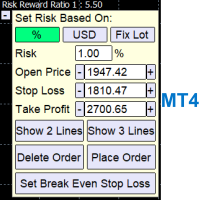
A Trading Assistant EA that can place order at user's desired open, stop loss, and take profit prices with automatically calculated lot size based on user's risk per trade
$30 for the next 25 downloaders, next price: $45 Try it out on demo account for free: Download Demo
Features: Smart Place Order : Automatically determine the Type of Order (Market/Stop/Limit & Buy/Sell) to be placed based on Open, and Stop Loss Price input, then execute it immediately Risk Manager : Set your risk of loss o
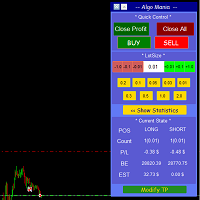
This is a trade manager specially for traders using martingale strategy and multiple trades at the same chart.
features: - easy and fast to set the lot size with mouse clicks. - Close all trades and close profit trades with a single click. - Show details on the running symbol: - number of trades (long - short) and total lots of each direction. - total profit/loss on this symbol separately and for both directions. - Break even point for both long and short. - Estimated profit if all the trades
FREE

The utility allows you to open, monitor and manage open positions on the forex market and only on instruments in which it is possible to create triangulations or those instruments that share the same currency in the numerator or denominator:
ex: EURSUSD --- GBPUSD --- EURGBP The help of operational lines and valuable information on the panel allow the trader to manage trades more easily. Recommended for novice and experienced traders.
External variables
CrossSymbol = choose the cross on which

Support and Resistance Levels by svidoks
This utility draws support and resistance zones to which the price reacts well. It also has a trend indicator that works on the basis of support and resistance zones. You can work with the indicator-advisor both manually and automatically (there is also an external control panel). Group for support, you can also write your Wishlist and wishes - telegram chat Supports all currency pairs
Options: Dist_set_limit - 300, this is the value in pips. When the
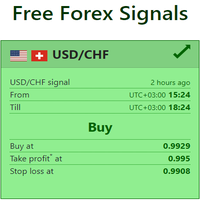
Live Forex Signals サイト信号での取引用に設計されています https://live-forex-signals.com/en と https://foresignal.com/en . Live Forex Signals for MetaTrader 5 https://www.mql5.com/ru/market/product/81448
パラメータ サイトへのサブスクリプションを持っている場合は、ユーザー名とパスワードlive-forex-signals.com/foresignal.com サブスクリプションがない場合は、フィールドを空のままにします; オープンされているお得な情報へのコメント リスクリスクは、取引のための預金の割合として、リスク=0の場合、値ロットが使用されます 取引のためのロット固定ボリューム UseTakeProfitは、サイトから利益を取る使用します 当サイトからのご利用停止のご案内 F r e c h encysignalupdateinminute顧問のサイトへの訪問頻度を指定します MaximumSpreadFo

このユーティリティの仕事は、デポジットのドローダウンを防ぐために、すべての金融商品に関する他のアドバイザーの仕事を分析することです。指定されたパラメーターを超えた場合、「エクイティ・プロテクション」はポジションをロックし、クローズし、それに関する通知を送信できます。 「株式プロテクション 」は 現在のシンボルまたはすべてのシンボルに対して機能し、組み込み機能により保留中のポジションを削除したり、アカウントで作業している他のアドバイザーを閉じることもできます。 機会:
アカウントでアクションが開始されたときにあらゆる種類の通知を送信します。 アカウント上のすべての商品を操作するには、1 つのチャートにアップロードするだけで十分です。 選択したマジック ナンバーまたはすべて、現在のシンボルまたはすべてのシンボルを操作します。 ブロックしたり、損失をクローズしたり、単に損失について通知したりできます。 必要に応じて、すべてのシンボルまたは現在のシンボルで他のアドバイザを無効にします。 未決注文だけでなく、ストップロスやテイクプロフィットも削除できます。 カスタマイズ可能なパネル。パネル

50% off. Original price: $60 Order Manager is a trade assistant and trade copier with a money manager that helps traders open, modify and close manual trades and also copy their trades between multiple accounts in the most simple way to help them focus more on their market analysis and open orders with just a few clicks.
Download Demo here (It only works on demo accounts for 14 days) Full guide here MT5 version here
Order Manager features: Works on all instruments such as currency pairs, i

Pomo Panel is a simple panel to help trader using grid strategy. It is designed with grid strategy in mind.
Its features: Open standard transactions Set up pending transactions Delete all pending transactions Modify multiple Stop-Loss and Target-Profit Calculate Lots of all opened transactions Calculate average Open-Close, High-Low Close All Opened Orders

这是中文简体版本 为了让新手交易者更容易理解,我做了一个交易平台账户信息面板,不收取任何费用。 首先,您必须在交易前了解平台。 各平台报价及商品规格与账户交易规则不同。 您可以调整面板的颜色和大小,如果您尝试按下,面板可能会移动。 面板不会下单,放心加载EXPERTS 如果我升级了免费产品,您需要先将我的旧产品从市场上移除,然后重新启动 MT4,然后再次下载以使用我升级的免费产品。 In order to make it easier for novice traders to understand, I made a trading platform account information panel, which does not charge any fees. First of all, you must understand the platform before trading. The quotations and commodity specifications of each platform are not the same as the account tra
FREE

為了讓新手交易者更容易理解,我做了一個交易平台賬戶信息面板,不收取任何費用。
首先,您必須在交易前了解平台。
各平台報價及商品規格與賬戶交易規則不同。
您可以調整面板的顏色和大小,如果您嘗試按下,面板可能會移動。 面板不會下單,放心加載EXPERTS 如果我升級了免費產品,您需要先將我的舊產品從市場上移除,然後重新啟動 MT4,然後再次下載以使用我升級的免費產品。
In order to make it easier for novice traders to understand, I made a trading platform account information panel, which does not charge any fees. First of all, you must understand the platform before trading. The quotations and commodity specifications of each platform are not the same as the account trading
FREE

Evening Scalper Pro is the state-of-the-art mean-reversion trading system that operates during all trading session. It's very different from most other scalping systems, since it uses a unique trading logic on cross pairs that have a strong mean-reverting tendency with high profit targets. EA not enters the market with market orders, it does not open trades. In terms of a trade duration, it's classical scalping: in and out of the trade within a few hours at the most. The EA uses a number of adv

AW MT4 To Telegram は、MetaTrader 5 口座のイベントを Telegram に送信するユーティリティです。送信対象はポジションのオープンと決済、部分決済、Stop Loss と Take Profit の変更、待機注文、口座アラート、レポートです。ユーティリティ自体は取引を行いません。口座の約定履歴を読み取り、あらゆる変化をプライベートチャット、トピック付きグループ、またはチャンネル向けのメッセージに変換します。 VIP チャンネルには即時に、Free チャンネルには遅延をつけて配信するシグナル販売者や、ドローダウン、証拠金、接続に関するアラートをスマートフォンで受け取りたいトレーダー向けに作られています。 マニュアルと説明 -> こちら / MT5 -> こちら 特長: 最大5つのチャットに対応し、スタイル、イベント、フィルター、遅延、ボタンをチャットごとに個別に設定可能 チャート上の AW Message Designer: 12種類の既成テンプレートとライブプレビュー メッセージはディスク上のキューで待機し、ネットワーク障害の後に再送されます 決済

初心者のトレーダーが理解しやすいように、手数料がかからないトレーディングプラットフォームの口座情報パネルを作りました。
まず、取引する前にプラットフォームを理解する必要があります。
各プラットフォームの見積もりと商品仕様は、アカウント取引ルールと同じではありません。
パネルの色やサイズを調整でき、押すとパネルが動く場合があります。 パネルは注文しません、自信を持ってエキスパートをロードします 無料の製品をアップグレードしたい場合は、古い製品を市場から削除し、MT4を再起動してから再度ダウンロードして、アップグレードされた無料の製品を使用する必要があります。
In order to make it easier for novice traders to understand, I made a trading platform account information panel, which does not charge any fees. First of all, you must understand the platform before trading. The
FREE
TradeKeyboard50 is a platform in which you can operate your real and training account in a simple way through your pure computer keyboard without the need to interact with the screen. We developed the platform so that you can trade automatically, semi-automatically and manually, you can open, close, change TakeProfit and StopLoss in multiple financial instruments, from currencies, futures, stocks, CFDs, Cryptos, Shares, in any Metatrader 4 of any Broker.
With the ability to display with differ

これはMT4で開発されたエンターテインメントゲームであり、このプログラムは無料で提供されています。 ゲームのプレイ方法 ゲームハンドルを使って、ヘビの上下左右の方向を制御し、何か食べるものを探します。一口ごとに一定のポイントを獲得でき、ヘビの体はどんどん長くなり、体が長いほど、遊ぶのが難しくなります。 ヘビの唯一の目標は、最長のヘビに成長することです! ジョイスティックをスライドさせてヘビの位置を制御し、地図上の色付きの点を食べると、長くなります。 コントロール:
S-開始/変更、↑-上、←-左、↓-下、→-右。 入力パラメータでは、ゲーム体験を向上させるためにさまざまな速度を変更できます。
プログラムはから選択する10の速度を提供します。
FREE

ASTA Trade Manager is a semi-automated trading tool designed to assist professional traders in Exit Strategy Management . This EA will not open trading positions automatically. This version is made to manage manual transactions on 1 chart (pair) only. For the Multipair version, you can check the product at: ASTA Multipair Trade Manager . FEATURES: 1. Entry and Exit Panel Order Panel: Buy, Sell and Pending Orders Exit Button: Close All Order, Close All Buy, Close All Sell Can be used on strategy
ASTA Multipair Trade Manager is a semi-automated trading tool designed to assist professional traders in Exit Strategy Management . This EA will not open trading positions automatically. This version is One Chart System, attach this EA on 1 chart only to manage Exit on all pairs. For single pair version, you can check the product at: ASTA Trade Manager . FEATURES: 1. Entry and Exit Panel Order Panel: Buy, Sell and Pending Orders Exit Button: Close All Order, Close All Buy, Close All Sel
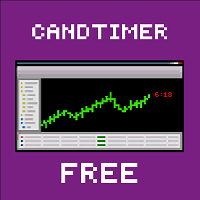
Об индикаторе CandTimer: Крайне простой индикатор CandTimer. Индикатор CandTimer показывает оставшееся время свечи. Работает для таймфреймов: М1 (Минутный таймфрейм); М5 (Пятиминутный таймфрейм); М15 (Пятнадцатиминутный таймфрейм); М30 (Тридцатиминутный таймфрейм); Н1 (Часовой таймфрейм); Н4 (Четырехчасовой таймфрейм); D1 (Дневной таймфрейм); W1 (Недельный таймфрейм); MN (Месячный таймфрейм). Таймер отображается в виде чисел на графике в часах, минутах и секундах.
FREE

Reviewed by Many forex traders spend their time looking for that perfect moment to enter the markets or a telltale sign that screams "buy" or "sell." And while the search can be fascinating, the result is always the same. The truth is, there is no one way to trade the forex markets . As a result, traders must learn that there are a variety of indicators that can help to determine the best time to buy or sell a forex cross rate . Here are four different market indicators that most su

In this section, we go through the top 10 best indicators for forex in more detail so you can see them in action and incorporate them in your trading. To do this we will be using the technical analysis charts and indicators provided by top-rated broker eToro. You can also use these forex indicators for Metatrader 4 . 1. Moving Averages Moving averages is one of the best forex trend indicators there are. They help to smooth price data so you can identify the overall market trends. The levels

Achieving success in the foreign exchange (forex) marketplace can be challenging. Nonetheless, traders from around the globe, both experienced and novice, attempt to do exactly that on a daily basis. Given the above-average failure rate of new entrants to the market, one has to wonder how long-run profitability may be attained via forex trading. Among the many ways that forex participants approach the market is through the application of technical analysis. By definition, technical analysis is

Success comes from knowledge – this is true for most things in life and especially Forex trading. To become successful, a trader needs to learn technical analysis. Technical indicators are a big part of technical analysis. The problem is that, at first sight, names of technical indicators can sound unpleasantly complicated, for example, MACD, RSI or Stochastic. However, we recommend you not to judge a book by its cover. We will provide you with a fair and simple explanation of the most popular t

A forex robot is a type of computer program that’s designed to trade forex automatically. Forex robots follow a specific set of trade signals and settings in determining the best prices at which you can buy or sell a currency pair. They use complex mathematical algorithms to monitor the markets and follow price action. Forex robots can help both beginners and experienced foreign exchange traders maximize their return on investment. They eliminate emotional and psychological biases when trading a

Do you want to have a fully automated trading bot that trades instead of you to make profits all the time?
Get your unlimited account license copy for only £49.99 one time payment!
Features:
Forex Golden Moon EA Automated Forex Trading System For MetaTrader 4 Setup Instructions | Quick & Easy 5 Minute Setup | Set & Forget Unlimited Licenses For All Your MT4 Accounts No Trading Experience Required US Brokers | Non-US Brokers No Trading Account Limitations Optimised SET files included
Here’s

AUTOMATIC TRADE COPIER for local * use . (copy trades between several metatrader terminals on the local computer/ *or GLOBALLY after setting your network /server !)
Can copy trades from one or several main MT4 accounts to several MT4 and MT5 accounts (no limit). For MT4 to MT5 copy you have to also get version for Metatrader 5 here: https://www.mql5.com/en/market/product/80843
- very fast execution (theoretically up to 5ms delay, depends on computer speed)
- user can set speed of copying (re

Alert line pro allows to make alert when price cross these objects: Horizontal lines Trendline Price Zone (Rectangle) Alert when close current bar (have new bar) When the price crosses the alert lines, the software will sound an alarm and send a notification to the MetaTrader 4 mobile, and Telegram with screenshot. You need to settings your MetaQuotes ID of MT4 apps to MetaTrader4 software to get notification to the mobile phone. Sound files must be place in Sounds folder of MT4
Hotkey: Pre

現在の取引口座の取引履歴のエクスポートを実行します。 ファイルは MQL4/Files ターミナルフォルダに保存されます( メインターミナルメニューから開くことができます: ファイル->データディレクトリを開く (Ctrl + Shift + D)そしてフォルダに移動します MQL5 /ファイル) または端末の Common/Files フォルダにあります。 ファイル名は自動的に生成されるか、スクリプトパラメータを使用して手動で設定されます。 履歴ファイルは、EAを使用して別の取引サーバーで同じ取引シーケンスをシミュレートするために使用できます シンプルヒストリーレシーバー 。 ファイルの名前: ファイル名を 指定するか、フィールドを空白のままにして、ファイル名を自動的に生成します。 区切り 文字:CSVファイル(カンマ'、'またはセミコロン';')および小数点(ピリオド'。'またはカンマ'、')のデータ部分の区切り記号を設定します ファイルを共通フォルダに保存 :Trueの場合、ファイルはCommon/Filesフォルダーに保存されます。
FREE

Trade Dashboard simplifies how you open, manage, and control your trades, with built-in lot size calculation. It allows you to execute trades, manage risk, and control positions directly on the chart, with tools such as partial close, breakeven, and trailing stop. Designed to reduce manual work and help you stay focused on your trading decisions. A demo version is available for testing. Detailed explanations of features are provided within the MQL5 platform. Installation instructions are include
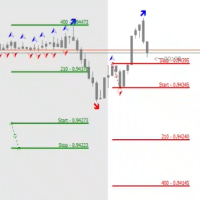
The STP Trade Manager is a utility tailored to the ST Patterns strategy by Vladimir Poltoratskiy ( www.stpatterns.com )
While specifically made for this strategy, it can also be used for other trade management. Especially when you have a need for quickly making trades and risk management.
It is a huge time saver and helps in quickly drawing the different ST Patterns corridors.
People familiar with the ST Patterns strategy will recognize and above all; appreciate the functions of this EA.
This

A complete Session Timer that shows the current time, session information with remaining time, chart display of range (high-low) and open price, of current and previous sessions for major markets, and option to add an additional city. A friendly user interface with clickable icons, customizable panel location and format, selection of colors and text. It automatically handles the DST (daylight saving) settings. It also shows the GMT/UTC and server (broker) time. And includes a Candle timer option
FREE

A simple and useful Current Price Panel, which displays magnified current Bid, Ask prices and spread, movable anywhere on chart window using the mouse. Also provides an option to have as text at a static location showing bid or ask price along with spread, shown at any location on the chart. Allows display as pips or points along with spread highlighted in distinct color if it crosses the threshold point for the previous 100 ticks. Includes an option to show or hide the last digit (pipette) of t
FREE

This is an expert advisor that works more like an indicator.
Its functions are the following: - Print the balance and equity in Arial font size 40 (cannot be changed) - Change chart background and candle colors depending on the close of the previous candle and the current price level.
Now... what is this for or what can I use it for? Good. Personally I use it to put it as the main chart while in other charts I leave other expert advisors working, what I care to see is the balance and equity..
FREE

Currency trading offers a challenging and profitable opportunity for well-educated investors. However, it is also a risky market, and traders must always remain alert to their positions—after all, the success or failure is measured in terms of the profits and losses (P&L) on their trades. It is important for traders to have a clear understanding of their P&L because it directly affects the margin balance they have in their trading account . If prices move against you, your margin bal
This tool will assist all those who trade the forex market manually. It will help them in a sense that it will calculate the required margin in order to initiate a trade. This calculator is so simple to use that a that the user only inputs only 2 pieces of information. which are Price and Lot size the trader wishes to take. All other information needed to calculate the calculator will work it out by itself. It will run or calculate on the current opened chart. As the name suggest it's

僕自身が数年間使っている便利なロボットをご紹介します。半自動モードでも完全自動モードでもお使いいただけます。 >>> Chat <<<
当プログラムは経済指標カレンダーで発表されるニュースをもとにした取引の柔軟な設定が可能です。戦略テスターでは確認不可です。実際の取引のみです。端末の設定メニューを開いて許可URLリストにニュースサイトを追加する必要があります。サービス > 設定 > エキスパート・アドバイザーをクリックしてください。”次のURLの WebRequestを許可する:"にチェックを入れてください。次のURLを追加してください(空白は削除します): https:// nfs.faireconomy.media
最新の設定アーカイブをダウンロードしてください: https://www.mql5.com/en/blogs/post/747929 シグナルモニタリング: https://www.mql5.com/en/signals/author/test-standart 当該エキスパート・アドバイザーのためのカスタマイズ設定セットを作る場合は、ブログの全パラメー
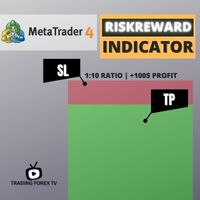
If you are looking for an indicator in the purest Tradingview style to plot your trades with Take Profit (TP) and Stop Loss (SL) as well as the entry point on the chart, Risk Reward Indicator is your indicator for Metatrader 4.
This indicator, among many other functions, allows you to draw and simulate operations, as well as the risk ratio (RB) benefit and the pips that you can win or lose in that operation.
In addition, this indicator includes a calculator where you can indicate the % of ris

StatBar 1.6 Indicator showing balance, earnings for today, yesterday and the day before yesterday. The indicator also shows: - Server; - GMT; - Server time; - Shoulder; - Spread.
Description of variables: extern int Magic = "-1"; // Magic for statistics -1 = all 0 = manual extern string Symboll = "-1"; // Symbol for statistics -1 = all 0 = current EURUSD = for EURUSD
FREE
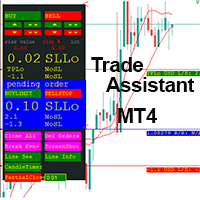
This EA is a trade management tool for Mt4 and Mt5. Mt5 version will find the Mt5 section here: https://www.mql5.com/en/market/product/80399?source=Site +Market+MT5+Utility+New+Rating006. It was to make a way for the trader to make the initial decision of when and which direction to enter. The trader decides in advance whether he wants the robot to take or stop an order. He also decides what new lot size, percent size or money size to use on each trade. On a live chart you can place a t
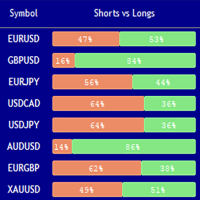
Market Sentiment Indicator Market Sentiment is a Trading Tool which allows you to see the positions of other currency traders. Until now, only institutional traders had access to such data which gave them a serious advantage over retail traders because of obvious reasons. With Market Sentiment, you too will finally know what other traders are doing which makes it easy to beat them on the forex battlefield.
Data comes from MyFxbook Community Outlook data feed and is based on up to 100 000 live

Simple Order Panel for calculating actual lot size with fixed risk amount. Working on both Market orders and pending orders. Notify Line Application when an order is opened or closed. Automatic set up Stoploss and Takeprofit with Risk Reward Ratio. Open one order with the risk(amount) per trade or separate the bet into three orders in one click. Involuntary modification Stopsloss to Breakeven when the Market takes the first or second-order profit. Filter button Buy or Sell when Moving Averate C
Fibo + Elliott + CME
The Expert Adviso r is designed as an assistant for manual trading. Ready-made trading system based on Elliott waves and Fibonacci retracement levels . It is simple and affordable. Display of the marking of Elliott waves (main or alternative option) on the chart. Construction of horizontal levels, support and resistance lines, a channel. Superposition of Fibonacci levels on waves 1, 3, 5, A Display data from CME (CME - Chicago Mercantile Exchange Chicago Mercantile Excha

KT Auto SL TP EAは、すべての手動取引にストップロスとテイクプロフィットを追加し、その後ストップロスを建値(ブレークイーブン)に移動してトレーリングします。 パソコンでもスマートフォンでも、取引を開いてください。すぐにストップロスとテイクプロフィットが設定され、チャート上のラベルに使用中の設定がそのまま表示されます。このEAが自分で取引を開いたり決済したりすることはありません。 主な機能 成行の取引と待機注文に、あなたのストップロスとテイクプロフィットを追加します。対象はチャートの銘柄だけ、または1つのチャートからすべての銘柄を選べます。 管理するのはあなたの手動取引だけで、他のEAの取引には触れません。 新しいティックを待たず、1秒間に約7回取引をチェックします。 待機注文のレベルは注文価格から設定されるため、注文が約定した時点で保護が整っています。 ブローカーの最小ストップレベルより小さい距離は、その最小値まで広げます。 ブレークイーブンとトレーリングストップ 取引が設定した利益に達すると、EAはストップロスをエントリー価格に移動します。オプションのオフセットで数ポイ

Adviser-1つのMT5アカウントまたはMT4アカウントから別のMT4アカウントにトランザクションをコピーするためのユーティリティ。 Demo-version can be downloaded here .
ネッティング勘定とヘッジ勘定の間でポジションを任意の組み合わせでコピーできます。 あなたは、楽器の名前とコピーされる位置のマジックナンバーでフィルタを設定することができます。 これまでのところ、ソースは市場の位置に関する情報のみを送信します。 保留中の注文は、公開市場のポジションに変わると処理されます。
一方の端末では、アドバイザーは送信者モード(送信者)で起動され、他方では受信者モード(受信者)で起動されます。
端末は、データを交換するのと同じ共有データフォルダを持つように、同じサーバー上で動作する必要があります。
インストール手順
送信者アカウントの端末では、送信者モードで顧問を起動し、一般的なパラメータを設定します。 受信機アカウントの端末では、受信機モードでアドバイザーを起動し、受信機の一般的なパラメータとパラメータを設定します。
MT4->MT

設定した時差で時間ラインを表示します。(30分単位の時差には対応していません。) また、100.000、100.010、100.020のようにキリの良い価格で価格ラインを表示します。 標準ではMT4による時間と価格でグリッドラインが表示されていますが、ブローカーの時間となり価格とともに中途半端な位置で表示されるので、非常に分かりにくいものとなっています。 本インジケーターは ユーザーが設定した時差と価格の分かりやすい位置でグリッドラインを表示します 。他のEAや裁量取引に負荷をかけないよう、軽快に動作するよう実装しております。
MT5版: https://www.mql5.com/ja/market/product/107069
・設定した間隔で時間と価格を表示可能 ・2段表示で見やすい 西暦、日付、時刻を2段で分けて表示。 ・未来の時間も表示 ・3大市場の時間を色分け表示 ・月日、時間の表示形式を設定可能 ・毎日の特別な時間にラインを表示可能 毎日の注目したい時刻にラインを表示することができます。 6本まで設定可能です。 ・詳細な時刻をラベルで表示可能 "F"キーを押すとカーソル

MACD Divergence Scanner is a multi-timeframe and multi-symbol dashboard and alert that checks all timeframes and symbols to find regular and hidden divergences between price chart and MACD indicator. This divergence scanner is integrated with support and resistance zones so you can check the MACD divergences in the most important areas of the chart to find trend reversals in the price chart. Download demo version (works on M 1,M5,M30,W1 timeframes) Full description of scanner parameters ->

The Expert Advisor Risk Manager for MT4 is a very important tools for every trader, to manage his trading risk and keep the Balance safe.more than 60% of the Trader lose their investment because they don`t manage the risk very well. With the Risk Manager Expert Advisor, you will be able to control your risk in your trading account. Risk and profit control can be carried out both in monetary terms and in percentage terms.
For the Expert Advisor to work, simply attach it to the currency pa

The Week7D indicator helps traders identify the day of the week on a price chart. It simply marks each period or each candle as the day of the week at the start of a new trading day. This allows traders to watch how prices move on any given day.
The Week7D indicator has several customization options that traders can use to change the visual representation of the indicator.
The variable "BarCount" changes the number of days during which the indicator will indicate the day of the week in each d
FREE

Simple Strategy Checklist Panel, as its name suggests, is a panel that works as a checklist, and can place up to twenty lines of text. This was created for traders who want to have their trading plan or to-do list at hand, a simple but useful product for many.
I will write this pointless paragraph since Metatrader asks me to put a minimum of 6300 characters, so I also explain that the list can also be used to make purchases from the supermarket! Example bread, milk, flour and much more... Enjo
FREE

Slow trading, low risk low return strategy open position only buy no stoploss , option ea : close equity target, stop equity target. Take profit step by step. For minimum blance please download excel file, and try ea in demo account before purchase link download how our ea works is * Recommended free swap account (islamic account) * trading with own money * ea will open buy, the price goes down will buy again and so on ea will stop when the highest price is according to settings * floating min

EA only work XAGUSD symbol Slow trading, low risk low return strategy open position only buy no stoploss , option ea : close equity target, stop equity target. Take profit step by step. For minimum blance please download excel file, and try ea in demo account before purchase link download forex robot ea xagusd miner forex robot to generate profits with very low risk, such as owning a mine but does not require high-spec hardware which is very expensive, rather than buying mining hardware, it is

An equity protection EA for MetaTrader that enforces your loss limits and profit target for you: when your account reaches a rule you set, it closes your trades on every symbol, before one bad day turns into a lost account. It suits prop firm challenges and personal accounts alike. Attach it to one chart, answer a few questions in the on-chart setup wizard, and it watches your whole account in the background while you trade by hand or with other EAs. What it protects Daily loss limit: a percenta

The programmable signal panel analyzes the charts of all available symbols and timeframes and sends a notification about the appearance of a trading signal. You can program all the necessary signals using the free binding indicator "Signal Collection". The binding indicator is provided with open source code. Thus, it is possible to program all the necessary signals for subsequent use in conjunction with the signal panel. The signal panel can not only analyze charts, but also manage these chart
FREE
MetaTraderマーケットは、他に類のない自動売買ロボットやテクニカル指標の販売場所です。
MQL5.community ユーザーメモを読んで、取引シグナルのコピー、フリーランサーによるカスタムアプリの開発、支払いシステムを経由した自動支払い、MQL5Cloud Networkなど、当社がトレーダーに対して提供するユニークなサービスについて詳しくご覧ください。

取引の機会を逃しています。
- 無料取引アプリ
- 8千を超えるシグナルをコピー
- 金融ニュースで金融マーケットを探索