 MetaTrader 5
 エキスパート
 インディケータ
 ライブラリ
ライブラリ
 ユーティリティ
 ウィジェット
 ルール
ルール
YouTubeにあるマーケットチュートリアルビデオをご覧ください
ロボットや指標を購入する
仮想ホスティングで
EAを実行
EAを実行
ロボットや指標を購入前にテストする
マーケットで収入を得る
販売のためにプロダクトをプレゼンテーションする方法
MetaTrader 4版新取引ユーティリティ - 20
 以下はMetaTrader4での外国替取引を簡素化する取引プログラムです。以下のリストのユーティリティにカーソルを合わせて、説明と目的をご覧ください。
トレードコピー - 投資家パスワード - コピートレード - MT4 x MT5 クロスプラットフォーム
注: クライアントアカウントがフォローするマスターアカウントに「ミラーコピーマスター」、マスターアカウントがフォローするクライアントアカウントに「ミラーコピークライアント」の両方が必要です
ブログ: https://www.mql5.com/en/blogs/post/756897
仕組み:
https://www.youtube.com/watch?v=V7FNpuzrg5M
MT4 バージョン
マスター: https://www.mql5.com/en/market/product/114774
クライアント: https://www.mql5.com/en/market/product/114843
MT5 バージョン
マスター: https://www.mql5.com/en/market/product/114775
クライアント: https://www.mql5.com/en/market/product/114844
「ミラー コピー」エキス
FREE

こんにちはます。 金融外国為替市場での取引のためのこのパネルについて少しお話ししたいと思います。 このパネルはMQL4プログラミング言語で書かれており、特定のポジションの成行注文を開くのに役立つように設計されています。 これは、通常の注文と保留中の注文の両方で動作します。 つまり、Buy、Sell、BuyLimit、SellLimit、BuyStop、SellStopなどの売り注文と買い注文を開きます。 また、グリッド注文を含む保留中の注文のネットワーク、つまり、保留中の注文を制限し、保留中の注文を一度に停止することもできます。 このパネルは、保留中の注文も閉じます。 今後の注文の設定は、パネルの上部にあります:
1. quantityは注文数(このパラメータは成行注文には影響せず、1つの価格で100注文としましょう)であり、ボタンを1回クリックするだけで開かれる保留中の注文の数を示します。 2. ロットは、ご注文が開かれる価格です 3. takeprofitはあなたの順序が利益と閉まる市場価格である。 4. stoplossは、お客様の注文が損失で終了する市場価格です 5. 距
The most friendly interactive interface for ordering, the most abundant easy-to-use functions, and the best ordering plan. \
Remote copying version!!!!! You need to ask the author for the server ID
EASY : Easy to use, just load and select the signal source or receiver to use. FAST: Fast copy of orders, algorithm-optimized order-following mechanism, priority calculation of new signals, priority queue processing for special signals received Multiple: 1. Support multiple signals to be sen

Smart Trade Manager for Layering & BE This trading tool automates trade management by handling entry positions, Break-Even (BE), and Take Profit (TP) dynamically. It allows traders to layer trades and protect their profits without manual intervention. Key Features: Secure profits automatically by setting BE once a trade reaches profit. Distribute trade volume across multiple entries to average the price. Set multiple TP targets to scale out of positions efficiently. Use tick-based calculations
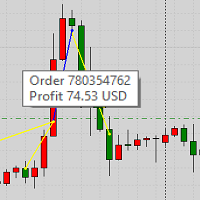
This product displays closed trades from history and current open trades on a chart. The product has many visual settings, as well as filtering settings for displayed transactions, which allows you to analyze the effectiveness of advisors and/or trading strategies. You can filter by comments or by the advisor's magic number. Without using this product, how else will you see your trading and understand its effectiveness?
FREE

An EA to export trading history for FXer - Journaling and Analytics. fxer.net Register Create an API token Put EA on any chart (any TF is fine) Fill in the API token Follow analytics for better trading At FXer, our mission is clear: to empower traders like you with the tools needed to excel in the ever-changing world of trading. We are committed to providing top-tier, data-driven market analysis and trading intelligence, ensuring you can make well-informed decisions, manage risks effectively, an
FREE
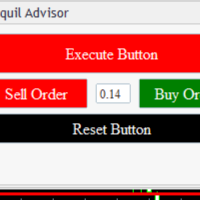
Tranquil Advice is very useful to scalpers as it calculates the volume/lot size you should use per trade, and it does that on real time prices. Meaning, if the bid price changes, the lot size that you should use per trade is recalculated so that you may not risk more than you are willing to lose. The volume/lot size that should be used per trade is calculated from the stoploss and take profit that you predefined prior to Executing a trade. This Expert Advisors comes in handy on fast-paced market

KALIFX Trailing Stop Utility for MetaTrader 4 The KALIFX Trailing Stop Utility is a tool for automated stop-loss management on the MetaTrader 4 platform.
It monitors open positions and dynamically adjusts the stop-loss level as the price moves in favor of the trade.
The utility can also place initial stop-loss and take-profit levels and apply breakeven rules once the trade reaches a defined profit distance. Core Functionality 1. Trailing Stop Logic When the market moves in the direction of an o
FREE
Your trading life will be easier with the Forex Control Panel. This control panel, which has many features, is very easy and simple to use.
With this control panel, you will have 3 different ea features. You can learn how to use it from the special video I prepared for you.
You can buy this product, whose normal price is $125, at a much cheaper price than its current discounted price.
You can also try all its features in the strategy test.
A pdf file explaining its detailed features will be
FREE

Welcome! We are delighted to introduce our latest expert, which is a semi-automatic trading system that includes all the features you need for position management. Simply draw a line on a significant trend or supply-demand level, and the expert will take care of the rest for you. It comes with a wide range of risk management and position management tools, such as trailing stop, partial closure, break even, determination of stop loss and take profit levels using ATR, as well as automatic lot sizi

BEP (Break Even Point) for MT4 script - closes absolutely all orders, whether pending or market ones.
Orders are closed at the current profit/loss indicators at the time of closing.
The script is suitable for moments when you need to quickly close all orders at the current indicators.
The script is very easy to use, just drag the script onto the chart and it will do its job.
Add me as a friend, I have many other useful products.

Modify Takeprofit and Stoploss for MT4 script - closes absolutely all orders, whether pending or market ones.
Orders are closed at the current profit/loss indicators at the time of closing.
The script is suitable for moments when you need to quickly close all orders at the current indicators.
The script is very easy to use, just drag the script onto the chart and it will do its job.
Add me as a friend, I have many other useful products.

"Coding and setting up automated processes can be complex and time-consuming. However, with our tool, you can streamline this process effortlessly. Once set up, it seamlessly integrates with MetaTrader 4, enabling automatic transmission of all your positions to your designated Telegram channel. This means you can focus on your trading strategies without the hassle of manually updating your positions on Telegram. Whether you're managing multiple positions or executing trades frequently, our tool

Close All Orders for MT4 script - closes absolutely all orders, whether pending or market ones.
Orders are closed at the current profit/loss indicators at the time of closing.
The script is suitable for moments when you need to quickly close all orders at the current indicators.
The script is very easy to use, just drag the script onto the chart and it will do its job.
Add me as a friend, I have many other useful products.
FREE

Close All Profit Orders for MT4 script - closes absolutely all orders, whether pending or market ones.
Orders are closed at the current profit/loss indicators at the time of closing.
The script is suitable for moments when you need to quickly close all orders at the current indicators.
The script is very easy to use, just drag the script onto the chart and it will do its job.
Add me as a friend, I have many other useful products.
FREE

Close All SELL Orders for MT4 script - closes absolutely all orders, whether pending or market ones.
Orders are closed at the current profit/loss indicators at the time of closing.
The script is suitable for moments when you need to quickly close all orders at the current indicators.
The script is very easy to use, just drag the script onto the chart and it will do its job.
Add me as a friend, I have many other useful products.
FREE

Close All BUY Orders for MT4 script - closes absolutely all orders, whether pending or market ones.
Orders are closed at the current profit/loss indicators at the time of closing.
The script is suitable for moments when you need to quickly close all orders at the current indicators.
The script is very easy to use, just drag the script onto the chart and it will do its job.
Add me as a friend, I have many other useful products.
FREE

Delete All Pending Orders for MT4 script - closes absolutely all orders, whether pending or market ones.
Orders are closed at the current profit/loss indicators at the time of closing.
The script is suitable for moments when you need to quickly close all orders at the current indicators.
The script is very easy to use, just drag the script onto the chart and it will do its job.
Add me as a friend, I have many other useful products.
FREE

It's very easy, you only need to enter the amount of profit you want to get, then when your account has grown this EA will close the order, even though you are not monitoring the chart. Now you don't need to worry if the profit you have achieved turns into a loss because you don't use this EA, because this EA will help you whenever, wherever you are. Good luck trying it, hopefully you will become a very profitable trader

This is an expanded version of my Daily Sacrifice EA that closes old losing trades at the expense of a portion of your profits. This helps to slowly work away drawdown and accelerate the closure of martingale grids
*** Pro Features *** Include/Exclude symbols. These fields are empty by default, but if populated allow you to include only specific symbols or alternatively exclude specific symbols Execute on an hourly interval. Allows the EA to be ran every so many hours rather than on a fixed
FREE

With the Bollinger Band Squeeze Scanner in your toolkit, you'll be the first to know when the market's gearing up for a breakout – whether it's a sky-high surge or a dive into the deep end. This bad boy does all the heavy lifting for you, sniffing out those times when volatility takes a snooze. You know, when those Bollinger Bands start hugging the price action real tight? That's when you know something big might be brewing. Y ou've got up to fifteen symbols at your fingertips, and you can twea

ドローダウンプロテクターは、希望する最大日次ドローダウンを管理するために使用されます。これはトレーダー、特にプロップファームのトレーダーにとって非常に価値のあるツールであるため、ドローダウン制限に注意する必要があります。 これは、株式ドローダウン管理の目的で簡単に使用できる効果的な EA です。 これは、変動株式(残高ではなく)が設定した日次損失制限を超えた場合に、新しい取引をブロックし、既存の取引を閉じることによって機能します。また、単一取引の最大損失制限を設定することもできます。これを超えると、次の暦日まで取引がブロックされます。
ユーザーは 3 つのパラメータの値を挿入します。 1 日あたりの損失限度額 (ドル単位): 名目通貨単位の最大損失額 (例として「$」を使用しています)。これは、 口座残高 の名目値で許容される最大ドローダウンです 。これを超えると、EA は翌日まで取引をブロックします。 $での取引ごとの損失制限: 名目通貨での最大損失(例として「$」を使用します)。これは、 単一取引 の名目値で許容される最大ドローダウンです 。これを超えると、EA は翌日まで

This EA creates two buttons in a panel that you can drag to any part of the chart (simply click on the panel and drag with the mouse to the part of the chart you want) with which you can close all the open operations in the account with a simple click, or close only the trades that are currently in profit. Check out my new trade dashboard assistant : Simple and Easy MT4 Trade Panel Tell me if you like the product and how it could be improved, Thanks :)
FREE

NEW VERSION! NB: IF YOU ARE USING A VERY HIGH RESOLUTION MACHINE AND THE EA DISPLAY LOOKS TOO SMALL, CONTACT ME SO I CAN HELP YOU. Open Multiple Trades on MT4 in 1 click at one price. Enter the Lot size Specify the number of trades you want to open Choose whether you want TP SL or Trailing Stop Once you are done, click Buy or Sell Open Multiple Pending Orders on MT4 in 1 click at one price. Enter the Lot size Specify the gap from the current price, where you want to place the pending order Spe

The SHE_Assistant Advisor is an advisor to help with manual trading.
For those who do not trust automatic Expert Advisors and prefer to trade manually. When trading manually, there are two big inconveniences, this is a long chain of actions to open a deal and set stop loss and take profit levels, and the problem with calculating the lot size after a loss. That's what this robot solves.
The main functions.
When the Expert Advisor is turned on, it displays a panel with three buttons, an inform

AUTO BE Utility – Breakeven Manager for MetaTrader 4 The AUTO BE Utility by KALIFX is a compact and efficient trade-management tool for MetaTrader 4.
It automatically adjusts the stop-loss level to the breakeven point once the market price reaches a defined profit distance.
This ensures that active trades are protected from reversals once they move into profit, without requiring manual intervention. Main Features Automatic Breakeven Control – Moves the stop-loss to breakeven when the price reac
FREE
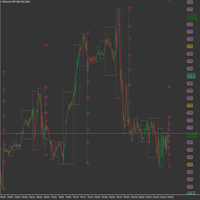
This product has been developed to complement various proven range expansion strategies, with features like the Fibonacci retracement and session/range definition along round numbers indicator. All coming together to provide a clear visual of areas which can potential present the trader with a position or even a quick scalping of price action. Download the full version, and check it out for yourself!!!
FREE

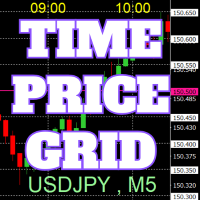
チャート上に、キリの良い数値で価格のグリッド、時刻のグリッドを描画します。
「パラメータの入力」から、各ピリオドごとに、価格の間隔設定が可能。 キリ番(ラウンドナンバー)のグリッドは、ほかの線より太く、目立つのでわかりやすいです。 キリ番(ラウンドナンバー)のグリッドは、ほかの線と異なる色に設定できます。
各所の色は、個別に設定できます。 シンボル、時間足を表示でき、場所も任意に設定できます。 時刻の表示は、上下どちらにするか設定できます。 表示する時刻は、サーバー時刻、ローカル(PCの時刻)、ユーザー設定(サーバーとの時刻差を任意で設定)から選べます。 無料でお使いになれます。 皆さんのトレードのお役に立てれば幸いです。
FREE
This utility will help you avoid losing money on your trades when your terminal loses connection to the broker or your VPS / computer goes into an update and doesn't open your MetaTrader client automatically after the update. How is this product different from the other disconnect alerts? This one will email you and/or an SMS even when your MetaTrader client gets disconnected from the Internet or doesn't respond! Your client is monitored externally and doesn't rely on its own Internet conn
FREE

Like you when I first started trading, It was overwhelming...learning about indicators, about lotsize, leverage and many more things. Its been almost 3 years. I am more knowledgeable in trading. My trading continues to improve as I work on my strategy, technical analysis, trading psychology and trade management. One thing I am not worried about though is being able to close my trades quicky if a trade goes against me or if the trade has reached my take profit level with the help of my Close Tra

I started of as a complete novice in trading not understanding what a pip was, not understanding leverage or how to factor in risk to manage my trades. Its been almost 3 years. I am more knowledgeable in trading. My trading continues to improve as I work on my strategy, technical analysis, trading psychology and risk management. One thing I am not worried about though is getting the right volume to match the risk for each trade. Not too long after I began trading, I learned how to code to make m

功能介绍
本软件利用键盘快捷键来辅助短线操盘、快速刷单和组合下单,是短线操盘手的利器。 本软件支持快捷下单,批量平仓,批量挂单及平仓与开仓的组合交易,实现一键操作多个交易指令执行。 面对行情剧烈行情波动时,操盘手可从容应对,并快速准确的下单和平仓,让交易变的更简单。 适合人群 热爱交易并希望成为一名操盘手的人。 长时间盯盘,操盘风格为短平快的操盘手。 愿意提高短线操盘胜率并训练强大执行力的操盘手。 希望更加高效把握市场机会,并能快速且准确的执行交易指令的操盘手 安装和配置 先软件需要安装在Experts文件夹中。 在导航中刷新可显示本软件,然后双击在到图表。 输入参数中选择语言及界面主题。 主界面分两个标签栏目: 基本交易和组合交易。基本交易执行的是简单命令,组合交易执行多个命令捆绑。 设置要对应的交易参数之后,要选择启动,那么就按下对应的快捷键执行交易了。 修改快捷键和交易参数必须在非启用状态下,双击对应的表格单元填入参数,或者弹出下拉框选择。 快捷键列表
本软件支持的预设快捷键清单,包括买入、卖出、撤单等常见交易操作的快捷键。 双击快捷键弹出下拉框可以选择自定义快捷键,同时用

The script opens charts of all trading instruments that are listed in the Market Watch.
Convenient to use for choosing a trading instrument for intraday trading (and not only). MT5-version: https://www.mql5.com/en/market/product/113499 You can attach a pre-created template to each chart you open.
For an example of work, see the video for this post.
There are only two settings: Selection of timeframe; Template name. If you do not need to attach a template, you must leave the Name field empt

Description: The forex risk management script is designed to assist traders in effectively managing the risk associated with their trades and maximizing profit potential. This script can be used on a trading platform to automate and simplify the risk management process. Features: Risk Configuration: Allows the user to set the percentage of capital they are willing to risk on a trade. Position Size Calculation: Automatically calculates the position size based on the specified risk percentage and

Close all open orders, delete all pending orders, and clear the entire account's orders. Please use caution! After clicking the button, the account order will be 0! Help us quickly clear account orders! As it is a free version, only the function of closing all orders is available. If other functions are needed, customization is required! The paid version has more features!
FREE
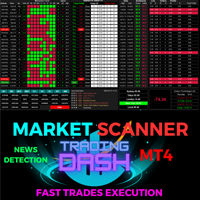
了解!以下是调整后的译文: すべてのトレーダーレベルに対応した包括的なトレーディングダッシュボード 初心者と経験豊富なトレーダーの両方を支援するよう設計された、高度なトレーディングダッシュボードをご紹介します。この多機能プラットフォームは、包括的な機能を備えており、市場分析と注文執行を簡素化し、直感的な単一インターフェース内で最大30の通貨ペアを同時に追跡することができます。 主な機能: ユニバーサル市場スキャナー: ブローカーがサポートするすべての通貨ペアを自動的に見つけ、活用します。 オールインワン指標: 8つの組み込みシステムが深い洞察力をもたらします: マーケットウォッチ検出: さまざまな通貨ペア間で潜在的なトレード機会を特定します。 価格とモメンタム分析: 1分足から1ヶ月足までの価格変動とトレンドを分析します。 トレンドシグナルとRSI: より高いレベルの方向性トレンドを検出し、潜在的な過買売状態を測定します。 取引実行スイート: ダッシュボードから直接取引を実行し、ストップロス、ロットサイズ、利食い、トレーリングストップロスの設定が可能です。 全部、一部、または個

自動ストップロスです。
このEAは高度な人工知能を使っています
註文をリアルタイムで追跡します
チャートに載っている註文を正確にキャッチします
このEAは自働的に註文に設定されたストップロスを押してストップロスを追加します。
トレーダーが註文する時間を大幅に短縮し、註文後にEAは自動的にストップロスを追加します。
ストップロスを設定し忘れたトレーダーには、資金を守る壁ができます。
アドバイスです:
通貨ペアです 時間範囲:何でもです 最低貯金額:必要ありません ブローカー時間:GMT +3です アカウントの種類はECN、Raw、Razorです。 重要なこと:最低差アカウントを使用して最適な結果を得ることが非常に重要です! スペックです: 損切りSLです ストップTPです マジックナンバーMagic Numberです インストールは非常に簡単で、設定を変更する必要はありません。GMT+2やDSTサーバーを利用するほとんどのブローカーに最適な設定です。 VPSでEAを24時間(24/7)稼働させることを強く推奨します。 注意です:
手動オープンの註文であれ、他のEAオー

Drawdown Partial Closure Expert Advisor Description: The Drawdown Partial Closure Expert Advisor is a tool designed for MetaTrader 4 that assists traders in managing their positions during drawdown periods. It monitors the drawdown of the trading account in real-time and automatically closes a portion of losing positions when the drawdown exceeds a specified threshold. This helps traders to mitigate losses during adverse market conditions while allowing profitable positions to remain open. Featu

Intro to ProfitKeeper - Equity Basket CloseAll Script, Free edition This is an update from this script ( mql4 forum | forexfactory : There were many people requesting some type of equity monitoring tool that can lock in profits after a pre-determined account equity is reached (e.g. close all open trades when profit target is hit). Profitkeeper was built to fulfill this gap for professional and casual traders looking to focus on the bottom line of their equity. This was designed mainly for cos

Introducing the OrderManager: A Revolutionary Utility for MT4
Manage your trades like a pro with the all-new Order Manager utility for MetaTrader 4. Designed with simplicity and ease-of-use in mind, the Order Manager allows you to effortlessly define and visualize the risk associated with each trade, enabling you to make informed decisions and optimize your trading strategy.
Key Features:
Risk Management: Define the risk of your trades quickly and easily, allowing you to make better decisio

The utility is designed to send signals from MT4 to Telegram. It has several unique features, allowing not only the sending of trade signals but also the following functionalities: Send messages directly from the terminal to Telegram Send emojis along with custom text Send text and images from Telegram All of these features enable users to manage a signal channel while focusing on trading and finding quality signals. Customizable Signal Messages You can fully customize the signal message: Specif
Patterns Wizardはローソク足のパターン作成ツールです。このツールを使用すると、さまざまなパターンを作成し、チャートに異なるパターンを持つインジケーターのインスタンスを複数追加できます。 作成の仕組みをより理解するために、 My Candle インジケーターの例を参照してください。これには70以上の異なるローソク足のパターンが含まれています。 このインジケーターの主な特徴は、 30のルールパラメータ を持っていることです。これは、最後の30本のローソク足それぞれに異なるルールを設定できることを意味します。 パターンが表示されると、このツールは以下の操作ができます: カスタムサウンドの再生 MetaTraderでのアラート 携帯電話に通知を送信 メールの送信 このインジケーターはリペイントや再描画をしません。キャンドルの終了時のみに実行され、非常に高速です。さらに、分析するキャンドルの最大数を最適化するパラメータも備えています。 テストで使用して自由にルールを作成し、取引の分析をサポートするプロのツールが必要になったら、このツールを購入してください。 ローソク足パターンの
FREE

Drawdown Manager MT4は、MetaTrader 4を使用するトレーダーにとって不可欠なユーティリティであり、ドローダウンを積極的に管理し、投資を保護することで取引資本を守るように設計されています。個人トレーダーとプロプライエタリ取引会社の両方に最適なこのツールは、取引戦略の整合性と資本の安全性を維持するための強力なソリューションを提供します。 リアルタイムアラートやカスタマイズ可能なリスクパラメータなどの高度な機能を備えたDrawdown Manager MT4は、取引活動を効果的に監視し、制御できるようにします。損失を出している取引を閉じたり、即時通知を受け取ったりすることを希望する場合、このユーティリティはあなたの取引パフォーマンスを向上させ、潜在的な損失を最小限に抑えるように調整されています。 MQL製品のインストールガイド | MT4/MT5で購入したMQL製品の更新 | 一般的なトラブルシューティングガイド | インジケーター設定 / ガイド 主な機能 ポップアップアラート: 信号イベントでMetaTraderアラートポップアップを発生させ、取引セットアップ

RRBCTC uses real Tick data to create custom Range, Time, Renko and Volume bar charts for MT4. Tick data use is RRBCTC unique feature, which allows highest quality charting of current and historical price movement. Custom inputs provide option to create range bars with sizes from 0.1 pip all the way to 100+ pip and time bars periods from second all the way to a month. Charts are updated with new data in real time, allowing user use of MT4 indicators and advisors (EA). RRBCTC greatly extends MT4 c

Orders Manager is a simple and indispensable assistant for managing all your orders. Inputs: Magic = 999; // Magic TakeProfit = 1000; // Take Profit. If = 0 the level is not setts. StopLoss = 0; // Stop Loss. If = 0 the level is not setts. Slippage = 10; // Slippage GeneralProfit = false; // Closing all orders based on total profit. If false the function is disabled and works according to TakePr
FREE

FIBO Price Calculator Brief Description 1. Automated Fibonacci Retracement Drawing This indicator automatically draws Fibonacci Retracement lines on the MT4 chart, assisting traders in quickly identifying potential support and resistance levels. 2. Customizable Fibonacci Sequence Users can customize the Fibonacci sequence values, and the indicator automatically converts them into corresponding price levels based on the current market price. 3. Adjustable Indicator Window Position The indicator

Ever thought of your broker stop hunting your stop losses? Incognito SL and TP is exactly what you need! As promised, version 1.1 now has the SL and TP lines that can easily be adjusted by the user. ========================================== INPUTS: SL: Exact price you want the orders for the chart symbol to close when this SL price was hit. Set to 0 for no SL. TP: Exact price you want the orders for the chart symbol to close when this TP price was hit. Set to 0 for no TP. ======================
FREE

**SALE ON NOW - 50% off for 1 week only!!** Stop Making the HUGE mistakes that cause you to BLOW UP!!! Prop Defender Trade Assistant is designed to put a barrier between you and the bad behaviors which cause you to keep blowing up accounts and failing your prop! Designed by a 20 year veteran trader who worked to overcome every bad behavior! This is for manual traders (and won't work with other EA's). It Defends against: Revenge Trading. Over Risking. Too much loss in 1 day. Moving your stoplos

Introducing Trade Timer: Your Time-Sensitive Trading Companion Are you tired of being caught off guard by unexpected market movements during critical hours? Say goodbye to missed opportunities and hello to precise trade management with Trade Timer, your indispensable tool for time-sensitive trading strategies on the MT4 platform. Stay in Control Trade Timer empowers you to take full control of your trading schedule by allowing you to set precise closing times for your trades. No more worrying ab

Narcis Trader is an expert designed for managing trades and facilitating trading. Attention, the application does not work in the strategy tester. Download Real
Its features include: Determining the trade volume based on the selected trader's risk. Setting specific and fixed stop-loss and take-profit levels. Defining the take-profit level based on the specified risk-to-reward ratio (r/r). Entering trades using static and dynamic lines based on the predetermined risk. Position closure management
FREE

Narcis Trader is an expert designed for managing trades and facilitating trading. Attention, the application does not work in the strategy tester. Download Demo
Its features include: Determining the trade volume based on the selected trader's risk. Setting specific and fixed stop-loss and take-profit levels. Defining the take-profit level based on the specified risk-to-reward ratio (r/r). Entering trades using static and dynamic lines based on the predetermined risk. Position closure management

Equity X è una utility che chiude tutte le posizioni ed eventuali ordini pendenti ad un importo prestabilito, è possibile fissare il bilancio del tuo conto quando il netto e uguale o superiore oppure uguale inferiore all'importo desiderato Ha integrato un sistema per la notifica mobile instantanea che genera il messaggio ad operazione avvenuta Uno strumento che permette di ottimizzare al massimo il rendimento del tuo investimento, è possibile utilizzarlo anche come gestore virtuale di take prof

The "Open grid of pending orders" script is designed to automate the process of creating buy (Buy) and sell (Sell) orders on the MT4 trading platform. It provides the user with the ability to set the distance between orders and the number of orders in this grid. This script allows traders to quickly build a grid of orders that covers a specific price range. The main functions of the script include: Ability to select the direction of orders: Buy (purchase) or Sell (sale). Setting the distan

A free program for copying orders between terminals on the same computer.
Any orders are copied in any direction, between any accounts.
The principle of operation:
On the terminal from which you want to copy, the "Server" parameter is set. On the terminal or terminals where the copied positions need to be opened, the "Client" parameter is set. It is also necessary to enter the account number of the "Server" terminal on the client.
In the future, it is planned to increase the functionality
FREE
There is no doubt that money management plays a key role in the success of a forex trader. Many people, despite having a good strategy for trading in the forex market, fail to earn a steady income because they do not observe the stop loss and take profit levels in their trades.
The Digitraderz.com team, due to the request of some of their audience, has designed a trader assistant robot for managing the stop loss and take profit levels in forex trades. This money management robot is offered for
FREE

Now, you have your very own SIMPLE LOT SIZE (POSITION SIZING) CALCULATOR ! There's no need to go to other websites just to compute for the exact lot size. It also opens the trade with a click of a button. All inputs on the calculator can be edited. So if you want to change the SL or TP or the lot size, you can do so before placing an order. ========================================== STOP LOSS . Stop loss in Pips (not points). Click on the SL Price text and it will change from green to red or r

Now, you have your very own PROP FIRM AUTO-CLOSER program! Once your account target or drawdown hits, all open orders will close automatically. “One mistake and your prop account is gone. Prop Firm Close All Orders for MT4 ensures that never happens.” All of your OPEN ORDERS will automatically close when: Your ACCOUNT TARGET is hit, OR Your specified ACCOUNT DRAWDOWN is hit, OR WEEKEND CLOSE is set and current time is already past the specified time, OR CLOSE ALL ORDERS bu

Delving deep into the sphere of finance and trading strategies, I decided to conduct a series of experiments, exploring approaches based on reinforcement learning as well as those operating without it. Applying these methods, I managed to formulate a nuanced conclusion, pivotal for understanding the significance of unique strategies in contemporary trading.
FREE

このツールは貿易管理に使用できます。 手動取引だけでなく取引ロボットを使用する人にとって、選択したペアをより良い価格で取引を終了するためのより良いソリューションです。 入力時に指定された価格で特定のシンボルペアのすべての取引を終了します。 軽量です。 使用するメモリが非常に少ないです。 迅速な実行。 価格シグナルの取得に遅延はありません。 これを使用することで、トレーダーはぐっすり眠ることができます。 Kono tsūru wa bōeki kanri ni shiyō dekimasu. Shudō torihiki dakedenaku torihiki robotto o shiyō suru hito ni totte, sentaku shita pea o yoriyoi kakaku de torihiki o shūryō suru tame no yoriyoi soryūshondesu. Nyūryoku-ji ni shitei sa reta kakaku de tokutei no shinborupea no subete no torihiki o sh
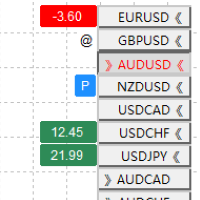
現在のMT 4グラフの配置方法は迅速な検索と切り替えが容易ではないことを考慮して、指標の形式でこのツールを開発して、このツールの持っている機能: 便利で直感的なワンクリックで開いているすべてのグラフを切り替え、ボタンの位置とサイズを調整することができます。 同じ名前の種類のグラフを識別します。例えば、EURを含むすべてのグラフが同類のグラフとして識別され、簡単に検索できます。 グラフに利益または損失のある注文ボタンの左にすべての注文の利益または損失の価格の合計が表示されている場合、グラフに注文ボタンの左にPマークが表示されている場合、 グラフに水平線、トレンド線、チャネル線、フィボナッチコールバック線が存在する場合は、@フラグ(このグラフが注目されていることを示す)を表示します。 使用方法: まず、表示するすべてのグラフを開きます。 最初に開いたグラフにメトリックをロードし、キー配列の位置とサイズを設定します。位置は右上隅を0点とし、キーサイズパラメータの範囲は-10から10、 デフォルトは0で、パラメータのスケールでスケールします。 最初のグラフにはすでに開いているグラフのボタンがす

Flat è una utility pensata per chi ama operare con take profit e stop loss virtuali ed ordini di copertura come sistema di protezione del capitale, ma a volte ad esempio la notte non è possibile operare quindi si è costretti ad intervenire nel momento e nel modo sbagliato Facciamo un esempio, dopo aver ricevuto un segnale ti posizioni sul mercato con una posizione Long ma il mercato a bassi volumi e comprendi che il tuo posizionamento è valido ma bisogna attendere più di quanto pensavi fosse ne

Profit X invia notifiche sul tuo dispositivo mobile mantenendoti aggiornato sul profitto dei tuoi investimenti anche nei momenti in cui non puoi fisicamente controllare i mercati, ad esempio quando sei alla guida, sul posto di lavoro, in una riunione o con amici, con parenti e non puoi distrarti Può essere disattivata e attivata ed è possibile scegliere la frequenza del aggiornamenti in minuti, ore, giorni, settimanale o mensile La configurazione e personalizzazione è molto semplice, di default

Elevate your risk management game with Equity Savior, the go-to Expert Advisor designed to safeguard your equity during prop firm challenges. This powerful yet user-friendly tool lets you choose your preferred trading session, set a maximum lot size, and establish a daily trade limit effortlessly. Key Features: Session Selection: Tailor your trading approach by selecting specific sessions, aligning with your strategy and prop firm challenge requirements. Max Lot Size Control: Take control of ri

What Can this indicator do for YOU!: Keeping it simple this year with a straightforward and highly flexible Trade Manager that can reduce your losses and preserve your capital and increase it overtime. Money Management is one of the key aspects of a successful traders career which is why this EA will serve you well.
So, how does this EA function? Below is a PDF attachment with a very in depth explanation into the various functions accompanied with a Demo Video to show you; All functions work

A simple script that closes all current orders.
Terminate once close all positions, so please don't worry about constantly closing your order.
How to use :
Drag the script from the navigator to the chart to activate it. Do remember to enable algo trading to use this script. There are different versions of the script that can choose whether to close all buy/sell posiitons, if you need this, do contact me in MQL5.

This is a Trade Manager that Manages your trade and helps any newbie to trade with ease.
Trade Parameters are as follows One Click Buy and Sell One Click Buy and Sell Limit One Click Buy and Sell Stop Uses Magic Number Uses Order Comment
EA has 3 tabs, First Tab shows the user's current or open trades Second Tab shows for easy trade execution Third Tab hides all information
Manages Risk that will automatically close trade based on user input.
FREE

MT4 Scipts that able to change all Chart's time frames easily by just double clicking the scripts.
How to use:
Simply drag the script into the charts, or double-click the script, and select the timeframe you require.
Remind: The default timeframe is your current chart's timeframe, but surely you can easily modify the input in the dropdown menu based on your need.
Thanks for purchase. Happy trading.

HFT Prop Passer は、一部のプロップ (独自) 企業の HFT チャレンジ アカウントに合格するように設計されたエキスパートアドバイザーです。
取引戦略: このエキスパートアドバイザーは、1 分の時間枠でダウ ジョーンズ シンボルに作用し、高頻度取引を実行します。 この製品は、非常に短い時間 (多くの場合 30 分未満) で HFT アカウントのチャレンジ フェーズを通過できます。 ドローダウンも非常に低いため、プロップファームの口座条件に適しています。 ***製品の現在の価格は、最初の 5 人の購入者に対してのみ 150 ドルです。 5回購入すると最大200ドル値上がりしますので、この機会をお見逃しなく。 Expert Advisor のテスト結果: 以下の画像で、ドローダウンレベル、利益、およびこの利益が得られた期間の例を確認できます。
これらの結果に基づいて、私たちのチームが設計した HFT テクノロジーの能力を評価できます。
バックテストのやり方は? mt4ストラテジーテスターでデ モ版をバックテストする方法はこちらをご覧ください。 製品購入後、「コメン

Lot Partial Close Closes your trades automatically by a specific size and at a specific target defined by you.
Description:
The Lot Partial close is a MetaTrader 4 Expert Advisor designed to automate trading strategies with a focus on managing multiple open orders of different sizes. This EA is versatile, allowing users to customize key parameters to meet their specific trading preferences. Key Features: Partial Close Functionality: The EA incorporates a partial close mechanism for the first t
MetaTraderマーケットはトレーダーのための自動売買ロボットやテクニカル指標を備えており、 ターミナルから直接利用することができます。
MQL5.community支払いシステムはMetaTraderサービス上のトランザクションのためにMQL5.comサイトに登録したすべてのユーザーに利用可能です。WebMoney、PayPal または銀行カードを使っての入金や出金が可能です。

取引の機会を逃しています。
- 無料取引アプリ
- 8千を超えるシグナルをコピー
- 金融ニュースで金融マーケットを探索