RiskManagementEA

# Risk Management EA - User Manual

## 📖 Table of Contents
1. [Overview](#overview)
2. [Installation](#installation)
3. [Features](#features)
4. [Input Parameters](#input-parameters)
5. [User Interface](#user-interface)
6. [How to Use](#how-to-use)
7. [Advanced Features](#advanced-features)
8. [Troubleshooting](#troubleshooting)

---

## 🎯 Overview

**Risk Management EA** is a professional trading tool designed to help traders manage risk, split orders, and automate take profit settings. It provides a user-friendly interface for placing orders with precise risk control.

### Key Benefits:
- ✅ Automatic lot size calculation based on risk percentage
- ✅ Split orders with different take profit levels
- ✅ Auto TP distribution (50% at 1R, remaining at 2R, 4R, 6R...)
- ✅ Break Even functionality
- ✅ Support for Market and Pending orders (Limit/Stop)
- ✅ Visual UI panel with drag & drop

---

## 🔧 Installation

### Step 1: File Structure
Place the files in the correct folders:

```
MQL5/
├── Experts/
│   └── RiskManagementEA-English.ex5        ← Main EA file
└── Include/RiskManagementEA/
    ├── RiskManager-English.mqh              ← Risk management class
    ├── TradeManager-English.mqh             ← Trade management class
    └── UIPanel-English.mqh                  ← UI interface class
```

### Step 2: Compile
1. Open **MetaEditor** (F4 from MT5)
2. Open `RiskManagementEA-English.ex5`
3. Press **F7** or click **Compile** button
4. Check for errors in the **Errors** tab

### Step 3: Attach to Chart
1. Open MT5
2. Drag `RiskManagementEA` from **Navigator****Expert Advisors** to your chart
3. Enable **AutoTrading** (Ctrl+E or click icon)
4. The UI panel will appear on the chart

---

## ⚡ Features

### 1. **Risk Management**
- Set maximum total risk as percentage of account balance
- Define risk per position (% or fixed USD)
- Real-time risk monitoring
- Prevents over-risking

### 2. **Split Orders**
- Split one trade into multiple orders
- **Manual Mode**: Enter different SL for each split
- **Auto Mode**: Same SL for all splits
- Auto distribute TP levels across splits

### 3. **Auto Take Profit**
- Automatically calculate TP based on Risk-Reward ratios
- **For single orders**: Uses first R ratio (e.g., 1R)
- **For split orders**:
  - First half: 1R
  - Second order: 2R
  - Third order: 4R
  - Fourth order: 6R
  - And so on...

### 4. **Entry Price**
- **Entry = 0**: Place Market order immediately
- **Entry > 0**: Place Pending order (Limit/Stop)
  - Buy Limit if entry < current price
  - Buy Stop if entry > current price
  - Sell Limit if entry > current price
  - Sell Stop if entry < current price

### 5. **Break Even**
- Move SL to entry + specified pips
- Only affects orders of current symbol
- Safe confirmation dialog

### 6. **Close All**
- Close all orders of current symbol only
- Does not affect other symbols
- Safe confirmation dialog

---

## ⚙️ Input Parameters

### Risk Management
| Parameter | Type | Default | Description |
|-----------|------|---------|-------------|
| `InpMaxRiskPercent` | double | 10.0 | Total maximum risk allowed (%) |

### Risk Per Position
| Parameter | Type | Default | Description |
|-----------|------|---------|-------------|
| `InpRiskTypeInput` | int | 0 | 0 = Percent, 1 = Fixed USD |
| `InpRiskValue` | double | 1.0 | Risk value per trade |

**Example:**
- Type = 0, Value = 1.0 → Risk 1% per trade
- Type = 1, Value = 50 → Risk $50 per trade

### Split Orders
| Parameter | Type | Default | Description |
|-----------|------|---------|-------------|
| `InpUseSplitOrder` | bool | false | Enable/disable split orders |
| `InpSplitModeInput` | int | 1 | 0 = Manual, 1 = Auto |
| `InpNumSplits` | int | 4 | Number of splits (2-10) |

### Take Profit
| Parameter | Type | Default | Description |
|-----------|------|---------|-------------|
| `InpAutoTP` | bool | true | Auto calculate TP |
| `InpTPRatios` | string | "1,2,4,6,8" | R multiples for TP levels |

**How TP Ratios work:**
- `"1,2,4"` = TP at 1R, 2R, 4R
- For split orders, first half gets 1R, then 2R, 4R...

### Break Even
| Parameter | Type | Default | Description |
|-----------|------|---------|-------------|
| `InpBEPips` | double | 5.0 | Additional pips when moving to BE |

---

## 🖥️ User Interface

### Panel Layout

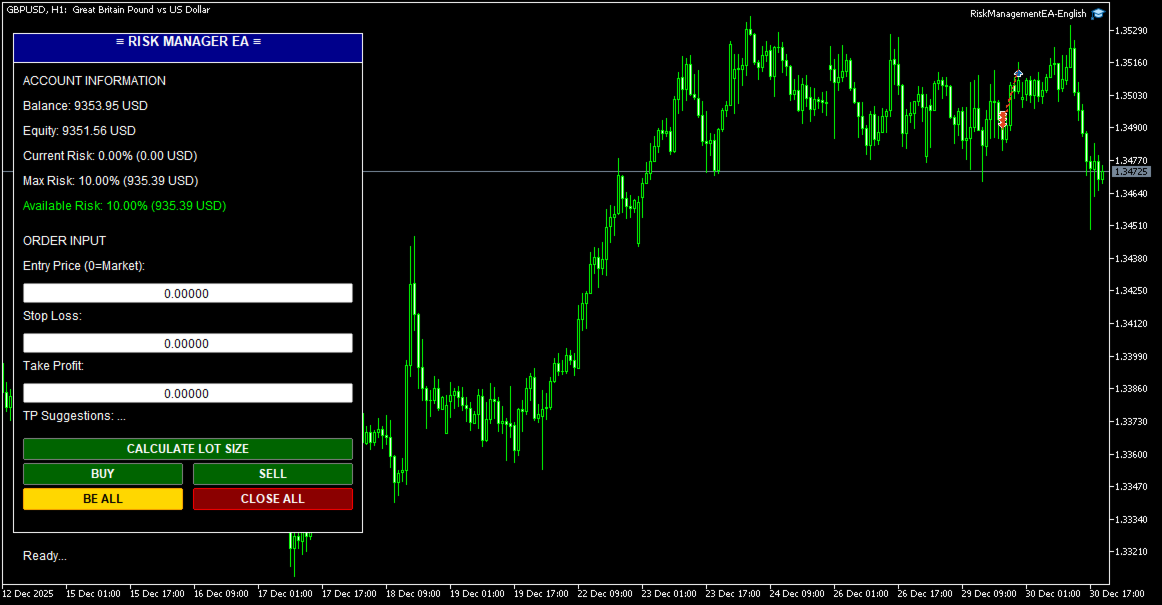
```
┌─────────────────────────────┐
│  ≡ RISK MANAGER EA ≡        │ ← Header (drag to move)
├─────────────────────────────┤
│ ACCOUNT INFORMATION         │
│ Balance: $10,000.00         │
│ Equity: $10,150.00          │
│ Current Risk: 2.5% ($250)   │
│ Max Risk: 10.0% ($1000)     │
│ Available Risk: 7.5% ($750) │
├─────────────────────────────┤
│ ORDER INPUT                 │
│ Entry Price (0=Market):     │
│ [0.00000]                   │
│ Stop Loss:                  │
│ [1.08000]                   │
│ Take Profit:                │
│ [1.09000]                   │
│ Suggestions: 1R=1.09, 2R=... │
├─────────────────────────────┤
│ [   CALCULATE LOT SIZE   ]  │
│ [   BUY   ] [   SELL   ]    │
│ [ BE ALL  ] [ CLOSE ALL ]   │
├─────────────────────────────┤
│ Status: Ready...            │
└─────────────────────────────┘
```

### Color Codes
- **Green buttons**: Action buttons (Buy/Sell/Calculate)
- **Gold button**: Break Even (BE ALL)
- **Red button**: Close All orders
- **Green text**: Available risk (positive)
- **Red text**: No available risk (at limit)

---

## 📝 How to Use

### Basic Trading Workflow

#### 1. **Market Order (No Entry)**
```
1. Leave Entry Price = 0
2. Enter Stop Loss (e.g., 1.08000)
3. (Optional) Enter Take Profit or leave 0 for auto TP
4. Click BUY or SELL
```

**Result:**
- Order opens immediately at market price
- If Auto TP enabled: TP calculated automatically
- Lot size calculated based on risk settings

#### 2. **Pending Order (With Entry)**
```
1. Enter Entry Price (e.g., 1.08500)
2. Enter Stop Loss (e.g., 1.08000)
3. (Optional) Enter Take Profit
4. Click BUY or SELL
```

**Result:**
- Pending order placed at Entry price
- Type determined automatically (Limit/Stop)
- Activates when price reaches entry

#### 3. **Split Orders**
```
1. Enable: InpUseSplitOrder = true
2. Set: InpNumSplits = 4
3. Set: InpAutoTP = true
4. Enter Entry (or 0 for market)
5. Enter Stop Loss
6. Click BUY or SELL
```

**Result:**
- 4 orders placed with same SL
- TP distributed automatically:
  - Order 1-2: TP = 1R
  - Order 3: TP = 2R
  - Order 4: TP = 4R

#### 4. **Calculate Lot Size**
```
1. Enter Stop Loss
2. Click "CALCULATE LOT SIZE"
```

**Result:**
- Shows calculated lot size
- Shows SL in points
- Shows current price

#### 5. **Break Even**
```
1. Wait for trade to be in profit
2. Click "BE ALL" button
3. Confirm in dialog box
```

**Result:**
- All orders of current symbol move to BE + 5 pips
- Orders of other symbols unaffected
- Safe from reversal

#### 6. **Close All**
```
1. Click "CLOSE ALL" button
2. Confirm in dialog box
```

**Result:**
- All orders of current symbol closed
- Orders of other symbols remain open
- P&L realized

---

## 🎓 Advanced Features

### 1. **Custom TP Ratios**

Change `InpTPRatios` to customize TP levels:

```
"1,1.5,3" → TP at 1R, 1.5R, 3R
"2,4,6,8" → TP at 2R, 4R, 6R, 8R
```

### 2. **Manual Split Mode**

Set `InpSplitModeInput = 0` for manual control:
- Enter different SL for each split
- System calculates proportional lot sizes
- More flexible for complex strategies

### 3. **Fixed Risk in USD**

Set `InpRiskTypeInput = 1` and `InpRiskValue = 100`:
- Every trade risks exactly $100
- Independent of account balance
- Good for consistent risk management

### 4. **Multiple Symbols**

Run EA on multiple charts simultaneously:
- Each chart manages its own symbol
- Break Even affects only current chart symbol
- Close All affects only current chart symbol
- Total risk tracked across all symbols

### 5. **Drag & Drop UI**

Click and drag the **header** (blue bar) to move panel anywhere on chart.

---

## 🔍 Troubleshooting

### Problem: EA doesn't open orders

**Check:**
1. AutoTrading enabled (Ctrl+E)
2. Stop Loss entered correctly
3. Available risk > 0
4. Account has sufficient margin
5. Symbol is tradable

### Problem: "Maximum risk limit reached"

**Solution:**
- Close some existing positions
- Or increase `InpMaxRiskPercent`
- Or reduce `InpRiskValue`

### Problem: Split orders not working

**Check:**
1. `InpUseSplitOrder = true`
2. `InpNumSplits` between 2-10
3. `InpAutoTP = true` (for auto TP)
4. Check Experts log for errors

### Problem: Auto TP not filling

**Check:**
1. `InpAutoTP = true`
2. `InpTPRatios` has valid values
3. Leave TP input = 0 (or blank)
4. Split orders enabled for distribution

### Problem: Break Even doesn't work

**Possible causes:**
- Orders already at or past BE
- No orders for current symbol
- SL already better than BE level

### Problem: Lot size too small/large

**Adjust:**
- Reduce/increase `InpRiskValue`
- Check SL distance (larger SL = smaller lot)
- Verify account balance

---

## 📊 Example Scenarios

### Scenario 1: Conservative Trader
```
InpMaxRiskPercent = 5.0
InpRiskTypeInput = 0
InpRiskValue = 0.5
InpUseSplitOrder = false
InpAutoTP = true
InpTPRatios = "2"
```
**Result:** Risk 0.5% per trade, TP at 2R (1:2 R:R)

### Scenario 2: Aggressive Scalper
```
InpMaxRiskPercent = 15.0
InpRiskTypeInput = 0
InpRiskValue = 2.0
InpUseSplitOrder = false
InpAutoTP = true
InpTPRatios = "1"
```
**Result:** Risk 2% per trade, quick 1R targets

### Scenario 3: Professional with Scaling
```
InpMaxRiskPercent = 10.0
InpRiskTypeInput = 0
InpRiskValue = 1.0
InpUseSplitOrder = true
InpNumSplits = 4
InpAutoTP = true
InpTPRatios = "1,2,4,6"
```
**Result:**
- 1% total risk split into 4 orders
- 2 orders close at 1R (secure profit)
- 1 order at 2R
- 1 order at 4R (let winners run)

---

## 📞 Support

For questions or issues:
- Telegram: [@CodingforDummies911](https://t.me/CodingforDummies911)
- Check EA logs: Tools → Options → Expert Advisors → Enable logs

---

## ⚠️ Disclaimer

Trading forex and CFDs carries high risk. This EA is a tool to assist with risk management but does not guarantee profits. Use at your own risk. Always test on demo account first.

---

## 📄 Version History

**v1.00** (2025)
- Initial release
- Risk management system
- Split orders with auto TP
- Entry price support (Market/Limit/Stop)
- Break Even functionality
- Close All (symbol-specific)
- Draggable UI panel

---

*Last updated: January 2025*
Prodotti consigliati
Scale & Trail Trade Manager (MT5) Your all-in-one solution for   precision trade execution and management . With just two clicks, you can size, place, and manage trades effortlessly—no calculators, no guesswork, no stress. Workflow Click 1:   Set your entry — instantly snaps to the live market price. Move Mouse:   Preview your stop-loss and four profit targets (1R–4R) in real time. Click 2:   Lock it in — the tool sizes your trade to your exact dollar risk (e.g., $3350) and manages it automatica
Click Trading
Jawad Tauheed
5 (1)
One Click Trading – Auto TP SL Developer TraderLinkz Version 1.00 Category Utility What it does Adds missing TP and SL to your manual trades and pending orders Sets them once per ticket Lets you move TP and SL afterward Works on hedging and netting accounts Scans on every tick and reacts on trade events Why you want it You place faster entries You get consistent risk and exit targets You reduce fat finger errors You keep full manual control Quick start Attach the EA to any chart Keep TP and SL e
FREE
Close All Pro MT5 – Fast PnL Control is a powerful trade manager MT5 utility that gives you total control over your trades. With a single click, you can close all MT5 orders, monitor real-time profit and loss, and manage your floating PnL directly from a clean on-chart panel. The tool is lightweight, responsive, and built to help traders save time, reduce emotional stress, and maintain focus. Whether you trade manually or through an EA, this MT5 profit panel provides the visibility and precisio
Blog: https://www.mql5.com/en/blogs/post/765148 Versione MT4: https://www.mql5.com/en/market/product/154458 Versione MT5: https://www.mql5.com/en/market/product/154459 Telegram Order – Smart Trade Manager e Telegram Notifier per MT4 Telegram Order è uno strumento di gestione delle negoziazioni e notifica intelligente per MetaTrader 4. Monitora automaticamente tutti i tuoi ordini (a mercato e in sospeso), invia notifiche dettagliate a Telegram (con screenshot opzionali) e ti offre un pannello
This EA help traders close their open positions at a specific MT5 server time before news or before ending of H4 timeframe of the morning New York session to protect their profit or prevent from unexpected loss. The default setting is 19:30 (HH:MM) and you can adjust as require to fit trading strategies. It very user friendly where contain only single input parameter to specify a time that position will be closed.  
Trailing Stop Manager PRO — Gestione professionale del trailing stop (MT5) Trailing Stop Manager PRO è un Expert Advisor per MetaTrader 5 che automatizza la gestione del trailing stop sulle posizioni aperte. Può gestire tutte le posizioni del conto oppure solo quelle filtrate per simbolo e/o MagicNumber. L’EA include diversi modelli di gestione: trailing fisso in pips, trailing basato sull’ATR, break-even automatico, chiusura parziale e una dashboard visiva. Obiettivo dello strumento Standardizz
Video Explanation on YouTube: https://youtu.be/OJXERVs405g Keyboard Scalper Pro – Tool Explanation Keyboard Scalper Pro is a manual scalping tool designed to execute and manage trades entirely via keyboard hotkeys , allowing for fast, precise, and distraction-free trading . The tool does not automate trading decisions . All actions are triggered manually by the trader using predefined keys. Hotkey Functions Explained W – Buy Market Opens a market buy position instantly on the current symbol usi
Boleta de negociação, adiciona automáticamente as ordens Take Profit e Stop Loss quando excutada uma ordem de compra ou venda. Ao apertar as teclas de atalho (A, D, ou TAB), serão inseridas duas linhas de pre-visualização, representando as futuras ordens de take profit (azul) e stop loss (vermelho), as quais irão manter o distanciamento especificado pelo usuário. Ditas ordens só serão adicionadas ao ser executada a ordem inicial. Ao operar a mercado, as ordens pendentes de take profit, e stop lo
Core function Intelligent transaction management one-click opening and closing operation, which supports user-defined lots to set multiple closing modes: all closing, closing by direction and closing by profit and loss status. Professional risk control, real-time risk monitoring and spread control to avoid high-cost trading environment. Visual control panel has an intuitive graphical interface, and all functions can be operated with one button to display position information, profit and loss sta
FREE
Boleta Easy Trade
Silvio Garcia Wohl
When executing an order, whether through the Metatrader ticket on a computer or the Metatrader app on a mobile device, either manual or pending, Easy Trade will automatically set the take profit and stop loss levels, as well as a limit order with its respective take profit and stop loss levels. It follows the trading strategy for market open (US30, US100, US500), but it can be applied to any market asset.
FREE
Auto Position Manager is a unique services application of its kind across the entire MQL5 market, setting new standards for applications of this type. The Services app is a compact but powerful tool that significantly impacts the entire system. Its user-friendly interface and start-stop system make it excellent for automating repetitive tasks. Once it's set up, the service can be toggled on or off with a single click. Crucially, the configuration persists even if the platform is turned off and
FREE
Price Action Builder Premium
Florea E. Sorin-Mihai Persoana Fizica Autorizata
The Price Action Builder Premium expert advisor is an extension of the freely available Price Action Builder Basic :     it provides 2 new candlestick patterns besides the pinbar (already available in the basic edition);     in most configurations, backtesting usually shows an average yearly return rate increased by approximately 50%;     the account growth curve is also smoother, due to larger number of trades, almost double (2x) compared to the free version. While aimed primarily at obtaining
When executing an order, whether through the Metatrader ticket on a computer or the Metatrader app on a mobile device, either manual or pending, Easy Trade will automatically set the take profit and stop loss levels, as well as a limit order with its respective take profit and stop loss levels. It follows the trading strategy for market open (US30, US100, US500), but it can be applied to any market asset.
MT5 Trades To Telegram
Mohammad Taher Halimi Tabrizi
The Trades To Telegram is a powerful and customizable trading assistant designed to bridge the gap between the MetaTrader 5 platform and the popular messaging app, Telegram. This bot serves as a crucial tool for traders, providing them with timely and accurate trading signals, alerts, and updates directly to their Telegram accounts. Key Features: Real-Time Signals: The bot monitors the MetaTrader 5 platform continuously, detecting trading signals, such as Opening/Closing of  buy/sell orders , a
EasyTradePad for MT5
Sergey Batudayev
5 (5)
EasyTradePad – Pannello di trading per MetaTrader 5 EasyTradePad   è uno strumento per il trading manuale e semi-automatico. Il pannello consente una rapida gestione di ordini e posizioni, nonché calcoli di gestione del rischio con un solo clic. Caratteristiche del pannello: Apri e chiudi le negoziazioni con rischio predefinito (% o valuta di deposito) Imposta SL e TP in punti, percentuali o valori monetari Calcola automaticamente il rapporto rischio/rendimento Sposta lo stop loss al pareggio C
Format Charts
Vital H B Engenharia Ltda
5 (1)
If you use several charts open at the same time, you know how boring it is to apply formats to each chart individually. This script can change all open charts using a single command. Parameters: 1 - Choose symbol to put on charts: apply the selected symbol to all charts. If "current", it does not change the symbol; 2 - Choose timeframe or leave empty: apply the selected timeframe to all charts. If "CURRENT", it does not change the timeframe; 3 - Apply template to the charts: If true, apply the t
FREE
Rosy Pro Panel MT5
Theresia Yovitha Herwanda
5 (1)
Download DEMO here  https://www.mql5.com/en/blogs/post/759772 An ultimate panel you've never seen before.  Compact and nice Trade panel with large Total P/L and it's percentage display. Groups for trades summary available: Ticket, Symbol, Type, Category, and Magic. Average price field helps you know your trading average price and direction. Set magic and comment of your trading in a very easy way. Group closing by symbol, type, category or magic - only by one click. Close All button for a quick
BreakEven ProSync
Rosen Kanev Kanev
5 (1)
For DEMO - please contact me and I will send you demo version to test the product. BreakEven ProSync – Advanced Trade Management Tool for MetaTrader 5 Overview The  BreakEven ProSync  is a powerful utility designed to enhance trade management in   MetaTrader 5 . It provides   one-click break-even functionality ,   hotkey trading ,   position synchronization , and   visual SL/TP tracking —all in a single, user-friendly tool. Perfect for manual traders who want   faster execution   and   better r
Trade Panel Pro MT5
Elvis Wangai Muriithi
Trade Panel Pro is a powerful and easy-to-use trading utility designed for traders who need fast execution, accurate position sizing, and complete risk management directly from the chart. Whether you scalp on the 1-minute chart or swing trade on the 4H, Trade Panel Pro gives you the tools to manage trades with confidence and precision — all in one clean interface. Price will double after 5 purchases. Grab this offer Key Features Fast Trade Execution Open Buy/Sell positions instantly from the pan
THIS PRODUCT CAN NOT BE TEST IN STRATEGY TESTER. PLEASE TRY DEMO VERSION: https://www.mql5.com/en/market/product/58096 RISK AND TRADE MANAGER RISK AND TRADE MANAGER   is an advanced trading panel designed for manual trading.   Utility helps to manage trades effectively and efficiently with a single click. MAIN FEATURES Convert and display Stop Loss (SL)   Pips into % and amount to view the clear picture of the trades if SL hits. Fund allocation for individual trade in % and in amount. Get alert
Risk Manager Pro
Jhojan Alberto Tobon Monsalve
Risk Manager Pro is a simple utility that calculates the necessary lots with the risk percentage and the pips of stop loss, before opening positions. The web calculators can be useful in some cases but they are not efficient to open operations in real time. In the trading days, there are few opportunities to open positions and when the opportunity arises, the seconds make the difference. This is not possible with conventional web calculators, since to calculate the size of an operation regarding
Broker & Account Info / Network Connection / Historical Order Benchmarks / Market Watch Symbols / Current Order Status Features: 1. Symbol’s Trading Privileges – Ensure the symbol is tradable. 2. Order Execution Mode – Check the broker’s execution type. 3. Trade Session Hours – Verify the trading hours. 4. Min/Max Lot Sizes – Check the allowed lot range. 5. Max Pending Orders – Confirm the maximum number of pending orders allowed. 6. Freeze Point & Pending Order Distance – Minimum distance re
FREE
Free MetaTrader 5 indicator that displays "CALL IT A DAY" when London & New York sessions close. Customizable alerts, session tracking, and a guilt-free reminder to log off. Perfect for workaholic traders! Tired of staring at charts when the market’s already clocked out? Session Guardian   is your sassy trading assistant that slaps a giant   "CALL IT A DAY"   on your screen when both London   and   New York sessions are closed—because even traders deserve happy hour. Key Features:   Big, Bo
FREE
Know the Candle Close Time
Benbyaanda Silvere Henri Sedric Kabore
This indicator allows to know the remaining time before the closing of the candle. It works on every timeframe. It is very usefull when your trading strategy depend of the close or the open of a specific candle. So use it like you want. Don't forget to leave a comment or a request for a EA or an indicator. Also spread it to your friends and don't hesitate to visit my profile to see others tools.
FREE
Slippage Calculator
BM Trading GmbH
5 (3)
If you are using scalping strategies (or any strategy that uses stop orders for position opening or closing) you need to know your slippage. Slippage is the difference between your pending order price and the price that your brokers uses to execute your order. This can be really different and depends on the broker as well as on the market conditions (news, trading hours, etc..) With this small script you can calculate the slippage you "paid" in points and also in your account currency. You also
FREE
Supports displaying up to 4 trading sessions with fully adjustable start and end times. Each session can be customized individually with unique colors and visual styles. Users can choose between drawing rectangles or filling areas, while the indicator clearly displays each session’s price range for better market insight. Free to use until the end of 2025. The paid version will be available starting from 2026.
FREE
MT5 to Telegram Notification Hub
George Liviu Geambasu
5 (1)
MT5 to Telegram Notification Hub   is a user-friendly tool that connects MetaTrader 5 (MT5) with Telegram, enabling seamless transmission of trade alerts, updates, and custom messages directly from MT5 to your Telegram account or channel. You can easily adjust and enable or disable specific parts of the notifications, making it ideal for signal providers and traders who want to keep their audience informed with real-time updates Setup guide A setup guide is available here . Key Features: Instan
Trade2Telegram
Strifor (Mauritius) Ltd
Trade2Telegram — a plugin for automatic trade notifications from MetaTrader to Telegram. This tool is designed for traders managing capital, running signal channels, or leading educational communities. The plugin copies all trading operations from the terminal and publishes them to a selected Telegram chat, group, or channel. Messages are sent automatically when positions are opened or closed, stop-loss or take-profit levels are changed, pending orders are triggered, or trades are partially clos
FREE
Hon Risk manager
Christopher Adie
Advanced Risk Manager EA - Complete User Guide What is Advanced Risk Manager EA? The Advanced Risk Manager EA is a professional risk management and account protection system for MetaTrader 5. It's NOT a trading robot that opens trades - instead, it protects your account by monitoring your trading activity and enforcing strict risk limits. Core Purpose Prevent account blowups by enforcing daily loss limits Protect profits with automatic profit targets Monitor trading remotely via Telegram Close u
Partial Close Panel
Carter Kyle Capital Inc.
4 (1)
The Partial Close Panel is a very useful MQL5 trading tool designed to provide traders with granular control over their trading positions. Key features of this script include: Partial Closure: This functionality allows traders to partially close their positions, setting a custom percentage of lots to close. The volume is flexible, allowing for precision management of risk and profit. Stop Loss Adjustment: This script supports dynamic stop loss adjustment to break-even points. This function can a
Gli utenti di questo prodotto hanno anche acquistato
Trade Assistant MT5
Evgeniy Kravchenko
4.41 (205)
It helps to calculate the risk per trade, the easy installation of a new order, order management with partial closing functions, trailing stop of 7 types and other useful functions. Additional materials and instructions Installation instructions - Application instructions - Trial version of the application for a demo account Line function -   shows on the chart the Opening line, Stop Loss, Take Profit. With this function it is easy to set a new order and see its additional characteristics bef
Forex Trade Manager MT5
InvestSoft
4.97 (585)
Benvenuto a Trade Manager EA, lo strumento definitivo per la gestione del rischio , progettato per rendere il trading più intuitivo, preciso ed efficiente. Non è solo uno strumento per l'esecuzione degli ordini, ma una soluzione completa per la pianificazione delle operazioni, la gestione delle posizioni e il controllo del rischio. Che tu sia un principiante, un trader avanzato o uno scalper che necessita di esecuzioni rapide, Trade Manager EA si adatta alle tue esigenze, offrendo flessibilità s
TradePanel MT5
Alfiya Fazylova
4.86 (148)
Trade Panel è un assistente commerciale multifunzionale. L'applicazione contiene più di 50 funzioni di trading per il trading manuale e consente di automatizzare la maggior parte delle operazioni di trading. Attenzione, l'applicazione non funziona nel tester di strategia. Prima dell'acquisto, puoi testare la versione demo su un conto demo. Versione demo qui . Istruzioni complete qui . Commercio. Ti consente di eseguire operazioni di trading con un clic: Apri ordini e posizioni pendenti con calco
Versione Beta Telegram to MT5 Signal Trader è quasi pronto per il rilascio ufficiale in versione alpha. Alcune funzionalità sono ancora in fase di sviluppo e potresti riscontrare piccoli bug. Se riscontri problemi, ti preghiamo di segnalarli, il tuo feedback aiuta a migliorare il software per tutti. Il prezzo aumenterà dopo 20 vendite. Copie rimanenti a $90:   2/20 . Telegram to MT5 Signal Trader è uno strumento potente che copia automaticamente segnali di trading da canali o gruppi Telegram a
HINN Lazy Trader
ALGOFLOW OÜ
5 (2)
Lazy Trader is your personal risk management assistant that independently finds the best market entries, manages positions, and helps you extract maximum profit from every trading idea! It monitors charts from M1 to W1 , finds optimal entry points based on your parameters, and manages trades without your involvement: - Got an idea on the daily chart? No need to wait for lower timeframes to form a signal — Lazy Trader will check everything and open all necessary positions while you live your lif
Ultimate Extractor
Clifton Creath
5 (9)
Ultimate Extractor - Professional Trading Analytics for MT5 *****this is the local HTML version of Ultimate Extractor. Check out Ultimate Extractor Cloud on mql5 for the Cloud version****** Ultimate Extractor transforms your MetaTrader 5 trading history into actionable insights with comprehensive analytics, interactive charts, and real-time performance tracking. What It Does Automatically analyzes your MT5 trading history across all Expert Advisors and generates detailed HTML reports with inte

Telegram To MT5 Receiver
Levi Dane Benjamin
4.53 (15)
Copia i segnali da qualsiasi canale di cui sei membro (compresi quelli privati e ristretti) direttamente sul tuo MT5.  Questo strumento è stato progettato con l'utente in mente offrendo molte funzionalità necessarie per gestire e monitorare gli scambi. Questo prodotto è presentato in un'interfaccia grafica facile da usare e visivamente accattivante. Personalizza le tue impostazioni e inizia ad utilizzare il prodotto in pochi minuti! Guida per l'utente + Demo  | Versione MT4 | Versione Discord
Smart Stop Scanner – Analisi multi-asset degli stop-loss basata sulla reale struttura di mercato Panoramica Smart Stop Scanner offre un monitoraggio professionale dei livelli di stop-loss su più mercati. Il sistema identifica automaticamente le zone di stop più rilevanti basandosi sulla reale struttura di mercato, sulle rotture significative e sulla logica del price action, presentando tutte le informazioni in un pannello chiaro, coerente e ottimizzato per schermi ad alta risoluzione (DPI-awar
Trade Manager DaneTrades
Levi Dane Benjamin
4.33 (27)
Trade Manager per aiutarti a entrare e uscire rapidamente dalle operazioni calcolando automaticamente il tuo rischio. Incluse funzionalità che ti aiutano a prevenire l'eccessivo trading, il vendetta trading e il trading emotivo. Le operazioni possono essere gestite automaticamente e i parametri di performance del conto possono essere visualizzati in un grafico. Queste caratteristiche rendono questo pannello ideale per tutti i trader manuali e aiuta a migliorare la piattaforma MetaTrader 5. Suppo
Smart Stop Manager – Esecuzione automatica dello stop-loss con precisione professionale Panoramica Smart Stop Manager è il livello di esecuzione della linea Smart Stop, progettato per i trader che richiedono una gestione dello stop-loss strutturata, affidabile e completamente automatizzata su più posizioni aperte. Monitora continuamente tutte le operazioni attive, calcola il livello di stop ottimale utilizzando la logica di struttura di mercato Smart Stop e aggiorna gli stop automaticamente se
Copy Cat More Trade Copier MT5 (Gatto Copiatore MT5) è un copiatore di trade locale e un framework completo di gestione del rischio ed esecuzione progettato per le sfide di trading odierne. Dalle sfide delle prop firm alla gestione di portafogli personali, si adatta a ogni situazione con una combinazione di esecuzione robusta, protezione del capitale, configurazione flessibile e gestione avanzata dei trade. Il copiatore funziona sia in modalità Master (mittente) che Slave (ricevente), con sincro
Exp COPYLOT CLIENT for MT5
Vladislav Andruschenko
3.82 (34)
Trade copyr per MT5 è un trade copyr per la piattaforma МetaТrader 5   . Copia le negoziazioni forex   tra       eventuali conti   MT5   -   MT5, MT4   -   MT5 per la versione COPYLOT MT5 (o MT4   -   MT4 MT5   -   MT4 per la versione COPYLOT MT4) Fotocopiatrice affidabile! Versione MT4 Descrizione completa   +DEMO +PDF Come comprare Come installare     Come ottenere i file di registro     Come testare e ottimizzare     Tutti i prodotti di Expforex Puoi anche copiare le operazioni nel termina
MT5 to Telegram Signal Provider è un'utilità facile da usare e completamente personalizzabile che consente l'invio di segnali specificati a una chat, canale o gruppo Telegram, rendendo il tuo account un fornitore di segnali. A differenza della maggior parte dei prodotti concorrenti, non utilizza importazioni DLL. [ Dimostrativo ] [ Manuale ] [ Versione MT4 ] [ Versione Discord ] [ Canale Telegram ]  New: [ Telegram To MT5 ] Configurazione Una guida utente passo-passo è disponibile. Nessuna cono
YuClusters
Yury Kulikov
4.93 (43)
Attention: You can view the program operation in the free version  YuClusters DEMO .  YuClusters is a professional market analysis system. The trader has unique opportunities to analyze the flow of orders, trade volumes, price movements using various charts, profiles, indicators, and graphical objects. YuClusters operates on data based on Time&Sales or ticks information, depending on what is available in the quotes of a financial instrument. YuClusters allows you to build graphs by combining da
The product will copy all telegram signal to MT5 ( which you are member) , also it can work as remote copier.  Easy to set up, copy order instant, can work with almost signal formats, image signal,  s upport to translate other language to English Work with all type of channel or group, even channel have "Restrict Saving Content", work with  multi channel, multi MT5 Work as remote copier: with signal have ticket number, it will copy exactly via ticket number. Support to backtest signal. How to s
The News Filter MT5
Leolouiski Gan
4.74 (19)
Questo prodotto filtra tutti gli esperti consulenti e i grafici manuali durante il periodo delle notizie, così non dovrai preoccuparti di improvvisi picchi di prezzo che potrebbero distruggere le tue impostazioni di trading manuali o le negoziazioni effettuate da altri esperti consulenti. Questo prodotto viene fornito anche con un sistema completo di gestione degli ordini che può gestire le tue posizioni aperte e gli ordini in sospeso prima della pubblicazione di qualsiasi notizia. Una volta che
Auto Trade Copier for MT5
Vu Trung Kien
4.41 (27)
Auto Trade Copier is designed to copy trades to multiple MT4, MT5 and cTrader accounts/terminals with 100% accuracy. The provider and receiver accounts must be on the same PC/VPS. With this tool, you can copy trades to receiver accounts on the same PC/VPS. All trading actions will be copied from provider to receiver perfectly. This version can be used on MT5 accounts only. For MT4 accounts, you must use Auto Trade Copier (for MT4). Reference: - For MT4 receiver, please download Trade Receiver Fr
EasyInsight AIO MT5
Alain Verleyen
4.91 (11)
EASY Insight AIO – La soluzione all-in-one per un trading intelligente e senza sforzo Panoramica Immagina di poter analizzare l’intero mercato — Forex, Oro, Cripto, Indici e persino Azioni — in pochi secondi, senza dover controllare manualmente i grafici, installare indicatori o affrontare configurazioni complicate. EASY Insight AIO è il tuo strumento definitivo di esportazione per il trading alimentato dall’IA, pronto all’uso. Offre una panoramica completa del mercato in un unico file CSV pul
VirtualTradePad One Click Trading Panel
Vladislav Andruschenko
4.58 (72)
Pannello di trading per il trading in 1 clic.   Lavorare con posizioni e ordini!   Trading dal grafico o dalla tastiera. Con il nostro pannello di trading, puoi eseguire operazioni con un solo clic direttamente dal grafico ed eseguire operazioni di trading 30 volte più velocemente rispetto al controllo MetaTrader standard. I calcoli automatici di parametri e funzioni rendono il trading più veloce e conveniente per i trader. Suggerimenti grafici, etichette informative e informazioni complete sugl
Everything for chart Technical Analysis indicator MT5 in one tool Draw your supply demand zone with rectangle and support resistance with trendline and get alerts to mobile phone or email alert -  Risk reward indicator mt5 Video tutorials, manuals, DEMO download   here .   Find contacts on my   profile . 1.   Extended rectangles and trendlines Object will be extended to the right edge of the chart when price will draw new candles on chart. This is rectangle extender or trendline extender. 2. Pri
Mt5 To InterativeBrokers Copier allows you to copy deals from MT5 account to Interactive Brokers. With this, you can run your EA strategy on a MT5 Demo/Real Account, then copy all the deals to Interactive Brokers account real time. Features: 1. Copy or Invert-Copy deals Realtime from MT5 to IB Account. 2. Synchronizing positions of both accounts periodicaly, in case any missing copying. 3. You can choose only Buy position or Sell position. Symbols Setup: General Format:  {MT Symbol} -> {IB S
Comprehensive on chart trade panel with the unique ability to be controllable from mobile as well. Plus has a library of downloadable configuration, e.g. exit rules, extra panel buttons, pending order setup and more. Please see our product video. Works with all symbols not just currency pairs. Features On chart panel plus controllable from free app for Windows, iPhone and Android Built-in script engine with library of downloadable configuration, e.g. add 'Close All Trades in Profit' button, exit
News Filter EA: Advanced Algo Trading Assistant News Filter EA is an advanced algo trading assistant designed to enhance your trading experience. By using the News Filter EA , you can integrate a Forex economic news filter into your existing expert advisor, even if you do not have access to its source code. In addition to the news filter, you can also specify trading days and hours for your expert. The News Filter EA also includes risk management  and equity protection features. MT4 Version KEY
Telegram to MT5 Coppy
Sergey Batudayev
5 (7)
Da Telegram a MT5:   la soluzione definitiva per la copia del segnale Semplifica il tuo trading con Telegram su MT5, il moderno strumento che copia i segnali di trading direttamente dai canali e dalle chat di Telegram sulla tua piattaforma MetaTrader 5, senza bisogno di DLL. Questa potente soluzione garantisce un'esecuzione precisa dei segnali, ampie opzioni di personalizzazione, fa risparmiare tempo e aumenta la tua efficienza. [ Instructions and DEMO ] Caratteristiche principali Integrazione d
Trade Manager DashPlus
Henry Lyubomir Wallace
5 (12)
DashPlus è uno strumento avanzato di gestione delle operazioni progettato per migliorare l'efficienza e l'efficacia del trading sulla piattaforma MetaTrader 5. Offre una suite completa di funzionalità, tra cui calcolo del rischio, gestione degli ordini, sistemi di griglia avanzati, strumenti basati su grafici e analisi delle prestazioni. Caratteristiche Principali 1. Griglia di Recupero Implementa un sistema di griglia flessibile e di media per gestire le operazioni in condizioni di mercato avve
DrawDown Limiter
Haidar, Lionel Haj Ali
5 (20)
Drawdown Limiter EA You are in the right place if you were searching for Drawdown control, Drawdown limiter, Balance protection, Equity Protection or Daily Drawdown Limit related to Prop Firm, FTMO, or Funded account trading, or if you want to protect your trading account. Have you suffered from controlling your drawdown when trading funded accounts? This EA is meant for you. Prop firms usually set a rule called “Trader Daily Drawdown”, and if it is not respected, you are disqualified.  I am an
Take a Break MT5
Eric Emmrich
4.83 (23)
The most advanced news filter on MQL market - free demo available Take a Break has transformed from a basic news filter into a comprehensive account protection solution. It seamlessly pauses any other Expert Advisors during news events or based on your custom filters, all while safeguarding your EA settings - restoring them automatically when trading resumes for complete peace of mind. Typical use cases: A single news filter for all your EAs. Stop trading during news/high volatility (+ close all
Custom Alerts MT5
Daniel Stein
5 (8)
Custom Alerts: Monitora più mercati e non perdere mai un setup importante Panoramica Custom Alerts è una soluzione dinamica per i trader che desiderano monitorare più strumenti da un unico punto centrale. Integrando i dati dei nostri strumenti principali — come FX Power, FX Volume, FX Dynamic, FX Levels e IX Power — Custom Alerts ti avvisa automaticamente degli sviluppi cruciali del mercato, senza dover passare continuamente da un grafico all'altro o rischiare di perdere opportunità importanti
Crypto Charting
Rajesh Kumar Nait
5 (5)
Crypto Charting for MT5 – Integrazione grafici criptovalute in MetaTrader 5 Panoramica Crypto Charting for MT5 offre dati OHLC in tempo reale tramite WebSocket. Supporta più exchange e aggiorna automaticamente i dati in MT5. Funzionalità Dati in tempo reale via WebSocket Aggiornamento automatico dei dati storici Sincronizzazione pianificata dopo interruzioni Compatibile con tutti i timeframe MT5 Dati OHLCV completi Supporto per il tester di strategia Riconnessione automatica Exchange supportati
Entry In The Zone and SMC Multi Timeframe   è uno strumento di analisi di mercato in tempo reale sviluppato sulla base degli Smart Money Concepts (SMC). È progettato per aiutare i trader ad analizzare la struttura del mercato in modo sistematico e ottenere una visione più chiara della direzione generale del mercato. Il sistema analizza automaticamente i Punti di Inversione, le Zone Chiave e la Market Structure su più timeframe, mostrando Point of Interest (POI), segnali No Repaint e Auto Fibona
Altri dall’autore
Volume indicator judging level of volume per bar accordingly to Volume Spread Analysis rules. It allows either to set static volume levels or dynamic ones based on ratio comparable to Moving Average. Bars are coloured based on ratio or static levels, visually presenting level of Volume (low, average, high, ultra high). Release Notes - Fixed and optimised calculations of Session Average Volume - added predefined settings for time to calculate Session Average for EU and US markets
FREE
Introducing the Machine Learning Price Target Predictions, a cutting-edge trading tool that leverages kernel regression to provide accurate price targets and enhance your trading strategy. This indicator combines trend-based signals with advanced machine learning techniques, offering predictive insights into potential price movements. Perfect for traders looking to make data-driven decisions with confidence. What is Kernel Regression and How It Works Kernel regression is a non-parametric mach
The   Volume SuperTrend AI   is an advanced technical indicator used to predict trends in price movements by utilizing a combination of traditional SuperTrend calculation and AI techniques, particularly the k-nearest neighbors (KNN) algorithm. The Volume SuperTrend AI is designed to provide traders with insights into potential market trends, using both volume-weighted moving averages (VWMA) and the k-nearest neighbors (KNN) algorithm. By combining these approaches, the indicator aims to offer
Filtro:
Nessuna recensione
Rispondi alla recensione