RiskManagementEA

# Risk Management EA - User Manual

## 📖 Table of Contents
1. [Overview](#overview)
2. [Installation](#installation)
3. [Features](#features)
4. [Input Parameters](#input-parameters)
5. [User Interface](#user-interface)
6. [How to Use](#how-to-use)
7. [Advanced Features](#advanced-features)
8. [Troubleshooting](#troubleshooting)

---

## 🎯 Overview

**Risk Management EA** is a professional trading tool designed to help traders manage risk, split orders, and automate take profit settings. It provides a user-friendly interface for placing orders with precise risk control.

### Key Benefits:
- ✅ Automatic lot size calculation based on risk percentage
- ✅ Split orders with different take profit levels
- ✅ Auto TP distribution (50% at 1R, remaining at 2R, 4R, 6R...)
- ✅ Break Even functionality
- ✅ Support for Market and Pending orders (Limit/Stop)
- ✅ Visual UI panel with drag & drop

---

## 🔧 Installation

### Step 1: File Structure
Place the files in the correct folders:

```
MQL5/
├── Experts/
│   └── RiskManagementEA-English.ex5        ← Main EA file
└── Include/RiskManagementEA/
    ├── RiskManager-English.mqh              ← Risk management class
    ├── TradeManager-English.mqh             ← Trade management class
    └── UIPanel-English.mqh                  ← UI interface class
```

### Step 2: Compile
1. Open **MetaEditor** (F4 from MT5)
2. Open `RiskManagementEA-English.ex5`
3. Press **F7** or click **Compile** button
4. Check for errors in the **Errors** tab

### Step 3: Attach to Chart
1. Open MT5
2. Drag `RiskManagementEA` from **Navigator****Expert Advisors** to your chart
3. Enable **AutoTrading** (Ctrl+E or click icon)
4. The UI panel will appear on the chart

---

## ⚡ Features

### 1. **Risk Management**
- Set maximum total risk as percentage of account balance
- Define risk per position (% or fixed USD)
- Real-time risk monitoring
- Prevents over-risking

### 2. **Split Orders**
- Split one trade into multiple orders
- **Manual Mode**: Enter different SL for each split
- **Auto Mode**: Same SL for all splits
- Auto distribute TP levels across splits

### 3. **Auto Take Profit**
- Automatically calculate TP based on Risk-Reward ratios
- **For single orders**: Uses first R ratio (e.g., 1R)
- **For split orders**:
  - First half: 1R
  - Second order: 2R
  - Third order: 4R
  - Fourth order: 6R
  - And so on...

### 4. **Entry Price**
- **Entry = 0**: Place Market order immediately
- **Entry > 0**: Place Pending order (Limit/Stop)
  - Buy Limit if entry < current price
  - Buy Stop if entry > current price
  - Sell Limit if entry > current price
  - Sell Stop if entry < current price

### 5. **Break Even**
- Move SL to entry + specified pips
- Only affects orders of current symbol
- Safe confirmation dialog

### 6. **Close All**
- Close all orders of current symbol only
- Does not affect other symbols
- Safe confirmation dialog

---

## ⚙️ Input Parameters

### Risk Management
| Parameter | Type | Default | Description |
|-----------|------|---------|-------------|
| `InpMaxRiskPercent` | double | 10.0 | Total maximum risk allowed (%) |

### Risk Per Position
| Parameter | Type | Default | Description |
|-----------|------|---------|-------------|
| `InpRiskTypeInput` | int | 0 | 0 = Percent, 1 = Fixed USD |
| `InpRiskValue` | double | 1.0 | Risk value per trade |

**Example:**
- Type = 0, Value = 1.0 → Risk 1% per trade
- Type = 1, Value = 50 → Risk $50 per trade

### Split Orders
| Parameter | Type | Default | Description |
|-----------|------|---------|-------------|
| `InpUseSplitOrder` | bool | false | Enable/disable split orders |
| `InpSplitModeInput` | int | 1 | 0 = Manual, 1 = Auto |
| `InpNumSplits` | int | 4 | Number of splits (2-10) |

### Take Profit
| Parameter | Type | Default | Description |
|-----------|------|---------|-------------|
| `InpAutoTP` | bool | true | Auto calculate TP |
| `InpTPRatios` | string | "1,2,4,6,8" | R multiples for TP levels |

**How TP Ratios work:**
- `"1,2,4"` = TP at 1R, 2R, 4R
- For split orders, first half gets 1R, then 2R, 4R...

### Break Even
| Parameter | Type | Default | Description |
|-----------|------|---------|-------------|
| `InpBEPips` | double | 5.0 | Additional pips when moving to BE |

---

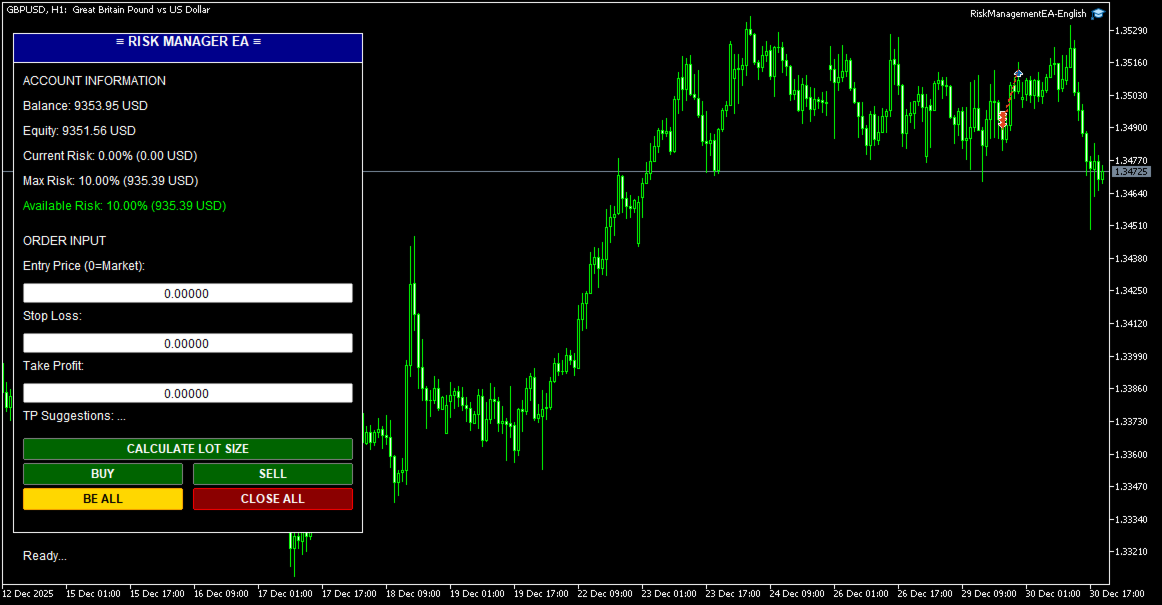
## 🖥️ User Interface

### Panel Layout

```
┌─────────────────────────────┐
│  ≡ RISK MANAGER EA ≡        │ ← Header (drag to move)
├─────────────────────────────┤
│ ACCOUNT INFORMATION         │
│ Balance: $10,000.00         │
│ Equity: $10,150.00          │
│ Current Risk: 2.5% ($250)   │
│ Max Risk: 10.0% ($1000)     │
│ Available Risk: 7.5% ($750) │
├─────────────────────────────┤
│ ORDER INPUT                 │
│ Entry Price (0=Market):     │
│ [0.00000]                   │
│ Stop Loss:                  │
│ [1.08000]                   │
│ Take Profit:                │
│ [1.09000]                   │
│ Suggestions: 1R=1.09, 2R=... │
├─────────────────────────────┤
│ [   CALCULATE LOT SIZE   ]  │
│ [   BUY   ] [   SELL   ]    │
│ [ BE ALL  ] [ CLOSE ALL ]   │
├─────────────────────────────┤
│ Status: Ready...            │
└─────────────────────────────┘
```

### Color Codes
- **Green buttons**: Action buttons (Buy/Sell/Calculate)
- **Gold button**: Break Even (BE ALL)
- **Red button**: Close All orders
- **Green text**: Available risk (positive)
- **Red text**: No available risk (at limit)

---

## 📝 How to Use

### Basic Trading Workflow

#### 1. **Market Order (No Entry)**
```
1. Leave Entry Price = 0
2. Enter Stop Loss (e.g., 1.08000)
3. (Optional) Enter Take Profit or leave 0 for auto TP
4. Click BUY or SELL
```

**Result:**
- Order opens immediately at market price
- If Auto TP enabled: TP calculated automatically
- Lot size calculated based on risk settings

#### 2. **Pending Order (With Entry)**
```
1. Enter Entry Price (e.g., 1.08500)
2. Enter Stop Loss (e.g., 1.08000)
3. (Optional) Enter Take Profit
4. Click BUY or SELL
```

**Result:**
- Pending order placed at Entry price
- Type determined automatically (Limit/Stop)
- Activates when price reaches entry

#### 3. **Split Orders**
```
1. Enable: InpUseSplitOrder = true
2. Set: InpNumSplits = 4
3. Set: InpAutoTP = true
4. Enter Entry (or 0 for market)
5. Enter Stop Loss
6. Click BUY or SELL
```

**Result:**
- 4 orders placed with same SL
- TP distributed automatically:
  - Order 1-2: TP = 1R
  - Order 3: TP = 2R
  - Order 4: TP = 4R

#### 4. **Calculate Lot Size**
```
1. Enter Stop Loss
2. Click "CALCULATE LOT SIZE"
```

**Result:**
- Shows calculated lot size
- Shows SL in points
- Shows current price

#### 5. **Break Even**
```
1. Wait for trade to be in profit
2. Click "BE ALL" button
3. Confirm in dialog box
```

**Result:**
- All orders of current symbol move to BE + 5 pips
- Orders of other symbols unaffected
- Safe from reversal

#### 6. **Close All**
```
1. Click "CLOSE ALL" button
2. Confirm in dialog box
```

**Result:**
- All orders of current symbol closed
- Orders of other symbols remain open
- P&L realized

---

## 🎓 Advanced Features

### 1. **Custom TP Ratios**

Change `InpTPRatios` to customize TP levels:

```
"1,1.5,3" → TP at 1R, 1.5R, 3R
"2,4,6,8" → TP at 2R, 4R, 6R, 8R
```

### 2. **Manual Split Mode**

Set `InpSplitModeInput = 0` for manual control:
- Enter different SL for each split
- System calculates proportional lot sizes
- More flexible for complex strategies

### 3. **Fixed Risk in USD**

Set `InpRiskTypeInput = 1` and `InpRiskValue = 100`:
- Every trade risks exactly $100
- Independent of account balance
- Good for consistent risk management

### 4. **Multiple Symbols**

Run EA on multiple charts simultaneously:
- Each chart manages its own symbol
- Break Even affects only current chart symbol
- Close All affects only current chart symbol
- Total risk tracked across all symbols

### 5. **Drag & Drop UI**

Click and drag the **header** (blue bar) to move panel anywhere on chart.

---

## 🔍 Troubleshooting

### Problem: EA doesn't open orders

**Check:**
1. AutoTrading enabled (Ctrl+E)
2. Stop Loss entered correctly
3. Available risk > 0
4. Account has sufficient margin
5. Symbol is tradable

### Problem: "Maximum risk limit reached"

**Solution:**
- Close some existing positions
- Or increase `InpMaxRiskPercent`
- Or reduce `InpRiskValue`

### Problem: Split orders not working

**Check:**
1. `InpUseSplitOrder = true`
2. `InpNumSplits` between 2-10
3. `InpAutoTP = true` (for auto TP)
4. Check Experts log for errors

### Problem: Auto TP not filling

**Check:**
1. `InpAutoTP = true`
2. `InpTPRatios` has valid values
3. Leave TP input = 0 (or blank)
4. Split orders enabled for distribution

### Problem: Break Even doesn't work

**Possible causes:**
- Orders already at or past BE
- No orders for current symbol
- SL already better than BE level

### Problem: Lot size too small/large

**Adjust:**
- Reduce/increase `InpRiskValue`
- Check SL distance (larger SL = smaller lot)
- Verify account balance

---

## 📊 Example Scenarios

### Scenario 1: Conservative Trader
```
InpMaxRiskPercent = 5.0
InpRiskTypeInput = 0
InpRiskValue = 0.5
InpUseSplitOrder = false
InpAutoTP = true
InpTPRatios = "2"
```
**Result:** Risk 0.5% per trade, TP at 2R (1:2 R:R)

### Scenario 2: Aggressive Scalper
```
InpMaxRiskPercent = 15.0
InpRiskTypeInput = 0
InpRiskValue = 2.0
InpUseSplitOrder = false
InpAutoTP = true
InpTPRatios = "1"
```
**Result:** Risk 2% per trade, quick 1R targets

### Scenario 3: Professional with Scaling
```
InpMaxRiskPercent = 10.0
InpRiskTypeInput = 0
InpRiskValue = 1.0
InpUseSplitOrder = true
InpNumSplits = 4
InpAutoTP = true
InpTPRatios = "1,2,4,6"
```
**Result:**
- 1% total risk split into 4 orders
- 2 orders close at 1R (secure profit)
- 1 order at 2R
- 1 order at 4R (let winners run)

---

## 📞 Support

For questions or issues:
- Telegram: [@CodingforDummies911](https://t.me/CodingforDummies911)
- Check EA logs: Tools → Options → Expert Advisors → Enable logs

---

## ⚠️ Disclaimer

Trading forex and CFDs carries high risk. This EA is a tool to assist with risk management but does not guarantee profits. Use at your own risk. Always test on demo account first.

---

## 📄 Version History

**v1.00** (2025)
- Initial release
- Risk management system
- Split orders with auto TP
- Entry price support (Market/Limit/Stop)
- Break Even functionality
- Close All (symbol-specific)
- Draggable UI panel

---

*Last updated: January 2025*
Produtos recomendados
EA Pause Manager
David Enrique Barrera Moncayo
4.2 (5)
EA Pause Manager — Your Smart Risk Guard & Scheduler (MT5) What It Does - Stops conflicting trades before they happen (based on active market positions).   - Pauses or resumes your EAs automatically based on:     - A simple “leader” rule: the first EA to trade becomes the leader and blocks the rest.     - A time schedule you set (e.g. no trading in Asian session). - Note : Interlock logic is triggered by executed market orders, not by pending orders (Buy Stop / Sell Stop). Why It Matters - Prot
Scale & Trail Trade Manager (MT5) Your all-in-one solution for   precision trade execution and management . With just two clicks, you can size, place, and manage trades effortlessly—no calculators, no guesswork, no stress. Workflow Click 1:   Set your entry — instantly snaps to the live market price. Move Mouse:   Preview your stop-loss and four profit targets (1R–4R) in real time. Click 2:   Lock it in — the tool sizes your trade to your exact dollar risk (e.g., $3350) and manages it automatica
Blogs do MQL5: https://www.mql5.com/en/blogs/post/761446 Versão MT4: https://www.mql5.com/en/market/product/136790 Versão MT5: https://www.mql5.com/en/market/product/136791 O Time Wizard é um assistente de trading profissional desenvolvido para traders que necessitam de velocidade, precisão e controlo de execução num painel de controlo intuitivo. Este Expert Advisor foi concebido para negociação baseada em eventos, execução programada e gestão rápida de ordens semiautomáticas. Permite-lhe pre
Click Trading
Jawad Tauheed
5 (2)
One Click Trading – Auto TP SL Developer TraderLinkz Version 1.00 Category Utility What it does Adds missing TP and SL to your manual trades and pending orders Sets them once per ticket Lets you move TP and SL afterward Works on hedging and netting accounts Scans on every tick and reacts on trade events Why you want it You place faster entries You get consistent risk and exit targets You reduce fat finger errors You keep full manual control Quick start Attach the EA to any chart Keep TP and SL e
FREE
Close All Pro MT5 – Fast PnL Control is a powerful trade manager MT5 utility that gives you total control over your trades. With a single click, you can close all MT5 orders, monitor real-time profit and loss, and manage your floating PnL directly from a clean on-chart panel. The tool is lightweight, responsive, and built to help traders save time, reduce emotional stress, and maintain focus. Whether you trade manually or through an EA, this MT5 profit panel provides the visibility and precisio
25R - WASD Order is a visual risk management EA for MetaTrader 5 that combines gaming-style WASD keyboard controls with interactive chart drawing for precise order placement. Designed for active traders who value speed and accuracy, it lets you visually plan trades by dragging entry and stop-loss lines directly on the chart, while automatically calculating position size based on your risk percentage. The tool displays color-coded profit/loss zones with real-time risk metrics, supports automatic
TradeDock Pro
Alex Michael Murray
TradeDock Pro (MT5) — One-Click Trade Manager Panel TradeDock Pro is a sleek and professional one-click trade panel for MetaTrader 5 designed for fast manual execution and simple trade management. Built for traders who want a clean interface, quick order placement, and essential management tools — without complicated settings or typing. Can be used on any market. KEY FEATURES One-Click BUY / SELL Lot size control on chart (0.01 – 99.99) SL toggle + SL in points TP toggle + TP in points Trailing
FREE
One Click Close All Pro is a premium fast-close utility for MetaTrader 5 designed to help traders exit positions quickly, manage basket exposure, and apply advanced risk protection from a professional on-chart dashboard. This tool is built for traders who need more than a basic close-all button. In addition to one-click closing, the Pro version includes advanced filtering, basket control, equity protection, daily lock protection, and partial close features for more precise position management. W
BerelzBridge
Barend Willem Van Den Berg
BerelzBridge Pro Ponte de dados MT5-para-JSON para todos os períodos com informação da conta. Visão Geral BerelzBridge Pro é um indicador MT5 que exporta dados de mercado em tempo real para um ficheiro JSON no disco. Escreve preços de compra e venda, spread, volume tick, estatísticas diárias, informação da conta e barras OHLCV para todos os 9 períodos. O ficheiro é atualizado num intervalo configurável com um padrão de 2 segundos. O indicador funciona juntamente com Expert Advisors no mesmo grá
This EA help traders close their open positions at a specific MT5 server time before news or before ending of H4 timeframe of the morning New York session to protect their profit or prevent from unexpected loss. The default setting is 19:30 (HH:MM) and you can adjust as require to fit trading strategies. It very user friendly where contain only single input parameter to specify a time that position will be closed.  
Trailing Stop Manager PRO — Gestão profissional de trailing stop (MT5) Trailing Stop Manager PRO é um Expert Advisor para MetaTrader 5 que automatiza a gestão de trailing stop nas posições abertas. Ele pode gerenciar todas as posições da conta ou apenas aquelas filtradas por símbolo e/ou MagicNumber. O EA inclui vários recursos: trailing fixo em pips, trailing baseado em ATR, break-even automático, fechamento parcial e um painel visual (dashboard). Objetivo da ferramenta Padronizar a gestão de t
Clonify PRO MT5
Andrej Hermann
5 (1)
Clonify PRO - Copiador local de negociações para MT5 e MT4            (  Local trade copier for MT4   https://www.mql5.com/ru/market/product/15992   ) Ferramenta profissional para copiar negociações entre contas MT5 e MT4 (através da pasta compartilhada "Common"). FUNCIONALIDADES: 1. REMETENTE (Sender): Exporta negociações em tempo real Envia tudo (sem filtros) Não requer configurações adicionais 2. RECEPTOR (Receiver): Copia negociações. Magic Number: Utiliza o ID da conta do remetente (padrão)
Video Explanation on YouTube: https://youtu.be/OJXERVs405g Keyboard Scalper Pro – Tool Explanation Keyboard Scalper Pro is a manual scalping tool designed to execute and manage trades entirely via keyboard hotkeys , allowing for fast, precise, and distraction-free trading . The tool does not automate trading decisions . All actions are triggered manually by the trader using predefined keys. Hotkey Functions Explained W – Buy Market Opens a market buy position instantly on the current symbol usi
Boleta de negociação, adiciona automáticamente as ordens Take Profit e Stop Loss quando excutada uma ordem de compra ou venda. Ao apertar as teclas de atalho (A, D, ou TAB), serão inseridas duas linhas de pre-visualização, representando as futuras ordens de take profit (azul) e stop loss (vermelho), as quais irão manter o distanciamento especificado pelo usuário. Ditas ordens só serão adicionadas ao ser executada a ordem inicial. Ao operar a mercado, as ordens pendentes de take profit, e stop lo
Introduction: The RosMaFin Trading Panel is not just a standard order execution tool. It is a comprehensive, professional assistant designed for manual and price-action traders who want to save time, manage risk with mathematical precision, and maintain full market awareness. Say goodbye to manual lot size calculations and tedious Stop Loss adjustments. This panel streamlines your entire trading workflow from analysis to trade exit. KEY FEATURES & BENEFITS: Advanced Risk Management & Exec
Core function Intelligent transaction management one-click opening and closing operation, which supports user-defined lots to set multiple closing modes: all closing, closing by direction and closing by profit and loss status. Professional risk control, real-time risk monitoring and spread control to avoid high-cost trading environment. Visual control panel has an intuitive graphical interface, and all functions can be operated with one button to display position information, profit and loss sta
FREE
Ao executara ordem, seja ela pela boleta do metatrader no computador ou pelo metatrader no celular, seja ordem manual ou pendente, o Easy Trade irá posicionar os níveis de take profit e stop loss, bem como uma ordem limit e seus respectivos take profit e stop loss de forma automática. Seguindo a estratégia de negociação para abertura de Bolsa (us30, us100,us500) porém, pode ser ultilizada em quaisquer ativo do mercado.
FREE
Auto Position Manager is a unique services application of its kind across the entire MQL5 market, setting new standards for applications of this type. The Services app is a compact but powerful tool that significantly impacts the entire system. Its user-friendly interface and start-stop system make it excellent for automating repetitive tasks. Once it's set up, the service can be toggled on or off with a single click. Crucially, the configuration persists even if the platform is turned off and
FREE
Price Action Builder Premium
Florea E. Sorin-Mihai Persoana Fizica Autorizata
The Price Action Builder Premium expert advisor is an extension of the freely available Price Action Builder Basic :     it provides 2 new candlestick patterns besides the pinbar (already available in the basic edition);     in most configurations, backtesting usually shows an average yearly return rate increased by approximately 50%;     the account growth curve is also smoother, due to larger number of trades, almost double (2x) compared to the free version. While aimed primarily at obtaining
Ao executara ordem, seja ela pela boleta do metatrader no computador ou pelo metatrader no celular, seja ordem manual ou pendente, o Easy Trade irá posicionar os níveis de take profit e stop loss, bem como uma ordem limit e seus respectivos take profit e stop loss de forma automática. Seguindo a estratégia de negociação para abertura de Bolsa (us30, us100,us500) porém, pode ser ultilizada em quaisquer ativo do mercado.
MT5 Trades To Telegram
Mohammad Taher Halimi Tabrizi
The Trades To Telegram is a powerful and customizable trading assistant designed to bridge the gap between the MetaTrader 5 platform and the popular messaging app, Telegram. This bot serves as a crucial tool for traders, providing them with timely and accurate trading signals, alerts, and updates directly to their Telegram accounts. Key Features: Real-Time Signals: The bot monitors the MetaTrader 5 platform continuously, detecting trading signals, such as Opening/Closing of  buy/sell orders , a
EasyTradePad for MT5
Sergey Batudayev
5 (5)
EasyTradePad – Painel de Negociação para MetaTrader 5 O EasyTradePad   é uma ferramenta para negociação manual e semiautomática. O painel permite o gerenciamento rápido de ordens e posições, bem como cálculos de gerenciamento de risco com um clique. Características do painel: Abra e feche negociações com risco predefinido (% ou moeda de depósito) Defina SL e TP em pontos, porcentagens ou valores monetários Calcular automaticamente a relação risco-recompensa Mover stop loss para o ponto de equil
Format Charts
Vital H B Engenharia Ltda
5 (1)
If you use several charts open at the same time, you know how boring it is to apply formats to each chart individually. This script can change all open charts using a single command. Parameters: 1 - Choose symbol to put on charts: apply the selected symbol to all charts. If "current", it does not change the symbol; 2 - Choose timeframe or leave empty: apply the selected timeframe to all charts. If "CURRENT", it does not change the timeframe; 3 - Apply template to the charts: If true, apply the t
FREE
Rosy Pro Panel MT5
Theresia Yovitha Herwanda
5 (1)
Download DEMO here  https://www.mql5.com/en/blogs/post/759772 An ultimate panel you've never seen before.  Compact and nice Trade panel with large Total P/L and it's percentage display. Groups for trades summary available: Ticket, Symbol, Type, Category, and Magic. Average price field helps you know your trading average price and direction. Set magic and comment of your trading in a very easy way. Group closing by symbol, type, category or magic - only by one click. Close All button for a quick
Trade Manager JM
Jonathan Ferreira De Magalhaes
Painel de Negociação Manual Eficiente para Traders Profissionais === EXIBIÇÃO DE SESSÕES DE NEGOCIAÇÃO E TIMER DE BARRA INCLUÍDOS === Trade Manager JM é um utilitário completo e intuitivo, projetado para revolucionar a execução e o gerenciamento manual de ordens no MetaTrader 5. Construído para velocidade e precisão, este painel consolida tudo o que um trader manual sério precisa em uma única interface elegante. Pare de perder segundos preciosos calculando tamanhos de lote ou configurando manual
BreakEven ProSync
Rosen Kanev Kanev
5 (1)
For DEMO - please contact me and I will send you demo version to test the product. BreakEven ProSync – Advanced Trade Management Tool for MetaTrader 5 Overview The  BreakEven ProSync  is a powerful utility designed to enhance trade management in   MetaTrader 5 . It provides   one-click break-even functionality ,   hotkey trading ,   position synchronization , and   visual SL/TP tracking —all in a single, user-friendly tool. Perfect for manual traders who want   faster execution   and   better r
Quick Trade Panel Pro
Nicolas Olivier Menetrey
Painel de trading one-click com gestão automática de lote e risco Quick Trade Panel Pro é um painel de trading intuitivo projetado para traders que querem executar ordens rapidamente mantendo controle total sobre seu risco. Funcionalidades principais Cálculo automático do tamanho do lote baseado em uma porcentagem da sua margem disponível Stop Loss configurável em pontos, aplicado automaticamente a cada trade Tamanho do lote bloqueado durante uma série de trades para garantir tamanho de posição
FREE
Trade Panel Pro MT5
Elvis Wangai Muriithi
Trade Panel Pro is a powerful and easy-to-use trading utility designed for traders who need fast execution, accurate position sizing, and complete risk management directly from the chart. Whether you scalp on the 1-minute chart or swing trade on the 4H, Trade Panel Pro gives you the tools to manage trades with confidence and precision — all in one clean interface. Price will double after 5 purchases. Grab this offer Key Features Fast Trade Execution Open Buy/Sell positions instantly from the pan
THIS PRODUCT CAN NOT BE TEST IN STRATEGY TESTER. PLEASE TRY DEMO VERSION: https://www.mql5.com/en/market/product/58096 RISK AND TRADE MANAGER RISK AND TRADE MANAGER   is an advanced trading panel designed for manual trading.   Utility helps to manage trades effectively and efficiently with a single click. MAIN FEATURES Convert and display Stop Loss (SL)   Pips into % and amount to view the clear picture of the trades if SL hits. Fund allocation for individual trade in % and in amount. Get alert
Risk Manager Pro
Jhojan Alberto Tobon Monsalve
Risk Manager Pro is a simple utility that calculates the necessary lots with the risk percentage and the pips of stop loss, before opening positions. The web calculators can be useful in some cases but they are not efficient to open operations in real time. In the trading days, there are few opportunities to open positions and when the opportunity arises, the seconds make the difference. This is not possible with conventional web calculators, since to calculate the size of an operation regarding
Os compradores deste produto também adquirem
Trade Assistant MT5
Evgeniy Kravchenko
4.42 (207)
Ajuda a calcular o risco por comércio, a fácil instalação de uma nova encomenda, gestão de encomendas com funções de fecho parcial, trailing stop de 7 tipos e outras funções úteis. Materiais e instruções adicionais Instruções de instalação   -   Instruções para a aplicação   -   Versão de teste da aplicação para uma conta de demonstração Função de linha Mostra no gráfico a linha de Abertura, Stop Loss, Take Profit. Com esta função é fácil definir uma nova ordem e ver as suas características ad
Bem-vindo ao Trade Manager EA—uma ferramenta de gestão de risco criada para tornar o trading mais intuitivo, preciso e eficiente. Não é apenas uma ferramenta para executar ordens, mas uma solução abrangente para planejamento de operações, gerenciamento de posições e controle de risco. Seja você um iniciante, trader avançado ou scalper que precisa de execução rápida, o Trade Manager EA adapta-se às suas necessidades, oferecendo flexibilidade em todos os mercados, desde forex e índices até commodi
TradePanel MT5
Alfiya Fazylova
4.87 (149)
Trade Panel é um assistente de negociação multifuncional. O aplicativo contém mais de 50 funções de negociação para trading manual e permite automatizar a maioria das tarefas de negociação. Atenção! Os descontos são por tempo limitado, toda terça-feira o preço aumentará em 5$. (até 100$). Antes da compra, você pode testar a versão de demonstração em uma conta demo. Baixe a versão experimental do aplicativo para uma conta de demonstração: https://www.mql5.com/pt/blogs/post/762547 . Instruções com
VERIFIED TRADING RESULTS - Farmed Hedge Yield Axi Copy:  https://www.mql5.com/en/signals/2356376 - Farmed Hedge Yield Exn Copy:   https://www.mql5.com/en/signals/2356404 - Farmed Hedge Yield V Copy:  https://www.mql5.com/en/signals/2357156 Contact me via private message to receive the User Manual and Setup. * Thai Lauguage Support Available Farmed Hedge Yield Farming - Professional Pair Trading Dashboard (Manual - Hybrid - Semi/Automated EA) VERSION 3 - WILD HARVEST UPDATE Trading Approac
Trade Dashboard MT5
Fatemeh Ameri
4.94 (120)
Tired of complex order placement and manual calculations? Trade Dashboard is your solution. With its user-friendly interface, placing orders becomes effortless, by a single click, you can open trades, set stop loss and take profit levels, manage trade lot size, and calculate risk to reward ratios, allowing you to only focus on your strategy. Say goodbye to manual calculations and streamline your trading experience with Trade Dashboard. Download  Demo Version  right now. You can find  Details of
Exp COPYLOT CLIENT for MT5
Vladislav Andruschenko
3.82 (34)
Copiadora de comércio para MT5 é um  comércio   copiadora para a plataforma МetaТrader 5 . Ele copia negociações forex  entre   qualquer conta   MT5  - MT5, MT4  - MT5 para a versão COPYLOT MT5 (ou MT4  - MT4 MT5  - MT4 para a versão COPYLOT MT4) Copiadora confiável! Versão MT 4 Descrição completa +DEMO +PDF Como comprar Como instalar    Como obter arquivos de log    Como testar e otimizar    Todos os produtos da Expforex Você também pode copiar negociações no terminal МТ4 ( МТ4  - МТ4, МТ5  -
Copy Cat More Trade Copier MT5 (Gato Copiador MT5) é um copiador de negociações local e uma estrutura completa de gestão de riscos e execução projetada para os desafios comerciais de hoje. Desde desafios de prop firms até gestão de portfólio pessoal, ele se adapta a cada situação com uma combinação de execução robusta, proteção de capital, configuração flexível e manuseio avançado de negociações. O copiador funciona tanto no modo Master (remetente) quanto Slave (receptor), com sincronização em t
AntiOverfit PRO MT5
Enrique Enguix
5 (3)
AntiOverfit PRO: a verdade incômoda sobre os backtests Antes de comprar esse EA, pare por um momento. Você acabou de encontrar um sistema que promete 250% ao ano. O backtest parece impecável. O vendedor está pedindo US$ 399, ou talvez US$ 1.999. No papel, tudo parece fazer sentido. Mas existe um problema: esse backtest não prova o que você acha que ele prova. Um histórico, por si só, prova muito pouco. A única coisa que ele confirma é que essa lógica funcionou em uma sequência específica de merc
Footprint Chart Pro — Professional OrderFlow EA for MetaTrader 5 Version 6.34 | Professional tool for real traders | Institutional-Grade Visualization DEMO USERS - PLEASE SELECT EVERY TICK / REAL TICK WHEN TESTING AND YOU HAVE DOWNLOADED HISTORICAL DATA. IF YOU SEE A WAITING SCREEN AND IT IS NOT DOWNLOADING, IT MEANS YOU HAVE LOW HISTORICAL DATA. TRY 1 MIN AND 5 MIN FIRST ON 1 DAY DATA. ONE DAY DATA SHOULD BE THE NEWEST AND MOST CURRENT DATE. PLEASE WAIT UNTIL THE MARKET HAS ROLLED OVER PERIOD.
Trade Manager DaneTrades
Levi Dane Benjamin
4.36 (28)
Trade Manager para ajudá-lo a entrar e sair rapidamente de negociações enquanto calcula automaticamente seu risco. Incluindo recursos para ajudar a evitar negociações excessivas, negociações de vingança e negociações emocionais. As negociações podem ser gerenciadas automaticamente e as métricas de desempenho da conta podem ser visualizadas em um gráfico. Esses recursos tornam este painel ideal para todos os traders manuais e ajudam a aprimorar a plataforma MetaTrader 5. Suporte multilíngue. Vers
HINN Lazy Trader
ALGOFLOW OÜ
5 (2)
The core idea: using the user interface, you configure the parameters the chart must meet before entering a position (or positions), choose which entry models to use, and set the rules for when trading and planning should end. Lazy Trader  handles the rest: it  takes over all the routine chart watching and execution! full description  :: 3 key videos [1] ->  [2]   ->  [3] What can it do? - Understands Larry Williams market structure - Understands swing market structure by Michael Huddleston
Trade Assistant 38 in 1
Makarii Gubaydullin
4.91 (23)
Ferramenta Multifuncional: Calculadora de Lote, Ordens Grid, Proporção R/R, Gerenciador de Negociações, Zonas de Oferta e Demanda, Price Action e muito mais Versão Demo   |   Manual do Usuário O Assistente de Trading   não funciona no testador de estratégias : você pode baixar a   Versão Demo AQUI  para testar a utilidade . Entre em contato   para qualquer dúvida  / ideias de melhoria / caso encontre um erro Se precisar de uma versão MT4, ela está disponível aqui Simplifique, acelere e automati
Anchor Trade Manager
Kalinskie Gilliam
5 (2)
Anchor: The EA Manager A coordination system for traders running multiple EAs. Anchor ensures only one EA can trade at a time, preventing conflicting positions and keeping your portfolio safer. Attach Anchor to any chart. Configure your EAs and their magic numbers. Anchor handles the rest. Built for portfolios. Built for discipline. Built for prop firms. The Problem Running multiple EAs on the same account creates risk. Two gold EAs can open opposite positions on the same candle. Three EA
The News Filter MT5
Leolouiski Gan
4.75 (20)
Este produto filtra todos os consultores especializados e gráficos manuais durante o horário das notícias, para que você não precise se preocupar com picos de preços repentinos que possam destruir suas configurações de negociação manuais ou negociações realizadas por outros consultores especializados. Este produto também vem com um sistema de gerenciamento de pedidos completo que pode lidar com suas posições abertas e ordens pendentes antes do lançamento de qualquer notícia. Depois de comprar o
Crypto Charting
Rajesh Kumar Nait
5 (5)
Crypto Charting for MT5 – Integração de gráficos de criptomoedas no MetaTrader 5 Visão geral Crypto Charting for MT5 oferece gráficos OHLC em tempo real através de WebSocket. Suporta múltiplas corretoras e atualizações automáticas no MT5. Funcionalidades Dados em tempo real via WebSocket Sincronização automática de histórico Atualizações programadas após falhas de conexão Compatível com todos os timeframes do MT5 Dados OHLCV completos Suporte ao testador de estratégias Reconexão automática Corr
Crystal Trade Manager – Advanced MT5 Risk and Trade Control Utility Overview Crystal Trade Manager (CTM) is a professional MetaTrader 5 utility designed for risk management, trade automation, and instant execution control. It provides traders with an integrated system for protecting equity, managing daily drawdowns, controlling lot sizes, and applying automation features such as automatic SL/TP, break-even, and trailing stop. The tool is suitable for manual traders, prop-firm challenge particip
The product will copy all telegram signal to MT5 ( which you are member) , also it can work as remote copier.  Easy to set up, copy order instant, can work with almost signal formats, image signal,  s upport to translate other language to English Work with all type of channel or group, even channel have "Restrict Saving Content", work with  multi channel, multi MT5 Work as remote copier: with signal have ticket number, it will copy exactly via ticket number. Support to backtest signal. How to s
Boleta, Painel de negociação, Gestão de risco, Negociação manual, Trailing Stop, Gestão de ordens, Execução rápida — JoOrderTrade Pro — painel de execução para MetaTrader 5 JoOrderTrade Pro é um painel gráfico para execução manual e gestão de ordens no MetaTrader 5. Permite envio rápido de ordens, definição de Stop Loss e Take Profit e inclui ferramentas de gestão de risco como Trailing Stop, Breakeven e sistema SP (Save Position). O painel funciona sobre o ambiente do MetaTrader 5 e depende d
Telegram To MT5 Receiver
Levi Dane Benjamin
4.31 (16)
Copie os sinais de qualquer canal do qual você seja membro (incluindo privados e restritos) diretamente para o seu MT5.  Esta ferramenta foi projetada com o usuário em mente, oferecendo muitos recursos que você precisa para gerenciar e monitorar as negociações. Este produto é apresentado em uma interface gráfica fácil de usar e visualmente atraente. Personalize suas configurações e comece a usar o produto em minutos! Guia do usuário + Demo  | Versão MT4 | Versão Discord Se deseja experimentar
Trader Evolution
Siarhei Vashchylka
5 (7)
" Trader Evolution " - A utility designed for traders who use wave and technical analysis in their work. One tab of the utility is capable of money management and opening orders, and the other can help in making Elliott wave and technical analysis. Manual (Be sure to read before purchasing) | Version for MT4 Advantages 1. Trading in a few clicks. Immediate and pending orders are available in the panel 2. Money management. The program automatically selects the appropriate lot size 3. Simplifies
YuClusters
Yury Kulikov
4.93 (43)
Atenção: A versão demo para revisão e teste está aqui . YuClusters é um sistema profissional de análise de mercado. O trader tem oportunidades únicas para analisar o fluxo de pedidos, volumes de negociação, movimentos de preços usando vários gráficos, perfis, indicadores e objetos gráficos. O YuClusters opera com base em dados de Tempos e Negócios ou informações de ticks, dependendo do que está disponível nas cotações de um instrumento financeiro. O YuClusters permite que você crie gráficos com
Custom Alerts: Monitore vários mercados e não perca nenhuma oportunidade importante Visão geral Custom Alerts é uma solução dinâmica para traders que desejam monitorar configurações potenciais em vários instrumentos a partir de um único local. Integrando dados de nossas ferramentas principais — como FX Power, FX Volume, FX Dynamic, FX Levels e IX Power — o Custom Alerts notifica automaticamente sobre movimentos importantes do mercado, sem a necessidade de alternar entre diversos gráficos ou pe
EasyTrade MT5
Alain Verleyen
5 (3)
Easy Trade – Gestão de Operações Inteligente, Simples e Poderosa Easy Trade é a solução completa de gestão de operações para usuários do MetaTrader que desejam manter o risco sob controle e uma execução ultra suave. Desenvolvido do zero com base no feedback de traders reais, o Easy Trade facilita a execução, o monitoramento e a gestão de operações em vários símbolos – sem complicar o seu fluxo de trabalho. Seja você um scalper manual ou esteja gerenciando uma pequena carteira de setups, o Easy
EasyInsight AIO MT5
Alain Verleyen
4.92 (12)
EASY Insight AIO – A solução tudo-em-um para trading inteligente e sem esforço Visão geral Imagine analisar todo o mercado — Forex, Ouro, Cripto, Índices e até Ações — em segundos, sem precisar examinar gráficos manualmente, instalar indicadores ou lidar com configurações complicadas. EASY Insight AIO é sua ferramenta definitiva de exportação para trading com IA, pronta para usar. Ela oferece um panorama completo do mercado em um único arquivo CSV limpo — pronto para análise imediata no ChatGP
Entry In The Zone and SMC Multi Timeframe   is a real-time 2-in-1 market analysis tool that combines market structure analysis and a No Repaint BUY / SELL signal system into a single indicator, built on Smart Money Concepts (SMC) — a widely adopted framework used by professional traders to understand market structure. This indicator helps you see the market more clearly, make decisions based on structure rather than guesswork, and focus on high-probability zones where price is more likely to rea
Layer Master: Professional Grid Trading Tool for MT5 Transform your grid trading with Layer Master - the most intuitive and powerful order management toolkit designed specifically for professional traders. MT4   Version:  https://www.mql5.com/en/market/product/79133 FREE - 7 Day Trial Version available. Please   contact  me to get your Free trial! Master Grid Trading with Precision Layer Master revolutionizes how you place and manage grid trades. With our visual interface, you can: Deploy hun
Painel de negociação para negociação em 1 clique. Trabalhando com posições e pedidos! Negociar a partir do gráfico ou do teclado. Com nosso painel de negociação, você pode executar negociações com um único clique diretamente no gráfico e realizar operações de negociação 30 vezes mais rápido do que com o controle MetaTrader padrão. Cálculos automáticos de parâmetros e funções tornam a negociação mais rápida e conveniente para os traders. Dicas gráficas, rótulos informativos e informações completa
Ultimate Extractor
Clifton Creath
5 (9)
Ultimate Extractor - Professional Trading Analytics for MT5 *****this is the local HTML version of Ultimate Extractor. For the online version please reach out to me directly****** Ultimate Extractor transforms your MetaTrader 5 trading history into actionable insights with comprehensive analytics, interactive charts, and real-time performance tracking. What It Does Automatically analyzes your MT5 trading history across all Expert Advisors and generates detailed HTML reports with interactive vi
Smart Stop Manager – Execução automática de stop-loss com precisão profissional Visão geral O Smart Stop Manager é a camada de execução da linha Smart Stop, desenvolvido para traders que precisam de uma gestão de stop-loss estruturada, fiável e totalmente automatizada em múltiplas posições abertas. Ele monitora continuamente todas as operações ativas, calcula o nível ideal de stop usando a lógica de estrutura de mercado do Smart Stop e atualiza os stops automaticamente com regras claras e tran
DrawDown Limiter
Haidar Lionel Haj Ali
5 (20)
Drawdown Limiter EA You are in the right place if you were searching for Drawdown control, Drawdown limiter, Balance protection, Equity Protection or Daily Drawdown Limit related to Prop Firm, FTMO, or Funded account trading, or if you want to protect your trading account. Have you suffered from controlling your drawdown when trading funded accounts? This EA is meant for you. Prop firms usually set a rule called “Trader Daily Drawdown”, and if it is not respected, you are disqualified.  I am an
Mais do autor
Volume indicator judging level of volume per bar accordingly to Volume Spread Analysis rules. It allows either to set static volume levels or dynamic ones based on ratio comparable to Moving Average. Bars are coloured based on ratio or static levels, visually presenting level of Volume (low, average, high, ultra high). Release Notes - Fixed and optimised calculations of Session Average Volume - added predefined settings for time to calculate Session Average for EU and US markets
FREE
Introducing the Machine Learning Price Target Predictions, a cutting-edge trading tool that leverages kernel regression to provide accurate price targets and enhance your trading strategy. This indicator combines trend-based signals with advanced machine learning techniques, offering predictive insights into potential price movements. Perfect for traders looking to make data-driven decisions with confidence. What is Kernel Regression and How It Works Kernel regression is a non-parametric mach
The   Volume SuperTrend AI   is an advanced technical indicator used to predict trends in price movements by utilizing a combination of traditional SuperTrend calculation and AI techniques, particularly the k-nearest neighbors (KNN) algorithm. The Volume SuperTrend AI is designed to provide traders with insights into potential market trends, using both volume-weighted moving averages (VWMA) and the k-nearest neighbors (KNN) algorithm. By combining these approaches, the indicator aims to offer
Filtro:
Sem comentários
Responder ao comentário