RiskManagementEA

  • Utilitaires
  • Nguyen Huu Chung
    Nguyen Huu Chung
    1. Price Action Breakout
    Price Action Breakout V1 - Master the Fundamentals
    The essential foundation for price action trading. Version 1 delivers clean, straightforward breakout signals without complexity, perfect for traders who want to focus on pure market structure and momentum shifts.
  • Version: 1.0
  • Activations: 5
# Risk Management EA - User Manual

## 📖 Table of Contents
1. [Overview](#overview)
2. [Installation](#installation)
3. [Features](#features)
4. [Input Parameters](#input-parameters)
5. [User Interface](#user-interface)
6. [How to Use](#how-to-use)
7. [Advanced Features](#advanced-features)
8. [Troubleshooting](#troubleshooting)

---

## 🎯 Overview

**Risk Management EA** is a professional trading tool designed to help traders manage risk, split orders, and automate take profit settings. It provides a user-friendly interface for placing orders with precise risk control.

### Key Benefits:
- ✅ Automatic lot size calculation based on risk percentage
- ✅ Split orders with different take profit levels
- ✅ Auto TP distribution (50% at 1R, remaining at 2R, 4R, 6R...)
- ✅ Break Even functionality
- ✅ Support for Market and Pending orders (Limit/Stop)
- ✅ Visual UI panel with drag & drop

---

## 🔧 Installation

### Step 1: File Structure
Place the files in the correct folders:

```
MQL5/
├── Experts/
│   └── RiskManagementEA-English.ex5        ← Main EA file
└── Include/RiskManagementEA/
    ├── RiskManager-English.mqh              ← Risk management class
    ├── TradeManager-English.mqh             ← Trade management class
    └── UIPanel-English.mqh                  ← UI interface class
```

### Step 2: Compile
1. Open **MetaEditor** (F4 from MT5)
2. Open `RiskManagementEA-English.ex5`
3. Press **F7** or click **Compile** button
4. Check for errors in the **Errors** tab

### Step 3: Attach to Chart
1. Open MT5
2. Drag `RiskManagementEA` from **Navigator****Expert Advisors** to your chart
3. Enable **AutoTrading** (Ctrl+E or click icon)
4. The UI panel will appear on the chart

---

## ⚡ Features

### 1. **Risk Management**
- Set maximum total risk as percentage of account balance
- Define risk per position (% or fixed USD)
- Real-time risk monitoring
- Prevents over-risking

### 2. **Split Orders**
- Split one trade into multiple orders
- **Manual Mode**: Enter different SL for each split
- **Auto Mode**: Same SL for all splits
- Auto distribute TP levels across splits

### 3. **Auto Take Profit**
- Automatically calculate TP based on Risk-Reward ratios
- **For single orders**: Uses first R ratio (e.g., 1R)
- **For split orders**:
  - First half: 1R
  - Second order: 2R
  - Third order: 4R
  - Fourth order: 6R
  - And so on...

### 4. **Entry Price**
- **Entry = 0**: Place Market order immediately
- **Entry > 0**: Place Pending order (Limit/Stop)
  - Buy Limit if entry < current price
  - Buy Stop if entry > current price
  - Sell Limit if entry > current price
  - Sell Stop if entry < current price

### 5. **Break Even**
- Move SL to entry + specified pips
- Only affects orders of current symbol
- Safe confirmation dialog

### 6. **Close All**
- Close all orders of current symbol only
- Does not affect other symbols
- Safe confirmation dialog

---

## ⚙️ Input Parameters

### Risk Management
| Parameter | Type | Default | Description |
|-----------|------|---------|-------------|
| `InpMaxRiskPercent` | double | 10.0 | Total maximum risk allowed (%) |

### Risk Per Position
| Parameter | Type | Default | Description |
|-----------|------|---------|-------------|
| `InpRiskTypeInput` | int | 0 | 0 = Percent, 1 = Fixed USD |
| `InpRiskValue` | double | 1.0 | Risk value per trade |

**Example:**
- Type = 0, Value = 1.0 → Risk 1% per trade
- Type = 1, Value = 50 → Risk $50 per trade

### Split Orders
| Parameter | Type | Default | Description |
|-----------|------|---------|-------------|
| `InpUseSplitOrder` | bool | false | Enable/disable split orders |
| `InpSplitModeInput` | int | 1 | 0 = Manual, 1 = Auto |
| `InpNumSplits` | int | 4 | Number of splits (2-10) |

### Take Profit
| Parameter | Type | Default | Description |
|-----------|------|---------|-------------|
| `InpAutoTP` | bool | true | Auto calculate TP |
| `InpTPRatios` | string | "1,2,4,6,8" | R multiples for TP levels |

**How TP Ratios work:**
- `"1,2,4"` = TP at 1R, 2R, 4R
- For split orders, first half gets 1R, then 2R, 4R...

### Break Even
| Parameter | Type | Default | Description |
|-----------|------|---------|-------------|
| `InpBEPips` | double | 5.0 | Additional pips when moving to BE |

---

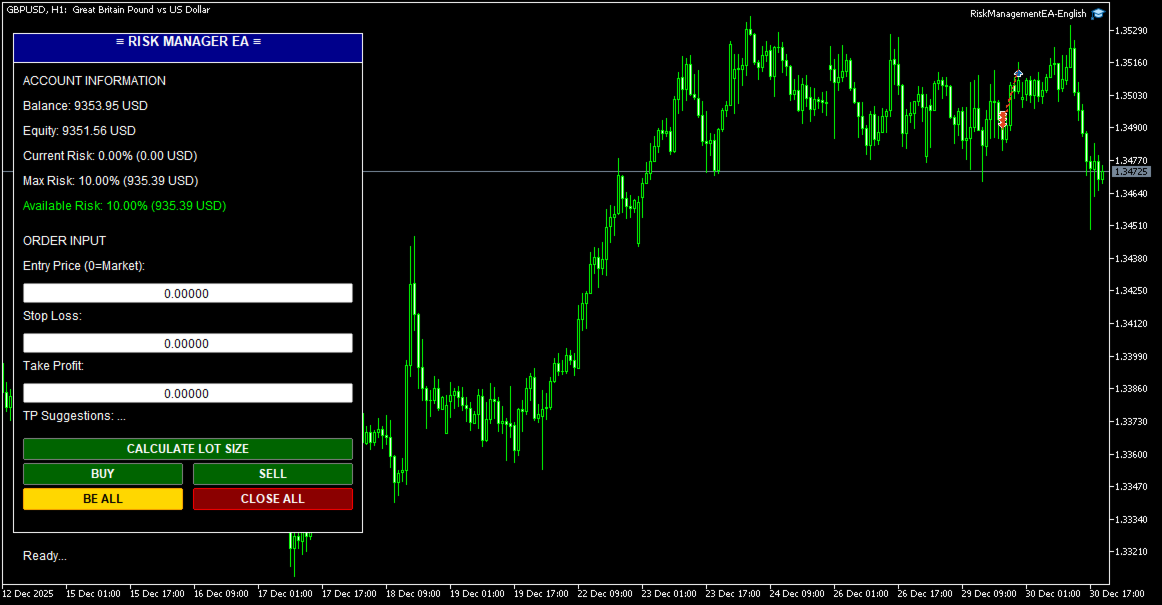
## 🖥️ User Interface

### Panel Layout

```
┌─────────────────────────────┐
│  ≡ RISK MANAGER EA ≡        │ ← Header (drag to move)
├─────────────────────────────┤
│ ACCOUNT INFORMATION         │
│ Balance: $10,000.00         │
│ Equity: $10,150.00          │
│ Current Risk: 2.5% ($250)   │
│ Max Risk: 10.0% ($1000)     │
│ Available Risk: 7.5% ($750) │
├─────────────────────────────┤
│ ORDER INPUT                 │
│ Entry Price (0=Market):     │
│ [0.00000]                   │
│ Stop Loss:                  │
│ [1.08000]                   │
│ Take Profit:                │
│ [1.09000]                   │
│ Suggestions: 1R=1.09, 2R=... │
├─────────────────────────────┤
│ [   CALCULATE LOT SIZE   ]  │
│ [   BUY   ] [   SELL   ]    │
│ [ BE ALL  ] [ CLOSE ALL ]   │
├─────────────────────────────┤
│ Status: Ready...            │
└─────────────────────────────┘
```

### Color Codes
- **Green buttons**: Action buttons (Buy/Sell/Calculate)
- **Gold button**: Break Even (BE ALL)
- **Red button**: Close All orders
- **Green text**: Available risk (positive)
- **Red text**: No available risk (at limit)

---

## 📝 How to Use

### Basic Trading Workflow

#### 1. **Market Order (No Entry)**
```
1. Leave Entry Price = 0
2. Enter Stop Loss (e.g., 1.08000)
3. (Optional) Enter Take Profit or leave 0 for auto TP
4. Click BUY or SELL
```

**Result:**
- Order opens immediately at market price
- If Auto TP enabled: TP calculated automatically
- Lot size calculated based on risk settings

#### 2. **Pending Order (With Entry)**
```
1. Enter Entry Price (e.g., 1.08500)
2. Enter Stop Loss (e.g., 1.08000)
3. (Optional) Enter Take Profit
4. Click BUY or SELL
```

**Result:**
- Pending order placed at Entry price
- Type determined automatically (Limit/Stop)
- Activates when price reaches entry

#### 3. **Split Orders**
```
1. Enable: InpUseSplitOrder = true
2. Set: InpNumSplits = 4
3. Set: InpAutoTP = true
4. Enter Entry (or 0 for market)
5. Enter Stop Loss
6. Click BUY or SELL
```

**Result:**
- 4 orders placed with same SL
- TP distributed automatically:
  - Order 1-2: TP = 1R
  - Order 3: TP = 2R
  - Order 4: TP = 4R

#### 4. **Calculate Lot Size**
```
1. Enter Stop Loss
2. Click "CALCULATE LOT SIZE"
```

**Result:**
- Shows calculated lot size
- Shows SL in points
- Shows current price

#### 5. **Break Even**
```
1. Wait for trade to be in profit
2. Click "BE ALL" button
3. Confirm in dialog box
```

**Result:**
- All orders of current symbol move to BE + 5 pips
- Orders of other symbols unaffected
- Safe from reversal

#### 6. **Close All**
```
1. Click "CLOSE ALL" button
2. Confirm in dialog box
```

**Result:**
- All orders of current symbol closed
- Orders of other symbols remain open
- P&L realized

---

## 🎓 Advanced Features

### 1. **Custom TP Ratios**

Change `InpTPRatios` to customize TP levels:

```
"1,1.5,3" → TP at 1R, 1.5R, 3R
"2,4,6,8" → TP at 2R, 4R, 6R, 8R
```

### 2. **Manual Split Mode**

Set `InpSplitModeInput = 0` for manual control:
- Enter different SL for each split
- System calculates proportional lot sizes
- More flexible for complex strategies

### 3. **Fixed Risk in USD**

Set `InpRiskTypeInput = 1` and `InpRiskValue = 100`:
- Every trade risks exactly $100
- Independent of account balance
- Good for consistent risk management

### 4. **Multiple Symbols**

Run EA on multiple charts simultaneously:
- Each chart manages its own symbol
- Break Even affects only current chart symbol
- Close All affects only current chart symbol
- Total risk tracked across all symbols

### 5. **Drag & Drop UI**

Click and drag the **header** (blue bar) to move panel anywhere on chart.

---

## 🔍 Troubleshooting

### Problem: EA doesn't open orders

**Check:**
1. AutoTrading enabled (Ctrl+E)
2. Stop Loss entered correctly
3. Available risk > 0
4. Account has sufficient margin
5. Symbol is tradable

### Problem: "Maximum risk limit reached"

**Solution:**
- Close some existing positions
- Or increase `InpMaxRiskPercent`
- Or reduce `InpRiskValue`

### Problem: Split orders not working

**Check:**
1. `InpUseSplitOrder = true`
2. `InpNumSplits` between 2-10
3. `InpAutoTP = true` (for auto TP)
4. Check Experts log for errors

### Problem: Auto TP not filling

**Check:**
1. `InpAutoTP = true`
2. `InpTPRatios` has valid values
3. Leave TP input = 0 (or blank)
4. Split orders enabled for distribution

### Problem: Break Even doesn't work

**Possible causes:**
- Orders already at or past BE
- No orders for current symbol
- SL already better than BE level

### Problem: Lot size too small/large

**Adjust:**
- Reduce/increase `InpRiskValue`
- Check SL distance (larger SL = smaller lot)
- Verify account balance

---

## 📊 Example Scenarios

### Scenario 1: Conservative Trader
```
InpMaxRiskPercent = 5.0
InpRiskTypeInput = 0
InpRiskValue = 0.5
InpUseSplitOrder = false
InpAutoTP = true
InpTPRatios = "2"
```
**Result:** Risk 0.5% per trade, TP at 2R (1:2 R:R)

### Scenario 2: Aggressive Scalper
```
InpMaxRiskPercent = 15.0
InpRiskTypeInput = 0
InpRiskValue = 2.0
InpUseSplitOrder = false
InpAutoTP = true
InpTPRatios = "1"
```
**Result:** Risk 2% per trade, quick 1R targets

### Scenario 3: Professional with Scaling
```
InpMaxRiskPercent = 10.0
InpRiskTypeInput = 0
InpRiskValue = 1.0
InpUseSplitOrder = true
InpNumSplits = 4
InpAutoTP = true
InpTPRatios = "1,2,4,6"
```
**Result:**
- 1% total risk split into 4 orders
- 2 orders close at 1R (secure profit)
- 1 order at 2R
- 1 order at 4R (let winners run)

---

## 📞 Support

For questions or issues:
- Telegram: [@CodingforDummies911](https://t.me/CodingforDummies911)
- Check EA logs: Tools → Options → Expert Advisors → Enable logs

---

## ⚠️ Disclaimer

Trading forex and CFDs carries high risk. This EA is a tool to assist with risk management but does not guarantee profits. Use at your own risk. Always test on demo account first.

---

## 📄 Version History

**v1.00** (2025)
- Initial release
- Risk management system
- Split orders with auto TP
- Entry price support (Market/Limit/Stop)
- Break Even functionality
- Close All (symbol-specific)
- Draggable UI panel

---

*Last updated: January 2025*
Produits recommandés
EA Pause Manager
David Enrique Barrera Moncayo
4.33 (6)
EA Pause Manager — Your Smart Risk Guard & Scheduler (MT5) What It Does - Stops conflicting trades before they happen (based on active market positions).   - Pauses or resumes your EAs automatically based on:     - A simple “leader” rule: the first EA to trade becomes the leader and blocks the rest.     - A time schedule you set (e.g. no trading in Asian session). - Note : Interlock logic is triggered by executed market orders, not by pending orders (Buy Stop / Sell Stop). Why It Matters - Prot
Scale & Trail Trade Manager (MT5) Your all-in-one solution for   precision trade execution and management . With just two clicks, you can size, place, and manage trades effortlessly—no calculators, no guesswork, no stress. Workflow Click 1:   Set your entry — instantly snaps to the live market price. Move Mouse:   Preview your stop-loss and four profit targets (1R–4R) in real time. Click 2:   Lock it in — the tool sizes your trade to your exact dollar risk (e.g., $3350) and manages it automatica
Blogs MQL5 : https://www.mql5.com/en/blogs/post/761446 Version MT4 : https://www.mql5.com/en/market/product/136790 Version MT5 : https://www.mql5.com/en/market/product/136791 Time Wizard est un assistant de trading professionnel conçu pour les traders exigeants qui recherchent rapidité, timing et contrôle de l’exécution sur un tableau de bord intuitif. Ce conseiller expert est conçu pour le trading événementiel, l’exécution programmée et la gestion semi-automatique rapide des ordres. Il vou
Click Trading
Jawad Tauheed
5 (2)
One Click Trading – Auto TP SL Developer TraderLinkz Version 1.00 Category Utility What it does Adds missing TP and SL to your manual trades and pending orders Sets them once per ticket Lets you move TP and SL afterward Works on hedging and netting accounts Scans on every tick and reacts on trade events Why you want it You place faster entries You get consistent risk and exit targets You reduce fat finger errors You keep full manual control Quick start Attach the EA to any chart Keep TP and SL e
FREE
Close All Pro MT5 – Fast PnL Control is a powerful trade manager MT5 utility that gives you total control over your trades. With a single click, you can close all MT5 orders, monitor real-time profit and loss, and manage your floating PnL directly from a clean on-chart panel. The tool is lightweight, responsive, and built to help traders save time, reduce emotional stress, and maintain focus. Whether you trade manually or through an EA, this MT5 profit panel provides the visibility and precisio
25R - WASD Order is a visual risk management EA for MetaTrader 5 that combines gaming-style WASD keyboard controls with interactive chart drawing for precise order placement. Designed for active traders who value speed and accuracy, it lets you visually plan trades by dragging entry and stop-loss lines directly on the chart, while automatically calculating position size based on your risk percentage. The tool displays color-coded profit/loss zones with real-time risk metrics, supports automatic
EA Monitor Dashboard
Geraldo Fabiano D Assuncao Braga
EA Monitor Dashboard Panneau utilitaire de surveillance pour MetaTrader 5 EA Monitor Dashboard est un indicateur utilitaire pour MetaTrader 5 conçu pour afficher des informations opérationnelles directement sur le graphique. Le panneau affiche des informations liées à : surveillance du spread timeframe actif timer de clôture des bougies surveillance des Magic Numbers statut des positions ouvertes informations sur les résultats des opérations Le panneau affiche des informations mises à jour direc
FREE
TradeDock Pro
Alex Michael Murray
TradeDock Pro (MT5) — One-Click Trade Manager Panel TradeDock Pro is a sleek and professional one-click trade panel for MetaTrader 5 designed for fast manual execution and simple trade management. Built for traders who want a clean interface, quick order placement, and essential management tools — without complicated settings or typing. Can be used on any market. KEY FEATURES One-Click BUY / SELL Lot size control on chart (0.01 – 99.99) SL toggle + SL in points TP toggle + TP in points Trailing
FREE
BerelzBridge
Barend Willem Van Den Berg
BerelzBridge Pro Pont de données MT5 vers JSON pour toutes les périodes avec informations sur le compte. Aperçu BerelzBridge Pro est un indicateur MT5 qui exporte les données de marché en direct vers un fichier JSON sur le disque. Il écrit les prix d'achat et de vente, le spread, le volume tick, les statistiques quotidiennes, les informations du compte et les barres OHLCV pour les 9 périodes. Le fichier est mis à jour à un intervalle configurable avec une valeur par défaut de 2 secondes. L'indi
This EA help traders close their open positions at a specific MT5 server time before news or before ending of H4 timeframe of the morning New York session to protect their profit or prevent from unexpected loss. The default setting is 19:30 (HH:MM) and you can adjust as require to fit trading strategies. It very user friendly where contain only single input parameter to specify a time that position will be closed.  
️ AutoProtect R13: Your Intelligent Trade Guardian Tired of manual management and emotional exits? AutoProtect R13 is a professional-grade utility designed to automate your risk management. This tool ensures your account stays protected 24/7. WHAT’S NEW IN V1.1 Optimized Execution: Faster processing for high-volatility market conditions. New User Interface: Professional GUI Dialog panel (replacing basic chart comments). Smart Break-Even+: Move Stop Loss to entry plus a small profit buffer
FREE
Clonify PRO MT5
Andrej Hermann
5 (1)
Clonify PRO - Copieur de transactions local pour MT5 et MT4            (  Local trade copier for MT4   https://www.mql5.com/ru/market/product/15992   ) Outil professionnel pour copier des transactions entre comptes MT5 et MT4 (via le dossier partagé "Common"). FONCTIONNALITÉS: 1. ÉMETTEUR (Sender): Exporte les transactions en temps réel Envoie tout (sans filtres) Ne nécessite aucun paramètre supplémentaire 2. RÉCEPTEUR (Receiver): Copie les transactions. Magic Number: Utilise l'ID du compte de l
Französisch Vidéo explicative sur YouTube : https://youtu.be/OJXERVs405g Keyboard Scalper Pro – Explication de l’outil Keyboard Scalper Pro est un outil de scalping manuel conçu pour exécuter et gérer les trades entièrement via des raccourcis clavier , permettant un trading rapide, précis et sans distraction . L’outil n’automatise aucune décision de trading . Toutes les actions sont déclenchées manuellement par le trader à l’aide de touches prédéfinies. Fonctions des raccourcis clavier W –
Boleta de negociação, adiciona automáticamente as ordens Take Profit e Stop Loss quando excutada uma ordem de compra ou venda. Ao apertar as teclas de atalho (A, D, ou TAB), serão inseridas duas linhas de pre-visualização, representando as futuras ordens de take profit (azul) e stop loss (vermelho), as quais irão manter o distanciamento especificado pelo usuário. Ditas ordens só serão adicionadas ao ser executada a ordem inicial. Ao operar a mercado, as ordens pendentes de take profit, e stop lo
Symbol Switcher Pro Symbol Switcher Pro est un panneau utilitaire gratuit pour MetaTrader 5 qui vous permet de naviguer entre 40 symboles de trading depuis une interface unique et personnalisable. Le P&L est affiché en temps réel pour chaque paire, vous permettant ainsi de connaître votre position sans quitter le graphique. Présentation Gérer plusieurs symboles dans MetaTrader 5 implique généralement de jongler entre les fenêtres du graphique, de perdre le fil et de perdre du temps. Symbol Sw
FREE
Core function Intelligent transaction management one-click opening and closing operation, which supports user-defined lots to set multiple closing modes: all closing, closing by direction and closing by profit and loss status. Professional risk control, real-time risk monitoring and spread control to avoid high-cost trading environment. Visual control panel has an intuitive graphical interface, and all functions can be operated with one button to display position information, profit and loss sta
FREE
Tick Volume Chart - un outil unique pour créer des graphiques basés sur les volumes de ticks dans MetaTrader 5 . Grâce à Tick Volume Chart , vous pouvez construire des graphiques où chaque bougie est formée non pas en fonction du temps, mais selon un nombre défini de ticks. Cela vous offre une précision d'analyse idéale de l'activité du marché, inaccessible sur les graphiques temporels classiques. Vous pouvez utiliser tous les indicateurs et conseillers experts compatibles avec les symboles pers
Dynamic Candle Timer
Channaphat Yamuangmorn
Overview The Dynamic Candle Timer is a lightweight and efficient utility designed for MetaTrader 5. Unlike traditional candle timers that remain static in the corner of the chart, this indicator dynamically attaches to the current Bid price line. This allows traders to monitor the remaining candle time directly at the point of action, enhancing focus during fast-paced market movements. It is highly suitable for day traders and scalpers operating on XAUUSD, Forex, Crypto, or Indices. Key Feature
FREE
Boleta Easy Trade
Silvio Garcia Wohl
When executing an order, whether through the Metatrader ticket on a computer or the Metatrader app on a mobile device, either manual or pending, Easy Trade will automatically set the take profit and stop loss levels, as well as a limit order with its respective take profit and stop loss levels. It follows the trading strategy for market open (US30, US100, US500), but it can be applied to any market asset.
FREE
Auto Position Manager is a unique services application of its kind across the entire MQL5 market, setting new standards for applications of this type. The Services app is a compact but powerful tool that significantly impacts the entire system. Its user-friendly interface and start-stop system make it excellent for automating repetitive tasks. Once it's set up, the service can be toggled on or off with a single click. Crucially, the configuration persists even if the platform is turned off and
FREE
Price Action Builder Premium
Florea E. Sorin-Mihai Persoana Fizica Autorizata
The Price Action Builder Premium expert advisor is an extension of the freely available Price Action Builder Basic :     it provides 2 new candlestick patterns besides the pinbar (already available in the basic edition);     in most configurations, backtesting usually shows an average yearly return rate increased by approximately 50%;     the account growth curve is also smoother, due to larger number of trades, almost double (2x) compared to the free version. While aimed primarily at obtaining
When executing an order, whether through the Metatrader ticket on a computer or the Metatrader app on a mobile device, either manual or pending, Easy Trade will automatically set the take profit and stop loss levels, as well as a limit order with its respective take profit and stop loss levels. It follows the trading strategy for market open (US30, US100, US500), but it can be applied to any market asset.
MT5 Trades To Telegram
Mohammad Taher Halimi Tabrizi
The Trades To Telegram is a powerful and customizable trading assistant designed to bridge the gap between the MetaTrader 5 platform and the popular messaging app, Telegram. This bot serves as a crucial tool for traders, providing them with timely and accurate trading signals, alerts, and updates directly to their Telegram accounts. Key Features: Real-Time Signals: The bot monitors the MetaTrader 5 platform continuously, detecting trading signals, such as Opening/Closing of  buy/sell orders , a
EasyTradePad for MT5
Sergey Batudayev
5 (5)
EasyTradePad – Panneau de trading pour MetaTrader 5 EasyTradePad   est un outil de trading manuel et semi-automatisé. Son interface permet une gestion rapide des ordres et des positions, ainsi que des calculs de gestion des risques en un clic. Caractéristiques du panneau : Ouvrir et fermer des transactions avec un risque prédéfini (% ou devise de dépôt) Définissez SL et TP en points, en pourcentages ou en valeurs monétaires Calculer automatiquement le ratio risque/récompense Déplacez le stop lo
Format Charts
Vital H B Engenharia Ltda
5 (1)
If you use several charts open at the same time, you know how boring it is to apply formats to each chart individually. This script can change all open charts using a single command. Parameters: 1 - Choose symbol to put on charts: apply the selected symbol to all charts. If "current", it does not change the symbol; 2 - Choose timeframe or leave empty: apply the selected timeframe to all charts. If "CURRENT", it does not change the timeframe; 3 - Apply template to the charts: If true, apply the t
FREE
Rosy Pro Panel MT5
Theresia Yovitha Herwanda
5 (1)
Download DEMO here  https://www.mql5.com/en/blogs/post/759772 An ultimate panel you've never seen before.  Compact and nice Trade panel with large Total P/L and it's percentage display. Groups for trades summary available: Ticket, Symbol, Type, Category, and Magic. Average price field helps you know your trading average price and direction. Set magic and comment of your trading in a very easy way. Group closing by symbol, type, category or magic - only by one click. Close All button for a quick
Trade Manager JM
Jonathan Ferreira De Magalhaes
Efficient Manual Trading Panel for Professional Traders === TRADING SESSIONS DISPLAY & BAR TIMER INCLUDED === Trade Manager JM is a comprehensive, intuitive utility designed to revolutionize manual order execution and management on MetaTrader 5. Built for speed and precision, this panel consolidates everything a serious manual trader needs into a single, sleek interface. Stop wasting precious seconds calculating lot sizes or manually setting SL/TP levels. Trade Manager JM allows you to focus pur
BreakEven ProSync
Rosen Kanev Kanev
5 (1)
For DEMO - please contact me and I will send you demo version to test the product. BreakEven ProSync – Advanced Trade Management Tool for MetaTrader 5 Overview The  BreakEven ProSync  is a powerful utility designed to enhance trade management in   MetaTrader 5 . It provides   one-click break-even functionality ,   hotkey trading ,   position synchronization , and   visual SL/TP tracking —all in a single, user-friendly tool. Perfect for manual traders who want   faster execution   and   better r
Quick Trade Panel Pro
Nicolas Olivier Menetrey
5 (1)
Panel de trading one-click avec gestion automatique du lot et du risque Quick Trade Panel Pro est un panneau de trading intuitif conçu pour les traders qui veulent exécuter leurs ordres rapidement tout en gardant un contrôle total sur leur risque. Fonctionnalités principales Calcul automatique de la taille du lot en fonction d'un pourcentage de votre marge disponible Stop Loss configurable en points, appliqué automatiquement à chaque trade Lot verrouillé pendant une série de trades pour garanti
FREE
THIS PRODUCT CAN NOT BE TEST IN STRATEGY TESTER. PLEASE TRY DEMO VERSION: https://www.mql5.com/en/market/product/58096 RISK AND TRADE MANAGER RISK AND TRADE MANAGER   is an advanced trading panel designed for manual trading.   Utility helps to manage trades effectively and efficiently with a single click. MAIN FEATURES Convert and display Stop Loss (SL)   Pips into % and amount to view the clear picture of the trades if SL hits. Fund allocation for individual trade in % and in amount. Get alert
Les acheteurs de ce produit ont également acheté
Trade Assistant MT5
Evgeniy Kravchenko
4.42 (211)
It helps to calculate the risk per trade, the easy installation of a new order, order management with partial closing functions, trailing stop of 7 types and other useful functions. Additional materials and instructions Installation instructions - Application instructions - Trial version of the application for a demo account Line function -   shows on the chart the Opening line, Stop Loss, Take Profit. With this function it is easy to set a new order and see its additional characteristics bef
Bienvenue sur Trade Manager EA, l’outil ultime de gestion des risques conçu pour rendre le trading plus intuitif, précis et efficace. Ce n’est pas seulement un outil d’exécution d’ordres ; c’est une solution complète pour la planification des trades, la gestion des positions et le contrôle des risques. Que vous soyez débutant, trader expérimenté ou scalpeur ayant besoin d’une exécution rapide, Trade Manager EA s’adapte à vos besoins, offrant une flexibilité sur tous les marchés, des devises et i
Quant AI Agents is NOT AN Expert Advisor. Quant AI Agents   is a   multi-agent AI trading framework   that turns natural-language strategy prompts into live.  WANT THE SAME RESULTS AS MY LIVE SIGNAL?   Use the exact same brokers I do:   IC MARKETS , IC TRADING   .  Unlike the centralized stock market, Forex has no single, unified price feed.  Every broker sources liquidity from different providers, creating unique data streams. Other brokers can only achieve trading performance equivalent to 60
TradePanel MT5
Alfiya Fazylova
4.87 (155)
Trade Panel est un assistant commercial multifonction. L'application contient plus de 50 fonctions de trading pour le trading manuel et permet d'automatiser la plupart des tâches commerciales. Avant l'achat, vous pouvez tester la version de démonstration sur un compte de démonstration. Télécharger la version d'essai de l'application pour un compte de démonstration : https://www.mql5.com/fr/blogs/post/762644 . Instructions complètes ici . Commerce. Permet d'effectuer des opérations commerciales e
Version Bêta Le Telegram to MT5 Signal Trader est presque prêt pour la sortie officielle en version alpha. Certaines fonctionnalités sont encore en développement et vous pourriez rencontrer de petits bugs. Si vous rencontrez des problèmes, merci de les signaler, vos retours aident à améliorer le logiciel pour tout le monde. Telegram to MT5 Signal Trader est un outil puissant qui copie automatiquement les signaux de trading depuis des chaînes ou groupes Telegram vers votre compte MetaTrader 5 .
Farmed Hedge Yield Farming | All Markets (Manual - Hybrid - Semi/Automated EA) MULTI-ASSET SUPPORT Trade any asset available on your broker - Forex: Major, Minor, Exotic pairs - Crypto: BTC, ETH, XRP, SOL, BNB - Stocks: Apple, Tesla, Amazon, Google, etc. - Commodities: Gold, Silver, Oil, Gas - Indices: US30, NAS100, SPX500, DAX40 - Any CFD your broker offers VERIFIED TRADING RESULTS - Farmed Hedge Yield Axi Copy:  https://www.mql5.com/en/signals/2356376 - Farmed Hedge Yield Exn Copy:   https:/
Power Candles Strategy Scanner - Outil de recherche de configurations multi-symboles à optimisation automatique Le Power Candles Strategy Scanner utilise le même moteur d'auto-optimisation que celui qui alimente l'indicateur Power Candles, pour chaque symbole de votre Market Watch, en parallèle. Un panneau vous indique quels symboles sont statistiquement négociables à l'instant, quelle stratégie est la plus performante pour chacun, la paire Stop Loss / Take Profit optimale, et vous alerte dès qu
YuClusters
Yury Kulikov
4.93 (43)
Attention: You can view the program operation in the free version  YuClusters DEMO .  YuClusters is a professional market analysis system. The trader has unique opportunities to analyze the flow of orders, trade volumes, price movements using various charts, profiles, indicators, and graphical objects. YuClusters operates on data based on Time&Sales or ticks information, depending on what is available in the quotes of a financial instrument. YuClusters allows you to build graphs by combining da
Premium Trade Manager - Gestion de trades rapide et disciplinée pour MetaTrader 5 Premium Trade Manager est fait pour les traders qui veulent garder leur attention sur la décision pendant que le panneau prend en charge la routine : dimensionnement, placement, partiels, trailing, actualités et limites de prop firm, traités de la même façon disciplinée à chaque trade. C'est un panneau rapide sur le graphique pour MetaTrader 5 qui supprime le travail mécanique de chaque trade. Vous décidez de la di
Exp COPYLOT CLIENT for MT5
Vladislav Andruschenko
3.91 (33)
Copieur professionnel de trades pour MetaTrader 5 Un copieur de trades rapide, professionnel et fiable pour MetaTrader . COPYLOT permet de copier des trades Forex entre les terminaux MT4 et MT5 avec prise en charge des comptes Hedge et Netting . La version MT5 de COPYLOT prend en charge : - MT5 Hedge → MT5 Hedge - MT5 Hedge → MT5 Netting - MT5 Netting → MT5 Hedge - MT5 Netting → MT5 Netting - MT4 → MT5 Hedge - MT4 → MT5 Netting Version MT4 Description complète + DEMO + PDF Comment acheter Comme
AntiOverfit PRO MT5
Enrique Enguix
5 (5)
Avant d’acheter un EA, vérifiez s’il tient vraiment la route ou s’il a simplement eu de la chance en backtest. La plupart des robots se vendent avec un beau backtest. Une courbe qui monte. Un bon profit factor. Très peu de doutes. Et pourtant, beaucoup de ces EA s’effondrent dès que le marché cesse de se comporter comme dans cet historique précis. Pourquoi ? Parce qu’un backtest ne prouve qu’une seule chose : que cette stratégie a fonctionné sur un parcours de prix bien précis. Il ne prouve pas
MT5 to Telegram Signal Provider est un utilitaire facile à utiliser et entièrement personnalisable qui permet l'envoi de signaux spécifiés vers un chat, un canal ou un groupe Telegram, transformant ainsi votre compte en fournisseur de signaux. Contrairement à la plupart des produits concurrents, il n'utilise pas d'importations DLL. [ Démonstration ] [ Manuel ] [ Version MT4 ] [ Version Discord ] [ Canal Telegram ]  New: [ Telegram To MT5 ] Configuration Un guide utilisateur étape par étape est
Ultimate Extractor
Clifton Creath
5 (9)
Ultimate Extractor - Professional Trading Analytics for MT5 *****this is the local HTML version of Ultimate Extractor. !!!!!it is not compatible with Cloud!!!! For the online version please reach out to me directly****** Ultimate Extractor transforms your MetaTrader 5 trading history into actionable insights with comprehensive analytics, interactive charts, and real-time performance tracking. What It Does Automatically analyzes your MT5 trading history across all Expert Advisors and generates

Trade Manager DaneTrades
Levi Dane Benjamin
4.28 (29)
Trade Manager pour vous aider à entrer et sortir rapidement des transactions tout en calculant automatiquement votre risque. Y compris des fonctionnalités pour vous aider à éviter le sur-trading, le trading de vengeance et le trading émotionnel. Les transactions peuvent être gérées automatiquement et les mesures de performances du compte peuvent être visualisées dans un graphique. Ces fonctionnalités rendent ce panneau idéal pour tous les traders manuels et contribuent à améliorer la plateforme
Panneau de trading pour MetaTrader 5 — contrôle professionnel du trading en un clic depuis le graphique et le clavier Un panneau de trading avancé conçu pour les traders actifs, afin d’ouvrir, gérer et clôturer des positions bien plus rapidement qu’avec l’interface standard de MetaTrader. Cette solution s’adresse à ceux qui veulent contrôler positions, ordres en attente, profit global et exécution depuis un seul espace de travail professionnel. Il ne s’agit pas d’un simple utilitaire. C’est un
Custom Alerts AIO : Surveillez tous les marchés à la fois — sans aucune configuration Présentation Custom Alerts AIO est une solution de surveillance du marché prête à l’emploi, sans configuration nécessaire. Tous les indicateurs requis — FX Power, FX Volume, FX Dynamic, FX Levels, IX Power — sont directement intégrés. Aucun graphique n’est affiché, ce qui rend cet outil idéal pour la génération d’alertes en temps réel. Il prend en charge toutes les classes d’actifs proposées par votre courtie
Poc Breakout Signal: The Ultimate Institutional Order Flow & Price Action System Elevate your trading with Poc Breakout, a comprehensive technical analysis tool designed to bridge the gap between retail trading and institutional market understanding. This all-in-one system combines powerful Buy/Sell signals, advanced Volume Profile analysis, real-time Order Flow (Depth of Market), and critical macroeconomic data to give you a clear, unambiguous edge in the markets. Poc Breakout Signal decodes c
Timeless Charts
Samuel Manoel De Souza
5 (5)
Timeless Charts est un utilitaire de trading tout-en-un destiné aux traders professionnels. Il combine des types de graphiques personnalisés tels que les graphiques en secondes et Renko avec une analyse avancée du flux d’ordre s utilisant Footprints , Clusters , Profils de Volume , études VWAP et outils d’analyse ancrés pour une compréhension plus approfondie du marché. Le trading et la gestion des positions sont effectués directement depuis le graphique via un panneau intégré de gestion des ord
The News Filter MT5
Leolouiski Gan
4.77 (22)
Ce produit filtre tous les conseillers experts et les graphiques manuels pendant les heures de publication des actualités, de sorte que vous n'avez pas à vous soucier des pics de prix soudains qui pourraient détruire vos configurations de trading manuelles ou les transactions entrées par d'autres conseillers experts. Ce produit est également livré avec un système de gestion des ordres complet qui peut gérer vos positions ouvertes et vos ordres en attente avant la publication de toute actualité.
Footprint Chart Pro — Professional OrderFlow EA for MetaTrader 5 Version 6.34 | Professional tool for real traders | Institutional-Grade Visualization DEMO USERS - PLEASE SELECT EVERY TICK / REAL TICK WHEN TESTING AND YOU HAVE DOWNLOADED HISTORICAL DATA. IF YOU SEE A WAITING SCREEN AND IT IS NOT DOWNLOADING, IT MEANS YOU HAVE LOW HISTORICAL DATA. TRY 1 MIN AND 5 MIN FIRST ON 1 DAY DATA. ONE DAY DATA SHOULD BE THE NEWEST AND MOST CURRENT DATE. PLEASE WAIT UNTIL THE MARKET HAS ROLLED OVER PERIOD.
Signal TradingView to MT5 Pro Automator Exécution professionnelle instantanée entre TradingView et MetaTrader 5 Automatisez votre stratégie de trading avec le pont de communication le plus robuste entre les alertes TradingView et l'exécution réelle sur MT5. Conçu pour les traders qui exigent vitesse, flexibilité et une gestion des risques impeccable, cet Expert Advisor transforme tout message d'alerte en un ordre au marché ou à cours limité précis. POINTS FORTS ET AVANTAGES Moteur d'analyse univ
AlgoRadar
Stephen J Martret
5 (4)
AlgoRadar is an on-chart analytics dashboard for MT5 that aggregates Expert Advisor performance across multiple accounts, brokers, and platforms, including both MT4 and MT5 data, into a single live view on your MT5 chart. All analysis runs from the chart interface, with no external applications or manual report processing required. EA Analysis and Ranking For traders running multiple Expert Advisors, AlgoRadar provides a consolidated view of each EA's performance across accounts. Active EAs a
Anchor Trade Manager
Kalinskie Gilliam
5 (2)
Anchor: The EA Manager Run your full EA portfolio without conflicts, without stacked risk, and without watching every chart yourself. Anchor coordinates up to 64 Expert Advisors on a single account so only one trades at a time. Attach Anchor to any chart. Type your EA names and magic numbers in one line. Anchor handles the rest. Built for portfolios. Built for discipline. Built for prop firms. The Problem Running multiple EAs on the same account creates risk. Two gold EAs can open opposite posit
The product will copy all telegram signal to MT5 ( which you are member) , also it can work as remote copier.  Easy to set up, copy order instant, can work with almost signal formats, image signal,  s upport to translate other language to English Work with all type of channel or group, even channel have "Restrict Saving Content", work with  multi channel, multi MT5 Work as remote copier: with signal have ticket number, it will copy exactly via ticket number. Support to backtest signal. How to s
Telegram to MT5 Coppy
Sergey Batudayev
5 (9)
Télégramme vers MT5 :   la solution ultime pour copier des signaux Simplifiez votre trading avec Telegram vers MT5, l'outil moderne qui copie les signaux de trading directement des canaux et chats Telegram vers votre plateforme MetaTrader 5, sans DLL. Cette solution puissante garantit une exécution précise des signaux, de nombreuses options de personnalisation, un gain de temps et une efficacité accrue. [ Instructions and DEMO ] Caractéristiques principales Intégration directe de l'API Telegram
DrawDown Limiter
Haidar Lionel Haj Ali
5 (20)
Expert Advisor "Drawdown Limiter"  Vous êtes au bon endroit si vous recherchez un contrôle de drawdown, un limiteur de drawdown, une protection du solde, une protection de l'équité ou une limite quotidienne de drawdown en rapport avec les entreprises de gestion de capitaux (Prop Firm), FTMO, My Forex Fund, ou si vous souhaitez protéger votre compte de trading. Avez-vous déjà eu du mal à contrôler votre drawdown en tradant sur des comptes financés ? Cet EA est fait pour vous. Les entreprises de
MT5 Trading Deck
Manuel Michiels
5 (2)
One button. One trade. MT5 Trading Deck is a hotkey trading panel for MetaTrader 5 that turns the platform into a keyboard-driven execution cockpit. Stop loss, take profit and lot size are pre-calculated for every key; the moment you press, a market order is live on the broker. A complete technical user manual is attached in the product Comments section. It documents every input parameter, the full hotkey map, the recommended Stream Deck XL layout, and the advanced workflows for Pre-Limit orders
Auto Trade Copier is designed to copy trades to multiple MT4, MT5 and cTrader accounts/terminals with 100% accuracy. The provider and receiver accounts must be on the same PC/VPS. With this tool, you can copy trades to receiver accounts on the same PC/VPS. All trading actions will be copied from provider to receiver perfectly. This version can be used on MT5 accounts only. For MT4 accounts, you must use Auto Trade Copier (for MT4). Reference: - For MT4 receiver, please download Trade Receiver Fr
SMC Trade Pilot MT5 Assistant de trading semi-automatique pour les traders Smart Money Concepts. Recevez les signaux directement sur Telegram avec capture du graphique, puis placez le trade en un seul appui. Gérez vos positions depuis votre téléphone, même loin de votre ordinateur. Le problème résolu Les setups Smart Money n'attendent pas. Les Order Blocks et les Liquidity Sweeps se forment pendant l'ouverture de Londres, de New York ou en plein milieu de la session asiatique, souvent quand vous
Overview AlphaForge Range Chart is a professional non-trading range-bar charting utility for MetaTrader 5. It generates live Range charts as MT5 custom symbols, helping traders analyze price movement through fixed-range bars instead of standard time-based candles. Unlike visual-only overlays, the generated Range chart behaves like a real MT5 custom-symbol chart. This means you can open it as a normal chart, apply templates, draw analysis objects, and add indicators directly to the Range chart fo
Plus de l'auteur
Volume indicator judging level of volume per bar accordingly to Volume Spread Analysis rules. It allows either to set static volume levels or dynamic ones based on ratio comparable to Moving Average. Bars are coloured based on ratio or static levels, visually presenting level of Volume (low, average, high, ultra high). Release Notes - Fixed and optimised calculations of Session Average Volume - added predefined settings for time to calculate Session Average for EU and US markets
FREE
Introducing the Machine Learning Price Target Predictions, a cutting-edge trading tool that leverages kernel regression to provide accurate price targets and enhance your trading strategy. This indicator combines trend-based signals with advanced machine learning techniques, offering predictive insights into potential price movements. Perfect for traders looking to make data-driven decisions with confidence. What is Kernel Regression and How It Works Kernel regression is a non-parametric mach
The   Volume SuperTrend AI   is an advanced technical indicator used to predict trends in price movements by utilizing a combination of traditional SuperTrend calculation and AI techniques, particularly the k-nearest neighbors (KNN) algorithm. The Volume SuperTrend AI is designed to provide traders with insights into potential market trends, using both volume-weighted moving averages (VWMA) and the k-nearest neighbors (KNN) algorithm. By combining these approaches, the indicator aims to offer
Filtrer:
Aucun avis
Répondre à l'avis