THV Easy SLTP Manager Mt5
- Experts
-
Trong Khanh Phan
 About Me:
I am a professional trader and MQL5 developer with years of experience creating automated trading systems and indicators for the global trading community. My focus is on building reliable, efficient, and easy-to-use tools for traders of all levels. - Versione: 1.20
- Aggiornato: 27 dicembre 2025
- Attivazioni: 10
Hi Traders,
This MT5 EA provides you with the following impressive & powerful features (with easy configurations & smooth operations):
1- Trade directly using your keyboard: open Buy/Sell orders, close profitable orders, close losing orders, close Buy orders, close Sell orders or close all orders instantly (very fast closure). You can define your desired keyboard to each function.5-If you turn the button off, the SL and TP lines will be removed from the chart, and all Stop Loss and Take Profit values will be cleared.
The EA also has feature to auto open a Buy or Sell position & set the SL TP (per Order or per Averaging Price) according to your input settings.
Note: You should hide "Trade Levels" on your chart for convenient dragging.
Configurations:
1//
- Open Buy: Allow the EA to open a Buy position automatically with no conditions
- Open Sell: Allow the EA to open a Sell position automatically with no conditions
- Lot: volume to open (for auto or keyboard Buy//Sell orders)
- Magic Number: define the magic number
//
- X Coordinate: set the distance from left to the button (pixels)
- Y Coordinate: set the distance from top to the button (pixels)
2//
- Shift the label to the right (+) or left (-) in candles: ex: 10 will shift the label 10 candles to the right, -10 will shift the label 10 candles to the left (from the current candle)
- Shift the label up or down in points: ex: 1000: the label space to the SL or TP line will be 1000 points. 2000: the label space to the SL or TP line will be 2000 points
- SL line color: set your desired SL color
- TP line color: set your desired TP color
3//
- Apply SLTP per Order: True: set SL TP per open order seprately. False: disable SL TP per order
- Apply SLTP per Averaging Price: True: set SL TP of all open orders to the same level from the averaging Buy/Sell price. This will override order's SL TP. False: disable SL TP per Averaging Price
- TP in points: set your desired TP level in points. Set = 0 will delete the SL
- SL in points: set your desired SL level in points. Set = 0 will delete the TP
4//Keyboard Trading: You can change to other Key you like (A to Z or main keyboard numeric 0 to 9. Leave blank to ignore the relative function).
- Key to open a Buy position: default: "ArrowUp". If you press the ArrowUp Key on the keyboard, the EA will open a Buy position.
- Key to open a Sell position: default: "ArrowDown". If you press the ArrowDown Key on the keyboard, the EA will open a Sell position.
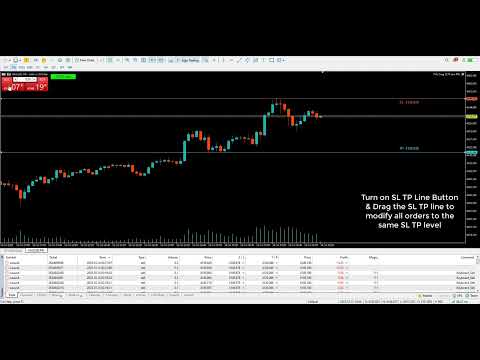
- Key to turn on SLTP Button: default: "F". If you press the F Key on the keyboard, the EA will turn on the button SLTP Line and draw a SL & a TP line to the chart & set the SLTP of your open positions to the SL TP line level. If you have open Buy positions, drag the SL to below the averaging Buy price & drag the TP line to above the averaging Buy price. If you have open Sell positions, drag the SL to above the averaging Buy price & drag the TP line to below the averaging Buy price. If you move (drag) the SL or TP line -> the SL or TP of all open orders willl be modified to the new level of the SL or TP line.
Note: You can also click to the button to turn it on/off
//
- Key to close all profitable positions: default: "C". If you press the C Key on the keyboard, the EA will close all profitable positions (both Buy & Sell of the same symbol)
- Key to close all losing positions: default: "X". If you press the X Key on the keyboard, the EA will close all losing positions (both Buy & Sell of the same symbol)
- Key to close all positions: default: "Z". If you press the Z Key on the keyboard, the EA will close all positions (both Buy & Sell of the same symbol)
//
- Key to close all profitable Buy positions: default: "D". If you press the D Key on the keyboard, the EA will close all profitable Buy positions (same symbol)
- Key to close all losing Buy positions: default: "S". If you press the S Key on the keyboard, the EA will close all losing Buy positions (same symbol)
- Key to close all Buy positions: default: "A". If you press the A Key on the keyboard, the EA will close all Buy positions (same symbol)
//
- Key to close all profitable Sell positions: default: "E". If you press the E Key on the keyboard, the EA will close all profitable Sell positions (same symbol)
- Key to close all losing Sell positions: default: "W". If you press the W Key on the keyboard, the EA will close all losing Sell positions (same symbol)
- Key to close all Sell positions: default: "Q". If you press the Q Key on the keyboard, the EA will close all Sell positions (same symbol)
Happy Trading !