Goldmarie EA
- Experts
-
Tibor Hartmut Sturm
 Ich bin ein Trader, welcher die Vielzahl der nutzlosen und überteuerten Indikatoren mit nützlichen Indikatoren und EA´s beendet. Ich trade seit über 15 Jahren und war der einzige Deutsche Finalist bis jetzt bei "The Real Forex Trader" -Serie 4.
 - Versione: 1.0
- Attivazioni: 5
Goldmarie EA
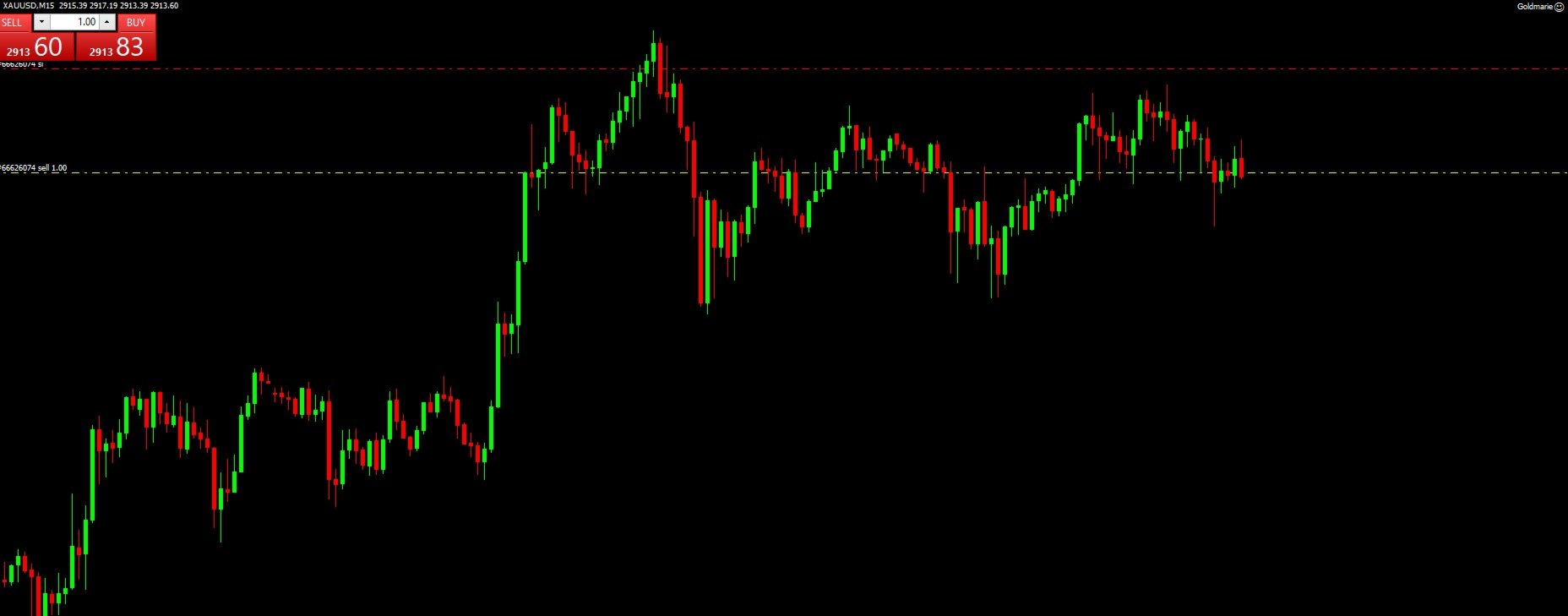
is an automated scalping Expert Advisor designed for XAU/USD (Gold) trading on M15 timeframe. It uses a combination of RSI, Bollinger Bands, and dynamic lot sizing to identify high-probability trade setups. The EA also features an advanced risk management system, preventing overtrading and margin issues.
The price for Goldmarie EA will increase by every 10 sales. Final price U$D 999
This guide explains Goldmarie EA's features, including the built-in dashboard and how to configure the EA.
Technical Analysis-Based Trading Strategy
- Uses RSI (Relative Strength Index) to detect overbought (>70) and oversold (<30) conditions
- Utilizes Bollinger Bands (20, 2.0 deviation) for price breakout detection
- Dynamic Lot Sizing adjusts trade volume based on account balance and risk percentage
Adv
The on-screen dashboard will provide real-time information about trading conditions and active trades. Here are the planned features:
Key Information Displayed on the Dashboard
Current RSI Value – Displays the latest RSI reading, showing if the market is overbought (>70) or oversold (<30)
Bollinger Band Position – Indicates if the price is near the upper or lower Bollinger Band, helping to confirm trade signals
Active Trade Count – Shows the number of currently open trades
Current Account Balance & Free Margin – Displays available margin to prevent over-leveraging
Lot Size Used in Next Trade – Displays the dynamically adjusted lot size based on risk management settings
Trade Execution Status – Provides feedback on whether a trade was successfully opened or failed (Error Codes)
Trade Profit & Loss Summary – Shows total profit/loss of open trades in real-time
Advanced Risk Management
- Automatic Stop-Loss & Take-Profit Calculation based on predefined pip values
- Dynamic Lot Sizing ensures trades fit within the available margin
- No Martingale or Grid Strategy (safe and controlled risk management)
- Maximum Trade Limitation prevents overtrading
Smart Trade Execution & Management
- Order Execution with Slippage Control
- Trade Monitoring & Auto-Closing when the profit target is reached
- Margin Protection Mechanism prevents opening trades when account balance is too low
User-Friendly Interface & Dashboard (Planned Update)
- On-Chart Dashboard displaying key trading parameters (Lot Size, Open Trades, Profit/Loss, etc.)
- Real-Time RSI & Bollinger Band Readings
- Trade Execution Status & Alerts
Installation
Open MetaTrader 4
Click "File" → "Open Data Folder"
Navigate to MQL4 → Experts
Copy and paste Goldmarie.mq4 into the Experts folder
Restart MetaTrader 4
Attach Goldmarie EA to a XAU/USD (Gold) M15 chart
Configuration & Settings
Recommended Settings:
- Timeframe: M15
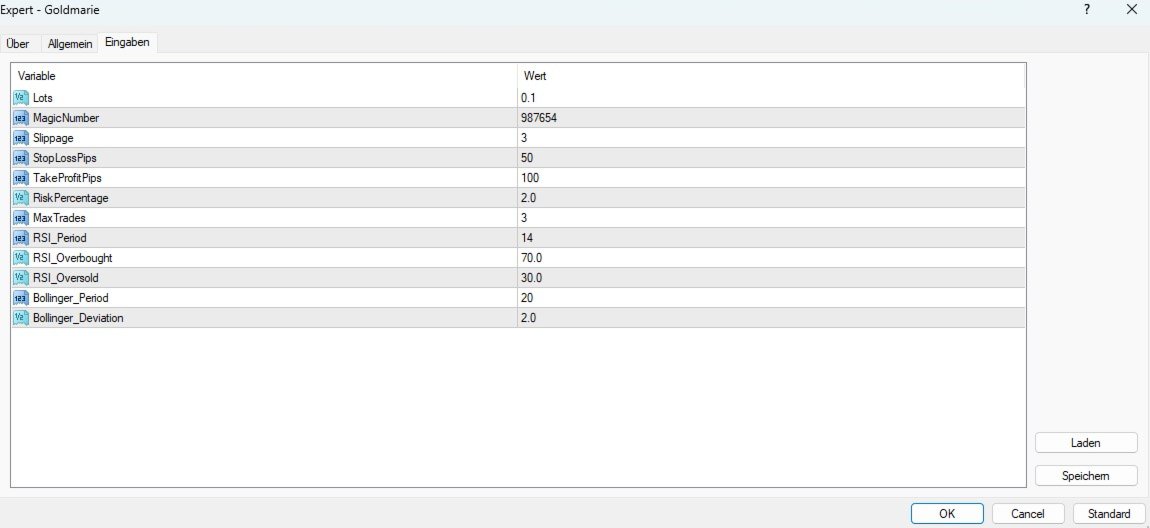
- Risk Percentage: 2.0%
- Max Trades: 3
- Stop-Loss & Take-Profit: 50/100 Pips (Adjustable)
Input Parameters Explained:
| Parameter | Description |
|---|---|
| Lots | Fixed lot size for trades (if dynamic lot sizing is disabled) |
| RiskPercentage | Percentage of account balance used per trade |
| MaxTrades | Maximum number of open trades allowed at once |
| Slippage | Allowed slippage for trade execution |
| StopLossPips | Stop-loss value in pips |
| TakeProfitPips | Take-profit value in pips |
| RSI_Period | RSI indicator calculation period |
| RSI_Overbought | RSI overbought level (default: 70) |
| RSI_Oversold | RSI oversold level (default: 30) |
| Bollinger_Period | Bollinger Bands calculation period |
| Bollinger_Deviation | Deviation for Bollinger Bands |
Q1: Why does my EA not open trades?
Ensure that "AutoTrading" is enabled in MetaTrader 4
Check if MaxTrades is limiting new trades
Verify that RSI & Bollinger Band conditions are met
Q2: What if I get error 134 (Not Enough Money)?
Reduce the Lot Size or Risk Percentage in the settings
Ensure your broker allows Gold trading with your account size
Q3: Can I use Goldmarie EA on other pairs?
The EA is optimized for XAU/USD (Gold). If you want it for Forex pairs, adjustments are required.