Sain Trade Manager
- Utilities
- Version: 9.31
- Activations: 5

A complete MT5 utility for trade execution, position management, visual trade monitoring and account risk control.
Sain's Trade Manager brings essential trading operations into one integrated chart-based interface. From placing an order to managing multiple open positions, adjusting protective stops, booking partial profits and monitoring account exposure, everything is accessible from a single control panel.
Designed for traders who want greater control over how they execute and manage their trades, without relying on multiple separate tools.
1. Integrated Trade Execution
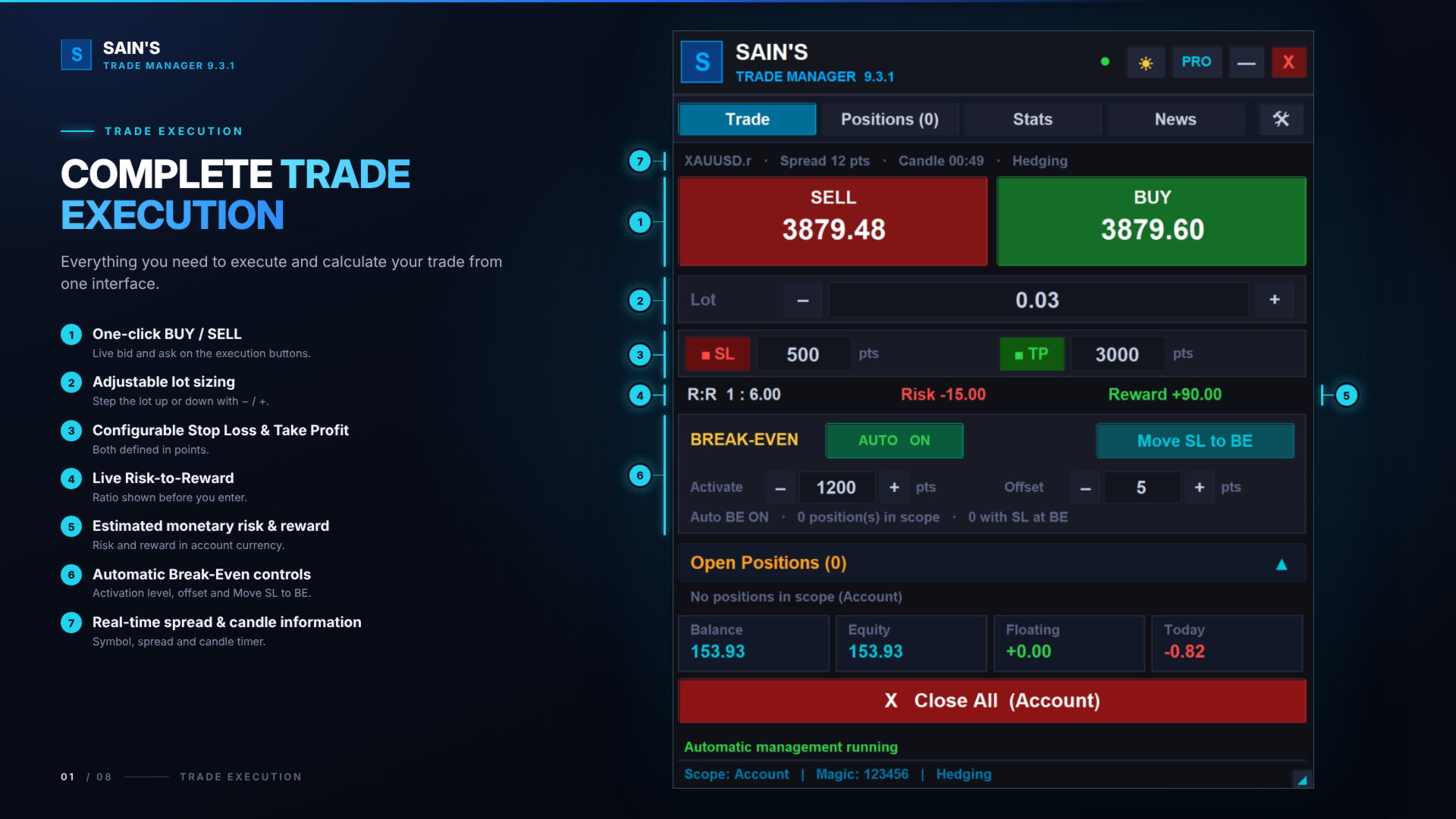
Execute market BUY and SELL orders directly from your chart.
-
Adjustable lot size with instant volume controls.
-
Stop-loss and take-profit configuration in points.
-
Live spread and candle countdown information.
-
Live risk and potential reward calculations before placing an order.
-
Fixed lot sizing, percentage-based risk sizing and fixed-money risk sizing.
Choose how much you want to risk.
Risk-based position sizing calculates the order volume using the selected stop-loss distance and the instrument's tick value. Percentage-based sizing can use account balance or equity as its calculation base.
2. Advanced Position Management
Manage open positions individually through dedicated position cards.
Each position provides its own management controls, allowing you to adjust your trade without affecting other positions.
Stop Loss and Take Profit
-
Modify or remove stop loss and take profit levels.
-
Monitor entry price, current price and floating P/L.
-
View position volume, ticket information and trade duration.
Break-Even Management
-
Automatic break-even activation.
-
Configurable activation distance and price offset.
-
Individual or global break-even settings.
-
Manual one-click SL movement to break-even.
Smart Trailing Stop
-
Fixed trailing mode.
-
Step trailing mode.
-
Configurable activation distance, trailing distance and step size.
-
Individual trailing settings for each position.
-
Automatic stop-loss adjustment as the trade moves.
Three-Level Partial Profit Booking
Configure up to three independent profit-booking levels.
-
Set a separate trigger distance for each level.
-
Book a percentage of the original position volume or specify fixed lots.
-
Monitor the status of each booking level.
-
Manage booking settings individually for every position.
Manual partial closing and individual position closing are also available.
3. Visual Trade Boxes
Visualize your open trades directly on the MT5 chart.
Sain's Trade Manager automatically draws visual risk/reward zones using the actual position entry, stop-loss and take-profit prices.
Each trade box can display:
-
Profit and loss zones.
-
Actual entry price.
-
Stop-loss and take-profit levels.
-
BUY or SELL direction.
-
Current floating P/L.
-
Risk amount and potential reward.
-
Risk/reward ratio.
-
Position volume and ticket information.
The visual boxes synchronize with position changes, including SL/TP modifications, break-even movements, trailing stops and partial closes.
Personalize your chart appearance:
Choose from Sain's Neon, Classic Trading and Minimal Monochrome presets, or configure your own colours.
Customize profit and loss zone colours, borders, entry line, information panel, text colours and transparency.
You can also control the displayed information, panel placement and box extension.
4. Account Risk Protection
Monitor and control account exposure through configurable protection settings.
Available controls include:
-
Daily loss limit, configured in money or percentage.
-
Daily profit target, configured in money or percentage.
-
Maximum open-position limit.
-
Maximum total-lot exposure.
-
Optional automatic position closure when the configured daily loss limit is reached.
Daily protection calculations include realized and floating P/L across the account.
The protection system can block new entries when configured limits are reached, helping traders maintain predefined account-level boundaries.
5. Multiple Position-Management Scopes
Choose which trades Sain's Trade Manager manages.
EA-Managed: Positions opened or adopted by the Trade Manager.
Symbol: All open positions belonging to the current chart symbol.
Account: Open positions across the entire trading account, including different symbols.
The selected scope determines which positions are included in global management operations and Close All.
Individual position controls remain available through their respective position cards.
6. Trading Statistics and Analytics
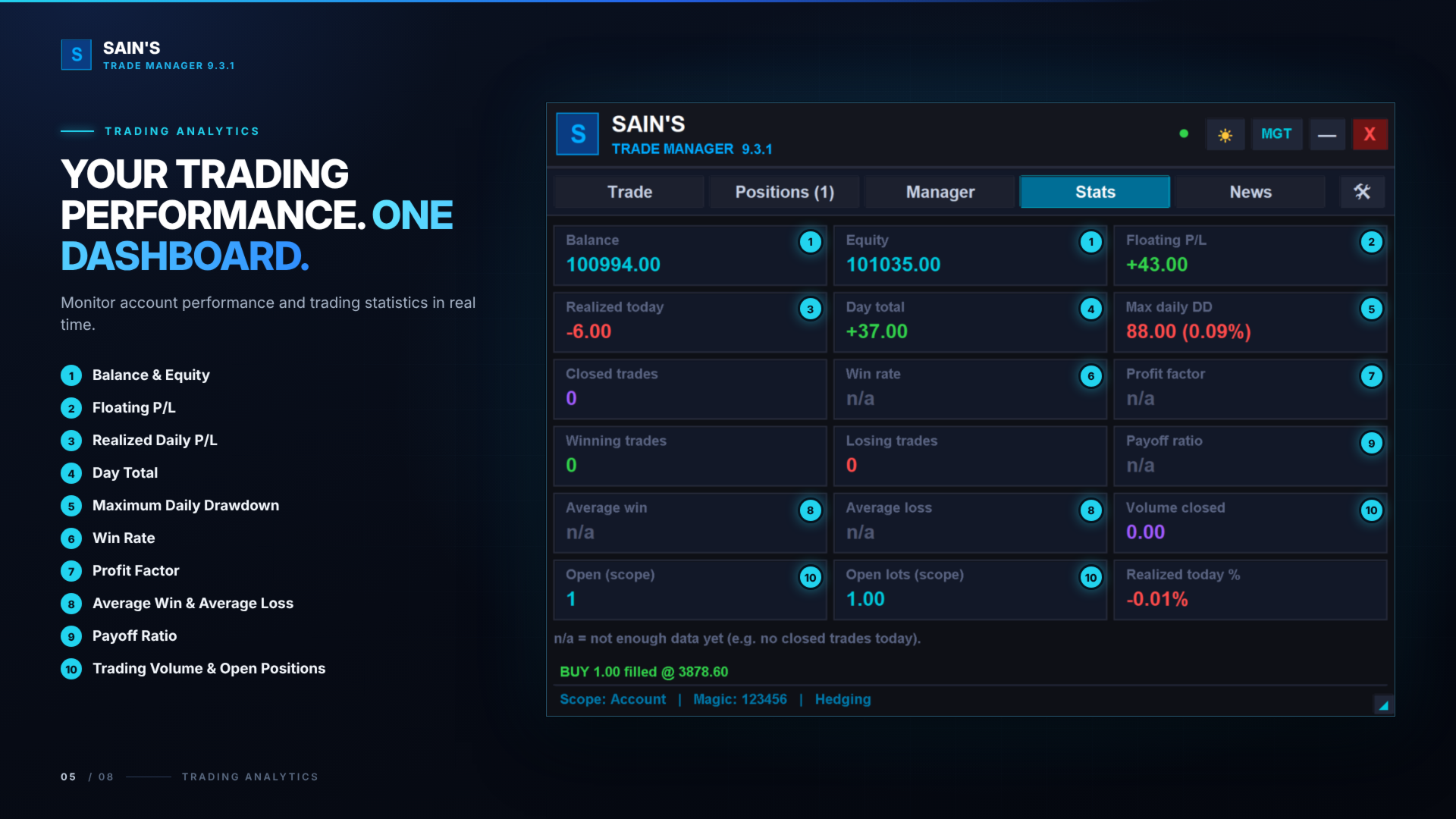
Monitor account and trading activity through the integrated statistics dashboard.
Available information includes:
-
Account balance and equity.
-
Floating and realized profit/loss.
-
Daily performance.
-
Maximum daily drawdown.
-
Closed trade statistics.
-
Win rate.
-
Profit factor.
-
Extended trading analytics.
Historical statistics are calculated from available account trading history. Some metrics may display as unavailable when insufficient data exists.
7. Integrated Economic Calendar
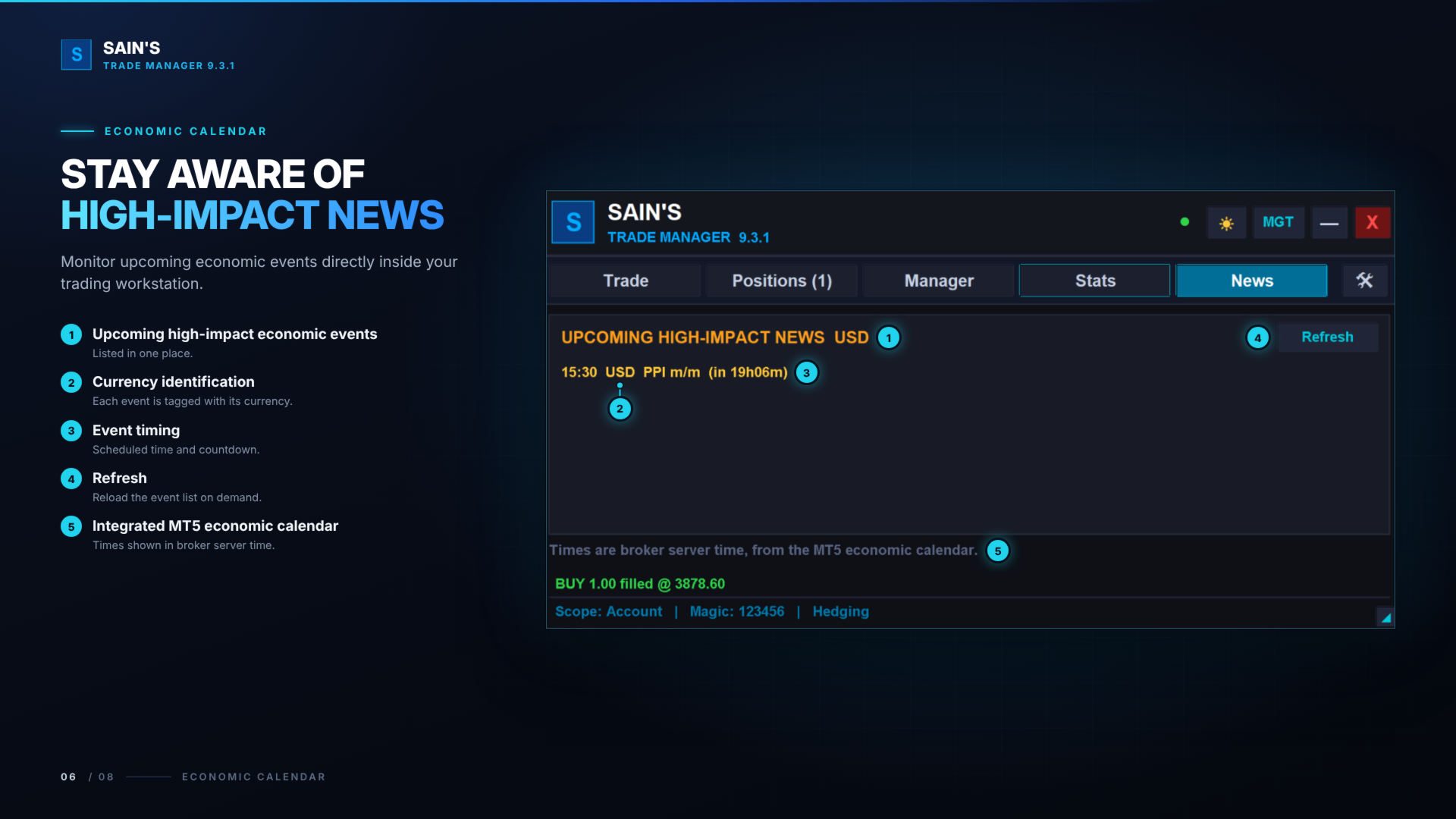
Stay aware of upcoming economic events without leaving your trading chart.
The integrated news panel uses the MetaTrader 5 economic calendar.
-
Upcoming economic events for the chart instrument's currencies.
-
High-impact news filtering.
-
Optional medium-impact event inclusion.
-
Configurable look-ahead period.
-
Manual refresh functionality.
Event times are displayed in broker server time.
8. Customizable Trading Interface
Sain's Trade Manager provides three interface modes to accommodate different trading preferences.
Compact Mode: Essential execution and position controls in a smaller interface.
Professional Mode: Expanded dashboard with position cards, statistics and additional management controls.
Management Mode: Wider position-management interface with detailed individual trade controls.
Additional customization includes:
-
Dark and White themes.
-
Adjustable panel width and size.
-
Automatic or fixed interface scaling.
-
Configurable BUY and SELL keyboard shortcuts.
-
Persistent settings and interface preferences.
Your preferred interface configuration can be retained between sessions.
9. Trade Execution and Position Control in One Place
Sain's Trade Manager is designed to bring together the operations traders regularly perform after entering the market.
Instead of switching between multiple terminal windows and manually managing every position, you have access to execution controls, position-level management, visual trade monitoring and account protection from a unified interface.
Whether you manage one position or several simultaneous trades, the interface provides a centralized way to monitor and manage them.
Important Information
Sain's Trade Manager is an execution and trade-management utility. It does not generate market-entry signals. The trader remains responsible for trading decisions and configuring management parameters.
Risk calculations are estimates based on configured prices, volume and available instrument specifications. Actual execution results may differ because of slippage, gaps, spreads and broker execution conditions.
Account protection settings do not guarantee that losses will remain within configured limits.
Please test the product on a demo account and familiarize yourself with its settings and operation before using it on a live trading account.