Apex Trendlines
- Indicators
-
Ajay Namdev Lonare
 Hi, I’m Ajay Lonare, a developer and algorithmic trading enthusiast specializing in the development of MT5 and MT4 indicators and Expert Advisor (EA) robots.
 - Version: 4.0
- Activations: 10
Stop guessing where price might turn. Start analysing the structure behind the move.
Apex Trendlines is an advanced MetaTrader 5 indicator designed for traders who want to identify meaningful support and resistance trendlines, evaluate breakout quality, and focus on potential entries after price retests a broken trendline.
Instead of relying on trendlines drawn manually, Apex Trendlines automatically identifies swing-based trendlines, ranks them using a multi-factor strength score, tracks breakout and liquidity events, and waits for a qualified retest before displaying a BUY or SELL signal
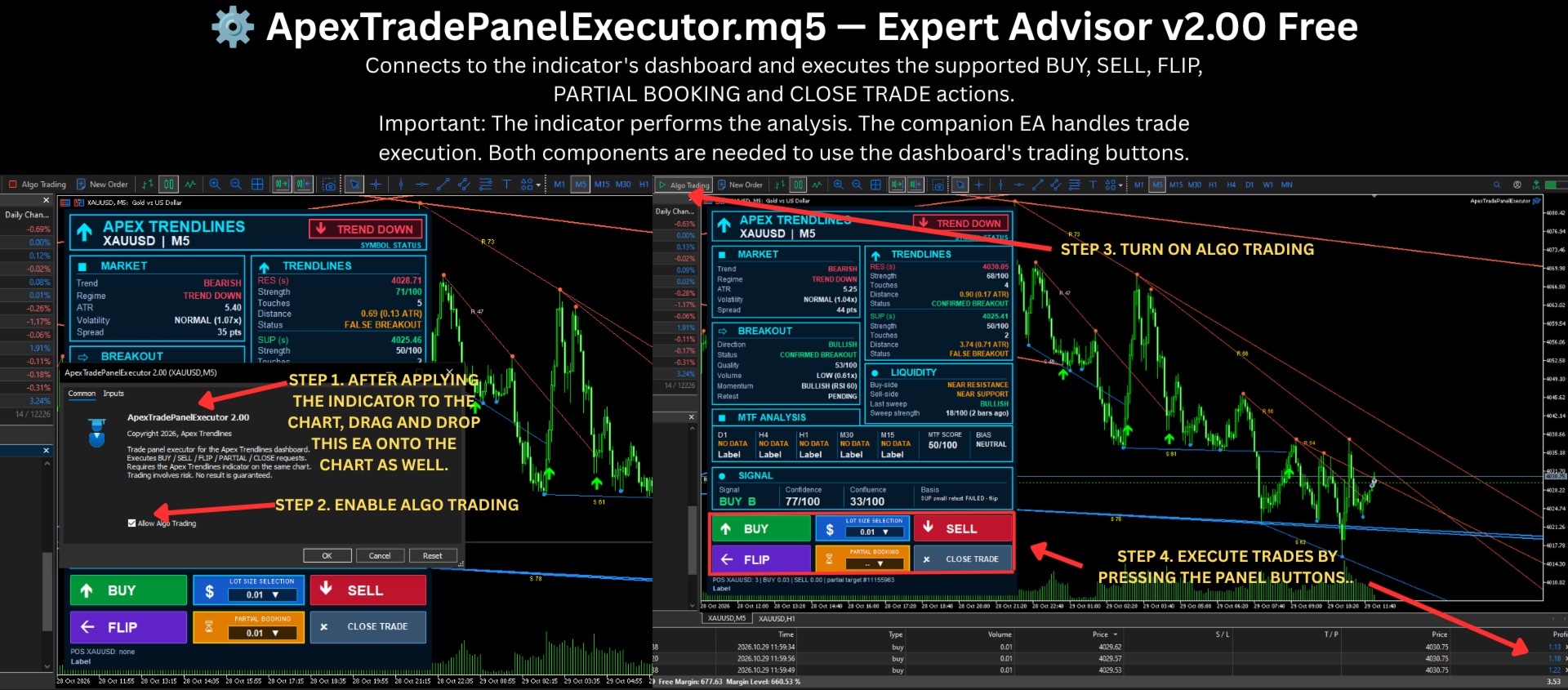
⚙️ ApexTradePanelExecutor.mq5 — Expert Advisor v2.00 Free
Connects to the indicator's dashboard and executes the supported BUY, SELL, FLIP, PARTIAL BOOKING and CLOSE TRADE actions.
EA: https://c.mql5.com/31/2545/ApexTradePanelExecutor.ex5
User Guide:https://c.mql5.com/31/2545/User_Guide.md
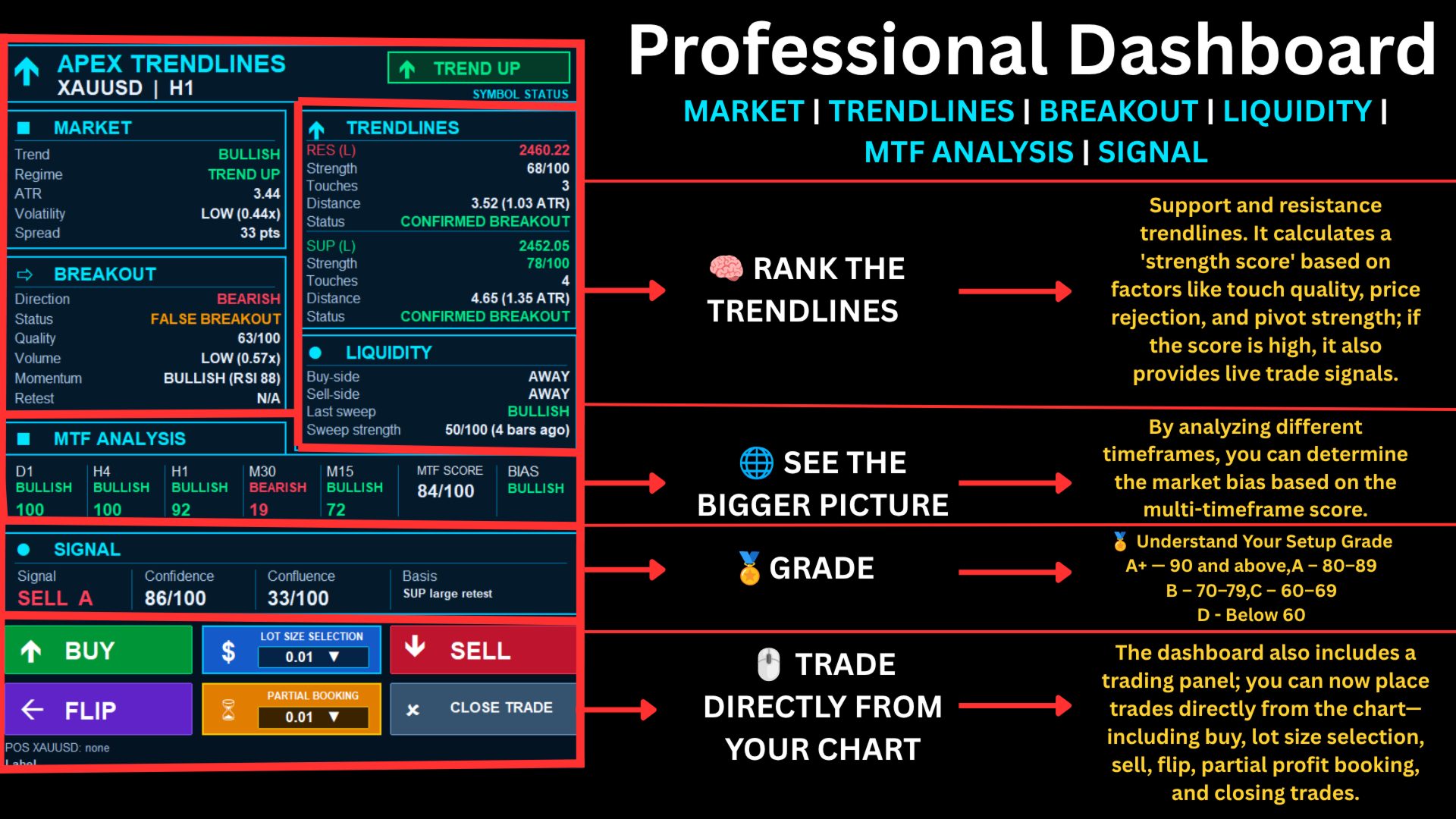
Its professional dashboard brings market conditions, trendline strength, breakout status, liquidity information, multi-timeframe analysis and signal quality together in one place.
And there is more: the integrated trading panel, supported by the companion Apex Trade Panel Executor EA, allows you to execute and manage trades directly from your chart with a few clicks.
🎯 Automated Analysis. Confirmed Retests. Structured Decisions.
🌟 WHY CHOOSE APEX TRENDLINES?
🎯 1. Automatic Support & Resistance Trendlines
Forget repeatedly drawing and adjusting trendlines by hand.
Apex Trendlines automatically identifies swing points and constructs support and resistance trendlines using its small and large pivot systems.
🔴 Resistance Trendlines — Identify potential areas where bullish price movement may encounter resistance.
🔵 Support Trendlines — Identify potential areas where bearish price movement may encounter support.
📊 Trendline Strength Ranking — Lines are evaluated and ranked to help you focus on the most relevant structures instead of filling your chart with unnecessary lines.
Choose Small, Large or Both line sizes according to your preferred chart view.
Each trendline can display a strength score, while touch markers help you see where price has interacted with the line.
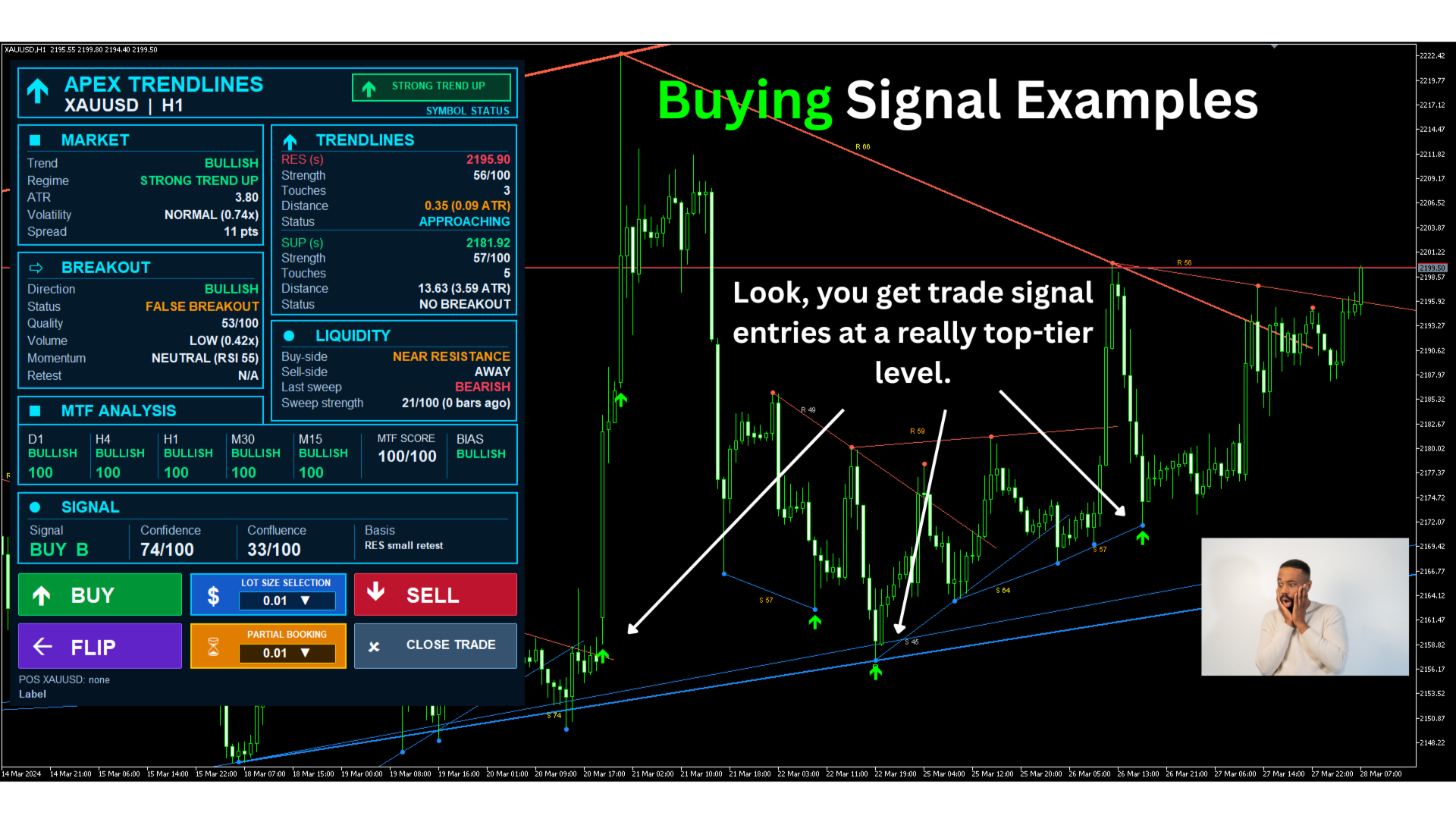
🔥 2. Retest-Based BUY & SELL Signals
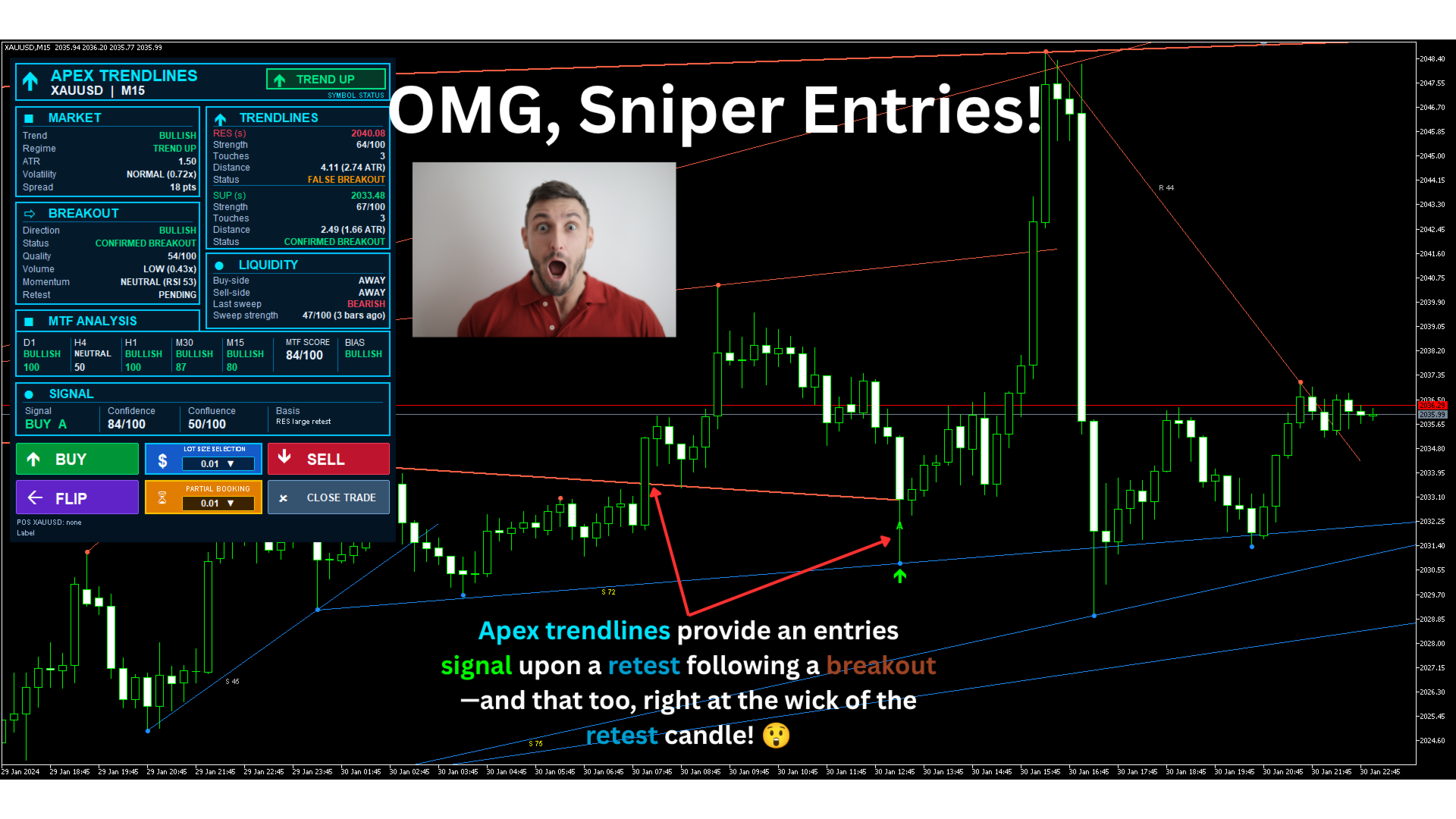
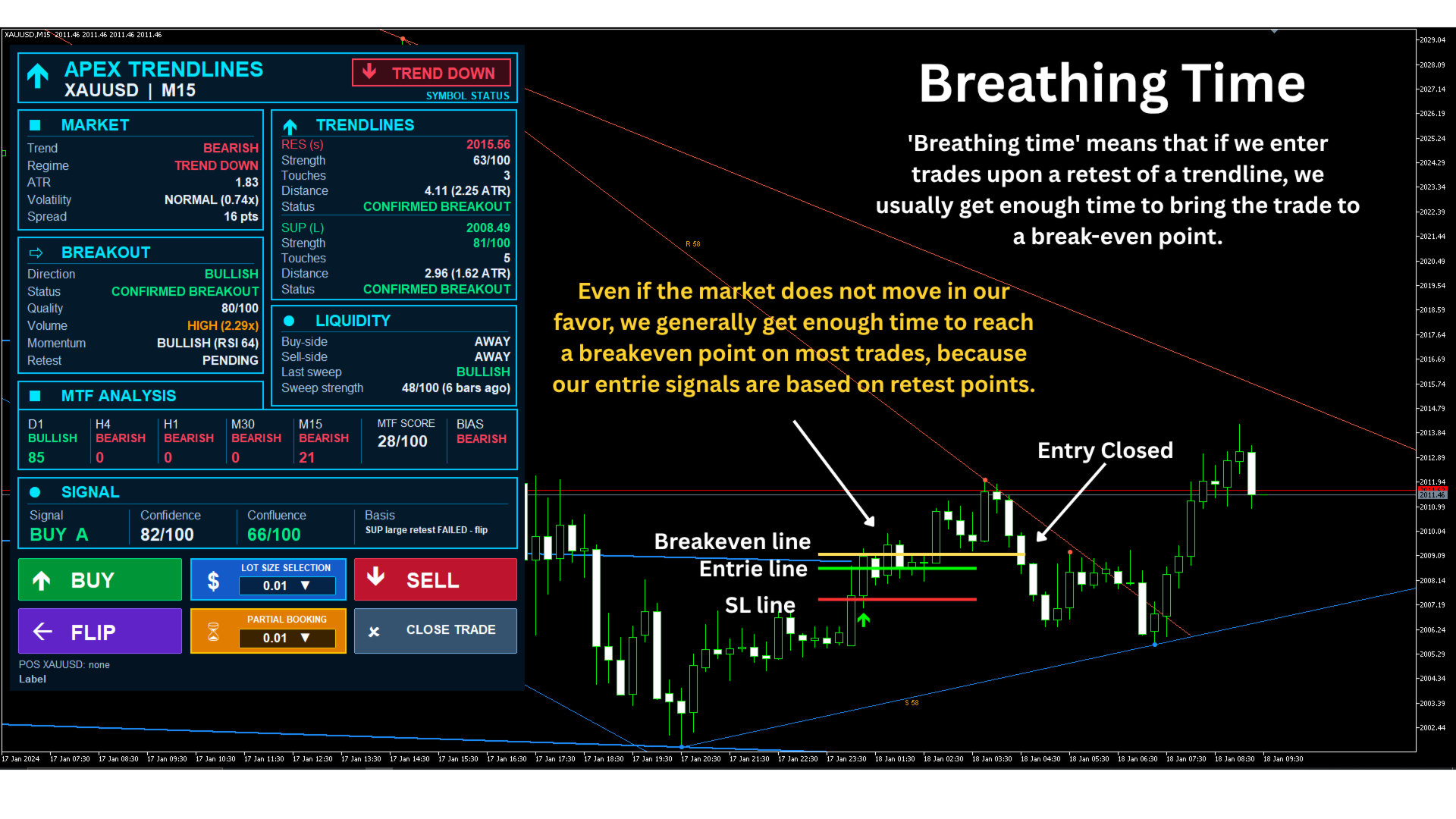
The central feature of Apex Trendlines is its breakout-and-retest approach.
Many traders watch for a breakout, but price can sometimes reverse after moving beyond a trendline. Apex Trendlines uses a confirmation process designed to avoid treating every breakout as an entry opportunity.
🟢 BUY Setup
-
Price confirms a breakout above a resistance trendline.
-
The setup reaches the required score threshold.
-
Price returns to retest the broken trendline.
-
The retest satisfies the configured confirmation rules.
-
A BUY arrow appears when the retest candle closes.
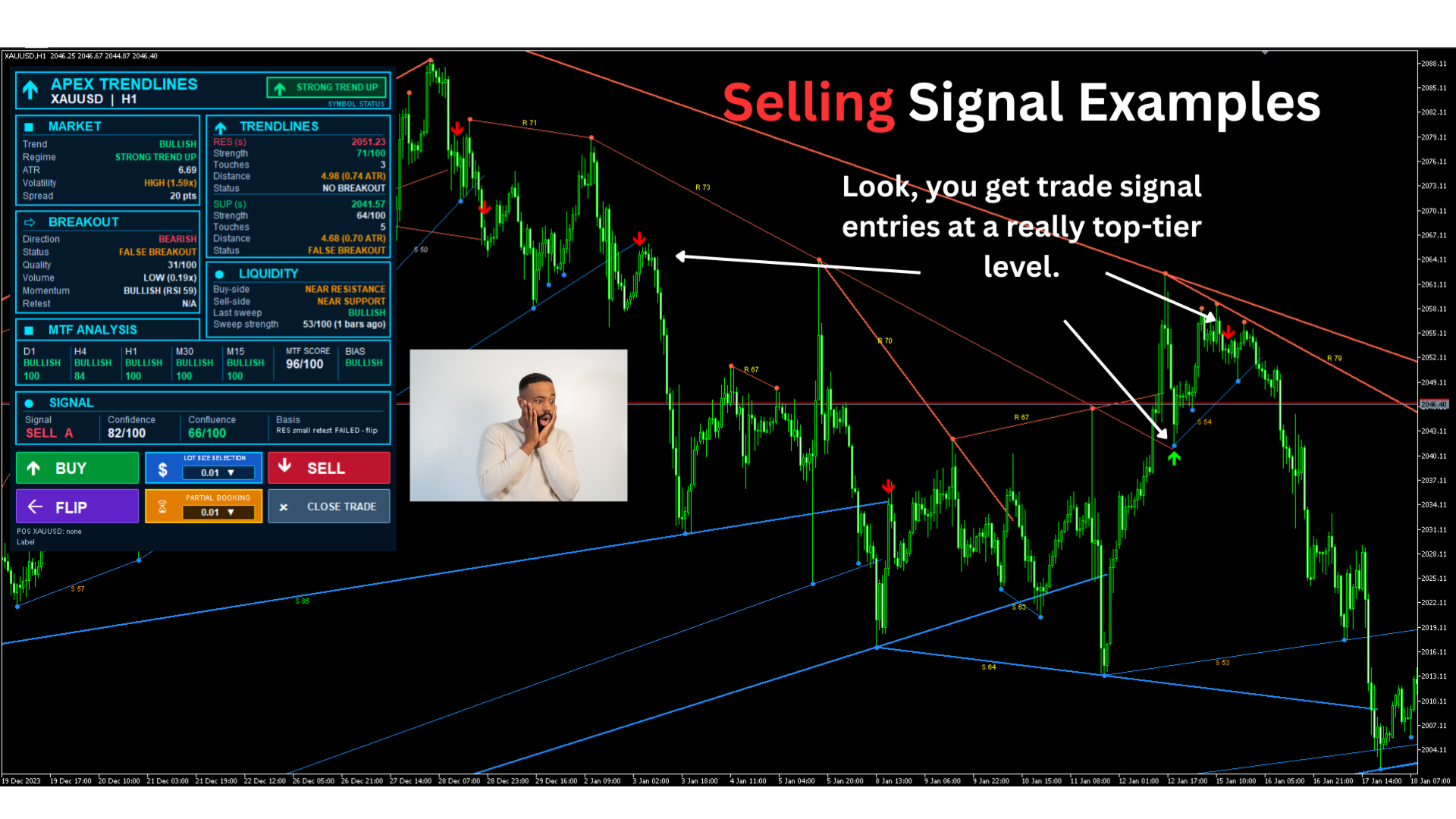
🔴 SELL Setup
-
Price confirms a breakout below a support trendline.
-
The setup reaches the required score threshold.
-
Price returns to retest the broken trendline.
-
The retest satisfies the configured confirmation rules.
-
A SELL arrow appears when the retest candle closes.
The indicator can also require the retest candle to close on the breakout side of the trendline.
Why this matters: Rather than automatically treating the initial breakout as an entry, the system waits for a subsequent price interaction with the broken line.
The result is a structured way to study potential continuation entries after a breakout and retest.
Important: Retest confirmation does not guarantee that price will continue in the expected direction.
🧠 3. Multi-Factor Trendline Strength Score
Not all trendlines are equally meaningful.
Apex Trendlines assigns each line a strength score from 0 to 100 using seven weighted components.
📌 The default weighting system includes:
-
👆 Touch Quality — 25%: Number and spacing of interactions with the line.
-
🧭 Pivot Strength — 15%: Strength of the second anchor pivot.
-
📏 Length — 15%: Line length and age.
-
🕯️ Price Rejection — 15%: Wick rejection away from the line.
-
📊 Volume Confirmation — 10%: Tick-volume behaviour around touches.
-
⚡ Momentum — 10%: Quality of the line's slope.
-
🧹 Cleanliness — 10%: How rarely price has pierced the line.
The default weights can be adjusted in the indicator settings.
🏆 Trendline Rating Guide
-
90–100: Exceptional
-
80–89: Very Strong
-
70–79: Strong
-
60–69: Moderate
-
50–59: Weak
-
Below 50: Poor
Use these scores to compare trendline structures and support your analysis. They are technical ratings, not statistical probabilities of winning a trade.
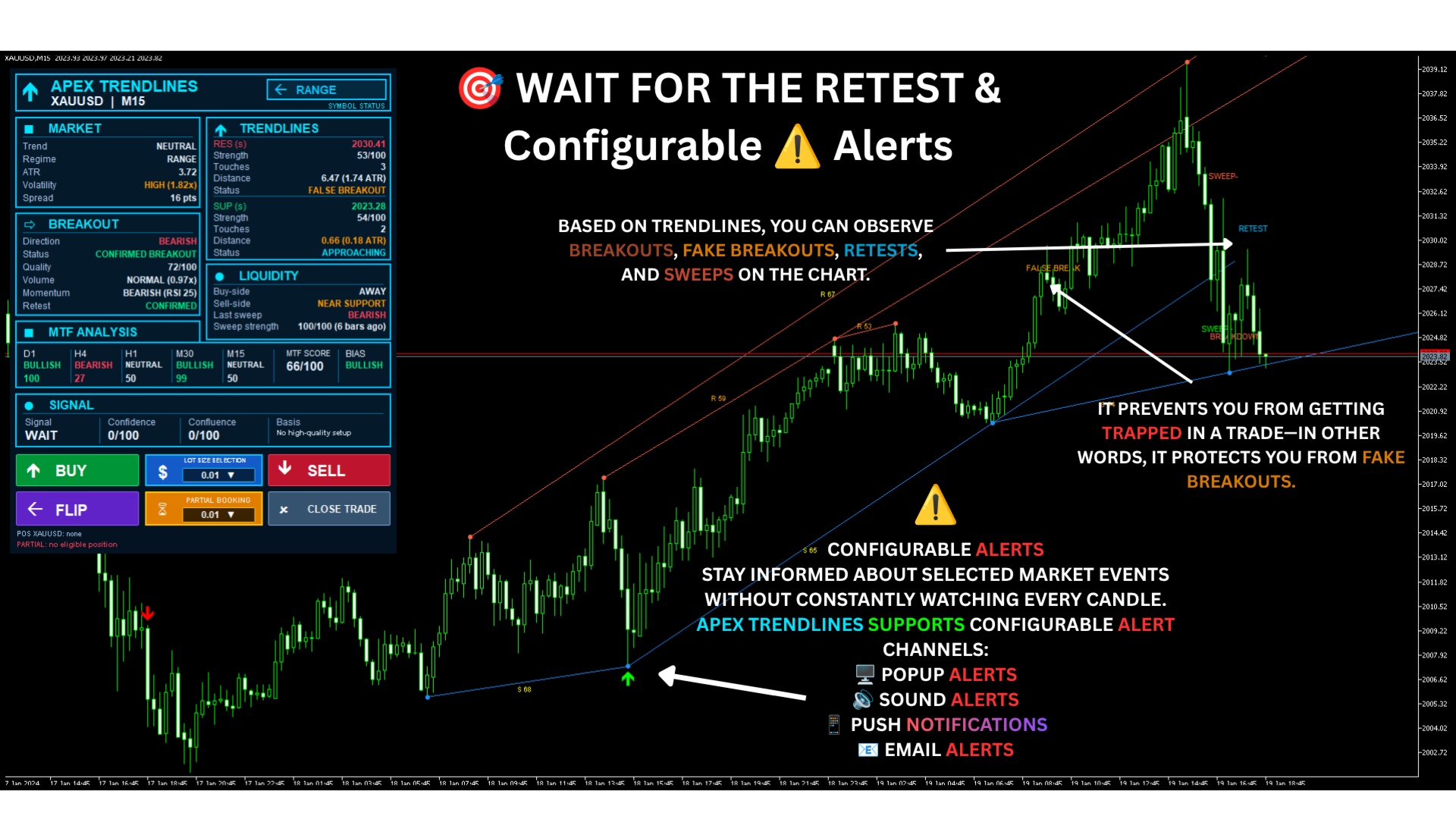
📈 4. Breakout, False Breakout & Retest Detection
Apex Trendlines tracks important events around its automatically identified trendlines.
💥 BREAKOUT / BREAKDOWN — Identifies a confirmed break using consecutive candle closes beyond the trendline.
⚠️ FALSE BREAK — Flags price returning to the original side of the line within the configured false-breakout window.
🔄 RETEST — Identifies price returning to a previously broken trendline.
❌ RETEST FAIL — Indicates that the retest did not hold according to the configured rules.
💧 SWEEP+ / SWEEP- — Identifies a liquidity-sweep pattern in which price wicks beyond a trendline but closes back on its original side.
These event labels help you understand the sequence of price action rather than looking at a BUY or SELL arrow in isolation.
⚡ 5. Setup Scoring & Signal Grades
Apex Trendlines evaluates potential setups using a composite score from 0 to 100.
The default setup score combines:
-
📈 Trend alignment
-
🧱 Trendline strength
-
💥 Breakout quality
-
💧 Liquidity-sweep information
-
📊 Volume
-
⚡ Momentum
-
🌐 Multi-timeframe alignment
-
🎯 Retest confirmation
The default component weights are 15, 20, 20, 10, 5, 5, 10 and 15 points respectively.
🏅 Understand Your Setup Grade
-
A+ — 90 and above
-
A — 80–89
-
B — 70–79
-
C — 60–69
-
D — Below 60
The default minimum setup score for BUY/SELL signals is 60, and this threshold is configurable.
A separate Confluence Score counts agreement among six factors: trendline strength, multi-timeframe bias, liquidity sweep, high volume, RSI momentum and confirmed retest.
Use the score, grade and confluence together to evaluate a setup instead of relying on a single indicator reading.
🌍 6. Multi-Timeframe Analysis (MTF)
Markets can look bullish on one timeframe and bearish on another.
The MTF Analysis panel helps you compare directional conditions across multiple timeframes without repeatedly changing chart views.
⏱️ Default timeframes:
-
D1 — Daily
-
H4 — Four-hour
-
H1 — One-hour
-
M30 — Thirty-minute
-
M15 — Fifteen-minute
The dashboard displays each timeframe's directional reading and score, alongside the combined MTF score and overall bias.
✅ At a glance, you can assess whether the current setup aligns with the broader timeframe structure.
The timeframe list and related analysis settings are configurable.
MTF readings require sufficient price history to be available in MetaTrader 5.
🖥️ THE APEX TRENDLINES PROFESSIONAL DASHBOARD
Your market analysis, organised in one chart-side workspace.
The dashboard is designed to reduce the need to switch between multiple indicators and separate analysis panels.
📊 MARKET
Monitor the current trend, market regime, ATR, volatility state and spread.
Understand whether the market is classified as bullish, bearish, trending or ranging according to the indicator's configured analysis rules.
📐 TRENDLINES
View the nearest resistance and support levels, including:
-
Trendline price
-
Strength score
-
Number of touches
-
Distance from current price
-
Distance measured in ATR units
-
Current breakout status
💥 BREAKOUT
Review the latest breakout direction, breakout status, setup quality, volume, RSI momentum and retest state.
💧 LIQUIDITY
See whether price is near a support or resistance trendline and review the latest detected liquidity sweep, its strength and its age.
🌐 MTF ANALYSIS
Compare the directional bias and score of the selected timeframes, together with the combined MTF score.
🎯 SIGNAL
The signal section brings together the current BUY, SELL or WAIT state, signal grade, confidence score, confluence score and the event or trendline supporting the setup.
When a qualified breakout is waiting for its retest, the dashboard can show an awaiting-retest status.
One dashboard. Multiple layers of technical context. A clearer view of the current setup.
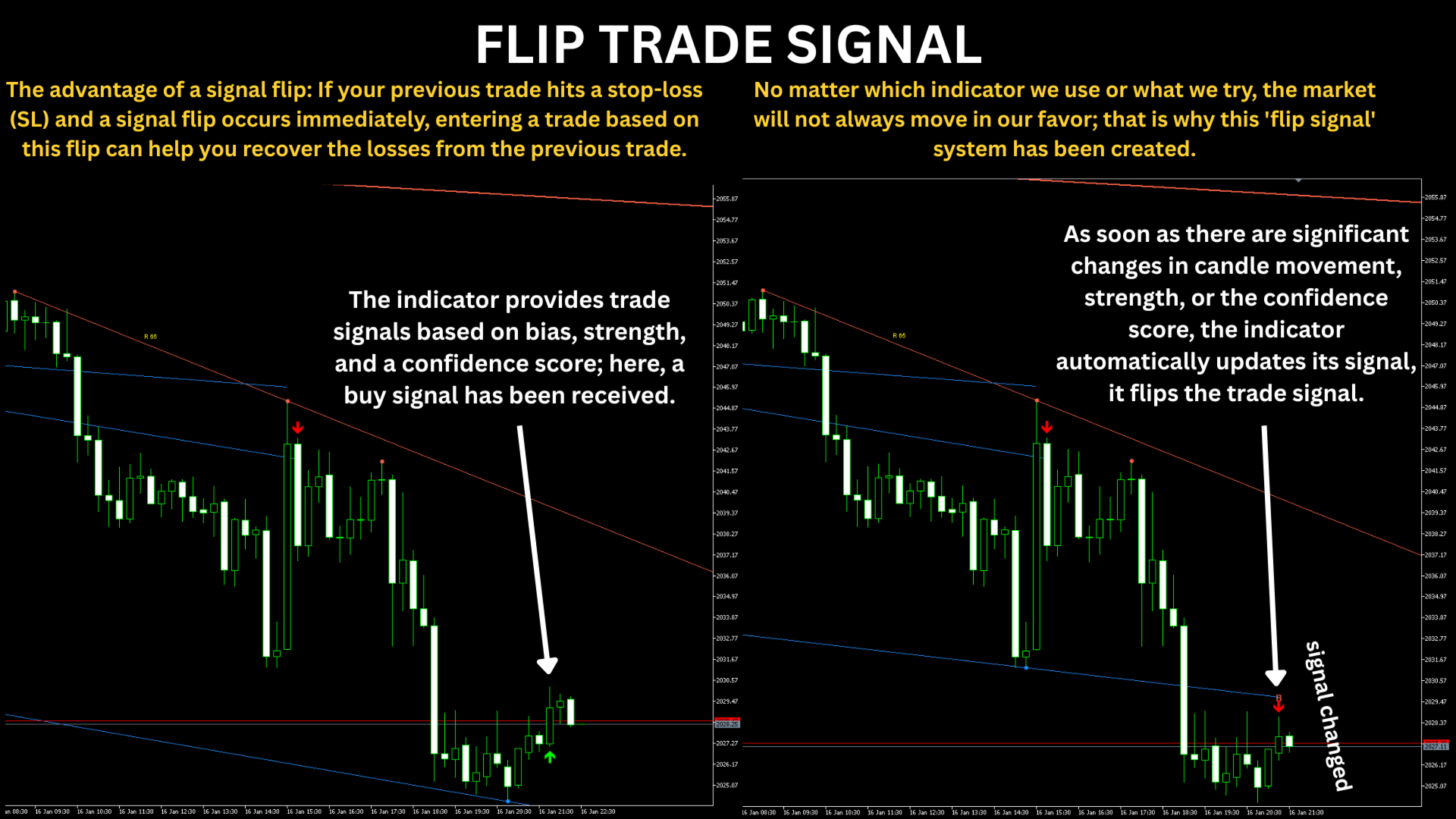
🔄 7. Automatic Failed-Retest Handling
A retest that initially looks successful can fail shortly afterward.
Apex Trendlines includes an optional Auto-Change Signal Direction feature, also called auto-flip.
When enabled, the indicator checks the retest during a configurable failure window. If price closes beyond the retest candle's extreme or back across the trendline under the configured rules, the original arrow can be withdrawn and an opposite arrow printed on the failure candle.
The default failure-check window is three candles.
🛡️ Why it is useful: It provides a way to recognise a failed retest and reassess the original directional idea.
⚠️ An arrow can change during this confirmation window. Traders who want to avoid acting on a signal that may still flip should wait until the configured check window has passed.
🛠️ 8. Integrated Semi-Automatic Trade Panel
Apex Trendlines includes a built-in chart trading panel that works with the companion Apex Trade Panel Executor EA.
Choose your action directly from the dashboard instead of opening a separate order window for every trade.
🟢 BUY — Send a market BUY order using the selected lot size.
🔴 SELL — Send a market SELL order using the selected lot size.
📏 LOT SIZE SELECTION — Choose a lot size valid for the current trading symbol.
🔄 FLIP — Reverse an eligible position. On a hedging account, the EA closes the eligible position or positions and opens the opposite side with the same volume. On a netting account, it sends an opposite order of twice the existing volume.
⌛ PARTIAL BOOKING — Close a selected volume from the newest eligible position while leaving a valid remaining volume.
❌ CLOSE TRADE — Close all eligible positions on the current symbol.
The dashboard displays the status of eligible positions and the result of the latest trading action reported by the EA.
🔐 Additional Execution Controls
The companion EA includes configurable safeguards and management options:
-
Maximum lot size per BUY or SELL click
-
Maximum spread for opening or flipping a position
-
Maximum permitted price deviation
-
Trade identification using a magic number
-
Optional management of manual trades and positions opened by other EAs
-
Validation of trading permissions, quotes, volume and available margin
-
Double-click confirmation for FLIP and CLOSE TRADE
The default settings for the maximum lot and maximum spread limits are disabled until configured.
This is semi-automatic trading, not a fully autonomous trading robot. The EA does not independently generate entries or open trades on its own. It executes actions requested through the dashboard.
The indicator and EA must be attached to the same chart for the trading controls to work.
🔔 9. Configurable Alerts
Stay informed about selected market events without constantly watching every candle.
Apex Trendlines supports configurable alert channels:
-
🖥️ Popup alerts
-
🔊 Sound alerts
-
📱 Push notifications
-
📧 Email alerts
Choose which events should trigger alerts, including confirmed breakouts, false breakouts, liquidity sweeps, confirmed retests and A/A+ setups.
Each selected event alerts once according to the indicator's alert logic.
Push and email alerts require the relevant MetaTrader 5 notification settings to be configured.
⚙️ 10. Flexible Settings & Customisation
Apex Trendlines is designed to let traders adapt its analysis to their preferences.
Customisable settings include:
-
📐 Small, Large or Both trendline sizes
-
🎨 Trendline colours, widths and styles
-
👆 Touch markers and strength labels
-
🟢🔴 BUY/SELL arrow appearance
-
🧠 Trendline strength-score weights
-
💥 Breakout confirmation requirements
-
🔄 False-breakout and retest windows
-
🎯 Minimum setup score
-
🕯️ Retest confirmation rules
-
⚡ RSI, momentum, volume and volatility settings
-
🌐 Multi-timeframe configuration
-
🖥️ Dashboard position, scale and auto-sizing
-
🔔 Alert events and delivery channels
The dashboard can also be hidden if you prefer to focus on the chart and trendlines.
📦 11. WHAT'S INCLUDED?
Your purchase package consists of two complementary components.
📊 ApexTrendlines.mq5 — Indicator v4.00
Provides the technical-analysis engine, automatic support and resistance trendlines, breakout and retest tracking, BUY/SELL signals, strength and setup scoring, MTF analysis, dashboard and alerts.
⚙️ ApexTradePanelExecutor.mq5 — Expert Advisor v2.00
Connects to the indicator's dashboard and executes the supported BUY, SELL, FLIP, PARTIAL BOOKING and CLOSE TRADE actions.
Important: The indicator performs the analysis. The companion EA handles trade execution. Both components are needed to use the dashboard's trading buttons.
💻 Platform Requirements
-
MetaTrader 5
-
A broker account supporting the required trading operations
-
Sufficient chart history for the analysis
-
The indicator installed in MQL5/Indicators/
-
The companion EA installed in MQL5/Experts/ if you want to use the trading panel
Compile the supplied source files in MetaEditor or install the compiled files if provided. Enable Algo Trading and allow algorithmic trading for the EA when using the trading controls.
👨💻 12. WHO IS APEX TRENDLINES FOR?
✅ Price-action traders who use support and resistance trendlines.
✅ Breakout traders who want to analyse what happens after price breaks a trendline.
✅ Retest traders who prefer waiting for a return to the broken level before considering an entry.
✅ Multi-timeframe traders who want a consolidated view of directional alignment.
✅ Technical analysts who want to evaluate trendline strength, breakout quality, liquidity events and signal confluence.
✅ Active MT5 traders who appreciate chart-based trade controls alongside their analysis.
Whether you prefer a clean technical-analysis chart or a more information-rich dashboard, the configurable layout and settings let you tailor the tool to your workflow.
🚀 13. A MORE STRUCTURED WAY TO READ THE MARKET
Successful trading requires more than finding a line on a chart.
You need to assess the market's direction, the significance of the level, the quality of the breakout, the behaviour of price during the retest and the broader market context.
Apex Trendlines brings these elements into a single workflow:
📐 Identify — Automatically detect and rank support and resistance trendlines.
🔍 Evaluate — Assess trendline strength, market conditions and multi-timeframe alignment.
💥 Confirm — Track breakout and false-breakout events.
🎯 Wait — Require a qualified retest before a BUY or SELL arrow is printed.
📊 Review — Use the setup score, grade, confluence and dashboard to assess the signal.
🖱️ Execute — If you decide to trade, use the companion EA's chart-based controls.
The goal is to help you analyse price structure more systematically and make trading decisions with greater context.
⚠️ RISK DISCLAIMER
Apex Trendlines is a technical-analysis and trade-execution tool. It does not guarantee profitable trades, eliminate losses or predict future market movements with certainty.
Signal grades, confidence scores, confluence scores and trendline-strength ratings are analytical measures based on price behaviour and the indicator's calculation rules. They are not probabilities of winning a trade or guarantees of future performance.
The dashboard's BUY and SELL buttons send market orders without automatically setting a stop loss or take profit. You are responsible for defining and managing your risk, position size, stop loss, take profit and open positions.
FLIP, PARTIAL BOOKING and CLOSE TRADE also require careful use. Execution depends on broker conditions, market liquidity, trading permissions, available margin and other operational factors.
Test the indicator and companion EA on a demo account before using real funds. Historical behaviour and example screenshots do not guarantee similar future results.
🔥 APEX TRENDLINESSee the structure. Evaluate the breakout. Wait for the retest.
Bring automatic trendline analysis, retest-based signals, multi-timeframe context and chart-based trade controls to your MetaTrader 5 workflow.
Make your next trading decision with a clearer view of the price structure behind it.