TradeMirror Local Trade Copier

TradeMirror copies trades from one MetaTrader 5 account to any number of other MT5 accounts on the same computer or VPS. Attach it in Master mode on the account you trade, and in Slave mode on every account that should follow. One EA does both jobs, with no DLL, no external program and no internet service in between. A copy usually opens within about half a second, broker execution included.

Launch price: it will rise as reviews come in.

What is copied
- Market positions, buy and sell
- Pending orders (limit and stop), including price changes and deletion
- Stop loss and take profit, and every later change to them
- Partial closes: the slave closes the same share of its copy
- Full closes, manual or by SL/TP on the master

Lot size
- Same lot as the master
- Master lot × multiplier
- Fixed lot
- Scaled by balance ratio or equity ratio (× multiplier): a 1 000 USD account follows a 10 000 USD account at one tenth of the size
- Risk % per trade: the lot is sized so that the stop loss costs the chosen % of the slave balance
- Optional maximum lot per trade. When the result is below the broker minimum, either use the minimum or skip the trade.

Symbols
- Broker suffixes and prefixes are handled automatically: EURUSDm, EURUSD.pro and EURUSD# all match each other
- Your own map for different names, e.g. GOLD=XAUUSD;US30=DJ30
- Allow and deny lists of symbols on each slave

Control
- Reverse mode: buy becomes sell, SL and TP swap, and limit and stop orders swap
- SL/TP as the same prices, or as the same distance from entry (for brokers whose prices differ)
- Copy only selected master magic numbers, e.g. one EA out of several
- Skip trades older than N seconds, or trades where price has already moved more than N points
- Maximum number of copied trades open at once
- Equity stop: when slave equity falls a set % below its peak balance, the copies are closed and copying pauses
- Channels: run several independent master → slave groups on one PC

Safe by design
- If the master terminal closes or loses connection, the slave leaves its copies alone and shows MASTER OFFLINE, instead of closing everything
- A copy you close by hand on the slave is not reopened
- Copies stay linked to their master trade after a restart, and even with brokers that clear the order comment on a partial close
- Accounts that are both slave and master do not send their copies back, so trades cannot loop
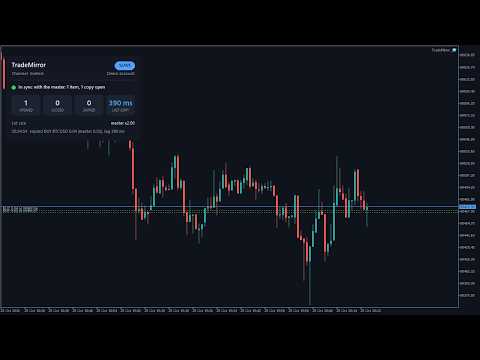
- A status panel on the chart shows the mode, the sync state, trades opened, closed and skipped, the time of the last copy and the last action

Strategy Tester
The tester cannot run two terminals, so in the tester TradeMirror plays both roles in one test. It opens demo master trades and moves the SL to break-even, closes half and then the rest, and copies each step through the same channel used live. Run it in visual mode to watch the panel.

Inputs
General
- Mode: Master (sends trades) or Slave (copies trades)
- Channel name: the same word on the master and its slaves
- Sync interval, ms: how often the EA checks (default 200)
- Show the status panel
Master
- Only these magic numbers: comma list, empty = all (0 = manual trades)
- Only these symbols: comma list, empty = all
- Do not send trades TradeMirror copied into this account: prevents loops
Slave: lot size
- Lot mode: same, multiplier, fixed, balance ratio, equity ratio, risk %
- Multiplier, Fixed lot, Risk % per trade
- Max lot per trade (0 = no cap)
- Use the min lot when the result is smaller (otherwise skip)
Slave: what to copy
- Reverse
- Copy pending orders
- SL/TP copying: same prices, same distance from entry, or none
- Follow SL/TP changes, Follow partial closes, Close when the master closes
- Copy trades already open when the slave starts
- Skip a trade older than N s (default 60, 0 = no limit)
- Skip if price moved more than N points (0 = off)
- Max slippage, points
- Copy only these master magic numbers
Slave: symbols
- Map, e.g. XAUUSD=GOLD;US30=DJ30
- Master prefix / suffix to strip, Slave prefix / suffix to add
- Copy only these symbols / Never copy these symbols
Slave: protection
- Master offline after N s without update (default 15; the copies are left as they are)
- Max copied trades open at once (0 = no limit)
- Equity stop: close copies and pause at −N% from peak balance (0 = off)
- Magic number of copied trades (give each slave on one account its own number)
Strategy Tester
- Tester demo: play master and slave in one test to show the copying

Please note
- All terminals must run on the same Windows computer or VPS. Copying over the internet between two machines is not supported.
- The MQL5 built-in VPS cannot be used: migrated terminals run on separate servers and cannot see each other's files. Use a normal Windows VPS.
- MetaTrader 5 only.
- Slave accounts must be hedging accounts (each copy is its own position). The master can be a hedging or a netting account.
- Turn on Algo Trading in every terminal. Each account needs its own terminal, installed in a separate folder.
- Copies are filled at the slave broker's price, so spread and slippage make slave results differ slightly from the master.
- Test on demo accounts first.
Recommended products
INTRODUCTORY LAUNCH OFFER: $139 • Exclusive introductory price for the first 10 copies only. • Price will be permanently adjusted to $279 after the first 10 activations. • Next price step: $199 -> Final price: $279. Fortress Risk Manager is an institutional-grade, all-in-one Capital Protection and Risk Management Cockpit built natively for MetaTrader 5. Engineered specifically for prop firm challenge accounts, funded trader programs, and discipl
Inverted_Chart_EA Utility Expert Advisor Inverted_Chart_EA creates and maintains a mirror-inverted chart of any symbol and timeframe. It automatically generates a custom instrument (e.g. US30_INV ) and keeps its price history updated in real time, with bars mirrored around a chosen pivot. This utility gives traders a new way to analyze the market from a different perspective by flipping the chart upside down. Why use an inverted chart? Highlight hidden patterns – price formations that look ordin
TradePilotmt5
Hossein Khalil Alishir
TradePilot Expert Advisor (EA) for MetaTrader 5 TradePilot is a professional and user-friendly Expert Advisor (EA) for MetaTrader 5 (MT5) . It simplifies automated trading , risk management , and trade execution with a smart trading panel . Perfect for beginners and experienced traders looking for a reliable trade manager EA with automated lot size calculation and smart position management. Key Advantages User-Friendly Trading Panel: Customizable panel with buttons and hotkeys for fast ex
KC Trade Copier Pro is the ultimate local trade copying solution designed for high-performance trading on MetaTrader 5. Engineered for speed and reliability, it allows you to replicate trades between multiple accounts on the same PC or VPS with near-zero latency (1-5ms) . Whether you are a Prop Firm trader managing multiple funded accounts, a portfolio manager, or a scalper requiring instant execution, KC Trade Copier Pro offers a professional alternative to expensive monthly subscription servi
Exp COPYLOT CLIENT for MT5
Vladislav Andruschenko
3.97 (35)
Professional Trade Copier for MetaTrader 5 Fast, professional, and reliable trade copier for MetaTrader . COPYLOT allows you to copy Forex trades between MT4 and MT5 terminals with support for Hedge and Netting accounts. COPYLOT MT5 version supports: - MT5 Hedge to MT5 Hedge - MT5 Hedge to MT5 Netting - MT5 Netting to MT5 Hedge - MT5 Netting to MT5 Netting - MT4 to MT5 Hedge - MT4 to MT5 Netting MT4 version Full Description +DEMO +PDF How To Buy How To Install How to get Log Files H
Overview Mirror Signals Service EA (Text only)   is a powerful monitoring Expert Advisor that automatically sends   real-time Telegram notifications   for all important trade events on your MetaTrader 5 account. It is engineered specifically for   signal providers ,   trade-copier operators ,   auditors ,   educators , and   professional trading services   that require immediate, detailed, and reliable reporting. Everything from   entries, exits, SL/TP changes, comment changes, trailing sto
Breakevan Utility
Jose Luis Thenier Villa
BreakEvan Utility  Is a simple tool in a panel with this utilities: This utility will draw a Golden Line in the chart applied showing the breakeven price, considering all the positions opened for that specific symbol. Also the information panel shows: Balance Breakeven Price for that chart Force Breakeven (for that symbol) as ON/OFF Force Breakeven Global (takes into account all trades opened) as ON/OFF Total Lots opened for Symbol Total Lots opened Global And two buttons: Force Breakeven: Whe
Trade Insight Pro Trade Insight Pro is an advanced trading performance analytics utility for MetaTrader 5. It transforms your MT5 trading history into clear and useful performance statistics directly on the chart. The utility is designed for traders who want to understand their historical results in greater detail, identify performance patterns, compare BUY and SELL behavior, and review their trading activity using objective data. Trade Insight Pro does not generate trading signals and does
Golden Gestion TP SL No Limit MT5
Matthias Hubert Patrick Snidaro
Auto SL/TP Manager EA – Gestion Automatique Intelligente Auto SL/TP Manager EA est un Expert Advisor conçu pour automatiser la gestion des commandes avec une efficacité maximale et une grande discrétion. Il gère automatiquement : Le Stop Loss (SL) et le Take Profit (TP) Le Profit Lock (verrouillage progressif des bénéfices) Le Trailing Stop avec plusieurs méthodes avancées L' affichage masqué du SL et du TP pour plus de discrétion (non visible par le courtisan) C'est l'outil idéal pour les
MT5 Local Trade Copier LTC
Mahamad Khairie Izwan Bin Yusli
Local Trade Copier Local Trade Copier (LTC) connects compatible MetaTrader 4 and MetaTrader 5 terminals and simplifies copying between trading accounts through an on-chart panel. Use the corresponding LTC edition on each terminal for MT4-to-MT4, MT5-to-MT5 or MT4-to-MT5 connections. Each receiving account can apply its own lot sizing, symbol selection and trade management preferences without requiring identical broker settings. Account Connections Choose MASTER and RECEIVER when trades should be
Local Trade Copier   is an advanced tool designed for efficiently copying trades between accounts in the   local   mode. It allows for lightning-fast order replication from a master account to a slave account. In local mode, trades are copied instantly, while in remote mode, the copying process takes less than 1 second. MT4 Version MT5 Full Version (Local & Remote) MT4 Full Version (Local & Remote) Local mode refers to both MetaTrader platforms being installed on the same system. It fully suppo
RRtoolBox
David Ruiz Moreno
RRtoolbox - Professional Tools: Risk:Reward Trading Tool (SL/TP Horizontals + Pending orders + Diagonals), Alerts set on trend lines (for alerts on diagonal levels), SelfManagement (BE, partials...), close/cancelling by time, Statistics, Info and trading on chart. One-Click Trading with Visual Risk:Reward Management RRtoolbox is a comprehensive trading panel that combines one-click order execution,  statistics and  powerful visual Risk:Reward tools, alerts set with trendlines, on chart butt
Trade Assistant 38 in 1
Makarii Gubaydullin
4.91 (23)
Multifunctional tool: Lot Calculator, Grid Orders, R/R ratio, Trade Manager, Supply and Demand zones, Price Action and much more Demo version   |   User manual Trade Assistant   doesn't work in the strategy tester : you can download the   Demo Version HERE  to test the utility . Contact me   for any questions  / ideas for improvement / in case of a bug found If you need a MT4 version, it is available here Simplify, speed up and automate your trading   process . Expand the standard terminal capa
TradePad
Ruslan Khasanov
5 (1)
TradePad is a tool for both manual and algorithmic trading. We present you a simple solution for fast trading operations and control of positions on several trading instruments. Attention, the application does not work in the strategy tester! Trial version of the application for a demo account and a description of all the tools The application interface is adapted for high-resolution monitors, simple and intuitive. For comfortable work, the trader is offered the following set of tools: A hot ke
CosmiCLab SMC FIBO CosmiCLab SMC FIBO is a professional trading indicator designed for traders who use Smart Money Concepts (SMC), market structure analysis and Fibonacci retracement levels. The indicator automatically detects market swings and builds Fibonacci levels based on the latest impulse movement. It also identifies market structure changes such as BOS (Break of Structure) and CHOCH (Change of Character), helping traders understand the current market direction. CosmiCLab SMC FIBO also pr
GGP Trade Copier MT5
Mohammadmahmood Pirayeh
GGP Trade Copier  EA is an automatic trading bot that can help traders automatically replicate the trading strategies and operations from one trading terminal to others by experiencing exceptionally fast trade copying system. Its easy-to-use setup allows you to copy trades between multiple MetaTrader terminals on the same Windows computer or Windows VPS with lightning-fast copying speeds of under 0.5 seconds. The software supports multiple trading varieties, including Forex, commodities, stocks
Advanced History Collector Panel for MT5 The Advanced History Collector Panel is a professional-grade account analysis and visualization indicator for MetaTrader 5 (MT5). It bridges the gap between raw trading logs and actionable insights by transforming execution data into interactive charts and comprehensive tables. Key Features: Comprehensive Data Metrics : Track daily/weekly profit and loss, long/short ratios, total volume, and deposit/withdrawal history. Dynamic Visualizations : Toggle betw
FREE
AI Trade Copier
Heri Yusufu Kaniugu
AI Trade Copier – Real time Copy Trading, Prop Firm Hedging & Adaptive Equity Curve Trading AI Trade Copier is a professional Expert Advisor designed to automatically copy trades across multiple accounts while adapting to market conditions and account performance. With advanced AI logic, it supports prop firm hedging ,  adaptive   equity curve trading , exponential growth compounding , and robust account risk management. Price increases by $100 for every 10 purchases, up to $2000. Private Messag
Server Link >> h ttps://www.mql5.com/en/market/product/160109 CopyTrade Slave is a lightweight, reliable local trade copier for MetaTrader 5 that mirrors positions from a Master account to one or more Slave accounts using a fast shared-file mechanism. It is designed for signal providers, account managers, and traders who need precise synchronization of trades with flexible delay and lot control. ​ Main concept Role: Works as the Slave side of a local copy trading setup and receives trades fr
Wulf BTC Bot
Riaan Adriaan Swanepoel
Wulf BTC Bot is a high-precision automated algorithmic trading system engineered for Bitcoin (BTC) on the H1 timeframe. It leverages a robust entry logic combining cyclical momentum and trend exhaustion via the Schaff Trend Cycle (STC) , dynamic breakout boundaries ( Lowest/Highest Price channels), and volatility-adaptive exits powered by ATR . The Expert Advisor is 100% Standalone , packing all custom indicators and math engines directly inside the .ex5 binary, requiring zero external dependenc
Gold Flow Seconds Chart transforms MetaTrader 5 into a fast and convenient workspace for manual trading. The utility builds 5-second and 10-second candles from the tick data provided by your broker. M1, M5, M7, M15, M30, H1 and H4 views are also available in the same interface. MOUSE-DRIVEN CHART NAVIGATION • Drag the chart horizontally and vertically with the left mouse button. • Use the mouse wheel to change candle width. • Use Ctrl + mouse wheel to adjust the vertical scale. • Return to t
Trade Mirror is a fast local trade copier for MetaTrader 5. Attach it as Provider to the account you trade on and as Receiver to every account that should follow. Trades are copied between terminals on the same computer within a fraction of a second, with no server, no subscription and no DLL. It copies trades but cannot guarantee any result. HOW IT WORKS The Provider shares its open positions through a small file in the common MetaTrader folder. Every Receiver terminal on the same computer read
Fast execution utility for manual traders. Drag-and-drop visual trading, split take-profits, and single-ticket management system. Speed, Precision, and Risk Control. KAB Trade Manager is built for traders who need to execute fast but keep risk tight. It integrates all essential tools into floating, collapsible windows. Core Functions: Instant Order Execution:   Market and Pending orders with automatic Lot sizing based on SL distance. Focus Ticket Manager:   A dedicated window to monitor and mana
Universal Trend
Maryna Shulzhenko
The Universal Trend indicator was created to detect trends in price movement and allows you to quickly determine not only the direction of the trend, but also understand the levels of interaction between buyers and sellers. The indicator works on all timeframes and currency pairs. The indicator gives fairly accurate signals and it is customary to use it both in trending and flat markets. It is advisable to use the indicator in combination with other tools for more reliable signals and making a
Bastion is a monitor-and-close-only risk manager for prop-firm traders. It watches your account against your firm's daily-loss and maximum-drawdown limits in real time and force-closes your open positions BEFORE you cross a line. It never opens a trade of its own, so it stays fully within the tools allowed by FTMO, FundedNext, The5ers, FTUK and FXIFY. Why traders fail challenges A large share of failed evaluations end on a single daily-loss breach: a moment of inattention, a news spike, one tra
R5U Gold Momentum Trader R5U Gold Momentum Trader is a fully automated XAUUSD / Gold Expert Advisor for MetaTrader 5 (MT5) . The EA combines market structure, price action and momentum confirmation to identify qualified Gold trading opportunities and automatically manage order execution, positions, protection and risk. R5U is designed for selective market participation rather than continuous or high-frequency trading. A trade is allowed only when the required market environment, opportunity and
Divergent Stochastic Filter II Catch Reversals Early, Filter Noise, Trade with Confidence The Edge: Why This Stochastic is Different  Every trader knows the Stochastic oscillator. But knowing when to trust its signals, that's the real challenge. The Divergent Stochastic Filter II transforms this classic indicator into a precision reversal detection system by adding critical elements: divergence intelligence, signal filtering and exhaustion detection.  While standard Stochastic oscillators fire s
Aegis DAX Scalper EA is a MetaTrader 5 Expert Advisor designed for short-term trading on GER40/DAX40. The system combines a M5 trend filter with M1 pullback entries, RSI confirmation, candle structure analysis, spread filtering, volatility filtering and automated trade management. The EA does not use grid, martingale or recovery basket logic. Each trade is opened with a real stop loss and managed through break-even and trailing stop rules. Version 1.01 includes improved compatibility with di
QuantEdge Prop Firm Guardian
Adrien Silvio Felipe Dimino
Most challenges are not failed by bad trading but by breaking one rule once. QuantEdge Prop Firm Guardian watches your account in real time and acts before the limit: - Daily loss and max loss (static or trailing), with a safety buffer for spread and slippage: closes every trade and blocks trading - Profit target reached: trades closed to secure the pass, optional daily gain lock - High-impact news (MT5 economic calendar): blocks or closes trades around the release - Weekend close, stop loss re
Recovery Assistant Pro for MT5 Manual Recovery Trading Assistant Recovery Assistant Pro is a Manual Trading Assistant EA for Recovery trade calculations and management. Helps calculate the appropriate Lot Size. Designed to calculate Recovery trade parameters based on floating loss and the selected Target USD. Simplifies Recovery calculations that would otherwise require manual calculation. The trading panel provides direct access to the main Recovery functions from the chart. Includes a Recov
Buyers of this product also purchase
Trade Assistant MT5
Evgeniy Kravchenko
4.43 (216)
It helps to calculate the risk per trade, the easy installation of a new order, order management with partial closing functions, trailing stop of 7 types and other useful functions. Additional materials and instructions Installation instructions - Application instructions Line function -   shows on the chart the Opening line, Stop Loss, Take Profit. With this function it is easy to set a new order and see its additional characteristics before opening.   Risk management  - The risk calculation
Forex Trade Manager MT5
InvestSoft
4.98 (689)
Trade Manager MT5 is an advanced position size calculator and trade management tool for MetaTrader 5, designed to help traders plan trades faster, control risk more precisely, and manage open positions directly from the chart. It combines order placement, risk based lot calculation, Stop Loss and Take Profit management, Break Even, Trailing Stop, Partial Close, Equity Protection, and external trade management in one panel. Whether you trade forex, indices, metals, commodities, crypto, or future
Telegram to MT5 MultiChannel Copier
Sergio Marquez Uroz
4.67 (21)
Telegram to MT5 Multi-Channel Copier   automatically copies trading signals from your Telegram and Discord channels straight to MetaTrader 5. No bots, no browser extensions, no manual copying. A signal arrives in Telegram or Discord and the EA opens the trade in your terminal within seconds. And before you copy a channel, the built-in backtester shows you what that channel would have done in your account. The product has two components: a Windows application that listens to your Telegram channel
News Trade EA MT5
Konstantin Kulikov
4.55 (11)
Present to you the useful robot that I have been using for several years. It can be used in both semi-automatic mode and fully automatic mode. >>> Chat <<< The program contains flexible settings for trading on the news of the economic calendar. It cannot be checked in the strategy tester. Only real work. In the terminal settings, you need to add the news site to the list of allowed URLs. Click Tools > Options > Expert Advisors. Check the option "Allow WebRequests for listed URL:". Add this (de
TradePanel MT5
Alfiya Fazylova
4.88 (170)
Trade Panel is a multi-functional trading assistant. The app contains over 50 trading functions for manual trading and allows you to automate most trading tasks. Application instructions: https://www.mql5.com/en/blogs/post/756482 Trial version of the application for a demo account: https://www.mql5.com/en/blogs/post/750865 How to install the application: https://www.mql5.com/en/blogs/post/756239 How to test the application in visual mode: https://www.mql5.com/en/blogs/post/770277 How to install
Copy Telegram signals with your own trading rules Telegram to MT5 Signal Trader automatically copies text-based trading signals from public and private Telegram channels and groups into MetaTrader 5. Manage multiple providers and MT5 accounts from one desktop app, with individual risk and trade settings for each provider . No Telegram bot or API setup needed for copying. Simply sign in with your own Telegram account by phone or QR code and select the channels or groups you have already joined. Y
FarmedHedge Pair Trading Dashboard
Tanapisit Tepawarapruek
5 (7)
Farmed Hedge Yield Farming | All Markets (Manual - Hybrid - Semi/Automated EA) VERIFIED TRADING RESULTS - Farmed Hedge Yield Axi Copy:  https://www.mql5.com/en/signals/2356376 - Farmed Hedge Yield Exn Copy:   https://www.mql5.com/en/signals/2356404 - Farmed Hedge Yield V Copy:  https://www.mql5.com/en/signals/2357156 IMPORTANT NOTICE: FarmedHedge is a MANUAL-FOCUSED TRADING UTILITY ,not a fully automated EA. Results shown on this Signal include manual trades and overall strategic management.
================================================================================ POC BREAKOUT - V20.72. Full Professional Grade Toolkit ================================================================================ POC Breakout is a full MetaTrader 5 trading dashboard for discretionary traders who want breakout signals, Point of Control (POC) context, volume profiles, order flow, market structure, news, alerts, and advanced trade planning in one professional workspace. Attached directly to you
Dealer Panel
Mian Rameez Ali
Dealer's Panel No signal decides anything here — a hand does. One click, and the panel calculates what's underneath: lot size from risk, target from a 30-step balance ladder that remembers exactly how far an account has climbed. Toggle between market and pending without touching an input field. Set a stop, and the take-profit can write itself — a fixed share of the balance, translated into price with no arithmetic left for the trader to get wrong. One trade live at a time; it won't let a seco
Next Update — Version 2.52 Coming Soon! [NEW] Get Ready for 4 Major New Features Designed to Enhance Your Market Analysis and Trading Workflow We’re taking market analysis to the next level with 4   new features designed to meet your trading needs. Introducing: TRADE OVERVIEW DASHBOARD CONFLUENCE AT ZONE STRONG & WEAK HIGH/LOW OTE 1. TADE OVERVIEW DASHBOARD  A dashboard that helps you understand the overall market picture more easily, providing guidance to support your trading decisions and h
The product will copy all telegram signal to MT5 ( which you are member) , also it can work as remote copier.  Easy to set up, copy order instant, can work with almost signal formats, image signal,  s upport to translate other language to English Work with all type of channel or group, even channel have "Restrict Saving Content", work with  multi channel, multi MT5 Work as remote copier: with signal have ticket number, it will copy exactly via ticket number. Support to backtest signal. How to s
RETAILBERG FOOTPRINT CHART PRO — Order-Flow Workspace for MetaTrader 5 Version 7.00  |  Professional System  |  31 tools  |  One chart A full 150-page illustrated User Manual is included. Please read the full manual to understand this feature packed footprint chart elements and ui. https://www.mql5.com/en/blogs/post/777982 DEMO / STRATEGY TESTER — PLEASE READ FIRST
Grid Manual MT5
Alfiya Fazylova
4.73 (22)
Grid Manual is a trading panel for working with grid strategies. The utility is universal, has flexible settings and an intuitive interface. It works with a grid of orders not only in the direction of averaging losses, but also in the direction of increasing profits. The trader does not need to create and maintain a grid of orders, the utility will do it. It is enough to open an order and the "Grid manual" will automatically create a grid of orders for it and will accompany it until the close. F
MT5 to Telegram Signal Provider turns your trading account into a signal provider. Every trade action, whether manual, by EA or from your phone, is instantly sent as a message to Telegram. You can fully customize the format or use a ready-made template for quick setup. [ Demo ] [ Manual ] [ MT4 Version ] [ Discord Version ]     New: [ Telegram To MT5 ] Setup A step by step user guide is available. Key Features Ability to customize order details sent to subscribers You can create a tiered subs
The Patch
Mian Rameez Ali
The Patch It never opens a trade. It walks behind the ones that did. Every open position, every pending order — checked twice a second for the one thing that's easy to forget: a stop, a target. Found bare, it doesn't ask. It writes the missing number in, measured in points from wherever the position began, and moves on to the next. No strategy, no opinion on direction. Just the quiet assumption that nothing should ever sit on the market unprotected — not because someone decided it shouldn't,
Signal Trading View to MT5 Pro
Mirel Daniel Gheonu
4.5 (2)
Signal TradingView to MT5 Pro  Instant professional execution between TradingView and MetaTrader 5 Automate your trading strategy with the most robust communication bridge between TradingView alerts and real execution in MT5. Designed for traders who demand speed, flexibility, and impeccable risk management, this Expert Advisor transforms any alert message into a precise market or limit order.   Install and TEST the TRIAL version HERE STRENGTHS AND ADVANTAGES Universal Parsing Engine (Propriet
Power Candles Strategy Scanner - Self-Optimizing Multi-Symbol Setup Finder Self-optimizing settings work one chart at a time, and finding where they pay off right now means opening chart after chart. Power Candles Strategy Scanner runs the same self-optimizing engine as the Power Candles indicator on every symbol in your Market Watch, side by side. One panel ranks where it pays off: the winning strategy per symbol, its optimized Stop Loss and Take Profit. An alert fires the moment a fresh signal
Anchor Trade Manager
Kalinskie Gilliam
5 (9)
Your EAs cannot see each other, but Anchor can. Anchor gives you one place to coordinate your EAs, manage risk, and decide when trading is allowed. It works alongside the trading bots you already use without any changes to them. The Problem One EA opens a trade. Then another starts trading. The next thing you know, you wake up to multiple grids built across your account. Each EA may be doing exactly what it was designed to do, but together they can place far more risk on your account than you in
VirtualTradePad PRO SE MT5 — professional trading control center for MetaTrader 5 VirtualTradePad PRO SE is a premium chart-based trading panel and trade-management workspace for MetaTrader 5 . It is designed for traders who want faster execution, clearer position control, structured trade management, visual level planning and a professional workflow directly from the chart. This is not only a BUY / SELL panel. PRO SE combines manual trading, pending orders, position management, partial exits, b
Prop Guardian Risk Manager MT5 – Drawdown, Risk & Hedge Protection for Prop Firm and Managed Accounts Prop Guardian Risk Manager is a professional risk-control utility for MetaTrader 5, designed for prop firm traders, money managers and anyone who wants strict account-level risk protection. It does not generate trading signals, strategy entries or trading decisions. Instead, it runs in the background, monitors your account risk and can automatically block new exposure, close managed positions or
The News Filter MT5
Leolouiski Gan
4.79 (24)
This product filters   all expert advisors and manual charts   during news time.  It is able to remove any of your EA during news and automatically reattach them after news ends. This product also comes with a complete  order management system   that can handle your open positions and pending orders before the release of any news. Once you purchase   The News Filter , you will no longer need to rely on built-in news filters for future expert advisors, as this product can filter them all from her
Floor Watch
Syed Tauqeer Hussain Shah
Floor Watch One number, watched every thirty seconds: how far equity has fallen since the day began — or since its highest point, if it's told to trail the peak instead of the open. Cross the line and it doesn't argue. Every open position closes, every pending order vanishes, and anything that slips through afterward gets shut the moment it appears. Not asked. Removed. The floor holds until the clock turns 5 AM Pakistan time — then, and only then, does the day start over. One rule. No except
EA Auditor
Stephen J Martret
5 (6)
EA Auditor is an independent analysis tool for traders evaluating Expert Advisors and trading signals on MetaTrader 5. It audits backtest reports, reviews posted developer signals, and cross-verifies the two against each other to help traders assess strategies before committing capital. The MQL5 market offers a wide range of Expert Advisors from many developers, with varying approaches, quality, and transparency. EA Auditor provides a consistent, data-driven framework for reviewing them, answer
Trade Manager DashPlus
Henry Lyubomir Wallace
4.85 (13)
DashPlus is an advanced trade management tool designed to enhance your trading efficiency and effectiveness on the MetaTrader 5 platform. It offers a comprehensive suite of features, including risk calculation, order management, advanced grid systems, chart-based tools, and performance analytics. Key Features 1. Recovery Grid Implements an averaging and flexible grid system to manage trades during adverse market conditions. Allows for strategic entry and exit points to optimize trade recovery
YuClusters
Yury Kulikov
4.93 (43)
Attention: You can view the program operation in the free version  YuClusters DEMO .  YuClusters is a professional market analysis system. The trader has unique opportunities to analyze the flow of orders, trade volumes, price movements using various charts, profiles, indicators, and graphical objects. YuClusters operates on data based on Time&Sales or ticks information, depending on what is available in the quotes of a financial instrument. YuClusters allows you to build graphs by combining da
Buy once. Get all my MT4 and MT5 indicators - available now and released in the future - at no extra cost. Contact me after purchase for instructions to receive them. The price is planned to rise by 50$ after every 10 purchases, up to 999$. The Market price at checkout applies. Keep the indicator you trust. Automate the work around it. Your signal. Your rules. Your execution. Already have an MT5 indicator you rely on, but still need to watch the chart, wait for a signal, calculate the lot, plac

Trader Evolution
Siarhei Vashchylka
5 (7)
" Trader Evolution " - A utility designed for traders who use wave and technical analysis in their work. One tab of the utility is capable of money management and opening orders, and the other can help in making Elliott wave and technical analysis. Manual (Be sure to read before purchasing) | Version for MT4 Advantages 1. Trading in a few clicks. Immediate and pending orders are available in the panel 2. Money management. The program automatically selects the appropriate lot size 3. Simplifies
Master Your Trading Discipline   Stop losing your hard-earned gains to overtrading and emotional decisions. The Discipline Tool is your ultimate trading assistant, ensuring strict risk management in real-time. Key Protection Features: Advanced Drawdown Defense : Automatically halts trading if your daily drawdown exceeds a preset threshold (percentage or dollar amount). Real-Time Equity Lock : Safeguard profits by referencing peak equity, ensuring drawdown stays within control. Hard Profit Target
Astro Trade MT5
Indra Maulana
5 (8)
25% discount on the release of the tool: only for the next 3 buyers Send a message to receive a demo version. AstroTrade Trading Assistant AstroTrade is a comprehensive multi-functional trading utility developed for the MetaTrader 5 platform. It integrates essential tools for trade execution, risk management, and technical monitoring into a single unified interface. The application is designed to assist traders in managing their daily operations through a visual and structured environment. Vi
Trade Indicator Assistant   is a powerful MT5 utility designed to turn indicators into automated trading systems. Its main feature is the ability to automatically detect an indicator’s   BUY and SELL signal buffers , without requiring you to know the buffer numbers, search through indicator settings, or modify the indicator source code. Bonus Indicator:   After purchasing Trade Indicator Assistant, contact me to receive   Trade Signal Pro   completely free as a bonus indicator. [Download Demo V
More from author
Trade History to Excel
Mohamed-amine Baddir
Trade History to Excel turns saved Strategy Tester reports, or the trading history of your account, into a real Excel workbook (.xlsx). Every report goes into the same file: one summary row per report, every closed trade with its entry and exit price, every deal, and the results of each day and month with the balance. Dates are Excel dates, numbers are numbers, the header row is frozen and every sheet has filters, so you can sort, filter, build pivot tables and charts right away. How To Use Back
FREE
Account Performance Report turns the history of your account into one HTML report that you open in any browser: balance and drawdown, the result of each Expert Advisor and each symbol, a daily P&L calendar, monthly returns and the usual statistics. The main figures are also shown on the chart, and the report is kept up to date while the terminal runs. How To Use Attach Account Performance Report to any chart of the account. It does not trade, so any symbol and timeframe will do. The report is wr
FREE
Optimization Robustness Map reads the results of a Strategy Tester optimization and shows whether the best pass sits on a plateau, where nearby inputs give similar results, or on a lone spike that a small change destroys. It draws a heat map of any two inputs, compares every pass with its neighbours, shows how each input moves the result and, when a forward period was tested, how well the back test predicted it. Everything is written to one HTML page. How To Use In the Strategy Tester, after an
FREE
Monte Carlo Risk Simulator shows how much worse a backtest could have gone with the same trades in a different order, and what more or less risk per trade does to its growth and drawdown. It reads saved Strategy Tester reports or the history of your account, runs thousands of simulations and writes one HTML page. How To Use Backtests: in the Strategy Tester, right click on the Backtest tab > Report > save it as HTML into MQL5\Files\RiskSimulator (File > Open Data Folder). Account: set "Trades to
FREE
Prop Risk Guard
Mohamed-amine Baddir
Prop Risk Guard enforces your account's risk rules automatically. Attach it to one chart and it watches every position on the account. When a limit is reached, it closes positions, deletes pending orders and locks trading, so one bad trade or a runaway EA cannot break the rules of your evaluation or funded account. Daily loss limit - Set as a percentage, a fixed amount, or both (the stricter applies) - Measured from the day-start balance, the day-start equity, or the higher of the two - Daily
The Strategy Tester runs one Expert Advisor at a time. If you run several EAs on one account, their separate reports do not tell you the combined drawdown, the margin they need together, or whether the account can carry them at all. Portfolio Backtest Combiner answers that from the reports you already have. How It Works Backtest each Expert Advisor as usual and save the report as HTML (Strategy Tester > Backtest tab > right click > Report > save as HTML) into the MQL5\Files folder of the termina
Backtest Report Compare puts several Strategy Tester reports side by side on one HTML page: growth and drawdown curves on one chart, the main statistics in one table, the correlation of their daily results, monthly returns and results by weekday and hour. Use it to choose between Expert Advisors, between settings of one Expert Advisor, or to see which strategies lose on the same days. How To Use In the Strategy Tester, after each test: right click on the Backtest tab > Report > save it as HTML i
FREE
Trade Excursion Analyzer measures how far every closed trade went against you (maximum adverse excursion, MAE) and in your favour (maximum favorable excursion, MFE) before it closed. It reads saved Strategy Tester reports or the history of your account, measures each trade on the price history of your terminal and writes one HTML page: where your stop-loss could be, how much open profit your exits give back, and what a fixed stop-loss or take-profit would have changed. How To Use Backtests: in t
Backtest vs Live
Mohamed-amine Baddir
Backtest vs Live explains why an Expert Advisor earns a different amount live than in the Strategy Tester. It matches every live trade with its twin in the backtest, then splits the whole difference of the results, to the cent, into entry prices, exit prices, swap and commission, lots and currency conversion, trades the backtest made that live trading missed, and live trades the backtest never made. It can also compare two backtests, for example the same Expert Advisor with and without execution
Portfolio Allocator tells you how many lots each Expert Advisor of a portfolio should trade. It reads one saved Strategy Tester report per Expert Advisor, or the history of an account that runs several of them (one strategy per magic number), and computes the allocation with eight methods: from equal risk and risk parity to hierarchical risk parity, maximum diversification, maximum Sharpe and minimum tail loss. Then it scales the whole portfolio to the drawdown you accept, and shows with a walk-
Filter:
No reviews
Reply to review