Session Pulse Hourly Volatility and Spread Map
- Indicators
- Version: 1.16
- Activations: 10

See every hour against its own past
Session Pulse measures how each hour of the week usually behaves. It reads the symbol's H1 history on your broker (default 26 weeks) and builds a 5 x 24 fingerprint: Monday to Friday, hour by hour. For each of the 120 cells it stores the average range, the average spread and how often that hour produced a spike. Then it puts the live market next to that fingerprint.
Main features
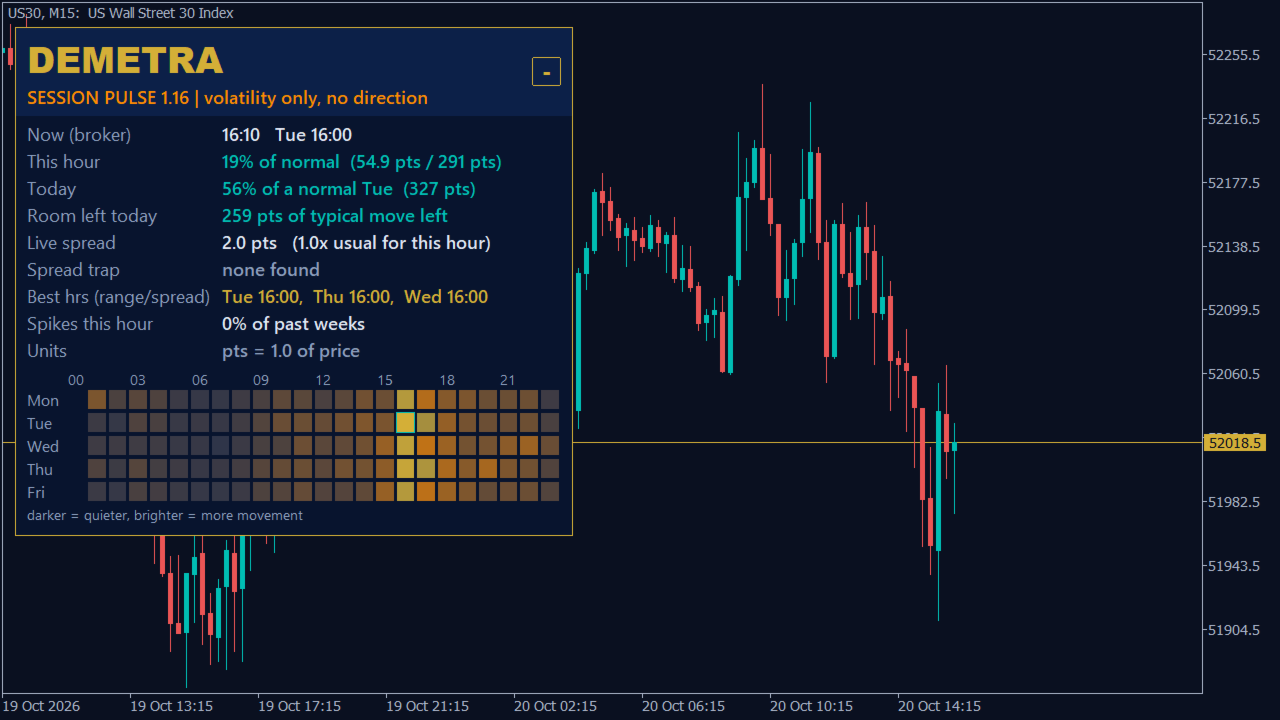
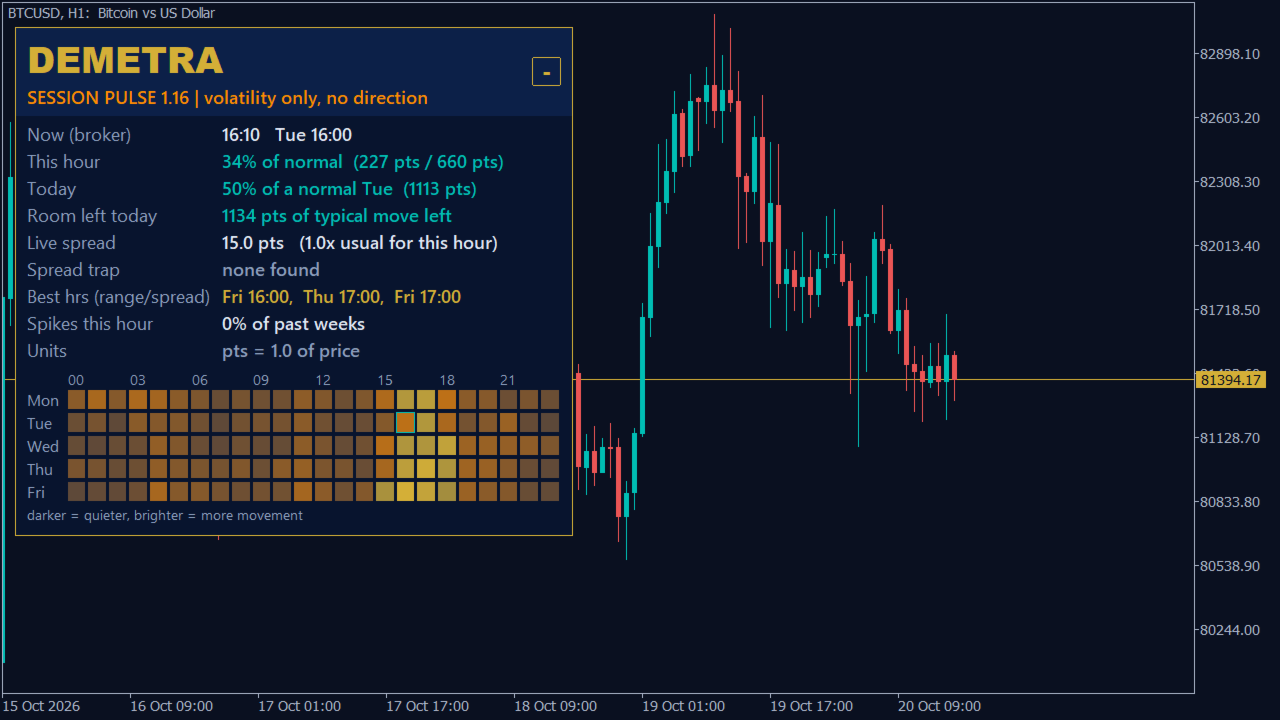
1. Weekday x hour fingerprint. Monday 09:00 and Friday 09:00 are different hours. Session Pulse keeps them apart: 120 cells of range, spread and spike frequency, drawn as one heatmap across the full panel width with a tooltip on every cell (range, usual spread, spike frequency) and a one-line legend: darker = quieter, brighter = more movement.
2. "This hour is X% of its normal" - live. The panel shows the current hour range as a % of the normal range for this weekday-hour, today's range as a % of a normal day for this weekday, and how much of the typical day move is left. Optional alert when the hour or the day goes above your exhaustion level (default 150%). Alerts fire only on a new crossing after the indicator has finished loading - levels that were already above when you attached it do not ring.
3. Spread-trap warning before it happens + data for your EA. Hours whose usual spread is above N x the symbol's normal spread (typical and normal spreads never taken below InpSpreadFloorPts) are marked as traps - on raw-spread majors these are usually the rollover hours; you get a warning InpTrapLead minutes before a trap hour starts (default 15; values above 60 mean the whole hour before it). Three hidden buffers that any EA can read with iCustom/CopyBuffer - hour range % of normal, spread vs the symbol's normal spread, trap flag (0/1).
What the panel shows
- Now (broker time) and the current weekday-hour cell.
- This hour: % of normal, with the range so far and the normal range.
- Today: % of a normal day for this weekday, and room left today. Until today's D1 bar is available it shows "loading..." (never a false 0%) and updates by itself.
- Live spread and how many times the usual spread for this hour it is (capped at 99.9x). The usual spread is the average of all H1 bar spreads of that weekday-hour, zeros included, so raw-spread majors (0-3 points) get a real ratio; the ratio never divides by less than InpSpreadFloorPts (auto: 3 points on 5/3-digit forex, 1 point elsewhere). The row turns red only when the live spread is above InpTrapMult x that typical spread. "usual: n/a" appears only when the hour has no data (fewer than InpMinSamples bars).
- Spread trap: now, next hour with countdown, or the next trap hour of the week.
- Best hours: the 3 hours with the best range-to-spread ratio (trap hours excluded).
- Spikes this hour: % of past weeks in which this hour produced a spike (range above InpSpikeMult x its average).
- Units: the unit used for every distance on the panel (for example "p = pip (0.10)" on gold, "pts = 1.0 of price" on indices).
- Heatmap 5 x 24 over the full panel width, hour labels centred on their column, same left edge on every symbol, current cell outlined, trap cells outlined in red, legend line underneath. On a chart too short for the full panel the heatmap is hidden and the text rows stay. Minimize button keeps only a small DEMETRA tab; the choice is remembered for that chart.
- Panel size is measured from the text, so labels do not overflow or overlap at higher Windows display scaling.
Units on every symbol
- Forex: pips (0.0001; 0.01 on JPY quotes).
- Gold XAU: pip = 0.10. Silver XAG: pip = 0.01.
- Indices, energies, crypto and other CFDs: "pts" = 1.0 of price. Points are never labelled as pips.
The unit in use is printed in the panel ("Units" row).
What it is not
An indicator: it never places, modifies or closes orders. It does not show direction and does not predict prices. No DLL, no web requests, no Telegram, no files. Broker server hours, Monday to Friday only.
Inputs (exact names and ranges from the code)
- InpWeeks (Fingerprint): default 26; allowed 4-104
- InpMinSamples (Fingerprint): default 4; allowed 1-50, and not above InpWeeks
- InpSpikeMult (Fingerprint): default 2.0; allowed 1.2-10
- InpTrapMult (Spread trap): default 2.0; allowed 1.2-20
- InpTrapLead (Spread trap): default 15; allowed 1-120 minutes
- InpSpreadFloorPts (Spread trap): default 0 (auto); allowed 0-10000 points; 0 = 3 points on 5/3-digit forex, 1 point elsewhere
- InpAlertTrap (Alerts): default true; allowed on/off
- InpAlertExhaust (Alerts): default true; allowed on/off
- InpExhaustPct (Alerts): default 150; allowed 100-500 %
- InpPopup / InpSound / InpPush / InpMail (Alerts): default true / false / false / false; allowed on/off
- InpX / InpY (Panel): default 12 / 24; allowed 0-5000 px
- InpDemoMode (Market validator): default true; allowed Strategy Tester only, ignored on live charts
Out-of-range values are refused at start with a clear message (INIT_PARAMETERS_INCORRECT).
For EA developers (buffers)
- Buffer 0: Range of the current hour so far, in % of the normal range of that weekday-hour. Empty value: EMPTY_VALUE.
- Buffer 1: Bar spread / normal spread of the symbol (floored at InpSpreadFloorPts) - the same baseline as the trap flag, so trap bars show a high ratio; latest bar: live spread; max 99.9; empty only when the hour has no data. Empty value: EMPTY_VALUE.
- Buffer 2: Trap flag: 1 inside a trap hour or within InpTrapLead minutes of the next one, else 0. Empty value: EMPTY_VALUE.
Charts up to H1: filled on the last 5000 bars. Above H1: latest bar only. On weekend bars and on hours without enough samples, buffers 0 and 1 stay empty and buffer 2 reads 0 (except within InpTrapLead minutes before a Monday trap hour). Historical buffer values are recalculated with the newest fingerprint every hour, so use the latest bars for decisions. When you pass custom inputs through iCustom/IndicatorCreate, remember that MQL5 counts each "input group" line as a string parameter.
FAQ
- Does it trade? No. Indicator only. It never sends orders.
- Which symbols and timeframes? Any symbol with enough H1 history (at least 120 H1 bars and 10 filled hour cells), any chart timeframe: forex, gold, silver, indices and crypto.
- Does it repaint? The fingerprint uses closed H1 bars only. The live rows change during the hour by design (they are "so far" values).
- Weekends? Monday to Friday only. On Saturday/Sunday the panel says "weekend (Mon-Fri only)", buffers 0 and 1 stay empty and buffer 2 reads 0; crypto weekends are not mapped.
- Raw-spread account (spreads of 0-3 points)? Supported. Every ratio uses a minimum baseline (InpSpreadFloorPts, auto 3 points on 5/3-digit forex), so a near-zero usual spread never gives absurd numbers or a false red row. On majors the trap hours are usually the rollover hours around midnight server time. Some brokers store only the lowest spread of each bar, so historical values of buffer 1 can read 0.0 on majors; the latest bar always uses the live spread.
- Strategy Tester? Yes. The panel builds its fingerprint from tester history and refreshes on every new tick/bar; InpDemoMode keeps it running by itself in the tester.
- Prop firm accounts? It sends no orders, shows no account data on screen and writes no files. The only thing it stores is one terminal global variable (named with symbol, chart and account number) that remembers if you minimized the panel. Check your firm's rules for chart tools.
- Time zone? Broker server time, as on your chart. No conversion needed.
- Push or e-mail alerts do not arrive? If the terminal cannot send them, the Experts log shows one clear warning per channel (push or e-mail) and per chart, telling you which terminal setting to check.
Risk note
Trading involves a high risk of loss. Session Pulse shows statistics from your broker's past and current data; past behaviour of an hour does not guarantee its future behaviour.
What's new
- 1.16: first public release.