Ultimate Range breakout Indicator
- Indicators
- Version: 1.3
- Activations: 10

Gold Range Breakout Indicator
Overview
Gold Range Breakout Indicator shows the Asian session range breakout setup directly on your chart. It marks the range, the breakout levels, the stop loss and take profit, and what happened on every recent day. It also keeps a small equity chart of past signals measured in R.
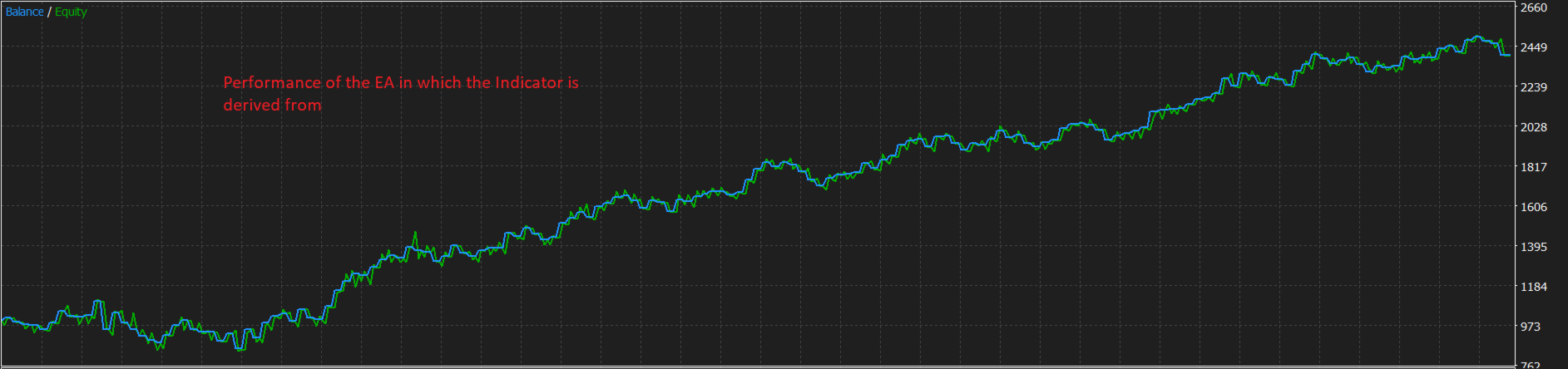
This indicator is derived from the Gold Range breakout EA, which trades the same idea automatically: Gold Range breakout EA, MQL5 Market product 200043 (https://www.mql5.com/en/market/product/200043). You are welcome to look at it as well. The indicator does not open, modify or close any trades. It is a visual and analytical tool for traders who want to follow the setup themselves.
The idea behind the setup
Markets often move quietly through the Asian session and then become more active when volume arrives. This setup measures that quiet period every day and prepares for a break in either direction. If price leaves the range, a signal is marked. If price stays inside, no signal is marked for that day. Each day has at most one signal.
How it works
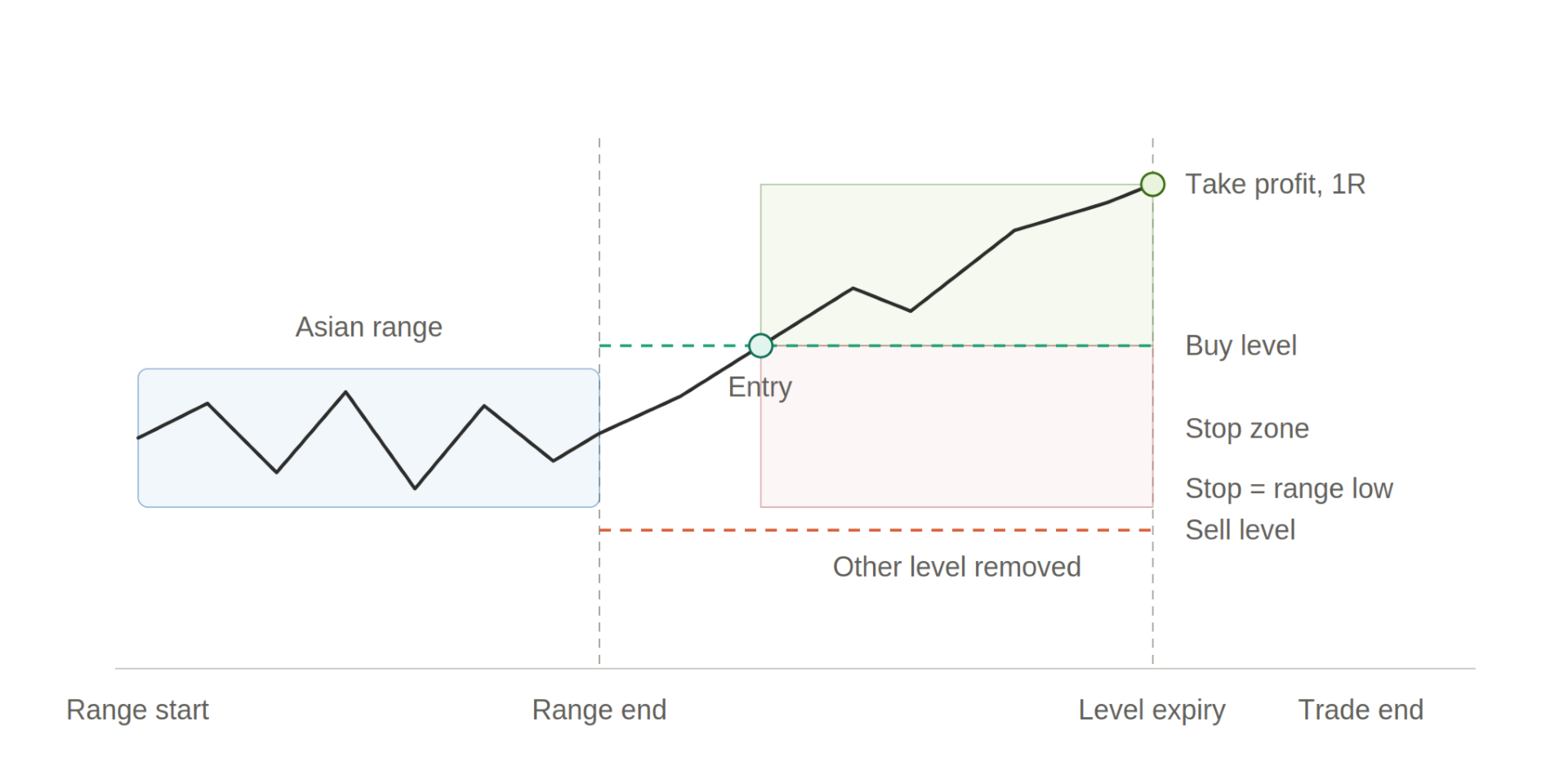
- During the range window, the indicator records the highest high and the lowest low.
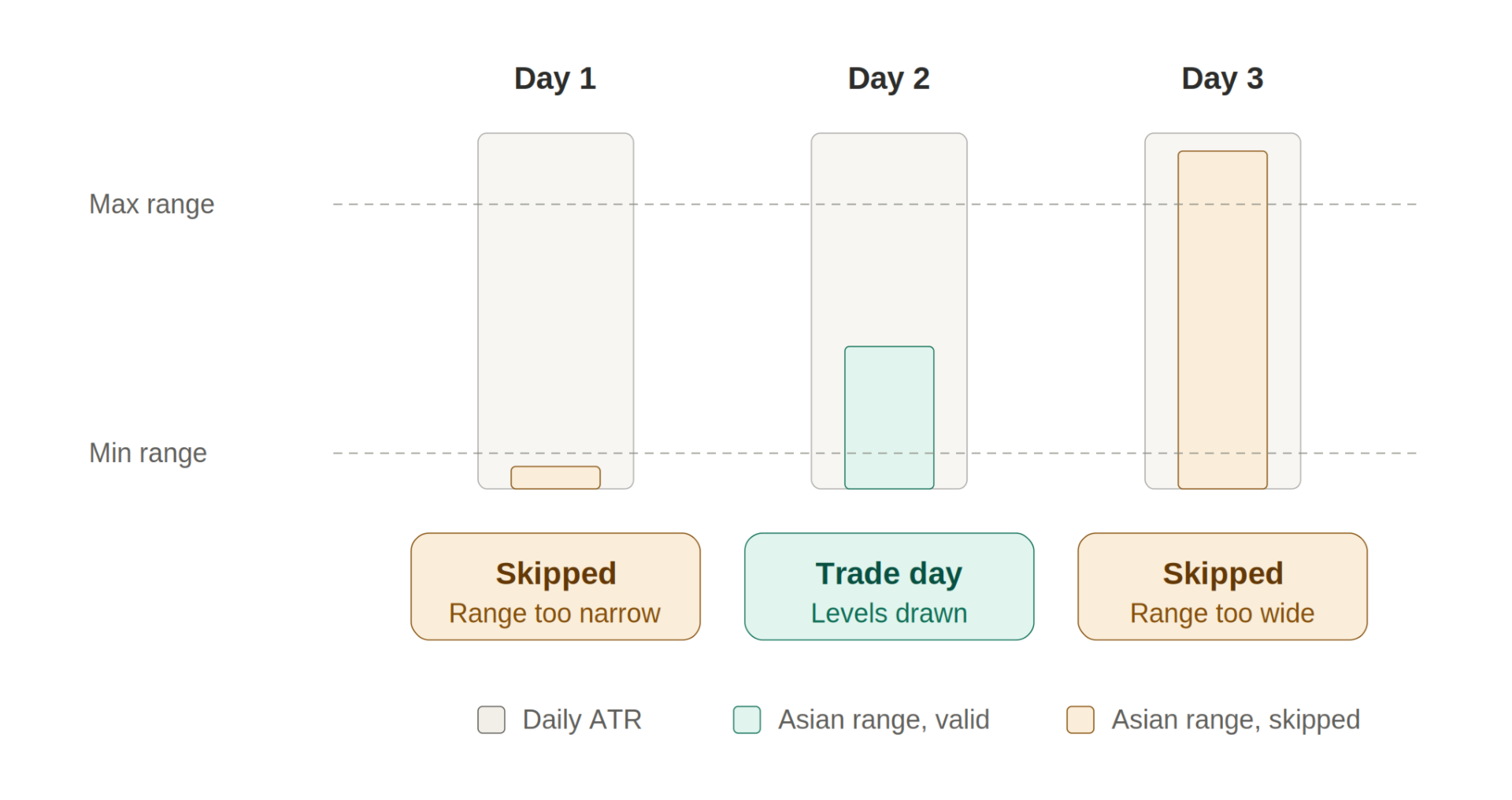
- At the end of the window, it checks the size of the range against the daily ATR. If the range is unusually small or unusually large, the day is skipped and marked on the chart.
- If the day passes the filter, it draws a buy level above the range and a sell level below the range. The distance is a percentage of the range width.
- The stop loss for either side is the opposite end of the range. The take profit is set as a multiple of the stop distance, 1R by default.
- When price touches one level, a signal is marked there and the other level is removed.
- If neither level is touched before the expiry time, the day is marked as no breakout. A signal that is still open at the end time is closed at the market price of that time.
All session times are set in GMT, so you can compare days and brokers on the same basis.
What you see on the chart
For each day in your chosen history, the indicator can draw:
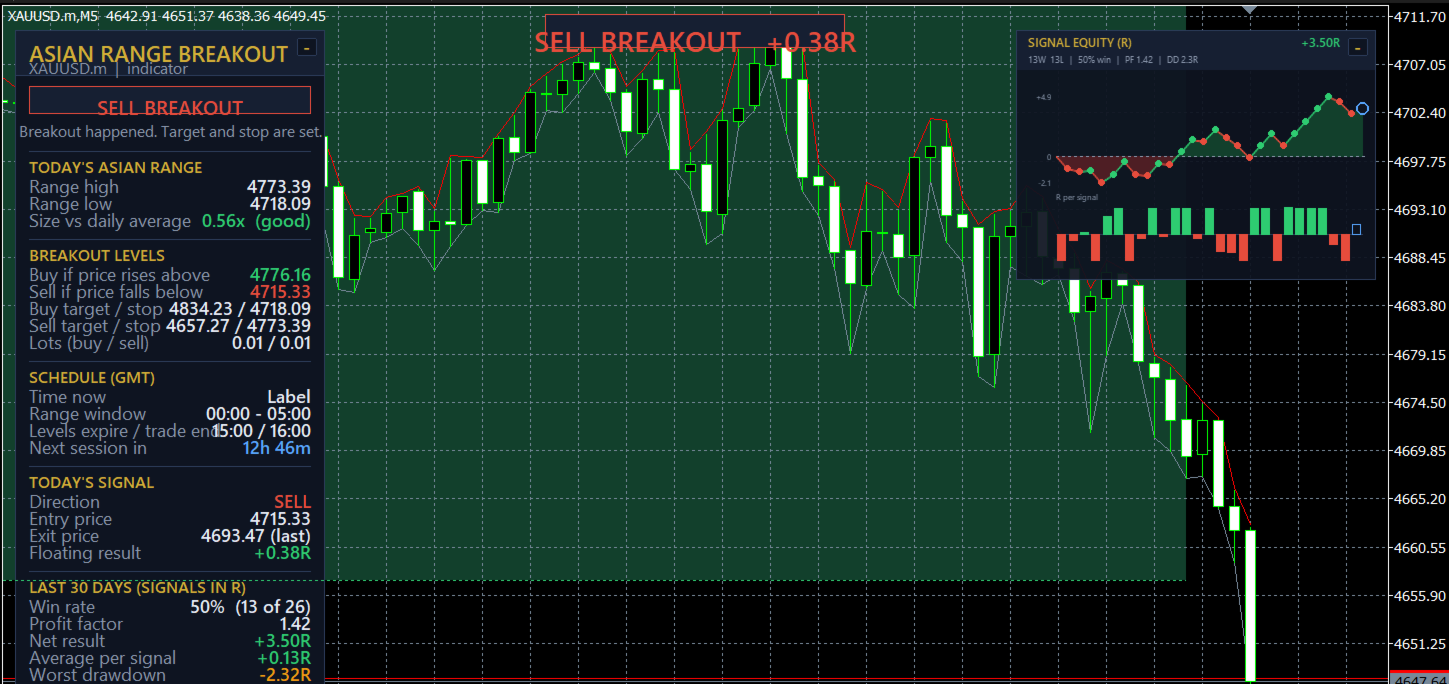
- The Asian range box, with a small label showing the range size compared with the daily ATR.
- The buy and sell levels as dashed lines, ending when a level is touched or when the levels expire.
- The take profit and stop loss zones, with the profit side and the loss side shown in different colours.
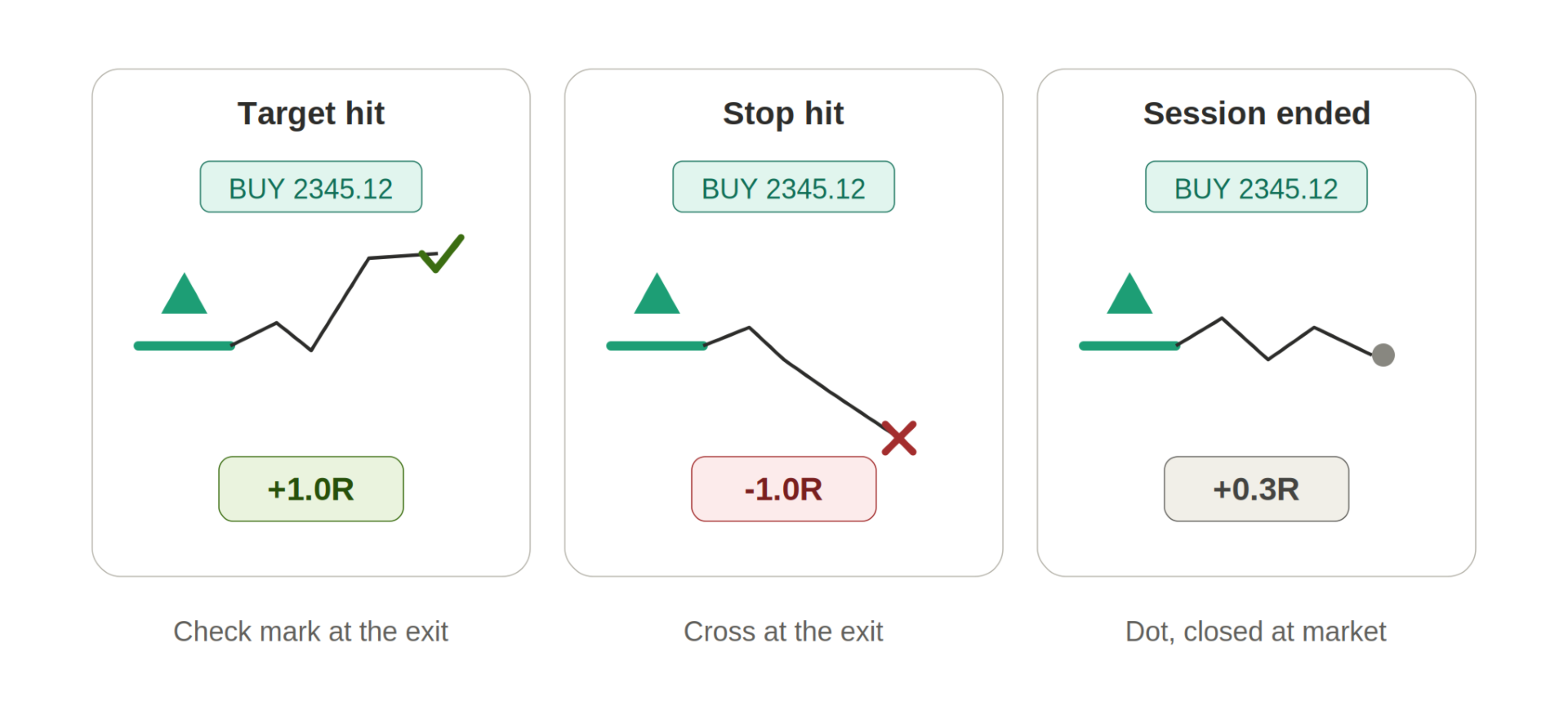
- The exit marker: a check mark for a target, a cross for a stop, and a dot when the session ended.
- The result of each signal in R next to the exit.
- Skipped days, marked in amber with the reason, such as range too narrow or too wide.
Today’s levels are extended into the future so you can see where they are before price reaches them.
Entry marking
Entries are drawn so they are easy to notice:
- A large arrow pointing at the entry price, up for buy and down for sell.
- A thick bar at the exact entry price and a price tag such as “BUY 2345.12”.
- A dotted vertical line at today’s entry bar.
- A marker that blinks for the first 30 minutes after today’s entry, or while the signal is open.
- A banner at the top of the chart while a signal is active, showing the direction and the running result in R. When the signal ends, the banner shows the outcome for 30 minutes.
All of these can be switched off in the inputs if you prefer a cleaner chart.
Signal equity chart
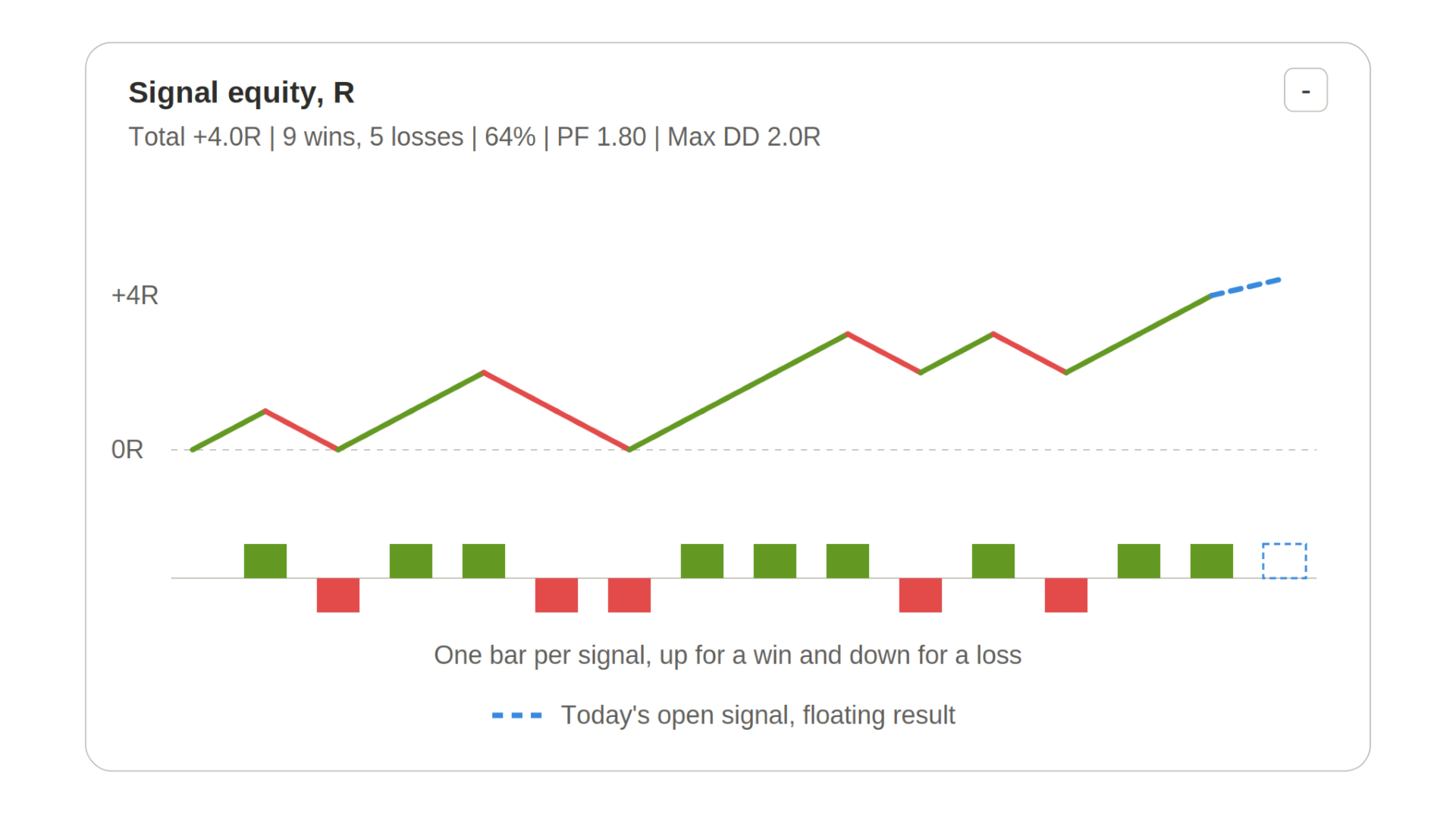
A small chart on the right side of the screen tracks the signals of the chosen history:
- A line of the running total in R. Segments are green after a winning signal and red after a losing one.
- A bar strip below it with one bar per signal, green upward for wins and red downward for losses.
- A dashed blue segment for today’s open signal with its floating result.
- A header with the total result, the number of wins and losses, the share of winning signals, the profit factor and the largest drawdown in R.
The chart can be collapsed with the button in its corner. Its width, height and position can be changed in the inputs.
Important: the equity chart and all statistics are calculated by simulating the rules on past M5 price data. They are not real trading results and are not a prediction of future results. Real trades will differ because of spread, commission, slippage, execution delays and broker price feeds.
Dashboard
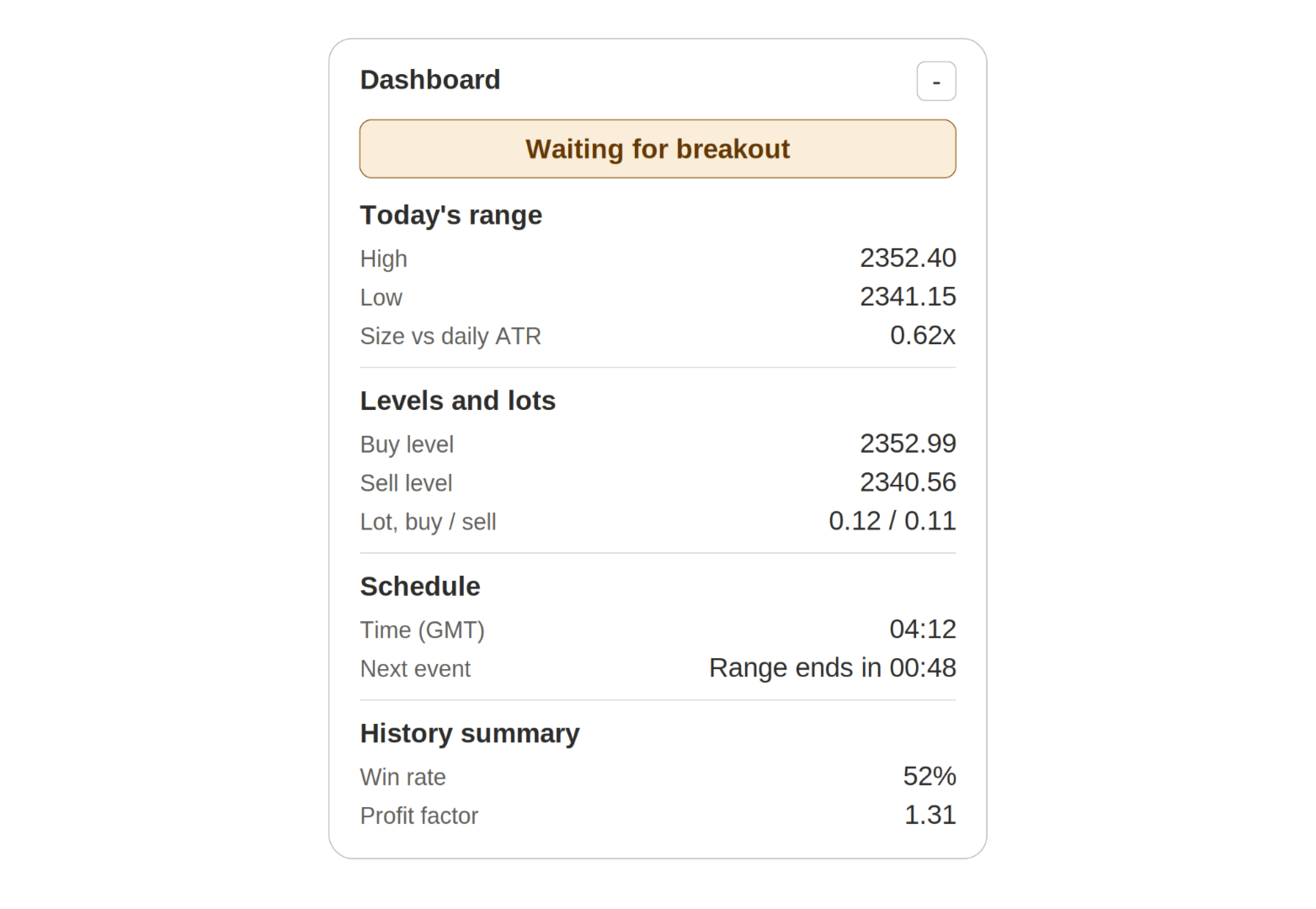
A collapsible dashboard on the left side of the chart gives a status in plain language, for example Building the range, Waiting for breakout, Buy breakout, Target hit or Skipping today. It also shows:
- Today’s range high, low and size compared with the daily ATR.
- The buy and sell levels, with the take profit and stop for each side.
- Suggested lot sizes for a buy and a sell, based on your risk setting.
- The time in GMT, the schedule, and a countdown to the next event.
- Today’s signal: direction, entry, exit and result.
- A summary of the chosen history: win rate, profit factor, net result in R, average per signal, worst drawdown, skipped days and days without a breakout.
Lot size suggestion
The indicator can show a suggested lot size for each side. It uses your account balance, the risk percentage you choose and the distance to the stop loss. You can also enter a fixed lot or a maximum lot. The suggestion is rounded to the symbol’s volume step and kept within the symbol’s limits. It is information only. Check it against your own risk plan before you trade.
Alerts
Optional pop-up and push notifications are available for today only:
- the range is complete and the levels are ready
- a day is skipped
- a breakout happens
- a signal ends at target, stop or session end
Alerts are off by default.
Data buffers
For traders who build their own tools, the indicator provides six buffers that can be read with iCustom():
- Buy entry
- Sell entry
- Buy level
- Sell level
- Range high
- Range low
Inputs
Session times (GMT): range start hour, range end hour, level expiry hour, trade end hour, broker time offset from GMT, and an option to add one hour during US daylight saving.
Entry and exit: the distance of the levels from the range as a percentage of the range width, and the take profit in R.
Range filter: the daily ATR period, the minimum range and the maximum range, both as multiples of the daily ATR.
History: the number of trading days to draw and count, from 1 to 250.
Lot suggestion: risk percentage, fixed lot and maximum lot.
Display: dashboard, range boxes and levels, take profit and stop zones, text labels, skipped days, top banner, blinking marker, colours of the range and levels, and the position of the dashboard.
Equity chart: show or hide, width, height, and distance from the right edge and the top.
Alerts: pop-up alerts and push notifications.
Getting started
- Attach the indicator to a chart of your symbol. It was designed for XAUUSD and can be used on other symbols.
- Set your broker’s time offset from GMT. If your broker follows US daylight saving, switch on the daylight saving option.
- Choose how many days of history you want to see.
- Leave the other inputs at their defaults until you are comfortable with the display.
Notes
- The indicator reads its own M5 and D1 data, so it can be attached to any chart timeframe. Timeframes from M5 to H1 give the clearest view.
- M5 and D1 history must be available in your terminal. If the history is still loading, the indicator retries by itself for a short time.
- When the same M5 bar touches both the stop and the target, the simulation counts the stop first. When one bar touches both levels, the side closer to the bar’s open price is used.
- Use one instance per chart. Removing the indicator removes all its drawings.
- To see how it looks before buying, run it in the Strategy Tester in visual mode.
Risk warning
Trading carries risk. Past results, including simulated results shown by this indicator, do not guarantee future performance. Never risk money you cannot afford to lose.