Northline Prop Challenge Odds
- Utilities
-
Geoffrey Pierre Manuel Gonzalez
 Northline Algo — clean, honest tools for MetaTrader 5.
Northline Algo was founded by a trader with more than 15 years of market experience. We build the tools we want to use ourselves.
We design indicators and Expert Advisors from scratch in MQL5, with three rules: - Version: 1.0
- Activations: 10
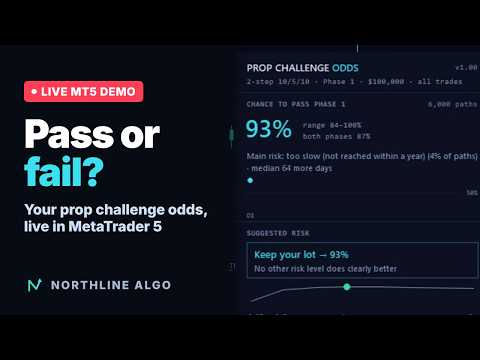
Your real chance to pass this challenge, from where you stand. Prop Challenge Odds runs inside MetaTrader 5 and estimates the probability that the prop challenge you are trading right now ends in a pass. It starts from your account as it is today: balance, today's loss, trailing peak, trading days. It also tells you which risk level gives you the best odds, including "stop for today".
Overview
Online challenge simulators work before the challenge, on a trade list you export. Risk panels in MT5 enforce your limits but never tell you how likely you are to make it. Prop Challenge Odds does both jobs in the terminal, during the challenge. Each time a trade closes, and every minute for the floating P/L, it replays your own past trading days thousands of times against the rules of your challenge, starting from your current state.
The result is an estimate with a range, not a promise. When your history is short, the range is wide, and the panel shows it.
What you get
- Chance to pass the current phase (and both phases on a 2-step), with a P10 to P90 range, the main reason paths fail (daily loss, max drawdown or time) and the median number of days left
- A day-by-day curve of your odds, so you see them move with every session
- Suggested risk: the multiplier of your current lot that maximises your odds (0.25x to 2x), or "Stop for today" when it is the better choice. More risk is never suggested unless your past days show a statistically proven edge
- Room left in trades: how many average losing trades you can still take today and before the drawdown floor
- Expected cost to get funded: the challenge fee times the number of attempts you can expect (this one, then fresh starts if it fails)
- Drift alert: when your challenge trades no longer look like your history, the odds are greyed out and the panel tells you why
- Alerts (pop-up and push) when your odds drop sharply during the day or fall below a level you choose
- An HTML report you can open on a computer or a phone, and a CSV file
Rules it models
- Profit target per phase, one or two phases
- Daily loss limit, measured on intraday equity, from the balance (or from the higher of balance and equity) at the daily reset hour of your firm
- Maximum drawdown: static, trailing at end of day, or trailing on intraday equity, with an optional lock at the initial balance
- Minimum trading days, time limit, consistency rule (best day as a maximum share of total profit)
Two generic presets are included (2-step 10/5/10 and 1-step 10/4/6 trailing) plus a fully custom set. They are examples: always check the rules of your own firm.
Where the statistics come from
- This account: the trading days before the challenge start date, filtered by magic number if you want (one EA or your manual trading).
- A profile exported from another account: a fresh challenge account has no history. Attach the tool to the account where your EA or your strategy already ran (a demo account, for example) in Export mode. It writes a small profile file to the common folder of MetaTrader 5. On the challenge account, load that file, and the odds are available from day one.
Each trading day is rebuilt with its worst and best intraday equity from M1 prices, open positions included. Days are drawn in blocks so that losing streaks stay together, and the whole calculation is repeated on resampled histories to give the range.
How to use it
- On your demo or past account: attach Prop Challenge Odds to any chart with Mode = Export a profile. Note the file name shown on the panel.
- On the challenge account: attach it to any chart with Mode = Track the challenge, choose the rules preset (or Custom), the current phase, the challenge start date, the challenge fee and the profile file.
- Press OK. The odds appear after a few seconds and update by themselves. The tool reads the account only: it never opens, modifies or closes a trade on a live chart.
Parameters
- Challenge: rules preset, current phase, start date, initial balance (0 = detected), fee, daily reset hour
- Custom rules: targets, daily loss, max drawdown and its type, lock, equity-based daily limit, minimum days, time limit in calendar days, consistency
- Trades: mode (track or export), magic number and symbol filter for the profile, profile file, history length
- Simulation: number of paths and of resamples
- Alerts and display: drop alert, level alert, push notifications, panel position
Good to know
- At least 5 traded days are needed for an estimate. With fewer, the panel shows your rules and your room left, and explains how to export a profile.
- Past equity is rebuilt from M1 bars at their worst price, which can be slightly more pessimistic than your firm's own measurement. When a limit appears to have been hit, the panel says so and invites you to check your firm's dashboard.
- Deposits or withdrawals inside the profile period make the daily percentages approximate; the panel tells you when this happens.
- The odds describe what your past trading days imply under these rules. They are a decision aid, not a forecast of the market and not a promise of results.
About the Strategy Tester and the demo
The Strategy Tester has no live challenge to follow, so in the tester (and in the free demo) the tool opens its own small demonstration trades (0.5% risk, fixed stop-loss and take-profit) and tracks a 2-step challenge on them with a built-in demonstration profile. Run it in visual mode to watch the odds change day by day.
Prop Challenge Odds is made by Northline Algo. It works well alongside Northline Prop Shield: Odds tells you how much risk makes sense, Shield enforces your limits.