All In One Trade Management Panel
- Utilities
- Version: 1.10
- Activations: 10

The complete on-chart trade management panel for every trading style — execution, risk, journaling, and market context, all in one.
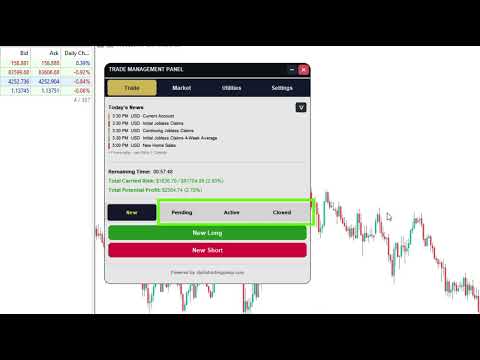
Manual lot-size math under pressure, SL/TP lines dragged by feel, and a chart full of half-remembered setups you can't reconstruct after a restart — that's the reality for most manually-traded accounts, no matter what strategy sits behind the entry. Trade Manager replaces all of it with a single draggable panel: place, size, split, and manage every trade directly on the chart, with your risk calculated for you, your setups saved exactly as you left them, and the market context you rely on — trend, key levels, structure, news, and strength — always visible.
Order Execution & Position Tool
- One-click market and pending orders — place trades straight from the chart, no order-ticket dialog.
- Auto-managed pending orders — limit and stop orders are detected and tracked automatically once placed.
- Draggable, color-coded position tool — drag your entry, stop loss, and take-profit lines directly on the chart with pixel-accurate placement, instead of eyeballing price levels.
- Multiple take-profit levels per trade — split a single trade across several TPs, each with its own lot size, R:R, and live running profit shown right on the chart.
- Plan mode — sketch a setup on the chart and save it without sending an order, then convert it to a live or pending trade whenever price confirms it.
- One-click batch close and a per-group visibility toggle to hide or show a trade's on-chart UI without losing it.
- Trade summary preview before execution, so nothing gets sent blind.
Risk Management
- Risk-based position sizing — size trades by percent of balance or fixed lot, auto-calculated and normalized to your broker's real lot step.
- Live risk and P&L summary displayed on-chart, so your total carried risk is never a guess.
- Candle-close countdown timer for the chart's active timeframe — useful for scalpers and swing traders alike.
- Account-wide risk exposure cap, enforced automatically on every trade you place.
Persistence & Journaling
- Full state persistence — every position tool, pending, active, or closed, including its color, size, and position, survives a chart reload or terminal restart.
- Built-in trade journal with CSV export for your own record-keeping and review.
- Past and closed trade visualization, so historical setups stay reviewable on the chart instead of disappearing the moment a trade closes.
Market Context, For However You Trade
Trade Manager doesn't lock you into one methodology — it puts every layer of market context traders actually use on the same chart as your execution panel, so you can read the ones that fit your own approach and ignore the rest.
- Economic calendar with event detail popups and a live countdown to upcoming high-impact news — essential for news-aware price action and scalping alike.
- Currency strength meter with a fully configurable reference period — pick any MetaTrader timeframe from M1 up to Monthly and set your own lookback count, for gauging relative strength before a pair trade.
- Custom price and event alarms so you don't have to watch the chart to catch your levels.
- Key level and market structure mapping — multi-timeframe trend analysis, swing/structure levels, Fair Value Gaps (FVGs), order blocks, liquidity pools, equal-level clusters, and session ranges, all plotted directly on the chart for traders who want that context. Structure traders can lean on it fully; price action and swing traders can use it as extra confluence; scalpers can turn it off entirely and run the panel lean.
Usability
- Clean, movable, minimizable dashboard panel with dedicated tabs for trade entry, open positions, journal/report, and settings.
- Multi-account support — use the same license across multiple trading accounts.
Who this is for
Trade Manager is built as an execution and risk layer first, so it fits whatever style you already trade — not the other way around:
- Price action traders who want fast, precise entries with visual SL/TP placement and no order-ticket friction.
- Scalpers who need one-click execution, live risk tracking, and a candle-close timer without a cluttered chart.
- Swing traders managing several open positions at once, who want every setup — and its exact chart layout — to persist across sessions.
- Structure and liquidity-focused (ICT/SMC) traders who want key levels, order blocks, FVGs, and liquidity pools mapped automatically alongside their trade management.
- Any discretionary trader who's tired of doing lot-size math by hand and wants a single panel that executes, sizes, journals, and shows relevant context.
Requirements
Runs on MetaTrader 5, any symbol or timeframe, with any broker. A hedging-enabled account is required to use the multi-take-profit feature, since each TP leg is opened as its own position.
Stop reconstructing your setups from memory and stop doing lot-size math mid-trade. Whatever your style — price action, scalping, swing, or structure-based — add Trade Manager to your chart and manage every position from one panel: sizing, risk, journaling, and the market context you actually use.